
Access Points के लिए Power over Ethernet (PoE): एक कार्यान्वयन गाइड
यह गाइड इंफ्रास्ट्रक्चर तकनीशियनों, नेटवर्क आर्किटेक्ट्स और IT निर्णयकर्ताओं को होटल, रिटेल एस्टेट, स्टेडियम और सार्वजनिक-क्षेत्र की सुविधाओं सहित एंटरप्राइज स्थानों पर Power over Ethernet (PoE) access points को तैनात करने के लिए एक निश्चित तकनीकी संदर्भ प्रदान करती है। यह 802.3af से लेकर 802.3bt तक के IEEE मानकों, पावर बजट गणना, केबलिंग आवश्यकताओं, VLAN सेगमेंटेशन और सुरक्षा अनुपालन को कवर करती है, जिसमें ठोस कार्यान्वयन परिदृश्य और मापने योग्य ROI बेंचमार्क शामिल हैं। PoE आर्किटेक्चर को समझना किसी भी [Guest WiFi](/guest-wifi) या [WiFi Analytics](/guest-wifi-marketing-analytics-platform) परिनियोजन के लिए बुनियादी है, क्योंकि फिजिकल लेयर की विश्वसनीयता सीधे डेटा कैप्चर की गुणवत्ता, उपयोगकर्ता अनुभव और परिचालन अपटाइम को निर्धारित करती है।
Video overview
इस गाइड को सुनें
पॉडकास्ट ट्रांसक्रिप्ट देखें
हमारी मुख्य श्रृंखला का हिस्सा: एंटरप्राइज WiFi सुरक्षा गाइड →
PoE power budget and switch capacity calculator
Calculate real-world Power over Ethernet budgets for enterprise WiFi access points. Factor in IEEE classification, cable resistance loss, voltage drop across Ethernet runs, and switch PSU headroom.
1. Access point hardware profile
2. Cabling and switch infrastructure
PoE power budget and switch sizing results
Aggregated electrical draw for 24 APs (WiFi 6E tri-band enterprise AP) over 55m Cat6 UTP (23 AWG) runs.
Planning an enterprise WiFi upgrade or venue deployment?
Eliminate power brownouts, optimise radio cell capacity, and unlock visitor engagement with Purple. Compatible with Cisco Meraki, HPE Aruba, Ruckus, Juniper Mist, and UniFi.

कार्यकारी सारांश (Executive Summary)
Power over Ethernet (PoE) हर एंटरप्राइज़-ग्रेड वायरलेस डिप्लॉयमेंट के पीछे का बुनियादी इंफ्रास्ट्रक्चर लेयर है। जैसे-जैसे WiFi 6, WiFi 6E, और WiFi 7 एक्सेस पॉइंट्स पावर बजट पर अत्यधिक मांग रखते हैं - कुछ मामलों में प्रति डिवाइस 60 वॉट से अधिक - अंडर-स्पेसिफाइड PoE इंफ्रास्ट्रक्चर के परिणाम पहले से कहीं अधिक गंभीर हो गए हैं। डिग्रेड होने वाला एक्सेस पॉइंट प्रदर्शन, Captive Portal आउटेज, टूटे हुए एनालिटिक्स पाइपलाइन और अनियोजित डाउनटाइम सभी खराब PoE योजना के प्रत्यक्ष लक्षण हैं।
यह गाइड आपको सही निर्णय लेने के लिए तकनीकी ढांचा प्रदान करती है: किस IEEE मानक को निर्दिष्ट करना है, स्विच पावर बजट की गणना कैसे करनी है, आपको किस केबलिंग का उपयोग करना चाहिए, और अनुपालन के लिए VLAN सेगमेंटेशन की योजना कैसे बनानी है। यह इन निर्णयों को वास्तविक व्यावसायिक परिणामों से भी जोड़ती है - आतिथ्य (hospitality) वातावरण में मेहमानों की संतुष्टि से लेकर खुदरा (retail) डिप्लॉयमेंट में ड्वेल-टाइम एनालिटिक्स तक। चाहे आप 50-कमरों वाले होटल का नवीनीकरण कर रहे हों या 2,000-सीटों वाले कॉन्फ्रेंस सेंटर का निर्माण, यहाँ दिए गए सिद्धांत पूरी तरह से लागू होते हैं।
तकनीकी गहराई (Technical Deep Dive)
IEEE PoE मानकों का अवलोकन
IEEE 802.3 वर्किंग ग्रुप ने चार प्रगतिशील PoE मानकों को परिभाषित किया है, जिनमें से प्रत्येक मानक ईथरनेट केबलिंग पर दी जाने वाली अधिकतम बिजली को बढ़ाता है। इन अंतरों को समझना केवल एक सैद्धांतिक अभ्यास नहीं है - खरीद के समय गलत मानक निर्दिष्ट करने से आपका इंफ्रास्ट्रक्चर एक ऐसे प्रदर्शन गतिरोध में फंस जाता है जो आपके भविष्य के वायरलेस रोडमैप को सीमित कर देता है।
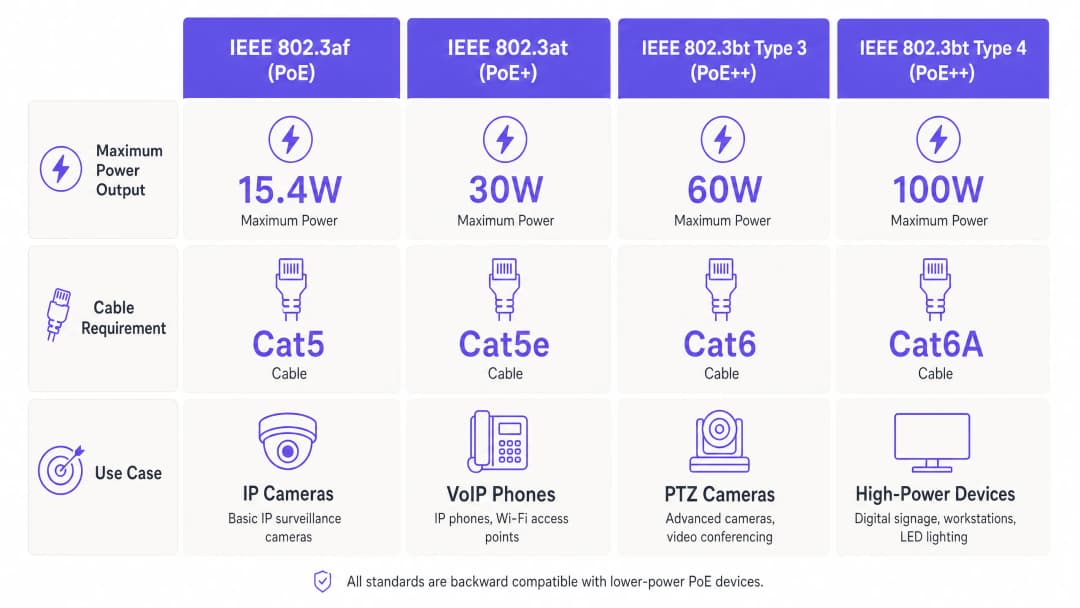
| मानक | सामान्य नाम | अधिकतम PSE आउटपुट | अधिकतम PD प्राप्त | न्यूनतम केबलिंग | उपयोग किए गए जोड़े |
|---|---|---|---|---|---|
| IEEE 802.3af (2003) | PoE | 15.4 W | 12.9 W | Cat 5 | 2 जोड़े |
| IEEE 802.3at (2009) | PoE+ | 30 W | 25.5 W | Cat 5e | 2 जोड़े |
| IEEE 802.3bt Type 3 (2018) | PoE++ | 60 W | 51 W | Cat 6 | 4 जोड़े |
| IEEE 802.3bt Type 4 (2018) | PoE++ | 100 W | 71.3 W | Cat 6A | 4 जोड़े |
PSE (पावर सोर्सिंग इक्विपमेंट - आपका स्विच) आउटपुट और PD (पावर्ड डिवाइस - आपका एक्सेस पॉइंट) के बीच का अंतर महत्वपूर्ण है। केबल का प्रतिरोध रन की लंबाई और कंडक्टर गेज के अनुपात में बिजली की हानि का कारण बनता है। 100-मीटर Cat 5e रन के अंत में 30-वॉट का PoE+ पोर्ट डिवाइस को लगभग 25.5 वॉट प्रदान करेगा। उच्च-घनत्व वाले डिप्लॉयमेंट के लिए जहां एक्सेस पॉइंट्स अपनी बिजली सीमा के करीब काम करते हैं, इस हानि मार्जिन को प्रत्येक प्रति-पोर्ट गणना में शामिल किया जाना चाहिए।
LLDP के माध्यम से पावर नेगोशिएशन
आधुनिक PoE स्विच और एक्सेस पॉइंट गतिशील रूप से बिजली की आवश्यकताओं को तय करने के लिए Link Layer Discovery Protocol (LLDP) - विशेष रूप से LLDP-MED एक्सटेंशन - का उपयोग करते हैं। संचालित डिवाइस अपनी अधिकतम और वर्तमान बिजली खपत को विज्ञापित करता है; स्विच उसी के अनुसार आवंटन करता है। यह स्विच बजट के अत्यधिक आवंटन को रोकता है और डिवाइस को अत्यधिक वोल्टेज से बचाता है। सुनिश्चित करें कि आपका स्विच फ़र्मवेयर LLDP-MED पावर वार्ता का समर्थन करता है, विशेष रूप से मिश्रित-विक्रेता वातावरण में, क्योंकि तीसरे पक्ष के APs Cisco के CDP जैसे मालिकाना प्रोटोकॉल का उपयोग करने में सक्षम नहीं हो सकते हैं।
WiFi 6, 6E और 7 पावर आवश्यकताएँ
प्रत्येक क्रमिक WiFi पीढ़ी के साथ, आधुनिक एंटरप्राइज़-ग्रेड एक्सेस पॉइंट्स की पावर आवश्यकताएं काफी बढ़ गई हैं। एक विशिष्ट WiFi 5 (802.11ac) AP 12 - 18 वॉट की खपत करता है, जो 802.3af सीमा के भीतर आसानी से आता है। 2.5GbE अपलिंक वाला एक ट्राई-बैंड WiFi 6 (802.11ax) AP आमतौर पर 20 - 30 वॉट की खपत करता है, जिसके लिए PoE+ की आवश्यकता होती है। 6 GHz बैंड का समर्थन करने वाले WiFi 6E APs को आम तौर पर 30 - 40 वॉट की आवश्यकता होती है, जो 802.3bt Type 3 क्षेत्र में प्रवेश करती है। और मल्टी-लिंक ऑपरेशन और 320 MHz चैनल सपोर्ट के साथ उभरते हुए WiFi 7 (802.11be) APs को पहले से ही विक्रेता डेटाशीट में 40 - 60 वॉट की आवश्यकता के रूप में सूचीबद्ध किया गया है। आज 802.3bt-सक्षम स्विच निर्दिष्ट करना एक भविष्योन्मुखी निवेश है, न कि कोई विलासिता।
पावर बजट गणना
सबसे आम और सबसे महंगी PoE परिनियोजन त्रुटि वास्तविक डिवाइस खपत के विरुद्ध स्विच के कुल पावर बजट की गणना करने में विफल होना है। एक 48-पोर्ट PoE+ स्विच प्रति पोर्ट 30 वॉट का दावा कर सकता है, लेकिन इसका कुल पावर बजट - कुल वॉट क्षमता जो इसकी आंतरिक बिजली आपूर्ति एक साथ सभी PoE पोर्ट पर दे सकती है - मॉडल के आधार पर आमतौर पर 370 - 740 वॉट होती है। प्रत्येक 25 वॉट की खपत करने वाले 30 APs को तैनात करने के लिए 750 वॉट की आवश्यकता होती है; 740-वॉट बजट वाला स्विच पूर्ण लोड के तहत पोर्ट बंद करना शुरू कर देगा।
सही गणना है:
आवश्यक बजट = (APs की संख्या × प्रति AP अधिकतम बिजली की खपत) × 1.25 ओवरहेड फ़ैक्टर
यह 25% ओवरहेड बिजली आपूर्ति दक्षता नुकसान, ऊंचे परिवेश के तापमान पर थर्मल कमी, और भविष्य के डिवाइस परिवर्धन के लिए जगह प्रदान करता है। हमेशा स्विच विक्रेता के प्रकाशित PoE बजट विनिर्देश के विरुद्ध इस आंकड़े को मान्य करें, न कि प्रति-पोर्ट अधिकतम के विरुद्ध।
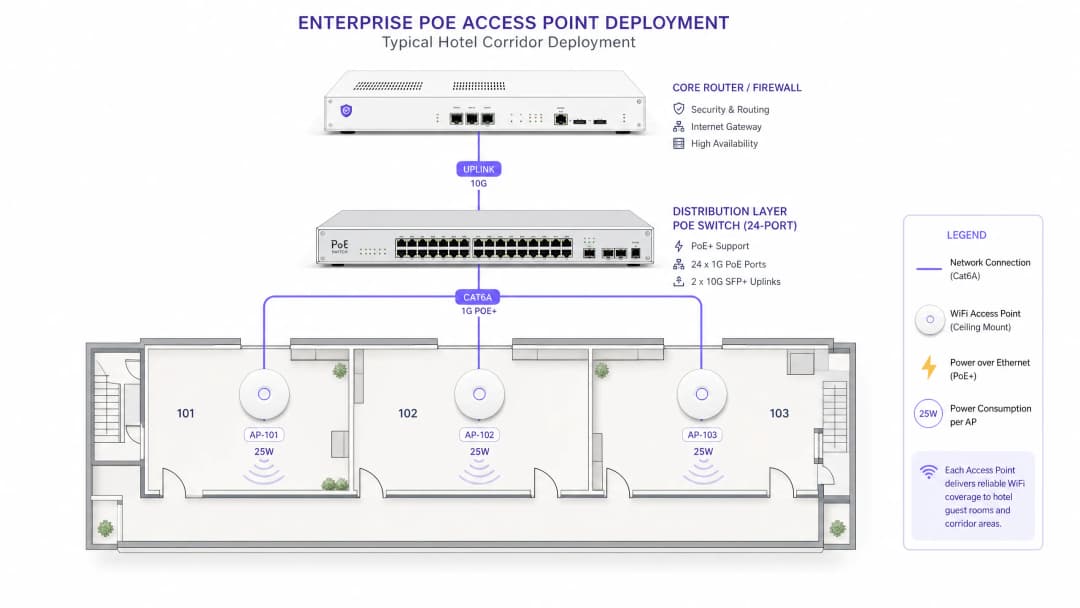
PoE एक्सेस पॉइंट्स के लिए केबलिंग आर्किटेक्चर
केबल का चयन एक थर्मल और इलेक्ट्रिकल इंजीनियरिंग का विषय है, न कि केवल डेटा थ्रूपुट का मामला। IEEE 802.3bt मानक न्यूनतम कंडक्टर विनिर्देशों को अनिवार्य करता है क्योंकि अधिक वॉट क्षमता केबल के भीतर आनुपातिक रूप से अधिक गर्मी उत्पन्न करती है। छत के रिक्त स्थानों या नाली के माध्यम से चलने वाले बंडल केबलों के लिए, संचयी थर्मल लोड परिवेश के तापमान को बढ़ाता है, जिससे बिजली वितरण दक्षता और डेटा अखंडता दोनों प्रभावित होते हैं।PoE मानक के अनुसार अनुशंसित केबलिंग विवरण इस प्रकार हैं। 802.3af परिनियोजन के लिए, Cat 5e न्यूनतम व्यावहारिक विकल्प है, लेकिन भविष्य में अपग्रेड की योजना वाले किसी भी इंस्टॉलेशन के लिए Cat 6 की सिफारिश की जाती है। 802.3at (PoE+) परिनियोजन के लिए, Cat 6 को बेसलाइन माना जाना चाहिए, और जहाँ केबल की लंबाई 60 मीटर से अधिक हो या वे हाई-डेंसिटी ट्रे में रखी हों, वहाँ Cat 6A की पुरजोर सिफारिश की जाती है। 60 वॉट या उससे अधिक वाले 802.3bt परिनियोजन के लिए, Cat 6A अनिवार्य है। ANSI/TIA-568-B2-1 मानक PoE अनुप्रयोगों के लिए न्यूनतम रूप में AWG24 कंडक्टर निर्दिष्ट करता है; Cat 6A में AWG23 कंडक्टर काफी कम प्रतिरोध और बेहतर हीट डिसिपेशन प्रदान करते हैं।
स्टेडियमों और बड़े कॉन्फ्रेंस सेंटरों जैसे स्थानों के लिए - जहाँ IDF कैबिनेट से लेकर सीट के नीचे या सीलिंग-माउंटेड AP तक केबल की लंबाई 100-मीटर की सीमा के करीब पहुँच सकती है - Cat 6A ही एकमात्र व्यावहारिक विकल्प है। केबल को दोबारा खींचने की लेबर लागत की तुलना में प्रति मीटर अतिरिक्त मटीरियल लागत नगण्य है।
VLAN सेगमेंटेशन और नेटवर्क आर्किटेक्चर
प्रत्येक एंटरप्राइज-ग्रेड PoE एक्सेस पॉइंट परिनियोजन में VLAN-आधारित नेटवर्क सेगमेंटेशन लागू किया जाना चाहिए। न्यूनतम व्यावहारिक आर्किटेक्चर तीन ट्रैफ़िक डोमेन को अलग करता है: मैनेजमेंट (स्विच और AP मैनेजमेंट इंटरफेस, जो केवल NOC VLAN से सुलभ हैं), कॉर्पोरेट (प्रमाणित कर्मचारी डिवाइस, जो 802.1X के माध्यम से कॉर्पोरेट डायरेक्टरी से जुड़े हैं), और गेस्ट (अप्रमाणित या Captive Portal-प्रमाणित विज़िटर ट्रैफ़िक, जो सभी आंतरिक संसाधनों से अलग रहता है)।
Purple का Guest WiFi प्लेटफ़ॉर्म मूल रूप से इसी आर्किटेक्चर के भीतर काम करता है। गेस्ट SSID एक समर्पित VLAN पर मैप होता है, Captive Portal प्रमाणीकरण और डेटा कैप्चर के लिए ट्रैफ़िक को Purple के क्लाउड इन्फ्रास्ट्रक्चर पर रूट किया जाता है, और प्लेटफ़ॉर्म का WiFi Analytics इंजन पूरी तरह से गेस्ट ट्रैफ़िक डोमेन के भीतर ड्वेल टाइम, रिपीट विज़िट रेट और जनसांख्यिकीय डेटा को प्रोसेस करता है। यह सेगमेंटेशन वैकल्पिक नहीं है - कार्ड भुगतान प्रोसेस करने वाले किसी भी स्थान के लिए PCI-DSS 4.0 के तहत यह एक आवश्यकता है, और गेस्ट डेटा संग्रह के लिए GDPR अनुपालन प्रदर्शित करने के लिए यह बुनियादी है।
healthcare वातावरण के लिए, सेगमेंटेशन मॉडल और आगे तक विस्तृत होता है: IoT मेडिकल डिवाइस, नर्स कॉल सिस्टम और मरीजों के WiFi प्रत्येक को अलग-अलग VLAN में होना चाहिए और उनके बीच स्पष्ट फ़ायरवॉल नीतियां होनी चाहिए। फिजिकल लेयर पर अनधिकृत डिवाइस कनेक्शन को रोकने के लिए हेल्थकेयर परिनियोजन में PoE स्विच को 802.1X पोर्ट-आधारित प्रमाणीकरण का समर्थन करना चाहिए।
अपने विशिष्ट सेटअप को लेकर कोई सवाल हैं?
हमारी टीम 80,000 से अधिक वेन्यू में वेन्यू ऑपरेटरों, IT मैनेजरों और नेटवर्क इंजीनियरों के साथ काम करती है। 20 मिनट का कॉल बुक करें और हम आपको दिखाएंगे कि आपके जैसे अन्य लोगों ने इसे कैसे हल किया।
कार्यान्वयन गाइड
चरण 1: साइट सर्वे और आवश्यकताओं को एकत्र करना
किसी भी खरीद का निर्णय लेने से पहले, चार आयामों को कवर करने वाला एक व्यवस्थित साइट सर्वेक्षण करें। पहला, प्रत्येक नियोजित AP स्थान को उसके निकटतम IDF या MDF से मैप करें, वास्तविक केबल रूटिंग दूरी की गणना करें - जिसमें नाली और छत के खाली स्थानों के माध्यम से होने वाला मार्ग शामिल है - न कि सीधे-लाइन की दूरी। दूसरा, मौजूदा केबल प्लांट का ऑडिट करें: केबल श्रेणी, स्थापना की तिथि और किसी भी ज्ञात खराबी के इतिहास की पुष्टि करें। तीसरा, मौजूदा स्विच एस्टेट की सूची बनाएं: PoE क्षमताओं, प्रति-पोर्ट वाट क्षमता और कुल पावर बजट को रिकॉर्ड करें। चौथा, मूल्यांकन के अधीन AP मॉडलों का दस्तावेजीकरण करें और विक्रेता डेटाशीट से पूर्ण रेडियो लोड के तहत उनके अधिकतम पावर ड्रा को निकालें, न कि "सामान्य" आंकड़ों को।
transport हब और बड़े सार्वजनिक-क्षेत्र के एस्टेट के लिए, इस सर्वेक्षण चरण में AP घनत्व आवश्यकताओं को निर्धारित करने के लिए एक RF प्रोपेगेशन अध्ययन भी शामिल होना चाहिए, जो सीधे कुल PoE पोर्ट संख्या और स्विच विनिर्देश को संचालित करता है।
चरण 2: स्विच और इन्फ्रास्ट्रक्चर विनिर्देश
सर्वेक्षण डेटा हाथ में होने पर, ऊपर दी गई बजट गणना विधि का उपयोग करके अपने PoE स्विच निर्दिष्ट करें। बहु-मंजिला या बहु-इमारत परिनियोजन के लिए, मानक आर्किटेक्चर प्रत्येक IDF कैबिनेट में एक PoE वितरण स्विच रखता है, जो 10GbE या 25GbE फाइबर अपलिंक के माध्यम से MDF में कोर स्विच से जुड़ा होता है। यह PoE केबल के मार्ग को छोटा रखता है, जिससे बिजली की हानि और थर्मल लोड कम होता है, जबकि कोर पर प्रबंधन को केंद्रीकृत करता है।
अस्पतालों, हवाई अड्डों या बड़े hospitality स्थानों जैसे महत्वपूर्ण वातावरणों में अतिरेक (redundancy) के लिए, दोहरे अनावश्यक बिजली आपूर्ति (dual redundant power supplies) वाले स्विच निर्दिष्ट करें। 48-पोर्ट PoE स्विच पर एक एकल PSU की विफलता एक साथ एक्सेस पॉइंट्स की पूरी मंजिल को बंद कर सकती है।
चरण 3: केबल स्थापना
ANSI/TIA-568-C.2 मानक के अनुसार केबल बिछाएं। प्रमुख आवश्यकताओं में न्यूनतम बेंड रेडियस बनाए रखना (Cat 6A के लिए केबल व्यास का चार गुना), हाई-वोल्टेज विद्युत नाली के आस-पास केबल मार्गों से बचना (कम से कम 300mm का अलगाव बनाए रखें), और पर्याप्त वायु प्रवाह और गर्मी लंपटता की अनुमति देने के लिए ट्रे फिल को 50% क्षमता से नीचे रखना शामिल है। स्विच स्थापित होने से पहले एक केबल प्रमाणन परीक्षक के साथ TIA-568-C.2 चैनल सीमाओं के विरुद्ध प्रत्येक रन का परीक्षण करें - इस चरण में खराबी का पता लगाने में मिनट लगते हैं; APs माउंट होने के बाद इसका पता लगाने में घंटे लग जाते हैं।
चरण 4: स्विच कॉन्फ़िगरेशन
अपने PoE स्विच पर निम्नलिखित बेसलाइन सेटिंग्स कॉन्फ़िगर करें। LLDP को विश्व स्तर पर और सभी एक्सेस पोर्ट पर सक्षम करें। PoE प्राथमिकता स्तर सेट करें: प्राथमिक कवरेज क्षेत्रों की सेवा करने वाले APs को "महत्वपूर्ण" प्राथमिकता दें, माध्यमिक कवरेज APs को "उच्च" और IoT सेंसर जैसे गैर-महत्वपूर्ण उपकरणों को "निम्न" प्राथमिकता दें। प्रत्येक AP के अधिकतम ड्रा और 10% सुरक्षा मार्जिन से मेल खाने के लिए प्रति-पोर्ट बिजली सीमाएं सेट करें - यह एक एकल दोषपूर्ण AP को बजट के अत्यधिक हिस्से का उपभोग करने से रोकता है। PoE पावर थ्रेशोल्ड अलर्ट के लिए SNMP ट्रैप सक्षम करें, और जब कुल स्विच बजट उपयोग 80% तक पहुंच जाए तो अलर्ट करने के लिए अपने NMS को कॉन्फ़िगर करें।
802.1X पोर्ट सुरक्षा के लिए, अप्रमाणित डिवाइसों को पूरी तरह से ब्लॉक करने के बजाय उन्हें एक सीमित VLAN में रखने के लिए स्विच को कॉन्फ़िगर करें - यह सुरक्षा स्थिति बनाए रखते हुए समस्या निवारण को आसान बनाता है।
चरण 5: एक्सेस पॉइंट परिनियोजन और सत्यापन
RF सर्वे योजना के अनुसार APs स्थापित करें। भौतिक स्थापना के बाद, स्विच CLI से PoE डिलीवरी को सत्यापित करें: प्रत्येक पोर्ट के लिए बातचीत की गई पावर क्लास, वास्तविक पावर ड्रॉ और LLDP पावर विज्ञापनों की पुष्टि करें। वास्तविक ड्रॉ की तुलना वेंडर डेटाशीट के अधिकतम से करें - एक महत्वपूर्ण अंतर केबल खराबी, पावर बजट की कमी, या फर्मवेयर समस्या का संकेत दे सकता है जिसके कारण AP कम पावर मोड में काम कर रहा है।
Purple के Guest WiFi जैसे प्लेटफ़ॉर्म के लिए, एक गेस्ट डिवाइस से अंतिम-से-अंतिम तक Captive Portal यात्रा को सत्यापित करें: इंस्टॉलेशन को अंतिम रूप देने से पहले SSID दृश्यता, पोर्टल रीडायरेक्ट, प्रमाणीकरण और डेटा कैप्चर की पुष्टि करें। एक PoE से संबंधित पावर डाउनग्रेड जो 5GHz रेडियो को अक्षम करता है, वह स्विच CLI पर तुरंत दिखाई नहीं देगा, लेकिन यह Purple के एनालिटिक्स में उस AP पर कनेक्टेड डिवाइसों की संख्या में भारी गिरावट के रूप में दिखाई देगा।
सर्वोत्तम प्रथाएं
निम्नलिखित वेंडर-अज्ञेयवादी सर्वोत्तम प्रथाएं IEEE मानकों, ANSI/TIA केबलिंग विशिष्टताओं और एंटरप्राइज़ परिनियोजन के व्यावहारिक अनुभव से ली गई हैं।
नए इंस्टॉलेशन के लिए हमेशा Cat 6A निर्दिष्ट करें। भले ही आपके वर्तमान AP मॉडलों को केवल PoE+ की आवश्यकता हो, Cat 6 की तुलना में Cat 6A की प्रति मीटर अतिरिक्त लागत आमतौर पर केवल 15-20% होती है। भविष्य के WiFi 7 APs का समर्थन करने के लिए केबल को फिर से खींचने की लागत बहुत अधिक है। पांच वर्ष या उससे अधिक समय तक सेवा देने वाले किसी भी इंस्टॉलेशन के लिए, Cat 6A ही सही विशिष्टता है।
कभी भी केवल प्रति-पोर्ट वाटेज आंकड़ों पर भरोसा न करें। हमेशा स्विच के कुल PoE पावर बजट को सत्यापित करें और कुल ड्रॉ की गणना करें। एंटरप्राइज़ परिनियोजन में इंस्टॉलेशन के बाद PoE विफलताओं का यह सबसे आम कारण है।
PoE पावर मॉनिटरिंग को मानक संचालन प्रक्रिया के रूप में लागू करें। प्रति-पोर्ट और कुल PoE उपयोग की SNMP-आधारित मॉनिटरिंग आपके मानक NMS कॉन्फ़िगरेशन का हिस्सा होनी चाहिए। समय के साथ इस डेटा के ट्रेंड को देखना धीरे-धीरे खराब होने वाले पावर सप्लाई को उनके बंद होने से पहले ही पकड़ लेता है।
20-30% पावर बजट हेडरूम बनाए रखें। यह बेकार का अतिरिक्त प्रावधान नहीं है - यह PSU दक्षता हानि, थर्मल रेटिंग में कमी और भविष्य के डिवाइस जुड़ाव को ध्यान में रखता है। अपने PoE बजट के 95% पर चलने वाला स्विच एक ऐसी समस्या है जो कभी भी आ सकती है।
अपनी VLAN और QoS रणनीति में महत्वपूर्णता के आधार पर PoE-संचालित डिवाइसों में अंतर करें। प्राथमिक गेस्ट WiFi की सेवा करने वाले एक्सेस पॉइंट को IoT सेंसर या डिजिटल साइनेज की तुलना में अधिक PoE प्राथमिकता मिलनी चाहिए। जब स्विच को लोड कम करना हो, तो आप चाहेंगे कि वह स्वचालित रूप से सही निर्णय ले।यह जानने के लिए कि वायरलेस आर्किटेक्चर के विकल्प वेन्यू के स्केल के साथ कैसे इंटरैक्ट करते हैं, हमारी गाइड Mesh Networks vs Access Points: Which Is Better for Large Venues? देखें, जो PoE-wired AP डिप्लॉयमेंट और मेश टोपोलॉजी के बीच के अंतर को विस्तार से बताती है।
-
ट्रबलशूटिंग और जोखिम न्यूनीकरण
एक्सेस पॉइंट का डिग्रैडेड मोड में काम करना
लक्षण: AP ऑनलाइन है, लेकिन विशिष्ट सुविधाएं - जैसे USB पोर्ट, सेकेंडरी रेडियो, या मल्टी-गीगाबिट अपलिंक - अनुपलब्ध हैं। मूल कारण: अपर्याप्त PoE पावर। AP को उसकी न्यूनतम परिचालन आवश्यकता से कम वॉट मिल रहे हैं और उसने ऑनलाइन रहने के लिए गैर-आवश्यक सुविधाओं को अक्षम कर दिया है। निदान: नेगोशिएटेड पावर क्लास और वास्तविक पावर ड्रा की पुष्टि करने के लिए स्विच CLI की जांच करें; वेंडर डेटाशीट से तुलना करें। रन लेंथ की जांच करें और टेस्टर से केबल को प्रमाणित करें। समाधान: स्विच के शेष पावर बजट को सत्यापित करें, यदि आवश्यक हो तो केबलिंग को अपग्रेड करें, या AP को उच्च PoE मानक का समर्थन करने वाले स्विच पोर्ट पर स्थानांतरित करें।
लोड के तहत स्विच पोर्ट्स का बंद होना
लक्षण: AP पोर्ट्स की बिजली रुक-रुक कर चली जाती है, विशेष रूप से पीक उपयोग के दौरान जब सभी रेडियो पूर्ण लोड के तहत होते हैं। मूल कारण: स्विच का कुल PoE पावर बजट समाप्त हो गया है। निदान: SNMP या CLI के माध्यम से स्विच पर कुल PoE उपयोग की जांच करें; स्विच के रेटेड पावर बजट से तुलना करें। समाधान: APs को कई स्विचों में पुनर्वितरित करें, दूसरा स्विच जोड़ें, या उच्च-बजट वाले स्विच मॉडल से बदलें। इस बीच, कम प्राथमिकता वाले डिवाइसों पर प्रति-पोर्ट पावर लिमिट को कम करें।
लंबी दूरी पर रुक-रुक कर कनेक्टिविटी होना
लक्षण: 90-100 मीटर के करीब की केबल रन वाले APs पर रुक-रुक कर कनेक्टिविटी या कम थ्रूपुट दिखाई देता है। मूल कारण: लंबी दूरी पर वोल्टेज में गिरावट और गर्मी के कारण प्रतिरोध में वृद्धि। सीलिंग के खाली स्थानों में बढ़ा हुआ परिवेशी तापमान समस्या को और बढ़ा देता है। निदान: प्रभावित रन पर केबल सर्टिफिकेशन टेस्ट चलाएं; केबल ट्रे पर परिवेशी तापमान की जांच करें। समाधान: रन को विभाजित करने के लिए PoE एक्सटेंडर या इंटरमीडिएट स्विच स्थापित करें, या दूरी कम करने के लिए केबल को फिर से रूट करें।
LLDP पावर नेगोशिएशन विफलता
लक्षण: AP चालू होता है लेकिन नेगोशिएटेड पावर के बजाय अधिकतम क्लास पावर लेता है, जिससे पावर बजट आवश्यकता से अधिक आवंटित हो जाता है। मूल कारण: LLDP-MED स्विच पोर्ट पर सक्षम नहीं है, या AP फर्मवेयर LLDP-MED पावर TLV का समर्थन नहीं करता है। समाधान: स्विच पर वैश्विक रूप से और व्यक्तिगत पोर्ट पर LLDP सक्षम करें; AP फर्मवेयर को अपडेट करें; सत्यापित करें कि मैनेजमेंट VLAN पर पैकेट कैप्चर के माध्यम से LLDP फ्रेम का आदान-प्रदान किया जा रहा है।
सुरक्षा जोखिम: अनधिकृत डिवाइस कनेक्शन
जोखिम: कोई अनधिकृत डिवाइस सार्वजनिक क्षेत्र में PoE स्विच पोर्ट से जुड़ जाता है और नेटवर्क एक्सेस प्राप्त कर लेता है। शमन: सभी एक्सेस-लेयर स्विच पोर्ट पर 802.1X पोर्ट ऑथेंटिकेशन सक्षम करें। ऐसे डिवाइस जो 802.1X सप्लीकेंट का समर्थन नहीं करते हैं, उनके लिए फ़ॉलबैक के रूप में MAC Authentication Bypass (MAB) कॉन्फ़िगर करें और उन्हें एक प्रतिबंधित VLAN में रखें। Purple Guest WiFi चलाने वाले वेन्यू के लिए, Captive Portal लेयर नेटवर्क लेयर के ऊपर एक अतिरिक्त ऑथेंटिकेशन चेकपॉइंट प्रदान करती है, जिससे यह सुनिश्चित होता है कि IP एड्रेस प्राप्त करने वाला डिवाइस भी तब तक इंटरनेट का उपयोग नहीं कर सकता जब तक वह पोर्टल यात्रा पूरी नहीं कर लेता।
ROI और व्यावसायिक प्रभाव
अंडर-स्पेसिफिकेशन की लागत का आकलन करना
सही PoE स्पेसिफिकेशन का व्यावसायिक मामला तब स्पष्ट हो जाता है जब आप विफलता की पूरी लागत को शामिल करते हैं। अपर्याप्त पावर के कारण डीग्रेड मोड में काम करने वाला एक एक्सेस पॉइंट अपने 5GHz रेडियो को अक्षम कर सकता है, जिससे प्रभावी थ्रूपुट आधा हो जाता है और क्लाइंट्स को भीड़भाड़ वाले 2.4GHz बैंड पर जाने के लिए मजबूर होना पड़ता है। एक होटल के माहौल में, यह सीधे तौर पर अतिथि संतुष्टि स्कोर से संबंधित है - अतिथि समीक्षाओं में WiFi गुणवत्ता लगातार शीर्ष तीन कारकों में बनी रहती है। hospitality डिप्लॉयमेंट से प्राप्त Purple का डेटा दर्शाता है कि स्थिर, उच्च-प्रदर्शन वाले WiFi वाले वेन्यू मापने योग्य उच्च नेट प्रमोटर स्कोर (NPS) और रिपीट बुकिंग दरें प्राप्त करते हैं। WiFi गुणवत्ता और अतिथि अनुभव के बीच संबंध के बारे में अधिक जानकारी के लिए, How to Improve Guest Satisfaction: The Ultimate Guide देखें।
इन्फ्रास्ट्रक्चर स्थिरता पर एनालिटिक्स राजस्व की निर्भरता
Purple का WiFi Analytics प्लेटफ़ॉर्म प्रत्येक अतिथि WiFi सत्र से फर्स्ट-पार्टी डेटा कैप्चर करता है: ड्वेल टाइम, विज़िट फ्रीक्वेंसी, पोर्टल रजिस्ट्रेशन से डेमोग्राफिक डेटा और पूरे वेन्यू में मूवमेंट पैटर्न। इस डेटा का सीधा व्यावसायिक मूल्य है - यह मार्केटिंग सेगमेंटेशन, स्टाफिंग निर्णयों और रिटेल फ्लोर प्लानिंग को सूचित करता है। PoE विफलता के कारण ऑफ़लाइन होने वाला प्रत्येक AP उस डेटा श्रृंखला में एक अंतर का प्रतिनिधित्व करता है। 200-साइट के रिटेल एस्टेट में, AP अपटाइम में केवल 2% की गिरावट भी पूरे एनालिटिक्स पाइपलाइन में मापने योग्य डेटा हानि उत्पन्न करती है।
इन्फ्रास्ट्रक्चर निवेश बनाम परिचालन लागत का संतुलन
खरीद के समय, 802.3at स्विच की तुलना में 802.3bt-सक्षम स्विच निर्दिष्ट करने की वृद्धिशील लागत आमतौर पर 15-25% होती है। दो साल बाद 100-AP डिप्लॉयमेंट में उच्च-क्षमता वाले स्विच को रेट्रोफ़िट करने की लागत - जिसमें श्रम, डाउनटाइम और पुनर्रचना शामिल है - नियमित रूप से मूल स्विच की लागत से अधिक हो जाती है। एक CTO के लिए, सही दृष्टिकोण यह नहीं है कि "क्या हमें आज इस क्षमता की आवश्यकता है?" बल्कि "क्या हमें इस इन्फ्रास्ट्रक्चर के परिचालन जीवनकाल के भीतर इस क्षमता की आवश्यकता होगी?"। WiFi 6E या WiFi 7 AP का समर्थन करने वाले किसी भी डिप्लॉयमेंट के लिए, इसका उत्तर स्पष्ट रूप से हाँ है।
सार्वजनिक क्षेत्र और स्मार्ट सिटी संदर्भ
स्मार्ट सिटी या डिजिटल समावेशन कार्यक्रमों के हिस्से के रूप में आउटडोर या सेमी-आउटडोर PoE एक्सेस पॉइंट्स को तैनात करने वाले सार्वजनिक-क्षेत्र के संगठनों के लिए, पर्यावरणीय कारक - अत्यधिक तापमान, नमी का प्रवेश, और आस-पास के बिजली के बुनियादी ढांचे की अनुपस्थिति - पावर बजट और केबल बिछाने के विचारों को बढ़ा देते हैं। इनके लिए विस्तृत तापमान रेटिंग और IP-रेटेड बाड़ों (enclosures) वाले औद्योगिक-ग्रेड PoE स्विच की आवश्यकता होती है। सार्वजनिक-क्षेत्र में Purple का बढ़ता अभ्यास - जो सार्वजनिक क्षेत्र के विकास के VP के रूप में Iain Fox की नियुक्ति में परिलक्षित होता है - स्थानीय परिषद, परिवहन और शिक्षा सेटिंग्स में इन तैनाती चुनौतियों के साथ सीधे तौर पर लगा हुआ है।
बड़े पैमाने पर पासवर्डलेस और निर्बाध प्रमाणीकरण
जैसे-जैसे स्थान पासवर्डलेस गेस्ट एक्सेस की ओर बढ़ रहे हैं - Passpoint और OpenRoaming जैसी तकनीकों का लाभ उठाते हुए - एक्सेस पॉइंट बुनियादी ढांचे को संबंधित प्रमाणीकरण ओवरहेड का समर्थन करना चाहिए। WPA3 और 802.1X-आधारित प्रमाणीकरण APs पर अतिरिक्त प्रोसेसिंग मांग रखते हैं, जिससे बदले में बिजली की खपत बढ़ जाती है। यह सुनिश्चित करना कि आपके PoE बुनियादी ढांचे में इन प्रमाणीकरण प्रोटोकॉल का समर्थन करने के लिए पर्याप्त हेडरूम है, आपकी तैनाती को भविष्य के लिए सुरक्षित बनाने का हिस्सा है। व्यावहारिक रूप से यह प्रमाणीकरण मॉडल कैसे काम करता है, इस पर अधिक जानकारी के लिए, How WiFi Assistants Enable Passwordless Access in 2026 देखें।
मुख्य परिभाषाएं
PSE (Power Sourcing Equipment)
वह उपकरण जो ईथरनेट केबल पर पावर की आपूर्ति करता है - एंटरप्राइज़ परिनियोजन में, यह PoE स्विच या PoE इंजेक्टर होता है। PSE पावर देने से पहले यह पता लगाता है कि कनेक्टेड डिवाइस PoE-सक्षम है या नहीं, जिससे नॉन-PoE उपकरणों को होने वाले नुकसान से बचाया जा सके।
IT टीमों को इस शब्द का सामना स्विच डेटाशीट और पावर बजट विशिष्टताओं की समीक्षा करते समय होता है। केबल के नुकसान के कारण PSE आउटपुट वाटेज हमेशा PD रिसीव वाटेज से अधिक होता है - यह अंतर सटीक पावर बजट गणना के लिए महत्वपूर्ण है।
PD (Powered Device)
वह उपकरण जो ईथरनेट केबल पर पावर प्राप्त करता है - वायरलेस परिनियोजन में, यह एक्सेस पॉइंट होता है। PD, LLDP के माध्यम से PSE को अपनी पावर क्लास और करंट ड्रॉ की जानकारी देता है, जिससे डायनेमिक पावर आवंटन सक्षम होता है।
AP वेंडर डेटाशीट पढ़ते समय प्रासंगिक। AP डेटाशीट में 'आवश्यक पावर' का आंकड़ा PD रिसीव आंकड़ा होता है, न कि PSE आउटपुट आंकड़ा। हमेशा सत्यापित करें कि वेंडर किस आंकड़े को उद्धृत कर रहा है।
PoE Power Budget
कुल संचयी वाटेज जो एक PoE स्विच अपने सभी PoE पोर्ट्स पर एक साथ प्रदान कर सकता है। यह स्विच की आंतरिक पावर सप्लाई क्षमता द्वारा निर्धारित एक कठिन सीमा है और प्रति-पोर्ट अधिकतम वाटेज से भिन्न है।
PoE स्विच की खरीद में सबसे अधिक गलत समझा जाने वाला विनिर्देश। 30W प्रति-पोर्ट अधिकतम वाले 48-पोर्ट PoE+ स्विच का कुल बजट केवल 370W हो सकता है - जो पूर्ण लोड पर लगभग 12 AP के लिए पर्याप्त है, न कि 48 के लिए।
LLDP-MED (Link Layer Discovery Protocol - Media Endpoint Discovery)
IEEE 802.1AB LLDP मानक का एक विस्तार जो PoE-सक्षम उपकरणों को PSE के समक्ष अपनी बिजली आवश्यकताओं और क्षमताओं का विज्ञापन करने में सक्षम बनाता है। यह स्थिर वर्ग-आधारित आवंटन के बजाय गतिशील बिजली बातचीत (dynamic power negotiation) की अनुमति देता है।
स्विच कॉन्फ़िगरेशन और AP कमीशनिंग के दौरान प्रासंगिक। यदि स्विच पोर्ट पर LLDP-MED सक्षम नहीं है, तो स्विच बातचीत की गई मात्रा के बजाय अधिकतम क्लास पावर आवंटित करेगा, जिससे आवश्यकता से अधिक पावर बजट की खपत होगी।
4PPoE (4-Pair Power over Ethernet)
IEEE 802.3bt में पेश की गई बिजली वितरण विधि जो बिजली ले जाने के लिए ईथरनेट केबल में कंडक्टरों के सभी चारों जोड़ों का उपयोग करती है, जिससे PoE++ (60W और 100W) के उच्च वाट क्षमता स्तर सक्षम होते हैं। इससे पहले के मानकों में केवल दो जोड़ों का उपयोग किया जाता था।
IEEE 802.3bt परिनियोजन के लिए केबलिंग निर्दिष्ट करते समय महत्वपूर्ण है। 4PPoE के लिए आवश्यक है कि केबल में सभी चारों जोड़े सुरक्षित और सही ढंग से समाप्त हों - एक भी ख़राब जोड़ा डिवाइस को पूरी बिजली प्राप्त करने से रोक देगा। केबल प्रमाणन को सभी चारों जोड़ों को सत्यापित करना होगा।
IDF (Intermediate Distribution Frame)
एक सहायक वायरिंग कोठरी या रैक जो किसी मंजिल या क्षेत्र से नेटवर्क कनेक्शन को एकत्रित करता है और उन्हें अपलिंक के माध्यम से मुख्य वितरण फ्रेम (MDF) से जोड़ता है। PoE परिनियोजन में, IDF वह जगह है जहाँ वितरण-परत के PoE स्विच स्थित होते हैं।
PoE परिनियोजन में IDF प्लेसमेंट एक महत्वपूर्ण डिज़ाइन निर्णय है। IDF और AP के बीच केबल चलाने का प्रत्येक मीटर बिजली की हानि और थर्मल लोड का प्रतिनिधित्व करता है। खराब स्थान पर स्थित IDF लंबी केबल चलाने पर मजबूर करते हैं जो PoE बिजली वितरण की सीमाओं को आगे बढ़ाते हैं।
PoE Priority Class
एक स्विच कॉन्फ़िगरेशन पैरामीटर जो यह निर्धारित करता है कि जब स्विच अपने कुल पावर बजट सीमा के करीब पहुँचता है तो किन पोर्ट को पहले बिजली मिलती है। आमतौर पर तीन स्तर होते हैं: महत्वपूर्ण (critical), उच्च (high), और निम्न (low)। बजट समाप्त होने पर कम प्राथमिकता वाले पोर्ट सबसे पहले बंद कर दिए जाते हैं।
स्विच सेटअप के दौरान कॉन्फ़िगर किया जाना चाहिए। प्राथमिक कवरेज क्षेत्रों की सेवा करने वाले एक्सेस पॉइंट्स को 'महत्वपूर्ण' (critical) प्राथमिकता दी जानी चाहिए। प्राथमिकता को कॉन्फ़िगर करने में विफल रहने का मतलब है कि स्विच पावर बजट की समाप्ति के दौरान मनमाने निर्णय लेता है, जिससे संभावित रूप से मिशन-महत्वपूर्ण APs बंद हो सकते हैं।
802.1X Port Authentication
पोर्ट-आधारित नेटवर्क एक्सेस नियंत्रण के लिए एक IEEE मानक जिसके लिए उपकरणों को नेटवर्क एक्सेस दिए जाने से पहले प्रमाणित होना आवश्यक है। PoE स्विच परिनियोजन में, 802.1X अनधिकृत उपकरणों को एक्सेस-लेयर स्विच पोर्ट से कनेक्ट होने और नेटवर्क एक्सेस प्राप्त करने से रोकता है।
किसी भी ऐसे परिनियोजन में प्रासंगिक है जहाँ PoE स्विच पोर्ट गैर-IT कर्मियों के लिए भौतिक रूप से सुलभ हैं - खुदरा दुकान के फर्श, होटल के गलियारे, सम्मेलन कक्ष। 802.1X के बिना, स्विच पोर्ट में प्लग किए गए किसी भी डिवाइस को नेटवर्क एक्सेस मिल जाता है। यह एक PCI DSS और सामान्य सुरक्षा आवश्यकता है।
Thermal Derating
ऊंचे परिवेशी तापमान पर PoE स्विच की अधिकतम बिजली आउटपुट क्षमता में कमी। अधिकांश उद्यम स्विचों को 25°C पर पूर्ण PoE आउटपुट के लिए रेट किया गया है; इस सीमा से ऊपर, बिजली आपूर्ति ओवरहीटिंग को रोकने के लिए आउटपुट को कम कर देती है।
उन परिनियोजनों में प्रासंगिक है जहाँ स्विच कम हवादार स्थानों में स्थित होते हैं - जैसे छत के खाली स्थान, कॉम्पैक्ट वॉल-माउंट बाड़े, या बाहरी कैबिनेट। 25°C पर 740W रेटिंग वाला स्विच 40°C पर केवल 600W प्रदान कर सकता है। किसी भी बिना वातानुकूलित वातावरण के लिए बिजली बजट की गणना में Thermal Derating को शामिल करें।
हल किए गए उदाहरण
एक 200 कमरों वाला होटल विरासत WiFi 4 से WiFi 6 में अपग्रेड कर रहा है। मौजूदा केबलिंग प्लांट Cat 5e है, जो लगभग 12 साल पहले स्थापित किया गया था। IT मैनेजर को 180 access points तैनात करने की आवश्यकता है - प्रति कमरा एक, साथ ही कॉरिडोर और सार्वजनिक क्षेत्र - और वह तीन वर्षों के भीतर WiFi 6E के लिए भविष्य की तैयारी करना चाहता है। बजट सीमित है, और चरण 1 में पूर्ण केबलिंग प्रतिस्थापन व्यवहार्य नहीं है। PoE इंफ्रास्ट्रक्चर को कैसे निर्दिष्ट किया जाना चाहिए?
समाधान के लिए एक चरणबद्ध दृष्टिकोण की आवश्यकता है जो विश्वसनीय अपग्रेड पथ का निर्माण करते हुए वर्तमान केबलिंग बाधा का सम्मान करे। चरण 1 में, 25 वॉट या उससे कम की अधिकतम खपत वाले WiFi 6 APs निर्दिष्ट करें - यह परिनियोजन को 802.3at (PoE+) सीमाओं के भीतर और मौजूदा Cat 5e केबलिंग के थर्मल लिफाफे के भीतर रखता है। उन APs का चयन करें जो PSE पोर्ट पर 30W की आवश्यकता के बजाय स्पष्ट रूप से 25.5W (802.3at के लिए अधिकतम PD रिसीव) पर संचालन का समर्थन करते हैं। स्विच लेयर के लिए, 802.3bt-सक्षम स्विच निर्दिष्ट करें भले ही चरण 1 APs को केवल PoE+ की आवश्यकता हो। वृद्धिशील लागत मामूली है, और इससे चरण 2 में स्विच रिप्लेसमेंट से बचा जा सकता है। प्रत्येक IDF स्विच को 24-पोर्ट स्विच के लिए न्यूनतम 740W कुल PoE बजट पर आकार दें, जो 24% ओवरहेड मार्जिन के साथ 25W पर 24 APs तक का समर्थन करता है। IDF कोठरी में प्रति मंजिल एक स्विच तैनात करें, जो कोर से 10GbE SFP+ फाइबर अपलिंक के माध्यम से जुड़ा हो। चरण 2 (12-24 महीने) में, उन वर्गों में Cat 5e को Cat 6A से बदलें जहाँ WiFi 6E APs को पहले तैनात किया जाएगा - आमतौर पर उच्च-घनत्व वाले सार्वजनिक क्षेत्र: लॉबी, रेस्तरां, सम्मेलन कक्ष। 802.3bt स्विच पहले से ही मौजूद हैं; बस APs को स्वैप करें और इंफ्रास्ट्रक्चर तैयार है। पहले दिन से VLAN कॉन्फ़िगर करें: प्रबंधन के लिए VLAN 10, कॉर्पोरेट कर्मचारियों के लिए VLAN 20, गेस्ट WiFi के लिए VLAN 30। Purple के Captive Portal को एक समर्पित DHCP स्कोप और Purple के क्लाउड पर अपस्ट्रीम रूटिंग के साथ VLAN 30 पर मैप करें।
85 स्टोरों वाली एक क्षेत्रीय रिटेल श्रृंखला अपने पूरे एस्टेट में Purple के Guest WiFi और WiFi Analytics प्लेटफ़ॉर्म को तैनात कर रही है। फ्लोर एरिया के आधार पर प्रत्येक स्टोर में 3 से 8 access points हैं। एस्टेट मैनेजर एक मानकीकृत PoE स्विच विनिर्देश चाहता है जो सभी स्टोर आकारों में काम करे, SKU संख्या को कम करे, और एनालिटिक्स प्लेटफ़ॉर्म का मज़बूती से समर्थन करे। वर्तमान केबलिंग Cat 5e और Cat 6 का मिश्रण है, जो पिछले दशक में विभिन्न समयों पर स्थापित की गई है। PoE इंफ्रास्ट्रक्चर को कैसे मानकीकृत किया जाना चाहिए?
इस पैमाने के रिटेल एस्टेट के लिए, एकल स्विच SKU पर मानकीकरण करना परिचालन रूप से सही है - यह स्पेयर पार्ट्स प्रबंधन, फर्मवेयर मानकीकरण और NOC सहायता को सरल बनाता है। अनुशंसित दृष्टिकोण मानक स्टोर यूनिट के रूप में एकल 8-पोर्ट या 16-पोर्ट प्रबंधित PoE+ स्विच (802.3at, न्यूनतम 120W कुल बजट) निर्दिष्ट करना है, जिसमें 6 AP से अधिक वाले बड़े स्टोर्स के लिए 24-पोर्ट वेरिएंट हो। 120W पर 8-पोर्ट यूनिट 20% ओवरहेड मार्जिन के साथ 25W पर 4 AP तक का समर्थन करती है; 240W पर 16-पोर्ट यूनिट 8 AP तक का समर्थन करती है। दोनों इकाइयों को कम से कम 2 पोर्ट्स पर 802.3bt का समर्थन करना चाहिए ताकि पूर्ण स्विच प्रतिस्थापन के बिना भविष्य के AP अपग्रेड को समायोजित किया जा सके। केबल बिछाने के लिए, प्रारंभिक परिनियोजन विजिट के दौरान प्रत्येक स्टोर का ऑडिट करें। जहाँ Cat 5e मौजूद है और रन की लंबाई 60 मीटर से कम है, वहाँ यह वर्तमान PoE+ AP के लिए स्वीकार्य है। 60 मीटर से अधिक के Cat 5e रन वाले या ज्ञात केबल दोषों वाले स्टोर्स को केबल प्रतिस्थापन के लिए चिह्नित करें, और स्टोर राजस्व के आधार पर इन्हें प्राथमिकता दें। सभी स्विचेस को एक मानकीकृत VLAN टेम्पलेट के साथ कॉन्फ़िगर करें: VLAN 10 प्रबंधन, VLAN 20 गेस्ट WiFi (जो Purple के प्लेटफ़ॉर्म से मैप किया गया हो), VLAN 30 POS सिस्टम (PCI DSS आवश्यकताओं के अनुसार गेस्ट ट्रैफ़िक से अलग)। एक ज़ीरो-टच प्रोविज़निंग कॉन्फ़िगरेशन परिनियोजित करें ताकि प्रतिस्थापन स्विचेस को स्टोर्स पर भेजा जा सके और वे पहली बार बूट होने पर खुद को कॉन्फ़िगर कर सकें - यह 85-स्टोर एस्टेट के लिए महत्वपूर्ण है जहाँ ऑन-साइट IT सहायता सीमित है।
अभ्यास प्रश्न
Q1. आप एक नए 350 सीटों वाले सम्मेलन केंद्र के लिए नेटवर्क बुनियादी ढांचे को निर्दिष्ट कर रहे हैं। यह स्थल छोटी बोर्डरूम बैठकों से लेकर लाइव स्ट्रीमिंग के साथ पूर्ण क्षमता वाले सम्मेलनों तक के कार्यक्रमों की मेजबानी करेगा। IT टीम ने 45 WiFi 6E एक्सेस पॉइंट्स निर्दिष्ट किए हैं, जिनमें से प्रत्येक की अधिकतम खपत 35 वॉट है। इस स्थल पर कोई मौजूदा केबलिंग नहीं है। आपसे PoE स्विच बुनियादी ढांचे को निर्दिष्ट करने के लिए कहा गया है। सभी स्विचों में आवश्यक न्यूनतम कुल PoE बजट क्या है, और कौन सी केबल श्रेणी निर्दिष्ट की जानी चाहिए?
संकेत: याद रखें कि अपने परिकलित लोड पर 25% ओवरहेड कारक लागू करें, और विचार करें कि प्रति AP 35W की खपत 802.3at की अधिकतम PD प्राप्त करने वाले आंकड़े 25.5W से अधिक है।
मॉडल उत्तर देखें
न्यूनतम आवश्यक PoE बजट गणना इस प्रकार है: 45 APs × 35W = 1,575W बेस लोड। 25% ओवरहेड फैक्टर लागू करने पर: 1,575W × 1.25 = 1,969W न्यूनतम कुल स्विच PoE बजट पूरे डिप्लॉयमेंट में। चूंकि प्रति AP 35W की आवश्यकता 802.3at PD की अधिकतम प्राप्ति सीमा 25.5W से अधिक है, इसलिए स्विच को IEEE 802.3bt Type 3 (60W प्रति पोर्ट) का समर्थन करना चाहिए। केबल बिछाने के लिए, 802.3bt डिप्लॉयमेंट के लिए Cat 6A अनिवार्य है और वैसे भी एक नए इंस्टॉलेशन के लिए यह सही स्पेसिफिकेशन है। एक सामान्य आर्किटेक्चर इसे 3 - 4 IDF स्थानों पर वितरित करेगा, जिसमें 24-पोर्ट 802.3bt स्विच (प्रत्येक न्यूनतम 740W बजट के साथ) होंगे, जो 10GbE फाइबर अपलिंक के माध्यम से एक कोर स्विच से जुड़े होंगे। तीन 740W स्विच 2,220W का बजट प्रदान करते हैं, जो पर्याप्त हेडरूम के साथ 1,969W की आवश्यकता को पूरा करते हैं।
Q2. 60-AP वाले एक रिटेल डिप्लॉयमेंट के पोस्ट-इंस्टॉलेशन ऑडिट के दौरान, आपको पता चलता है कि तीसरी मंजिल पर 12 एक्सेस पॉइंट अपने 5GHz रेडियो को अक्षम करके काम कर रहे हैं। स्विच सभी पोर्ट को बिना किसी त्रुटि के 'PoE active' के रूप में दिखाता है। तीसरी मंजिल पर केबल रन की औसत लंबाई 85 मीटर है। इसका सबसे संभावित मूल कारण क्या है, और इसके समाधान का तरीका क्या है?
संकेत: केबल रन की लंबाई, बिजली की हानि, और अपर्याप्त बिजली मिलने पर AP के व्यवहार के बीच संबंध पर विचार करें। स्विच द्वारा 'PoE active' दिखाने का मतलब यह नहीं है कि AP को पूरी रेटेड बिजली मिल रही है।
मॉडल उत्तर देखें
सबसे संभावित मूल कारण 85-मीटर Cat 5e या Cat 6 केबल रन पर वोल्टेज में गिरावट और बिजली की हानि है, जिसके परिणामस्वरूप APs को उनकी पूर्ण-सुविधा संचालन के लिए आवश्यक न्यूनतम वाटेज से कम बिजली मिल रही है। स्विच का 'PoE active' दिखाना यह पुष्टि करता है कि बिजली भेजी जा रही है लेकिन यह डिवाइस पर प्राप्त वाटेज की पुष्टि नहीं करता है। 85 मीटर पर, Cat 5e पर रेजिस्टेंस लॉस के कारण प्राप्त बिजली में 30-मीटर रन की तुलना में 15 - 20% की कमी आ सकती है। यदि APs को पूर्ण संचालन (5GHz रेडियो सहित) के लिए 25W की आवश्यकता है, तो उन्हें केवल 20 - 21W मिल रहा होगा, जिससे बिजली बचाने के उपाय के रूप में रेडियो अक्षम हो जाता है। समाधान: पहला, प्रति-पोर्ट वास्तविक बिजली खपत के लिए स्विच CLI की जांच करें और AP की रेटेड अधिकतम सीमा से तुलना करें। दूसरा, केबल रन को प्रमाणित करें - TIA-568-C.2 सीमाओं से अधिक रेजिस्टेंस मानों की जांच करें। तीसरा, या तो केबल रन को Cat 6A (कम रेजिस्टेंस प्रति मीटर) से बदलें या रन की लंबाई को कम करने के लिए बीच में PoE एक्सटेंडर स्विच इंस्टॉल करें। चौथा, सत्यापित करें कि LLDP-MED सक्षम है ताकि स्विच सही पावर क्लास आवंटित करे।
Q3. एक होटल समूह 150 कमरों की संपत्ति में Purple का गेस्ट WiFi प्लेटफॉर्म डिप्लॉय करने की योजना बना रहा है। नेटवर्क आर्किटेक्ट ने कॉन्फ़िगरेशन को आसान बनाने के लिए एक ही VLAN पर सभी डिवाइसों - गेस्ट WiFi, POS टर्मिनलों, IP कैमरों और स्टाफ डिवाइसों के साथ एक फ्लैट नेटवर्क डिज़ाइन का प्रस्ताव दिया है। होटल फ्रंट डेस्क और रेस्तरां में कार्ड पेमेंट प्रोसेस करता है। इस डिज़ाइन में अनुपालन और सुरक्षा जोखिमों की पहचान करें और एक संशोधित आर्किटेक्चर का प्रस्ताव दें।
संकेत: कार्डधारक डेटा परिवेशों के लिए PCI-DSS आवश्यकताओं, गेस्ट डेटा के लिए GDPR दायित्वों, और POS टर्मिनलों के साथ ब्रॉडकास्ट डोमेन साझा करने वाले गेस्ट डिवाइसों के सुरक्षा प्रभावों पर विचार करें।
मॉडल उत्तर देखें
फ्लैट नेटवर्क डिज़ाइन कई महत्वपूर्ण अनुपालन और सुरक्षा विफलताओं को दर्शाता है। PCI DSS 4.0 के तहत, कार्डधारक डेटा ले जाने वाले किसी भी नेटवर्क को अन्य सभी नेटवर्क ट्रैफ़िक से अलग (segmented) किया जाना चाहिए। एक फ्लैट नेटवर्क जहां अतिथि WiFi डिवाइस POS टर्मिनलों के साथ एक VLAN साझा करते हैं, इसका मतलब है कि कार्डधारक डेटा वातावरण (CDE) अलग नहीं है - यह एक प्रत्यक्ष PCI DSS उल्लंघन है जिसके परिणामस्वरूप QSA मूल्यांकन विफल हो जाएगा और संभावित रूप से कार्ड प्रोसेसिंग क्षमता का नुकसान हो सकता है। GDPR के तहत, Purple कैप्टिव पोर्टल (captive portal) के माध्यम से एकत्र किए गए अतिथि डेटा को एक नियंत्रित वातावरण में प्रबंधित किया जाना चाहिए; एक फ्लैट नेटवर्क डेटा लीक होने के जोखिम को बढ़ाता है। सुधारे गए आर्किटेक्चर के लिए न्यूनतम चार VLAN की आवश्यकता होती है: नेटवर्क प्रबंधन (स्विच, AP, कैमरे - केवल NOC से सुलभ) के लिए VLAN 10; POS और भुगतान प्रणालियों (CDE, सख्त फ़ायरवॉल नियमों के साथ जो केवल भुगतान प्रोसेसर ट्रैफ़िक की अनुमति देते हैं) के लिए VLAN 20; अतिथि WiFi (Purple के प्लेटफ़ॉर्म पर रूट किया गया, आंतरिक संसाधनों तक कोई पहुँच नहीं) के लिए VLAN 30; और कर्मचारियों के कॉर्पोरेट उपकरणों (802.1X के माध्यम से प्रमाणित, आंतरिक प्रणालियों तक पहुँच) के लिए VLAN 40। प्रत्येक VLAN के बीच स्पष्ट फ़ायरवॉल नीति की आवश्यकता होती है, जिसमें CDE VLAN के नियम सबसे अधिक प्रतिबंधात्मक होते हैं। यह आर्किटेक्चर PCI DSS नेटवर्क सेगमेंटेशन आवश्यकताओं को पूरा करता है और एक सुरक्षित GDPR डेटा प्रबंधन स्थिति प्रदान करता है।
अक्सर पूछे जाने वाले प्रश्न
What PoE standard is required for WiFi 6, WiFi 6E, and WiFi 7 access points?
Enterprise dual-band WiFi 6 (802.11ax) access points typically require IEEE 802.3at (PoE+, supplying up to 30W PSE / 25.5W PD). Tri-band WiFi 6E and tri/quad-band WiFi 7 (802.11be) APs with 6 GHz radios, multi-gigabit uplinks, and 4x4 or 8x8 MU-MIMO arrays require IEEE 802.3bt Type 3 (PoE++, up to 60W) or Type 4 (up to 90W). When connected to lower-tier 802.3at or 802.3af switches, these APs negotiate reduced power profiles that shut down the 6 GHz radio or throttle MIMO chains.
What happens when an access point receives insufficient PoE power from a switch?
When an access point detects insufficient wattage during LLDP or CDP negotiation, it enters a hardware fallback mode. Typical fallback symptoms include disabling the 6 GHz radio, reducing 5 GHz and 2.4 GHz transmit power, stepping down 4x4 MIMO to 2x2 MIMO, shutting down secondary mGig Ethernet or USB IoT expansion ports, and triggering spontaneous reboots under peak client association surges.
What is the maximum cable distance for PoE powering wireless access points?
Under IEEE 802.3 and ANSI/TIA-568 standards, the maximum channel length for twisted-pair Ethernet (Cat5e, Cat6, Cat6A) is 100 metres (328 feet), consisting of up to 90 metres of solid horizontal cabling and 10 metres of total patch cord. Exceeding 100 metres increases DC loop resistance, leading to excessive voltage drop below the AP operating threshold and severe radio power starvation.
How do you calculate switch PoE power budget headroom for enterprise WiFi deployments?
Calculate the total raw wattage of all connected access points at maximum draw, add estimated cable resistance dissipation (typically 2W to 4W per 100m run on 2-pair PoE), and incorporate an engineering buffer of 20% for power supply thermal efficiency and inrush currents. For example, 24 WiFi 6E APs drawing 25.5W each require 612W base load plus 122W headroom, demanding a switch power budget of at least 734W.
How do LLDP and CDP power negotiations prevent switch PoE overload?
Hardware classification reserves power in fixed chunks based on IEEE classes (such as reserving a full 30W for Class 4). Link Layer Discovery Protocol (LLDP-MED) and Cisco Discovery Protocol (CDP) allow the AP to dynamically communicate its actual runtime wattage (e.g. 21.4W) to the switch over Layer 2. The switch then adjusts its allocated power pool down to the exact requirement, freeing up unallocated watts for additional access points.
इस श्रृंखला में आगे पढ़ें
Cisco Meraki में VLAN स्टीयरिंग के लिए NAC पॉलिसी कैसे कॉन्फ़िगर करें
यह आधिकारिक गाइड IT लीडर्स, नेटवर्क आर्किटेक्ट्स और वेन्यू ऑपरेशंस डायरेक्टर्स को Cisco Meraki वातावरण में NAC पॉलिसी और VLAN स्टीयरिंग को कॉन्फ़िगर करने के लिए एक व्यावहारिक, चरण-दर-चरण ढांचा प्रदान करती है। यह हॉस्पिटैलिटी, रिटेल और सार्वजनिक-क्षेत्र के डिप्लॉयमेंट में सुरक्षित, कंप्लायंट और उच्च-प्रदर्शन नेटवर्क सेगमेंटेशन सुनिश्चित करने के लिए 802.1X इम्प्लीमेंटेशन, MAC ऑथेंटिकेशन बायपास के माध्यम से IoT डिवाइस आइसोलेशन, और Purple के गेस्ट WiFi एनालिटिक्स प्लेटफ़ॉर्म के साथ सहज इंटीग्रेशन को कवर करती है।
Enterprise Access Points का चयन: Cisco, Aruba, Ruckus, UniFi की तुलना
Cisco Meraki, Aruba, Ruckus, और UniFi enterprise access points की तुलना करें। WiFi 6E/7, TCO लाइसेंसिंग, RF प्रदर्शन और कंट्रोलर आर्किटेक्चर का मूल्यांकन करें।
अपग्रेड के बाद Windows 11 इंटरनेट कनेक्टिविटी और नेटवर्क एडॉप्टर की समस्याओं को ठीक करें
अपग्रेड के बाद Windows 11 WiFi और इंटरनेट कनेक्टिविटी की समस्याओं का समाधान करें। दूषित TCP/IP स्टैक, DNS टाइमआउट और ड्राइवर त्रुटियों के लिए चरण-दर-चरण तकनीकी समाधान।
अपने विशिष्ट सेटअप को लेकर कोई सवाल हैं?
हमारी टीम 80,000 से अधिक वेन्यू में वेन्यू ऑपरेटरों, IT मैनेजरों और नेटवर्क इंजीनियरों के साथ काम करती है। 20 मिनट का कॉल बुक करें और हम आपको दिखाएंगे कि आपके जैसे अन्य लोगों ने इसे कैसे हल किया।