
Alcatel-Lucent Enterprise (ALE) OmniAccess Integration with Purple WiFi
Questa guida descrive in dettaglio l'integrazione tecnica tra gli access point Alcatel-Lucent Enterprise (ALE) OmniAccess Stellar e Purple WiFi. Copre il reindirizzamento del Captive Portal, l'autenticazione RADIUS, la configurazione del Walled Garden, la sicurezza della Staff WiFi 802.1X e la segmentazione Multi-Tenant WiFi tramite Private Pre-Shared Keys (PPSK) con instradamento VLAN dinamico, offrendo ai responsabili IT e agli architetti di rete un riferimento completo e pratico per l'implementazione di reti basate sull'identità (Identity-Based Networks) su hardware ALE.
Ascolta questa guida
Visualizza trascrizione del podcast
Sintesi esecutiva
Gli access point Alcatel-Lucent Enterprise (ALE) OmniAccess Stellar si integrano con Purple utilizzando protocolli RADIUS standard e il reindirizzamento esterno del Captive Portal. Non è richiesto alcun middleware proprietario. Purple opera come un overlay cloud, posizionandosi sopra l'infrastruttura ALE esistente e gestendo l'autenticazione, l'acquisizione dei dati e i criteri di sessione senza richiedere modifiche all'hardware.
Questa guida copre tre scenari di implementazione. Primo, Guest WiFi con reindirizzamento esterno del Captive Portal e configurazione del Walled Garden. Secondo, Staff WiFi sicura tramite 802.1X con PEAP o EAP-TLS. Terzo, Multi-Tenant WiFi utilizzando Private Pre-Shared Keys (PPSK) e instradamento VLAN dinamico tramite gli attributi RADIUS 64, 65 e 81.
Purple serve oltre 80.000 sedi attive e ha elaborato più di 440 milioni di accessi nel 2024 (dati interni Purple, 2024). Possiede le certificazioni ISO 27001, GDPR, CCPA e Cyber Essentials. La piattaforma opera con un uptime del 99,999%, rendendola un backend di autenticazione affidabile per le implementazioni aziendali.
Se sei un responsabile IT o un architetto di rete che distribuisce hardware ALE OmniAccess in ambienti alberghieri, retail, eventi o nel settore pubblico, questa guida ti fornisce i passaggi di configurazione esatti per passare dall'hardware a una rete basata sull'identità (Identity-Based Network) completamente operativa.
Architettura tecnica e flusso di integrazione
L'integrazione di Purple con ALE OmniAccess Stellar si basa su due protocolli standard: RADIUS per l'autenticazione e l'accounting, e il reindirizzamento HTTP/HTTPS per la fornitura del Captive Portal. L'AP ALE funge da Network Access Server (NAS), inoltrando le richieste di autenticazione al server RADIUS cloud di Purple e applicando i criteri restituiti nella risposta Access-Accept.
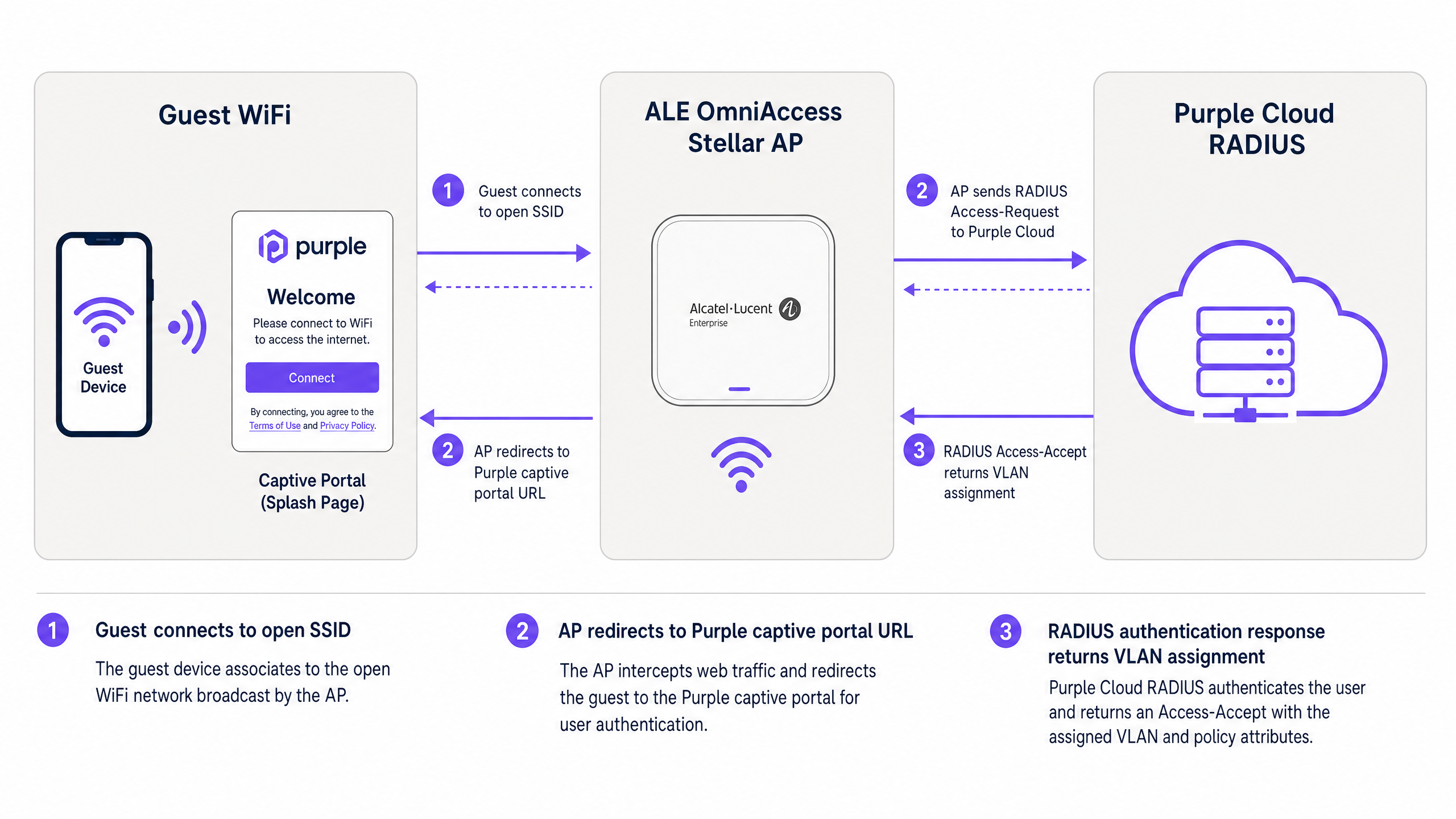
Figura 1: Flusso di autenticazione tra dispositivo ospite, AP ALE OmniAccess Stellar e RADIUS cloud di Purple.
Il flusso funziona come segue. Un visitatore si connette all'SSID Guest WiFi aperto. L'AP ALE assegna un indirizzo IP temporaneo dal pool DHCP di pre-autenticazione e intercetta la prima richiesta HTTP o HTTPS del visitatore. L'AP reindirizza il browser all'URL del Captive Portal di Purple, passando l'indirizzo MAC del client e l'identificatore NAS dell'AP come parametri URL. Il visitatore si autentica tramite la splash page di Purple, utilizzando l'e-mail, il login social o la verifica tramite SMS. Il server RADIUS di Purple convalida la sessione e restituisce un messaggio Access-Accept all'AP ALE. L'AP concede l'accesso a Internet e inizia a inviare aggiornamenti di RADIUS Accounting a Purple all'intervallo configurato.
Per implementazioni avanzate che utilizzano PPSK e instradamento VLAN dinamico, il messaggio RADIUS Access-Accept include anche gli attributi di assegnazione della VLAN. L'AP ALE li utilizza per instradare il traffico del client direttamente sul segmento VLAN corretto, isolandolo dagli altri utenti sulla stessa infrastruttura fisica.
Guida all'implementazione
Parte 1: Guest WiFi con Captive Portal esterno
Questa sezione descrive la configurazione del Captive Portal di Alcatel-Lucent per il reindirizzamento esterno a Purple. Questi passaggi si applicano agli AP ALE OmniAccess Stellar gestiti tramite OmniVista Cirrus, OmniVista 2500 o l'interfaccia web Stellar Express.
Passaggio 1: Recuperare le credenziali RADIUS di Purple
Accedi al tuo portale Purple. Vai su Management > Venues, seleziona la tua sede e apri la sezione Hardware. Aggiungi una nuova voce hardware e seleziona Alcatel-Lucent OmniAccess Stellar como tipo di hardware. Purple genera un segreto condiviso RADIUS univoco, l'IP del server di autenticazione e l'URL del Captive Portal per la tua sede. Registra questi valori prima di procedere.
Passaggio 2: Configurare il server RADIUS sull'AP ALE
Nell'interfaccia di gestione ALE, vai alle impostazioni di autenticazione e aggiungi un nuovo profilo server RADIUS.
| Parametro | Valore |
|---|---|
| IP server / Hostname | Come fornito nel portale Purple |
| Porta di autenticazione | 1812 |
| Porta di accounting | 1813 |
| Segreto condiviso | Come fornito nel portale Purple |
| RADIUS Accounting | Abilitato |
| Intervallo di accounting | 300 secondi |
Abilita un server RADIUS secondario utilizzando l'IP di backup dal portale Purple. Ciò garantisce il failover se il server primario è temporaneamente irraggiungibile.
Passaggio 3: Configurare il Walled Garden
Il Walled Garden definisce i domini che un dispositivo può raggiungere prima del completamento dell'autenticazione. Configura le seguenti voci nell'elenco di accesso di pre-autenticazione:
Domini principali di Purple (obbligatori):
| Dominio | Scopo |
|---|---|
| region1.purpleportal.net | Captive Portal di Purple |
| venuewifi.com | Gestione della sessione Purple |
| cloudfront.net | CDN per le risorse del portale |
| openweathermap.org | Widget meteo (opzionale) |
| stripe.com | Pagamenti WiFi a pagamento (se applicabile) |
Domini di login social (aggiungere come richiesto):
| Provider | Domini |
|---|---|
| facebook.com, fbcdn.net, connect.facebook.net | |
| linkedin.com, licdn.net | |
| accounts.google.com, googleapis.com |
L'omissione di qualsiasi dominio richiesto causerà il mancato funzionamento del metodo di accesso corrispondente senza mostrare errori. Testa ciascun metodo di accesso dopo la configurazione.
Passaggio 4: Configurare l'SSID Guest WiFi
Crea un nuovo profilo WLAN con le seguenti impostazioni:
| Parametro | Valore |
|---|---|
| Livello di sicurezza | Aperto |
| Captive Portal | Abilitato |
| Tipo di Captive Portal | Esterno |
| URL di reindirizzamento | Come fornito nel portale Purple |
| Reindirizzamento HTTPS | Disabilitato (a meno che non sia installato un certificato SSL) |
| Timeout di inattività | 1800 secondi (30 minuti) |
| Profilo server RADIUS | Profilo RADIUS Purple (creato al Passaggio 2) |
Se richiedi il reindirizzamento HTTPS, installa un certificato SSL valido nell'AP ALE in System > General > Certificate Management. Nota che i certificati wildcard non sono supportato dall'AP Stellar a questo scopo.
Passaggio 5: Assegnare l'SSID a un gruppo AP
Applica il profilo WLAN al gruppo AP pertinente in OmniVista. Verifica che gli AP stiano trasmettendo l'SSID e che i client possano associarsi prima di testare il flusso del Captive Portal.
Parte 2: Proteggere il WiFi del personale tramite 802.1X
Per il WiFi del personale, utilizza WPA2-Enterprise o WPA3-Enterprise con autenticazione 802.1X. Questo elimina le password condivise e associa l'accesso alle singole identità utente gestite in Microsoft Entra ID, Okta o Google Workspace.
Passaggio 1: Configurare l'SSID 802.1X
Crea un profilo WLAN separato per il personale. Imposta il tipo di sicurezza su WPA2-Enterprise o WPA3-Enterprise e assegna il server RADIUS di Purple come backend di autenticazione. Il server RADIUS di Purple inoltra le richieste di autenticazione al tuo provider di identità tramite LDAP o SAML.
Passaggio 2: Selezionare il metodo EAP
Per la maggior parte delle distribuzioni, utilizza PEAP con MSCHAPv2. Questo richiede solo un certificato lato server e funziona con i supplicant standard Windows, macOS, iOS e Android. Per ambienti a sicurezza più elevata, utilizza EAP-TLS con certificati client emessi tramite la tua PKI.
Passaggio 3: Assegnare il personale a una VLAN dedicata
Configura il server RADIUS di Purple per restituire Tunnel-Private-Group-ID = ID della VLAN del personale nella risposta Access-Accept. Ciò garantisce che i dispositivi del personale finiscano sul segmento di rete aziendale, separato dal traffico guest al Livello 2.
Parte 3: WiFi multi-tenant tramite PPSK e instradamento dinamico della VLAN
La tecnologia PPSK (Private Pre-Shared Key) - denominata anche iPSK (Identity PSK) in alcune documentazioni dei fornitori - consente a un singolo SSID di servire più gruppi di utenti isolati. Ciascun gruppo riceve una passphrase univoca. Il server RADIUS mappa ciascuna passphrase a una VLAN specifica, fornendo l'isolamento della rete per singolo tenant senza il sovraccarico RF di più SSID.
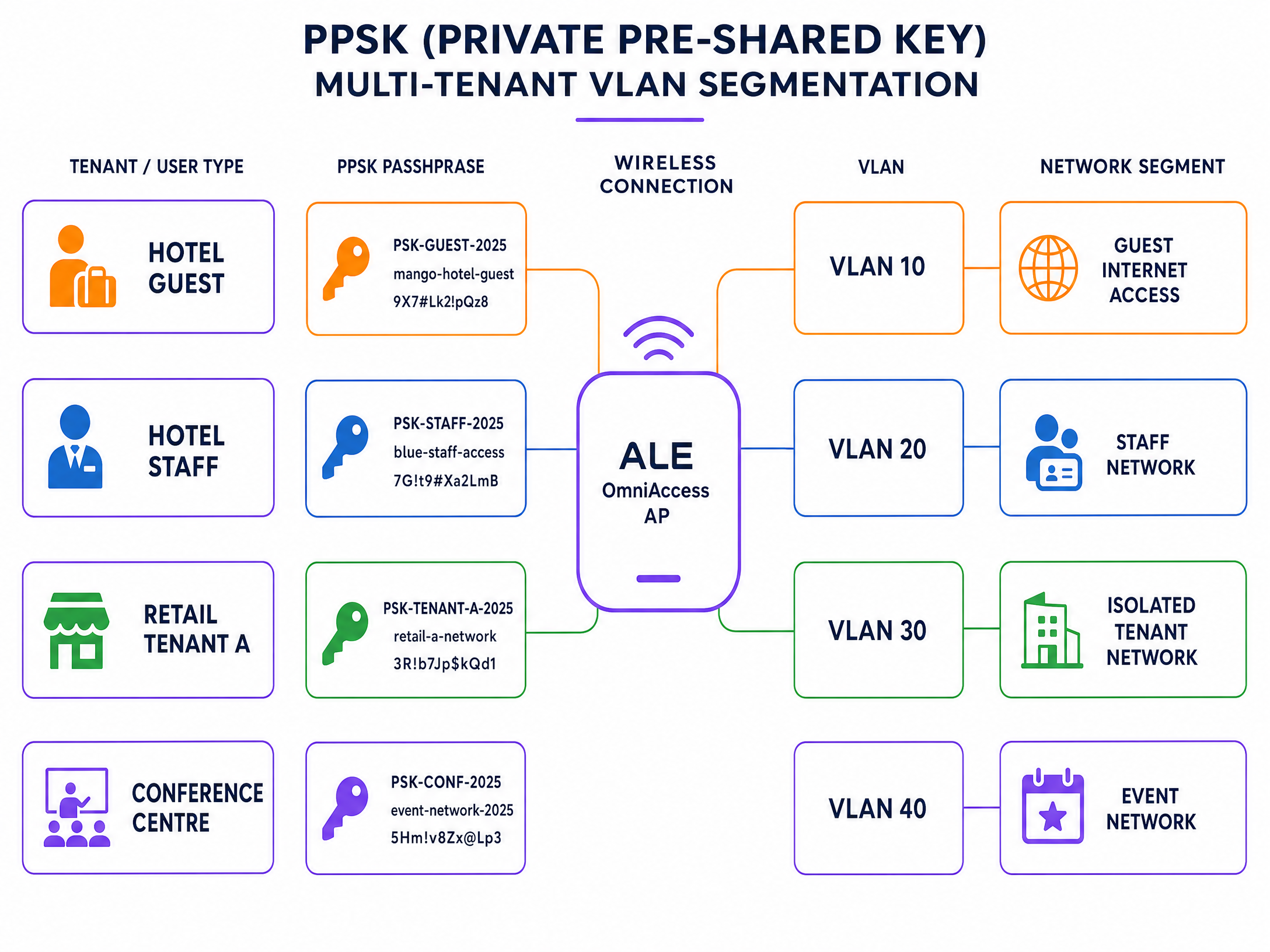
Figura 2: Segmentazione VLAN multi-tenant PPSK su un singolo SSID ALE OmniAccess.
Passaggio 1: Creare l'SSID PPSK
Crea un nuovo profilo WLAN e imposta il tipo di autenticazione su WPA2-PSK con convalida PSK supportata da RADIUS. Nel firmware Stellar 4.0.8.16 e versioni successive (per i modelli AP1301 e superiori), l'assegnazione dinamica della VLAN tramite RADIUS è supportata in Express Mode. Per i modelli più vecchi o firmware precedenti, utilizza la modalità gestita da OmniVista.
Passaggio 2: Definire le passphrase dei tenant in Purple
Nel portale Purple, crea un gruppo PPSK per ciascun tenant. Assegna una passphrase univoca per tenant e mappa ciascuna passphrase all'ID VLAN corrispondente. Purple memorizza queste mappature nel proprio database RADIUS.
Passaggio 3: Configurare gli attributi RADIUS per l'instradamento della VLAN
Assicurati che il server RADIUS di Purple restituisca i seguenti attributi standard IETF in ogni risposta Access-Accept:
| Numero Attributo | Nome Attributo | Valore |
|---|---|---|
| 64 | Tunnel-Type | 13 (VLAN) |
| 65 | Tunnel-Medium-Type | 6 (IEEE 802 / Ethernet) |
| 81 | Tunnel-Private-Group-ID | ID VLAN (es., "30") |
Tutti e tre gli attributi devono essere presenti. Se ne manca anche uno solo, l'AP ALE ignora l'assegnazione della VLAN e inserisce il client nella VLAN predefinita.
Passaggio 4: Verificare il trunking VLAN sull'uplink
Assicurati che tutte le VLAN dei tenant siano taggate sulla porta di uplink tra l'AP ALE e lo switch di distribuzione. Un AP non può instradare il traffico verso una VLAN che non è consentita sul suo trunk di uplink.
Best practice
Le seguenti raccomandazioni riflettono la pratica standard per le distribuzioni wireless aziendali e sono in linea con i requisiti IEEE 802.1X, PCI DSS 4.0 e GDPR.
Separa il WiFi guest dal WiFi del personale al Livello 2. Non inserire mai il traffico guest e quello del personale sulla stessa VLAN. Utilizza l'assegnazione della VLAN basata su RADIUS per imporre automaticamente questa separazione, indipendentemente dall'AP a cui si connette l'utente.
Utilizza HTTPS per tutti i reindirizzamenti del Captive Portal. Installa un certificato SSL valido sull'AP ALE per abilitare il reindirizzamento HTTPS. Ciò impedisce ai browser di visualizzare avvisi di sicurezza sulla splash page, riducendo i tassi di abbandono e allineandosi ai requisiti GDPR per la gestione sicura dei dati.
Imposta l'intervallo di RADIUS Accounting su 300 secondi. Questo fornisce a Purple aggiornamenti regolari sulle sessioni per garantire l'accuratezza dei dati analitici. Un intervallo superiore a 600 secondi rischia di causare la perdita dei dati di sessione se un client si disconnette senza una de-autenticazione pulita.
Testa il Walled Garden prima della messa in servizio. Connetti un dispositivo di test all'SSID del WiFi guest e prova ad accedere a ciascun provider di social login. Se un accesso non va a buon fine, il dominio corrispondente manca dal Walled Garden.
Segmenta i dispositivi IoT utilizzando PPSK. Negli ambienti retail e hospitality, i dispositivi IoT come la segnaletica digitale, i terminali di pagamento e i sensori ambientali dovrebbero ricevere ciascuno un PPSK univoco mappato su una VLAN isolata. Ciò impedisce a un dispositivo IoT compromesso di accedere alla rete più ampia.
Per ulteriori letture sugli standard di sicurezza e sull'architettura del WiFi aziendale, consulta la nostra guida alla sicurezza del WiFi aziendale .
Risoluzione dei problemi e mitigazione dei rischi
La tabella seguente copre le modalità di guasto più comuni nelle integrazioni ALE OmniAccess e Purple.
| Sintomo | Causa più probabile | Risoluzione |
|---|---|---|
| Il Captive Portal non viene visualizzato | Errata configurazione del Walled Garden o DNS mancante | Verifica che i domini Purple siano inseriti nella whitelist; controlla che l'ambito DHCP includa un server DNS valido |
| L'autenticazione RADIUS non va a buon fine | Mancata corrispondenza del segreto condiviso o firewall che blocca UDP 1812/1813 | Reinserisci il segreto condiviso dal portale Purple; conferma che le regole del firewall consentano il traffico UDP in uscita sulle porte 1812 e 1813 |
| Gli utenti finiscono sulla VLAN errata | Attributi RADIUS Tunnel mancanti o limitazione del firmware dell'AP | Conferma che vengano restituiti tutti e tre gli attributi RADIUS (64, 65, 81); verifica che la versione del firmware ALE supporti la VLAN dinamica |
| Il pulsante di social login non funziona | Dominio del social provider mancante dal Walled Garden | Aggiungi i domini del social provider richiesti tall'elenco di accesso pre-autenticazione |
| Il captive portal HTTPS mostra un avviso di certificato | Viene utilizzato un certificato wildcard o nessun certificato installato | Installare un certificato SSL specifico per il dominio tramite Sistema > Generale > Gestione certificati |
| Dati di sessione mancanti negli analytics di Purple | RADIUS Accounting disabilitato o intervallo troppo lungo | Abilitare RADIUS Accounting; impostare l'intervallo a 300 secondi |
In caso di problemi RADIUS persistenti, abilitare la registrazione di debug sull'AP ALE e acquisire lo scambio RADIUS. Cercare i messaggi di Access-Reject e verificare il codice del motivo del rifiuto. I codici comuni includono il 16 (errore di autenticazione) e il 18 (attributo mancante).
ROI e impatto aziendale
La distribuzione di Purple sull'hardware ALE OmniAccess trasforma una rete passiva in una risorsa di dati attiva. Ogni sessione autenticata genera un profilo visitatore: indirizzo e-mail, frequenza delle visite, tempo di permanenza e tipo di dispositivo. Questi dati di prima parte confluiscono direttamente nel CRM tramite la libreria di Purple con oltre 400 connettori.
Harrods ha ottenuto un ROI di marketing pari a 57 volte l'investimento grazie alla distribuzione del Guest WiFi, utilizzando l'acquisizione dati di Purple per incrementare le iscrizioni al programma fedeltà (case study Purple, 2023). AGS Airports ha generato un ROI dell'842% implementando il WiFi a pagamento con larghezza di banda differenziata in tutte le sue strutture (case study Purple, 2022).
Per gli operatori del settore alberghiero , il captive portal rappresenta il punto di contatto principale per l'acquisizione dei dati degli ospiti. Per gli ambienti retail , consente l'analisi del comportamento degli acquirenti e promozioni mirate. Per gli hub di trasporto , fornisce dati sul flusso dei passeggeri e la registrazione delle sessioni conforme alle normative.
La piattaforma Guest WiFi e gli strumenti di WiFi Analytics di Purple offrono l'infrastruttura di reportistica necessaria per misurare questi risultati. Monitora i tassi di autenticazione, la durata delle sessioni, i tassi di visitatori ricorrenti e la conversione degli opt-in da un'unica dashboard.
Per una guida all'integrazione correlata, consultare la guida all'integrazione di WatchGuard Firebox , che descrive un'architettura simile basata su RADIUS su una piattaforma hardware diversa.
Definizioni chiave
PPSK (Private Pre-Shared Key)
A security method where individual users or devices are issued unique passphrases for a single SSID, rather than sharing one global password. The RADIUS server maps each passphrase to a specific policy or VLAN.
Used in Multi-Tenant WiFi to isolate traffic between tenants, residents, or event groups without deploying multiple SSIDs.
RADIUS (Remote Authentication Dial-In User Service)
A networking protocol defined in RFC 2865 that provides centralised Authentication, Authorization, and Accounting (AAA) management for users connecting to a network service.
The core protocol Purple uses to communicate with ALE hardware. The ALE AP sends Access-Request messages; Purple responds with Access-Accept or Access-Reject.
Dynamic VLAN steering
The process of assigning a connected device to a specific VLAN based on RADIUS attributes returned during authentication, rather than a static VLAN configured on the SSID.
Essential for multi-tenant deployments where different user groups must be isolated on the same physical AP infrastructure.
Walled Garden
A controlled environment that restricts a device's internet access to a predefined set of domains before authentication is complete.
Required to allow devices to reach the Purple captive portal and external identity providers before the user has logged in.
Captive portal
A web page that intercepts a user's browser session and requires them to authenticate or accept terms before gaining full network access.
The primary interface where visitors provide consent and first-party data. Purple hosts this page in the cloud; the ALE AP performs the redirect.
Identity-Based Network
A network architecture where access policies, VLAN assignments, and bandwidth controls are determined by who the user is, rather than where or how they connect.
The architectural outcome of integrating ALE hardware with Purple's authentication overlay.
802.1X
An IEEE standard for port-based network access control that provides an authentication mechanism for devices connecting to a LAN or WLAN. It requires a supplicant on the client device, an authenticator (the AP), and an authentication server (RADIUS).
The standard used for secure Staff WiFi deployments. Eliminates shared passwords and ties access to individual user identities.
EAP-TLS (Extensible Authentication Protocol - Transport Layer Security)
A certificate-based EAP method where both the client and the RADIUS server present digital certificates for mutual authentication.
The most secure 802.1X method. Requires a PKI infrastructure to issue client certificates, but eliminates password-based credential theft entirely.
PEAP (Protected Extensible Authentication Protocol)
An EAP method that tunnels the inner authentication exchange inside a TLS session, protecting credentials in transit. Commonly used with MSCHAPv2 as the inner method.
The most common 802.1X method in enterprise deployments. Requires only a server-side certificate and works with standard OS supplicants.
NAS (Network Access Server)
In RADIUS terminology, the device that enforces access control - in this case, the ALE OmniAccess Stellar AP. The NAS forwards authentication requests to the RADIUS server and enforces the policies returned.
The ALE AP acts as the NAS in the Purple integration. Its IP address and shared secret must be registered in the Purple portal as a trusted NAS client.
Esempi pratici
A 200-room hotel in central London uses ALE OmniAccess Stellar APs throughout the property. They need to serve hotel guests, back-of-house staff, and a ground-floor restaurant as three completely separate network segments. They want to avoid broadcasting multiple SSIDs to preserve RF performance.
Deploy a single secure SSID using PPSK. Configure the ALE OmniAccess APs to authenticate against the Purple RADIUS server. In the Purple portal, create three PPSK groups: Hotel Guests (VLAN 10), Staff (VLAN 20), and Restaurant (VLAN 30). The RADIUS server returns Tunnel-Private-Group-ID = 10, 20, or 30 depending on which passphrase the device uses. The ALE AP dynamically steers each device to the correct VLAN. Hotel guests receive internet access only. Staff receive access to the property management system. The restaurant receives an isolated segment for their EPOS terminals.
A conference centre hosts 15 corporate events simultaneously. Each event organiser needs their own isolated WiFi network for attendees, but the venue only has a single ALE OmniAccess infrastructure. The venue IT team needs to provision and de-provision networks quickly between events.
Use Purple's PPSK management to create per-event passphrases mapped to dedicated event VLANs. The venue pre-configures 15 VLAN segments on the ALE infrastructure. For each event, the IT team creates a new PPSK entry in the Purple portal, assigns it to the correct VLAN, and provides the passphrase to the event organiser. At the end of the event, they revoke the passphrase in Purple. The ALE AP immediately stops accepting that passphrase, isolating the de-provisioned VLAN. No AP reconfiguration is required.
Domande di esercitazione
Q1. You have configured the Alcatel-Lucent captive portal on an ALE OmniAccess Stellar AP. Guests connect to the SSID and receive an IP address, but their devices show 'No Internet Connection' and the splash page does not appear. What are the two most likely causes, and how do you resolve each?
Suggerimento: Consider what must happen at the DNS and HTTP layer before the captive portal redirect can occur.
Visualizza risposta modello
Cause 1: The DHCP scope does not include a valid DNS server. Without DNS, the client cannot resolve the captive portal URL and the OS captive portal detection mechanism fails. Resolution: Add a valid DNS server (e.g., 8.8.8.8) to the DHCP scope on the guest VLAN. Cause 2: The Walled Garden does not include the Purple portal domains. Without these, the AP blocks the redirect request before it reaches the client. Resolution: Add region1.purpleportal.net, venuewifi.com, and cloudfront.net to the pre-authentication access list.
Q2. Your Multi-Tenant WiFi deployment uses PPSK on a single ALE OmniAccess SSID. Users authenticate successfully - the Purple portal shows successful logins - but all users receive IP addresses from VLAN 1 instead of their assigned tenant VLANs. What is the most likely cause?
Suggerimento: Check the communication between the RADIUS server and the AP, and the AP's uplink configuration.
Visualizza risposta modello
There are two likely causes. First, the Purple RADIUS server may not be returning all three required RADIUS tunnel attributes (64, 65, 81) in the Access-Accept message. Verify the enforcement policy includes Tunnel-Type = 13, Tunnel-Medium-Type = 6, and Tunnel-Private-Group-ID = the correct VLAN ID. Second, the tenant VLANs may not be tagged on the uplink trunk between the ALE AP and the distribution switch. If the VLAN does not exist on the trunk, the AP cannot steer traffic to it, even if the RADIUS attributes are correct.
Q3. A venue requires that guest sessions are automatically terminated after 60 minutes, and that guests who return within 24 hours are recognised and bypass the registration form. How should this be configured in the Purple and ALE architecture?
Suggerimento: Consider which system controls session lifetime and which system controls returning visitor recognition.
Visualizza risposta modello
Session termination is controlled via the RADIUS Session-Timeout attribute. Configure the Purple RADIUS server to include Session-Timeout = 3600 (seconds) in the Access-Accept message. The ALE AP will disconnect the client after 3600 seconds. Returning visitor recognition is controlled in the Purple portal. Enable the 'remember device' or MAC-based re-authentication setting for your venue. When a returning visitor connects within the configured window, Purple's RADIUS server recognises their MAC address and returns an Access-Accept without requiring the splash page interaction, providing a seamless reconnection experience.
Q4. You are deploying Staff WiFi using 802.1X on ALE OmniAccess Stellar APs. Your organisation uses Microsoft Entra ID as the identity provider. Staff devices are Windows 11 laptops managed via Intune. Which EAP method should you use, and what certificate requirements apply?
Suggerimento: Consider the balance between security, deployment complexity, and the capabilities of the existing infrastructure.
Visualizza risposta modello
Use PEAP with MSCHAPv2 as the EAP method. This requires only a server-side certificate on the Purple RADIUS server (already provisioned by Purple) and leverages the user's Entra ID credentials for authentication. No client certificates are required, which simplifies deployment on Intune-managed devices. Configure the Windows 11 supplicant via an Intune Wi-Fi profile, specifying the SSID, WPA2-Enterprise security, PEAP method, and the Purple RADIUS server certificate thumbprint for server validation. If your security policy requires certificate-based mutual authentication, upgrade to EAP-TLS and deploy client certificates via Intune SCEP profiles, but this adds significant PKI management overhead.
Continua a leggere questa serie
CommScope Ruckus Integration with Purple WiFi: Setup and Configuration Guide
Questa guida di riferimento tecnico fornisce un playbook di configurazione autorevole per l'integrazione delle architetture CommScope Ruckus con Purple WiFi. Dettaglia le implementazioni passo-passo per i Captive Portal per Guest WiFi, il WiFi sicuro per il personale tramite 802.1X e l'isolamento di rete multi-tenant tramite Ruckus Dynamic PSK.
Allied Telesis Access Points Integration with Purple WiFi
Questa guida fornisce un playbook di configurazione completo per l'integrazione degli access point Allied Telesis serie TQ con Purple WiFi. Copre il reindirizzamento del Captive Portal esterno, l'autenticazione RADIUS 802.1X e l'instradamento dinamico della VLAN tramite Private Pre-Shared Keys (PPSK) per distribuzioni multi-tenant sicure.
Cisco WLC and Catalyst Integration with Purple WiFi: Step-by-Step Guest Access Guide
Questa guida descrive in dettaglio l'integrazione passo-passo di Cisco WLC e Catalyst 9800 Wireless con Purple, coprendo il reindirizzamento al Captive Portal per Guest WiFi tramite Central Web Authentication, il WiFi aziendale sicuro per il personale tramite 802.1X EAP-TLS e la segmentazione multi-tenant tramite Cisco Identity Pre-Shared Keys (iPSK) con assegnazione dinamica della VLAN. È scritta per architetti di rete aziendali e direttori della sicurezza IT che distribuiscono l'infrastruttura Cisco nei settori hospitality, retail e grandi spazi pubblici.