
Come configurare un Captive Portal su Starlink: una guida per sedi remote e marittime
Questa guida spiega in dettaglio come escludere l'hardware Starlink nativo e integrare un captive portal gestito in cloud utilizzando apparecchiature di routing enterprise. Imparerete a superare il limite del CGNAT, applicare la segmentazione VLAN, gestire i vincoli di larghezza di banda satellitare e garantire la conformità normativa.
Ascolta questa guida
Visualizza trascrizione del podcast
Parte della nostra serie principale: Captive Portal Guide →
Sintesi Esecutiva
Starlink fornisce una connettività a 220 Mbps in località non raggiunte dalla fibra, cambiando completamente lo scenario di rete per le strutture remote e marittime. Tuttavia, per gli ambienti aperti al pubblico, la sola connettività non è sufficiente. Quando si distribuisce Starlink per ospiti, passeggeri o equipaggio, è necessario implementare l'autenticazione, il controllo degli accessi, il consenso conforme al GDPR e la gestione della larghezza di banda. Il router Starlink nativo non fornisce nessuna di queste funzionalità.
Questa guida spiega in dettaglio come escludere l'hardware Starlink nativo e integrare un Captive Portal gestito in cloud utilizzando apparecchiature di routing aziendali. Imparerete a superare le limitazioni del Carrier Grade NAT (CGNAT), a implementare la segmentazione VLAN, a gestire i vincoli di larghezza di banda del satellite e a garantire la conformità normativa.
Implementando questa architettura, i gestori delle strutture trasformano una linea internet non gestita in una rete sicura e segmentata che acquisisce dati di prima parte e protegge l'infrastruttura aziendale principale.
Approfondimento Tecnico
Il Vincolo del CGNAT
Il principale ostacolo tecnico quando si distribuisce un Captive Portal su Starlink è il Carrier Grade NAT (CGNAT). L'antenna Starlink standard si collega a un router proprietario che gestisce DHCP e NAT. Per impostazione predefinita, l'indirizzo IP WAN assegnato alle apparecchiature rientra nell'intervallo 100.64.0.0/10. Poiché non si tratta di un indirizzo IP pubblico, il router non può ricevere connessioni in entrata da internet.
Le architetture standard di Captive Portal spesso presuppongono che il portale cloud possa comunicare a ritroso con la rete per autenticare gli utenti o aggiornare gli elenchi di controllo degli accessi. Con il CGNAT, le connessioni in entrata falliscono.
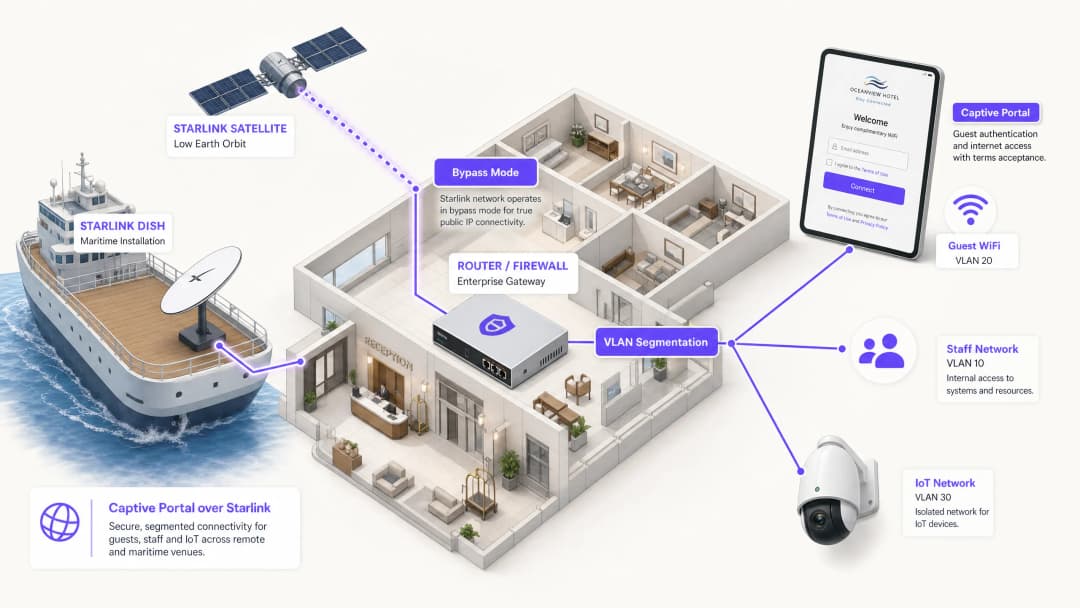
Per risolvere questo problema, è necessario configurare l'antenna Starlink in Bypass Mode (spesso definita modalità bridge). In Bypass Mode, le funzioni del router Starlink vengono disabilitate e l'antenna invia l'indirizzo CGNAT direttamente alla porta WAN del router aziendale. Il router aziendale assume quindi il controllo completo del livello di routing.

Architettura a Tunnel Inverso
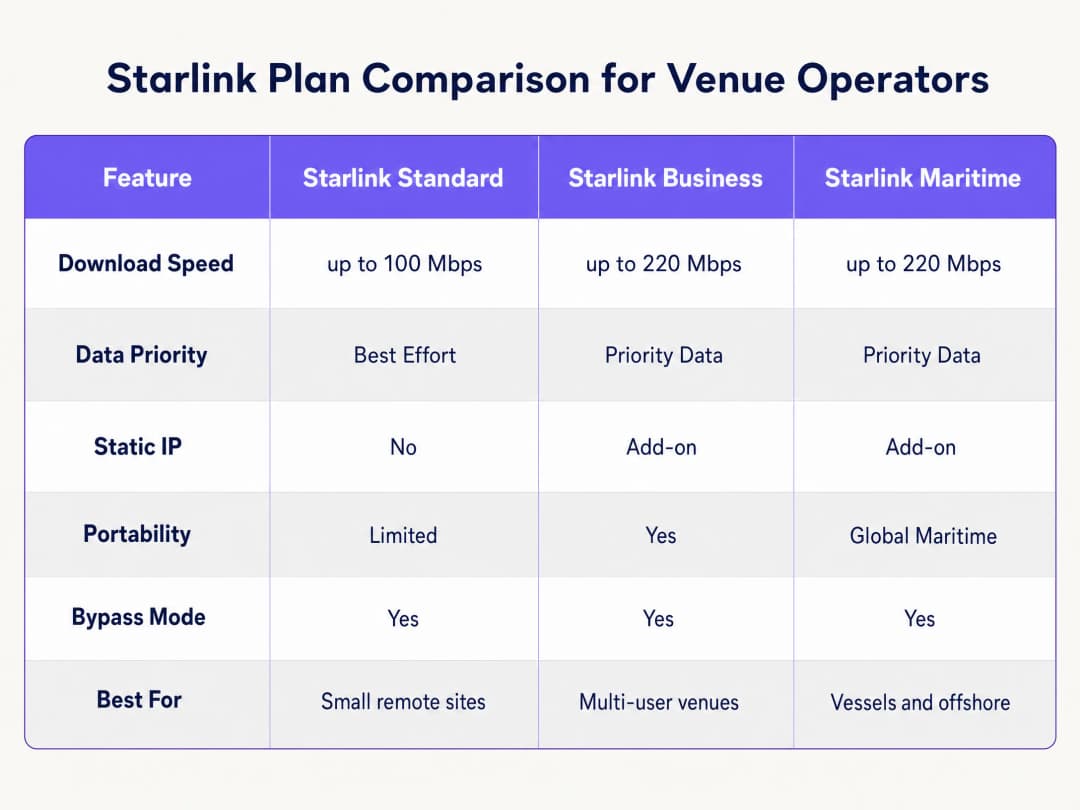
Anche con il router aziendale che gestisce il traffico, la restrizione in entrata del CGNAT rimane. La soluzione è un'architettura a tunnel inverso. Il router stabilisce una connessione in uscita verso il portale cloud e la mantiene continuamente. Tutto il traffico di autenticazione scorre attraverso questo tunnel stabilito. L'infrastruttura cloud non ha mai bisogno di avviare una connessione in entrata. L'architettura overlay in cloud di Purple gestisce questo aspetto in modo nativo. Non è necessario configurare tunnel VPN manuali. Se la vostra implementazione richiede un IP statico per i server RADIUS legacy on-premises o un rigoroso inserimento di IP in allowlist, i piani Starlink Business e Maritime forniscono un IP statico come add-on a pagamento.
Limitazioni di Banda e Traffic Shaping
La banda satellitare è una risorsa condivisa e finita. Un singolo utente che guarda video in streaming in 4K può consumare continuamente 25 Mbps. Su un'imbarcazione con 50 passeggeri che condividono una connessione Starlink da 220 Mbps, un solo utente potrebbe consumare l'11% della capacità totale.
È necessario affrontare questo problema a livello di Captive Portal e di router attraverso un traffic shaping aggressivo:
- Limiti per dispositivo: limitare i singoli dispositivi degli ospiti a 5 Mbps in download e 2 Mbps in upload.
- Politiche di utilizzo corretto: applicare soglie di traffico dati giornaliere (ad es. 2GB ogni 24 ore).
- Controllo delle applicazioni: dare la priorità alla navigazione web e ai protocolli di messaggistica rispetto allo streaming video e alla condivisione di file peer-to-peer.
- Accesso a più livelli: fornire un livello gratuito per la connettività di base e un livello premium a pagamento per lo streaming, trasformando l'infrastruttura WiFi da un centro di costo a una fonte di ricavo.
Hai domande sulla tua configurazione specifica?
Il nostro team collabora con gestori di sedi, responsabili IT e ingegneri di rete in 80.000 sedi. Prenota una chiamata di 20 minuti e ti mostreremo come altri professionisti come te hanno risolto il problema.
Guida all'Implementazione
Seguite questi passaggi per distribuire un Captive Portal sicuro su Starlink utilizzando hardware enterprise.
Passaggio 1: Abilitare la Modalità Bypass
- Installare l'hardware Starlink e verificare la connettività utilizzando il router originale.
- Aprire l'applicazione mobile Starlink e andare su Settings.
- Selezionare e confermare Bypass Starlink WiFi router.
- Collegare lo Starlink Ethernet Adapter alla porta WAN del router enterprise (Cisco Meraki, HPE Aruba, Ruckus, Juniper Mist, Ubiquiti UniFi, Cambium, Extreme o Fortinet).
Nota: se la parabola Starlink subisce un ripristino delle impostazioni di fabbrica, la modalità Bypass viene disattivata automaticamente. Documentate questo aspetto nel manuale operativo del sito e configurate un avviso di monitoraggio sull'interfaccia WAN del router.
Passaggio 2: Configurare la Segmentazione VLAN
È necessario isolare il traffico degli ospiti dai sistemi aziendali principali. Configurate almeno tre VLAN sullo switch principale e sugli access point:
- VLAN 10 (Personale): trasporta i sistemi POS, le applicazioni di back-office e il traffico di gestione.
- VLAN 20 (Ospiti): segmento di sola navigazione Internet che reindirizza al Captive Portal.
- VLAN 30 (IoT): rete isolata per telecamere, termostati intelligenti e sistemi di gestione dell'edificio.
Configurate le regole del firewall per bloccare tutto il routing inter-VLAN. Un dispositivo ospite sulla VLAN 20 non deve mai essere in grado di effettuare un ping verso un terminale POS sulla VLAN 10. Questa segmentazione è un requisito rigoroso per la conformità PCI-DSS.
Passaggio 3: Distribuire il Cloud Captive Portal
- Configurare gli access point per trasmettere l'SSID ospite sulla VLAN 20.
- Impostare il metodo di autenticazione su RADIUS esterno o utilizzare l'integrazione API del fornitore.3. Indirizza il server di autenticazione verso l'infrastruttura cloud di Purple.
- Configura il walled garden (allowlist) per consentire il traffico verso i domini di Purple prima che l'autenticazione sia completata.
- Progetta la splash page nel portale Purple, assicurando che il branding sia in linea con il tuo locale e che i termini di servizio siano chiaramente visibili.
Passaggio 4: Testare il flusso utente
Testa il flusso di autenticazione su dispositivi iOS e Android. Il Captive Network Assistant (CNA) di Apple e il probe di rete di Android si comportano in modo diverso. Verifica che la splash page si carichi entro 10 secondi e che il dispositivo ottenga l'accesso a internet subito dopo l'autenticazione.
Best Practice
- Intercettazione HTTPS: Assicurati che il tuo router gestisca correttamente l'intercettazione HTTPS. I dispositivi moderni utilizzano HTTPS per impostazione predefinita. Se il router non riesce a reindirizzare le richieste HTTPS in modo pulito, gli ospiti riscontreranno errori di certificato prima di raggiungere il portale.
- Session Keepalive: La costellazione in orbita terrestre bassa (LEO) di Starlink offre latenze comprese tra 20 e 40 millisecondi, ma si verificano brevi picchi durante i passaggi di consegna dei satelliti. Imposta l'intervallo di session keepalive del tuo Captive Portal a un valore pari o inferiore a 60 secondi per evitare disconnessioni premature.
- Caching Offline: Configura il tuo router per memorizzare nella cache locale le sessioni attive. Se la connessione Starlink si interrompe temporaneamente, gli ospiti già autenticati rimarranno online al ripristino della connettività, invece di essere costretti a effettuare nuovamente l'accesso.
Risoluzione dei problemi e mitigazione dei rischi
| Modalità di errore | Causa principale | Mitigazione |
|---|---|---|
| Il Captive Portal non si carica | Configurazione errata del walled garden | Verifica che tutti i domini Purple richiesti e gli endpoint CDN siano aggiunti alla allowlist di pre-autenticazione sul router. |
| Errori di Double NAT | Bypass Mode disattivata | Controlla l'app Starlink per confermare che la Bypass Mode sia attiva. Sbalzi di tensione o ripristini manuali potrebbero aver riportato la parabola alle impostazioni predefinite. |
| Velocità ridotta degli ospiti | Banda non limitata | Applica limiti di larghezza di banda per singolo dispositivo (ad esempio, 5 Mbps) e blocca sul firewall le applicazioni ad alto consumo di banda come BitTorrent. |
| Fallimento dell'audit di sicurezza | Routing inter-VLAN abilitato | Controlla le regole del firewall per assicurarti che il traffico proveniente dalla VLAN ospiti non possa essere instradato verso la VLAN del personale o di gestione. |
ROI e impatto sul business
La distribuzione di un Captive Portal gestito su Starlink trasforma una connessione internet grezza in una risorsa aziendale misurabile.
Per una nave da crociera da 120 cabine che utilizza Starlink Maritime a 220 Mbps, l'accesso non gestito produce zero ritorni commerciali. Distribuendo gli access point Cisco Meraki e il Captive Portal di Purple, l'operatore può imporre una soglia giornaliera di 2 GB per i passeggeri standard, vendendo al contempo un pacchetto premium da 10 GB. Le entrate derivanti dal WiFi coprono i costi di abbonamento mensili a Starlink di oltre 250 dollari. Inoltre, il portale acquisisce dati e-mail di prima parte in totale conformità con le normative, ampliando l'elenco di marketing diretto dell'operatore per i viaggi futuri.In un hotel situato in una posizione remota, l'implementazione di un portale con policy rigorose sulla larghezza di banda riduce i reclami degli ospiti relativi alla lentezza del WiFi fino al 60%, poiché si impedisce agli utenti con un consumo elevato di monopolizzare il collegamento satellitare.
"
Definizioni chiave
Bypass Mode
Un'impostazione di configurazione che disabilita le funzioni DHCP e NAT del router Starlink nativo, trasmettendo l'IP WAN direttamente a un router enterprise di terze parti.
Necessario quando si integrano apparecchiature di rete enterprise con un'antenna Starlink per evitare il doppio NAT e conflitti di routing.
CGNAT (Carrier Grade NAT)
Un metodo utilizzato dagli ISP per condividere un unico indirizzo IP pubblico tra più clienti. Il router del cliente riceve un indirizzo IP privato (tipicamente 100.64.0.0/10).
Starlink utilizza CGNAT per impostazione predefinita, il che impedisce le connessioni in entrata da internet e richiede architetture a tunnel inverso per la gestione in cloud.
VLAN (Virtual Local Area Network)
Una sottorete logica che raggruppa una collezione di dispositivi provenienti da diverse LAN fisiche.
Utilizzato per isolare il traffico WiFi degli ospiti dalla rete del personale e dai dispositivi IoT, garantendo sicurezza e conformità.
Captive Portal
Una pagina web che un utente di una rete ad accesso pubblico è obbligato a visualizzare e con cui deve interagire prima che venga concesso l'accesso a internet.
Utilizzato per applicare i termini di servizio, raccogliere dati di marketing e autenticare gli utenti sulle reti WiFi ospiti.
Walled Garden
Un ambiente limitato che controlla l'accesso dell'utente a contenuti e servizi web prima che si sia completamente autenticato.
Necessario per consentire ai dispositivi degli ospiti di raggiungere il captive portal in cloud e i server di autenticazione prima che venga concesso l'accesso completo a internet.
RADIUS
Un protocollo di rete che fornisce una gestione centralizzata di autenticazione, autorizzazione e tracciamento (AAA - Authentication, Authorisation, and Accounting) per gli utenti che si connettono e utilizzano un servizio di rete.
Il protocollo sottostante utilizzato dagli access point enterprise per comunicare con il captive portal in cloud per verificare le credenziali dell'utente.
Traffic Shaping
La manipolazione e la prioritizzazione del traffico di rete per ridurre l'impatto degli utenti ad alto consumo o delle applicazioni sensibili alla latenza.
Essenziale sulle reti Starlink per dare priorità alla navigazione web rispetto ad attività ad alta intensità di banda come lo streaming video.
Dati di prima parte
Informazioni che un'azienda raccoglie direttamente dai propri clienti e di cui è proprietaria.
Raccolti tramite il processo di accesso al captive portal (ad es. indirizzi email) e utilizzati per campagne di marketing diretto e fidelizzazione.
Esempi pratici
Una nave da crociera con 120 cabine che utilizza Starlink Maritime a 220 Mbps deve fornire il WiFi ai passeggeri senza compromettere le operazioni di bordo. È necessario un meccanismo per monetizzare la connessione e raccogliere dati di marketing.
L'operatore distribuisce access point Cisco Meraki in tutta la nave con tre VLAN rigorose: equipaggio, passeggeri e sistemi di bordo. Il captive portal di Purple gestisce l'autenticazione dei passeggeri tramite email o ricerca del numero di cabina integrata con il PMS. Ogni passeggero riceve una quota giornaliera di 2GB. I passeggeri della categoria premium possono acquistare un pacchetto da 10GB. Il portale raccoglie i dati email di prima parte per le attività di marketing successive al viaggio.
Un hotel in una remota località montana privo di infrastruttura in fibra utilizza Starlink Business a 150 Mbps. Gli ospiti si lamentano costantemente della lentezza della rete durante le ore serali e l'hotel non ha visibilità su chi stia utilizzando la rete.
L'hotel distribuisce access point HPE Aruba nell'edificio principale e nelle dependance. Configura l'antenna Starlink in Bypass Mode e la collega a un gateway Aruba. Gli ospiti si autenticano tramite email sul portale Purple. L'hotel applica un limite di banda rigoroso di 5 Mbps per dispositivo e utilizza le analisi di Purple per monitorare i picchi di utilizzo.
Domande di esercitazione
Q1. Un campo minerario remoto ha implementato Starlink Business. Ha collegato un firewall Cisco Meraki MX al router Starlink. Gli ospiti possono connettersi al WiFi, ma la pagina del captive portal va in timeout e non si carica. Qual è la causa più probabile?
Suggerimento: Considera come l'hardware Starlink gestisce il routing per impostazione predefinita e cosa richiede il firewall Meraki per gestire il traffico in modo efficace.
Visualizza risposta modello
La parabola Starlink non è stata impostata in Bypass Mode. Di conseguenza, la rete risente di un doppio NAT (il router Starlink e il firewall Meraki stanno entrambi tentando di eseguire la Network Address Translation). L'amministratore deve utilizzare l'app Starlink per abilitare la Bypass Mode, consentendo al firewall Meraki di ricevere direttamente l'IP CGNAT e gestire il routing e l'intercettazione del captive portal.
Q2. Stai implementando un captive portal per un hotel che utilizza Starlink. Hai configurato la Bypass Mode e la segmentazione VLAN. Durante i test, noti che i dispositivi Apple richiedono all'utente di accedere immediatamente, ma alcuni dispositivi Android mostrano un errore di certificato quando l'utente tenta di navigare su un sito web sicuro prima di autenticarsi. Come risolvi il problema?
Suggerimento: Pensa a come i browser moderni gestiscono le richieste di connessione iniziale e a cosa deve fare il router per intercettarle in modo pulito.
Visualizza risposta modello
Il router aziendale non è configurato per gestire correttamente l'intercettazione HTTPS per il reindirizzamento al captive portal. I browser moderni utilizzano HTTPS per impostazione predefinita. Quando l'utente tenta di visitare un sito HTTPS prima di autenticarsi, il router intercetta il traffico e presenta il proprio certificato, che il browser rifiuta in quanto non valido. È necessario assicurarsi che le impostazioni del captive portal del router siano configurate per utilizzare un certificato SSL valido per il reindirizzamento, oppure affidarsi alle sonde di rete a livello di sistema operativo (come il CNA di Apple) che utilizzano endpoint HTTP per attivare automaticamente il portale.
Q3. Un operatore marittimo si lamenta del fatto che la propria connessione Starlink Maritime (220 Mbps) diventa inutilizzabile ogni sera. Attualmente fornisce una rete ospiti aperta e senza password. Quali tre configurazioni specifiche dovresti implementare sul router aziendale e sul captive portal per risolvere questo problema?
Suggerimento: Concentrati sul controllo della quantità di dati che i singoli utenti possono consumare e sulla priorità dei tipi di traffico critici.
Visualizza risposta modello
- Implementare un captive portal che richieda l'autenticazione per monitorare e gestire i singoli utenti. 2. Applicare limiti di larghezza di banda per dispositivo (ad es. 5 Mbps in download / 2 Mbps in upload) per evitare che un singolo utente monopolizzi la connessione. 3. Applicare regole di traffic shaping sul firewall per dare priorità alla navigazione web e ai protocolli di messaggistica, limitando o bloccando al contempo le applicazioni ad alta larghezza di banda come lo streaming video e la condivisione di file P2P.
Continua a leggere questa serie
Ubiquiti UniFi guest portal non reindirizza: cause e soluzioni
Questa guida isola un errore di reindirizzamento del portale ospiti UniFi analizzando in sequenza lo stato dell'ospite, il reindirizzamento, il percorso di pre-autorizzazione e l'autorizzazione del controller. Fornisce ai team IT locali un metodo collaudato per risolvere i dubbi tra rete ospiti e Hotspot, i passaggi ai portali esterni, i requisiti correnti degli account UniFi OS e i test di isolamento DNS.
Cisco Meraki splash page non funzionante: un diagramma di flusso per la risoluzione dei problemi
Questa guida pratica per il secondo giorno isola i punti in cui un flusso splash Cisco Meraki ha fallito: autorizzazione del client, avvio del reindirizzamento HTTP, raggiungibilità del walled garden o sign-on RADIUS. Fornisce ai team IT delle sedi un percorso di verifica controllato, in modo da poter ripristinare il Guest WiFi senza apportare modifiche generiche a un'intera infrastruttura attiva.
Guida alla configurazione del WiFi ospiti aziendale: segmentazione VLAN, sicurezza e Captive Portals
Questa guida tecnica mostra ai team IT come configurare il WiFi ospiti come servizio di accesso internet controllato, utilizzando la segmentazione VLAN, le policy del firewall e un Captive Portal. Spiega inoltre come i moduli di registrazione e i controlli di onboarding di Purple supportino un'esperienza per i visitatori proporzionata senza indebolire il perimetro che circonda il personale, i pagamenti e i sistemi operativi.
Hai domande sulla tua configurazione specifica?
Il nostro team collabora con gestori di sedi, responsabili IT e ingegneri di rete in 80.000 sedi. Prenota una chiamata di 20 minuti e ti mostreremo come altri professionisti come te hanno risolto il problema.