
CommScope Ruckus Integration with Purple WiFi: Setup and Configuration Guide
Questa guida di riferimento tecnico fornisce un playbook di configurazione autorevole per l'integrazione delle architetture CommScope Ruckus con Purple WiFi. Dettaglia le implementazioni passo-passo per i Captive Portal per Guest WiFi, il WiFi sicuro per il personale tramite 802.1X e l'isolamento di rete multi-tenant tramite Ruckus Dynamic PSK.
Ascolta questa guida
Visualizza trascrizione del podcast
Sintesi esecutiva
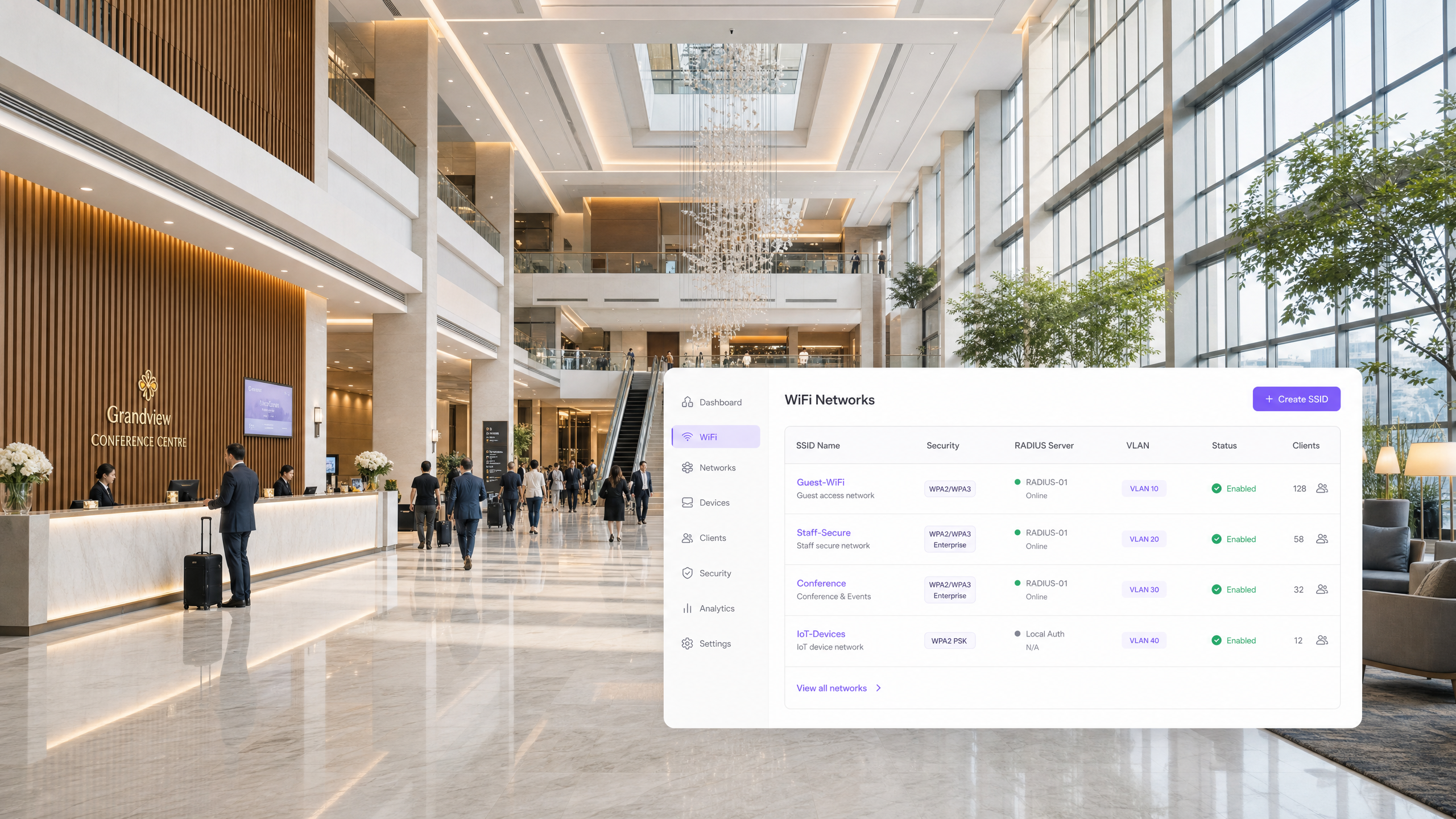
L'implementazione di una rete wireless ad alte prestazioni in ambienti aziendali richiede un delicato equilibrio tra un'esperienza utente fluida e una solida sicurezza tecnica. Per le organizzazioni che utilizzano architetture CommScope Ruckus, che spaziano da stadi e centri congressi ad alta densità a vasti complessi commerciali e gruppi alberghieri, la rete funge da gateway principale per il coinvolgimento digitale. Questa guida fornisce un playbook tecnico definitivo per l'integrazione dei controller Ruckus SmartZone, ZoneDirector e Unleashed con la piattaforma cloud Purple. Dettagliamo i passaggi esatti di configurazione richiesti per implementare il Guest WiFi utilizzando il reindirizzamento del Captive Portal WISPr, reti sicure per il personale tramite lo steering VLAN dinamico 802.1X e l'isolamento di rete multi-tenant utilizzando le chiavi pre-condivise dinamiche (DPSK) di Ruckus. Seguendo queste best practice indipendenti dal fornitore, i team IT possono automatizzare la segmentazione della rete, garantire la conformità a standard come PCI DSS e acquisire dati di prima parte in modo sicuro.
Approfondimento tecnico
L'integrazione tra l'hardware CommScope Ruckus e Purple si basa su protocolli di autenticazione standard del settore e comunicazioni API sicure. L'architettura supporta tre distinti modelli di implementazione, ciascuno al servizio di uno specifico gruppo di utenti all'interno della struttura.
Architettura Guest WiFi (WISPr)
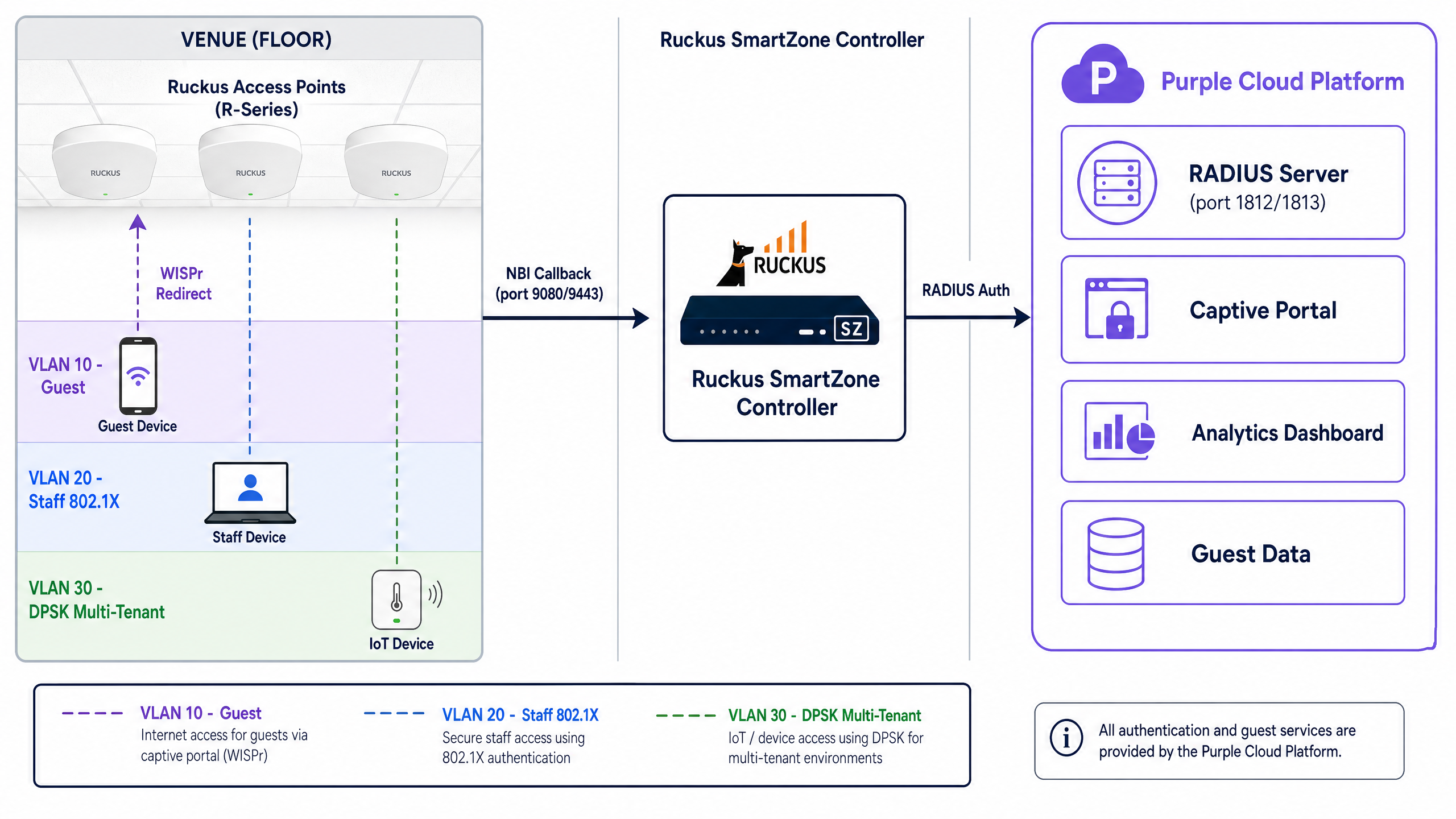
Per le reti ad accesso pubblico nel settore retail e dell'ospitalità, Ruckus utilizza il protocollo WISPr (Wireless Internet Service Provider roaming). Quando un ospite si connette a un SSID aperto, il controller Ruckus intercetta la sua richiesta HTTP iniziale ed emette un reindirizzamento HTTP 302 al Captive Portal esterno di Purple. L'ospite si autentica tramite un meccanismo di opt-in consapevole, come l'e-mail o un provider di identità social. Una volta completata l'autenticazione, Purple comunica nuovamente con il controller Ruckus tramite la Northbound Interface (NBI) per autorizzare l'indirizzo MAC e concedere l'accesso a Internet.
WiFi sicuro per il personale (802.1X e VLAN dinamiche)
I dispositivi del personale richiedono un approccio fondamentalmente diverso. Invece di affidarsi ai Captive Portal, gli ambienti aziendali utilizzano l'autenticazione 802.1X. I dispositivi si autenticano direttamente con l'infrastruttura RADIUS di Purple utilizzando i protocolli EAP-TLS (basato su certificati) o PEAP-MSCHAPv2 (basato su credenziali).
Il componente critico in questo caso è lo steering VLAN dinamico. Quando il server RADIUS di Purple restituisce un messaggio di Access-Accept, include tre attributi standard IETF specifici:
Tunnel-Type(Attributo 64): impostato suVLAN(valore 13)Tunnel-Medium-Type(Attributo 65): impostato suIEEE-802(valore 6)Tunnel-Private-Group-ID(Attributo 81): contiene la stringa dell'ID VLAN (ad es. "20" per il personale)
Il controller Ruckus SmartZone legge questi attributi e tagga dinamicamente il traffico dell'utente, inserendolo nel corretto segmento di rete isolato, indipendentemente dall'access point fisico a cui si è connesso.
Isolamento multi-tenant (Ruckus DPSK)
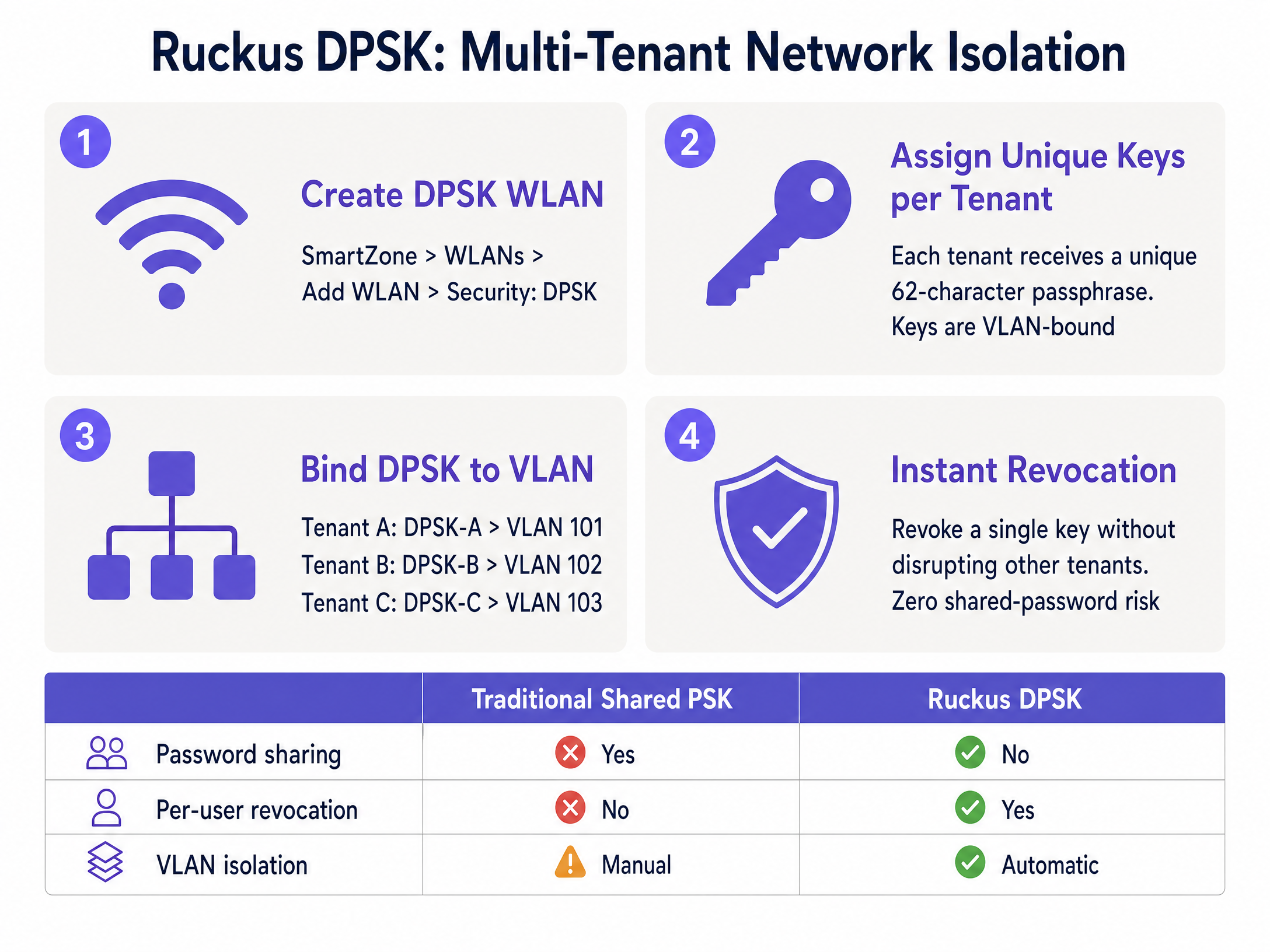
Per ambienti come spazi di co-working, alloggi per studenti e unità abitative plurifamiliari (MDU), la trasmissione di decine di SSID crea gravi interferenze di canale. La tecnologia Dynamic Pre-Shared Key (DPSK) di Ruckus risolve questo problema assegnando una passphrase WPA2/WPA3 univoca a ciascun tenant su un singolo SSID condiviso.
Ogni DPSK è associata a una VLAN specifica. Quando un residente si connette, il controller utilizza la sua chiave univoca per autenticare il dispositivo e inserirlo nella sua VLAN privata. Purple automatizza questo processo tramite l'integrazione API, generando e revocando le chiavi man mano che i tenant entrano ed escono, eliminando i rischi di sicurezza associati alle tradizionali password condivise.
Guida all'implementazione
Questa sezione descrive i passaggi di configurazione specifici richiesti per integrare Purple con un controller Ruckus SmartZone. I passaggi per Unleashed sono ampiamente simili ma omettono il requisito della Northbound Interface.
1. Configurare i server RADIUS AAA
- Passare a Services & Profiles > Authentication.
- Creare un nuovo profilo server AAA con il Service Protocol impostato su RADIUS.
- Inserire l'IP del server primario e la chiave segreta condivisa (Shared Secret) forniti nella console di amministrazione di Purple.
- Impostare la porta di autenticazione su 1812.
- Ripetere questo processo in Services & Profiles > Accounting, impostando la porta su 1813.
2. Configurare il profilo Hotspot WISPr
- Passare a Services & Profiles > Hotspots & Portals > Hotspot (WISPr).
- Creare un nuovo profilo e impostare il Login URL su External.
- Inserire l'URL di reindirizzamento del Captive Portal di Purple.
- Definire il proprio Walled Garden. Questo passaggio è fondamentale. È necessario consentire l'accesso ai domini di Purple prima dell'autenticazione. SmartZone supporta i caratteri jolly (ad es.
*.purple.ai). È inoltre necessario includerecaptive.apple.comper gestire il comportamento del Captive Network Assistant (CNA) di iOS.
3. Disabilitare la crittografia dell'indirizzo MAC (passaggio critico)
Per impostazione predefinita, SmartZone crittografa gli indirizzi MAC e IP passati nell'URL di reindirizzamento. Purple richiede l'indirizzo MAC non elaborato per la gestione della sessione. È necessario disabilitarlo tramite CLI:
enable
config
no encrypt-mac-ip
exit
4. Abilitare la Northbound Interface (NBI)
- Passare a Administration > External Services > WISPr Northbound Interface.
- Abilitare il servizio e configurare un nome utente e una password.
- Fornire queste credenziali a Purple. Assicurarsi che il proprio il firewall consenta il traffico TCP in entrata sulle porte 9080 (HTTP) e 9443 (HTTPS) dagli intervalli IP di Purple.
5. Creazione della WLAN
- Creare una nuova WLAN e impostare il Tipo di autenticazione su Hotspot (WISPr).
- Selezionare il profilo Hotspot e i server AAA configurati in precedenza.
- Per le reti del personale 802.1X, abilitare AAA Override nelle impostazioni avanzate per garantire l'elaborazione degli attributi VLAN dinamici.
Best Practice
Per garantire un'implementazione robusta e sicura, attenersi a queste raccomandazioni standard del settore:
- Isolare il traffico ospiti: Posizionare sempre la rete WiFi ospiti su una VLAN dedicata e abilitare l'isolamento dei client. Questo è un requisito obbligatorio per la conformità PCI DSS se la sede elabora pagamenti sulla stessa infrastruttura fisica.
- Standardizzare gli ID VLAN: Quando si distribuisce lo steering dinamico delle VLAN su più sedi, assicurarsi che lo schema di numerazione delle VLAN sia identico a livello globale (ad es. la VLAN 20 è sempre Staff). Una denominazione incoerente causerà errori di autenticazione.
- Implementare il fallback RADIUS: Configurare una VLAN critica o un meccanismo di fallback sui controller. Se il server RADIUS primario non è raggiungibile, i dispositivi dovrebbero essere inseriti in una VLAN limitata al solo accesso a Internet per mantenere la connettività di base.
- Utilizzare DPSK3 per le nuove installazioni: Se l'hardware Ruckus supporta WPA3, distribuire DPSK3 invece del DPSK legacy per beneficiare della crittografia basata su SAE.
Risoluzione dei problemi e mitigazione dei rischi
Durante l'integrazione di Captive Portal esterni e servizi RADIUS, i tecnici riscontrano comunemente le seguenti modalità di guasto:
- Mancato caricamento del portale: Si tratta quasi sempre di una configurazione errata del Walled Garden. I portali moderni caricano risorse da più CDN e provider di identità. Utilizzare gli strumenti di sviluppo del browser per identificare le richieste bloccate e aggiungere i domini richiesti al proprio SmartZone Walled Garden.
- Autenticazione riuscita ma nessun accesso a Internet: Questo indica un errore della Northbound Interface. SmartZone non riceve la callback di autorizzazione da Purple. Verificare le credenziali NBI e controllare i log del firewall per verificare la presenza di traffico rifiutato sulle porte TCP 9080/9443.
- Assegnazione dinamica della VLAN non riuscita: Se gli utenti 802.1X si autenticano correttamente ma finiscono sulla VLAN predefinita, verificare che AAA Override sia abilitato nelle impostazioni WLAN. Senza questo, SmartZone ignora l'attributo
Tunnel-Private-Group-IDrestituito da Purple.
ROI e impatto aziendale
L'integrazione dell'infrastruttura Ruckus con Purple trasforma una rete wireless standard in un asset aziendale misurabile.
Per i settori retail e hospitality, il Captive Portal acquisisce dati di prima parte verificati, favorendo la crescita dei programmi di fidelizzazione e consentendo campagne di marketing mirate. Una grande catena alberghiera del Regno Unito ha registrato un aumento del 40% nei punteggi di soddisfazione degli ospiti in seguito all'implementazione di Ruckus e Purple.
Per le operazioni IT, lo steering dinamico delle VLAN e l'automazione DPSK riducono drasticamente i costi di configurazione manuale. Invece di gestire porte di switch statiche o reimpostare password condivise quando un tenant se ne va, il controllo degli accessi è centralizzato e automatizzato, mitigando i rischi per la sicurezza e riducendo i ticket di supporto.
Definizioni chiave
WISPr
Wireless Internet Service Provider roaming. An industry-standard protocol used by wireless controllers to intercept HTTP traffic and redirect users to an external captive portal.
This is the foundational architecture for all public Guest WiFi deployments on Ruckus hardware.
Northbound Interface (NBI)
An API on the Ruckus SmartZone controller that allows external platforms to send authorisation commands.
Required for Purple to grant a user internet access after they successfully complete the captive portal login.
Walled Garden
A whitelist of domains and IP addresses that a device is permitted to access before authenticating on the network.
Essential for allowing the captive portal page, its associated images, and social login providers to load for unauthenticated guests.
Dynamic PSK (DPSK)
A Ruckus-proprietary technology that assigns a unique WPA2/WPA3 passphrase to individual users or groups on a single shared SSID.
Used heavily in multi-tenant environments (MDUs, co-working spaces) to provide secure network isolation without SSID bloat.
Dynamic VLAN Steering
The process of automatically assigning a device to a specific network segment (VLAN) based on RADIUS attributes returned during 802.1X authentication.
Allows IT teams to use a single 'Staff' SSID while securely separating HR, Finance, and Front Desk traffic at the network layer.
AAA Override
A configuration setting on wireless controllers that forces the access point to apply the policies (like VLAN IDs) returned by the RADIUS server.
Must be enabled on Ruckus WLANs for dynamic VLAN steering to function correctly.
Client Isolation
A security feature that prevents devices connected to the same wireless network from communicating directly with each other.
A mandatory security control for public Guest WiFi networks to prevent peer-to-peer attacks and ensure compliance.
Captive Network Assistant (CNA)
The mini-browser built into mobile operating systems (like iOS and Android) that automatically pops up when a captive portal is detected.
Engineers must manage CNA behaviour via the Walled Garden to ensure a smooth login experience for mobile users.
Esempi pratici
A 250-room hotel needs to deploy three distinct networks on their Ruckus SmartZone infrastructure: a public guest network, a secure staff network with access to the property management system, and an isolated IoT network for smart thermostats.
The IT team configures three WLANs. The 'Guest-WiFi' WLAN uses Hotspot (WISPr) authentication redirecting to Purple's captive portal, dropping users onto VLAN 10 with client isolation enabled. The 'Staff-Secure' WLAN uses 802.1X EAP authentication against Purple SecurePass; the RADIUS server returns Tunnel-Private-Group-ID = 20, dynamically steering staff to the internal VLAN. The 'IoT-Devices' WLAN uses a static WPA2 PSK bound to VLAN 30, restricted via firewall rules to communicate only with the thermostat control server.
A co-working space operator manages a building with 15 different tenant companies. They need to provide secure, isolated wireless access for each company without broadcasting 15 separate SSIDs.
The operator deploys Ruckus Unleashed and configures a single 'Tenant-WiFi' WLAN using Dynamic PSK (DPSK) security. Within the controller, they enable Per-DPSK VLAN assignment. Each of the 15 tenant companies is issued a unique 62-character passphrase. When Tenant A's employees connect using their specific key, the controller automatically assigns their traffic to VLAN 101. Tenant B's employees use a different key and land on VLAN 102.
Domande di esercitazione
Q1. You have configured a Guest WiFi network on a Ruckus SmartZone controller integrated with Purple. When connecting a test device, the Purple captive portal page appears, but the logo image is missing and the 'Login with Facebook' button does not work. What is the most likely cause?
Suggerimento: Consider what network access the device has before it successfully authenticates.
Visualizza risposta modello
The Walled Garden is misconfigured. The domains hosting the logo image (e.g., a CDN) and the Facebook authentication servers have not been added to the Walled Garden whitelist, so the SmartZone controller is blocking those requests pre-authentication.
Q2. A network engineer is deploying 802.1X for staff access. The Purple RADIUS server is correctly returning the `Tunnel-Private-Group-ID` attribute for VLAN 20. However, when staff connect, they are placed on the default VLAN assigned to the WLAN. How do you resolve this?
Suggerimento: The controller is receiving the RADIUS instructions but choosing to ignore them.
Visualizza risposta modello
You must enable 'AAA Override' in the advanced settings of the WLAN on the SmartZone controller. Without this setting enabled, the controller will not apply the dynamic VLAN attributes returned by the RADIUS server.
Q3. A co-working space wants to provide secure WiFi for 10 different companies. They currently broadcast 10 separate SSIDs, which is causing severe channel interference. They cannot use 802.1X because many devices are shared printers or smart TVs. What is the recommended Ruckus architecture?
Suggerimento: Look for a solution that provides unique encryption keys without requiring enterprise certificates or credentials.
Visualizza risposta modello
Implement Ruckus Dynamic PSK (DPSK) on a single SSID. Issue a unique DPSK to each tenant company, and configure the controller to bind each DPSK to a specific VLAN. This eliminates SSID bloat, provides network isolation, and supports headless devices like printers.
Continua a leggere questa serie
Allied Telesis Access Points Integration with Purple WiFi
Questa guida fornisce un playbook di configurazione completo per l'integrazione degli access point Allied Telesis serie TQ con Purple WiFi. Copre il reindirizzamento del Captive Portal esterno, l'autenticazione RADIUS 802.1X e l'instradamento dinamico della VLAN tramite Private Pre-Shared Keys (PPSK) per distribuzioni multi-tenant sicure.
Cisco WLC and Catalyst Integration with Purple WiFi: Step-by-Step Guest Access Guide
Questa guida descrive in dettaglio l'integrazione passo-passo di Cisco WLC e Catalyst 9800 Wireless con Purple, coprendo il reindirizzamento al Captive Portal per Guest WiFi tramite Central Web Authentication, il WiFi aziendale sicuro per il personale tramite 802.1X EAP-TLS e la segmentazione multi-tenant tramite Cisco Identity Pre-Shared Keys (iPSK) con assegnazione dinamica della VLAN. È scritta per architetti di rete aziendali e direttori della sicurezza IT che distribuiscono l'infrastruttura Cisco nei settori hospitality, retail e grandi spazi pubblici.
Huawei AirEngine and CloudCampus Integration with Purple WiFi
Questa guida fornisce istruzioni dettagliate per l'integrazione degli access point Huawei AirEngine e di iMaster NCE-Campus con Purple WiFi. Copre la configurazione del Captive Portal, l'autenticazione del personale tramite 802.1X e lo steering dinamico delle VLAN tramite PPSK per le reti aziendali.