
Captive Portal personalizzato: Guida a HTML e CSS
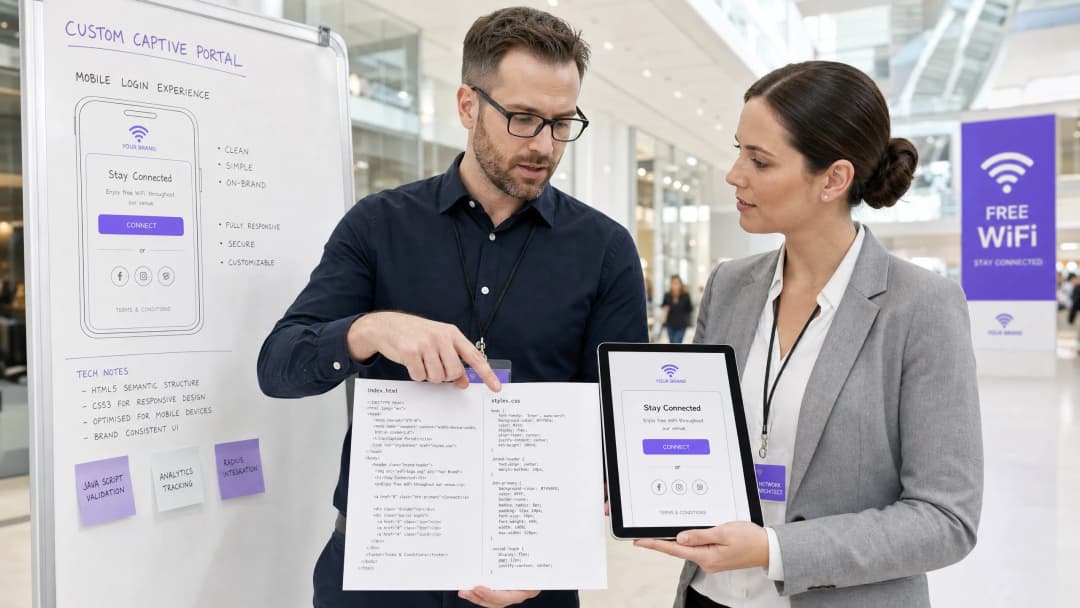
Questa guida di riferimento tecnico autorevole delinea gli standard di sviluppo, l'architettura CSS e i vincoli a livello di rete necessari per progettare e codificare una landing page per un Captive Portal personalizzato. Fornisce a sviluppatori frontend e architetti di rete strategie attuabili per navigare negli ambienti Apple CNA e webview Android, garantendo esperienze WiFi per gli ospiti perfette al pixel, conformi e ad altissime prestazioni.
Video overview
Ascolta questa guida
Visualizza trascrizione del podcast
Parte della nostra serie principale: Guida al Captive Portal →
Executive Summary
Per le sedi aziendali - che spaziano dagli hotel di lusso Hospitality e catene retail Retail agli hub di transito Transport e moderni campus medici Healthcare - la pagina di benvenuto del WiFi per gli ospiti rappresenta la porta d'ingresso digitale. Tuttavia, oltre il 90% degli accessi al WiFi per gli ospiti avviene su dispositivi mobili, dove la visualizzazione non è gestita da browser standard come Safari o Chrome, ma da webview Captive Network Assistant (CNA) altamente limitate [1]. Questi "mini-browser" impongono severe limitazioni di sandbox: bloccano i CDN esterni, disabilitano i cookie persistenti, ignorano i web font esterni e limitano severamente l'esecuzione di JavaScript per mitigare i rischi di sicurezza e prevenire il dirottamento delle sessioni [2].
Quando uno sviluppatore progetta una pagina di benvenuto utilizzando gli standard web tradizionali, questi vincoli si traducono in layout compromessi, elementi del brand mancanti e pulsanti di accesso non funzionanti, con un impatto diretto sulla soddisfazione del cliente e sul coinvolgimento digitale. Questa guida fornisce soluzioni a queste sfide, presentando pratiche di codifica difensive - come CSS inline, codifica delle risorse in Base64, stack di font di sistema e handshake di autenticazione espliciti guidati dalla navigazione - per garantire una visualizzazione cross-platform fluida. Inoltre, esaminiamo come l'utilizzo di una soluzione gestita come il costruttore di portali di Purple consenta agli sviluppatori di mantenere il controllo creativo completo su HTML/CSS delegando l'autenticazione RADIUS, la scalabilità del database, la conformità GDPR/PCI e le integrazioni AP multi-vendor [3].
Approfondimento Tecnico
Per creare un Captive Portal personalizzato e resiliente, gli sviluppatori devono comprendere l'intercettazione a livello di rete e la virtualizzazione del browser che si verificano quando un ospite si associa a un SSID aperto.
Il Ciclo di Vita del Captive Portal
Quando un dispositivo client si associa a un SSID captive, viene avviata la seguente sequenza:
- Associazione IP: Il dispositivo completa un handshake a 3 vie e richiede un indirizzo IP tramite DHCP.
- Sonda di Connettività Attiva: Il gestore di rete in background del sistema operativo invia immediatamente una richiesta HTTP GET a un URL canary dedicato e indipendente dal fornitore (ad esempio,
http://captive.apple.com/hotspot-detect.htmldi Apple ohttp://connectivitycheck.gstatic.com/generate_204di Google) [1]. - Intercettazione DNS/HTTP: Il Wireless LAN Controller (WLC) o l'Access Point (AP) locale intercetta questa richiesta HTTP sulla porta 80. Invece di restituire lo stato HTTP 200 o 204 previsto, il gateway reindirizza il traffico del client all'URL della landing page del captive portal tramite un reindirizzamento HTTP 302 [2].
- Generazione della Webview: Rilevando il reindirizzamento, il sistema operativo genera il proprio mini-browser nativo Captive Network Assistant (CNA) per visualizzare la pagina di benvenuto reindirizzata, evitando che l'utente debba aprire manualmente un browser completo.5. Autenticazione e transizione di stato: l'utente compila il modulo di login, inviando le credenziali al server del portale, che istruisce il gateway (spesso tramite un Access-Accept RADIUS o una chiamata API esterna) ad autorizzare l'indirizzo MAC.
- Handshake di uscita CNA: il mini-browser CNA esegue un altro HTTP GET verso il suo URL canary. Se riceve la risposta 200/204 prevista, cambia il pulsante in alto a destra da "Annulla" a "Fine" e stabilisce la connessione WiFi come interfaccia di rete primaria.
Vincoli del mini-browser specifici per piattaforma
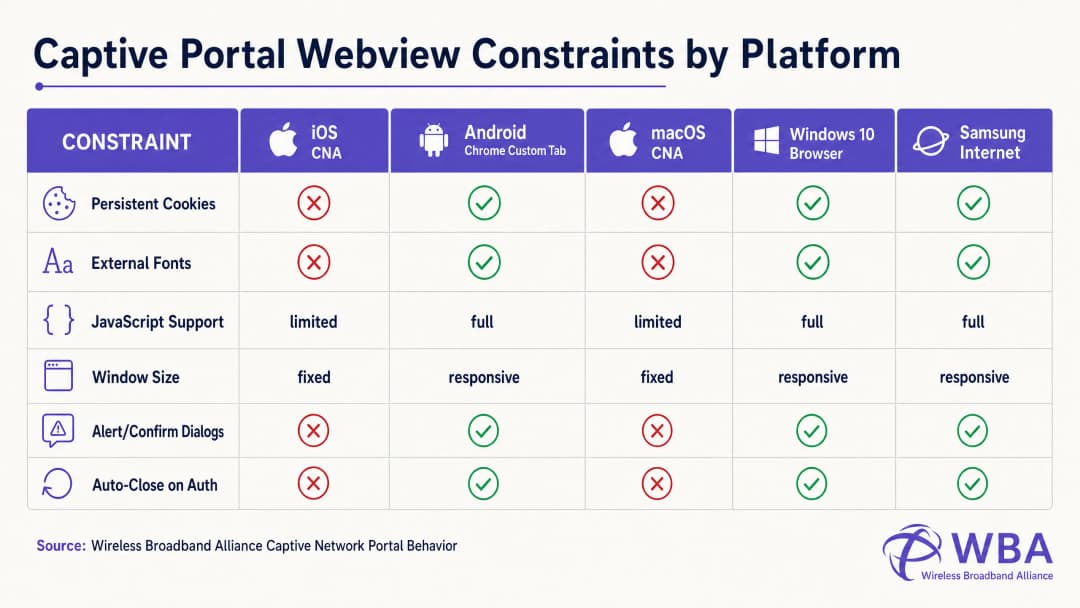
Ogni sistema operativo gestisce questo ciclo di vita all'interno di diversi ambienti webview, con conseguente comportamento altamente frammentato. La tabella seguente illustra in dettaglio questi vincoli critici:
| Piattaforma / Webview | Metodo di visualizzazione | Cookie persistenti | Font web esterni | Esecuzione JavaScript | Dimensioni della finestra | Trigger dell'handshake di uscita |
|---|---|---|---|---|---|---|
| Apple iOS CNA (Websheet) | Popup del mini-browser | Bloccati (Distrutti alla chiusura) | Bloccati (Offline) | Limitata (No localStorage/sessionStorage) | Reattiva (Larghezza del dispositivo) | Solo reindirizzamento HTTP a pagina intera [1] |
| Apple macOS CNA (Captive Network Assistant) | Popup del mini-browser | Bloccati | Bloccati | Limitata (No finestre di dialogo alert/confirm) | Fissa (900px x 572px) | Solo reindirizzamento HTTP a pagina intera |
| Android (Google) (CaptivePortalLogin) | Notifica push -> Scheda personalizzata Chrome | Consentiti (Condivisi con Chrome) | Consentiti (Se inclusi nella whitelist del walled garden) | Completa | Reattiva | Automatico (API Captive Portal / Controllo 204) [2] |
| Samsung Android (Samsung Internet) | Notifica push -> Mini-browser | Consentiti | Consentiti | Completa | Reattiva | Automatico |
| Windows 10/11 (Browser predefinito) | Avvio automatico del browser predefinito | Consentiti (Contesto completo del browser) | Consentiti | Completa | Reattiva | Manuale / Automatico |
Aggirare la trappola del pulsante "Fine" su Apple CNA
Uno dei problemi di funzionamento più frequenti nello sviluppo di Captive Portal personalizzati è la trappola del pulsante "Fine" sui dispositivi iOS. Quando un utente esegue l'autenticazione, la webview dell'iOS Websheet deve rilevare che la rete non è più captive. Per farlo, monitora il successo delle sue richieste canary in background.
Fondamentalmente, il CNA di iOS attiverà questo controllo solo a seguito di una navigazione HTTP a pagina intera (reindirizzamento della posizione). Se uno sviluppatore crea una moderna Single Page Application (SPA) che invia i dati del modulo tramite una chiamata AJAX asincrona (ad es. fetch() o Axios) e aggiorna il DOM in modo dinamico senza modificare l'URL, il CNA non eseguirà mai una seconda volta il suo controllo di connettività. L'utente verrà autenticato a livello di gateway, ma il pulsante del CNA nell'angolo in alto a destra rimarrà impostato su "Annulla". Se l'utente frustrato fa clic su "Annulla", il dispositivo iOS si disassocerà immediatamente dall'SSID, interrompendo la sessione WiFi [1].
Per evitare questo problema, il gestore del successo dell'autenticazione deve eseguire un reindirizzamento a pagina intera verso una pagina di destinazione fisica (ad es. window.location.href = '/success') o inviare il modulo di accesso in modo nativo tramite una richiesta standard HTTP POST.
Guida all'implementazione
Per garantire un rendering coerente su tutte le piattaforme, gli sviluppatori devono passare dal design web moderno e ricco di risorse a uno stile di codifica altamente autonomo e difensivo.
La regola d'oro: Progettare per una connettività Internet pari a zero
Durante lo stato captive, il dispositivo client non ha alcun accesso a Internet. Può solo risolvere e accedere a indirizzi IP e domini esplicitamente inclusi nella whitelist del controller wireless denominata Walled Garden (come l'IP del server del Captive Portal stesso). Pertanto, qualsiasi risorsa esterna a cui si fa riferimento nel codice HTML non verrà caricata, compromettendo il layout.
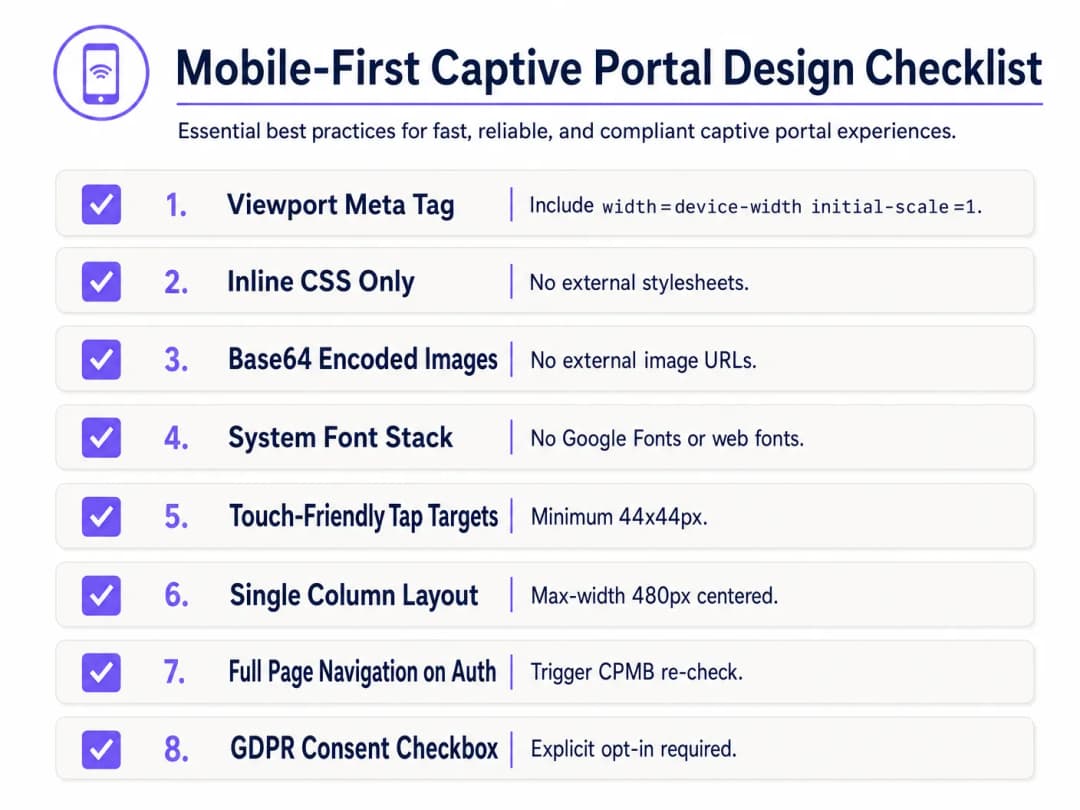
Per progettare in modo difensivo, implementa la seguente Lista di controllo per la progettazione del Captive Portal Mobile-First:
1. Configurazione del Viewport
Per evitare che i dispositivi mobili riducano il viewport a una larghezza desktop (in genere 980px), l'HTML <head> deve includere un meta tag responsive per il viewport. Senza di questo, il testo e i campi di input appariranno microscopici sui dispositivi mobili:
<meta name="viewport" content="width=device-width, initial-scale=1.0, maximum-scale=1.0, user-scalable=no">
2. Incorporamento di CSS in linea ed eliminazione delle dipendenze esterne
Non collegare mai file CSS esterni o CDN (ad es. Bootstrap, Tailwind o Google Fonts). Tutto il codice CSS deve essere inserito all'interno di un blocco <style> nell' <head> dell'HTML.
Per la tipografia, utilizza un system font stack che fa riferimento ai caratteri locali preinstallati nel sistema operativo. In questo modo si evitano del tutto le richieste HTTP e si garantisce che la pagina si carichi istantaneamente utilizzando il carattere sans-serif nativo e di alta qualità del dispositivo:
body {
    font-family: -apple-system, BlinkMacSystemFont, "Segoe UI", Roboto, Helvetica, Arial, sans-serif;
    background-color: #F5F1ED; /* Pearl White Brand Colour */
    color: #011638; /* Dark Blue Brand Colour */
    margin: 0;
    padding: 0;
    display: flex;
    flex-direction: column;
    align-items: center;
    justify-content: center;
    min-height: 100vh;
}
3. Codifica degli Asset in Base64
Le immagini, i loghi e le icone non devono essere richiamati tramite URL HTTP esterni, a meno che il dominio ospitante non sia inserito nella whitelist del walled garden del gateway. Il metodo più affidabile consiste nel codificare i piccoli elementi visivi (come i loghi PNG o SVG) direttamente all'interno dell'HTML o del CSS come URI di dati Base64:
<!-- Inline Base64 Logo Example -->
<img src="data:image/svg+xml;base64,PHN2ZyB4bWxucz0iaHR0cDovL3d3dy53My5vcmcvMjAwMC9zdmciIHZpZXdCb3g9IjAgMCAxMDAgMTAwIj48Y2lyY2xlIGN4PSI1MCIgY3k9IjUwIiByPSI0MCIgZmlsbD0iIzc0NThGRCIvPjwvc3ZnPg==" alt="Purple Logo" class="brand-logo">
4. Ottimizzazione dei Campi di Input e dei Target di Selezione (Tap)
Per garantire la conformità con gli standard di usabilità su dispositivi mobili (come le linee guida sull'interfaccia umana di Apple), tutti gli elementi interattivi devono essere ottimizzati per l'input tattile:
- Dimensione del Font di Input: Le dimensioni del carattere del testo di input devono essere di almeno 16px. Se la dimensione del font è inferiore (ad es. 14px), iOS Safari e il CNA ingrandiranno automaticamente il campo di input al momento della messa a fuoco, distorcendo il layout della pagina [1].
- Target di Selezione: Pulsanti, caselle di controllo e collegamenti devono avere un'area minima del target di selezione pari a 44px x 44px per evitare clic accidentali o frustrazione da parte dell'utente.
5. Consenso Legale e Conformità GDPR
Durante l'acquisizione dei dati degli ospiti (ad es. e-mail, numero di telefono o profili social), la struttura HTML deve supportare un consenso legale esplicito. Ai sensi del GDPR, le caselle di controllo preselezionate o le dichiarazioni di consenso implicite (ad es. "Accedendo, accetti i nostri termini") non sono conformi [3].
- Fornire una casella di controllo non selezionata per impostazione predefinita per i Termini e Condizioni e l'Informativa sulla Privacy.
- Inserire il testo legale dettagliato in un contenitore ad altezza limitata con barra di scorrimento (
max-height: 120px; overflow-y: auto;) per mantenere il modulo di login principale sopra la piega della pagina (above the fold).
<div class="consent-container">
    <input type="checkbox" id="terms_consent" name="terms_consent" required>
    <label for="terms_consent">
        I explicitly agree to the <a href="#" onclick="showTerms()">Terms of Service</a> and consent to the processing of my data in accordance with the <a href="#" onclick="showPrivacy()">Privacy Policy</a>.
    </label>
</div>
Hai domande sulla tua configurazione specifica?
Il nostro team collabora con gestori di sedi, responsabili IT e ingegneri di rete in 80.000 sedi. Prenota una chiamata di 20 minuti e ti mostreremo come altri professionisti come te hanno risolto il problema.
Modello HTML/CSS Personalizzato per Captive Portal
Di seguito è riportato un modello HTML/CSS a file singolo, completo e pronto per la produzione, che integra tutte le migliori pratiche ottimizzate per dispositivi mobili e conformi al CNA. Presenta un layout responsive, un set di caratteri di sistema, segnaposto per asset pronti per Base64, campi di input touch-friendly e strutture di consenso esplicito conformi al GDPR:
<!DOCTYPE html>
<html lang="en">
<head>
    <meta charset="UTF-8">
    <meta name="viewport" content="width=device-width, initial-scale=1.0, maximum-scale=1.0, user-scalable=no">
    <title>Guest WiFi Login</title>
    <style>
        /* CSS Reset & Variable Declarations */
        :root {
            --color-primary: #7458FD; /* Purple Brand Colour */
            --color-dark: #011638; /* Dark Blue */
            --color-light: #F5F1ED; /* Pearl White */
            --color-white: #FFFFFF;
"}            --color-border: #D1D5DB;
            --radius-container: 12px;
            --radius-element: 6px;
        }

        * {
            box-sizing: border-box;
            -webkit-tap-highlight-color: transparent;
        }

        body {
            font-family: -apple-system, BlinkMacSystemFont, "Segoe UI", Roboto, Helvetica, Arial, sans-serif;
            background-color: var(--color-light);
            color: var(--color-dark);
            margin: 0;
            padding: 20px;
            display: flex;
            flex-direction: column;
            align-items: center;
            justify-content: center;
            min-height: 100vh;
        }

        /* Layout scheda reattiva */
        .portal-card {
            background-color: var(--color-white);
            width: 100%;
            max-width: 420px;
            padding: 32px 24px;
            border-radius: var(--radius-container);
            box-shadow: 0 4px 20px rgba(1, 22, 56, 0.05);
            text-align: center;
        }

        .logo-container {
            margin-bottom: 24px;
        }

        /* Segnaposto logo incorporato in Base64 */
        .logo {
            width: 120px;
            height: auto;
        }

        h1 {
            font-size: 24px;
            font-weight: 700;
            margin: 0 0 8px 0;
            color: var(--color-dark);
        }

        p {
            font-size: 14px;
            color: #4B5563;
            margin: 0 0 24px 0;
            line-height: 1.5;
        }

        /* Stili modulo */
        .form-group {
            text-align: left;
            margin-bottom: 16px;
        }

        label {
            display: block;
            font-size: 14px;
            font-weight: 600;
            margin-bottom: 6px;
            color: var(--color-dark);
        }

        /* Critico: la dimensione del carattere deve essere di almeno 16px per impedire lo zoom automatico in iOS */
        input[type="email"],
        input[type="text"] {
            width: 100%;
            height: 48px;
            padding: 12px 16px;
            font-size: 16px;
            border: 1px solid var(--color-border);
            border-radius: var(--radius-element);
            background-color: var(--color-white);
            color: var(--color-dark);
            outline: none;
            transition: border-color 0.2s;
        }

        input[type="email"]:focus,
        input[type="text"]:focus {
            border-color: var(--color-primary);
            box-shadow: 0 0 0 3px rgba(116, 88, 253, 0.15);
        }

        /* Stili consenso */
        .consent-group {
            display: flex;
            align-items: flex-start;
            text-align: left;
            margin: 20px 0;
        }

        /* Dimensionamento del target ottimizzato per il touch */
        input[type="checkbox"] {
            width: 20px;
            height: 20px;
            margin: 2px 12px 0 0;
            flex-shrink: 0;
            cursor: pointer;
            accent-color: var(--color-primary);
        }

        .consent-label {
            font-size: 13px;
            line-height: 1.4;
            color: #4B5563;
            user-select: none;
        }

        .consent-label a {
            color: var(--color-primary);
            text-decoration: none;
            font-weight: 600;
        }

        .consent-label a:hover {
            text-decoration: underline;
        }

        /* Touch-Friendly CTA Button (Minimum 44px height) */
        .btn-submit {
            width: 100%;
            height: 48px;
            background-color: var(--color-primary);
            color: var(--color-white);
            border: none;
            border-radius: var(--radius-element);
            font-size: 16px;
            font-weight: 600;
            cursor: pointer;
            transition: background-color 0.2s;
            display: flex;
            align-items: center;
            justify-content: center;
        }

        .btn-submit:hover {
            background-color: #5B3EE3;
        }

        .btn-submit:active {
            background-color: #4A2FD4;
        }

        /* Legal Terms Scrollbox */
        .terms-scrollbox {
            display: none; /* Toggled via JS */
            text-align: left;
            font-size: 11px;
            color: #6B7280;
            background-color: var(--color-light);
            padding: 12px;
            border-radius: var(--radius-element);
            max-height: 100px;
            overflow-y: auto;
            margin-bottom: 16px;
            border: 1px solid var(--color-border);
        }

        .footer {
            margin-top: 24px;
            font-size: 11px;
            color: #9CA3AF;
        }
    </style>
</head>
<body>

    <div class="portal-card">
        <div class="logo-container">
            <!-- Replace src with your actual Base64-encoded SVG or PNG -->
            <svg class="logo" xmlns="http://www.w3.org/2000/svg" viewBox="0 0 100 30">
                <rect width="100" height="30" rx="6" fill="#7458FD"/>
                <text x="50" y="20" font-family="sans-serif" font-size="12" fill="#FFFFFF" font-weight="bold" text-anchor="middle">IL TUO BRAND</text>
            </svg>
        </div>

        <h1>Benvenuto nel WiFi per gli ospiti</h1>
        <p>Inserisci i tuoi dati qui sotto per accedere a internet in modo sicuro e ad alta velocità.</p>

        <!-- Form must submit natively (full page navigation) to clear Apple CNA -->
        <form action="/login/submit" method="POST" onsubmit="return validateForm()">
            <div class="form-group">
                <label for="guest_name">Nome e Cognome</label>
                <input type="text" id="guest_name" name="name" placeholder="Mario Rossi" required autocomplete="name">
            </div>

            <div class="form-group">
                <label for="guest_email">Indirizzo e-mail</label>
                <input type="email" id="guest_email" name="email" placeholder="john@example.com" required autocomplete="email">
            </div>

            <div class="consent-group">
                <input type="checkbox" id="terms_consent" name="terms_accepted" required>
                <label for="terms_consent" class="consent-label">
                    Accetto i <a href="#" onclick="toggleTerms(event)">Termini di Servizio</a> e acconsento al trattamento dei dati in conformità con le normative GDPR.
                </label>
            </div>

            <div id="terms_box" class="terms-scrollbox">
                <strong>Termini di Servizio WiFi:</strong><br>
                1. Questo servizio viene fornito così com'è senza garanzie.<br>
                2. Gli utenti non devono intraprendere attività illegali ad alta intensità di banda.<br>
                3. I dati personali vengono raccolti esclusivamente per l'autenticazione e il consenso al marketing in conformità con la nostra Informativa sulla Privacy.
            </div>

            <button type="submit" class="btn-submit">Connettiti al WiFi</button>
        </form>

        <div class="footer">
            Powered by Purple | Secure Guest WiFi
        </div>
    </div>

    <script>
        function toggleTerms(e) {
            e.preventDefault();
            var box = document.getElementById('terms_box');
            box.style.display = (box.style.display === 'block') ? 'none' : 'block';
        }

        function validateForm() {
            var consent = document.getElementById('terms_consent');
            if (!consent.checked) {
                alert('È necessario accettare i Termini di Servizio per connettersi.');
                return false;
            }
            return true;
        }
    </script>
</body>
</html>
Risoluzione dei problemi e mitigazione dei rischi
Durante l'implementazione di Captive Portal HTML/CSS con codice personalizzato, i team di gestione IT incontrano frequentemente diversi gravi rischi operativi:
1. Il loop di avviso del certificato SSL/TLS
Poiché i Captive Portal funzionano intercettando il traffico, presentano un conflitto fondamentale con la moderna sicurezza web HTTPS. Quando un utente tenta di visitare un sito HTTPS (ad es. https://www.google.com) e il gateway tenta di reindirizzare quel traffico verso un Captive Portal HTTP, il browser rileva una mancata corrispondenza nel certificato SSL e mostra un avviso di sicurezza critico "La tua connessione non è privata".
- Mitigazione: Non tentare mai di intercettare direttamente il traffico HTTPS. Affidarsi interamente all'assistente CNA nativo del sistema operativo (che effettua una richiesta HTTP non crittografata per attivare il reindirizzamento). Assicurarsi che il dominio del Captive Portal disponga di un certificato SSL valido e pubblicamente attendibile (ad es. Let's Encrypt o DigiCert) e che sia servito tramite HTTPS solo dopo che il reindirizzamento HTTP iniziale ha indirizzato con successo l'utente al dominio del portale [2].
2. Errori di risoluzione DNS (la trappola del Walled Garden)
Se la tua pagina HTML personalizzata fa riferimento a risorse esterne - come un endpoint OAuth di accesso social (ad es. Facebook, Google) o un gateway di pagamento - le richieste DNS per questi domini falliranno a meno che non siano esplicitamente inserite nella whitelist del Walled Garden del controller wireless. Se un dominio manca dalla whitelist, il flusso di accesso si bloccherà, mostrando una schermata vuota.
- Mitigazione: Mantieni un elenco Walled Garden rigoroso e minimale. Se utilizzi gli accessi social, inserisci nella whitelist i domini wildcard specifici consigliati dai provider di identità (ad es.
*.google.com,*.gstatic.com).
3. Vulnerabilità di Session Timeout e MAC Spoofing
I Captive Portal standard autenticano i dispositivi in base ai loro indirizzi MAC. Tuttavia, i moderni sistemi operativi mobili (iOS 14+ e Android 10+) utilizzano per impostazione predefinita indirizzi MAC casuali (indirizzi WiFi privati), ruotandoli periodicamente. Ciò può far sì che agli ospiti venga richiesto ripetutamente di ripetere l'autenticazione, compromettendo l'esperienza utente [1].
- Mitigazione: Implementa session timeout ragionevoli (ad es. 24 ore) sul server RADIUS per prevenire sessioni inattive, e utilizza standard di autenticazione moderni come Passpoint (Hotspot 2.0) o WPA3-Enterprise per un onboarding fluido e sicuro che bypassi completamente i Captive Portal basati su MAC.
Rilevanza del Prodotto Purple: Sviluppo Interno vs. Acquisto
Sebbene la codifica di una singola pagina HTML sia semplice, ospitare, proteggere e scalare un'infrastruttura di Captive Portal personalizzata comporta enormi ostacoli tecnici e di conformità. La tabella seguente confronta le realtà ingegneristiche e operative dell'hosting autonomo di un portale personalizzato rispetto all'utilizzo della piattaforma aziendale gestita di Purple:
| Caratteristica / Requisito Operativo | Portale Personalizzato in Self-Hosting | Piattaforma Purple Enterprise WiFi |
|---|---|---|
| Personalizzazione HTML/CSS | Codifica completamente manuale, caricamento dei file sui singoli AP o server web locali. | Editor per sviluppatori pixel-perfect che consente inserimenti di HTML/CSS personalizzati, combinato con un builder visivo drag-and-drop. |
| Infrastruttura RADIUS | È necessario distribuire, configurare e mantenere server FreeRADIUS o Cloud RADIUS ad alta disponibilità [4]. | RADIUS nativo del cloud, integrato e distribuito a livello globale con ridondanza active-active e SLA di uptime del 99,99%. |
| Supporto AP Multi-Vendor | Script di integrazione personalizzati richiesti per ciascun fornitore di hardware (Cisco, Aruba, Meraki, Ruckus) [5]. | Integrazione nativa e immediata con oltre 200 modelli di hardware; implementazione unificata del portale su parchi macchine con hardware misto. |
| Privacy dei Dati e Conformità | La sede si assume il 100% della responsabilità legale per la conformità a GDPR, CCPA e PCI DSS, inclusi la crittografia sicura del database e i flussi di lavoro per la cancellazione dei dati. | Completamente conforme fin dalla progettazione. Gestione del consenso integrata, richieste di cancellazione dei dati degli interessati automatizzate e hosting sicuro certificato ISO 27001. |
| Analytics & Marketing | Richiede la creazione di pipeline personalizzate per l'acquisizione dei dati e l'integrazione di strumenti di marketing di terze parti. | Dashboard di analytics di livello enterprise con tracciamento delle presenze in tempo reale, metriche sul tasso di ritorno e trigger per campagne di marketing automatizzate [6]. |
| Integrazioni con Identity Provider | Integrazioni OAuth2 manuali con Google, Facebook, Apple e gateway SMS locali. | Integrazioni con un clic con le principali piattaforme social, gateway SMS e Azure AD / Okta per gli ospiti aziendali. |
La piattaforma di Purple risolve il dilemma "Build vs. Buy". Offre agli sviluppatori la completa libertà creativa di uno spazio di lavoro HTML/CSS personalizzato, eliminando al contempo la complessa e rischiosa progettazione dell'infrastruttura backend necessaria per supportare l'autenticazione RADIUS sicura su scala.
ROI e impatto aziendale
Investire in un Captive Portal personalizzato, reattivo e progettato in modo professionale offre ritorni quantificabili in tutte le operazioni IT, nel marketing e nella conformità legale.
1. Riduzione dei costi operativi (ticket dell'helpdesk IT)
Nelle distribuzioni su larga scala, come uno stadio o una catena di vendita al dettaglio multi-sito, un Captive Portal malfunzionante è una delle cause principali dell'aumento dei ticket di supporto IT. Quando gli ospiti visualizzano una "schermata bianca" o un pulsante di accesso che non risponde, sovraccaricano il personale in loco o inviano ticket di supporto.
$$\text{Risparmio annuale sul supporto} = (\text{Visite annuali totali degli ospiti} \times \text{Tasso di errore del portale} \times \text{Tasso di contatto dell'helpdesk}) \times \text{Costo per ticket di supporto}$$
- Scenario: un centro congressi con 1.000.000 di visitatori annuali. Un portale codificato male ha un tasso di errore del 5% sui dispositivi iOS più vecchi, il che porta a un tasso di contatto dell'helpdesk del 10%. Con un costo standard del settore di 15 $ per ticket di supporto, il costo operativo è: $$(1.000.000 \times 0,05 \times 0,10) \times $15 = $75.000 \text{ all'anno in costi di supporto evitabili}$$
- Risultato: il passaggio a un modello ottimizzato per CNA e pensato prima di tutto per i dispositivi mobili riduce il tasso di errore del portale a <0,1%, eliminando quasi del tutto questo spreco operativo.
2. Acquisizione dei dati di marketing e ottimizzazione dell'opt-in
Per i punti vendita al dettaglio e i luoghi di ospitalità, il portale WiFi per gli ospiti è il meccanismo principale per acquisire dati dei clienti di prima parte puliti. Un'interfaccia utente progettata male, con testo microscopico o un layout del modulo macchinoso, causa elevati tassi di rimbalzo - gli utenti abbandonano del tutto il processo di accesso, con conseguente perdita di opportunità di marketing.
- Caso di studio (Retail): una catena di negozi nazionale ha implementato un Captive Portal ottimizzato per i dispositivi mobili utilizzando la piattaforma di Purple. Sostituendo un modulo di accesso in più passaggi con un campo singolo per l'inserimento dell'e-mail (dimensione font: 16px) e un pulsante con area tattile ottimizzata da 48px, hanno registrato un incremento del 42% delle registrazioni completate e un aumento del 28% delle iscrizioni alla newsletter di marketing nel primo trimestre [6].
3. Mitigazione dei rischi legali e normativi
Ai sensi di GDPR e CCPA, la raccolta di dati non conforme comporta severe sanzioni finanziarie (fino al 4% del fatturato annuo globale ai sensi del GDPR). Affidarsi a caselle di controllo preselezionate o non fornire un'Informativa sulla Privacy chiara e facilmente accessibile sulla splash page espone l'azienda a un'immensa responsabilità legale.
- ROI di mitigazione: L'implementazione di una casella di controllo del consenso esplicita e non selezionata e l'hosting dei termini all'interno di una casella di scorrimento ottimizzata garantiscono la conformità normativa al 100%, mitigando il rischio di sanzioni normative multimilionarie e proteggendo la reputazione del marchio.
Sintesi dei punti chiave
- La Sandbox CNA è restrittiva: Il Websheet iOS di Apple e il CNA macOS sono ambienti altamente protetti da sandbox che bloccano risorse esterne, cookie e font web. Tutti gli stili e le risorse devono essere autonomi (CSS inline, immagini Base64, font di sistema) [1].
- AJAX interrompe l'handshake di uscita di iOS: Per far passare correttamente il dispositivo iOS da "connessione limitata" a "connesso" (cambiando il pulsante in alto a destra da "Annulla" a "Fine"), è necessario attivare un reindirizzamento HTTP a pagina intera. Gli aggiornamenti DOM asincroni lasceranno il dispositivo in un ciclo di captive portal continuo.
- Il Mobile-First è obbligatorio: Oltre il 90% degli accessi avviene da mobile. Progetta un layout a colonna singola (larghezza massima: 480px), utilizza target di tocco ottimizzati per il mobile (minimo 44px x 44px) e applica una dimensione minima del carattere di 16px su tutti i campi di inserimento testo per impedire lo zoom automatico del browser iOS.
- I Walled Garden controllano il DNS: Qualsiasi dominio esterno a cui si fa riferimento durante l'accesso (ad esempio, le API di login social) deve essere esplicitamente inserito nella whitelist del walled garden del controller wireless, altrimenti la pagina non si caricherà.
- Purple elimina la complessità del backend: L'utilizzo del costruttore di portali di Purple offre agli sviluppatori il controllo completo di HTML/CSS tramite un editor personalizzato, scaricando al contempo gli immensi oneri di sicurezza, scalabilità e conformità di RADIUS, integrazioni AP multi-vendor e gestione dei database conforme al GDPR [3].
Riferimenti
- [1] Wireless Broadband Alliance: Captive Network Portal Behaviour
- [2] Android Open Source Project: Captive Portal Login Webview Integration
- [3] European Data Protection Board: Guidelines on Consent under Regulation 2016/679
- [4] Come implementare l'autenticazione 802.1X con Cloud RADIUS
- [5] AP wireless Cisco: Guida 2026 ai prodotti e all'implementazione
- [6] Piattaforma di marketing e analisi Purple WiFi
-
Ascolta il briefing tecnico
Ascolta un senior solutions architect discutere i vincoli tecnici e le strategie di implementazione per i Captive Portal personalizzati:
Definizioni chiave
Captive Portal
Una pagina web che viene mostrata agli utenti appena connessi a una rete WiFi prima che venga concesso loro un accesso più ampio alle risorse di rete, solitamente utilizzata per l'autenticazione, il pagamento o la visualizzazione dei termini di servizio.
I team IT distribuiscono i Captive Portal a livello di gateway per controllare l'accesso degli ospiti, acquisire i dati degli utenti e garantire la conformità legale.
Captive Network Assistant (CNA)
Un mini-browser protetto e altamente limitato, avviato automaticamente dai sistemi operativi (come Apple iOS e macOS) al rilevamento del reindirizzamento di una rete captive, progettato esclusivamente per facilitare l'autenticazione sul portale.
Le visualizzazioni web dei CNA impongono limitazioni rigide, tra cui il blocco delle CDN esterne, dei cookie persistenti e dello storage locale, che spesso compromettono i normali design web.
Walled Garden
Un elenco limitato di indirizzi IP, subnet o nomi di dominio a cui un utente ospite non autenticato è autorizzato ad accedere attraverso il gateway prima di completare la procedura di accesso al Captive Portal.
Gli sviluppatori devono assicurarsi che qualsiasi risorsa esterna (come le API per il login social o i gateway di pagamento) sia inserita nella whitelist del walled garden per evitare che il flusso di accesso si blocchi.
Codifica Base64
Uno schema di codifica da binario a testo che rappresenta i dati binari (come le immagini) come una stringa ASCII, consentendo di incorporare le risorse direttamente nei documenti HTML o CSS.
L'utilizzo della codifica Base64 per loghi e icone elimina le richieste HTTP esterne, garantendo che gli elementi grafici vengano visualizzati perfettamente negli ambienti CNA offline.
RADIUS (Remote Authentication Dial-In User Service)
Un protocollo di rete che fornisce la gestione centralizzata di autenticazione, autorizzazione e tracciamento (AAA) per gli utenti che si connettono e utilizzano un servizio di rete.
Il server del Captive Portal comunica con un server RADIUS per autorizzare l'indirizzo MAC dell'ospite sul gateway di rete una volta soddisfatti i criteri di autenticazione.
System Font Stack
Una dichiarazione CSS font-family che dà la priorità ai font preinstallati del sistema operativo (come San Francisco su iOS, Segoe UI su Windows e Roboto su Android) rispetto ai web font esterni.
L'implementazione di un system font stack garantisce la visualizzazione immediata dei caratteri tipografici senza attivare richieste HTTP esterne bloccate verso servizi come Google Fonts.
Canary URL
Un URL HTTP dedicato e non crittografato gestito dai produttori di sistemi operativi (ad es. captive.apple.com) per verificare se un dispositivo ha una connettività internet illimitata.
Il gestore di rete in background del sistema operativo controlla questo URL per rilevare la presenza di un Captive Portal e attivare la finestra popup del CNA.
Passpoint (Hotspot 2.0)
Uno standard di settore sviluppato da WiFi Alliance che consente ai dispositivi mobili di rilevare e autenticarsi automaticamente e in modo sicuro con gli hotspot WiFi, evitando l'accesso manuale tramite Captive Portal.
Le aziende utilizzano Passpoint insieme a piattaforme come Purple per far passare gli ospiti da splash page complesse a un'esperienza di roaming sicuro e fluido simile a quella cellulare.
Esempi pratici
Una catena di hotel di lusso con 250 camere [Hospitality](/industries/hospitality) desidera implementare una pagina di login WiFi per gli ospiti personalizzata che si adatti perfettamente alle linee guida del loro brand premium. La loro agenzia creativa ha progettato una splash page che utilizza una tipografia del brand personalizzata (ospitata su Adobe Fonts), molteplici immagini di sfondo ad alta risoluzione (ospitate su un bucket AWS S3 pubblico) e una procedura guidata JavaScript animata in più passaggi. Una volta implementata, gli ospiti iOS si connettono al SSID, ma il portale appare come una schermata bianca vuota e gli utenti non sono in grado di autenticarsi.
Per risolvere la schermata vuota e il branding interrotto, dobbiamo ristrutturare l'architettura frontend del portale per renderla conforme ai vincoli della sandbox di Apple CNA:
- Risoluzione della tipografia: Poiché Adobe Fonts richiede una richiesta HTTP esterna che viene bloccata dal CNA, sostituiamo la chiamata al font personalizzato con uno stack di font di sistema nativo e premium (
font-family: -apple-system, BlinkMacSystemFont, 'Segoe UI', Roboto, Helvetica, Arial, sans-serif;). Ciò garantisce un rendering istantaneo senza chiamate di rete esterne. - Ottimizzazione delle risorse: Le immagini di sfondo su AWS S3 sono bloccate perché S3 non si trova nel walled garden del gateway. Comprimiamo il logo principale del brand, lo convertiamo in un SVG leggero e lo codifichiamo direttamente nell'HTML come Data URI Base64. Per lo sfondo, sostituiamo le immagini pesanti con un gradiente CSS pulito e reattivo che utilizza i colori del brand dell'hotel, riducendo significativamente il peso della pagina.
- Semplificazione di JavaScript: La procedura guidata animata in più passaggi si basa su librerie esterne jQuery e GSAP. Eliminiamo queste dipendenze esterne e rifattorizziamo il modulo in una struttura HTML a pagina singola e colonna singola. La convalida del modulo è riscritta in JavaScript nativo e leggero.
- Handshake di autenticazione: L'invio del modulo viene modificato da un invio basato su AJAX a un modulo HTML nativo
<form action=\"/submit\" method=\"POST\">per attivare un reindirizzamento a pagina intera, consentendo a iOS Websheet di eseguire il suo controllo canary e visualizzare il pulsante "Fine".
Una catena di vendita al dettaglio nazionale [Retail](/industries/retail) con 450 negozi desidera acquisire le e-mail degli ospiti tramite le splash page WiFi per alimentare il proprio CRM. Richiedono agli ospiti di prestare il consenso alla ricezione di newsletter di marketing. Il design iniziale presenta una casella di controllo preselezionata "Accetto di ricevere e-mail di marketing". Inoltre, il portale è ospitato su un unico server locale nella loro sede centrale. Durante le ore di punta (sabato pomeriggio), gli ospiti di tutto il paese subiscono gravi ritardi e molti non riescono a caricare la pagina di login, con una conseguente massiccia interruzione dei tassi di acquisizione dei dati.
Dobbiamo affrontare sia la violazione di conformità che il collo di bottiglia dell'infrastruttura:
- Risoluzione della conformità: Ai sensi del GDPR e del CCPA, le caselle di consenso preselezionate sono illegali. Modifichiamo l'HTML per deselezionare di default la casella di controllo del consenso al marketing (
<input type="checkbox" id="marketing_consent">). Aggiungiamo anche una casella di controllo obbligatoria separata per i Termini di servizio per scindere l'accordo legale dall'adesione al marketing. - Scalabilità dell'infrastruttura: L'hosting di un Captive Portal nazionale su un singolo server centralizzato crea un singolo punto di vulnerabilità e un enorme collo di bottiglia per la latenza. Migriamo il frontend del portale su una Content Delivery Network (CDN) altamente disponibile e distribuita a livello globale con edge-caching.
- Integrazione RADIUS: Configuriamo gli access point dei negozi locali affinché puntino a un cluster RADIUS cloud-native con ridondanza active-active, garantendo che le richieste di autenticazione vengano elaborate localmente all'edge con una latenza inferiore a 50 ms, anche durante i picchi di traffico del sabato.
- Migrazione a Purple: Per eliminare completamente questo sovraccarico ingegneristico, il rivenditore migra a Purple. Gli strumenti di gestione del consenso integrati di Purple conformi al GDPR gestiscono automaticamente le adesioni a norma di legge, e la loro infrastruttura cloud distribuita a livello globale gestisce milioni di autenticazioni quotidiane con un uptime del 99,99%, risolvendo del tutto il collo di bottiglia della scalabilità.
Domande di esercitazione
Q1. Un team IT di un importante aeroporto internazionale [Transport](/industries/transport) implementa un Captive Portal con codice personalizzato. Notano che, mentre gli utenti Android si connettono senza problemi, una parte significativa di utenti iOS riscontra un problema per cui si autenticano correttamente ma non riescono a navigare sul web. A un esame più attento, i dispositivi iOS mostrano di essere connessi al SSID, ma il pulsante in alto a destra sulla popup di login dice ancora 'Annulla' anziché 'Fine'. Qual è la causa principale di questo problema e come dovrebbe risolverlo lo sviluppatore?
Suggerimento: Analizza in che modo l'assistente CNA di Apple rileva che una rete è passata dallo stato captive a quello autenticato e quale azione del browser è necessaria per attivare questo controllo.
Visualizza risposta modello
La causa principale è che la pagina di successo del portale aggiorna l'interfaccia utente in modo dinamico tramite JavaScript (routing AJAX/SPA) anziché eseguire una navigazione HTTP a pagina intera. Il mini-browser Captive Network Assistant (CNA) di Apple iOS esegue nuovamente il controllo di connettività in background (la richiesta canary a captive.apple.com) solo quando si verifica un reindirizzamento o una navigazione URL a pagina intera. Se lo sviluppatore invia il modulo di login tramite AJAX e mostra semplicemente un messaggio di 'Successo' nel DOM, il CNA non si rende conto che la rete è stata sbloccata. Di conseguenza, il pulsante in alto a destra rimane impostato su 'Annulla'. Se l'utente fa clic su 'Annulla' per uscire, il sistema operativo presuppone che il login sia fallito e si disconnette dalla rete WiFi.\n\nSoluzione: Lo sviluppatore deve modificare il gestore del successo dell'autenticazione per forzare un reindirizzamento a pagina intera. Questo può essere ottenuto inviando il modulo di login in modo nativo tramite un tag HTML standard <form action=\"/submit\" method=\"POST\"> o eseguendo window.location.href = '/success_landing_page' in JavaScript una volta che l'API restituisce una risposta di autenticazione corretta. Ciò attiva il caricamento della pagina intera richiesto, costringendo l'assistente CNA a valutare nuovamente lo stato della rete, verificare che il Canary URL sia ora raggiungibile e cambiare il pulsante in alto a destra in 'Fine'.
Q2. Un team operativo di uno stadio [Events] vuole lanciare una rete WiFi per gli ospiti che acquisisca i consensi per il marketing. Il responsabile della conformità insiste sul fatto che il portale debba essere conforme al 100% al GDPR. Il team di sviluppo presenta un prototipo in cui il modulo di login ha una casella preselezionata con scritto 'Accetto i Termini di Servizio e acconsento a ricevere newsletter di marketing'. Perché questo design non è conforme e come dovrebbero essere ristrutturati l'HTML/CSS e la struttura del modulo per soddisfare il GDPR mantenendo un tasso di conversione elevato?
Suggerimento: Considera i severi requisiti del GDPR in materia di consenso esplicito, la separazione tra l'adesione al marketing e i termini di servizio, e la visibilità fisica dei testi legali sugli schermi dei dispositivi mobili.
Visualizza risposta modello
Il design proposto viola il GDPR su due fronti principali: in primo luogo, le caselle di controllo preselezionate non costituiscono un consenso valido, che deve essere liberamente fornito, specifico, informato e inequivocabile. In secondo luogo, associare il consenso al marketing all'accettazione dei Termini di Servizio non è conforme; un utente non può essere costretto ad accettare email di marketing come condizione per l'utilizzo del servizio WiFi.
Strategia di Refactoring:
- Disaccoppiare il Consenso: Dividere la casella di controllo in due caselle separate. La casella A è obbligatoria e riguarda i Termini di Servizio e l'Informativa sulla Privacy. La casella B è facoltativa e riguarda l'adesione alla newsletter di marketing.
- Impostare come non Selezionato: Assicurarsi che entrambe le caselle di controllo siano deselezionate per impostazione predefinita nell'HTML (attributo
checkedomesso). - Visibilità CSS: Poiché oltre il 90% degli utenti utilizza dispositivi mobili, posizionare le caselle di controllo direttamente sopra il pulsante 'Connetti' in modo che siano visibili 'above the fold' senza dover scorrere. Utilizzare un set di font di sistema e impostare la dimensione del carattere dell'etichetta a 14px con un'altezza della riga di 1.4 per una migliore leggibilità.
- Scrollbox dei Termini: Per evitare che il testo legale spinga gli elementi del modulo fuori dallo schermo, posizionare i Termini di Servizio dettagliati in un contenitore scorrevole con altezza fissa (
max-height: 100px; overflow-y: auto; background-color: #F5F1ED; border: 1px solid #D1D5DB; border-radius: 6px;) che può essere aperto o chiuso tramite un link testuale. In questo modo si mantiene un layout pulito e ad alta conversione, garantendo al contempo l'assoluta conformità legale.
Q3. Una catena retail [Retail](/industries/retail) sta distribuendo una splash page con codice personalizzato in 100 negozi. Il designer ha utilizzato Google Fonts (Montserrat) e ha inserito nell'head HTML un collegamento a un foglio di stile Bootstrap ospitato su CDN. Durante i test su una rete aziendale, la pagina viene visualizzata perfettamente. Tuttavia, quando viene distribuita sull'AP di un negozio di prova con una configurazione di rete captive, la pagina viene visualizzata con testo non formattato in Times New Roman, allineamento interrotto e icone mancanti. Perché succede questo e come devono essere ristrutturati gli asset?
Suggerimento: Analizzare lo stato della connessione di rete prima che un utente sia autenticato e determinare come il browser gestisce le richieste HTTP esterne verso domini al di fuori del walled garden.
Visualizza risposta modello
Questo errore si verifica perché il dispositivo si trova in uno stato captive non autenticato quando viene caricata la splash page. In questo stato, il gateway wireless blocca tutto il traffico Internet in uscita, consentendo le richieste solo ai domini esplicitamente inseriti nella whitelist del Walled Garden del gateway. Poiché i domini CDN per Bootstrap (cdn.jsdelivr.net) e Google Fonts (fonts.googleapis.com) non sono inseriti nella whitelist, le richieste del browser per recuperare il foglio di stile e i file dei font falliscono in modo silenzioso. Di conseguenza, il browser ripiega sul suo motore di rendering predefinito, generando un HTML non formattato (testo Times New Roman) e layout interrotti.
Strategia di Refactoring:
- CSS Inline: Rimuovere il collegamento esterno al foglio di stile Bootstrap. Copiare le regole CSS grid/flexbox necessarie direttamente in un blocco
<style>nell'head HTML<head>. Questo garantisce che tutte le istruzioni di layout vengano fornite nel payload iniziale a pagina singola. - Implementare un set di font di sistema: Rimuovere la chiamata
@importo<link>a Google Fonts. Sostituirla con un set di font di sistema nativo nel CSS (font-family: -apple-system, BlinkMacSystemFont, 'Segoe UI', Roboto, sans-serif;). Questo costringe il dispositivo a utilizzare font di alta qualità già preinstallati sul sistema operativo, eliminando completamente la dipendenza dalla rete esterna. - Codificare le icone/i loghi in Base64: Se il layout si affida a immagini esterne o librerie di icone (come FontAwesome), convertire queste icone in formato SVG e incorporarle inline all'interno dell'HTML o come URI di dati Base64 nel CSS. Questo garantisce che la pagina sia autonoma al 100% e venga visualizzata perfettamente anche con una connettività Internet pari a zero.
Continua a leggere questa serie
Ubiquiti UniFi guest portal non reindirizza: cause e soluzioni
Questa guida isola un errore di reindirizzamento del portale ospiti UniFi analizzando in sequenza lo stato dell'ospite, il reindirizzamento, il percorso di pre-autorizzazione e l'autorizzazione del controller. Fornisce ai team IT locali un metodo collaudato per risolvere i dubbi tra rete ospiti e Hotspot, i passaggi ai portali esterni, i requisiti correnti degli account UniFi OS e i test di isolamento DNS.
Cisco Meraki splash page non funzionante: un diagramma di flusso per la risoluzione dei problemi
Questa guida pratica per il secondo giorno isola i punti in cui un flusso splash Cisco Meraki ha fallito: autorizzazione del client, avvio del reindirizzamento HTTP, raggiungibilità del walled garden o sign-on RADIUS. Fornisce ai team IT delle sedi un percorso di verifica controllato, in modo da poter ripristinare il Guest WiFi senza apportare modifiche generiche a un'intera infrastruttura attiva.
Guida alla configurazione del WiFi ospiti aziendale: segmentazione VLAN, sicurezza e Captive Portals
Questa guida tecnica mostra ai team IT come configurare il WiFi ospiti come servizio di accesso internet controllato, utilizzando la segmentazione VLAN, le policy del firewall e un Captive Portal. Spiega inoltre come i moduli di registrazione e i controlli di onboarding di Purple supportino un'esperienza per i visitatori proporzionata senza indebolire il perimetro che circonda il personale, i pagamenti e i sistemi operativi.
Hai domande sulla tua configurazione specifica?
Il nostro team collabora con gestori di sedi, responsabili IT e ingegneri di rete in 80.000 sedi. Prenota una chiamata di 20 minuti e ti mostreremo come altri professionisti come te hanno risolto il problema.