
Allied Telesis Access Points Integration with Purple WiFi
Questa guida fornisce un playbook di configurazione completo per l'integrazione degli access point Allied Telesis serie TQ con Purple WiFi. Copre il reindirizzamento del Captive Portal esterno, l'autenticazione RADIUS 802.1X e l'instradamento dinamico della VLAN tramite Private Pre-Shared Keys (PPSK) per distribuzioni multi-tenant sicure.
Ascolta questa guida
Visualizza trascrizione del podcast
Executive Summary
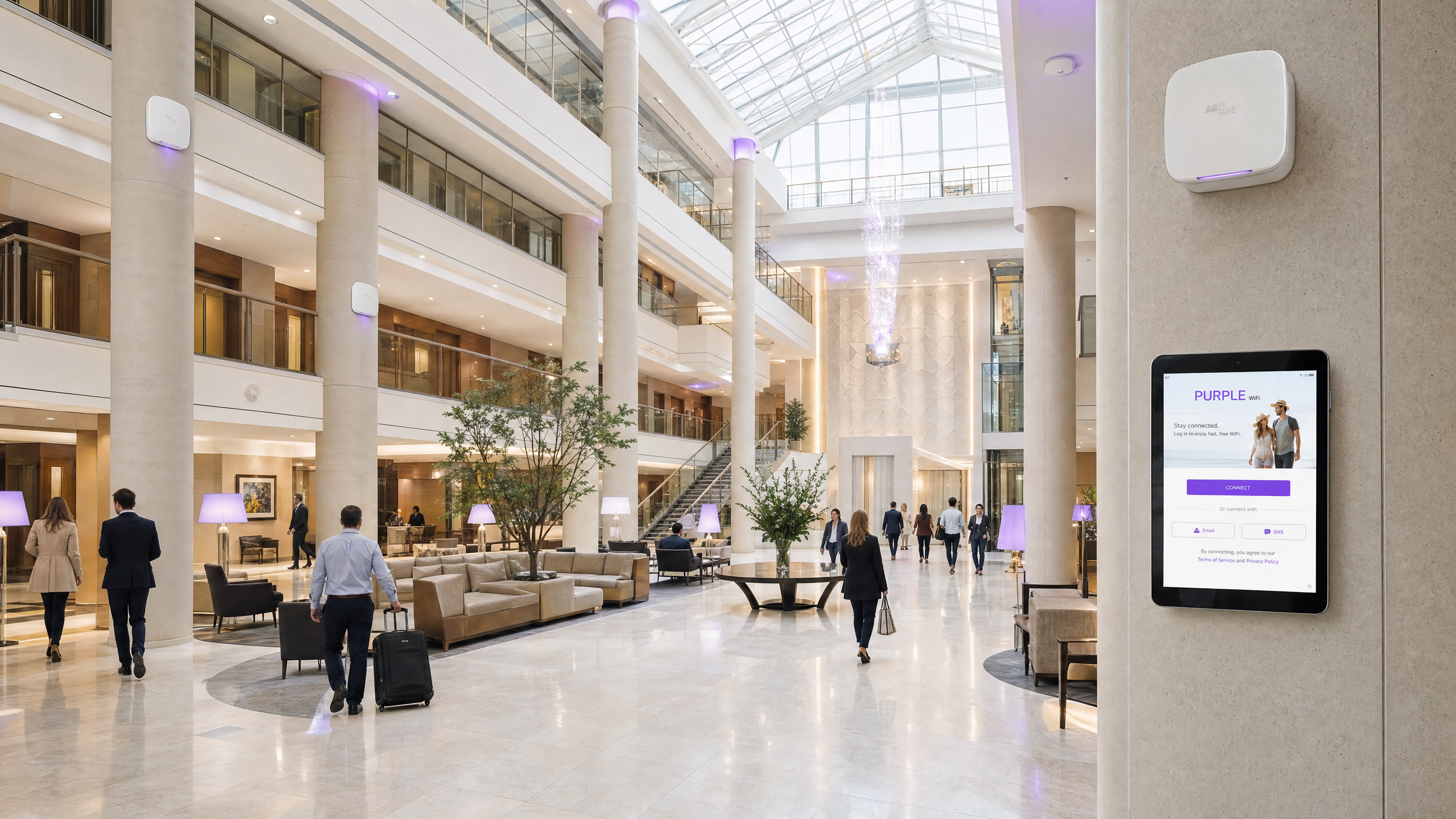
La distribuzione degli access point Allied Telesis serie TQ con Purple offre un'architettura di rete scalabile, sicura e altamente configurabile. Questo playbook di integrazione descrive in dettaglio la configurazione del reindirizzamento del Captive Portal esterno per Guest WiFi, l'autenticazione 802.1X per Staff WiFi e la mappatura delle Private Pre-Shared Key (PPSK) per l'isolamento della rete Multi-Tenant. Combinando l'hardware Allied Telesis con Purple RADIUS as a Service, si centralizza la gestione delle identità e si elimina la necessità di server RADIUS on-premises. Questa guida copre gli attributi RADIUS specifici richiesti per l'instradamento dinamico della VLAN, la configurazione del Walled Garden per l'erogazione fluida della splash page e le best practice per la scalabilità delle reti basate sull'identità (Identity-Based Networks) in contesti ricettivi, retail e del settore pubblico.
Technical Deep-Dive
Gli access point Allied Telesis, come i modelli TQ6702 GEN2 e TQ5403, eseguono il firmware AlliedWare Plus. Supportano solide funzionalità enterprise tra cui WPA3, Passpoint (Hotspot 2.0) e un'integrazione RADIUS completa. Quando integrato con Purple, l'access point funge da Network Access Server (NAS) e autenticatore 802.1X, mentre Purple opera come server RADIUS ospitato in cloud e provider di Captive Portal.
Guest Captive Portal Redirection
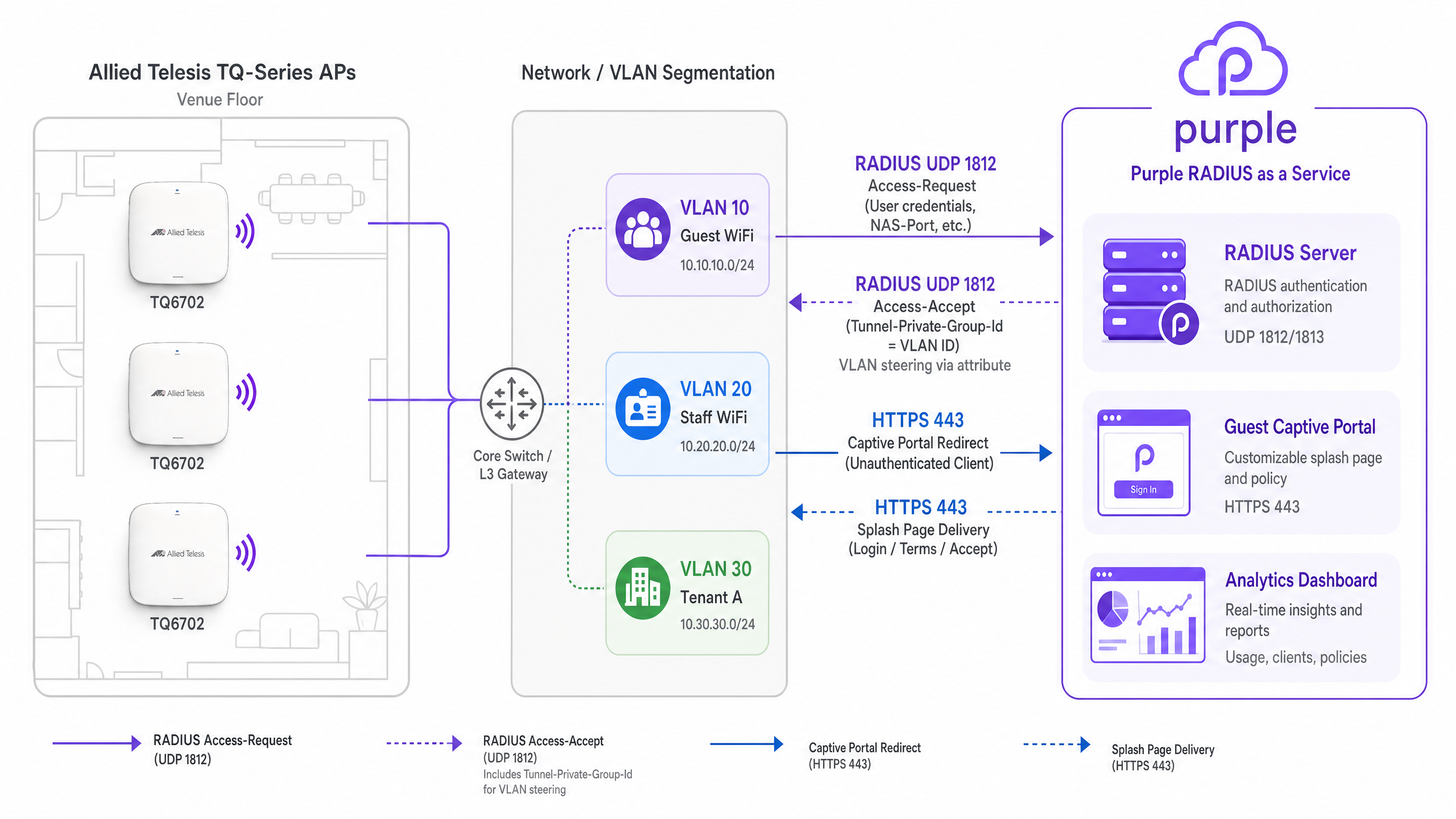
Per il Guest WiFi, l'access point intercetta il traffico dei client non autenticati e reindirizza le richieste HTTP/HTTPS alla splash page di Purple. Ciò richiede la configurazione della modalità Captive Portal su External Page Redirect.
Quando un ospite si connette, l'AP fa riferimento alla sua configurazione Walled Garden. Il Walled Garden deve includere nella whitelist i domini di Purple, gli endpoint CDN e qualsiasi provider di social login configurato (come Google Workspace o Microsoft Entra ID). Una volta che l'ospite ha completato il flusso di autenticazione sulla splash page, il server RADIUS di Purple invia un messaggio RADIUS Access-Accept (porta UDP 1812) all'access point, che quindi concede l'accesso completo alla rete.
Dynamic VLAN Steering via RADIUS
L'assegnazione dinamica della VLAN è fondamentale per la segmentazione della rete. Quando si configura lo Staff WiFi utilizzando WPA Enterprise, l'access point inoltra le credenziali EAP al servizio RADIUS SecurePass di Purple.
In caso di autenticazione riuscita, il server RADIUS di Purple restituisce un pacchetto Access-Accept contenente tre attributi RADIUS standard IETF definiti nella RFC 3580:
Tunnel-Type(Attributo 64): impostato suVLAN(13).Tunnel-Medium-Type(Attributo 65): impostato suIEEE-802(6).Tunnel-Private-Group-Id(Attributo 81): impostato sull'ID VLAN assegnato (ad es.,20).
L'AP Allied Telesis legge questi attributi e posiziona dinamicamente il dispositivo client sulla VLAN specificata. Note: la VLAN dinamica deve essere esplicitamente abilitata nelle impostazioni VAP Advanced Security all'interno della GUI di Allied Telesis.
Multi-Tenant Isolation with PPSK
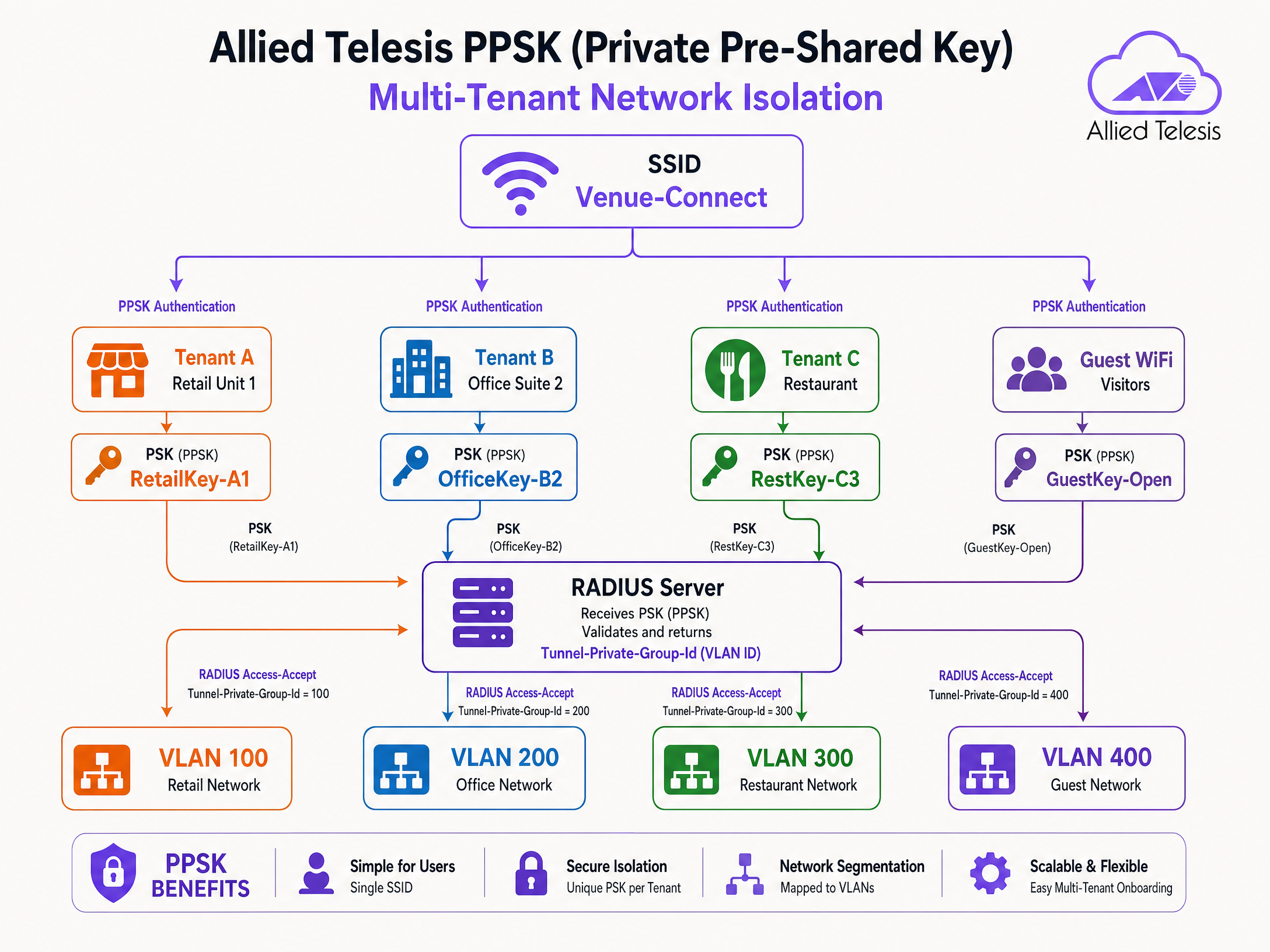
La Private Pre-Shared Key (PPSK) consente di utilizzare un singolo SSID assegnando passphrase diverse a utenti o tenant diversi. Questo è altamente efficace in unità abitative plurifamiliari (MDU), spazi di coworking e parchi commerciali.
Quando un dispositivo si associa utilizzando una PPSK specifica, l'access point invia la passphrase al server RADIUS di Purple. Purple mappa la passphrase a uno specifico profilo tenant e restituisce l'attributo Tunnel-Private-Group-Id. Questo instrada i dispositivi del tenant alla loro VLAN dedicata, garantendo l'isolamento a livello Layer 2 senza trasmettere SSID multipli.
Implementation Guide
Seguire questi passaggi per configurare gli access point Allied Telesis per l'integrazione con Purple.
Step 1: Configure the RADIUS Server Profile
- Accedere alla GUI del dispositivo AP Allied Telesis.
- Passare a Network Services > RADIUS.
- Aggiungere un nuovo server RADIUS esterno utilizzando l'indirizzo IP fornito nella dashboard di Purple.
- Impostare la porta di autenticazione su
1812e la porta di accounting su1813. - Inserire il Shared Secret esatto fornito da Purple.
- Configurare il NAS Identifier in modo che corrisponda all'IP di gestione o all'hostname dell'AP.
Step 2: Configure Guest WiFi (Captive Portal)
- Passare a Wireless > Radio1 (o Radio2).
- Fare clic su Edit per il VAP di destinazione (ad es., VAP0).
- Impostare il nome SSID (ad es., "Guest WiFi").
- Andare alla scheda Advanced Settings > Security.
- Impostare Captive Portal su External Page Redirect.
- Inserire l'URL della splash page di Purple nel campo External Page URL.
- Sotto Walled Garden, aggiungere i domini Purple richiesti e gli IP dei social login.
Step 3: Configure Staff WiFi (802.1X and Dynamic VLAN)
- Modificare un VAP separato per lo Staff WiFi.
- Impostare Security su WPA Enterprise.
- Selezionare il profilo del server RADIUS Purple dal menu a discesa RADIUS Authentication Group.
- Andare a Advanced Settings > Security.
- Abilitare Dynamic VLAN.
- Assicurarsi che gli switch di rete di backend siano configurati per il trunking delle VLAN assegnate dinamicamente alle porte dell'AP.
Step 4: Configure PPSK for Multi-Tenant
- Modificare il VAP destinato all'uso multi-tenant.
- Abilitare la PPSK (spesso configurata in combinazione con l'autenticazione MAC o impostazioni WPA specifiche a seconda della versione del firmware).
- Assicurarsi che il profilo del server RADIUS sia selezionato.
- Nella dashboard di Purple, creare i record utente PPSK, mappando ciascuna passphrase al corretto ID VLAN.
Best Practices
- Walled Garden Maintenance: Regolarmente rivedere e aggiornare le voci della Walled Garden. I provider di social login cambiano frequentemente i loro intervalli IP e domini CDN.
- Ridondanza: Configurare sempre gli indirizzi IP primari e secondari del server RADIUS Purple nel gruppo RADIUS dell'AP per garantire un'elevata disponibilità.
- Aggiornamenti firmware: Mantenere aggiornato il firmware AlliedWare Plus. Il supporto WPA3 CCMP e le funzionalità PPSK avanzate richiedono la versione 5.5.4-2.3 o successiva.
- Trunking VLAN: Verificare che le porte dello switch collegate agli access point siano configurate come trunk 802.1Q e consentano tutte le VLAN che potrebbero essere assegnate dinamicamente dal server RADIUS.
Risoluzione dei problemi e mitigazione dei rischi
- Errori di autenticazione silenziosi: Se i dispositivi non riescono a connettersi alla rete 802.1X o PPSK, verificare il segreto condiviso RADIUS. Una mancata corrispondenza fa sì che l'AP scarti silenziosamente i pacchetti Access-Reject.
- Mancato caricamento della Splash Page: Se il reindirizzamento al Captive Portal entra in un ciclo continuo o non riesce a caricare le risorse, è probabile che nella Walled Garden manchino i domini richiesti. Esaminare la console di sviluppo del browser per identificare le richieste bloccate.
- Client assegnati alla VLAN errata: Se l'instradamento VLAN dinamico (Dynamic VLAN steering) non riesce, verificare che la VLAN dinamica sia esplicitamente abilitata sul VAP. Utilizzare l'acquisizione dei pacchetti per verificare che Purple restituisca l'attributo
Tunnel-Private-Group-Id.
ROI e impatto sul business
L'integrazione di Allied Telesis con Purple trasforma la connettività wireless di base in una piattaforma intelligente e basata sui dati.
Per i team IT, la centralizzazione dell'autenticazione tramite Purple RADIUS as a Service elimina i costi di gestione dei server RADIUS on-premises e delle integrazioni Active Directory all'edge. L'uso di PPSK riduce il sovraccarico dell'SSID, migliorando le prestazioni RF e semplificando l'onboarding degli utenti.
Per la gestione delle strutture, il Captive Portal acquisisce dati di prima parte verificati, guidando la crescita del CRM e consentendo un marketing mirato. Con oltre 29 miliardi di punti dati raccolti attraverso la piattaforma Purple, le strutture ottengono informazioni utili sul comportamento dei visitatori, sui tempi di permanenza e sull'utilizzo dello spazio, supportando direttamente gli obiettivi commerciali.
Definizioni chiave
PPSK (Private Pre-Shared Key)
A security mechanism where multiple unique passphrases can be used on a single SSID, with each passphrase mapped to specific network policies or VLANs.
Used in multi-tenant environments to provide secure, isolated network access without broadcasting multiple SSIDs.
Tunnel-Private-Group-Id
RADIUS Attribute 81, defined in RFC 2868, used to specify the VLAN ID that a user or device should be assigned to upon successful authentication.
Essential for dynamic VLAN steering in both 802.1X and PPSK deployments.
Walled Garden
A restricted network environment that allows unauthenticated users access to a specific whitelist of IP addresses or domains.
Required for captive portals to allow devices to load the splash page and authenticate via social login providers before gaining full internet access.
RADIUS as a Service
A cloud-hosted RADIUS infrastructure managed by a third party (like Purple), eliminating the need for on-premises authentication servers.
Simplifies 802.1X deployments for distributed venues by centralising identity management in the cloud.
Captive Portal
A web page that users are forced to view and interact with before access is granted to a public WiFi network.
Used to capture first-party data, enforce terms of service, and display venue branding.
VAP (Virtual Access Point)
A logical entity within a physical access point that broadcasts its own SSID and maintains its own security and policy configurations.
Allows a single Allied Telesis AP to simultaneously provide Guest WiFi, Staff WiFi, and IoT connectivity.
EAP-PEAP
Protected Extensible Authentication Protocol, a secure method for transmitting authentication credentials inside an encrypted TLS tunnel.
The most common authentication protocol used for Staff WiFi (802.1X) when verifying usernames and passwords against a directory.
Access-Accept
A standard RADIUS packet sent by the server to the authenticator (AP) indicating that authentication was successful.
Often includes additional attributes, such as VLAN assignments or bandwidth limits, to enforce network policy.
Esempi pratici
A 250-room hotel needs to deploy a secure staff network and a branded guest network. The IT team wants to manage staff access via Microsoft Entra ID without deploying a local RADIUS server, while guests must accept terms and conditions via a captive portal.
Deploy Allied Telesis TQ6702 GEN2 APs. Configure VAP0 as an open network with Captive Portal set to 'External Page Redirect', pointing to the Purple splash page URL. Configure VAP1 with WPA Enterprise, pointing the RADIUS Authentication Group to Purple's SecurePass RADIUS servers. Integrate Purple SecurePass with Microsoft Entra ID in the cloud. Enable Dynamic VLAN on VAP1 so staff are automatically steered to the internal VLAN upon successful EAP authentication.
A retail park landlord wants to provide WiFi to 12 independent retail units using a single hardware deployment. Each unit requires its own secure, isolated network segment.
Configure a single SSID (e.g., 'Retail-Park-Secure') on the Allied Telesis APs. Enable PPSK (Private Pre-Shared Key) and point authentication to the Purple RADIUS server. In the Purple dashboard, generate a unique passphrase for each retail unit and map it to a specific VLAN ID (e.g., Unit 1 = VLAN 101, Unit 2 = VLAN 102). When a device connects, the AP sends the passphrase to Purple, which returns the Tunnel-Private-Group-Id attribute, steering the device to the correct tenant VLAN.
Domande di esercitazione
Q1. A venue reports that Android devices can connect to the Guest WiFi and see the splash page, but Apple iOS devices show a blank white screen. What is the most likely configuration issue?
Suggerimento: Consider how different operating systems detect captive portals and what domains they need to reach.
Visualizza risposta modello
The Walled Garden is likely missing the specific domains Apple uses for captive portal detection (e.g., captive.apple.com). If the AP blocks these domains before authentication, the iOS Captive Network Assistant cannot trigger the mini-browser correctly.
Q2. You have configured WPA Enterprise on the AP and pointed it to Purple's RADIUS server. The RADIUS logs show successful authentication (Access-Accept), but the client device does not receive an IP address on the expected VLAN. What are the two most likely causes?
Suggerimento: Check both the AP configuration and the physical switch port configuration.
Visualizza risposta modello
- 'Dynamic VLAN' is not enabled in the VAP Advanced Security settings on the Allied Telesis AP. 2. The switch port connecting the AP is not configured as an 802.1Q trunk, or the target VLAN is not allowed on the trunk, preventing DHCP traffic from reaching the client.
Q3. A retail park wants to deploy PPSK for 50 tenants. They ask if they should create 50 separate VAPs or use a single VAP. What is your recommendation and why?
Suggerimento: Consider the impact of management frames on wireless airtime.
Visualizza risposta modello
Recommend using a single VAP with PPSK. Broadcasting 50 separate SSIDs generates excessive beacon frames and management overhead, severely degrading RF performance and available airtime. A single SSID with PPSK provides the same Layer 2 isolation via dynamic VLAN assignment without the RF penalty.
Continua a leggere questa serie
CommScope Ruckus Integration with Purple WiFi: Setup and Configuration Guide
Questa guida di riferimento tecnico fornisce un playbook di configurazione autorevole per l'integrazione delle architetture CommScope Ruckus con Purple WiFi. Dettaglia le implementazioni passo-passo per i Captive Portal per Guest WiFi, il WiFi sicuro per il personale tramite 802.1X e l'isolamento di rete multi-tenant tramite Ruckus Dynamic PSK.
Cisco WLC and Catalyst Integration with Purple WiFi: Step-by-Step Guest Access Guide
Questa guida descrive in dettaglio l'integrazione passo-passo di Cisco WLC e Catalyst 9800 Wireless con Purple, coprendo il reindirizzamento al Captive Portal per Guest WiFi tramite Central Web Authentication, il WiFi aziendale sicuro per il personale tramite 802.1X EAP-TLS e la segmentazione multi-tenant tramite Cisco Identity Pre-Shared Keys (iPSK) con assegnazione dinamica della VLAN. È scritta per architetti di rete aziendali e direttori della sicurezza IT che distribuiscono l'infrastruttura Cisco nei settori hospitality, retail e grandi spazi pubblici.
Huawei AirEngine and CloudCampus Integration with Purple WiFi
Questa guida fornisce istruzioni dettagliate per l'integrazione degli access point Huawei AirEngine e di iMaster NCE-Campus con Purple WiFi. Copre la configurazione del Captive Portal, l'autenticazione del personale tramite 802.1X e lo steering dinamico delle VLAN tramite PPSK per le reti aziendali.