
SonicWall TZ and SonicWave Integration with Purple WiFi
Questo riferimento tecnico descrive in dettaglio l'integrazione dei firewall SonicWall TZ e degli AP SonicWave con la piattaforma Purple WiFi. Fornisce passaggi di configurazione pratici per il reindirizzamento del Captive Portal, le eccezioni del walled garden, l'autenticazione 802.1X e l'instradamento VLAN dinamico tramite Private Pre-Shared Keys (PPSK).
Ascolta questa guida
Visualizza trascrizione del podcast
Sintesi esecutiva
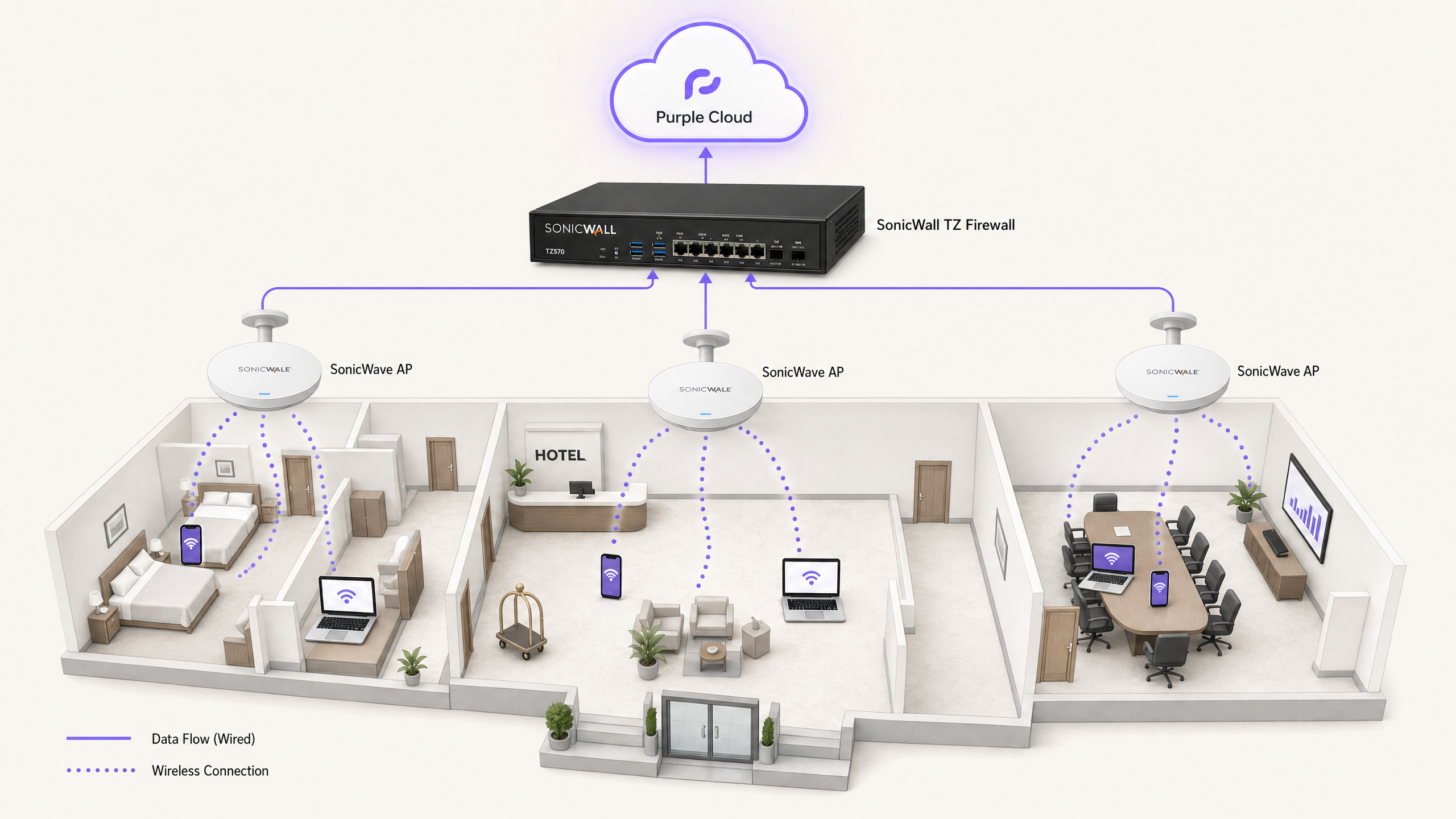
L'integrazione dell'infrastruttura di rete SonicWall con l'overlay cloud di Purple offre un controllo degli accessi di livello enterprise insieme a una sofisticata acquisizione di dati di prima parte. Questa guida illustra l'implementazione tecnica di quattro casi d'uso distinti: WiFi ospiti con reindirizzamento del Captive Portal, eccezioni Walled Garden, WiFi aziendale sicuro tramite 802.1X e isolamento multi-tenant tramite Private Pre-Shared Keys (PPSK) di SonicWall con instradamento VLAN dinamico.
Gestiamo 440 milioni di login all'anno in oltre 80.000 sedi attive. L'architettura descritta di seguito è collaudata su scala nei settori dell'ospitalità, del retail e del settore pubblico. Consente di mantenere l'hardware SonicWall esistente delegando la gestione delle identità, l'hosting della splash page e l'autenticazione RADIUS al cloud di Purple.
Approfondimento tecnico
L'integrazione si basa su due meccanismi principali: Lightweight Hotspot Messaging (LHM) per il reindirizzamento del Captive Portal e RADIUS per l'autenticazione 802.1X e PPSK.
Reindirizzamento del Captive Portal tramite LHM
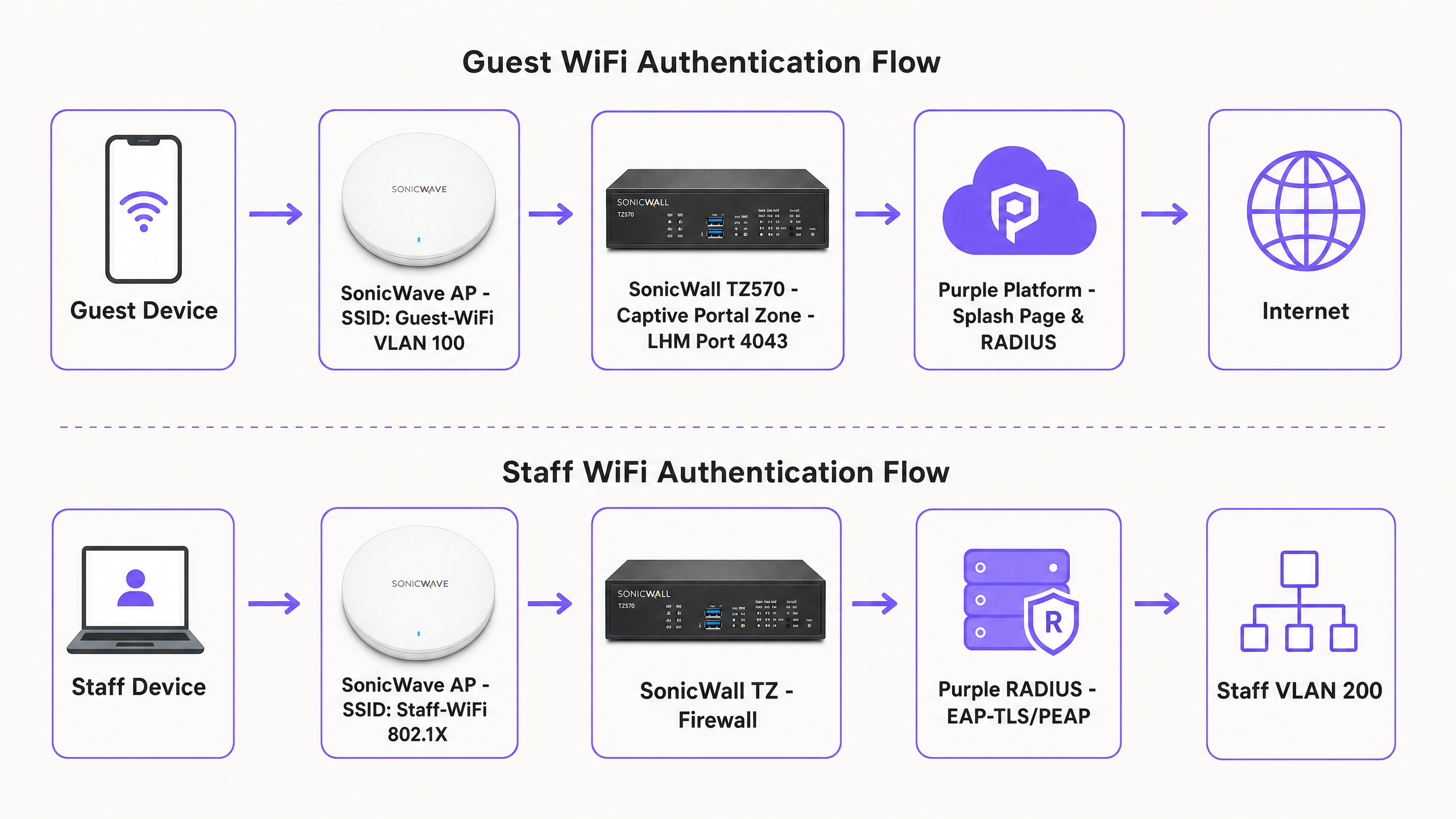
SonicOS utilizza LHM per gestire i reindirizzamenti esterni del Captive Portal. Quando un dispositivo ospite non autenticato tenta di accedere a Internet, il firewall SonicWall TZ intercetta la richiesta HTTP e reindirizza il client alla splash page ospitata da Purple. L'ospite completa il flusso di autenticazione (ad es. social login, compilazione di moduli). Purple invia quindi un pacchetto di autorizzazione LHM al SonicWall sulla porta TCP 4043. Al ricevimento di questo pacchetto, il SonicWall aggiorna la sua lista di controllo degli accessi interna, consentendo all'indirizzo MAC del dispositivo di accedere a Internet.
Architettura Walled Garden
Prima dell'autenticazione, il dispositivo ospite viene trattenuto in una zona limitata. Il walled garden è l'insieme specifico di Fully Qualified Domain Names (FQDN) a cui il dispositivo è autorizzato ad accedere per caricare la splash page e completare il processo di login. Questo include la CDN di Purple (cdn.purple.ai), l'API di autenticazione (api.purple.ai) e i domini richiesti da provider di identità di terze parti come Google Workspace, Microsoft Entra ID e Meta.
SonicOS implementa i walled garden utilizzando oggetti indirizzo FQDN. Il firewall esegue la risoluzione DNS dinamica su questi oggetti, aggiornando automaticamente gli intervalli IP consentiti. Questo è fondamentale perché i provider di identità e le CDN utilizzano l'allocazione dinamica degli IP; le whitelist di IP statici falliranno inevitabilmente.
WiFi aziendale sicuro e 802.1X
Per le reti del personale, gli AP SonicWave fungono da autenticatore 802.1X, inoltrando le richieste tramite proxy al server RADIUS di Purple. Consigliamo EAP-TLS per i dispositivi gestiti che utilizzano certificati, o PEAP-MSCHAPv2 per l'autenticazione con nome utente/password rispetto a directory come Microsoft Entra ID. In caso di autenticazione riuscita, Purple restituisce gli attributi RADIUS standard (Tunnel-Type, Tunnel-Medium-Type e Tunnel-Private-Group-ID) per assegnare dinamicamente il dispositivo alla VLAN del personale corretta.
Isolamento Multi-Tenant con PPSK
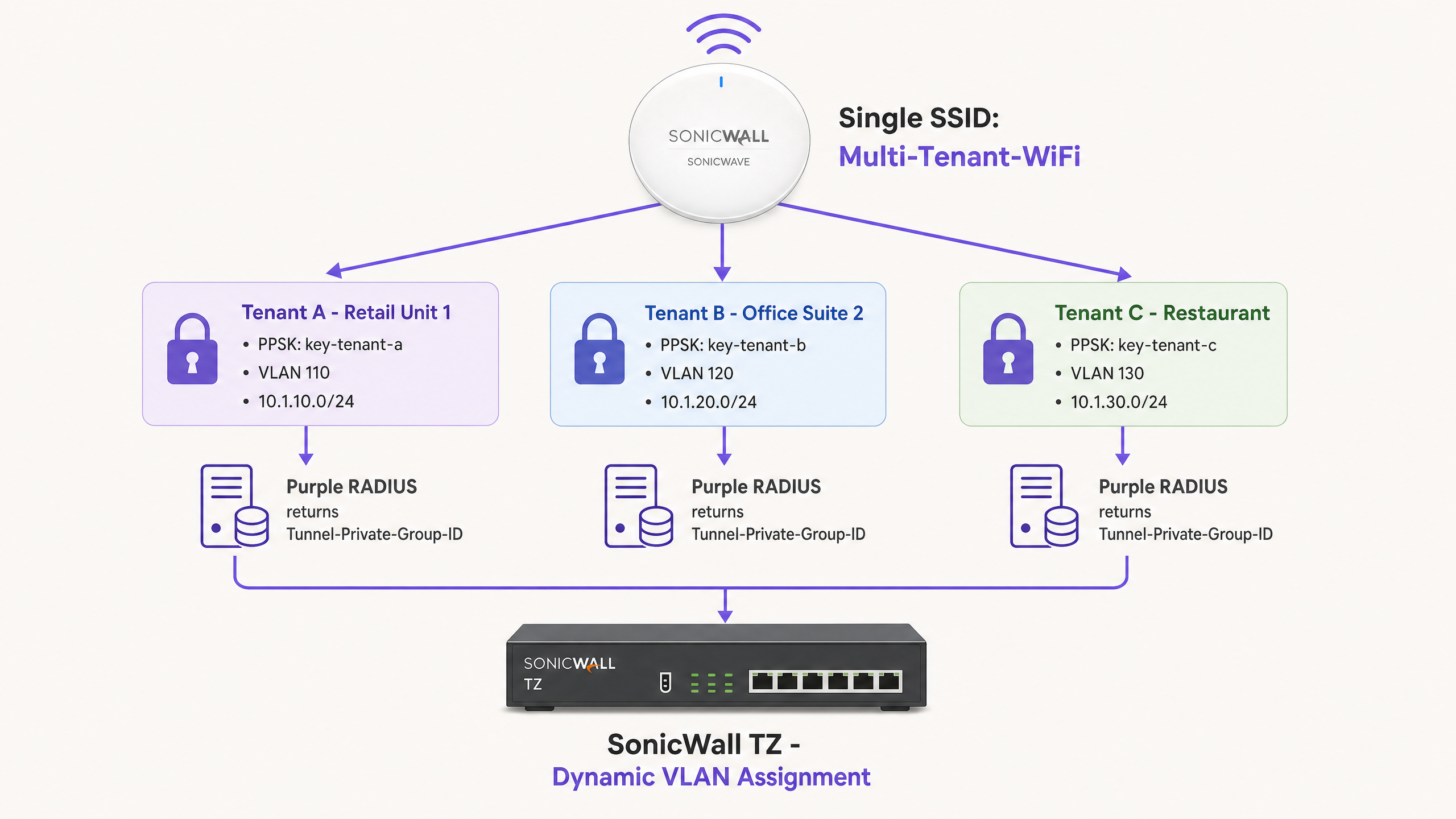
Le reti basate sull'identità eliminano la necessità di complesse distribuzioni multi-SSID. Utilizzando il PPSK di SonicWall, un singolo SSID (ad es. "Multi-Tenant-WiFi") trasmette in tutta la sede. Ogni tenant riceve una passphrase univoca. Quando un dispositivo si associa utilizzando un PPSK specifico, l'AP SonicWave convalida la chiave rispetto al server RADIUS di Purple. Purple identifica il tenant e restituisce l'ID VLAN associato. Il SonicWall instrada quindi il traffico nella VLAN isolata del tenant.
Guida all'implementazione
1. Configurazione del Captive Portal di SonicWall (LHM)
Per configurare il Captive Portal esterno su una serie SonicWall TZ con SonicOS 7.x:
- Passare a Object > Match Objects > Zones. Modificare la zona assegnata alla rete ospiti (ad es. WLAN).
- Nella scheda Guest Services, abilitare Enable Guest Services e External Guest Authentication.
- Passare a Configure > Guest Services > General.
- Impostare il Client Redirect Protocol su HTTP.
- Impostare l'indirizzo del Web Server su
portal.purple.ai. - Impostare la Port su
4043. - Nella scheda Auth Pages, impostare il Login URL sull'URL specifico della splash page fornito nella dashboard della sede di Purple.
- Salvare la configurazione. SonicOS genererà automaticamente un criterio NAT e una regola di accesso WAN-to-WAN per consentire la porta TCP 4043. Non modificare queste regole generate automaticamente.
2. Creazione del Walled Garden
Creare oggetti indirizzo FQDN per i domini richiesti e aggiungerli a un gruppo di indirizzi. Applicare questo gruppo a una regola di autorizzazione nella zona ospiti.
Domini Purple richiesti:
*.purple.ai*.purpleportal.net
Probe del Captive Portal del sistema operativo:
captive.apple.com(iOS/macOS)connectivitycheck.gstatic.com(Android)msftconnecttest.com(Windows)
Domini di social login comuni (Google):
accounts.google.comoauth2.googleapis.comapis.google.com*.gstatic.com
3. Configurazione di RADIUS per gli AP SonicWave
Per integrare gli AP SonicWave con Purple RADIUS tramite il Wireless Network Manager:
- Passare a Policies > Policy Hierarchy e selezionare il criterio AP.
- Selezionare la scheda 802.1X.
- Inserire l'indirizzo IP del server RADIUS di Purple (disponibile nella dashboard di Purple).
- Inserire il segreto condiviso generato da Purple.
- Impostare la Authentication Port su
1812e la Accounting Port su1813. - Selezionare il metodo EAP appropriato in base al proprio provider di identità.
4. Configurazione dell'instradamento VLAN dinamico
Assicurarsi che le VLAN di destinazione esistano come sottointerfacce sul firewall SonicWall TZ prima di abilitare l'assegnazione dinamica.
Nella dashboard di Purple, mappa il gruppo utente o PPSK all'ID VLAN di destinazione. Purple restituirà i seguenti attributi in caso di autenticazione riuscita:
Tunnel-Type = VLAN (13)Tunnel-Medium-Type = 802 (6)Tunnel-Private-Group-ID = [VLAN ID](ad es., "110")
Best Practices
- Verificare la visibilità della porta LHM: la porta TCP 4043 deve essere raggiungibile da Internet verso l'interfaccia WAN di SonicWall. Verifica questo aspetto utilizzando uno scanner di porte esterno prima del go-live. Se l'ISP blocca questa porta, il pacchetto di autorizzazione andrà perso e gli ospiti rimarranno bloccati sulla splash page.
- Pre-configurare le sotto-interfacce VLAN: lo steering dinamico della VLAN fallirà in modo silenzioso se la sotto-interfaccia VLAN di destinazione non è configurata su SonicWall prima dell'evento di autenticazione. Il dispositivo tornerà alla VLAN non taggata predefinita.
- Forzare l'OAuth basato sul web: assicurati che la configurazione della splash page forzi i flussi OAuth basati sul web. Il deep-linking ad app di social media native (come l'app Facebook iOS) spesso interrompe la sequenza del Captive Portal perché il traffico dell'app nativa è bloccato dal walled garden.
- Ottimizzare gli intervalli di aggiornamento DNS: SonicOS risolve periodicamente gli oggetti FQDN. In ambienti ad alta rotazione come stadi o hub di trasporto, imposta l'intervallo di aggiornamento DNS per gli oggetti del walled garden a 60 secondi per garantire che le variazioni degli IP della CDN siano tracciate accuratamente.
Risoluzione dei problemi e mitigazione dei rischi
Sintomo: l'ospite completa l'accesso alla splash page ma non ha accesso a Internet. Causa: il pacchetto di autorizzazione LHM sulla porta TCP 4043 non raggiunge il SonicWall. Risoluzione: verifica che esista la regola di accesso WAN-to-WAN generata automaticamente. Controlla i router ISP a monte per verificare l'eventuale blocco delle porte. Assicurati che l'IP WAN di SonicWall sia registrato correttamente nella dashboard di Purple.
Sintomo: la splash page non si carica o i pulsanti di login social restituiscono errori CORS. Causa: configurazione incompleta del walled garden. Risoluzione: connetti un dispositivo di test in uno stato non autenticato. Utilizza gli strumenti di sviluppo del browser (scheda Rete) per identificare le richieste HTTPS bloccate. Aggiungi i domini interessati come oggetti indirizzo FQDN in SonicOS.
Sintomo: i dispositivi del personale si autenticano tramite 802.1X ma ricevono un indirizzo IP dalla VLAN predefinita anziché dalla VLAN assegnata.
Causa: la sotto-interfaccia VLAN di destinazione non esiste su SonicWall, oppure gli attributi RADIUS non sono formattati correttamente.
Risoluzione: verifica che la sotto-interfaccia VLAN sia attiva. Controlla i log RADIUS di Purple per confermare che Tunnel-Private-Group-ID venga inviato come valore stringa corrispondente all'ID VLAN.
ROI e impatto sul business
L'implementazione dell'infrastruttura SonicWall con Purple trasforma un tipico centro di costo di rete in un asset aziendale misurabile.
Per una catena di vendita al dettaglio con 200 sedi, il passaggio da chiavi precondivise generiche a un Captive Portal personalizzato genera in genere un aumento del 40% dei profili cliente noti entro sei mesi. Questi dati di prima parte si integrano direttamente nei sistemi CRM, guidando campagne di marketing mirate e aumentando le visite ripetute.
In ambienti multi-tenant come spazi di coworking o alloggi per studenti, il PPSK con steering dinamico della VLAN elimina i costi operativi di gestione dell'hardware dedicato per ciascun tenant. Distribuisci un'unica rete fisica e la segmenti logicamente tramite l'identità. Ciò riduce le spese in conto capitale per l'hardware fino al 60%, mantenendo al contempo un rigoroso isolamento della rete conforme allo standard ISO 27001.
Definizioni chiave
Lightweight Hotspot Messaging (LHM)
A protocol used by SonicWall to communicate with external captive portals. It handles the redirect and authorisation handshake.
Required for integrating SonicOS with cloud-managed guest WiFi platforms like Purple.
Walled Garden
A specific set of domains or IP addresses that unauthenticated devices are permitted to access.
Critical for allowing guest devices to load the splash page, access CDNs, and complete social login OAuth flows before gaining full internet access.
Private Pre-Shared Key (PPSK)
A security method where multiple unique passphrases are valid on a single SSID, with each passphrase tied to a specific user or policy.
Used in multi-tenant environments to isolate traffic without broadcasting multiple SSIDs.
Captive Network Assistant (CNA)
The built-in OS mechanism (on iOS, Android, Windows) that detects a captive portal and automatically opens a limited browser window for authentication.
If the OS probe domains (e.g., captive.apple.com) are not in the walled garden, the CNA will not trigger, and guests will think the WiFi is broken.
Dynamic VLAN Steering
The process of assigning a device to a specific VLAN based on its identity or credentials, rather than the SSID it connected to.
Managed by Purple RADIUS returning the Tunnel-Private-Group-ID attribute to the SonicWall.
FQDN Address Object
A firewall object based on a Fully Qualified Domain Name rather than a static IP address.
SonicOS resolves these objects dynamically, making them essential for robust walled garden configurations.
Identity-Based Network
A network architecture where access policies and segmentation are applied based on the authenticated user or device, rather than physical ports or SSIDs.
Achieved by combining Purple RADIUS with SonicWall PPSK and 802.1X.
Tunnel-Private-Group-ID
The standard RFC 2868 RADIUS attribute used to specify the VLAN ID for a connecting device.
Must be returned by Purple as a string value (e.g., '100') to instruct the SonicWall to steer the device.
Esempi pratici
A 150-room hotel (Premier Inn) needs to provide free Guest WiFi via a splash page and a secure Staff WiFi network for housekeeping devices. They have a SonicWall TZ570 and 40 SonicWave APs. How should they segment this traffic?
Deploy two SSIDs. SSID 1: 'Guest-WiFi' mapped to VLAN 100. Configure the SonicWall WLAN zone for External Guest Authentication pointing to portal.purple.ai on TCP 4043. Configure the walled garden FQDNs for Purple and social logins. SSID 2: 'Staff-WiFi' mapped to VLAN 200 using 802.1X. Point the SonicWave AP policy to Purple's RADIUS server. Configure Purple to authenticate housekeeping devices via MAC address bypass (MAB) or PEAP-MSCHAPv2, returning Tunnel-Private-Group-ID '200'.
A coworking space manages 15 different companies sharing one open-plan office. They want to provide secure, isolated networks for each company without broadcasting 15 different SSIDs from their SonicWave APs.
Deploy a single SSID named 'Workspace-Secure' using WPA2-Enterprise with PPSK. Create 15 VLAN sub-interfaces on the SonicWall TZ firewall (e.g., VLANs 101-115). In the Purple dashboard, generate a unique PPSK for each company and map it to their specific VLAN ID. When a user connects using their company's PPSK, Purple RADIUS returns the corresponding Tunnel-Private-Group-ID, and the SonicWall steers the device into the isolated VLAN.
Domande di esercitazione
Q1. You have configured the SonicWall guest zone for External Guest Authentication and set the web server to portal.purple.ai. Guests are redirected to the splash page and can log in successfully, but they never gain internet access. What is the most likely cause?
Suggerimento: Think about how Purple tells the SonicWall that the authentication was successful.
Visualizza risposta modello
The LHM authorisation packet is being blocked. TCP port 4043 must be open on the SonicWall WAN interface to receive the success signal from Purple. Check upstream firewalls or ISP configurations for port blocking.
Q2. A venue wants to offer Facebook login on their splash page. You add www.facebook.com to the walled garden FQDN address group. Guests report that the Facebook login page loads, but the styling is broken and the login button does not work.
Suggerimento: Modern web applications load assets from multiple domains.
Visualizza risposta modello
The walled garden is incomplete. You must also whitelist the domains that serve Facebook's CSS, JavaScript, and API calls, specifically graph.facebook.com, connect.facebook.net, and the CDN domain (e.g., *.fbcdn.net).
Q3. You are deploying PPSK for a multi-tenant office. You configure the SSID for WPA2-Enterprise with PPSK and point the RADIUS server to Purple. You create a PPSK in Purple mapped to VLAN 50. When a user connects with that PPSK, they receive an IP address from VLAN 10 instead. Why?
Suggerimento: The SonicWall needs to know where to send the traffic before the RADIUS request completes.
Visualizza risposta modello
VLAN 50 has not been created as a sub-interface on the SonicWall TZ firewall. Dynamic VLAN steering requires the target VLAN to exist on the firewall beforehand; if it does not, the device falls back to the default untagged VLAN (in this case, VLAN 10).
Continua a leggere questa serie
CommScope Ruckus Integration with Purple WiFi: Setup and Configuration Guide
Questa guida di riferimento tecnico fornisce un playbook di configurazione autorevole per l'integrazione delle architetture CommScope Ruckus con Purple WiFi. Dettaglia le implementazioni passo-passo per i Captive Portal per Guest WiFi, il WiFi sicuro per il personale tramite 802.1X e l'isolamento di rete multi-tenant tramite Ruckus Dynamic PSK.
Allied Telesis Access Points Integration with Purple WiFi
Questa guida fornisce un playbook di configurazione completo per l'integrazione degli access point Allied Telesis serie TQ con Purple WiFi. Copre il reindirizzamento del Captive Portal esterno, l'autenticazione RADIUS 802.1X e l'instradamento dinamico della VLAN tramite Private Pre-Shared Keys (PPSK) per distribuzioni multi-tenant sicure.
Cisco WLC and Catalyst Integration with Purple WiFi: Step-by-Step Guest Access Guide
Questa guida descrive in dettaglio l'integrazione passo-passo di Cisco WLC e Catalyst 9800 Wireless con Purple, coprendo il reindirizzamento al Captive Portal per Guest WiFi tramite Central Web Authentication, il WiFi aziendale sicuro per il personale tramite 802.1X EAP-TLS e la segmentazione multi-tenant tramite Cisco Identity Pre-Shared Keys (iPSK) con assegnazione dinamica della VLAN. È scritta per architetti di rete aziendali e direttori della sicurezza IT che distribuiscono l'infrastruttura Cisco nei settori hospitality, retail e grandi spazi pubblici.