
iPSK adalah: a comprehensive guide for businesses
This guide explains Identity Pre-Shared Key (iPSK) architecture, deployment strategy, and business impact for property developers, BTR operators, and landlords deploying multi-tenant WiFi. It covers how iPSK delivers per-resident network isolation on shared infrastructure without the complexity of 802.1X, and how Purple automates the key lifecycle to reduce operational overhead across residential and commercial venues.
Listen to this guide
View podcast transcript
Executive summary
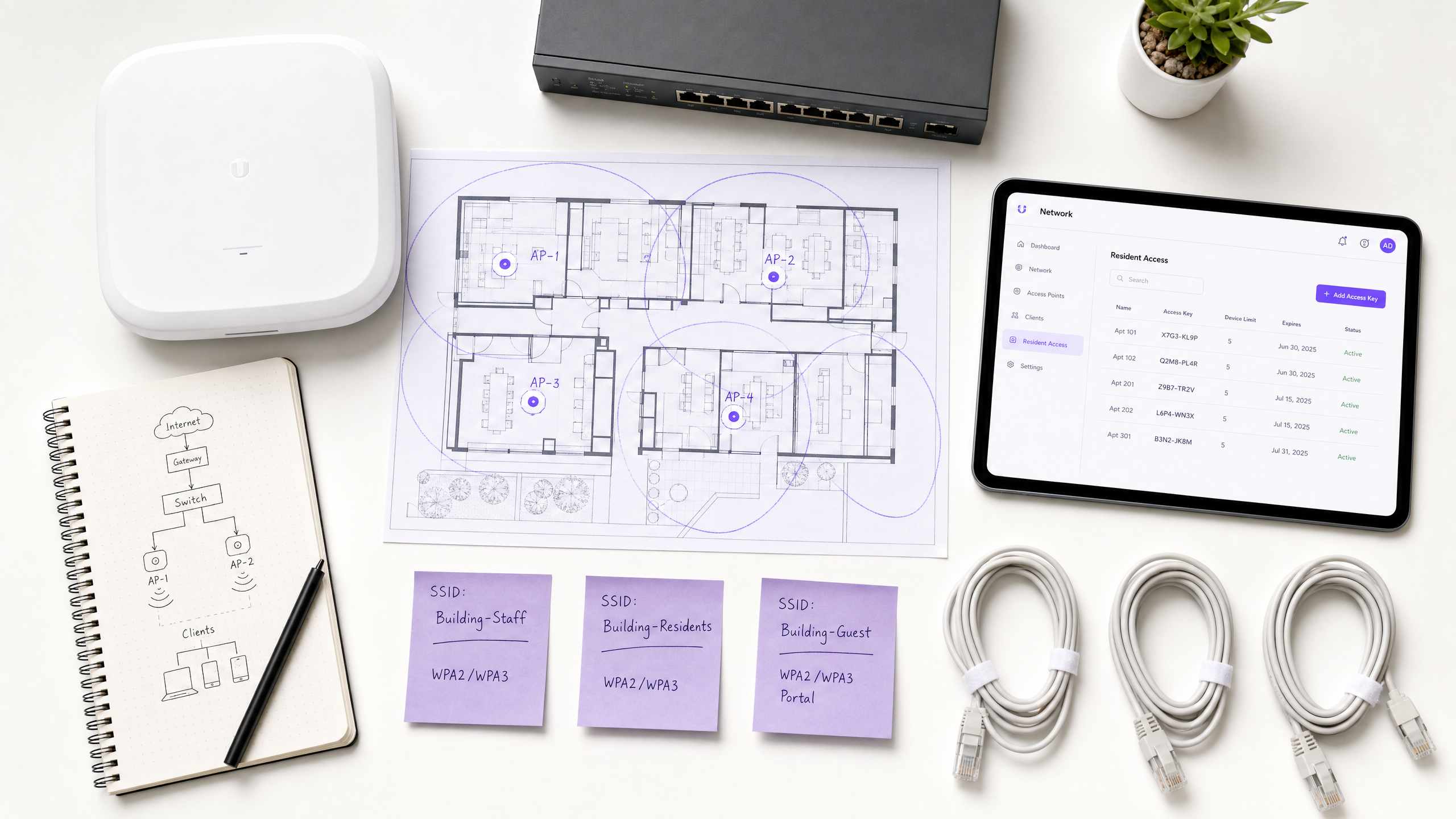
iPSK - Identity Pre-Shared Key - solves the fundamental tension in enterprise and multi-tenant WiFi: the need for individual access control without the endpoint complexity of 802.1X. For IT managers and venue operations directors across Build-to-Rent (BTR), hospitality, and public-sector environments, iPSK provides a method to issue unique encryption keys to individual users or devices while broadcasting a single SSID. Each resident, guest, or device gets their own passphrase. The network uses that passphrase to identify them, assign them to the correct VLAN, and isolate their traffic from everyone else on the same physical infrastructure.
This architecture delivers the simplicity of a home network experience while maintaining enterprise-grade security and segmentation. When a resident moves out or a contractor finishes their engagement, you revoke one key - zero impact on anyone else. iPSK also handles headless IoT devices - smart TVs, gaming consoles, sensors - that cannot support certificate-based authentication. Purple provides the orchestration layer to automate this key lifecycle, integrating directly with your property management or identity systems to provision and revoke access dynamically. Purple operates across 80,000+ live venues and has processed 440 million logins in 2024 (Purple internal data, 2024).
Listen to the briefing
Technical deep-dive: iPSK architecture
To understand how iPSK functions, you need to examine the authentication flow between the client device, the Wireless LAN Controller (WLC), and the RADIUS server. The IEEE 802.11i standard governs the underlying WPA2/WPA3 handshake, and iPSK extends this by inserting a per-device passphrase lookup into that handshake.
When a device attempts to connect to an iPSK-enabled SSID, the WLC intercepts the request and forwards the device's MAC address to the RADIUS server. The RADIUS server queries its identity store. If it finds a match, it returns an Access-Accept response containing specific Attribute-Value Pairs (AVPs), including the unique PSK for that device and policy attributes such as VLAN assignment and QoS profiles. The WLC uses this returned passphrase to validate the client's connection attempt.
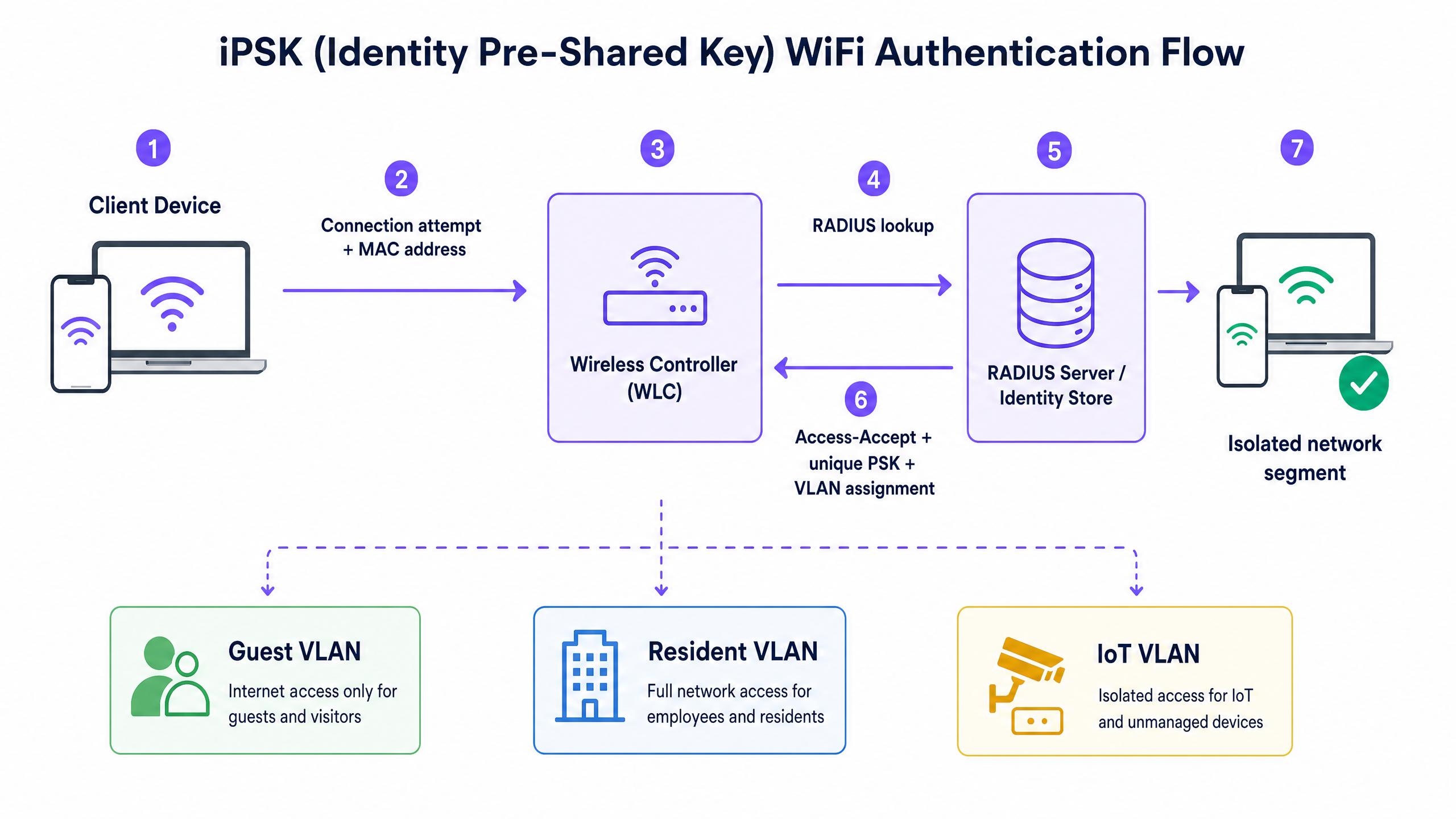
This mechanism allows a single SSID to dynamically segment traffic. A staff member's device authenticates and drops onto the corporate VLAN. A resident's smart TV drops onto their isolated personal VLAN. An HVAC sensor drops onto a restricted IoT VLAN. All devices see the same network name, but the underlying infrastructure enforces strict Layer 2 isolation based on the identity tied to the pre-shared key.
Vendor implementations
While the underlying IEEE 802.11i framework remains consistent, major hardware vendors use different terminology for this capability. The table below maps vendor names to their implementation:
| Vendor | Term | Key characteristics |
|---|---|---|
| Cisco Meraki | iPSK | Native integration with Cisco ISE; supports thousands of keys per SSID |
| HPE Aruba | MPSK (Multi-PSK) | Deployed with ClearPass; strong IoT onboarding workflows |
| Ruckus | DPSK (Dynamic PSK) | Mature implementation; robust PMS integration support |
| Juniper Mist | PPSK | AI-driven operations; cloud-native RADIUS integration |
| Ubiquiti UniFi | PPSK | Cost-effective for smaller MDU deployments |
Purple integrates with all of these - Cisco Meraki, HPE Aruba, Ruckus, Juniper Mist, Ubiquiti UniFi, Cambium, Extreme, and Fortinet - acting as the cloud overlay that manages RADIUS interactions and key lifecycles regardless of the underlying access points.
The WiFi bubble: per-resident isolation
The most important concept for multi-tenant deployments is what Purple calls the WiFi bubble. Each resident is issued a unique iPSK during onboarding. All their devices - phone, laptop, smart TV, gaming console, smart speaker - use that same key. The network uses the key to identify which resident a device belongs to.
The result: every device on Resident A's key sees every other device on Resident A's key. Their phone discovers their Chromecast. Their smart speaker pairs with their bulbs. Their console finds their TV. No device on Resident A's key sees any device on a different key. Resident B's devices are invisible to Resident A, even though they share the same access point. When Resident A moves out, their key is revoked without affecting any other resident.
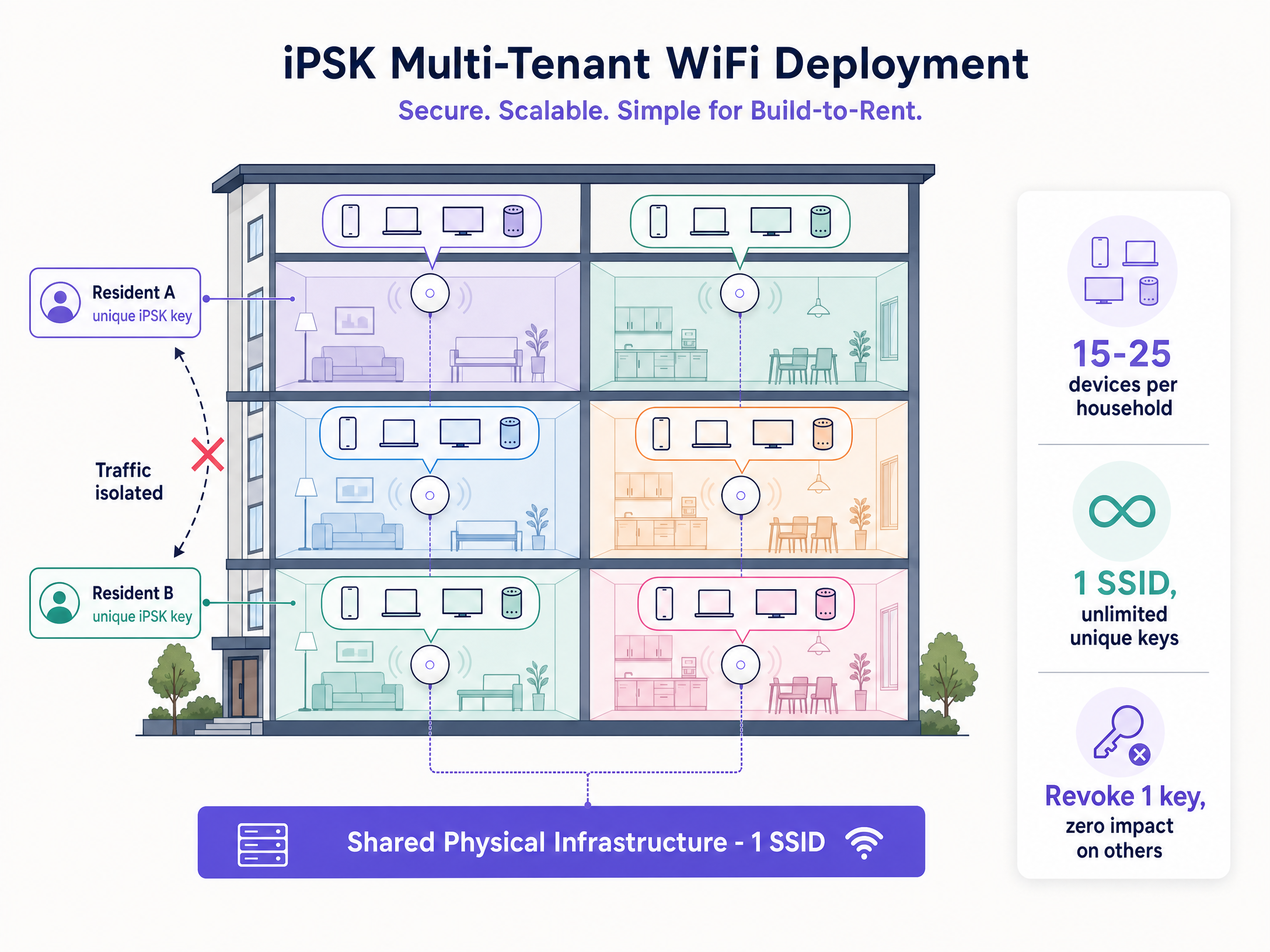
A typical BTR apartment connects 15 to 25 devices (Purple internal data, 2024). A 200-unit building has 3,000 to 5,000 devices on the WiFi at any moment. iPSK handles this density without degrading RF performance, because you broadcast one SSID rather than the multiple SSIDs that a traditional segmentation approach would require.
Implementation guide
Deploying iPSK in a BTR property or multi-tenant venue requires a structured approach to subnet design, key management, and integration.
Step 1: Define the subnet architecture. Calculate the required IP scopes. Use a private IP space (RFC 1918) and ensure your DHCP pools can handle the device density. For a 200-unit BTR building with 20 devices per unit, plan for 4,000 concurrent DHCP leases.
Step 2: Configure the WLC for MAC Authentication Bypass (MAB). The controller must query the RADIUS server using the client MAC address before completing the WPA2/WPA3 handshake. Enable AAA Override on the WLAN profile so the RADIUS-returned VLAN tag takes precedence over any static VLAN configuration.
Step 3: Configure RADIUS with the correct AVPs. The RADIUS server must return the cisco-av-pair attributes psk-mode=ascii and psk-password= in the Access-Accept response. VLAN assignment uses the standard Tunnel-Private-Group-ID attribute.
Step 4: Automate key lifecycle. Integrate Purple with your Property Management System (PMS). When a lease begins, Purple generates a unique key and provisions it in the RADIUS identity store. When the lease ends, Purple revokes it. No manual intervention, no security gap between tenancies.
Step 5: Enable mDNS reflection. Configure mDNS gateway services on the controller so discovery protocols (Bonjour, mDNS) operate within a resident's assigned VLAN but do not cross into others. This enables casting and smart home pairing within the WiFi bubble.
Step 6: Address MAC randomisation. Modern operating systems (iOS 14+, Android 10+, Windows 11) use private WiFi addresses by default. Implement a captive portal onboarding flow that captures the permanent MAC address, or instruct residents to disable private addressing for the resident SSID. Purple's onboarding flow handles this automatically.
Best practices
Adhere to these vendor-neutral recommendations to ensure security and operational stability:
Enforce strict Layer 2 isolation. Ensure peer-to-peer communication is blocked at the access point level for devices not sharing the same iPSK. This prevents lateral movement if one device is compromised.
Design for RADIUS resilience. Your iPSK deployment depends entirely on the availability of the RADIUS server. Deploy primary and secondary RADIUS endpoints and configure appropriate failover on the WLC. Purple's cloud RADIUS infrastructure maintains 99.999% uptime (Purple SLA, 2024).
Align with data privacy standards. Under GDPR and CCPA, network logs constitute personal data. Implement automated data retention policies to purge connection logs after six months, balancing operational troubleshooting needs with privacy compliance. Purple is ISO 27001, GDPR, and CCPA certified.
Segment IoT separately. Even within a resident's WiFi bubble, consider whether IoT devices (smart locks, cameras, sensors) should be on a sub-segment with restricted internet access. This limits the blast radius if a device is compromised.
For a detailed comparison of iPSK against PPSK deployment models, see our guide: PPSK usm kubang kerian: comparing features and deployment models . For a broader discussion of SSID design across guest, staff, and IoT networks, see Three SSIDs to rule them all: guest, Passpoint, and IoT WiFi .
Troubleshooting and risk mitigation
Even with a robust architecture, you will encounter operational challenges. Here are the most common failure modes and how to resolve them.
Devices fail to authenticate despite entering the correct key. The RADIUS server is rejecting the MAC address due to randomisation, or the WLC timeout is too aggressive. Verify the client is presenting its true MAC address. Increase the RADIUS timeout on the WLC to five seconds to accommodate cloud-based RADIUS latency.
A resident cannot cast from their phone to their smart TV. The devices are on different keys, or mDNS reflection is incorrectly configured. Confirm both devices authenticated using the exact same iPSK. Verify the controller is forwarding Bonjour/mDNS traffic within the specific VLAN tag assigned to that resident.
New devices added mid-tenancy fail to connect. The resident's key is not registered against the new device's MAC address. Implement a self-service device registration portal - Purple provides this as part of the resident onboarding flow - so residents can add devices without contacting support.
RADIUS server unavailability causes authentication failures. No new devices can authenticate when the RADIUS server is down. Existing authenticated sessions typically remain active, but this is a significant operational risk. Ensure redundant RADIUS servers are configured and test failover quarterly.
ROI and business impact
Treating WiFi as a managed amenity via iPSK delivers measurable business outcomes for property developers and landlords. Based on data from over 80,000 live venues, operators deploying Multi-Tenant WiFi see distinct financial benefits.
BTR operators consistently command a rent premium of £15 to £30 per unit per month when high-performance, day-one connectivity is included (British Property Federation sector research). Void periods decrease by five to 10 days because apartments are move-in ready immediately, eliminating the standard wait time for residential broadband installation. The per-door cost of managed WiFi runs 30% to 50% lower than per-unit broadband contracts when deployed as a software overlay on owned hardware (Purple internal data, 2024). WiFi quality ranks in the top five amenity factors in BTR and purpose-built student accommodation booking research (British Property Federation, 2023).
The operational cost of managing the network drops significantly when key provisioning is automated through Purple. IT teams eliminate the support overhead associated with password resets and compromised shared keys. You deploy one physical infrastructure, broadcast one SSID, and serve hundreds of isolated households securely.
For a deeper look at how Purple's Guest WiFi and WiFi Analytics platforms complement iPSK deployments in hospitality and retail, see our industry pages for Hospitality and Retail .
Key Definitions
iPSK (Identity Pre-Shared Key)
A WiFi authentication method where unique passphrases are tied to specific users or devices, allowing granular access control and VLAN assignment on a single SSID. Known as MPSK on HPE Aruba hardware and DPSK on Ruckus hardware.
Used when IT teams need enterprise-grade segmentation but must support headless IoT devices that cannot use 802.1X. The primary enabling technology for multi-tenant residential WiFi.
RADIUS (Remote Authentication Dial-In User Service)
A networking protocol that provides centralised Authentication, Authorisation, and Accounting (AAA) management for users connecting to a network service. Defined in RFC 2865.
The engine behind iPSK. It validates the MAC address and returns the specific PSK and VLAN attributes to the wireless controller. Must be deployed with redundancy in any production iPSK environment.
VLAN (Virtual Local Area Network)
A logical subnetwork that groups a collection of devices from different physical LANs, isolating their traffic for security and performance. Defined in IEEE 802.1Q.
iPSK uses RADIUS attributes to dynamically assign devices to specific VLANs based on their identity, separating staff, residents, and IoT traffic without requiring multiple SSIDs.
Headless device
Network-connected hardware that lacks a traditional user interface, screen, or keyboard, such as environmental sensors, smart speakers, digital signage, or gaming consoles.
These devices drive the adoption of iPSK because they cannot process captive portals or 802.1X certificate prompts. They are a significant proportion of the device fleet in any hospitality or residential environment.
mDNS (Multicast DNS)
A protocol that resolves hostnames to IP addresses within small networks without a local name server, enabling device discovery. Used by Apple Bonjour, Google Cast, and similar protocols.
Critical for multi-tenant WiFi. mDNS reflection must be configured so residents can discover their own smart devices (casting to a TV, pairing with a speaker) without seeing their neighbours' devices.
MAC randomisation
A privacy feature in modern operating systems (iOS 14+, Android 10+, Windows 11) that generates a temporary, randomised MAC address for each WiFi network a device connects to.
The primary troubleshooting challenge for iPSK deployments. Because iPSK relies on consistent MAC addresses for RADIUS lookups, a randomised MAC causes authentication failures. Requires a device registration workflow to resolve.
Layer 2 isolation
A security measure configured on access points that prevents devices connected to the same wireless network from communicating directly with each other at the data link layer.
Essential in public and multi-tenant networks to stop lateral movement of malware and protect user privacy. Must be balanced with mDNS reflection to allow legitimate intra-household device discovery.
BTR (Build-to-Rent)
Purpose-built residential developments designed specifically for renting rather than sale, typically managed by a single operator at scale.
The primary growth sector for multi-tenant iPSK deployments. Operators in this sector treat managed WiFi as a premium amenity, commanding a rent premium of £15 to £30 per unit per month (British Property Federation, 2023).
WLC (Wireless LAN Controller)
A network device that manages wireless access points in a centralised manner, handling authentication, roaming, and policy enforcement across the wireless network.
The component that intercepts iPSK connection attempts, forwards MAC addresses to the RADIUS server, and applies the returned policy attributes (VLAN, QoS) to the authenticated session.
Worked Examples
A 250-unit Build-to-Rent operator currently plans to install individual broadband lines from an ISP into each apartment. How does an iPSK deployment alter this architecture and improve the operational model?
Instead of 250 separate ISP contracts and 250 consumer-grade routers, the operator deploys enterprise access points (Cisco Meraki or HPE Aruba) in corridors and apartments, broadcasting a single SSID. Purple integrates with the building's Property Management System. When a tenant signs a lease for Apartment 101, Purple automatically generates a unique iPSK and assigns a specific VLAN tag. The resident uses this key for their phone, laptop, and smart TV. All their devices communicate with each other, but are cryptographically isolated from Apartment 102. When the tenancy ends, the PMS triggers Purple to revoke the key. No hardware is collected. The next tenant receives day-one connectivity. The operator captures a rent premium of £15 to £30 per unit per month versus units without managed connectivity (British Property Federation, 2023).
A large retail chain with 50 locations needs to secure its POS terminals, staff tablets, and digital signage. They cannot deploy 802.1X because the digital signage media players lack supplicant support. How should they segment this traffic?
The retailer deploys iPSK across their existing infrastructure (Cisco Meraki or Ruckus). They create three key profiles in the identity store: one for POS devices, one for staff tablets, and one for digital signage. The RADIUS server returns different VLAN assignments based on the key used. POS terminals are assigned to a highly restricted, PCI-DSS-compliant VLAN with no internet access and routing only to the payment processor. Staff tablets drop onto an internal corporate VLAN with internet access. Digital signage drops onto an IoT VLAN restricted to communicating only with the cloud content management system. All three device types connect to the same SSID. No additional SSIDs are broadcast, preserving RF capacity.
Practice Questions
Q1. You are deploying WiFi across a university campus. The IT security policy mandates 802.1X for all student laptops and smartphones. However, the facilities team needs to connect 500 new smart thermostats that only support WPA2-Personal. How do you design the network to accommodate both without compromising security or broadcasting excessive SSIDs?
Hint: Consider the limitations of headless devices and the RF performance impact of multiple SSIDs.
View model answer
Deploy an iPSK SSID specifically for the IoT devices alongside the existing 802.1X SSID. Maintain WPA3-Enterprise with 802.1X for student laptops and phones to ensure the highest security posture for capable devices. Create a second SSID using iPSK for the facilities hardware. Generate a unique key for the thermostat fleet, and configure the RADIUS server to assign any device using that key to a restricted IoT VLAN with no internet access, routing only to the building management system. This limits the SSID count to two, preserving RF capacity, while maintaining appropriate security for both device types.
Q2. A hotel guest reports they cannot cast Netflix from their iPad to the smart TV provided in their room. Both devices are connected to the hotel's iPSK network. The guest is certain they entered the same passphrase on both devices. What are the two most likely configuration errors, and how do you diagnose each?
Hint: Think about how discovery protocols operate across network boundaries, and how the WLC enforces client isolation.
View model answer
The two most likely issues are: first, mDNS reflection is not configured correctly on the wireless controller. Even if both devices share the same iPSK and VLAN, the access point's Layer 2 isolation may be blocking multicast traffic. Diagnose by checking whether the controller has mDNS gateway or Bonjour gateway services enabled for the resident VLAN. Second, the smart TV may have been pre-configured with a different iPSK by hotel staff during setup, placing it on a different VLAN from the guest's key. Diagnose by checking the RADIUS authentication logs to confirm both devices are using the same key and receiving the same VLAN assignment.
Q3. During a pilot deployment of iPSK in a 120-unit BTR building, 30% of residents report intermittent authentication failures, particularly on iPhones. The other 70% have no issues. What is the most likely cause, and what is the correct remediation?
Hint: Consider which operating system version introduced a specific privacy feature that affects MAC-based authentication.
View model answer
The most likely cause is MAC Address Randomisation (Private WiFi Address), which is enabled by default on iOS 14 and later. Approximately 30% of residents have iPhones running iOS 14+ and have not disabled private addressing for the building SSID. Their devices present a randomised MAC address, which the RADIUS server does not recognise, causing the authentication failure. The remediation is to update the resident onboarding flow to include a step instructing iPhone users to disable Private WiFi Address for the building SSID. In iOS, this is found in Settings > WiFi > [SSID name] > Private WiFi Address. Purple's onboarding portal can display device-specific instructions during the initial registration flow.
Continue reading in this series
Uu PPSK pdf: comparing features and deployment models
This technical reference guide compares Private Pre-Shared Key (PPSK) WiFi architecture against traditional 802.1X and standard PSK deployments. It provides network architects and IT managers with vendor-neutral implementation strategies for multi-tenant residential, IoT, and BTR environments.
Uu PPSK pdf: comparing features and deployment models
This technical reference guide compares Private Pre-Shared Key (PPSK) WiFi architecture against traditional 802.1X and standard PSK deployments. It provides network architects and IT managers with vendor-neutral implementation strategies for multi-tenant residential, IoT, and BTR environments.
Uu PPSK 2023: comparing features and deployment models
This technical reference guide compares Unique per-User Private Pre-Shared Key (UU PPSK) WiFi architecture against traditional shared PSK and 802.1X deployments, with a specific focus on the 2023 landscape of vendor implementations and platform capabilities. It provides property developers, BTR operators, and MDU landlords with actionable deployment strategies, VLAN architecture guidance, and automated lifecycle management workflows. The guide covers three deployment models, real-world case studies, and the compliance implications of each authentication approach.