
L'impatto degli annunci video sulla larghezza di banda della rete guest
Questa guida esplora come gli annunci video con riproduzione automatica consumino silenziosamente la larghezza di banda della rete guest in ambienti ad alta densità. Offre strategie concrete e neutrali rispetto ai vendor per consentire a IT manager e network architect di recuperare banda utilizzando il filtraggio DNS all'edge.
Video overview
Ascolta questa guida
Visualizza trascrizione del podcast
Parte della nostra serie principale: Guida al WiFi Guest →

Executive Summary
Per i CTO e gli architetti di rete che gestiscono sedi ad alta densità - come stadi, centri retail, ambienti di hospitality e snodi di transport - le prestazioni del WiFi per gli ospiti rappresentano una metrica operativa critica. Tuttavia, la pianificazione standard della capacità di rete spesso trascura una pressione silenziosa e strutturale sulla larghezza di banda: gli annunci video in riproduzione automatica.
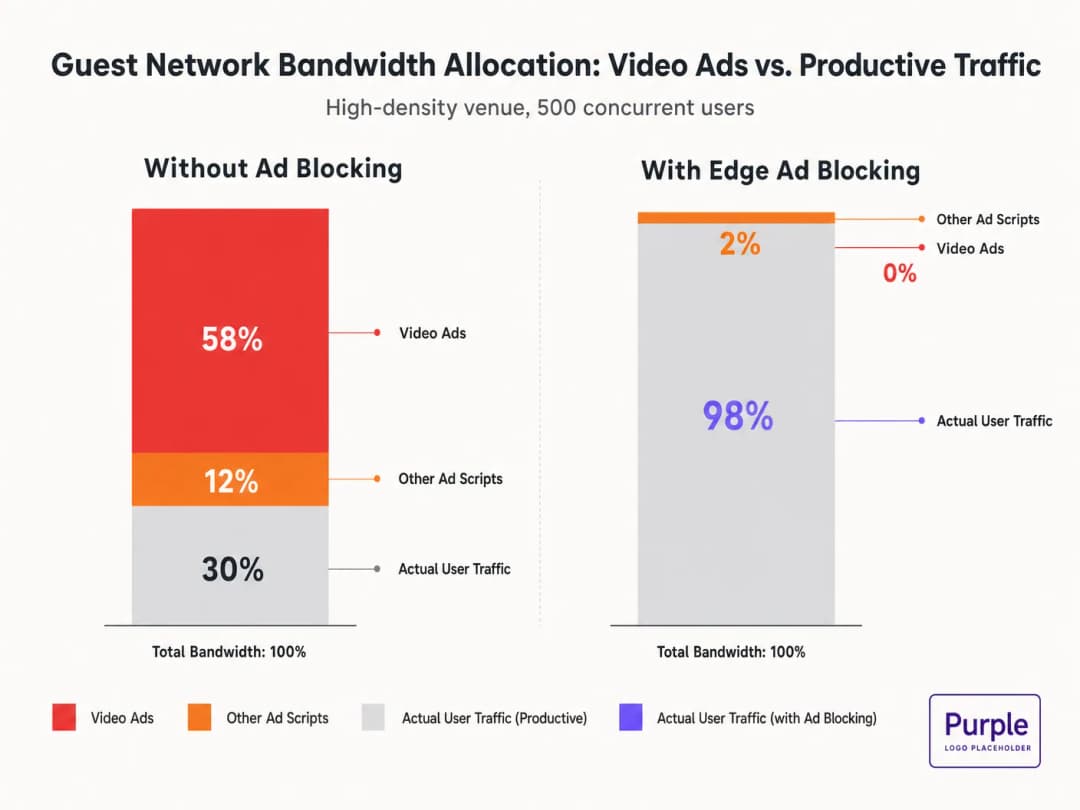
Quando gli ospiti si connettono alla rete e navigano su normali risorse web, i loro dispositivi avviano decine di connessioni in background verso le reti di distribuzione pubblicitaria. Questi flussi video a bitrate adattivo possono consumare fino al 50-70% del throughput disponibile, degradando l'esperienza di tutti gli utenti e saturando i collegamenti di backhaul. Questa guida descrive in dettaglio i meccanismi tecnici di questo consumo di banda e fornisce un modello indipendente dal fornitore per mitigarlo all'edge tramite il filtraggio DNS. Implementando queste strategie, le sedi possono migliorare drasticamente le prestazioni del guest WiFi senza attendere i cicli di rinnovo dell'hardware, riducendo i costi infrastrutturali e migliorando la conformità.
Ascolta il nostro briefing su questo argomento:
Analisi tecnica approfondita: la fisica della saturazione di rete guidata dagli annunci
Anatomia di una richiesta web
Quando un utente su una rete guest accede a un sito web supportato da pubblicità, il comportamento del browser è altamente aggressivo. Il caricamento di una singola pagina attiva in genere connessioni a 8-40 domini di terze parti distinti, inclusi ad exchange, piattaforme demand-side (DSP) e reti di distribuzione dei contenuti (CDN).
La penale di larghezza di banda degli annunci video
Gli annunci pubblicitari video, in particolare i formati pre-roll e mid-roll erogati dai principali exchange, vengono distribuiti come stream a bitrate adattivo. La CDN sonda la larghezza di banda disponibile e fornisce lo stream con la migliore qualità possibile. In un ambiente ad alta densità con 500 utenti simultanei, se il 20% degli utenti attiva uno stream pubblicitario a 1080p a 4-8 Mbps, la domanda aggregata sale istantaneamente di 400-800 Mbps. Questo traffico indesiderato aggira la normale profilazione del Quality of Service (QoS) perché proviene da connessioni HTTPS legittime.
Consumo di tempo di trasmissione e inefficienza spettrale
Oltre alla saturazione del backhaul, gli annunci video consumano prezioso tempo di trasmissione radio. In un mezzo wireless condiviso, ogni dispositivo che riceve attivamente uno stream ad alto bitrate riduce le opportunità di trasmissione per gli altri dispositivi. Sebbene lo standard IEEE 802.11ax (WiFi 6) abbia introdotto OFDMA e BSS Colouring per migliorare l'efficienza spettrale, questi meccanismi non possono compensare l'enorme volume di dati richiesto dalle reti pubblicitarie. Il livello radio si congestiona, aumentando la latenza e la perdita di pacchetti per il traffico produttivo.
Cascata di latenza della risoluzione DNS
L'erogazione degli annunci si basa su catene di reindirizzamento complesse. Una singola impressione pubblicitaria può richiedere 6-12 query DNS prima ancora che lo stream video abbia inizio. In un'implementazione densa, questo aumenta rapidamente il carico sul resolver DNS locale. Quando il resolver diventa un collo di bottiglia, la latenza subisce un'impennata, causando un sensibile degrado dei tempi di caricamento delle pagine per ogni utente sulla rete.
Hai domande sulla tua configurazione specifica?
Il nostro team collabora con gestori di sedi, responsabili IT e ingegneri di rete in 80.000 sedi. Prenota una chiamata di 20 minuti e ti mostreremo come altri professionisti come te hanno risolto il problema.
Guida all'implementazione: architettura di filtraggio DNS all'edge
L'intervento architetturale più efficace è il filtraggio DNS all'edge. Bloccando i domini delle reti pubblicitarie a livello di resolver, la rete impedisce che le connessioni TCP vengano stabilite. Questo approccio è stateless, scala in modo lineare e aggiunge una latenza trascurabile.
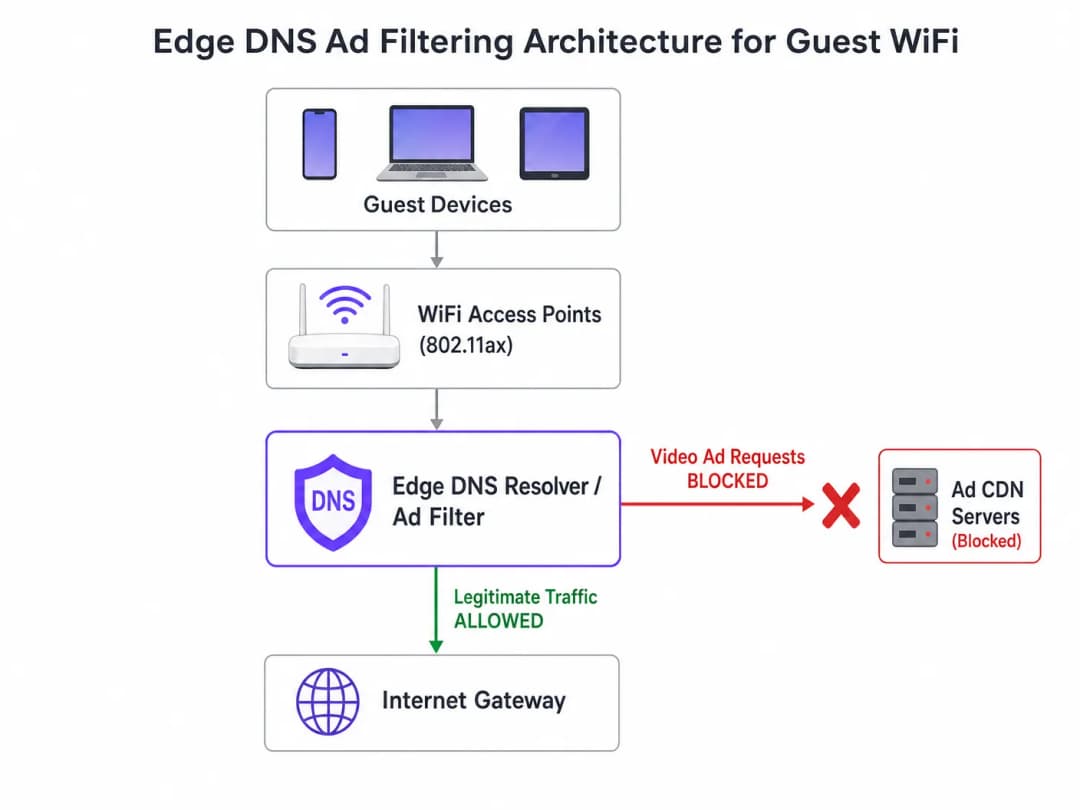
Strategia di implementazione passo dopo passo
- Strumentazione passiva: distribuisci la registrazione DNS passiva sulla rete guest per 48-72 ore per stabilire un profilo di traffico di base. Identifica i domini più interrogati e il loro volume. Utilizza piattaforme come l'analisi WiFi analytics per visualizzare questi dati.
- Applicazione Conservativa della Blocklist: Non distribuire massicce blocklist della community (ad esempio, la lista di Steven Black) fin dal primo giorno. Inizia con i primi 500 domini noti per la distribuzione di annunci video. Verifica che la fornitura di contenuti legittimi non subisca impatti.
- Configurazione DNS Split-Horizon: Garantisci una rigorosa separazione tra l'infrastruttura DNS aziendale e quella per gli ospiti. La policy di filtraggio deve essere limitata esclusivamente alla VLAN ospiti per prevenire interruzioni operative.
- Manutenzione Automatica della Blocklist: I network pubblicitari ruotano dinamicamente i domini e utilizzano algoritmi di generazione dei domini (DGA). Configura il resolver per scaricare feed aggiornati di threat intelligence e blocklist almeno ogni 4 ore.
- Gestione del DNS over HTTPS (DoH): I browser moderni potrebbero tentare di bypassare i resolver locali utilizzando il DoH. Mitiga questo problema bloccando la porta TCP/UDP 443 in uscita per gli intervalli IP dei provider DoH noti, forzando il fallback al resolver fornito dalla rete.
Per approfondire i dettagli di configurazione, consulta la nostra guida su Migliorare la velocità del WiFi bloccando le reti pubblicitarie all'edge.
Best Practice e Compliance
Privacy by Design (GDPR Articolo 25)
L'implementazione del filtraggio DNS all'edge si allinea con i principi di privacy by design del GDPR. Impedendo le connessioni ai domini di tracciamento di terze parti, la rete protegge intrinsecamente i dati degli ospiti dalla raccolta non autorizzata. Questo approccio proattivo riduce l'onere di conformità della struttura.
Segmentazione della Rete (PCI DSS)
Per i punti vendita e le strutture ricettive che elaborano pagamenti, lo standard PCI DSS richiede una rigorosa segmentazione della rete. Il filtraggio DNS rafforza questo confine garantendo che i dispositivi degli ospiti non possano inavvertitamente fungere da vettori per payload dannosi distribuiti tramite reti pubblicitarie compromesse (malvertising).
Esperienza Utente Trasparente
A differenza degli interstitial del Captive Portal o della deep packet inspection, il filtraggio DNS è trasparente. L'utente sperimenta caricamenti di pagina più rapidi e un ridotto consumo di batteria. Se uno spazio pubblicitario non si carica, solitamente si comprime o mostra uno spazio vuoto, il che viene raramente percepito dall'utente come un guasto di rete.
Risoluzione dei Problemi e Mitigazione dei Rischi
| Modalità di Guasto | Causa Radice | Strategia di Mitigazione |
|---|---|---|
| Blocco Eccessivo di Contenuti Legittimi | Blocco a livello root di CDN condivise (ad es. Akamai, Fastly). | Applica il filtraggio a livello di sottodominio. Mantieni una allowlist robusta per i servizi critici della struttura. |
| Bypass del Filtraggio tramite DoH | I browser utilizzano resolver DoH codificati nel software. | Applica il null-routing agli IP dei provider DoH noti. Implementa policy di split-tunneling se utilizzi il Mobile Device Management (MDM). |
| Esaurimento della CPU del Resolver | Infrastruttura DNS sottodimensionata che gestisce risposte NXDOMAIN eccessive. | Dota i resolver di CPU/RAM adeguate. Utilizza la memorizzazione nella cache in modo aggressivo. Considera i resolver ricorsivi ospitati nel cloud per garantire elasticità. |
ROI e Impatto Aziendale
L'impatto aziendale del filtraggio DNS all'edge è immediato e misurabile:
- Recupero della larghezza di banda: le sedi in genere recuperano il 30-50% della larghezza di banda della rete ospiti, differendo i costosi aggiornamenti del backhaul.
- Miglioramento della soddisfazione degli ospiti: caricamenti di pagina più rapidi e una connettività affidabile si correlano direttamente a punteggi Net Promoter Score (NPS) più elevati e recensioni positive sulla struttura.
- Efficienza operativa: un minor numero di ticket di assistenza legati al "WiFi lento" consente ai team IT di concentrarsi su iniziative strategiche, come l'implementazione della modalità mappe offline o l'espansione delle integrazioni per le smart city, come promosso dalla nostra leadership (vedi Purple nomina Iain Fox a VP Growth).
- Postura di sicurezza migliorata: il blocco proattivo dei domini di malvertising e tracciamento semplifica gli audit di sicurezza e i report di conformità. Scopri di più nel nostro articolo sul mantenimento di una postura sicura: Spiegazione di cos'è un audit trail per la sicurezza IT nel 2026.
Definizioni chiave
Filtraggio DNS all'edge
La pratica di bloccare l'accesso a domini specifici a livello di resolver DNS locale, impedendo ai dispositivi di risolvere gli indirizzi IP di reti pubblicitarie note.
Utilizzato dai team IT per interrompere silenziosamente il traffico indesiderato prima ancora che venga tentata una connessione TCP, risparmiando larghezza di banda e migliorando le prestazioni.
Adaptive Bitrate Streaming (ABR)
Una tecnologia che regola dinamicamente la qualità di un flusso video in base alla larghezza di banda disponibile dell'utente.
Le reti pubblicitarie utilizzano l'ABR per servire video della massima qualità possibile, consumando in modo aggressivo la larghezza di banda disponibile del WiFi guest.
Split-Horizon DNS
Una configurazione in cui vengono fornite risposte DNS diverse a seconda dell'indirizzo IP di origine della query (ad esempio, guest rispetto a aziendale).
Essenziale per applicare policy di filtraggio restrittive alle reti guest senza impattare sulle operazioni del back-office.
DNS over HTTPS (DoH)
Un protocollo per eseguire la risoluzione DNS remota tramite il protocollo HTTPS, crittografando le query.
Il DoH può aggirare il filtraggio locale all'edge; i network architect devono bloccare attivamente i provider DoH noti per applicare le policy DNS locali.
BSS Colouring
Una funzionalità Wi-Fi 6 (802.11ax) che aggiunge un identificatore di "colore" alle trasmissioni, consentendo agli access point di ignorare il traffico proveniente da reti sovrapposte.
Migliora l'efficienza radio nelle strutture affollate, ma non risolve la saturazione del backhaul causata dagli annunci video.
NXDOMAIN
Un codice di risposta DNS che indica che il nome di dominio richiesto non esiste.
La risposta standard restituita da un resolver di filtraggio quando un dispositivo tenta di interrogare un dominio di rete pubblicitaria bloccato.
Domain Generation Algorithm (DGA)
Tecniche utilizzate da malware e da alcune reti pubblicitarie aggressive per generare periodicamente nuovi nomi di dominio al fine di eludere le blocklist statiche.
Richiede ai team IT di utilizzare feed di intelligence sulle minacce dinamici e aggiornati frequentemente, anziché file hosts statici.
Malvertising
L'uso della pubblicità online per distribuire malware o reindirizzare gli utenti verso siti web dannosi.
Il blocco delle reti pubblicitarie all'edge protegge intrinsecamente i dispositivi degli ospiti da queste minacce, migliorando il livello di sicurezza della struttura.
Esempi pratici
Un hotel con 400 camere riscontra un grave deterioramento del WiFi guest ogni sera tra le 19:00 e le 22:00. Il backhaul da 1 Gbps è saturo, ma il property management system (PMS) mostra solo 600 dispositivi connessi. In che modo il network architect dovrebbe affrontare questo problema senza aggiornare il circuito?
- Implementare il logging DNS passivo sulla VLAN guest per analizzare il profilo del traffico durante la finestra di picco. 2. Identificare i domini che consumano più larghezza di banda, che probabilmente saranno le CDN degli annunci video. 3. Distribuire un resolver DNS ricorsivo con una blocklist curata che miri a queste specifiche reti pubblicitarie. 4. Configurare lo scope DHCP guest per assegnare il nuovo resolver. 5. Monitorare l'utilizzo della larghezza di banda; prevedere una riduzione del 30-40% del carico di picco.
Il direttore IT di uno stadio desidera implementare il blocco degli annunci tramite DNS, ma teme di compromettere l'applicazione mobile della struttura, che utilizza un SDK di analisi di terze parti.
- Analizzare le dipendenze di rete dell'applicazione mobile utilizzando uno strumento proxy. 2. Identificare gli endpoint API specifici richiesti per la funzionalità dell'applicazione. 3. Aggiungere questi specifici FQDN (Fully Qualified Domain Names) alla allowlist del resolver DNS, superando qualsiasi policy di blocklist. 4. Distribuire la policy di filtraggio a un sottoinsieme di access point (ad esempio, una singola area di passaggio) per un beta test prima di una distribuzione su tutta la struttura.
Domande di esercitazione
Q1. Una catena di negozi al dettaglio desidera implementare il filtraggio DNS in 500 punti vendita. Attualmente utilizza una soluzione firewall gestita in cloud. Dovrebbe implementare resolver DNS locali in ogni negozio o instradare tutte le query DNS a un resolver cloud centralizzato?
Suggerimento: Considera l'impatto della latenza delle query DNS sui tempi di caricamento delle pagine.
Visualizza risposta modello
Dovrebbe instradare le query a un resolver cloud centralizzato con punti di presenza (PoP) geograficamente distribuiti, a condizione che la latenza verso il PoP più vicino sia inferiore a 20ms. L'implementazione e la manutenzione di 500 resolver locali comporta un notevole sovraccarico operativo. I resolver cloud offrono una gestione centralizzata delle policy e aggiornamenti automatici delle blocklist, una soluzione ideale per un ambiente di vendita al dettaglio distribuito.
Q2. Dopo aver implementato una blocklist DNS, il team di marketing segnala che la splash page del Captive Portal della struttura non si carica per alcuni utenti. Qual è la causa più probabile?
Suggerimento: I Captive Portal spesso dipendono da risorse esterne per il tracciamento o l'autenticazione.
Visualizza risposta modello
La blocklist ha probabilmente bloccato inavvertitamente un CDN o un dominio con pixel di tracciamento (ad esempio, Google Analytics o un'API di social login) da cui dipende il Captive Portal. L'architetto deve esaminare i log DNS per l'intervallo IP del walled garden del Captive Portal, identificare la dipendenza bloccata e aggiungerla alla allowlist.
Q3. Un centro congressi ospita un summit di digital marketing. Il direttore IT teme che il blocco delle reti pubblicitarie possa impedire ai partecipanti di lavorare e mostrare i propri prodotti. Come dovrebbe essere gestita la situazione?
Suggerimento: Le policy di rete possono essere segmentate per SSID o VLAN.
Visualizza risposta modello
Il direttore IT dovrebbe predisporre un SSID/VLAN dedicato per i partecipanti al summit con una policy di bypass che utilizzi resolver DNS non filtrati (ad esempio, 8.8.8.8). La rete WiFi ospiti standard può rimanere filtrata. Questo fornisce l'accesso necessario per l'evento specifico senza compromettere le prestazioni della rete pubblica generale.
Continua a leggere questa serie
Come scansionare le interferenze WiFi e trovare il canale migliore
Questa guida tecnica completa fornisce ai responsabili IT aziendali metodologie pratiche per identificare le interferenze RF e selezionare i canali a 5GHz ottimali. Copre l'analisi dello spettro, le considerazioni sui canali DFS e le strategie pratiche di implementazione per massimizzare la velocità di trasmissione e ridurre la latenza senza richiedere nuovi investimenti in hardware.
Come Migliorare la Velocità del WiFi Senza Acquistare Nuovi Access Point
Questa guida spiega in dettaglio come le grandi strutture possano recuperare oltre il 30% della larghezza di banda WiFi senza acquistare nuovi access point. Implementando il filtraggio DNS, il band steering e le policy QoS, i team IT possono estendere la durata dell'hardware, ridurre le CapEx e migliorare le prestazioni e la sicurezza della rete.
Riduzione della latenza su reti WiFi ad alta densità
Questa guida spiega in dettaglio come l'eliminazione delle query DNS non necessarie per i domini di tracciamento riduca drasticamente la latenza sulle reti WiFi ad alta densità. Fornisce indicazioni pratiche su architettura, implementazione e ROI per i responsabili IT che gestiscono ambienti ad alta affluenza congestionati.
Hai domande sulla tua configurazione specifica?
Il nostro team collabora con gestori di sedi, responsabili IT e ingegneri di rete in 80.000 sedi. Prenota una chiamata di 20 minuti e ti mostreremo come altri professionisti come te hanno risolto il problema.