

BYOD WiFi सुरक्षा: तुमच्या नेटवर्कवर वैयक्तिक उपकरणे सुरक्षितपणे कशी येऊ द्यावी?
BYOD WiFi ॲक्सेस सुरक्षित करण्याबाबत IT नेत्यांसाठी एक व्यावहारिक, विक्रेता-निरपेक्ष मार्गदर्शक. हे कॉर्पोरेट मालमत्तांचे संरक्षण करताना वैयक्तिक उपकरणांना सक्षम करण्यासाठी 802.1X प्रमाणीकरण, MDM एकत्रीकरण आणि कठोर नेटवर्क सेगमेंटेशनच्या अंमलबजावणीचा समावेश करते.
🎧 हे मार्गदर्शक ऐका
ट्रान्सक्रिप्ट पहा

कार्यकारी सारांश
कॉर्पोरेट नेटवर्कची परिमिती विरघळत असताना, BYOD (Bring Your Own Device) WiFi ॲक्सेस व्यवस्थापित करणे हे सोयीच्या वैशिष्ट्यापासून गंभीर सुरक्षा गरजेकडे सरकले आहे. एंटरप्राइझ वातावरणात कार्यरत असलेल्या IT व्यवस्थापक आणि नेटवर्क आर्किटेक्टसाठी— हॉस्पिटॅलिटी आणि रिटेल पासून हेल्थकेअर आणि ट्रान्सपोर्ट पर्यंत—आव्हानात्मक स्पष्ट आहे: कॉर्पोरेट मालमत्तांना अस्वीकार्य धोक्यात न आणता वैयक्तिक उपकरणांना नेटवर्कवर सुरक्षितपणे कसे येऊ द्यावे.
हे मार्गदर्शक सुरक्षित BYOD WiFi तैनात करण्यासाठी एक व्यावहारिक, विक्रेता-निरपेक्ष फ्रेमवर्क प्रदान करते. आम्ही सैद्धांतिक मॉडेल्स वगळून कृतीयोग्य आर्किटेक्चरवर लक्ष केंद्रित करू: 802.1X प्रमाणीकरण लागू करणे, अनुपालनासाठी Mobile Device Management (MDM) चा लाभ घेणे आणि कठोर नेटवर्क सेगमेंटेशन लागू करणे. या तांत्रिक नियंत्रणांना व्यावसायिक परिणामांशी जोडून, IT नेते डेटा अखंडता संरक्षित करणारे आणि कार्यात्मक कार्यक्षमता राखणारे उपाय तैनात करू शकतात. तुम्ही जुन्या WPA2-PSK नेटवर्क अपग्रेड करत असाल किंवा सुरुवातीपासून शून्य-विश्वास आर्किटेक्चर डिझाइन करत असाल, हे संदर्भ आधुनिक एंटरप्राइझ एज सुरक्षित करण्यासाठी आवश्यक असलेल्या अचूक कॉन्फिगरेशनची माहिती देते.
तांत्रिक सखोल अभ्यास: आर्किटेक्चर आणि मानके
सुरक्षित BYOD WiFi सुरक्षेचा पाया सामायिक पासवर्ड सोडून ओळख-आधारित ॲक्सेस कंट्रोल स्वीकारण्यावर आधारित आहे.
802.1X मानक आणि EAP प्रोटोकॉल
IEEE 802.1X मानक हे एंटरप्राइझ WiFi सुरक्षेसाठी एक अनिवार्य आधारभूत आहे. हे पोर्ट-आधारित Network Access Control (PNAC) प्रदान करते, ज्यामुळे एखादे उपकरण स्पष्टपणे प्रमाणित होईपर्यंत नेटवर्कवर संवाद साधू शकत नाही याची खात्री होते.
BYOD डिप्लॉयमेंटसाठी, निवडलेली Extensible Authentication Protocol (EAP) पद्धत महत्त्वाची आहे. वापरकर्तानाव आणि पासवर्ड वापरून EAP-PEAP (Protected EAP) एक आधारभूत प्रदान करत असताना, EAP-TLS (Transport Layer Security) हे सुवर्ण मानक आहे. EAP-TLS क्लायंट-साइड प्रमाणपत्रांवर अवलंबून असते, ज्यामुळे क्रेडेंशियल चोरी आणि मॅन-इन-द-मिडल हल्ल्यांचा धोका नाहीसा होतो. जेव्हा वापरकर्त्याचा वैयक्तिक स्मार्टफोन कनेक्ट करण्याचा प्रयत्न करतो, तेव्हा RADIUS सर्व्हर त्या डिव्हाइसवर स्थापित अद्वितीय प्रमाणपत्राची पडताळणी करतो, ज्यामुळे वापरकर्त्याची ओळख आणि डिव्हाइसची अधिकृतता स्थिती दोन्ही सुनिश्चित होते.
नेटवर्क सेगमेंटेशन आणि VLANs
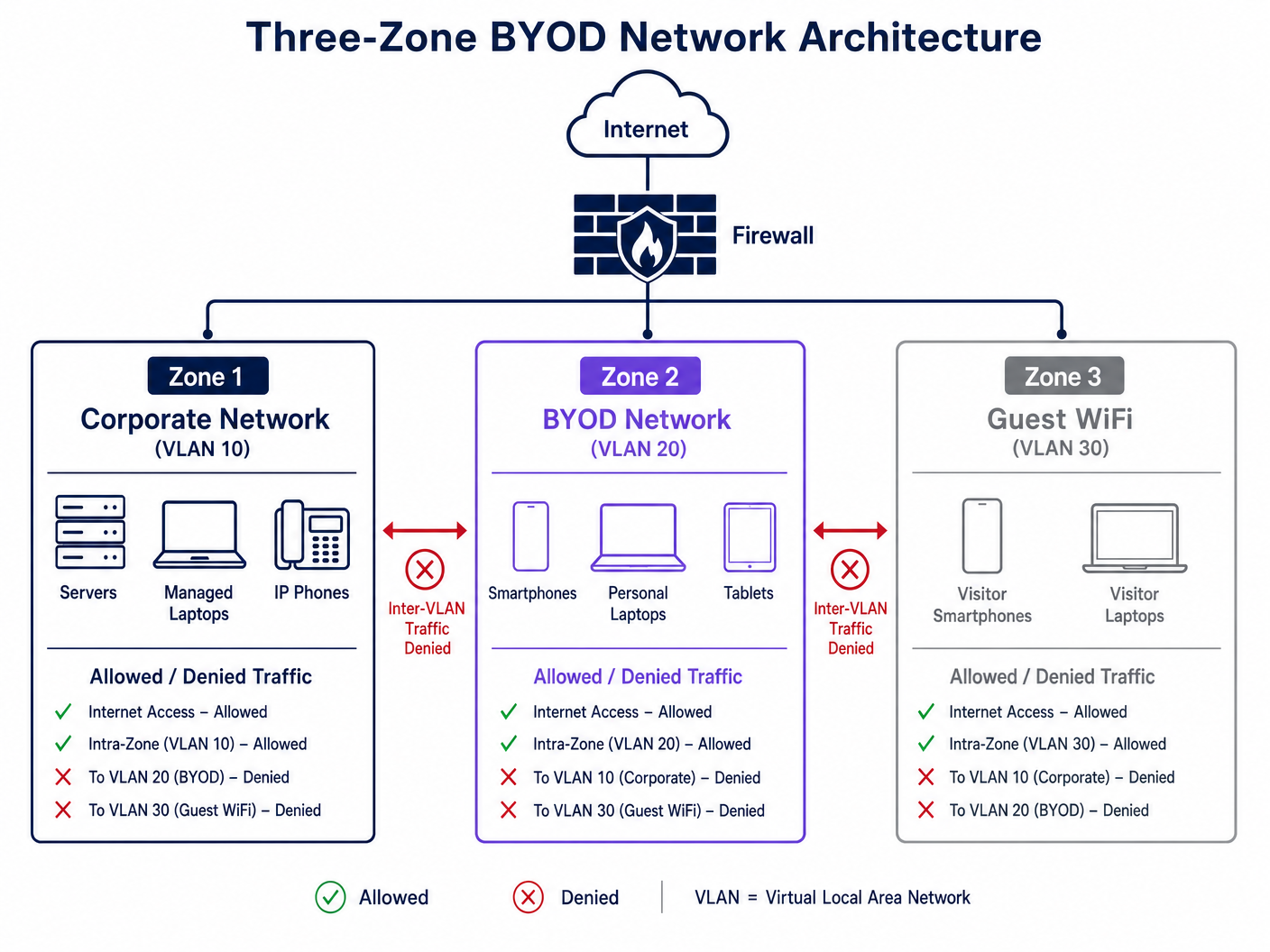
एक सपाट नेटवर्क हे तडजोड केलेले नेटवर्क आहे. BYOD उपकरणे कॉर्पोरेट सर्व्हर, पॉइंट-ऑफ-सेल सिस्टम किंवा गंभीर पायाभूत सुविधांसह कधीही सबनेट सामायिक करू नयेत.
कठोर थ्री-झोन आर्किटेक्चर लागू करणे आवश्यक आहे:
- कॉर्पोरेट झोन (VLAN 10): व्यवस्थापित, कंपनीच्या मालकीची उपकरणे ज्यांना अंतर्गत संसाधनांवर पूर्ण ॲक्सेस आहे.
- BYOD झोन (VLAN 20): कर्मचाऱ्यांच्या मालकीची उपकरणे. या झोनमध्ये इंटरनेट ॲक्सेस असावा आणि विशिष्ट अंतर्गत ॲप्लिकेशन्सवर (उदा. रिव्हर्स प्रॉक्सी किंवा अंतर्गत VPN द्वारे) प्रतिबंधित, अत्यंत निरीक्षण केलेला ॲक्सेस असावा.
- गेस्ट झोन (VLAN 30): अभ्यागतांची उपकरणे. फक्त इंटरनेट ॲक्सेस. पीअर-टू-पीअर संवाद रोखण्यासाठी क्लायंट आयसोलेशन सक्षम करणे आवश्यक आहे.
Mobile Device Management (MDM) एकत्रीकरण
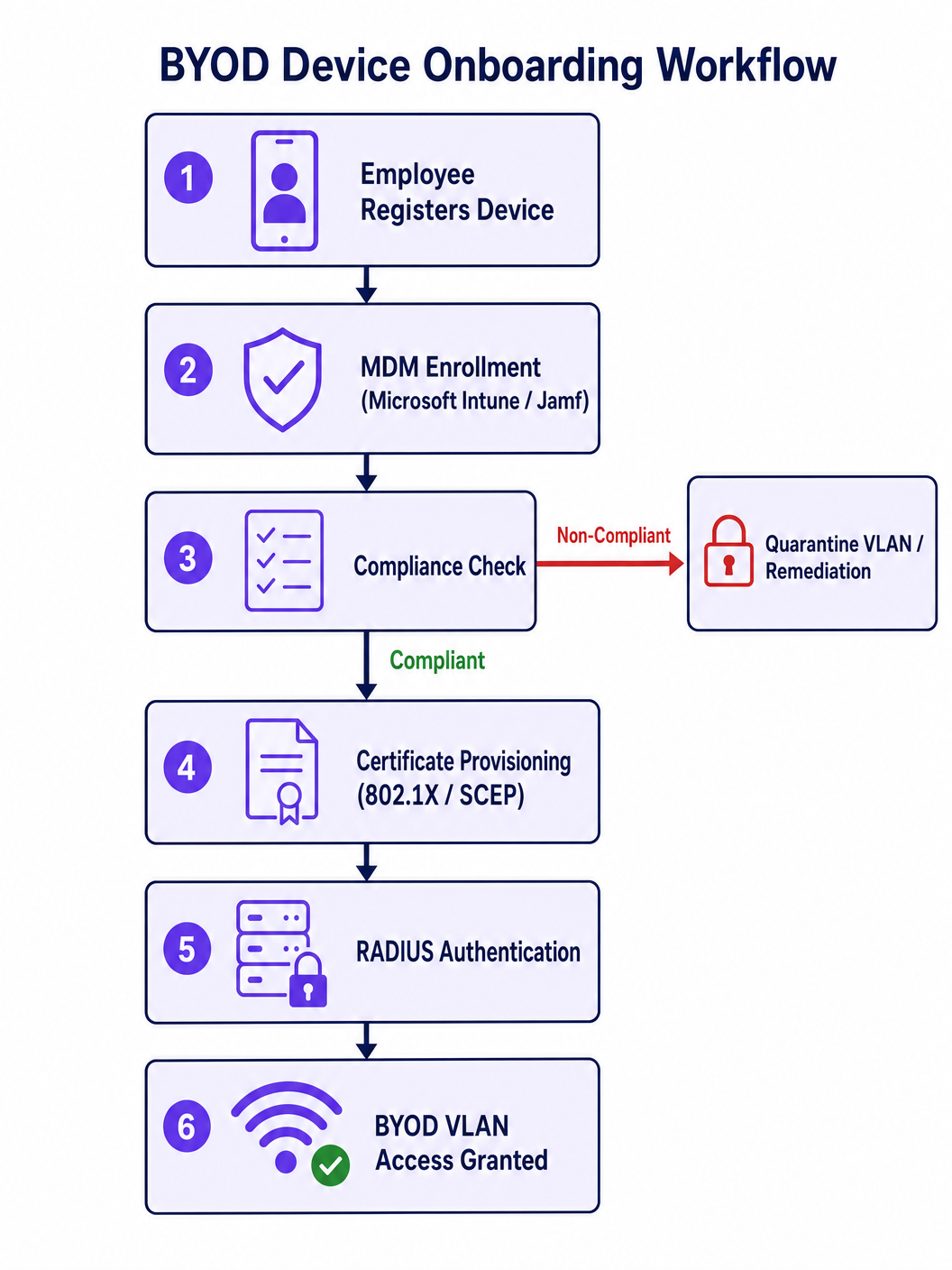
वैयक्तिक उपकरणांवर अनुपालन लागू करण्यासाठी, MDM एकत्रीकरण आवश्यक आहे. Microsoft Intune किंवा Jamf सारखे उपाय IT ला नेटवर्क ॲक्सेससाठी आवश्यक असलेले EAP-TLS प्रमाणपत्र जारी करण्यापूर्वी किमान OS आवृत्त्या, सक्रिय स्क्रीन लॉक आणि अन-रुटेड स्थिती यांसारख्या मूलभूत सुरक्षा स्थिती लागू करण्यास अनुमती देतात. जर एखादे उपकरण अनुपालनातून बाहेर पडले, तर MDM प्रमाणपत्र रद्द करते, ज्यामुळे WiFi ॲक्सेस त्वरित समाप्त होतो.
अंमलबजावणी मार्गदर्शक: चरण-दर-चरण डिप्लॉयमेंट
सुरक्षित BYOD आर्किटेक्चर तैनात करण्यासाठी वायरलेस LAN कंट्रोलर (WLC), ओळख प्रदाता (IdP) आणि MDM प्लॅटफॉर्म यांच्यात काळजीपूर्वक समन्वय आवश्यक आहे.
टप्पा 1: पायाभूत सुविधांची तयारी
- VLANs कॉन्फिगर करा: तुमच्या कोअर स्विचवर विशिष्ट VLANs स्थापित करा आणि त्यांना ॲक्सेस पॉइंट्सपर्यंत प्रसारित करा. फायरवॉलवर डीफॉल्टनुसार इंटर-VLAN राउटिंग नाकारले असल्याची खात्री करा.
- RADIUS तैनात करा: तुमच्या कॉर्पोरेट डिरेक्टरी (Active Directory, Entra ID) सह एकत्रित RADIUS सर्व्हर (उदा. Cisco ISE, Aruba ClearPass, किंवा क्लाउड RADIUS) लागू करा.
टप्पा 2: प्रमाणपत्र प्राधिकरण आणि MDM सेटअप
- PKI स्थापित करा: क्लायंट प्रमाणपत्रे जारी करण्यासाठी Certificate Authority (CA) सेट करा.
- SCEP/EST कॉन्फिगर करा: उपकरणांना प्रमाणपत्र वितरण स्वयंचलित करण्यासाठी Simple Certificate Enrollment Protocol (SCEP) किंवा Enrollment over Secure Transport (EST) सक्षम करा.
- MDM धोरणे परिभाषित करा: तुमच्या MDM मध्ये, डिव्हाइसच्या आरोग्याची तपासणी करणारे अनुपालन धोरण तयार करा. EAP-TLS कॉन्फिगरेशन आणि SCEP URL अनुपालन करणाऱ्या उपकरणांवर ढकलणारे WiFi प्रोफाइल पेलोड तयार करा.
टप्पा 3: ऑनबोर्डिंग अनुभव
हेल्पडेस्कवरील भार टाळण्यासाठी ऑनबोर्डिंग प्रक्रिया अखंड असावी.
- प्रोव्हिजनिंग SSID: एक ओपन किंवा WPA3-SAE प्रोव्हिजनिंग SSID प्रसारित करा.
- Captive Portal पुनर्निर्देशन: जेव्हा वापरकर्ते कनेक्ट होतात, तेव्हा त्यांना एका Captive Portal वर पुनर्निर्देशित करा. येथे, Purple चे Guest WiFi प्लॅटफॉर्म प्रारंभिक संपर्क बिंदू म्हणून काम करू शकते, वापरकर्त्यांना MDM प्रोफाइल डाउनलोड करण्यासाठी मार्गदर्शन करते.
- स्वयंचलित संक्रमण: एकदा MDM प्रोफाइल स्थापित झाल्यावर आणि प्रमाणपत्र प्रोव्हिजन झाल्यावर, डिव्हाइस आपोआप प्रोव्हिजनिंग SSID पासून डिस्कनेक्ट होते आणि सुरक्षित 802.1X BYOD SSID शी कनेक्ट होते.
सर्वोत्तम पद्धती आणि उद्योग मानके
एक मजबूत सुरक्षा स्थिती राखण्यासाठी, खालील सर्वोत्तम पद्धतींचे पालन करा:
- क्लायंट आयसोलेशन लागू करा: गेस्ट आणि BYOD VLANs दोन्हीवर, ॲक्सेस पॉइंट स्तरावर क्लायंट आयसोलेशन सक्षम करा. यामुळे वैयक्तिक उपकरण धोक्यात आल्यास बाजूकडील हालचाल थांबते.
- WPA3-Enterprise लागू करा: संक्रमणn from WPA2 वरून WPA3-Enterprise मध्ये अपग्रेड करा, ज्यामुळे अनिवार्य Protected Management Frames (PMF) आणि वर्धित क्रिप्टोग्राफिक सूट्सचा लाभ मिळेल.
- OpenRoaming चा लाभ घ्या: ठिकाणांवर अखंड, सुरक्षित कनेक्टिव्हिटीसाठी, OpenRoaming लागू करण्याचा विचार करा. Purple Connect परवान्याअंतर्गत OpenRoaming साठी विनामूल्य ओळख प्रदाता म्हणून कार्य करते, ज्यामुळे मॅन्युअल ऑनबोर्डिंगशिवाय सुरक्षित प्रवेश सुलभ होतो.
- सतत निरीक्षण: ट्रॅफिक पॅटर्नचे निरीक्षण करण्यासाठी WiFi Analytics वापरा. BYOD सबनेटमधून असामान्य बँडविड्थ वापर किंवा कनेक्शनचे प्रयत्न स्वयंचलित सूचनांना ट्रिगर केले पाहिजेत.
- अनुपालनाशी जुळवून घेणे: तुमची BYOD धोरणे संबंधित नियमांशी जुळतात याची खात्री करा. उदाहरणार्थ, आरोग्यसेवेत, HIPAA अनुपालनासाठी BYOD ट्रॅफिक वेगळे करणे महत्त्वाचे आहे, जसे की WiFi in Hospitals: A Guide to Secure Clinical Networks मध्ये तपशीलवार दिले आहे.
समस्यानिवारण आणि जोखीम कमी करणे
मजबूत आर्किटेक्चर असले तरीही, समस्या उद्भवतील. येथे सामान्य अपयश मोड आणि कमी करण्याच्या रणनीती आहेत:
प्रमाणपत्र कालबाह्यता
जोखीम: क्लायंट प्रमाणपत्रे कालबाह्य झाल्यावर डिव्हाइसेस अचानक कनेक्टिव्हिटी गमावतात. कमी करणे: SCEP द्वारे कालबाह्य होण्यापूर्वी 30 दिवस आधी प्रमाणपत्रे आपोआप नूतनीकरण करण्यासाठी MDM कॉन्फिगर करा. आगामी कालबाह्यतेबद्दल IT ला सतर्क करण्यासाठी CA वर निरीक्षण लागू करा.
Android MAC रँडमायझेशन
जोखीम: आधुनिक iOS आणि Android डिव्हाइसेस डीफॉल्टनुसार त्यांचे MAC पत्ते रँडमाइज करतात, ज्यामुळे MAC-आधारित प्रवेश नियंत्रणे किंवा Captive Portal बायपास नियम खंडित होऊ शकतात. कमी करणे: प्रमाणीकरण आणि धोरण अंमलबजावणीसाठी MAC पत्त्याऐवजी पूर्णपणे 802.1X ओळख (प्रमाणपत्र) वर अवलंबून रहा.
रोग ॲक्सेस पॉईंट्स
जोखीम: कर्मचारी निर्बंधांना बायपास करण्यासाठी वैयक्तिक राउटर प्लग इन करू शकतात, ज्यामुळे रोग ॲक्सेस पॉईंट्स तयार होतात. कमी करणे: तुमच्या एंटरप्राइझ WLC वर रोग AP शोध सक्षम करा (उदा. Wireless Access Point Ruckus उपयोजन व्यवस्थापित करताना) आणि एकाधिक MAC पत्ते (पोर्ट सुरक्षा) शोधल्यावर स्विच पोर्ट अक्षम करण्यासाठी कॉन्फिगर करा.
ROI आणि व्यवसायावर परिणाम
BYOD WiFi सुरक्षित करणे हे केवळ खर्च केंद्र नाही; ते मोजता येण्याजोगे व्यावसायिक मूल्य प्रदान करते:
- कमी झालेला हेल्पडेस्क ओव्हरहेड: MDM द्वारे प्रमाणपत्र तरतूद स्वयंचलित केल्याने पासवर्ड रीसेट तिकिटे आणि मॅन्युअल ऑनबोर्डिंग विनंत्या 80% पर्यंत कमी होतात.
- जोखीम कमी करणे: कठोर विभाजन आणि अनुपालन तपासणीमुळे तडजोड केलेल्या वैयक्तिक डिव्हाइसमधून उद्भवणाऱ्या महागड्या डेटा उल्लंघनाची शक्यता मोठ्या प्रमाणात कमी होते.
- वर्धित उत्पादकता: कर्मचाऱ्यांना त्यांच्या पसंतीच्या डिव्हाइसेसवर आवश्यक संसाधनांमध्ये अखंड, सुरक्षित प्रवेश मिळतो, ज्यामुळे एकूण कार्यक्षमता सुधारते.
- डेटा-आधारित अंतर्दृष्टी: BYOD आणि अतिथी ट्रॅफिकला ॲनालिटिक्स प्लॅटफॉर्मद्वारे रूट केल्याने, ठिकाणे जागेचा वापर आणि थांबण्याच्या वेळेबद्दल कृतीयोग्य बुद्धिमत्ता गोळा करू शकतात.
वैयक्तिक डिव्हाइसेस विस्तृत नेटवर्क इकोसिस्टममध्ये कसे समाकलित होतात याबद्दल अधिक व्यापक दृष्टिकोनासाठी, Personal Area Networks (PANs): Technologies, Applications, Security, and Future Trends वरील आमच्या मार्गदर्शकाचा संदर्भ घ्या.
महत्त्वाच्या संज्ञा आणि व्याख्या
802.1X
An IEEE standard for port-based Network Access Control (PNAC) that provides an authentication mechanism to devices wishing to attach to a LAN or WLAN.
The foundational protocol that prevents unauthorized devices from passing traffic on the enterprise network.
EAP-TLS
Extensible Authentication Protocol-Transport Layer Security. An authentication method that uses public key infrastructure (PKI) and client-side certificates.
The gold standard for BYOD authentication, eliminating the need for passwords and protecting against credential theft.
MDM (Mobile Device Management)
Software that allows IT administrators to control, secure, and enforce policies on smartphones, tablets, and laptops.
Used to verify device health (compliance) before issuing the certificate required to join the BYOD WiFi.
Network Segmentation
The practice of dividing a computer network into multiple subnets or VLANs to improve performance and security.
Crucial for ensuring that compromised personal devices cannot access corporate servers or point-of-sale systems.
Client Isolation
A wireless network security feature that prevents devices connected to the same AP from communicating directly with each other.
Must be enabled on Guest and BYOD networks to prevent peer-to-peer malware spread or lateral movement.
SCEP (Simple Certificate Enrollment Protocol)
A protocol designed to make the issuing and revocation of digital certificates as scalable as possible.
Used by the MDM to silently and automatically push EAP-TLS certificates to compliant BYOD devices.
RADIUS
Remote Authentication Dial-In User Service. A networking protocol that provides centralized Authentication, Authorization, and Accounting (AAA) management.
The server that checks the device's certificate against the directory and tells the WLC whether to allow the connection.
WPA3-Enterprise
The latest generation of WiFi security, offering enhanced cryptographic strength and mandatory Protected Management Frames (PMF).
The recommended security standard for modern BYOD deployments to prevent deauthentication attacks.
केस स्टडीज
A 200-room hotel needs to allow staff to use personal smartphones to access a cloud-based housekeeping app, but must ensure these devices cannot access the property management system (PMS) or the guest WiFi network.
- Configure a dedicated BYOD VLAN (e.g., VLAN 20) on the core switch and WLC.
- Create an 802.1X SSID (e.g., 'Staff-BYOD') mapped to VLAN 20.
- Integrate an MDM (e.g., Intune) to push EAP-TLS certificates only to devices that meet minimum security baselines.
- Configure firewall rules at the edge: Allow outbound internet access for VLAN 20 to reach the cloud housekeeping app. Explicitly deny routing from VLAN 20 to the Corporate VLAN (where the PMS resides) and the Guest VLAN.
A large retail chain is experiencing high helpdesk call volumes because employee BYOD certificates are expiring, locking staff out of the inventory network.
- Audit the MDM and Certificate Authority (CA) integration.
- Configure the MDM policy to utilize SCEP (Simple Certificate Enrollment Protocol) for automated certificate renewal.
- Set the renewal threshold to trigger 30 days prior to the certificate expiration date.
- Implement an alert system on the CA to notify the IT operations team if a batch of renewals fails.
परिस्थिती विश्लेषण
Q1. A hospital IT director wants to allow visiting doctors to use their personal iPads to view non-sensitive schedules. The director proposes putting these iPads on the existing Corporate VLAN to simplify routing. What is the primary risk, and what is the correct architectural approach?
💡 संकेत:Consider the principle of least privilege and the impact of a compromised personal device on clinical systems.
शिफारस केलेला दृष्टिकोन दाखवा
The primary risk is lateral movement; if a visiting doctor's iPad is infected with malware, placing it on the Corporate VLAN exposes critical clinical systems and electronic health records (EHR) to potential compromise. The correct approach is to implement a dedicated BYOD or Partner VLAN with strict firewall rules that only permit outbound access to the specific scheduling application, explicitly denying routing to the Corporate VLAN.
Q2. Your network currently uses MAC Address Authentication Bypass (MAB) to allow executive personal devices onto a privileged WiFi network. Executives are complaining that they have to re-register their new iPhones frequently. Why is this happening, and how should you redesign the authentication mechanism?
💡 संकेत:Think about modern mobile OS privacy features regarding hardware identifiers.
शिफारस केलेला दृष्टिकोन दाखवा
This is happening because modern iOS (and Android) devices use MAC randomization by default to protect user privacy, meaning the MAC address changes, breaking the MAB rules. To fix this, you must abandon MAC-based authentication and implement 802.1X with EAP-TLS. By deploying an MDM to push unique client certificates to the executives' devices, authentication becomes tied to cryptographic identity rather than a volatile hardware identifier.
Q3. During a BYOD rollout, you decide to use EAP-PEAP (username and password) instead of EAP-TLS to save time on setting up a Certificate Authority. What specific security vulnerability does this introduce?
💡 संकेत:Consider how devices verify the network they are connecting to and how credentials are transmitted.
शिफारस केलेला दृष्टिकोन दाखवा
Using EAP-PEAP introduces the risk of credential theft via Man-in-the-Middle (MitM) attacks or rogue access points. If a device is not configured to strictly validate the server certificate (which is common on unmanaged BYOD devices), an attacker can broadcast a spoofed SSID, intercept the PEAP handshake, and capture the user's corporate credentials. EAP-TLS mitigates this entirely by requiring mutual certificate authentication.




