

Personal Area Networks (PANs): Technologies, Applications, Security, and Future Trends
This authoritative technical reference guide covers the architecture, deployment, and security of Personal Area Networks (PANs) for enterprise environments, examining Bluetooth Low Energy, Zigbee, NFC, and Ultra-Wideband in detail. It provides actionable guidance for IT managers and network architects managing high-density venues such as hotels, retail chains, stadiums, and healthcare facilities. The guide addresses RF spectrum management, network segmentation, compliance requirements, and emerging PAN trends to help senior IT leaders make informed deployment decisions.
🎧 Listen to this Guide
View Transcript

Executive Summary
For CTOs and network architects managing high-density environments like hotels, retail chains, and stadiums, the proliferation of Personal Area Networks (PANs) presents both a significant operational advantage and a complex RF management challenge. While the Wireless Local Area Network (WLAN) handles broad coverage, PANs operate at the extreme edge — typically within a 10-metre radius — connecting the myriad of wearables, IoT sensors, and peripherals that drive modern user experiences and operational efficiency.
This guide provides a vendor-neutral, technical deep-dive into the dominant PAN protocols: Bluetooth Low Energy (BLE), Zigbee, Near Field Communication (NFC), and Ultra-Wideband (UWB). We explore their architectural implications, particularly regarding 2.4 GHz spectrum congestion, and detail the security controls required to prevent short-range networks from becoming a vector into your secure enterprise infrastructure. By treating PANs with the same architectural rigour as your primary Guest WiFi deployment, you can leverage these technologies to enhance location-based services, streamline access control, and deploy resilient sensor networks without compromising performance or security.
Technical Deep-Dive
Personal Area Networks are defined by their proximity to the user and their specific use cases, which dictate the underlying protocol selection. Understanding the technical characteristics of each protocol is essential for successful deployment in an enterprise environment.
Bluetooth Low Energy (BLE)
Operating in the 2.4 GHz ISM band, BLE is the ubiquitous standard for connecting peripherals and wearables. Unlike Classic Bluetooth, BLE is designed for short bursts of data, significantly reducing power consumption. It employs Frequency Hopping Spread Spectrum (FHSS) across 40 channels (each 2 MHz wide) to mitigate interference. In enterprise deployments, BLE is frequently used for asset tracking and proximity marketing via beacons. However, because it shares the 2.4 GHz spectrum with legacy Wi-Fi (802.11b/g/n), high-density BLE deployments can raise the noise floor, impacting overall WLAN performance. For hospitality deployments in particular, where guests bring multiple BLE devices into a confined space, this interference must be actively managed.
Zigbee (IEEE 802.15.4)
Zigbee is a low-power, low-data-rate protocol that also operates in the 2.4 GHz band, distinguished by its mesh networking topology. This makes it highly resilient and ideal for building automation and IoT sensor networks, such as smart thermostats and lighting controls. A Zigbee network consists of a Coordinator, Routers (which extend the mesh), and End Devices. Careful channel planning is essential when deploying Zigbee alongside Wi-Fi to avoid overlapping frequencies. The IEEE 802.15.4 standard also underpins Thread, the protocol used by Matter-compatible smart home devices, making Zigbee expertise increasingly relevant for forward-looking deployments.
Near Field Communication (NFC)
NFC operates at 13.56 MHz and is designed for extremely short-range communication, typically less than 4 centimetres. This physical proximity requirement inherently enhances security, making NFC the standard for contactless payments (ISO/IEC 14443), access control, and secure device pairing. NFC operates in three modes: Reader/Writer, Peer-to-Peer, and Card Emulation. In retail environments, NFC is increasingly used for both point-of-sale transactions and interactive product information displays, reducing friction at the point of purchase.
Ultra-Wideband (UWB)
UWB operates across a broad spectrum (typically 3.1 to 10.6 GHz) and uses short-duration pulses to transmit data. Its primary enterprise advantage is precise indoor positioning. Unlike BLE, which estimates distance based on Received Signal Strength Indicator (RSSI), UWB calculates Time of Flight (ToF), enabling location accuracy down to a few centimetres. This is invaluable for high-value asset tracking in healthcare settings or precise navigation in complex venues such as airports and conference centres. Apple's AirTag and the iPhone's Precision Finding feature are consumer implementations of the same IEEE 802.15.4a standard that underpins enterprise UWB deployments.
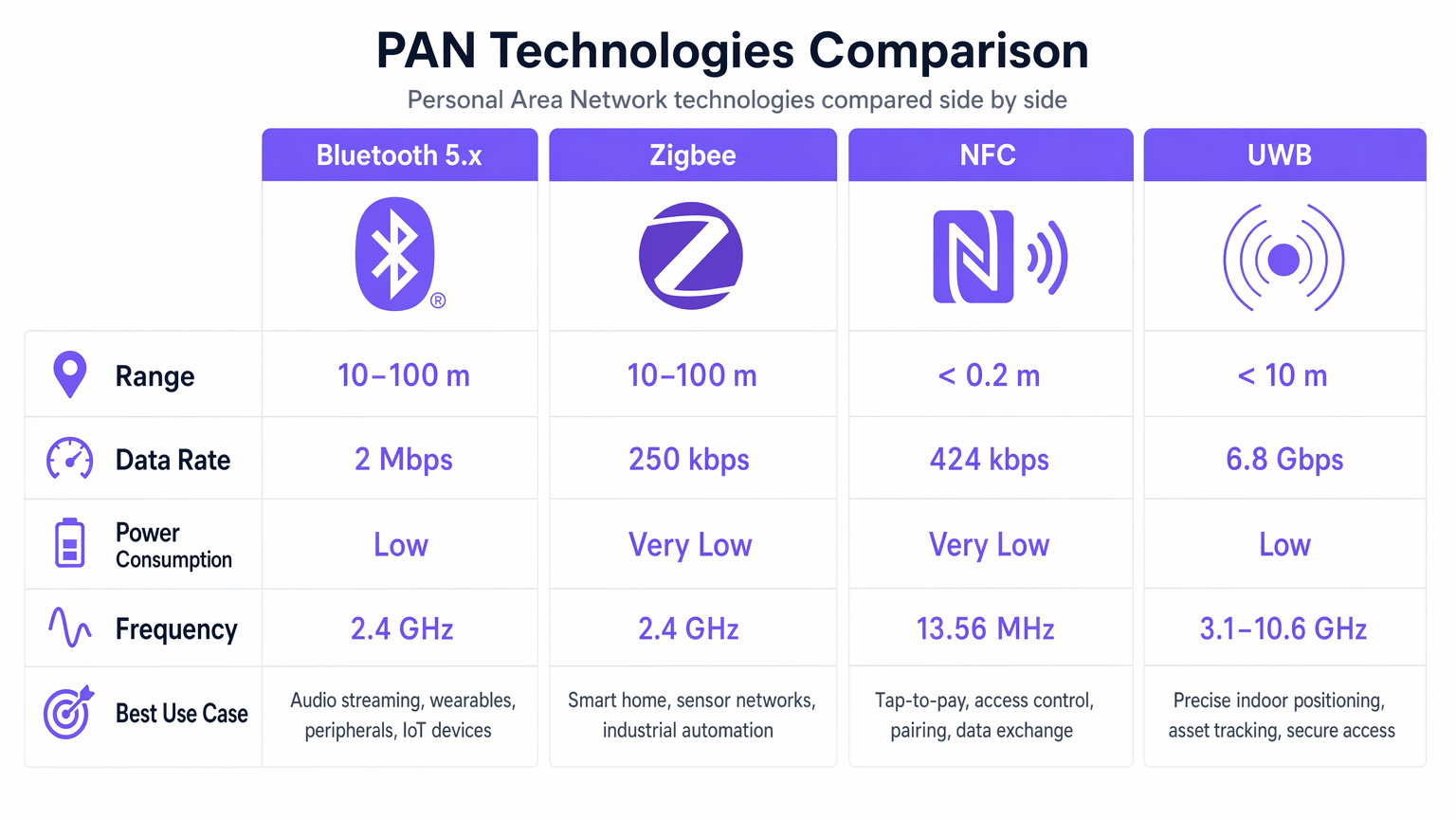
| Technology | Standard | Frequency | Range | Data Rate | Power | Primary Use Case |
|---|---|---|---|---|---|---|
| Bluetooth 5.x (BLE) | IEEE 802.15.1 | 2.4 GHz | 10–100 m | 2 Mbps | Low | Wearables, peripherals, beacons |
| Zigbee | IEEE 802.15.4 | 2.4 GHz | 10–100 m | 250 kbps | Very Low | Building automation, IoT sensors |
| NFC | ISO/IEC 18092 | 13.56 MHz | < 0.2 m | 424 kbps | Very Low | Access control, payments, pairing |
| UWB | IEEE 802.15.4a | 3.1–10.6 GHz | < 10 m | 6.8 Gbps | Low | Precise positioning, asset tracking |
| Infrared (IrDA) | IrDA | 800–900 nm | < 1 m | 16 Mbps | Very Low | Legacy device control |
Implementation Guide
Deploying PAN technologies in an enterprise environment requires careful planning to ensure reliability and minimise interference with existing infrastructure.
Step 1: RF Spectrum Analysis and Channel Planning
The most critical step in deploying 2.4 GHz PANs (BLE and Zigbee) is mitigating interference with your Wi-Fi network. Conduct a thorough RF site survey to identify existing 2.4 GHz utilisation before placing any PAN hardware. Wi-Fi typically utilises non-overlapping channels 1, 6, and 11. To minimise interference, configure your Zigbee networks to use channels 15, 20, 25, or 26. These channels fall within the guard bands between the primary Wi-Fi channels, significantly reducing co-channel interference. This is the single most impactful configuration decision in a combined Wi-Fi and Zigbee deployment.
Step 2: Gateway Placement and Density
For BLE and Zigbee networks, the placement of gateways (or coordinators) is crucial for reliable data collection. Ensure gateways have a clear line of sight to the maximum number of end devices, minimising attenuation from walls and metal structures. Do not exceed the manufacturer's recommended ratio of end devices per gateway. In high-density IoT deployments, such as a smart hotel floor, consider deploying a dedicated gateway per room cluster to ensure reliable mesh formation and data backhaul. Where possible, utilise enterprise Wi-Fi access points that include integrated BLE or Zigbee radios to reduce hardware footprint, as discussed in Your Guide to a Wireless Access Point Ruckus .
Step 3: Network Segmentation and VLAN Architecture
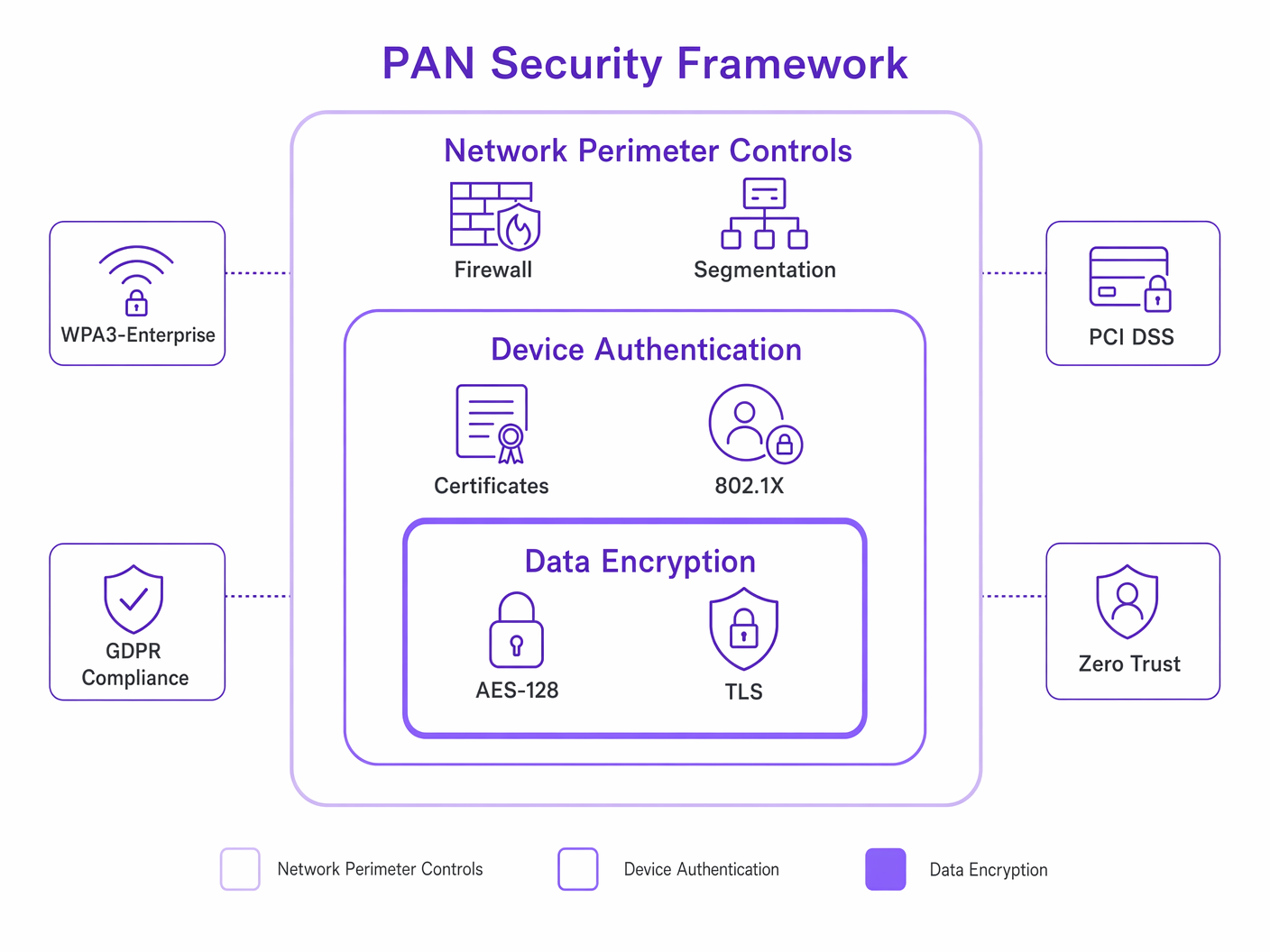
PAN gateways that bridge IoT traffic to the enterprise network must be strictly isolated. Place all PAN gateways on a dedicated, non-routable VLAN. Implement strict Access Control Lists (ACLs) to restrict traffic from the PAN VLAN to only the necessary internal servers or external cloud endpoints. Deny all lateral movement to the corporate data network. This architecture is fundamental to preventing a compromised IoT device from serving as a pivot point into sensitive systems.
Step 4: Device Authentication and Provisioning
Enforce IEEE 802.1X authentication for all PAN gateways connecting to the wired or wireless network. Use certificate-based authentication (EAP-TLS) where possible, as it eliminates the risk of credential theft. For Bluetooth device pairing, mandate Out-of-Band (OOB) pairing or Numeric Comparison to prevent Man-in-the-Middle attacks. Maintain a device inventory and implement a zero-touch provisioning process for new devices to ensure consistent security configuration at scale.
Best Practices
Adherence to industry standards and vendor-neutral best practices is essential for a robust PAN deployment.
Enforce Strong Authentication. Never rely on default PINs or 'Just Works' pairing for Bluetooth devices in an enterprise setting. Require OOB pairing or Numeric Comparison to mitigate MitM attacks. For gateway devices, enforce 802.1X with EAP-TLS.
Implement Layered Encryption. Mandate AES-128 encryption for all BLE and Zigbee traffic at the protocol layer. Additionally, enforce TLS 1.3 for all communication between PAN gateways and backend servers to protect data in transit across the wider network.
Establish a Firmware Management Programme. PAN devices, particularly IoT sensors, are frequently deployed and forgotten. Establish a centralised management system to push firmware updates to gateways and end devices to patch known vulnerabilities. This is a direct GDPR compliance requirement under the principle of data protection by design.
Conduct Regular PAN Audits. Use spectrum analysis tools to periodically audit the RF environment for rogue PAN devices. An unauthorised Bluetooth device operating within your venue could be conducting a reconnaissance attack. Integrate PAN device discovery into your existing Network Access Control (NAC) framework.
Align with Compliance Frameworks. For retail environments handling payment card data, ensure that PAN devices used in proximity to payment terminals comply with PCI DSS requirements, particularly around network segmentation and encryption. For healthcare, align with NHS Digital's Data Security and Protection Toolkit and ensure that wearable devices transmitting patient data comply with GDPR Article 9 (special category data). For broader network security hardening, refer to Mitigating RADIUS Vulnerabilities: A Security Hardening Guide .
Troubleshooting & Risk Mitigation
Even with careful planning, PAN deployments encounter operational and security challenges.
Common Failure Modes
Mesh Network Collapse (Zigbee). If too many routing nodes fail or are powered down simultaneously, the Zigbee mesh can collapse, isolating end devices. Ensure sufficient redundancy by deploying adequate routing nodes and utilising mains-powered devices where possible to maintain the mesh backbone. Battery-powered routers should be treated as end devices only.
BLE Beacon Drift. Over time, battery degradation causes the transmission interval to lengthen or the signal strength to drop, leading to inaccurate location data. Implement a proactive battery monitoring system and establish a regular replacement schedule. Most enterprise beacon management platforms provide battery status dashboards.
Rogue Device Pairing. An attacker may attempt to pair a malicious device with an enterprise PAN gateway. Implement strict MAC address filtering on gateways and utilise Wireless Intrusion Prevention Systems (WIPS) to detect anomalous pairing requests. Disable Bluetooth discoverability on all enterprise devices when not actively pairing.
2.4 GHz Saturation. In high-density venues such as stadiums or conference centres, the cumulative effect of thousands of personal BLE devices can saturate the 2.4 GHz band. The primary mitigation is to migrate your enterprise Wi-Fi traffic to the 5 GHz and 6 GHz bands (Wi-Fi 6E/7), reserving 2.4 GHz for legacy IoT devices and accepting the elevated noise floor as a managed risk.
Security Threat Landscape
The short range of PANs often leads to a false sense of security. Vulnerabilities in PAN protocols can be exploited to gain access to the wider network.
Bluejacking and Bluesnarfing. While largely mitigated in modern Bluetooth implementations, legacy devices remain vulnerable to unauthorised messaging (Bluejacking) or data theft (Bluesnarfing). Ensure all devices enforce secure connections and disable discoverability when not actively pairing.
KNOB Attack (Key Negotiation of Bluetooth). This attack forces Bluetooth devices to negotiate a weaker encryption key, enabling eavesdropping. Mitigated by ensuring devices enforce a minimum encryption key length of 7 octets, as recommended by the Bluetooth SIG.
Zigbee Network Key Theft. During the Zigbee network join process, the network key is transmitted in plaintext if the Trust Centre Link Key is the well-known default. Always configure a unique, pre-shared Trust Centre Link Key before deployment. For more on network-level authentication security, see Mitigating RADIUS Vulnerabilities: A Security Hardening Guide .
ROI & Business Impact
Investing in a robust, secure PAN infrastructure delivers measurable business value across sectors.
Hospitality. Integrating Zigbee-based smart room controls with the property management system reduces energy consumption by automating HVAC and lighting based on occupancy. A 200-room hotel deploying smart thermostats typically achieves a 15–20% reduction in energy costs, with a payback period of 18–24 months. Seamless Bluetooth pairing for in-room entertainment enhances the guest experience, directly impacting review scores and repeat bookings. For a broader view of connectivity strategy in this sector, see the Hospitality industry hub.
Retail. Deploying BLE beacons enables highly targeted, location-based marketing. When integrated with a platform like WiFi Analytics , retailers can analyse footfall patterns, optimise store layouts, and push personalised offers to customers' smartphones, driving conversion rates. Pilot deployments in grocery retail have demonstrated a 7–12% uplift in basket size when location-triggered promotions are deployed effectively.
Healthcare. Utilising UWB for precise asset tracking ensures that critical equipment, such as infusion pumps or defibrillators, can be located instantly, reducing search times by up to 70% in clinical environments. This directly improves patient care efficiency and reduces capital expenditure on replacement equipment. For more on clinical network deployments, see WiFi in Hospitals: A Guide to Secure Clinical Networks .
Transport. In airport and transit hub environments, BLE beacons integrated with passenger apps provide turn-by-turn indoor navigation, reducing missed connections and improving passenger satisfaction scores. UWB-based baggage tracking provides real-time location data, reducing mishandled baggage rates. For related connectivity considerations, see Your Guide to Enterprise In Car Wi Fi Solutions and the Transport industry hub.
By treating PANs as a critical extension of the enterprise network rather than an afterthought, organisations can unlock new operational efficiencies and revenue streams while maintaining a strong security posture aligned with GDPR, PCI DSS, and sector-specific compliance requirements.
Future Trends in PAN Technology
Several developments will shape the enterprise PAN landscape over the next three to five years.
Matter and Thread Convergence. The Matter smart home standard, backed by Apple, Google, Amazon, and Samsung, uses Thread (based on IEEE 802.15.4) as its underlying mesh transport. As Matter adoption accelerates in commercial building automation, IT teams will need to manage Thread networks alongside existing Zigbee deployments.
Wi-Fi HaLow (802.11ah). Operating in the sub-1 GHz band, Wi-Fi HaLow extends the range of Wi-Fi to over 1 kilometre while maintaining low power consumption. This positions it as a direct competitor to Zigbee and LoRaWAN for large-scale IoT sensor deployments, potentially simplifying the protocol landscape for enterprise teams.
UWB Proliferation. As UWB chipsets become standard in flagship smartphones and wearables, the barrier to deploying UWB-based location services will decrease significantly. Expect to see UWB replace BLE for indoor positioning in high-value retail and healthcare environments within the next two to three years.
AI-Driven RF Management. Machine learning algorithms are increasingly being integrated into wireless infrastructure management platforms to dynamically optimise channel allocation and power levels across both Wi-Fi and PAN protocols in real time, reducing the manual overhead of RF planning in complex, high-density environments.
Key Terms & Definitions
Personal Area Network (PAN)
A short-range wireless network used for data transmission between devices in the immediate vicinity of a user, typically within a 10-metre radius. PANs connect peripherals, wearables, and IoT sensors to a primary device, which then bridges to the wider enterprise network.
The foundational concept for understanding the edge layer of enterprise network architecture.
Bluetooth Low Energy (BLE)
A wireless PAN technology (IEEE 802.15.1) designed for short bursts of data transmission with significantly reduced power consumption compared to Classic Bluetooth. Operates in the 2.4 GHz ISM band using Frequency Hopping Spread Spectrum (FHSS).
The dominant protocol for IoT sensors, proximity marketing beacons, and wearable device connectivity in enterprise environments.
Zigbee
A low-power, low-data-rate wireless mesh networking protocol based on the IEEE 802.15.4 standard, operating in the 2.4 GHz band. Supports mesh, star, and tree topologies, with a maximum data rate of 250 kbps.
The preferred protocol for building automation, smart room controls, and large-scale IoT sensor networks due to its resilient mesh capabilities.
Near Field Communication (NFC)
A set of communication protocols (ISO/IEC 18092) for communication between two devices at a distance of less than 4 centimetres, operating at 13.56 MHz. Supports Reader/Writer, Peer-to-Peer, and Card Emulation modes.
Essential for secure access control, contactless payments, and secure device pairing in enterprise environments.
Ultra-Wideband (UWB)
A radio technology (IEEE 802.15.4a) that transmits data using short-duration pulses across a broad spectrum (3.1–10.6 GHz). Enables centimetre-level indoor positioning through Time of Flight (ToF) calculations.
Increasingly deployed for high-value asset tracking and precise indoor navigation where BLE RSSI accuracy is insufficient.
Frequency Hopping Spread Spectrum (FHSS)
A method of transmitting radio signals by rapidly switching the carrier frequency among many distinct frequencies within a designated band. BLE uses FHSS across 40 channels to mitigate interference in the congested 2.4 GHz band.
The mechanism that allows BLE to coexist with Wi-Fi and other 2.4 GHz devices, though it does not eliminate interference entirely.
Time of Flight (ToF)
A distance measurement method that calculates the time taken for a signal to travel from a transmitter to a receiver. UWB uses ToF to achieve centimetre-level positioning accuracy, as opposed to BLE's RSSI-based distance estimation.
The key differentiator between UWB and BLE for location services. When the use case demands accuracy better than 1–2 metres, ToF-based UWB is required.
Out-of-Band (OOB) Pairing
A Bluetooth pairing method where the pairing information (cryptographic keys) is exchanged via a separate wireless technology, such as NFC, rather than over the Bluetooth channel itself. This prevents Man-in-the-Middle attacks during the pairing process.
A critical security control for provisioning Bluetooth devices in enterprise environments, particularly for medical devices and access control systems.
KNOB Attack (Key Negotiation of Bluetooth)
A Bluetooth vulnerability (CVE-2019-9506) that allows an attacker to force two pairing devices to negotiate a weaker encryption key (as short as 1 byte), enabling eavesdropping on the connection.
Mitigated by ensuring devices enforce a minimum encryption key length of 7 octets. Relevant when auditing legacy Bluetooth device firmware.
Trust Centre Link Key (Zigbee)
A pre-shared key used in Zigbee networks to secure the transmission of the Network Key during the device join process. If left at the default value ('ZigBeeAlliance09'), the Network Key is transmitted in plaintext, enabling an attacker to decrypt all network traffic.
A critical security configuration item for any Zigbee deployment. Must be changed from the default before commissioning.
Case Studies
A 200-room hotel is deploying a Zigbee-based smart thermostat and lighting system. The hotel already has a dense, high-performance Wi-Fi 6 deployment utilising the 2.4 GHz and 5 GHz bands. How should the network architect configure the Zigbee network to ensure reliable operation without degrading the existing Wi-Fi performance?
Step 1 — Conduct RF Survey: Analyse the current 2.4 GHz Wi-Fi channel utilisation. Confirm the Wi-Fi network is correctly configured to use non-overlapping channels 1, 6, and 11.
Step 2 — Select Zigbee Channels: Configure the Zigbee Coordinator to utilise channels that fall within the guard bands of the Wi-Fi channels. Specifically, select Zigbee channels 15, 20, 25, or 26. Channel 26 is particularly recommended as it sits above the Wi-Fi channel 11 upper edge.
Step 3 — Deploy Coordinators: Install a Zigbee Coordinator (gateway) per floor or per cluster of 4–5 rooms, ensuring they are hardwired to the network via Power over Ethernet (PoE) and placed on a dedicated, isolated IoT VLAN (e.g., VLAN 30).
Step 4 — Configure ACLs: Apply strict ACLs to the IoT VLAN, permitting only outbound traffic to the building management system (BMS) server. Deny all inter-VLAN routing to the corporate and guest networks.
Step 5 — Verify Mesh: Once deployed, verify that all Zigbee end devices (thermostats, lights) are successfully routing traffic through the mesh to the nearest coordinator using the Zigbee coordinator's diagnostic interface. Confirm no end devices are operating as orphaned nodes.
Step 6 — Monitor: Integrate the Zigbee coordinator's health data into the central network monitoring platform to receive alerts on mesh degradation or node failures.
A large retail chain wants to implement a location-based marketing campaign using BLE beacons to push targeted offers to customers' smartphones as they approach specific product displays. They plan to use battery-powered beacons and expect to deploy approximately 500 beacons across 20 stores. What are the key operational and technical considerations for this deployment?
Step 1 — Determine Beacon Density: Calculate the required number of beacons per store based on the desired location accuracy. For aisle-level accuracy (approximately 3–5 metres), deploy one beacon every 8–10 metres.
Step 2 — Configure Transmission Parameters: Adjust the beacon's transmission power (Tx power) and advertising interval. For in-store proximity marketing, a Tx power of -12 dBm and an advertising interval of 200–300 ms provides a good balance between responsiveness and battery life, typically yielding 18–24 months of battery life from a CR2477 cell.
Step 3 — Implement Fleet Management: Deploy a centralized beacon management platform (e.g., via the store's existing Wi-Fi infrastructure if APs include integrated BLE radios) to monitor battery levels, firmware versions, and device health proactively. Set automated alerts for beacons below 20% battery.
Step 4 — Integrate with Analytics: Connect the beacon data to a central analytics platform such as Purple's WiFi Analytics to correlate location data with customer profiles and purchase history, enabling personalised offer delivery.
Step 5 — GDPR Compliance: Ensure the customer-facing app includes explicit consent for location tracking and that all location data is processed in accordance with GDPR Article 6 (lawful basis for processing). Implement data minimisation — retain only the location events necessary for the marketing use case.
Scenario Analysis
Q1. Your organisation is deploying a new fleet of BLE-enabled medical carts in a hospital. The carts will transmit real-time location data to fixed gateways every 5 seconds. The hospital already has a critical VoIP over Wi-Fi deployment operating on the 2.4 GHz band. What is the most significant risk, and how should you architect the solution to mitigate it?
💡 Hint:Consider the cumulative impact of high-density BLE advertising packets on the 2.4 GHz noise floor, and the latency sensitivity of VoIP traffic.
Show Recommended Approach
The most significant risk is that the high volume of BLE advertising packets from the medical carts will raise the 2.4 GHz noise floor, causing increased jitter and packet loss on the VoIP network, leading to degraded call quality. The recommended mitigation strategy is twofold: first, migrate the VoIP traffic to the 5 GHz band using 802.11ac/ax-capable handsets to separate it from the BLE traffic entirely. Second, tune the BLE carts' advertising interval to the maximum acceptable for the location accuracy requirement (e.g., 1-second intervals rather than 100 ms) and reduce the Tx power to the minimum required for reliable gateway detection. This reduces the BLE duty cycle and minimises spectral impact.
Q2. A facilities manager wants to install consumer-grade Zigbee smart plugs in the corporate office to monitor energy usage. They plan to connect the Zigbee hub directly to the main corporate switch using the default Trust Centre Link Key. Why is this a critical security risk, and what is the correct deployment architecture?
💡 Hint:Consider both the network segmentation risk and the Zigbee-specific cryptographic vulnerability introduced by the default Trust Centre Link Key.
Show Recommended Approach
There are two critical risks. First, connecting a consumer-grade IoT hub directly to the corporate network without VLAN isolation means that a compromised hub could serve as a bridge into the sensitive data network, violating the principle of least privilege. Second, using the default Trust Centre Link Key ('ZigBeeAlliance09') means that when new devices join the network, the Network Key is transmitted in plaintext, allowing any passive observer with a Zigbee sniffer to capture the key and decrypt all subsequent network traffic. The correct architecture is: (1) change the Trust Centre Link Key to a unique, randomly generated value before commissioning any devices; (2) place the Zigbee hub on a dedicated, isolated IoT VLAN; (3) apply ACLs to deny all traffic from the IoT VLAN to the corporate network, permitting only outbound connections to the energy management cloud endpoint.
Q3. You are designing the physical access control system for a Tier 3 data centre. You must choose between BLE-based mobile credentials (using a smartphone app) and NFC-based smart cards. The security team has flagged concerns about relay attacks. Which technology provides a stronger inherent security posture for physical access, and what additional controls would you layer on top?
💡 Hint:Consider the physical range of each technology and the feasibility of a relay attack at the respective operating distances.
Show Recommended Approach
NFC provides a stronger inherent security posture for this use case. Because NFC operates at a range of less than 4 centimetres, it requires deliberate physical proximity (a 'tap'), making relay attacks significantly more difficult compared to BLE, which can transmit over tens of metres. A BLE relay attack — where an attacker relays the BLE credential signal from a legitimate user's smartphone to the access reader — is a well-documented threat that has been demonstrated in practice against smart locks and vehicle keyless entry systems. For a Tier 3 data centre, the additional controls layered on top of NFC should include: (1) multi-factor authentication combining NFC card with a PIN pad; (2) anti-passback controls to prevent credential sharing; (3) time-of-day access restrictions; and (4) integration with a CCTV system for audit trail correlation.




