
Custom Captive Portal: HTML आणि CSS मार्गदर्शक
हे अधिकृत तांत्रिक संदर्भ मार्गदर्शक कस्टम captive portal लँडिंग पेज डिझाइन आणि कोड करण्यासाठी आवश्यक असणारे डेव्हलपमेंट मानके, CSS आर्किटेक्चर आणि नेटवर्क-स्तरीय मर्यादा स्पष्ट करते. हे फ्रंटएंड डेव्हलपर्स आणि नेटवर्क आर्किटेक्ट्सना Apple CNA आणि Android webview वातावरणांमध्ये काम करण्यासाठी सुयोग्य धोरणे प्रदान करते, ज्यामुळे पिक्सेल-परफेक्ट, सुसंगत आणि अत्यंत कार्यक्षम अतिथी WiFi अनुभवांची खात्री मिळते.
Video overview
हे मार्गदर्शक ऐका
पॉडकास्ट ट्रान्सक्रिप्ट पहा
आमच्या मुख्य मालिकेचा भाग: Captive Portal मार्गदर्शक →
Custom Captive Portal Architecture & CNA Inspector Tool
Model your custom HTML/CSS guest WiFi splash page. Inspect walled garden domain allowlists, evaluate Captive Network Assistant (CNA) mini-browser restrictions across iOS and Android, and export production-ready boilerplate code.
Vendor Controller Profile: Cisco Meraki (MR Series)
Architecture Category: Cloud-Managed WLAN
Redirection Flow: Custom splash URL with URL parameter append ($login_url)
RFC 3576 CoA Support: Supported (Dynamic Session Terminate / Role Push)
RFC 8908 Modern API: Native Controller Support
Onboarding & Conversion: Click-Through / Terms Acceptance
Guests review acceptable use policies (AUP) and click a single button to connect.
Average Onboarding Duration: ~8 seconds
Target Venue Policy: Fast friction-free onboarding, social marketing consent, and return visitor recognition.
Eliminate Captive Portal Support Calls & Walled Garden Errors
Building custom HTML/CSS captive portals by hand across changing iOS, Android, and Windows mini-browsers causes frequent disconnection tickets and broken walled gardens. Purple delivers enterprise cloud captive portals with 99.99% uptime SLA, native RFC 8908 support, and seamless CRM integrations across 40,000+ venues worldwide.
- ✓ Native Cisco Meraki, Aruba & Ruckus API Sync
- ✓ Automated Walled Garden Allowlist Orchestration
- ✓ Guaranteed iOS & Android CNA Compatibility
- ✓ GDPR, CCPA & ISO 27001 Certified Data Security
Request Custom Captive Portal Consultation
Speak with a Purple wireless architect to review your splash page requirements and controller integrations.
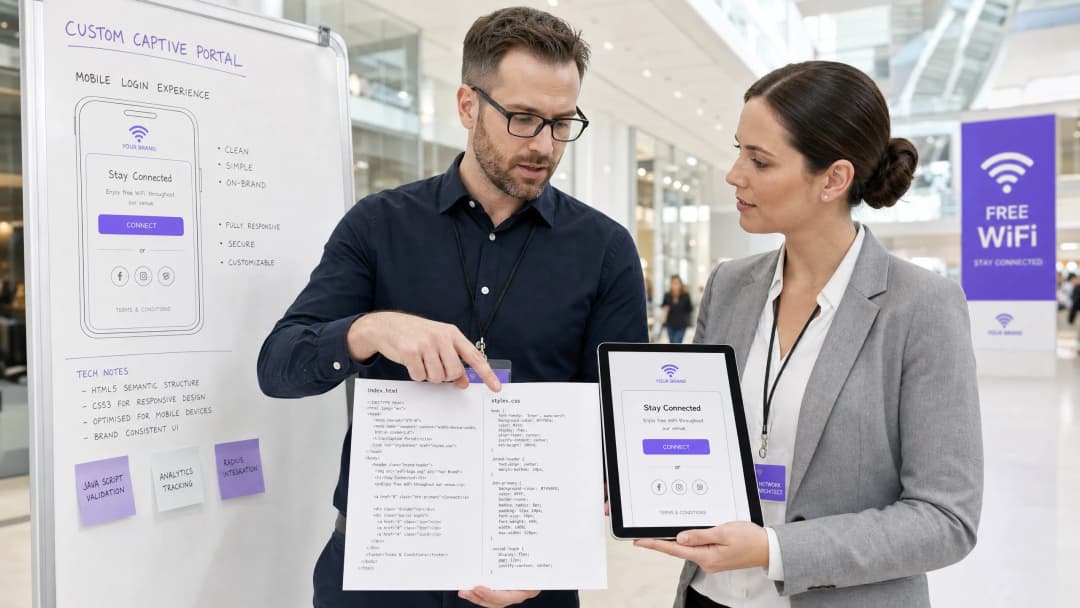
कार्यकारी सारांश (Executive Summary)
भव्य हॉटेल्स Hospitality आणि रिटेल चेन्स Retail पासून ते ट्रान्झिट हब्स Transport आणि आधुनिक वैद्यकीय कॅम्पसेस Healthcare पर्यंतच्या - कॉर्पोरेट व्यावसायिक ठिकाणांसाठी - गेस्ट WiFi स्प्लॅश पेज हे डिजिटल प्रवेशद्वार आहे. तथापि, ९०% पेक्षा जास्त गेस्ट WiFi लॉगिन हे मोबाईल डिव्हाइसेसवर होतात, जिथे रेंडरिंगचे नियंत्रण Safari किंवा Chrome सारख्या मानक ब्राउझरद्वारे नाही, तर अत्यंत प्रतिबंधित Captive Network Assistant (CNA) वेबव्ह्यूद्वारे [1] केले जाते. हे "मिनी-ब्राउझर्स" कठोर सँडबॉक्स मर्यादा लागू करतात: ते बाह्य CDN ब्लॉक करतात, पर्सिस्टंट कुकीज अक्षम करतात, बाह्य वेब फॉन्ट दुर्लक्षित करतात आणि सुरक्षा धोके कमी करण्यासाठी व सेशन हायजॅकिंग रोखण्यासाठी JavaScript एक्झिक्युशनवर तीव्र मर्यादा घालतात [2].
जेव्हा एखादा डेव्हलपर पारंपारिक वेब मानके वापरून स्प्लॅश पेज डिझाइन करतो, तेव्हा या मर्यादांमुळे लेआउट बिघडतात, ब्रँड ॲसेट्स गहाळ होतात आणि लॉगिन बटणे काम करत नाहीत, ज्याचा थेट परिणाम ग्राहकांच्या समाधानावर आणि डिजिटल एंगेजमेंटवर होतो. हे मार्गदर्शक या आव्हानांवर उपाय प्रदान करते, बचावात्मक कोडिंग पद्धती सादर करते - जसे की इनलाइन CSS, Base64 ॲसेट एन्कोडिंग, सिस्टम फॉन्ट स्टॅक्स आणि स्पष्ट नेव्हिगेशन-चालित ऑथेंटिकेशन हँडशेक - जेणेकरून अखंड क्रॉस-प्लॅटफॉर्म रेंडरिंग सुनिश्चित होईल. याव्यतिरिक्त, Purple च्या पोर्टल बिल्डरसारख्या व्यवस्थापित सोल्यूशनचा वापर केल्याने डेव्हलपर्सना RADIUS ऑथेंटिकेशन, डेटाबेस स्केलिंग, GDPR/PCI अनुपालन आणि मल्टी-व्हेंडर AP इंटिग्रेशन्सचा भार हलका करताना HTML/CSS वर पूर्ण क्रिएटिव्ह नियंत्रण कसे ठेवता येते याचे आम्ही परीक्षण करतो [3].
तांत्रिक सखोल विश्लेषण (Technical Deep-Dive)
एक लवचिक आणि मजबूत कस्टम कॅप्टिव्ह पोर्टल तयार करण्यासाठी, डेव्हलपर्सना नेटवर्क-स्तरीय इंटरसेप्शन आणि ब्राउझर व्हर्च्युअलायझेशन समजून घेणे आवश्यक आहे जे एखादा अतिथी ओपन SSID शी जोडला जातो तेव्हा घडते.
कॅप्टिव्ह पोर्टल लाइफसायकल (The Captive Portal Lifecycle)
जेव्हा एखादे क्लायंट डिव्हाइस कॅप्टिव्ह SSID शी जोडले जाते, तेव्हा खालील क्रम सुरू होतो:
- IP असोसिएशन: डिव्हाइस 3-वे हँडशेक पूर्ण करते आणि DHCP द्वारे IP पत्त्याची विनंती करते.
- सक्रिय कनेक्टिव्हिटी प्रोब (Active Connectivity Probe): ऑपरेटिंग सिस्टमचा बॅकग्राउंड नेटवर्क व्यवस्थापक त्वरित एका समर्पित व्हेंडर-न्यूट्रल कॅनरी URL वर HTTP GET विनंती पाठवतो (उदा. Apple ची
http://captive.apple.com/hotspot-detect.htmlकिंवा Google चीhttp://connectivitycheck.gstatic.com/generate_204) [1]. - DNS/HTTP इंटरसेप्शन: स्थानिक वायरलेस लॅन कंट्रोलर (WLC) किंवा ॲक्सेस पॉइंट (AP) या पोर्ट 80 HTTP विनंतीला इंटरसेप्ट करतो. अपेक्षित HTTP 200 किंवा 204 स्टेटस परत करण्याऐवजी, गेटवे क्लायंटच्या ट्रॅफिकला HTTP 302 रीडायरेक्टद्वारे कॅप्टिव्ह पोर्टलच्या लँडिंग पेज URL वर रीडायरेक्ट करतो [2].
- वेबव्ह्यू स्पॉनिंग (Webview Spawning): रीडायरेक्ट शोधून, OS युझरला मॅन्युअली पूर्ण ब्राउझर उघडण्याची आवश्यकता न ठेवता, रीडायरेक्ट केलेले स्प्लॅश पेज दाखवण्यासाठी त्याचे मूळ Captive Network Assistant (CNA) मिनी-ब्राउझर स्पॉन (सुरू) करते.5. Authentication and State Transition: वापरकर्ता लॉगिन फॉर्म पूर्ण करतो, पोर्टल सर्व्हरकडे क्रेडेन्शियल सबमिट करतो, जे गेटवेला (बऱ्याचदा RADIUS Access-Accept किंवा बाह्य API कॉलद्वारे) MAC ॲड्रेस अधिकृत करण्याचे निर्देश देते.
- CNA Exit Handshake: CNA मिनी-ब्राउझर त्याच्या कॅनरी URL वर आणखी एक HTTP GET करतो. त्याला अपेक्षित २००/२०४ प्रतिसाद मिळाल्यास, तो त्याच्या उजव्या कोपऱ्यातील बटण "Cancel" वरून "Done" मध्ये बदलतो आणि प्राथमिक नेटवर्क इंटरफेस म्हणून WiFi कनेक्शन स्थापित करतो.
प्लॅटफॉर्म-विशिष्ट मिनी-ब्राउझर मर्यादा
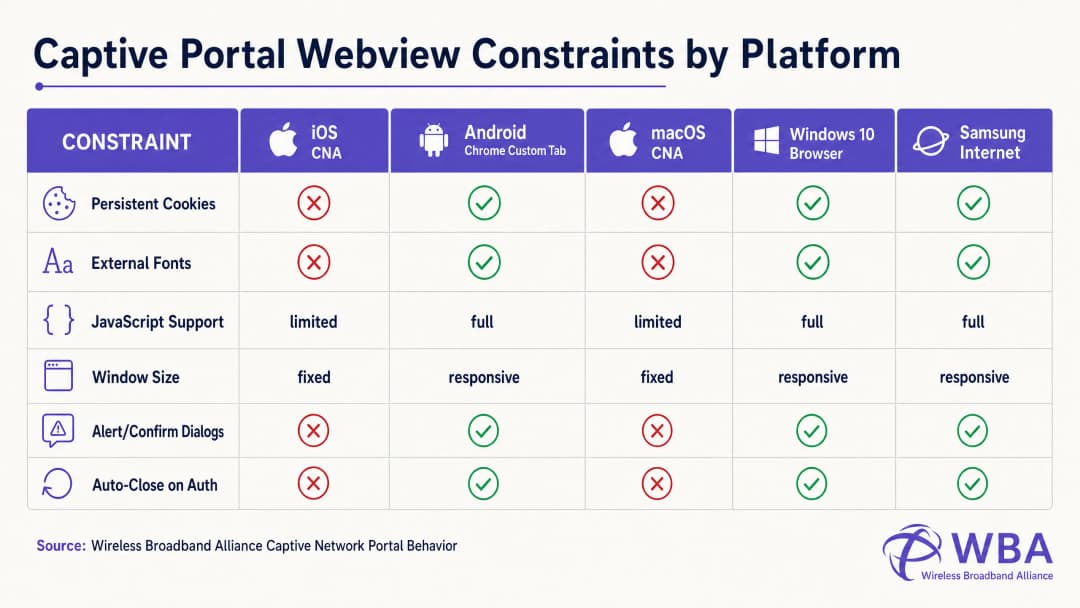
प्रत्येक ऑपरेटिंग सिस्टम हे लाइफसायकल वेगवेगळ्या वेबव्ह्यू वातावरणात हाताळते, ज्यामुळे अत्यंत विखंडित वर्तन दिसून येते. खालील तक्ता या महत्त्वपूर्ण मर्यादांचा तपशील देतो:
| प्लॅटफॉर्म / वेबव्ह्यू | डिस्प्ले पद्धत | पर्सिस्टंट कुकीज | बाह्य वेब फॉन्ट | JavaScript एक्झिक्युशन | विंडोचे परिमाण | एक्झिट हँडशेक ट्रिगर |
|---|---|---|---|---|---|---|
| Apple iOS CNA (Websheet) | मिनी-ब्राउझर पॉपअप | Blocked (बंद केल्यावर नष्ट होते) | Blocked (ऑफलाइन) | मर्यादित (localStorage/sessionStorage नाही) | रिस्पॉन्सिव्ह (डिव्हाइस-रुंदी) | फक्त पूर्ण-पृष्ठ HTTP रीडायरेक्ट [1] |
| Apple macOS CNA (Captive Network Assistant) | मिनी-ब्राउझर पॉपअप | Blocked | Blocked | मर्यादित (अलर्ट/कन्फर्म डायलॉग नाहीत) | निश्चित (900px x 572px) | फक्त पूर्ण-पृष्ठ HTTP रीडायरेक्ट |
| Android (Google) (CaptivePortalLogin) | पुश नोटिफिकेशन -> Chrome कस्टम टॅब | Allowed (Chrome सह शेअर केलेले) | Allowed (वॉल गार्डनमध्ये व्हाईटलिस्ट असल्यास) | पूर्ण | रिस्पॉन्सिव्ह | स्वयंचलित (Captive Portal API / 204 तपासणी) [2] |
| Samsung Android (Samsung Internet) | पुश नोटिफिकेशन -> मिनी-ब्राउझर | Allowed | Allowed | पूर्ण | रिस्पॉन्सिव्ह | स्वयंचलित |
| Windows 10/11 (डिफॉल्ट ब्राउझर) | ऑटो-लाँच डिफॉल्ट ब्राउझर | Allowed (पूर्ण ब्राउझर संदर्भ) | Allowed | पूर्ण | रिस्पॉन्सिव्ह | मॅन्युअल / स्वयंचलित |
Apple CNA "Done" बटण सापळ्याभोवती कोडिंग करणे
कस्टम पोर्टल डेव्हलपमेंटमधील सर्वात वारंवार अपयशी ठरणाऱ्या पद्धतींपैकी एक म्हणजे iOS डिव्हाइसेसवरील "Done" बटणाचा सापळा. जेव्हा वापरकर्ता ऑथेंटिकेट करतो, तेव्हा iOS Websheet वेबव्ह्यूने नेटवर्क आता कॅप्टिव्ह नाही हे शोधले पाहिजे. हे त्याच्या बॅकग्राउंड कॅनरी विनंत्यांच्या यशाचे निरीक्षण करून केले जाते.
महत्त्वाचे म्हणजे, iOS CNA हे केवळ फुल-पेज HTTP नेव्हिगेशन (लोकेशन रीडायरेक्ट) दरम्यानच ही तपासणी सुरू करेल. जर एखाद्या डेव्हलपरने मॉडर्न सिंगल पेज ॲप्लिकेशन (SPA) तयार केले जे असिंक्रोनस AJAX कॉलद्वारे (उदा. fetch() किंवा Axios) फॉर्म डेटा सबमिट करते आणि URL न बदलता DOM डायनॅमिकली अपडेट करते, तर CNA त्याची कनेक्टिव्हिटी तपासणी कधीच पुन्हा रन करणार नाही. युझर गेटवे पातळीवर ऑथेंटिकेट केला जाईल, परंतु वरील उजव्या कोपऱ्यातील CNA बटण "Cancel" असेच राहील. त्रस्त झालेल्या युझरने "Cancel" वर क्लिक केल्यास, iOS डिव्हाइस ताबडतोब SSID पासून विलग होईल, ज्यामुळे WiFi सेशन संपुष्टात येईल [1].
हे रोखण्यासाठी, ऑथेंटिकेशन सक्सेस हँडलरने फिजिकल लँडिंग पेजवर फुल-पेज रीडायरेक्ट करणे आवश्यक आहे (उदा. window.location.href = '/success') किंवा स्टँडर्ड HTTP POST ॲक्शनद्वारे लॉगिन फॉर्म नेटिव्हली सबमिट करणे आवश्यक आहे.
अंमलबजावणी मार्गदर्शक (Implementation Guide)
सर्व प्लॅटफॉर्मवर सातत्यपूर्ण रेंडरिंग सुनिश्चित करण्यासाठी, डेव्हलपर्सनी मॉडर्न, असेट-हेवी वेब डिझाइनकडून अत्यंत सेल्फ-कंटेन्ड, डिफेन्सिव्ह कोडिंग पद्धतीकडे वळले पाहिजे.
सुवर्ण नियम: झिरो इंटरनेट कनेक्टिव्हिटीसाठी डिझाइन करा
कॅप्टिव्ह स्टेट दरम्यान, क्लायंट डिव्हाइसला बाहेरील इंटरनेटचा कोणताही ॲक्सेस नसतो. ते वायरलेस कंट्रोलरच्या Walled Garden मध्ये स्पष्टपणे व्हाइटलिस्ट केलेल्या IP ॲड्रेस आणि डोमेन्स (जसे की कॅप्टिव्ह पोर्टल सर्व्हरचा IP) केवळ रिझॉल्व्ह आणि ॲक्सेस करू शकते. म्हणूनच, तुमच्या HTML मध्ये संदर्भ दिलेल्या कोणत्याही बाह्य असेट लोड होण्यात अपयशी ठरतील, ज्यामुळे लेआउट विस्कळीत होईल.
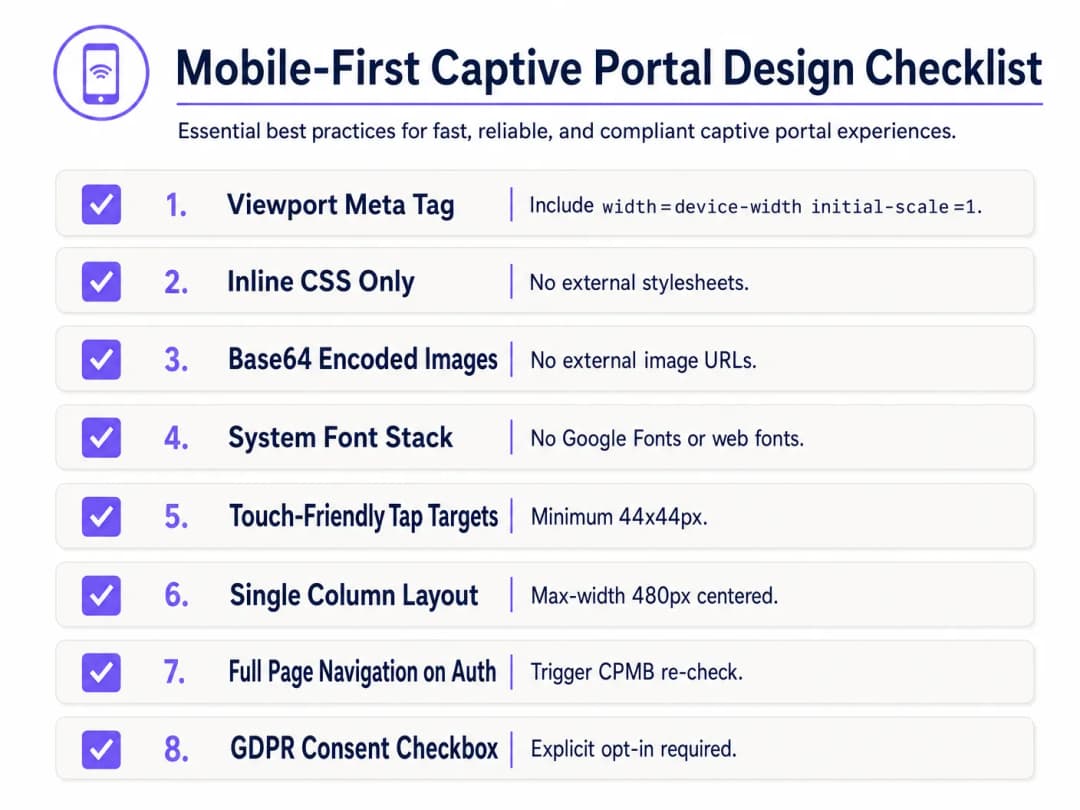
डिफेन्सिव्ह डिझाइन करण्यासाठी, खालील मोबाईल-फर्स्ट कॅप्टिव्ह पोर्टल डिझाइन चेकलिस्ट लागू करा:
१. व्ह्यूपोर्ट कॉन्फिगरेशन
मोबाईल डिव्हाइसेसना व्ह्यूपोर्ट डेस्कटॉप विड्थपर्यंत (साधारणपणे 980px) लहान करण्यापासून रोखण्यासाठी, HTML <head> मध्ये रिस्पॉन्सिव्ह व्ह्यूपोर्ट मेटा टॅग समाविष्ट असणे आवश्यक आहे. याशिवाय, मोबाईल डिव्हाइसेसवर मजकूर आणि इनपुट फील्ड अतिशय सूक्ष्म दिसतील:
<meta name="viewport" content="width=device-width, initial-scale=1.0, maximum-scale=1.0, user-scalable=no">
२. इनलाइन CSS आणि बाह्य डिपेंडन्सी काढून टाकणे
बाह्य CSS फाइल्स किंवा CDNs (उदा. Bootstrap, Tailwind, किंवा Google Fonts) कधीही लिंक करू नका. सर्व CSS हे HTML <head> मधील <style> ब्लॉकच्या आत एम्बेड केलेले असावे.
टायपोग्राफीसाठी, सिस्टम फॉन्ट स्टॅक चा वापर करा जो आधीपासून इन्स्टॉल केलेल्या स्थानिक ऑपरेटिंग सिस्टम फॉन्ट्सचा संदर्भ देतो. हे HTTP रिक्वेस्ट पूर्णपणे टाळते आणि डिव्हाइसचा नेटिव्ह, हाय-क्वालिटी सॅन्स-सेरिफ टाइपफेस वापरून पेज झटपट लोड होण्याची खात्री देते:
body {
    font-family: -apple-system, BlinkMacSystemFont, "Segoe UI", Roboto, Helvetica, Arial, sans-serif;
    background-color: #F5F1ED; /* Pearl White Brand Colour */
    color: #011638; /* Dark Blue Brand Colour */
    margin: 0;
    padding: 0;
    display: flex;
    flex-direction: column;
    align-items: center;
    justify-content: center;
    min-height: 100vh;
}
३. Base64 ॲसेट एन्कोडिंग
जोपर्यंत होस्टिंग डोमेनला गेटवेच्या वॉल्ड गार्डनमध्ये व्हाइटलिस्ट केले जात नाही, तोपर्यंत बाह्य HTTP URL द्वारे इमेजेस, लोगो आणि आयकॉन्स संदर्भित केले जाऊ नयेत. लहान व्हिज्युअल ॲसेट्स (जसे की PNG किंवा SVG लोगो) थेट HTML किंवा CSS मध्ये Base64 Data URIs म्हणून एन्कोड करणे ही सर्वात विश्वासार्ह पद्धत आहे:
<!-- Inline Base64 Logo Example -->
<img src="data:image/svg+xml;base64,PHN2ZyB4bWxucz0iaHR0cDovL3d3dy53My5vcmcvMjAwMC9zdmciIHZpZXdCb3g9IjAgMCAxMDAgMTAwIj48Y2lyY2xlIGN4PSI1MCIgY3k9IjUwIiByPSI0MCIgZmlsbD0iIzc0NThGRCIvPjwvc3ZnPg==" alt="Purple Logo" class="brand-logo">
४. इनपुट फील्ड आणि टॅप टार्गेट ऑप्टिमायझेशन
मोबाईल युझेबिलिटी मानकांचे (जसे की Apple च्या Human Interface Guidelines) पालन करण्यासाठी, सर्व परस्परसंवादी (interactive) घटक टच इनपुटसाठी ऑप्टिमाइझ केलेले असणे आवश्यक आहे:
- इनपुट फॉन्ट साईझ: इनपुट मजकुराचा फॉन्ट साईझ किमान 16px असावा. फॉन्टचा साईझ कमी असल्यास (उदा. 14px), iOS Safari आणि CNA फोकस केल्यावर इनपुट फील्डवर स्वयंचलितपणे झूम इन करतील, ज्यामुळे पेजचे लेआउट बिघडू शकते [१].
- टॅप टार्गेट्स: चुकीचे क्लिक किंवा युझरची निराशा टाळण्यासाठी बटणे, चेकबॉक्स आणि लिंक्सचे टच टार्गेट क्षेत्र किमान 44px x 44px असणे आवश्यक आहे.
५. कायदेशीर संमती आणि GDPR अनुपालन
गेस्ट डेटा (उदा. ईमेल, फोन नंबर किंवा सोशल प्रोफाइल) कॅप्चर करताना, HTML संरचनेने स्पष्ट कायदेशीर संमतीचे समर्थन केले पाहिजे. GDPR अंतर्गत, आधीच टिक केलेले चेकबॉक्स किंवा अप्रत्यक्ष संमती विधाने (उदा. "लॉग इन करून, तुम्ही आमच्या अटींशी सहमत आहात") नियमांचे उल्लंघन करतात [३].
- नियम आणि अटी (Terms & Conditions) आणि गोपनीयता धोरणांसाठी (Privacy Policies) बाय-डिफॉल्ट अनचेक असलेला चेकबॉक्स द्या.
- मुख्य लॉगिन फॉर्म स्क्रीनवर वरच्या बाजूस ठेवण्यासाठी सविस्तर कायदेशीर मजकूर स्क्रोल करण्यायोग्य, मर्यादित-उंचीच्या कंटेनरमध्ये (
max-height: 120px; overflow-y: auto;) समाविष्ट करा.
<div class="consent-container">
    <input type="checkbox" id="terms_consent" name="terms_consent" required>
    <label for="terms_consent">
        I explicitly agree to the <a href="#" onclick="showTerms()">Terms of Service</a> and consent to the processing of my data in accordance with the <a href="#" onclick="showPrivacy()">Privacy Policy</a>.
    </label>
</div>
तुमच्या विशिष्ट सेटअपबद्दल काही प्रश्न आहेत का?
आमची टीम ८०,००० हून अधिक वेन्यूजमधील वेन्यू ऑपरेटर्स, IT मॅनेजर्स आणि नेटवर्क इंजिनिअर्ससोबत काम करते. २० मिनिटांचा कॉल बुक करा आणि तुमच्यासारख्या इतरांनी ही समस्या कशी सोडवली हे आम्ही तुम्हाला दाखवू.
कस्टमाइज्ड Captive Portal HTML/CSS टेम्पलेट
खाली एक संपूर्ण, प्रोडक्शन-रेडी, सिंगल-फाइल HTML/CSS टेम्पलेट दिले आहे ज्यामध्ये सर्व मोबाईल-फर्स्ट, CNA-अनुपालक सर्वोत्तम पद्धतींचा समावेश आहे. यामध्ये रिस्पॉन्सिव्ह लेआउट, सिस्टम फॉन्ट स्टॅक, Base64-रेडी ॲसेट प्लेसहोल्डर्स, टच-फ्रेंडली इनपुट आणि स्पष्ट GDPR-अनुपालक संमती रचना समाविष्ट आहे:
<!DOCTYPE html>
<html lang="en">
<head>
    <meta charset="UTF-8">
    <meta name="viewport" content="width=device-width, initial-scale=1.0, maximum-scale=1.0, user-scalable=no">
    <title>Guest WiFi Login</title>
    <style>
        /* CSS Reset & Variable Declarations */
        :root {
            --color-primary: #7458FD; /* Purple Brand Colour */
            --color-dark: #011638; /* Dark Blue */
            --color-light: #F5F1ED; /* Pearl White */
            --color-white: #FFFFFF;
            --color-border: #D1D5DB;
            --radius-container: 12px;
            --radius-element: 6px;
        }

        * {
            box-sizing: border-box;
            -webkit-tap-highlight-color: transparent;
        }

        body {
            font-family: -apple-system, BlinkMacSystemFont, "Segoe UI", Roboto, Helvetica, Arial, sans-serif;
            background-color: var(--color-light);
            color: var(--color-dark);
            margin: 0;
            padding: 20px;
            display: flex;
            flex-direction: column;
            align-items: center;
            justify-content: center;
            min-height: 100vh;
        }

        /* रिस्पॉन्सिव्ह कार्ड लेआउट */
        .portal-card {
            background-color: var(--color-white);
            width: 100%;
            max-width: 420px;
            padding: 32px 24px;
            border-radius: var(--radius-container);
            box-shadow: 0 4px 20px rgba(1, 22, 56, 0.05);
            text-align: center;
        }

        .logo-container {
            margin-bottom: 24px;
        }

        /* एम्बेडेड Base64 लोगो प्लेसहोल्डर */
        .logo {
            width: 120px;
            height: auto;
        }

        h1 {
            font-size: 24px;
            font-weight: 700;
            margin: 0 0 8px 0;
            color: var(--color-dark);
        }

        p {
            font-size: 14px;
            color: #4B5563;
            margin: 0 0 24px 0;
            line-height: 1.5;
        }

        /* फॉर्म स्टाइल्स */
        .form-group {
            text-align: left;
            margin-bottom: 16px;
        }

        label {
            display: block;
            font-size: 14px;
            font-weight: 600;
            margin-bottom: 6px;
            color: var(--color-dark);
        }

        /* महत्त्वाचे: iOS ऑटो-झूम रोखण्यासाठी फॉन्ट आकार किमान 16px असावा */
        input[type="email"],
        input[type="text"] {
            width: 100%;
            height: 48px;
            padding: 12px 16px;
            font-size: 16px;
            border: 1px solid var(--color-border);
            border-radius: var(--radius-element);
            background-color: var(--color-white);
            color: var(--color-dark);
            outline: none;
            transition: border-color 0.2s;
        }

        input[type="email"]:focus,
        input[type="text"]:focus {
            border-color: var(--color-primary);
            box-shadow: 0 0 0 3px rgba(116, 88, 253, 0.15);
        }

        /* संमती स्टाइल्स */
        .consent-group {
            display: flex;
            align-items: flex-start;
            text-align: left;
            margin: 20px 0;
        }

        /* टच-फ्रेंडली लक्ष्य आकार */
        input[type="checkbox"] {
            width: 20px;
            height: 20px;
            margin: 2px 12px 0 0;
            flex-shrink: 0;
            cursor: pointer;
            accent-color: var(--color-primary);
        }

        .consent-label {
            font-size: 13px;
            line-height: 1.4;
            color: #4B5563;
            user-select: none;
        }

        .consent-label a {
            color: var(--color-primary);
            text-decoration: none;
            font-weight: 600;
        }

        .consent-label a:hover {
            text-decoration: underline;
        }

        /* Touch-Friendly CTA Button (Minimum 44px height) */
        .btn-submit {
            width: 100%;
            height: 48px;
            background-color: var(--color-primary);
            color: var(--color-white);
            border: none;
            border-radius: var(--radius-element);
            font-size: 16px;
            font-weight: 600;
            cursor: pointer;
            transition: background-color 0.2s;
            display: flex;
            align-items: center;
            justify-content: center;
        }

        .btn-submit:hover {
            background-color: #5B3EE3;
        }

        .btn-submit:active {
            background-color: #4A2FD4;
        }

        /* Legal Terms Scrollbox */
        .terms-scrollbox {
            display: none; /* Toggled via JS */
            text-align: left;
            font-size: 11px;
            color: #6B7280;
            background-color: var(--color-light);
            padding: 12px;
            border-radius: var(--radius-element);
            max-height: 100px;
            overflow-y: auto;
            margin-bottom: 16px;
            border: 1px solid var(--color-border);
        }

        .footer {
            margin-top: 24px;
            font-size: 11px;
            color: #9CA3AF;
        }
    </style>
</head>
<body>

    <div class="portal-card">
        <div class="logo-container">
            <!-- Replace src with your actual Base64-encoded SVG or PNG -->
            <svg class="logo" xmlns="http://www.w3.org/2000/svg" viewBox="0 0 100 30">
                <rect width="100" height="30" rx="6" fill="#7458FD"/>
                <text x="50" y="20" font-family="sans-serif" font-size="12" fill="#FFFFFF" font-weight="bold" text-anchor="middle">YOUR BRAND</text>
            </svg>
        </div>

        <h1>Guest WiFi मध्ये आपले स्वागत आहे</h1>
        <p>सुरक्षित, हाय - स्पीड इंटरनेटचा ॲक्सेस मिळवण्यासाठी कृपया तुमचे तपशील खाली प्रविष्ट करा.</p>

        <!-- Form must submit natively (full page navigation) to clear Apple CNA -->
        <form action="/login/submit" method="POST" onsubmit="return validateForm()">
            <div class="form-group">
                <label for="guest_name">पूर्ण नाव</label>
                <input type="text" id="guest_name" name="name" placeholder="John Doe" required autocomplete="name">
            </div>

            <div class="form-group">
                <label for="guest_email">ईमेल पत्ता</label>
                <input type="email" id="guest_email" name="email" placeholder="john@example.com" required autocomplete="email">
            </div>

            <div class="consent-group">
                <input type="checkbox" id="terms_consent" name="terms_accepted" required>
                <label for="terms_consent" class="consent-label">
                    मी <a href="#" onclick="toggleTerms(event)">सेवाशर्ती</a> स्वीकारतो आणि GDPR नियमांच्या अनुपालनामध्ये डेटा प्रक्रियेसाठी संमती देतो.
                </label>
            </div>

            <div id="terms_box" class="terms-scrollbox">
                <strong>WiFi सेवाशर्ती:</strong><br>
                १. ही सेवा कोणत्याही हमीशिवाय जशी आहे तशी प्रदान केली जाते.<br>
                २. वापरकर्त्यांनी बेकायदेशीर बँडविड्थ - केंद्रित क्रियाकलापांमध्ये गुंतू नये.<br>
                ३. वैयक्तिक डेटा केवळ प्रमाणीकरण आणि आमच्या गोपनीयता धोरणाच्या अनुपालनामध्ये मार्केटिंग ऑप्ट - इनसाठी गोळा केला जातो.
            </div>

            <button type="submit" class="btn-submit">WiFi शी कनेक्ट करा</button>
        </form>

        <div class="footer">
            Powered by Purple | Secure Guest WiFi
        </div>
    </div>

    <script>
        function toggleTerms(e) {
            e.preventDefault();
            var box = document.getElementById('terms_box');
            box.style.display = (box.style.display === 'block') ? 'none' : 'block';
        }

        function validateForm() {
            var consent = document.getElementById('terms_consent');
            if (!consent.checked) {
                alert('कनेक्ट करण्यासाठी तुम्ही सेवाशर्ती स्वीकारणे आवश्यक आहे.');
                return false;
            }
            return true;
        }
    </script>
</body>
</html>
त्रुटी निवारण आणि जोखीम कमी करणे
कस्टम - कोडेड HTML/CSS कॅप्टिव्ह पोर्टल्स उपयोजित करताना, IT ऑपरेशन्स टीम्सना वारंवार अनेक गंभीर ऑपरेशनल जोखमींचा सामना करावा लागतो:
१. SSL/TLS प्रमाणपत्र चेतावणी लूप
कॅप्टिव्ह पोर्टल्स रहदारी अडवून कार्य करत असल्यामुळे, ते आधुनिक HTTPS वेब सुरक्षेशी मूलभूत संघर्ष निर्माण करतात. जेव्हा एखादा वापरकर्ता HTTPS साइटला भेट देण्याचा प्रयत्न करतो (उदा. https://www.google.com), आणि गेटवे त्या रहदारीला HTTP कॅप्टिव्ह पोर्टलवर रिडायरेक्ट करण्याचा प्रयत्न करतो, तेव्हा ब्राउझर SSL प्रमाणपत्रातील विसंगती ओळखतो आणि एक गंभीर "तुमचे कनेक्शन खाजगी नाही" अशी सुरक्षा चेतावणी प्रदर्शित करतो.
- जोखीम कमी करणे: थेट HTTPS रहदारी अडवण्याचा कधीही प्रयत्न करू नका. पूर्णपणे ऑपरेटिंग सिस्टमच्या नेटिव्ह CNA हेल्परवर अवलंबून रहा (जे रिडायरेक्ट ट्रिगर करण्यासाठी अनइन्क्रिप्टेड HTTP विनंती करते). तुमच्या कॅप्टिव्ह पोर्टलच्या डोमेनकडे वैध, सार्वजनिकरित्या विश्वसनीय SSL प्रमाणपत्र (उदा. Let's Encrypt किंवा DigiCert) असल्याची खात्री करा आणि प्रारंभिक HTTP रिडायरेक्टने वापरकर्त्याला तुमच्या पोर्टल डोमेनवर यशस्वीरित्या पाठवल्यानंतर केवळ HTTPS द्वारे सेवा दिली जाईल याची खात्री करा [2].
२. DNS रिझोल्यूशन अपयश (द वॉल्ड गार्डन ट्रॅप)
जर तुमच्या सानुकूल HTML पेजमध्ये बाह्य संसाधनांचे संदर्भ असतील - जसे की सोशल लॉगिन OAuth एंडपॉइंट (उदा. Facebook, Google) किंवा पेमेंट गेटवे - तर या डोमेन्ससाठी DNS विनंत्या यशस्वी होणार नाहीत, जोपर्यंत त्यांना वायरलेस कंट्रोलरच्या Walled Garden मध्ये स्पष्टपणे व्हाईटलिस्ट केले जात नाही. जर एखादे डोमेन व्हाईटलिस्टमध्ये नसेल, तर लॉगिन प्रक्रिया थांबेल आणि कोरी स्क्रीन दिसेल.
- शमन: एक कठोर, किमान Walled Garden सूची ठेवा. सोशल लॉगिन वापरत असल्यास, ओळख प्रदात्यांद्वारे शिफारस केलेले विशिष्ट वाइल्डकार्ड डोमेन व्हाईटलिस्ट करा (उदा.
*.google.com,*.gstatic.com).
३. सेशन टाइमआउट आणि MAC स्फूफिंग असुरक्षितता
मानक Captive Portal डिव्हाइसेसना त्यांच्या MAC पत्त्यांच्या आधारे प्रमाणित करतात. तथापि, आधुनिक मोबाइल ऑपरेटिंग सिस्टम (iOS 14+ आणि Android 10+) डीफॉल्टनुसार यादृच्छिक MAC पत्ते (खाजगी WiFi पत्ते) वापरतात, आणि ते वेळोवेळी बदलतात. यामुळे पाहुण्यांना वारंवार पुन्हा-प्रमाणित करण्यासाठी सांगितले जाऊ शकते, ज्यामुळे वापरकर्त्याचा अनुभव खराब होतो [१].
- शमन: जुने सेशन्स रोखण्यासाठी RADIUS सर्व्हरवर वाजवी सेशन टाइमआउट (उदा. २४ तास) लागू करा, आणि MAC-आधारित Captive Portals ला पूर्णपणे बायपास करणाऱ्या अखंड, सुरक्षित ऑनबोर्डिंगसाठी Passpoint (Hotspot 2.0) किंवा WPA3-Enterprise सारख्या आधुनिक प्रमाणीकरण मानकांचा वापर करा.
Purple उत्पादन प्रासंगिकता: स्वतः तयार करणे वि. खरेदी करणे
एकच HTML पेज कोड करणे सोपे असले तरी, सानुकूल Captive Portal पायाभूत सुविधांचे होस्टिंग करणे, सुरक्षित करणे आणि स्केलिंग करणे यामध्ये प्रचंड तांत्रिक आणि अनुपालन अडथळे येतात. खालील तक्ता स्वतः सानुकूल पोर्टल होस्ट करणे विरूद्ध Purple चे व्यवस्थापित एंटरप्राइझ प्लॅटफॉर्म वापरणे यामधील अभियांत्रिकी आणि ऑपरेशनल वास्तवांची तुलना करतो:
| वैशिष्ट्य / ऑपरेशनल आवश्यकता | स्वतः होस्ट केलेले सानुकूल पोर्टल | Purple एंटरप्राइझ WiFi प्लॅटफॉर्म |
|---|---|---|
| HTML/CSS सानुकूलन | पूर्णपणे मॅन्युअल कोडिंग, वैयक्तिक AP किंवा स्थानिक वेब सर्व्हरवर फाइल्स अपलोड करणे. | पिक्सेल-परफेक्ट डेव्हलपर एडिटर जो सानुकूल HTML/CSS इंजेक्शनची परवानगी देतो, सोबत ड्रॅग-अँड-ड्रॉप व्हिज्युअल बिल्डर. |
| RADIUS पायाभूत सुविधा | अत्यंत उपलब्ध FreeRADIUS किंवा क्लाउड RADIUS सर्व्हर तैनात, कॉन्फिगर आणि देखरेख करणे आवश्यक आहे [४]. | ऍक्टिव्ह-ऍक्टिव्ह रिडंडन्सी आणि ९९.९९% अपटाइम SLA सह अंगभूत, जागतिक स्तरावर वितरित, क्लाउड-नेटिव्ह RADIUS. |
| मल्टी-व्हेंडर AP समर्थन | प्रत्येक हार्डवेअर व्हेंडरसाठी (Cisco, Aruba, Meraki, Ruckus) सानुकूल इंटिग्रेशन स्क्रिप्ट्स आवश्यक आहेत [५]. | २०० हून अधिक हार्डवेअर मॉडेल्ससह नेटिव्ह, आउट-ऑफ-द-बॉक्स इंटिग्रेशन; मिश्र-हार्डवेअर मालमत्तेवर युनिफाइड पोर्टल तैनाती. |
| डेटा गोपनीयता आणि अनुपालन | सुरक्षित डेटाबेस एन्क्रिप्शन आणि डेटा हटवण्याच्या वर्कफ्लोसह GDPR, CCPA, आणि PCI DSS अनुपालनासाठी व्हेन्यू १००% कायदेशीर दायित्व स्वीकारतो. | रचनेनुसार पूर्णपणे अनुपालन. अंगभूत संमती व्यवस्थापन, स्वयंचलित डेटा-विषय हटवण्याच्या विनंत्या आणि सुरक्षित ISO 27001-प्रमाणित होस्टिंग. |
| Analytics & Marketing | यासाठी कस्टम डेटा इंजेशन पाइपलाइन्स तयार करणे आणि थर्ड-पार्टी मार्केटिंग टूल्स समाकलित करणे आवश्यक आहे. | रिअल-टाइम फूटफॉल ट्रॅकिंग, रिटर्न-रेट मेट्रिक्स आणि स्वयंचलित मार्केटिंग मोहीम ट्रिगर्ससह Enterprise-grade analytics dashboard [6]. |
| Identity Provider Integrations | Google, Facebook, Apple आणि स्थानिक SMS गेटवेसह मॅन्युअल OAuth2 समाकलन. | मुख्य सोशल प्लॅटफॉर्म्स, SMS गेटवे आणि कॉर्पोरेट पाहुण्यांसाठी Azure AD / Okta सह One-click integrations. |
Purple चे प्लॅटफॉर्म "Build vs. Buy" च्या गोंधळाचे निराकरण करते. हे डेव्हलपर्सना कस्टम HTML/CSS वर्कस्पेसचे पूर्ण कल्पक स्वातंत्र्य प्रदान करते, तसेच सुरक्षित RADIUS ऑथेंटिकेशनचे स्केलवर समर्थन करण्यासाठी आवश्यक असणारे क्लिष्ट आणि उच्च-जोखमीचे बॅकएंड इन्फ्रास्ट्रक्चर इंजिनिअरिंग दूर करते.
ROI & व्यावसायिक प्रभाव
व्यावसायिकरित्या इंजिनिअर केलेल्या, रिस्पॉन्सिव्ह कस्टम captive portal मध्ये गुंतवणूक केल्याने IT ऑपरेशन्स, मार्केटिंग आणि कायदेशीर अनुपालनामध्ये मोजता येण्याजोगा परतावा मिळतो.
१. ऑपरेशनल खर्च कपात (IT हेल्पडेस्क तिकीट्स)
स्टेडियम किंवा मल्टि-साइट रिटेल चेन सारख्या मोठ्या प्रमाणावरील उपयोजनांमध्ये, बिघडलेले captive portal हे IT हेल्पडेस्क समस्या वाढवण्याचे मुख्य कारण ठरते. जेव्हा पाहुण्यांना "व्हाईट स्क्रीन" किंवा प्रतिसाद न देणारे लॉगिन बटण आढळते, तेव्हा ते ऑन-साइट कर्मचाऱ्यांना त्रस्त करतात किंवा सपोर्ट तिकीट्स सबमिट करतात.
$$\text{वार्षिक सपोर्ट बचत} = (\text{एकूण वार्षिक अतिथी भेटी} \times \text{पोर्टल अपयश दर} \times \text{हेल्पडेस्क संपर्क दर}) \times \text{प्रति सपोर्ट तिकीट खर्च}$$
- परिदृश्य: वार्षिक १,००,००० अभ्यागत असलेले एक कन्व्हेन्शन सेंटर. खराब कोड केलेल्या पोर्टलचा जुन्या iOS उपकरणांवर ५% अपयश दर आहे, ज्यामुळे १०% हेल्पडेस्क संपर्क दर होतो. प्रति सपोर्ट तिकीट $१५ या उद्योग-मानक दराने, ऑपरेशनल खर्च खालीलप्रमाणे आहे: $$(1,000,000 \times 0.05 \times 0.10) \times $15 = \text{टाळता येण्याजोग्या सपोर्ट ओव्हरहेडमध्ये वार्षिक } $75,000$$
- परिणाम: CNA-ऑप्टिमाइझ्ड, मोबाईल-फर्स्ट टेम्पलेटवर स्विच केल्याने पोर्टलचा अपयश दर <०.१% पर्यंत कमी होतो, ज्यामुळे हा ऑपरेशनल खर्च अक्षरशः संपुष्टात येतो.
२. मार्केटिंग डेटा कॅप्चर आणि ऑप्ट-इन ऑप्टिमायझेशन
रिटेल आणि हॉस्पिटॅलिटी ठिकाणांसाठी, अतिथी WiFi पोर्टल हे स्वच्छ, फर्स्ट-पार्टी ग्राहक डेटा कॅप्चर करण्याचे प्राथमिक साधन आहे. मायक्रोस्कोपिक मजकूर किंवा क्लिष्ट फॉर्म लेआउट असलेला खराब डिझाइन केलेला युझर इंटरफेस उच्च बाउन्स रेट्स कारणीभूत ठरतो - वापरकर्ते लॉगिन प्रक्रिया पूर्णपणे सोडून देतात, ज्यामुळे मार्केटिंगच्या संधी गमावल्या जातात.
- केस स्टडी (रिटेल): एका राष्ट्रीय रिटेल चेनने Purple च्या प्लॅटफॉर्मचा वापर करून मोबाईल-फर्स्ट ऑप्टिमाइझ्ड captive portal लागू केले. मल्टी-स्टेप लॉगिन फॉर्म ऐवजी सिंगल-फील्ड ईमेल इनपुट (फॉन्ट-साईझ: १६px) आणि ऑप्टिमाइझ्ड ४८px टॅप-टार्गेट बटण वापरून, त्यांना पहिल्या तिमाहीतच पूर्ण झालेल्या नोंदणीमध्ये ४२% वाढ आणि मार्केटिंग न्यूजलेटर ऑप्ट-इन्समध्ये २८% वाढ दिसून आली [6].
३. कायदेशीर आणि नियामक जोखीम कमी करणे
GDPR आणि CCPA अंतर्गत, नियमांचे पालन न करता गोळा केलेल्या डेटावर गंभीर आर्थिक दंड आकारला जाऊ शकतो (GDPR अंतर्गत जागतिक वार्षिक उलाढालीच्या ४% पर्यंत). आधीच टिक केलेल्या चेकबॉक्सेसवर विसंबून राहणे किंवा तुमच्या स्प्लॅश पेजवर स्पष्ट, सहज उपलब्ध असणारी गोपनीयता धोरण (Privacy Policy) प्रदान करण्यात अयशस्वी होणे यामुळे एंटरप्राइझला प्रचंड कायदेशीर दायित्वाचा सामना करावा लागतो.
- निवारण ROI: एक स्पष्ट, अन-टिक केलेला संमती चेकबॉक्स लागू करणे आणि ऑप्टिमाइझ केलेल्या स्क्रोलबॉक्समध्ये अटी होस्ट करणे १००% नियामक अनुपालन सुनिश्चित करते, ज्यामुळे लाखो डॉलर्सच्या नियामक दंडाचा धोका कमी होतो आणि ब्रँडच्या प्रतिष्ठेचे रक्षण होते.
मुख्य मुद्द्यांचा सारांश
- CNA सँडबॉक्स मर्यादित आहे: Apple चे iOS वेबशीट आणि macOS CNA हे अत्यंत सँडबॉक्स्ड वातावरण आहेत जे बाह्य मालमत्ता, कुकीज आणि वेब फॉन्ट ब्लॉक करतात. सर्व स्टाइलिंग आणि मालमत्ता स्वतः समाविष्ट (इनलाइन CSS, Base64 प्रतिमा, सिस्टम फॉन्ट) असणे आवश्यक आहे [1].
- AJAX मुळे iOS एक्झिट हँडशेक खंडित होतो: iOS डिव्हाइसला यशस्वीरित्या "captive" वरून "connected" वर स्थानांतरित करण्यासाठी (वरच्या उजव्या बाजूचे बटण "Cancel" वरून "Done" वर बदलणे), आपण फुल-पेज HTTP रीडायरेक्ट ट्रिगर करणे आवश्यक आहे. असिंक्रोनस DOM अपडेट्स डिव्हाइसला कॅप्टिव्ह लूपमध्ये ठेवतील.
- मोबाईल-फर्स्ट अनिवार्य आहे: ९०% पेक्षा जास्त लॉगइन मोबाईलवर होतात. सिंगल-कॉलम लेआउट (कमाल-रुंदी: ४८०px) डिझाइन करा, टच-फ्रेंडली टॅप टार्गेट्स (किमान ४४px x ४४px) वापरा आणि स्वयंचलित iOS ब्राउझर झूमिंग रोखण्यासाठी सर्व मजकूर इनपुटवर किमान १६px फॉन्ट आकार लागू करा.
- वॉल्ड गार्डन्स DNS नियंत्रित करतात: लॉगइन दरम्यान संदर्भित केलेल्या कोणत्याही बाह्य डोमेनचा (उदा. सोशल लॉगइन APIs) वायरलेस कंट्रोलरच्या वॉल्ड गार्डनमध्ये स्पष्टपणे व्हाईटलिस्टमध्ये समावेश असणे आवश्यक आहे, अन्यथा पृष्ठ लोड होणार नाही.
- Purple बॅकएंडची गुंतागुंत दूर करते: Purple च्या पोर्टल बिल्डरचा वापर केल्याने डेव्हलपर्सना कस्टम एडिटरद्वारे संपूर्ण HTML/CSS नियंत्रण मिळते, तर RADIUS, मल्टि-व्हेंडर AP इंटिग्रेशन्स आणि GDPR-अनुपालक डेटाबेस व्यवस्थापनाचा मोठा सुरक्षा, स्केलिंग आणि अनुपालनाचा भार कमी होतो [3].
संदर्भ
- [1] Wireless Broadband Alliance: Captive Network Portal Behaviour
- [2] Android Open Source Project: Captive Portal Login Webview Integration
- [3] European Data Protection Board: Guidelines on Consent under Regulation 2016/679
- [4] How to Implement 802.1X Authentication with Cloud RADIUS
- [5] Cisco Wireless APs: 2026 Guide to Products & Deployment
- [6] Purple WiFi Marketing & Analytics Platform
तांत्रिक माहिती ऐका
कस्टम कॅप्टिव्ह पोर्टल्ससाठी तांत्रिक मर्यादा आणि अंमलबजावणी धोरणांवर चर्चा करणाऱ्या वरिष्ठ सोल्यूशन्स आर्किटेक्टचे संभाषण ऐका:
महत्वाच्या व्याख्या
Captive Portal
एखाद्या WiFi नेटवर्कच्या नवीन कनेक्ट झालेल्या युझर्सना नेटवर्क संसाधनांचा अधिक वापर करण्याची परवानगी देण्यापूर्वी त्यांच्यासमोर प्रदर्शित होणारे वेब पेज, जे सहसा ऑथेंटिकेशन, पेमेंट किंवा सेवा अटी दर्शवण्यासाठी वापरले जाते.
आयटी (IT) टीम्स पाहुण्यांच्या प्रवेशावर नियंत्रण ठेवण्यासाठी, युझर डेटा गोळा करण्यासाठी आणि कायदेशीर नियमांचे पालन सुनिश्चित करण्यासाठी गेटवे पातळीवर captive portals तैनात करतात.
Captive Network Assistant (CNA)
ऑपरेटिंग सिस्टीम्स (जसे की Apple iOS आणि macOS) द्वारे कॅप्टिव्ह नेटवर्क रीडायरेक्ट ओळखल्यानंतर आपोआप सुरू होणारे अत्यंत मर्यादित, सँडबॉक्स्ड मिनी-ब्राउझर, जे केवळ पोर्टल ऑथेंटिकेशन सुलभ करण्यासाठी डिझाइन केलेले आहे.
CNA वेबव्ह्यूज कडक मर्यादा घालतात, ज्यामध्ये बाह्य CDNs, कायमस्वरूपी कुकीज आणि स्थानिक स्टोरेज ब्लॉक करणे समाविष्ट आहे, ज्यामुळे अनेकदा प्रमाणित वेब डिझाइन बिघडतात.
Walled Garden
आयपी (IP) पत्ते, सबनेट्स किंवा डोमेन नावांची मर्यादित यादी, ज्यामध्ये अनधिकृत पाहुण्या युझरला Captive Portal लॉगिन प्रक्रिया पूर्ण करण्यापूर्वी गेटवेद्वारे प्रवेश करण्याची परवानगी दिली जाते.
लॉगिन प्रक्रिया खंडित होऊ नये म्हणून डेव्हलपर्सनी कोणत्याही बाह्य संसाधनाला (जसे की सोशल लॉगिन APIs किंवा पेमेंट गेटवे) walled garden मध्ये व्हाईटलिस्ट केले असल्याची खात्री करणे आवश्यक आहे.
Base64 Encoding
एक बायनरी-टू-टेक्स्ट एन्कोडिंग पद्धत जी बायनरी डेटा (जसे की प्रतिमा) ASCII स्ट्रिंग म्हणून दर्शवते, ज्यामुळे मालमत्ता थेट HTML किंवा CSS दस्तऐवजांमध्ये समाविष्ट केली जाऊ शकते.
लोगो आणि चिन्हांसाठी Base64 encoding चा वापर केल्याने बाह्य HTTP विनंत्यांची गरज उरत नाही, ज्यामुळे ऑफलाइन CNA वातावरणात देखील मालमत्ता उत्तम प्रकारे प्रदर्शित होते.
RADIUS (Remote Authentication Dial-In User Service)
एक नेटवर्किंग प्रोटोकॉल जो नेटवर्क सेवा कनेक्ट करणाऱ्या आणि वापरणाऱ्या युझर्ससाठी केंद्रीकृत ऑथेंटिकेशन, ऑथोरायझेशन आणि अकाउंटिंग (AAA) व्यवस्थापन प्रदान करतो.
ऑथेंटिकेशन निकष पूर्ण झाल्यानंतर नेटवर्क गेटवेवर पाहुण्याच्या MAC पत्त्याला अधिकृत करण्यासाठी Captive Portal सर्व्हर RADIUS सर्व्हरशी संपर्क साधतो.
System Font Stack
एक CSS font-family डिक्लेरेशन जे बाह्य वेब फॉन्टऐवजी प्री-इन्स्टॉल केलेल्या ऑपरेटिंग सिस्टम फॉन्टला (जसे की iOS वर San Francisco, Windows वर Segoe UI आणि Android वर Roboto) प्राधान्य देते.
System font stack लागू केल्याने Google Fonts सारख्या सेवांना पाठवल्या जाणाऱ्या बाह्य HTTP विनंत्या ब्लॉक न होता त्वरित टायपोग्राफी प्रदर्शित होण्याची खात्री होते.
Canary URL
ऑपरेटिंग सिस्टम पुरवठादारांद्वारे (उदा. captive.apple.com) डिव्हाइसला अप्रतिबंधित इंटरनेट कनेक्टिव्हिटी आहे की नाही हे तपासण्यासाठी वापरली जाणारी एक समर्पित, अनएनक्रिप्टेड HTTP URL.
OS बॅकग्राउंड नेटवर्क मॅनेजर Captive Portal चे अस्तित्व शोधण्यासाठी आणि CNA वेबव्ह्यू पॉपअप ट्रिगर करण्यासाठी या URL ची तपासणी करतो.
Passpoint (Hotspot 2.0)
WiFi Alliance द्वारे विकसित केलेले एक उद्योग मानक जे मोबाईल डिव्हाइसेसना मॅन्युअल Captive Portal लॉगइन न करता स्वयंचलितपणे WiFi हॉटस्पॉट्स शोधण्यास आणि सुरक्षितपणे ऑथेंटिकेट करण्यास सक्षम करते.
अडथळ्यांनी भरलेल्या स्प्लॅश पेजेसवरून युजर्सना अखंड, सेल्युलरसारख्या सुरक्षित रोमिंग अनुभवांमध्ये नेण्यासाठी कंपन्या Purple सारख्या प्लॅटफॉर्मसह Passpoint चा वापर करतात.
सोडवलेली उदाहरणे
एका लक्झरी २५०-रुम्स असलेल्या हॉटेल साखळीला [Hospitality](/industries/hotels) त्यांच्या प्रीमियम ब्रँड मार्गदर्शक तत्त्वांशी तंतोतंत जुळणारे कस्टम अतिथी WiFi लॉगिन पेज लागू करायचे आहे. त्यांच्या क्रिएटिव्ह एजन्सीने कस्टम ब्रँड टायपोग्राफी (Adobe Fonts वर होस्ट केलेले), एकाधिक हाय-रिझोल्यूशन बॅकग्राउंड इमेजेस (सार्वजनिक AWS S3 बकेटवर होस्ट केलेल्या) आणि मल्टी-स्टेप ॲनिमेटेड JavaScript विझार्डचा वापर करून एक स्प्लॅश पेज डिझाइन केले. जेव्हा हे तैनात केले जाते, तेव्हा iOS अतिथी SSID शी कनेक्ट होतात, परंतु पोर्टल एक कोरी पांढरी स्क्रीन म्हणून पॉप अप होते आणि वापरकर्ते प्रमाणीकरण (authenticate) करू शकत नाहीत.
कोरी स्क्रीन आणि विस्कळीत ब्रँडिंगची समस्या सोडवण्यासाठी, आम्हाला Apple CNA सँडबॉक्स मर्यादांचे पालन करण्यासाठी पोर्टलचे फ्रंटएंड आर्किटेक्चर पुन्हा तयार करावे लागेल:
१. टायपोग्राफी दुरुस्ती: Adobe Fonts ला बाह्य HTTP विनंतीची आवश्यकता असते जी CNA द्वारे ब्लॉक केली जाते, म्हणून आम्ही कस्टम फॉन्ट कॉलऐवजी नेटिव्ह, प्रीमियम सिस्टम फॉन्ट स्टॅक (font-family: -apple-system, BlinkMacSystemFont, 'Segoe UI', Roboto, Helvetica, Arial, sans-serif;) वापरू. हे बाह्य नेटवर्क कॉलशिवाय त्वरित रेंडरिंग सुनिश्चित करते.
२. मालमत्ता ऑप्टिमायझेशन (Asset Optimisation): AWS S3 वरील बॅकग्राउंड इमेजेस ब्लॉक केल्या जातात कारण S3 गेटवेच्या वॉल्ड गार्डनमध्ये नाही. आम्ही मुख्य ब्रँड लोगो कॉम्प्रेस करतो, त्याला हलक्या वजनाच्या SVG मध्ये रूपांतरित करतो आणि थेट HTML मध्ये Base64 Data URI म्हणून एन्कोड करतो. बॅकग्राउंडसाठी, आम्ही वजनदार इमेजेसऐवजी हॉटेलच्या ब्रँड रंगांचा वापर करून एक स्वच्छ, रिस्पॉन्सिव्ह CSS ग्रेडियंट वापरतो, ज्यामुळे पेजचे वजन लक्षणीयरीत्या कमी होते.
३. JavaScript सुसूत्रीकरण: मल्टी-स्टेप ॲनिमेटेड विझार्ड बाह्य jQuery आणि GSAP लायब्ररीवर अवलंबून असतो. आम्ही या बाह्य डिपेंडन्सीज काढून टाकतो आणि फॉर्मला सिंगल-पेज, सिंगल-कॉलम HTML संरचनेत रिफॅक्टर करतो. फॉर्म व्हॅलिडेशन हलक्या वजनाच्या, व्हॅनिला JavaScript मध्ये पुन्हा लिहिले आहे.
४. प्रमाणीकरण हँडशेक (Authentication Handshake): AJAX-आधारित सबमिशनऐवजी फॉर्म सबमिशन नेटिव्ह HTML <form action=\"/submit\" method=\"POST\"> मध्ये सुधारित केले आहे जेणेकरून पूर्ण-पेज रीडायरेक्ट ट्रिगर होईल, ज्यामुळे iOS Websheet ला त्याची कॅनरी चाचणी कार्यान्वित करता येईल आणि 'Done' बटण प्रदर्शित करता येईल.
४५० स्टोअर्स असलेल्या एका राष्ट्रीय रिटेल साखळीला [Retail](/industries/retail) त्यांच्या CRM ला चालना देण्यासाठी WiFi स्प्लॅश पेजेसद्वारे अतिथींचे ईमेल कॅप्चर करायचे आहेत. त्यांना अतिथींनी मार्केटिंग न्यूजलेटर्ससाठी ऑप्ट-इन करणे आवश्यक आहे. सुरुवातीच्या डिझाइनमध्ये आधीपासूनच टिक केलेले 'मी मार्केटिंग ईमेल प्राप्त करण्यास सहमत आहे' असा चेकबॉक्स आहे. शिवाय, हे पोर्टल त्यांच्या मुख्यालयातील एकाच स्थानिक सर्व्हरवर होस्ट केलेले आहे. गर्दीच्या वेळेत (शनिवारी दुपारी), देशभरातील अतिथींना प्रचंड विलंबाचा सामना करावा लागतो आणि बरेच जण लॉगिन पेज लोड करू शकत नाहीत, ज्यामुळे डेटा कॅप्चर दरांमध्ये मोठी घसरण होते.
आपल्याला नियमांचे उल्लंघन आणि पायाभूत सुविधांमधील अडथळा या दोन्ही गोष्टी दूर करणे आवश्यक आहे:
१. नियमन अनुपालन निवारण: GDPR आणि CCPA अंतर्गत, आधीच टिक केलेले संमतीचे बॉक्स बेकायदेशीर आहेत. आम्ही मार्केटिंग संमतीचा चेकबॉक्स डीफॉल्टनुसार अनचेक करण्यासाठी HTML मध्ये बदल करतो (<input type="checkbox" id="marketing_consent">). कायदेशीर करारनामा आणि मार्केटिंग संमतीची निवड एकमेकांपासून वेगळी करण्यासाठी आम्ही सेवा अटींसाठी (Terms of Service) एक स्वतंत्र, अनिवार्य चेकबॉक्स देखील जोडतो.
२. पायाभूत सुविधांचे स्केलिंग: एकाच केंद्रीकृत सर्व्हरवर राष्ट्रीय स्तरावरील Captive Portal होस्ट केल्याने बिघाड होण्याची शक्यता असते आणि लेटन्सीचा (विलंब) मोठा अडथळा निर्माण होतो. आम्ही पोर्टलच्या फ्रंटएंडला एज-कॅशिंगसह उच्च उपलब्धता असलेल्या, जागतिक स्तरावर वितरित केलेल्या कंटेंट डिलिव्हरी नेटवर्क (CDN) वर स्थलांतरित करतो.
३. RADIUS एकत्रीकरण: आम्ही स्थानिक स्टोअर ॲक्सेस पॉइंट्सना ॲक्टिव्ह-ॲक्टिव्ह रिडंडन्सीसह क्लाउड-नेटिव्ह RADIUS क्लस्टरकडे निर्देशित करण्यासाठी कॉन्फिगर करतो. यामुळे शनिवारच्या गर्दीच्या वेळी देखील ५०ms पेक्षा कमी लेटन्सीसह एजवर ऑथेंटिकेशन विनंत्यांवर स्थानिक पातळीवर प्रक्रिया केली जाईल याची खात्री होते.
४. Purple वर स्थलांतर: हा संपूर्ण इंजिनिअरिंगचा त्रास दूर करण्यासाठी, किरकोळ विक्रेता Purple वर स्थलांतरित होतो. Purple चे अंगभूत GDPR संमती टूल नियमांनुसार संमती स्वयंचलितपणे व्यवस्थापित करते, आणि त्यांच्या जागतिक स्तरावर वितरित क्लाउड इन्फ्रास्ट्रक्चरद्वारे ९९.९९% अपटाइमसह लाखो दैनिक ऑथेंटिकेशन सहज हाताळले जातात, ज्यामुळे स्केलिंगचा अडथळा पूर्णपणे दूर होतो.
सराव प्रश्न
Q1. एका मोठ्या आंतरराष्ट्रीय विमानतळावरील [Transport](/industries/trains) IT टीम कस्टम-कोडेड Captive Portal तैनात करते. त्यांच्या असे निदर्शनास येते की Android युजर्स अखंडपणे कनेक्ट होत असताना, बऱ्याच iOS युजर्सना अशा समस्येचा सामना करावा लागतो जिथे ते यशस्वीरित्या ऑथेंटिकेट होतात परंतु वेब ब्राउझ करू शकत नाहीत. बारकाईने पाहिल्यावर, iOS डिव्हाइसेस SSID शी कनेक्ट असल्याचे दाखवतात, परंतु कॅप्टिव्ह पॉपअपवरील वरच्या उजव्या बाजूचे बटण अजूनही 'Done' ऐवजी 'Cancel' असे दर्शवते. या समस्येचे मूळ कारण काय आहे आणि डेव्हलपरने याचे निवारण कसे करावे?
टीप: Apple CNA हेल्पर नेटवर्क कॅप्टिव्हमधून ऑथेंटिकेट कडे कधी गेले हे कसे ओळखतो आणि हा चेक ट्रिगर करण्यासाठी कोणत्या ब्राउझर क्रियेची आवश्यकता आहे याचे विश्लेषण करा.
नमुना उत्तर पहा
याचे मूळ कारण असे आहे की पोर्टलचे सक्सेस पेज फुल-पेज HTTP नॅव्हिगेशन करण्याऐवजी JavaScript (AJAX/SPA राउटींग) द्वारे UI डायनॅमिकली अपडेट करत आहे. Apple iOS Captive Network Assistant (CNA) मिनी-ब्राउझर केवळ तेव्हाच त्याची बॅकग्राउंड कनेक्टिव्हिटी तपासणी (captive.apple.com वरील कॅनरी रिक्वेस्ट) पुन्हा चालवतो जेव्हा फुल-पेज URL रीडायरेक्ट किंवा नॅव्हिगेशन होते. जर डेव्हलपरने AJAX द्वारे लॉगइन फॉर्म सबमिट केला आणि DOM मध्ये फक्त 'Success' मेसेज दाखवला, तर नेटवर्क अनलॉक झाल्याची माहिती CNA ला मिळत नाही. परिणामी, वरच्या उजव्या बाजूचे बटण 'Cancel' असेच राहते. जर युजर बाहेर पडण्यासाठी 'Cancel' वर क्लिक करतो, तर OS असे समजते की लॉगइन अयशस्वी झाले आणि WiFi नेटवर्कवरून डिस्कनेक्ट होते.
उपाय: ऑथेंटिकेशन सक्सेस हँडलरमध्ये बदल करून डेव्हलपरने फुल-पेज रीडायरेक्ट सक्तीने लागू करणे आवश्यक आहे. हे स्टँडर्ड HTML <form action="/submit" method="POST"> द्वारे लॉगइन फॉर्म सबमिट करून किंवा एकदा API यशस्वी ऑथेंटिकेशन रिस्पॉन्स देईल की JavaScript मध्ये window.location.href = '/success_landing_page' चालवून साध्य केले जाऊ शकते. यामुळे आवश्यक फुल-पेज लोड ट्रिगर होते, ज्यामुळे CNA हेल्पर नेटवर्क स्टेटचे पुन्हा मूल्यांकन करतो, कॅनरी URL आता ॲक्सेस करण्यायोग्य असल्याचे सत्यापित करतो आणि वरच्या उजव्या बाजूचे बटण 'Done' वर बदलतो.
Q2. स्टेडियमची ऑपरेशन्स टीम [Events] एक गेस्ट WiFi नेटवर्क सुरू करू इच्छिते जे मार्केटिंग संमती (opt-ins) कॅप्चर करेल. कॉम्पलायन्स ऑफिसरचा असा आग्रह आहे की पोर्टल १००% GDPR-सुसंगत असावे. डेव्हलपमेंट टीम एक मॉकअप सादर करते जिथे लॉगइन फॉर्ममध्ये आधीपासूनच टिक केलेले एक बॉक्स आहे ज्यावर लिहिले आहे 'मी सेवा अटींशी सहमत आहे आणि मार्केटिंग न्यूजलेटर्स प्राप्त करण्यास संमती देतो'. ही डिझाइन गैर-सुसंगत का आहे आणि उच्च कन्व्हर्जन रेट राखत GDPR चे पालन करण्यासाठी HTML/CSS आणि फॉर्म रचनेत कसा बदल केला पाहिजे?
टीप: स्पष्ट संमतीबाबत GDPR च्या कडक आवश्यकता, सेवा अटींमधून मार्केटिंग संमती वेगळी ठेवणे आणि मोबाईल स्क्रीनवर कायदेशीर मजकुराची प्रत्यक्ष दृश्यमानता विचारात घ्या.
नमुना उत्तर पहा
प्रस्तावित डिझाइन दोन मुख्य आघाड्यांवर GDPR चे उल्लंघन करते: पहिले, आधीच टिक केलेले (pre-checked) चेकबॉक्स हे वैध संमती मानले जात नाही, जे मुक्तपणे दिलेले, विशिष्ट, माहितीपूर्ण आणि स्पष्ट असले पाहिजे. दुसरे, सेवा अटींच्या (Terms of Service) करारासोबत मार्केटिंग संमती एकत्र करणे हे नियमांचे पालन करत नाही; वापरकर्त्याला WiFi सेवा वापरण्याची अट म्हणून मार्केटिंग ईमेल स्वीकारण्यास भाग पाडले जाऊ शकत नाही.
रिफॅक्टरिंग धोरण (Refactoring Strategy):
- संमती स्वतंत्र करा (Decouple Consent): चेकबॉक्सचे दोन स्वतंत्र चेकबॉक्समध्ये विभाजन करा. चेकबॉक्स A अनिवार्य आहे आणि त्यामध्ये सेवा अटी (Terms of Service) आणि गोपनीयता धोरण समाविष्ट आहे. चेकबॉक्स B पर्यायी आहे आणि त्यामध्ये मार्केटिंग न्यूजलेटर स्वीकारण्याचा पर्याय समाविष्ट आहे.
- टिक न केलेले ठेवा (Set to Unchecked): HTML मध्ये दोन्ही चेकबॉक्स आधीपासूनच टिक न केलेले असतील याची खात्री करा (
checkedॲट्रिब्युट वगळले आहे). - CSS दृश्यमानता (CSS Visibility): ९०% पेक्षा जास्त वापरकर्ते मोबाईलवर असल्याने, चेकबॉक्स थेट 'Connect' बटणाच्या वर ठेवा जेणेकरून ते स्क्रोल न करता 'above the fold' दृश्यमान राहतील. वाचनीयतेसाठी सिस्टम फॉन्ट स्टॅक वापरा आणि लेबल फॉन्ट साईझ 14px सह line-height 1.4 सेट करा.
- अटींसाठी स्क्रोलबॉक्स (Terms Scrollbox): कायदेशीर मजकुरामुळे फॉर्म घटक स्क्रीनच्या बाहेर जाऊ नयेत म्हणून, सविस्तर सेवा अटी एका निश्चित उंचीच्या स्क्रोल करण्यायोग्य कंटेनरमध्ये ठेवा (
max-height: 100px; overflow-y: auto; background-color: #F5F1ED; border: 1px solid #D1D5DB; border-radius: 6px;) जो टेक्स्ट लिंकद्वारे उघडता किंवा बंद करता येऊ शकतो. यामुळे परिपूर्ण कायदेशीर अनुपालन (compliance) सुनिश्चित करताना लेआउट स्वच्छ आणि उच्च-रूपांतरण देणारा राहतो.
Q3. एक रिटेल साखळी [Retail](/industries/retail) १०० स्टोअर्समध्ये कस्टम-कोडेड स्प्लॅश पेज तैनात करत आहे. डिझायनरने HTML head मध्ये Google Fonts (Montserrat) वापरले आणि CDN-होस्ट केलेल्या Bootstrap स्टाईलशीटची लिंक दिली. कॉर्पोरेट नेटवर्कवर चाचणी दरम्यान, पेज सुंदरपणे दिसते. तथापि, जेव्हा ते कॅप्टिव्ह नेटवर्क कॉन्फिगरेशन असलेल्या चाचणी स्टोअर AP वर तैनात केले जाते, तेव्हा पेज कोणत्याही स्टाईलशिवाय Times New Roman मजकूर, बिघडलेले अलाइनमेंट आणि गहाळ आयकॉनसह दिसते. असे का होते, आणि या ॲसेट्सचे रिफॅक्टरिंग कसे केले पाहिजे?
टीप: वापरकर्त्याचे प्रमाणीकरण (authentication) होण्यापूर्वी नेटवर्क कनेक्शनच्या स्थितीचे विश्लेषण करा आणि वॉल्ड गार्डन (walled garden) बाहेरील डोमेन्सवर बाह्य HTTP विनंत्या ब्राउझर कशा प्रकारे हाताळतो ते ठरवा.
नमुना उत्तर पहा
हा बिघाड उद्भवतो कारण जेव्हा स्प्लॅश पेज लोड केले जाते तेव्हा डिव्हाइस अप्रमाणित, कॅप्टिव्ह स्थितीत असते. या स्थितीत, वायरलेस गेटवे सर्व आउटबाउंड इंटरनेट ट्रॅफिक ब्लॉक करतो आणि केवळ गेटवेच्या वॉल्ड गार्डन (Walled Garden) मध्ये स्पष्टपणे व्हाईटलिस्ट केलेल्या डोमेन्सनाच विनंत्या पाठवण्याची परवानगी देतो. Bootstrap (cdn.jsdelivr.net) आणि Google Fonts (fonts.googleapis.com) साठीचे CDN डोमेन्स व्हाईटलिस्ट केलेले नसल्यामुळे, स्टाईलशीट आणि फॉन्ट फाइल्स मिळवण्यासाठी ब्राउझरने केलेल्या विनंत्या शांतपणे अयशस्वी होतात. परिणामी, ब्राउझर त्याच्या डीफॉल्ट रेंडरिंग इंजिनवर परत जातो, ज्यामुळे स्टाईल नसलेला HTML (Times New Roman मजकूर) आणि बिघडलेला लेआउट दिसतो.
रिफॅक्टरिंग धोरण (Refactoring Strategy):
- इनलाइन CSS (Inline CSS): बाह्य Bootstrap स्टाईलशीट लिंक काढून टाका. आवश्यक असलेले CSS ग्रिड/फ्लेक्सबॉक्स नियम थेट HTML
<head>मधील<style>ब्लॉकमध्ये कॉपी करा. हे सुनिश्चित करते की सर्व लेआउट सूचना सुरुवातीच्या सिंगल-पेज पेलोडमध्येच दिल्या जातील. - सिस्टम फॉन्ट स्टॅक लागू करा (Implement System Font Stack): Google Fonts ची
@importकिंवा<link>कॉल काढून टाका. त्याऐवजी CSS मध्ये नेटिव्ह सिस्टम फॉन्ट स्टॅक वापरा (font-family: -apple-system, BlinkMacSystemFont, 'Segoe UI', Roboto, sans-serif;). हे डिव्हाइसला ऑपरेटिंग सिस्टमवर आधीपासूनच स्थापित असलेले उच्च-दर्जाचे फॉन्ट वापरण्यास भाग पाडते, ज्यामुळे बाह्य नेटवर्कवरील अवलंबित्व पूर्णपणे संपुष्टात येते. - आयकॉन्स/लोगो Base64 एन्कोड करा (Base64 Encode Icons/Logos): जर लेआउट बाह्य प्रतिमा किंवा आयकॉन लायब्ररींवर (उदा. FontAwesome) अवलंबून असेल, तर या आयकॉन्सना SVG फॉरमॅटमध्ये रूपांतरित करा आणि त्यांना HTML मध्ये इनलाइन किंवा CSS मध्ये Base64 डेटा URIs म्हणून एम्बेड करा. हे हमी देते की पेज १००% स्वयंपूर्ण आहे आणि अगदी शून्य इंटरनेट कनेक्टिव्हिटी असतानाही उत्तम प्रकारे दिसते.
वारंवार विचारले जाणारे प्रश्न
Captive Network Assistant (CNA) म्हणजे काय आणि यामध्ये कस्टम captive portal HTML आणि CSS वेगळे का वागतात?
Captive Network Assistant (CNA) हा एक सँडबॉक्स केलेला, प्रतिबंधित वेबव्ह्यू आहे जो iOS, macOS, Android, आणि Windows सारख्या ऑपरेटिंग सिस्टम्सद्वारे नेटवर्क इंटरसेप्शन शोधल्यावर स्वयंचलितपणे तयार केला जातो. CNAs मध्ये पूर्ण ब्राउझर वैशिष्ट्यांचा अभाव असतो: ते वारंवार पॉपअप ब्लॉक करतात, पर्सिस्टंट कुकी स्टोरेज प्रतिबंधित करतात, JavaScript एक्झिक्यूशन गती मर्यादित करतात, फाइल डाउनलोड अक्षम करतात आणि कडक व्ह्यूपोर्ट मर्यादा लागू करतात. कस्टम captive portal HTML आणि CSS हलके, स्वयंपूर्ण असावेत आणि बाह्य रिडायरेक्ट्स टाळावेत ज्यामुळे CNA सत्र वेळेपूर्वी संपुष्टात येऊ शकते.
captive portal वॉल्ड गार्डनमध्ये कोणते डोमेन आणि IP पत्ते समाविष्ट केले पाहिजेत?
वॉल्ड गार्डन (प्रि-ऑथेंटिकेशन परवानगी यादी) अनऑथेंटिकेटेड वायरलेस क्लायंटना लॉगिन करण्यापूर्वी गंभीर संसाधनांपर्यंत पोहोचण्याची परवानगी देते. स्प्लॅश पेजवर वापरल्या जाणाऱ्या कोणत्याही बाह्य होस्ट केलेल्या CSS स्टाइलशीट, JavaScript बंडल, वेब फॉन्ट किंवा CDN मालमत्तेसाठी तुम्ही होस्टनेम समाविष्ट करणे आवश्यक आहे. सोशल लॉगिन किंवा SMS पडताळणीला सपोर्ट करत असल्यास, तुम्ही Apple, Google किंवा SMS गेटवेज, तसेच कंट्रोलर रिडायरेक्ट आणि RFC 8908 API एंडपॉइंट्ससाठी ऑथेंटिकेशन एंडपॉइंट्सना परवानगी यादीत समाविष्ट केले पाहिजे.
RFC 8908 आणि RFC 8910 जुन्या पद्धतीच्या HTTP रिडायरेक्शनच्या तुलनेत captive portal शोध कसे आधुनिक बनवतात?
पारंपारिक captive portals क्लियरटेक्स्ट HTTP विनंत्या (पोर्ट 80) अडवतात आणि HTTP 302 रिडायरेक्ट परत करतात, ज्यामुळे क्लायंटने HTTPS कनेक्शनचा प्रयत्न केल्यास SSL/TLS प्रमाणपत्र चेतावणी येते. RFC 8908 आणि RFC 8910 हे एका प्रमाणित Captive Portal API ची स्थापना करतात जेथे वायरलेस नेटवर्क DHCP Option 114 किंवा IPv6 Router Advertisement Option 38 द्वारे API URL ची जाहिरात करते. क्लायंट ऑपरेटिंग सिस्टम थेट या JSON एंडपॉइंटची चौकशी करते, ज्याद्वारे पॅकेट छेडछाड किंवा प्रमाणपत्र त्रुटींशिवाय स्पष्ट कॅप्टिव्ह स्थिती, ठिकाणाच्या अटी आणि ऑथेंटिकेशन URLs प्राप्त होतात.
मोबाईल उपकरणांवर कॅप्टिव्ह पोर्टल स्प्लॅश पेजेससाठी कोणते CSS डिझाइन पॅटर्न सर्वोत्तम काम करतात?
कॅप्टिव्ह पोर्टल CSS साठी सर्वोत्तम पद्धतींमध्ये फ्लूइड Flexbox किंवा CSS Grid मांडणी वापरणे, स्पर्श सुलभतेसाठी परस्परसंवादी टॅप टार्गेट्स किमान 48x48 पिक्सेल सेट करणे, रेंडर-ब्लॉकिंग वेबफॉन्ट डाउनलोड टाळण्यासाठी सिस्टम फॉन्ट स्टॅकवर (-apple-system, BlinkMacSystemFont, Segoe UI सारख्या) अवलंबून राहणे, HTTP विनंत्या कमी करण्यासाठी महत्त्वपूर्ण SVG आयकॉन इनलाइन करणे आणि मिनी-ब्राउझरमध्ये येणारी अवाजवी आडवी स्क्रोलिंग रोखण्यासाठी कठोर मोबाईल व्ह्यूपोर्ट मेटा टॅग (width=device-width, initial-scale=1) निर्दिष्ट करणे यांचा समावेश होतो.
Purple सानुकूल कॅप्टिव्ह पोर्टल उपयोजन आणि वॉल्ड गार्डन व्यवस्थापन कसे सोपे करते?
Purple असुरक्षित सेल्फ-होस्ट केलेल्या वेब सर्व्हर्सना एंटरप्राइझ क्लाउड कॅप्टिव्ह पोर्टल प्लॅटफॉर्मसह बदलतो. Purple डायनॅमिक ब्रँडिंग साधने, Cisco Meraki, HPE Aruba, Ruckus, Ubiquiti, UniFi आणि Fortinet मधील स्वयंचलित वॉल्ड गार्डन ऑर्केस्ट्रेशन, संपूर्ण RFC 8908 मानक सपोर्ट आणि iOS आणि Android CNA वेबव्ह्यूजवर कठोर सुसंगतता चाचणी प्रदान करतो, ज्याला 99.99% क्लाउड अपटाइम आणि CRM मार्केटिंग इंटिग्रेशन्सचा पाठबळ आहे.
या मालिकेमध्ये पुढे वाचा
Ubiquiti UniFi guest portal redirection होत नाही: कारणे आणि उपाय
ही मार्गदर्शिका guest state, redirect, pre-authorisation route आणि controller authorisation यांचा अनुक्रमे मागोवा घेऊन UniFi guest portal redirect बिघाड वेगळा करते. हे वेन्यू IT टीम्सना guest-network विरुद्ध Hotspot गोंधळ, बाह्य portal हँड-ऑफ, सद्य UniFi OS खाते आवश्यकता आणि DNS आयसोलेशन चाचणीचे निराकरण करण्यासाठी एक विश्वसनीय पद्धत प्रदान करते.
Cisco Meraki splash page काम करत नाही: एक ट्रबलशूटिंग फ्लोचार्ट
हा प्रॅक्टिकल मार्गदर्शक Cisco Meraki splash फ्लो नेमका कुठे अयशस्वी झाला आहे ते शोधून काढतो: client authorisation, HTTP redirect initiation, walled-garden reachability किंवा RADIUS sign-on. हा व्हेन्यू IT टीम्सना एक नियंत्रित पुरावा मार्ग प्रदान करतो, जेणेकरून ते थेट सुरू असलेल्या नेटवर्कवर मोठे बदल न करता Guest WiFi पूर्ववत करू शकतील.
Enterprise Guest WiFi सेटअप मार्गदर्शक: VLAN विभागणी, सुरक्षा आणि Captive Portals
हे तांत्रिक मार्गदर्शक IT टीम्सना VLAN विभागणी, फायरवॉल पॉलिसी आणि captive portal चा वापर करून Guest WiFi एक नियंत्रित इंटरनेट - ऍक्सेस सेवा म्हणून कसे सेट करावे हे दर्शवते. हे मार्गदर्शक कर्मचारी, पेमेंट आणि ऑपरेशनल सिस्टम्सच्या सुरक्षिततेची सीमा कमकुवत न करता Purple चे नोंदणी फॉर्म्स आणि ऑनबोर्डिंग नियंत्रणे पाहुण्यांना एक सुयोग्य अनुभव कसा देतात हे देखील स्पष्ट करते.
तुमच्या विशिष्ट सेटअपबद्दल काही प्रश्न आहेत का?
आमची टीम ८०,००० हून अधिक वेन्यूजमधील वेन्यू ऑपरेटर्स, IT मॅनेजर्स आणि नेटवर्क इंजिनिअर्ससोबत काम करते. २० मिनिटांचा कॉल बुक करा आणि तुमच्यासारख्या इतरांनी ही समस्या कशी सोडवली हे आम्ही तुम्हाला दाखवू.