
Custom Captive Portal: HTML and CSS Guide
This authoritative technical reference guide outlines the development standards, CSS architecture, and network-level constraints required to design and code a custom captive portal landing page. It provides frontend developers and network architects with actionable strategies to navigate Apple CNA and Android webview environments, ensuring pixel-perfect, compliant, and highly performant guest WiFi experiences.
Video overview
Listen to this guide
View podcast transcript
Part of our core series: Captive Portal Guide →
Custom Captive Portal Architecture & CNA Inspector Tool
Model your custom HTML/CSS guest WiFi splash page. Inspect walled garden domain allowlists, evaluate Captive Network Assistant (CNA) mini-browser restrictions across iOS and Android, and export production-ready boilerplate code.
Vendor Controller Profile: Cisco Meraki (MR Series)
Architecture Category: Cloud-Managed WLAN
Redirection Flow: Custom splash URL with URL parameter append ($login_url)
RFC 3576 CoA Support: Supported (Dynamic Session Terminate / Role Push)
RFC 8908 Modern API: Native Controller Support
Onboarding & Conversion: Click-Through / Terms Acceptance
Guests review acceptable use policies (AUP) and click a single button to connect.
Average Onboarding Duration: ~8 seconds
Target Venue Policy: Fast friction-free onboarding, social marketing consent, and return visitor recognition.
Eliminate Captive Portal Support Calls & Walled Garden Errors
Building custom HTML/CSS captive portals by hand across changing iOS, Android, and Windows mini-browsers causes frequent disconnection tickets and broken walled gardens. Purple delivers enterprise cloud captive portals with 99.99% uptime SLA, native RFC 8908 support, and seamless CRM integrations across 40,000+ venues worldwide.
- ✓ Native Cisco Meraki, Aruba & Ruckus API Sync
- ✓ Automated Walled Garden Allowlist Orchestration
- ✓ Guaranteed iOS & Android CNA Compatibility
- ✓ GDPR, CCPA & ISO 27001 Certified Data Security
Request Custom Captive Portal Consultation
Speak with a Purple wireless architect to review your splash page requirements and controller integrations.
Executive Summary
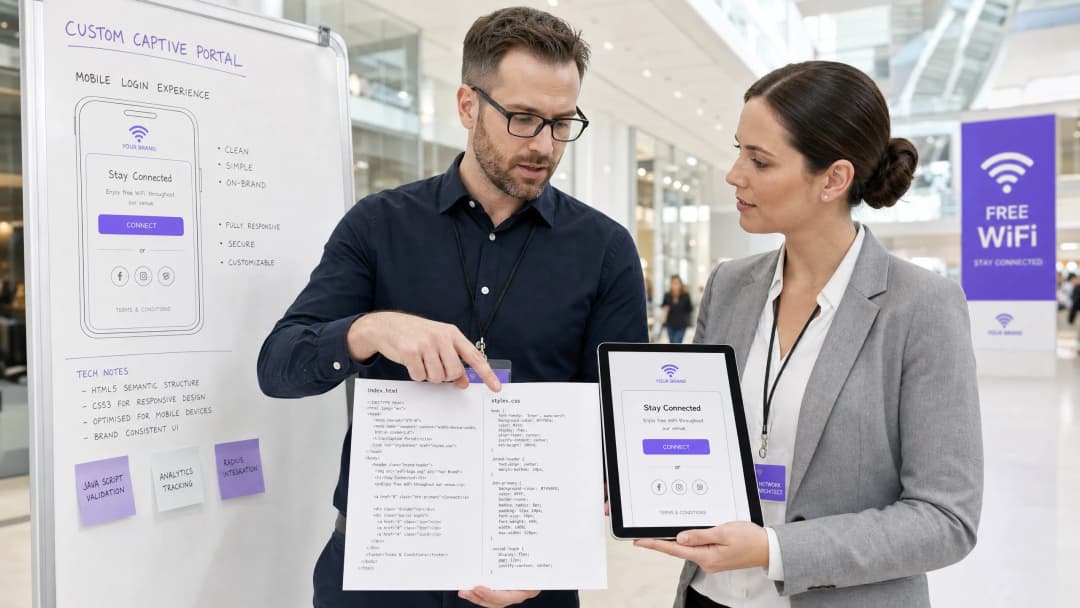
For enterprise venues - ranging from luxury hotels Hospitality and retail chains Retail to transit hubs Transport and modern medical campuses Healthcare - the guest WiFi splash page is the digital front door. However, over 90% of guest WiFi logins occur on mobile devices, where rendering is governed not by standard browsers like Safari or Chrome, but by highly restricted Captive Network Assistant (CNA) webviews [1]. These "mini-browsers" enforce severe sandbox limitations: they block external CDNs, disable persistent cookies, ignore external web fonts, and severely restrict JavaScript execution to mitigate security risks and prevent session hijacking [2].
When a developer designs a splash page using traditional web standards, these constraints result in broken layouts, missing brand assets, and non-functional login buttons, directly impacting customer satisfaction and digital engagement. This guide provides solutions to these challenges, presenting defensive coding practices - such as inline CSS, Base64 asset encoding, system font stacks, and explicit navigation-driven authentication handshakes - to ensure seamless cross-platform rendering. Furthermore, we examine how utilising a managed solution like Purple's portal builder allows developers to maintain complete HTML/CSS creative control while offloading RADIUS authentication, database scaling, GDPR/PCI compliance, and multi-vendor AP integrations [3].
Technical Deep-Dive
To build a resilient custom captive portal, developers must understand the network-level interception and browser virtualisation that occurs when a guest associates with an open Service Set Identifier (SSID).
The Captive Portal Lifecycle
When a client device associates with a captive SSID, the following sequence is triggered:
- IP Association: The device completes a 3-way handshake and requests an IP address via DHCP.
- Active Connectivity Probe: The operating system's background network manager immediately sends an HTTP GET request to a dedicated vendor-neutral canary URL (e.g., Apple's
http://captive.apple.com/hotspot-detect.htmlor Google'shttp://connectivitycheck.gstatic.com/generate_204) [1]. - DNS/HTTP Interception: The local Wireless LAN Controller (WLC) or Access Point (AP) intercepts this port 80 HTTP request. Instead of returning the expected HTTP 200 or 204 status, the gateway redirects the client's traffic to the captive portal's landing page URL via an HTTP 302 redirect [2].
- Webview Spawning: Detecting the redirect, the OS spawns its native Captive Network Assistant (CNA) mini-browser to display the redirected splash page, bypassing the need for the user to manually open a full browser.
- Authentication and State Transition: The user completes the login form, submitting credentials back to the portal server, which instructs the gateway (often via a RADIUS Access-Accept or external API call) to authorise the MAC address.
- CNA Exit Handshake: The CNA mini-browser performs another HTTP GET to its canary URL. If it receives the expected 200/204 response, it changes its top-right button from "Cancel" to "Done" and establishes the WiFi connection as the primary network interface.
Platform-Specific Mini-Browser Constraints
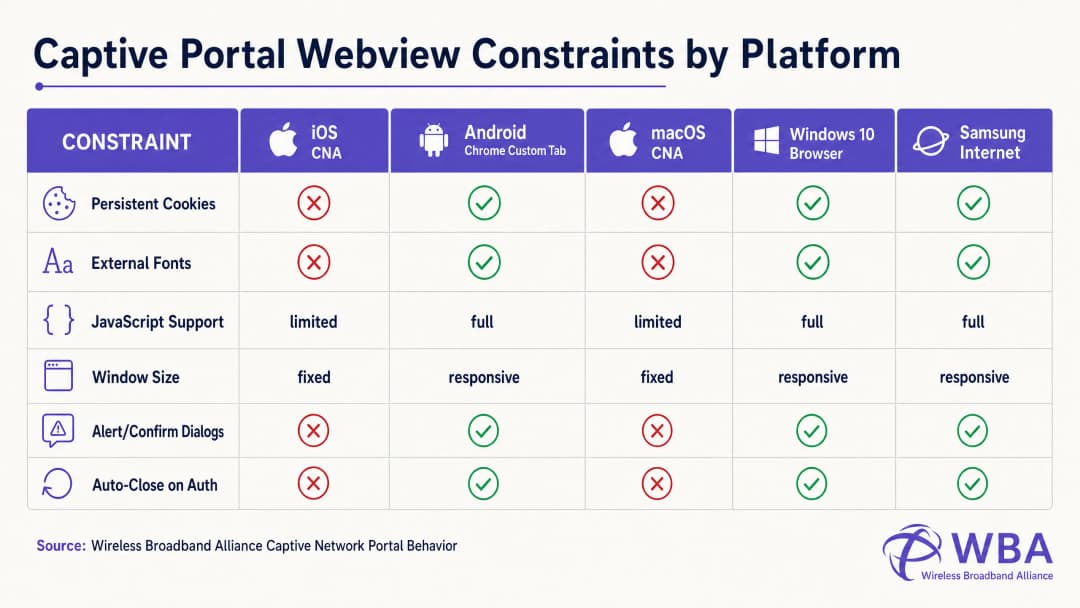
Each operating system handles this lifecycle within different webview environments, resulting in highly fragmented behaviour. The table below details these critical constraints:
| Platform / Webview | Display Method | Persistent Cookies | External Web Fonts | JavaScript Execution | Window Dimensions | Exit Handshake Trigger |
|---|---|---|---|---|---|---|
| Apple iOS CNA (Websheet) | Mini-Browser Popup | Blocked (Destroyed on close) | Blocked (Offline) | Limited (No localStorage/sessionStorage) | Responsive (Device-width) | Full-page HTTP Redirect Only [1] |
| Apple macOS CNA (Captive Network Assistant) | Mini-Browser Popup | Blocked | Blocked | Limited (No alert/confirm dialogs) | Fixed (900px x 572px) | Full-page HTTP Redirect Only |
| Android (Google) (CaptivePortalLogin) | Push Notification -> Chrome Custom Tab | Allowed (Shared with Chrome) | Allowed (If whitelisted in walled garden) | Full | Responsive | Automatic (Captive Portal API / 204 Check) [2] |
| Samsung Android (Samsung Internet) | Push Notification -> Mini-Browser | Allowed | Allowed | Full | Responsive | Automatic |
| Windows 10/11 (Default Browser) | Auto-Launch Default Browser | Allowed (Full browser context) | Allowed | Full | Responsive | Manual / Automatic |
Coding Around the Apple CNA "Done" Button Trap
One of the most frequent failure modes in custom portal development is the "Done" Button Trap on iOS devices. When a user authenticates, the iOS Websheet webview must detect that the network is no longer captive. It does this by monitoring the success of its background canary requests.
Crucially, the iOS CNA will only trigger this check upon a full-page HTTP navigation (location redirect). If a developer builds a modern Single Page Application (SPA) that submits form data via an asynchronous AJAX call (e.g., fetch() or Axios) and updates the DOM dynamically without changing the URL, the CNA will never re-run its connectivity check. The user will be authenticated at the gateway level, but the CNA button in the top-right corner will remain as "Cancel". If the frustrated user clicks "Cancel", the iOS device will immediately disassociate from the SSID, terminating the WiFi session [1].
To prevent this, the authentication success handler must perform a full-page redirect to a physical landing page (e.g., window.location.href = '/success') or submit the login form natively via a standard HTTP POST action.
Implementation Guide
To ensure consistent rendering across all platforms, developers must transition from modern, asset-heavy web design to a highly self-contained, defensive coding style.
The Golden Rule: Design for Zero Internet Connectivity
During the captive state, the client device has no access to the wider internet. It can only resolve and access IP addresses and domains explicitly whitelisted in the wireless controller's Walled Garden (such as the IP of the captive portal server itself). Therefore, any external asset referenced in your HTML will fail to load, resulting in a broken layout.
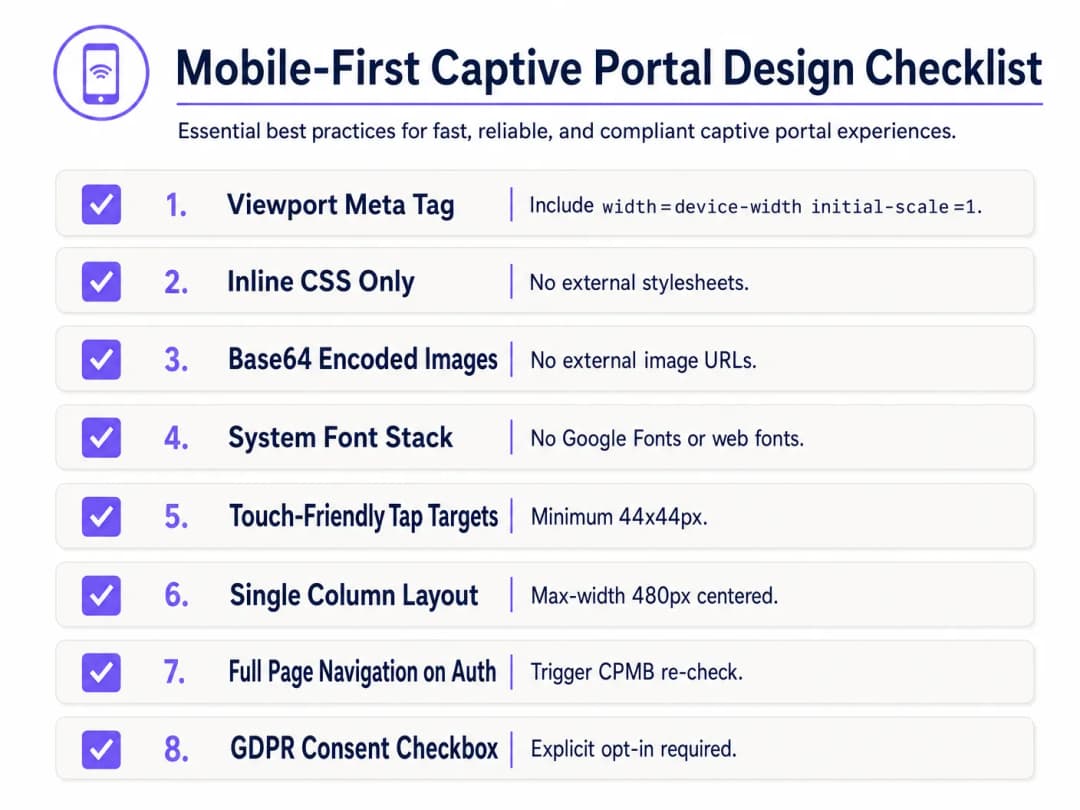
To design defensively, implement the following Mobile-First Captive Portal Design Checklist:
1. Viewport Configuration
To prevent mobile devices from scaling down the viewport to a desktop width (typically 980px), the HTML <head> must include a responsive viewport meta tag. Without this, text and input fields will appear microscopic on mobile devices:
<meta name="viewport" content="width=device-width, initial-scale=1.0, maximum-scale=1.0, user-scalable=no">
2. Inlining CSS and Removing External Dependencies
Never link to external CSS files or CDNs (e.g., Bootstrap, Tailwind, or Google Fonts). All CSS must be embedded within a <style> block in the HTML <head>.
For typography, utilise a system font stack that references pre-installed local operating system fonts. This avoids HTTP requests entirely and ensures the page loads instantly using the device's native, high-quality sans-serif typeface:
body {
    font-family: -apple-system, BlinkMacSystemFont, "Segoe UI", Roboto, Helvetica, Arial, sans-serif;
    background-color: #F5F1ED; /* Pearl White Brand Colour */
    color: #011638; /* Dark Blue Brand Colour */
    margin: 0;
    padding: 0;
    display: flex;
    flex-direction: column;
    align-items: center;
    justify-content: center;
    min-height: 100vh;
}
3. Base64 Asset Encoding
Images, logos, and icons should not be referenced via external HTTP URLs unless the hosting domain is whitelisted in the gateway's walled garden. The most reliable method is to encode small visual assets (such as PNG or SVG logos) directly into the HTML or CSS as Base64 Data URIs:
<!-- Inline Base64 Logo Example -->
<img src="data:image/svg+xml;base64,PHN2ZyB4bWxucz0iaHR0cDovL3d3dy53My5vcmcvMjAwMC9zdmciIHZpZXdCb3g9IjAgMCAxMDAgMTAwIj48Y2lyY2xlIGN4PSI1MCIgY3k9IjUwIiByPSI0MCIgZmlsbD0iIzc0NThGRCIvPjwvc3ZnPg==" alt="Purple Logo" class="brand-logo">
4. Input Field and Tap Target Optimisation
To comply with mobile usability standards (such as Apple's Human Interface Guidelines), all interactive elements must be optimised for touch input:
- Input Font Size: Input text font sizes must be at least 16px. If the font size is lower (e.g., 14px), iOS Safari and the CNA will automatically zoom in on the input field when focused, distorting the page layout [1].
- Tap Targets: Buttons, checkboxes, and links must have a minimum touch target area of 44px x 44px to prevent accidental clicks or user frustration.
5. Legal Consent and GDPR Compliance
When capturing guest data (e.g., email, phone number, or social profiles), the HTML structure must support explicit legal consent. Under GDPR, pre-ticked checkboxes or implicit consent statements (e.g., "By logging in, you agree to our terms") are non-compliant [3].
- Provide an unchecked-by-default checkbox for Terms & Conditions and Privacy Policies.
- Wrap detailed legal text in a scrollable, constrained-height container (
max-height: 120px; overflow-y: auto;) to keep the primary login form above the fold.
<div class="consent-container">
    <input type="checkbox" id="terms_consent" name="terms_consent" required>
    <label for="terms_consent">
        I explicitly agree to the <a href="#" onclick="showTerms()">Terms of Service</a> and consent to the processing of my data in accordance with the <a href="#" onclick="showPrivacy()">Privacy Policy</a>.
    </label>
</div>
Got questions about your specific setup?
Our team works with venue operators, IT managers, and network engineers across 80,000 venues. Book a 20-minute call and we will show you how others like you solved it.
Custom Captive Portal HTML/CSS Template
Below is a complete, production-ready, single-file HTML/CSS template that incorporates all mobile-first, CNA-compliant best practices. It features a responsive layout, a system font stack, Base64-ready asset placeholders, touch-friendly inputs, and explicit GDPR-compliant consent structures:
<!DOCTYPE html>
<html lang="en">
<head>
    <meta charset="UTF-8">
    <meta name="viewport" content="width=device-width, initial-scale=1.0, maximum-scale=1.0, user-scalable=no">
    <title>Guest WiFi Login</title>
    <style>
        /* CSS Reset & Variable Declarations */
        :root {
            --color-primary: #7458FD; /* Purple Brand Colour */
            --color-dark: #011638; /* Dark Blue */
            --color-light: #F5F1ED; /* Pearl White */
            --color-white: #FFFFFF;
            --color-border: #D1D5DB;
            --radius-container: 12px;
            --radius-element: 6px;
        }

        * {
            box-sizing: border-box;
            -webkit-tap-highlight-color: transparent;
        }

        body {
            font-family: -apple-system, BlinkMacSystemFont, "Segoe UI", Roboto, Helvetica, Arial, sans-serif;
            background-color: var(--color-light);
            color: var(--color-dark);
            margin: 0;
            padding: 20px;
            display: flex;
            flex-direction: column;
            align-items: center;
            justify-content: center;
            min-height: 100vh;
        }

        /* Responsive Card Layout */
        .portal-card {
            background-color: var(--color-white);
            width: 100%;
            max-width: 420px;
            padding: 32px 24px;
            border-radius: var(--radius-container);
            box-shadow: 0 4px 20px rgba(1, 22, 56, 0.05);
            text-align: center;
        }

        .logo-container {
            margin-bottom: 24px;
        }

        /* Embedded Base64 Logo Placeholder */
        .logo {
            width: 120px;
            height: auto;
        }

        h1 {
            font-size: 24px;
            font-weight: 700;
            margin: 0 0 8px 0;
            color: var(--color-dark);
        }

        p {
            font-size: 14px;
            color: #4B5563;
            margin: 0 0 24px 0;
            line-height: 1.5;
        }

        /* Form Styles */
        .form-group {
            text-align: left;
            margin-bottom: 16px;
        }

        label {
            display: block;
            font-size: 14px;
            font-weight: 600;
            margin-bottom: 6px;
            color: var(--color-dark);
        }

        /* Critical: font-size must be at least 16px to prevent iOS auto-zoom */
        input[type="email"],
        input[type="text"] {
            width: 100%;
            height: 48px;
            padding: 12px 16px;
            font-size: 16px;
            border: 1px solid var(--color-border);
            border-radius: var(--radius-element);
            background-color: var(--color-white);
            color: var(--color-dark);
            outline: none;
            transition: border-color 0.2s;
        }

        input[type="email"]:focus,
        input[type="text"]:focus {
            border-color: var(--color-primary);
            box-shadow: 0 0 0 3px rgba(116, 88, 253, 0.15);
        }

        /* Consent Styles */
        .consent-group {
            display: flex;
            align-items: flex-start;
            text-align: left;
            margin: 20px 0;
        }

        /* Touch-friendly target sizing */
        input[type="checkbox"] {
            width: 20px;
            height: 20px;
            margin: 2px 12px 0 0;
            flex-shrink: 0;
            cursor: pointer;
            accent-color: var(--color-primary);
        }

        .consent-label {
            font-size: 13px;
            line-height: 1.4;
            color: #4B5563;
            user-select: none;
        }

        .consent-label a {
            color: var(--color-primary);
            text-decoration: none;
            font-weight: 600;
        }

        .consent-label a:hover {
            text-decoration: underline;
        }

        /* Touch-Friendly CTA Button (Minimum 44px height) */
        .btn-submit {
            width: 100%;
            height: 48px;
            background-color: var(--color-primary);
            color: var(--color-white);
            border: none;
            border-radius: var(--radius-element);
            font-size: 16px;
            font-weight: 600;
            cursor: pointer;
            transition: background-color 0.2s;
            display: flex;
            align-items: center;
            justify-content: center;
        }

        .btn-submit:hover {
            background-color: #5B3EE3;
        }

        .btn-submit:active {
            background-color: #4A2FD4;
        }

        /* Legal Terms Scrollbox */
        .terms-scrollbox {
            display: none; /* Toggled via JS */
            text-align: left;
            font-size: 11px;
            color: #6B7280;
            background-color: var(--color-light);
            padding: 12px;
            border-radius: var(--radius-element);
            max-height: 100px;
            overflow-y: auto;
            margin-bottom: 16px;
            border: 1px solid var(--color-border);
        }

        .footer {
            margin-top: 24px;
            font-size: 11px;
            color: #9CA3AF;
        }
    </style>
</head>
<body>

    <div class="portal-card">
        <div class="logo-container">
            <!-- Replace src with your actual Base64-encoded SVG or PNG -->
            <svg class="logo" xmlns="http://www.w3.org/2000/svg" viewBox="0 0 100 30">
                <rect width="100" height="30" rx="6" fill="#7458FD"/>
                <text x="50" y="20" font-family="sans-serif" font-size="12" fill="#FFFFFF" font-weight="bold" text-anchor="middle">YOUR BRAND</text>
            </svg>
        </div>

        <h1>Welcome to Guest WiFi</h1>
        <p>Please enter your details below to gain secure, high-speed internet access.</p>

        <!-- Form must submit natively (full page navigation) to clear Apple CNA -->
        <form action="/login/submit" method="POST" onsubmit="return validateForm()">
            <div class="form-group">
                <label for="guest_name">Full Name</label>
                <input type="text" id="guest_name" name="name" placeholder="John Doe" required autocomplete="name">
            </div>

            <div class="form-group">
                <label for="guest_email">Email Address</label>
                <input type="email" id="guest_email" name="email" placeholder="john@example.com" required autocomplete="email">
            </div>

            <div class="consent-group">
                <input type="checkbox" id="terms_consent" name="terms_accepted" required>
                <label for="terms_consent" class="consent-label">
                    I accept the <a href="#" onclick="toggleTerms(event)">Terms of Service</a> and consent to data processing in compliance with GDPR regulations.
                </label>
            </div>

            <div id="terms_box" class="terms-scrollbox">
                <strong>WiFi Terms of Service:</strong><br>
                1. This service is provided as-is without warranties.<br>
                2. Users must not engage in illegal bandwidth-intensive activities.<br>
                3. Personal data is collected solely for authentication and marketing opt-ins in compliance with our Privacy Policy.
            </div>

            <button type="submit" class="btn-submit">Connect to WiFi</button>
        </form>

        <div class="footer">
            Powered by Purple | Secure Guest WiFi
        </div>
    </div>

    <script>
        function toggleTerms(e) {
            e.preventDefault();
            var box = document.getElementById('terms_box');
            box.style.display = (box.style.display === 'block') ? 'none' : 'block';
        }

        function validateForm() {
            var consent = document.getElementById('terms_consent');
            if (!consent.checked) {
                alert('You must accept the Terms of Service to connect.');
                return false;
            }
            return true;
        }
    </script>
</body>
</html>
Troubleshooting & Risk Mitigation
When deploying custom-coded HTML/CSS captive portals, IT operations teams frequently encounter several severe operational risks:
1. The SSL/TLS Certificate Warning Loop
Because captive portals function by intercepting traffic, they present a fundamental conflict with modern HTTPS web security. When a user attempts to visit an HTTPS site (e.g., https://www.google.com), and the gateway attempts to redirect that traffic to an HTTP captive portal, the browser detects a mismatch in the SSL certificate and displays a critical "Your connection is not private" security warning.
- Mitigation: Never attempt to intercept HTTPS traffic directly. Rely entirely on the operating system's native CNA helper (which makes an unencrypted HTTP request to trigger the redirect). Ensure your captive portal's domain has a valid, publicly trusted SSL certificate (e.g., Let's Encrypt or DigiCert) and is served over HTTPS only after the initial HTTP redirect has successfully routed the user to your portal domain [2].
2. DNS Resolution Failures (The Walled Garden Trap)
If your custom HTML page references external resources - such as a social login OAuth endpoint (e.g., Facebook, Google) or a payment gateway - the DNS requests for these domains will fail unless they are explicitly whitelisted in the wireless controller's Walled Garden. If a domain is missing from the whitelist, the login flow will stall, presenting a blank screen.
- Mitigation: Maintain a strict, minimal Walled Garden list. If utilising social logins, whitelist the specific wildcard domains recommended by the identity providers (e.g.,
*.google.com,*.gstatic.com).
3. Session Timeout and MAC Spoofing Vulnerabilities
Standard captive portals authenticate devices based on their MAC addresses. However, modern mobile operating systems (iOS 14+ and Android 10+) utilise randomised MAC addresses (private WiFi addresses) by default, rotating them periodically. This can lead to guests being repeatedly prompted to re-authenticate, destroying the user experience [1].
- Mitigation: Implement reasonable session timeouts (e.g., 24 hours) on the RADIUS server to prevent stale sessions, and utilise modern authentication standards like Passpoint (Hotspot 2.0) or WPA3-Enterprise for seamless, secure onboarding that bypasses MAC-based captive portals entirely.
Purple Product Relevance: Build vs. Buy
While coding a single HTML page is straightforward, hosting, securing, and scaling a custom captive portal infrastructure presents massive technical and compliance hurdles. The table below compares the engineering and operational realities of self-hosting a custom portal versus utilising Purple's managed enterprise platform:
| Feature / Operational Requirement | Self-Hosted Custom Portal | Purple Enterprise WiFi Platform |
|---|---|---|
| HTML/CSS Customisation | Fully manual coding, uploading files to individual APs or local web servers. | Pixel-perfect developer editor allowing custom HTML/CSS injects, combined with a drag-and-drop visual builder. |
| RADIUS Infrastructure | Must deploy, configure, and maintain highly available FreeRADIUS or Cloud RADIUS servers [4]. | Built-in, globally distributed, cloud-native RADIUS with active-active redundancy and 99.99% uptime SLAs. |
| Multi-Vendor AP Support | Custom integration scripts required for each hardware vendor (Cisco, Aruba, Meraki, Ruckus) [5]. | Native, out-of-the-box integration with over 200 hardware models; unified portal deployment across mixed-hardware estates. |
| Data Privacy & Compliance | Venue assumes 100% legal liability for GDPR, CCPA, and PCI DSS compliance, including secure database encryption and data deletion workflows. | Fully compliant by design. Built-in consent management, automated data-subject deletion requests, and secure ISO 27001-certified hosting. |
| Analytics & Marketing | Requires building custom data ingestion pipelines and integrating third-party marketing tools. | Enterprise-grade analytics dashboard with real-time footfall tracking, return-rate metrics, and automated marketing campaign triggers [6]. |
| Identity Provider Integrations | Manual OAuth2 integrations with Google, Facebook, Apple, and local SMS gateways. | One-click integrations with major social platforms, SMS gateways, and Azure AD / Okta for corporate guests. |
Purple's platform resolves the "Build vs. Buy" dilemma. It provides developers with the complete creative freedom of a custom HTML/CSS workspace while eliminating the complex, high-risk backend infrastructure engineering required to support secure RADIUS authentication at scale.
ROI & Business Impact
Investing in a professionally engineered, responsive custom captive portal delivers quantifiable returns across IT operations, marketing, and legal compliance.
1. Operational Cost Reduction (IT Helpdesk Tickets)
In large-scale deployments, such as a stadium or multi-site retail chain, a broken captive portal is a leading driver of IT helpdesk escalations. When guests encounter a "white screen" or a non-responsive login button, they overwhelm on-site staff or submit support tickets.
$$\text{Annual Support Savings} = (\text{Total Annual Guest Visits} \times \text{Portal Failure Rate} \times \text{Helpdesk Contact Rate}) \times \text{Cost Per Support Ticket}$$
- Scenario: A convention centre with 1,000,000 annual visitors. A poorly coded portal has a 5% failure rate on older iOS devices, leading to a 10% helpdesk contact rate. At an industry-standard $15 per support ticket, the operational cost is: $$(1,000,000 \times 0.05 \times 0.10) \times $15 = $75,000 \text{ annually in avoidable support overhead}$$
- Outcome: Transitioning to a CNA-optimised, mobile-first template reduces the portal failure rate to <0.1%, virtually eliminating this operational drain.
2. Marketing Data Capture and Opt-in Optimisation
For retail and hospitality venues, the guest WiFi portal is the primary mechanism for capturing clean, first-party customer data. A poorly designed user interface with microscopic text or a clunky form layout causes high bounce rates - users abandon the login process entirely, resulting in lost marketing opportunities.
- Case Study (Retail): A national retail chain implemented a mobile-first optimised captive portal utilising Purple's platform. By replacing a multi-step login form with a single-field email input (font-size: 16px) and an optimised 48px tap-target button, they saw a 42% increase in completed registrations and a 28% increase in marketing newsletter opt-ins within the first quarter [6].
3. Legal and Regulatory Risk Mitigation
Under GDPR and CCPA, non-compliant data collection carries severe financial penalties (up to 4% of global annual turnover under GDPR). Relying on pre-ticked checkboxes or failing to provide a clear, easily accessible Privacy Policy on your splash page exposes the enterprise to immense legal liability.
- Mitigation ROI: Implementing an explicit, un-ticked consent checkbox and hosting terms within an optimised scrollbox ensures 100% regulatory compliance, mitigating the risk of multi-million dollar regulatory fines and protecting brand reputation.
Summary of Key Takeaways
- The CNA Sandbox is Restrictive: Apple's iOS Websheet and macOS CNA are highly sandboxed environments that block external assets, cookies, and web fonts. All styling and assets must be self-contained (inline CSS, Base64 images, system fonts) [1].
- AJAX Breaks the iOS Exit Handshake: To successfully transition the iOS device from "captive" to "connected" (changing the top-right button from "Cancel" to "Done"), you must trigger a full-page HTTP redirect. Asynchronous DOM updates will leave the device in a captive loop.
- Mobile-First is Mandatory: Over 90% of logins occur on mobile. Design a single-column layout (max-width: 480px), utilise touch-friendly tap targets (minimum 44px x 44px), and enforce a minimum 16px font size on all text inputs to prevent automatic iOS browser zooming.
- Walled Gardens Control DNS: Any external domain referenced during login (e.g., social login APIs) must be explicitly whitelisted in the wireless controller's walled garden, or the page will fail to load.
- Purple Eliminates Backend Complexity: Utilising Purple's portal builder gives developers complete HTML/CSS control via a custom editor, while offloading the immense security, scaling, and compliance burdens of RADIUS, multi-vendor AP integrations, and GDPR-compliant database management [3].
References
- [1] Wireless Broadband Alliance: Captive Network Portal Behaviour
- [2] Android Open Source Project: Captive Portal Login Webview Integration
- [3] European Data Protection Board: Guidelines on Consent under Regulation 2016/679
- [4] How to Implement 802.1X Authentication with Cloud RADIUS
- [5] Cisco Wireless APs: 2026 Guide to Products & Deployment
- [6] Purple WiFi Marketing & Analytics Platform
Listen to the Technical Briefing
Listen to a senior solutions architect discuss the technical constraints and implementation strategies for custom captive portals:
Key Definitions
Captive Portal
A web page that is displayed to newly connected users of a WiFi network before they are granted broader access to network resources, typically used for authentication, payment, or displaying terms of service.
IT teams deploy captive portals at the gateway level to control guest access, capture user data, and enforce legal compliance.
Captive Network Assistant (CNA)
A highly restricted, sandboxed mini-browser spawned automatically by operating systems (such as Apple iOS and macOS) upon detecting a captive network redirect, designed solely to facilitate portal authentication.
CNA webviews enforce strict limitations, including blocking external CDNs, persistent cookies, and local storage, which frequently break standard web designs.
Walled Garden
A restricted list of IP addresses, subnets, or domain names that an unauthenticated guest user is permitted to access through the gateway before completing the captive portal login process.
Developers must ensure that any external resource (such as social login APIs or payment gateways) is whitelisted in the walled garden to prevent the login flow from stalling.
Base64 Encoding
A binary-to-text encoding scheme that represents binary data (such as images) as an ASCII string, allowing assets to be embedded directly within HTML or CSS documents.
Utilising Base64 encoding for logos and icons eliminates external HTTP requests, ensuring assets render perfectly within offline CNA environments.
RADIUS (Remote Authentication Dial-In User Service)
A networking protocol that provides centralised Authentication, Authorisation, and Accounting (AAA) management for users who connect and use a network service.
The captive portal server communicates with a RADIUS server to authorise the guest's MAC address at the network gateway once authentication criteria are met.
System Font Stack
A CSS font-family declaration that prioritises pre-installed operating system fonts (such as San Francisco on iOS, Segoe UI on Windows, and Roboto on Android) over external web fonts.
Implementing a system font stack ensures immediate typography rendering without triggering blocked external HTTP requests to services like Google Fonts.
Canary URL
A dedicated, unencrypted HTTP URL maintained by operating system vendors (e.g., captive.apple.com) to test whether a device has unrestricted internet connectivity.
The OS background network manager checks this URL to detect the presence of a captive portal and trigger the CNA webview popup.
Passpoint (Hotspot 2.0)
An industry standard developed by the WiFi Alliance that enables mobile devices to automatically discover and securely authenticate with WiFi hotspots, bypassing manual captive portal logins.
Enterprises utilise Passpoint alongside platforms like Purple to transition guests from friction-heavy splash pages to seamless, cellular-like secure roaming experiences.
Worked Examples
A luxury 250-room hotel chain [Hospitality](/industries/hotels) wants to implement a custom guest WiFi login page that perfectly matches their premium brand guidelines. Their creative agency designed a splash page utilising custom brand typography (hosted on Adobe Fonts), multiple high-resolution background images (hosted on a public AWS S3 bucket), and a multi-step animated JavaScript wizard. When deployed, iOS guests connect to the SSID, but the portal pops up as a blank white screen, and users are unable to authenticate.
To resolve the blank screen and broken branding, we must restructure the portal's frontend architecture to comply with the Apple CNA sandbox constraints:
- Typography Remediation: Since Adobe Fonts requires an external HTTP request that is blocked by the CNA, we replace the custom font call with a native, premium system font stack (
font-family: -apple-system, BlinkMacSystemFont, 'Segoe UI', Roboto, Helvetica, Arial, sans-serif;). This ensures instant rendering without external network calls. - Asset Optimisation: The background images on AWS S3 are blocked because S3 is not in the gateway's walled garden. We compress the primary brand logo, convert it to a lightweight SVG, and encode it directly in the HTML as a Base64 Data URI. For the background, we replace the heavy images with a clean, responsive CSS gradient using the hotel's brand colours, significantly reducing page weight.
- JavaScript Simplification: The multi-step animated wizard relies on external jQuery and GSAP libraries. We strip out these external dependencies and refactor the form into a single-page, single-column HTML structure. Form validation is rewritten in lightweight, vanilla JavaScript.
- Authentication Handshake: The form submission is modified from an AJAX-based submission to a native HTML
<form action="/submit" method="POST">to trigger a full-page redirect, allowing the iOS Websheet to execute its canary check and display the 'Done' button.
A national retail chain [Retail](/industries/retail) with 450 stores wants to capture guest emails via WiFi splash pages to fuel their CRM. They require guests to opt-in to marketing newsletters. The initial design has a pre-checked 'I agree to receive marketing emails' checkbox. Furthermore, the portal is hosted on a single local server in their headquarters. During peak hours (Saturday afternoon), guests across the country experience severe delays, and many are unable to load the login page, leading to a massive drop in data capture rates.
We must address both the compliance violation and the infrastructure bottleneck:
- Compliance Remediation: Under GDPR and CCPA, pre-checked consent boxes are illegal. We modify the HTML to make the marketing consent checkbox unchecked by default (
<input type="checkbox" id="marketing_consent">). We also add a separate, mandatory checkbox for the Terms of Service to decouple legal agreement from marketing opt-in. - Infrastructure Scaling: Hosting a national captive portal on a single centralised server creates a single point of failure and a massive latency bottleneck. We migrate the portal frontend to a highly available, globally distributed Content Delivery Network (CDN) with edge-caching.
- RADIUS Integration: We configure the local store access points to point to a cloud-native RADIUS cluster with active-active redundancy, ensuring that authentication requests are processed locally at the edge with sub-50ms latency, even during peak Saturday traffic.
- Purple Migration: To eliminate this entire engineering overhead, the retailer migrates to Purple. Purple's built-in GDPR consent tooling automatically manages compliant opt-ins, and their globally distributed cloud infrastructure handles millions of daily authentications with 99.99% uptime, completely resolving the scaling bottleneck.
Practice Questions
Q1. An IT team at a major international airport [Transport](/industries/trains) deploys a custom-coded captive portal. They notice that while Android users connect seamlessly, a significant portion of iOS users experience an issue where they authenticate successfully but cannot browse the web. On closer inspection, the iOS devices show they are connected to the SSID, but the top-right button on the captive popup still says 'Cancel' instead of 'Done'. What is the root cause of this issue, and how should the developer fix it?
Hint: Analyse how the Apple CNA helper detects that a network has transitioned from captive to authenticated, and what browser action is required to trigger this check.
View model answer
The root cause is that the portal's success page is updating the UI dynamically via JavaScript (AJAX/SPA routing) rather than performing a full-page HTTP navigation. The Apple iOS Captive Network Assistant (CNA) mini-browser only re-runs its background connectivity check (the canary request to captive.apple.com) when a full-page URL redirect or navigation occurs. If the developer submits the login form via AJAX and simply displays a 'Success' message in the DOM, the CNA remains unaware that the network has been unlocked. Consequently, the top-right button remains as 'Cancel'. If the user clicks 'Cancel' to exit, the OS assumes the login failed and disconnects from the WiFi network.
Solution: The developer must modify the authentication success handler to force a full-page redirect. This can be achieved by submitting the login form natively via a standard HTML <form action="/submit" method="POST"> or by executing window.location.href = '/success_landing_page' in JavaScript once the API returns a successful authentication response. This triggers the required full-page load, forcing the CNA helper to re-evaluate the network state, verify that the canary URL is now reachable, and change the top-right button to 'Done'.
Q2. A stadium operations team [Events] wants to launch a guest WiFi network that captures marketing opt-ins. The compliance officer insists that the portal must be 100% GDPR-compliant. The development team presents a mockup where the login form has a pre-checked box saying 'I agree to the Terms of Service and consent to receive marketing newsletters'. Why is this design non-compliant, and how should the HTML/CSS and form structure be refactored to satisfy GDPR while maintaining a high conversion rate?
Hint: Consider GDPR's strict requirements regarding explicit consent, the decoupling of marketing opt-ins from terms of service, and the physical visibility of legal text on mobile screens.
View model answer
The proposed design violates GDPR on two major fronts: first, pre-checked checkboxes do not constitute valid consent, which must be freely given, specific, informed, and unambiguous. Second, bundling marketing consent with the agreement to the Terms of Service is non-compliant; a user cannot be forced to accept marketing emails as a condition of using the WiFi service.
Refactoring Strategy:
- Decouple Consent: Split the checkbox into two separate checkboxes. Checkbox A is mandatory and covers the Terms of Service and Privacy Policy. Checkbox B is optional and covers marketing newsletter opt-in.
- Set to Unchecked: Ensure both checkboxes are unchecked by default in the HTML (
checkedattribute omitted). - CSS Visibility: Since over 90% of users are on mobile, place the checkboxes directly above the 'Connect' button so they are visible 'above the fold' without scrolling. Use a system font stack and set the label font size to 14px with a line-height of 1.4 for readability.
- Terms Scrollbox: To prevent the legal text from pushing the form elements off the screen, place the detailed Terms of Service in a scrollable container with a fixed height (
max-height: 100px; overflow-y: auto; background-color: #F5F1ED; border: 1px solid #D1D5DB; border-radius: 6px;) that can be toggled open or closed via a text link. This maintains a clean, high-converting layout while ensuring absolute legal compliance.
Q3. A retail chain [Retail](/industries/retail) is deploying a custom-coded splash page across 100 stores. The designer used Google Fonts (Montserrat) and linked to a CDN-hosted Bootstrap stylesheet in the HTML head. During testing on a corporate network, the page renders beautifully. However, when deployed on a test store AP with a captive network configuration, the page renders with unstyled Times New Roman text, broken alignment, and missing icons. Why does this happen, and how must the assets be refactored?
Hint: Analyse the state of the network connection before a user is authenticated, and determine how the browser handles external HTTP requests to domains outside the walled garden.
View model answer
This failure occurs because the device is in an unauthenticated, captive state when the splash page is loaded. In this state, the wireless gateway blocks all outbound internet traffic, allowing requests only to domains explicitly whitelisted in the gateway's Walled Garden. Because the CDN domains for Bootstrap (cdn.jsdelivr.net) and Google Fonts (fonts.googleapis.com) are not whitelisted, the browser's requests to fetch the stylesheet and font files fail silently. Consequently, the browser falls back to its default rendering engine, resulting in unstyled HTML (Times New Roman text) and broken layouts.
Refactoring Strategy:
- Inline CSS: Remove the external Bootstrap stylesheet link. Copy the necessary CSS grid/flexbox rules directly into a
<style>block in the HTML<head>. This ensures that all layout instructions are delivered in the initial single-page payload. - Implement System Font Stack: Remove the Google Fonts
@importor<link>call. Replace it with a native system font stack in the CSS (font-family: -apple-system, BlinkMacSystemFont, 'Segoe UI', Roboto, sans-serif;). This forces the device to use high-quality fonts already pre-installed on the operating system, eliminating the external network dependency entirely. - Base64 Encode Icons/Logos: If the layout relies on external images or icon libraries (like FontAwesome), convert these icons into SVG format and embed them inline within the HTML or as Base64 Data URIs in the CSS. This guarantees that the page is 100% self-contained and renders perfectly even with zero internet connectivity.
Frequently asked questions
What is the Captive Network Assistant (CNA) and why does custom captive portal HTML and CSS behave differently in it?
The Captive Network Assistant (CNA) is a sandboxed, restricted webview spawned automatically by operating systems like iOS, macOS, Android, and Windows upon detecting network interception. CNAs lack full browser features: they frequently block popups, restrict persistent cookie storage, limit JavaScript execution speed, disable file downloads, and enforce strict viewport bounds. Custom captive portal HTML and CSS must be lightweight, self-contained, and avoid external redirects that can terminate the CNA session prematurely.
What domains and IP addresses must be included in a captive portal walled garden?
A walled garden (pre-authentication allowlist) permits unauthenticated wireless clients to reach critical resources before logging in. You must include hostnames for any externally hosted CSS stylesheets, JavaScript bundles, web fonts, or CDN assets used on the splash page. If supporting social login or SMS verification, you must also allowlist authentication endpoints for Apple, Google, or SMS gateways, as well as the controller redirect and RFC 8908 API endpoints.
How do RFC 8908 and RFC 8910 modernise captive portal discovery over legacy HTTP redirection?
Traditional captive portals intercept cleartext HTTP requests (port 80) and return an HTTP 302 redirect, which causes SSL/TLS certificate warnings if the client attempts an HTTPS connection. RFC 8908 and RFC 8910 establish a standardised Captive Portal API where the wireless network advertises an API URL via DHCP Option 114 or IPv6 Router Advertisement Option 38. The client operating system queries this JSON endpoint directly, receiving explicit captive status, venue terms, and authentication URLs without packet tampering or certificate errors.
What CSS design patterns work best for captive portal splash pages across mobile devices?
Best practices for captive portal CSS include using fluid Flexbox or CSS Grid layouts, setting interactive tap targets to at least 48x48 pixels for touch ergonomics, relying on system font stacks (such as -apple-system, BlinkMacSystemFont, Segoe UI) to avoid render-blocking webfont downloads, inlining critical SVG icons to minimise HTTP requests, and specifying a strict mobile viewport meta tag (width=device-width, initial-scale=1) to prevent awkward horizontal scrolling inside mini-browsers.
How does Purple simplify custom captive portal deployment and walled garden management?
Purple replaces fragile self-hosted web servers with an enterprise cloud captive portal platform. Purple provides dynamic branding tools, automated walled garden orchestration across Cisco Meraki, HPE Aruba, Ruckus, Ubiquiti UniFi, and Fortinet, full RFC 8908 standard support, and rigorous compatibility testing across iOS and Android CNA webviews, backed by 99.99% cloud uptime and CRM marketing integrations.
Continue reading in this series
Ubiquiti UniFi guest portal not redirecting: causes and fixes
This guide isolates a UniFi guest portal redirect failure by following the guest state, redirect, pre-authorisation route and controller authorisation in sequence. It gives venue IT teams a sourced method to address guest-network versus Hotspot confusion, external portal hand-offs, current UniFi OS account requirements and DNS isolation testing.
Cisco Meraki splash page not working: a troubleshooting flowchart
This practical day-two guide isolates where a Cisco Meraki splash flow has failed: client authorisation, HTTP redirect initiation, walled-garden reachability or RADIUS sign-on. It gives venue IT teams a controlled evidence path, so they can restore Guest WiFi without making broad changes to a live estate.
Enterprise Guest WiFi Setup Guide: VLAN Segmentation, Security, and Captive Portals
This technical guide shows IT teams how to set up Guest WiFi as a controlled internet-access service, using VLAN segmentation, firewall policy and a captive portal. It also explains how Purple's registration forms and onboarding controls support a proportionate visitor experience without weakening the boundary around staff, payment and operational systems.
Got questions about your specific setup?
Our team works with venue operators, IT managers, and network engineers across 80,000 venues. Book a 20-minute call and we will show you how others like you solved it.