
Custom Captive Portal: HTML এবং CSS নির্দেশিকা
এই নির্ভরযোগ্য টেকনিক্যাল রেফারেন্স নির্দেশিকাটিতে একটি কাস্টম Captive Portal ল্যান্ডিং পেজ ডিজাইন এবং কোড করার জন্য প্রয়োজনীয় ডেভেলপমেন্ট স্ট্যান্ডার্ড, CSS আর্কিটেকচার এবং নেটওয়ার্ক-স্তরের সীমাবদ্ধতাগুলো ব্যাখ্যা করা হয়েছে। এটি ফ্রন্টএন্ড ডেভেলপার এবং নেটওয়ার্ক আর্কিটেক্টদের Apple CNA এবং Android ওয়েবভিউ পরিবেশের সাথে কাজ করার কার্যকর কৌশল প্রদান করে, যা পিক্সেল-পারফেক্ট, নিয়মসম্মত এবং অত্যন্ত পারফরম্যান্ট গেস্ট WiFi অভিজ্ঞতা নিশ্চিত করে।
Video overview
এই গাইডটি শুনুন
পডকাস্ট ট্রান্সক্রিপ্ট দেখুন
আমাদের মূল সিরিজের অংশ: Captive Portal নির্দেশিকা →
Custom Captive Portal Architecture & CNA Inspector Tool
Model your custom HTML/CSS guest WiFi splash page. Inspect walled garden domain allowlists, evaluate Captive Network Assistant (CNA) mini-browser restrictions across iOS and Android, and export production-ready boilerplate code.
Vendor Controller Profile: Cisco Meraki (MR Series)
Architecture Category: Cloud-Managed WLAN
Redirection Flow: Custom splash URL with URL parameter append ($login_url)
RFC 3576 CoA Support: Supported (Dynamic Session Terminate / Role Push)
RFC 8908 Modern API: Native Controller Support
Onboarding & Conversion: Click-Through / Terms Acceptance
Guests review acceptable use policies (AUP) and click a single button to connect.
Average Onboarding Duration: ~8 seconds
Target Venue Policy: Fast friction-free onboarding, social marketing consent, and return visitor recognition.
Eliminate Captive Portal Support Calls & Walled Garden Errors
Building custom HTML/CSS captive portals by hand across changing iOS, Android, and Windows mini-browsers causes frequent disconnection tickets and broken walled gardens. Purple delivers enterprise cloud captive portals with 99.99% uptime SLA, native RFC 8908 support, and seamless CRM integrations across 40,000+ venues worldwide.
- ✓ Native Cisco Meraki, Aruba & Ruckus API Sync
- ✓ Automated Walled Garden Allowlist Orchestration
- ✓ Guaranteed iOS & Android CNA Compatibility
- ✓ GDPR, CCPA & ISO 27001 Certified Data Security
Request Custom Captive Portal Consultation
Speak with a Purple wireless architect to review your splash page requirements and controller integrations.
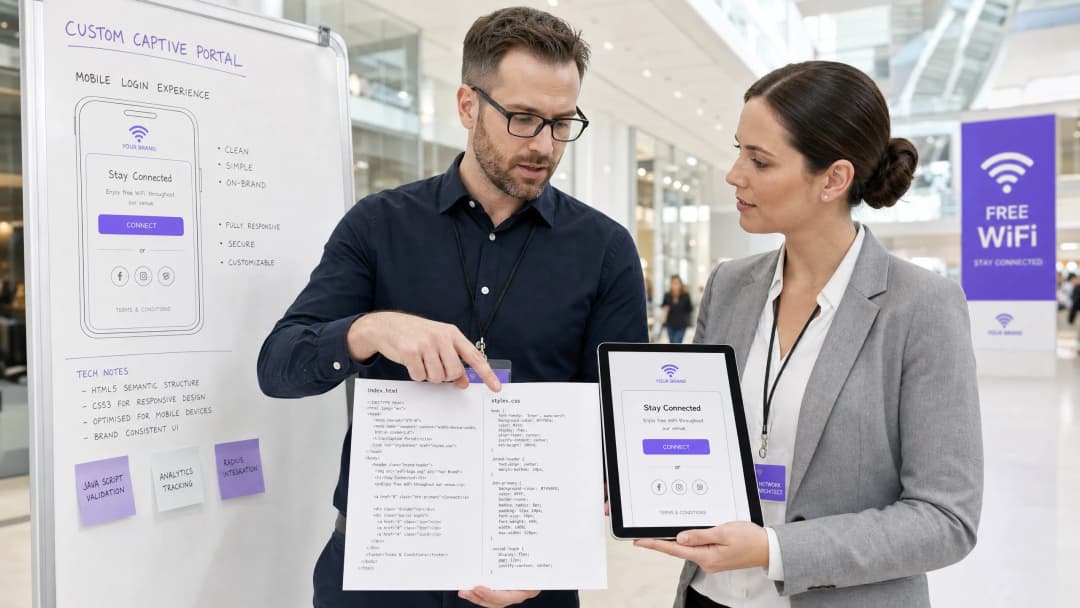
এক্সিকিউটিভ সামারি
এন্টারপ্রাইজ ভেন্যুগুলির জন্য - বিলাসবহুল হোটেল Hospitality এবং রিটেল চেইন Retail থেকে শুরু করে ট্রানজিট হাব Transport এবং আধুনিক মেডিকেল ক্যাম্পাস Healthcare পর্যন্ত - গেস্ট WiFi স্প্ল্যাশ পেজটি হলো ডিজিটাল সদর দরজা। তবে, ৯০% এরও বেশি গেস্ট WiFi লগইন মোবাইল ডিভাইসে ঘটে থাকে, যেখানে রেন্ডারিং স্ট্যান্ডার্ড ব্রাউজার যেমন Safari বা Chrome দ্বারা পরিচালিত হয় না, বরং অত্যন্ত সীমাবদ্ধ Captive Network Assistant (CNA) ওয়েবভিউ [1] দ্বারা নিয়ন্ত্রিত হয়। এই "মিনি-ব্রাউজার" গুলি কঠোর স্যান্ডবক্স সীমাবদ্ধতা প্রয়োগ করে: এগুলি এক্সটার্নাল CDN ব্লক করে, পারসিস্টেন্ট কুকিজ নিষ্ক্রিয় করে, এক্সটার্নাল ওয়েব ফন্ট উপেক্ষা করে এবং সিকিউরিটি রিস্ক কমাতে ও সেশন হাইজ্যাকিং প্রতিরোধ করতে JavaScript এক্সিকিউশন মারাত্মকভাবে সীমাবদ্ধ করে [2]।
যখন একজন ডেভেলপার ট্র্যাডিশনাল ওয়েব স্ট্যান্ডার্ড ব্যবহার করে একটি স্প্ল্যাশ পেজ ডিজাইন করেন, তখন এই সীমাবদ্ধতাগুলির ফলে লেআউট ভেঙে যায়, ব্র্যান্ড অ্যাসেট অনুপস্থিত থাকে এবং লগইন বাটনগুলি অকার্যকর হয়ে পড়ে, যা সরাসরি কাস্টমার স্যাটিসফ্যাকশন এবং ডিজিটাল এনগেজমেন্টকে প্রভাবিত করে। এই গাইডটি এই চ্যালেঞ্জগুলির সমাধান প্রদান করে, ডিফেন্সিভ কোডিং অনুশীলনের ব্যাখ্যা দেয় - যেমন ইনলাইন CSS, Base64 অ্যাসেট এনকোডিং, সিস্টেম ফন্ট স্ট্যাক এবং এক্সপ্লিসিট নেভিগেশন-চালিত অথেন্টিকেশন হ্যান্ডশেক - যা নির্বিঘ্ন ক্রস-প্ল্যাটফর্ম রেন্ডারিং নিশ্চিত করে। উপরন্তু, আমরা আলোচনা করব কীভাবে Purple-এর পোর্টাল বিল্ডারের মতো একটি ম্যানেজড সলিউশন ব্যবহার করে ডেভেলপাররা RADIUS অথেন্টিকেশন, ডাটাবেস স্কেলিং, GDPR/PCI কমপ্লায়েন্স এবং মাল্টি-ভেন্ডর AP ইন্টিগ্রেশনগুলির দায়িত্ব আমাদের উপর ছেড়ে দিয়েও সম্পূর্ণ HTML/CSS ক্রিয়েটিভ কন্ট্রোল বজায় রাখতে পারেন [3]।
টেকনিক্যাল ডিপ-ডাইভ
একটি স্থিতিস্থাপক কাস্টম ক্যাপ্টভ পোর্টাল তৈরি করতে, ডেভেলপারদের অবশ্যই নেটওয়ার্ক-লেভেল ইন্টারসেপশন এবং ব্রাউজার ভার্চুয়ালাইজেশন বুঝতে হবে যা ঘটে যখন একজন গেস্ট একটি ওপেন SSID-এর সাথে যুক্ত হন।
ক্যাপ্টভ পোর্টাল লাইফসাইকেল
যখন একটি ক্লায়েন্ট ডিভাইস একটি ক্যাপ্টভ SSID-এর সাথে যুক্ত হয়, তখন নিম্নলিখিত সিকোয়েন্সটি ট্রিগার হয়:
- IP অ্যাসোসিয়েশন: ডিভাইসটি ৩-ওয়ে হ্যান্ডশেক সম্পূর্ণ করে এবং DHCP-এর মাধ্যমে একটি IP অ্যাড্রেস অনুরোধ করে।
- অ্যাক্টিভ কানেক্টিভিটি প্রোব: অপারেটিং সিস্টেমের ব্যাকগ্রাউন্ড নেটওয়ার্ক ম্যানেজার অবিলম্বে একটি ডেডিকেটেড ভেন্ডর-নিরপেক্ষ ক্যানারি URL-এ একটি HTTP GET অনুরোধ পাঠায় (যেমন, Apple-এর
http://captive.apple.com/hotspot-detect.htmlঅথবা Google-এরhttp://connectivitycheck.gstatic.com/generate_204) [1]। - DNS/HTTP ইন্টারসেপশন: লোকাল ওয়্যারলেস ল্যান কন্ট্রোলার (WLC) বা অ্যাক্সেস পয়েন্ট (AP) এই পোর্ট ৮০ HTTP অনুরোধটিকে ইন্টারসেপ্ট করে। প্রত্যাশিত HTTP 200 বা 204 স্ট্যাটাস ফেরত দেওয়ার পরিবর্তে, গেটওয়ে একটি HTTP 302 রিডাইরেক্টের মাধ্যমে ক্লায়েন্টের ট্রাফিককে ক্যাপ্টভ পোর্টালের ল্যান্ডিং পেজ URL-এ রিডাইরেক্ট করে [2]।
- ওয়েবভিউ স্পনিং: রিডাইরেক্ট সনাক্ত করে, OS রিডাইরেক্ট করা স্প্ল্যাশ পেজটি প্রদর্শন করতে তার নেটিভ CNA মিনি-ব্রাউজারটি চালু করে, যার ফলে ব্যবহারকারীকে ম্যানুয়ালি একটি সম্পূর্ণ ব্রাউজার খোলার প্রয়োজন হয় না।5. Authentication and State Transition: ব্যবহারকারী লগইন ফর্মটি পূরণ করে পোর্টাল সার্ভারে ক্রেডেনশিয়াল জমা দেন, যা গেটওয়েকে (প্রায়শই একটি RADIUS Access-Accept বা এক্সটার্নাল API কলের মাধ্যমে) MAC অ্যাড্রেসটি অথরাইজ করার নির্দেশ দেয়।
- CNA Exit Handshake: CNA মিনি-ব্রাউজার তার ক্যানারি URL-এ আরেকটি HTTP GET সম্পাদন করে। যদি এটি প্রত্যাশিত 200/204 রেসপন্স পায়, তবে এটি তার ডানদিকের উপরের বোতামটি "Cancel" থেকে "Done"-এ পরিবর্তন করে এবং প্রাথমিক নেটওয়ার্ক ইন্টারফেস হিসেবে WiFi সংযোগ স্থাপন করে।
Platform-Specific Mini-Browser Constraints
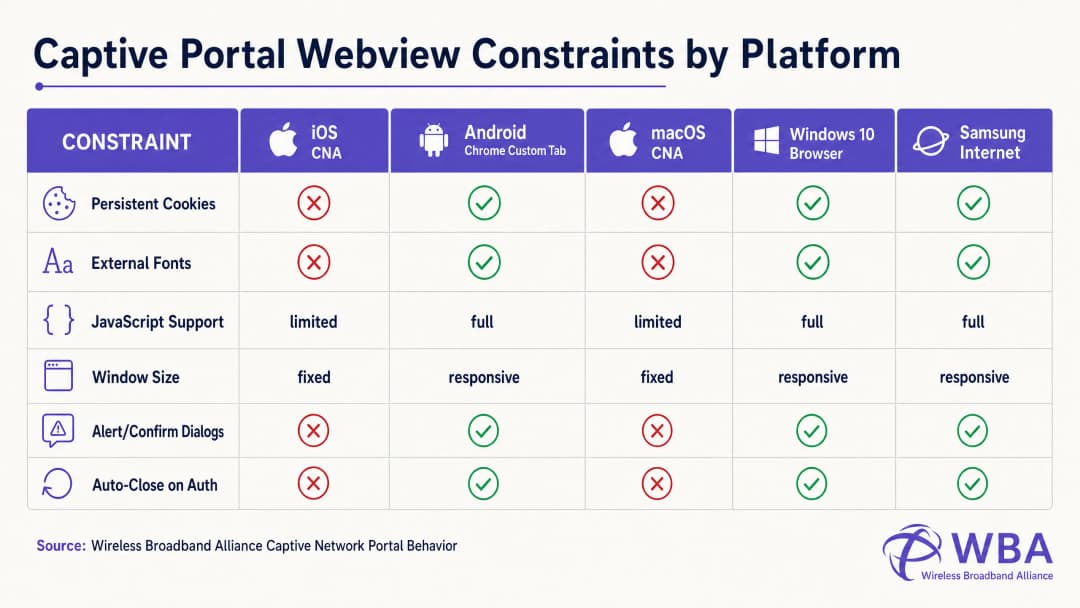
প্রতিটি অপারেটিং সিস্টেম বিভিন্ন ওয়েবভিউ এনভায়রনমেন্টের মধ্যে এই লাইফসাইকেলটি পরিচালনা করে, যার ফলে অত্যন্ত খণ্ডিত আচরণ দেখা যায়। নিচের টেবিলটি এই জটিল সীমাবদ্ধতার বিবরণ দেয়:
| প্ল্যাটফর্ম / ওয়েবভিউ | প্রদর্শনের পদ্ধতি | পারসিস্টেন্ট কুকিজ | এক্সটার্নাল ওয়েব ফন্ট | JavaScript এক্সিকিউশন | উইন্ডোর পরিমাপ | এক্সিট হ্যান্ডশেক ট্রিগার |
|---|---|---|---|---|---|---|
| Apple iOS CNA (Websheet) | মিনি-ব্রাউজার পপআপ | Blocked (বন্ধ করার সময় মুছে যায়) | Blocked (অফলাইন) | Limited (কোনো localStorage/sessionStorage নেই) | রেসপন্সিভ (ডিভাইসের প্রস্থ) | শুধুমাত্র ফুল-পেজ HTTP রিডাইরেক্ট [1] |
| Apple macOS CNA (Captive Network Assistant) | মিনি-ব্রাউজার পপআপ | Blocked | Blocked | Limited (কোনো alert/confirm ডায়ালগ নেই) | Fixed (900px x 572px) | শুধুমাত্র ফুল-পেজ HTTP রিডাইরেক্ট |
| Android (Google) (CaptivePortalLogin) | পুশ নোটিফিকেশন -> Chrome কাস্টম ট্যাব | Allowed (Chrome-এর সাথে শেয়ার করা হয়) | Allowed (যদি ওয়াল্ড গার্ডেনে হোয়াইটলিস্ট করা থাকে) | Full | রেসপন্সিভ | স্বয়ংক্রিয় (Captive Portal API / 204 চেক) [2] |
| Samsung Android (Samsung Internet) | পুশ নোটিফিকেশন -> মিনি-ব্রাউজার | Allowed | Allowed | Full | রেসপন্সিভ | স্বয়ংক্রিয় |
| Windows 10/11 (ডিফল্ট ব্রাউজার) | অটো-লঞ্চ ডিফল্ট ব্রাউজার | Allowed (সম্পূর্ণ ব্রাউজার কনটেক্সট) | Allowed | Full | রেসপন্সিভ | ম্যানুয়াল / স্বয়ংক্রিয় |
Coding Around the Apple CNA "Done" Button Trap
কাস্টম পোর্টাল ডেভেলপমেন্টে সবচেয়ে ঘন ঘন ব্যর্থতার অন্যতম একটি কারণ হলো iOS ডিভাইসে "Done" Button Trap। যখন একজন ব্যবহারকারী অথেন্টিকেট করেন, তখন iOS Websheet ওয়েবভিউকে অবশ্যই সনাক্ত করতে হবে যে নেটওয়ার্কটি আর ক্যাপটিভ অবস্থায় নেই। এটি তার ব্যাকগ্রাউন্ড ক্যানারি রিকোয়েস্টের সফলতা পর্যবেক্ষণ করে এই কাজটি সম্পন্ন করে।
সবচেয়ে গুরুত্বপূর্ণ বিষয় হলো, iOS CNA শুধুমাত্র একটি ফুল-পেজ HTTP নেভিগেশনের (লোকেশন রিডাইরেক্ট) মাধ্যমেই এই চেকটি ট্রিগার করবে। কোনো ডেভেলপার যদি একটি আধুনিক Single Page Application (SPA) তৈরি করেন যা কোনো অ্যাসিনক্রোনাস AJAX কল (যেমন: fetch() বা Axios) এর মাধ্যমে ফর্ম ডেটা সাবমিট করে এবং URL পরিবর্তন না করে ডাইনামিক্যালি DOM আপডেট করে, তবে CNA তার কানেক্টিভিটি চেক কখনই পুনরায় রান করবে না। ব্যবহারকারী গেটওয়ে লেভেলে অথেন্টিকেটেড হবেন, কিন্তু ডানদিকের উপরের কোণায় থাকা CNA বোতামটি "Cancel" হিসেবেই থেকে যাবে। হতাশ ব্যবহারকারী যদি "Cancel"-এ ক্লিক করেন, তাহলে iOS ডিভাইসটি অবিলম্বে SSID থেকে বিচ্ছিন্ন হয়ে যাবে, যার ফলে WiFi সেশনটি বন্ধ হয়ে যাবে [1]।
এটি প্রতিরোধ করতে, অথেন্টিকেশন সফল হওয়ার হ্যান্ডলারকে অবশ্যই একটি ফিজিক্যাল ল্যান্ডিং পেজে একটি ফুল-পেজ রিডাইরেক্ট করতে হবে (যেমন: window.location.href = '/success') অথবা একটি স্ট্যান্ডার্ড HTTP POST অ্যাকশনের মাধ্যমে নেটিভলি লগইন ফর্মটি সাবমিট করতে হবে।
Implementation Guide
সব প্ল্যাটফর্ম জুড়ে সামঞ্জস্যপূর্ণ রেন্ডারিং নিশ্চিত করতে, ডেভেলপারদের অবশ্যই আধুনিক, ভারী অ্যাসেট-যুক্ত ওয়েব ডিজাইন থেকে সরে এসে একটি অত্যন্ত সেলফ-কন্টেনড, ডিফেন্সিভ কোডিং স্টাইল গ্রহণ করতে হবে।
The Golden Rule: Design for Zero Internet Connectivity
ক্যাপটিভ স্টেটে থাকাকালীন, ক্লায়েন্ট ডিভাইসের উইডার ইন্টারনেটে কোনো অ্যাক্সেস থাকে না। এটি শুধুমাত্র ওয়্যারলেস কন্ট্রোলারের Walled Garden-এ (যেমন ক্যাপটিভ পোর্টাল সার্ভারের নিজস্ব IP) স্পষ্টভাবে হোয়াইটলিস্ট করা IP অ্যাড্রেস এবং ডোমেনগুলো রিসলভ এবং অ্যাক্সেস করতে পারে। তাই, আপনার HTML-এ রেফারেন্স করা যেকোনো বাহ্যিক অ্যাসেট লোড হতে ব্যর্থ হবে, যার ফলে লেআউটটি ভেঙে যাবে।
ডিফেন্সিভলি ডিজাইন করতে, নিচের Mobile-First Captive Portal Design Checklist-টি বাস্তবায়ন করুন:
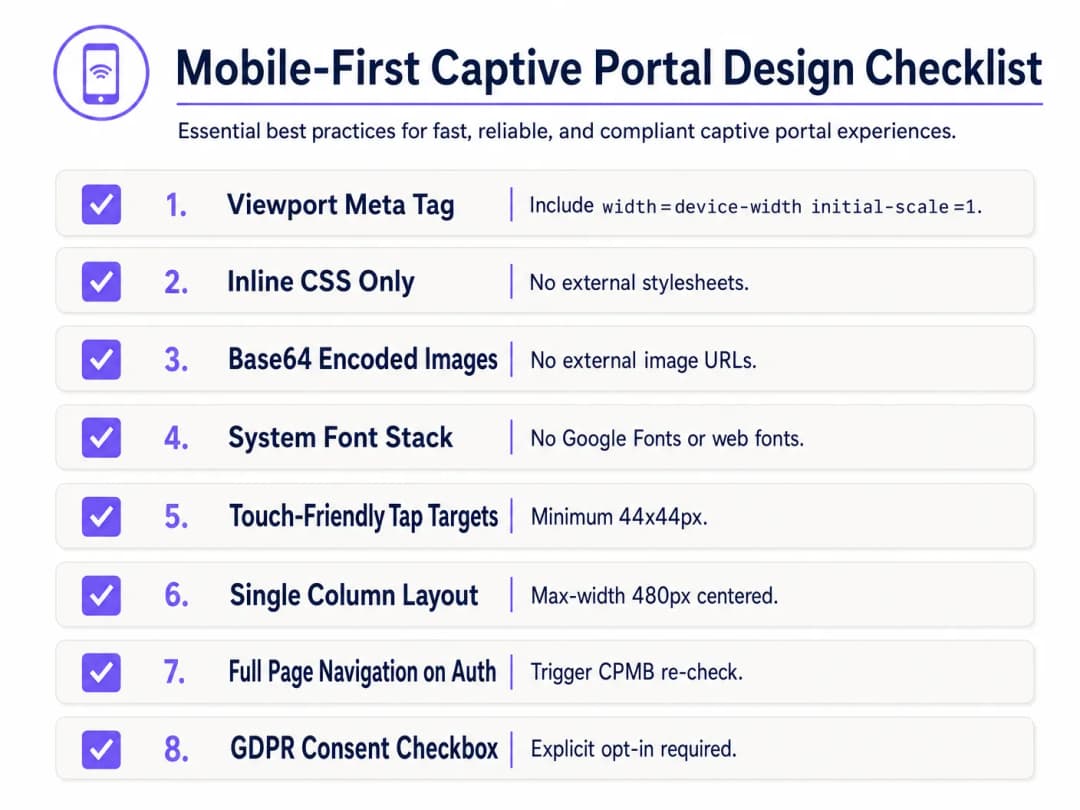
১. Viewport কনফিগারেশন
মোবাইল ডিভাইসগুলো যাতে ভিউপোর্টকে ডেস্কটপ উইডথ-এ (সাধারণত 980px) ছোট করে না ফেলে, সেজন্য HTML <head>-এ একটি রেসপন্সিভ ভিউপোর্ট মেটা ট্যাগ অন্তর্ভুক্ত করতে হবে। এটি ছাড়া, মোবাইল ডিভাইসে টেক্সট এবং ইনপুট ফিল্ডগুলো অত্যন্ত ক্ষুদ্র দেখাবে:
<meta name="viewport" content="width=device-width, initial-scale=1.0, maximum-scale=1.0, user-scalable=no">
২. CSS ইনলাইন করা এবং বাহ্যিক ডিপেনডেন্সি অপসারণ করা
কখনই বাহ্যিক CSS ফাইল বা CDN (যেমন: Bootstrap, Tailwind, বা Google Fonts) এর সাথে লিঙ্ক করবেন না। সমস্ত CSS অবশ্যই HTML <head>-এর একটি <style> ব্লকের মধ্যে এমবেড করতে হবে।
টাইপোগ্রাফির জন্য, একটি সিস্টেম ফন্ট স্ট্যাক ব্যবহার করুন যা আগে থেকে ইনস্টল করা লোকাল অপারেটিং সিস্টেম ফন্টগুলোকে রেফারেন্স করে। এটি সম্পূর্ণভাবে HTTP রিকোয়েস্ট এড়িয়ে চলে এবং ডিভাইসের নেটিভ, হাই-কোয়ালিটি সান্স-সেরিফ টাইপফেস ব্যবহার করে পেজটি তাৎক্ষণিকভাবে লোড হওয়া নিশ্চিত করে:
body {
    font-family: -apple-system, BlinkMacSystemFont, "Segoe UI", Roboto, Helvetica, Arial, sans-serif;
    background-color: #F5F1ED; /* Pearl White Brand Colour */
    color: #011638; /* Dark Blue Brand Colour */
    margin: 0;
    padding: 0;
    display: flex;
    flex-direction: column;
    align-items: center;
    justify-content: center;
    min-height: 100vh;
}
### ৩. Base64 অ্যাসেট এনকোডিং

গেটওয়ের ওয়াল্ড গার্ডেনে হোস্টিং ডোমেনটি হোয়াইটলিস্ট করা না থাকলে বাহ্যিক HTTP URL-এর মাধ্যমে ছবি, লোগো এবং আইকন রেফারেন্স করা উচিত নয়। সবচেয়ে নির্ভরযোগ্য পদ্ধতি হল ছোট ভিজ্যুয়াল অ্যাসেটগুলো (যেমন PNG বা SVG লোগো) সরাসরি HTML বা CSS-এ **Base64 ডেটা URI** হিসেবে এনকোড করা:

```html
<!-- Inline Base64 Logo Example -->
<img src="data:image/svg+xml;base64,PHN2ZyB4bWxucz0iaHR0cDovL3d3dy53My5vcmcvMjAwMC9zdmciIHZpZXdCb3g9IjAgMCAxMDAgMTAwIj48Y2lyY2xlIGN4PSI1MCIgY3k9IjUwIiByPSI0MCIgZmlsbD0iIzc0NThGRCIvPjwvc3ZnPg==" alt="Purple Logo" class="brand-logo">
৪. ইনপুট ফিল্ড এবং ট্যাপ টার্গেট অপ্টিমাইজেশন
মোবাইল ব্যবহারের মানদণ্ড (যেমন Apple-এর Human Interface Guidelines) মেনে চলার জন্য, সমস্ত ইন্টারেক্টিভ এলিমেন্ট স্পর্শ ইনপুটের জন্য অপ্টিমাইজ করা আবশ্যক:
- ইনপুট ফন্ট সাইজ: ইনপুট টেক্সটের ফন্ট সাইজ অন্তত 16px হতে হবে। ফন্ট সাইজ কম হলে (যেমন, 14px), iOS Safari এবং CNA ইনপুট ফিল্ডে ফোকাস করার সময় স্বয়ংক্রিয়ভাবে জুম ইন করবে, যা পেজের লেআউট নষ্ট করে ফেলে [১]।
- ট্যাপ টার্গেট: ভুলবশত ক্লিক বা ব্যবহারকারীর বিরক্তি এড়াতে বোতাম, চেকবক্স এবং লিঙ্কগুলোর ন্যূনতম স্পর্শ টার্গেট এরিয়া 44px x 44px হতে হবে।
৫. আইনি সম্মতি এবং GDPR কমপ্লায়েন্স
গেস্ট ডেটা (যেমন, ইমেল, ফোন নম্বর বা সোশ্যাল প্রোফাইল) সংগ্রহ করার সময়, HTML স্ট্রাকচারে অবশ্যই স্পষ্ট আইনি সম্মতি সমর্থিত হতে হবে। GDPR-এর অধীনে, আগে থেকে টিক চিহ্ন দেওয়া চেকবক্স বা পরোক্ষ সম্মতি বিবৃতি (যেমন, "লগ ইন করার মাধ্যমে, আপনি আমাদের শর্তাবলীতে সম্মত হচ্ছেন") কমপ্লায়েন্ট নয় [৩]।
- শর্তাবলী এবং গোপনীয়তা নীতির জন্য একটি ডিফল্টরূপে আনচেক করা চেকবক্স প্রদান করুন।
- মূল লগইন ফর্মটিকে স্ক্রিনের উপরের অংশে রাখতে স্ক্রোলযোগ্য, সীমিত-উচ্চতার কন্টেইনারে (
max-height: 120px; overflow-y: auto;) বিস্তারিত আইনি টেক্সট যুক্ত করুন।
<div class="consent-container">
    <input type="checkbox" id="terms_consent" name="terms_consent" required>
    <label for="terms_consent">
        I explicitly agree to the <a href="#" onclick="showTerms()">Terms of Service</a> and consent to the processing of my data in accordance with the <a href="#" onclick="showPrivacy()">Privacy Policy</a>.
    </label>
</div>
আপনার নির্দিষ্ট সেটআপ নিয়ে কোনো প্রশ্ন আছে?
আমাদের টিম ৮০,০০০ ভেন্যুতে ভেন্যু অপারেটর, IT ম্যানেজার এবং নেটওয়ার্ক ইঞ্জিনিয়ারদের সাথে কাজ করে। একটি ২০ মিনিটের কল বুক করুন এবং আপনার মতো অন্যরা কীভাবে এর সমাধান করেছেন তা আমরা আপনাকে দেখাব।
কাস্টম Captive Portal HTML/CSS টেমপ্লেট
নিচে একটি সম্পূর্ণ, প্রোডাকশন-রেডি, সিঙ্গেল-ফাইল HTML/CSS টেমপ্লেট দেওয়া হলো যা সমস্ত মোবাইল-ফার্স্ট, CNA-কমপ্লায়েন্ট সেরা অনুশীলনগুলোকে অন্তর্ভুক্ত করে। এতে একটি রেসপন্সিভ লেআউট, একটি সিস্টেম ফন্ট স্ট্যাক, Base64-রেডি অ্যাসেট প্লেসহোল্ডার, টাচ-ফ্রেন্ডলি ইনপুট এবং স্পষ্ট GDPR-কমপ্লায়েন্ট সম্মতি কাঠামো রয়েছে:
<!DOCTYPE html>
<html lang="en">
<head>
    <meta charset="UTF-8">
    <meta name="viewport" content="width=device-width, initial-scale=1.0, maximum-scale=1.0, user-scalable=no">
    <title>Guest WiFi Login</title>
    <style>
        /* CSS Reset & Variable Declarations */
        :root {
            --color-primary: #7458FD; /* Purple Brand Colour */
            --color-dark: #011638; /* Dark Blue */
            --color-light: #F5F1ED; /* Pearl White */
            --color-white: #FFFFFF;
            --color-border: #D1D5DB;
            --radius-container: 12px;
            --radius-element: 6px;
        }

        * {
            box-sizing: border-box;
            -webkit-tap-highlight-color: transparent;
        }

        body {
            font-family: -apple-system, BlinkMacSystemFont, "Segoe UI", Roboto, Helvetica, Arial, sans-serif;
            background-color: var(--color-light);
            color: var(--color-dark);
            margin: 0;
            padding: 20px;
            display: flex;
            flex-direction: column;
            align-items: center;
            justify-content: center;
            min-height: 100vh;
        }

        /* রেসপনসিভ কার্ড লেআউট */
        .portal-card {
            background-color: var(--color-white);
            width: 100%;
            max-width: 420px;
            padding: 32px 24px;
            border-radius: var(--radius-container);
            box-shadow: 0 4px 20px rgba(1, 22, 56, 0.05);
            text-align: center;
        }

        .logo-container {
            margin-bottom: 24px;
        }

        /* এমবেডেড Base64 লোগো প্লেসহোল্ডার */
        .logo {
            width: 120px;
            height: auto;
        }

        h1 {
            font-size: 24px;
            font-weight: 700;
            margin: 0 0 8px 0;
            color: var(--color-dark);
        }

        p {
            font-size: 14px;
            color: #4B5563;
            margin: 0 0 24px 0;
            line-height: 1.5;
        }

        /* ফর্ম স্টাইল */
        .form-group {
            text-align: left;
            margin-bottom: 16px;
        }

        label {
            display: block;
            font-size: 14px;
            font-weight: 600;
            margin-bottom: 6px;
            color: var(--color-dark);
        }

        /* গুরুত্বপূর্ণ: iOS অটো-জুম প্রতিরোধ করতে ফন্ট সাইজ অবশ্যই কমপক্ষে ১৬ পিক্সেল হতে হবে */
        input[type="email"],
        input[type="text"] {
            width: 100%;
            height: 48px;
            padding: 12px 16px;
            font-size: 16px;
            border: 1px solid var(--color-border);
            border-radius: var(--radius-element);
            background-color: var(--color-white);
            color: var(--color-dark);
            outline: none;
            transition: border-color 0.2s;
        }

        input[type="email"]:focus,
        input[type="text"]:focus {
            border-color: var(--color-primary);
            box-shadow: 0 0 0 3px rgba(116, 88, 253, 0.15);
        }

        /* সম্মতি সংক্রান্ত স্টাইল */
        .consent-group {
            display: flex;
            align-items: flex-start;
            text-align: left;
            margin: 20px 0;
        }

        /* স্পর্শ-বান্ধব লক্ষ্য আকার */
        input[type="checkbox"] {
            width: 20px;
            height: 20px;
            margin: 2px 12px 0 0;
            flex-shrink: 0;
            cursor: pointer;
            accent-color: var(--color-primary);
        }

        .consent-label {
            font-size: 13px;
            line-height: 1.4;
            color: #4B5563;
            user-select: none;
        }

        .consent-label a {
            color: var(--color-primary);
            text-decoration: none;
            font-weight: 600;
        }

        .consent-label a:hover {
            text-decoration: underline;
        }

        /* Touch-Friendly CTA Button (Minimum 44px height) */
        .btn-submit {
            width: 100%;
            height: 48px;
            background-color: var(--color-primary);
            color: var(--color-white);
            border: none;
            border-radius: var(--radius-element);
            font-size: 16px;
            font-weight: 600;
            cursor: pointer;
            transition: background-color 0.2s;
            display: flex;
            align-items: center;
            justify-content: center;
        }

        .btn-submit:hover {
            background-color: #5B3EE3;
        }

        .btn-submit:active {
            background-color: #4A2FD4;
        }

        /* Legal Terms Scrollbox */
        .terms-scrollbox {
            display: none; /* Toggled via JS */
            text-align: left;
            font-size: 11px;
            color: #6B7280;
            background-color: var(--color-light);
            padding: 12px;
            border-radius: var(--radius-element);
            max-height: 100px;
            overflow-y: auto;
            margin-bottom: 16px;
            border: 1px solid var(--color-border);
        }

        .footer {
            margin-top: 24px;
            font-size: 11px;
            color: #9CA3AF;
        }
    </style>
</head>
<body>

    <div class="portal-card">
        <div class="logo-container">
            <!-- Replace src with your actual Base64-encoded SVG or PNG -->
            <svg class="logo" xmlns="http://www.w3.org/2000/svg" viewBox="0 0 100 30">
                <rect width="100" height="30" rx="6" fill="#7458FD"/>
                <text x="50" y="20" font-family="sans-serif" font-size="12" fill="#FFFFFF" font-weight="bold" text-anchor="middle">YOUR BRAND</text>
            </svg>
        </div>

        <h1>গেস্ট WiFi-এ আপনাকে স্বাগত</h1>
        <p>সুরক্ষিত, উচ্চ-গতির ইন্টারনেট অ্যাক্সেস পেতে অনুগ্রহ করে নিচে আপনার বিবরণ লিখুন।</p>

        <!-- Form must submit natively (full page navigation) to clear Apple CNA -->
        <form action="/login/submit" method="POST" onsubmit="return validateForm()">
            <div class="form-group">
                <label for="guest_name">পুরো নাম</label>
                <input type="text" id="guest_name" name="name" placeholder="John Doe" required autocomplete="name">
            </div>

            <div class="form-group">
                <label for="guest_email">ইমেল ঠিকানা</label>
                <input type="email" id="guest_email" name="email" placeholder="john@example.com" required autocomplete="email">
            </div>

            <div class="consent-group">
                <input type="checkbox" id="terms_consent" name="terms_accepted" required>
                <label for="terms_consent" class="consent-label">
                    আমি <a href="#" onclick="toggleTerms(event)">পরিষেবার শর্তাবলী</a> মেনে নিচ্ছি এবং GDPR 규정গুলির সাথে সামঞ্জস্য রেখে ডেটা প্রক্রিয়াকরণের সম্মতি দিচ্ছি।
                </label>
            </div>

            <div id="terms_box" class="terms-scrollbox">
                <strong>WiFi পরিষেবার শর্তাবলী:</strong><br>
                ১. এই পরিষেবাটি কোনো ওয়ারেন্টি ছাড়াই যেমন আছে তেমনভাবে প্রদান করা হয়।<br>
                ২. ব্যবহারকারীদের অবশ্যই অবৈধ ব্যান্ডউইথ-নিবিড় ক্রিয়াকলাপে লিপ্ত হওয়া উচিত নয়।<br>
                ৩. আমাদের গোপনীয়তা নীতি মেনে শুধুমাত্র প্রমাণীকরণ এবং মার্কেটিং অপ্ট-ইন এর উদ্দেশ্যে ব্যক্তিগত ডেটা সংগ্রহ করা হয়।
            </div>

            <button type="submit" class="btn-submit">WiFi এর সাথে সংযুক্ত করুন</button>
        </form>

        <div class="footer">
            Powered by Purple | Secure Guest WiFi
        </div>
    </div>

    <script>
        function toggleTerms(e) {
            e.preventDefault();
            var box = document.getElementById('terms_box');
            box.style.display = (box.style.display === 'block') ? 'none' : 'block';
        }

        function validateForm() {
            var consent = document.getElementById('terms_consent');
            if (!consent.checked) {
                alert('সংযুক্ত হতে আপনাকে অবশ্যই পরিষেবার শর্তাবলী মেনে নিতে হবে।');
                return false;
            }
            return true;
        }
    </script>
</body>
</html>
সমস্যা সমাধান এবং ঝুঁকি হ্রাসকরণ
কাস্টম-কোডেড HTML/CSS Captive Portal স্থাপন করার সময়, IT অপারেশন টিমগুলি প্রায়শই বেশ কয়েকটি মারাত্মক অপারেশনাল ঝুঁকির সম্মুখীন হয়:
১. SSL/TLS সার্টিফিকেট সতর্কতা লুপ
যেহেতু Captive Portalগুলি ট্রাফিককে বাধা দিয়ে কাজ করে, তাই আধুনিক HTTPS ওয়েব সুরক্ষার সাথে তাদের একটি মৌলিক দ্বন্দ্ব তৈরি হয়। যখন কোনো ব্যবহারকারী একটি HTTPS সাইট (যেমন, https://www.google.com) ভিজিট করার চেষ্টা করেন, এবং গেটওয়ে সেই ট্রাফিককে একটি HTTP Captive Portal-এ রিডাইরেক্ট করার চেষ্টা করে, তখন ব্রাউজার SSL সার্টিফিকেটের অমিল সনাক্ত করে এবং একটি অত্যন্ত গুরুত্বপূর্ণ "আপনার সংযোগটি ব্যক্তিগত নয়" নিরাপত্তা সতর্কতা প্রদর্শন করে।
- ঝুঁকি হ্রাসকরণ: কখনোই সরাসরি HTTPS ট্রাফিককে বাধা দেওয়ার চেষ্টা করবেন না। সম্পূর্ণভাবে অপারেটিং সিস্টেমের নেটিভ CNA হেল্পারের ওপর নির্ভর করুন (যা রিডাইরেক্ট সক্রিয় করতে একটি আনএনক্রিপ্টেড HTTP অনুরোধ পাঠায়)। নিশ্চিত করুন যে আপনার Captive Portal-এর ডোমেনে একটি বৈধ, সর্বজনীনভাবে বিশ্বস্ত SSL সার্টিফিকেট (যেমন, Let's Encrypt বা DigiCert) রয়েছে এবং প্রাথমিক HTTP রিডাইরেক্ট সফলভাবে ব্যবহারকারীকে আপনার পোর্টাল ডোমেনে নিয়ে যাওয়ার পরই কেবল HTTPS-এর মাধ্যমে পরিবেশন করা হচ্ছে [২]।
২. DNS রেজোলিউশন ব্যর্থতা (দ্য ওয়াল্ড গার্ডেন ট্র্যাপ)
যদি আপনার কাস্টম HTML পেজটি কোনো বাহ্যিক রিসোর্স নির্দেশ করে - যেমন কোনো সোশ্যাল লগইন OAuth এন্ডপয়েন্ট (যেমন, Facebook, Google) বা কোনো পেমেন্ট গেটওয়ে - তবে এই ডোমেনগুলোর জন্য DNS অনুরোধ ব্যর্থ হবে যদি না সেগুলো ওয়্যারলেস কন্ট্রোলারের Walled Garden-এ স্পষ্টভাবে হোয়াইটলিস্ট করা থাকে। যদি হোয়াইটলিস্ট থেকে কোনো ডোমেন বাদ পড়ে, তবে লগইন প্রক্রিয়াটি থমকে যাবে এবং একটি ফাঁকা স্ক্রিন দেখাবে।
- প্রশমন: একটি কঠোর, ন্যূনতম Walled Garden তালিকা বজায় রাখুন। সোশ্যাল লগইন ব্যবহার করার ক্ষেত্রে, আইডেন্টিটি প্রোভাইডারদের দ্বারা প্রস্তাবিত নির্দিষ্ট ওয়াইল্ডকার্ড ডোমেনগুলো হোয়াইটলিস্ট করুন (যেমন,
*.google.com,*.gstatic.com)।
৩. সেশন টাইমআউট এবং MAC স্পুফিং দুর্বলতা
সাধারণ Captive Portal-গুলো ডিভাইসের MAC অ্যাড্রেসের ওপর ভিত্তি করে তাদের প্রমাণীকরণ করে। তবে, আধুনিক মোবাইল অপারেটিং সিস্টেম (iOS 14+ এবং Android 10+) ডিফল্টরূপে র্যান্ডমাইজড MAC অ্যাড্রেস (প্রাইভেট WiFi অ্যাড্রেস) ব্যবহার করে এবং সেগুলো পর্যায়ক্রমে পরিবর্তন করে। এর ফলে অতিথিদের বারবার পুনরায় প্রমাণীকরণ করার জন্য অনুরোধ জানানো হতে পারে, যা ব্যবহারকারীর অভিজ্ঞতা নষ্ট করে [১]।
- প্রশমন: স্টেল সেশন প্রতিরোধ করতে RADIUS সার্ভারে যুক্তিসঙ্গত সেশন টাইমআউট (যেমন, ২৪ ঘণ্টা) প্রয়োগ করুন এবং সম্পূর্ণ নিরবচ্ছিন্ন ও নিরাপদ অনবোর্ডিংয়ের জন্য Passpoint (Hotspot 2.0) বা WPA3-Enterprise-এর মতো আধুনিক প্রমাণীকরণ স্ট্যান্ডার্ডগুলো ব্যবহার করুন যা সম্পূর্ণভাবে MAC-ভিত্তিক Captive Portal-কে এড়িয়ে চলে।
Purple পণ্যের প্রাসঙ্গিকতা: নিজে তৈরি বনাম কিনে নেওয়া
একটি মাত্র HTML পেজ কোড করা সহজ হলেও, একটি কাস্টম Captive Portal অবকাঠামো হোস্ট করা, সুরক্ষিত করা এবং স্কেল করা ব্যাপক প্রযুক্তিগত ও কমপ্লায়েন্স সংক্রান্ত বাধা সৃষ্টি করে। নিচে দেওয়া টেবিলটি একটি স্ব-হোস্টেড কাস্টম পোর্টাল বনাম Purple-এর ম্যানেজড এন্টারপ্রাইজ প্ল্যাটফর্ম ব্যবহারের প্রকৌশলগত এবং কর্মক্ষম বাস্তবতার তুলনা করে:
| ফিচার / কর্মক্ষম প্রয়োজনীয়তা | স্ব-হোস্টেড কাস্টম পোর্টাল | Purple এন্টারপ্রাইজ WiFi প্ল্যাটফর্ম |
|---|---|---|
| HTML/CSS কাস্টমাইজেশন | সম্পূর্ণ ম্যানুয়াল কোডিং, প্রতিটি নির্দিষ্ট AP বা স্থানীয় ওয়েব সার্ভারে ফাইল আপলোড করা। | পিক্সেল-পারফেক্ট ডেভেলপার এডিটর যা কাস্টম HTML/CSS ইনজেক্ট করার অনুমতি দেয়, সাথে একটি ড্র্যাগ-অ্যান্ড-ড্রপ ভিজ্যুয়াল বিল্ডার। |
| RADIUS অবকাঠামো | অবশ্যই উচ্চ নির্ভরযোগ্যতাসম্পন্ন FreeRADIUS বা ক্লাউড RADIUS সার্ভার ডেপ্লয়, কনফিগার এবং রক্ষণাবেক্ষণ করতে হবে [৪]। | অ্যাক্টিভ-অ্যাক্টিভ রিডান্ডেন্সি এবং ৯৯.৯৯% আপটাইম SLA সহ বিল্ট-ইন, বিশ্বব্যাপী বিস্তৃত, ক্লাউড-নেটিভ RADIUS। |
| মাল্টি-ভেন্ডর AP সাপোর্ট | প্রতিটি হার্ডওয়্যার ভেন্ডরের (Cisco, Aruba, Meraki, Ruckus) জন্য কাস্টম ইন্টিগ্রেশন স্ক্রিপ্টের প্রয়োজন [৫]। | ২০০টিরও বেশি হার্ডওয়্যার মডেলের সাথে নেটিভ, আউট-অফ-দ্য-বক্স ইন্টিগ্রেশন; মিশ্র-হার্ডওয়্যার এস্টেট জুড়ে ইউনিফাইড পোর্টাল ডেপ্লয়মেন্ট। |
| ডেটা গোপনীয়তা ও কমপ্লায়েন্স | ভেন্যু GDPR, CCPA, এবং PCI-DSS কমপ্লায়েন্সের জন্য ১০০% আইনি দায়বদ্ধতা গ্রহণ করে, যার মধ্যে নিরাপদ ডেটাবেস এনক্রিপশন এবং ডেটা মুছে ফেলার ওয়ার্কফ্লো অন্তর্ভুক্ত। | ডিজাইন অনুযায়ী সম্পূর্ণ কমপ্লায়েন্ট। বিল্ট-ইন সম্মতি পরিচালনা, স্বয়ংক্রিয় ডেটা-সাবজেক্ট মুছে ফেলার অনুরোধ এবং নিরাপদ ISO 27001-প্রত্যয়িত হোস্টিং। |
| Analytics & Marketing | এর জন্য কাস্টম ডেটা ইনজেশন পাইপলাইন তৈরি করা এবং থার্ড-পার্টি মার্কেটিং টুল ইন্টিগ্রেট করা প্রয়োজন। | রিয়েল-টাইম ফুটফল ট্র্যাকিং, রিটার্ন-রেট মেট্রিক্স এবং স্বয়ংক্রিয় মার্কেটিং ক্যাম্পেইন ট্রিগার সহ এন্টারপ্রাইজ-গ্রেড অ্যানালিটিক্স ড্যাশবোর্ড [6]। |
| Identity Provider Integrations | Google, Facebook, Apple এবং স্থানীয় SMS গেটওয়ের সাথে ম্যানুয়াল OAuth2 ইন্টিগ্রেশন। | কর্পোরেট অতিথিদের জন্য প্রধান সোশ্যাল প্ল্যাটফর্ম, SMS গেটওয়ে এবং Azure AD / Okta-এর সাথে ওয়ান-ক্লিক ইন্টিগ্রেশন। |
Purple-এর প্ল্যাটফর্ম "Build vs. Buy" দ্বন্দ্বের সমাধান করে। এটি ডেভেলপারদের একটি কাস্টম HTML/CSS ওয়ার্কস্পেসের সম্পূর্ণ সৃজনশীল স্বাধীনতা প্রদান করে এবং স্কেলে নিরাপদ RADIUS প্রমাণীকরণ সমর্থন করার জন্য প্রয়োজনীয় জটিল, উচ্চ-ঝুঁকিপূর্ণ ব্যাকএন্ড অবকাঠামো ইঞ্জিনিয়ারিং দূর করে।
ROI ও ব্যবসায়িক প্রভাব
একটি পেশাদারভাবে তৈরি, রেসপন্সিভ কাস্টম captive portal-এ বিনিয়োগ করা IT অপারেশন, মার্কেটিং এবং আইনি কমপ্লায়েন্স জুড়ে পরিমাপযোগ্য রিটার্ন প্রদান করে।
১. অপারেশনাল খরচ হ্রাস (IT হেল্পডেস্ক টিকিট)
স্টেডিয়াম বা মাল্টি-সাইট রিটেল চেইনের মতো বড় আকারের ডেপ্লয়মেন্টে, একটি ত্রুটিপূর্ণ captive portal হল IT হেল্পডেস্কের সমস্যা বৃদ্ধির অন্যতম প্রধান চালিকাশক্তি। অতিথিরা যখন একটি "হোয়াইট স্ক্রিন" বা একটি অ-প্রতিক্রিয়াশীল লগইন বোতামের সম্মুখীন হন, তখন তারা অন-সাইট কর্মীদের বিভ্রান্ত করেন বা সাপোর্ট টিকিট জমা দেন।
$$\text{Annual Support Savings} = (\text{Total Annual Guest Visits} \times \text{Portal Failure Rate} \times \text{Helpdesk Contact Rate}) \times \text{Cost Per Support Ticket}$$
- দৃশ্যপট: বছরে ১,০০০,০০০ ভিজিটর সহ একটি কনভেনশন সেন্টার। একটি দুর্বল কোডযুক্ত পোর্টালের পুরোনো iOS ডিভাইসগুলোতে ৫% ব্যর্থতার হার রয়েছে, যার ফলে ১০% হেল্পডেস্ক যোগাযোগ হার হয়। সাপোর্ট টিকিট প্রতি ইন্ডাস্ট্রি-স্ট্যান্ডার্ড $১৫ মূল্যে, অপারেশনাল খরচ দাঁড়ায়: $$(1,000,000 \times 0.05 \times 0.10) \times $15 = $75,000 \text{ বার্ষিক এড়ানো যায় এমন সাপোর্ট ওভারহেড}$$
- ফলাফল: একটি CNA-অপ্টিমাইজড, মোবাইল-ফার্স্ট টেমপ্লেটে স্থানান্তরিত করার ফলে পোর্টাল ব্যর্থতার হার কমে <০.১% এ নেমে আসে, যা কার্যত এই অপারেশনাল ড্রেন দূর করে।
২. মার্কেটিং ডেটা সংগ্রহ এবং অপ্ট-ইন অপ্টিমাইজেশন
রিটেল এবং হসপিটালিটি ভেন্যুগুলোর জন্য, গেস্ট WiFi পোর্টাল হল পরিচ্ছন্ন, ফার্স্ট-পার্টি কাস্টমার ডেটা সংগ্রহের প্রাথমিক মাধ্যম। মাইক্রোস্কোপিক টেক্সট বা একটি জটিল ফর্ম লেআউট সহ একটি দুর্বলভাবে ডিজাইন করা ইউজার ইন্টারফেস উচ্চ বাউন্স রেট সৃষ্টি করে - ব্যবহারকারীরা লগইন প্রক্রিয়াটি সম্পূর্ণরূপে পরিত্যাগ করে, যার ফলে মার্কেটিং সুযোগগুলো হাতছাড়া হয়।
- কেস স্টাডি (রিটেল): একটি জাতীয় রিটেল চেইন Purple-এর প্ল্যাটফর্ম ব্যবহার করে একটি মোবাইল-ফার্স্ট অপ্টিমাইজড captive portal প্রয়োগ করেছে। একটি মাল্টি-স্টেপ লগইন ফর্মের পরিবর্তে একটি সিঙ্গেল-ফিল্ড ইমেল ইনপুট (ফন্ট-সাইজ: ১৬px) এবং একটি অপ্টিমাইজড ৪৮px ট্যাপ-টার্গেট বোতাম ব্যবহার করে, তারা প্রথম প্রান্তিকের মধ্যেই সম্পূর্ণ রেজিস্ট্রেশনে ৪২% বৃদ্ধি এবং মার্কেটিং নিউজলেটার অপ্ট-ইনে ২৮% বৃদ্ধি দেখেছে [6]।
৩. আইনি এবং নিয়ন্ত্রক ঝুঁকি হ্রাস
GDPR এবং CCPA এর অধীনে, নীতি বহির্ভূত ডেটা সংগ্রহের ফলে কঠোর আর্থিক জরিমানা হতে পারে (GDPR এর অধীনে বৈশ্বিক বার্ষিক টার্নওভারের ৪% পর্যন্ত)। আপনার স্প্ল্যাশ পেজে আগে থেকে টিক চিহ্ন দেওয়া চেক বক্সের ওপর নির্ভর করা বা একটি স্পষ্ট, সহজে অ্যাক্সেসযোগ্য প্রাইভেসি পলিসি প্রদান করতে ব্যর্থ হওয়া এন্টারপ্রাইজকে বিশাল আইনি দায়বদ্ধতার মুখোমুখি করে।
- মিটিগেশন ROI: একটি স্পষ্ট, টিক চিহ্ন ছাড়া সম্মতি জানানোর চেক বক্স স্থাপন করা এবং অপ্টিমাইজড স্ক্রলবক্সের মধ্যে শর্তাবলী হোস্ট করা ১০০% রেগুলেটরি কমপ্লায়েন্স নিশ্চিত করে, যা মাল্টি-মিলিয়ন ডলার রেগুলেটরি জরিমানার ঝুঁকি হ্রাস করে এবং ব্র্যান্ডের সুনাম রক্ষা করে।
মূল শিক্ষণীয় বিষয়সমূহের সংক্ষিপ্তসার
- CNA স্যান্ডবক্স অত্যন্ত সীমাবদ্ধ: Apple এর iOS ওয়েবশীট এবং macOS CNA হলো অত্যন্ত স্যান্ডবক্সড এনভায়রনমেন্ট যা বাহ্যিক অ্যাসেট, কুকিজ এবং ওয়েব ফন্ট ব্লক করে। সমস্ত স্টাইলিং এবং অ্যাসেট অবশ্যই স্বয়ংসম্পূর্ণ হতে হবে (ইনলাইন CSS, Base64 ইমেজ, সিস্টেম ফন্ট) [1]।
- AJAX টেকনিক iOS এক্সিট হ্যান্ডশেককে ব্যাহত করে: iOS ডিভাইসকে সফলভাবে "captive" থেকে "connected" মোডে স্থানান্তর করতে (উপরের ডানদিকের বোতামটি "Cancel" থেকে "Done" এ পরিবর্তন করতে), আপনাকে অবশ্যই একটি ফুল-পেজ HTTP রিডাইরেক্ট ট্রিগার করতে হবে। অ্যাসিনক্রোনাস DOM আপডেট ডিভাইসটিকে একটি ক্যাপটিভ লুপের মধ্যে ফেলে দেবে।
- মোবাইল-ফার্স্ট ডিজাইন করা বাধ্যতামূলক: ৯০% এর বেশি লগইন মোবাইলে ঘটে। তাই একটি সিঙ্গেল-কলাম লেআউট (সর্বোচ্চ প্রস্থ: 480px) ডিজাইন করুন, টাচ-ফ্রেন্ডলি ট্যাপ টার্গেট (নূন্যতম 44px x 44px) ব্যবহার করুন এবং স্বয়ংক্রিয় iOS ব্রাউজার জুমিং প্রতিরোধ করতে সমস্ত টেক্সট ইনপুটে নূন্যতম 16px ফন্ট সাইজ প্রয়োগ করুন।
- ওয়াল্ড গার্ডেন DNS নিয়ন্ত্রণ করে: লগইনের সময় ব্যবহৃত যেকোনো বাহ্যিক ডোমেন (যেমন, সোশ্যাল লগইন API) ওয়্যারলেস কন্ট্রোলারের ওয়াল্ড গার্ডেনে স্পষ্টভাবে হোয়াইটলিস্ট করা থাকতে হবে, অন্যথায় পৃষ্ঠাটি লোড হতে ব্যর্থ হবে।
- Purple ব্যাকএন্ডের জটিলতা দূর করে: Purple এর পোর্টাল বিল্ডার ব্যবহার করলে ডেভেলপাররা একটি কাস্টম এডিটরের মাধ্যমে সম্পূর্ণ HTML/CSS নিয়ন্ত্রণ পান, পাশাপাশি RADIUS, মাল্টি-ভেন্ডর AP ইন্টিগ্রেশন এবং GDPR-কমপ্লায়েন্ট ডাটাবেস ব্যবস্থাপনার বিশাল নিরাপত্তা, স্কেলিং এবং কমপ্লায়েন্সের দায়বদ্ধতা থেকে মুক্তি পান [3]।
তথ্যসূত্র
- [1] Wireless Broadband Alliance: Captive Network Portal Behaviour
- [2] Android Open Source Project: Captive Portal Login Webview Integration
- [3] European Data Protection Board: Guidelines on Consent under Regulation 2016/679
- [4] How to Implement 802.1X Authentication with Cloud RADIUS
- [5] Cisco Wireless APs: 2026 Guide to Products & Deployment
- [6] Purple WiFi Marketing & Analytics Platform
-
টেকনিক্যাল ব্রিফিং শুনুন
কাস্টম captive portals এর টেকনিক্যাল সীমাবদ্ধতা এবং ইমপ্লিমেন্টেশন স্ট্র্যাটেজি নিয়ে একজন সিনিয়র সলিউশন আর্কিটেক্টের আলোচনা শুনুন:
মূল সংজ্ঞাসমূহ
Captive Portal
একটি ওয়েব পেজ যা একটি WiFi নেটওয়ার্কের নতুন সংযুক্ত ব্যবহারকারীদের নেটওয়ার্ক রিসোর্সে আরও বেশি অ্যাক্সেস দেওয়ার আগে প্রদর্শিত হয়, সাধারণত প্রমাণীকরণ, অর্থপ্রদান বা পরিষেবার শর্তাবলী প্রদর্শনের জন্য ব্যবহৃত হয়।
আইটি টিমগুলি গেটওয়ে স্তরে গেস্ট অ্যাক্সেস নিয়ন্ত্রণ করতে, ব্যবহারকারীর ডেটা ক্যাপচার করতে এবং আইনি কমপ্লায়েন্স প্রয়োগ করতে Captive Portal মোতায়েন করে।
Captive Network Assistant (CNA)
একটি অত্যন্ত সীমাবদ্ধ, স্যান্ডবক্সড মিনি-ব্রাউজার যা একটি ক্যাপটিভ নেটওয়ার্ক রিডাইরেক্ট সনাক্ত করার পর অপারেটিং সিস্টেম (যেমন Apple iOS এবং macOS) দ্বারা স্বয়ংক্রিয়ভাবে তৈরি হয়, যা শুধুমাত্র পোর্টাল প্রমাণীকরণ সহজতর করার জন্য ডিজাইন করা হয়েছে।
CNA ওয়েবভিউগুলি বাহ্যিক CDN, পারসিস্টেন্ট কুকিজ এবং লোকাল স্টোরেজ ব্লক করা সহ কঠোর সীমাবদ্ধতা প্রয়োগ করে, যা প্রায়শই সাধারণ ওয়েব ডিজাইনগুলিকে ব্যাহত করে।
Walled Garden
IP অ্যাড্রেস, সাবনেট বা ডোমেইন নামের একটি সীমাবদ্ধ তালিকা যা একজন অপ্রমাণিত গেস্ট ব্যবহারকারীকে Captive Portal লগইন প্রক্রিয়া সম্পন্ন করার আগে গেটওয়ের মাধ্যমে অ্যাক্সেস করার অনুমতি দেওয়া হয়।
ডেভেলপারদের অবশ্যই নিশ্চিত করতে হবে যে কোনও বাহ্যিক রিসোর্স (যেমন সোশ্যাল লগইন API বা পেমেন্ট গেটওয়ে) Walled Garden-এ হোয়াইটলিস্ট করা আছে যাতে লগইন প্রক্রিয়া আটকে না যায়।
Base64 এনকোডিং
একটি বাইনারি-টু-টেক্সট এনকোডিং স্কিম যা বাইনারি ডেটাকে (যেমন ইমেজ) একটি ASCII স্ট্রিং হিসেবে উপস্থাপন করে, যা অ্যাসেটগুলিকে সরাসরি HTML বা CSS ডকুমেন্টের মধ্যে এম্বেড করার অনুমতি দেয়।
লোগো এবং আইকনগুলির জন্য Base64 এনকোডিং ব্যবহার করা বাহ্যিক HTTP অনুরোধগুলিকে দূর করে, যা অফলাইন CNA পরিবেশের মধ্যে অ্যাসেটগুলি নিখুঁতভাবে রেন্ডার হওয়া নিশ্চিত করে।
RADIUS (Remote Authentication Dial-In User Service)
একটি নেটওয়ার্কিং প্রোটোকল যা একটি নেটওয়ার্ক পরিষেবা সংযোগকারী এবং ব্যবহারকারী ব্যবহারকারীদের জন্য সেন্ট্রালাইজড প্রমাণীকরণ, অনুমোদন এবং অ্যাকাউন্টিং (AAA) ব্যবস্থাপনা প্রদান করে।
প্রমাণীকরণের মানদণ্ড পূরণ হয়ে গেলে নেটওয়ার্ক গেটওয়েতে গেস্টের MAC অ্যাড্রেস অনুমোদন করার জন্য Captive Portal সার্ভারটি একটি RADIUS সার্ভারের সাথে যোগাযোগ করে।
সিস্টেম ফন্ট স্ট্যাক
একটি CSS font-family ডিক্লারেশন যা এক্সটার্নাল ওয়েব ফন্টের চেয়ে আগে থেকে ইনস্টল করা অপারেটিং সিস্টেম ফন্টগুলোকে (যেমন iOS-এ San Francisco, Windows-এ Segoe UI এবং Android-এ Roboto) অগ্রাধিকার দেয়।
একটি সিস্টেম ফন্ট স্ট্যাক প্রয়োগ করা Google Fonts এর মতো পরিষেবাগুলিতে ব্লক করা বাহ্যিক HTTP অনুরোধগুলি ট্রিগার না করেই তাৎক্ষণিক টাইপোগ্রাফি রেন্ডারিং নিশ্চিত করে।
Canary URL
অপারেটিং সিস্টেম ভেন্ডরদের দ্বারা রক্ষণাবেক্ষণ করা একটি ডেডিকেটেড, আনএনক্রিপ্টেড HTTP URL (যেমন, captive.apple.com) যা একটি ডিভাইসের অবাধ ইন্টারনেট কানেক্টিভিটি আছে কিনা তা পরীক্ষা করতে ব্যবহৃত হয়।
OS ব্যাকগ্রাউন্ড নেটওয়ার্ক ম্যানেজার একটি Captive Portal-এর উপস্থিতি সনাক্ত করতে এবং CNA ওয়েবভিউ পপআপ চালু করতে এই URL টি চেক করে।
Passpoint (Hotspot 2.0)
WiFi Alliance দ্বারা তৈরি একটি ইন্ডাস্ট্রি স্ট্যান্ডার্ড যা মোবাইল ডিভাইসগুলোকে ম্যানুয়াল Captive Portal লগইন ছাড়াই স্বয়ংক্রিয়ভাবে WiFi হটস্পটগুলো সনাক্ত করতে এবং সুরক্ষিতভাবে প্রমাণীকরণ করতে সক্ষম করে।
এন্টারপ্রাইজগুলো অতিথিদের ঝামেলাপূর্ণ স্প্ল্যাশ পেজ থেকে নির্বিঘ্ন, সেলুলারের মতো সুরক্ষিত রোমিংয়ের অভিজ্ঞতায় নিয়ে যেতে Purple-এর মতো প্ল্যাটফর্মের পাশাপাশি Passpoint ব্যবহার করে।
সমাধানকৃত উদাহরণসমূহ
একটি ২৫০ রুম বিশিষ্ট লাক্সারি হোটেল চেইন [Hospitality](/industries/hotels) একটি কাস্টম গেস্ট WiFi লগইন পেজ চালু করতে চায় যা তাদের প্রিমিয়াম ব্র্যান্ড গাইডলাইনের সাথে নিখুঁতভাবে মেলে। তাদের ক্রিয়েটিভ এজেন্সি কাস্টম ব্র্যান্ড টাইপোগ্রাফি (যা Adobe Fonts-এ হোস্ট করা), একাধিক হাই-রেজোলিউশন ব্যাকগ্রাউন্ড ইমেজ (একটি পাবলিক AWS S3 বাকেটে হোস্ট করা) এবং একটি মাল্টি-স্টেপ অ্যানিমেটেড JavaScript উইজার্ড ব্যবহার করে একটি স্প্ল্যাশ পেজ ডিজাইন করেছে। কিন্তু এটি চালু করার পর, iOS গেস্টরা যখন SSID-এর সাথে সংযোগ করে, তখন পোর্টালটি একটি খালি সাদা স্ক্রিন হিসেবে পপ আপ হয় এবং ব্যবহারকারীরা অথেন্টিকেট করতে পারেন না।
এই খালি স্ক্রিন এবং ত্রুটিপূর্ণ ব্র্যান্ডিং সমস্যার সমাধানের জন্য, আমাদের পোর্টালের ফ্রন্টএন্ড আর্কিটেকচারকে Apple CNA স্যান্ডবক্সের সীমাবদ্ধতাগুলোর সাথে সামঞ্জস্যপূর্ণ করতে পুনর্গঠন করতে হবে:
১. টাইপোগ্রাফি সংশোধন: যেহেতু Adobe Fonts-এর জন্য একটি এক্সটার্নাল HTTP রিকোয়েস্টের প্রয়োজন হয় যা CNA দ্বারা ব্লক করা থাকে, তাই আমরা কাস্টম ফন্ট কলের পরিবর্তে একটি নেটিভ, প্রিমিয়াম সিস্টেম ফন্ট স্ট্যাক (font-family: -apple-system, BlinkMacSystemFont, 'Segoe UI', Roboto, Helvetica, Arial, sans-serif;) ব্যবহার করব। এটি এক্সটার্নাল নেটওয়ার্ক কল ছাড়াই তাৎক্ষণিক রেন্ডারিং নিশ্চিত করে।
২. অ্যাসেট অপ্টিমাইজেশন: AWS S3-এ থাকা ব্যাকগ্রাউন্ড ইমেজগুলো ব্লক হয়ে যায় কারণ S3 গেটওয়ের ওয়াল্ড গার্ডেনের (walled garden) মধ্যে নেই। আমরা প্রাইমারি ব্র্যান্ড লোগোটি কমপ্রেস করব, এটিকে একটি লাইটওয়েট SVG-তে রূপান্তর করব এবং সরাসরি HTML-এ Base64 Data URI হিসেবে এনকোড করব। ব্যাকগ্রাউন্ডের জন্য, ভারী ইমেজের পরিবর্তে হোটেলের ব্র্যান্ড কালার ব্যবহার করে একটি ক্লিন, রেসপনসিভ CSS গ্রেডিয়েন্ট ব্যবহার করব, যা পেজের সাইজ উল্লেখযোগ্যভাবে কমিয়ে দেবে।
৩. JavaScript সরলীকরণ: মাল্টি-স্টেপ অ্যানিমেটেড উইজার্ডটি এক্সটার্নাল jQuery এবং GSAP লাইব্রেরির ওপর নির্ভর করে। আমরা এই এক্সটার্নাল ডিপেন্ডেন্সিগুলো বাদ দেব এবং ফর্মটিকে একটি সিঙ্গেল-পেজ, সিঙ্গেল-কলাম HTML স্ট্রাকচারে রিফ্যাক্টর করব। ফর্ম ভ্যালিডেশনটি লাইটওয়েট, ভ্যানিলা JavaScript-এ নতুন করে লেখা হবে।
৪. অথেন্টিকেশন হ্যান্ডশেক: ফর্ম সাবমিশনটি AJAX-ভিত্তিক সাবমিশনের পরিবর্তে একটি নেটিভ HTML <form action="/submit" method="POST">-এ পরিবর্তন করা হয়েছে যাতে একটি ফুল-পেজ রিডাইরেক্ট ট্রিগার করা যায়। এটি iOS Websheet-কে তার ক্যানারি চেক রান করতে এবং 'Done' বাটনটি প্রদর্শন করতে সাহায্য করে।
৪৫০টি স্টোর বিশিষ্ট একটি জাতীয় রিটেইল চেইন [Retail](/industries/retail) তাদের CRM-কে সমৃদ্ধ করতে WiFi স্প্ল্যাশ পেজের মাধ্যমে গেস্টদের ইমেল সংগ্রহ করতে চায়। তারা চায় গেস্টরা যেন মার্কেটিং নিউজলেটার পাওয়ার জন্য অপ্ট-ইন করেন। প্রাথমিক ডিজাইনে একটি আগে থেকেই টিক দেওয়া 'আমি মার্কেটিং ইমেল পেতে সম্মত আছি' চেকবক্স রাখা হয়েছে। তাছাড়া, পোর্টালটি তাদের হেডকোয়ার্টারের একটি মাত্র লোকাল সার্ভারে হোস্ট করা আছে। পিক আওয়ারে (শনিবার বিকেল), সারা দেশের গেস্টরা মারাত্মক বিলম্বের সম্মুখীন হন এবং অনেকেই লগইন পেজ লোড করতে পারেন না, যার ফলে ডেটা সংগ্রহের হার ব্যাপকভাবে হ্রাস পায়।
আমাদের অবশ্যই কমপ্লায়েন্স লঙ্ঘন এবং পরিকাঠামোগত বাধা উভয়েরই সমাধান করতে হবে:
১. কমপ্লায়েন্স সংশোধন: GDPR এবং CCPA এর অধীনে, আগে থেকে টিক চিহ্ন দেওয়া সম্মতি বাক্সগুলি অবৈধ। আমরা ডিফল্টরূপে মার্কেটিং সম্মতি টিক চিহ্ন মুক্ত করার জন্য HTML সংশোধন করি (<input type="checkbox" id="marketing_consent">)। মার্কেটিং অপ্ট-ইন থেকে আইনি চুক্তিকে আলাদা করতে আমরা পরিষেবার শর্তাবলীর জন্য একটি আলাদা, বাধ্যতামূলক টিক চিহ্ন দেওয়ার বাক্সও যুক্ত করি।
২. পরিকাঠামোর স্কেলিং: একটি একক সেন্ট্রালাইজড সার্ভারে একটি জাতীয় Captive Portal হোস্ট করলে ব্যর্থতার একটি একক বিন্দু এবং একটি বিশাল লেটেন্সি বাধা তৈরি হয়। আমরা পোর্টাল ফ্রন্টএন্ডকে এজ-ক্যাশিং সহ একটি উচ্চ উপলব্ধতাসম্পন্ন, বিশ্বব্যাপী বিতরণ করা কন্টেন্ট ডেলিভারি নেটওয়ার্কে (CDN) স্থানান্তরিত করি।
৩. RADIUS ইন্টিগ্রেশন: আমরা লোকাল স্টোর অ্যাক্সেস পয়েন্টগুলিকে অ্যাক্টিভ-অ্যাক্টিভ রেডানডেন্সি সহ একটি ক্লাউড-নেটিভ RADIUS ক্লাস্টারের দিকে নির্দেশ করার জন্য কনফিগার করি, যাতে শনিবারের পিক ট্রাফিকের মধ্যেও ৫০ মিলি-সেকেন্ডের কম লেটেন্সির সাথে এজে স্থানীয়ভাবে প্রমাণীকরণ অনুরোধগুলি প্রক্রিয়া করা নিশ্চিত করা যায়।
৪. Purple মাইগ্রেশন: এই সম্পূর্ণ ইঞ্জিনিয়ারিং ওভারহেড দূর করতে, খুচরা বিক্রেতা Purple-এ স্থানান্তরিত হন। Purple-এর অন্তর্নির্মিত GDPR সম্মতি টুলিং স্বয়ংক্রিয়ভাবে কমপ্লায়েন্ট অপ্ট-ইনগুলি পরিচালনা করে এবং তাদের বিশ্বব্যাপী বিতরণ করা ক্লাউড পরিকাঠামো ৯৯.৯৯% আপটাইম সহ প্রতিদিন লক্ষ লক্ষ প্রমাণীকরণ পরিচালনা করে, যা স্কেলিংয়ের বাধা সম্পূর্ণরূপে সমাধান করে।
অনুশীলনী প্রশ্নসমূহ
Q1. একটি বড় আন্তর্জাতিক বিমানবন্দরের [পরিবহন](/industries/trains) IT টিম একটি কাস্টম-কোডেড Captive Portal মোতায়েন করেছে। তারা লক্ষ্য করেছেন যে Android ব্যবহারকারীরা নির্বিঘ্নে সংযুক্ত হতে পারলেও, iOS ব্যবহারকারীদের একটি বড় অংশ এমন একটি সমস্যার সম্মুখীন হচ্ছেন যেখানে তারা সফলভাবে প্রমাণীকরণ করার পরেও ওয়েব ব্রাউজ করতে পারছেন না। নিবিড়ভাবে পরীক্ষা করার পর দেখা গেল যে, iOS ডিভাইসগুলো SSID-এর সাথে সংযুক্ত দেখাচ্ছে, কিন্তু ক্যাপটিভ পপআপের ডানদিকের উপরের বোতামটি এখনও 'Done'-এর পরিবর্তে 'Cancel' দেখাচ্ছে। এই সমস্যার মূল কারণ কী এবং ডেভেলপারের এটি কীভাবে সমাধান করা উচিত?
ইঙ্গিত: অ্যাপল CNA হেল্পার কীভাবে সনাক্ত করে যে একটি নেটওয়ার্ক ক্যাশ থেকে প্রমাণীকৃত অবস্থায় পরিবর্তিত হয়েছে এবং এই চেকটি শুরু করার জন্য কী ধরনের ব্রাউজার অ্যাকশন প্রয়োজন তা বিশ্লেষণ করুন।
মডেল উত্তর দেখুন
মূল কারণ হলো পোর্টালের সফলতার পেজটি সম্পূর্ণ-পৃষ্ঠার HTTP নেভিগেশন করার পরিবর্তে জাভাস্ক্রিপ্ট (AJAX/SPA রাউটিং) এর মাধ্যমে ডাইনামিকভাবে UI আপডেট করছে। অ্যাপল iOS Captive Network Assistant (CNA) মিনি-ব্রাউজারটি কেবল তখনই তার ব্যাকগ্রাউন্ড কানেক্টিভিটি চেক (যেমন captive.apple.com-এ canary রিকোয়েস্ট) পুনরায় চালায় যখন একটি ফুল-পেজ URL রিডাইরেক্ট বা নেভিগেশন ঘটে। ডেভেলপার যদি AJAX-এর মাধ্যমে লগইন ফর্মটি সাবমিট করেন এবং কেবল DOM-এ একটি 'Success' বার্তা প্রদর্শন করেন, তবে CNA বুঝতে পারে না যে নেটওয়ার্কটি আনলক করা হয়েছে। ফলস্বরূপ, ডানদিকের উপরের বোতামটি 'Cancel' হিসেবেই থেকে যায়। ব্যবহারকারী যদি প্রস্থান করার জন্য 'Cancel' ক্লিক করেন, তবে OS ধরে নেয় লগইন ব্যর্থ হয়েছে এবং WiFi নেটওয়ার্ক থেকে সংযোগ বিচ্ছিন্ন করে দেয়।
সমাধান: ডেভেলপারকে অবশ্যই প্রমাণীকরণ সফল হওয়ার হ্যান্ডলারটি সংশোধন করে একটি ফোর্সড ফুল-পেজ রিডাইরেক্ট যুক্ত করতে হবে। এটি করার জন্য স্ট্যান্ডার্ড HTML <form action="/submit" method="POST"> ব্যবহার করে নেটিভভাবে লগইন ফর্ম সাবমিট করা যেতে পারে অথবা API থেকে সফল প্রমাণীকরণের রেসপন্স পাওয়ার পর জাভাস্ক্রিপ্টে window.location.href = '/success_landing_page' রান করানো যেতে পারে। এটি প্রয়োজনীয় ফুল-পেজ লোড সম্পন্ন করবে, যা CNA হেল্পারকে নেটওয়ার্ক স্টেট পুনরায় যাচাই করতে, canary URL-টি এখন অ্যাক্সেসযোগ্য কিনা তা পরীক্ষা করতে এবং ডানদিকের উপরের বোতামটি পরিবর্তন করে 'Done' করতে বাধ্য করবে।
Q2. একটি স্টেডিয়াম অপারেশন টিম [ইভেন্টস] এমন একটি গেস্ট WiFi নেটওয়ার্ক চালু করতে চায় যা মার্কেটিং অপ্ট-ইন সংগ্রহ করবে। কমপ্লায়েন্স অফিসার জোর দিয়ে বলেছেন যে পোর্টালটি অবশ্যই ১০০% GDPR-সম্মত হতে হবে। ডেভেলপমেন্ট টিম একটি মকআপ উপস্থাপন করে যেখানে লগইন ফর্মে একটি আগে থেকে টিক দেওয়া বক্স রয়েছে যা বলছে 'আমি পরিষেবার শর্তাবলীতে সম্মত এবং মার্কেটিং নিউজলেটার পেতে সম্মতি দিচ্ছি'। কেন এই ডিজাইনটি নিয়মসম্মত নয় এবং উচ্চ কনভার্সন রেট বজায় রেখে GDPR সন্তুষ্ট করতে HTML/CSS এবং ফর্মের গঠন কীভাবে রিফ্যাক্টর করা উচিত?
ইঙ্গিত: স্পষ্ট সম্মতি সম্পর্কিত GDPR-এর কঠোর নিয়মাবলি, পরিষেবার শর্তাবলী থেকে মার্কেটিং অপ্ট-ইন আলাদা করা এবং মোবাইলের স্ক্রিনে আইনি লেখার শারীরিক দৃশ্যমানতার বিষয়টি বিবেচনা করুন।
মডেল উত্তর দেখুন
প্রস্তাবিত ডিজাইনটি দুটি প্রধান ক্ষেত্রে GDPR লঙ্ঘন করে: প্রথমত, আগে থেকে টিক দেওয়া চেকবক্স বৈধ সম্মতি গঠন করে না, যা অবশ্যই অবাধে দেওয়া, সুনির্দিষ্ট, অবহিত এবং দ্ব্যর্থহীন হতে হবে। দ্বিতীয়ত, মার্কেটিং সম্মতিকে পরিষেবার শর্তাবলীর চুক্তির সাথে একত্রিত করা নিয়মসম্মত নয়; কোনো ব্যবহারকারীকে WiFi পরিষেবা ব্যবহারের শর্ত হিসেবে মার্কেটিং ইমেল গ্রহণ করতে বাধ্য করা যাবে না।
রিফ্যাক্টরিং কৌশল:
- সম্মতি পৃথকীকরণ: চেকবক্সটিকে দুটি আলাদা চেকবক্সে বিভক্ত করুন। চেকবক্স A বাধ্যতামূলক এবং এটি পরিষেবার শর্তাবলী ও গোপনীয়তা নীতি কভার করে। চেকবক্স B ঐচ্ছিক এবং এটি মার্কেটিং নিউজলেটার গ্রহণের বিষয় কভার করে।
- আনচেকড হিসেবে সেট করা: HTML-এ ডিফল্টভাবে দুটি চেকবক্সই আনচেকড করা আছে তা নিশ্চিত করুন (
checkedঅ্যাট্রিবিউট বাদ দিয়ে)। - CSS ভিজিবিলিটি: যেহেতু ৯০%-এর বেশি ব্যবহারকারী মোবাইলে আছেন, তাই চেকবক্স দুটি সরাসরি 'Connect' বোতামের উপরে রাখুন যাতে স্ক্রোল না করেই সেগুলি স্ক্রিনে দেখা যায়। পড়ার সুবিধার জন্য একটি সিস্টেম ফন্ট স্ট্যাক ব্যবহার করুন এবং লেবেল ফন্ট সাইজ ১৪ পিক্সেল ও লাইন-হাইট ১.৪ সেট করুন।
- শর্তাবলীর স্ক্রোলবক্স: আইনি লেখার কারণে যাতে ফর্মের উপাদানগুলো স্ক্রিনের বাইরে চলে না যায়, তার জন্য বিস্তারিত পরিষেবার শর্তাবলী একটি নির্দিষ্ট উচ্চতার স্ক্রোলযোগ্য কন্টেইনারে রাখুন (
max-height: 100px; overflow-y: auto; background-color: #F5F1ED; border: 1px solid #D1D5DB; border-radius: 6px;) যা একটি টেক্সট লিঙ্কের মাধ্যমে খুলে বা বন্ধ করে দেখা যায়। এটি সম্পূর্ণ আইনি সম্মতি নিশ্চিত করার সাথে সাথে একটি পরিষ্কার এবং আকর্ষণীয় লেআউট বজায় রাখে।
Q3. একটি রিটেইল চেইন [Retail](/industries/retail) তাদের ১০০টি স্টোর জুড়ে একটি কাস্টম-কোড করা স্প্ল্যাশ পেজ স্থাপন করছে। ডিজাইনার Google Fonts (Montserrat) ব্যবহার করেছেন এবং HTML হেডে একটি CDN-হোস্ট করা Bootstrap স্টাইলশীট লিঙ্ক করেছেন। একটি কর্পোরেট নেটওয়ার্কে পরীক্ষা করার সময়, পেজটি সুন্দরভাবে প্রদর্শিত হয়। তবে, একটি টেস্ট স্টোর AP-তে Captive Portal কনফিগারেশনের সাথে স্থাপন করার সময়, পেজটি স্টাইল ছাড়া Times New Roman টেক্সট, ভাঙা অ্যালাইনমেন্ট এবং অনুপস্থিত আইকন সহ প্রদর্শিত হয়। এটি কেন ঘটে এবং কীভাবে এই অ্যাসেটগুলো রিফ্যাক্টর করতে হবে?
ইঙ্গিত: কোনো ব্যবহারকারী প্রমাণীকৃত হওয়ার আগে নেটওয়ার্ক সংযোগের অবস্থা বিশ্লেষণ করুন এবং ব্রাউজার কীভাবে সুরক্ষিত ওয়াল্ড গার্ডেনের বাইরের ডোমেনগুলোতে বাহ্যিক HTTP অনুরোধগুলো পরিচালনা করে তা নির্ধারণ করুন।
মডেল উত্তর দেখুন
এই ব্যর্থতার কারণ হলো স্প্ল্যাশ পেজটি লোড হওয়ার সময় ডিভাইসটি একটি অপ্রমাণীকৃত, ক্যাস্কেডিং অবস্থায় থাকে। এই অবস্থায়, ওয়্যারলেস গেটওয়ে সমস্ত আউটবাউন্ড ইন্টারনেট ট্রাফিক ব্লক করে দেয় এবং শুধুমাত্র গেটওয়ের Walled Garden-এ স্পষ্টভাবে অনুমোদিত ডোমেনগুলোতে অনুরোধের অনুমতি দেয়। যেহেতু Bootstrap (cdn.jsdelivr.net) এবং Google Fonts (fonts.googleapis.com)-এর CDN ডোমেনগুলো অনুমোদিত তালিকায় নেই, তাই স্টাইলশীট এবং ফন্ট ফাইলগুলো আনার জন্য ব্রাউজারের অনুরোধগুলো নিঃশব্দে ব্যর্থ হয়। ফলস্বরূপ, ব্রাউজার তার ডিফল্ট রেন্ডারিং ইঞ্জিনে ফিরে যায়, যার ফলে স্টাইলবিহীন HTML (Times New Roman টেক্সট) এবং ভাঙা লেআউট তৈরি হয়।
রিফ্যাক্টরিং কৌশল:
- ইনলাইন CSS: বাহ্যিক Bootstrap স্টাইলশীট লিঙ্কটি সরিয়ে ফেলুন। প্রয়োজনীয় CSS গ্রিড/ফ্লেক্সবক্স নিয়মগুলো সরাসরি HTML-এর
<head>-এ একটি<style>ব্লকে কপি করুন। এটি নিশ্চিত করে যে সমস্ত লেআউট নির্দেশাবলী প্রাথমিক সিঙ্গেল-পেজ পেলোডেই সরবরাহ করা হয়েছে। - সিস্টেম ফন্ট স্ট্যাক প্রয়োগ করা: Google Fonts-এর
@importবা<link>কলটি সরিয়ে ফেলুন। CSS-এ একটি নেটিভ সিস্টেম ফন্ট স্ট্যাক দিয়ে এটি প্রতিস্থাপন করুন (font-family: -apple-system, BlinkMacSystemFont, 'Segoe UI', Roboto, sans-serif;)। এটি ডিভাইসটিকে অপারেটিং সিস্টেমে আগে থেকেই ইনস্টল করা উচ্চমানের ফন্ট ব্যবহার করতে বাধ্য করে, যা বাহ্যিক নেটওয়ার্কের নির্ভরতা সম্পূর্ণরূপে দূর করে। - আইকন/লোগো Base64 এনকোড করা: লেআউট যদি বাহ্যিক ছবি বা আইকন লাইব্রেরির (যেমন FontAwesome) উপর নির্ভর করে, তবে এই আইকনগুলোকে SVG ফরম্যাটে রূপান্তর করুন এবং সেগুলোকে HTML-এর মধ্যে ইনলাইন হিসেবে বা CSS-এ Base64 Data URI হিসেবে এম্বেড করুন। এটি গ্যারান্টি দেয় যে পেজটি ১০০% স্বয়ংসম্পূর্ণ এবং কোনো ইন্টারনেট সংযোগ ছাড়াই নিখুঁতভাবে প্রদর্শিত হবে।
প্রায়শই জিজ্ঞাসিত প্রশ্নাবলী
Captive Network Assistant (CNA) কী এবং কেন কাস্টম Captive Portal HTML এবং CSS এতে ভিন্নভাবে আচরণ করে?
Captive Network Assistant (CNA) হলো একটি স্যান্ডবক্সড, সীমাবদ্ধ ওয়েবভিউ যা নেটওয়ার্ক ইন্টারসেপশন শনাক্ত করার পর iOS, macOS, Android এবং Windows এর মতো অপারেটিং সিস্টেম দ্বারা স্বয়ংক্রিয়ভাবে তৈরি হয়। CNA-তে সম্পূর্ণ ব্রাউজার ফিচারের অভাব থাকে: এগুলো প্রায়শই পপআপ ব্লক করে, পারসিস্টেন্ট কুকি স্টোরেজ সীমাবদ্ধ করে, JavaScript এক্সিকিউশন স্পিড সীমিত করে, ফাইল ডাউনলোড নিষ্ক্রিয় করে এবং কঠোর ভিউপোর্ট সীমানা প্রয়োগ করে। কাস্টম Captive Portal HTML এবং CSS অবশ্যই হালকা, স্বয়ংসম্পূর্ণ হতে হবে এবং বাহ্যিক রিডাইরেক্ট এড়িয়ে চলতে হবে যা সময়ের আগেই CNA সেশন বন্ধ করে দিতে পারে।
একটি Captive Portal ওয়াল্ড গার্ডেনে কোন ডোমেইন এবং IP অ্যাড্রেসগুলো অন্তর্ভুক্ত করা আবশ্যক?
একটি ওয়াল্ড গার্ডেন (প্রি-অথেন্টিকেশন অ্যালোলিস্ট) অথেন্টিকেশনহীন ওয়্যারলেস ক্লায়েন্টদের লগইন করার আগে গুরুত্বপূর্ণ রিসোর্সে পৌঁছানোর অনুমতি দেয়। স্প্ল্যাশ পেজে ব্যবহৃত যেকোনো এক্সটার্নাল হোস্টেড CSS স্টাইলশীট, JavaScript বান্ডিল, ওয়েব ফন্ট বা CDN অ্যাসেটের হোস্টনাম আপনাকে অবশ্যই অন্তর্ভুক্ত করতে হবে। সোশ্যাল লগইন বা SMS ভেরিফিকেশন সাপোর্ট করলে, আপনাকে Apple, Google বা SMS গেটওয়ের অথেন্টিকেশন এন্ডপয়েন্টগুলোর পাশাপাশি কন্ট্রোলার রিডাইরেক্ট এবং RFC 8908 API এন্ডপয়েন্টগুলোকেও অ্যালোলিস্টে রাখতে হবে।
কীভাবে RFC 8908 এবং RFC 8910 লিগ্যাসি HTTP রিডাইরেকশনের তুলনায় Captive Portal ডিসকভারি আধুনিকীকরণ করে?
ঐতিহ্যবাহী Captive Portal গুলো ক্লিয়ারটেক্সট HTTP রিকোয়েস্ট (পোর্ট 80) ইন্টারসেপ্ট করে এবং একটি HTTP 302 রিডাইরেক্ট ফেরত দেয়, যা ক্লায়েন্ট একটি HTTPS কানেকশন চেষ্টা করলে SSL/TLS সার্টিফিকেট ওয়ার্নিং দেখায়। RFC 8908 এবং RFC 8910 একটি স্ট্যান্ডার্ডাইজড Captive Portal API প্রতিষ্ঠা করে যেখানে ওয়্যারলেস নেটওয়ার্ক DHCP Option 114 বা IPv6 Router Advertisement Option 38 এর মাধ্যমে একটি API URL প্রচার করে। ক্লায়েন্ট অপারেটিং সিস্টেম সরাসরি এই JSON এন্ডপয়েন্ট কুয়েরি করে এবং প্যাকেট ট্যাম্পারিং বা সার্টিফিকেট ত্রুটি ছাড়াই স্পষ্ট ক্যাপটিভ স্ট্যাটাস, ভেন্যু টার্মস এবং অথেন্টিকেশন URL পেয়ে যায়।
মোবাইল ডিভাইস জুড়ে captive portal স্প্ল্যাশ পেজের জন্য কোন CSS ডিজাইন প্যাটার্নগুলি সবচেয়ে ভালো কাজ করে?
Captive portal CSS-এর জন্য সেরা অনুশীলনের মধ্যে রয়েছে ফ্লুইড Flexbox বা CSS Grid লেআউট ব্যবহার করা, স্পর্শের সুবিধার্থে ইন্টারেক্টিভ ট্যাপ টার্গেট কমপক্ষে ৪৮x৪৮ পিক্সেল সেট করা, রেন্ডার-ব্লকিং ওয়েবফন্ট ডাউনলোড এড়াতে সিস্টেম ফন্ট স্ট্যাক (যেমন -apple-system, BlinkMacSystemFont, Segoe UI) ব্যবহার করা, HTTP রিকোয়েস্ট কমাতে ক্রিটিক্যাল SVG আইকন ইনলাইন করা এবং মিনি-ব্রাউজারে অস্বস্তিকর অনুভূমিক স্ক্রোলিং রোধ করতে একটি কঠোর মোবাইল ভিউপোর্ট মেটা ট্যাগ (width=device-width, initial-scale=1) নির্দিষ্ট করা।
Purple কীভাবে কাস্টম captive portal ডিপ্লয়মেন্ট এবং ওয়াল্ড গার্ডেন পরিচালনাকে সহজ করে তোলে?
Purple ক্ষণস্থায়ী সেলফ-হোস্টেড ওয়েব সার্ভার প্রতিস্থাপন করে একটি এন্টারপ্রাইজ ক্লাউড captive portal প্ল্যাটফর্ম প্রদান করে। Purple ডায়নামিক ব্র্যান্ডিং টুলস, Cisco Meraki, HPE Aruba, Ruckus, Ubiquiti, UniFi এবং Fortinet জুড়ে স্বয়ংক্রিয় ওয়াল্ড গার্ডেন অর্কেস্ট্রেশন, সম্পূর্ণ RFC 8908 স্ট্যান্ডার্ড সমর্থন এবং iOS ও Android CNA ওয়েবভিউতে কঠোর সামঞ্জস্যতা পরীক্ষা সরবরাহ করে, যা ৯৯.৯৯% ক্লাউড আপটাইম এবং CRM মার্কেটিং ইন্টিগ্রেশন দ্বারা সমর্থিত।
এই সিরিজে পড়া চালিয়ে যান
Ubiquiti UniFi গেস্ট পোর্টাল রিডাইরেক্ট হচ্ছে না: কারণ এবং সমাধান
এই নির্দেশিকাটি গেস্ট স্টেট, রিডাইরেক্ট, প্রি-অথোরাইজেশন রুট এবং কন্ট্রোলার অথোরাইজেশন ধারাবাহিকভাবে অনুসরণ করে একটি UniFi গেস্ট পোর্টাল রিডাইরেক্ট ব্যর্থতা আলাদা করে চিহ্নিত করে। এটি ভেন্যু আইটি টিমগুলোকে গেস্ট নেটওয়ার্ক বনাম Hotspot বিভ্রান্তি, এক্সটার্নাল পোর্টাল হ্যান্ড-অফ, বর্তমান UniFi OS অ্যাকাউন্ট প্রয়োজনীয়তা এবং DNS আইসোলেশন টেস্টিং সমাধানের জন্য একটি বিশ্বস্ত পদ্ধতি প্রদান করে।
Cisco Meraki splash page কাজ করছে না: একটি ট্রাবলশুটিং ফ্লোচার্ট
এই ব্যবহারিক ডে-টু গাইডটি সনাক্ত করে যে ঠিক কোথায় একটি Cisco Meraki splash ফ্লো ব্যর্থ হয়েছে: ক্লায়েন্ট অথরাইজেশন, HTTP রিডাইরেক্ট ইনিশিয়েশন, walled-garden রিচিবিলিটি বা RADIUS সাইন-অন। এটি ভেন্যু আইটি টিমগুলিকে একটি নিয়ন্ত্রিত প্রমাণ পথ প্রদান করে, যাতে তারা একটি লাইভ এস্টেটে বড় কোনো পরিবর্তন না করেই Guest WiFi পুনরুদ্ধার করতে পারে।
Enterprise Guest WiFi সেটআপ নির্দেশিকা: VLAN Segmentation, নিরাপত্তা এবং Captive Portals
এই প্রযুক্তিগত নির্দেশিকাটি IT টিমগুলোকে দেখায় কীভাবে VLAN segmentation, firewall policy এবং একটি captive portal ব্যবহার করে Guest WiFi-কে একটি নিয়ন্ত্রিত ইন্টারনেট-অ্যাক্সেস পরিষেবা হিসেবে সেট আপ করতে হয়। এটি আরও ব্যাখ্যা করে যে কীভাবে Purple-এর রেজিস্ট্রেশন ফর্ম এবং অনবোর্ডিং নিয়ন্ত্রণগুলো স্টাফ, পেমেন্ট এবং অপারেশনাল সিস্টেমের চারপাশের সীমানাকে দুর্বল না করে একটি আনুপাতিক ভিজিটর অভিজ্ঞতা প্রদান করতে সহায়তা করে।
আপনার নির্দিষ্ট সেটআপ নিয়ে কোনো প্রশ্ন আছে?
আমাদের টিম ৮০,০০০ ভেন্যুতে ভেন্যু অপারেটর, IT ম্যানেজার এবং নেটওয়ার্ক ইঞ্জিনিয়ারদের সাথে কাজ করে। একটি ২০ মিনিটের কল বুক করুন এবং আপনার মতো অন্যরা কীভাবে এর সমাধান করেছেন তা আমরা আপনাকে দেখাব।