
कस्टम Captive Portal: HTML और CSS गाइड
यह आधिकारिक तकनीकी संदर्भ गाइड एक कस्टम captive portal लैंडिंग पेज को डिजाइन और कोड करने के लिए आवश्यक डेवलपमेंट मानकों, CSS आर्किटेक्चर और नेटवर्क-स्तर के प्रतिबंधों को रेखांकित करती है। यह फ्रंटएंड डेवलपर्स और नेटवर्क आर्किटेक्ट्स को Apple CNA और Android webview वातावरणों में काम करने के लिए व्यावहारिक रणनीतियां प्रदान करती है, जिससे पिक्सेल-परफेक्ट, अनुपालन और अत्यधिक प्रदर्शन करने वाले गेस्ट WiFi अनुभवों को सुनिश्चित किया जा सके।
Video overview
इस गाइड को सुनें
पॉडकास्ट ट्रांसक्रिप्ट देखें
हमारी मुख्य श्रृंखला का हिस्सा: Captive Portal गाइड →
Custom Captive Portal Architecture & CNA Inspector Tool
Model your custom HTML/CSS guest WiFi splash page. Inspect walled garden domain allowlists, evaluate Captive Network Assistant (CNA) mini-browser restrictions across iOS and Android, and export production-ready boilerplate code.
Vendor Controller Profile: Cisco Meraki (MR Series)
Architecture Category: Cloud-Managed WLAN
Redirection Flow: Custom splash URL with URL parameter append ($login_url)
RFC 3576 CoA Support: Supported (Dynamic Session Terminate / Role Push)
RFC 8908 Modern API: Native Controller Support
Onboarding & Conversion: Click-Through / Terms Acceptance
Guests review acceptable use policies (AUP) and click a single button to connect.
Average Onboarding Duration: ~8 seconds
Target Venue Policy: Fast friction-free onboarding, social marketing consent, and return visitor recognition.
Eliminate Captive Portal Support Calls & Walled Garden Errors
Building custom HTML/CSS captive portals by hand across changing iOS, Android, and Windows mini-browsers causes frequent disconnection tickets and broken walled gardens. Purple delivers enterprise cloud captive portals with 99.99% uptime SLA, native RFC 8908 support, and seamless CRM integrations across 40,000+ venues worldwide.
- ✓ Native Cisco Meraki, Aruba & Ruckus API Sync
- ✓ Automated Walled Garden Allowlist Orchestration
- ✓ Guaranteed iOS & Android CNA Compatibility
- ✓ GDPR, CCPA & ISO 27001 Certified Data Security
Request Custom Captive Portal Consultation
Speak with a Purple wireless architect to review your splash page requirements and controller integrations.
कार्यकारी सारांश (Executive Summary)
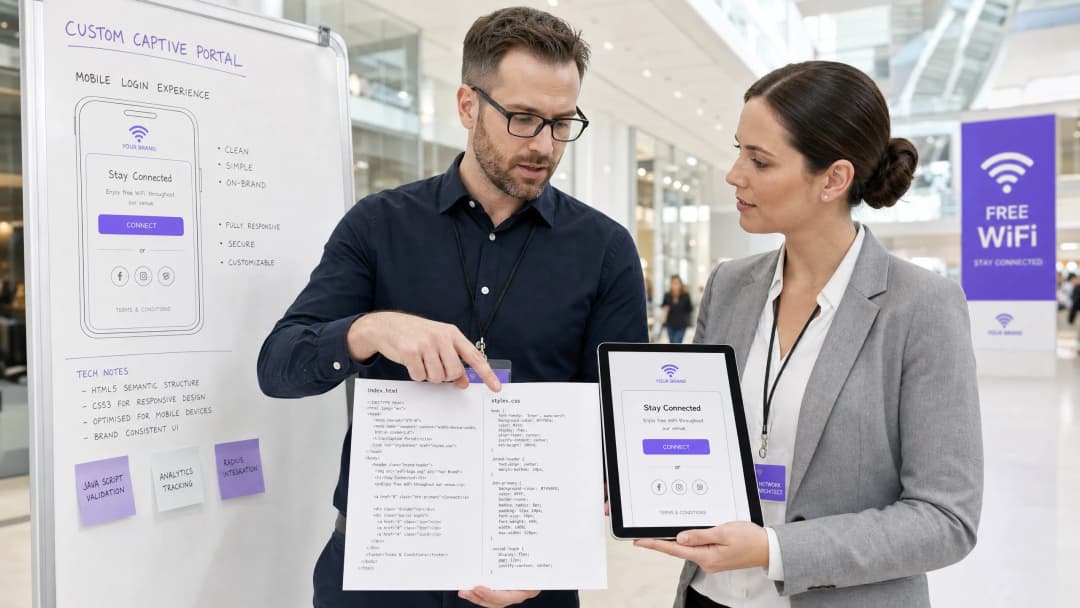
एंटरप्राइज स्थलों के लिए - जिसमें लक्जरी होटल Hospitality और रिटेल चेन Retail से लेकर ट्रांजिट हब Transport और आधुनिक मेडिकल कैंपस Healthcare शामिल हैं - गेस्ट WiFi स्पैश पेज डिजिटल मुख्य द्वार होता है। हालांकि, गेस्ट WiFi लॉगिन के 90% से अधिक मामले मोबाइल डिवाइस पर होते हैं, जहां रेंडरिंग सामान्य ब्राउज़र जैसे Safari या Chrome द्वारा नहीं, बल्कि अत्यधिक प्रतिबंधित Captive Network Assistant (CNA) वेबव्यू [1] द्वारा नियंत्रित होती है। ये "मिनी-ब्राउज़र" कड़े सैंडबॉक्स प्रतिबंध लागू करते हैं: ये बाहरी CDNs को ब्लॉक करते हैं, पर्सिस्टेंट कुकीज़ को अक्षम करते हैं, बाहरी वेब फ़ॉन्ट्स को अनदेखा करते हैं, और सुरक्षा जोखिमों को कम करने और सेशन हाईजैकिंग को रोकने के लिए JavaScript निष्पादन को गंभीर रूप से प्रतिबंधित करते हैं [2]।
जब कोई डेवलपर पारंपरिक वेब मानकों का उपयोग करके स्पैश पेज डिजाइन करता है, तो इन सीमाओं के कारण टूटे हुए लेआउट, गायब ब्रांड एसेट्स और काम न करने वाले लॉगिन बटन जैसी समस्याएं आती हैं, जो सीधे तौर पर ग्राहकों की संतुष्टि और डिजिटल जुड़ाव को प्रभावित करती हैं। यह गाइड इन चुनौतियों के समाधान प्रदान करती है, जिसमें सुरक्षात्मक कोडिंग पद्धतियां प्रस्तुत की गई हैं - जैसे कि इनलाइन CSS, Base64 एसेट एन्कोडिंग, सिस्टम फ़ॉन्ट स्टैक और स्पष्ट नेविगेशन-संचालित प्रमाणीकरण हैंडशेक - ताकि निर्बाध क्रॉस-प्लेटफॉर्म रेंडरिंग सुनिश्चित की जा सके। इसके अलावा, हम यह भी देखेंगे कि कैसे Purple के पोर्टल बिल्डर जैसे प्रबंधित समाधान का उपयोग करने से डेवलपर्स को HTML/CSS पर पूर्ण रचनात्मक नियंत्रण बनाए रखने की अनुमति मिलती है, जबकि RADIUS प्रमाणीकरण, डेटाबेस स्केलिंग, GDPR/PCI अनुपालन और मल्टी-वेंडर AP एकीकरण [3] का काम प्रबंधित हो जाता है।
तकनीकी गहन विश्लेषण (Technical Deep-Dive)
एक लचीला कस्टम कैप्टिव पोर्टल बनाने के लिए, डेवलपर्स को नेटवर्क-स्तरीय इंटरसेप्शन और ब्राउज़र वर्चुअलाइजेशन को समझना होगा जो तब होता है जब कोई गेस्ट एक ओपन SSID के साथ जुड़ता है।
कैप्टिव पोर्टल लाइफसाइकिल (The Captive Portal Lifecycle)
जब कोई क्लाइंट डिवाइस कैप्टिव SSID से जुड़ता है, तो निम्नलिखित अनुक्रम सक्रिय होता है:
- IP एसोसिएशन: डिवाइस 3-वे हैंडशेक पूरा करता है और DHCP के माध्यम से एक IP एड्रेस का अनुरोध करता है।
- सक्रिय कनेक्टिविटी जांच: ऑपरेटिंग सिस्टम का बैकग्राउंड नेटवर्क मैनेजर तुरंत एक समर्पित वेंडर-न्यूट्रल कैनरी URL (जैसे, Apple का
http://captive.apple.com/hotspot-detect.htmlया Google काhttp://connectivitycheck.gstatic.com/generate_204) पर एक HTTP GET अनुरोध भेजता है [1]। - DNS/HTTP इंटरसेप्शन: स्थानीय वायरलेस LAN कंट्रोलर (WLC) या एक्सेस पॉइंट (AP) इस पोर्ट 80 HTTP अनुरोध को इंटरसेप्ट करता है। अपेक्षित HTTP 200 या 204 स्टेटस वापस करने के बजाय, गेटवे क्लाइंट के ट्रैफ़िक को HTTP 302 रीडायरेक्ट के माध्यम से कैप्टिव पोर्टल के लैंडिंग पेज URL पर रीडायरेक्ट करता है [2]।
- वेबव्यू सक्रिय होना: रीडायरेक्ट का पता चलने पर, OS रीडायरेक्ट किए गए स्पैश पेज को प्रदर्शित करने के लिए अपने मूल Captive Network Assistant (CNA) मिनी-ब्राउज़र को सक्रिय करता है, जिससे उपयोगकर्ता को मैन्युअल रूप से एक पूर्ण ब्राउज़र खोलने की आवश्यकता नहीं होती है।5. प्रमाणीकरण और स्थिति परिवर्तन (Authentication and State Transition): उपयोगकर्ता लॉगिन फॉर्म पूरा करता है, पोर्टल सर्वर पर क्रेडेंशियल सबमिट करता है, जो गेटवे को MAC पते को अधिकृत करने का निर्देश देता है (अक्सर RADIUS Access-Accept या बाहरी API कॉल के माध्यम से)।
- CNA निकास हैंडशेक: CNA मिनी-ब्राउज़र अपने कैनरी URL पर एक और HTTP GET करता है। यदि इसे अपेक्षित 200/204 प्रतिक्रिया प्राप्त होती है, तो यह अपने शीर्ष-दाएं बटन को "Cancel" से बदलकर "Done" कर देता है और WiFi कनेक्शन को प्राथमिक नेटवर्क इंटरफ़ेस के रूप में स्थापित करता है।
प्लेटफ़ॉर्म-विशिष्ट मिनी-ब्राउज़र सीमाएँ
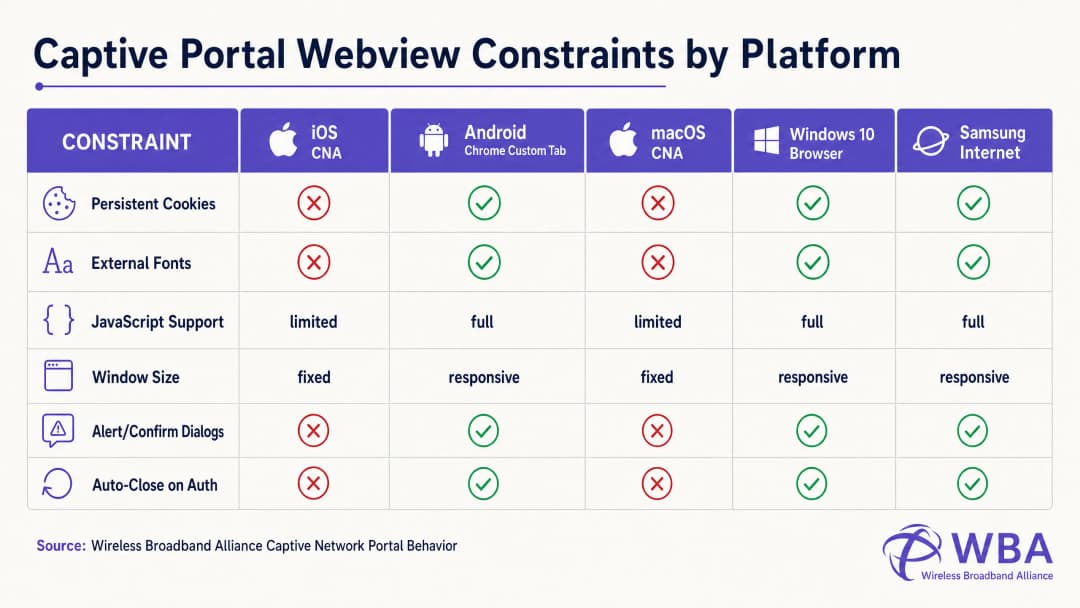
प्रत्येक ऑपरेटिंग सिस्टम विभिन्न वेबव्यू वातावरणों के भीतर इस जीवनचक्र को संभालता है, जिसके परिणामस्वरूप अत्यधिक खंडित व्यवहार होता है। नीचे दी गई तालिका इन महत्वपूर्ण सीमाओं का विवरण देती है:
| प्लेटफ़ॉर्म / वेबव्यू | प्रदर्शन विधि | स्थायी कुकीज़ | बाहरी वेब फ़ॉन्ट्स | JavaScript निष्पादन | विंडो आयाम | निकास हैंडशेक ट्रिगर |
|---|---|---|---|---|---|---|
| Apple iOS CNA (Websheet) | मिनी-ब्राउज़र पॉपअप | अवरुद्ध (बंद होने पर नष्ट) | अवरुद्ध (ऑफ़लाइन) | सीमित (कोई localStorage/sessionStorage नहीं) | प्रतिक्रियाशील (डिवाइस-चौड़ाई) | केवल पूर्ण-पृष्ठ HTTP रीडायरेक्ट [1] |
| Apple macOS CNA (Captive Network Assistant) | मिनी-ब्राउज़र पॉपअप | अवरुद्ध | अवरुद्ध | सीमित (कोई अलर्ट/कन्फर्म डायलॉग नहीं) | निश्चित (900px x 572px) | केवल पूर्ण-पृष्ठ HTTP रीडायरेक्ट |
| Android (Google) (CaptivePortalLogin) | पुश नोटिफिकेशन -> Chrome कस्टम टैब | स्वीकृत (Chrome के साथ साझा) | स्वीकृत (यदि वॉल्ड गार्डन में श्वेतसूचीबद्ध हो) | पूर्ण | प्रतिक्रियाशील | स्वचालित (Captive Portal API / 204 चेक) [2] |
| Samsung Android (Samsung Internet) | पुश नोटिफिकेशन -> मिनी-ब्राउज़र | स्वीकृत | स्वीकृत | पूर्ण | प्रतिक्रियाशील | स्वचालित |
| Windows 10/11 (डिफ़ॉल्ट ब्राउज़र) | ऑटो-लॉन्च डिफ़ॉल्ट ब्राउज़र | स्वीकृत (पूर्ण ब्राउज़र संदर्भ) | स्वीकृत | पूर्ण | प्रतिक्रियाशील | मैन्युअल / स्वचालित |
Apple CNA "Done" बटन ट्रैप के लिए कोडिंग
कस्टम पोर्टल विकास में सबसे लगातार विफलताओं में से एक iOS उपकरणों पर "Done" बटन ट्रैप है। जब कोई उपयोगकर्ता प्रमाणित होता है, तो iOS Websheet वेबव्यू को यह पता लगाना चाहिए कि नेटवर्क अब कैप्टिव नहीं है। यह अपने बैकग्राउंड कैनरी अनुरोधों की सफलता की निगरानी करके ऐसा करता है।
महत्वपूर्ण बात यह है कि, iOS CNA केवल पूर्ण-पृष्ठ HTTP नेविगेशन (लोकेशन रीडायरेक्ट) पर ही इस जांच को ट्रिगर करेगा। यदि कोई डेवलपर एक आधुनिक सिंगल पेज एप्लिकेशन (SPA) बनाता है जो एसिंक्रोनस AJAX कॉल (जैसे, fetch() या Axios) के माध्यम से फॉर्म डेटा सबमिट करता है और URL को बदले बिना DOM को गतिशील रूप से अपडेट करता है, तो CNA अपनी कनेक्टिविटी जांच को कभी भी दोबारा नहीं चलाएगा। उपयोगकर्ता गेटवे स्तर पर प्रमाणित हो जाएगा, लेकिन शीर्ष-दाएं कोने में CNA बटन "Cancel" के रूप में ही रहेगा। यदि निराश उपयोगकर्ता "Cancel" पर क्लिक करता है, तो iOS डिवाइस तुरंत SSID से अलग हो जाएगा, जिससे WiFi सत्र समाप्त हो जाएगा [1]।
इसे रोकने के लिए, प्रमाणीकरण सफलता हैंडलर को एक भौतिक लैंडिंग पृष्ठ पर पूर्ण-पृष्ठ रीडायरेक्ट (जैसे, window.location.href = '/success') करना चाहिए या एक मानक HTTP POST क्रिया के माध्यम से मूल रूप से लॉगिन फॉर्म सबमिट करना चाहिए।
कार्यान्वयन गाइड
सभी प्लेटफॉर्मों पर लगातार रेंडरिंग सुनिश्चित करने के लिए, डेवलपर्स को आधुनिक, भारी-एसेट वाले वेब डिज़ाइन से हटकर एक अत्यधिक स्व-निहित, रक्षात्मक कोडिंग शैली को अपनाना चाहिए।
स्वर्ण नियम: शून्य इंटरनेट कनेक्टिविटी के लिए डिज़ाइन करें
कैप्टिव स्थिति के दौरान, क्लाइंट डिवाइस के पास व्यापक इंटरनेट तक कोई पहुंच नहीं होती है। यह केवल वायरलेस कंट्रोलर के Walled Garden में स्पष्ट रूप से श्वेतसूचीबद्ध (whitelisted) IP पतों और डोमेन तक ही पहुंच सकता है (जैसे कि स्वयं Captive Portal सर्वर का IP)। इसलिए, आपके HTML में संदर्भित कोई भी बाहरी एसेट लोड होने में विफल हो जाएगी, जिसके परिणामस्वरूप लेआउट खराब हो जाएगा।
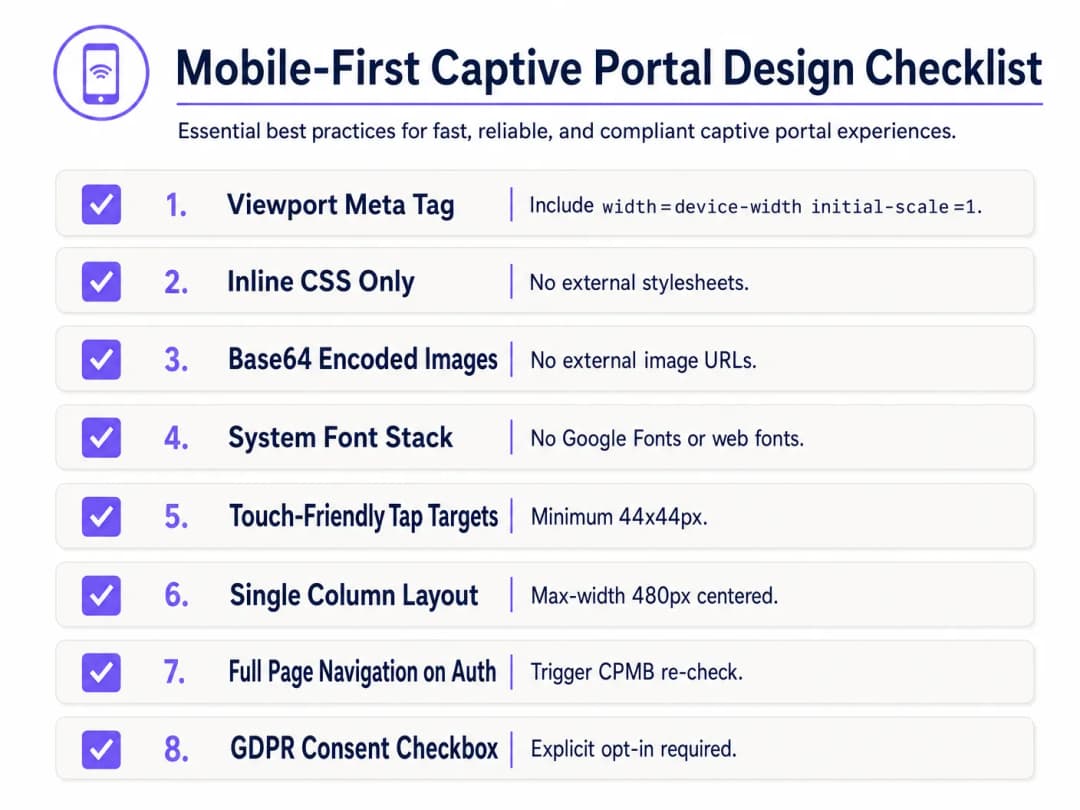
रक्षात्मक रूप से डिज़ाइन करने के लिए, निम्नलिखित Mobile-First Captive Portal Design Checklist को लागू करें:
1. व्यूपोर्ट कॉन्फ़िगरेशन (Viewport Configuration)
मोबाइल उपकरणों को व्यूपोर्ट को डेस्कटॉप चौड़ाई (आमतौर पर 980px) तक छोटा करने से रोकने के लिए, HTML <head> में एक रिस्पॉन्सिव व्यूपोर्ट मेटा टैग शामिल होना चाहिए। इसके बिना, मोबाइल उपकरणों पर टेक्स्ट और इनपुट फ़ील्ड बहुत छोटे दिखाई देंगे:
<meta name="viewport" content="width=device-width, initial-scale=1.0, maximum-scale=1.0, user-scalable=no">
2. CSS को इनलाइन करना और बाहरी निर्भरता हटाना
कभी भी बाहरी CSS फ़ाइलों या CDNs (जैसे, Bootstrap, Tailwind, या Google Fonts) को लिंक न करें। सभी CSS को HTML <head> में <style> ब्लॉक के भीतर एम्बेड किया जाना चाहिए।
टाइपोग्राफी के लिए, एक सिस्टम फॉन्ट स्टैक का उपयोग करें जो पहले से इंस्टॉल किए गए स्थानीय ऑपरेटिंग सिस्टम फॉन्ट को संदर्भित करता है। यह HTTP अनुरोधों से पूरी तरह से बचाता है और यह सुनिश्चित करता है कि पृष्ठ डिवाइस के मूल, उच्च-गुणवत्ता वाले सेन्स-सेरिफ़ टाइपफेस का उपयोग करके तुरंत लोड हो जाए:
body {
    font-family: -apple-system, BlinkMacSystemFont, "Segoe UI", Roboto, Helvetica, Arial, sans-serif;
    background-color: #F5F1ED; /* Pearl White Brand Colour */
    color: #011638; /* Dark Blue Brand Colour */
    margin: 0;
    padding: 0;
    display: flex;
    flex-direction: column;
    align-items: center;
    justify-content: center;
    min-height: 100vh;
}
3. Base64 एसेट एन्कोडिंग
इमेज, लोगो और आइकन को बाहरी HTTP URLs के माध्यम से संदर्भित नहीं किया जाना चाहिए जब तक कि होस्टिंग डोमेन को गेटवे के वॉल्ड गार्डन में व्हाइटलिस्ट न किया गया हो। सबसे विश्वसनीय तरीका छोटे विजुअल एसेट्स (जैसे कि PNG या SVG लोगो) को सीधे HTML या CSS में Base64 Data URIs के रूप में एन्कोड करना है:
<!-- Inline Base64 Logo Example -->
<img src="data:image/svg+xml;base64,PHN2ZyB4bWxucz0iaHR0cDovL3d3dy53My5vcmcvMjAwMC9zdmciIHZpZXdCb3g9IjAgMCAxMDAgMTAwIj48Y2lyY2xlIGN4PSI1MCIgY3k9IjUwIiByPSI0MCIgZmlsbD0iIzc0NThGRCIvPjwvc3ZnPg==" alt="Purple Logo" class="brand-logo">
4. इनपुट फ़ील्ड और टैप टारगेट ऑप्टिमाइज़ेशन
मोबाइल उपयोगिता मानकों (जैसे कि Apple के Human Interface Guidelines) का अनुपालन करने के लिए, सभी इंटरैक्टिव तत्वों को टच इनपुट के लिए ऑप्टिमाइज़ किया जाना चाहिए:
- इनपुट फ़ॉन्ट आकार: इनपुट टेक्स्ट फ़ॉन्ट का आकार कम से कम 16px होना चाहिए। यदि फ़ॉन्ट का आकार कम है (जैसे, 14px), तो iOS Safari और CNA फ़ोकस होने पर इनपुट फ़ील्ड को स्वचालित रूप से ज़ूम इन कर देंगे, जिससे पेज लेआउट विकृत हो जाता है [1]।
- टैप टारगेट: अनजाने क्लिक या उपयोगकर्ता की निराशा को रोकने के लिए बटन, चेकबॉक्स और लिंक का न्यूनतम टच टारगेट क्षेत्र 44px x 44px होना चाहिए।
5. कानूनी सहमति और GDPR अनुपालन
जब मेहमानों का डेटा (जैसे, ईमेल, फ़ोन नंबर, या सोशल प्रोफ़ाइल) कैप्चर किया जा रहा हो, तो HTML संरचना को स्पष्ट कानूनी सहमति का समर्थन करना चाहिए। GDPR के तहत, पहले से टिक किए गए चेकबॉक्स या अप्रत्यक्ष सहमति के कथन (जैसे, "लॉग इन करके, आप हमारी शर्तों से सहमत होते हैं") गैर-अनुपालनकारी हैं [3]।
- नियम व शर्तों और गोपनीयता नीतियों के लिए एक डिफ़ॉल्ट-रूप-से-अनचेक चेकबॉक्स प्रदान करें।
- मुख्य लॉगिन फ़ॉर्म को बिना स्क्रॉल किए दिखाई देने वाले हिस्से (above the fold) में रखने के लिए विस्तृत कानूनी टेक्स्ट को स्क्रॉल करने योग्य, सीमित-ऊंचाई वाले कंटेनर (
max-height: 120px; overflow-y: auto;) में रैप करें।
<div class="consent-container">
    <input type="checkbox" id="terms_consent" name="terms_consent" required>
    <label for="terms_consent">
        I explicitly agree to the <a href="#" onclick="showTerms()">Terms of Service</a> and consent to the processing of my data in accordance with the <a href="#" onclick="showPrivacy()">Privacy Policy</a>.
    </label>
</div>
अपने विशिष्ट सेटअप को लेकर कोई सवाल हैं?
हमारी टीम 80,000 से अधिक वेन्यू में वेन्यू ऑपरेटरों, IT मैनेजरों और नेटवर्क इंजीनियरों के साथ काम करती है। 20 मिनट का कॉल बुक करें और हम आपको दिखाएंगे कि आपके जैसे अन्य लोगों ने इसे कैसे हल किया।
कस्टम Captive Portal HTML/CSS टेम्पलेट
नीचे एक संपूर्ण, प्रोडक्शन-रेडी, सिंगल-फ़ाइल HTML/CSS टेम्पलेट दिया गया है, जिसमें सभी मोबाइल-फ़र्स्ट, CNA-अनुपालन वाली सर्वोत्तम प्रथाओं को शामिल किया गया है। इसमें एक रिस्पॉन्सिव लेआउट, सिस्टम फ़ॉन्ट स्टैक, Base64-रेडी एसेट प्लेसहोल्डर, टच-फ्रेंडली इनपुट और स्पष्ट GDPR-अनुपालन सहमति संरचनाएं शामिल हैं:
<!DOCTYPE html>
<html lang="en">
<head>
    <meta charset="UTF-8">
    <meta name="viewport" content="width=device-width, initial-scale=1.0, maximum-scale=1.0, user-scalable=no">
    <title>Guest WiFi Login</title>
    <style>
        /* CSS Reset & Variable Declarations */
        :root {
            --color-primary: #7458FD; /* Purple Brand Colour */
            --color-dark: #011638; /* Dark Blue */
            --color-light: #F5F1ED; /* Pearl White */
            --color-white: #FFFFFF;
            --color-border: #D1D5DB;
            --radius-container: 12px;
            --radius-element: 6px;
        }

        * {
            box-sizing: border-box;
            -webkit-tap-highlight-color: transparent;
        }

        body {
            font-family: -apple-system, BlinkMacSystemFont, "Segoe UI", Roboto, Helvetica, Arial, sans-serif;
            background-color: var(--color-light);
            color: var(--color-dark);
            margin: 0;
            padding: 20px;
            display: flex;
            flex-direction: column;
            align-items: center;
            justify-content: center;
            min-height: 100vh;
        }

        /* रिस्पॉन्सिव कार्ड लेआउट */
        .portal-card {
            background-color: var(--color-white);
            width: 100%;
            max-width: 420px;
            padding: 32px 24px;
            border-radius: var(--radius-container);
            box-shadow: 0 4px 20px rgba(1, 22, 56, 0.05);
            text-align: center;
        }

        .logo-container {
            margin-bottom: 24px;
        }

        /* एम्बेडेड Base64 लोगो प्लेसहोल्डर */
        .logo {
            width: 120px;
            height: auto;
        }

        h1 {
            font-size: 24px;
            font-weight: 700;
            margin: 0 0 8px 0;
            color: var(--color-dark);
        }

        p {
            font-size: 14px;
            color: #4B5563;
            margin: 0 0 24px 0;
            line-height: 1.5;
        }

        /* फ़ॉर्म शैलियाँ */
        .form-group {
            text-align: left;
            margin-bottom: 16px;
        }

        label {
            display: block;
            font-size: 14px;
            font-weight: 600;
            margin-bottom: 6px;
            color: var(--color-dark);
        }

        /* महत्वपूर्ण: iOS ऑटो-ज़ूम को रोकने के लिए फ़ॉन्ट का आकार कम से कम 16px होना चाहिए */
        input[type="email"],
        input[type="text"] {
            width: 100%;
            height: 48px;
            padding: 12px 16px;
            font-size: 16px;
            border: 1px solid var(--color-border);
            border-radius: var(--radius-element);
            background-color: var(--color-white);
            color: var(--color-dark);
            outline: none;
            transition: border-color 0.2s;
        }

        input[type="email"]:focus,
        input[type="text"]:focus {
            border-color: var(--color-primary);
            box-shadow: 0 0 0 3px rgba(116, 88, 253, 0.15);
        }

        /* सहमति शैलियाँ */
        .consent-group {
            display: flex;
            align-items: flex-start;
            text-align: left;
            margin: 20px 0;
        }

        /* स्पर्श-अनुकूल लक्ष्य आकार निर्धारण */
        input[type="checkbox"] {
            width: 20px;
            height: 20px;
            margin: 2px 12px 0 0;
            flex-shrink: 0;
            cursor: pointer;
            accent-color: var(--color-primary);
        }

        .consent-label {
            font-size: 13px;
            line-height: 1.4;
            color: #4B5563;
            user-select: none;
        }

        .consent-label a {
            color: var(--color-primary);
            text-decoration: none;
            font-weight: 600;
        }

        .consent-label a:hover {
            text-decoration: underline;
        }

        /* Touch-Friendly CTA Button (Minimum 44px height) */
        .btn-submit {
            width: 100%;
            height: 48px;
            background-color: var(--color-primary);
            color: var(--color-white);
            border: none;
            border-radius: var(--radius-element);
            font-size: 16px;
            font-weight: 600;
            cursor: pointer;
            transition: background-color 0.2s;
            display: flex;
            align-items: center;
            justify-content: center;
        }

        .btn-submit:hover {
            background-color: #5B3EE3;
        }

        .btn-submit:active {
            background-color: #4A2FD4;
        }

        /* Legal Terms Scrollbox */
        .terms-scrollbox {
            display: none; /* Toggled via JS */
            text-align: left;
            font-size: 11px;
            color: #6B7280;
            background-color: var(--color-light);
            padding: 12px;
            border-radius: var(--radius-element);
            max-height: 100px;
            overflow-y: auto;
            margin-bottom: 16px;
            border: 1px solid var(--color-border);
        }

        .footer {
            margin-top: 24px;
            font-size: 11px;
            color: #9CA3AF;
        }
    </style>
</head>
<body>

    <div class="portal-card">
        <div class="logo-container">
            <!-- Replace src with your actual Base64-encoded SVG or PNG -->
            <svg class="logo" xmlns="http://www.w3.org/2000/svg" viewBox="0 0 100 30">
                <rect width="100" height="30" rx="6" fill="#7458FD"/>
                <text x="50" y="20" font-family="sans-serif" font-size="12" fill="#FFFFFF" font-weight="bold" text-anchor="middle">YOUR BRAND</text>
            </svg>
        </div>

        <h1>अतिथि WiFi में आपका स्वागत है</h1>
        <p>सुरक्षित, हाई-स्पीड इंटरनेट एक्सेस प्राप्त करने के लिए कृपया नीचे अपना विवरण दर्ज करें।</p>

        <!-- Form must submit natively (full page navigation) to clear Apple CNA -->
        <form action="/login/submit" method="POST" onsubmit="return validateForm()">
            <div class="form-group">
                <label for="guest_name">पूरा नाम</label>
                <input type="text" id="guest_name" name="name" placeholder="जॉन डो" required autocomplete="name">
            </div>

            <div class="form-group">
                <label for="guest_email">ईमेल पता</label>
                <input type="email" id="guest_email" name="email" placeholder="john@example.com" required autocomplete="email">
            </div>

            <div class="consent-group">
                <input type="checkbox" id="terms_consent" name="terms_accepted" required>
                <label for="terms_consent" class="consent-label">
                    मैं <a href="#" onclick="toggleTerms(event)">सेवा की शर्तों</a> को स्वीकार करता हूँ और GDPR नियमों के अनुपालन में डेटा प्रोसेसिंग के लिए सहमति देता हूँ।
                </label>
            </div>

            <div id="terms_box" class="terms-scrollbox">
                <strong>WiFi सेवा की शर्तें:</strong><br>
                1. यह सेवा बिना किसी वारंटी के जैसी है वैसी ही प्रदान की जाती है।<br>
                2. उपयोगकर्ताओं को अवैध बैंडविड्थ - गहन गतिविधियों में शामिल नहीं होना चाहिए।<br>
                3. व्यक्तिगत डेटा पूरी तरह से हमारी गोपनीयता नीति के अनुपालन में प्रमाणीकरण और मार्केटिंग ऑप्ट - इन के लिए एकत्र किया जाता है।
            </div>

            <button type="submit" class="btn-submit">WiFi से कनेक्ट करें</button>
        </form>

        <div class="footer">
            Powered by Purple | Secure Guest WiFi
        </div>
    </div>

    <script>
        function toggleTerms(e) {
            e.preventDefault();
            var box = document.getElementById('terms_box');
            box.style.display = (box.style.display === 'block') ? 'none' : 'block';
        }

        function validateForm() {
            var consent = document.getElementById('terms_consent');
            if (!consent.checked) {
                alert('कनेक्ट करने के लिए आपको सेवा की शर्तों को स्वीकार करना होगा।');
                return false;
            }
            return true;
        }
    </script>
</body>
</html>
समस्या निवारण और जोखिम न्यूनीकरण
कस्टम - कोडित HTML/CSS Captive Portals को तैनात करते समय, IT ऑपरेशन्स टीमों को अक्सर कई गंभीर परिचालन जोखिमों का सामना करना पड़ता है:
1. SSL/TLS सर्टिफिकेट चेतावनी लूप
चूंकि Captive Portals ट्रैफ़िक को इंटरसेप्ट करके काम करते हैं, इसलिए वे आधुनिक HTTPS वेब सुरक्षा के साथ एक मौलिक टकराव पैदा करते हैं। जब कोई उपयोगकर्ता HTTPS साइट (जैसे, https://www.google.com) पर जाने का प्रयास करता है, और गेटवे उस ट्रैफ़िक को HTTP Captive Portal पर रीडायरेक्ट करने का प्रयास करता है, तो ब्राउज़र SSL सर्टिफिकेट में बेमेल का पता लगाता है और एक महत्वपूर्ण "आपका कनेक्शन निजी नहीं है" सुरक्षा चेतावनी प्रदर्शित करता है।
- न्यूनीकरण: कभी भी HTTPS ट्रैफ़िक को सीधे इंटरसेप्ट करने का प्रयास न करें। पूरी तरह से ऑपरेटिंग सिस्टम के मूल CNA हेल्पर पर भरोसा करें (जो रीडायरेक्ट को ट्रिगर करने के लिए एक अनएन्क्रिप्टेड HTTP अनुरोध करता है)। सुनिश्चित करें कि आपके Captive Portal के डोमेन के पास एक वैध, सार्वजनिक रूप से विश्वसनीय SSL सर्टिफिकेट (जैसे, Let's Encrypt या DigiCert) है और प्रारंभिक HTTP रीडायरेक्ट द्वारा उपयोगकर्ता को आपके पोर्टल डोमेन पर सफलतापूर्वक रूट करने के बाद ही इसे HTTPS पर प्रस्तुत किया जाता है [2]।
2. DNS रिज़ॉल्यूशन विफलताएं (वॉल्ड गार्डन ट्रैप)
यदि आपका कस्टम HTML पेज बाहरी संसाधनों को संदर्भित करता है - जैसे कि एक सोशल लॉगिन OAuth एंडपॉइंट (जैसे, Facebook, Google) या भुगतान गेटवे - तो इन डोमेन के लिए DNS अनुरोध तब तक विफल रहेंगे जब तक कि वे वायरलेस कंट्रोलर के Walled Garden में स्पष्ट रूप से श्वेतसूचीबद्ध न हों। यदि कोई डोमेन श्वेतसूची से गायब है, तो लॉगिन प्रवाह रुक जाएगा, जिससे एक खाली स्क्रीन दिखाई देगी।
- शमन: एक सख्त, न्यूनतम Walled Garden सूची बनाए रखें। यदि सोशल लॉगिन का उपयोग कर रहे हैं, तो पहचान प्रदाताओं द्वारा अनुशंसित विशिष्ट वाइल्डकार्ड डोमेन (जैसे,
*.google.com,*.gstatic.com) को श्वेतसूची में डालें।
3. सत्र समय-समाप्ति और MAC स्पूफिंग कमजोरियाँ
मानक Captive Portals उपकरणों को उनके MAC पते के आधार पर प्रमाणित करते हैं। हालाँकि, आधुनिक मोबाइल ऑपरेटिंग सिस्टम (iOS 14+ और Android 10+) डिफ़ॉल्ट रूप से रैंडमाइज्ड MAC पते (निजी WiFi पते) का उपयोग करते हैं, और उन्हें समय-समय पर बदलते रहते हैं। इसके कारण मेहमानों को बार-बार पुनः प्रमाणित करने के लिए प्रेरित किया जा सकता है, जिससे उपयोगकर्ता अनुभव नष्ट हो जाता है [1]।
- शमन: बासी सत्रों को रोकने के लिए RADIUS सर्वर पर उचित सत्र समय-समाप्ति (जैसे, 24 घंटे) लागू करें, और एक निर्बाध, सुरक्षित ऑनबोर्डिंग के लिए Passpoint (Hotspot 2.0) या WPA3-Enterprise जैसे आधुनिक प्रमाणीकरण मानकों का उपयोग करें जो MAC-आधारित Captive Portals को पूरी तरह से बायपास करते हैं।
Purple उत्पाद प्रासंगिकता: स्वयं बनाएं बनाम खरीदें
हालांकि एक सिंगल HTML पेज को कोड करना आसान है, लेकिन एक कस्टम Captive Portal बुनियादी ढांचे की होस्टिंग, सुरक्षा और स्केलिंग करना भारी तकनीकी और अनुपालन बाधाएं पेश करता है। नीचे दी गई तालिका खुद से होस्ट किए गए कस्टम पोर्टल बनाम Purple के प्रबंधित एंटरप्राइज़ प्लेटफ़ॉर्म के उपयोग की इंजीनियरिंग और परिचालन वास्तविकताओं की तुलना करती है:
| सुविधा / परिचालन आवश्यकता | स्व-होस्टेड कस्टम पोर्टल | Purple एंटरप्राइज़ WiFi प्लेटफ़ॉर्म |
|---|---|---|
| HTML/CSS कस्टमाइज़ेशन | पूरी तरह से मैन्युअल कोडिंग, फ़ाइलों को व्यक्तिगत APs या स्थानीय वेब सर्वर पर अपलोड करना। | पिक्सेल-परफेक्ट डेवलपर एडिटर जो कस्टम HTML/CSS इंजेक्ट की अनुमति देता है, साथ ही एक ड्रैग-एंड-ड्रॉप विज़ुअल बिल्डर। |
| RADIUS इन्फ्रास्ट्रक्चर | अत्यधिक उपलब्ध FreeRADIUS या क्लाउड RADIUS सर्वर को तैनात, कॉन्फ़िगर और बनाए रखना होगा [4]। | अंतर्निहित, विश्व स्तर पर वितरित, क्लाउड-नेटिव RADIUS एक्टिव-एक्टिव रिडंडेंसी और 99.99% अपटाइम SLAs के साथ। |
| मल्टी-वेंडर AP सपोर्ट | प्रत्येक हार्डवेयर वेंडर (Cisco, Aruba, Meraki, Ruckus) के लिए कस्टम इंटीग्रेशन स्क्रिप्ट की आवश्यकता होती है [5]। | 200 से अधिक हार्डवेयर मॉडलों के साथ नेटिव, आउट-ऑफ-द-बॉक्स इंटीग्रेशन; मिश्रित-हार्डवेयर एस्टेट में एकीकृत पोर्टल परिनियोजन। |
| डेटा गोपनीयता और अनुपालन | वेन्यू GDPR, CCPA, और PCI DSS अनुपालन के लिए 100% कानूनी दायित्व लेता है, जिसमें सुरक्षित डेटाबेस एन्क्रिप्शन और डेटा विलोपन वर्कफ़्लो शामिल हैं। | डिज़ाइन द्वारा पूरी तरह से अनुपालन। अंतर्निहित सहमति प्रबंधन, स्वचालित डेटा-विषय विलोपन अनुरोध, और सुरक्षित ISO 27001-प्रमाणित होस्टिंग। |
| Identity Provider Integrations | Google, Facebook, Apple, और स्थानीय SMS गेटवे के साथ मैन्युअल OAuth2 एकीकरण। | प्रमुख सोशल प्लेटफॉर्म्स, SMS गेटवे और कॉर्पोरेट मेहमानों के लिए Azure AD / Okta के साथ वन-क्लिक एकीकरण। |
Purple का प्लेटफ़ॉर्म "बिल्ड बनाम बाय" की दुविधा को हल करता है। यह डेवलपर्स को एक कस्टम HTML/CSS वर्कस्पेस की पूर्ण रचनात्मक स्वतंत्रता प्रदान करता है और साथ ही बड़े पैमाने पर सुरक्षित RADIUS प्रमाणीकरण का समर्थन करने के लिए आवश्यक जटिल, उच्च-जोखिम वाले बैकएंड इन्फ्रास्ट्रक्चर इंजीनियरिंग को समाप्त करता है।
ROI और व्यावसायिक प्रभाव
एक व्यावसायिक रूप से इंजीनियर, रिस्पॉन्सिव कस्टम Captive Portal में निवेश करने से IT संचालन, मार्केटिंग और कानूनी अनुपालन में मात्रात्मक लाभ मिलता है।
1. परिचालन लागत में कमी (IT हेल्पडेस्क टिकट)
बड़े पैमाने पर होने वाले डिप्लॉयमेंट में, जैसे कि स्टेडियम या मल्टी-साइट रिटेल चेन, एक खराब Captive Portal, IT हेल्पडेस्क पर लोड बढ़ाने का एक प्रमुख कारण बनता है। जब मेहमानों को "सफेद स्क्रीन" या काम न करने वाला लॉगिन बटन दिखाई देता है, तो वे ऑन-साइट कर्मचारियों पर दबाव डालते हैं या सपोर्ट टिकट सबमिट करते हैं।
$$\text{Annual Support Savings} = (\text{Total Annual Guest Visits} \times \text{Portal Failure Rate} \times \text{Helpdesk Contact Rate}) \times \text{Cost Per Support Ticket}$$
- परिदृश्य: एक कन्वेंशन सेंटर जिसमें सालाना 1,000,000 विज़िटर आते हैं। पुराने iOS डिवाइस पर खराब कोड वाले पोर्टल की विफलता दर 5% है, जिससे 10% हेल्पडेस्क संपर्क दर होती है। $15 प्रति सपोर्ट टिकट के उद्योग-मानक पर, परिचालन लागत है: $$(1,000,000 \times 0.05 \times 0.10) \times $15 = $75,000 \text{ टाले जा सकने वाले सपोर्ट ओवरहेड में सालाना}$$
- परिणाम: CNA-अनुकूलित, मोबाइल-फ़र्स्ट टेम्पलेट पर जाने से पोर्टल की विफलता दर कम होकर <0.1% हो जाती है, जिससे यह परिचालन बोझ लगभग समाप्त हो जाता है।
2. मार्केटिंग डेटा कैप्चर और ऑप्ट-इन अनुकूलन
रिटेल और हॉस्पिटैलिटी स्थलों के लिए, गेस्ट WiFi पोर्टल स्वच्छ, फ़र्स्ट-पार्टी ग्राहक डेटा कैप्चर करने का प्राथमिक माध्यम है। बहुत छोटे टेक्स्ट या कठिन फ़ॉर्म लेआउट वाला खराब डिज़ाइन किया गया यूज़र इंटरफ़ेस उच्च बाउंस दर का कारण बनता है - उपयोगकर्ता लॉगिन प्रक्रिया को पूरी तरह से छोड़ देते हैं, जिससे मार्केटिंग के अवसर खो जाते हैं।
- केस स्टडी (रिटेल): एक राष्ट्रीय रिटेल चेन ने Purple के प्लेटफ़ॉर्म का उपयोग करके मोबाइल-फ़र्स्ट अनुकूलित Captive Portal लागू किया। एक बहु-चरणीय लॉगिन फ़ॉर्म को सिंगल-फ़ील्ड ईमेल इनपुट (फ़ॉन्ट-साइज़: 16px) और एक अनुकूलित 48px टैप-टार्गेट बटन से बदलकर, उन्होंने पहली तिमाही के भीतर पूरे किए गए रजिस्ट्रेशन में 42% की वृद्धि और मार्केटिंग न्यूज़लेटर ऑप्ट-इन में 28% की वृद्धि देखी [6]।
3. कानूनी और नियामक जोखिम में कमी
GDPR और CCPA के तहत, गैर-अनुपालन डेटा संग्रह पर भारी वित्तीय दंड (GDPR के तहत वैश्विक वार्षिक कारोबार का 4% तक) लगाया जा सकता है। पहले से टिक किए गए चेकबॉक्स पर भरोसा करना या अपने स्प्लैश पेज पर स्पष्ट, आसानी से सुलभ गोपनीयता नीति प्रदान करने में विफल होना उद्यम को भारी कानूनी देनदारी के जोखिम में डालता है।
- जोखिम शमन ROI: एक स्पष्ट, बिना टिक किए हुए सहमति चेकबॉक्स को लागू करना और एक अनुकूलित स्क्रॉलबॉक्स के भीतर शर्तों को होस्ट करना 100% नियामक अनुपालन सुनिश्चित करता है, जिससे लाखों डॉलर के नियामक जुर्मानों का जोखिम कम होता है और ब्रांड की प्रतिष्ठा सुरक्षित रहती है।
मुख्य निष्कर्षों का सारांश
- CNA सैंडबॉक्स प्रतिबंधात्मक है: Apple का iOS वेबशीट और macOS CNA अत्यधिक सैंडबॉक्स वाले वातावरण हैं जो बाहरी संपत्तियों, कुकीज़ और वेब फोंट को ब्लॉक करते हैं। सभी स्टाइलिंग और संपत्तियां स्व-निहित (इनलाइन CSS, Base64 छवियां, सिस्टम फोंट) होनी चाहिए [1]।
- AJAX iOS एक्जिट हैंडशेक को बाधित करता है: iOS डिवाइस को "कैप्टिव" से "कनेक्टेड" में सफलतापूर्वक स्थानांतरित करने के लिए (ऊपरी-दाएं बटन को "Cancel" से "Done" में बदलना), आपको एक पूर्ण-पृष्ठ HTTP रीडायरेक्ट ट्रिगर करना होगा। एसिंक्रोनस DOM अपडेट डिवाइस को कैप्टिव लूप में छोड़ देंगे।
- मोबाइल-फर्स्ट अनिवार्य है: 90% से अधिक लॉगिन मोबाइल पर होते हैं। एक सिंगल-कॉलम लेआउट (अधिकतम-चौड़ाई: 480px) डिज़ाइन करें, टच-फ्रेंडली टैप टारगेट (न्यूनतम 44px x 44px) का उपयोग करें, और स्वचालित iOS ब्राउज़र ज़ूमिंग को रोकने के लिए सभी टेक्स्ट इनपुट पर न्यूनतम 16px फ़ॉन्ट आकार लागू करें।
- वॉल्ड गार्डन DNS को नियंत्रित करते हैं: लॉगिन के दौरान संदर्भित किसी भी बाहरी डोमेन (जैसे, सोशल लॉगिन API) को वायरलेस कंट्रोलर के वॉल्ड गार्डन में स्पष्ट रूप से श्वेतसूचीबद्ध किया जाना चाहिए, अन्यथा पेज लोड होने में विफल हो जाएगा।
- Purple बैकएंड की जटिलता को समाप्त करता है: Purple के पोर्टल बिल्डर का उपयोग करने से डेवलपर्स को एक कस्टम संपादक के माध्यम से पूर्ण HTML/CSS नियंत्रण मिलता है, जबकि RADIUS, मल्टी-वेंडर AP एकीकरण और GDPR-अनुपालन डेटाबेस प्रबंधन के भारी सुरक्षा, स्केलिंग और अनुपालन बोझ से मुक्ति मिलती है [3]।
संदर्भ
- [1] Wireless Broadband Alliance: Captive Network Portal Behaviour
- [2] Android Open Source Project: Captive Portal Login Webview Integration
- [3] European Data Protection Board: Guidelines on Consent under Regulation 2016/679
- [4] How to Implement 802.1X Authentication with Cloud RADIUS
- [5] Cisco Wireless APs: 2026 Guide to Products & Deployment
- [6] Purple WiFi Marketing & Analytics Platform
तकनीकी जानकारी सुनें
एक वरिष्ठ समाधान आर्किटेक्ट को कस्टम Captive Portal के लिए तकनीकी बाधाओं और कार्यान्वयन रणनीतियों पर चर्चा करते हुए सुनें:
मुख्य परिभाषाएं
Captive Portal
एक वेब पेज जो WiFi नेटवर्क के नए जुड़े उपयोगकर्ताओं को नेटवर्क संसाधनों तक व्यापक पहुंच प्रदान करने से पहले प्रदर्शित किया जाता है, आमतौर पर इसका उपयोग प्रमाणीकरण, भुगतान, या सेवा की शर्तें प्रदर्शित करने के लिए किया जाता है।
IT टीमें अतिथि पहुंच को नियंत्रित करने, उपयोगकर्ता डेटा कैप्चर करने और कानूनी अनुपालन लागू करने के लिए गेटवे स्तर पर Captive Portal तैनात करती हैं।
Captive Network Assistant (CNA)
Captive नेटवर्क रीडायरेक्ट का पता चलने पर ऑपरेटिंग सिस्टम (जैसे Apple iOS और macOS) द्वारा स्वचालित रूप से लॉन्च किया जाने वाला एक अत्यधिक प्रतिबंधित, सैंडबॉक्स किया हुआ मिनी-ब्राउज़र, जिसे केवल पोर्टल प्रमाणीकरण को आसान बनाने के लिए डिज़ाइन किया गया है।
CNA वेबव्यू सख्त सीमाएं लागू करते हैं, जिसमें बाहरी CDNs, लगातार बने रहने वाले कुकीज़ और स्थानीय स्टोरेज को ब्लॉक करना शामिल है, जो अक्सर मानक वेब डिज़ाइन को बाधित करते हैं।
Walled Garden
IP पतों, सबनेट या डोमेन नामों की एक प्रतिबंधित सूची जिसे एक अप्रमाणित अतिथि उपयोगकर्ता को Captive Portal लॉगिन प्रक्रिया पूरी करने से पहले गेटवे के माध्यम से एक्सेस करने की अनुमति दी जाती है।
लॉगिन प्रवाह को रुकने से बचाने के लिए डेवलपर्स को यह सुनिश्चित करना होगा कि कोई भी बाहरी संसाधन (जैसे सोशल लॉगिन APIs या भुगतान गेटवे) Walled Garden में श्वेतसूची (व्हाइटलिस्टेड) में शामिल हो।
Base64 एन्कोडिंग
एक बाइनरी-टू-टेक्स्ट एन्कोडिंग योजना जो बाइनरी डेटा (जैसे छवियों) को ASCII स्ट्रिंग के रूप में प्रस्तुत करती है, जिससे संपत्तियों को सीधे HTML या CSS दस्तावेजों में एम्बेड किया जा सकता है।
लोगो और आइकन के लिए Base64 एन्कोडिंग का उपयोग करने से बाहरी HTTP अनुरोध समाप्त हो जाते हैं, जिससे यह सुनिश्चित होता है कि संपत्तियां ऑफ़लाइन CNA वातावरण में पूरी तरह से प्रदर्शित हों।
RADIUS (Remote Authentication Dial-In User Service)
एक नेटवर्किंग प्रोटोकॉल जो नेटवर्क सेवा से जुड़ने और उपयोग करने वाले उपयोगकर्ताओं के लिए केंद्रीकृत प्रमाणीकरण, प्राधिकरण और लेखांकन (AAA) प्रबंधन प्रदान करता है।
प्रमाणीकरण मानदंड पूरे होने के बाद, नेटवर्क गेटवे पर अतिथि के MAC पते को अधिकृत करने के लिए Captive Portal सर्वर RADIUS सर्वर के साथ संचार करता है।
सिस्टम फॉन्ट स्टैक
एक CSS font-family डिक्लेरेशन जो बाहरी वेब फ़ॉन्ट्स की तुलना में पहले से इंस्टॉल किए गए ऑपरेटिंग सिस्टम फ़ॉन्ट्स (जैसे iOS पर San Francisco, Windows पर Segoe UI, और Android पर Roboto) को प्राथमिकता देता है।
सिस्टम फॉन्ट स्टैक को लागू करने से Google Fonts जैसी सेवाओं के लिए ब्लॉक किए गए बाहरी HTTP अनुरोधों को ट्रिगर किए बिना तुरंत टाइपोग्राफी रेंडरिंग सुनिश्चित होती है।
Canary URL
ऑपरेटिंग सिस्टम विक्रेताओं द्वारा संचालित एक समर्पित, अनएन्क्रिप्टेड HTTP URL (जैसे, captive.apple.com) यह परीक्षण करने के लिए कि क्या किसी डिवाइस में अप्रतिबंधित इंटरनेट कनेक्टिविटी है।
OS बैकग्राउंड नेटवर्क मैनेजर एक Captive Portal की उपस्थिति का पता लगाने और CNA वेबव्यू पॉपअप को ट्रिगर करने के लिए इस URL की जांच करता है।
Passpoint (Hotspot 2.0)
WiFi Alliance द्वारा विकसित एक उद्योग मानक जो मोबाइल डिवाइसों को स्वचालित रूप से WiFi हॉटस्पॉट खोजने और सुरक्षित रूप से प्रमाणित करने में सक्षम बनाता है, जिससे मैन्युअल Captive Portal लॉगिन की आवश्यकता नहीं रहती है।
एंटरप्राइजेस मेहमानों को परेशानी भरे स्प्लैश पेजों से सहज, सेलुलर जैसी सुरक्षित रोमिंग अनुभवों में स्थानांतरित करने के लिए Purple जैसे प्लेटफॉर्म के साथ Passpoint का उपयोग करते हैं।
हल किए गए उदाहरण
एक लग्जरी 250-कमरों वाली होटल चेन [Hospitality](/industries/hotels) एक कस्टम गेस्ट WiFi लॉगिन पेज लागू करना चाहती है जो उनके प्रीमियम ब्रांड दिशानिर्देशों से पूरी तरह मेल खाता हो। उनकी क्रिएटिव एजेंसी ने कस्टम ब्रांड टाइपोग्राफी (Adobe Fonts पर होस्ट की गई), कई हाई-रिजॉल्यूशन बैकग्राउंड इमेज (एक सार्वजनिक AWS S3 बकेट पर होस्ट की गई), और एक मल्टी-स्टेप एनिमेटेड JavaScript विजार्ड का उपयोग करके एक स्प्लैश पेज डिजाइन किया। जब इसे डिप्लॉय किया जाता है, तो iOS गेस्ट SSID से कनेक्ट होते हैं, लेकिन पोर्टल एक खाली सफेद स्क्रीन के रूप में पॉप अप होता है, और उपयोगकर्ता प्रमाणित होने में असमर्थ होते हैं।
खाली स्क्रीन और टूटी हुई ब्रांडिंग को हल करने के लिए, हमें Apple CNA सैंडबॉक्स प्रतिबंधों का अनुपालन करने के लिए पोर्टल के फ्रंटएंड आर्किटेक्चर को पुनर्गठित करना होगा:
- टाइपोग्राफी सुधार: चूंकि Adobe Fonts के लिए एक बाहरी HTTP अनुरोध की आवश्यकता होती है जो CNA द्वारा ब्लॉक कर दिया जाता है, हम कस्टम फ़ॉन्ट कॉल को एक नेटिव, प्रीमियम सिस्टम फ़ॉन्ट स्टैक (
font-family: -apple-system, BlinkMacSystemFont, 'Segoe UI', Roboto, Helvetica, Arial, sans-serif;) से बदल देते हैं। यह बाहरी नेटवर्क कॉल के बिना तत्काल रेंडरिंग सुनिश्चित करता है। - एसेट ऑप्टिमाइज़ेशन: AWS S3 पर बैकग्राउंड इमेज ब्लॉक हैं क्योंकि S3 गेटवे के वॉल्ड गार्डन में नहीं है। हम प्राथमिक ब्रांड लोगो को कंप्रेस करते हैं, इसे एक लाइटवेट SVG में बदलते हैं, और इसे सीधे HTML में Base64 डेटा URI के रूप में एनकोड करते हैं। बैकग्राउंड के लिए, हम होटल के ब्रांड रंगों का उपयोग करके भारी इमेज को एक साफ, रिस्पॉन्सिव CSS ग्रेडिएंट से बदल देते हैं, जिससे पेज का आकार काफी कम हो जाता है।
- JavaScript सरलीकरण: मल्टी-स्टेप एनिमेटेड विजार्ड बाहरी jQuery और GSAP लाइब्रेरी पर निर्भर करता है। हम इन बाहरी डिपेंडेंसी को हटा देते हैं और फॉर्म को सिंगल-पेज, सिंगल-कॉलम HTML संरचना में बदल देते हैं। फॉर्म वैलिडेशन को लाइटवेट, वैनिला JavaScript में फिर से लिखा गया है।
- प्रमाणीकरण हैंडशेक: फॉर्म सबमिशन को AJAX-आधारित सबमिशन से बदलकर एक नेटिव HTML
<form action="/submit" method="POST">में संशोधित किया जाता है ताकि फुल-पेज रीडायरेक्ट को ट्रिगर किया जा सके, जिससे iOS वेबशीट अपने केनरी चेक को निष्पादित कर सके और 'Done' बटन प्रदर्शित कर सके।
450 स्टोर वाली एक राष्ट्रीय रिटेल चेन [Retail](/industries/retail) अपने CRM को बढ़ावा देने के लिए WiFi स्प्लैश पेजों के माध्यम से गेस्ट ईमेल कैप्चर करना चाहती है। उन्हें मार्केटिंग न्यूज़लेटर्स के लिए मेहमानों से ऑप्ट-इन की आवश्यकता होती है। प्रारंभिक डिज़ाइन में पहले से चेक किया गया 'I agree to receive marketing emails' चेकबॉक्स है। इसके अलावा, पोर्टल उनके मुख्यालय में एक एकल स्थानीय सर्वर पर होस्ट किया गया है। पीक ऑवर्स (शनिवार दोपहर) के दौरान, देश भर के मेहमानों को गंभीर देरी का अनुभव होता है, और कई लोग लॉगिन पेज लोड करने में असमर्थ होते हैं, जिससे डेटा कैप्चर दरों में भारी गिरावट आती है।
हमें अनुपालन उल्लंघन और बुनियादी ढांचे की बाधा (रुकवाट) दोनों को हल करना होगा:
- अनुपालन समाधान: GDPR और CCPA के तहत, पहले से टिक किए गए सहमति बॉक्स अवैध हैं। हम विपणन (मार्केटिंग) सहमति चेकबॉक्स को डिफ़ॉल्ट रूप से अनचेक करने के लिए HTML को संशोधित करते हैं (
<input type="checkbox" id="marketing_consent">)। हम मार्केटिंग ऑप्ट-इन से कानूनी सहमति को अलग करने के लिए सेवा की शर्तों (टर्म्स ऑफ सर्विस) के लिए एक अलग, अनिवार्य चेकबॉक्स भी जोड़ते हैं। - इन्फ्रास्ट्रक्चर स्केलिंग: एक ही केंद्रीकृत सर्वर पर राष्ट्रीय स्तर के Captive Portal को होस्ट करने से सिंगल पॉइंट ऑफ फेलियर और एक बड़ी लेटेंसी बाधा उत्पन्न होती है। हम एज-कैशिंग के साथ पोर्टल फ्रंटएंड को अत्यधिक उपलब्ध, विश्व स्तर पर वितरित कंटेंट डिलीवरी नेटवर्क (CDN) में माइग्रेट करते हैं।
- RADIUS एकीकरण: हम स्थानीय स्टोर एक्सेस पॉइंट्स को एक्टिव-एक्टिव रिडंडेंसी वाले क्लाउड-नेटिव RADIUS क्लस्टर की ओर इंगित करने के लिए कॉन्फ़िगर करते हैं, जिससे यह सुनिश्चित होता है कि शनिवार की पीक ट्रैफिक के दौरान भी 50ms से कम की लेटेंसी के साथ एज पर स्थानीय रूप से प्रमाणीकरण अनुरोधों को संसाधित किया जा सके।
- Purple माइग्रेशन: इस संपूर्ण इंजीनियरिंग ओवरहेड को खत्म करने के लिए, रिटेलर Purple पर माइग्रेट करता है। Purple का अंतर्निहित GDPR सहमति टूल स्वचालित रूप से अनुपालन करने वाले ऑप्ट-इन्स को प्रबंधित करता है, और उनका विश्व स्तर पर वितरित क्लाउड इन्फ्रास्ट्रक्चर 99.99% अपटाइम के साथ लाखों दैनिक प्रमाणीकरणों को संभालता है, जिससे स्केलिंग की बाधा पूरी तरह से समाप्त हो जाती है।
अभ्यास प्रश्न
Q1. एक प्रमुख अंतरराष्ट्रीय हवाई अड्डे [परिवहन](/industries/trains) की एक IT टीम एक कस्टम-कोडेड Captive Portal तैनात करती है। वे देखते हैं कि जहाँ Android उपयोगकर्ता सुचारू रूप से जुड़ते हैं, वहीं iOS उपयोगकर्ताओं के एक बड़े हिस्से को एक समस्या का सामना करना पड़ता है जहाँ वे सफलतापूर्वक प्रमाणित तो हो जाते हैं लेकिन वेब ब्राउज़ नहीं कर पाते हैं। करीब से देखने पर, iOS डिवाइस दिखाते हैं कि वे SSID से जुड़े हुए हैं, लेकिन कैप्टिव पॉपअप पर ऊपर-दाएँ कोने का बटन अभी भी 'Done' के बजाय 'Cancel' दिखाता है। इस समस्या का मूल कारण क्या है, और डेवलपर को इसे कैसे ठीक करना चाहिए?
संकेत: विश्लेषण करें कि Apple CNA हेल्पर कैसे पता लगाता है कि एक नेटवर्क कैप्टिव से प्रमाणित में बदल गया है, और इस जांच को ट्रिगर करने के लिए किस ब्राउज़र एक्शन की आवश्यकता होती है।
मॉडल उत्तर देखें
इसका मूल कारण यह है कि पोर्टल का सफलता पृष्ठ पूरे पृष्ठ के HTTP नेविगेशन को निष्पादित करने के बजाय JavaScript (AJAX/SPA राउटिंग) के माध्यम से UI को गतिशील रूप से अपडेट कर रहा है। Apple iOS Captive Network Assistant (CNA) मिनी-ब्राउज़र अपनी बैकग्राउंड कनेक्टिविटी जांच (captive.apple.com पर canary अनुरोध) को केवल तभी फिर से चलाता है जब पूरे पृष्ठ का URL रीडायरेक्ट या नेविगेशन होता है। यदि डेवलपर AJAX के माध्यम से लॉगिन फ़ॉर्म सबमिट करता है और DOM में केवल एक 'सफलता' संदेश प्रदर्शित करता है, तो CNA को पता नहीं चल पाता है कि नेटवर्क अनलॉक हो गया है। परिणामस्वरूप, ऊपर-दाएँ कोने का बटन 'Cancel' ही बना रहता है। यदि उपयोगकर्ता बाहर निकलने के लिए 'Cancel' पर क्लिक करता है, तो OS मान लेता है कि लॉगिन विफल हो गया और WiFi नेटवर्क से डिस्कनेक्ट हो जाता है।
समाधान: डेवलपर को प्रमाणीकरण सफलता हैंडलर को संशोधित करना चाहिए ताकि पूरे पृष्ठ के रीडायरेक्ट को बाध्य किया जा सके। इसे मानक HTML <form action="/submit" method="POST"> के माध्यम से लॉगिन फ़ॉर्म को मूल रूप से सबमिट करके या API द्वारा सफल प्रमाणीकरण प्रतिक्रिया लौटाने के बाद JavaScript में window.location.href = '/success_landing_page' को निष्पादित करके प्राप्त किया जा सकता है। यह आवश्यक पूर्ण-पृष्ठ लोड को ट्रिगर करता है, जिससे CNA हेल्पर नेटवर्क स्थिति का पुनर्मूल्यांकन करने, यह सत्यापित करने कि Canary URL अब सुलभ है, और ऊपर-दाएँ बटन को 'Done' में बदलने के लिए बाध्य होता है।
Q2. एक स्टेडियम संचालन टीम [इवेंट] एक अतिथि WiFi नेटवर्क शुरू करना चाहती है जो मार्केटिंग ऑप्ट-इन कैप्चर करता है। अनुपालन अधिकारी का आग्रह है कि पोर्टल 100% GDPR-अनुपालक होना चाहिए। डेवलपमेंट टीम एक मॉकअप प्रस्तुत करती है जहाँ लॉगिन फ़ॉर्म में एक पहले से चेक किया गया बॉक्स है जिसमें लिखा है 'मैं सेवा की शर्तों से सहमत हूँ और मार्केटिंग न्यूज़लेटर प्राप्त करने के लिए सहमति देता हूँ'। यह डिज़ाइन गैर-अनुपालक क्यों है, और उच्च रूपांतरण दर बनाए रखते हुए GDPR को संतुष्ट करने के लिए HTML/CSS और फ़ॉर्म संरचना को कैसे रिफैक्टर किया जाना चाहिए?
संकेत: स्पष्ट सहमति, सेवा की शर्तों से मार्केटिंग ऑप्ट-इन को अलग करने, और मोबाइल स्क्रीन पर कानूनी पाठ की भौतिक दृश्यता के संबंध में GDPR की सख्त आवश्यकताओं पर विचार करें।
मॉडल उत्तर देखें
प्रस्तावित डिज़ाइन दो प्रमुख मोर्चों पर GDPR का उल्लंघन करता है: पहला, पहले से चेक किए गए चेकबॉक्स वैध सहमति नहीं बनाते हैं, जो स्वतंत्र रूप से दी गई, विशिष्ट, सूचित और स्पष्ट होनी चाहिए। दूसरा, सेवा की शर्तों (Terms of Service) की सहमति के साथ मार्केटिंग सहमति को बंडल करना गैर-अनुपालनकारी है; किसी उपयोगकर्ता को WiFi सेवा का उपयोग करने की शर्त के रूप में मार्केटिंग ईमेल स्वीकार करने के लिए मजबूर नहीं किया जा सकता है।
रिफैक्टरिंग रणनीति:
- सहमति को अलग करें: चेकबॉक्स को दो अलग-अलग चेकबॉक्स में विभाजित करें। चेकबॉक्स A अनिवार्य है और इसमें सेवा की शर्तें और गोपनीयता नीति शामिल हैं। चेकबॉक्स B वैकल्पिक है और मार्केटिंग न्यूज़लेटर ऑप्ट-इन को कवर करता है।
- अनचेक पर सेट करें: सुनिश्चित करें कि HTML में दोनों चेकबॉक्स डिफ़ॉल्ट रूप से अनचेक हों (
checkedविशेषता हटा दी गई है)। - CSS दृश्यता: चूंकि 90% से अधिक उपयोगकर्ता मोबाइल पर हैं, इसलिए चेकबॉक्स को सीधे 'कनेक्ट' बटन के ऊपर रखें ताकि वे बिना स्क्रॉल किए 'एबव द फोल्ड' दिखाई दें। सिस्टम फ़ॉन्ट स्टैक का उपयोग करें और पठनीयता के लिए लेबल फ़ॉन्ट आकार को 1.4 की लाइन-हाइट के साथ 14px पर सेट करें।
- शर्तें स्क्रॉलबॉक्स: कानूनी टेक्स्ट को स्क्रीन से फ़ॉर्म तत्वों को हटाने से रोकने के लिए, विस्तृत सेवा की शर्तों को एक निश्चित ऊंचाई (
max-height: 100px; overflow-y: auto; background-color: #F5F1ED; border: 1px solid #D1D5DB; border-radius: 6px;) वाले स्क्रॉल करने योग्य कंटेनर में रखें, जिसे टेक्स्ट लिंक के माध्यम से खोला या बंद किया जा सके। यह पूर्ण कानूनी अनुपालन (GDPR) सुनिश्चित करते हुए एक साफ, उच्च-परिवर्तित लेआउट बनाए रखता है।
Q3. एक रिटेल चेन [Retail](/industries/retail) 100 स्टोर्स में एक कस्टम-कोडेड स्प्लैश पेज तैनात कर रही है। डिज़ाइनर ने Google Fonts (Montserrat) का उपयोग किया और HTML हेड में CDN-होस्टेड Bootstrap स्टाइलशीट से लिंक किया। कॉर्पोरेट नेटवर्क पर परीक्षण के दौरान, पेज बहुत सुंदर दिखता है। हालांकि, जब कैप्टिव नेटवर्क कॉन्फ़िगरेशन वाले टेस्ट स्टोर AP पर तैनात किया जाता है, तो पेज बिना स्टाइल वाले Times New Roman टेक्स्ट, टूटे हुए संरेखण और गायब आइकन के साथ रेंडर होता है। ऐसा क्यों होता है, और संपत्तियों को कैसे रिफैक्टर किया जाना चाहिए?
संकेत: उपयोगकर्ता के प्रमाणित होने से पहले नेटवर्क कनेक्शन की स्थिति का विश्लेषण करें, और निर्धारित करें कि ब्राउज़र वॉल्ड गार्डन के बाहर के डोमेन पर बाहरी HTTP अनुरोधों को कैसे संभालता है।
मॉडल उत्तर देखें
यह विफलता इसलिए होती है क्योंकि स्प्लैश पेज लोड होने पर डिवाइस एक अप्रमाणित, कैप्टिव स्थिति में होता है। इस स्थिति में, वायरलेस गेटवे सभी आउटबाउंड इंटरनेट ट्रैफ़िक को ब्लॉक कर देता है, जिससे केवल गेटवे के वॉल्ड गार्डन में स्पष्ट रूप से श्वेतसूचीबद्ध (whitelisted) डोमेन के अनुरोधों की अनुमति मिलती है। चूंकि Bootstrap (cdn.jsdelivr.net) और Google Fonts (fonts.googleapis.com) के लिए CDN डोमेन श्वेतसूचीबद्ध नहीं हैं, इसलिए स्टाइलशीट और फ़ॉन्ट फ़ाइलों को प्राप्त करने के ब्राउज़र के अनुरोध चुपचाप विफल हो जाते हैं। नतीजतन, ब्राउज़र अपने डिफ़ॉल्ट रेंडरिंग इंजन पर वापस आ जाता है, जिसके परिणामस्वरूप बिना स्टाइल वाला HTML (Times New Roman टेक्स्ट) और टूटे हुए लेआउट दिखाई देते हैं।
रिफैक्टरिंग रणनीति:
- इनलाइन CSS: बाहरी Bootstrap स्टाइलशीट लिंक को हटा दें। आवश्यक CSS ग्रिड/फ्लेक्सबॉक्स नियमों को सीधे HTML
<head>में<style>ब्लॉक में कॉपी करें। यह सुनिश्चित करता है कि सभी लेआउट निर्देश प्रारंभिक सिंगल-पेज पेलोड में ही वितरित किए जाएं। - सिस्टम फ़ॉन्ट स्टैक लागू करें: Google Fonts
@importया<link>कॉल को हटा दें। इसे CSS में एक मूल सिस्टम फ़ॉन्ट स्टैक (font-family: -apple-system, BlinkMacSystemFont, 'Segoe UI', Roboto, sans-serif;) से बदलें। यह डिवाइस को ऑपरेटिंग सिस्टम पर पहले से इंस्टॉल किए गए उच्च-गुणवत्ता वाले फ़ॉन्ट्स का उपयोग करने के लिए मजबूर करता है, जिससे बाहरी नेटवर्क निर्भरता पूरी तरह से समाप्त हो जाती है। - Base64 एन्कोड आइकन/लोगो: यदि लेआउट बाहरी छवियों या आइकन लाइब्रेरी (जैसे FontAwesome) पर निर्भर करता है, तो इन आइकन को SVG प्रारूप में परिवर्तित करें और उन्हें HTML के भीतर इनलाइन या CSS में Base64 डेटा URI के रूप में एम्बेड करें। यह गारंटी देता है कि पेज 100% आत्मनिर्भर है और शून्य इंटरनेट कनेक्टिविटी के साथ भी पूरी तरह से रेंडर होता है।
अक्सर पूछे जाने वाले प्रश्न
Captive Network Assistant (CNA) क्या है और इसमें कस्टम Captive Portal HTML और CSS अलग तरह से व्यवहार क्यों करते हैं?
Captive Network Assistant (CNA) एक सैंडबॉक्सयुक्त, प्रतिबंधित वेबव्यू है जो नेटवर्क इंटरसेप्शन का पता लगाने पर iOS, macOS, Android, और Windows जैसे ऑपरेटिंग सिस्टम द्वारा स्वचालित रूप से स्पॉन किया जाता है। CNA में पूर्ण ब्राउज़र सुविधाओं की कमी होती है: वे अक्सर पॉपअप को ब्लॉक करते हैं, लगातार कुकी स्टोरेज को प्रतिबंधित करते हैं, JavaScript निष्पादन गति को सीमित करते हैं, फ़ाइल डाउनलोड को अक्षम करते हैं, और सख्त व्यूपोर्ट सीमाएं लागू करते हैं। कस्टम Captive Portal HTML और CSS हल्के, स्व-निहित होने चाहिए, और बाहरी रीडायरेक्ट से बचना चाहिए जो CNA सत्र को समय से पहले समाप्त कर सकते हैं।
एक Captive Portal वॉल्ड गार्डन में कौन से डोमेन और IP पते शामिल होने चाहिए?
एक वॉल्ड गार्डन (प्री-ऑथेंटिकेशन अनुमति सूची) अप्रमाणित वायरलेस क्लाइंट को लॉग इन करने से पहले महत्वपूर्ण संसाधनों तक पहुँचने की अनुमति देता है। आपको स्प्लैश पेज पर उपयोग की जाने वाली किसी भी बाहरी रूप से होस्ट की गई CSS स्टाइलशीट, JavaScript बंडल, वेब फ़ॉन्ट, या CDN एसेट के होस्टनाम शामिल करने होंगे। यदि सोशल लॉगिन या SMS सत्यापन का समर्थन कर रहे हैं, तो आपको Apple, Google, या SMS गेटवे के साथ-साथ कंट्रोलर रीडायरेक्ट और RFC 8908 API एंडपॉइंट्स के लिए प्रमाणीकरण एंडपॉइंट्स को भी अनुमति सूची में डालना होगा।
RFC 8908 और RFC 8910 लीगेसी HTTP रीडायरेक्शन की तुलना में Captive Portal खोज को कैसे आधुनिक बनाते हैं?
पारंपरिक Captive Portal क्लियरटेक्स्ट HTTP अनुरोधों (पोर्ट 80) को इंटरसेप्ट करते हैं और एक HTTP 302 रीडायरेक्ट वापस करते हैं, जिससे क्लाइंट द्वारा HTTPS कनेक्शन का प्रयास करने पर SSL/TLS प्रमाणपत्र चेतावनी दिखाई देती है। RFC 8908 और RFC 8910 एक मानकीकृत Captive Portal API स्थापित करते हैं जहाँ वायरलेस नेटवर्क DHCP विकल्प 114 या IPv6 राउटर विज्ञापन विकल्प 38 के माध्यम से एक API URL का विज्ञापन करता है। क्लाइंट ऑपरेटिंग सिस्टम इस JSON एंडपॉइंट को सीधे क्वेरी करता है, जिससे पैकेट के साथ छेड़छाड़ या प्रमाणपत्र त्रुटियों के बिना स्पष्ट कैप्टिव स्थिति, स्थल की शर्तें, और प्रमाणीकरण URL प्राप्त होते हैं।
मोबाइल डिवाइसों पर Captive Portal स्प्लैश पेजों के लिए कौन से CSS डिज़ाइन पैटर्न सबसे अच्छा काम करते हैं?
Captive Portal CSS के लिए सर्वोत्तम प्रथाओं में फ़्लूइड Flexbox या CSS Grid लेआउट का उपयोग करना, स्पर्श एर्गोनॉमिक्स के लिए इंटरैक्टिव टैप टारगेट को कम से कम 48x48 पिक्सेल पर सेट करना, रेंडर-ब्लॉकिंग वेबफ़ॉन्ट डाउनलोड से बचने के लिए सिस्टम फ़ॉन्ट स्टैक (जैसे -apple-system, BlinkMacSystemFont, Segoe UI) पर भरोसा करना, HTTP अनुरोधों को कम करने के लिए महत्वपूर्ण SVG आइकन को इनलाइन करना, और मिनी-ब्राउज़रों के भीतर अजीब हॉरिजॉन्टल स्क्रॉलिंग को रोकने के लिए एक सख्त मोबाइल व्यूपोर्ट मेटा टैग (width=device-width, initial-scale=1) निर्दिष्ट करना शामिल है।
Purple कस्टम Captive Portal परिनियोजन और वॉल्ड गार्डन प्रबंधन को कैसे सरल बनाता है?
Purple नाजुक सेल्फ-होस्टेड वेब सर्वरों को एक एंटरप्राइज क्लाउड Captive Portal प्लेटफॉर्म से बदल देता है। Purple गतिशील ब्रांडिंग टूल, Cisco Meraki, HPE Aruba, Ruckus, Ubiquiti UniFi, और Fortinet में स्वचालित वॉल्ड गार्डन ऑर्केस्ट्रेशन, पूर्ण RFC 8908 मानक समर्थन, और iOS और Android CNA वेबव्यू में कठोर अनुकूलता परीक्षण प्रदान करता है, जो 99.99% क्लाउड अपटाइम और CRM मार्केटिंग एकीकरण द्वारा समर्थित है।
इस श्रृंखला में आगे पढ़ें
Ubiquiti UniFi गेस्ट पोर्टल रीडायरेक्ट नहीं हो रहा: कारण और समाधान
यह गाइड अतिथि स्थिति, रीडायरेक्ट, प्री-ऑथराइजेशन रूट और कंट्रोलर ऑथराइजेशन का क्रमवार पालन करके UniFi guest portal रीडायरेक्ट विफलता का पता लगाती है। यह वेन्यू IT टीमों को guest-network बनाम Hotspot के भ्रम, बाहरी पोर्टल हैंड-ऑफ़, वर्तमान UniFi OS अकाउंट आवश्यकताओं और DNS आइसोलेशन परीक्षण को हल करने के लिए एक विश्वसनीय तरीका प्रदान करती है।
Cisco Meraki splash page नहीं चल रहा है: एक ट्रबलशूटिंग फ्लोचार्ट
यह व्यावहारिक डे-टू गाइड यह पहचानती है कि Cisco Meraki splash फ्लो कहाँ विफल हुआ है: क्लाइंट ऑथराइजेशन, HTTP रीडायरेक्ट की शुरुआत, walled-garden रीचैबिलिटी या RADIUS साइन-ऑन। यह वेन्यू IT टीमों को एक नियंत्रित साक्ष्य पथ प्रदान करता है, ताकि वे लाइव एस्टेट में बड़े बदलाव किए बिना Guest WiFi को बहाल कर सकें।
एंटरप्राइज गेस्ट WiFi सेटअप गाइड: VLAN सेगमेंटेशन, सुरक्षा, और Captive Portals
यह तकनीकी गाइड IT टीमों को दिखाती है कि VLAN Segmentation, फ़ायरवॉल पॉलिसी और एक Captive Portal का उपयोग करके Guest WiFi को एक नियंत्रित इंटरनेट-एक्सेस सेवा के रूप में कैसे सेट किया जाए। यह यह भी बताती है कि कैसे Purple के रजिस्ट्रेशन फॉर्म और ऑनबोर्डिंग नियंत्रण स्टाफ, भुगतान और परिचालन प्रणालियों के चारों ओर की सीमा को कमजोर किए बिना एक आनुपातिक विज़िटर अनुभव का समर्थन करते हैं।
अपने विशिष्ट सेटअप को लेकर कोई सवाल हैं?
हमारी टीम 80,000 से अधिक वेन्यू में वेन्यू ऑपरेटरों, IT मैनेजरों और नेटवर्क इंजीनियरों के साथ काम करती है। 20 मिनट का कॉल बुक करें और हम आपको दिखाएंगे कि आपके जैसे अन्य लोगों ने इसे कैसे हल किया।