
CommScope Ruckus Integration with Purple WiFi: Setup and Configuration Guide
This technical reference guide provides an authoritative configuration playbook for integrating CommScope Ruckus architectures with Purple WiFi. It details step-by-step deployments for Guest WiFi captive portals, Secure Staff WiFi via 802.1X, and Multi-Tenant network isolation using Ruckus Dynamic PSK.
Listen to this guide
View podcast transcript
Executive Summary
Deploying a high-performance wireless network in enterprise venues requires a delicate balance between seamless user experience and robust technical security. For organisations running CommScope Ruckus architectures - ranging from high-density stadiums and convention centres to expansive retail estates and hospitality groups - the network serves as the primary gateway for digital engagement. This guide provides a definitive technical playbook for integrating Ruckus SmartZone, ZoneDirector, and Unleashed controllers with the Purple cloud platform. We detail the exact configuration steps required to deploy Guest WiFi using WISPr captive portal redirection, secure staff networks via 802.1X dynamic VLAN steering, and multi-tenant network isolation using Ruckus Dynamic Pre-Shared Keys (DPSK). By following these vendor-neutral best practices, IT teams can automate network segmentation, ensure compliance with standards like PCI DSS, and capture first-party data securely.
Technical Deep-Dive
The integration between CommScope Ruckus hardware and Purple relies on industry-standard authentication protocols and secure API communications. The architecture supports three distinct deployment models, each serving a specific user group within the venue.
Guest WiFi Architecture (WISPr)
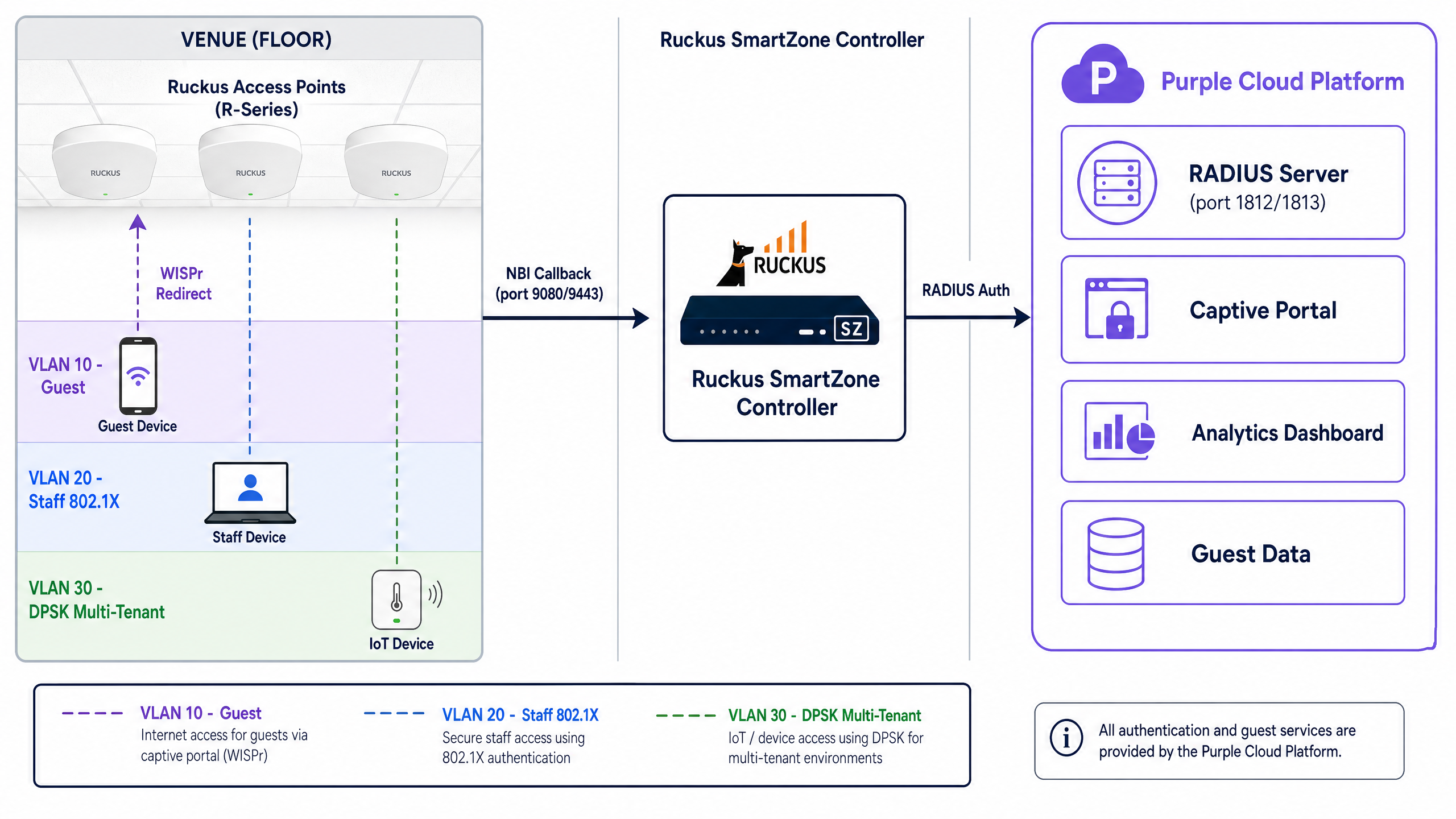
For public access networks in retail and hospitality, Ruckus utilises the Wireless Internet Service Provider roaming (WISPr) protocol. When a guest connects to an open SSID, the Ruckus controller intercepts their initial HTTP request and issues an HTTP 302 redirect to Purple's external captive portal. The guest authenticates via a conscious-choice opt-in mechanism - such as email or a social identity provider. Upon successful authentication, Purple communicates back to the Ruckus controller via the Northbound Interface (NBI) to authorise the MAC address and grant internet access.
Secure Staff WiFi (802.1X and Dynamic VLANs)
Staff devices require a fundamentally different approach. Rather than relying on captive portals, enterprise environments use 802.1X authentication. Devices authenticate directly against Purple's RADIUS infrastructure using EAP-TLS (certificate-based) or PEAP-MSCHAPv2 (credential-based) protocols.
The critical component here is dynamic VLAN steering. When Purple's RADIUS server returns an Access-Accept message, it includes three specific IETF standard attributes:
Tunnel-Type(Attribute 64): Set toVLAN(value 13)Tunnel-Medium-Type(Attribute 65): Set toIEEE-802(value 6)Tunnel-Private-Group-ID(Attribute 81): Contains the VLAN ID string (e.g., "20" for Staff)
The Ruckus SmartZone controller reads these attributes and dynamically tags the user's traffic, placing them into the correct isolated network segment regardless of the physical access point they connected to.
Multi-Tenant Isolation (Ruckus DPSK)
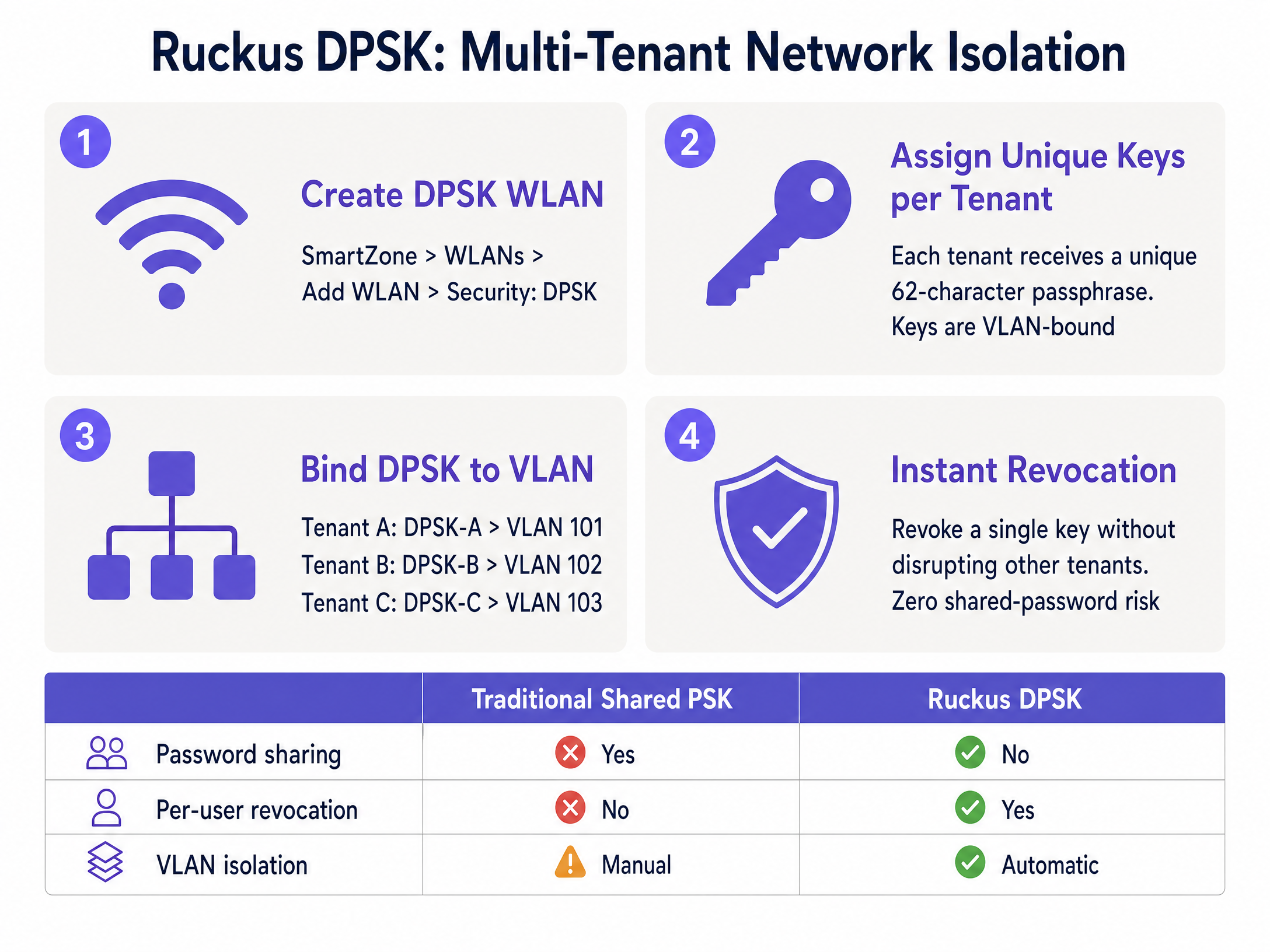
For environments like co-working spaces, student accommodation, and multi-dwelling units (MDUs), broadcasting dozens of SSIDs creates severe channel interference. Ruckus Dynamic Pre-Shared Key (DPSK) solves this by assigning a unique WPA2/WPA3 passphrase to each tenant on a single shared SSID.
Each DPSK is bound to a specific VLAN. When a resident connects, the controller uses their unique key to authenticate the device and drop them into their private VLAN. Purple automates this process via API integration, generating and revoking keys as tenants move in and out, eliminating the security risks associated with traditional shared passwords.
Implementation Guide
This section outlines the specific configuration steps required to integrate Purple with a Ruckus SmartZone controller. The steps for Unleashed are broadly similar but omit the Northbound Interface requirement.
1. Configure RADIUS AAA Servers
- Navigate to Services & Profiles > Authentication.
- Create a new AAA server profile with the Service Protocol set to RADIUS.
- Enter the Primary Server IP and Shared Secret provided in your Purple admin console.
- Set the authentication port to 1812.
- Repeat this process under Services & Profiles > Accounting, setting the port to 1813.
2. Configure the Hotspot WISPr Profile
- Navigate to Services & Profiles > Hotspots & Portals > Hotspot (WISPr).
- Create a new profile and set the Login URL to External.
- Enter your Purple captive portal redirect URL.
- Define your Walled Garden. This is critical. You must allow access to Purple's domains pre-authentication. SmartZone supports wildcards (e.g.,
*.purple.ai). You must also includecaptive.apple.comto manage the iOS Captive Network Assistant (CNA) behaviour.
3. Disable MAC Address Encryption (Critical Step)
By default, SmartZone encrypts the MAC and IP addresses passed in the redirect URL. Purple requires the raw MAC address for session management. You must disable this via the CLI:
enable
config
no encrypt-mac-ip
exit
4. Enable the Northbound Interface (NBI)
- Navigate to Administration > External Services > WISPr Northbound Interface.
- Enable the service and configure a username and password.
- Provide these credentials to Purple. Ensure your firewall permits inbound TCP traffic on ports 9080 (HTTP) and 9443 (HTTPS) from Purple's IP ranges.
5. Create the WLAN
- Create a new WLAN and set the Authentication Type to Hotspot (WISPr).
- Select the Hotspot profile and AAA servers configured earlier.
- For 802.1X staff networks, enable AAA Override in the advanced settings to ensure dynamic VLAN attributes are processed.
Best Practices
To ensure a robust and secure deployment, adhere to these industry-standard recommendations:
- Isolate Guest Traffic: Always place guest WiFi on a dedicated VLAN and enable client isolation. This is a mandatory requirement for PCI DSS compliance if your venue processes payments on the same physical infrastructure.
- Standardise VLAN IDs: When deploying dynamic VLAN steering across multiple venues, ensure your VLAN numbering scheme is identical globally (e.g., VLAN 20 is always Staff). Inconsistent naming will cause authentication failures.
- Implement RADIUS Fallback: Configure a critical VLAN or fallback mechanism on your controllers. If the primary RADIUS server is unreachable, devices should be dropped into a restricted internet-only VLAN to maintain basic connectivity.
- Use DPSK3 for New Deployments: If your Ruckus hardware supports WPA3, deploy DPSK3 instead of legacy DPSK to benefit from SAE-based encryption.
Troubleshooting & Risk Mitigation
When integrating external captive portals and RADIUS services, engineers commonly encounter the following failure modes:
- Portal Fails to Load: This is almost always a Walled Garden misconfiguration. Modern portals load assets from multiple CDNs and identity providers. Use browser developer tools to identify blocked requests and add the required domains to your SmartZone Walled Garden.
- Authentication Succeeds but No Internet Access: This indicates a Northbound Interface failure. SmartZone is not receiving the authorisation callback from Purple. Verify your NBI credentials and check firewall logs for dropped traffic on TCP ports 9080/9443.
- Dynamic VLAN Assignment Fails: If 802.1X users authenticate successfully but land on the default VLAN, check that AAA Override is enabled in the WLAN settings. Without this, SmartZone ignores the
Tunnel-Private-Group-IDattribute returned by Purple.
ROI & Business Impact
Integrating Ruckus infrastructure with Purple transforms a standard wireless network into a measurable business asset.
For retail and hospitality venues, the captive portal captures verified first-party data, driving loyalty programme growth and enabling targeted marketing campaigns. A major UK hotel chain reported a 40% increase in guest satisfaction scores following their Ruckus and Purple rollout.
For IT operations, dynamic VLAN steering and DPSK automation drastically reduce manual configuration overhead. Instead of managing static switch ports or resetting shared passwords when a tenant leaves, access control is centralised and automated, mitigating security risks and reducing support tickets.
Key Definitions
WISPr
Wireless Internet Service Provider roaming. An industry-standard protocol used by wireless controllers to intercept HTTP traffic and redirect users to an external captive portal.
This is the foundational architecture for all public Guest WiFi deployments on Ruckus hardware.
Northbound Interface (NBI)
An API on the Ruckus SmartZone controller that allows external platforms to send authorisation commands.
Required for Purple to grant a user internet access after they successfully complete the captive portal login.
Walled Garden
A whitelist of domains and IP addresses that a device is permitted to access before authenticating on the network.
Essential for allowing the captive portal page, its associated images, and social login providers to load for unauthenticated guests.
Dynamic PSK (DPSK)
A Ruckus-proprietary technology that assigns a unique WPA2/WPA3 passphrase to individual users or groups on a single shared SSID.
Used heavily in multi-tenant environments (MDUs, co-working spaces) to provide secure network isolation without SSID bloat.
Dynamic VLAN Steering
The process of automatically assigning a device to a specific network segment (VLAN) based on RADIUS attributes returned during 802.1X authentication.
Allows IT teams to use a single 'Staff' SSID while securely separating HR, Finance, and Front Desk traffic at the network layer.
AAA Override
A configuration setting on wireless controllers that forces the access point to apply the policies (like VLAN IDs) returned by the RADIUS server.
Must be enabled on Ruckus WLANs for dynamic VLAN steering to function correctly.
Client Isolation
A security feature that prevents devices connected to the same wireless network from communicating directly with each other.
A mandatory security control for public Guest WiFi networks to prevent peer-to-peer attacks and ensure compliance.
Captive Network Assistant (CNA)
The mini-browser built into mobile operating systems (like iOS and Android) that automatically pops up when a captive portal is detected.
Engineers must manage CNA behaviour via the Walled Garden to ensure a smooth login experience for mobile users.
Worked Examples
A 250-room hotel needs to deploy three distinct networks on their Ruckus SmartZone infrastructure: a public guest network, a secure staff network with access to the property management system, and an isolated IoT network for smart thermostats.
The IT team configures three WLANs. The 'Guest-WiFi' WLAN uses Hotspot (WISPr) authentication redirecting to Purple's captive portal, dropping users onto VLAN 10 with client isolation enabled. The 'Staff-Secure' WLAN uses 802.1X EAP authentication against Purple SecurePass; the RADIUS server returns Tunnel-Private-Group-ID = 20, dynamically steering staff to the internal VLAN. The 'IoT-Devices' WLAN uses a static WPA2 PSK bound to VLAN 30, restricted via firewall rules to communicate only with the thermostat control server.
A co-working space operator manages a building with 15 different tenant companies. They need to provide secure, isolated wireless access for each company without broadcasting 15 separate SSIDs.
The operator deploys Ruckus Unleashed and configures a single 'Tenant-WiFi' WLAN using Dynamic PSK (DPSK) security. Within the controller, they enable Per-DPSK VLAN assignment. Each of the 15 tenant companies is issued a unique 62-character passphrase. When Tenant A's employees connect using their specific key, the controller automatically assigns their traffic to VLAN 101. Tenant B's employees use a different key and land on VLAN 102.
Practice Questions
Q1. You have configured a Guest WiFi network on a Ruckus SmartZone controller integrated with Purple. When connecting a test device, the Purple captive portal page appears, but the logo image is missing and the 'Login with Facebook' button does not work. What is the most likely cause?
Hint: Consider what network access the device has before it successfully authenticates.
View model answer
The Walled Garden is misconfigured. The domains hosting the logo image (e.g., a CDN) and the Facebook authentication servers have not been added to the Walled Garden whitelist, so the SmartZone controller is blocking those requests pre-authentication.
Q2. A network engineer is deploying 802.1X for staff access. The Purple RADIUS server is correctly returning the `Tunnel-Private-Group-ID` attribute for VLAN 20. However, when staff connect, they are placed on the default VLAN assigned to the WLAN. How do you resolve this?
Hint: The controller is receiving the RADIUS instructions but choosing to ignore them.
View model answer
You must enable 'AAA Override' in the advanced settings of the WLAN on the SmartZone controller. Without this setting enabled, the controller will not apply the dynamic VLAN attributes returned by the RADIUS server.
Q3. A co-working space wants to provide secure WiFi for 10 different companies. They currently broadcast 10 separate SSIDs, which is causing severe channel interference. They cannot use 802.1X because many devices are shared printers or smart TVs. What is the recommended Ruckus architecture?
Hint: Look for a solution that provides unique encryption keys without requiring enterprise certificates or credentials.
View model answer
Implement Ruckus Dynamic PSK (DPSK) on a single SSID. Issue a unique DPSK to each tenant company, and configure the controller to bind each DPSK to a specific VLAN. This eliminates SSID bloat, provides network isolation, and supports headless devices like printers.
Continue reading in this series
Allied Telesis Access Points Integration with Purple WiFi
This guide provides a comprehensive configuration playbook for integrating Allied Telesis TQ-Series access points with Purple WiFi. It covers external captive portal redirection, 802.1X RADIUS authentication, and dynamic VLAN steering using Private Pre-Shared Keys (PPSK) for secure multi-tenant deployments.
Grandstream GWN Access Points Integration with Purple WiFi
This authoritative technical reference guide details how to integrate Grandstream GWN access points with Purple's Guest WiFi and analytics platform. It covers Grandstream captive portal configuration, RADIUS AAA settings, walled garden setup, secure staff 802.1X authentication with dynamic VLAN steering, and multi-tenant PPSK segmentation - providing actionable, step-by-step guidance for MSPs and IT teams deploying guest and staff WiFi at scale.
Cisco WLC and Catalyst Integration with Purple WiFi: Step-by-Step Guest Access Guide
This guide details the step-by-step integration of Cisco WLC and Catalyst 9800 Wireless with Purple, covering Guest WiFi captive portal redirection via Central Web Authentication, Secure Staff WiFi using 802.1X EAP-TLS, and Multi-Tenant segmentation using Cisco Identity Pre-Shared Keys (iPSK) with dynamic VLAN assignment. It is written for enterprise network architects and IT security directors deploying Cisco infrastructure in hospitality, retail, and large public venues.