
WiFi चा वापर करून हॉटेल्समध्ये ग्राहक अनुभव कसा सुधारावा
हे मार्गदर्शक IT लीडर्स आणि वेन्यू ऑपरेटर्सना हॉटेल WiFi ला एका मूलभूत सुविधेपासून सक्रिय एंगेजमेंट चॅनेलमध्ये बदलण्यासाठी एक तांत्रिक ब्ल्यूप्रिंट प्रदान करते. यामध्ये वैयक्तिकृत अतिथी अनुभव प्रदान करण्यासाठी, रूम अपग्रेड्स वाढवण्यासाठी आणि लॉयल्टी प्रोग्राम संपादन वाढवण्यासाठी आवश्यक असणारे आर्किटेक्चर, PMS इंटिग्रेशन्स आणि डिप्लॉयमेंट स्ट्रॅटेजीज समाविष्ट आहेत. कॅप्टिव्ह पोर्टल (captive portal) डिझाइन आणि GDPR अनुपालनापासून ते प्रेझेन्स ॲनालिटिक्स आणि स्टे-नंतरच्या ऑटोमेटेड सर्वेक्षणांपर्यंत, हॉस्पिटॅलिटी IT टीम्ससाठी हा एक निश्चित ऑपरेशनल संदर्भ आहे.
हे मार्गदर्शक ऐका
पॉडकास्ट ट्रान्सक्रिप्ट पहा
📚 आमच्या मुख्य मालिकेचा भाग: WiFi Marketing Guide →
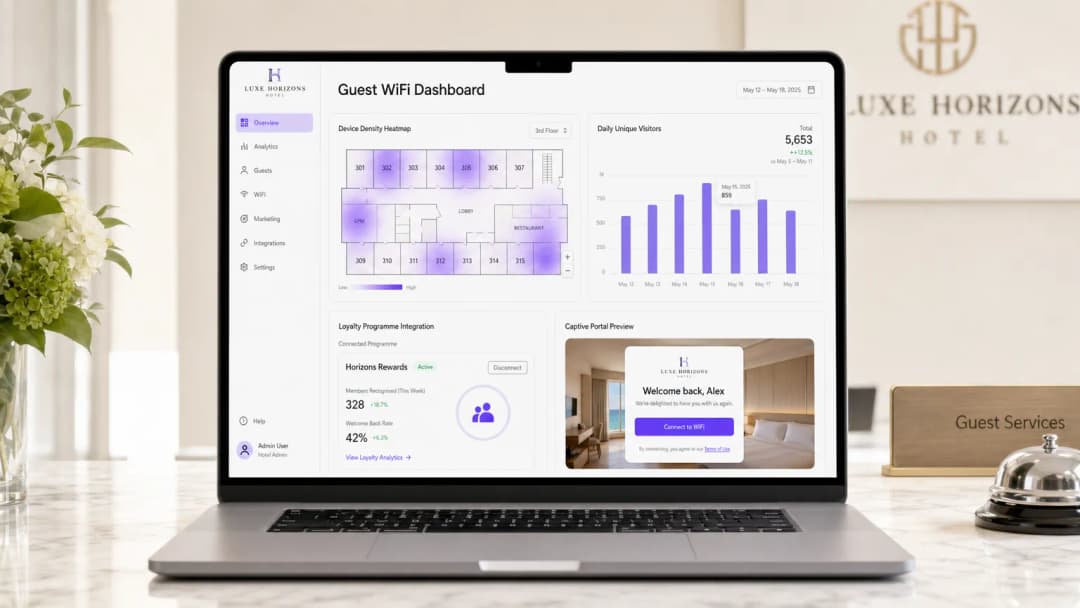
कार्यकारी सारांश (Executive Summary)
आधुनिक हॉटेल ऑपरेशन्ससाठी, guest WiFi हे एका मूलभूत सुविधेपासून महसूल, ग्राहक निष्ठा आणि कार्यात्मक कार्यक्षमता वाढवणाऱ्या एका महत्त्वपूर्ण पायाभूत सुविधेत (infrastructure layer) विकसित झाले आहे. हे मार्गदर्शक WiFi चा वापर करून हॉटेलमधील ग्राहकांचा अनुभव कसा सुधारायचा, तसेच साध्या कनेक्टिव्हिटीला एका सक्रिय एंगेजमेंट चॅनेलमध्ये कसे रूपांतरित करायचे याबद्दल सविस्तर माहिती देते. आम्ही वैयक्तिकृत स्वागत (personalised welcomes), लक्ष्यित रूम अपग्रेड्स, अखंड लॉयल्टी प्रोग्राम एकत्रीकरण आणि स्वयंचलित पोस्ट-स्टे सर्वेक्षणांसाठी आवश्यक असलेल्या तांत्रिक संरचनेचा (technical architecture) शोध घेत आहोत.
Purple सारख्या एंटरप्राइझ-ग्रेड प्लॅटफॉर्मचा लाभ घेऊन, IT लीडर्स साध्या बँडविड्थ तरतुदीच्या पलीकडे जाऊन मोजण्यायोग्य व्यवसाय मूल्य देऊ शकतात. हे संदर्भ दस्तऐवज आजच्या कनेक्टेड प्रवाशांच्या गरजा पूर्ण करण्यासाठी आणि GDPR आणि PCI-DSS सह जागतिक डेटा संरक्षण नियमांचे पालन सुनिश्चित करण्यासाठी मजबूत Guest WiFi आणि WiFi Analytics सोल्यूशन्स लागू करण्यासाठी आवश्यक असणारे उपयोजन विचार (deployment considerations), एकत्रीकरण पद्धती आणि सुरक्षा मानके समाविष्ट करते.
तांत्रिक सखोल विश्लेषण: वैयक्तिकीकरण रचना (Personalisation Architecture)
अर्थपूर्ण वैयक्तिकीकरण साध्य करण्यासाठी, WiFi इन्फ्रास्ट्रक्चर हॉटेलच्या विस्तीर्ण तंत्रज्ञान स्टॅकशी, विशेषतः प्रॉपर्टी मॅनेजमेंट सिस्टम (PMS) आणि कस्टमर रिलेशनशिप मॅनेजमेंट (CRM) प्लॅटफॉर्मसह अखंडपणे समाकलित (integrate) झाले पाहिजे. हा विभाग मुख्य आर्किटेक्चरल घटक आणि ते एकत्रितपणे कसे कार्य करतात याची रूपरेषा देतो.
ओळख स्तर म्हणून Captive Portal (The Captive Portal as an Identity Layer)
Captive Portal हे प्राथमिक प्रमाणीकरण (authentication) आणि डेटा कॅप्चर यंत्रणा म्हणून काम करते. जेनेरिक प्री-शेअर्ड की (PSKs) वापरण्याऐवजी, आधुनिक उपयोजन हे अत्याधुनिक स्प्लॅश पेजेसचा लाभ घेतात जे सोशल साइन-इन (Google, Facebook किंवा Apple साठी OAuth 2.0 द्वारे), ईमेल नोंदणी आणि थेट लॉयल्टी प्रोग्राम क्रेडेंशियल व्हेरिफिकेशनसह एकाधिक प्रमाणीकरण पद्धतींना समर्थन देतात. हा स्तर वापरकर्त्याची ओळख पटवण्यासाठी, GDPR च्या कलम ७ अंतर्गत आवश्यक संमती मिळवण्यासाठी आणि डाउनस्ट्रीम ॲनालिटिक्स इंजिनकडे ओळखीचा संदर्भ पाठवण्यासाठी जबाबदार आहे.
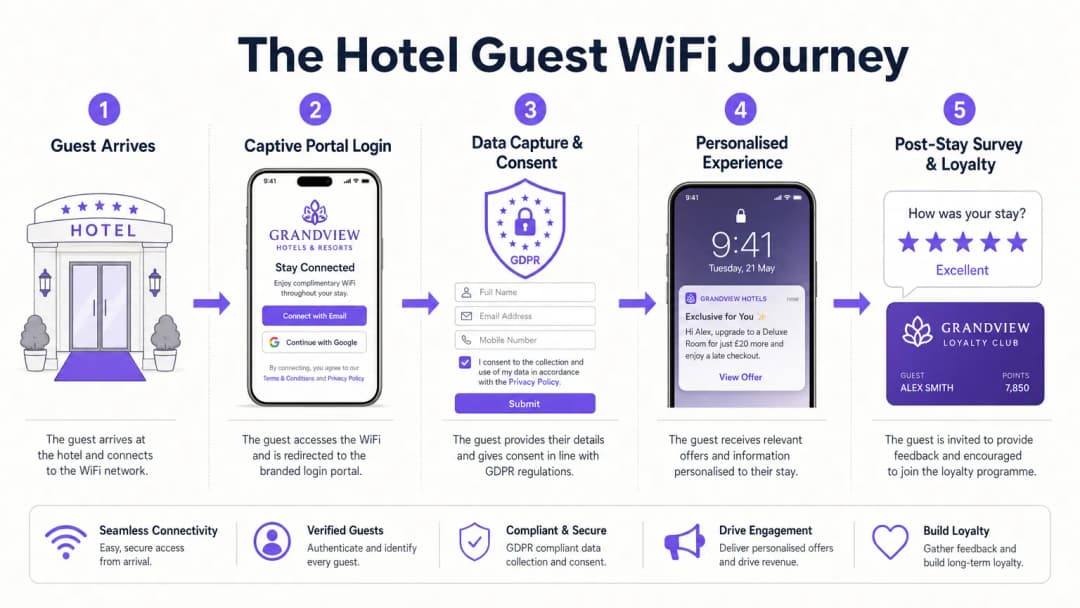 SSID आर्किटेक्चरची रचना हेतूंच्या वर्गीकरणासह केली पाहिजे. गेस्ट-फेसिंग SSID सर्व अनॉथेंटिकेटेड ट्रॅफिकला DNS हायजॅकिंगद्वारे captive portal कंट्रोलरकडे पाठवते. गेस्टने लॉगिन फ्लो पूर्ण करण्यापूर्वी - सोशल लॉगिन प्रोव्हाइडर्स, CDN-होस्ट केलेली पोर्टल ॲसेट्स आणि कोणत्याही थर्ड-पार्टी ऑथेंटिकेशन सर्व्हिसेस यांसारख्या सर्व आवश्यक एक्सटर्नल डोमेन्सना ॲक्सेस देण्यासाठी वॉल्ड गार्डन (walled garden) कॉन्फिगरेशन्स काळजीपूर्वक राखली गेली पाहिजेत. वॉल्ड गार्डन्स राखण्यात आलेली अयशस्वीता हे प्रोडक्शन डिप्लॉयमेंटमध्ये captive portal अयशस्वी होण्याचे सर्वात सामान्य कारण आहे.
Property Management System इंटिग्रेशन
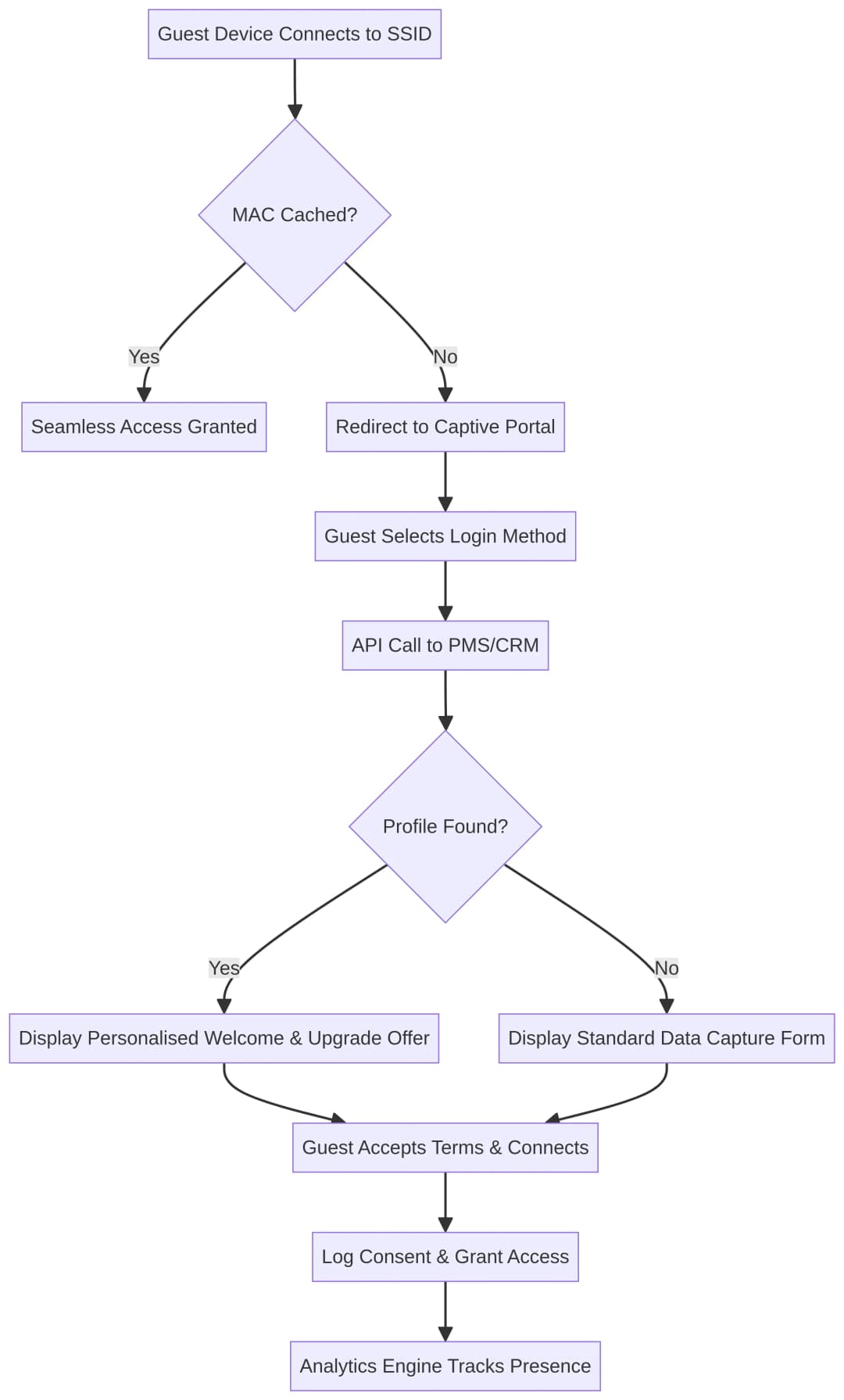
WiFi Analytics प्लॅटफॉर्मचे खरे मूल्य PMS सोबतच्या इंटिग्रेशनद्वारे अनलॉक होते. जेव्हा एखादा गेस्ट कनेक्ट होतो, तेव्हा सिस्टम त्यांच्या ऑथेंटिकेटेड आयडेंटिटीचा (ईमेल किंवा लॉयल्टी नंबर) वापर करून रिअल-टाइममध्ये त्यांची सद्य बुकिंग स्थिती, रूम नंबर आणि लॉयल्टी टायर मिळवण्यासाठी PMS कडे क्वेरी पाठवू शकते. हा डेटा एक्सचेंज captive portal ला डायनॅमिकली पर्सनलाइज्ड कंटेंट दाखवण्याची परवानगी देतो: गेस्टचे नावासाहित स्वागत करणारा मेसेज, त्यांचे सद्य लॉयल्टी पॉईंट्स बॅलन्स, किंवा त्यांच्या सध्याच्या मुक्कामाशी संबंधित असलेली टार्गेटेड अपग्रेड ऑफर.
यशस्वी ऑथेंटिकेशन झाल्यावर WiFi analytics प्लॅटफॉर्मवरून PMS ला REST API कॉल ट्रिगर करून सामान्यतः हे इंटिग्रेशन साध्य केले जाते. त्यानंतर योग्य स्पॅश पेज व्हेरिएंट दाखवण्यासाठी डायनॅमिक टेम्पलेटिंग इंजिन भरण्यासाठी PMS रिस्पॉन्स पेलोडचा वापर केला जातो. या API कॉलचा लॅटन्सी हा एक गंभीर परफॉर्मन्सचा मुद्दा आहे; युझर एक्सपिरियन्स खराब होऊ नये म्हणून हा कॉल काही सेकंदामध्ये (few hundred milliseconds) पूर्ण झाला पाहिजे.

प्रेझेन्स ॲनालिटिक्स आणि स्पेशल इंटेलिजन्स
एकदा ऑथेंटिकेट झाल्यावर, ॲनालिटिक्स इंजिन प्रेझेन्स डेटावर प्रक्रिया करण्यास सुरवात करते. मल्टिपल ॲक्सेस पॉईंट्सवरून येणाऱ्या सिग्नल स्ट्रेंथचे (RSSI) विश्लेषण करून, सिस्टम संपूर्ण व्हेन्यूमधील ड्वेल टाईम (थांबण्याचा वेळ) आणि हालचालींचे पॅटर्न ठरवू शकते. हॉटेलच्या सुविधांचा - लॉबीपासून ते रेस्टॉरंट आणि स्पा पर्यंत - गेस्ट कसा वापर करतात हे समजून घेण्यासाठी हे स्पेशल इंटेलिजन्स अत्यंत महत्त्वाचे आहे. Connect लायसन्स अंतर्गत OpenRoaming सारख्या सेवांसाठी फ्री आयडेंटिटी प्रोव्हाइडर (Identity Provider) म्हणून काम करून, Purple पुन्हा येणाऱ्या गेस्टना पुन्हा ऑथेंटिकेट न करता वेगवेगळ्या प्रॉपर्टीजमध्ये सुरक्षितपणे आणि आपोआप लॉग इन करण्याची परवानगी देऊन हे अधिक सोपे करते.
खालील आकृती ऑथेंटिकेशन आणि पर्सनलायझेशनचा निर्णय फ्लो दर्शवते:
अंमलबजावणी मार्गदर्शक: स्टेप-बाय-स्टेप डिप्लॉयमेंट
एक सर्वसमावेशक WiFi एंगेजमेंट सोल्यूशन डिप्लॉय करण्यासाठी IT, मार्केटिंग आणि ऑपरेशन्स टीम्समध्ये काळजीपूर्वक नियोजन आणि समन्वयाची आवश्यकता असते. खालील टप्पे डिप्लॉयमेंटसाठी एक पद्धतशीर रोडमॅप प्रदान करतात.
टप्पा १: पायाभूत सुविधांची पूर्वतयारी आणि नेटवर्क आर्किटेक्चर
एक Captive Portal कार्यान्वित करण्यापूर्वी, हे सुनिश्चित करा की मूळ वायरलेस पायाभूत सुविधा अपेक्षित उपकरणांची घनता आणि थ्रूपुट आवश्यकतांना सपोर्ट करण्यास सक्षम आहेत.
| विचार करण्यासारख्या गोष्टी | शिफारस | मानक |
|---|---|---|
| SSID धोरण | Captive Portal चा वापर करणारे सिंगल गेस्ट SSID; 802.1X चा वापर करणारे स्वतंत्र कॉर्पोरेट SSID | IEEE 802.11i |
| नेटवर्क विभाजन (Segmentation) | कॉर्पोरेट आणि POS नेटवर्क्सपासून वेगळे केलेले, गेस्ट ट्रॅफिकसाठी समर्पित VLAN | PCI DSS आवश्यकता १ |
| AP घनता | RF साइट सर्वेक्षण करा; संपूर्ण ठिकाणी किमान -६५ dBm चे RSSI चे लक्ष्य ठेवा | IEEE 802.11k/v/r |
| सुरक्षा प्रोटोकॉल | उपकरणांची सुसंगतता परवानगी देत असल्यास गेस्ट SSID वर WPA3-SAE चा वापर करा | IEEE 802.11ax |
| थ्रूपुट बेसलाइन | उच्च-घनता असलेल्या क्षेत्रांमध्ये प्रति समवर्ती (concurrent) उपकरणासाठी किमान ५ Mbps | व्हेंडर-न्यूट्रल सर्वोत्तम पद्धत |
समर्पित VLAN द्वारे गेस्ट ट्रॅफिक कॉर्पोरेट आणि ऑपरेशनल नेटवर्क्सपासून काटेकोरपणे वेगळे केले आहे याची खात्री करा. ही केवळ एक सर्वोत्तम पद्धत नाही; जर कोणतीही पेमेंट सिस्टम त्याच भौतिक पायाभूत सुविधांवर कार्य करत असेल, तर PCI DSS अंतर्गत हे एक अनिवार्य नियंत्रण आहे.
टप्पा २: Captive Portal कॉन्फिगरेशन आणि ब्रँडिंग
Captive Portal हा बऱ्याचदा अतिथीला ऑन-प्रॉपर्टी मिळणारा पहिला डिजिटल स्पर्शबिंदू (touchpoint) असतो. त्याचे डिझाइन आणि कामगिरी थेट हॉटेल ब्रँडबद्दलच्या अतिथीच्या दृष्टिकोनावर परिणाम करतात.
डेटा संपादन आणि सुलभता यांचा समतोल राखण्यासाठी प्रमाणीकरण (authentication) पर्याय कॉन्फिगर करा. ईमेल आणि सोशल लॉगिन हे मानक कॉन्फिगरेशन आहेत, परंतु थेट लॉयल्टी प्रोग्राम प्रमाणीकरण समाकलित केल्याने सर्वोच्च-मूल्य असलेली ओळख डेटा मिळतो. वारंवार येणारे विरुद्ध नवीन अभ्यागत, दिवसाची वेळ किंवा विशिष्ट ठिकाणे यासारख्या व्हेरिएबल्सवर आधारित विविध स्प्लॅश पेजेस प्रदर्शित करण्यासाठी डायनॅमिक कंटेंट नियम लागू करा. उदाहरणार्थ, स्पामध्ये कनेक्ट होणाऱ्या अतिथीला लॉबीमध्ये कनेक्ट होणाऱ्या अतिथीपेक्षा वेगळा स्वागत अनुभव दिसला पाहिजे.
सर्व डेटा संपादन GDPR चे पालन करणारे असावे. मार्केटिंग संवादांसाठी स्पष्ट, तपशीलवार ऑप्ट-इन चेकबॉक्स लागू करा आणि संमती लॉग्स टॅम्पर-प्रूफ ऑडिट ट्रेलवर लिहिले गेल्याची खात्री करा. प्रक्रियेचा कायदेशीर आधार स्प्लॅश पेजवर स्पष्टपणे नमूद केला पाहिजे.
टप्पा ३: PMS आणि CRM इंटिग्रेशन
वैयक्तिकृत स्वागत आणि रूम अपग्रेड्स प्रदान करण्यासाठी ही सर्वात महत्त्वाची पायरी आहे.
WiFi प्लॅटफॉर्म आणि PMS आणि CRM दरम्यान एक सुरक्षित API कनेक्शन स्थापित करा. Captive Portal मधील फील्ड CRM मधील ग्राहक प्रोफाइलशी कसे मॅप होतात ते परिभाषित करा आणि स्वयंचलित ट्रिगर्स सेट अप करा. उदाहरणार्थ, जर एखाद्या अतिथीने प्रमाणीकरण केले आणि PMS ने पुष्टी केली की ते एका मानक रूममध्ये राहत आहेत आणि सुइट इन्व्हेंटरी उपलब्ध आहे, तर सशुल्क अपग्रेड देणारा Captive Portal इंटरस्टिशियल ट्रिगर करा. हे ऑफर रूपांतरण (conversion) वाढवण्यासाठी स्पष्ट कॉल-टू-ॲक्शन आणि मर्यादित-वेळच्या प्रोत्साहनासह आले पाहिजे.
टप्पा ४: स्टे-नंतरची सर्वेक्षण ऑटोमेशन
पाहुण्यांच्या उपस्थितीचे निरीक्षण करण्यासाठी ॲनालिटिक्स प्लॅटफॉर्म कॉन्फिगर करा. जेव्हा एखाद्या पाहुण्याचे डिव्हाइस नेटवर्कवर ठराविक कालावधीसाठी दिसले नाही - साधारणपणे १२ ते २४ तास, जे चेक-आउट दर्शवते - तेव्हा ईमेल मार्केटिंग प्लॅटफॉर्मवर वेबहुक ट्रिगर करा. हा वेबहुक मुक्कामानंतरचा NPS किंवा CSAT सर्वेक्षण ईमेल ट्रिगर करतो, ज्यामुळे प्रतिसादाचा दर वाढवण्यासाठी अनुभव अजून ताजा असतानाच तो पाठवला जाईल याची खात्री होते.
Best Practices for Hospitality WiFi Deployments
या शिफारसी hospitality मधील WiFi डिप्लॉयमेंटसाठी उद्योग-मानक दृष्टिकोन दर्शवतात आणि retail , healthcare , आणि transport सह अनेक प्रकारच्या ठिकाणांसाठी लागू होतात.
पुन्हा भेट देणाऱ्या पाहुण्यांसाठी विना-अडथळा लॉगिनला प्राधान्य द्या. परत येणाऱ्या पाहुण्यांना पुन्हा क्रेडेंशियल प्रविष्ट न करता स्वयंचलितपणे ऑथेंटिकेट करण्यासाठी MAC ॲड्रेस कॅशिंग किंवा Passpoint (Hotspot 2.0 / IEEE 802.11u) सारख्या मानकांचा वापर करा. तीन रात्री मुक्काम करणाऱ्या पाहुण्याला Captive Portal चा सामना फक्त एकदाच करावा लागला पाहिजे.
लोकेशन-बेस्ड ॲनालिटिक्सचा जबाबदारीने वापर करा. प्रेझेन्स ॲनालिटिक्स शक्तिशाली आहे परंतु ते काळजीपूर्वक हाताळले पाहिजे. तुमच्या डेटा रिटेंशन पॉलिसी स्पष्टपणे नमूद केल्या आहेत आणि Captive Portal वरून लिंक केलेल्या प्रायव्हसी पॉलिसीमध्ये पाहुण्यांना प्रेझेन्स ट्रॅकिंगबद्दल माहिती दिली गेली आहे याची खात्री करा.
मुक्कामानंतरचे परस्परसंवाद स्वयंचलित करा. सर्वेक्षण ईमेल ट्रिगर करण्यासाठी मॅन्युअल PMS एक्सपोर्टवर अवलंबून राहू नका. वेळेची अचूकता आणि वेळेवर पाठवणे सुनिश्चित करण्यासाठी नेटवर्क प्रेझेन्स डेटाचा ट्रिगर म्हणून वापर करा.
कोणतेही पेमेंट फ्लो PCI-DSS सुसंगत असल्याची खात्री करा. जर Captive Portal प्रीमियम बँडविड्थ टियर किंवा अपग्रेड खरेदीसाठी पेमेंट प्रक्रियेत आणत असेल, तर संपूर्ण पेमेंट फ्लो PCI-DSS चे पालन करणारा असणे आवश्यक आहे. तुमच्या स्वतःच्या इन्फ्रास्ट्रक्चरवर कार्ड डेटावर प्रक्रिया करण्याऐवजी प्रमाणित पेमेंट गेटवेमधील टोकनाइज्ड होस्ट केलेल्या पेमेंट पेजेसचा वापर करा.
WiFi ला लॉयल्टी स्ट्रॅटेजीशी संरेखित करा. पाहुण्यांना त्यांच्या लॉयल्टी क्रेडेंशियल्सचा वापर करून WiFi वर ऑथेंटिकेट करण्याची परवानगी द्या. हे ऑन-प्रॉपर्टी डिजिटल वर्तन आणि लॉयल्टी प्रोफाइल दरम्यान थेट, निरंतर दुवा स्थापित करते, ज्यामुळे भविष्यातील मुक्कामादरम्यान अधिक समृद्ध वैयक्तिकीकरण करणे शक्य होते.
एंटरप्राइझ नेटवर्कच्या उत्क्रांतीवरील अतिरिक्त संदर्भासाठी, Hotel WiFi: The Complete Guide for Hoteliers आणि WiFi para Hoteles: La Guía Completa para Hoteleros पहा.
Troubleshooting and Risk Mitigation
Captive Portal Not Rendering
लक्षण: पाहुणे SSID शी कनेक्ट होतात परंतु स्पॅश पेज दिसत नाही किंवा चुकीच्या पद्धतीने दिसते.
मूळ कारण: सर्वात सामान्य कारणे म्हणजे चुकीचे कॉन्फिगर केलेले वॉल्ड गार्डन्स, DNS रीडायरेक्शन अयशस्वी होणे, किंवा पोर्टल ट्रिगर करणाऱ्या HTTP रीडायरेक्टला ब्लॉक करणारी डिव्हाइस-लेव्हल सुरक्षा वैशिष्ट्ये आहेत.Mitigation: सर्व आवश्यक डोमेन्स व्हाईटलिस्टेड आहेत याची खात्री करण्यासाठी वॉल गार्डनचे (walled gardens) नियमितपणे ऑडिट करा. अतिथींना नॉन-HTTPS URL वर नेव्हिगेट करून मॅन्युअली पोर्टल ट्रिगर करण्यासाठी मार्गदर्शन करण्यासाठी फ्रंट डेस्क कर्मचाऱ्यांना प्रशिक्षित करा. अॅनालिटिक्स डॅशबोर्डद्वारे पोर्टल रेंडर यशस्वी दरांचे निरीक्षण करा आणि असामान्य घसरणीसाठी अलर्ट सेट करा.
कमी मार्केटिंग ऑप्ट-इन दर
Symptom: उच्च WiFi कनेक्शन दर, परंतु अॅक्शन करण्यायोग्य ईमेल पत्ते किंवा मार्केटिंग संमतीचे कमी संपादन.
Root Cause: ऑप्ट-इन करण्यासाठी व्हॅल्यू प्रपोझिशन स्पष्ट नाही, किंवा फॉर्म खूप लांब आणि कंटाळवाणे आहेत.
Mitigation: प्रोग्रेसिव्ह प्रोफाइलिंग लागू करा. मूलभूत प्रवेशासाठी विनाव्यत्यय वन-क्लिक सोशल लॉगिन ऑफर करा, नंतर विस्तारित प्रोफाइल पूर्ण करण्याच्या बदल्यात एक स्पष्ट मूल्य विनिमय - उच्च बँडविड्थ, एक मोफत पेय किंवा त्वरित लॉयल्टी पॉइंट्स ऑफर करा.
चुकीचे प्रेझेन्स अॅनालिटिक्स
Symptom: हीटमॅप्स विस्कळीत किंवा अतार्किक अतिथी हालचालींचे पॅटर्न दर्शवतात जे प्रत्यक्ष निरीक्षणांशी जुळत नाहीत.
Root Cause: अपुरी AP घनता, खराब AP प्लेसमेंट, झोन दरम्यान RF सिग्नल ब्लीड किंवा अॅनालिटिक्स प्लॅटफॉर्ममध्ये कॅलिब्रेशनचा अभाव.
Mitigation: नियमित RF साइट सर्वेक्षण आयोजित करा. कव्हरेजच्या गरजा तसेच लोकेशन अॅनालिटिक्सला सपोर्ट करणाऱ्या घनतेमध्ये APs तैनात केले आहेत याची खात्री करा. अचूक फ्लोअर प्लॅन आणि प्रत्यक्ष स्केल मोजमाप वापरून अॅनालिटिक्स प्लॅटफॉर्म कॅलिब्रेट करा.
MAC रँडमायझेशनचा अतिथी ओळखीवर होणारा परिणाम
Symptom: सिस्टम परत येणाऱ्या अतिथींना ओळखण्यात अपयशी ठरते, परिणामी ज्ञात लॉयल्टी सदस्यांना सामान्य पोर्टल अनुभव मिळतो.
Root Cause: आधुनिक iOS आणि Android डिव्हाइसेस प्रति-नेटवर्क रँडमाइज्ड MAC अॅड्रेस वापरतात जे भेटींच्या दरम्यान बदलू शकतात.
Mitigation: ओळखण्याची धोरणे हार्डवेअर लेयर (MAC अॅड्रेस) वरून आयडेंटिटी लेयरवर हलवा. अतिथींना captive portal वर कायमस्वरूपी ओळखकर्ता (ईमेल किंवा लॉयल्टी नंबर) वापरून ऑथेंटिकेट करणे आवश्यक करा. ही ओळख CRM मध्ये स्टोअर करा आणि सर्व पर्सनलायझेशन लॉजिकसाठी प्राथमिक की म्हणून वापरा.
ROI आणि व्यावसायिक प्रभाव
एक अत्याधुनिक WiFi अॅनालिटिक्स प्लॅटफॉर्म लागू केल्याने कॉस्ट सेंटरचे रूपांतर महसूल निर्माण करणाऱ्या मालमत्तेमध्ये होते. व्यावसायिक प्रभाव मोजमाप अनेक आयामांवर केले जाऊ शकते.
| मेट्रिक | ठराविक बेंचमार्क | WiFi अॅनालिटिक्स प्लॅटफॉर्मसह | वाढ |
|---|---|---|---|
| लॉयल्टी प्रोग्राम साइन-अप दर | अतिथींपैकी 5-8% (फ्रंट डेस्क) | कनेक्ट केलेल्या अतिथींपैकी 20-35% | 3-4x वाढ |
| रूम अपग्रेड कन्व्हर्जन दर | 2-3% (फ्रंट डेस्क अपसेल) | 8-15% (लक्ष्यित पोर्टल ऑफर) | 3-5x वाढ |
| मुक्कामानंतरचा सर्वेक्षण प्रतिसाद दर | 8-12% (विलंबित ईमेल) | 25-40% (तासांच्या आत ट्रिगर केलेले) | 2-3x वाढ |
| अतिथी समाधान स्कोअर (NPS) | बेसलाइन | +10-15 NPS पॉइंट्स | मोजण्यायोग्य वाढ |
हे आकडे सूचक आहेत आणि मालमत्तेचा प्रकार, अतिथींची डेमोग्राफिक्स आणि लागू केलेल्या पर्सनलायझेशन लॉजिकच्या गुणवत्तेवर आधारित बदलू शकतात. ROI चा मुख्य ड्रायव्हर PMS आणि CRM इंटिग्रेशनची गुणवत्ता आहे; एक खराबपणे इंटिग्रेट केलेली सिस्टीम जी परत येणाऱ्या अतिथी आणि नवीन अभ्यागतामधील फरक ओळखू शकत नाही, ती लक्षणीयरीत्या कमी परतावा देईल.
एंटरप्राइझ WiFi ROI आणि डेप्लॉयमेंटच्या इतर गोष्टींबद्दल अतिरिक्त संदर्भासाठी, भाडेतत्त्वावरील लाइन म्हणजे काय? समर्पित बिझनेस इंटरनेट आणि ऑटोमध्ये WiFi: २०२६ मधील एंटरप्राइझसाठी संपूर्ण मार्गदर्शक पहा.
महत्वाच्या व्याख्या
Captive Portal
एक वेब पृष्ठ जे सार्वजनिक-प्रवेश नेटवर्कच्या वापरकर्त्याला संपूर्ण इंटरनेट प्रवेश मंजूर होण्यापूर्वी पाहणे आणि त्यावर संवाद साधणे बंधनकारक असते. हे नेटवर्क स्तरावर DNS इंटरसेप्शन किंवा HTTP रीडायरेक्टद्वारे अंमलात आणले जाते.
सेवाशर्ती लागू करण्यासाठी, पाहुण्यांच्या ओळखीचा डेटा मिळवण्यासाठी, लक्ष्यित विपणन संदेश सादर करण्यासाठी आणि GDPR संमती नोंदवण्यासाठी IT साठी ही प्राथमिक यंत्रणा आहे. याची रचना आणि कार्यप्रदर्शन थेट पाहुण्यांच्या हॉटेलबद्दलच्या पहिल्या डिजिटल इंप्रेशनवर प्रभाव पाडते.
Walled Garden
एक नेटवर्क ऍक्सेस नियंत्रण यंत्रणा जी अप्रमाणित वापरकर्त्यांना Captive Portal प्रमाणीकरण प्रवाह पूर्ण करण्यापूर्वी पूर्व-मंजूर डोमेन्सच्या मर्यादित संचापुरती मर्यादित ठेवते.
पाहुण्यांनी प्रमाणीकरण करण्यापूर्वी डिव्हाइसेसना सोशल लॉगिन प्रदाते (Google, Facebook, Apple) आणि CDN-होस्ट केलेल्या पोर्टल मालमत्तांपर्यंत पोहोचण्याची परवानगी देण्यासाठी अत्यंत महत्त्वाचे आहे. प्रत्यक्ष वापरात Captive Portal अयशस्वी होण्याचे चुकीचे कॉन्फिगरेशन हे सर्वात सामान्य कारण आहे.
MAC Randomization
आधुनिक ऑपरेटिंग सिस्टीम्स (iOS 14+, Android 10+) मधील एक गोपनीयता वैशिष्ट्य जे डिव्हाइस कनेक्ट करत असलेल्या प्रत्येक WiFi नेटवर्कसाठी एक अद्वितीय, यादृच्छिक MAC पत्ता तयार करते, ज्यामुळे दीर्घकालीन क्रॉस-सेशन डिव्हाइस ट्रॅकिंगला प्रतिबंध होतो.
IT टीम्सनी प्रमाणीकरण प्रवाह अशा प्रकारे डिझाइन केले पाहिजेत जे दीर्घकालीन पाहुण्यांचे प्रोफाइलिंग आणि ओळखण्यासाठी सातत्यपूर्ण MAC पत्त्यांऐवजी प्राप्त केलेल्या ओळखीवर (ईमेल किंवा लॉयल्टी ID) अवलंबून असतील.
Passpoint / Hotspot 2.0
एक IEEE 802.11u-आधारित मानक जे डिव्हाइसेसना पूर्व-तरतूद केलेल्या क्रेडेंशियल्सचा वापर करून WiFi नेटवर्कशी स्वयंचलितपणे आणि सुरक्षितपणे कनेक्ट होण्यास सक्षम करते, ज्यासाठी Captive Portal सह मॅन्युअल संवादाची आवश्यकता नसते.
परत येणाऱ्या पाहुण्यांसाठी किंवा लॉयल्टी सदस्यांसाठी अखंड, सेल्युलरसारखा रोमिंग अनुभव प्रदान करण्यासाठी वापरले जाते, ज्यामुळे त्यानंतरच्या भेटींमध्ये आणि अनेक मालमत्तांमध्ये Captive Portal ची अडचण दूर होते.
Property Management System (PMS)
हॉटेलद्वारे आरक्षणे, खोल्यांचे वाटप, चेक-इन आणि चेक-आउट, बिलिंग आणि अतिथी प्रोफाइल व्यवस्थापित करण्यासाठी वापरले जाणारे मुख्य सॉफ्टवेअर ॲप्लिकेशन. सामान्य प्लॅटफॉर्म्समध्ये Oracle OPERA, Mews आणि Cloudbeds यांचा समावेश होतो.
थेट आरक्षण डेटा, लॉयल्टी श्रेणी आणि खोलीच्या प्रकारावर आधारित रिअल-टाइम, वैयक्तिकृत Captive Portal अनुभव सक्षम करण्यासाठी REST API द्वारे WiFi विश्लेषण प्लॅटफॉर्मला PMS सह समाकलित करणे आवश्यक आहे.
Presence Analytics
मल्टिपल ऍक्सेस पॉइंट्सवरून RSSI (रिसीव्ह्ड सिग्नल स्ट्रेंथ इंडिकेटर) डेटाचे विश्लेषण करून भौतिक जागेत वायरलेस उपकरणांचे स्थान आणि हालचाल शोधण्यासाठी WiFi पायाभूत सुविधांचा वापर. यामध्ये निवासी वेळ, पादचाऱ्यांची संख्या आणि झोन-टू-झोन हालचालीसह इतर मेट्रिक्स मिळतात.
स्थान संचालन संचालकांना पाहुणे हॉटेलच्या सुविधांचा कसा वापर करतात याबद्दल कृतीयोग्य डेटा प्रदान करते, ज्यामुळे कर्मचारी निर्णय, जागा मांडणी ऑप्टिमायझेशन आणि लक्ष्यित विपणन संप्रेषणाच्या वेळेची माहिती मिळते.
VLAN Segmentation
नेटवर्क स्तरावर ट्रॅफिक प्रवाह वेगळे करण्यासाठी आणि प्रवेश नियंत्रण धोरणे लागू करण्यासाठी एकाच भौतिक नेटवर्कला अनेक लॉजिकल नेटवर्क्समध्ये (Virtual Local Area Networks) विभाजित करण्याची पद्धत.
पाहुण्यांचा WiFi ट्रॅफिक कॉर्पोरेट सिस्टीम, पेमेंट कार्ड नेटवर्क आणि ऑपरेशनल इन्फ्रास्ट्रक्चरपासून पूर्णपणे वेगळा ठेवला जाईल याची खात्री करण्यासाठी एक अनिवार्य सुरक्षा नियंत्रण. पेमेंट सिस्टीम भौतिक नेटवर्क इन्फ्रास्ट्रक्चर शेअर करत असलेल्या कोणत्याही वातावरणासाठी PCI-DSS आवश्यकता 1 अंतर्गत आवश्यक आहे.
OpenRoaming
एक वायरलेस ब्रॉडबँड अलायन्स (WBA) फेडरेशन मानक जे उपकरणांना एकाच ओळख क्रेडेंशियलचा वापर करून सहभागी WiFi नेटवर्कशी स्वयंचलितपणे आणि सुरक्षितपणे कनेक्ट होण्यास सक्षम करते, ज्यामुळे विविध ठिकाणांवर आणि ऑपरेटर्समध्ये अखंड रोमिंग अनुभव मिळतो.
Connect परवान्याअंतर्गत OpenRoaming साठी विनामूल्य ओळख प्रदाता म्हणून Purple ची भूमिका पाहुण्यांसाठी कनेक्टिव्हिटी सोपी करते, ज्यामुळे अनेक मालमत्ता किंवा सहभागी ठिकाणांवर लॉगिनची अडचण कमी होते. वारंवार प्रवास करणाऱ्या व्यावसायिक प्रवाशांसाठी विशेषतः मूल्यवान.
Progressive Profiling
एक डेटा कॅप्चर स्ट्रॅटेजी जी एकाच फॉर्म सबमिशनमध्ये सर्व डेटा फील्ड पूर्ण करणे आवश्यक करण्याऐवजी, अनेक परस्परसंवादांमध्ये वाढीव पद्धतीने पाहुण्यांची माहिती गोळा करते.
विपणन विभागाची समृद्ध पाहुण्यांच्या डेटाची इच्छा आणि ऑपरेशन्स विभागाची अखंड ऑनबोर्डिंगची आवश्यकता यामधील तणाव दूर करते. पाहुणे पहिल्या कनेक्शनवर मूलभूत माहिती देतात आणि मूर्त फायद्यांच्या बदल्यात कालांतराने अतिरिक्त माहिती प्रदान करण्यासाठी त्यांना प्रोत्साहित केले जाते.
सोडवलेली उदाहरणे
एक ३०० खोल्यांचे बिझनेस हॉटेल त्यांच्या नवीन लॉयल्टी प्रोग्रामसाठी साइन-अप वाढवू इच्छित आहे. सध्या, अतिथी जेनेरिक PSK द्वारे कनेक्ट होतात आणि फ्रंट डेस्क कर्मचाऱ्यांना गर्दीच्या चेक-इन कालावधीत साइन-अप उद्दिष्टे पूर्ण करण्यासाठी संघर्ष करावा लागत आहे. हॉटेलचे CRM Salesforce आहे आणि PMS Oracle OPERA आहे.
१. PSK ला ओपन SSID ने बदला आणि Purple च्या Guest WiFi प्लॅटफॉर्मद्वारे captive portal डिप्लॉय करा. २. टायर्ड बँडविड्थ ऑफर करण्यासाठी captive portal कॉन्फिगर करा: ईमेल लॉगिनसाठी मूलभूत गती (5 Mbps), आणि स्प्लॅश पेजवर थेट लॉयल्टी प्रोग्राममध्ये सामील होण्याच्या बदल्यात प्रीमियम हाय-स्पीड ॲक्सेस (25 Mbps). ३. नवीन लॉयल्टी खाते स्वयंचलितपणे तयार करण्यासाठी आणि साइन-अप केल्यावर लगेचच अतिथीच्या पॉइंट्स बॅलन्ससह स्वागत ईमेल पाठवण्यासाठी WiFi प्लॅटफॉर्मच्या API ला Salesforce CRM सह इंटिग्रेट करा. ४. दुय्यम ट्रिगर कॉन्फिगर करा: जर अतिथीचा ईमेल आधीपासूनच Salesforce मध्ये असेल (परत येणारा अतिथी), तर साइन-अप फॉर्म वगळा आणि त्याऐवजी त्यांच्या सध्याच्या पॉइंट्स बॅलन्ससह वैयक्तिकृत स्वागत प्रदर्शित करा. ५. साइन-अप दर ऑप्टिमाइझ करण्यासाठी WiFi ॲनालिटिक्स डॅशबोर्डद्वारे कन्व्हर्जन रेट्सचे निरीक्षण करा आणि वेगवेगळ्या व्हॅल्यू प्रपोझिशन्स (बँडविड्थ विरुद्ध F&B व्हाउचर) ची A/B चाचणी करा.
५ प्रॉपर्टीज असलेले एक लक्झरी रिसॉर्ट ऑटोमेटेड पोस्ट-स्टे NPS सर्वेक्षण पाठवू इच्छित आहे. त्यांची सध्याची प्रक्रिया PMS कडील मॅन्युअल दैनंदिन एक्सपोर्ट्सवर अवलंबून आहे, ज्यामुळे चेकआउटनंतर ३ - ४ दिवसांनी सर्वेक्षणे पोहोचतात. रिस्पॉन्स रेट ८% पेक्षा कमी आहेत. त्यांना २५%+ रिस्पॉन्स रेट साध्य करायचा आहे.
१. एक WiFi ॲनालिटिक्स प्लॅटफॉर्म डिप्लॉय करा जो सर्व ५ प्रॉपर्टीजमधील ॲक्सेस पॉइंट्ससह डिव्हाइस असोसिएशनद्वारे अतिथींच्या उपस्थितीचा मागोवा घेतो. २. ॲनालिटिक्स इंजिनमध्ये 'चेकआउट ट्रिगर' कॉन्फिगर करा: जेव्हा अतिथीचे डिव्हाइस नेटवर्कवर १८ तास दिसत नाही (दिवसाच्या दरम्यान प्रॉपर्टी सोडून जाणाऱ्या अतिथींकडून चुकीचे ट्रिगर टाळण्यासाठी कॅलिब्रेट केलेली मर्यादा), तेव्हा सिस्टम प्रोफाइलला 'चेकआउट केले' म्हणून चिन्हांकित करते. ३. हा इव्हेंट स्वयंचलितपणे ईमेल मार्केटिंग प्लॅटफॉर्मवर (उदा. Mailchimp किंवा Braze) पुश करण्यासाठी वेबहूक वापरा, ज्यामुळे अंदाजे प्रस्थानाच्या २ - ४ तासांच्या आत NPS सर्वेक्षण ईमेल ट्रिगर होईल. ४. CRM मधून घेतलेल्या अतिथीचे नाव, प्रॉपर्टीचे नाव आणि स्टे च्या तारखांसह सर्वेक्षण ईमेल वैयक्तिकृत करा. ५. प्रत्येक प्रॉपर्टीनुसार आणि प्रत्येक सर्वेक्षण ट्रिगर विलंबाच्या आधारे रिस्पॉन्स रेट्सचे निरीक्षण करण्यासाठी डॅशबोर्ड सेट करा, ज्यामुळे ट्रिगर मर्यादेचे सतत ऑप्टिमायझेशन करता येईल.
सराव प्रश्न
Q1. तुम्ही 10 हॉटेल्स असलेल्या हॉटेल चेनसाठी नवीन captive portal तैनात करत आहात. मार्केटिंग टीमला प्रत्येक लॉगिनवर पाहुण्यांचा विस्तृत डेटा गोळा करण्यासाठी 10-फील्ड फॉर्म समाविष्ट करायचा आहे, तर ऑपरेशन्स टीमला तक्रारी कमी करण्यासाठी घर्षणविरहित 1-click लॉगिन हवे आहे. कोणत्याही उद्दिष्टाशी तडजोड न करता तुम्ही दोन्ही गरजा पूर्ण करणारे सोल्यूशन कसे डिझाइन कराल?
टीप: प्रोग्रेसिव्ह प्रोफाइलिंग आणि व्हॅल्यू एक्सचेंजच्या सिद्धांताचा विचार करा. पाहुण्यांना त्यांनी प्रदान केलेल्या प्रत्येक माहितीच्या बदल्यात काय मिळते याचा विचार करा.
नमुना उत्तर पहा
टायर्ड ॲक्सेससह प्रोग्रेसिव्ह प्रोफाइलिंग लागू करा. मानक गतीने मूळ, मर्यादित-वेळेच्या WiFi ॲक्सेससाठी घर्षणविरहित वन-क्लिक सोशल लॉगिन (Google किंवा Apple) किंवा सोपे ईमेल कॅप्चर ऑफर करण्यासाठी captive portal कॉन्फिगर करा. विस्तारित 10-फील्ड प्रोफाइल पूर्ण करण्याच्या बदल्यात स्पष्ट व्हॅल्यू एक्सचेंज - प्रीमियम बँडविड्थ टियर, विनामूल्य F&B व्हाउचर किंवा त्वरित लॉयल्टी पॉइंट्स - देणारी स्वतंत्र, पर्यायी 'तुमचे प्रोफाइल पूर्ण करा' स्क्रीन सादर करा. हा दृष्टीकोन प्रत्येक कनेक्शनसाठी घर्षण न निर्माण करता प्रेरित पाहुण्यांकडून मार्केटिंगला आवश्यक असलेला डेटा गोळा करतो. कन्वर्जन कमी करणारे कमी-मूल्याचे डेटा पॉइंट्स ओळखण्यासाठी आणि काढून टाकण्यासाठी प्रति फील्ड पूर्ण होण्याचे दर ट्रॅक करा.
Q2. 250 खोल्यांच्या हॉटेलमधील प्रायोगिक तैनाती दरम्यान, ॲनालिटिक्स इंजिन अहवाल देते की पाहुणे लॉबीमध्ये सरासरी 4 तास घालवत आहेत, जे ऑपरेशन्स टीमच्या प्रत्यक्ष निरीक्षणांशी विसंगत आहे ज्यांच्या मते लॉबीमधील सरासरी वेळ 30 मिनिटांपेक्षा कमी आहे. याचे सर्वात संभाव्य तांत्रिक कारण काय आहे आणि तुम्ही त्याचे निवारण कसे कराल?
टीप: डिव्हाइस सक्रियपणे वापरात नसताना कसे वर्तन करतात, सिस्टम 'प्रेझेन्स' कशी परिभाषित करते आणि पाहुणे त्यांच्या रूममध्ये गेल्यावर डिव्हाइस असोसिएशनचे काय होते याचा विचार करा.
नमुना उत्तर पहा
सर्वात संभाव्य कारण म्हणजे लॉबी ॲक्सेस पॉइंट्सवरून शेजारच्या गेस्ट रूममध्ये आरएफ सिग्नल ब्लीड (RF signal bleed) होणे, आणि ॲनालिटिक्स प्लॅटफॉर्ममधील अत्यंत उदार 'last seen' टाइमआउट. लॉबीच्या थेट वर किंवा शेजारी असलेल्या रूममधील डिव्हाइसेस मजबूत सिग्नल स्ट्रेंथमुळे लॉबी APs शी असोसिएट होत आहेत आणि ॲनालिटिक्स प्लॅटफॉर्म त्यांचे अस्तित्व लॉबी झोनचे असल्याचे मानत आहे. याचे निवारण करण्यासाठी: प्रथम, वरच्या मजल्यांवर सिग्नल ब्लीड मर्यादित करण्यासाठी लॉबी APs चा ट्रान्समिट पॉवर कमी करा; दुसरे, गेस्ट रूम APs पुरेशा डेन्सिटीसह तैनात केले आहेत याची खात्री करा जेणेकरून डिव्हाइसेस त्यांना लॉबी APs पेक्षा अधिक प्राधान्य देतील; तिसरे, प्रत्यक्ष फ्लोअर प्लॅन डेटा वापरून ॲनालिटिक्स प्लॅटफॉर्मच्या झोन बाउंड्री RSSI थ्रेशोल्ड कॅलिब्रेट करा; आणि चौथे, 'last seen' टाइमआउट कमी करून रिअलिटिक लॉबी वेळेचे स्वरूप दर्शवणारे मूल्य (उदा. 15 मिनिटे) सेट करा.
Q3. एका हॉटेलला captive portal वर परत येणाऱ्या पाहुण्यांना 'Welcome Back' वैयक्तिकृत संदेश द्यायचा आहे. तैनातीनंतर, सिस्टम अंदाजे 65% पाहुण्यांना ओळखण्यात अयशस्वी ठरते जे आधी राहिले आहेत आणि ज्यांचे प्रोफाइल CRM मध्ये आहे. हॉटेलच्या आयटी टीमला संशय आहे की MAC randomisation हे याचे कारण आहे. हार्डवेअर बदलांची आवश्यकता नसलेले कायमस्वरूपी सोल्यूशन तुम्ही कसे डिझाइन कराल?
टीप: जर सेशन दरम्यान हार्डवेअर आयडेंटिफायर अस्थिर असेल, तर दुसरा कोणता आयडेंटिफायर सातत्यपूर्ण अँकर म्हणून काम करू शकतो? ऑथेंटिकेशन फ्लो आणि पाहुण्यांना आधीच काय माहित आहे याचा विचार करा.
नमुना उत्तर पहा
ओळख पटवण्याची रणनीती पूर्णपणे हार्डवेअर लेयर (MAC address) वरून आयडेंटिटी लेयरवर हलवा. या सोल्यूशनचे दोन घटक आहेत. पहिले, captive portal वर, परत येणाऱ्या पाहुण्यांची ओळख पटवण्यासाठी MAC address च्या ओळखीवर अवलंबून राहण्याऐवजी, पाहुण्यांना त्यांच्या ईमेल पत्ता किंवा लॉयल्टी प्रोग्राम नंबर यासारख्या कायमस्वरूपी आयडेंटिफायरचा वापर करून प्रमाणीकरण करणे आवश्यक करा. दुसरे, लॉगिनच्या वेळी प्रमाणीकृत ईमेल किंवा लॉयल्टी नंबरचा वापर करून CRM मध्ये शोध घेण्यासाठी WiFi प्लॅटफॉर्म कॉन्फिगर करा. मॅचिंग प्रोफाइल सापडल्यास, डिव्हाइसच्या MAC address चा विचार न करता वैयक्तिकृत 'Welcome Back' अनुभव प्रदान करा. MAC address केवळ सध्याच्या वास्तव्यादरम्यान सेशन-लेव्हल आयडेंटिफायर म्हणून राखला गेला पाहिजे (जेणेकरून वास्तव्यादरम्यान पुन्हा प्रमाणीकरण टाळण्यासाठी MAC कॅशिंग करता येईल), दीर्घकालीन ओळख अँकर म्हणून नाही. हा आर्किटेक्चरल बदल वास्तव्यादरम्यान एकाधिक डिव्हाइसेस वापरणाऱ्या पाहुण्यांची समस्या देखील सोडवतो.
या मालिकेमध्ये पुढे वाचा
पुनरावृत्ती भेटी वाढवण्यासाठी मार्केटिंगमध्ये SMS चा कसा वापर करावा
हे तांत्रिक संदर्भ मार्गदर्शक स्पष्ट करते की एंटरप्राइझ स्थाने वारंवार येणाऱ्या भेटींना चालना देण्यासाठी SMS मार्केटिंग इंजिनसह WiFi विश्लेषण कसे समाकलित करू शकतात. हे रिअल-टाइम प्रेझेन्स डेटा कॅप्चर करण्यासाठी, शारीरिक वर्तनावर आधारित स्वयंचलित SMS मोहिमा सुरू करण्यासाठी आणि रिटर्न रेट्सवर थेट परिणाम मोजण्यासाठी आवश्यक असलेल्या आर्किटेक्चरचा तपशील देते. नेटवर्क इन्फ्रास्ट्रक्चरला मार्केटिंग ऑटोमेशनसह संरेखित करून, IT आणि ऑपरेशन्स टीम्स ग्राहकांना टिकवून ठेवण्यासाठी उच्च-उत्पन्न देणारा चॅनेल स्थापित करू शकतात.
First-party data marketing: व्यवसायांसाठी एक व्यापक मार्गदर्शक
हे मार्गदर्शक एंटरप्राइझ Guest WiFi नेटवर्कचा वापर करून एक मजबूत first-party data मार्केटिंग धोरण कसे तयार करावे हे स्पष्ट करते. यामध्ये captive portals द्वारे सुरक्षित डेटा कॅप्चर करण्यासाठी तांत्रिक आर्किटेक्चर, GDPR-compliant संमती वर्कफ्लो, CRM इंटिग्रेशन पॅटर्न आणि स्वयंचलित मोहीम उपयोजन समाविष्ट आहे. हॉस्पिटॅलिटी, रिटेल, इव्हेंट्स आणि सार्वजनिक-क्षेत्रातील ठिकाण ऑपरेटर्सना निष्क्रिय अभ्यागतांना उच्च-गुणवत्तेच्या, मालकीच्या मार्केटिंग प्रेक्षकांमध्ये रूपांतरित करण्यासाठी कृतीयोग्य मार्गदर्शन मिळेल.
ग्राहक डेटा व्यवस्थापन प्लॅटफॉर्म: व्यवसायांसाठी एक व्यापक मार्गदर्शिका
ही मार्गदर्शिका स्पष्ट करते की वेन्यू ऑपरेटर विखुरलेला अभ्यागत डेटा एकत्रित करण्यासाठी ग्राहक डेटा व्यवस्थापन प्लॅटफॉर्म कसा तैनात करू शकतात. यामध्ये तांत्रिक आर्किटेक्चर, एकत्रीकरण धोरणे आणि फर्स्ट-पार्टी डेटा प्रोफाईल तयार करण्यात Guest WiFi ची महत्त्वपूर्ण भूमिका समाविष्ट आहे.