
How to Improve Customer Experience in Hotels Using WiFi
This guide provides IT leaders and venue operators with a technical blueprint for transforming hotel WiFi from a basic amenity into an active engagement channel. It covers the architecture, PMS integrations, and deployment strategies required to deliver personalised guest experiences, drive room upgrades, and increase loyalty programme acquisition. From captive portal design and GDPR compliance to presence analytics and post-stay survey automation, this is the definitive operational reference for hospitality IT teams.
Listen to this guide
View podcast transcript
📚 Part of our core series: WiFi Marketing Guide →
Executive Summary
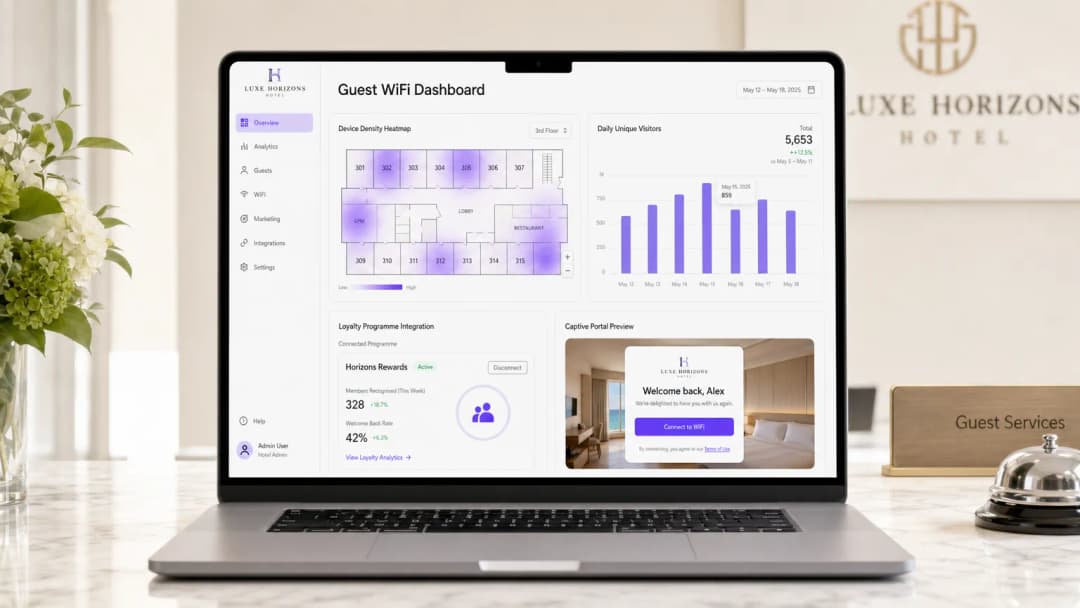
For modern hotel operations, guest WiFi has evolved from a basic amenity into a critical infrastructure layer that drives revenue, loyalty, and operational efficiency. This guide details how to improve the hotel customer experience using WiFi, transforming passive connectivity into an active engagement channel. We explore the technical architecture required to deliver personalised welcomes, targeted room upgrades, seamless loyalty program integration, and automated post-stay surveys.
By leveraging an enterprise-grade platform like Purple , IT leaders can move beyond simple bandwidth provision to deliver measurable business value. This reference covers deployment considerations, integration patterns, and the security standards necessary to implement robust Guest WiFi and WiFi Analytics solutions that meet the demands of today's connected traveller while ensuring compliance with global data protection regulations including GDPR and PCI DSS.
Technical Deep Dive: Personalisation Architecture
To achieve meaningful personalisation, the WiFi infrastructure must integrate seamlessly with the hotel's broader technology stack, specifically the Property Management System (PMS) and Customer Relationship Management (CRM) platforms. This section outlines the core architectural components and how they function in unison.
The Captive Portal as an Identity Layer
The Captive Portal serves as the primary authentication and data capture mechanism. Rather than using generic pre-shared keys (PSKs), modern deployments leverage sophisticated splash pages that support multiple authentication methods, including social sign-in (via OAuth 2.0 for Google, Facebook, or Apple), email registration, and direct loyalty program credential verification. This layer is responsible for identifying the user, obtaining necessary consents under Article 7 of the GDPR, and passing identity context to downstream analytics engines.
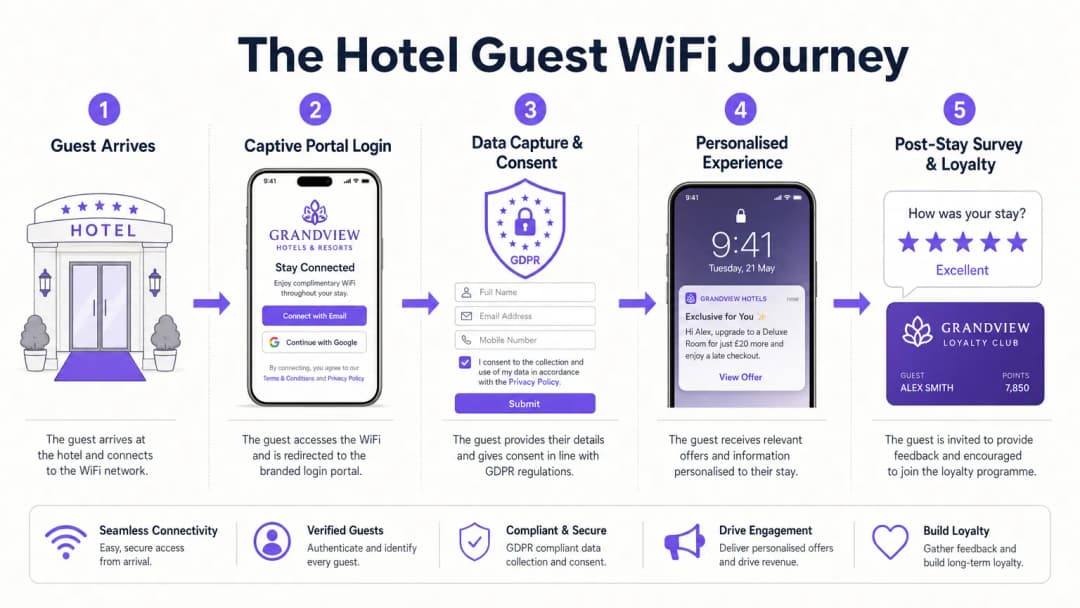
The SSID architecture should be designed with separation of concerns. A guest-facing SSID routes all unauthenticated traffic to the captive portal controller via DNS hijacking. Walled garden configurations must be meticulously maintained to allow access to all necessary external domains - social login providers, CDN-hosted portal assets, and any third-party authentication services - before the guest completes the login flow. Failure to maintain walled gardens is the most common cause of captive portal failure in production deployments.
Property Management System Integration
The true value of a WiFi Analytics platform is unlocked through integration with the PMS. When a guest connects, the system can query the PMS using their authenticated identity (email or loyalty number) to retrieve their current booking status, room number, and loyalty tier in real-time. This data exchange allows the captive portal to dynamically render personalised content: a welcome message greeting the guest by name, their current loyalty points balance, or a targeted upgrade offer relevant to their current stay.
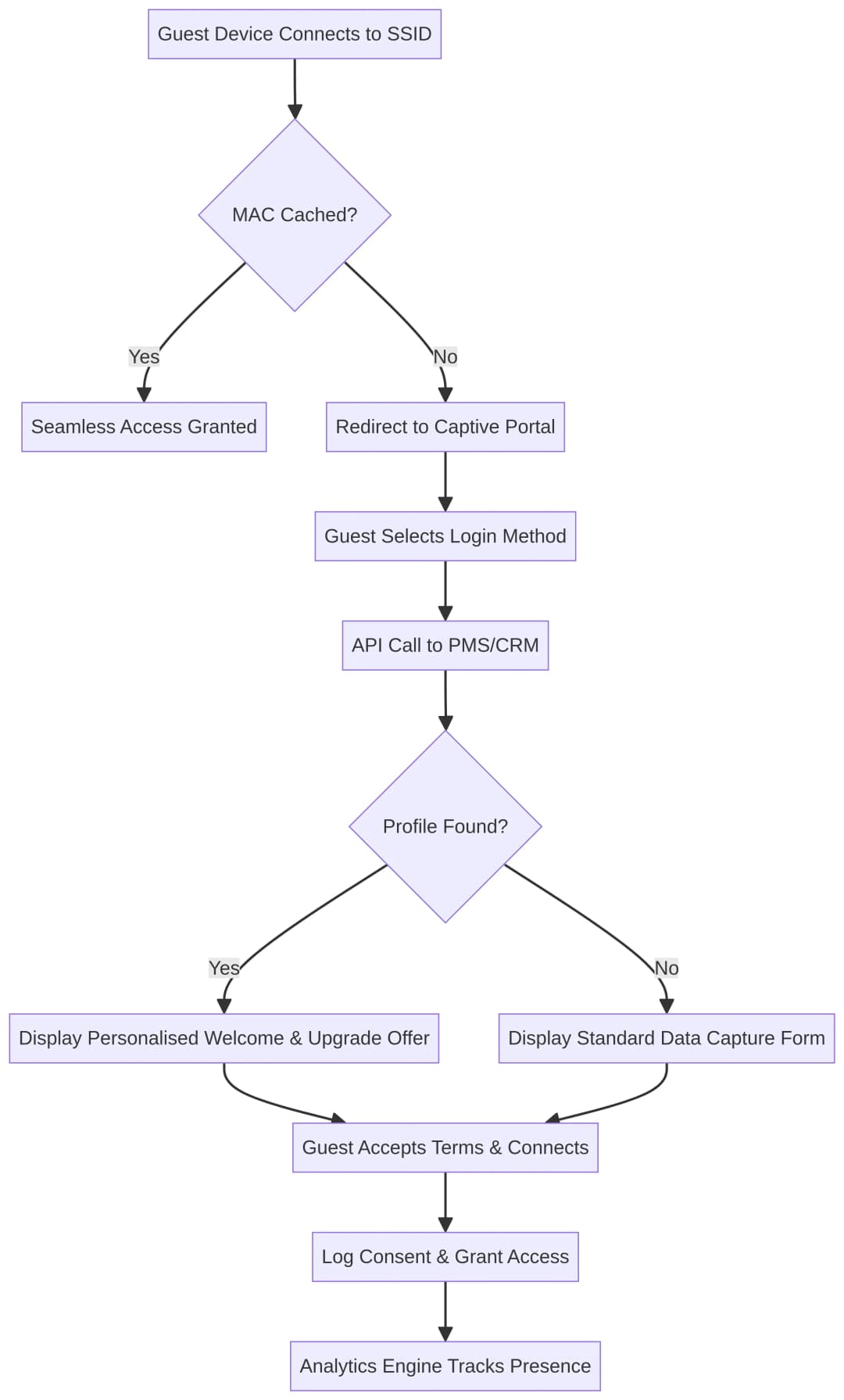
Integration is typically achieved by triggering a REST API call from the WiFi analytics platform to the PMS upon successful authentication. The PMS response payload is then used to populate a dynamic templating engine that renders the appropriate splash page variant. The latency of this API call is a critical performance consideration; the call must complete within a few hundred milliseconds to avoid degrading the user experience.

Presence Analytics and Spatial Intelligence
Once authenticated, the analytics engine begins processing presence data. By analysing signal strength (RSSI) from multiple access points, the system can determine dwell times and movement patterns throughout the venue. This spatial intelligence is crucial for understanding how guests utilise hotel amenities - from the lobby to the restaurant to the spa. Purple, functioning as a free Identity Provider for services like OpenRoaming under a Connect licence, further simplifies this by allowing returning guests to log in securely and automatically across different properties without needing to re-authenticate.
The diagram below illustrates the authentication and personalisation decision flow:
Implementation Guide: Step-by-Step Deployment
Deploying a comprehensive WiFi engagement solution requires careful planning and coordination between IT, marketing, and operations teams. The following phases provide a structured roadmap for deployment.
Phase 1: Infrastructure Readiness and Network Architecture
Before implementing a captive portal, ensure that the underlying wireless infrastructure is capable of supporting the anticipated device density and throughput requirements.
| Consideration | Recommendation | Standard |
|---|---|---|
| SSID Strategy | Single Guest SSID utilising a captive portal; separate Corporate SSID utilising 802.1X | IEEE 802.11i |
| Network Segmentation | Dedicated VLAN for guest traffic, isolated from corporate and POS networks | PCI DSS Requirement 1 |
| AP Density | Perform RF site surveys; target minimum RSSI of -65 dBm across venue | IEEE 802.11k/v/r |
| Security Protocols | Utilise WPA3-SAE on Guest SSID where device compatibility permits | IEEE 802.11ax |
| Throughput Baseline | Minimum 5 Mbps per concurrent device in high-density areas | Vendor-neutral best practice |
Ensure guest traffic is strictly isolated from corporate and operational networks via a dedicated VLAN. This is not just a best practice; it is a mandatory control under PCI DSS if any payment systems operate over the same physical infrastructure.
Phase 2: Captive Portal Configuration and Branding
The captive portal is often the first digital touchpoint a guest experiences on-property. Its design and performance directly impact guest perception of the hotel brand.
Configure authentication options to balance friction with data acquisition. Email and social login are standard configurations, but integrating direct loyalty programme authentication provides the highest-value identity data. Implement dynamic content rules to display different splash pages based on variables like repeat versus new visitor status, time of day, or specific venue locations. For example, a guest connecting in the spa should see a different welcome experience to a guest connecting in the lobby.
All data acquisition must comply with GDPR. Implement clear, granular opt-in checkboxes for marketing communications and ensure consent logs are written to a tamper-proof audit trail. The legal basis for processing should be clearly stated on the splash page.
Stage Three: PMS and CRM Integration
This is the most critical step for delivering personalised welcomes and room upgrades.
Establish a secure API connection between the WiFi platform and the PMS and CRM. Define how fields in the captive portal map to customer profiles in the CRM and set up automated triggers. For example, if a guest authenticates and the PMS confirms they are staying in a standard room and suite inventory is available, trigger a captive portal interstitial offering a paid upgrade. This offer should come with a clear call-to-action and a time-limited incentive to drive conversion.
Stage Four: Post-Stay Survey Automation
Configure the analytics platform to monitor guest presence. When a guest's device has not been seen on the network for a specified duration - typically 12-24 hours, indicating check-out - trigger a webhook to the email marketing platform. This webhook triggers a post-stay NPS or CSAT survey email, ensuring it is sent while the experience is still fresh to maximise response rates.
Best Practices for Hospitality WiFi Deployments
These recommendations reflect industry-standard approaches for WiFi deployments in hospitality and are applicable across multiple venue types including retail , healthcare , and transport .
Prioritise frictionless login for repeat visitors. Utilise MAC address caching or standards like Passpoint (Hotspot 2.0 / IEEE 802.11u) to automatically authenticate returning guests without them needing to re-enter credentials. A guest staying for three nights should only encounter the captive portal once.
Leverage location-based analytics responsibly. Presence analytics are powerful but must be handled carefully. Ensure your data retention policies are clearly stated and that guests are informed of presence tracking in the privacy policy linked from the captive portal.
Automate post-stay interaction. Do not rely on manual PMS exports to trigger survey emails. Use network presence data as the trigger to ensure timeliness and accuracy.
Ensure any payment flows are PCI DSS compliant. If the captive portal processes payments for premium bandwidth tiers or upgrade purchases, the entire payment flow must comply with PCI DSS. Use tokenised hosted payment pages from a certified payment gateway rather than processing card data on your own infrastructure.
Align WiFi with loyalty strategy. Allow guests to authenticate to the WiFi using their loyalty credentials. This establishes a direct, persistent link between on-property digital behaviour and loyalty profiles, allowing for richer personalisation during future stays.
For additional context on enterprise network evolution, see Hotel WiFi: The Complete Guide for Hoteliers and WiFi para Hoteles: La Guía Completa para Hoteleros .
Troubleshooting and Risk Mitigation
Captive Portal Not Rendering
Symptom: Guest connects to the SSID but the splash page does not appear, or displays incorrectly.
Root Cause: The most common causes are misconfigured walled gardens, DNS redirection failures, or device-level security features blocking the HTTP redirect that triggers the portal.
Mitigation: Audit walled gardens regularly to ensure all required domains are whitelisted. Train front desk staff to guide guests to manually trigger the portal by navigating to a non-HTTPS URL. Monitor portal render success rates through the analytics dashboard and set up alerts for unusual drops.
Low Marketing Opt-In Rates
Symptom: High WiFi connection rates, but low acquisition of actionable email addresses or marketing consent.
Root Cause: The value proposition for opting in is unclear, or forms are too long and cumbersome.
Mitigation: Implement progressive profiling. Offer a frictionless one-click social login for basic access, then offer a clear value exchange - higher bandwidth, a complimentary drink, or instant loyalty points - in exchange for completing an extended profile.
Inaccurate Presence Analytics
Symptom: Heatmaps show erratic or illogical guest movement patterns that do not match physical observations.
Root Cause: Insufficient AP density, poor AP placement, RF signal bleed between zones, or lack of calibration in the analytics platform.
Mitigation: Conduct regular RF site surveys. Ensure APs are deployed at a density that supports location analytics as well as coverage needs. Calibrate the analytics platform using accurate floor plans and physical scale measurements.
MAC Randomisation Impacting Guest Recognition
Symptom: System fails to recognise returning guests, resulting in known loyalty members getting a generic portal experience.
Root Cause: Modern iOS and Android devices use per-network randomised MAC addresses that can change between visits.
Mitigation: Shift recognition strategies from the hardware layer (MAC address) to the identity layer. Require guests to authenticate using a persistent identifier (email or loyalty number) on the captive portal. Store this identity in the CRM and use it as the primary key for all personalisation logic.
ROI and Business Impact
Implementing a sophisticated WiFi analytics platform transforms a cost centre into a revenue-generating asset. Business impact can be measured across multiple dimensions.
| Metric | Typical Benchmark | With WiFi Analytics Platform | Lift |
|---|---|---|---|
| Loyalty Programme Sign-up Rate | 5-8% of guests (front desk) | 20-35% of connected guests | 3-4x lift |
| Room Upgrade Conversion Rate | 2-3% (front desk upsell) | 8-15% (targeted portal offer) | 3-5x lift |
| Post-stay Survey Response Rate | 8-12% (delayed email) | 25-40% (triggered within hours) | 2-3x lift |
| Guest Satisfaction Score (NPS) | Baseline | +10-15 NPS points | Measurable lift |
These numbers are indicative and will vary based on property type, guest demographics, and the quality of the personalisation logic implemented. The key driver of ROI is the quality of the PMS and CRM integration; a poorly integrated system that cannot differentiate a repeat guest from a new visitor will yield significantly lower returns.
For additional context on enterprise WiFi ROI and deployment considerations, see What is a Leased Line? Dedicated Business Internet and WiFi in Auto: Complete Guide for Enterprise in 2026 .
Key Definitions
Captive Portal
A web page that a user of a public-access network is obliged to view and interact with before full internet access is granted. Implemented via DNS interception or HTTP redirect at the network layer.
This is the primary mechanism for IT to enforce terms of service, capture guest identity data, present targeted marketing messages, and log GDPR consent. Its design and performance directly impact the guest's first digital impression of the hotel.
Walled Garden
A network access control mechanism that restricts unauthenticated users to a limited set of pre-approved domains before they complete the captive portal authentication flow.
Crucial for allowing devices to reach social login providers (Google, Facebook, Apple) and CDN-hosted portal assets before the guest has authenticated. Misconfiguration is the most common cause of captive portal failures in production.
MAC Randomization
A privacy feature in modern operating systems (iOS 14+, Android 10+) that generates a unique, randomised MAC address for each WiFi network a device connects to, preventing long-term cross-session device tracking.
IT teams must design authentication flows that rely on captured identity (email or loyalty ID) rather than persistent MAC addresses for long-term guest profiling and recognition.
Passpoint / Hotspot 2.0
An IEEE 802.11u-based standard that enables devices to automatically and securely connect to WiFi networks using pre-provisioned credentials, without requiring manual interaction with a captive portal.
Used to provide a seamless, cellular-like roaming experience for returning guests or loyalty members, eliminating captive portal friction on subsequent visits and across multiple properties.
Property Management System (PMS)
The core software application used by hotels to manage reservations, room assignments, check-in and check-out, billing, and guest profiles. Common platforms include Oracle OPERA, Mews, and Cloudbeds.
Integrating the WiFi analytics platform with the PMS via REST API is essential for enabling real-time, personalised captive portal experiences based on live reservation data, loyalty tier, and room type.
Presence Analytics
The use of WiFi infrastructure to detect the location and movement of wireless devices within a physical space by analysing RSSI (Received Signal Strength Indicator) data from multiple access points. Provides metrics including dwell time, footfall, and zone-to-zone movement.
Provides venue operations directors with actionable data on how guests use hotel facilities, informing staffing decisions, space layout optimisation, and the timing of targeted marketing communications.
VLAN Segmentation
The practice of dividing a single physical network into multiple logical networks (Virtual Local Area Networks) to isolate traffic flows and enforce access control policies at the network layer.
A mandatory security control to ensure that guest WiFi traffic is completely isolated from corporate systems, payment card networks, and operational infrastructure. Required under PCI DSS Requirement 1 for any environment where payment systems share physical network infrastructure.
OpenRoaming
A Wireless Broadband Alliance (WBA) federation standard that enables devices to automatically and securely connect to participating WiFi networks using a single identity credential, providing a seamless roaming experience across venues and operators.
Purple's role as a free identity provider for OpenRoaming under the Connect licence simplifies connectivity for guests, reducing login friction across multiple properties or participating venues. Particularly valuable for frequent business travellers.
Progressive Profiling
A data capture strategy that collects guest information incrementally across multiple interactions, rather than requiring all data fields to be completed in a single form submission.
Resolves the tension between marketing's desire for rich guest data and operations' requirement for frictionless onboarding. Guests provide basic information on first connection and are incentivised to provide additional data over time in exchange for tangible benefits.
Worked Examples
A 300-room business hotel wants to increase sign-ups for its new loyalty programme. Currently, guests connect via a generic PSK and front desk staff are struggling to meet sign-up targets during busy check-in periods. The hotel's CRM is Salesforce and the PMS is Oracle OPERA.
- Replace the PSK with an open SSID and deploy a captive portal via Purple's Guest WiFi platform.
- Configure the captive portal to offer tiered bandwidth: basic speed (5 Mbps) for email login, and premium high-speed access (25 Mbps) in exchange for joining the loyalty programme directly on the splash page.
- Integrate the WiFi platform's API with Salesforce CRM to automatically provision the new loyalty account and send a welcome email with the guest's points balance instantly upon sign-up.
- Configure a secondary trigger: if the guest's email is already in Salesforce (returning guest), skip the sign-up form and present a personalised welcome with their current points balance instead.
- Monitor conversion rates via the WiFi analytics dashboard and A/B test different value propositions (bandwidth vs. F&B voucher) to optimise the sign-up rate.
A luxury resort with 5 properties wants to send automated post-stay NPS surveys. Their current process relies on manual daily exports from the PMS, resulting in surveys arriving 3 - 4 days after checkout. Response rates are below 8%. They want to achieve a 25%+ response rate.
- Deploy a WiFi analytics platform that tracks guest presence via device association with access points across all 5 properties.
- Configure a 'Checkout Trigger' within the analytics engine: when a guest's device is not seen on the network for 18 hours (a threshold calibrated to avoid false triggers from guests who leave the property during the day), the system flags the profile as 'checked out'.
- Use a webhook to automatically push this event to the email marketing platform (e.g., Mailchimp or Braze), triggering the NPS survey email within 2 - 4 hours of the inferred departure.
- Personalise the survey email with the guest's name, property name, and stay dates pulled from the CRM.
- Set up a dashboard to monitor response rates per property and per survey trigger delay, allowing ongoing optimisation of the trigger threshold.
Practice Questions
Q1. You are deploying a new captive portal for a hotel chain with 10 properties. The marketing team wants to include a 10-field form to capture extensive guest data at every login, while the operations team wants a frictionless 1-click login to minimise complaints. How do you architect a solution that satisfies both requirements without compromising either goal?
Hint: Consider progressive profiling and the value exchange principle. Think about what the guest receives in return for each piece of data they provide.
View model answer
Implement progressive profiling with tiered access. Configure the captive portal to offer a frictionless one-click social login (Google or Apple) or simple email capture for basic, time-limited WiFi access at standard speed. Present a separate, optional 'Complete Your Profile' screen offering a clear value exchange - premium bandwidth tier, a complimentary F&B voucher, or immediate loyalty points - in return for completing the extended 10-field profile. This approach captures the data marketing needs from motivated guests without creating friction for every single connection. Track completion rates per field to identify and remove low-value data points that reduce conversion.
Q2. During a pilot deployment at a 250-room hotel, the analytics engine reports that guests are spending an average of 4 hours in the lobby, which contradicts physical observations by the operations team who estimate average lobby dwell time at under 30 minutes. What is the most likely technical cause and how do you resolve it?
Hint: Think about how devices behave when not actively in use, how the system defines 'presence', and what happens to device associations when guests move to their rooms.
View model answer
The most likely cause is RF signal bleed from the lobby access points into adjacent guest rooms, combined with an overly generous 'last seen' timeout in the analytics platform. Devices in rooms directly above or adjacent to the lobby are associating with lobby APs due to stronger signal strength, and the analytics platform is attributing their presence to the lobby zone. To resolve this: first, reduce the transmit power of lobby APs to limit signal bleed into upper floors; second, ensure guest room APs are deployed with sufficient density so devices prefer them over lobby APs; third, calibrate the analytics platform's zone boundary RSSI thresholds using physical floor plan data; and fourth, reduce the 'last seen' timeout to a value that reflects realistic lobby dwell patterns (e.g., 15 minutes).
Q3. A hotel wants to deliver a 'Welcome Back' personalised message to returning guests on the captive portal. After deployment, the system fails to recognise approximately 65% of guests who have stayed before and have profiles in the CRM. The hotel's IT team suspects MAC randomisation is the cause. How do you architect a permanent solution that resolves this without requiring hardware changes?
Hint: If the hardware identifier is unreliable between sessions, what other identifier can serve as a persistent anchor? Consider the authentication flow and what the guest already knows.
View model answer
Shift the identification strategy entirely from the hardware layer (MAC address) to the identity layer. The solution has two components. First, on the captive portal, require guests to authenticate using a persistent identifier - email address or loyalty programme number - rather than relying on MAC address recognition for returning guest detection. Second, configure the WiFi platform to perform a CRM lookup using the authenticated email or loyalty number at the point of login. If a matching profile is found, serve the personalised 'Welcome Back' experience regardless of the device's MAC address. The MAC address should be retained only as a session-level identifier for the duration of the current stay (for MAC caching to avoid re-authentication during the stay), not as a long-term identity anchor. This architectural change also resolves the issue for guests who use multiple devices during their stay.
Continue reading in this series
How to leverage SMS in marketing to increase return visits
This technical reference guide outlines how enterprise venues can integrate WiFi analytics with SMS marketing engines to drive repeat visits. It details the architecture required to capture real-time presence data, trigger automated SMS campaigns based on physical behaviour, and measure the direct impact on return rates. By aligning network infrastructure with marketing automation, IT and operations teams can establish a high-yield channel for customer retention.
First-party data marketing: a comprehensive guide for businesses
This guide explains how to build a robust first-party data marketing strategy using enterprise Guest WiFi networks. It covers the technical architecture for secure data capture via captive portals, GDPR-compliant consent workflows, CRM integration patterns, and automated campaign deployment. Venue operators across hospitality, retail, events, and public-sector environments will find actionable guidance for turning passive visitors into a high-quality, owned marketing audience.
Customer data management platform: a comprehensive guide for businesses
This guide explains how venue operators can deploy a customer data management platform to unify fragmented visitor data. It covers technical architecture, integration strategies, and the critical role of Guest WiFi in building first-party data profiles.