
Hotel WiFi: हॉटेल मालकांसाठी संपूर्ण मार्गदर्शक
एंटरप्राइझ - ग्रेड हॉटेल WiFi नेटवर्कचे डिझाइन, उपयोजन आणि कमाई कशी करावी ते शोधा. यामध्ये PMS इंटिग्रेशन्स (Opera, Mews), टायर्ड बँडविड्थ ROI, PCI DSS अनुपालन आणि अतिथी डेटा कॅप्चर समाविष्ट आहे.
Video overview
हे मार्गदर्शक ऐका
पॉडकास्ट ट्रान्सक्रिप्ट पहा
आमच्या मुख्य मालिकेचा भाग: द मास्टर गेस्ट WiFi मार्गदर्शक →
Executive Summary
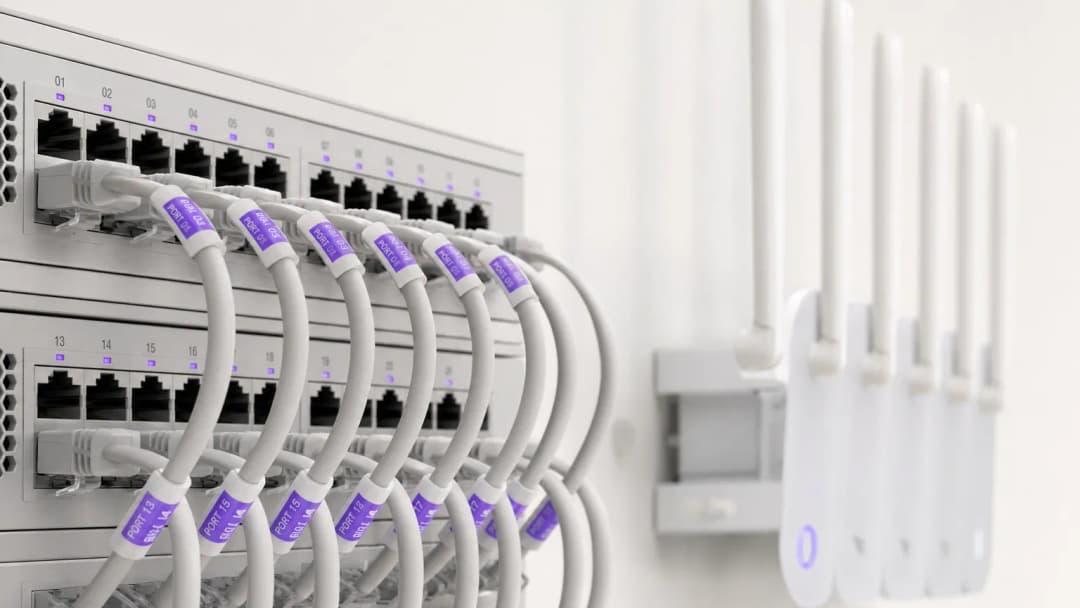
आधुनिक हॉटेल व्यावसायिकांसाठी, अतिथी WiFi ही केवळ एक मूलभूत सुविधा असण्यापेक्षा बरेच काही आहे - हे अतिथींच्या समाधान गुणांचे, पुन्हा थेट बुकिंग मिळवण्याचे आणि कार्यात्मक कार्यक्षमतेचे मुख्य चालक आहे. हॉटेलचे अतिथी गेस्ट रूम, लॉबी, कॉन्फरन्स स्पेस आणि बाहेरील सुविधांमध्ये अखंड, हाय-स्पीड कनेक्टिव्हिटीची अपेक्षा करतात. त्याच वेळी, वरिष्ठ IT नेत्यांनी PCI-DSS सुरक्षा अनुपालन आणि डेटा गोपनीयता नियमांसह उच्च समवर्ती बँडविड्थच्या मागण्यांचा समतोल राखला पाहिजे.
हे सर्वसमावेशक मार्गदर्शक हॉटेल IT व्यवस्थापक, वेन्यू ऑपरेशन्स संचालक आणि जनरल मॅनेजरना एंटरप्राइझ-ग्रेड हॉटेल WiFi नेटवर्कचे डिझाइन, उपयोजन आणि कमाई करण्यासाठी एक व्यावहारिक फ्रेमवर्क प्रदान करते. आम्ही इन-रूम ॲक्सेस पॉइंट आर्किटेक्चर, प्रॉपर्टी मॅनेजमेंट सिस्टम (PMS) इंटिग्रेशन्स, टियर बँडविड्थ महसूल मॉडेल्स आणि अतिथी WiFi लॉगिनचे सत्यापित फर्स्ट-पार्टी मार्केटिंग डेटामध्ये कसे रूपांतर करावे हे एक्सप्लोर करतो.
मुख्य हॉटेल WiFi संकल्पनांवरील आमच्या सोबती ब्रीफिंग ऐका:
Technical Architecture आणि नेटवर्कचे वर्गीकरण
लॉजिकल VLAN वर्गीकरण
एंटरप्राइज हॉटेल WiFi चा पाया मजबूत लॉजिकल नेटवर्क वर्गीकरण हा आहे. सुरक्षितता किंवा परफॉर्मन्सशी कोणतीही तडजोड न करता एकाच प्रत्यक्ष पायाभूत संरचनेने (physical infrastructure) वेगवेगळ्या वापरकर्त्यांच्या गटांना हाताळले पाहिजे - हॉटेलचे पाहुणे (guests), कर्मचाऱ्यांचे कामकाज, पॉइंट-ऑफ-सेल (POS) टर्मिनल्स आणि बिल्डिंग ऑटोमेशन (IoT/HVAC).
पाहुण्यांच्या डेटा ट्रॅफिकला समर्पित Virtual Local Area Networks (VLANs) वर वेगळे केले पाहिजे. PCI-DSS अनुपालनासाठी (compliance) पेमेंट प्रोसेसिंग (POS) आणि प्रॉपर्टी मॅनेजमेंट सिस्टीम्स (PMS) यांना कूटबद्ध (encrypted) स्टाफ VLANs वर वेगळे करणे ही अनिवार्य अट आहे. याव्यतिरिक्त, गेस्ट VLANs ने क्लायंटचे विलगीकरण (client isolation) लागू केले पाहिजे, जेणेकरून पाहुण्यांचे डिव्हाइसेस स्थानिक वायरलेस नेटवर्कवर एकमेकांशी संवाद साधू शकणार नाहीत.
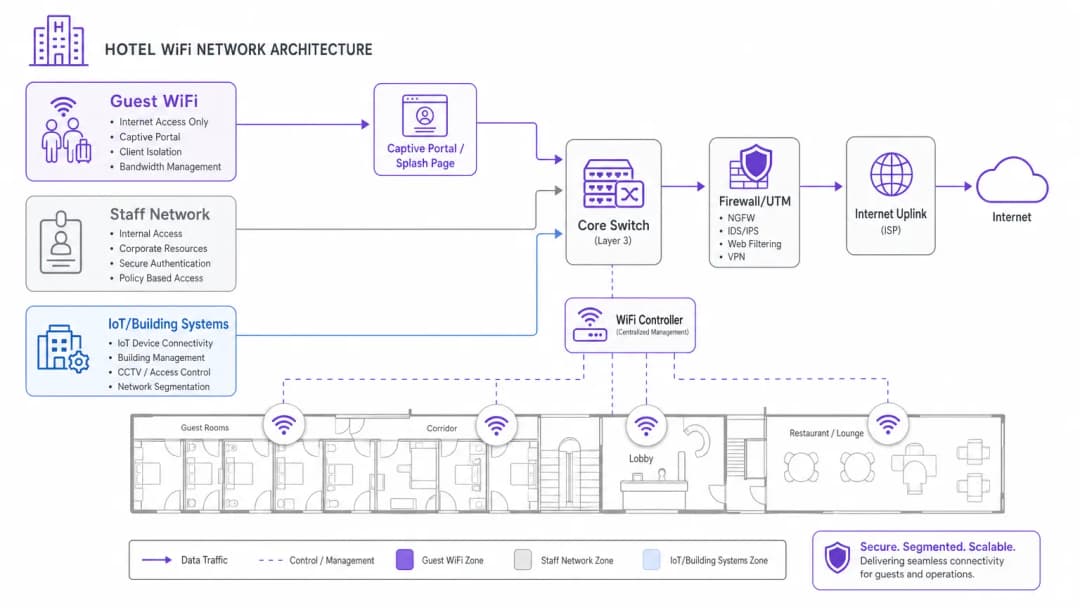
वायरलेस डेन्सिटी आणि ॲक्सेस पॉइंटची मांडणी
हॉटेलच्या जुन्या WiFi डिझाईन्स कॉरिडॉरमध्ये बसवलेल्या ॲक्सेस पॉइंट्स (APs) वर अवलंबून असत, जे दर ५ ते ७ रूम्सच्या अंतरावर लावले जायचे. आधुनिक हॉटेलच्या इमारतींमध्ये, जिथे प्रबलित काँक्रीट (reinforced concrete), लिफ्टचे शाफ्ट्स, टाईल्स लावलेले बाथरुम्स आणि फॉइल-बॅक इन्सुलेशन असते, तिथे कॉरिडॉरमधील सिग्नल्स पाहुण्यांच्या बेड आणि डेस्कपर्यंत पोहोचण्यापूर्वीच वेगाने क्षीण (attenuate) होतात.
सध्याचा उद्योगाचा प्रमाणित दर्जा (industry standard) हा इन-रूम वॉल-प्लेट AP डिप्लॉयमेंट (प्रति गेस्ट रूम १ AP किंवा दर २ रूम्समागे १ AP) असा आहे. इन-रूम WiFi 6 APs स्पष्ट ५GHz आणि ६GHz कव्हरेज, व्हिडिओ कॉल्ससाठी कमी लॅटन्सी (low latency) आणि स्मार्ट टीव्ही, IP फोन्स आणि VoIP ड्रॉप लाईन्ससाठी इन-बिल्ट वायर्ड इथरनेट पोर्ट्स प्रदान करतात.
तुमच्या विशिष्ट सेटअपबद्दल काही प्रश्न आहेत का?
आमची टीम ८०,००० हून अधिक वेन्यूजमधील वेन्यू ऑपरेटर्स, IT मॅनेजर्स आणि नेटवर्क इंजिनिअर्ससोबत काम करते. २० मिनिटांचा कॉल बुक करा आणि तुमच्यासारख्या इतरांनी ही समस्या कशी सोडवली हे आम्ही तुम्हाला दाखवू.
PMS इंटिग्रेशन आणि गेस्ट ऑथेंटिकेटेड पोर्टल्स
तुमच्या गेस्ट WiFi Captive Portal ला तुमच्या प्रॉपर्टी मॅनेजमेंट सिस्टीम (PMS) सोबत इंटिग्रेट करणे - जसे की Oracle Opera, Mews, Stayntouch किंवा Cloudbeds - साध्या नेटवर्क ॲक्सेसला एका वैयक्तिकृत गेस्ट अनुभवात रूपांतरित करते.
PMS ऑथेंटिकेशन कसे काम करते
१. गेस्ट असोसिएशन: पाहुणे हॉटेलच्या WiFi SSID शी कनेक्ट होतात आणि त्यांना ब्रँडेड Captive Portal वर रिडायरेक्ट केले जाते. २. रूम व्हेरिफिकेशन: पाहुणे त्यांचा रूम नंबर आणि आडनाव (किंवा बुकिंग संदर्भ) प्रविष्ट करतात. ३. API लुकअप: सक्रिय मुक्काम स्थितीची (active stay status) पडताळणी करण्यासाठी पोर्टल सुरक्षित API द्वारे PMS डेटाबेसला क्वेरी पाठवते. ४. प्रिव्हिलेज मॅपिंग: पाहुण्यांच्या लॉयल्टी टियरच्या आधारे नेटवर्क टेलर्ड बँडविड्थ पॉलिसी लागू करते (उदा. VIP लोकांसाठी ५० Mbps हाय-स्पीड ॲक्सेस विरुद्ध सामान्य पाहुण्यांसाठी १० Mbps).
हॉटेल WiFi ॲक्सेस मॉडेल्सची तुलना
| ॲक्सेस मॉडेल | ऑथेंटिकेशन पद्धत | पाहुण्यांचा अनुभव | महसूल / डेटाचे मूल्य | सुरक्षितता आणि अनुपालन |
|---|---|---|---|---|
| PMS ऑथेंटिकेटेड | रूम नंबर + आडनाव | अखंड, वैयक्तिकृत स्वागत | उच्च (प्रोफाइल आणि मुक्कामाचा इतिहास सिंक करतो) | उच्च (पडताळणी केलेले हॉटेलचे पाहुणे) |
| सोशल / फॉर्म ऑप्ट-इन | ईमेल, LinkedIn, Google | जलद, एका क्लिकवर लॉगिन | उच्च (पडताळणी केलेले ईमेल ऑप्ट-इन्स मिळवते) | मध्यम (क्लायंट विलगीकरण) |
| टायर्ड पेड पास | क्रेडिट कार्ड / रूम चार्ज | मोफत विरुद्ध प्रीमियम स्पीड्सचा पर्याय | उच्च (थेट अतिरिक्त महसूल) | उच्च (एनक्रिप्टेड पेमेंट गेटवे) |
| Open Click-Through | नियम आणि अटींचे बटण स्वीकारा | झटपट प्रवेश | कमी (कोणताही संपर्क डेटा संकलित केला जात नाही) | मूलभूत (क्लायंट आयसोलेटेड) |
Monetising Hotel WiFi & Tiered Bandwidth ROI
उच्च-बँडविड्थ व्हिडिओ स्ट्रीमिंग (4K Netflix, YouTube, Twitch) आणि रिमोट काम करणाऱ्यांचे व्हिडिओ कॉन्फरन्सिंग संध्याकाळच्या वेळी अतिथींच्या नेटवर्क वापरावर वर्चस्व गाजवतात. अनियंत्रित खुली बँडविड्थ अपलिंक संपृक्तता आणि खराब अतिथी पुनरावलोकनांना कारणीभूत ठरते.
टियर बँडविड्थ लागू करणे
हॉटेल व्यावसायिक दोन-टियर बँडविड्थ मॉडेल लागू करू शकतात:
- मोफत बेसिक टियर: प्रति डिव्हाइस 5 - 10 Mbps सिमेट्रिक स्पीड - वेब ब्राउझिंग, ईमेल आणि सोशल मेसेजिंगसाठी योग्य.
- प्रीमियम हाय-स्पीड टियर: व्यवसाय प्रवाशांसाठी किंवा निष्ठावंत सदस्यांसाठी $7.99 ते $12.99 प्रति 24 तासांसाठी (किंवा विनामूल्य) 30 - 50 Mbps उच्च-प्राधान्य बँडविड्थ.
ही रणनीती सर्व अतिथींसाठी सुरळीत मूलभूत कामगिरीची हमी देते आणि व्यवसाय प्रवासी तसेच पॉवर युजर्सकडून आवर्ती महसूल मिळवून देते.
अतिथी नेटवर्क धोरणे आणि एंटरप्राइझ सुरक्षिततेबद्दल अधिक सखोल माहितीसाठी, आमचे Guest WiFi Guide, WiFi Marketing Guide, आणि Enterprise WiFi Security Guide एक्सप्लोर करा.
महत्वाच्या व्याख्या
PMS इंटिग्रेशन
अतिथींना खोली क्रमांक किंवा नावाने प्रमाणित करण्यासाठी आणि प्रोफाइल प्राधान्ये सिंक करण्यासाठी Property Management Systems (उदा. Oracle Opera, Mews, Stayntouch) सोबत अतिथी WiFi कॅप्टिव्ह पोर्टल्स जोडणे.
अखंड अतिथी चेक - इन, VIP बँडविड्थ नियम आणि मुक्कामानंतरचे स्वयंचलित ईमेल ट्रिगर्स यासाठी आवश्यक आहे.
क्लायंट आयसोलेशन
एक सुरक्षा वैशिष्ट्य जे एकाच वायरलेस नेटवर्कशी कनेक्ट केलेल्या अतिथी उपकरणांना एकमेकांना शोधण्यापासून किंवा एकमेकांशी संवाद साधण्यापासून रोखते.
खोल्यांच्या दरम्यान लॅटरल सायबर हल्ले आणि डेटा स्निफिंग रोखण्यासाठी हॉटेलच्या अतिथी नेटवर्कवर अनिवार्य आहे.
टायर्ड बँडविड्थ
अतिथींच्या श्रेणीवर आधारित विविध बँडविड्थ मर्यादा आणि प्राधान्ये वाटप करणे (उदा. मानक ब्राउझिंगसाठी विनामूल्य ५ Mbps विरूद्ध ४K स्ट्रीमिंग आणि गेमिंगसाठी सशुल्क ५० Mbps).
हॉटेल मालकांना सर्व अतिथींसाठी अपलिंक क्षमता सुरक्षित ठेवून, उच्च - बँडविड्थ मागणीतून कमाई करण्याची अनुमती देते.
इन - रूम ॲक्सेस पॉइंट (AP)
कॉरिडॉरमध्ये तुरळक ठिकाणी छतावर माउंट करण्याऐवजी अतिथींच्या खोल्यांच्या आत लो - प्रोफाइल वॉल - प्लेट WiFi ६ ॲक्सेस पॉइंट्स तैनात करणे.
बाथरूमच्या टाईल्स, फॉइल इन्सुलेशन आणि जड फायर डोअर्समुळे कॉरिडॉलमधून सिग्नलमध्ये येणारा अडथळा दूर करतो.
सोडवलेली उदाहरणे
एक २५० खोल्यांचे बिझनेस हॉटेल आहे जेथे संध्याकाळच्या गर्दीच्या वेळी (संध्याकाळी ७ ते रात्री १०) WiFi च्या गतीबाबत अतिथींच्या तीव्र तक्रारी येतात. ही मालमत्ता सध्या मध्यवर्ती कॉरिडॉरमध्ये माउंट केलेल्या ॲक्सेस पॉइंट्ससह ५०० Mbps ब्रॉडबँड कनेक्शनवर अवलंबून आहे. कोणती नेटवर्क आर्किटेक्चर अपग्रेड लागू केली पाहिजे?
१. गर्दीच्या वेळी एकाच वेळी होणाऱ्या स्ट्रीमिंग ट्रॅफिकला हाताळण्यासाठी हमी दिलेल्या SLA सह इंटरनेट अपलिंक १ Gbps डेडिकेटेड लीज्ड लाइनवर अपग्रेड करा. २. भिंतींमुळे येणारा अडथळा (attenuation) दूर करण्यासाठी वायरलेस आर्किटेक्चर इन - रूम AP मॉडेलवर (प्रति खोली १ AP किंवा दर २ खोल्यांमागे १) रिडिझाईन करा. ३. गेस्ट VLAN वर बँडविड्थ शेपिंग लागू करा (उदा. प्रति क्लायंट १० Mbps बेसलाइन) आणि सोबतच एक पर्यायी सशुल्क ५० Mbps हाय - स्पीड टियर उपलब्ध करा.
एका बुटीक हॉटेल ग्रुपला थेट बुकिंग मोहिमेसाठी अतिथींचे सत्यापित संपर्क तपशील कॅप्चर करायचे आहेत आणि त्याच वेळी GDPR आणि गोपनीयता नियमांचे काटेकोर पालन सुनिश्चित करायचे आहे. कॅप्टिव्ह पोर्टल कसे कॉन्फिगर केले पाहिजे?
प्रॉपर्टी मॅनेजमेंट सिस्टम (PMS) शी इंटिग्रेट केलेले कॅप्टिव्ह पोर्टल तैनात करा. नेटवर्कच्या सेवा शर्तींपासून स्वतंत्र, मार्केटिंग संवादांसाठी स्पष्ट, अनबंडल केलेले ऑप्ट - इन चेकबॉक्स आवश्यक असण्यासाठी लॉगिन स्क्रीन कॉन्फिगर करा. हे पोर्टल आपोआप संमतीच्या वेळा (timestamps), IP ॲड्रेस आणि MAC ॲड्रेस रेकॉर्ड करते आणि सत्यापित अतिथी प्रोफाइल सेंट्रल मार्केटिंग प्लॅटफॉर्मवर सिंक करते.
सराव प्रश्न
Q1. तुमच्या हॉटेल ऑपरेशन्स डायरेक्टरला आउटडोअर पूल टेरेसवरील नवीन मोबाईल पॉइंट - ऑफ - सेल (POS) टॅब्लेट सध्याच्या गेस्ट WiFi नेटवर्कशी कनेक्ट करायचे आहेत. तुम्ही कसा प्रतिसाद द्याल?
टीप: PCI DSS अनुपालन आणि नेटवर्क सेगमेंटेशनचा विचार करा.
नमुना उत्तर पहा
या विनंतीला नकार द्या. पेमेंट टर्मिनल्स एका खुल्या गेस्ट WiFi नेटवर्कशी कनेक्ट करणे PCI DSS नियमांचे उल्लंघन करते आणि क्रेडिट कार्ड डेटा धोक्यात आणते. POS टॅब्लेट हे WPA3-Enterprise द्वारे सुरक्षित असलेल्या समर्पित, एन्क्रिप्टेड स्टाफ/POS VLAN शी कनेक्ट केलेले असणे आवश्यक आहे, जे अतिथींच्या ट्रॅफिकपासून पूर्णपणे वेगळे असेल.
Q2. हॉटेल लॉबीचे सौंदर्य टिकवून ठेवण्यासाठी एका इंटिरियर डिझायनरने छतावर माउंट केलेले ॲक्सेस पॉइंट्स सुशोभित पितळी घरांच्या (brass enclosures) आत लपवून ठेवण्याचा आग्रह धरला आहे. याचा तांत्रिक परिणाम काय होईल?
टीप: मेटॅलिक एन्क्लोजर्सचा रेडिओ सिग्नलवर कसा परिणाम होतो याचा विचार करा.
नमुना उत्तर पहा
धातूचे कव्हर्स फॅराडे केज (Faraday cages) सारखे काम करतात, ज्यामुळे RF सिग्नल मोठ्या प्रमाणावर अडवले जातात आणि डेड झोन तयार होतात. ॲक्सेस पॉइंट्स बाहेर किंवा RF-पारदर्शक कव्हर्सच्या (जसे की प्लास्टिक किंवा ड्रायवॉल) मागे बसवणे आवश्यक आहे. ब्रँड-मंजूर विनाइल स्किन्स WiFi च्या कामगिरीमध्ये अडथळा न आणता सजावटीशी जुळवून घेऊ शकतात.
Q3. हॉटेलचे मार्केटिंग मॅनेजर गेस्ट WiFi शी जोडणाऱ्या प्रत्येक अतिथीची हॉटेलच्या दैनंदिन न्यूजलेटरसाठी स्वयंचलितपणे वर्गणी (subscribe) करण्याची मागणी करतात. हे कसे हाताळले पाहिजे?
टीप: GDPR आणि गोपनीयता कायद्यांतर्गत स्पष्ट संमतीच्या आवश्यकतांचा विचार करा.
नमुना उत्तर पहा
पोर्टल अतिथींची स्वयंचलितपणे वर्गणी करू शकत नाही. संमती स्पष्ट, माहितीपूर्ण आणि स्वतंत्र असणे आवश्यक आहे. स्प्लॅश पेजवर मार्केटिंग निवडीसाठी एक न टिकवलेला (unticked) चेकबॉक्स असणे आवश्यक आहे, जो नेटवर्कच्या सेवा अटी स्वीकारण्यापेक्षा वेगळा असावा.
वारंवार विचारले जाणारे प्रश्न
Why is in-room AP deployment preferred over corridor access points in hotels?
Modern hotel construction materials (reinforced concrete, foil insulation, fire doors, and bathroom tile) cause RF attenuation of 10 to 18 dB per wall. Corridor-mounted APs struggle to penetrate guest rooms, forcing client devices to transmit at maximum power and degrading battery life. In-room wall-plate APs provide line-of-sight 5 GHz and 6 GHz coverage, sub-millisecond roaming latency, and built-in Gigabit Ethernet switch ports for smart TVs, VoIP phones, and IoT thermostats.
How does hotel WiFi integrate with Property Management Systems (PMS)?
Guest WiFi captive portals integrate with hotel PMS platforms (such as Oracle Opera, Mews, Stayntouch, and Cloudbeds) via secure REST APIs or Micros FIAS protocols. When guests connect, they authenticate using their room number and surname or reservation code. The portal validates active stay status against the PMS in real time, applies VIP bandwidth profiles automatically, and posts optional tiered service charges directly to the guest folio.
How do tiered WiFi bandwidth passes generate revenue for hoteliers?
Tiered bandwidth models provide a complimentary baseline speed (such as 10 Mbps for email and social browsing) while offering paid high-speed passes (such as 50 to 100 Mbps for 4K video streaming, gaming, or remote work videoconferencing). Guests purchase 24-hour or multi-day passes via credit card, Apple Pay, or direct room charge. This protects core uplink capacity during peak evening hours while generating predictable ancillary revenue.
What network segmentation is required for hotel WiFi and PCI DSS compliance?
Hotels must maintain strict Layer-2 and Layer-3 network segmentation using dedicated Virtual Local Area Networks (VLANs). Guest WiFi traffic must be isolated on an independent guest VLAN with client isolation enabled, preventing guest devices from discovering or attacking one another. Point-of-Sale (POS) card terminals, Property Management Systems (PMS), and administrative staff devices must reside on separate, encrypted VLANs protected by next-generation firewall access control lists (ACLs) to satisfy PCI DSS Requirement 1.3.
How do hotels handle MAC address randomisation across returning guests?
iOS, Android, and Windows rotate randomized MAC addresses periodically, which can cause guests to see repeated login splash screens when returning to the hotel or moving between common areas. Enterprise platforms like Purple resolve this by issuing Passpoint (Hotspot 2.0) encrypted profiles or binding authenticated guest sessions to secure HTTP session tokens and verified user identity profiles rather than transient physical MAC addresses.
How does Purple improve guest WiFi ROI for hotels and resorts?
Purple turns hotel guest WiFi into a high-conversion marketing and operations asset. By streamlining captive portal logins with social and PMS authentication, Purple captures verified, GDPR-compliant guest profiles and syncs them with hospitality CRMs (such as HubSpot, Salesforce, and Revinate). Hoteliers leverage real-time footfall analytics, dwell times, and automated post-stay review triggers (TripAdvisor, Google Reviews) to drive repeat direct bookings and reduce OTA commission fees.
या मालिकेमध्ये पुढे वाचा
Guest WiFi कसा सेट करावा: एक सुरक्षित Enterprise कॉन्फिगरेशन मार्गदर्शिका
ही अधिकृत मार्गदर्शिका IT लीडर्स आणि नेटवर्क आर्किटेक्ट्सना सुरक्षित enterprise guest WiFi तैनात करण्यासाठी एक निश्चित ब्ल्यूप्रिंट प्रदान करते. यामध्ये अंतर्गत प्रणालींचे संरक्षण करताना सुसंगत फर्स्ट - पार्टी डेटा गोळा करण्यासाठी आवश्यक आर्किटेक्चर, WPA3 मायग्रेशन, VLAN सेगमेंटेशन आणि captive portal इंटिग्रेशन समाविष्ट आहे.
तुमचा इंटरनेट प्लॅन अपग्रेड न करता स्लो WiFi ची समस्या कशी सोडवायची
ISP बँडविड्थ न वाढवता एंटरप्राइज WiFi परफॉर्मन्स ऑप्टिमाइझ करण्याबाबत IT व्यवस्थापक आणि नेटवर्क आर्किटेक्ट्ससाठी एक सर्वसमावेशक तांत्रिक संदर्भ मार्गदर्शक. यामध्ये RF ट्यूनिंग, क्लायंट डेन्सिटी मॅनेजमेंट, QoS इम्प्लीमेंटेशन आणि अडथळे शोधण्यासाठी व ते दूर करण्यासाठी WiFi अॅनालिटिक्सचा वापर कसा करावा याचा समावेश आहे.
कॅम्पस WiFi नेटवर्क कसे तयार करावे: युनिव्हर्सिटी IT मार्गदर्शक
हे तांत्रिक मार्गदर्शक हाय डेंसिटी कॅम्पस WiFi नेटवर्क डिझाइन आणि तैनात करण्यासाठी सर्वसमावेशक आराखडा प्रदान करते, ज्यामध्ये ॲक्टिव्ह साईट सर्व्हे आणि ॲक्सेस पॉइंट प्लेसमेंटपासून ते कंट्रोलर आर्किटेक्चर, अखंड रोमिंग आणि सुरक्षित गेस्ट ऑनबोर्डिंगपर्यंत सर्व गोष्टींचा समावेश आहे. हे मार्गदर्शक विद्यापीठे आणि मोठ्या ठिकाणांवरील IT मॅनेजर, नेटवर्क आर्किटेक्ट आणि CTO यांच्यासाठी लिहिले गेले आहे ज्यांना चालू तिमाहीत वायरलेस उपयोजनाचे नियोजन आणि अंमलबजावणी करण्यासाठी प्रत्यक्ष कृतीयोग्य मार्गदर्शनाची आवश्यकता आहे. हे मार्गदर्शक उपयोजन जीवनचक्रामधील वास्तविक एकत्रीकरण बिंदूंवर Purple चे Guest WiFi आणि ॲनालिटिक्स प्लॅटफॉर्म देखील मॅप करते.
तुमच्या विशिष्ट सेटअपबद्दल काही प्रश्न आहेत का?
आमची टीम ८०,००० हून अधिक वेन्यूजमधील वेन्यू ऑपरेटर्स, IT मॅनेजर्स आणि नेटवर्क इंजिनिअर्ससोबत काम करते. २० मिनिटांचा कॉल बुक करा आणि तुमच्यासारख्या इतरांनी ही समस्या कशी सोडवली हे आम्ही तुम्हाला दाखवू.