
Hotel WiFi: Der komplette Leitfaden für Hoteliers
Entdecken Sie, wie Sie erstklassige Hotel WiFi Netzwerke für Unternehmen entwerfen, bereitstellen und monetarisieren. Deckt PMS-Integrationen (Opera, Mews), ROI durch gestaffelte Bandbreiten, PCI-DSS-Compliance und die Erfassung von Gästedaten ab.
Video overview
Diesen Leitfaden anhören
Podcast-Transkript ansehen
Teil unserer Kernserie: Der ultimative Leitfaden für Gäste WiFi →
Executive Summary
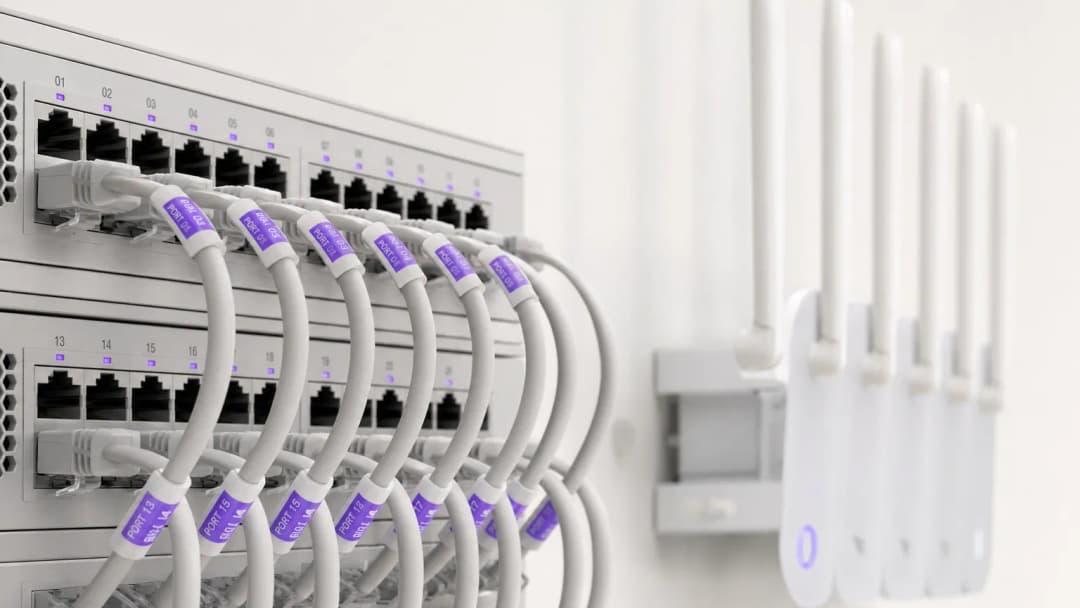
Für moderne Hoteliers ist Gäste-WiFi weit mehr als eine grundlegende Annehmlichkeit - es ist ein Haupttreiber für die Zufriedenheit der Gäste, wiederholte Direktbuchungen und die betriebliche Effizienz. Hotelgäste erwarten eine nahtlose Hochgeschwindigkeitsverbindung in den Zimmern, der Lobby, den Konferenzräumen und im Außenbereich. Gleichzeitig müssen IT-Leiter die hohen Anforderungen an die gleichzeitige Bandbreite mit der PCI DSS-Sicherheitskonformität und den Datenschutzbestimmungen in Einklang bringen.
Dieser umfassende Leitfaden bietet IT-Managern in Hotels, Betriebsleitern von Veranstaltungsorten und General Managern einen praktischen Rahmen für die Entwicklung, Bereitstellung und Monetarisierung von Hotel-WiFi-Netzwerken der Enterprise-Klasse. Wir befassen uns mit der Architektur von Access Points in den Zimmern, Integrationen in Property Management Systeme (PMS), gestaffelten Bandbreiten-Umsatzmodellen und der Frage, wie sich Gäste-WiFi-Logins in verifizierte First-Party-Marketingdaten umwandeln lassen.
Hören Sie sich unser begleitendes Briefing zu den wichtigsten Konzepten für Hotel-WiFi an:
Technische Architektur & Netzwerksegmentierung
Logische VLAN Segmentierung
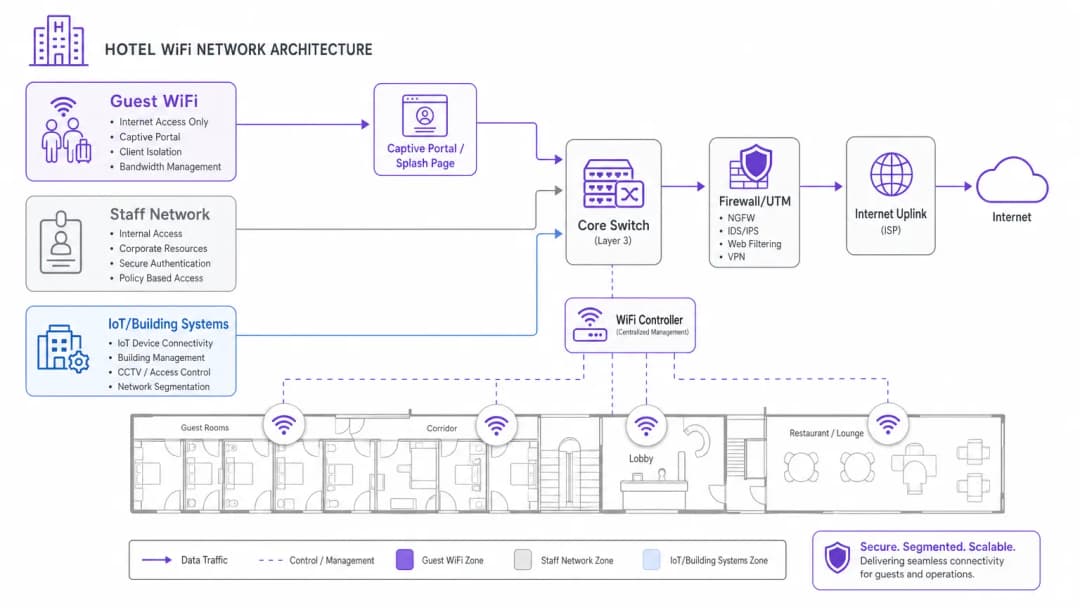
Die Grundlage von Enterprise-Hotel-WiFi ist eine strikte logische Netzwerksegmentierung. Eine einzige physische Infrastruktur muss verschiedene Benutzergruppen - Hotelgäste, Personalbetrieb, Point-of-Sale-Terminals (POS) und Gebäudeautomation (IoT/HVAC) - verwalten, ohne die Sicherheit oder Leistung zu beeinträchtigen.
Der Gastdatenverkehr muss auf dedizierten Virtual Local Area Networks (VLANs) isoliert werden. Die Trennung von Zahlungsabwicklung (POS) und Property Management Systemen (PMS) in verschlüsselte Mitarbeiter-VLANs ist eine zwingende Voraussetzung für die PCI-DSS-Compliance. Darüber hinaus müssen Gast-VLANs die Client-Isolierung erzwingen, um zu verhindern, dass Gastgeräte über das lokale drahtlose Netzwerk miteinander kommunizieren.
Wireless-Dichte & Platzierung der Access Points
Historische Hotel-WiFi-Designs basierten auf in Korridoren montierten Access Points (APs), die alle 5 bis 7 Zimmer platziert waren. In modernen Hotelgebäuden mit Stahlbeton, Aufzugsschächten, gefliesten Badezimmern und folienkaschierter Isolierung dämpfen Korridorsignale schnell ab, bevor sie die Betten und Schreibtische der Gäste erreichen.
Der aktuelle Branchenstandard ist die In-Room-Wandplatten-AP-Bereitstellung (1 AP pro Gästezimmer oder 1 AP pro 2 Zimmer). In-Room-WiFi-6-APs bieten eine saubere 5-GHz- und 6-GHz-Abdeckung, geringe Latenzzeiten für Videoanrufe und integrierte kabelgebundene Ethernet-Ports für Smart-TVs, IP-Telefone und VoIP-Leitungen.
Haben Sie Fragen zu Ihrem spezifischen Setup?
Unser Team arbeitet mit Standortbetreibern, IT-Managern und Netzwerktechnikern an über 80.000 Standorten zusammen. Buchen Sie ein 20-minütiges Gespräch und wir zeigen Ihnen, wie andere diese Herausforderungen gelöst haben.
PMS-Integration & gastauthentifizierte Portale
Die Integration Ihres Captive Portals für Hotel-WiFi in Ihr Property Management System (PMS) - wie Oracle Opera, Mews, Stayntouch oder Cloudbeds - verwandelt den einfachen Netzwerkzugriff in ein personalisiertes Gästeerlebnis.
Wie die PMS-Authentifizierung funktioniert
- Gäste-Zuordnung: Der Gast verbindet sich mit der Hotel-WiFi-SSID und wird zum gebrandeten Captive Portal weitergeleitet.
- Zimmer-Verifizierung: Der Gast gibt seine Zimmernummer und seinen Nachnamen (oder die Buchungsreferenz) ein.
- API-Abfrage: Das Portal fragt die PMS-Datenbank über eine sichere API ab, um den aktiven Aufenthaltsstatus zu überprüfen.
- Berechtigungszuweisung: Das Netzwerk wendet maßgeschneiderte Bandbreitenrichtlinien an, die auf der Loyalitätsstufe des Gastes basieren (z. B. 50 Mbps High-Speed-Zugang für VIPs gegenüber 10 Mbps für Standardgäste).
Vergleich von Hotel-WiFi-Zugangsmodellen
| Zugangsmodell | Authentifizierungsmethode | Gästeerlebnis | Umsatz- / Datenwert | Sicherheit & Compliance |
|---|---|---|---|---|
| PMS-authentifiziert | Zimmernummer + Nachname | Nahtlose, personalisierte Begrüßung | Hoch (Synchronisiert Profil- & Aufenthaltsverlauf) | Hoch (Verifizierte Hotelgäste) |
| Social / Formular-Opt-In | E-Mail, LinkedIn, Google | Schneller Login mit einem Klick | Hoch (Erfasst verifizierte E-Mail-Opt-Ins) | Mittel (Client-isoliert) |
| Gestufter kostenpflichtiger Pass | Kreditkarte / Zimmerrechnung | Wahl zwischen kostenloser und Premium-Geschwindigkeit | Hoch (Direkter zusätzlicher Umsatz) | Hoch (Verschlüsseltes Payment Gateway) |
| Direkte Anmeldung | Schaltfläche "AGB akzeptieren" | Sofortiger Zugriff | Niedrig (Keine Kontaktdaten erfasst) | Basis (Client isoliert) |
Monetarisierung von Hotel-WiFi & ROI durch gestaffelte Bandbreiten
Videostreaming mit hoher Bandbreite (4K Netflix, YouTube, Twitch) und Videokonferenzen im Homeoffice dominieren abends die Netzauslastung der Gäste. Eine unbegrenzte, offene Bandbreite führt zur Sättigung des Uplinks und zu schlechten Gästebewertungen.
Implementierung von gestaffelten Bandbreiten
Hoteliers können ein zweistufiges Bandbreitenmodell einführen:
- Kostenlose Basisstufe: 5 bis 10 Mbps symmetrische Geschwindigkeit pro Gerät - ideal für Web-Browsing, E-Mail und Social Messaging.
- Premium-Hochgeschwindigkeitsstufe: 30 bis 50 Mbps Bandbreite mit hoher Priorität für 7,99 $ bis 12,99 $ pro 24 Stunden (oder kostenlos für Treuemitglieder).
Diese Strategie garantiert eine reibungslose Basisleistung für alle Gäste und generiert gleichzeitig wiederkehrende Einnahmen durch Geschäftsreisende und Power-User.
Um tiefer in die Strategien für Gästenetzwerke und die Sicherheit im Unternehmen einzusteigen, lesen Sie unseren Guest WiFi Guide, den WiFi Marketing Guide und den Enterprise WiFi Security Guide.
Schlüsseldefinitionen
PMS-Integration
Verbindung von Gäste WiFi Captive Portals mit Property Management Systemen (z. B. Oracle Opera, Mews, Stayntouch), um Gäste anhand ihrer Zimmernummer oder ihres Namens zu authentifizieren und Profilpräferenzen zu synchronisieren.
Unerlässlich für einen nahtlosen Check-in der Gäste, VIP-Bandbreitenregeln und automatisierte E-Mail-Trigger nach dem Aufenthalt.
Client Isolation
Eine Sicherheitsfunktion, die verhindert, dass mit demselben Drahtlosnetzwerk verbundene Gästegeräte einander entdecken oder miteinander kommunizieren.
Zwingend erforderlich in Hotelgästetzen, um laterale Cyberangriffe und Datenschnüffeln zwischen Zimmern zu verhindern.
Gestaffelte Bandbreite
Zuweisung unterschiedlicher Bandbreitenlimits und Prioritäten basierend auf der Gästekategorie (z. B. kostenlose 5 Mbps für normales Surfen vs. kostenpflichtige 50 Mbps für 4K-Streaming und Gaming).
Ermöglicht Hoteliers, die Nachfrage nach hoher Bandbreite zu monetarisieren und gleichzeitig die Uplink-Kapazität für alle Gäste zu schützen.
In-Room Access Point (AP)
Bereitstellung von flachen WiFi 6 Wand-Access-Points in den Gästezimmern anstelle von spärlich verteilten Deckenhalterungen in den Korridoren.
Eliminiert die Signaldämpfung auf Korridoren durch Badezimmerfliesen, Folienisolierung und schwere Brandschutztüren.
Ausgearbeitete Beispiele
Ein Business-Hotel mit 250 Zimmern hat während der Hauptabendstunden (19:00 - 22:00 Uhr) mit massiven Gästebeschwerden über die WiFi Geschwindigkeit zu kämpfen. Das Gebäude nutzt derzeit einen 500 Mbps Breitbandanschluss mit Access Points, die in zentralen Korridoren montiert sind. Welches Upgrade der Netzwerkarchitektur sollte implementiert werden?
- Upgrade des Internet-Uplinks auf eine dedizierte Standleitung mit 1 Gbps und garantierter SLA, um den gleichzeitigen Streaming-Verkehr in Spitzenzeiten zu bewältigen. 2. Neugestaltung der Wireless-Architektur hin zu einem In-Room-AP-Modell (1 AP pro Zimmer oder pro 2 Zimmer), um die Dämpfung durch Wände zu eliminieren. 3. Implementierung von Bandbreitenbegrenzung im Gäste-VLAN (z. B. 10 Mbps Basisleitung pro Client) zusammen mit einer optionalen, kostenpflichtigen 50 Mbps High-Speed-Stufe.
Eine Boutique-Hotelgruppe möchte verifizierte Kontaktdaten von Gästen für Direktbuchungskampagnen erfassen und gleichzeitig die strikte Einhaltung der GDPR und Datenschutzbestimmungen gewährleisten. Wie sollte das Captive Portal konfiguriert werden?
Implementieren Sie ein Captive Portal, das in das Property Management System (PMS) integriert ist. Konfigurieren Sie den Anmeldebildschirm so, dass ein explizites, separates Opt-in-Kontrollkästchen für Marketing-Kommunikation erforderlich ist, getrennt von den Nutzungsbedingungen des Netzwerks. Das Portal zeichnet automatisch die Zeitstempel der Einwilligung, IP-Adressen und MAC-Adressen auf und synchronisiert die verifizierten Gästeprofile mit der zentralen Marketingplattform.
Übungsfragen
Q1. Ihr Leiter des Hotelbetriebs möchte neue mobile Point-of-Sale-Tablets (POS) auf der Außenterrasse des Pools mit dem vorhandenen Gäste WiFi Netzwerk verbinden. Wie sollten Sie reagieren?
Hinweis: Berücksichtigen Sie die PCI-DSS-Compliance und die Netzwerksegmentierung.
Musterlösung anzeigen
Lehnen Sie die Anfrage ab. Der Anschluss von Zahlungsterminals an ein offenes Gäste WiFi Netzwerk verstößt gegen die PCI-DSS-Regeln und setzt Kreditkartendaten Risiken aus. Die POS-Tablets müssen mit einem dedizierten, verschlüsselten Mitarbeiter/POS-VLAN verbunden werden, das mit WPA3-Enterprise gesichert und vollständig vom Gästeverkehr isoliert ist.
Q2. Ein Innenarchitekt besteht darauf, an der Decke montierte Access Points in dekorativen Messinggehäusen zu verbergen, um die Ästhetik der Hotellobby zu wahren. Was sind die technischen Auswirkungen?
Hinweis: Berücksichtigen Sie, wie metallische Gehäuse mit Funksignalen interagieren.
Musterlösung anzeigen
Metallgehäuse wirken wie Faraday'sche Käfige, blockieren HF-Signale stark und verursachen Funklöcher. Access Points müssen extern oder hinter HF-transparenten Gehäusen (wie Kunststoff oder Trockenbau) montiert werden. Vom Hersteller freigegebene Vinyl-Folierungen können an das Dekor angepasst werden, ohne die WiFi Leistung zu beeinträchtigen.
Q3. Der Marketing-Manager des Hotels bittet darum, jeden Gast, der sich mit dem Gäste-WiFi verbindet, automatisch für den täglichen Hotel-Newsletter anzumelden. Wie sollte dies gehandhabt werden?
Hinweis: Berücksichtigen Sie die Anforderungen an die ausdrückliche Einwilligung gemäß GDPR und Datenschutzgesetzen.
Musterlösung anzeigen
Das Portal darf Gäste nicht automatisch anmelden. Die Einwilligung muss ausdrücklich, informiert und entkoppelt sein. Die Landingpage muss ein nicht vorab ausgewähltes Kontrollkästchen für das Marketing-Opt-in enthalten, das von der Zustimmung zu den Nutzungsbedingungen des Netzwerks getrennt ist.
Weiterlesen in dieser Reihe
Einrichten von Guest WiFi: Ein Leitfaden für die sichere Enterprise Konfiguration
Dieser maßgebliche Leitfaden bietet IT-Leitern und Netzwerkarchitekten eine definitive Vorlage für die Bereitstellung von sicherem Enterprise Guest WiFi. Er behandelt die wesentliche Architektur, die WPA3 Migration, VLAN Segmentierung und Captive Portal Integration, um interne Systeme zu schützen und gleichzeitig DSGVO-konforme First-Party-Daten zu erfassen.
Wie Sie langsames WiFi beheben, ohne Ihren Internet-Tarif zu upgraden
Ein umfassender technischer Leitfaden für IT-Manager und Netzwerkarchitekten zur Optimierung der Enterprise-WiFi-Performance ohne Erhöhung der ISP-Bandbreite. Behandelt RF-Tuning, Client-Dichte-Management, QoS-Implementierung und die Nutzung von WiFi-Analysen zur Diagnose und Behebung von Engpässen.
Wie man ein Campus WiFi Netzwerk aufbaut: Ein Leitfaden für die Universitäts-IT
Dieser technische Leitfaden bietet eine umfassende Blaupause für das Design und die Bereitstellung von hochverdichteten Campus WiFi Netzwerken. Er deckt alles ab - von aktiven Standortbegehungen und der Platzierung von Access Points bis hin zur Controller-Architektur, nahtlosem Roaming und sicherem Gäste-Onboarding. Er wurde für IT-Manager, Netzwerkarchitekten und CTOs an Universitäten und großen Veranstaltungsorten geschrieben, die in diesem Quartal eine umsetzbare Anleitung zur Planung und Durchführung einer drahtlosen Bereitstellung benötigen. Der Leitfaden ordnet zudem die Guest WiFi und Analyse-Plattform von Purple den realen Integrationspunkten innerhalb des Bereitstellungs-Lebenszyklus zu.
Haben Sie Fragen zu Ihrem spezifischen Setup?
Unser Team arbeitet mit Standortbetreibern, IT-Managern und Netzwerktechnikern an über 80.000 Standorten zusammen. Buchen Sie ein 20-minütiges Gespräch und wir zeigen Ihnen, wie andere diese Herausforderungen gelöst haben.