
WiFi para hoteles: la guía completa para hoteleros
Descubra cómo diseñar, implementar y monetizar redes WiFi para hoteles de nivel empresarial. Cubre integraciones con PMS (Opera, Mews), ROI de ancho de banda multinivel, cumplimiento de PCI DSS y captura de datos de huéspedes.
Video overview
Escucha esta guía
Ver transcripción del podcast
Parte de nuestra serie principal: La guía definitiva de WiFi de invitados →
Resumen Ejecutivo
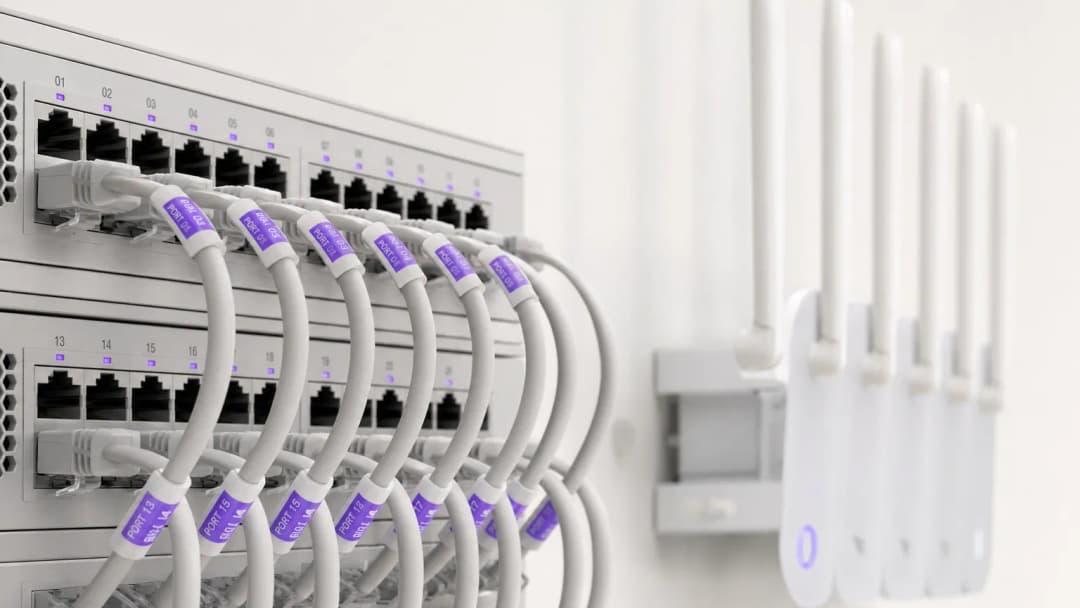
Para los hoteleros modernos, el WiFi para huéspedes es mucho más que un servicio básico: es un factor clave para las puntuaciones de satisfacción de los huéspedes, las reservas directas recurrentes y la eficiencia operativa. Los huéspedes de los hoteles esperan una conectividad de alta velocidad y sin interrupciones en las habitaciones, los vestíbulos, los espacios de conferencias y las áreas al aire libre. Al mismo tiempo, los líderes de TI sénior deben equilibrar las demandas de un alto ancho de banda concurrente con el cumplimiento de seguridad PCI DSS y las normativas de privacidad de datos.
Esta guía completa proporciona a los gerentes de TI de hoteles, directores de operaciones de recintos y gerentes generales un marco práctico para diseñar, implementar y monetizar redes de WiFi para hoteles de nivel empresarial. Exploramos la arquitectura de puntos de acceso en las habitaciones, las integraciones con Sistemas de Gestión de Propiedades (PMS), los modelos de ingresos por ancho de banda estructurado y cómo convertir los inicios de sesión de WiFi de los huéspedes en datos de marketing de primera mano verificados.
Escuche nuestra sesión informativa complementaria sobre los conceptos clave de WiFi para hoteles:
Arquitectura técnica y segmentación de red
Segmentación lógica de VLAN
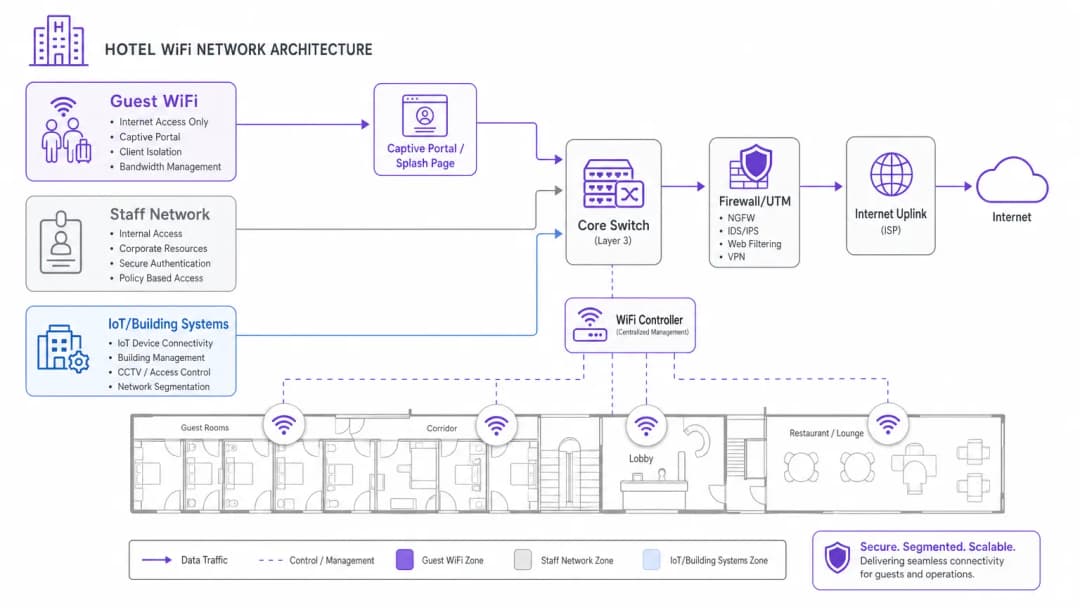
La base del WiFi para hoteles empresariales es una segmentación lógica de red estricta. Una única infraestructura física debe gestionar distintos grupos de usuarios (huéspedes del hotel, operaciones del personal, terminales de punto de venta [POS] y automatización de edificios [IoT/HVAC]) sin comprometer la seguridad ni el rendimiento.
El tráfico de los huéspedes debe estar aislado en redes de área local virtuales (VLANs) dedicadas. Separar el procesamiento de pagos (POS) y los sistemas de gestión de propiedades (PMS) en VLANs de personal cifradas es un requisito obligatorio para cumplir con la norma PCI-DSS. Además, las VLAN de huéspedes deben aplicar el aislamiento de clientes, lo que evita que los dispositivos de los huéspedes se comuniquen entre sí a través de la red inalámbrica local.
Densidad inalámbrica y ubicación de puntos de acceso
Los diseños históricos de WiFi para hoteles dependían de puntos de acceso (APs) montados en los pasillos y espaciados cada 5 o 7 habitaciones. En los edificios de hoteles modernos con concreto reforzado, cubos de elevadores, baños con azulejos y aislamiento con respaldo de aluminio, las señales de los pasillos se atenúan rápidamente antes de llegar a las camas y escritorios de los huéspedes.
El estándar actual de la industria es el despliegue de APs de placa de pared en la habitación (1 AP por habitación de huésped o 1 AP por cada 2 habitaciones). Los APs con Wi-Fi 6 en la habitación ofrecen una cobertura limpia en las bandas de 5GHz y 6GHz, baja latencia para videollamadas y puertos Ethernet cableados integrados para Smart TVs, teléfonos IP y líneas de VoIP.
¿Tiene preguntas sobre su configuración específica?
Nuestro equipo trabaja con gestores de espacios, responsables de TI e ingenieros de redes en 80 000 establecimientos. Reserve una llamada de 20 minutos y le mostraremos cómo lo resolvieron otros profesionales como usted.
Integración con PMS y portales de autenticación de huéspedes
Integrar el Captive Portal de su WiFi para huéspedes con su sistema de gestión de propiedades (PMS) - como Oracle Opera, Mews, Stayntouch o Cloudbeds - transforma el simple acceso a la red en una experiencia de huésped personalizada.
Cómo funciona la autenticación con PMS
- Asociación de huéspedes: El huésped se conecta al SSID del WiFi del hotel y es redirigido al Captive Portal con la marca del hotel.
- Verificación de la habitación: El huésped ingresa su número de habitación y apellido (o referencia de reservación).
- Búsqueda por API: El portal realiza una consulta en la base de datos del PMS a través de una API segura para verificar el estado de la estancia activa.
- Asignación de privilegios: La red aplica políticas de ancho de banda personalizadas según el nivel de lealtad del huésped (por ejemplo, acceso de alta velocidad de 50 Mbps para VIPs frente a 10 Mbps para huéspedes estándar).
Comparación de modelos de acceso WiFi para hoteles
| Modelo de acceso | Método de autenticación | Experiencia del huésped | Valor de ingresos / datos | Seguridad y cumplimiento |
|---|---|---|---|---|
| Autenticado con PMS | Número de habitación + Apellido | Bienvenida fluida y personalizada | Alto (Sincroniza perfil e historial de estancias) | Alto (Huéspedes del hotel verificados) |
| Registro por formulario / redes sociales | Correo electrónico, LinkedIn, Google | Inicio de sesión rápido con un solo clic | Alto (Captura registros de correo electrónico verificados) | Medio (Cliente aislado) |
| Pase de pago por niveles | Tarjeta de crédito / Cargo a la habitación | Elección de velocidades gratuitas frente a premium | Alto (Ingresos incrementales directos) | Alto (Pasarela de pago cifrada) |
| Clic de Acceso Abierto | Botón de aceptar Términos y Condiciones | Acceso instantáneo | Bajo (No se recopilan datos de contacto) | Básica (Cliente aislado) |
Monetización de WiFi para Hoteles y ROI de Ancho de Banda Estructurado
La transmisión de video de alto ancho de banda (Netflix en 4K, YouTube, Twitch) y las videoconferencias de trabajo remoto dominan el consumo de la red de huéspedes por la noche. El ancho de banda abierto sin restricciones provoca la saturación del enlace de subida y malas reseñas de los huéspedes.
Implementación de Ancho de Banda Estructurado
Los hoteleros pueden implementar un modelo de ancho de banda de dos niveles:
- Nivel Básico Gratuito: Velocidad simétrica de 5 a 10 Mbps por dispositivo, ideal para navegación web, correo electrónico y mensajería en redes sociales.
- Nivel Premium de Alta Velocidad: Ancho de banda de alta prioridad de 30 a 50 Mbps por $7.99 a $12.99 USD por cada 24 horas (o en cortesía para miembros del programa de lealtad).
Esta estrategia garantiza un rendimiento básico fluido para todos los huéspedes mientras genera ingresos recurrentes de los viajeros de negocios y usuarios de alto consumo.
Para profundizar en las estrategias de redes de huéspedes y la seguridad empresarial, explore nuestra Guest WiFi Guide, WiFi Marketing Guide y Enterprise WiFi Security Guide.
Definiciones clave
Integración con PMS
Conexión de los portales cautivos de WiFi de invitados con los Sistemas de Gestión de Propiedades (por ejemplo, Oracle Opera, Mews, Stayntouch) para autenticar a los huéspedes por número de habitación o nombre y sincronizar las preferencias de su perfil.
Esencial para un check-in de huéspedes sin fricciones, reglas de ancho de banda para VIP y el envío automatizado de correos electrónicos después de la estancia.
Aislamiento de clientes
Una función de seguridad que evita que los dispositivos de los huéspedes conectados a la misma red inalámbrica se descubran o se comuniquen entre sí.
Obligatorio en las redes de invitados de hoteles para prevenir ciberataques laterales y la interceptación de datos entre habitaciones.
Ancho de banda multinivel
Asignación de diferentes límites y prioridades de ancho de banda en función de la categoría del huésped (por ejemplo, 5 Mbps gratuitos para navegación estándar frente a 50 Mbps de pago para streaming en 4K y videojuegos).
Permite a los hoteleros monetizar la demanda de alto ancho de banda mientras protegen la capacidad del enlace ascendente para todos los huéspedes.
Punto de acceso (AP) en la habitación
Implementación de puntos de acceso de bajo perfil WiFi 6 de pared dentro de las habitaciones de los huéspedes, en lugar de instalaciones dispersas en el techo de los pasillos.
Elimina la atenuación de la señal en los pasillos causada por los azulejos de los baños, el aislamiento de aluminio y las puertas cortafuegos pesadas.
Ejemplos resueltos
Un hotel de negocios de 250 habitaciones experimenta quejas graves de los huéspedes sobre las velocidades de WiFi durante las horas pico de la noche (7 PM - 10 PM). La propiedad depende actualmente de una conexión de banda ancha de 500 Mbps con puntos de acceso instalados en los pasillos centrales. ¿Qué actualización de arquitectura de red se debería implementar?
- Actualizar el enlace ascendente de internet a una línea dedicada de 1 Gbps con un SLA garantizado para manejar el tráfico máximo de streaming simultáneo. 2. Rediseñar la arquitectura inalámbrica a un modelo de AP en la habitación (1 AP por habitación o por cada 2 habitaciones) para eliminar la atenuación de las paredes. 3. Implementar la regulación de ancho de banda en la VLAN de invitados (por ejemplo, un límite base de 10 Mbps por cliente) junto con un nivel opcional de alta velocidad de pago de 50 Mbps.
Un grupo de hoteles boutique desea capturar datos de contacto verificados de los huéspedes para campañas de reserva directa, garantizando al mismo tiempo un estricto cumplimiento de GDPR y las normativas de privacidad. ¿Cómo se debe configurar el Captive Portal?
Implementar un Captive Portal integrado con el sistema de gestión hotelera (PMS). Configurar la pantalla de inicio de sesión para que requiera una casilla de verificación de consentimiento explícita y desagregada para comunicaciones de marketing, independiente de los términos de servicio de la red. El portal registra automáticamente las marcas de tiempo de consentimiento, las direcciones IP y las direcciones MAC, mientras sincroniza los perfiles verificados de los huéspedes con la plataforma de marketing central.
Preguntas de práctica
Q1. El director de operaciones de su hotel desea conectar nuevas tabletas de punto de venta (POS) móviles en la terraza de la piscina exterior a la red WiFi de invitados existente. ¿Cómo debería responder?
Sugerencia: Considere el cumplimiento de PCI DSS y la segmentación de red.
Ver respuesta modelo
Rechace la solicitud. Conectar terminales de pago a una red WiFi de invitados abierta viola las normas de PCI DSS y expone los datos de las tarjetas de crédito a riesgos. Las tabletas POS deben conectarse a una VLAN de personal/POS dedicada y cifrada, protegida con WPA3-Enterprise y completamente aislada del tráfico de invitados.
Q2. Un diseñador de interiores insiste en ocultar los puntos de acceso montados en el techo dentro de cajas decorativas de latón para preservar la estética del lobby del hotel. ¿Cuál es el impacto técnico?
Sugerencia: Considere cómo interactúan las cajas metálicas con las señales de radio.
Ver respuesta modelo
Los gabinetes metálicos actúan como jaulas de Faraday, bloqueando severamente las señales de RF y creando zonas muertas. Los puntos de acceso deben montarse externamente o detrás de gabinetes transparentes a la RF (como de plástico o yeso). Las cubiertas de vinilo aprobadas por el proveedor pueden combinar con la decoración sin degradar el rendimiento de WiFi.
Q3. El gerente de marketing del hotel solicita suscribir automáticamente a todos los huéspedes que se conecten al WiFi de invitados al boletín diario del hotel. ¿Cómo se debe manejar esto?
Sugerencia: Considere los requisitos de consentimiento explícito bajo el GDPR y las leyes de privacidad.
Ver respuesta modelo
El portal no puede suscribir automáticamente a los huéspedes. El consentimiento debe ser explícito, informado y desagregado. La página de bienvenida debe contar con una casilla de verificación desmarcada para la suscripción de marketing, independiente de la aceptación de los términos de servicio de la red.
Continúe leyendo esta serie
Cómo configurar el WiFi de invitados: una guía definitiva de configuración empresarial segura
Esta guía definitiva proporciona a los líderes de TI y arquitectos de redes un diseño estructural definitivo para implementar un WiFi de invitados empresarial seguro. Cubre la arquitectura esencial, la migración a WPA3, la segmentación de VLAN y la integración de Captive Portal para proteger los sistemas internos mientras se recopilan datos de primera mano en conformidad con la ley.
Cómo solucionar los problemas de WiFi lento sin mejorar tu plan de Internet
Una guía de referencia técnica completa para gerentes de TI y arquitectos de red sobre cómo optimizar el rendimiento de la WiFi empresarial sin aumentar el ancho de banda del ISP. Cubre la sintonización de RF, la gestión de la densidad de clientes, la implementación de QoS y cómo aprovechar la analítica de WiFi para diagnosticar y resolver cuellos de botella.
Cómo construir una red WiFi para campus: Una guía de TI para universidades
Esta guía técnica proporciona un modelo integral para diseñar e implementar redes WiFi de alta densidad en campus, abarcando desde estudios de cobertura activos en sitio y la ubicación de puntos de acceso, hasta la arquitectura del controlador, el roaming fluido y el onboarding seguro de invitados. Está escrita para gerentes de TI, arquitectos de red y directores de tecnología (CTOs) en universidades y grandes recintos que necesitan orientación práctica para planificar y ejecutar una implementación inalámbrica este trimestre. La guía también vincula la plataforma de analíticas y Guest WiFi de Purple con puntos de integración reales dentro del ciclo de vida de la implementación.
¿Tiene preguntas sobre su configuración específica?
Nuestro equipo trabaja con gestores de espacios, responsables de TI e ingenieros de redes en 80 000 establecimientos. Reserve una llamada de 20 minutos y le mostraremos cómo lo resolvieron otros profesionales como usted.