
Hotel WiFi: complete guide for hoteliers
Discover how to design, deploy, and monetize enterprise-grade hotel WiFi networks. Covers PMS integrations (Opera, Mews), tiered bandwidth ROI, PCI DSS compliance, and guest data capture.
📖 4 min read650 words2 worked examples3 practice questions4 key definitions
Video overview
Listen to this guide
View podcast transcript
Hotel WiFi: The Complete Guide for Hoteliers — A Purple Briefing
[INTRODUCTION — approximately 1 minute]
Welcome to the Purple Briefing. I'm your host, and today we're covering something that sits right at the intersection of guest experience and IT infrastructure: hotel WiFi. Not the basics of "plug in a router and hope for the best," but a proper, enterprise-grade approach to designing, deploying, and monetising a wireless network across a hospitality venue.
Whether you're the IT manager at a 50-room boutique property, the network architect responsible for a 500-room conference hotel, or the CTO overseeing a portfolio of properties, this briefing will give you a clear framework for making the right decisions — this quarter, not in some theoretical future.
Let's get into it.
[TECHNICAL DEEP-DIVE — approximately 5 minutes]
First, let's talk about what "hotel WiFi" actually means from an infrastructure perspective, because it's significantly more complex than a standard office deployment.
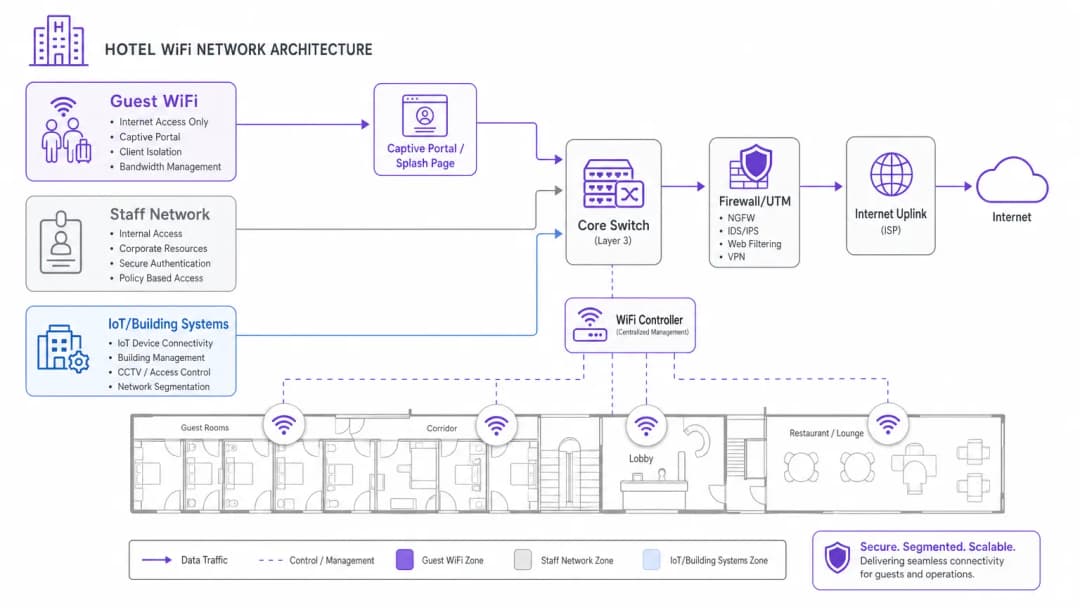
A hotel network has to serve at least three distinct user populations simultaneously: guests, staff, and building systems. Each has completely different security, performance, and compliance requirements. Getting this wrong is one of the most common and costly mistakes we see in hospitality deployments.
The correct approach is network segmentation using VLANs — Virtual Local Area Networks. You create logically separate networks on the same physical infrastructure. Your guest WiFi sits on its own VLAN, completely isolated from your property management system, your point-of-sale terminals, and your staff communications. This isn't optional — it's a baseline requirement under PCI DSS if you're processing card payments anywhere on the same physical network. It also dramatically reduces your attack surface if a guest device is compromised.
Now, for the wireless layer itself, the current standard you should be deploying to is Wi-Fi 6 — that's IEEE 802.11ax. If you're in a high-density environment like a conference centre or a large ballroom, Wi-Fi 6E, which adds the 6 GHz band, gives you significantly more spectrum to work with. The key performance improvements over the previous generation are OFDMA — Orthogonal Frequency Division Multiple Access — which allows a single access point to serve multiple clients simultaneously rather than sequentially, and BSS Colouring, which reduces interference in dense deployments. In practical terms, you're looking at roughly four times the throughput capacity per access point compared to Wi-Fi 5, with much lower latency under load.
Access point placement is where many deployments go wrong. The instinct is to put APs in corridors, but in a hotel, you want in-room coverage. The best practice for a standard room layout is one AP per room, or at minimum one AP per two rooms, mounted in the ceiling or behind the TV. This eliminates the "corridor shadow" problem where signal has to penetrate two walls to reach a guest. For public spaces — lobbies, restaurants, conference rooms — you need a proper RF site survey before finalising placement. Tools like Ekahau or iBwave give you predictive modelling before you commit to cable runs.
On the backhaul side, every access point should be wired. Mesh WiFi is fine for a home, but in a hotel you need deterministic, low-latency backhaul. Cat 6A to each AP, terminated at a PoE switch in the IDF — the Intermediate Distribution Frame — on each floor. Your uplink from the property to the internet is equally critical. For a property of 100 rooms or more, a dedicated leased line is the right choice over a standard broadband product. A leased line gives you symmetrical bandwidth, a guaranteed SLA, and no contention with other customers on the same circuit. If you want to understand the technical differences in more detail, there's a good explainer on the Purple blog — "What Is a Leased Line? Dedicated Business Internet" — which covers the architecture clearly.
Now let's talk about the captive portal, because this is where the network transitions from a cost centre to a revenue and data asset.
A captive portal — sometimes called a splash page — is the authentication gateway that guests hit when they first connect. Done badly, it's an annoyance. Done well, it's your primary mechanism for first-party data capture. The guest authenticates via email, social login, or SMS verification. You capture a verified identity. That identity is then linked to their device MAC address, their visit timestamp, their dwell time, and any subsequent visits. Over time, you build a rich, consented, GDPR-compliant dataset of your actual guests.
GDPR compliance here is non-negotiable. Your splash page must present a clear privacy notice, explicit consent options for marketing, and a straightforward mechanism for guests to exercise their data rights. The consent must be granular — consent to use the WiFi is not the same as consent to receive marketing emails. Purple's platform handles this natively, with consent records tied to each user profile and audit trails available for regulatory review.
For authentication security, WPA3-Enterprise with IEEE 802.1X is the gold standard for staff networks. For guest networks, WPA3-Personal or an open network behind a captive portal with HTTPS enforcement is the standard approach. What you absolutely must not do is run an open network without client isolation — that allows any guest to sniff traffic from any other guest on the same network.
[IMPLEMENTATION RECOMMENDATIONS AND PITFALLS — approximately 2 minutes]
Let me give you the practical deployment sequence that we recommend.
Start with a site survey. Before you touch a single cable, walk the property with a spectrum analyser. Identify existing interference sources — neighbouring networks, microwave ovens in the kitchen, DECT phones at reception. This informs your channel plan and AP placement.
Second, design your VLAN architecture before you configure anything. Map out: Guest WiFi VLAN, Staff VLAN, IoT and Building Systems VLAN, and Management VLAN. Get this approved by your security team and documented before deployment.
Third, size your internet uplink correctly. A common rule of thumb is 1 Mbps per concurrent device, but in a hotel where guests are streaming 4K video, you should plan for 5 to 10 Mbps per room at peak occupancy. For a 200-room hotel at 80% occupancy, that's a minimum of 800 Mbps to 1.6 Gbps of committed bandwidth. A leased line with burstable capacity is the right product here.
Fourth, deploy your captive portal platform before go-live and test the full guest journey end-to-end. Test on iOS, Android, and Windows. Test the consent flows. Test the redirect behaviour. Test what happens when a guest reconnects on a return visit.
Now, the pitfalls. The most common one is under-provisioning the uplink and then blaming the wireless infrastructure when guests complain. Nine times out of ten, slow hotel WiFi is an internet bandwidth problem, not a radio frequency problem.
The second pitfall is deploying a captive portal that collects data but has no downstream marketing workflow. You've built the data asset — now use it. Pre-stay emails, post-stay surveys, loyalty programme enrolment, targeted offers during the stay. Purple's analytics platform connects the WiFi data layer directly to your CRM and marketing automation tools, closing that loop.
The third pitfall is neglecting ongoing management. WiFi is not a fit-and-forget infrastructure. You need monitoring, alerting, and a regular review of your channel plan as the RF environment changes.
[RAPID-FIRE Q&A — approximately 1 minute]
Quick-fire questions.
"Do I need Wi-Fi 6 or will Wi-Fi 5 do?" — If you're deploying new infrastructure today, always go Wi-Fi 6. The cost delta is minimal and the performance headroom is significant.
"Should I charge guests for WiFi?" — No. In 2026, paid guest WiFi is a guest satisfaction liability. The data and marketing value of free, authenticated WiFi far exceeds any revenue from access fees.
"How do I handle a guest who complains about slow WiFi?" — First, check your internet uplink utilisation. Second, check the AP association count — if one AP has 40 clients and the next has 5, your band steering isn't working. Third, check for rogue APs or interference on your channel plan.
"Is a cloud-managed WiFi controller better than on-premise?" — For most hotel deployments, yes. Cloud management gives you centralised visibility across multiple properties, automatic firmware updates, and no single point of failure in the comms room.
[SUMMARY AND NEXT STEPS — approximately 1 minute]
To wrap up: hotel WiFi done properly is a strategic asset, not a utility cost. The infrastructure investment pays back through guest satisfaction scores, direct booking conversion, and the first-party data you capture through an authenticated captive portal.
The three things to take away from this briefing: One — segment your network properly from day one. Guest, staff, and IoT on separate VLANs, with a firewall between them. Two — size your internet uplink for peak demand, not average demand. Three — treat your captive portal as a marketing platform, not just an access gateway.
If you want to go deeper on any of these areas, Purple's hospitality resources at purple.ai cover guest WiFi deployment, analytics, and marketing integration in detail. There's also a broader guide on digital strategies for physical businesses that's worth a read if you're thinking about how WiFi data fits into your overall customer engagement model.
Thanks for listening. Until next time.
Part of our core series: The Master Guest WiFi Guide →
Useful? Link to this tool
Executive Summary
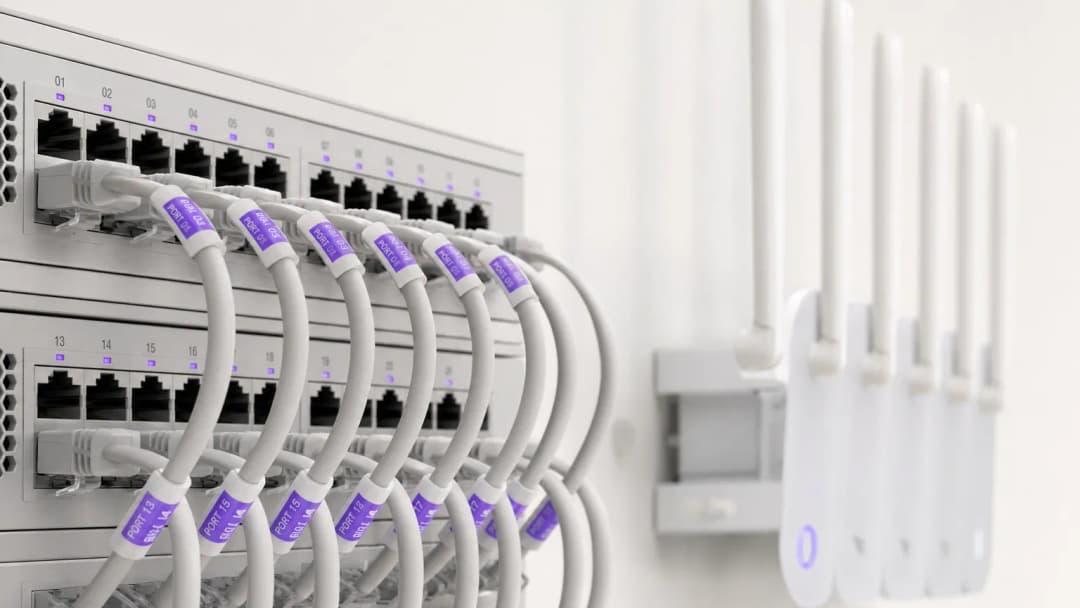
For modern hoteliers, guest WiFi is far more than a basic amenity - it is a primary driver of guest satisfaction scores, repeat direct bookings, and operational efficiency. Hotel guests expect seamless, high-speed connectivity across guest rooms, lobbies, conference spaces, and outdoor amenities. At the same time, senior IT leaders must balance high concurrent bandwidth demands against PCI DSS security compliance and data privacy regulations.
This comprehensive guide provides hotel IT managers, venue operations directors, and general managers with an actionable framework for designing, deploying, and monetizing enterprise-grade hotel WiFi networks. We explore in-room access point architecture, Property Management System (PMS) integrations, tiered bandwidth revenue models, and how to convert guest WiFi logins into verified first-party marketing data.
Listen to our companion briefing on core hotel WiFi concepts:
Technical Architecture & Network Segmentation
Logical VLAN Segmentation
The foundation of enterprise hotel WiFi is strict logical network segmentation. A single physical infrastructure must handle distinct user groups - hotel guests, staff operations, point-of-sale (POS) terminals, and building automation (IoT/HVAC) - without compromising security or performance.
Guest traffic must be isolated on dedicated Virtual Local Area Networks (VLANs). Separating payment processing (POS) and property management systems (PMS) onto encrypted staff VLANs is a mandatory requirement for PCI DSS compliance. Furthermore, guest VLANs must enforce client isolation, preventing guest devices from communicating with one another over the local wireless network.
Wireless Density & Access Point Placement
Historical hotel WiFi designs relied on corridor-mounted access points (APs) spaced every 5 to 7 rooms. In modern hotel buildings with reinforced concrete, elevator shafts, tiled bathrooms, and foil-backed insulation, corridor signals attenuate rapidly before reaching guest beds and desks.
The current industry standard is in-room wall-plate AP deployment (1 AP per guest room or 1 AP per 2 rooms). In-room Wi-Fi 6 APs deliver clean 5GHz and 6GHz coverage, low latency for video calls, and built-in wired Ethernet ports for smart TVs, IP phones, and VoIP drop lines.
Got questions about your specific setup?
Our team works with venue operators, IT managers, and network engineers across 80,000 venues. Book a 20-minute call and we will show you how others like you solved it.
PMS Integration & Guest Authenticated Portals
Integrating your guest WiFi captive portal with your Property Management System (PMS) - such as Oracle Opera, Mews, Stayntouch, or Cloudbeds - transforms simple network access into a personalized guest experience.
How PMS Authentication Works
- Guest Association: The guest connects to the hotel WiFi SSID and is redirected to the branded captive portal.
- Room Verification: The guest enters their Room Number and Last Name (or Booking Reference).
- API Lookup: The portal queries the PMS database via secure API to verify active stay status.
- Privilege Mapping: The network applies tailored bandwidth policies based on guest loyalty tier (e.g. 50 Mbps high-speed access for VIPs vs 10 Mbps for standard guests).
Comparing Hotel WiFi Access Models
| Access Model | Authentication Method | Guest Experience | Revenue / Data Value | Security & Compliance |
|---|---|---|---|---|
| PMS Authenticated | Room Number + Last Name | Seamless, personalized welcome | High (Syncs profile & stay history) | High (Verified hotel guests) |
| Social / Form Opt-In | Email, LinkedIn, Google | Fast, single-click login | High (Captures verified email opt-ins) | Medium (Client isolated) |
| Tiered Paid Pass | Credit Card / Room Charge | Choice of free vs premium speeds | High (Direct incremental revenue) | High (Encrypted payment gateway) |
| Open Click-Through | Accept T&Cs button | Instant access | Low (No contact data collected) | Basic (Client isolated) |
Monetizing Hotel WiFi & Tiered Bandwidth ROI
High-bandwidth video streaming (4K Netflix, YouTube, Twitch) and remote work video conferencing dominate evening guest network consumption. Unrestricted open bandwidth leads to uplink saturation and bad guest reviews.
Implementing Tiered Bandwidth
Hoteliers can implement a two-tier bandwidth model:
- Free Basic Tier: 5-10 Mbps symmetric speed per device - perfect for web browsing, email, and social messaging.
- Premium High-Speed Tier: 30-50 Mbps high-priority bandwidth for $7.99 to $12.99 per 24 hours (or complimentary for loyalty members).
This strategy guarantees smooth baseline performance for all guests while generating recurring revenue from business travelers and power users.
To dive deeper into guest network strategies and enterprise security, explore our Guest WiFi Guide, WiFi Marketing Guide, and Enterprise WiFi Security Guide.
Key Definitions
PMS Integration
Connecting guest WiFi captive portals with Property Management Systems (e.g., Oracle Opera, Mews, Stayntouch) to authenticate guests by room number or name and sync profile preferences.
Essential for seamless guest check-in, VIP bandwidth rules, and automated post-stay email triggers.
Client Isolation
A security feature that prevents guest devices connected to the same wireless network from discovering or communicating with each other.
Mandatory on hotel guest networks to prevent lateral cyber attacks and data sniffing between rooms.
Tiered Bandwidth
Allocating different bandwidth limits and priorities based on guest tier (e.g., free 5Mbps for standard browsing vs. paid 50Mbps for 4K streaming and gaming).
Allows hoteliers to monetize high-bandwidth demand while protecting uplink capacity for all guests.
In-Room Access Point (AP)
Deploying low-profile wall-plate WiFi 6 access points inside guest rooms rather than sparse ceiling mounts in corridors.
Eliminates corridor signal attenuation from bathroom tile, foil insulation, and heavy fire doors.
Worked Examples
A 250-room business hotel experiences severe guest complaints regarding WiFi speeds during peak evening hours (7 PM - 10 PM). The property currently relies on a 500 Mbps broadband connection with access points mounted in central corridors. What network architecture upgrade should be implemented?
- Upgrade the internet uplink to a 1 Gbps dedicated leased line with guaranteed SLA to handle peak concurrent streaming traffic. 2. Redesign the wireless architecture to an in-room AP model (1 AP per room or per 2 rooms) to eliminate wall attenuation. 3. Implement bandwidth shaping on the guest VLAN (e.g., 10 Mbps baseline per client) alongside an optional paid 50 Mbps high-speed tier.
Examiner's Commentary: The root cause is twofold: uplink saturation during peak streaming hours and poor RF design from corridor mounting. In-room APs solve coverage and latency, while bandwidth shaping prevents heavy users from monopolizing bandwidth.
A boutique hotel group wants to capture verified guest contact details for direct booking campaigns while ensuring strict compliance with CCPA and privacy regulations. How should the captive portal be configured?
Deploy a captive portal integrated with the Property Management System (PMS). Configure the login screen to require an explicit, unbundled opt-in checkbox for marketing communications, separate from the network terms of service. The portal automatically records consent timestamps, IP addresses, and MAC addresses, while syncing verified guest profiles into the central marketing platform.
Examiner's Commentary: Under privacy laws, bundling marketing consent with network access terms is illegal. A dedicated portal platform guarantees verifiable opt-in records while seamlessly passing clean profile data to CRM tools.
Practice Questions
Q1. Your hotel operations director wants to connect new mobile point-of-sale (POS) tablets on the outdoor pool terrace to the existing Guest WiFi network. How should you respond?
Hint: Consider PCI DSS compliance and network segmentation.
View model answer
Refuse the request. Connecting payment terminals to an open Guest WiFi network violates PCI DSS rules and exposes credit card data to risk. The POS tablets must connect to a dedicated, encrypted Staff/POS VLAN secured with WPA3-Enterprise, completely isolated from guest traffic.
Q2. An interior designer insists on concealing ceiling-mounted access points inside decorative brass enclosures to preserve hotel lobby aesthetics. What is the technical impact?
Hint: Consider how metallic enclosures interact with radio signals.
View model answer
Metal enclosures act as Faraday cages, severely blocking RF signals and creating dead zones. Access points must be mounted externally or behind RF-transparent enclosures (such as plastic or drywall). Vendor-approved vinyl skins can match decor without degrading WiFi performance.
Q3. The hotel marketing manager asks to automatically subscribe every guest who connects to guest WiFi to the daily hotel newsletter. How should this be handled?
Hint: Consider explicit consent requirements under CCPA and privacy laws.
View model answer
The portal cannot automatically subscribe guests. Consent must be explicit, informed, and unbundled. The splash page must feature an unticked checkbox for marketing opt-in, distinct from accepting the network terms of service.
Frequently asked questions
Why is in-room AP deployment preferred over corridor access points in hotels?
Modern hotel construction materials (reinforced concrete, foil insulation, fire doors, and bathroom tile) cause RF attenuation of 10 to 18 dB per wall. Corridor-mounted APs struggle to penetrate guest rooms, forcing client devices to transmit at maximum power and degrading battery life. In-room wall-plate APs provide line-of-sight 5 GHz and 6 GHz coverage, sub-millisecond roaming latency, and built-in Gigabit Ethernet switch ports for smart TVs, VoIP phones, and IoT thermostats.
How does hotel WiFi integrate with Property Management Systems (PMS)?
Guest WiFi captive portals integrate with hotel PMS platforms (such as Oracle Opera, Mews, Stayntouch, and Cloudbeds) via secure REST APIs or Micros FIAS protocols. When guests connect, they authenticate using their room number and surname or reservation code. The portal validates active stay status against the PMS in real time, applies VIP bandwidth profiles automatically, and posts optional tiered service charges directly to the guest folio.
How do tiered WiFi bandwidth passes generate revenue for hoteliers?
Tiered bandwidth models provide a complimentary baseline speed (such as 10 Mbps for email and social browsing) while offering paid high-speed passes (such as 50 to 100 Mbps for 4K video streaming, gaming, or remote work videoconferencing). Guests purchase 24-hour or multi-day passes via credit card, Apple Pay, or direct room charge. This protects core uplink capacity during peak evening hours while generating predictable ancillary revenue.
What network segmentation is required for hotel WiFi and PCI DSS compliance?
Hotels must maintain strict Layer-2 and Layer-3 network segmentation using dedicated Virtual Local Area Networks (VLANs). Guest WiFi traffic must be isolated on an independent guest VLAN with client isolation enabled, preventing guest devices from discovering or attacking one another. Point-of-Sale (POS) card terminals, Property Management Systems (PMS), and administrative staff devices must reside on separate, encrypted VLANs protected by next-generation firewall access control lists (ACLs) to satisfy PCI DSS Requirement 1.3.
How do hotels handle MAC address randomisation across returning guests?
iOS, Android, and Windows rotate randomized MAC addresses periodically, which can cause guests to see repeated login splash screens when returning to the hotel or moving between common areas. Enterprise platforms like Purple resolve this by issuing Passpoint (Hotspot 2.0) encrypted profiles or binding authenticated guest sessions to secure HTTP session tokens and verified user identity profiles rather than transient physical MAC addresses.
How does Purple improve guest WiFi ROI for hotels and resorts?
Purple turns hotel guest WiFi into a high-conversion marketing and operations asset. By streamlining captive portal logins with social and PMS authentication, Purple captures verified, GDPR-compliant guest profiles and syncs them with hospitality CRMs (such as HubSpot, Salesforce, and Revinate). Hoteliers leverage real-time footfall analytics, dwell times, and automated post-stay review triggers (TripAdvisor, Google Reviews) to drive repeat direct bookings and reduce OTA commission fees.
Continue reading in this series
How to Set Up Guest WiFi: A Secure Enterprise Configuration Guide
This authoritative guide provides IT leaders and network architects with a definitive blueprint for deploying secure enterprise guest WiFi. It covers essential architecture, WPA3 migration, VLAN segmentation, and captive portal integration to protect internal systems while capturing compliant first-party data.
How to Fix Slow WiFi Without Upgrading Your Internet Plan
A comprehensive technical reference guide for IT managers and network architects on optimizing enterprise WiFi performance without increasing ISP bandwidth. Covers RF tuning, client density management, QoS implementation, and how to leverage WiFi analytics to diagnose and resolve bottlenecks.
How to Build a Campus WiFi Network: A University IT Guide
This technical guide provides a comprehensive blueprint for designing and deploying high-density campus WiFi networks, covering everything from active site surveys and access point placement to controller architecture, seamless roaming, and secure guest onboarding. It is written for IT managers, network architects, and CTOs at universities and large venues who need actionable guidance to plan and execute a wireless deployment this quarter. The guide also maps Purple's Guest WiFi and analytics platform to real integration points within the deployment lifecycle.
Got questions about your specific setup?
Our team works with venue operators, IT managers, and network engineers across 80,000 venues. Book a 20-minute call and we will show you how others like you solved it.