
PPSK usm kubang kerian: comparing features and deployment models
This guide compares PPSK (Private Pre-Shared Key) against standard PSK and 802.1X, detailing implementation models for multi-tenant environments like the USM Health Campus in Kubang Kerian. It equips IT managers and property operators with the technical architecture required to deliver secure, per-user isolated WiFi at scale.
Listen to this guide
View podcast transcript
Executive Summary
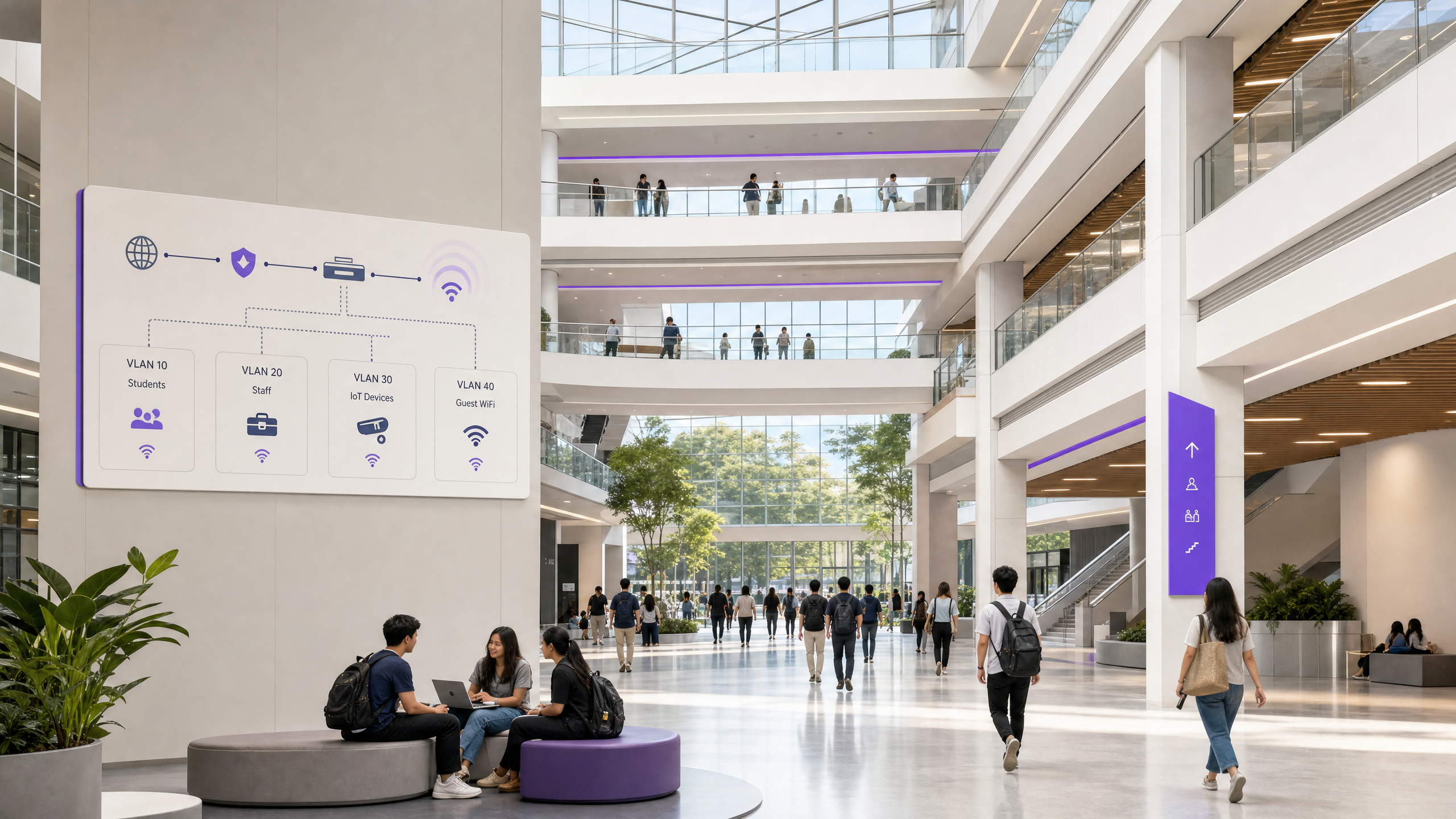
Universiti Sains Malaysia's Health Campus in Kubang Kerian operates one of the most complex wireless environments in South-East Asia. A 747-bed teaching hospital, research laboratories, and student accommodation all share a single physical network. Deploying a separate SSID for every department, student block, and IoT category degrades performance for everyone.
Private Pre-Shared Key (PPSK) solves this. PPSK gives each user or device group a unique WiFi key that maps directly to an isolated VLAN, all from a single SSID. It delivers the per-device isolation of 802.1X without requiring a supplicant or certificate infrastructure, making it the only viable architecture for mixed-use environments containing legacy medical equipment, resident smart devices, and building management systems.
This guide details the technical architecture, deployment models, and implementation strategies for PPSK in complex multi-tenant environments, using the USM Health Campus as a practical reference model.
Technical Deep-Dive
The Authentication Mechanism
In a standard WPA2-Personal network, every device shares identical credentials. In an 802.1X WPA-Enterprise network, devices use individual credentials or certificates via the Extensible Authentication Protocol (EAP). PPSK sits between these models.
When a device connects to a PPSK-enabled SSID, it presents its unique key during the WPA four-way handshake. The access point or controller intercepts this and queries the key store. If valid, the response includes the VLAN assignment for that specific key. The device is placed on its designated VLAN, completely isolated from other users on the same SSID.
The device itself is unaware of this process. It sees a standard WiFi connection, which is why PPSK supports headless IoT devices, legacy clinical equipment, and consumer smart home hardware that cannot run an 802.1X supplicant.
Vendor Terminology
The underlying mechanism is identical, but vendor terminology varies:
- HPE Aruba: PPSK (Private Pre-Shared Key) or MPSK (Multiple Pre-Shared Key)
- Cisco Meraki: iPSK (Identity PSK)
- Juniper Mist: ePSK (Multiple PSK)
- Ruckus: DPSK (Dynamic PSK)
- Ubiquiti UniFi: PPSK
Architecture Comparison
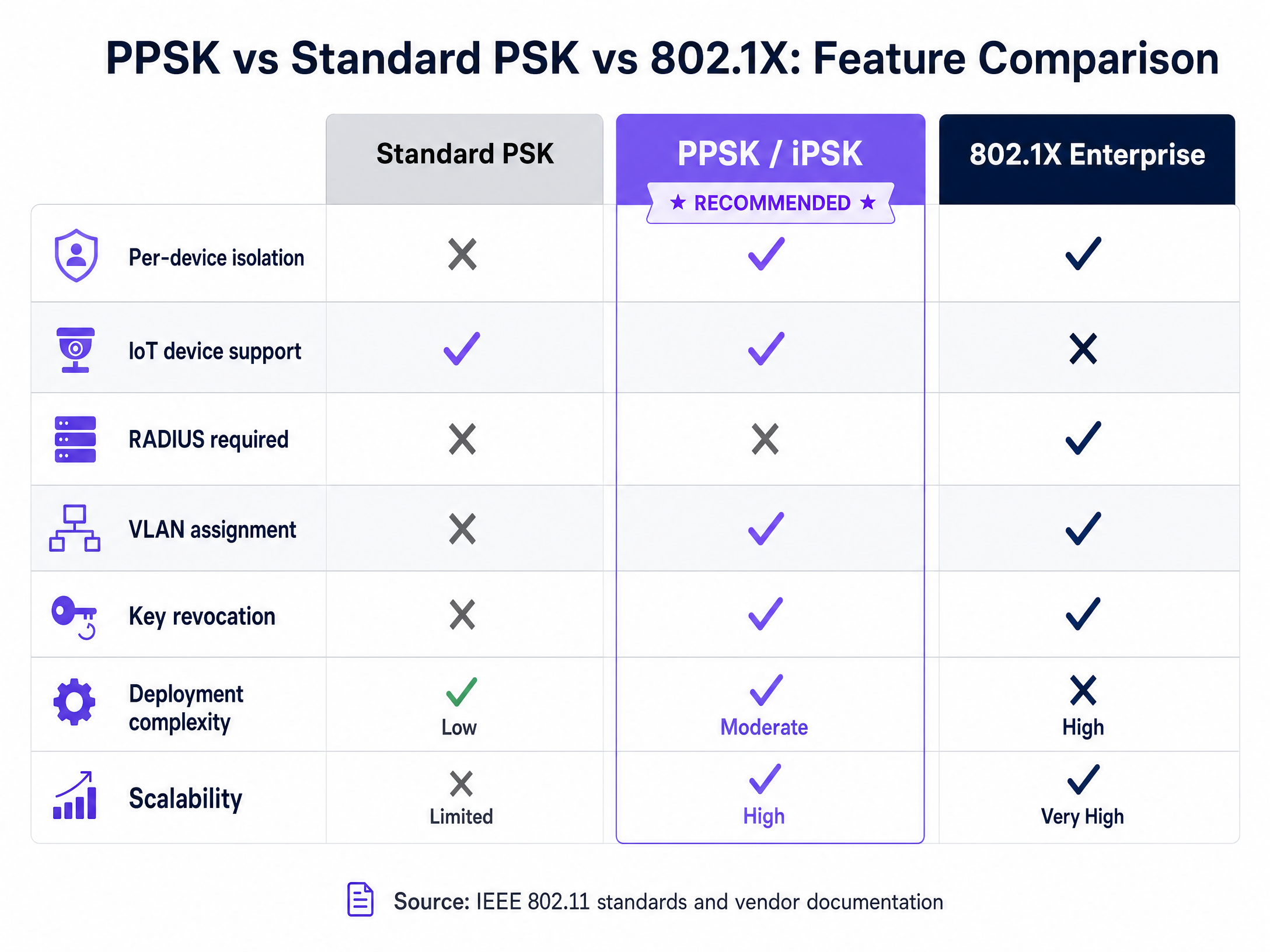
| Feature | Standard PSK | PPSK | 802.1X Enterprise |
|---|---|---|---|
| Per-Device Isolation | No | Yes | Yes |
| IoT Device Support | Yes | Yes | No |
| RADIUS Required | No | Optional (Recommended) | Yes |
| VLAN Assignment | No | Yes | Yes |
| Key Revocation | Global only | Per-user | Per-user |
| Deployment Complexity | Low | Moderate | High |
Implementation Guide
Deploying PPSK at scale requires a structured approach. The following model applies to multi-tenant residential blocks, large Healthcare campuses, and Hospitality environments.
1. Select the Deployment Model
Controller-Local PPSK: Keys are stored on the wireless controller. Suitable for small deployments (under 200 users). Scalability is limited, and lifecycle management is manual.
RADIUS-Backed PPSK: Keys are stored in an external RADIUS server. The controller queries the RADIUS server for every connection. This is the required model for large deployments.
Cloud RADIUS-as-a-Service: The infrastructure is hosted externally (e.g., Purple's cloud overlay). This provides the scalability of RADIUS-backed PPSK without the operational overhead of running on-premise RADIUS servers. It integrates with existing hardware from Cisco Meraki, HPE Aruba, Ruckus, Juniper Mist, Ubiquiti UniFi, Cambium, Extreme, and Fortinet.
2. Design the VLAN Architecture
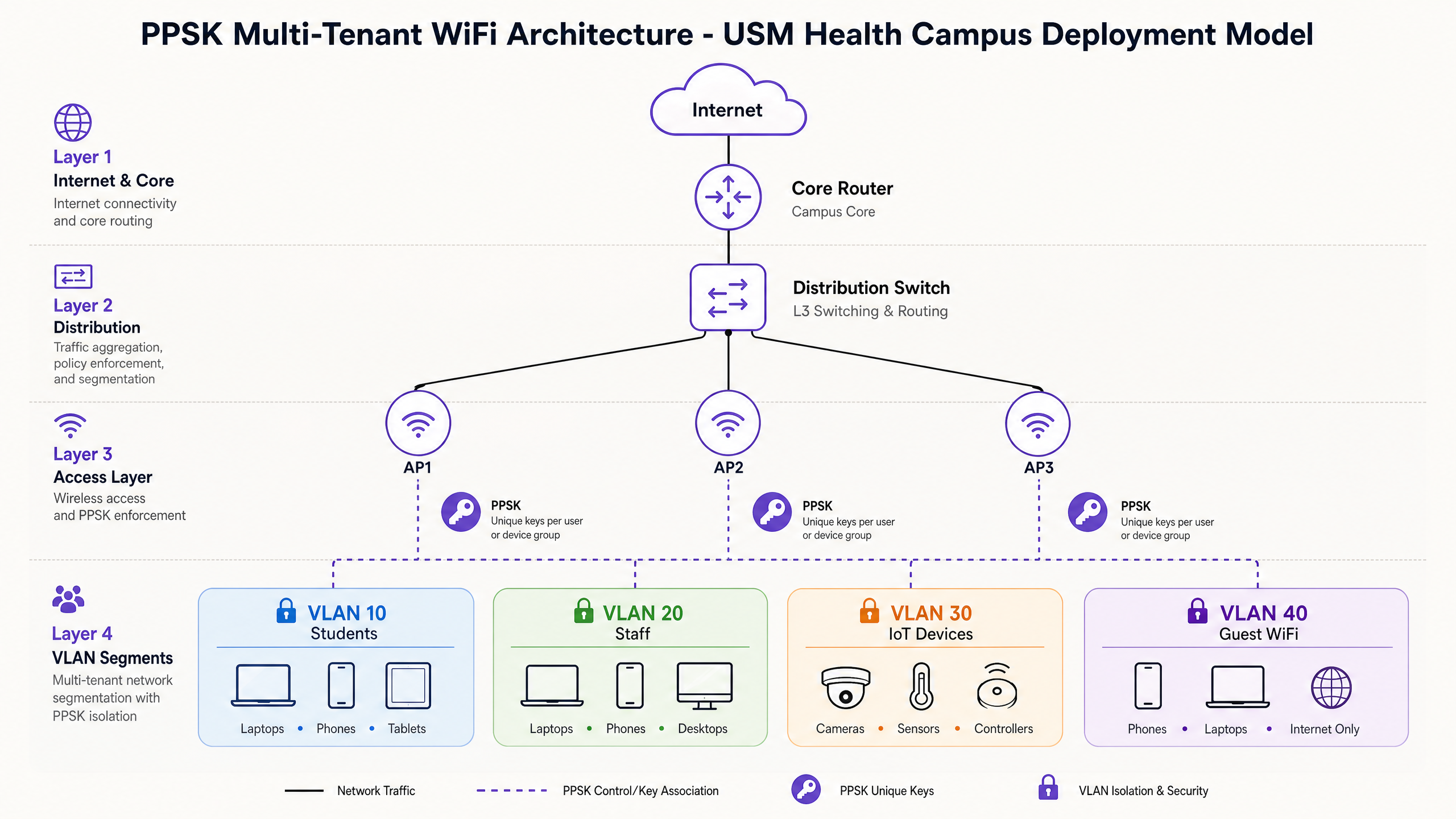
A campus like USM Kubang Kerian requires strict segmentation. A typical hybrid architecture includes:
- VLAN 10-49 (Students/Residents): One VLAN per accommodation block or floor, using PPSK.
- VLAN 50 (Clinical Staff): 802.1X authentication against Microsoft Entra ID.
- VLAN 99 (IoT & Building Management): PPSK with strict egress filtering.
- VLAN 100 (Guest WiFi): Captive portal with Purple Guest WiFi for analytics and compliance.
3. Automate the Key Lifecycle
Manual key management fails at scale. Integrate the PPSK provisioning engine with the student management system or property management software. When a student enrols, the system generates a key and emails it to them. When they graduate, the system revokes the key.
Best Practices
1. Limit SSID Broadcasts Every SSID consumes airtime. Keep the SSID count below four per radio. Use PPSK to serve multiple user segments from a single SSID.
2. Plan for MAC Randomisation Modern operating systems use randomised MAC addresses by default. If your RADIUS server relies on MAC lookups, connections will fail. Implement a pre-registration workflow or use a platform that handles randomisation natively.
3. Verify WPA3 Compatibility WPA3-SAE provides stronger protection against offline dictionary attacks. Deploy PPSK on WPA3 where client devices support it. Note that some platforms (e.g., Ubiquiti UniFi) currently only support PPSK on WPA2. The 6 GHz band requires WPA3, so PPSK deployments on WiFi 6E access points must support WPA3-SAE.
Troubleshooting & Risk Mitigation
Traffic Silently Dropping If a device authenticates successfully but cannot reach the internet, verify the trunk port configuration. The distribution switch must permit the dynamically assigned VLAN on the trunk link to the access point.
Legacy Device Failures Some legacy medical equipment may fail the WPA2 four-way handshake if the access point enforces strict 802.11w (WPA3) transition mode. Maintain a dedicated WPA2-only PPSK SSID for these specific devices if necessary.
IoT Device Compromise Do not place high-risk IoT devices on resident VLANs. A compromised smart TV on a resident VLAN can attack other devices on that segment. Isolate building management systems and high-risk IoT hardware on dedicated VLANs with strict egress filtering.
ROI & Business Impact
For property developers, landlords, and BTR operators, PPSK delivers measurable business value.
- Reduced Support Overhead: Automating the key lifecycle and eliminating shared password rotation reduces WiFi-related support tickets by up to 70%.
- Enhanced Security Posture: Per-user isolation prevents lateral movement across the network. If one resident's device is compromised, the threat is contained within their VLAN.
- Improved User Experience: Residents get a private, home-like network where their smart devices pair seamlessly. This drives resident satisfaction and retention in multi-tenant environments.
- Compliance and Accountability: Every connection is tied to a specific user key, providing the audit trail required for GDPR and PCI-DSS compliance.
For further reading on network design, see our guide on Three SSIDs to rule them all: guest, Passpoint, and IoT WiFi .
Key Definitions
PPSK (Private Pre-Shared Key)
An authentication method where each user or device receives a unique passphrase that connects to a common SSID but maps to an isolated VLAN.
Used to provide secure, isolated access for IoT and personal devices in multi-tenant environments.
802.1X
The IEEE standard for port-based network access control, requiring a RADIUS server and a client-side supplicant.
The enterprise standard for authenticating managed corporate devices.
VLAN (Virtual Local Area Network)
A logical subnetwork that groups a collection of devices, isolating their traffic from other devices on the same physical infrastructure.
The mechanism PPSK uses to separate resident traffic in a BTR or student accommodation block.
RADIUS
A networking protocol that provides centralised Authentication, Authorization, and Accounting management.
The backend database that stores and validates PPSK keys in enterprise deployments.
SSID (Service Set Identifier)
The primary name associated with an 802.11 wireless local area network.
PPSK allows multiple isolated user groups to share a single SSID, improving overall network performance.
MAC Randomisation
A privacy feature in modern operating systems that generates a temporary MAC address for different WiFi networks.
A critical consideration for PPSK deployments that rely on MAC-based authentication workflows.
WPA3-SAE
The latest WiFi security protocol, using Simultaneous Authentication of Equals to prevent offline dictionary attacks.
Required for PPSK deployments operating on the 6 GHz band (WiFi 6E).
Supplicant
The software client on a device that communicates with the authenticator in an 802.1X network.
Because IoT devices lack a supplicant, they cannot use 802.1X and require PPSK.
Worked Examples
A 400-bed student accommodation block experiences high support volume during the annual move-in week. Returning students complain about password changes, and new students struggle to pair smart TVs on the shared network.
Deploy a single SSID using RADIUS-backed PPSK. Integrate the RADIUS provisioning engine with the student management system. Generate unique keys prior to arrival and distribute them via the welcome pack. Assign each key to a dedicated VLAN.
A clinical research facility needs to support managed staff laptops alongside legacy medical sensors that cannot authenticate via 802.1X.
Implement a hybrid authentication architecture on a single physical infrastructure. Configure 802.1X against Microsoft Entra ID for the staff laptops on VLAN 50. Configure PPSK for the medical sensors on VLAN 99, with strict egress filtering at the firewall to restrict traffic to necessary clinical servers only.
Practice Questions
Q1. A BTR operator is planning a 300-unit development. They intend to use Ubiquiti UniFi access points with controller-local PPSK to save costs on external RADIUS licensing. Is this the recommended approach?
Hint: Consider the scalability limits of controller-local storage and the operational requirements of managing 300 units.
View model answer
No. For a deployment exceeding 200 units, controller-local PPSK presents scalability and management risks. The operator should use RADIUS-backed PPSK (such as a cloud RADIUS service) to ensure automated key lifecycle management and reliable performance at scale.
Q2. A hospital IT team needs to secure new WiFi 6E access points. They want to deploy PPSK for medical sensors on the 6 GHz band. What specific protocol compatibility must they verify?
Hint: The 6 GHz band has strict security protocol requirements.
View model answer
They must verify that their chosen hardware platform supports PPSK with WPA3-SAE. The 6 GHz band requires WPA3, and not all vendors currently support PPSK on WPA3 configurations.
Q3. During commissioning of a new student accommodation block, devices authenticate successfully via PPSK but fail to receive an IP address or reach the internet. What is the most likely configuration error?
Hint: Consider the path between the access point and the core network.
View model answer
The most likely error is an insufficient trunk port configuration. The distribution switch is likely not configured to permit the dynamically assigned VLANs across the trunk link to the access point.
Continue reading in this series
Uu PPSK pdf: comparing features and deployment models
This technical reference guide compares Private Pre-Shared Key (PPSK) WiFi architecture against traditional 802.1X and standard PSK deployments. It provides network architects and IT managers with vendor-neutral implementation strategies for multi-tenant residential, IoT, and BTR environments.
Uu PPSK pdf: comparing features and deployment models
This technical reference guide compares Private Pre-Shared Key (PPSK) WiFi architecture against traditional 802.1X and standard PSK deployments. It provides network architects and IT managers with vendor-neutral implementation strategies for multi-tenant residential, IoT, and BTR environments.
Uu PPSK 2023: comparing features and deployment models
This technical reference guide compares Unique per-User Private Pre-Shared Key (UU PPSK) WiFi architecture against traditional shared PSK and 802.1X deployments, with a specific focus on the 2023 landscape of vendor implementations and platform capabilities. It provides property developers, BTR operators, and MDU landlords with actionable deployment strategies, VLAN architecture guidance, and automated lifecycle management workflows. The guide covers three deployment models, real-world case studies, and the compliance implications of each authentication approach.