
WiFi प्रमाणीकरणासाठी RADIUS सर्व्हर कसा सेट करावा
हे अधिकृत मार्गदर्शक IT लीडर्स आणि नेटवर्क आर्किटेक्ट्सना एंटरप्राइझ WiFi प्रमाणीकरणासाठी RADIUS सर्व्हर तैनात करण्यासाठी एक व्यापक ब्लूप्रिंट प्रदान करते. यात ऑन-प्रिमाईस आणि क्लाउड-होस्टेड डिप्लॉयमेंट्समधील आर्किटेक्चरल ट्रेड-ऑफ, EAP पद्धत निवड, ॲक्टिव्ह डिरेक्टरी इंटिग्रेशन आणि डायनॅमिक VLAN असाइनमेंट समाविष्ट आहे. व्हेन्यू ऑपरेटर्स आणि IT टीम्सना या तिमाहीत असुरक्षित PSK वातावरणातून मजबूत 802.1X इन्फ्रास्ट्रक्चरकडे जाण्यासाठी कृती करण्यायोग्य अंमलबजावणीच्या पायऱ्या, वास्तविक-जगातील केस स्टडीज आणि जोखीम निवारण धोरणे मिळतील.
हे मार्गदर्शक ऐका
पॉडकास्ट ट्रान्सक्रिप्ट पहा
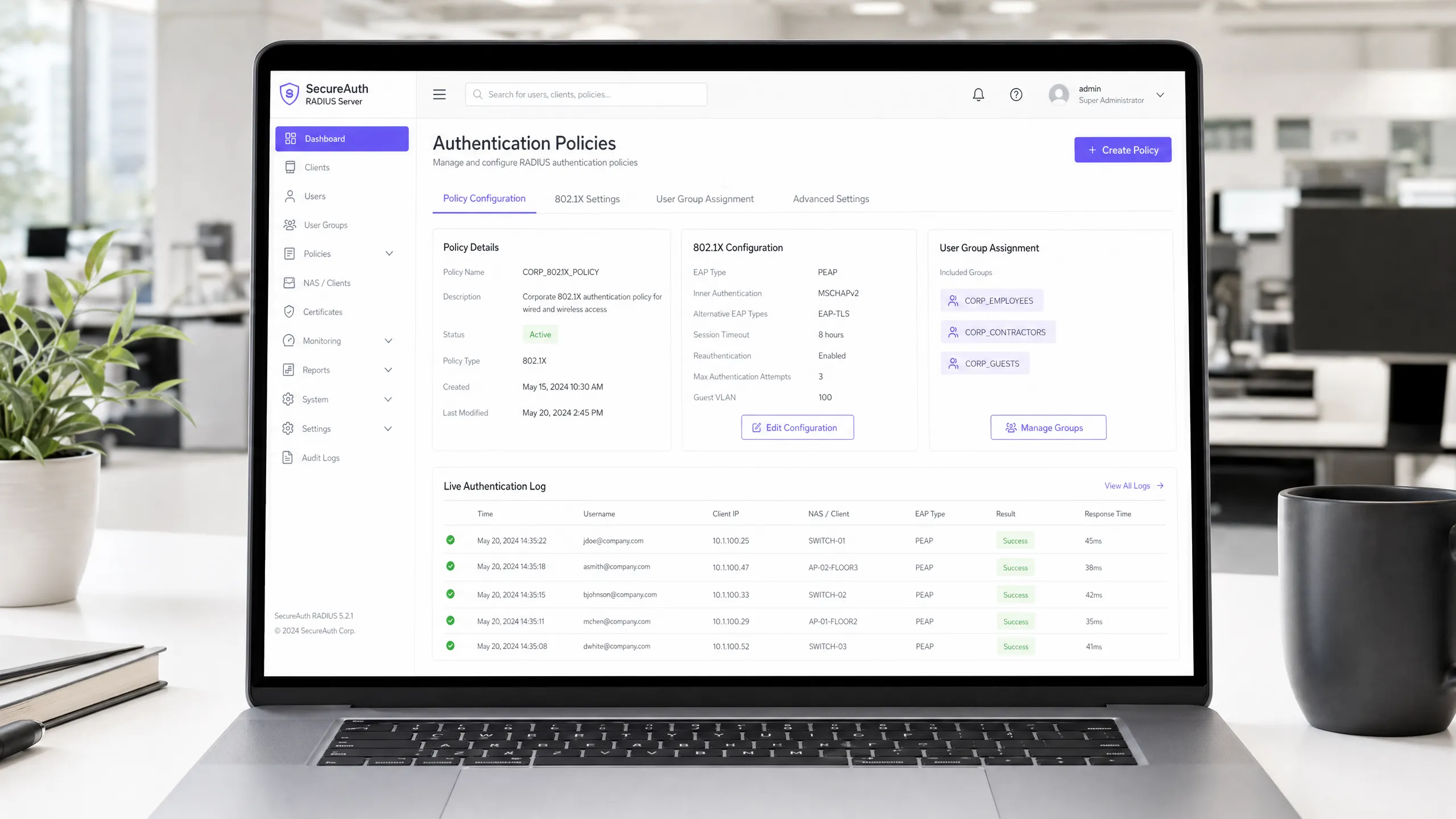
Executive Summary
For enterprise environments — whether a sprawling university campus, a high-density stadium, or a distributed retail chain — relying on a Pre-Shared Key (PSK) for WiFi access is a significant security liability. A single compromised credential exposes the entire network, and revoking access requires changing the password for every device on the estate. Implementing 802.1X authentication via a RADIUS (Remote Authentication Dial-In User Service) server eliminates this problem entirely: each user authenticates individually, access can be revoked instantly, and network segmentation is enforced dynamically.
This guide provides a definitive roadmap for IT managers and network architects to deploy RADIUS authentication. We cover the architectural trade-offs between on-premise and cloud-hosted deployments, the configuration of Extensible Authentication Protocol (EAP) methods, and the integration with directory services like Active Directory. We also demonstrate how a robust authentication layer integrates with Guest WiFi solutions to provide seamless access for visitors, while capturing the WiFi Analytics that turn your network into a business intelligence asset.
Technical Deep-Dive
The 802.1X Architecture
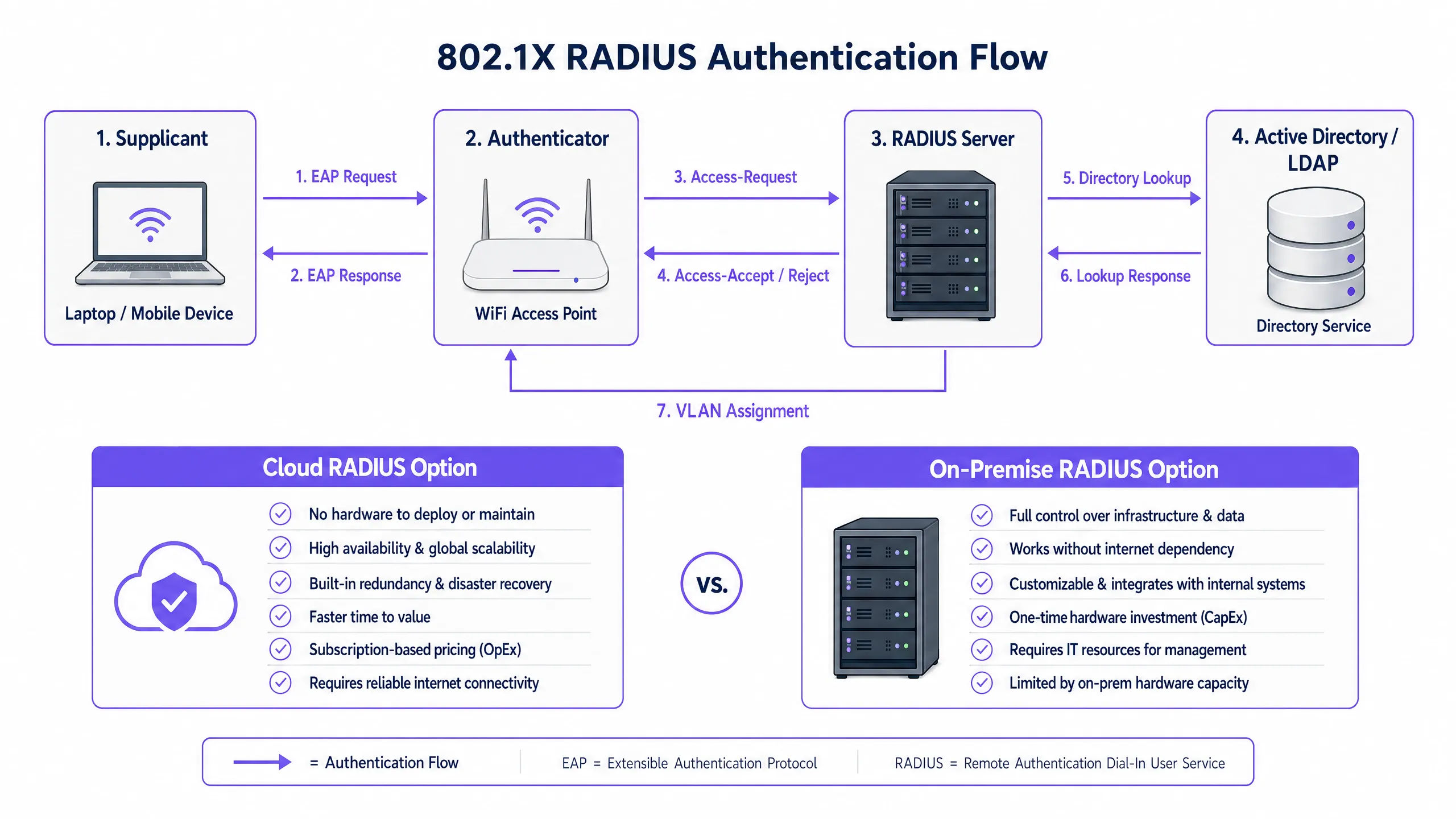
The IEEE 802.1X standard defines port-based Network Access Control (PNAC). In a wireless context, it involves three primary roles working in concert:
| Role | Component | Responsibility |
|---|---|---|
| Supplicant | Client device (laptop, smartphone) | Presents credentials to request network access |
| Authenticator | WiFi Access Point or Controller | Enforces access control; relays EAP messages |
| Authentication Server | RADIUS Server | Validates credentials; returns accept/reject and policy attributes |
When a supplicant associates with an access point, the AP blocks all data traffic except EAP (Extensible Authentication Protocol) messages. The AP encapsulates these EAP messages in RADIUS packets and forwards them to the RADIUS server. The server verifies the credentials against a backend database — typically LDAP or Active Directory — and returns an Access-Accept or Access-Reject message. If accepted, the AP unblocks the port and the client's traffic flows freely.
Choosing an EAP Method
The security of your RADIUS deployment depends heavily on the EAP method selected. The two most prevalent in enterprise deployments are:
EAP-TLS (Transport Layer Security) is the gold standard. It requires digital certificates on both the RADIUS server and every client device, eliminating passwords entirely. Even if an attacker captures the full authentication exchange, there are no credentials to extract. The trade-off is administrative overhead: deploying and managing client certificates requires a functioning Public Key Infrastructure (PKI) and an MDM solution (e.g., Microsoft Intune, Jamf) to distribute certificates to endpoints.
PEAP-MSCHAPv2 (Protected EAP) is the most widely deployed method in practice. It uses a server-side certificate to establish an encrypted TLS tunnel, inside which the client authenticates with a username and password. This is significantly easier to deploy than EAP-TLS because only one certificate — the server's — needs to be managed. However, it carries a critical caveat: if client devices are not explicitly configured to validate the RADIUS server's certificate, they are vulnerable to Man-in-the-Middle (MitM) attacks via rogue access points.
> Critical Security Note: Failing to enforce strict certificate validation on client devices effectively nullifies the security benefits of PEAP-MSCHAPv2. An attacker can deploy a rogue AP, present a fraudulent certificate, and capture user credentials in plaintext. This is not a theoretical risk — it is a well-documented attack vector that has been exploited in real-world environments.
Implementation Guide
Step 1: Architectural Decision — On-Premise vs. Cloud RADIUS
The first decision is where to host the RADIUS infrastructure. This is primarily an operational and cost question, not a security one — both models can be deployed securely.
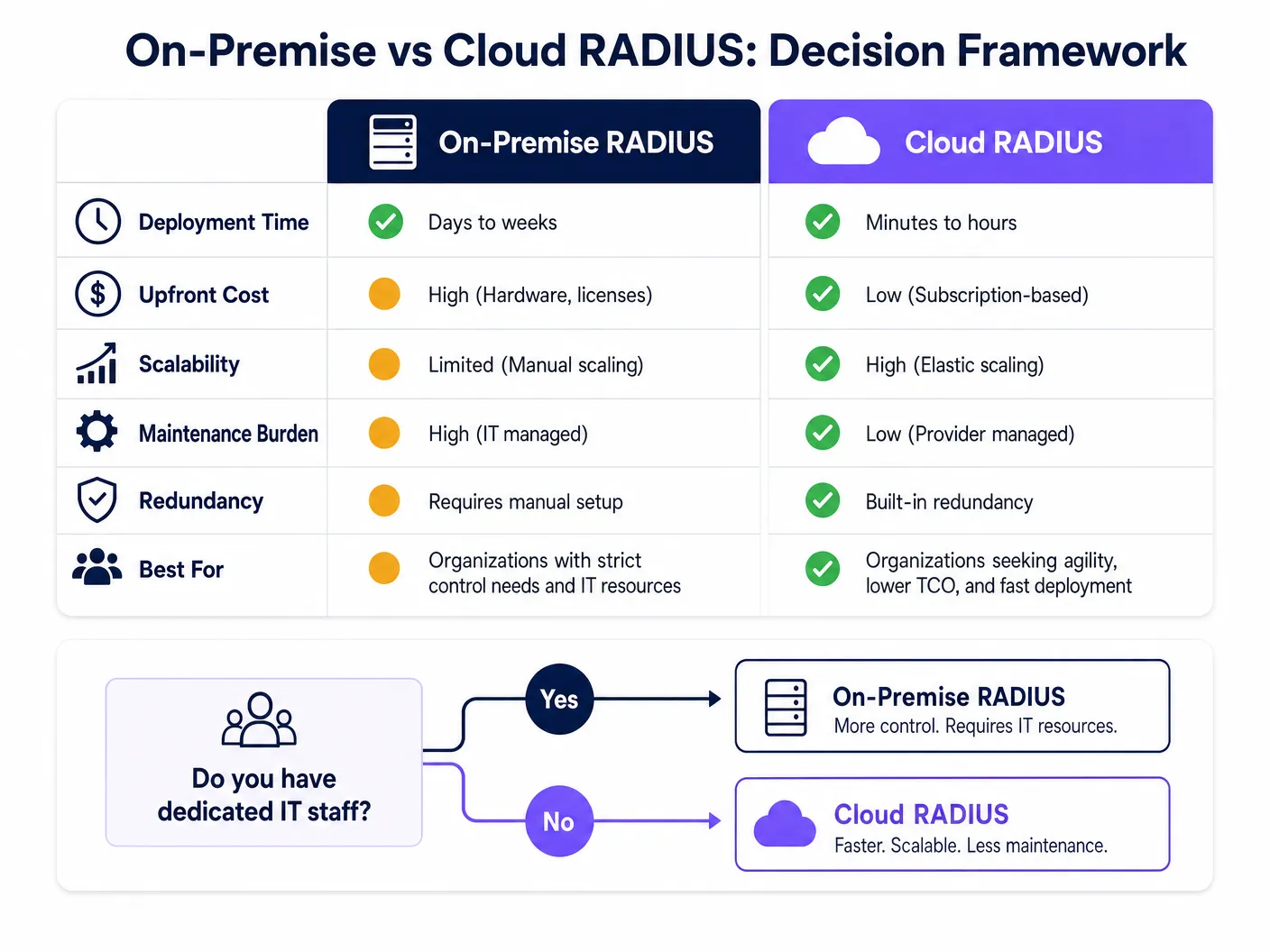
On-Premise RADIUS (e.g., Microsoft NPS, FreeRADIUS, Cisco ISE) is suited for organisations with dedicated IT staff, existing on-premise directory infrastructure, and stringent data sovereignty or compliance requirements. It does not depend on internet connectivity for authentication, which is a meaningful advantage for environments where internet uptime cannot be guaranteed.
Cloud RADIUS is increasingly the preferred model for distributed environments — Retail chains, Hospitality groups, and Transport hubs where deploying servers at every location is operationally impractical. Cloud RADIUS integrates natively with cloud identity providers (Azure AD, Google Workspace, Okta) and provides built-in high availability and global scalability.
Step 2: Install and Configure the RADIUS Server
For an on-premise deployment using Microsoft NPS (the most common choice in Windows-centric environments):
- Install the Network Policy Server role via Server Manager.
- Register the NPS server in Active Directory to allow it to read user dial-in properties.
- Create a RADIUS Client entry for each access point or wireless controller, specifying the AP's IP address and a strong, unique Shared Secret.
- Configure a Network Policy defining the conditions (e.g., user group membership) and constraints (e.g., EAP method, session timeout) for access.
- Configure the Connection Request Policy to process requests locally.
For FreeRADIUS on Linux:
- Install via package manager:
sudo apt-get install freeradius freeradius-ldap. - Configure
/etc/freeradius/3.0/clients.confto define RADIUS clients (APs) and their shared secrets. - Configure the LDAP module in
/etc/freeradius/3.0/mods-available/ldapto point to your Active Directory or LDAP server. - Enable the LDAP module:
sudo ln -s /etc/freeradius/3.0/mods-available/ldap /etc/freeradius/3.0/mods-enabled/. - Define EAP methods in
/etc/freeradius/3.0/mods-available/eap.
Step 3: Configure Access Points
On your wireless controller or individual access points:
- Define the RADIUS server IP address(es) and authentication port (default: UDP 1812).
- Configure the Shared Secret — use a minimum of 22 characters, mixing alphanumeric and special characters. Use a unique secret per location or AP group.
- Configure the SSID to use WPA2-Enterprise or WPA3-Enterprise security mode with 802.1X key management.
- Configure a secondary RADIUS server for failover.
Step 4: Directory Integration
For on-premise AD integration, the RADIUS server must be joined to the domain or have LDAP read access. Ensure service accounts used for LDAP binding have the minimum required permissions. For cloud RADIUS, configure the API-based synchronization or SAML/OIDC integration with your IdP.
Define clear user groups in your directory, as these will drive authorization policies. Recommended group structure:
| Group | VLAN | Access Level |
|---|---|---|
Corp_Staff |
VLAN 10 | Full internal network |
Corp_Contractors |
VLAN 20 | Internet + specific internal resources |
Corp_IoT |
VLAN 30 | Isolated, device-specific ports only |
Corp_Guests |
VLAN 100 | Internet only via captive portal |
Step 5: Client Configuration and Certificate Validation
This is the most operationally critical step. Use Group Policy (GPO) for Windows and MDM profiles for macOS/iOS/Android to push WiFi configurations silently to managed devices. The profile must specify:
- The Root CA that issued the RADIUS server's certificate.
- The expected server name (CN or SAN of the server certificate).
- The EAP method and inner authentication protocol.
For unmanaged BYOD devices, provide clear self-service onboarding instructions, ideally via a Network Access Control (NAC) portal.
Step 6: Implement Dynamic VLAN Assignment
Configure the RADIUS server to return VLAN assignment attributes in the Access-Accept response:
Tunnel-Type=VLAN(13)Tunnel-Medium-Type=IEEE-802(6)Tunnel-Private-Group-Id= ``
The access point reads these attributes and places the authenticated client on the specified VLAN — no manual reconfiguration required as users change roles or locations.
Best Practices
Redundancy is non-negotiable. Deploy a minimum of two RADIUS servers (primary and secondary) and configure all access points to fail over automatically. For on-premise deployments, consider placing the secondary server in a different physical location or availability zone. A RADIUS outage means nobody can authenticate, which is a complete network outage for 802.1X-protected SSIDs.
Monitor certificate expiry proactively. A RADIUS server certificate expiry is one of the most common causes of sudden, widespread authentication failures. Implement monitoring to alert administrators at least 30 days before expiry. This applies to both the server certificate and any intermediate CA certificates in the chain.
Treat the Shared Secret as a critical credential. The shared secret between the AP and the RADIUS server encrypts RADIUS packets. Use unique secrets per location or AP group, store them in a secrets manager, and rotate them periodically. See our guide on Protect Your Network with Strong DNS and Security for broader network security hygiene recommendations.
Align with compliance frameworks. For environments subject to PCI DSS (e.g., retail payment networks), 802.1X authentication directly supports requirements for network access control and audit logging. For GDPR compliance, RADIUS accounting logs (port 1813) provide a detailed audit trail of who accessed the network, from where, and when — valuable for incident response. For Healthcare environments, network segmentation via dynamic VLAN assignment supports HIPAA requirements for protecting electronic protected health information (ePHI).
Troubleshooting & Risk Mitigation
| Failure Mode | Symptom | Resolution |
|---|---|---|
| Certificate expiry | Sudden mass authentication failures | Monitor expiry; renew and redeploy certificate |
| NTP desynchronisation | Intermittent EAP-TLS failures | Ensure RADIUS server and DCs sync to same NTP source |
| LDAP connectivity loss | Authentication fails when AD is unreachable | Deploy redundant DCs; configure RADIUS to cache recent authentications |
| Incorrect Shared Secret | AP logs show RADIUS timeout or Bad authenticator |
Verify secret matches on both AP and RADIUS server |
| Client certificate mismatch | EAP-TLS failures for specific devices | Verify client cert is issued by trusted CA; check cert validity period |
| VLAN not assigned | User authenticated but on wrong network segment | Verify RADIUS attributes are correctly returned; check AP VLAN configuration |
For a deeper dive into the 802.1X configuration process itself, the How to Configure 802.1X WiFi Authentication: A Step-by-Step Guide provides granular, vendor-specific configuration walkthroughs.
ROI & Business Impact
Transitioning from PSK to RADIUS-backed 802.1X requires an initial investment in configuration, and potentially licensing for cloud solutions or hardware for on-premise deployments. The ROI case is straightforward:
Risk mitigation: The average cost of a data breach in the UK is in excess of £3 million (IBM Cost of a Data Breach Report). A compromised PSK can expose the entire network. 802.1X limits the blast radius to a single compromised user account, which can be disabled in seconds via the directory.
Operational efficiency: Dynamic VLAN assignment eliminates manual network reconfiguration as staff change roles. Onboarding a new employee means adding them to the correct AD group — the network access follows automatically.
Compliance posture: For organisations subject to PCI DSS, ISO 27001, or Cyber Essentials Plus, 802.1X is a direct control that auditors expect to see. Deploying it strengthens your compliance posture and reduces audit remediation costs.
Guest experience and analytics: For venue operators, integrating RADIUS for staff authentication with Purple's Guest WiFi platform for visitor access creates a unified, tiered access model. Staff authenticate silently via 802.1X; guests connect via a branded captive portal. Purple's WiFi Analytics platform then provides real-time visibility into visitor dwell times, repeat visit rates, and engagement metrics — data that directly informs marketing spend and venue operations decisions.
For further reading, see the Como Configurar a Autenticação 802.1X WiFi: Um Guia Passo a Passo for Portuguese-language implementation guidance, and What Is a Leased Line? Dedicated Business Internet for guidance on ensuring the underlying connectivity meets enterprise requirements.
महत्वाच्या व्याख्या
RADIUS (रिमोट ऑथेंटिकेशन डायल-इन युजर सर्व्हिस)
नेटवर्क सेवेशी कनेक्ट होणाऱ्या वापरकर्त्यांसाठी केंद्रीकृत ऑथेंटिकेशन, ऑथरायझेशन आणि अकाउंटिंग (AAA) व्यवस्थापन प्रदान करणारा नेटवर्किंग प्रोटोकॉल. RFC 2865 मध्ये परिभाषित.
WiFi ॲक्सेस देण्यापूर्वी डिरेक्टरी विरुद्ध वापरकर्ता क्रेडेंशियल्स प्रमाणित करणारा मुख्य सर्व्हर घटक. 802.1X वापरणाऱ्या प्रत्येक एंटरप्राइझ WiFi डिप्लॉयमेंटसाठी RADIUS सर्व्हर आवश्यक आहे.
802.1X
पोर्ट-आधारित नेटवर्क ॲक्सेस कंट्रोल (PNAC) साठी एक IEEE मानक. हे LAN किंवा WLAN शी जोडण्याची इच्छा असलेल्या डिव्हाइसेसना प्रमाणीकरण यंत्रणा प्रदान करते, प्रमाणीकरण यशस्वी होईपर्यंत सर्व नॉन-EAP ट्रॅफिक ब्लॉक करते.
सप्लिकंट, ऑथेंटिकेटर आणि ऑथेंटिकेशन सर्व्हर कसे संवाद साधतात हे परिभाषित करणारे सर्वसमावेशक फ्रेमवर्क मानक. जेव्हा IT टीम्स 'एंटरप्राइझ WiFi सिक्युरिटी' चा संदर्भ देतात, तेव्हा त्यांचा अर्थ सामान्यतः 802.1X सह WPA2/WPA3-Enterprise असा असतो.
सप्लिकंट (Supplicant)
क्लायंट डिव्हाइस — किंवा अधिक अचूकपणे, त्या डिव्हाइसवरील 802.1X सॉफ्टवेअर स्टॅक — जे नेटवर्कला क्रेडेंशियल्स सादर करून प्रमाणीकरण प्रक्रिया सुरू करते.
Windows वर, अंगभूत सप्लिकंट वायरलेस ऑटोकॉन्फिग सर्व्हिस आहे. macOS आणि iOS वर, ते OS साठी नेटिव्ह आहे. सप्लिकंट योग्यरित्या कॉन्फिगर केले आहे याची खात्री करणे (विशेषतः प्रमाणपत्र प्रमाणीकरणासाठी) हा डिप्लॉयमेंट समस्यांचा सर्वात सामान्य स्रोत आहे.
ऑथेंटिकेटर (Authenticator)
नेटवर्क डिव्हाइस — सामान्यतः WiFi ॲक्सेस पॉईंट किंवा वायरलेस कंट्रोलर — जे सप्लिकंट आणि RADIUS सर्व्हर यांच्यात मध्यस्थ म्हणून काम करते, प्रमाणीकरण परिणामावर आधारित ॲक्सेस कंट्रोल लागू करते.
RADIUS सर्व्हरकडून Access-Accept मिळेपर्यंत AP पोर्टवरील सर्व डेटा ट्रॅफिक ब्लॉक करतो. हे Access-Accept रिस्पॉन्समधून RADIUS ॲट्रिब्यूट्स (उदा. VLAN असाइनमेंट) देखील वाचते आणि ते सेशनवर लागू करते.
EAP (एक्स्टेंसिबल ऑथेंटिकेशन प्रोटोकॉल)
RFC 3748 मध्ये परिभाषित केलेले प्रमाणीकरण फ्रेमवर्क जे सप्लिकंट आणि ऑथेंटिकेशन सर्व्हर यांच्यात विविध प्रमाणीकरण पद्धतींसाठी (TLS, PEAP, TTLS, इ.) प्रमाणित ट्रान्सपोर्ट यंत्रणा प्रदान करते.
EAP ही क्लायंट आणि RADIUS सर्व्हर यांच्यात बोलली जाणारी 'भाषा' आहे. EAP पद्धतीची निवड (EAP-TLS वि PEAP) प्रमाणीकरण प्रणालीची सुरक्षा ताकद आणि डिप्लॉयमेंटची गुंतागुंत ठरवते.
PEAP (प्रोटेक्टेड EAP)
एक EAP पद्धत जी प्रथम सर्व्हरचे प्रमाणपत्र वापरून TLS टनेल स्थापित करते, नंतर त्या एन्क्रिप्टेड टनेलच्या आत दुय्यम प्रमाणीकरण (सामान्यतः युजरनेम/पासवर्डसह MSCHAPv2) करते.
सुरक्षा आणि डिप्लॉयमेंट साधेपणाच्या संतुलनामुळे सर्वात सामान्य एंटरप्राइझ WiFi प्रमाणीकरण पद्धत. याला फक्त सर्व्हर-साइड प्रमाणपत्र आवश्यक आहे, ज्यामुळे ते EAP-TLS पेक्षा रोल आउट करणे खूप सोपे होते.
डायनॅमिक VLAN असाइनमेंट
एक RADIUS वैशिष्ट्य जिथे सर्व्हर Access-Accept रिस्पॉन्समध्ये VLAN-विशिष्ट ॲट्रिब्यूट्स (Tunnel-Type, Tunnel-Medium-Type, Tunnel-Private-Group-Id) समाविष्ट करतो, AP ला प्रमाणित क्लायंटला विशिष्ट VLAN वर ठेवण्याची सूचना देतो.
एकाच SSID ला वेगवेगळ्या सुरक्षा आवश्यकता असलेल्या एकाधिक वापरकर्ता लोकसंख्येला सेवा देण्यास सक्षम करते. वेगवेगळ्या वापरकर्ता गटांसाठी एकाधिक SSIDs ब्रॉडकास्ट करण्याची गरज दूर करते, RF ओव्हरहेड कमी करते आणि वापरकर्ता अनुभव सुलभ करते.
शेअर्ड सिक्रेट (Shared Secret)
केवळ ऑथेंटिकेटर (AP) आणि RADIUS सर्व्हरला ज्ञात असलेली पूर्व-कॉन्फिगर केलेली मजकूर स्ट्रिंग, जी RADIUS पॅकेट्सवर स्वाक्षरी करण्यासाठी आणि एन्क्रिप्ट करण्यासाठी वापरली जाते, संवादाची अखंडता आणि सत्यता सुनिश्चित करते.
एक महत्त्वपूर्ण सुरक्षा कॉन्फिगरेशन घटक. जर शेअर्ड सिक्रेट कमकुवत असेल किंवा तडजोड केली असेल, तर हल्लेखोर RADIUS Access-Accept रिस्पॉन्स बनावट बनवू शकतो, अनधिकृत नेटवर्क ॲक्सेस देऊ शकतो. प्रत्येक लोकेशनसाठी युनिक सिक्रेट्स वापरा आणि त्यांना सिक्रेट्स मॅनेजरमध्ये स्टोअर करा.
मॅक ऑथेंटिकेशन बायपास (MAB)
एक फॉलबॅक प्रमाणीकरण यंत्रणा जिथे डिव्हाइसचा MAC ॲड्रेस त्याचा ओळख क्रेडेंशियल म्हणून वापरला जातो, 802.1X सप्लिकंट्सना समर्थन न देणाऱ्या डिव्हाइसेससाठी नेटवर्क ॲक्सेस सक्षम करतो.
हेडलेस डिव्हाइसेससाठी (प्रिंटर्स, IoT सेन्सर्स, IP कॅमेरे) वापरले जाते. कारण MAC ॲड्रेसेस सार्वजनिकरित्या दृश्यमान असतात आणि सहजपणे स्पूफ केले जाऊ शकतात, MAB मजबूत प्रमाणीकरणाऐवजी डिव्हाइस ओळख प्रदान करते. नेहमी प्रतिबंधात्मक VLAN असाइनमेंटसह जोडा.
सोडवलेली उदाहरणे
500 लोकेशन्स असलेल्या एका राष्ट्रीय रिटेल चेनला स्टोअर मॅनेजर्सचे टॅब्लेट्स आणि POS टर्मिनल्ससाठी सुरक्षित WiFi लागू करण्याची आवश्यकता आहे. ते सध्या सर्व स्टोअर्समध्ये एकच PSK वापरतात, जी वारंवार अनधिकृत कर्मचारी आणि कंत्राटदारांसोबत शेअर केली जाते. ते आयडेंटिटी मॅनेजमेंटसाठी Azure AD वापरतात आणि शाखांच्या ठिकाणी कोणतेही समर्पित IT कर्मचारी नाहीत.
थेट Azure AD सोबत इंटिग्रेट केलेले क्लाउड RADIUS सोल्यूशन तैनात करा. यामुळे 500 ठिकाणी ऑन-प्रिमाईस RADIUS सर्व्हर तैनात आणि व्यवस्थापित करण्याची गरज दूर होते. IT टीम Microsoft Intune चा वापर करून सर्व स्टोअर मॅनेजर्सचे टॅब्लेट्स आणि POS टर्मिनल्सवर PEAP-MSCHAPv2 साठी कॉन्फिगर केलेले WiFi प्रोफाइल पुश करते, जे क्लाउड RADIUS सर्व्हरच्या प्रमाणपत्राचे प्रमाणीकरण कठोरपणे लागू करते. क्लाउड RADIUS पॉलिसी ॲक्सेस देण्यापूर्वी वापरकर्त्याची Azure AD ग्रुप मेंबरशिप तपासते: 'Store_Managers' ग्रुपला VLAN 10 (संपूर्ण POS आणि बॅक-ऑफिस ॲक्सेस) मिळतो, 'Contractors' ग्रुपला VLAN 20 (केवळ इंटरनेट) मिळतो. जेव्हा एखाद्या कंत्राटदाराचा करार संपतो, तेव्हा त्यांना Azure AD ग्रुपमधून काढून टाकल्याने एकाच वेळी सर्व 500 ठिकाणी त्यांचा WiFi ॲक्सेस त्वरित रद्द होतो — कोणताही PSK बदल आवश्यक नाही.
एका 400-खोल्यांच्या सिटी-सेंटर हॉटेलला कर्मचारी (फ्रंट डेस्क, हाऊसकीपिंग, व्यवस्थापन) आणि अतिथी दोघांसाठी सुरक्षित WiFi प्रदान करण्याची आवश्यकता आहे. कर्मचाऱ्यांना प्रॉपर्टी मॅनेजमेंट सिस्टम (PMS) आणि अंतर्गत सर्व्हर्सचा ॲक्सेस आवश्यक आहे. अतिथींना फक्त इंटरनेट ॲक्सेस आवश्यक आहे. हॉटेलमध्ये एकच ऑन-प्रिमाईस Windows Server वातावरण आहे.
समर्पित Windows Server VM वर Microsoft NPS तैनात करा. वायरलेस इन्फ्रास्ट्रक्चरवर दोन SSID कॉन्फिगर करा: 'Hotel_Staff' (WPA2-Enterprise, 802.1X) आणि 'Hotel_Guest' (ओपन किंवा WPA2-Personal, Captive Portal कडे रीडायरेक्ट करणारे). स्टाफ SSID साठी, NPS ॲक्टिव्ह डिरेक्टरी विरुद्ध क्रेडेंशियल्स प्रमाणित करते आणि डायनॅमिक VLAN असाइनमेंट्स परत करते: 'Management' AD ग्रुप → VLAN 10 (पूर्ण ॲक्सेस), 'FrontDesk' → VLAN 20 (PMS ॲक्सेस), 'Housekeeping' → VLAN 30 (केवळ इंटरनेट + शेड्युलिंग ॲप). अतिथींसाठी, ब्रँडेड लॉगिन अनुभव प्रदान करण्यासाठी, फर्स्ट-पार्टी डेटा (ईमेल, मार्केटिंग संमती) संकलित करण्यासाठी आणि ड्वेल टाइम आणि रिपीट व्हिजिट्सवर ॲनालिटिक्स मिळवण्यासाठी Purple च्या गेस्ट WiFi प्लॅटफॉर्मसोबत Captive Portal इंटिग्रेट करा. दोन-SSID मॉडेल नेटवर्क लेयरवर कर्मचारी आणि अतिथी ट्रॅफिक पूर्णपणे वेगळे ठेवते.
सराव प्रश्न
Q1. तुमची संस्था 2,000 Windows लॅपटॉप्सना शेअर्ड PSK वरून PEAP-MSCHAPv2 सह 802.1X वर मायग्रेट करत आहे. तुमची सुरक्षा टीम फ्लॅग करते की PEAP रोग ॲक्सेस पॉईंट्सद्वारे क्रेडेंशियल हार्वेस्टिंगसाठी असुरक्षित आहे. ही जोखीम कमी करण्यासाठी सर्वात महत्त्वाची कॉन्फिगरेशन पायरी कोणती आहे आणि तुम्ही ती मोठ्या प्रमाणावर कशी तैनात कराल?
टीप: सेल्फ-साइंड प्रमाणपत्र सादर करणाऱ्या फसव्या RADIUS सर्व्हरवर विश्वास ठेवण्यापासून क्लायंटला काय प्रतिबंधित करते याचा विचार करा.
नमुना उत्तर पहा
प्रत्येक क्लायंट डिव्हाइसवर कठोर सर्व्हर प्रमाणपत्र प्रमाणीकरण लागू करणे ही महत्त्वपूर्ण पायरी आहे. ग्रुप पॉलिसी ऑब्जेक्ट्स (GPO) वापरून, सर्व 2,000 लॅपटॉप्सवर एक WiFi प्रोफाइल पुश करा जे निर्दिष्ट करते: (1) RADIUS सर्व्हरचे प्रमाणपत्र जारी करणारे अचूक Root CA प्रमाणपत्र, (2) अपेक्षित सर्व्हर नाव (CN/SAN), आणि (3) क्लायंटने वापरकर्त्याला नवीन प्रमाणपत्रांवर विश्वास ठेवण्यास प्रवृत्त करू नये. हे सुनिश्चित करते की जरी एखाद्या हल्लेखोराने फसव्या प्रमाणपत्रासह रोग AP तैनात केला, तरीही क्लायंट TLS हँडशेक नाकारेल आणि क्रेडेंशियल्स पाठविण्यास नकार देईल. या कॉन्फिगरेशनशिवाय, PEAP रोग AP हल्ल्यांविरूद्ध कोणतेही अर्थपूर्ण संरक्षण प्रदान करत नाही.
Q2. एका हॉस्पिटलच्या IT संचालकाला 300 वैद्यकीय IoT डिव्हाइसेस (इन्फ्युजन पंप्स, मॉनिटरिंग उपकरणे) साठी नेटवर्क ॲक्सेस प्रदान करण्याची आवश्यकता आहे जे 802.1X ला समर्थन देत नाहीत. ही उपकरणे त्याच वायरलेस इन्फ्रास्ट्रक्चरवर कर्मचारी वर्कस्टेशन्सच्या बाजूला बसतात. RADIUS इन्फ्रास्ट्रक्चरने या उपकरणांना कसे हाताळावे आणि कोणती नेटवर्क नियंत्रणे लागू असावीत?
टीप: हेडलेस डिव्हाइसेससाठी उपलब्ध प्रमाणीकरण पद्धतीचा विचार करा आणि त्याच्या अंगभूत कमकुवतपणाची भरपाई कशी करावी याचा विचार करा.
नमुना उत्तर पहा
या विशिष्ट उपकरणांसाठी RADIUS सर्व्हरवर MAC ऑथेंटिकेशन बायपास (MAB) कॉन्फिगर करा. प्रत्येक डिव्हाइसचा MAC ॲड्रेस समर्पित ॲक्टिव्ह डिरेक्टरी ग्रुप किंवा RADIUS डेटाबेसमध्ये नोंदणीकृत करा. कारण MAC ॲड्रेसेस सहजपणे स्पूफ केले जातात, RADIUS सर्व्हरने सर्व MAB-प्रमाणित उपकरणांना समर्पित, अत्यंत प्रतिबंधित VLAN (उदा. VLAN 30 - IoT) वर ठेवण्यासाठी डायनॅमिक VLAN असाइनमेंट वापरणे आवश्यक आहे. या VLAN ला केवळ विशिष्ट वैद्यकीय सर्व्हर IP ॲड्रेसेसशी संवाद साधण्याची परवानगी देण्यासाठी फायरवॉल केले पाहिजे आणि इंटरनेट ॲक्सेस आणि स्टाफ VLANs कडे लॅटरल मूव्हमेंटसह इतर सर्व ट्रॅफिक ब्लॉक केले पाहिजे. कर्मचारी वर्कस्टेशन्स 802.1X द्वारे प्रमाणित करतात आणि वेगळ्या VLAN वर ठेवले जातात. हे आर्किटेक्चर ePHI-संलग्न उपकरणांसाठी HIPAA नेटवर्क सेगमेंटेशन आवश्यकता पूर्ण करते.
Q3. तुम्ही 50-व्हेन्यू रेस्टॉरंट चेनचे नेटवर्क आर्किटेक्ट आहात. क्लाउड RADIUS वापरून 49 ठिकाणी प्रमाणीकरण योग्यरित्या काम करत आहे, परंतु एका विशिष्ट ठिकाणाहून अहवाल येतो की सर्व डिव्हाइसेस प्रमाणित करण्यात अयशस्वी होतात. क्लाउड RADIUS मॅनेजमेंट पोर्टल दाखवते की त्या ठिकाणाहून शून्य प्रमाणीकरण विनंत्या येत आहेत. तुमचा डायग्नोस्टिक दृष्टिकोन काय आहे?
टीप: जर RADIUS सर्व्हरला कोणत्याही विनंत्या मिळत नसतील, तर समस्या ऑथेंटिकेटर आणि सर्व्हरमधील कम्युनिकेशन पाथमध्ये आहे — प्रमाणीकरण लॉजिकमध्ये नाही.
नमुना उत्तर पहा
चूंकि RADIUS सर्व्हरला या ठिकाणाहून शून्य विनंत्या मिळत आहेत, त्यामुळे दोष ॲक्सेस पॉईंट्स आणि क्लाउड RADIUS सर्व्हरच्या दरम्यान आहे. क्रमाने डायग्नोस्टिक पायऱ्या: (1) ठिकाणाच्या APs किंवा वायरलेस कंट्रोलरवर कॉन्फिगर केलेला RADIUS सर्व्हर IP ॲड्रेस आणि पोर्ट (UDP 1812) तपासा — येथे टायपो हे सर्वात सामान्य कारण आहे. (2) क्लाउड RADIUS IP रेंजला आउटबाउंड UDP 1812 ट्रॅफिकची परवानगी आहे याची पुष्टी करण्यासाठी त्या ठिकाणचे स्थानिक फायरवॉल किंवा राउटर नियम तपासा. (3) APs वर कॉन्फिगर केलेले शेअर्ड सिक्रेट क्लाउड RADIUS पोर्टलमध्ये त्या ठिकाणासाठी कॉन्फिगर केलेल्या सिक्रेटशी जुळत असल्याची पडताळणी करा — विसंगतीमुळे RADIUS सर्व्हर सायलेंटली पॅकेट्स टाकून देतो. (4) ठिकाणाचे इंटरनेट कनेक्शन काम करत आहे का ते तपासा — क्लाउड RADIUS ला विश्वसनीय इंटरनेट कनेक्टिव्हिटी आवश्यक आहे. AP किंवा अपस्ट्रीम राउटरवर पॅकेट कॅप्चर चालवल्याने RADIUS पॅकेट्स पाठवले जात आहेत की नाही आणि रिस्पॉन्स मिळत आहेत की नाही याची पुष्टी होईल.
या मालिकेमध्ये पुढे वाचा
Server RADIUS: व्यवसायांसाठी एक सर्वसमावेशक मार्गदर्शिका
ही मार्गदर्शिका IT व्यवस्थापक, नेटवर्क आर्किटेक्ट आणि CTOs ना एंटरप्राइझ WiFi साठी server RADIUS ऑथेंटिकेशनवर एक निश्चित तांत्रिक संदर्भ प्रदान करते. यामध्ये AAA फ्रेमवर्क, 802.1X आर्किटेक्चर, EAP पद्धत निवड, क्लाउड विरुद्ध ऑन-प्रिमाइसेस डिप्लॉयमेंटचे फायदे-तोटे आणि डायनॅमिक VLAN असाइनमेंट समाविष्ट आहे. आदरातिथ्य (hospitality), रिटेल, इव्हेंट्स आणि सार्वजनिक क्षेत्रातील वेन्यू ऑपरेटर्सना असुरक्षित प्री-शेअर्ड की वरून सुरक्षित, ओळख-आधारित (identity-driven) नेटवर्क ऍक्सेस कंट्रोल आर्किटेक्चरमध्ये स्थलांतरित होण्यासाठी आवश्यक असणारे अंमलबजावणी मार्गदर्शन, वास्तविक जगातील केस स्टडीज आणि निर्णय घेण्याची फ्रेमवर्क मिळतील.
Aruba ClearPass vs. Purple WiFi: वैशिष्ट्यांची तुलना आणि को-डिप्लॉयमेंट
Aruba ClearPass आणि Purple WiFi च्या को-डिप्लॉयमेंट आर्किटेक्चरची सविस्तर माहिती देणारी एक व्यापक तांत्रिक मार्गदर्शिका. यामध्ये RADIUS प्रॉक्सी कॉन्फिगरेशन, डायनॅमिक VLAN असाइनमेंट आणि एंटरप्राइझ NAC सोबत सुरक्षित, अॅनालिटिक्स-चालित अतिथी नेटवर्क प्रदान करण्यासाठी सर्वोत्तम पद्धतींचा समावेश आहे.
Cisco ISE विरुद्ध Purple WiFi: ते कसे तुलना करतात आणि एकत्र काम करतात
हे मार्गदर्शक स्पष्ट करते की Cisco ISE आणि Purple WiFi हे एंटरप्राइझ नेटवर्कमध्ये वेगळ्या पण पूरक भूमिका कशा बजावतात. सुरक्षित 802.1X कॉर्पोरेट ॲक्सेससाठी Cisco ISE कसे वापरावे आणि GDPR-सुसंगत अतिथी WiFi, मार्केटिंग ॲनालिटिक्स आणि CRM इंटिग्रेशनसाठी Purple चा कसा फायदा घ्यावा, हे यामध्ये तपशीलवार दिले आहे.