

TP-Link Omada आणि Purple WiFi SMB उपयोजनांसाठी
हे अधिकृत मार्गदर्शक IT व्यवस्थापक आणि नेटवर्क आर्किटेक्टना TP-Link Omada ॲक्सेस पॉइंट्सना Purple च्या क्लाउड RADIUS इन्फ्रास्ट्रक्चरमध्ये समाकलित करण्यासाठी एक निश्चित आराखडा प्रदान करते. यात आर्किटेक्चरल डिझाइन, स्टेप-बाय-स्टेप Captive Portal कॉन्फिगरेशन, Walled Garden च्या आवश्यकता आणि SMB उपयोजनांसाठी UniFi विरुद्ध व्यावसायिक तुलना समाविष्ट आहे.
🎧 हे मार्गदर्शक ऐका
ट्रान्सक्रिप्ट पहा
कार्यकारी सारांश
हॉस्पिटॅलिटी , रिटेल आणि सार्वजनिक ठिकाणी असलेल्या SMBs साठी, सुरक्षित, ब्रँडेड Guest WiFi प्रदान करणे आता चैनीची गोष्ट राहिलेली नाही—ती एक कार्यात्मक आवश्यकता आहे. ऐतिहासिकदृष्ट्या, IT व्यवस्थापकांना एका कठीण निवडीचा सामना करावा लागला आहे: UniFi सारखे महागडे, एंटरप्राइझ-ग्रेड हार्डवेअर तैनात करणे, किंवा ग्राहक-ग्रेड ॲक्सेस पॉइंट्ससह सुरक्षा आणि ॲनालिटिक्सवर तडजोड करणे. TP-Link Omada हे समीकरण मूलभूतपणे बदलते. Omada चे किफायतशीर, क्लाउड-व्यवस्थापित हार्डवेअर Purple च्या एंटरप्राइझ-ग्रेड प्रमाणीकरण आणि WiFi Analytics सह एकत्र करून, ठिकाणांचे ऑपरेटर पारंपारिक खर्चाच्या काही अंशात सुरक्षित, स्केलेबल नेटवर्क आर्किटेक्चर साध्य करू शकतात.
हे तांत्रिक संदर्भ मार्गदर्शक TP-Link Omada ॲक्सेस पॉइंट्सना Purple च्या क्लाउड RADIUS इन्फ्रास्ट्रक्चरसह तैनात करण्यासाठी एक निश्चित आराखडा प्रदान करते. आम्ही आर्किटेक्चरल एकत्रीकरण तपासू, अखंड Captive Portal अनुभवासाठी आवश्यक असलेल्या विशिष्ट कॉन्फिगरेशन पॅरामीटर्सची तपशीलवार माहिती देऊ आणि SMB उपयोजनांसाठी Omada ची UniFi शी तुलना करणारे स्पष्ट खर्च-लाभ विश्लेषण प्रदान करू. हे एक व्यावहारिक, विक्रेता-तटस्थ अंमलबजावणी मार्गदर्शक आहे जे वरिष्ठ IT व्यावसायिक आणि नेटवर्क आर्किटेक्टसाठी डिझाइन केलेले आहे ज्यांना या तिमाहीत मजबूत गेस्ट नेटवर्क तैनात करण्यासाठी कृतीयोग्य मार्गदर्शन आवश्यक आहे.
तांत्रिक सखोल विश्लेषण
TP-Link Omada आणि Purple मधील एकत्रीकरण मानक External RADIUS Server आर्किटेक्चर आणि External Web Portal रीडायरेक्टवर अवलंबून आहे. रेडिओ ॲक्सेस नेटवर्कला ओळख व्यवस्थापन प्लेनपासून वेगळे करणे हे आधुनिक Internet of Things Architecture: A Complete Guide चे मूलभूत तत्त्व आहे.
आर्किटेक्चरल विहंगावलोकन
मानक उपयोजनामध्ये, Omada Access Point (उदा. EAP670 किंवा EAP650) RF वातावरण, क्लायंट असोसिएशन आणि रोमिंग हाताळते. तथापि, ते प्रमाणीकरण हाताळत नाही. जेव्हा क्लायंट डिव्हाइस गेस्ट SSID शी कनेक्ट होते, तेव्हा Omada कंट्रोलर कनेक्शनला अडवतो आणि वापरकर्त्याच्या ब्राउझरला Purple च्या होस्ट केलेल्या स्प्लॅश पेजवर रीडायरेक्ट करतो.
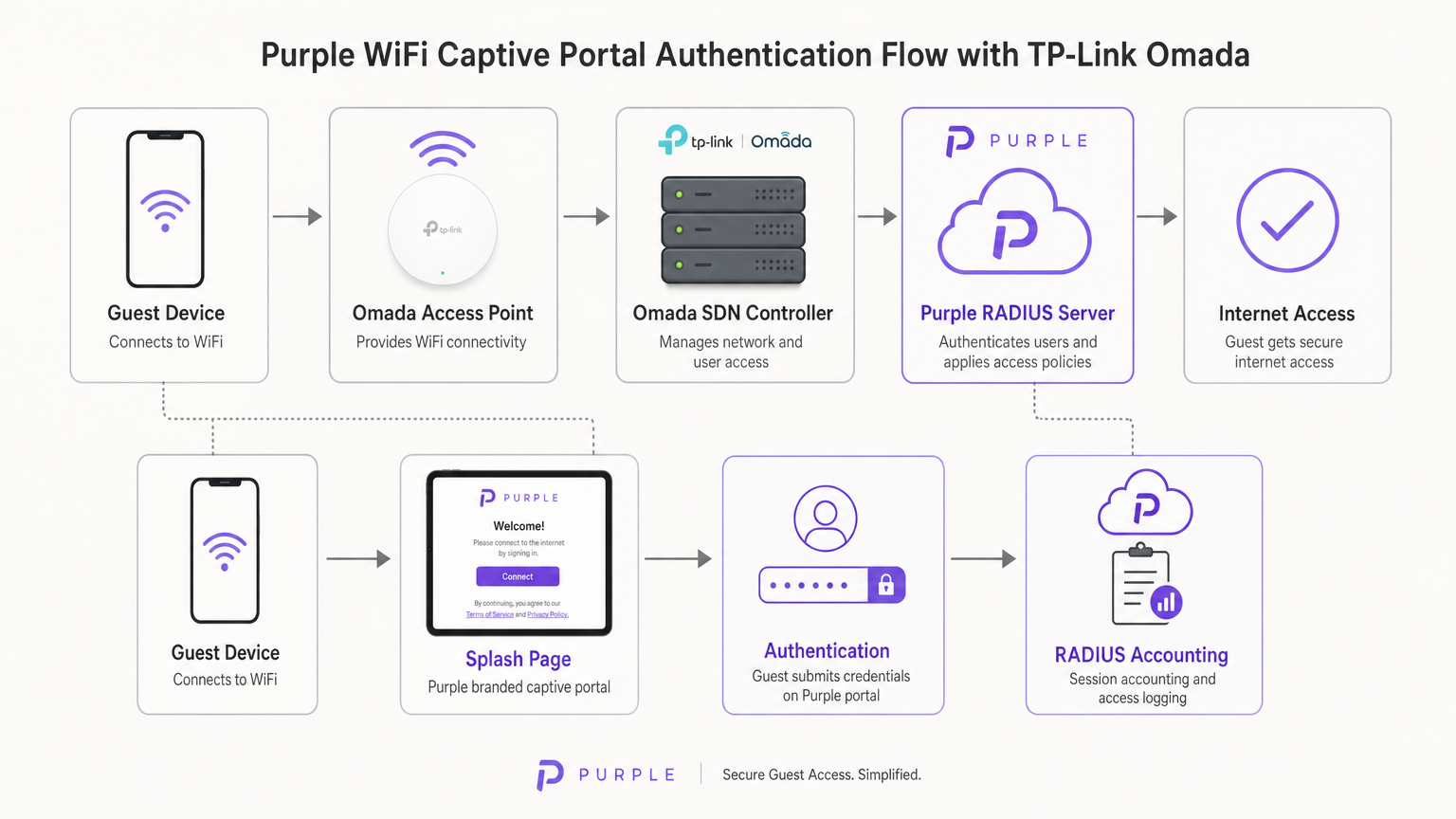
एकदा वापरकर्त्याने Purple पोर्टलवर त्यांची क्रेडेन्शियल्स (किंवा सेवा अटी स्वीकारल्या) सबमिट केल्यावर, Purple चे क्लाउड इन्फ्रास्ट्रक्चर RADIUS सर्व्हर म्हणून कार्य करते. ते Omada कंट्रोलरला Access-Accept संदेश परत पाठवते, जे नंतर स्थानिक नेटवर्कवरील क्लायंट डिव्हाइसच्या MAC ॲड्रेसला अधिकृत करते. Purple सर्व RADIUS Accounting देखील हाताळते, ॲनालिटिक्स आणि अनुपालन हेतूंसाठी सत्र कालावधी आणि डेटा वापर ट्रॅक करते.
Omada कंट्रोलर पर्याय
Omada Software Defined Networking (SDN) प्लॅटफॉर्मला ॲक्सेस पॉइंट्स व्यवस्थापित करण्यासाठी आणि Captive Portal रीडायरेक्शन हाताळण्यासाठी कंट्रोलरची आवश्यकता असते. तुमच्याकडे तीन प्राथमिक उपयोजन मॉडेल्स आहेत:
- Omada Cloud-Based Controller: TP-Link द्वारे पूर्णपणे होस्ट केलेले. बहुतेक SMB उपयोजनांसाठी हा शिफारस केलेला दृष्टीकोन आहे कारण तो ऑन-साइट कंट्रोलर हार्डवेअरची आवश्यकता काढून टाकतो आणि उच्च उपलब्धता प्रदान करतो.
- Hardware Controller (OC200/OC300): स्थानिक नेटवर्कवर स्थापित केलेले भौतिक उपकरण. अविश्वसनीय WAN लिंक्स असलेल्या वातावरणासाठी योग्य आहे जिथे स्थानिक व्यवस्थापन महत्त्वाचे आहे.
- Software Controller: स्थानिक सर्व्हर किंवा VM (Windows किंवा Linux) वर स्थापित केलेले.
महत्त्वाचे म्हणजे, नवीन गेस्ट प्रमाणीकरण प्रक्रिया करण्यासाठी Omada कंट्रोलर ऑनलाइन राहणे आवश्यक आहे. जर कंट्रोलर ऑफलाइन झाला, तर विद्यमान प्रमाणीकृत सत्रे सक्रिय राहतील, परंतु नवीन क्लायंट Captive Portal लोड करू शकणार नाहीत.
अंमलबजावणी मार्गदर्शक
Omada v4+ कंट्रोलरवर Purple तैनात करण्यासाठी तीन भिन्न घटक कॉन्फिगर करणे आवश्यक आहे: Wireless Network, Guest Portal आणि Walled Garden.
पायरी 1: वायरलेस सेटिंग्ज कॉन्फिगरेशन
स्थानिक एन्क्रिप्शनशिवाय गेस्ट ॲक्सेससाठी कॉन्फिगर केलेला एक समर्पित SSID हा पाया आहे.
- Omada कंट्रोलरमधील Wireless Settings वर नेव्हिगेट करा आणि Add वर क्लिक करा.
- SSID परिभाषित करा (उदा. "Guest WiFi").
- Guest Network टॉगल सक्षम करा. हे महत्त्वाचे आहे कारण ते लेयर 2 क्लायंट आयसोलेशन सक्षम करते, ज्यामुळे पाहुण्यांना एकमेकांशी संवाद साधण्यापासून किंवा स्थानिक कॉर्पोरेट संसाधनांमध्ये प्रवेश करण्यापासून प्रतिबंधित करते—PCI DSS अनुपालनासाठी ही एक अनिवार्य आवश्यकता आहे.
- Security Mode None वर सेट करा. प्रमाणीकरण लेयर 2 ऐवजी Captive Portal द्वारे लेयर 7 वर हाताळले जाईल.
- 2.4GHz आणि 5GHz दोन्ही बँडवर सेटिंग्ज लागू करा.
पायरी 2: गेस्ट पोर्टल आणि RADIUS कॉन्फिगरेशन
ही पायरी Omada कंट्रोलरला Purple च्या क्लाउड इन्फ्रास्ट्रक्चरशी जोडते.
- Wireless Control > Portal वर नेव्हिगेट करा आणि Add a New Portal वर क्लिक करा.
- पायरी 1 मध्ये तयार केलेला SSID निवडा.
- Authentication Type External RADIUS Server वर सेट करा.
- प्राथमिक RADIUS सर्व्हर कॉन्फिगर करा:
- RADIUS Server IP: तुमच्या Purple डॅशबोर्डमध्ये प्रदान केलेला.
- RADIUS पोर्ट:
1812 - RADIUS पासवर्ड: तुमचा अद्वितीय Purple RADIUS सिक्रेट.
- प्रमाणीकरण मोड:
PAP
- RADIUS Accounting सक्षम करा:
- Accounting Server IP: तुमच्या Purple डॅशबोर्डमध्ये प्रदान केलेला.
- Accounting Server पोर्ट:
1813 - Accounting Server पासवर्ड: तुमचा अद्वितीय Purple RADIUS सिक्रेट.
- Interim Update सक्षम करा आणि मध्यांतर
120सेकंदांवर सेट करा. हे अचूक सत्र ट्रॅकिंग सुनिश्चित करते. - Portal Customization अंतर्गत, External Web Portal निवडा.
- Purple द्वारे प्रदान केलेला External Web Portal URL इनपुट करा.
महत्त्वाची सूचना: HTTPS Redirect Disable वर सेट केले असल्याची खात्री करा. प्रारंभिक Captive Portal इंटरसेप्ट HTTP वर अवलंबून असतो. कंट्रोलर स्तरावर HTTPS रीडायरेक्ट सक्षम केल्यास स्प्लॅश पेज लोड प्रक्रिया खंडित होईल.
पायरी 3: Walled Garden (पूर्व-प्रमाणीकरण प्रवेश)
Walled Garden हे गेस्ट WiFi उपयोजनांमध्ये अपयशाचे सर्वात सामान्य कारण आहे. वापरकर्ता प्रमाणीकरण करण्यापूर्वी, त्यांचेडिव्हाइसने स्प्लॅश पेज लोड करण्यासाठी आणि सोशल लॉगिन प्रक्रिया करण्यासाठी Purple च्या सर्व्हरना रिझॉल्व्ह आणि रीच करता आले पाहिजे.
- पोर्टल सेटिंग्जमधील Access Control हेडरवर नेव्हिगेट करा.
- Pre-authentication Access सक्षम करा.
- Purple च्या अधिकृत Walled Garden व्हाईटलिस्टमध्ये सूचीबद्ध असलेले प्रत्येक डोमेन जोडा. यामध्ये Purple चे मुख्य डोमेन, CDN एंडपॉइंट्स आणि सोशल लॉगिन प्रदात्यांसाठी (Facebook, Google, X) आवश्यक असलेले डोमेन समाविष्ट आहेत.
- हे योग्यरित्या कॉन्फिगर करण्यात अयशस्वी झाल्यास iOS आणि Android वरील Captive Network Assistant (CNA) पेज रेंडर करण्यात अयशस्वी होईल.
सर्वोत्तम पद्धती
मजबूत आणि अनुरूप उपयोजन सुनिश्चित करण्यासाठी, खालील उद्योग-मानक शिफारसींचे पालन करा:
- VLAN सेगमेंटेशन: नेहमी गेस्ट SSID ला समर्पित VLAN वर ठेवा, जे कॉर्पोरेट ट्रॅफिक, पॉइंट ऑफ सेल (POS) सिस्टीम आणि व्यवस्थापन इंटरफेसपासून पूर्णपणे वेगळे असेल. यामुळे धोका कमी होतो आणि अनुपालन ऑडिटिंग सोपे होते.
- बँडविड्थ दर मर्यादा: गेस्ट SSID वर दर मर्यादा लागू करा (उदा. प्रति क्लायंट 5 Mbps डाउनलोड / 1 Mbps अपलोड) जेणेकरून एकच वापरकर्ता WAN लिंक पूर्णपणे वापरू शकणार नाही आणि व्यवसायाच्या कामकाजावर परिणाम होणार नाही.
- SecurePass एकीकरण: जास्त वेळा भेट देणाऱ्या पाहुण्यांसाठी, Purple चे SecurePass (Hotspot 2.0 सह WPA-Enterprise) कॉन्फिगर करा. यामुळे परत येणाऱ्या पाहुण्यांना प्रोफाइलद्वारे आपोआप प्रमाणीकरण करता येते, ज्यामुळे Captive Portal पूर्णपणे वगळले जाते आणि एक सुलभ अनुभव मिळतो.
- कंट्रोलर उच्च उपलब्धता: जर ऑन-प्रिमाईस हार्डवेअर कंट्रोलर (OC200) वापरत असाल, तर ते Uninterruptible Power Supply (UPS) शी जोडलेले असल्याची खात्री करा. कंट्रोलर रीबूट झाल्यास नवीन प्रमाणीकरण थांबेल.
समस्यानिवारण आणि धोका कमी करणे
तृतीय-पक्ष Captive Portal उपयोजित करताना, विशिष्ट अपयश वारंवार उद्भवतात. त्यांना कसे हाताळावे ते येथे दिले आहे:
iOS Captive Network Assistant (CNA) लोड होण्यात अयशस्वी
जर Apple डिव्हाइसेस WiFi शी कनेक्ट झाले, परंतु स्प्लॅश पेज आपोआप पॉप अप झाले नाही, तर समस्या जवळजवळ नेहमीच अपूर्ण Walled Garden असते. iOS CNA इंटरनेट ऍक्सेस शोधण्यासाठी विशिष्ट Apple एंडपॉइंट्स (उदा. captive.apple.com) पर्यंत पोहोचण्याचा प्रयत्न करते. जर हे ब्लॉक केले असतील, किंवा Purple चे CDN डोमेन Pre-Authentication Access सूचीमधून गहाळ असतील, तर पेज रेंडर होणार नाही. Purple च्या सध्याच्या दस्तऐवजीकरणानुसार व्हाईटलिस्ट सत्यापित करा.
ॲनालिटिक्समध्ये सत्रे दिसत नाहीत
जर वापरकर्ते प्रमाणीकरण करू शकत असतील आणि इंटरनेट ऍक्सेस करू शकत असतील, परंतु त्यांचा सत्र डेटा (कालावधी, बँडविड्थ) Purple डॅशबोर्डमधून गहाळ असेल, तर RADIUS अकाउंटिंग कॉन्फिगरेशन सत्यापित करा. अकाउंटिंग पोर्ट 1813 वर सेट केले असल्याची खात्री करा, सिक्रेट तंतोतंत जुळते, आणि Interim Update मध्यांतर सक्षम केले आहे आणि 120 सेकंदांवर सेट केले आहे.
प्रमाणीकरण टाइमआउट्स
जर पोर्टल लोड झाले परंतु 'Connect' वर क्लिक केल्यावर वापरकर्त्यांना टाइमआउट एरर मिळाल्यास, Omada कंट्रोलर पोर्ट 1812 वर Purple RADIUS सर्व्हरपर्यंत पोहोचण्यात अयशस्वी होत आहे. तुमच्या एज राउटरवरील आउटबाउंड फायरवॉल नियम सत्यापित करा जेणेकरून UDP पोर्ट 1812 आणि 1813 Purple च्या IP ॲड्रेससाठी खुले आहेत याची खात्री होईल.
ROI आणि व्यावसायिक परिणाम
IT संचालक आणि CTO साठी, Purple सॉफ्टवेअरसह Omada हार्डवेअर उपयोजित करण्याचा निर्णय मूलतः व्यावसायिक आहे. ही आर्किटेक्चर पर्यायांशी कशी तुलना करते, आणि गुंतवणुकीवर अपेक्षित परतावा काय आहे?
Omada विरुद्ध UniFi निर्णय
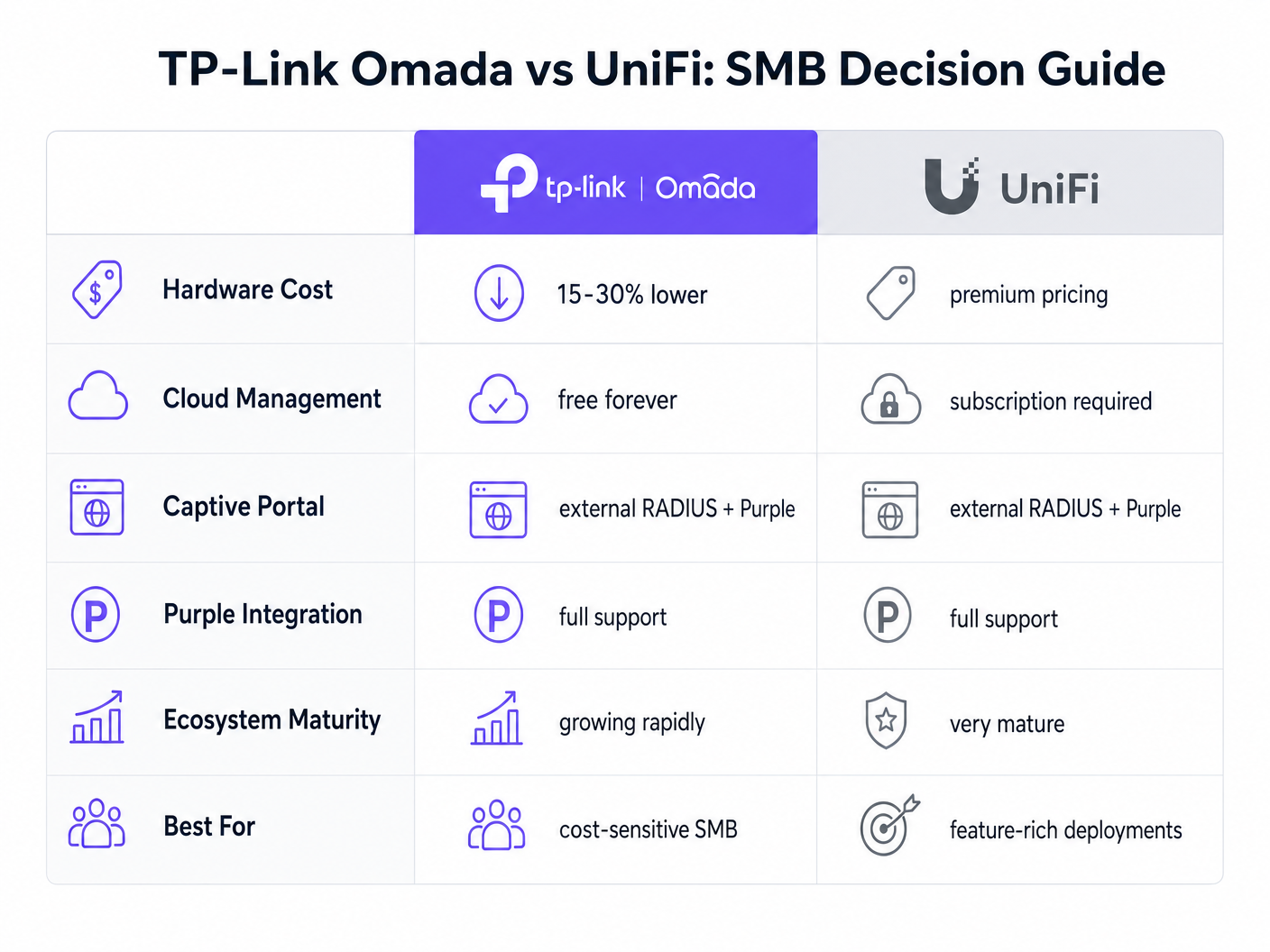
Ubiquiti चे UniFi प्लॅटफॉर्म SMB क्षेत्रात सध्याचे आघाडीचे आहे. तथापि, TP-Link Omada मुख्य कार्यक्षमतेचा त्याग न करता एक आकर्षक आर्थिक फायदा देते.
- भांडवली खर्च (CapEx): Omada ॲक्सेस पॉइंट्स (उदा. EAP670) त्यांच्या UniFi समतुल्य (उदा. U6 Pro) पेक्षा साधारणपणे 15-30% कमी महाग असतात. 50-AP उपयोजनामध्ये, यामुळे हजारो डॉलर्सची हार्डवेअर बचत होते.
- कार्यकारी खर्च (OpEx): TP-Link Omada Cloud कंट्रोलर विनामूल्य देते. UniFi च्या अधिकृत क्लाउड होस्टिंगसाठी प्रति साइट मासिक सदस्यता आवश्यक आहे.
- एकीकरण: दोन्ही प्लॅटफॉर्म External RADIUS ला सपोर्ट करतात आणि Purple सह अखंडपणे एकत्रित होतात.
कॅमेरा आणि दरवाजा ॲक्सेससह वैशिष्ट्यपूर्ण, एकीकृत इकोसिस्टमसाठी, UniFi अजूनही श्रेष्ठ आहे. तथापि, खर्च-कार्यक्षमता आणि विश्वसनीय गेस्ट ॲक्सेसवर लक्ष केंद्रित केलेल्या केवळ वायरलेस उपयोजनासाठी, Omada अपवादात्मक मूल्य प्रदान करते.
यशाचे मोजमाप
Omada हार्डवेअरवर Purple Connect (विनामूल्य स्तर) उपयोजित केल्याने गेस्ट पासवर्ड व्यवस्थापित करण्याशी संबंधित IT सपोर्टचा भार कमी करून त्वरित ROI मिळते. डेटा कॅप्चर आणि मार्केटिंग ऑटोमेशनसाठी सशुल्क स्तरांवर अपग्रेड करण्याच्या व्यापक व्यावसायिक परिणामांना समजून घेण्यासाठी, आमचे सर्वसमावेशक विश्लेषण वाचा: Why Use WiFi Marketing? The Business Case With Real Data .
Omada च्या किफायतशीर हार्डवेअरचा लाभ घेऊन, ठिकाणे पायाभूत सुविधा CapEx मधून सक्रियपणे महसूल वाढवणाऱ्या सॉफ्टवेअर सोल्यूशन्सकडे बजेट पुन्हा वाटप करू शकतात, नेटवर्कला कॉस्ट सेंटरमधून मार्केटिंग ॲसेटमध्ये रूपांतरित करू शकतात.
महत्त्वाच्या संज्ञा आणि व्याख्या
External RADIUS Server
A networking protocol that provides centralized Authentication, Authorization, and Accounting (AAA) management. In this context, Purple acts as the RADIUS server, verifying users and instructing the Omada controller to grant network access.
IT teams use this architecture to decouple identity management from local network hardware, enabling cloud-based analytics and compliance.
Captive Portal
A web page that a user of a public-access network is obliged to view and interact with before access is granted.
This is the primary touchpoint for data capture and brand engagement in guest WiFi deployments.
Walled Garden (Pre-Authentication Access)
A limited environment that controls the user's access to web content and services before they have fully authenticated on the network.
Crucial for allowing devices to reach the splash page hosted on Purple's servers and to communicate with social login providers like Google or Facebook before internet access is granted.
Captive Network Assistant (CNA)
The pseudo-browser built into mobile operating systems (like iOS and Android) that automatically detects captive portals and pops up the login screen.
IT teams must ensure the Walled Garden is perfectly configured, as the CNA is highly sensitive to blocked resources and will fail silently if it cannot reach necessary endpoints.
RADIUS Accounting
The process of tracking network resource consumption by users, including session duration and bytes transferred.
Essential for generating accurate analytics in the Purple dashboard and for enforcing bandwidth or time limits on guest sessions.
Layer 2 Isolation (Guest Network Mode)
A security feature that prevents devices connected to the same wireless network from communicating directly with each other.
A mandatory requirement for public networks to prevent lateral movement of malware and to comply with security standards like PCI DSS.
Interim Update Interval
The frequency at which the network controller sends accounting data updates to the RADIUS server during an active session.
Setting this to 120 seconds ensures Purple has near real-time data on user sessions without overwhelming the network with RADIUS traffic.
Passpoint (Hotspot 2.0)
A standard that enables mobile devices to automatically discover and connect to Wi-Fi networks securely without requiring a captive portal login.
Used by Purple's SecurePass feature to provide a frictionless, secure (WPA-Enterprise) connection for returning guests, improving the user experience and increasing connection rates.
केस स्टडीज
A 150-room boutique hotel needs to deploy guest WiFi across all bedrooms and public areas. They have a strict budget but require GDPR-compliant data capture and seamless roaming. They are evaluating UniFi U6 Pro vs TP-Link Omada EAP670.
The hotel should deploy 40 TP-Link Omada EAP670 access points managed via the free Omada Cloud Controller. They will configure a 'Guest WiFi' SSID with no Layer 2 security, relying on Purple's External RADIUS integration for authentication. They must implement a strict Walled Garden to allow pre-authentication access to Purple's splash pages. The guest network will be placed on an isolated VLAN.
A retail chain with 20 small footprint stores wants to offer free WiFi to customers to capture email addresses for their loyalty program. They currently have unmanaged consumer routers in each store and no centralized IT support.
Deploy a single TP-Link Omada EAP650 access point in each store, connected to an Omada Cloud Controller for centralized management. Configure Purple's 'Connect' or 'Capture' tier via External RADIUS. Implement bandwidth rate limiting (e.g., 5Mbps down/1Mbps up) on the guest SSID to protect the stores' limited WAN connections, which are also used for Point of Sale (POS) systems.
परिस्थिती विश्लेषण
Q1. A venue reports that users can connect to the guest WiFi and browse the internet, but no session data or analytics are appearing in the Purple dashboard. What is the most likely configuration error on the Omada controller?
💡 संकेत:Think about the specific RADIUS protocol responsible for tracking usage, not just granting access.
शिफारस केलेला दृष्टिकोन दाखवा
The RADIUS Accounting configuration is likely incorrect or disabled. The IT team should verify that Accounting is enabled, the Accounting Server IP is correct, the Accounting Port is set to 1813, and the Interim Update interval is set to 120 seconds.
Q2. During a pilot deployment, Android devices successfully load the Purple splash page, but iOS devices show a blank screen and drop the WiFi connection. How should the network architect resolve this?
💡 संकेत:iOS and Android handle captive portal detection differently. iOS relies heavily on specific domains being reachable before authentication.
शिफारस केलेला दृष्टिकोन दाखवा
The network architect must update the Pre-Authentication Access List (Walled Garden) on the Omada controller. The iOS Captive Network Assistant (CNA) is failing because it cannot reach required Apple domains or Purple CDN endpoints. They must cross-reference their configuration with Purple's official Walled Garden whitelist.
Q3. A client wants to migrate from an expensive, subscription-based cloud managed WiFi solution to TP-Link Omada to save on OpEx, but they are concerned about losing the enterprise-grade analytics they currently rely on. What is the recommended architecture?
💡 संकेत:How can you separate the hardware management plane from the analytics and identity plane?
शिफारस केलेला दृष्टिकोन दाखवा
The client should deploy TP-Link Omada access points managed by the free Omada Cloud Controller to eliminate hardware subscription fees. They should then integrate this with Purple WiFi via an External RADIUS configuration. This architecture provides cost-effective hardware management while retaining enterprise-grade analytics, data capture, and CRM integration through the Purple platform.




