

TP-Link Omada und Purple WiFi für SMB-Bereitstellungen
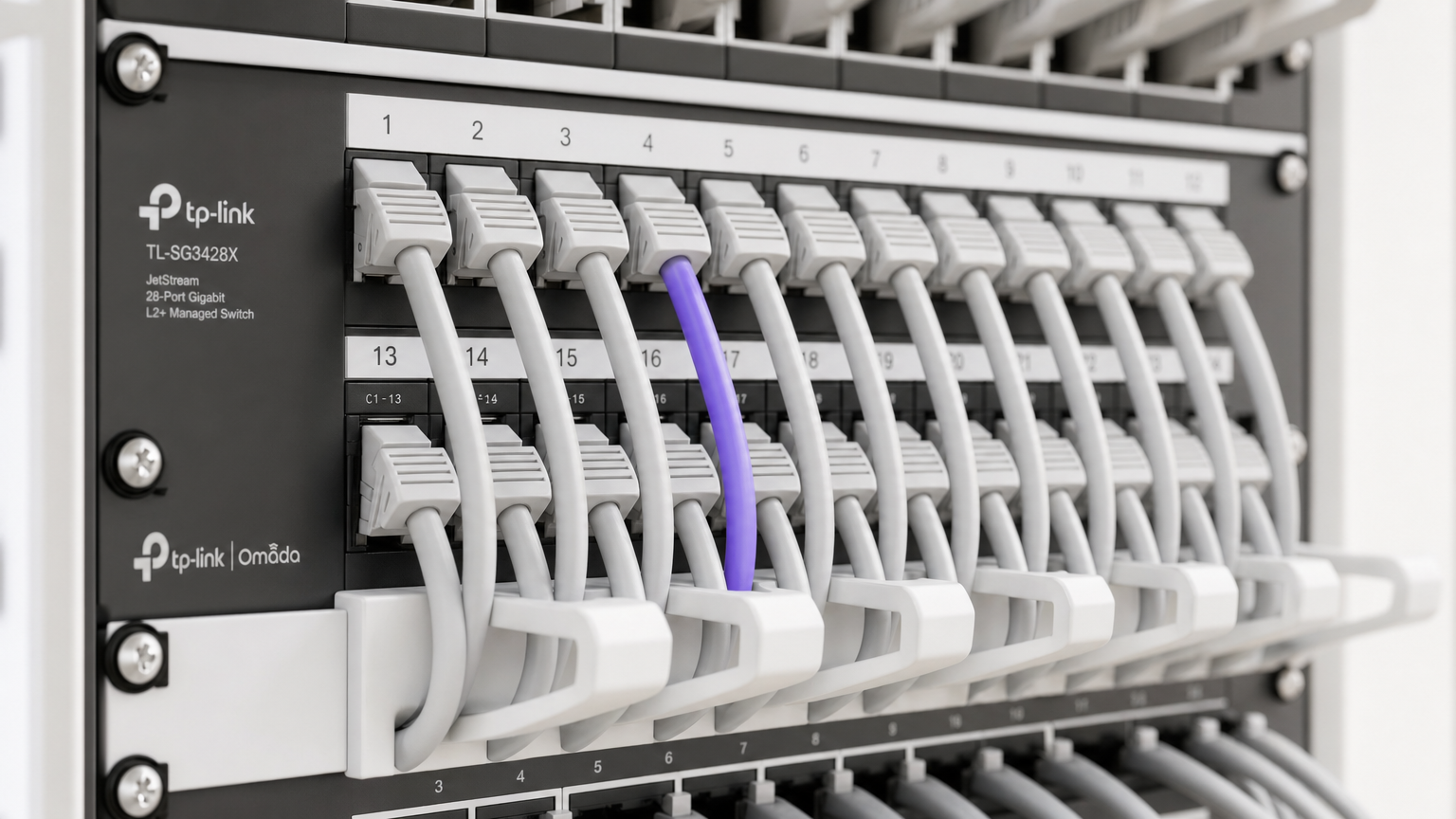
Dieser maßgebliche Leitfaden bietet IT-Managern und Netzwerkarchitekten einen definitiven Plan für die Integration von TP-Link Omada Access Points mit der Cloud-RADIUS-Infrastruktur von Purple. Er behandelt architektonisches Design, die schrittweise Konfiguration des Captive Portal, Walled Garden-Anforderungen und einen kommerziellen Vergleich mit UniFi für SMB-Bereitstellungen.
🎧 Diesen Leitfaden anhören
Transkript anzeigen
Zusammenfassung für die Geschäftsleitung
Für SMBs in Hospitality , Retail und öffentlichen Einrichtungen ist die Bereitstellung von sicherem, gebrandetem Guest WiFi kein Luxus mehr – es ist eine betriebliche Notwendigkeit. Historisch standen IT-Manager vor einer schwierigen Wahl: teure, unternehmenstaugliche Hardware wie UniFi einzusetzen oder bei Sicherheit und Analysen mit Consumer-Grade Access Points Kompromisse einzugehen. TP-Link Omada ändert diese Gleichung grundlegend. Durch die Kombination von Omadas kostengünstiger, Cloud-verwalteter Hardware mit Purples unternehmenstauglicher Authentifizierung und WiFi Analytics können Betreiber von Veranstaltungsorten eine sichere, skalierbare Netzwerkarchitektur zu einem Bruchteil der traditionellen Kosten realisieren.
Dieser technische Referenzleitfaden bietet einen definitiven Plan für die Bereitstellung von TP-Link Omada Access Points mit der Cloud-RADIUS-Infrastruktur von Purple. Wir werden die architektonische Integration untersuchen, die spezifischen Konfigurationsparameter für ein nahtloses Captive Portal-Erlebnis detailliert beschreiben und eine offene Kosten-Nutzen-Analyse im Vergleich von Omada zu UniFi für SMB-Bereitstellungen liefern. Dies ist ein praktischer, herstellerneutraler Implementierungsleitfaden, der für erfahrene IT-Experten und Netzwerkarchitekten entwickelt wurde, die umsetzbare Anleitungen zur Bereitstellung robuster Gastnetzwerke in diesem Quartal benötigen.
Technischer Tiefen-Einblick
Die Integration zwischen TP-Link Omada und Purple basiert auf einer Standard-Architektur mit externem RADIUS-Server, kombiniert mit einer Weiterleitung zu einem externen Webportal. Diese Entkopplung des Funkzugangsnetzes von der Identitätsmanagement-Ebene ist ein grundlegendes Prinzip der modernen Internet of Things Architecture: A Complete Guide .
Architektonische Übersicht
In einer Standardbereitstellung übernimmt der Omada Access Point (z.B. EAP670 oder EAP650) die HF-Umgebung, die Client-Assoziation und das Roaming. Er übernimmt jedoch nicht die Authentifizierung. Wenn ein Client-Gerät sich mit dem Gast-SSID verbindet, fängt der Omada Controller die Verbindung ab und leitet den Browser des Benutzers auf die von Purple gehostete Splash Page um.
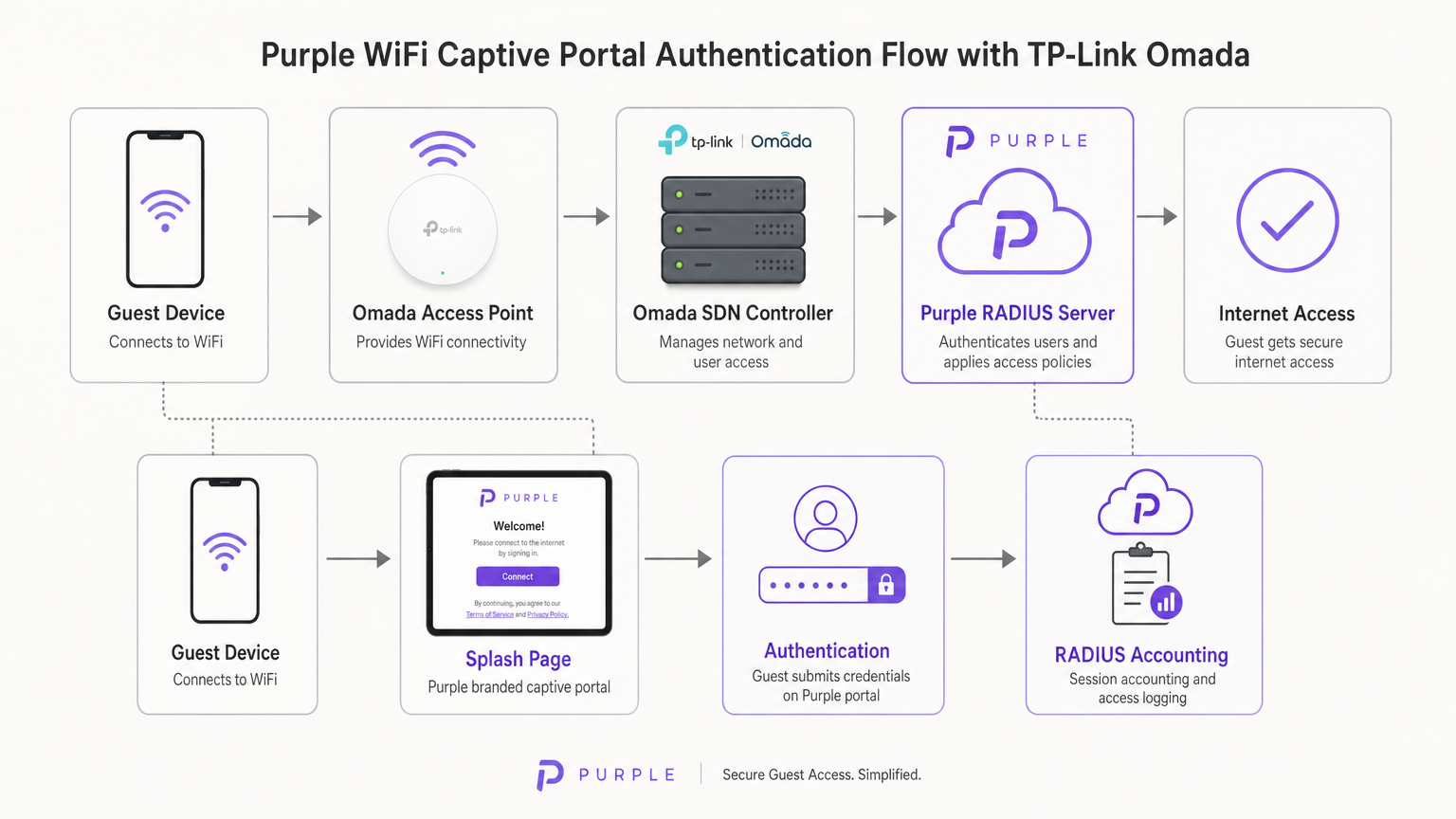
Sobald der Benutzer seine Anmeldeinformationen (oder die Nutzungsbedingungen) auf dem Purple-Portal übermittelt, fungiert Purples Cloud-Infrastruktur als RADIUS-Server. Sie sendet eine Access-Accept-Nachricht zurück an den Omada Controller, der dann die MAC-Adresse des Client-Geräts im lokalen Netzwerk autorisiert. Purple übernimmt auch das gesamte RADIUS Accounting, verfolgt die Sitzungsdauer und Datennutzung für Analyse- und Compliance-Zwecke.
Omada Controller-Optionen
Die Omada Software Defined Networking (SDN)-Plattform erfordert einen Controller zur Verwaltung der Access Points und zur Handhabung der Captive Portal-Weiterleitung. Sie haben drei primäre Bereitstellungsmodelle:
- Omada Cloud-basierter Controller: Vollständig von TP-Link gehostet. Dies ist der empfohlene Ansatz für die meisten SMB-Bereitstellungen, da er die Notwendigkeit von Controller-Hardware vor Ort eliminiert und hohe Verfügbarkeit bietet.
- Hardware Controller (OC200/OC300): Eine physische Appliance, die im lokalen Netzwerk installiert ist. Geeignet für Umgebungen mit unzuverlässigen WAN-Verbindungen, wo lokale Verwaltung entscheidend ist.
- Software Controller: Installiert auf einem lokalen Server oder einer VM (Windows oder Linux).
Entscheidend ist, dass der Omada Controller online bleiben muss, um neue Gastauthentifizierungen zu verarbeiten. Geht der Controller offline, bleiben bestehende authentifizierte Sitzungen aktiv, aber neue Clients können das Captive Portal nicht laden.
Implementierungsleitfaden
Die Bereitstellung von Purple auf einem Omada v4+ Controller erfordert die Konfiguration von drei verschiedenen Komponenten: dem Wireless Network, dem Guest Portal und dem Walled Garden.
Schritt 1: Konfiguration der Wireless-Einstellungen
Die Grundlage ist ein dediziertes SSID, das für den Gastzugang ohne lokale Verschlüsselung konfiguriert ist.
- Navigieren Sie im Omada Controller zu Wireless Settings und klicken Sie auf Add.
- Definieren Sie die SSID (z.B. „Guest WiFi“).
- Aktivieren Sie den Schalter Guest Network. Dies ist entscheidend, da es die Layer-2-Client-Isolation ermöglicht, die Gäste daran hindert, miteinander zu kommunizieren oder auf lokale Unternehmensressourcen zuzugreifen – eine zwingende Anforderung für die PCI DSS-Konformität.
- Setzen Sie den Security Mode auf None. Die Authentifizierung erfolgt auf Layer 7 über das Captive Portal, nicht auf Layer 2.
- Wenden Sie die Einstellungen auf die 2,4-GHz- und 5-GHz-Bänder an.
Schritt 2: Guest Portal- und RADIUS-Konfiguration
Dieser Schritt bindet den Omada Controller an Purples Cloud-Infrastruktur.
- Navigieren Sie zu Wireless Control > Portal und klicken Sie auf Add a New Portal.
- Wählen Sie das in Schritt 1 erstellte SSID aus.
- Setzen Sie den Authentication Type auf External RADIUS Server.
- Konfigurieren Sie den primären RADIUS-Server:
- RADIUS Server IP: Wird in Ihrem Purple-Dashboard bereitgestellt.
- RADIUS Port:
1812 - RADIUS Password: Ihr einzigartiges Purple RADIUS-Geheimnis.
- Authentication Mode:
PAP
- Aktivieren Sie RADIUS Accounting:
- Accounting Server IP: Wird in Ihrem Purple-Dashboard bereitgestellt.
- Accounting Server Port:
1813 - Accounting Server Password: Ihr einzigartiges Purple RADIUS-Geheimnis.
- Aktivieren Sie Interim Update und setzen Sie das Intervall auf
120Sekunden. Dies gewährleistet eine genaue Sitzungsverfolgung. - Wählen Sie unter Portal Customization die Option External Web Portal aus.
- Geben Sie die von Purple bereitgestellte External Web Portal URL ein.
Wichtiger Hinweis: Stellen Sie sicher, dass HTTPS Redirect auf Disable gesetzt ist. Der anfängliche Captive Portal-Intercept basiert auf HTTP. Das Aktivieren der HTTPS-Weiterleitung auf Controller-Ebene unterbricht den Ladevorgang der Splash Page.
Schritt 3: Walled Garden (Pre-Authentifizierungszugang)
Der Walled Garden ist der häufigste Fehlerpunkt bei Guest WiFi-Bereitstellungen. Bevor ein Benutzer sich authentifiziert, ist seinGerät muss in der Lage sein, die Server von Purple aufzulösen und zu erreichen, um die Splash-Seite zu laden und soziale Logins zu verarbeiten.
- Navigieren Sie zum Header Zugriffskontrolle innerhalb der Portaleinstellungen.
- Aktivieren Sie den Pre-authentication Access.
- Fügen Sie jede Domain hinzu, die in Purples offizieller Walled Garden Whitelist aufgeführt ist. Dies umfasst Purples Kerndomains, CDN-Endpunkte und Domains, die für soziale Login-Anbieter (Facebook, Google, X) erforderlich sind.
- Eine fehlerhafte Konfiguration führt dazu, dass der Captive Network Assistant (CNA) auf iOS und Android die Seite nicht rendern kann.
Best Practices
Um eine robuste und konforme Bereitstellung zu gewährleisten, beachten Sie die folgenden branchenüblichen Empfehlungen:
- VLAN-Segmentierung: Platzieren Sie die Gast-SSID immer in einem dedizierten VLAN, vollständig isoliert vom Unternehmensdatenverkehr, Point of Sale (POS)-Systemen und Verwaltungsschnittstellen. Dies mindert Risiken und vereinfacht Compliance-Audits.
- Bandbreitenbegrenzung: Implementieren Sie eine Ratenbegrenzung für die Gast-SSID (z. B. 5 Mbit/s Down / 1 Mbit/s Up pro Client), um zu verhindern, dass ein einzelner Benutzer die WAN-Verbindung überlastet und den Geschäftsbetrieb beeinträchtigt.
- SecurePass-Integration: Für Standorte mit hohen Wiederholungsbesucherzahlen konfigurieren Sie Purples SecurePass (WPA-Enterprise mit Hotspot 2.0). Dies ermöglicht wiederkehrenden Gästen, sich automatisch über ein Profil zu authentifizieren und das Captive Portal für ein reibungsloses Erlebnis vollständig zu umgehen.
- Controller-Hochverfügbarkeit: Wenn Sie einen lokalen Hardware-Controller (OC200) verwenden, stellen Sie sicher, dass dieser an eine unterbrechungsfreie Stromversorgung (USV) angeschlossen ist. Ein Neustart des Controllers unterbricht neue Authentifizierungen.
Fehlerbehebung & Risikominderung
Beim Einsatz von Captive Portals von Drittanbietern treten häufig spezifische Fehler auf. So beheben Sie diese:
iOS Captive Network Assistant (CNA) lädt nicht
Wenn Apple-Geräte sich mit dem WiFi verbinden, aber die Splash-Seite nicht automatisch aufspringt, liegt das Problem fast immer an einem unvollständigen Walled Garden. Der iOS CNA versucht, bestimmte Apple-Endpunkte (z. B. captive.apple.com) zu erreichen, um den Internetzugang zu erkennen. Wenn diese blockiert sind oder Purples CDN-Domains in der Pre-Authentication Access-Liste fehlen, wird die Seite nicht gerendert. Überprüfen Sie die Whitelist anhand der aktuellen Purple-Dokumentation.
Sitzungen werden nicht in den Analytics angezeigt
Wenn Benutzer sich authentifizieren und auf das Internet zugreifen können, aber ihre Sitzungsdaten (Dauer, Bandbreite) im Purple-Dashboard fehlen, überprüfen Sie die RADIUS-Accounting-Konfiguration. Stellen Sie sicher, dass der Accounting Port auf 1813 eingestellt ist, das Geheimnis exakt übereinstimmt und das Interim Update-Intervall aktiviert und auf 120 Sekunden eingestellt ist.
Authentifizierungs-Timeouts
Wenn das Portal lädt, Benutzer aber beim Klicken auf 'Verbinden' eine Timeout-Fehlermeldung erhalten, kann der Omada-Controller den Purple RADIUS-Server auf Port 1812 nicht erreichen. Überprüfen Sie die ausgehenden Firewall-Regeln auf Ihrem Edge-Router, um sicherzustellen, dass die UDP-Ports 1812 und 1813 für Purples IP-Adressen geöffnet sind.
ROI & Geschäftsauswirkungen
Für IT-Direktoren und CTOs ist die Entscheidung, Omada-Hardware mit Purple-Software einzusetzen, grundsätzlich eine kommerzielle. Wie vergleicht sich diese Architektur mit Alternativen, und welcher Return on Investment ist zu erwarten?
Die Omada vs. UniFi Entscheidung
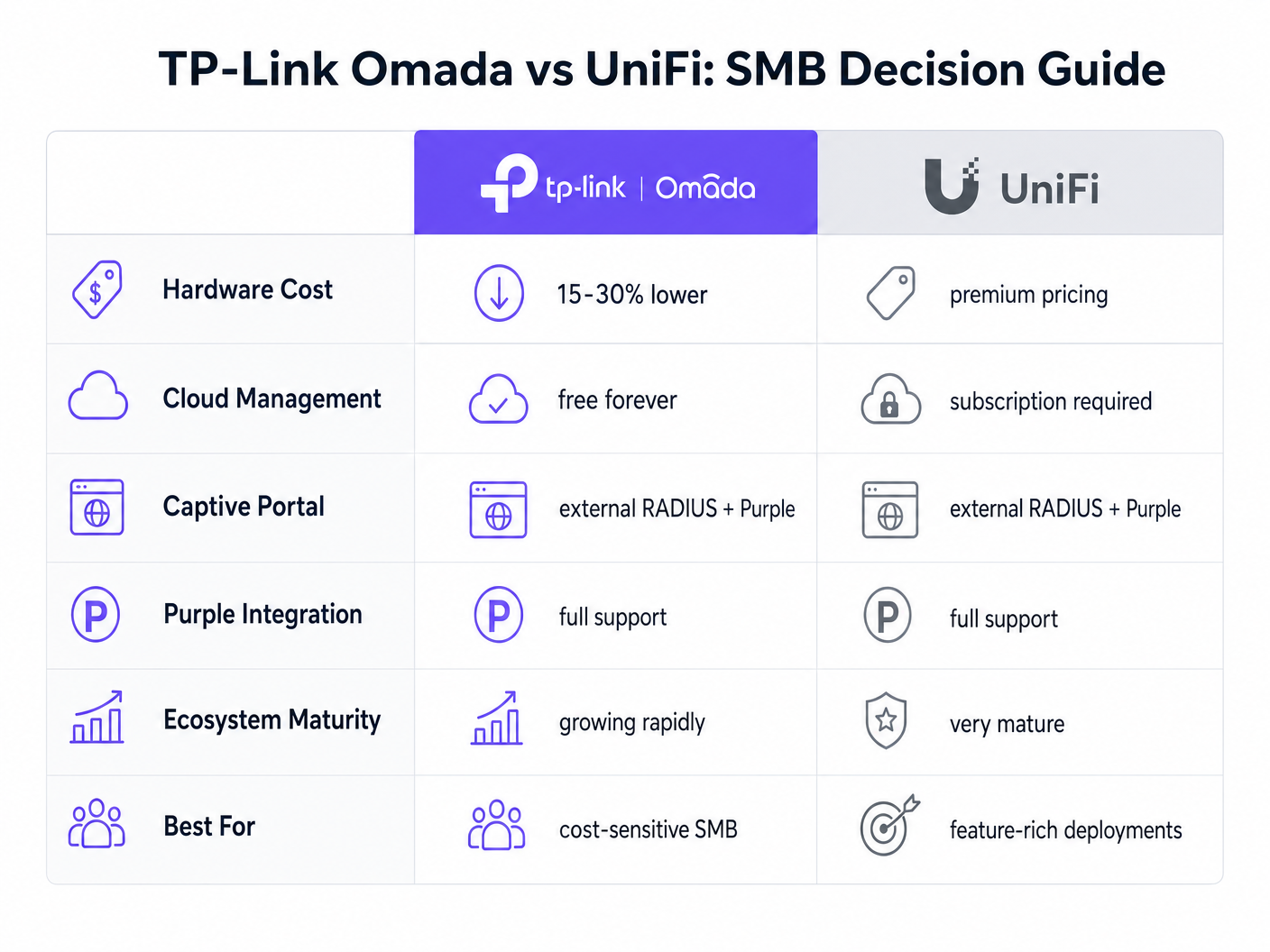
Die UniFi-Plattform von Ubiquiti ist der etablierte Marktführer im SMB-Bereich. TP-Link Omada bietet jedoch einen überzeugenden finanziellen Vorteil, ohne die Kernfunktionalität zu opfern.
- Investitionsausgaben (CapEx): Omada Access Points (z. B. EAP670) sind typischerweise 15-30 % günstiger als ihre UniFi-Äquivalente (z. B. U6 Pro). Bei einer Bereitstellung mit 50 Access Points bedeutet dies Hardware-Einsparungen von Tausenden von Dollar.
- Betriebsausgaben (OpEx): TP-Link bietet den Omada Cloud Controller kostenlos an. UniFis offizielles Cloud-Hosting erfordert ein monatliches Abonnement pro Standort.
- Integration: Beide Plattformen unterstützen External RADIUS und lassen sich nahtlos in Purple integrieren.
Für ein funktionsreiches, einheitliches Ökosystem, das Kameras und Türzugang umfasst, bleibt UniFi überlegen. Für eine reine Wireless-Bereitstellung, die auf Kosteneffizienz und zuverlässigen Gastzugang abzielt, bietet Omada jedoch einen außergewöhnlichen Wert.
Erfolgsmessung
Der Einsatz von Purple Connect (der kostenlosen Stufe) auf Omada-Hardware bietet einen sofortigen ROI, indem er den IT-Supportaufwand für die Verwaltung von Gastpasswörtern reduziert. Um die umfassenderen kommerziellen Auswirkungen eines Upgrades auf kostenpflichtige Stufen für Datenerfassung und Marketingautomatisierung zu verstehen, lesen Sie unsere umfassende Analyse: Warum WiFi Marketing nutzen? Der Business Case mit realen Daten .
Durch die Nutzung der kostengünstigen Hardware von Omada können Standorte Budgets von Infrastruktur-CapEx auf Softwarelösungen umverteilen, die aktiv Umsatz generieren und das Netzwerk von einem Kostenfaktor in einen Marketing-Asset verwandeln.
Schlüsselbegriffe & Definitionen
External RADIUS Server
A networking protocol that provides centralized Authentication, Authorization, and Accounting (AAA) management. In this context, Purple acts as the RADIUS server, verifying users and instructing the Omada controller to grant network access.
IT teams use this architecture to decouple identity management from local network hardware, enabling cloud-based analytics and compliance.
Captive Portal
A web page that a user of a public-access network is obliged to view and interact with before access is granted.
This is the primary touchpoint for data capture and brand engagement in guest WiFi deployments.
Walled Garden (Pre-Authentication Access)
A limited environment that controls the user's access to web content and services before they have fully authenticated on the network.
Crucial for allowing devices to reach the splash page hosted on Purple's servers and to communicate with social login providers like Google or Facebook before internet access is granted.
Captive Network Assistant (CNA)
The pseudo-browser built into mobile operating systems (like iOS and Android) that automatically detects captive portals and pops up the login screen.
IT teams must ensure the Walled Garden is perfectly configured, as the CNA is highly sensitive to blocked resources and will fail silently if it cannot reach necessary endpoints.
RADIUS Accounting
The process of tracking network resource consumption by users, including session duration and bytes transferred.
Essential for generating accurate analytics in the Purple dashboard and for enforcing bandwidth or time limits on guest sessions.
Layer 2 Isolation (Guest Network Mode)
A security feature that prevents devices connected to the same wireless network from communicating directly with each other.
A mandatory requirement for public networks to prevent lateral movement of malware and to comply with security standards like PCI DSS.
Interim Update Interval
The frequency at which the network controller sends accounting data updates to the RADIUS server during an active session.
Setting this to 120 seconds ensures Purple has near real-time data on user sessions without overwhelming the network with RADIUS traffic.
Passpoint (Hotspot 2.0)
A standard that enables mobile devices to automatically discover and connect to Wi-Fi networks securely without requiring a captive portal login.
Used by Purple's SecurePass feature to provide a frictionless, secure (WPA-Enterprise) connection for returning guests, improving the user experience and increasing connection rates.
Fallstudien
A 150-room boutique hotel needs to deploy guest WiFi across all bedrooms and public areas. They have a strict budget but require GDPR-compliant data capture and seamless roaming. They are evaluating UniFi U6 Pro vs TP-Link Omada EAP670.
The hotel should deploy 40 TP-Link Omada EAP670 access points managed via the free Omada Cloud Controller. They will configure a 'Guest WiFi' SSID with no Layer 2 security, relying on Purple's External RADIUS integration for authentication. They must implement a strict Walled Garden to allow pre-authentication access to Purple's splash pages. The guest network will be placed on an isolated VLAN.
A retail chain with 20 small footprint stores wants to offer free WiFi to customers to capture email addresses for their loyalty program. They currently have unmanaged consumer routers in each store and no centralized IT support.
Deploy a single TP-Link Omada EAP650 access point in each store, connected to an Omada Cloud Controller for centralized management. Configure Purple's 'Connect' or 'Capture' tier via External RADIUS. Implement bandwidth rate limiting (e.g., 5Mbps down/1Mbps up) on the guest SSID to protect the stores' limited WAN connections, which are also used for Point of Sale (POS) systems.
Szenarioanalyse
Q1. A venue reports that users can connect to the guest WiFi and browse the internet, but no session data or analytics are appearing in the Purple dashboard. What is the most likely configuration error on the Omada controller?
💡 Hinweis:Think about the specific RADIUS protocol responsible for tracking usage, not just granting access.
Empfohlenen Ansatz anzeigen
The RADIUS Accounting configuration is likely incorrect or disabled. The IT team should verify that Accounting is enabled, the Accounting Server IP is correct, the Accounting Port is set to 1813, and the Interim Update interval is set to 120 seconds.
Q2. During a pilot deployment, Android devices successfully load the Purple splash page, but iOS devices show a blank screen and drop the WiFi connection. How should the network architect resolve this?
💡 Hinweis:iOS and Android handle captive portal detection differently. iOS relies heavily on specific domains being reachable before authentication.
Empfohlenen Ansatz anzeigen
The network architect must update the Pre-Authentication Access List (Walled Garden) on the Omada controller. The iOS Captive Network Assistant (CNA) is failing because it cannot reach required Apple domains or Purple CDN endpoints. They must cross-reference their configuration with Purple's official Walled Garden whitelist.
Q3. A client wants to migrate from an expensive, subscription-based cloud managed WiFi solution to TP-Link Omada to save on OpEx, but they are concerned about losing the enterprise-grade analytics they currently rely on. What is the recommended architecture?
💡 Hinweis:How can you separate the hardware management plane from the analytics and identity plane?
Empfohlenen Ansatz anzeigen
The client should deploy TP-Link Omada access points managed by the free Omada Cloud Controller to eliminate hardware subscription fees. They should then integrate this with Purple WiFi via an External RADIUS configuration. This architecture provides cost-effective hardware management while retaining enterprise-grade analytics, data capture, and CRM integration through the Purple platform.




