

TP-Link Omada e Purple WiFi para Implementações SMB
Este guia autorizado fornece a gestores de TI e arquitetos de rede um plano definitivo para integrar pontos de acesso TP-Link Omada com a infraestrutura RADIUS na cloud da Purple. Abrange o design arquitetónico, a configuração passo a passo do Captive Portal, os requisitos de Walled Garden e uma comparação comercial com o UniFi para implementações SMB.
🎧 Ouça este Guia
Ver Transcrição
Resumo Executivo
Para SMBs em Hospitalidade , Retalho e espaços públicos, fornecer Guest WiFi seguro e com marca já não é um luxo — é um requisito operacional. Historicamente, os gestores de TI enfrentaram uma escolha difícil: implementar hardware caro de nível empresarial como o UniFi, ou comprometer a segurança e a análise com pontos de acesso de nível de consumidor. O TP-Link Omada muda fundamentalmente esta equação. Ao combinar o hardware económico e gerido na cloud da Omada com a autenticação de nível empresarial da Purple e as WiFi Analytics , os operadores de espaços podem alcançar uma arquitetura de rede segura e escalável a uma fração do custo tradicional.
Este guia de referência técnica fornece um plano definitivo para implementar pontos de acesso TP-Link Omada com a infraestrutura RADIUS na cloud da Purple. Iremos examinar a integração arquitetónica, detalhar os parâmetros de configuração específicos necessários para uma experiência de Captive Portal sem falhas e fornecer uma análise franca de custo-benefício comparando o Omada com o UniFi para implementações SMB. Este é um guia de implementação prático e neutro em relação ao fornecedor, concebido para profissionais de TI seniores e arquitetos de rede que necessitam de orientação acionável para implementar redes de convidados robustas neste trimestre.
Análise Técnica Detalhada
A integração entre o TP-Link Omada e a Purple baseia-se numa arquitetura padrão de Servidor RADIUS Externo combinada com um redirecionamento para um Portal Web Externo. Este desacoplamento da rede de acesso rádio do plano de gestão de identidade é um princípio fundamental da arquitetura moderna de Internet of Things Architecture: A Complete Guide .
Visão Geral da Arquitetura
Numa implementação padrão, o Ponto de Acesso Omada (por exemplo, EAP670 ou EAP650) gere o ambiente de RF, a associação de clientes e o roaming. No entanto, não gere a autenticação. Quando um dispositivo cliente se conecta ao SSID de convidado, o controlador Omada interceta a conexão e redireciona o navegador do utilizador para a página de splash alojada da Purple.
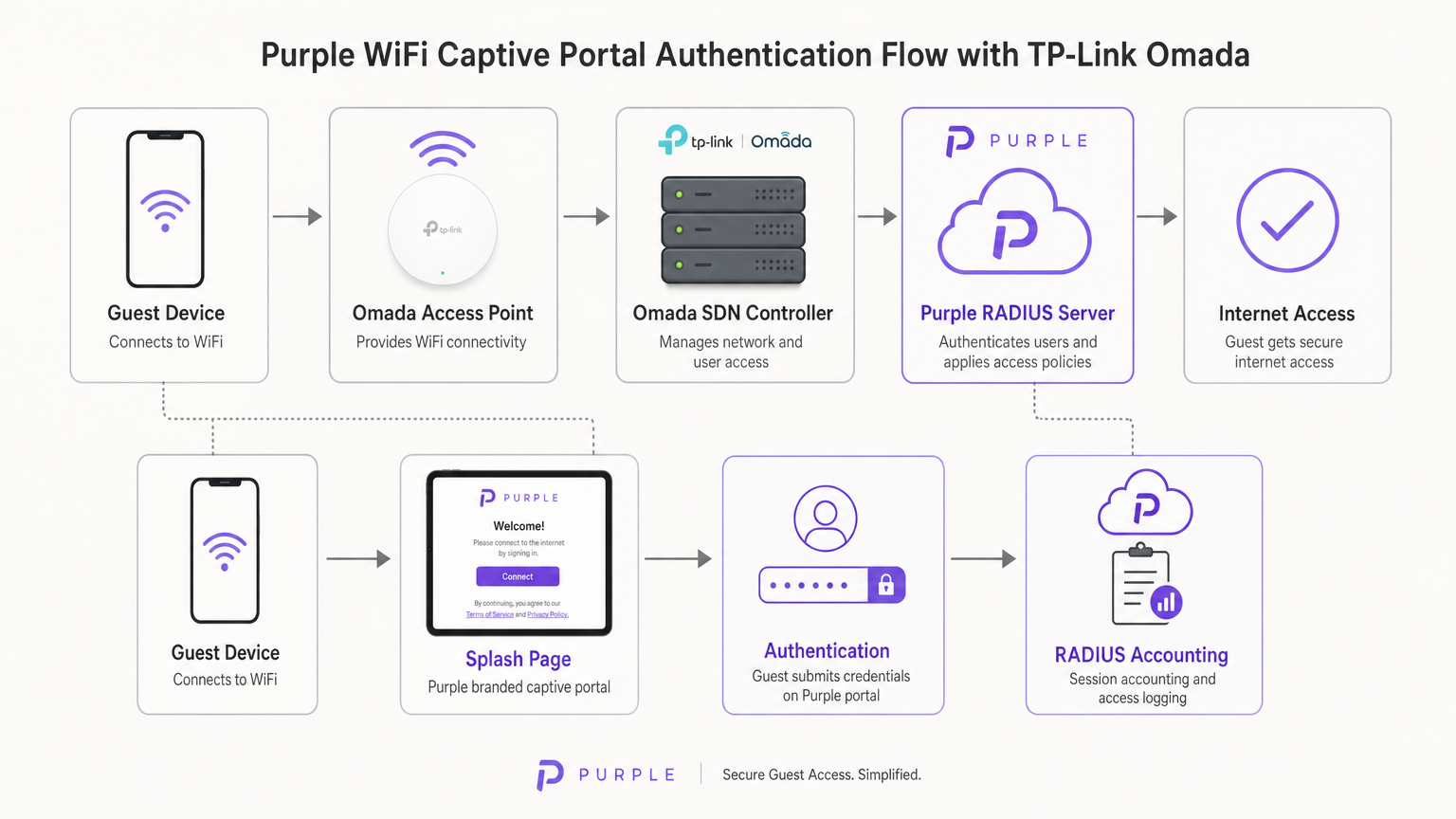
Assim que o utilizador submete as suas credenciais (ou aceita os termos de serviço) no portal da Purple, a infraestrutura cloud da Purple atua como o servidor RADIUS. Envia uma mensagem de Access-Accept de volta ao controlador Omada, que então autoriza o endereço MAC do dispositivo cliente na rede local. A Purple também gere todo o RADIUS Accounting, monitorizando a duração da sessão e o uso de dados para fins de análise e conformidade.
Opções do Controlador Omada
A plataforma Omada Software Defined Networking (SDN) requer um controlador para gerir os pontos de acesso e lidar com o redirecionamento do Captive Portal. Tem três modelos de implementação principais:
- Controlador Omada Baseado na Cloud: Alojado inteiramente pela TP-Link. Esta é a abordagem recomendada para a maioria das implementações SMB, pois elimina a necessidade de hardware de controlador no local e oferece alta disponibilidade.
- Controlador de Hardware (OC200/OC300): Um dispositivo físico instalado na rede local. Adequado para ambientes com ligações WAN não fiáveis onde a gestão local é crítica.
- Controlador de Software: Instalado num servidor local ou VM (Windows ou Linux).
Crucialmente, o controlador Omada deve permanecer online para processar novas autenticações de convidados. Se o controlador ficar offline, as sessões autenticadas existentes permanecerão ativas, mas os novos clientes não conseguirão carregar o Captive Portal.
Guia de Implementação
A implementação da Purple num controlador Omada v4+ requer a configuração de três componentes distintos: a Rede Sem Fios, o Portal de Convidados e o Walled Garden.
Passo 1: Configuração das Definições Sem Fios
A base é um SSID dedicado configurado para acesso de convidados sem encriptação local.
- Navegue para Wireless Settings no controlador Omada e clique em Add.
- Defina o SSID (por exemplo, "Guest WiFi").
- Ative a opção Guest Network. Isto é crítico, pois permite o isolamento de clientes da Camada 2, impedindo que os convidados comuniquem entre si ou acedam a recursos corporativos locais — um requisito obrigatório para a conformidade com PCI DSS.
- Defina o Security Mode como None. A autenticação será gerida na Camada 7 através do Captive Portal, não na Camada 2.
- Aplique as definições nas bandas de 2.4GHz e 5GHz.
Passo 2: Configuração do Portal de Convidados e RADIUS
Este passo vincula o controlador Omada à infraestrutura cloud da Purple.
- Navegue para Wireless Control > Portal e clique em Add a New Portal.
- Selecione o SSID criado no Passo 1.
- Defina o Authentication Type como External RADIUS Server.
- Configure o Servidor RADIUS Primário:
- RADIUS Server IP: Fornecido no seu dashboard da Purple.
- RADIUS Port:
1812 - RADIUS Password: O seu segredo RADIUS único da Purple.
- Authentication Mode:
PAP
- Ative o RADIUS Accounting:
- Accounting Server IP: Fornecido no seu dashboard da Purple.
- Accounting Server Port:
1813 - Accounting Server Password: O seu segredo RADIUS único da Purple.
- Ative o Interim Update e defina o intervalo para
120segundos. Isto garante um rastreamento preciso da sessão. - Em Portal Customization, selecione External Web Portal.
- Insira o External Web Portal URL fornecido pela Purple.
Nota Crítica: Certifique-se de que o HTTPS Redirect está definido como Disable. A interceção inicial do Captive Portal depende de HTTP. Ativar o redirecionamento HTTPS ao nível do controlador irá quebrar o processo de carregamento da página de splash.
Passo 3: Walled Garden (Acesso Pré-Autenticação)
O Walled Garden é o ponto de falha mais comum em implementações de WiFi para convidados. Antes de um utilizador se autenticar, o seuo dispositivo deve ser capaz de resolver e alcançar os servidores da Purple para carregar a página de apresentação e processar os inícios de sessão sociais.
- Navegue até ao cabeçalho Controlo de Acesso nas definições do Portal.
- Ative o Acesso de Pré-autenticação.
- Adicione todos os domínios listados na lista de permissões oficial do Walled Garden da Purple. Isto inclui os domínios principais da Purple, os pontos finais CDN e os domínios necessários para os fornecedores de início de sessão social (Facebook, Google, X).
- A falha na configuração correta resultará na falha do Captive Network Assistant (CNA) no iOS e Android em apresentar a página.
Melhores Práticas
Para garantir uma implementação robusta e compatível, siga as seguintes recomendações padrão da indústria:
- Segmentação de VLAN: Coloque sempre o SSID de convidado numa VLAN dedicada, completamente isolada do tráfego corporativo, sistemas de Ponto de Venda (POS) e interfaces de gestão. Isto mitiga o risco e simplifica a auditoria de conformidade.
- Limitação de Taxa de Largura de Banda: Implemente a limitação de taxa no SSID de convidado (por exemplo, 5 Mbps de download / 1 Mbps de upload por cliente) para evitar que um único utilizador sature o link WAN e afete as operações comerciais.
- Integração SecurePass: Para locais com altas taxas de visitantes repetidos, configure o SecurePass da Purple (WPA-Enterprise com Hotspot 2.0). Isto permite que os convidados que regressam se autentiquem automaticamente através de um perfil, ignorando completamente o captive portal para uma experiência sem atritos.
- Alta Disponibilidade do Controlador: Se estiver a utilizar um controlador de hardware no local (OC200), certifique-se de que está ligado a uma Fonte de Alimentação Ininterrupta (UPS). Um reinício do controlador irá interromper novas autenticações.
Resolução de Problemas e Mitigação de Riscos
Ao implementar captive portals de terceiros, surgem frequentemente modos de falha específicos. Veja como os resolver:
O Captive Network Assistant (CNA) do iOS não Carrega
Se os dispositivos Apple se ligarem ao WiFi mas a página de apresentação não aparecer automaticamente, o problema é quase sempre um Walled Garden incompleto. O CNA do iOS tenta alcançar pontos finais específicos da Apple (por exemplo, captive.apple.com) para detetar o acesso à internet. Se estes estiverem bloqueados, ou se os domínios CDN da Purple estiverem em falta na lista de Acesso de Pré-autenticação, a página não será apresentada. Verifique a lista de permissões em relação à documentação atual da Purple.
Sessões Não Aparecem nas Análises
Se os utilizadores conseguirem autenticar e aceder à internet, mas os seus dados de sessão (duração, largura de banda) estiverem em falta no painel de controlo da Purple, verifique a configuração de Contabilidade RADIUS. Certifique-se de que a Porta de Contabilidade está definida para 1813, o segredo corresponde exatamente, e o intervalo de Atualização Provisória está ativado e definido para 120 segundos.
Tempos Limite de Autenticação
Se o portal carregar mas os utilizadores receberem um erro de tempo limite ao clicar em 'Ligar', o controlador Omada não está a conseguir alcançar o servidor RADIUS da Purple na porta 1812. Verifique as regras de firewall de saída no seu router de borda para garantir que as portas UDP 1812 e 1813 estão abertas para os endereços IP da Purple.
ROI e Impacto no Negócio
Para diretores de TI e CTOs, a decisão de implementar hardware Omada com software Purple é fundamentalmente comercial. Como se compara esta arquitetura com alternativas, e qual é o retorno esperado do investimento?
A Decisão Omada vs. UniFi
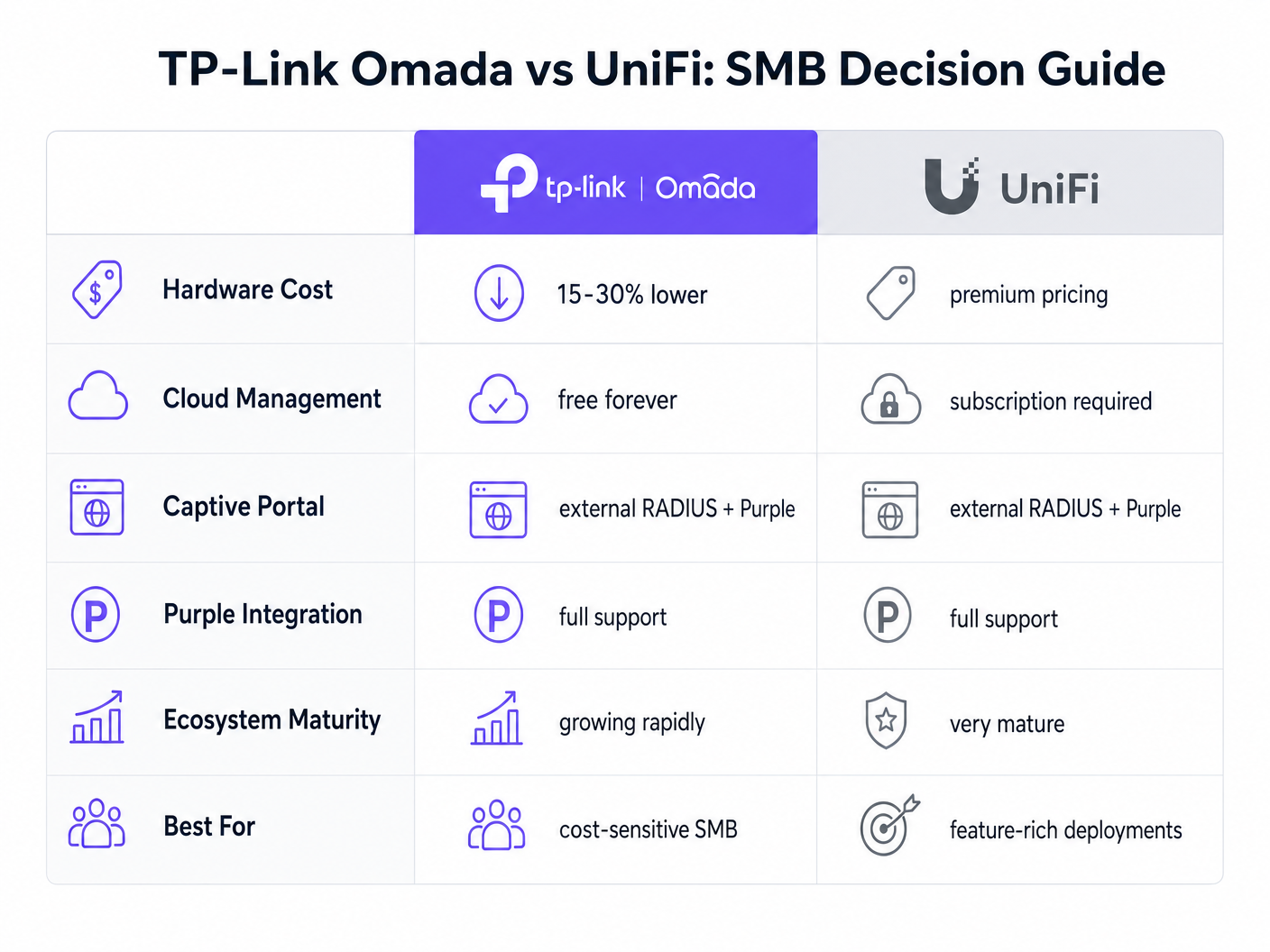
A plataforma UniFi da Ubiquiti é o líder estabelecido no espaço SMB. No entanto, o TP-Link Omada oferece uma vantagem financeira convincente sem sacrificar a funcionalidade principal.
- Despesa de Capital (CapEx): Os pontos de acesso Omada (por exemplo, EAP670) são tipicamente 15-30% menos caros do que os seus equivalentes UniFi (por exemplo, U6 Pro). Numa implementação de 50 APs, isto representa milhares de dólares em poupanças de hardware.
- Despesa Operacional (OpEx): A TP-Link oferece o controlador Omada Cloud gratuitamente. O alojamento oficial na nuvem da UniFi requer uma subscrição mensal por site.
- Integração: Ambas as plataformas suportam RADIUS Externo e integram-se perfeitamente com a Purple.
Para um ecossistema unificado e rico em funcionalidades que inclui câmaras e acesso a portas, o UniFi continua a ser superior. No entanto, para uma implementação wireless pura focada na eficiência de custos e acesso fiável para convidados, o Omada oferece um valor excecional.
Medir o Sucesso
A implementação do Purple Connect (o nível gratuito) em hardware Omada proporciona um ROI imediato ao reduzir a carga de suporte de TI associada à gestão de palavras-passe de convidados. Para compreender o impacto comercial mais amplo da atualização para níveis pagos para captura de dados e automação de marketing, reveja a nossa análise abrangente: Porquê Usar Marketing WiFi? O Caso de Negócio Com Dados Reais .
Ao alavancar o hardware económico da Omada, os locais podem realocar o orçamento de CapEx de infraestrutura para soluções de software que impulsionam ativamente a receita, transformando a rede de um centro de custos num ativo de marketing.
Termos-Chave e Definições
External RADIUS Server
A networking protocol that provides centralized Authentication, Authorization, and Accounting (AAA) management. In this context, Purple acts as the RADIUS server, verifying users and instructing the Omada controller to grant network access.
IT teams use this architecture to decouple identity management from local network hardware, enabling cloud-based analytics and compliance.
Captive Portal
A web page that a user of a public-access network is obliged to view and interact with before access is granted.
This is the primary touchpoint for data capture and brand engagement in guest WiFi deployments.
Walled Garden (Pre-Authentication Access)
A limited environment that controls the user's access to web content and services before they have fully authenticated on the network.
Crucial for allowing devices to reach the splash page hosted on Purple's servers and to communicate with social login providers like Google or Facebook before internet access is granted.
Captive Network Assistant (CNA)
The pseudo-browser built into mobile operating systems (like iOS and Android) that automatically detects captive portals and pops up the login screen.
IT teams must ensure the Walled Garden is perfectly configured, as the CNA is highly sensitive to blocked resources and will fail silently if it cannot reach necessary endpoints.
RADIUS Accounting
The process of tracking network resource consumption by users, including session duration and bytes transferred.
Essential for generating accurate analytics in the Purple dashboard and for enforcing bandwidth or time limits on guest sessions.
Layer 2 Isolation (Guest Network Mode)
A security feature that prevents devices connected to the same wireless network from communicating directly with each other.
A mandatory requirement for public networks to prevent lateral movement of malware and to comply with security standards like PCI DSS.
Interim Update Interval
The frequency at which the network controller sends accounting data updates to the RADIUS server during an active session.
Setting this to 120 seconds ensures Purple has near real-time data on user sessions without overwhelming the network with RADIUS traffic.
Passpoint (Hotspot 2.0)
A standard that enables mobile devices to automatically discover and connect to Wi-Fi networks securely without requiring a captive portal login.
Used by Purple's SecurePass feature to provide a frictionless, secure (WPA-Enterprise) connection for returning guests, improving the user experience and increasing connection rates.
Estudos de Caso
A 150-room boutique hotel needs to deploy guest WiFi across all bedrooms and public areas. They have a strict budget but require GDPR-compliant data capture and seamless roaming. They are evaluating UniFi U6 Pro vs TP-Link Omada EAP670.
The hotel should deploy 40 TP-Link Omada EAP670 access points managed via the free Omada Cloud Controller. They will configure a 'Guest WiFi' SSID with no Layer 2 security, relying on Purple's External RADIUS integration for authentication. They must implement a strict Walled Garden to allow pre-authentication access to Purple's splash pages. The guest network will be placed on an isolated VLAN.
A retail chain with 20 small footprint stores wants to offer free WiFi to customers to capture email addresses for their loyalty program. They currently have unmanaged consumer routers in each store and no centralized IT support.
Deploy a single TP-Link Omada EAP650 access point in each store, connected to an Omada Cloud Controller for centralized management. Configure Purple's 'Connect' or 'Capture' tier via External RADIUS. Implement bandwidth rate limiting (e.g., 5Mbps down/1Mbps up) on the guest SSID to protect the stores' limited WAN connections, which are also used for Point of Sale (POS) systems.
Análise de Cenários
Q1. A venue reports that users can connect to the guest WiFi and browse the internet, but no session data or analytics are appearing in the Purple dashboard. What is the most likely configuration error on the Omada controller?
💡 Dica:Think about the specific RADIUS protocol responsible for tracking usage, not just granting access.
Mostrar Abordagem Recomendada
The RADIUS Accounting configuration is likely incorrect or disabled. The IT team should verify that Accounting is enabled, the Accounting Server IP is correct, the Accounting Port is set to 1813, and the Interim Update interval is set to 120 seconds.
Q2. During a pilot deployment, Android devices successfully load the Purple splash page, but iOS devices show a blank screen and drop the WiFi connection. How should the network architect resolve this?
💡 Dica:iOS and Android handle captive portal detection differently. iOS relies heavily on specific domains being reachable before authentication.
Mostrar Abordagem Recomendada
The network architect must update the Pre-Authentication Access List (Walled Garden) on the Omada controller. The iOS Captive Network Assistant (CNA) is failing because it cannot reach required Apple domains or Purple CDN endpoints. They must cross-reference their configuration with Purple's official Walled Garden whitelist.
Q3. A client wants to migrate from an expensive, subscription-based cloud managed WiFi solution to TP-Link Omada to save on OpEx, but they are concerned about losing the enterprise-grade analytics they currently rely on. What is the recommended architecture?
💡 Dica:How can you separate the hardware management plane from the analytics and identity plane?
Mostrar Abordagem Recomendada
The client should deploy TP-Link Omada access points managed by the free Omada Cloud Controller to eliminate hardware subscription fees. They should then integrate this with Purple WiFi via an External RADIUS configuration. This architecture provides cost-effective hardware management while retaining enterprise-grade analytics, data capture, and CRM integration through the Purple platform.




