

TP-Link Omada e Purple WiFi per implementazioni SMB
Questa guida autorevole fornisce a responsabili IT e architetti di rete un progetto definitivo per l'integrazione degli access point TP-Link Omada con l'infrastruttura RADIUS cloud di Purple. Copre la progettazione architettonica, la configurazione passo-passo del Captive Portal, i requisiti del Walled Garden e un confronto commerciale con UniFi per le implementazioni SMB.
🎧 Ascolta questa guida
Visualizza trascrizione
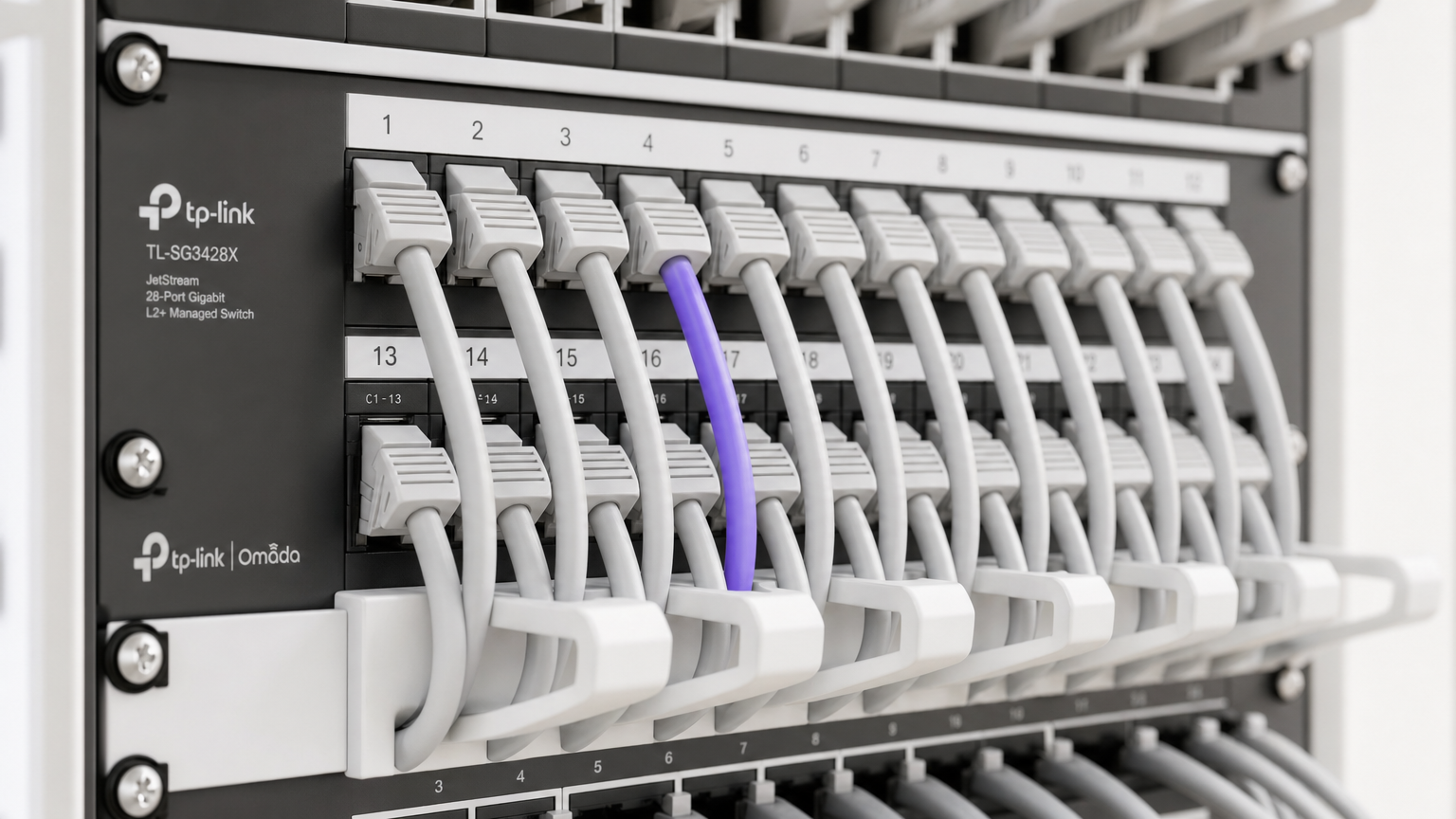
Riepilogo Esecutivo
Per le SMB nei settori Ospitalità , Vendita al Dettaglio e luoghi pubblici, fornire un Guest WiFi sicuro e brandizzato non è più un lusso, ma un requisito operativo. Storicamente, i responsabili IT si sono trovati di fronte a una scelta difficile: implementare hardware costoso di livello enterprise come UniFi, o compromettere sicurezza e analisi con access point di livello consumer. TP-Link Omada cambia radicalmente questa equazione. Combinando l'hardware Omada, conveniente e gestito via cloud, con l'autenticazione di livello enterprise di Purple e i WiFi Analytics, gli operatori delle strutture possono ottenere un'architettura di rete sicura e scalabile a una frazione del costo tradizionale.
Questa guida di riferimento tecnico fornisce un progetto definitivo per l'implementazione degli access point TP-Link Omada con l'infrastruttura RADIUS cloud di Purple. Esamineremo l'integrazione architettonica, dettaglieremo i parametri di configurazione specifici necessari per un'esperienza Captive Portal senza interruzioni e forniremo un'analisi costi-benefici schietta che confronta Omada con UniFi per le implementazioni SMB. Questa è una guida pratica all'implementazione, neutrale rispetto al fornitore, progettata per professionisti IT senior e architetti di rete che necessitano di indicazioni attuabili per implementare reti guest robuste in questo trimestre.
Approfondimento Tecnico
L'integrazione tra TP-Link Omada e Purple si basa su un'architettura standard di server RADIUS esterno combinata con un reindirizzamento a un portale web esterno. Questo disaccoppiamento della rete di accesso radio dal piano di gestione delle identità è un principio fondamentale della moderna Architettura dell'Internet delle Cose: Una Guida Completa .
Panoramica Architettonica
In un'implementazione standard, l'Access Point Omada (ad esempio, EAP670 o EAP650) gestisce l'ambiente RF, l'associazione client e il roaming. Tuttavia, non gestisce l'autenticazione. Quando un dispositivo client si connette all'SSID guest, il controller Omada intercetta la connessione e reindirizza il browser dell'utente alla splash page ospitata da Purple.
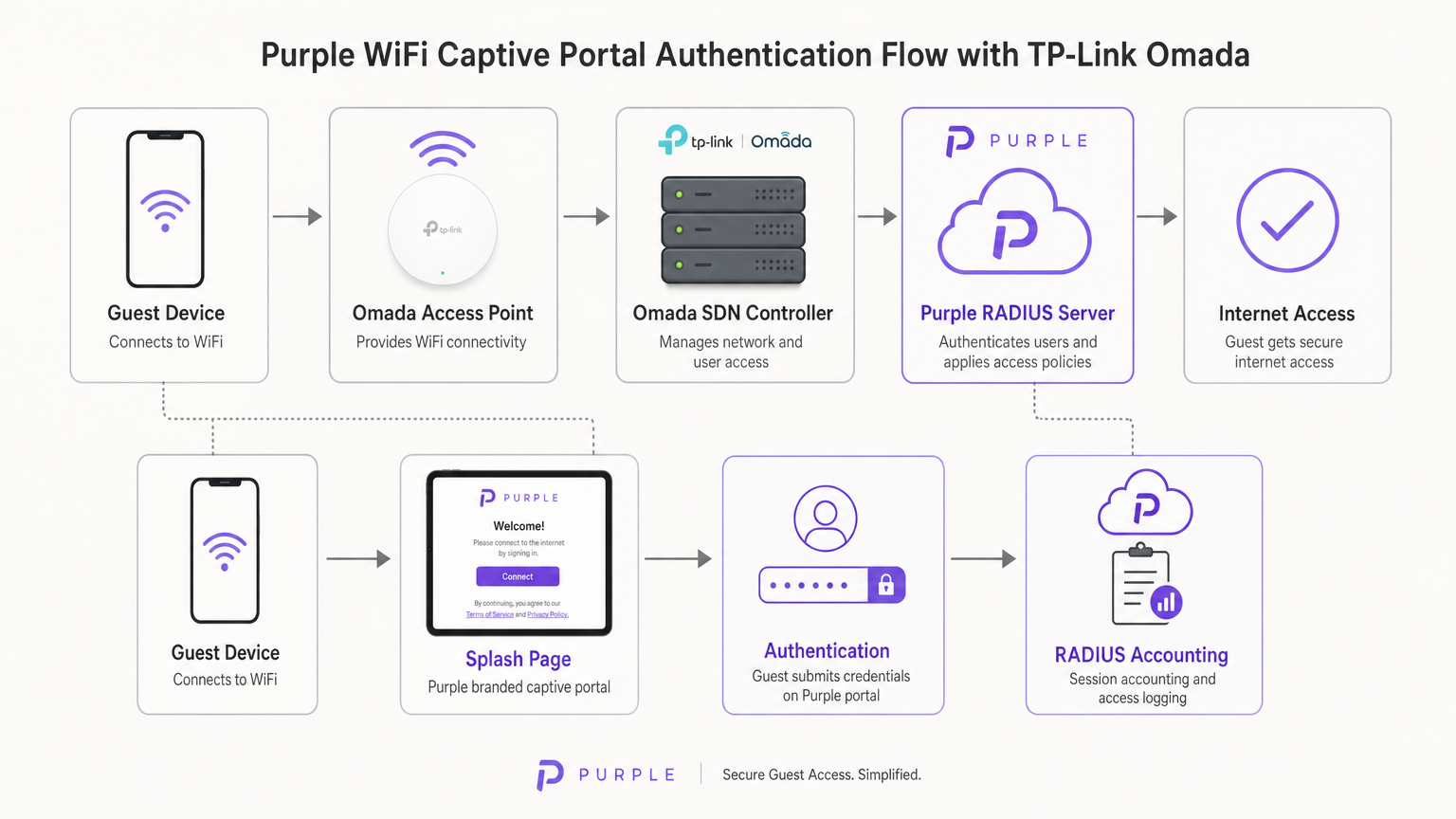
Una volta che l'utente invia le proprie credenziali (o accetta i termini di servizio) sul portale Purple, l'infrastruttura cloud di Purple agisce come server RADIUS. Invia un messaggio Access-Accept al controller Omada, che poi autorizza l'indirizzo MAC del dispositivo client sulla rete locale. Purple gestisce anche tutta la contabilità RADIUS, tracciando la durata della sessione e l'utilizzo dei dati per scopi di analisi e conformità.
Opzioni del Controller Omada
La piattaforma Omada Software Defined Networking (SDN) richiede un controller per gestire gli access point e gestire il reindirizzamento del Captive Portal. Sono disponibili tre modelli di implementazione principali:
- Controller Omada basato su Cloud: Ospitato interamente da TP-Link. Questo è l'approccio consigliato per la maggior parte delle implementazioni SMB in quanto elimina la necessità di hardware controller in loco e fornisce alta disponibilità.
- Controller Hardware (OC200/OC300): Un'appliance fisica installata sulla rete locale. Adatto per ambienti con collegamenti WAN inaffidabili dove la gestione locale è fondamentale.
- Controller Software: Installato su un server locale o VM (Windows o Linux).
È fondamentale che il controller Omada rimanga online per elaborare le nuove autenticazioni guest. Se il controller va offline, le sessioni autenticate esistenti rimarranno attive, ma i nuovi client non saranno in grado di caricare il Captive Portal.
Guida all'Implementazione
L'implementazione di Purple su un controller Omada v4+ richiede la configurazione di tre componenti distinti: la Rete Wireless, il Portale Guest e il Walled Garden.
Passaggio 1: Configurazione delle Impostazioni Wireless
La base è un SSID dedicato configurato per l'accesso guest senza crittografia locale.
- Navigare in Impostazioni Wireless nel controller Omada e cliccare su Aggiungi.
- Definire l'SSID (ad esempio, "Guest WiFi").
- Abilitare l'interruttore Rete Guest. Questo è fondamentale in quanto abilita l'isolamento client Layer 2, impedendo agli ospiti di comunicare tra loro o di accedere alle risorse aziendali locali, un requisito obbligatorio per la conformità PCI DSS.
- Impostare la Modalità di Sicurezza su Nessuna. L'autenticazione sarà gestita al Layer 7 tramite il Captive Portal, non al Layer 2.
- Applicare le impostazioni su entrambe le bande 2.4GHz e 5GHz.
Passaggio 2: Configurazione del Portale Guest e RADIUS
Questo passaggio lega il controller Omada all'infrastruttura cloud di Purple.
- Navigare in Controllo Wireless > Portale e cliccare su Aggiungi un Nuovo Portale.
- Selezionare l'SSID creato nel Passaggio 1.
- Impostare il Tipo di Autenticazione su Server RADIUS Esterno.
- Configurare il Server RADIUS Primario:
- IP Server RADIUS: Fornito nella dashboard di Purple.
- Porta RADIUS:
1812 - Password RADIUS: Il tuo segreto RADIUS Purple unico.
- Modalità di Autenticazione:
PAP
- Abilitare la Contabilità RADIUS:
- IP Server di Contabilità: Fornito nella dashboard di Purple.
- Porta Server di Contabilità:
1813 - Password Server di Contabilità: Il tuo segreto RADIUS Purple unico.
- Abilitare l'Aggiornamento Intermedio e impostare l'intervallo su
120secondi. Questo garantisce un tracciamento accurato della sessione. - Sotto Personalizzazione Portale, selezionare Portale Web Esterno.
- Inserire l'URL del Portale Web Esterno fornito da Purple.
Nota Critica: Assicurarsi che il Reindirizzamento HTTPS sia impostato su Disabilita. L'intercettazione iniziale del Captive Portal si basa su HTTP. L'abilitazione del reindirizzamento HTTPS a livello di controller interromperà il processo di caricamento della splash page.
Passaggio 3: Walled Garden (Accesso Pre-Autenticazione)
Il Walled Garden è il punto di fallimento più comune nelle implementazioni di WiFi guest. Prima che un utente si autentichi, il suoil dispositivo deve essere in grado di risolvere e raggiungere i server di Purple per caricare la splash page e elaborare i login social.
- Navigare all'intestazione Controllo Accessi all'interno delle impostazioni del Portale.
- Abilitare l'Accesso Pre-autenticazione.
- Aggiungere ogni dominio elencato nella whitelist ufficiale del Walled Garden di Purple. Questo include i domini principali di Purple, gli endpoint CDN e i domini richiesti per i provider di login social (Facebook, Google, X).
- La mancata configurazione corretta comporterà l'impossibilità per il Captive Network Assistant (CNA) su iOS e Android di visualizzare la pagina.
Migliori Pratiche
Per garantire una distribuzione robusta e conforme, attenersi alle seguenti raccomandazioni standard del settore:
- Segmentazione VLAN: Posizionare sempre l'SSID guest su una VLAN dedicata, completamente isolata dal traffico aziendale, dai sistemi Point of Sale (POS) e dalle interfacce di gestione. Ciò mitiga il rischio e semplifica l'audit di conformità.
- Limitazione della Larghezza di Banda: Implementare la limitazione della larghezza di banda sull'SSID guest (ad es. 5 Mbps in download / 1 Mbps in upload per client) per impedire che un singolo utente saturi il collegamento WAN e influisca sulle operazioni aziendali.
- Integrazione SecurePass: Per le sedi con un'elevata frequenza di visitatori abituali, configurare SecurePass di Purple (WPA-Enterprise con Hotspot 2.0). Ciò consente agli ospiti di ritorno di autenticarsi automaticamente tramite un profilo, bypassando completamente il captive portal per un'esperienza senza attriti.
- Alta Disponibilità del Controller: Se si utilizza un controller hardware on-premise (OC200), assicurarsi che sia collegato a un gruppo di continuità (UPS). Un riavvio del controller interromperà le nuove autenticazioni.
Risoluzione dei Problemi e Mitigazione del Rischio
Quando si implementano captive portal di terze parti, si presentano frequentemente specifiche modalità di errore. Ecco come affrontarle:
Il Captive Network Assistant (CNA) di iOS non si Carica
Se i dispositivi Apple si connettono al WiFi ma la splash page non compare automaticamente, il problema è quasi sempre un Walled Garden incompleto. Il CNA di iOS tenta di raggiungere specifici endpoint Apple (ad es. captive.apple.com) per rilevare l'accesso a internet. Se questi sono bloccati, o se i domini CDN di Purple mancano dall'elenco di Accesso Pre-autenticazione, la pagina non verrà visualizzata. Verificare la whitelist rispetto alla documentazione attuale di Purple.
Sessioni Non Visualizzate negli Analytics
Se gli utenti possono autenticarsi e accedere a internet, ma i dati della loro sessione (durata, larghezza di banda) mancano dalla dashboard di Purple, verificare la configurazione di RADIUS Accounting. Assicurarsi che la Porta di Accounting sia impostata su 1813, che il segreto corrisponda esattamente e che l'intervallo di Aggiornamento Intermedio sia abilitato e impostato su 120 secondi.
Timeout di Autenticazione
Se il portale si carica ma gli utenti ricevono un errore di timeout cliccando su 'Connetti', il controller Omada non riesce a raggiungere il server RADIUS di Purple sulla porta 1812. Verificare le regole del firewall in uscita sul router di bordo per assicurarsi che le porte UDP 1812 e 1813 siano aperte agli indirizzi IP di Purple.
ROI e Impatto Commerciale
Per i direttori IT e i CTO, la decisione di implementare hardware Omada con software Purple è fondamentalmente commerciale. Come si confronta questa architettura con le alternative e qual è il ritorno sull'investimento atteso?
La Decisione Omada vs. UniFi
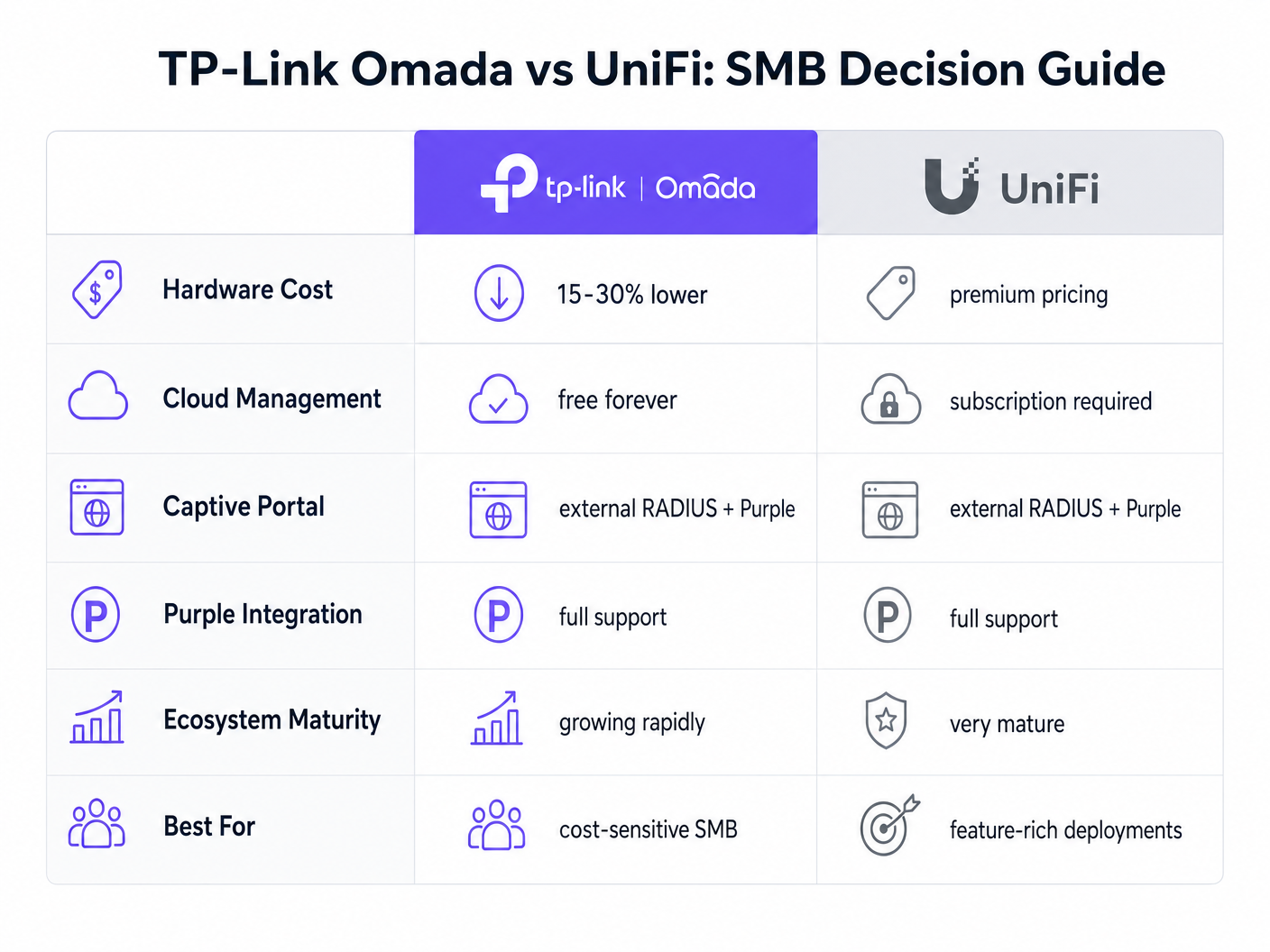
La piattaforma UniFi di Ubiquiti è il leader consolidato nel settore SMB. Tuttavia, TP-Link Omada offre un vantaggio finanziario convincente senza sacrificare le funzionalità principali.
- Spese in Conto Capitale (CapEx): Gli access point Omada (ad es. EAP670) sono tipicamente dal 15 al 30% meno costosi dei loro equivalenti UniFi (ad es. U6 Pro). In una distribuzione con 50 AP, questo rappresenta migliaia di dollari di risparmio sull'hardware.
- Spese Operative (OpEx): TP-Link offre il controller Omada Cloud gratuitamente. L'hosting cloud ufficiale di UniFi richiede un abbonamento mensile per sito.
- Integrazione: Entrambe le piattaforme supportano RADIUS Esterno e si integrano perfettamente con Purple.
Per un ecosistema unificato e ricco di funzionalità che include telecamere e controllo accessi, UniFi rimane superiore. Tuttavia, per una distribuzione wireless pura focalizzata sull'efficienza dei costi e sull'accesso guest affidabile, Omada offre un valore eccezionale.
Misurare il Successo
L'implementazione di Purple Connect (il livello gratuito) su hardware Omada fornisce un ROI immediato riducendo l'onere di supporto IT associato alla gestione delle password guest. Per comprendere l'impatto commerciale più ampio dell'aggiornamento ai livelli a pagamento per l'acquisizione di dati e l'automazione del marketing, consultare la nostra analisi completa: Perché Usare il WiFi Marketing? Il Business Case con Dati Reali .
Sfruttando l'hardware conveniente di Omada, le sedi possono riallocare il budget dalle spese in conto capitale (CapEx) per l'infrastruttura verso soluzioni software che generano attivamente entrate, trasformando la rete da un centro di costo a una risorsa di marketing.
Termini chiave e definizioni
External RADIUS Server
A networking protocol that provides centralized Authentication, Authorization, and Accounting (AAA) management. In this context, Purple acts as the RADIUS server, verifying users and instructing the Omada controller to grant network access.
IT teams use this architecture to decouple identity management from local network hardware, enabling cloud-based analytics and compliance.
Captive Portal
A web page that a user of a public-access network is obliged to view and interact with before access is granted.
This is the primary touchpoint for data capture and brand engagement in guest WiFi deployments.
Walled Garden (Pre-Authentication Access)
A limited environment that controls the user's access to web content and services before they have fully authenticated on the network.
Crucial for allowing devices to reach the splash page hosted on Purple's servers and to communicate with social login providers like Google or Facebook before internet access is granted.
Captive Network Assistant (CNA)
The pseudo-browser built into mobile operating systems (like iOS and Android) that automatically detects captive portals and pops up the login screen.
IT teams must ensure the Walled Garden is perfectly configured, as the CNA is highly sensitive to blocked resources and will fail silently if it cannot reach necessary endpoints.
RADIUS Accounting
The process of tracking network resource consumption by users, including session duration and bytes transferred.
Essential for generating accurate analytics in the Purple dashboard and for enforcing bandwidth or time limits on guest sessions.
Layer 2 Isolation (Guest Network Mode)
A security feature that prevents devices connected to the same wireless network from communicating directly with each other.
A mandatory requirement for public networks to prevent lateral movement of malware and to comply with security standards like PCI DSS.
Interim Update Interval
The frequency at which the network controller sends accounting data updates to the RADIUS server during an active session.
Setting this to 120 seconds ensures Purple has near real-time data on user sessions without overwhelming the network with RADIUS traffic.
Passpoint (Hotspot 2.0)
A standard that enables mobile devices to automatically discover and connect to Wi-Fi networks securely without requiring a captive portal login.
Used by Purple's SecurePass feature to provide a frictionless, secure (WPA-Enterprise) connection for returning guests, improving the user experience and increasing connection rates.
Casi di studio
A 150-room boutique hotel needs to deploy guest WiFi across all bedrooms and public areas. They have a strict budget but require GDPR-compliant data capture and seamless roaming. They are evaluating UniFi U6 Pro vs TP-Link Omada EAP670.
The hotel should deploy 40 TP-Link Omada EAP670 access points managed via the free Omada Cloud Controller. They will configure a 'Guest WiFi' SSID with no Layer 2 security, relying on Purple's External RADIUS integration for authentication. They must implement a strict Walled Garden to allow pre-authentication access to Purple's splash pages. The guest network will be placed on an isolated VLAN.
A retail chain with 20 small footprint stores wants to offer free WiFi to customers to capture email addresses for their loyalty program. They currently have unmanaged consumer routers in each store and no centralized IT support.
Deploy a single TP-Link Omada EAP650 access point in each store, connected to an Omada Cloud Controller for centralized management. Configure Purple's 'Connect' or 'Capture' tier via External RADIUS. Implement bandwidth rate limiting (e.g., 5Mbps down/1Mbps up) on the guest SSID to protect the stores' limited WAN connections, which are also used for Point of Sale (POS) systems.
Analisi degli scenari
Q1. A venue reports that users can connect to the guest WiFi and browse the internet, but no session data or analytics are appearing in the Purple dashboard. What is the most likely configuration error on the Omada controller?
💡 Suggerimento:Think about the specific RADIUS protocol responsible for tracking usage, not just granting access.
Mostra l'approccio consigliato
The RADIUS Accounting configuration is likely incorrect or disabled. The IT team should verify that Accounting is enabled, the Accounting Server IP is correct, the Accounting Port is set to 1813, and the Interim Update interval is set to 120 seconds.
Q2. During a pilot deployment, Android devices successfully load the Purple splash page, but iOS devices show a blank screen and drop the WiFi connection. How should the network architect resolve this?
💡 Suggerimento:iOS and Android handle captive portal detection differently. iOS relies heavily on specific domains being reachable before authentication.
Mostra l'approccio consigliato
The network architect must update the Pre-Authentication Access List (Walled Garden) on the Omada controller. The iOS Captive Network Assistant (CNA) is failing because it cannot reach required Apple domains or Purple CDN endpoints. They must cross-reference their configuration with Purple's official Walled Garden whitelist.
Q3. A client wants to migrate from an expensive, subscription-based cloud managed WiFi solution to TP-Link Omada to save on OpEx, but they are concerned about losing the enterprise-grade analytics they currently rely on. What is the recommended architecture?
💡 Suggerimento:How can you separate the hardware management plane from the analytics and identity plane?
Mostra l'approccio consigliato
The client should deploy TP-Link Omada access points managed by the free Omada Cloud Controller to eliminate hardware subscription fees. They should then integrate this with Purple WiFi via an External RADIUS configuration. This architecture provides cost-effective hardware management while retaining enterprise-grade analytics, data capture, and CRM integration through the Purple platform.




