

TP-Link Omada y Purple WiFi para Implementaciones en PYMES
Esta guía autorizada proporciona a los gerentes de TI y arquitectos de red un plan definitivo para integrar los puntos de acceso TP-Link Omada con la infraestructura RADIUS en la nube de Purple. Cubre el diseño arquitectónico, la configuración paso a paso del Captive Portal, los requisitos de Walled Garden y una comparación comercial con UniFi para implementaciones en PYMES.
🎧 Escucha esta guía
Ver transcripción
Resumen Ejecutivo
Para las PYMES en Hospitalidad , Comercio Minorista y espacios públicos, ofrecer una WiFi para Invitados segura y con marca ya no es un lujo, es un requisito operativo. Históricamente, los gerentes de TI se han enfrentado a una elección difícil: implementar hardware costoso de nivel empresarial como UniFi, o comprometer la seguridad y el análisis con puntos de acceso de grado de consumidor. TP-Link Omada cambia fundamentalmente esta ecuación. Al combinar el hardware rentable y gestionado en la nube de Omada con la autenticación de nivel empresarial de Purple y Análisis de WiFi , los operadores de locales pueden lograr una arquitectura de red segura y escalable a una fracción del costo tradicional.
Esta guía de referencia técnica proporciona un plan definitivo para implementar puntos de acceso TP-Link Omada con la infraestructura RADIUS en la nube de Purple. Examinaremos la integración arquitectónica, detallaremos los parámetros de configuración específicos necesarios para una experiencia de Captive Portal sin interrupciones y proporcionaremos un análisis franco de costo-beneficio comparando Omada con UniFi para implementaciones en PYMES. Esta es una guía de implementación práctica y neutral para el proveedor, diseñada para profesionales de TI senior y arquitectos de red que necesitan orientación práctica para implementar redes de invitados robustas este trimestre.
Análisis Técnico Detallado
La integración entre TP-Link Omada y Purple se basa en una arquitectura estándar de Servidor RADIUS Externo combinada con una redirección a un Portal Web Externo. Este desacoplamiento de la red de acceso de radio del plano de gestión de identidades es un principio fundamental de la Arquitectura del Internet de las Cosas: Una Guía Completa moderna.
Resumen Arquitectónico
En una implementación estándar, el Punto de Acceso Omada (p. ej., EAP670 o EAP650) gestiona el entorno de RF, la asociación de clientes y el roaming. Sin embargo, no gestiona la autenticación. Cuando un dispositivo cliente se conecta al SSID de invitado, el controlador Omada intercepta la conexión y redirige el navegador del usuario a la página de bienvenida alojada de Purple.
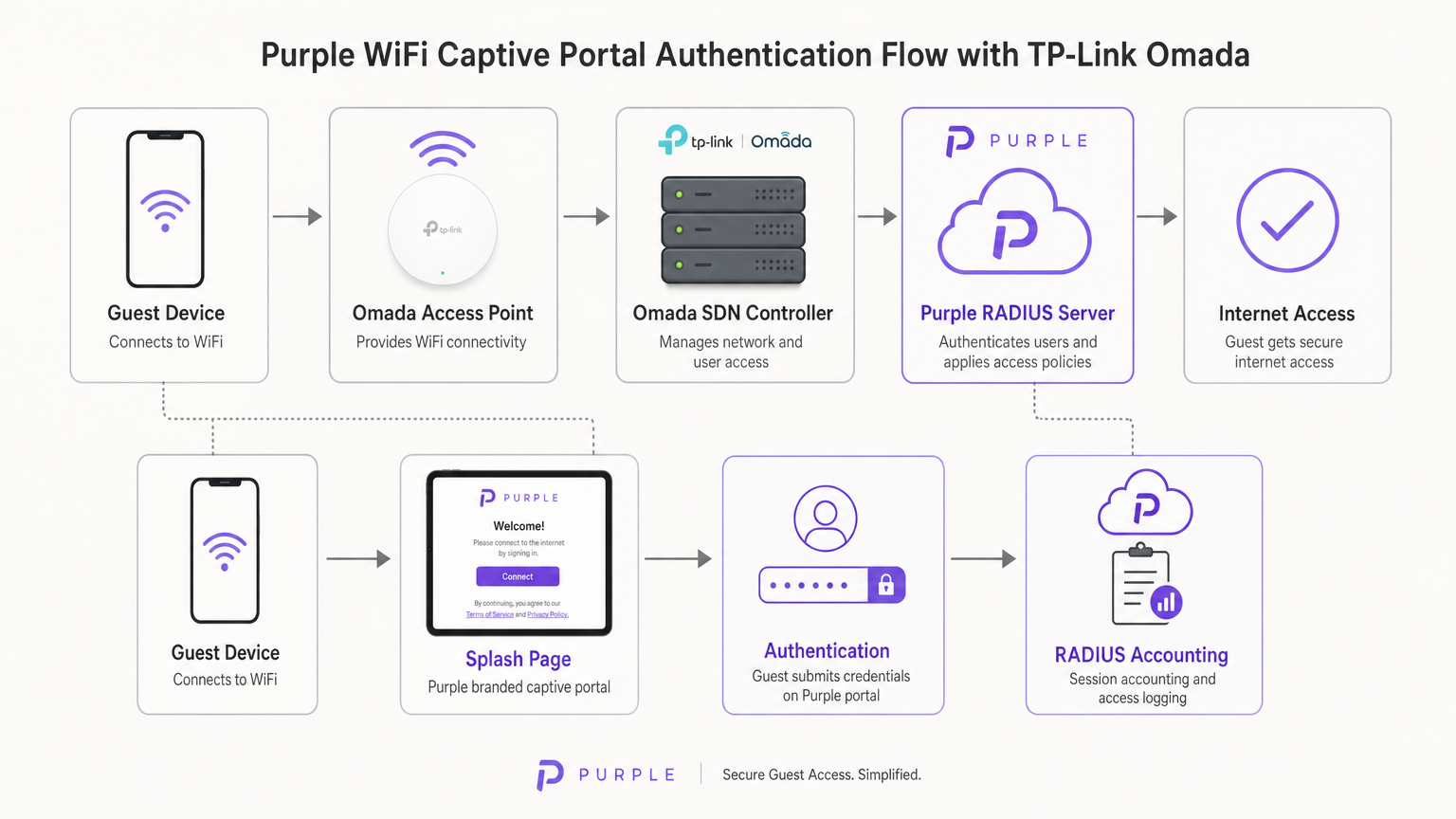
Una vez que el usuario envía sus credenciales (o acepta los términos de servicio) en el portal de Purple, la infraestructura en la nube de Purple actúa como el servidor RADIUS. Envía un mensaje Access-Accept de vuelta al controlador Omada, que luego autoriza la MAC address del dispositivo cliente en la red local. Purple también gestiona toda la Contabilidad RADIUS, rastreando la duración de la sesión y el uso de datos para fines de análisis y cumplimiento.
Opciones del Controlador Omada
La plataforma Omada Software Defined Networking (SDN) requiere un controlador para gestionar los puntos de acceso y manejar la redirección del Captive Portal. Tiene tres modelos de implementación principales:
- Controlador Omada Basado en la Nube: Alojado completamente por TP-Link. Este es el enfoque recomendado para la mayoría de las implementaciones en PYMES, ya que elimina la necesidad de hardware de controlador en el sitio y proporciona alta disponibilidad.
- Controlador de Hardware (OC200/OC300): Un dispositivo físico instalado en la red local. Adecuado para entornos con enlaces WAN poco fiables donde la gestión local es crítica.
- Controlador de Software: Instalado en un servidor local o VM (Windows o Linux).
Fundamentalmente, el controlador Omada debe permanecer en línea para procesar nuevas autenticaciones de invitados. Si el controlador se desconecta, las sesiones autenticadas existentes permanecerán activas, pero los nuevos clientes no podrán cargar el Captive Portal.
Guía de Implementación
La implementación de Purple en un controlador Omada v4+ requiere la configuración de tres componentes distintos: la Red Inalámbrica, el Portal de Invitados y el Walled Garden.
Paso 1: Configuración de Ajustes Inalámbricos
La base es un SSID dedicado configurado para acceso de invitados sin cifrado local.
- Navegue a Ajustes Inalámbricos en el controlador Omada y haga clic en Añadir.
- Defina el SSID (p. ej., "Guest WiFi").
- Habilite el interruptor Red de Invitados. Esto es crítico ya que habilita el aislamiento de clientes de Capa 2, impidiendo que los invitados se comuniquen entre sí o accedan a recursos corporativos locales, un requisito obligatorio para el cumplimiento de PCI DSS.
- Establezca el Modo de Seguridad en Ninguno. La autenticación se gestionará en la Capa 7 a través del Captive Portal, no en la Capa 2.
- Aplique los ajustes en ambas bandas de 2.4GHz y 5GHz.
Paso 2: Configuración del Portal de Invitados y RADIUS
Este paso vincula el controlador Omada a la infraestructura en la nube de Purple.
- Navegue a Control Inalámbrico > Portal y haga clic en Añadir un Nuevo Portal.
- Seleccione el SSID creado en el Paso 1.
- Establezca el Tipo de Autenticación en Servidor RADIUS Externo.
- Configure el Servidor RADIUS Primario:
- IP del Servidor RADIUS: Proporcionada en su panel de Purple.
- Puerto RADIUS:
1812 - Contraseña RADIUS: Su secreto RADIUS único de Purple.
- Modo de Autenticación:
PAP
- Habilite la Contabilidad RADIUS:
- IP del Servidor de Contabilidad: Proporcionada en su panel de Purple.
- Puerto del Servidor de Contabilidad:
1813 - Contraseña del Servidor de Contabilidad: Su secreto RADIUS único de Purple.
- Habilite la Actualización Provisional y establezca el intervalo en
120segundos. Esto asegura un seguimiento preciso de la sesión. - En Personalización del Portal, seleccione Portal Web Externo.
- Ingrese la URL del Portal Web Externo proporcionada por Purple.
Nota Crítica: Asegúrese de que la Redirección HTTPS esté configurada en Deshabilitar. La intercepción inicial del Captive Portal se basa en HTTP. Habilitar la redirección HTTPS a nivel de controlador interrumpirá el proceso de carga de la página de bienvenida.
Paso 3: Walled Garden (Acceso Pre-Autenticación)
El Walled Garden es el punto de falla más común en las implementaciones de WiFi para invitados. Antes de que un usuario se autentique, suel dispositivo debe poder resolver y alcanzar los servidores de Purple para cargar la página de bienvenida y procesar los inicios de sesión sociales.
- Navegue al encabezado Control de Acceso dentro de la configuración del Portal.
- Habilite el Acceso de Preautenticación.
- Agregue cada dominio listado en la lista blanca oficial de Walled Garden de Purple. Esto incluye los dominios principales de Purple, los puntos finales de CDN y los dominios requeridos para los proveedores de inicio de sesión social (Facebook, Google, X).
- Si no se configura correctamente, el Captive Network Assistant (CNA) en iOS y Android no podrá renderizar la página.
Mejores Prácticas
Para asegurar una implementación robusta y conforme, siga las siguientes recomendaciones estándar de la industria:
- Segmentación de VLAN: Siempre coloque el SSID de invitados en una VLAN dedicada, completamente aislada del tráfico corporativo, los sistemas de Punto de Venta (POS) y las interfaces de administración. Esto mitiga el riesgo y simplifica la auditoría de cumplimiento.
- Limitación de Ancho de Banda: Implemente la limitación de velocidad en el SSID de invitados (por ejemplo, 5 Mbps de bajada / 1 Mbps de subida por cliente) para evitar que un solo usuario sature el enlace WAN y afecte las operaciones comerciales.
- Integración de SecurePass: Para lugares con altas tasas de visitantes recurrentes, configure SecurePass de Purple (WPA-Enterprise con Hotspot 2.0). Esto permite que los invitados que regresan se autentiquen automáticamente a través de un perfil, omitiendo por completo el Captive Portal para una experiencia sin fricciones.
- Alta Disponibilidad del Controlador: Si utiliza un controlador de hardware local (OC200), asegúrese de que esté conectado a una Fuente de Alimentación Ininterrumpida (UPS). Un reinicio del controlador detendrá las nuevas autenticaciones.
Solución de Problemas y Mitigación de Riesgos
Al implementar Captive Portals de terceros, con frecuencia surgen modos de falla específicos. Aquí se explica cómo abordarlos:
El Captive Network Assistant (CNA) de iOS no Carga
Si los dispositivos Apple se conectan al WiFi pero la página de bienvenida no aparece automáticamente, el problema es casi siempre un Walled Garden incompleto. El CNA de iOS intenta alcanzar puntos finales específicos de Apple (por ejemplo, captive.apple.com) para detectar el acceso a internet. Si estos están bloqueados, o si faltan los dominios CDN de Purple en la lista de Acceso de Preautenticación, la página no se renderizará. Verifique la lista blanca con la documentación actual de Purple.
Sesiones que no Aparecen en los Análisis
Si los usuarios pueden autenticarse y acceder a internet, pero sus datos de sesión (duración, ancho de banda) faltan en el panel de Purple, verifique la configuración de Contabilidad RADIUS. Asegúrese de que el Puerto de Contabilidad esté configurado en 1813, que el secreto coincida exactamente y que el intervalo de Actualización Provisional esté habilitado y configurado en 120 segundos.
Tiempos de Espera de Autenticación
Si el portal carga pero los usuarios reciben un error de tiempo de espera al hacer clic en 'Conectar', el controlador Omada no puede alcanzar el servidor RADIUS de Purple en el puerto 1812. Verifique las reglas de firewall de salida en su enrutador de borde para asegurarse de que los puertos UDP 1812 y 1813 estén abiertos a las direcciones IP de Purple.
ROI e Impacto Comercial
Para los directores de TI y CTOs, la decisión de implementar hardware Omada con software Purple es fundamentalmente comercial. ¿Cómo se compara esta arquitectura con las alternativas y cuál es el retorno de la inversión esperado?
La Decisión Omada vs. UniFi
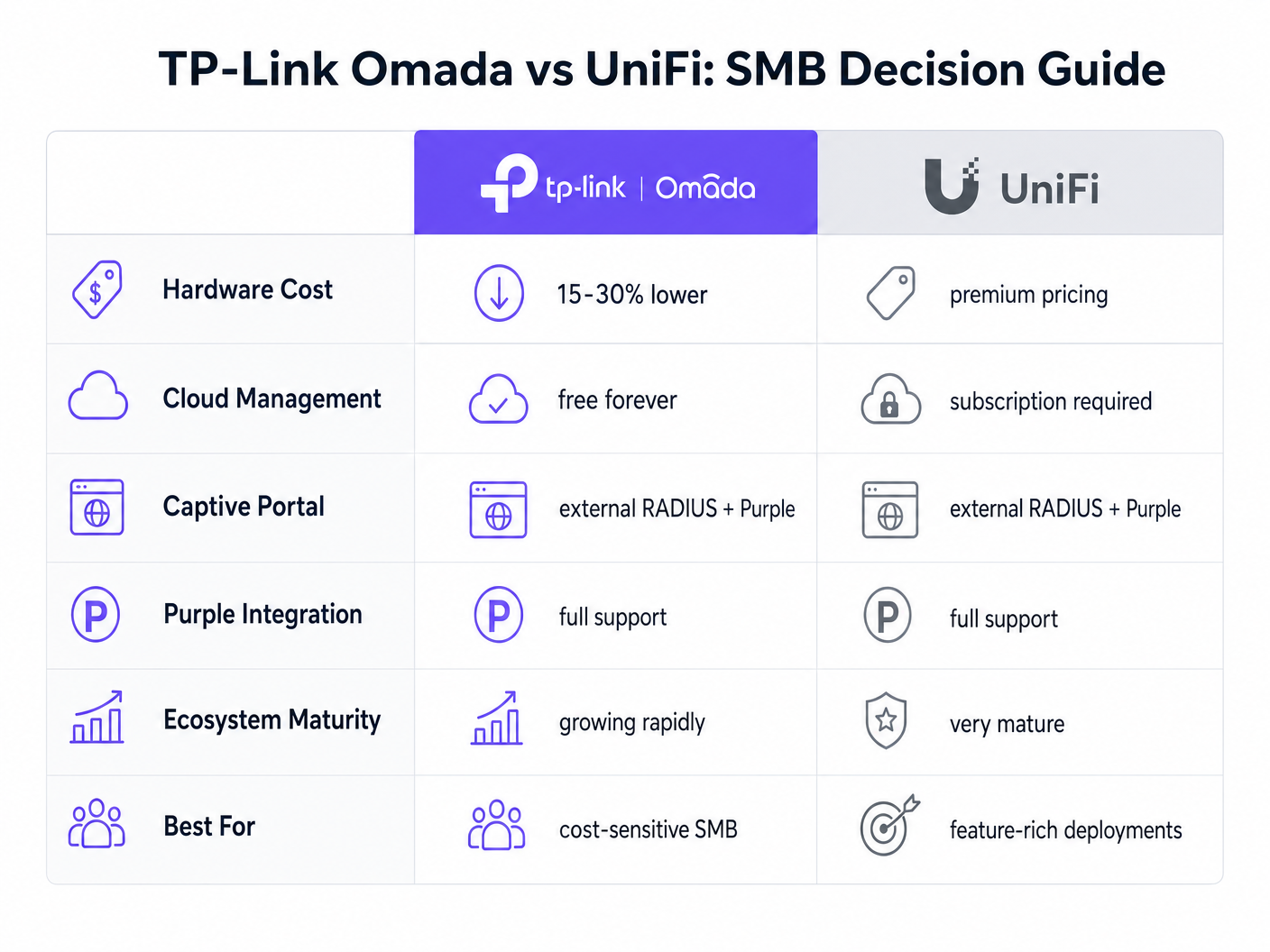
La plataforma UniFi de Ubiquiti es el líder actual en el espacio de las PYMES. Sin embargo, TP-Link Omada ofrece una ventaja financiera convincente sin sacrificar la funcionalidad principal.
- Gasto de Capital (CapEx): Los puntos de acceso Omada (por ejemplo, EAP670) son típicamente entre un 15 y un 30% menos costosos que sus equivalentes UniFi (por ejemplo, U6 Pro). En una implementación de 50 AP, esto representa miles de dólares en ahorros de hardware.
- Gasto Operativo (OpEx): TP-Link ofrece el controlador Omada Cloud de forma gratuita. El alojamiento oficial en la nube de UniFi requiere una suscripción mensual por sitio.
- Integración: Ambas plataformas soportan RADIUS Externo y se integran sin problemas con Purple.
Para un ecosistema unificado y rico en funciones que incluye cámaras y acceso a puertas, UniFi sigue siendo superior. Sin embargo, para una implementación inalámbrica pura centrada en la eficiencia de costos y el acceso confiable para invitados, Omada ofrece un valor excepcional.
Medición del Éxito
La implementación de Purple Connect (la capa gratuita) en hardware Omada proporciona un ROI inmediato al reducir la carga de soporte de TI asociada con la gestión de contraseñas de invitados. Para comprender el impacto comercial más amplio de la actualización a niveles de pago para la captura de datos y la automatización de marketing, revise nuestro análisis completo: ¿Por qué usar WiFi Marketing? El caso de negocio con datos reales .
Al aprovechar el hardware rentable de Omada, los lugares pueden reasignar el presupuesto de CapEx de infraestructura hacia soluciones de software que impulsan activamente los ingresos, transformando la red de un centro de costos en un activo de marketing.
Términos clave y definiciones
External RADIUS Server
A networking protocol that provides centralized Authentication, Authorization, and Accounting (AAA) management. In this context, Purple acts as the RADIUS server, verifying users and instructing the Omada controller to grant network access.
IT teams use this architecture to decouple identity management from local network hardware, enabling cloud-based analytics and compliance.
Captive Portal
A web page that a user of a public-access network is obliged to view and interact with before access is granted.
This is the primary touchpoint for data capture and brand engagement in guest WiFi deployments.
Walled Garden (Pre-Authentication Access)
A limited environment that controls the user's access to web content and services before they have fully authenticated on the network.
Crucial for allowing devices to reach the splash page hosted on Purple's servers and to communicate with social login providers like Google or Facebook before internet access is granted.
Captive Network Assistant (CNA)
The pseudo-browser built into mobile operating systems (like iOS and Android) that automatically detects captive portals and pops up the login screen.
IT teams must ensure the Walled Garden is perfectly configured, as the CNA is highly sensitive to blocked resources and will fail silently if it cannot reach necessary endpoints.
RADIUS Accounting
The process of tracking network resource consumption by users, including session duration and bytes transferred.
Essential for generating accurate analytics in the Purple dashboard and for enforcing bandwidth or time limits on guest sessions.
Layer 2 Isolation (Guest Network Mode)
A security feature that prevents devices connected to the same wireless network from communicating directly with each other.
A mandatory requirement for public networks to prevent lateral movement of malware and to comply with security standards like PCI DSS.
Interim Update Interval
The frequency at which the network controller sends accounting data updates to the RADIUS server during an active session.
Setting this to 120 seconds ensures Purple has near real-time data on user sessions without overwhelming the network with RADIUS traffic.
Passpoint (Hotspot 2.0)
A standard that enables mobile devices to automatically discover and connect to Wi-Fi networks securely without requiring a captive portal login.
Used by Purple's SecurePass feature to provide a frictionless, secure (WPA-Enterprise) connection for returning guests, improving the user experience and increasing connection rates.
Casos de éxito
A 150-room boutique hotel needs to deploy guest WiFi across all bedrooms and public areas. They have a strict budget but require GDPR-compliant data capture and seamless roaming. They are evaluating UniFi U6 Pro vs TP-Link Omada EAP670.
The hotel should deploy 40 TP-Link Omada EAP670 access points managed via the free Omada Cloud Controller. They will configure a 'Guest WiFi' SSID with no Layer 2 security, relying on Purple's External RADIUS integration for authentication. They must implement a strict Walled Garden to allow pre-authentication access to Purple's splash pages. The guest network will be placed on an isolated VLAN.
A retail chain with 20 small footprint stores wants to offer free WiFi to customers to capture email addresses for their loyalty program. They currently have unmanaged consumer routers in each store and no centralized IT support.
Deploy a single TP-Link Omada EAP650 access point in each store, connected to an Omada Cloud Controller for centralized management. Configure Purple's 'Connect' or 'Capture' tier via External RADIUS. Implement bandwidth rate limiting (e.g., 5Mbps down/1Mbps up) on the guest SSID to protect the stores' limited WAN connections, which are also used for Point of Sale (POS) systems.
Análisis de escenarios
Q1. A venue reports that users can connect to the guest WiFi and browse the internet, but no session data or analytics are appearing in the Purple dashboard. What is the most likely configuration error on the Omada controller?
💡 Sugerencia:Think about the specific RADIUS protocol responsible for tracking usage, not just granting access.
Mostrar enfoque recomendado
The RADIUS Accounting configuration is likely incorrect or disabled. The IT team should verify that Accounting is enabled, the Accounting Server IP is correct, the Accounting Port is set to 1813, and the Interim Update interval is set to 120 seconds.
Q2. During a pilot deployment, Android devices successfully load the Purple splash page, but iOS devices show a blank screen and drop the WiFi connection. How should the network architect resolve this?
💡 Sugerencia:iOS and Android handle captive portal detection differently. iOS relies heavily on specific domains being reachable before authentication.
Mostrar enfoque recomendado
The network architect must update the Pre-Authentication Access List (Walled Garden) on the Omada controller. The iOS Captive Network Assistant (CNA) is failing because it cannot reach required Apple domains or Purple CDN endpoints. They must cross-reference their configuration with Purple's official Walled Garden whitelist.
Q3. A client wants to migrate from an expensive, subscription-based cloud managed WiFi solution to TP-Link Omada to save on OpEx, but they are concerned about losing the enterprise-grade analytics they currently rely on. What is the recommended architecture?
💡 Sugerencia:How can you separate the hardware management plane from the analytics and identity plane?
Mostrar enfoque recomendado
The client should deploy TP-Link Omada access points managed by the free Omada Cloud Controller to eliminate hardware subscription fees. They should then integrate this with Purple WiFi via an External RADIUS configuration. This architecture provides cost-effective hardware management while retaining enterprise-grade analytics, data capture, and CRM integration through the Purple platform.




