

TP-Link Omada and Purple WiFi for SMB Deployments
This authoritative guide provides IT managers and network architects with a definitive blueprint for integrating TP-Link Omada access points with Purple's cloud RADIUS infrastructure. It covers architectural design, step-by-step captive portal configuration, Walled Garden requirements, and a commercial comparison against UniFi for SMB deployments.
🎧 Listen to this Guide
View Transcript
Executive Summary
For SMBs in Hospitality , Retail , and public venues, delivering secure, branded Guest WiFi is no longer a luxury—it is an operational requirement. Historically, IT managers have faced a difficult choice: deploy expensive, enterprise-grade hardware like UniFi, or compromise on security and analytics with consumer-grade access points. TP-Link Omada fundamentally changes this equation. By combining Omada's cost-effective, cloud-managed hardware with Purple's enterprise-grade authentication and WiFi Analytics , venue operators can achieve a secure, scalable network architecture at a fraction of the traditional cost.
This technical reference guide provides a definitive blueprint for deploying TP-Link Omada access points with Purple's cloud RADIUS infrastructure. We will examine the architectural integration, detail the specific configuration parameters required for a seamless captive portal experience, and provide a candid cost-benefit analysis comparing Omada to UniFi for SMB deployments. This is a practical, vendor-neutral implementation guide designed for senior IT professionals and network architects who need actionable guidance to deploy robust guest networks this quarter.
Technical Deep-Dive
The integration between TP-Link Omada and Purple relies on a standard External RADIUS Server architecture combined with an External Web Portal redirect. This decoupling of the radio access network from the identity management plane is a fundamental principle of modern Internet of Things Architecture: A Complete Guide .
Architectural Overview
In a standard deployment, the Omada Access Point (e.g., EAP670 or EAP650) handles the RF environment, client association, and roaming. However, it does not handle authentication. When a client device connects to the guest SSID, the Omada controller intercepts the connection and redirects the user's browser to Purple's hosted splash page.
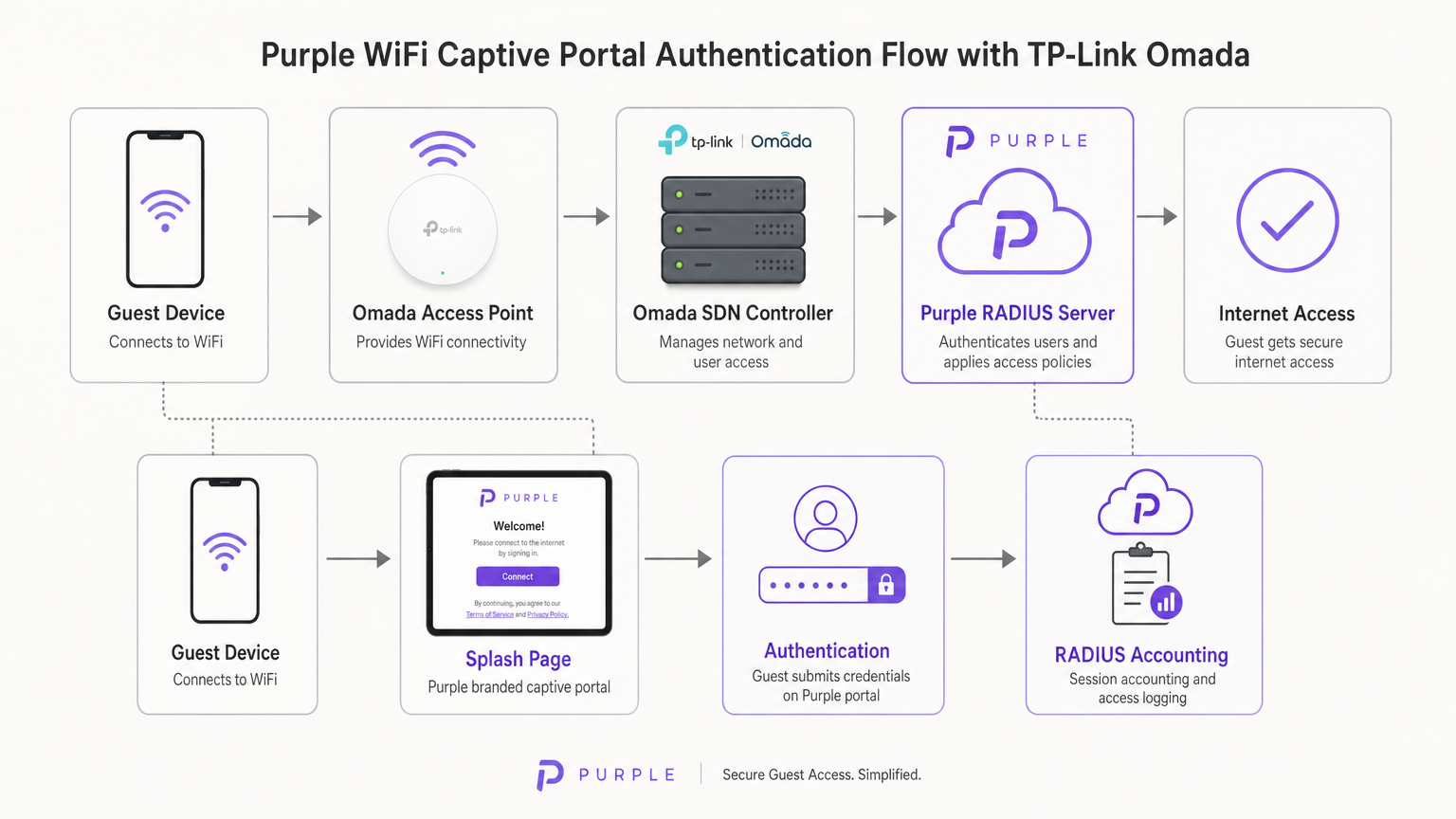
Once the user submits their credentials (or accepts the terms of service) on the Purple portal, Purple's cloud infrastructure acts as the RADIUS server. It sends an Access-Accept message back to the Omada controller, which then authorises the MAC address of the client device on the local network. Purple also handles all RADIUS Accounting, tracking session duration and data usage for analytics and compliance purposes.
Omada Controller Options
The Omada Software Defined Networking (SDN) platform requires a controller to manage the access points and handle the captive portal redirection. You have three primary deployment models:
- Omada Cloud-Based Controller: Hosted entirely by TP-Link. This is the recommended approach for most SMB deployments as it removes the need for on-site controller hardware and provides high availability.
- Hardware Controller (OC200/OC300): A physical appliance installed on the local network. Suitable for environments with unreliable WAN links where local management is critical.
- Software Controller: Installed on a local server or VM (Windows or Linux).
Crucially, the Omada controller must remain online to process new guest authentications. If the controller goes offline, existing authenticated sessions will remain active, but new clients will be unable to load the captive portal.
Implementation Guide
Deploying Purple on an Omada v4+ controller requires configuring three distinct components: the Wireless Network, the Guest Portal, and the Walled Garden.
Step 1: Wireless Settings Configuration
The foundation is a dedicated SSID configured for guest access without local encryption.
- Navigate to Wireless Settings in the Omada controller and click Add.
- Define the SSID (e.g., "Guest WiFi").
- Enable the Guest Network toggle. This is critical as it enables Layer 2 client isolation, preventing guests from communicating with each other or accessing local corporate resources—a mandatory requirement for PCI DSS compliance.
- Set Security Mode to None. Authentication will be handled at Layer 7 via the captive portal, not Layer 2.
- Apply the settings across both 2.4GHz and 5GHz bands.
Step 2: Guest Portal and RADIUS Configuration
This step binds the Omada controller to Purple's cloud infrastructure.
- Navigate to Wireless Control > Portal and click Add a New Portal.
- Select the SSID created in Step 1.
- Set Authentication Type to External RADIUS Server.
- Configure the Primary RADIUS Server:
- RADIUS Server IP: Provided in your Purple dashboard.
- RADIUS Port:
1812 - RADIUS Password: Your unique Purple RADIUS secret.
- Authentication Mode:
PAP
- Enable RADIUS Accounting:
- Accounting Server IP: Provided in your Purple dashboard.
- Accounting Server Port:
1813 - Accounting Server Password: Your unique Purple RADIUS secret.
- Enable Interim Update and set the interval to
120seconds. This ensures accurate session tracking. - Under Portal Customization, select External Web Portal.
- Input the External Web Portal URL provided by Purple.
Critical Note: Ensure HTTPS Redirect is set to Disable. The initial captive portal intercept relies on HTTP. Enabling HTTPS redirect at the controller level will break the splash page load process.
Step 3: Walled Garden (Pre-Authentication Access)
The Walled Garden is the most common point of failure in guest WiFi deployments. Before a user authenticates, their device must be able to resolve and reach Purple's servers to load the splash page and process social logins.
- Navigate to the Access Control header within the Portal settings.
- Enable Pre-authentication Access.
- Add every domain listed in Purple's official Walled Garden whitelist. This includes Purple's core domains, CDN endpoints, and domains required for social login providers (Facebook, Google, X).
- Failure to configure this correctly will result in the Captive Network Assistant (CNA) on iOS and Android failing to render the page.
Best Practices
To ensure a robust and compliant deployment, adhere to the following industry-standard recommendations:
- VLAN Segmentation: Always place the guest SSID on a dedicated VLAN, completely isolated from corporate traffic, Point of Sale (POS) systems, and management interfaces. This mitigates risk and simplifies compliance auditing.
- Bandwidth Rate Limiting: Implement rate limiting on the guest SSID (e.g., 5 Mbps down / 1 Mbps up per client) to prevent a single user from saturating the WAN link and impacting business operations.
- SecurePass Integration: For venues with high repeat visitor rates, configure Purple's SecurePass (WPA-Enterprise with Hotspot 2.0). This allows returning guests to authenticate automatically via a profile, bypassing the captive portal entirely for a frictionless experience.
- Controller High Availability: If using an on-premise hardware controller (OC200), ensure it is connected to an Uninterruptible Power Supply (UPS). A controller reboot will halt new authentications.
Troubleshooting & Risk Mitigation
When deploying third-party captive portals, specific failure modes frequently arise. Here is how to address them:
iOS Captive Network Assistant (CNA) Fails to Load
If Apple devices connect to the WiFi but the splash page does not automatically pop up, the issue is almost always an incomplete Walled Garden. The iOS CNA attempts to reach specific Apple endpoints (e.g., captive.apple.com) to detect internet access. If these are blocked, or if Purple's CDN domains are missing from the Pre-Authentication Access list, the page will fail to render. Verify the whitelist against Purple's current documentation.
Sessions Not Appearing in Analytics
If users can authenticate and access the internet, but their session data (duration, bandwidth) is missing from the Purple dashboard, verify the RADIUS Accounting configuration. Ensure the Accounting Port is set to 1813, the secret matches exactly, and the Interim Update interval is enabled and set to 120 seconds.
Authentication Timeouts
If the portal loads but users receive a timeout error upon clicking 'Connect', the Omada controller is failing to reach the Purple RADIUS server on port 1812. Verify outbound firewall rules on your edge router to ensure UDP ports 1812 and 1813 are open to Purple's IP addresses.
ROI & Business Impact
For IT directors and CTOs, the decision to deploy Omada hardware with Purple software is fundamentally a commercial one. How does this architecture compare to alternatives, and what is the expected return on investment?
The Omada vs. UniFi Decision
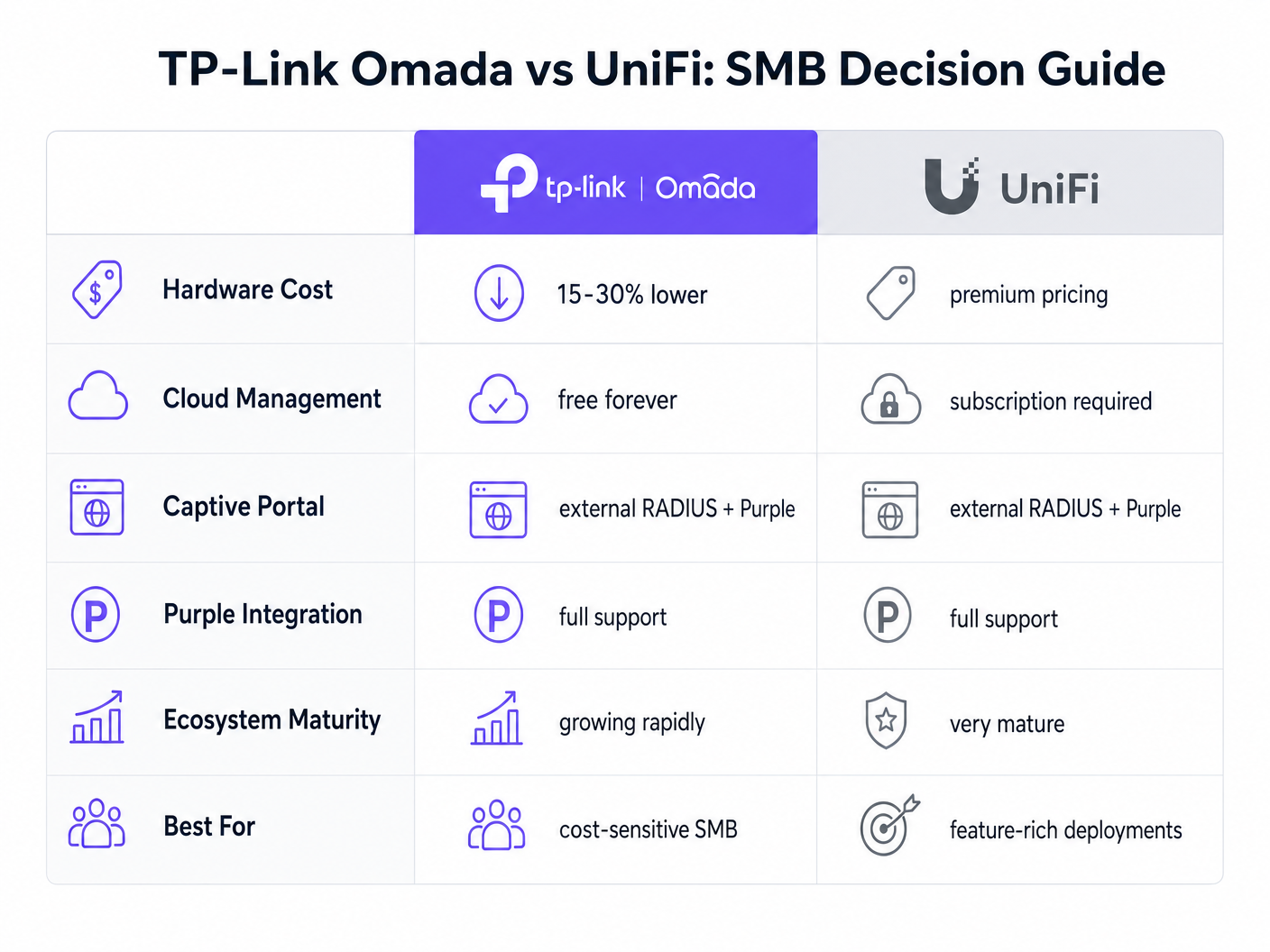
Ubiquiti's UniFi platform is the incumbent leader in the SMB space. However, TP-Link Omada offers a compelling financial advantage without sacrificing core functionality.
- Capital Expenditure (CapEx): Omada access points (e.g., EAP670) are typically 15-30% less expensive than their UniFi equivalents (e.g., U6 Pro). In a 50-AP deployment, this represents thousands of pounds in hardware savings.
- Operational Expenditure (OpEx): TP-Link offers the Omada Cloud controller for free. UniFi's official cloud hosting requires a monthly subscription per site.
- Integration: Both platforms support External RADIUS and integrate seamlessly with Purple.
For a feature-rich, unified ecosystem that includes cameras and door access, UniFi remains superior. However, for a pure-play wireless deployment focused on cost-efficiency and reliable guest access, Omada delivers exceptional value.
Measuring Success
Deploying Purple Connect (the free tier) on Omada hardware provides immediate ROI by reducing the IT support burden associated with managing guest passwords. To understand the broader commercial impact of upgrading to paid tiers for data capture and marketing automation, review our comprehensive analysis: Why Use WiFi Marketing? The Business Case With Real Data .
By leveraging Omada's cost-effective hardware, venues can reallocate budget from infrastructure CapEx toward software solutions that actively drive revenue, transforming the network from a cost centre into a marketing asset.
Key Terms & Definitions
External RADIUS Server
A networking protocol that provides centralized Authentication, Authorization, and Accounting (AAA) management. In this context, Purple acts as the RADIUS server, verifying users and instructing the Omada controller to grant network access.
IT teams use this architecture to decouple identity management from local network hardware, enabling cloud-based analytics and compliance.
Captive Portal
A web page that a user of a public-access network is obliged to view and interact with before access is granted.
This is the primary touchpoint for data capture and brand engagement in guest WiFi deployments.
Walled Garden (Pre-Authentication Access)
A limited environment that controls the user's access to web content and services before they have fully authenticated on the network.
Crucial for allowing devices to reach the splash page hosted on Purple's servers and to communicate with social login providers like Google or Facebook before internet access is granted.
Captive Network Assistant (CNA)
The pseudo-browser built into mobile operating systems (like iOS and Android) that automatically detects captive portals and pops up the login screen.
IT teams must ensure the Walled Garden is perfectly configured, as the CNA is highly sensitive to blocked resources and will fail silently if it cannot reach necessary endpoints.
RADIUS Accounting
The process of tracking network resource consumption by users, including session duration and bytes transferred.
Essential for generating accurate analytics in the Purple dashboard and for enforcing bandwidth or time limits on guest sessions.
Layer 2 Isolation (Guest Network Mode)
A security feature that prevents devices connected to the same wireless network from communicating directly with each other.
A mandatory requirement for public networks to prevent lateral movement of malware and to comply with security standards like PCI DSS.
Interim Update Interval
The frequency at which the network controller sends accounting data updates to the RADIUS server during an active session.
Setting this to 120 seconds ensures Purple has near real-time data on user sessions without overwhelming the network with RADIUS traffic.
Passpoint (Hotspot 2.0)
A standard that enables mobile devices to automatically discover and connect to Wi-Fi networks securely without requiring a captive portal login.
Used by Purple's SecurePass feature to provide a frictionless, secure (WPA-Enterprise) connection for returning guests, improving the user experience and increasing connection rates.
Case Studies
A 150-room boutique hotel needs to deploy guest WiFi across all bedrooms and public areas. They have a strict budget but require GDPR-compliant data capture and seamless roaming. They are evaluating UniFi U6 Pro vs TP-Link Omada EAP670.
The hotel should deploy 40 TP-Link Omada EAP670 access points managed via the free Omada Cloud Controller. They will configure a 'Guest WiFi' SSID with no Layer 2 security, relying on Purple's External RADIUS integration for authentication. They must implement a strict Walled Garden to allow pre-authentication access to Purple's splash pages. The guest network will be placed on an isolated VLAN.
A retail chain with 20 small footprint stores wants to offer free WiFi to customers to capture email addresses for their loyalty program. They currently have unmanaged consumer routers in each store and no centralized IT support.
Deploy a single TP-Link Omada EAP650 access point in each store, connected to an Omada Cloud Controller for centralized management. Configure Purple's 'Connect' or 'Capture' tier via External RADIUS. Implement bandwidth rate limiting (e.g., 5Mbps down/1Mbps up) on the guest SSID to protect the stores' limited WAN connections, which are also used for Point of Sale (POS) systems.
Scenario Analysis
Q1. A venue reports that users can connect to the guest WiFi and browse the internet, but no session data or analytics are appearing in the Purple dashboard. What is the most likely configuration error on the Omada controller?
💡 Hint:Think about the specific RADIUS protocol responsible for tracking usage, not just granting access.
Show Recommended Approach
The RADIUS Accounting configuration is likely incorrect or disabled. The IT team should verify that Accounting is enabled, the Accounting Server IP is correct, the Accounting Port is set to 1813, and the Interim Update interval is set to 120 seconds.
Q2. During a pilot deployment, Android devices successfully load the Purple splash page, but iOS devices show a blank screen and drop the WiFi connection. How should the network architect resolve this?
💡 Hint:iOS and Android handle captive portal detection differently. iOS relies heavily on specific domains being reachable before authentication.
Show Recommended Approach
The network architect must update the Pre-Authentication Access List (Walled Garden) on the Omada controller. The iOS Captive Network Assistant (CNA) is failing because it cannot reach required Apple domains or Purple CDN endpoints. They must cross-reference their configuration with Purple's official Walled Garden whitelist.
Q3. A client wants to migrate from an expensive, subscription-based cloud managed WiFi solution to TP-Link Omada to save on OpEx, but they are concerned about losing the enterprise-grade analytics they currently rely on. What is the recommended architecture?
💡 Hint:How can you separate the hardware management plane from the analytics and identity plane?
Show Recommended Approach
The client should deploy TP-Link Omada access points managed by the free Omada Cloud Controller to eliminate hardware subscription fees. They should then integrate this with Purple WiFi via an External RADIUS configuration. This architecture provides cost-effective hardware management while retaining enterprise-grade analytics, data capture, and CRM integration through the Purple platform.




