
Como o Filtro DNS Reduz o Consumo de Largura de Banda da Rede
Este guia detalha como a implementação de filtro DNS em redes WiFi empresariais bloqueia tráfego de publicidade, rastreamento e telemetria antes que consuma largura de banda. Para gestores de TI e operadores de espaços, isto traduz-se em reduções imediatas nos custos de ISP, melhoria do desempenho da rede e uma postura de segurança reforçada.
Ouça este guia
Ver transcrição do podcast
Resumo Executivo
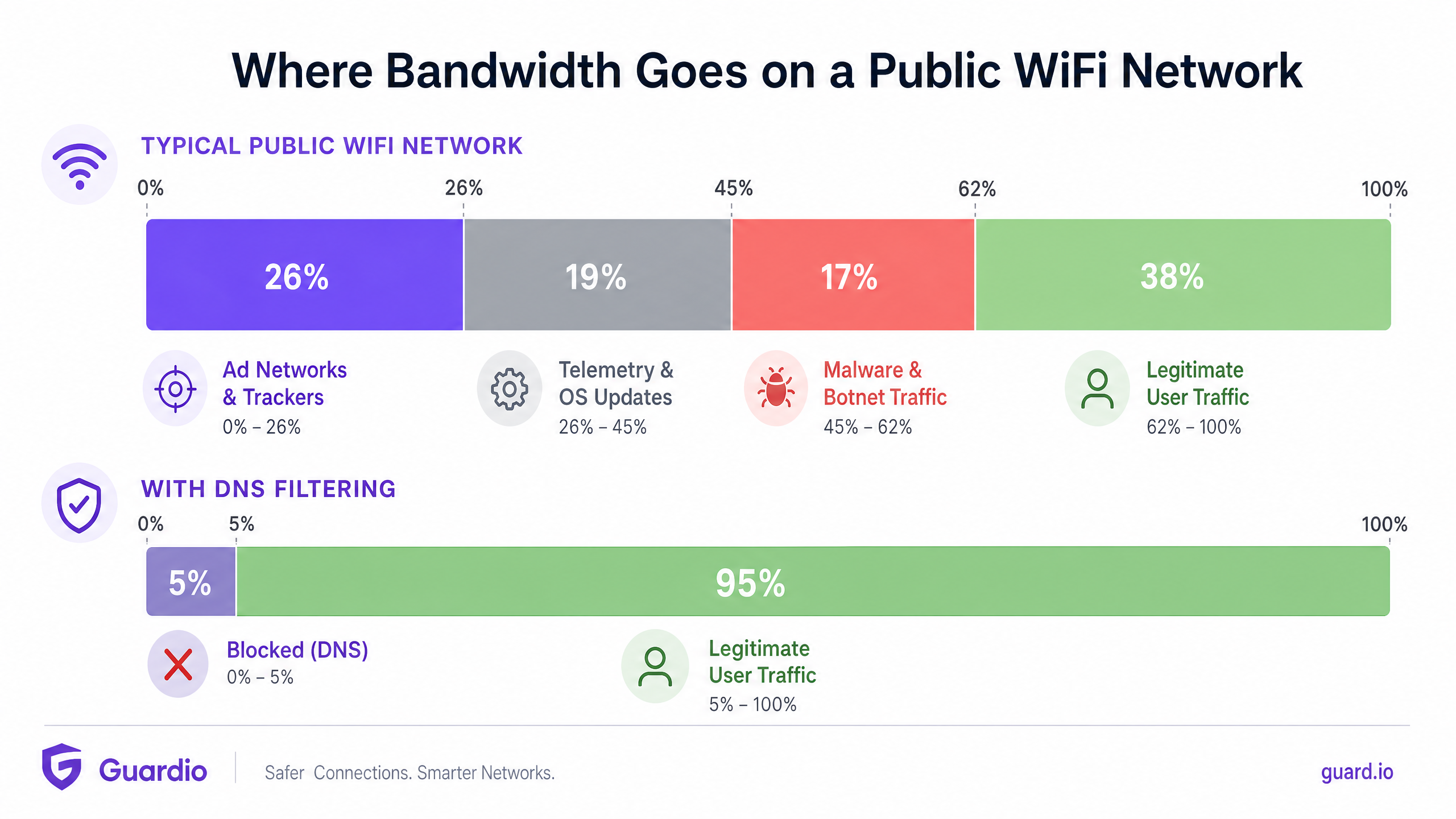
Para gestores de TI empresariais e arquitetos de rede que supervisionam ambientes de alta densidade — como Hotelaria , Retalho , Transportes e grandes espaços — a gestão da largura de banda é um desafio operacional persistente. Apesar das atualizações contínuas às ligações de ISP e à densidade de pontos de acesso, uma percentagem significativa da capacidade disponível é frequentemente consumida por tráfego não iniciado pelo utilizador. Redes de publicidade, sinais de telemetria, pixels de rastreamento e atualizações de SO em segundo plano degradam silenciosamente o desempenho da rede e inflacionam artificialmente os custos de infraestrutura.
Este guia de referência técnica detalha como a implementação de filtro DNS na extremidade da rede aborda diretamente esta ineficiência. Ao intercetar e bloquear pedidos de resolução para domínios conhecidos de publicidade, rastreamento e maliciosos, os operadores de rede podem prevenir o estabelecimento de ligações TCP desnecessárias. Esta abordagem reduz o consumo de largura de banda da rede em até 35% em ambientes densos, melhorando a experiência do utilizador final e mitigando riscos de segurança. Iremos explorar a arquitetura técnica, modelos de implementação e ROI mensurável do filtro DNS, fornecendo orientação acionável para profissionais de TI seniores.
Análise Técnica Detalhada
A Mecânica da Resolução DNS e o Desperdício de Largura de Banda
O Domain Name System (DNS) opera como a camada de encaminhamento fundamental para todo o tráfego da internet. Quando um dispositivo cliente se conecta a uma rede Guest WiFi , a primeira ação que toma antes de estabelecer qualquer ligação HTTP/HTTPS é uma consulta DNS para resolver um nome de host para um endereço IP.
Em aplicações web e móveis modernas, uma única ação do utilizador (por exemplo, carregar um website de notícias ou abrir uma aplicação de redes sociais) desencadeia uma cascata de consultas DNS secundárias e terciárias. Estas consultas são direcionadas para servidores de anúncios, plataformas de análise e pontos de extremidade de telemetria.
Quando estas consultas são resolvidas com sucesso, o dispositivo estabelece uma ligação e descarrega a carga útil — frequentemente ficheiros de multimédia pesados para anúncios ou fluxos de dados contínuos para telemetria. Este tráfego consome largura de banda valiosa, tempo de antena de rádio no Ponto de Acesso (AP) e limites de ligação concorrentes no router gateway.
Como o Filtro DNS Recupera Largura de Banda
O filtro DNS interceta este processo na fase de resolução. Quando um dispositivo consulta um domínio, o resolvedor DNS verifica o nome de host contra uma lista de bloqueio mantida (ou feed de inteligência de ameaças). Se o domínio for sinalizado como uma rede de anúncios, rastreador ou entidade maliciosa conhecida, o resolvedor retorna uma resposta nula (por exemplo, 0.0.0.0 ou NXDOMAIN) em vez do endereço IP real.
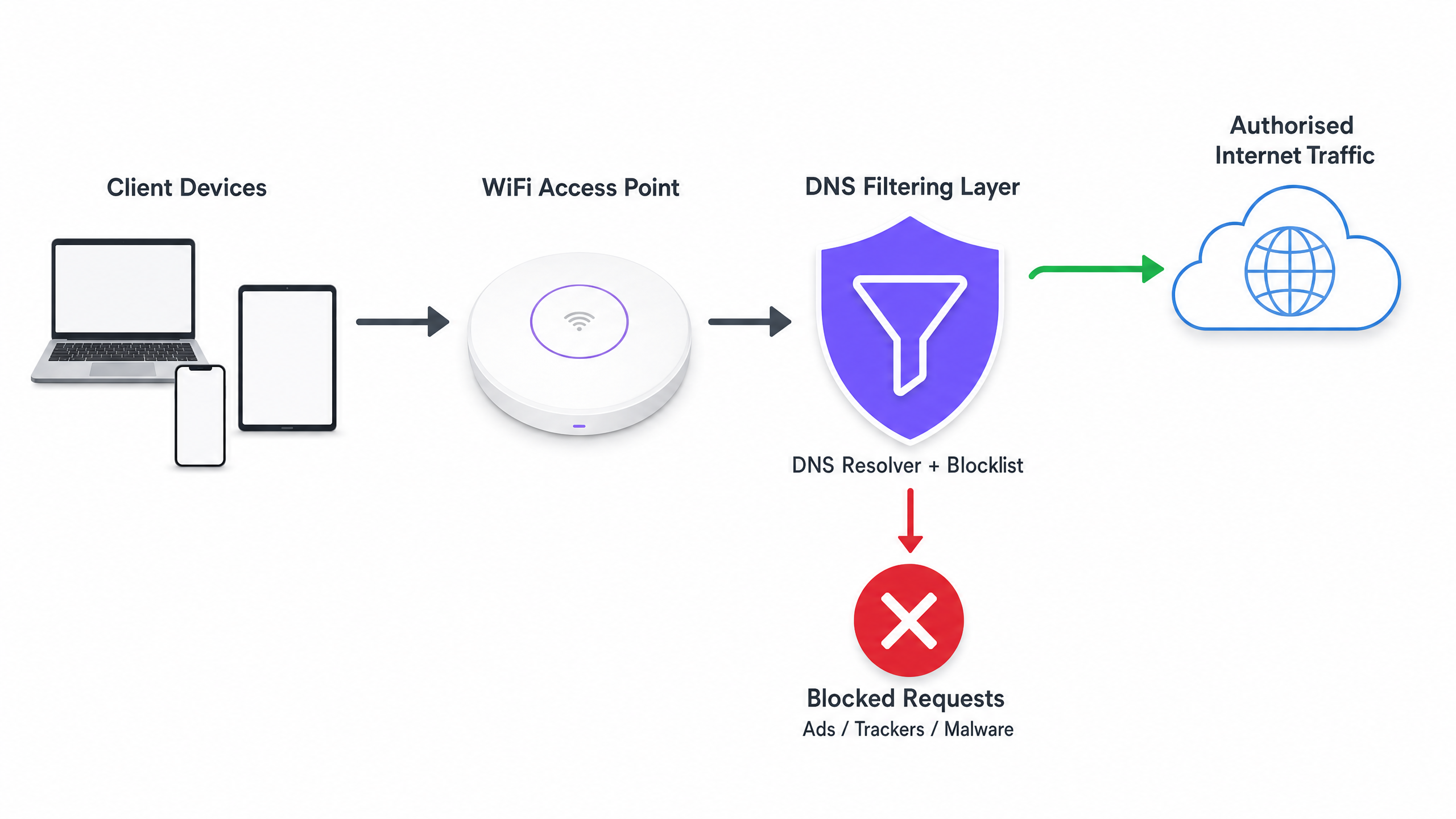
O ganho de eficiência crítico aqui é que a transação é terminada antes que um handshake TCP possa ocorrer. Nenhuma negociação TLS acontece, e nenhuma carga útil é descarregada. A largura de banda que teria sido consumida pelo anúncio ou script de rastreamento é inteiramente preservada.
Arquiteturas de Implementação
Existem três modelos arquitetónicos primários para implementar filtro DNS num ambiente empresarial:
- Resolvedores Baseados na Nuvem: O servidor DHCP local é configurado para atribuir os endereços IP de um serviço de filtro DNS baseado na nuvem (por exemplo, Cisco Umbrella, Cloudflare Gateway) aos dispositivos cliente. Esta é a implementação de menor atrito, não exigindo alterações de hardware no local. No entanto, depende inteiramente da latência do fornecedor da nuvem.
- Dispositivos No Local: Um resolvedor DNS dedicado (dispositivo físico ou virtual) é implementado dentro da infraestrutura de rede local. Isto proporciona a menor latência para a resolução DNS e garante que todos os registos de consulta DNS permanecem no local, o que pode simplificar a conformidade com as regulamentações de soberania de dados.
- Plataformas de Gestão WiFi Integradas: O modelo mais eficiente para operadores de múltiplos espaços é integrar o filtro DNS diretamente na camada de gestão de rede ou de captive portal. Plataformas que oferecem WiFi Analytics abrangentes frequentemente incluem filtro DNS baseado em políticas que pode ser aplicado por SSID, por espaço ou por grupo de utilizadores.
Guia de Implementação
A implementação de filtro DNS requer uma abordagem estruturada para evitar a interrupção do tráfego legítimo do utilizador ou a quebra de serviços essenciais.
Passo 1: Estabelecer uma Linha de Base
Antes de implementar quaisquer regras de bloqueio, configure os seus resolvedores DNS atuais para registar todas as consultas. Execute isto num modo de auditoria por pelo menos 14 dias para capturar uma amostra representativa de tráfego em todos os espaços. Analise estes registos para identificar os domínios mais consultados e calcule a percentagem de consultas direcionadas para redes de anúncios e rastreadores conhecidos. Esta linha de base é essencial para medir o ROI pós-implementação.
Passo 2: Definir Políticas de Filtro por Segmento de Rede
Uma política de filtro monolítica raramente é eficaz num ambiente empresarial. Deve segmentar as suas políticas com base no propósito da rede:
- Guest WiFi: Implemente um bloqueio agressivo de redes de anúncios, rastreadores, conteúdo adulto e domínios de malware conhecidos para maximizar a poupança de largura de banda e proteger a reputação do espaço.
- Redes de Colaboradores/Corporativas: Aplique um filtro moderado. Embora domínios de malware e phishing devam ser bloqueados, um bloqueio de anúncios excessivamente agressivo pode interferir com equipas de marketing ou aplicações SaaS específicas. Consulte Políticas BYOD Seguras para Redes WiFi de Colaboradores para orientação sobre como equilibrarsegurança e acesso.
- Redes IoT/Operacionais: Implemente uma lista de permissões rigorosa (negação por predefinição). Os dispositivos IoT (por exemplo, termostatos inteligentes, terminais de ponto de venda) só devem ser capazes de resolver os domínios específicos necessários para a sua operação.
Passo 3: Selecionar e Testar Blocklists
A eficácia da sua filtragem de DNS depende inteiramente da qualidade das suas blocklists. Confiar numa única fonte é arriscado. Combine feeds de inteligência de ameaças comerciais com listas de reputação mantidas pela comunidade (por exemplo, OISD).
Crucialmente, execute as blocklists selecionadas primeiro num modo de 'simulação' ou monitorização. Analise os registos para identificar quaisquer falsos positivos — domínios legítimos que seriam bloqueados. Por exemplo, bloquear uma CDN importante pode inadvertidamente quebrar a renderização de aplicações de negócios críticas.
Passo 4: Abordar o DNS sobre HTTPS (DoH)
Os navegadores modernos (Chrome, Firefox, Edge) estão a predefinir cada vez mais o DNS sobre HTTPS (DoH), que encripta as consultas de DNS e as envia diretamente para resolvedores na cloud (como Google ou Cloudflare), contornando os servidores DNS atribuídos por DHCP da sua rede local. Se o DoH estiver ativo, a sua filtragem de DNS é contornada.
Para mitigar isto, deve configurar as suas firewalls de borda para bloquear o tráfego de saída para fornecedores de DoH conhecidos na porta 443, forçando os navegadores a recorrer ao resolvedor de DNS local e não encriptado onde as suas políticas de filtragem são aplicadas.
Melhores Práticas
- Automatizar Atualizações de Blocklist: Os cenários de ameaças e os domínios de publicidade mudam diariamente. Garanta que a sua solução de filtragem de DNS obtém automaticamente atualizações dos feeds de inteligência de ameaças escolhidos pelo menos a cada 24 horas.
- Implementar uma Cache Local: Para minimizar a latência, garanta que o seu resolvedor de DNS local armazena em cache as consultas frequentes. Mesmo que utilize um serviço de filtragem baseado na cloud, um encaminhador de cache local reduz o tempo de ida e volta para pedidos comuns.
- Manter uma Lista de Permissões Acessível: Falsos positivos acontecerão. Estabeleça um processo claro e rápido para as equipas de suporte de TI adicionarem domínios específicos a uma lista de permissões quando um serviço legítimo é inadvertidamente bloqueado.
- Garantir Conformidade: Os registos de consultas de DNS contêm informações sobre o comportamento de navegação do utilizador, que podem estar sujeitas a regulamentações como o GDPR ou CCPA. Garanta que as suas práticas de registo se alinham com as políticas de privacidade da sua organização. Para mais informações sobre a manutenção de registos seguros, consulte Explique o que é um registo de auditoria para a Segurança de TI em 2026 .
Resolução de Problemas e Mitigação de Riscos
Modos de Falha Comuns
- Quebra de Captive Portal: A filtragem agressiva de DNS pode, por vezes, bloquear os domínios necessários para a deteção de Captive Portal do sistema operativo do dispositivo (por exemplo,
captive.apple.com). Garanta que estes domínios essenciais estão explicitamente na lista de permissões. - Mau Funcionamento da Aplicação: Algumas aplicações móveis não carregarão ou falharão se os seus domínios de telemetria ou de publicidade estiverem inacessíveis. Se uma aplicação crítica utilizada pelo seu pessoal ou convidados estiver a falhar, reveja os registos de DNS para consultas bloqueadas originárias desses dispositivos e ajuste a lista de permissões em conformidade.
- Estrangulamentos de Desempenho: Se estiver a implementar um dispositivo no local, garanta que está adequadamente provisionado para lidar com o pico de consultas por segundo (QPS) da sua rede. Um resolvedor de DNS com recursos insuficientes introduzirá uma latência significativa, degradando a experiência do utilizador muito mais do que os anúncios teriam.
ROI e Impacto no Negócio
A implementação da filtragem de DNS proporciona retornos mensuráveis em três áreas principais:
- Redução de Custos de Largura de Banda: Ao eliminar 15% a 35% do tráfego não essencial, as organizações podem frequentemente atrasar atualizações dispendiosas de circuitos de ISP. Em ambientes com ligações medidas ou backhaul via satélite, as poupanças de custos são imediatas e substanciais.
- Melhoria do Desempenho da Rede: A redução do volume de ligações concorrentes e do tempo de antena de rádio consumido pelo tráfego de fundo melhora diretamente o débito e a latência para atividades legítimas do utilizador. Isto traduz-se em menos tickets de suporte sobre 'WiFi lento' e pontuações de satisfação do utilizador mais elevadas.
- Postura de Segurança Reforçada: O bloqueio de domínios de comando e controlo (C2) de malware e sites de phishing na camada DNS reduz significativamente o risco de uma violação bem-sucedida originada por um dispositivo comprometido na rede de convidados ou de pessoal.
À medida que as iniciativas do setor público e das cidades inteligentes se expandem — como as defendidas no nosso recente anúncio, Purple Nomeia Iain Fox como VP de Crescimento – Setor Público para Impulsionar a Inclusão Digital e a Inovação em Cidades Inteligentes — a utilização eficiente da largura de banda torna-se crítica para fornecer conectividade equitativa e de alto desempenho em escala. Além disso, funcionalidades como Purple Lança Modo de Mapas Offline para Navegação Contínua e Segura para Hotspots WiFi demonstram como a otimização dos recursos de rede pode melhorar a jornada geral do utilizador.
Definições Principais
DNS Resolution
The process of translating a human-readable domain name (e.g., example.com) into a machine-readable IP address.
This is the prerequisite step for almost all network traffic; intercepting it here is the most efficient way to block unwanted connections.
DNS over HTTPS (DoH)
A protocol for performing remote DNS resolution via the HTTPS protocol, encrypting the query.
DoH prevents local network administrators from seeing or filtering DNS requests, requiring specific firewall rules to mitigate.
Telemetry Traffic
Automated communications sent by operating systems or applications to their vendors, reporting usage data, diagnostics, or status.
While individually small, the aggregate telemetry traffic from hundreds of devices on a public WiFi network consumes significant bandwidth.
NXDOMAIN
A DNS response indicating that the requested domain name does not exist.
DNS filters often return an NXDOMAIN response for blocked domains, immediately terminating the client's connection attempt.
Threat Intelligence Feed
A continuously updated stream of data providing information on known malicious domains, IPs, and URLs.
Used to dynamically update DNS blocklists to protect networks from newly identified malware and phishing infrastructure.
False Positive
In DNS filtering, when a legitimate, necessary domain is incorrectly categorized and blocked.
False positives cause application breakage and require a rapid allow-listing process to resolve user complaints.
Allow-List (Default Deny)
A security posture where all traffic is blocked by default, and only explicitly approved domains are permitted to resolve.
Best practice for highly secure or operational networks (like IoT or POS systems) where the required domains are known and finite.
Captive Portal Detection
The mechanism by which an OS determines if it is behind a captive portal, usually by attempting to reach a specific vendor domain.
If DNS filtering blocks these specific domains, devices will fail to display the WiFi login page, preventing users from connecting.
Exemplos Práticos
A 400-room hotel is experiencing severe network congestion during the evening peak (7 PM - 10 PM). The 1Gbps ISP connection is saturated, and guests are complaining about slow video streaming. Upgrading the circuit to 2Gbps will cost an additional £1,500 per month. How can the IT Director use DNS filtering to address this?
- Deploy a cloud-based DNS filtering solution and configure the core router's DHCP scope to assign the new resolvers to the Guest VLAN.
- Enable a comprehensive blocklist targeting ad networks, tracking pixels, and known bandwidth-heavy telemetry endpoints.
- Configure the edge firewall to block outbound DoH (DNS over HTTPS) traffic to ensure all guest devices use the filtered resolvers.
- Monitor the bandwidth utilization during the next evening peak.
A large retail chain offers free Guest WiFi across 50 locations. They have noticed a high volume of background traffic originating from Android devices, primarily Google Play Services telemetry, which is degrading the performance of the in-store point-of-sale (POS) tablets sharing the same WAN link.
- Implement policy-based DNS filtering via the central WiFi management platform.
- Create two distinct policies: one for the Guest SSID and one for the POS SSID.
- On the Guest SSID policy, apply standard ad and malware blocking, plus specific rules to rate-limit or block non-essential OS telemetry domains.
- On the POS SSID policy, implement a strict allow-list, only permitting DNS resolution for the payment gateway, inventory management system, and essential MDM (Mobile Device Management) endpoints.
Perguntas de Prática
Q1. You are deploying DNS filtering across a university campus network. During the pilot phase, students report that they cannot access the login page for the campus WiFi. What is the most likely cause, and how do you resolve it?
Dica: Think about how operating systems determine if they need to display a login screen.
Ver resposta modelo
The DNS filter is likely blocking the specific domains used by Apple, Android, and Windows for Captive Portal Detection (e.g., captive.apple.com, connectivitycheck.gstatic.com). The resolution is to immediately add these vendor-specific captive portal domains to the global allow-list.
Q2. A stadium IT director wants to implement DNS filtering to save bandwidth during game days. However, they are concerned about the latency introduced by routing all DNS queries to a cloud provider. What architectural approach should you recommend?
Dica: Consider where the DNS resolution process physically takes place.
Ver resposta modelo
Recommend deploying an On-Premises DNS Appliance or a local caching forwarder. This keeps the initial DNS resolution local to the stadium infrastructure, providing sub-millisecond response times, while still utilizing cloud-based threat intelligence feeds to update the local blocklists asynchronously.
Q3. After implementing DNS filtering, the dashboard shows a 25% reduction in DNS queries, but the overall WAN bandwidth utilization has only dropped by 5%. What is the most likely reason for this discrepancy?
Dica: What protocol bypasses local DNS resolvers entirely?
Ver resposta modelo
Client devices (specifically modern browsers) are likely using DNS over HTTPS (DoH) to bypass the local DNS resolvers. While some background OS traffic is being caught by the local filter (the 25% query reduction), the heavy browser traffic is encrypted and bypassing the filter. The firewall must be configured to block outbound DoH traffic to force browsers to fall back to the local resolver.