
Allied Telesis Access Points Integration with Purple WiFi
This guide provides a comprehensive configuration playbook for integrating Allied Telesis TQ-Series access points with Purple WiFi. It covers external captive portal redirection, 802.1X RADIUS authentication, and dynamic VLAN steering using Private Pre-Shared Keys (PPSK) for secure multi-tenant deployments.
Listen to this guide
View podcast transcript
Executive Summary
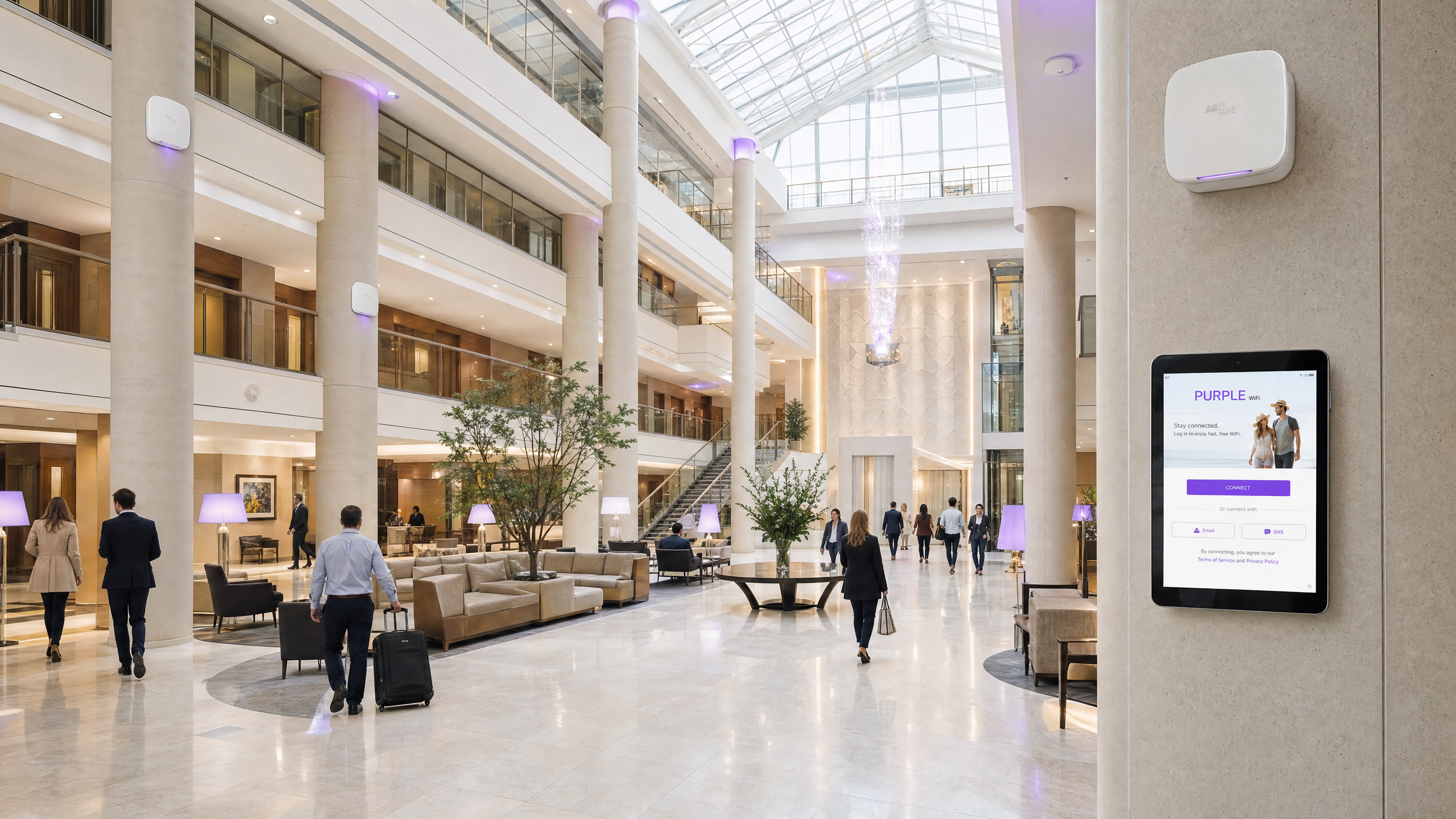
Deploying Allied Telesis TQ-Series access points with Purple provides a scalable, secure, and highly configurable network architecture. This integration playbook details the configuration of external captive portal redirection for Guest WiFi, 802.1X authentication for Staff WiFi, and Private Pre-Shared Key (PPSK) mapping for Multi-Tenant network isolation. By combining Allied Telesis hardware with Purple RADIUS as a Service, you centralise identity management and eliminate the need for on-premises RADIUS servers. This guide covers the specific RADIUS attributes required for dynamic VLAN steering, Walled Garden configuration for seamless splash page delivery, and best practices for scaling Identity-Based Networks across hospitality, retail, and public-sector environments.
Technical Deep-Dive
Allied Telesis access points, such as the TQ6702 GEN2 and TQ5403, run the AlliedWare Plus firmware. They support robust enterprise features including WPA3, Passpoint (Hotspot 2.0), and comprehensive RADIUS integration. When integrated with Purple, the access point acts as the Network Access Server (NAS) and 802.1X authenticator, while Purple operates as the cloud-hosted RADIUS server and captive portal provider.
Guest Captive Portal Redirection
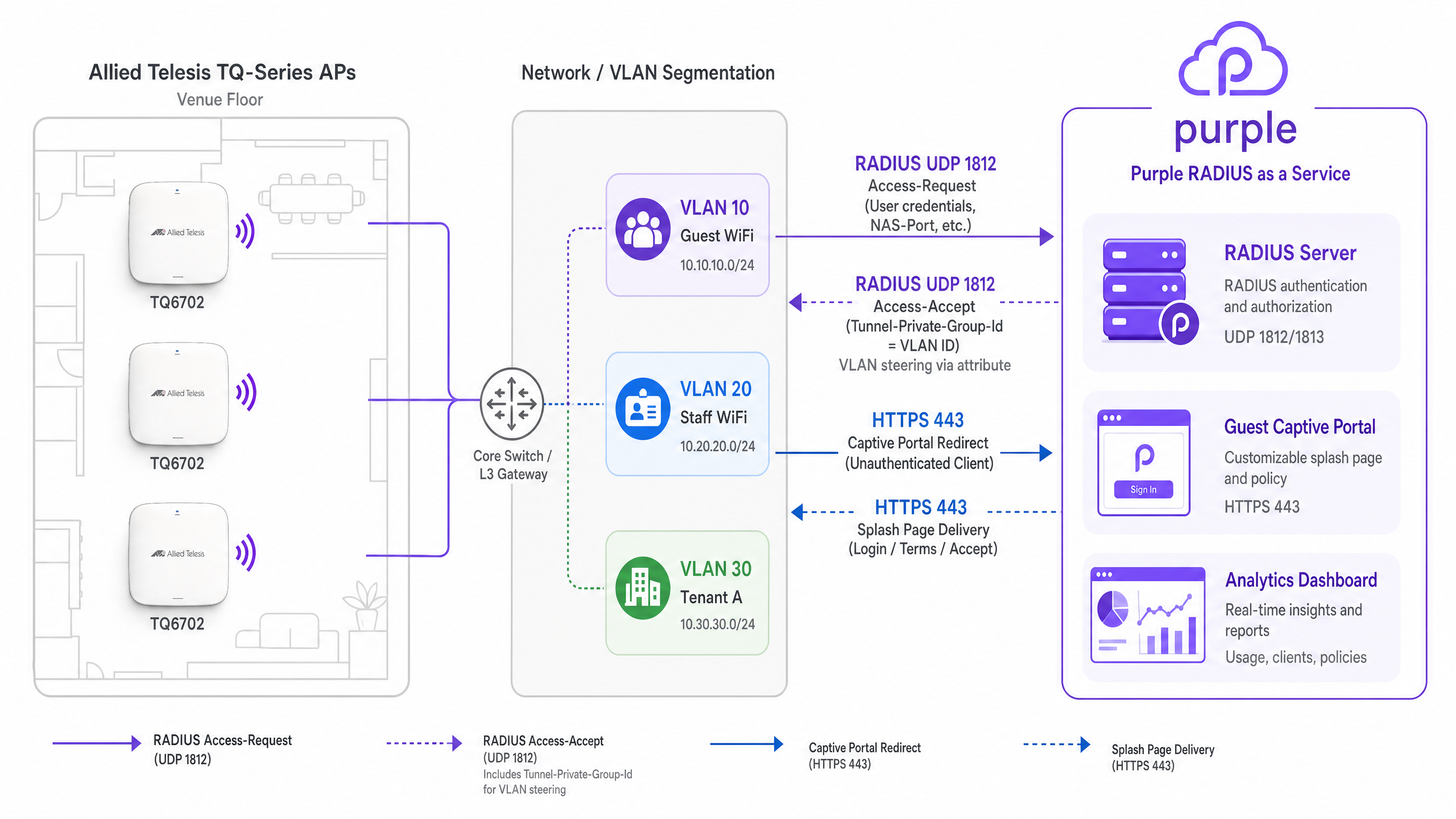
For Guest WiFi, the access point intercepts unauthenticated client traffic and redirects HTTP/HTTPS requests to the Purple splash page. This requires configuring the Captive Portal mode to External Page Redirect.
When a guest connects, the AP references its Walled Garden configuration. The Walled Garden must whitelist Purple's domains, CDN endpoints, and any configured social login providers (such as Google Workspace or Microsoft Entra ID). Once the guest completes the authentication flow on the splash page, Purple's RADIUS server sends a RADIUS Access-Accept message (UDP port 1812) to the access point, which then grants full network access.
Dynamic VLAN Steering via RADIUS
Dynamic VLAN assignment is critical for network segmentation. When configuring Staff WiFi using WPA Enterprise, the access point forwards EAP credentials to Purple's SecurePass RADIUS service.
Upon successful authentication, the Purple RADIUS server returns an Access-Accept packet containing three standard IETF RADIUS attributes defined in RFC 3580:
Tunnel-Type(Attribute 64): Set toVLAN(13).Tunnel-Medium-Type(Attribute 65): Set toIEEE-802(6).Tunnel-Private-Group-Id(Attribute 81): Set to the assigned VLAN ID (e.g.,20).
The Allied Telesis AP reads these attributes and dynamically places the client device onto the specified VLAN. Note: Dynamic VLAN must be explicitly enabled in the VAP Advanced Security settings within the Allied Telesis GUI.
Multi-Tenant Isolation with PPSK
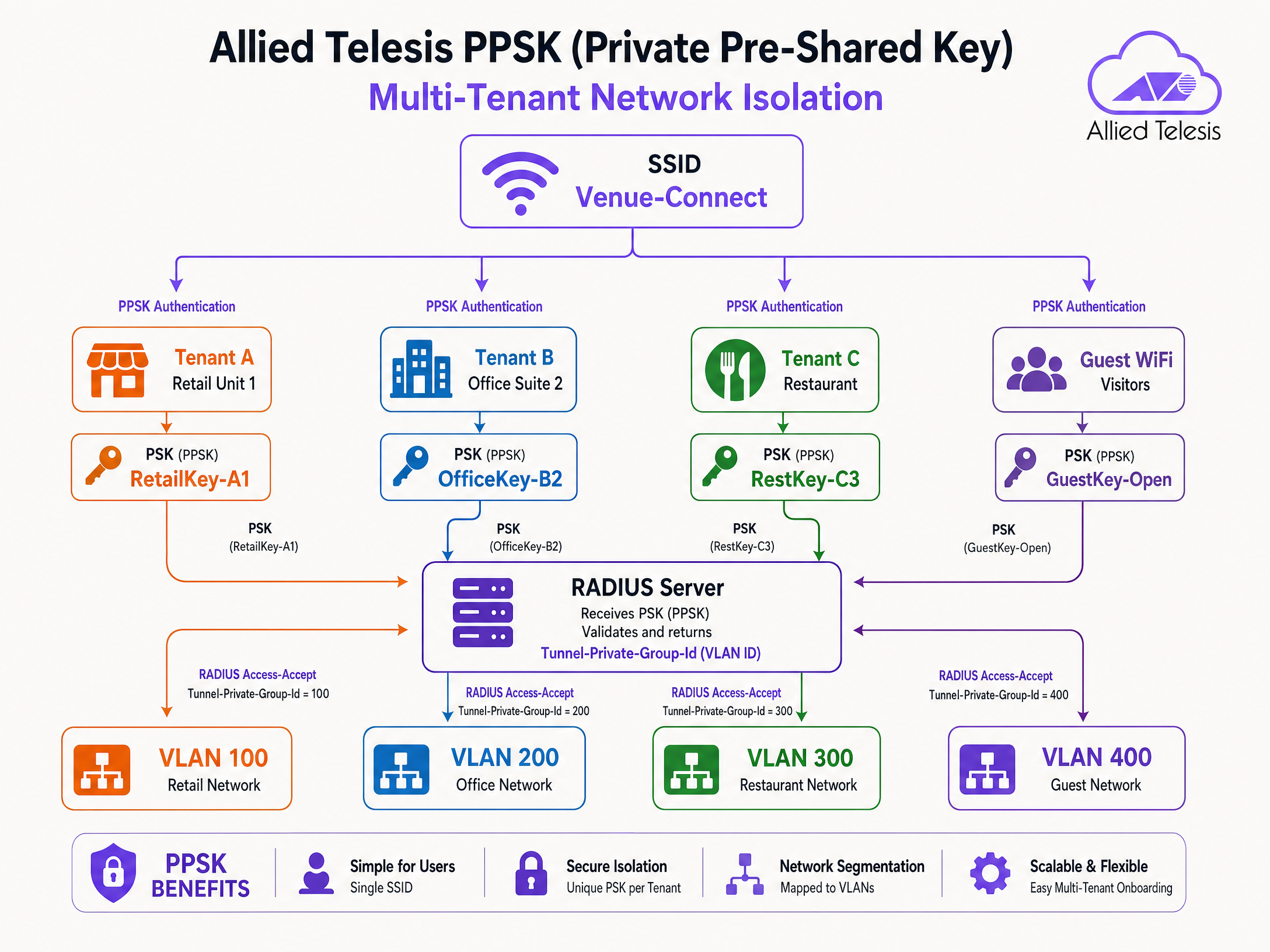
Private Pre-Shared Key (PPSK) allows you to use a single SSID while assigning different passphrases to different users or tenants. This is highly effective in multi-dwelling units (MDUs), coworking spaces, and retail parks.
When a device associates using a specific PPSK, the access point sends the passphrase to the Purple RADIUS server. Purple maps the passphrase to a specific tenant profile and returns the Tunnel-Private-Group-Id attribute. This steers the tenant's devices to their dedicated VLAN, ensuring Layer 2 isolation without broadcasting multiple SSIDs.
Implementation Guide
Follow these steps to configure Allied Telesis access points for Purple integration.
Step 1: Configure the RADIUS Server Profile
- Log in to the Allied Telesis AP device GUI.
- Navigate to Network Services > RADIUS.
- Add a new external RADIUS server using the IP address provided in your Purple dashboard.
- Set the authentication port to
1812and accounting port to1813. - Enter the exact Shared Secret provided by Purple.
- Configure the NAS Identifier to match the AP's management IP or hostname.
Step 2: Configure Guest WiFi (Captive Portal)
- Navigate to Wireless > Radio1 (or Radio2).
- Click Edit for the target VAP (e.g., VAP0).
- Set the SSID name (e.g., "Guest WiFi").
- Go to Advanced Settings > Security tab.
- Set Captive Portal to External Page Redirect.
- Enter the Purple splash page URL in the External Page URL field.
- Under Walled Garden, add the required Purple domains and social login IPs.
Step 3: Configure Staff WiFi (802.1X and Dynamic VLAN)
- Edit a separate VAP for Staff WiFi.
- Set Security to WPA Enterprise.
- Select the Purple RADIUS server profile from the RADIUS Authentication Group dropdown.
- Go to Advanced Settings > Security.
- Enable Dynamic VLAN.
- Ensure the backend network switches are configured to trunk the dynamically assigned VLANs to the AP ports.
Step 4: Configure PPSK for Multi-Tenant
- Edit the VAP intended for multi-tenant use.
- Enable PPSK (often configured in conjunction with MAC authentication or specific WPA settings depending on the firmware version).
- Ensure the RADIUS server profile is selected.
- In the Purple dashboard, create the PPSK user records, mapping each passphrase to the correct VLAN ID.
Best Practices
- Walled Garden Maintenance: Regularly review and update Walled Garden entries. Social login providers frequently change their IP ranges and CDN domains.
- Redundancy: Always configure primary and secondary Purple RADIUS server IP addresses in the AP's RADIUS group to ensure high availability.
- Firmware Updates: Keep AlliedWare Plus firmware updated. WPA3 CCMP support and advanced PPSK features require version 5.5.4-2.3 or later.
- VLAN Trunking: Verify that the switch ports connected to the access points are configured as 802.1Q trunks and allow all VLANs that might be dynamically assigned by the RADIUS server.
Troubleshooting & Risk Mitigation
- Silent Authentication Failures: If devices cannot connect to the 802.1X or PPSK network, verify the RADIUS shared secret. A mismatch causes the AP to silently drop Access-Reject packets.
- Splash Page Fails to Load: If the captive portal redirect loops or fails to load assets, the Walled Garden is likely missing required domains. Inspect the browser's developer console to identify blocked requests.
- Clients Placed on Wrong VLAN: If Dynamic VLAN steering fails, check that Dynamic VLAN is explicitly enabled on the VAP. Use packet capture to verify that Purple is returning the
Tunnel-Private-Group-Idattribute.
ROI & Business Impact
Integrating Allied Telesis with Purple transforms basic wireless connectivity into an intelligent, data-driven platform.
For IT teams, centralising authentication via Purple RADIUS as a Service eliminates the overhead of managing on-premises RADIUS servers and Active Directory integrations at the edge. The use of PPSK reduces SSID overhead, improving RF performance and simplifying tenant onboarding.
For venue operations, the captive portal captures verified first-party data, driving CRM growth and enabling targeted marketing. With over 29 billion data points collected across the Purple platform, venues gain actionable insights into visitor behaviour, dwell times, and space utilisation, directly supporting commercial objectives.
Key Definitions
PPSK (Private Pre-Shared Key)
A security mechanism where multiple unique passphrases can be used on a single SSID, with each passphrase mapped to specific network policies or VLANs.
Used in multi-tenant environments to provide secure, isolated network access without broadcasting multiple SSIDs.
Tunnel-Private-Group-Id
RADIUS Attribute 81, defined in RFC 2868, used to specify the VLAN ID that a user or device should be assigned to upon successful authentication.
Essential for dynamic VLAN steering in both 802.1X and PPSK deployments.
Walled Garden
A restricted network environment that allows unauthenticated users access to a specific whitelist of IP addresses or domains.
Required for captive portals to allow devices to load the splash page and authenticate via social login providers before gaining full internet access.
RADIUS as a Service
A cloud-hosted RADIUS infrastructure managed by a third party (like Purple), eliminating the need for on-premises authentication servers.
Simplifies 802.1X deployments for distributed venues by centralising identity management in the cloud.
Captive Portal
A web page that users are forced to view and interact with before access is granted to a public WiFi network.
Used to capture first-party data, enforce terms of service, and display venue branding.
VAP (Virtual Access Point)
A logical entity within a physical access point that broadcasts its own SSID and maintains its own security and policy configurations.
Allows a single Allied Telesis AP to simultaneously provide Guest WiFi, Staff WiFi, and IoT connectivity.
EAP-PEAP
Protected Extensible Authentication Protocol, a secure method for transmitting authentication credentials inside an encrypted TLS tunnel.
The most common authentication protocol used for Staff WiFi (802.1X) when verifying usernames and passwords against a directory.
Access-Accept
A standard RADIUS packet sent by the server to the authenticator (AP) indicating that authentication was successful.
Often includes additional attributes, such as VLAN assignments or bandwidth limits, to enforce network policy.
Worked Examples
A 250-room hotel needs to deploy a secure staff network and a branded guest network. The IT team wants to manage staff access via Microsoft Entra ID without deploying a local RADIUS server, while guests must accept terms and conditions via a captive portal.
Deploy Allied Telesis TQ6702 GEN2 APs. Configure VAP0 as an open network with Captive Portal set to 'External Page Redirect', pointing to the Purple splash page URL. Configure VAP1 with WPA Enterprise, pointing the RADIUS Authentication Group to Purple's SecurePass RADIUS servers. Integrate Purple SecurePass with Microsoft Entra ID in the cloud. Enable Dynamic VLAN on VAP1 so staff are automatically steered to the internal VLAN upon successful EAP authentication.
A retail park landlord wants to provide WiFi to 12 independent retail units using a single hardware deployment. Each unit requires its own secure, isolated network segment.
Configure a single SSID (e.g., 'Retail-Park-Secure') on the Allied Telesis APs. Enable PPSK (Private Pre-Shared Key) and point authentication to the Purple RADIUS server. In the Purple dashboard, generate a unique passphrase for each retail unit and map it to a specific VLAN ID (e.g., Unit 1 = VLAN 101, Unit 2 = VLAN 102). When a device connects, the AP sends the passphrase to Purple, which returns the Tunnel-Private-Group-Id attribute, steering the device to the correct tenant VLAN.
Practice Questions
Q1. A venue reports that Android devices can connect to the Guest WiFi and see the splash page, but Apple iOS devices show a blank white screen. What is the most likely configuration issue?
Hint: Consider how different operating systems detect captive portals and what domains they need to reach.
View model answer
The Walled Garden is likely missing the specific domains Apple uses for captive portal detection (e.g., captive.apple.com). If the AP blocks these domains before authentication, the iOS Captive Network Assistant cannot trigger the mini-browser correctly.
Q2. You have configured WPA Enterprise on the AP and pointed it to Purple's RADIUS server. The RADIUS logs show successful authentication (Access-Accept), but the client device does not receive an IP address on the expected VLAN. What are the two most likely causes?
Hint: Check both the AP configuration and the physical switch port configuration.
View model answer
- 'Dynamic VLAN' is not enabled in the VAP Advanced Security settings on the Allied Telesis AP. 2. The switch port connecting the AP is not configured as an 802.1Q trunk, or the target VLAN is not allowed on the trunk, preventing DHCP traffic from reaching the client.
Q3. A retail park wants to deploy PPSK for 50 tenants. They ask if they should create 50 separate VAPs or use a single VAP. What is your recommendation and why?
Hint: Consider the impact of management frames on wireless airtime.
View model answer
Recommend using a single VAP with PPSK. Broadcasting 50 separate SSIDs generates excessive beacon frames and management overhead, severely degrading RF performance and available airtime. A single SSID with PPSK provides the same Layer 2 isolation via dynamic VLAN assignment without the RF penalty.
Continue reading in this series
CommScope Ruckus Integration with Purple WiFi: Setup and Configuration Guide
This technical reference guide provides an authoritative configuration playbook for integrating CommScope Ruckus architectures with Purple WiFi. It details step-by-step deployments for Guest WiFi captive portals, Secure Staff WiFi via 802.1X, and Multi-Tenant network isolation using Ruckus Dynamic PSK.
CommScope Ruckus Integration with Purple WiFi: Setup and Configuration Guide
This technical reference guide provides an authoritative configuration playbook for integrating CommScope Ruckus architectures with Purple WiFi. It details step-by-step deployments for Guest WiFi captive portals, Secure Staff WiFi via 802.1X, and Multi-Tenant network isolation using Ruckus Dynamic PSK.
Grandstream GWN Access Points Integration with Purple WiFi
This authoritative technical reference guide details how to integrate Grandstream GWN access points with Purple's Guest WiFi and analytics platform. It covers Grandstream captive portal configuration, RADIUS AAA settings, walled garden setup, secure staff 802.1X authentication with dynamic VLAN steering, and multi-tenant PPSK segmentation - providing actionable, step-by-step guidance for MSPs and IT teams deploying guest and staff WiFi at scale.