কাগজে-কলমে প্রজেক্টটি সহজ মনে হয়। ভেন্ডরের কোটেশনে অ্যাক্সেস পয়েন্ট, হয়তো সুইচ, হয়তো কন্ট্রোলার লাইসেন্স রয়েছে এবং স্পন্সর ইতিমধ্যেই একটি কাটওভার উইকএন্ড নির্ধারণ করে রেখেছেন। তারপর কেউ জিজ্ঞেস করে যে গেস্ট অথেন্টিকেশনের দায়িত্ব কার, স্টাফদের ডিভাইস কীভাবে সঠিক VLAN-এ যাবে, পুরানো ব্যাজ রিডার এবং প্রিন্টারগুলোর কী হবে এবং কেন ক্যাপটিভ পোর্টাল এখনও হোটেলের CRM বা হাসপাতালের আইডেন্টিটি প্ল্যাটফর্মের সাথে যুক্ত নয়। ঠিক সেই মুহূর্তেই বেশিরভাগ wireless network deployment কাজ কেবল একটি রেডিও প্রজেক্ট না থেকে একটি আর্কিটেকচার প্রজেক্টে পরিণত হয়।
আমার করা সেরা ডেপ্লয়মেন্টগুলো কখনোই কেবল কভারেজের মধ্যে সীমাবদ্ধ ছিল না। সেগুলো RF design, identity, segmentation, এবং operations-কে একটি একক পরিকল্পনায় যুক্ত করেছিল, যাতে টিম প্রতিটি স্তরে একই প্রশ্নের উত্তর দিতে পারে—"সিগন্যাল কি এই রুমে পৌঁছাতে পারছে?" থেকে শুরু করে "এই ডিভাইসটিকে কি আদৌ এই SSID-এ অনুমতি দেওয়া উচিত?" পর্যন্ত। এটি যুক্তরাজ্যেও গুরুত্বপূর্ণ, যেখানে Ofcom-এর 2024 Connected Nations রিপোর্ট অনুযায়ী অন্তত একজন অপারেটরের মাধ্যমে ভূখণ্ডের ৮৮% এলাকায় 4G ভৌগোলিক কভারেজ এবং ৬১% এলাকায় 5G কভারেজ রয়েছে, যেখানে ইনডোর কভারেজ 4G প্রাঙ্গণের জন্য ৯৯% এবং 5G প্রাঙ্গণের জন্য ৯৩%-এ পৌঁছেছে। এটি নির্দেশ করে যে বাজারটি এখন ম্যাপ কভারেজের মতোই বিল্ডিং পেনিট্রেশনের ওপরও নির্ভরশীল Ofcom Connected Nations report।
কেন বেশিরভাগ এন্টারপ্রাইজ ওয়্যারলেস রোলআউট চালু হওয়ার আগেই লক্ষ্যচ্যুত হয়
এক হোটেলের IT প্রধান আমাকে একবার একটি "নতুন ওয়্যারলেস এস্টেট"-এর জন্য সুন্দরভাবে সই করা একটি কোটেশন দেখিয়েছিলেন। এতে কেবল রেডিও এবং লাইসেন্স অন্তর্ভুক্ত ছিল, ব্যস এটুকুই। কোনো আইডেন্টিটি ফ্লো ছিল না। কোনো সেগমেন্টেশন модель ছিল না। কোনো গেস্ট অনবোর্ডিং জার্নি ছিল না। প্রথম দিনেই রিসেপশনের প্রয়োজন হতে পারে এমন পুরানো SSID-গুলোর জন্য কোনো মাইগ্রেশন প্ল্যানও ছিল না।
এই ধরণের ঘাটতির কারণেই প্রজেক্টগুলো লক্ষ্যচ্যুত হয়। বিজনেস রুলস ঠিক করার আগেই রেডিও ডিজাইন অনুমোদিত হয়ে যায়, যার ফলে অ্যাক্সেস পয়েন্টগুলো বেছে নেওয়ার পর টিম অথেন্টিকেশন, গেস্ট অ্যাক্সেস এবং পলিসি কন্ট্রোল যুক্ত করার চেষ্টা করে। বাস্তবে এর অর্থ হলো, ক্যাবলিং, মাউন্টিং এবং কন্ট্রোলারের কাজ অর্ধেক শেষ হয়ে পড়ে থাকে, আর সিকিউরিটি, অপারেশনস এবং প্রপার্টি টিমগুলো অনবোর্ডিংয়ের দায়িত্ব কার এবং কোন ডিভাইস কোন নেটওয়ার্কে থাকবে তা নিয়ে দ্বন্দ্বে লিপ্ত হয়।
ব্যবহারিক নিয়ম: আপনি যদি এক প্যারাগ্রাফে গেস্ট, স্টাফ এবং IoT অ্যাক্সেস বর্ণনা করতে না পারেন, তবে আপনি এখনও AP বসানোর জন্য প্রস্তুত নন।
সবচেয়ে নিরাপদ ডেপ্লয়মেন্টগুলো হার্ডওয়্যার দিয়ে নয়, বরং ফলাফল দিয়ে শুরু হয়। একটি হাসপাতালের ওয়ার্ড, একটি রিটেইল ফ্লোর এবং একটি কনফারেন্স ভেন্যু—সবারই একই মূল প্রশ্নগুলোর জন্য আলাদা উত্তরের প্রয়োজন হয়: কে কানেক্ট করছে, তাদের কী করার অনুমতি আছে, তারা কোথায় ল্যান্ড করছে এবং রোমিং করার সময় কী ঘটছে। রেডিও প্ল্যানের কাজ হওয়া উচিত সেই উত্তরগুলোকে পরিবেশন করা, সেগুলোকে নির্ধারণ করা নয়।
এখানেই সাধারণত বাজেট অপচয় হয়। AP-এর কোটেশনটি দৃশ্যমান থাকে। কিন্তু সার্টিফিকেট রোলআউট, ডিরেক্টরি ইন্টিগ্রেশন, মনিটরিং এবং রোলব্যাক টেস্টিংয়ের প্রচেষ্টা প্রায়শই দৃশ্যমান হয় না। আপনি যদি প্রথম দিন থেকেই এগুলোকে ডেপ্লয়মেন্টের অংশ হিসেবে বিবেচনা না করেন, তবে পরবর্তীতে এগুলো বিলম্ব, জরুরি পরিবর্তন উইন্ডো এবং "সাময়িক" ব্যতিক্রম হিসেবে দেখা দেবে যা কখনোই দূর হয় না।
একটি একক অ্যাক্সেস পয়েন্ট স্পর্শ করার আগেই রিকোয়ারমেন্টের পরিধি নির্ধারণ করা
সার্ভে টুল দিয়ে নয়, স্টেকহোল্ডারদের দিয়ে শুরু করুন। প্রতিটি পরিবেশের জন্য অপারেশনস, সিকিউরিটি, ফ্যাসিলিটিজ এবং লাইন-অফ-বিজনেস মালিকের সাথে কথা বলুন, তারপর তারা কী চান এবং নেটওয়ার্ককে অবশ্যই কী নিশ্চিত করতে হবে তা আলাদা করুন। একটি বলরুমের জন্য লোডিং বে-র মতো একই সার্ভিস প্রোফাইলের প্রয়োজন হয় না, এবং একটি ওয়ার্ডে রোমিং ব্যর্থতার সহনশীলতা স্টাফদের ব্রেক রুমের মতো নয়।
বিজনেস প্রয়োজনগুলোকে নেটওয়ার্ক নিয়মে রূপান্তর করুন
একটি ডেপ্লয়মেন্টের পরিধি নির্ধারণের সবচেয়ে পরিচ্ছন্ন উপায় হলো প্রথমে অ্যাপ্লিকেশনগুলো লিখে ফেলা। ভয়েস, ভিডিও, পয়েন্ট অফ সেল, টেলিমেট্রি, প্রিন্টার, সেন্সর, ক্লিনিকাল সিস্টেম এবং ভিজিটর অ্যাক্সেস—সবই লোড এবং ব্যর্থতার অধীনে ভিন্নভাবে আচরণ করে। ভেন্যুটি যদি পেমেন্ট টার্মিনাল, টাইম-ক্রিটিক্যাল ভয়েস বা হেডলেস IoT-এর ওপর নির্ভর করে, তবে সেগুলো কেবল "থাকলে ভালো হতো" এমন কিছু নয়, বরং সেগুলো শুরু থেকেই SSID সংখ্যা, অথেন্টিকেশন পদ্ধতি এবং সেগমেন্টেশন নির্ধারণ করে।
তারপর কে কানেক্ট করছে তা নির্ধারণ করুন। BYOD, কর্পোরেট ল্যাপটপ, ম্যানেজড মোবাইল, স্ক্যানার, ক্যামেরা, এনভায়রনমেন্টাল সেন্সর এবং 802.1X রান করতে পারে না এমন যেকোনো কিছুর তালিকা তৈরি করুন। এই ডিভাইসের তালিকাটি বিজনেস এবং RF-এর মধ্যে সেতু হিসেবে কাজ করে, কারণ এটি আপনাকে জানায় যে মূল সমস্যাটি কভারেজ, ক্যাপাসিটি, রোমিং নাকি আইডেন্টিটি।
সাইটের মালিক যদি বলেন "আমাদের কেবল সব জায়গায় WiFi প্রয়োজন", তবে এটি নির্দিষ্ট অ্যাপ্লিকেশন এবং নির্দিষ্ট ডিভাইসের ধরণে পরিণত না হওয়া পর্যন্ত প্রশ্ন করতে থাকুন।
একটি দরকারী স্কোপিং শিটে পাঁচটি কলাম থাকে। এরিয়া, ব্যবহারকারীর ধরণ, অ্যাপ্লিকেশনের গুরুত্ব, প্রত্যাশিত কনকারেন্সি এবং যেকোনো কমপ্লায়েন্স সীমাবদ্ধতা। রিটেইল সাধারণত পেমেন্ট এবং ভিজিটর ফ্লোকে একই স্পেসে নিয়ে আসে, হেলথকেয়ার ক্লিনিকাল এবং গেস্ট ট্রাফিককে কাছাকাছি নিয়ে আসে এবং হসপিটালিটিতে প্রায়শই এই তিনটি প্যাটার্নেরই একসাথে প্রয়োজন হয়।
ডিসকভারি ফেজটিকে সংক্ষিপ্ত এবং ব্যবহারিক রাখার জন্য নিচের ইনফোগ্রাফিকটি একটি ভালো অনুস্মারক।
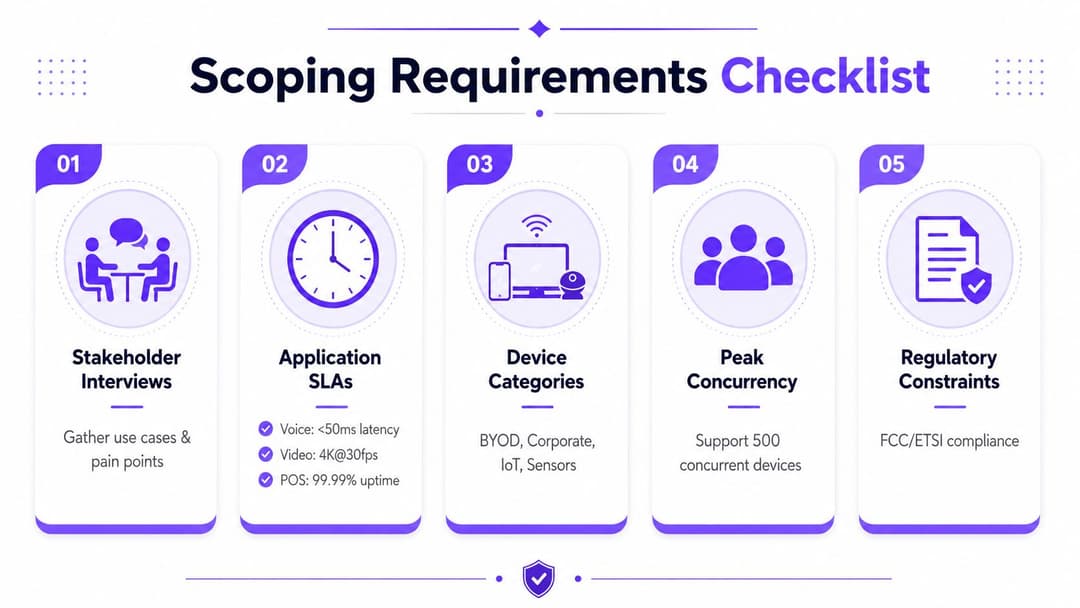
এটি হাতে থাকলে, আপনি একটি এক পৃষ্ঠার ব্রিফ লিখতে পারেন যা প্রকিউরমেন্ট, সিকিউরিটি এবং ফ্যাসিলিটিজ টিমগুলো নতুন করে না লিখে সহজেই রিভিউ করতে পারবে। এতে উল্লেখ থাকা উচিত যে সাফল্য কেমন দেখাবে, কোন গ্রুপগুলোর অ্যাক্সেস প্রয়োজন, কোন সার্ভিসগুলো স্কোপের মধ্যে রয়েছে এবং কোন সাইট বা জোনগুলো প্রথম অগ্রাধিকার পাবে। পরবর্তীতে কেউ যখন জিজ্ঞেস করবে যে কেন লবির ডিজাইন ওয়ার্ডের চেয়ে আলাদা, অথবা কেন IoT ডিভাইসগুলো গেস্ট SSID-এ নেই, তখন এই ডকুমেন্টটি রেফারেন্স পয়েন্ট হিসেবে কাজ করবে।
সাইট সার্ভে এবং RF ডিজাইন যা ব্যবহারকারীর অভিজ্ঞতা অনুমান করে
ডিজাইন "সম্পন্ন" হওয়ার পর শুরু হওয়া সার্ভে সাধারণত কেবল একটি ভুল ধারণাকেই নিশ্চিত করে। একটি ভালো ডেপ্লয়মেন্টে, সার্ভে হলো এমন একটি পর্যায় যেখানে দেয়ালে কোনো ব্র্যাকেট লাগানোর আগেই পরিকল্পনাটি নিজেকে প্রমাণ করে অথবা সংশোধন করা হয়। এখানেই চকচকে AP মডেলের চেয়ে Ekahau বা NetSpot-এর মতো টুল, একটি পরিষ্কার ফ্লোর প্ল্যান এবং বাস্তবসম্মত ব্যবহারকারীর অনুমান বেশি গুরুত্বপূর্ণ।
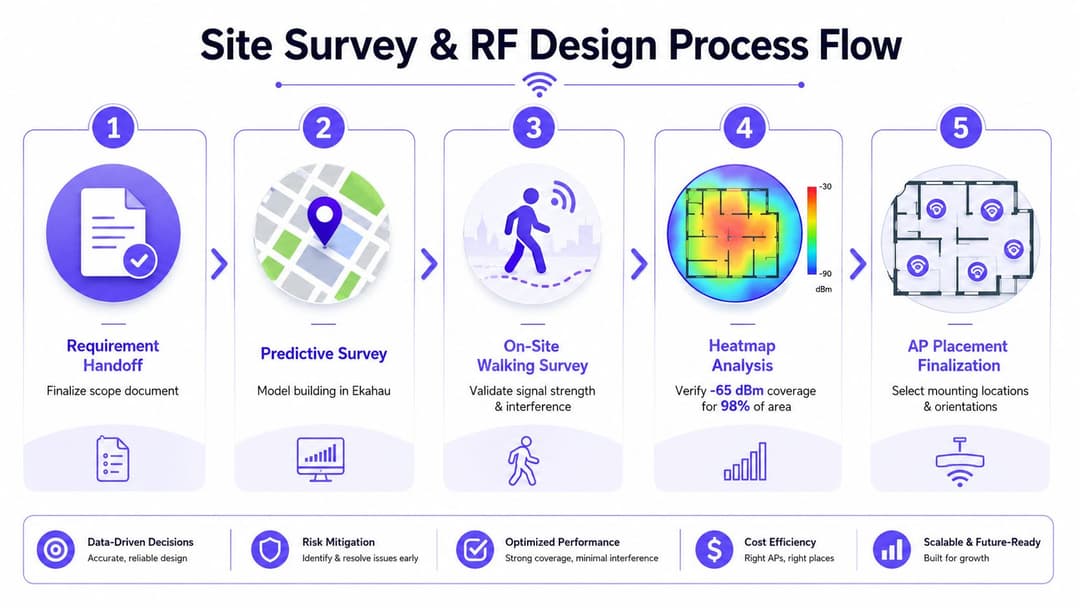
முதலில் প্রেডিক্টিভ কাজ, তারপর ওয়াকিং সার্ভে
প্রেডিক্টিভ মডেলটিতে বিল্ডিংয়ের বাস্তব চিত্র প্রতিফলিত হওয়া উচিত, কোনো কাল্পনিক রূপ নয়। যুক্তরাজ্যের প্রেক্ষাপটে এর অর্থ হলো সাসপেন্ডেড সিলিং, কংক্রিট রাইজার, ইটের পার্টিশন, লিফট, অলিন্দ (atriums) এবং প্ল্যান্ট রুম সম্পর্কে চিন্তা করা, তারপর সিদ্ধান্ত নেওয়া যে AP সিলিং টাইলে, ডাডো ট্রাঙ্কিংয়ে নাকি কোনো আউটডোর এনক্লোজারে রাখা হবে। একটি প্রেডিক্টিভ প্ল্যান কেবল তখনই কার্যকর হয় যখন মাউন্টিং পদ্ধতিটি সাইটে ইনস্টল করা সম্ভব হয়।
RF মডেলের মতোই ক্যাবল প্ল্যান্টও সমান গুরুত্বপূর্ণ। মোট প্যাচ-কর্ড এবং ক্যাবলের দূরত্ব 100 m-এর নিচে রাখুন যাতে স্ক্রিনে রেডিও প্ল্যানটি নিখুঁত দেখালেও ইনফ্রাস্ট্রাকচার লেয়ারে ডিজাইনটি ভেঙে না পড়ে। ঘনবসতিপূর্ণ ফ্লোরগুলোতে প্রথমে ব্যবহারকারী এবং ডিভাইসের সংখ্যা অনুযায়ী সাইজ নির্ধারণ করুন। একটি ব্যবহারিক অপারেটিং লক্ষ্য হলো প্রতি রেডিওতে প্রায় ২৫ জন ক্লায়েন্ট বা প্রতি AP-তে ৫০ জন ক্লায়েন্ট, যার কারণে হোটেল, ওয়ার্ড এবং মিটিং ফ্লোরগুলোতে পুরানো প্রতি-রুমে-একটি-AP নিয়মটি আর কাজ করে না WatchGuard deployment best practices।
মডেলটির প্রশংসা করার জন্য নয়, বরং যাচাই করার জন্য সার্ভে ব্যবহার করুন। গুরুত্বপূর্ণ দেয়ালগুলোর উভয় পাশে সিগন্যাল পরীক্ষা করুন, মাউন্টিং পয়েন্টগুলো কার্যকর কিনা তা নিশ্চিত করুন এবং প্রতিবেশী নেটওয়ার্কের ইন্টারফারেন্সের দিকে নজর রাখুন যা একটি ফ্লোর প্ল্যান অনুমান করতে পারে না। একটি সঠিক ওয়াকিং সার্ভে এটিও দেখায় যে পরিকল্পিত AP পজিশনগুলো বিল্ডিং লেআউটের সাথে সাংঘর্ষিক হচ্ছে কিনা।
ভালো ক্যাপাসিটি প্ল্যানিং কেমন দেখায়
একটি দরকারী সাইজিং ওয়ার্কফ্লো পরিকল্পনা, ডিজাইন, বাস্তবায়ন এবং অপ্টিমাইজেশন অনুসরণ করে। প্রথমে, অ্যাপ্লিকেশন এবং SLA-এর প্রয়োজনীয়তাগুলো নির্ধারণ করুন। তারপর সেল ডেনসিটি এবং অ্যান্টেনা ওরিয়েন্টেশনের সাইজ নির্ধারণ করুন। বেসলাইনের বিপরীতে ইনস্টল, টেস্ট এবং টিউন করুন। একটি সাধারণ AP সংখ্যা দিয়ে ফ্লোরটি পূরণ করার চেষ্টার চেয়ে এই সিকোয়েন্সটি অনেক বেশি নির্ভরযোগ্য।
ক্যাপাসিটি-ভিত্তিক ডেপ্লয়মেন্টের জন্য সঠিক প্রশ্নটি এটি নয় যে কতগুলোルーム রয়েছে, বরং প্রতিটি জোনকে কতগুলো কনকারেন্ট ডিভাইস সাপোর্ট করতে হবে। একটি ২০০ রুমের হোটেলের লবি, কনফারেন্স স্পেস এবং গেস্ট ফ্লোরগুলোতে খুব ভিন্ন ডেনসিটি থাকতে পারে, তাই AP ম্যাপে গড় জোনের চেয়ে ব্যস্ততম জোনগুলোর প্রতিফলন থাকা উচিত। একটি ৪০ শয্যার ওয়ার্ডের ক্ষেত্রেও এটি সত্য, যেখানে ক্লিনিকাল ডিভাইস, স্টাফদের মোবাইল এবং গেস্ট ভিজিটররা তুলনামূলকভাবে ছোট জায়গায় ভিন্ন ভিন্ন লোডিং প্যাটার্ন তৈরি করে।
দ্রুত পরিকল্পনা সহায়তার জন্য, আমি প্রায়শই টিমগুলোকে একটি access point calculator যেমন Purple's access point calculator ব্যবহার করার পরামর্শ দিই, তারপর সাইটের প্রকৃত দেয়ালের ধরণ এবং ডিভাইসের মিশ্রণের সাথে ফলাফলটি মিলিয়ে দেখি। এটি সার্ভে কাজের বিকল্প নয়, তবে এটি প্রথম ইনস্টলেশনের তারিখ বুক করার আগেই স্পষ্টতই দুর্বল জোনগুলোকে চিহ্নিত করতে সাহায্য করে।
Meraki, Aruba, Ruckus, Mist এবং UniFi-এর মধ্যে নির্বাচন করা
ভেন্ডর নির্বাচন ব্যবহারকারীর অভিজ্ঞতা পরিবর্তন করার অনেক আগেই ডেপ্লয়মেন্টের রূপ পরিবর্তন করে দেয়। সেরা প্রশ্নটি এটি নয় যে "কোন প্ল্যাটফর্মে সবচেয়ে বেশি ফিচার রয়েছে", his "কোন প্ল্যাটফর্মটি আমাদের আইডেন্টিটি স্ট্যাক, সাপোর্ট মডেল এবং ভেন্যুর ধরণের জন্য সবচেয়ে কম জটিলতায় প্রোডাকশনে নিয়ে যেতে পারে"।
Meraki সাধারণত প্রাথমিক রোলআউটকে সংক্ষিপ্ত করে কারণ ক্লাউড-ফার্স্ট প্রোভিশনিং সহজ এবং অপারেশনাল মডেলটি ছোট টিমগুলোর কাছে পরিচিত। Aruba সাধারণত বড় বা বেশি সেগমেন্টেড পরিবেশের জন্য ভালো মানায়, বিশেষ করে যখন টিম শক্তিশালী পলিসি কন্ট্রোল এবং এন্টারপ্রাইজ ইন্টিগ্রেশন চায়। Ruckus সাধারণত জটিল বিল্ডিংগুলোতে RF পারফরম্যান্স যখন অগ্রাধিকার পায়, তখন বেছে নেওয়া হয়। Mist সেই টিমগুলোকে আকর্ষণ করে যারা AI-সহায়তা সম্পন্ন অপারেশনস এবং পরিচ্ছন্ন ক্লাউড ম্যানেজমেন্ট চায়। UniFi খরচ কমাতে পারে এবং ছোট ডেপ্লয়মেন্টগুলোকে সহজ করতে পারে, তবে এর বিনিময়ে আপনাকে উন্নত এন্টারপ্রাইজ প্রয়োজনীয়তা এবং লাইফসাইকেল গভর্নেন্স সম্পর্কে সতর্ক থাকতে হবে।
আইডেন্টিটি লেয়ারেই এই পার্থক্যগুলো স্পষ্ট হয়ে ওঠে। কিছু কন্ট্রোলার অন্যদের তুলনায় Passpoint-স্টাইলের অনবোর্ডিং সহজ করে তোলে। কিছু টিম ক্লাউড RADIUS-এর ওপর বেশি নির্ভর করবে। কিছু পরিবেশ একটি পিওর নেটওয়ার্ক কন্ট্রোলারের চেয়ে গেস্ট ম্যানেজমেন্ট এবং অ্যানালিটিক্সের সাথে আরও নিবিড় সম্পর্ক চায়। ডেপ্লয়মেন্টে যদি গেস্ট, স্টাফ এবং IoT সেপারেশন অন্তর্ভুক্ত থাকে, তবে প্রথম পাইলট SSID লাইভ হওয়ার পরে নয়, বরং প্ল্যাটফর্মটি চূড়ান্ত করার আগেই সেই সিদ্ধান্ত নেওয়া উচিত।
| ভেন্ডর | নেটিভ Passpoint / OpenRoaming | আইডেন্টিটি ইন্টিগ্রেশন | সবচেয়ে উপযুক্ত ভেন্যু |
|---|---|---|---|
| Meraki | ক্লাউড-ম্যানেজড গেস্ট এবং রোমিং ওয়ার্কফ্লো যেখানে প্রয়োজন সেখানে ভালো মানায় | প্রায়শই ক্লাউড RADIUS এবং ডিরেক্টরি-ব্যাকড অ্যাক্সেসের সাথে ভালো কাজ করে | হোটেল, রিটেইল, মাল্টি-সাইট ব্রাঞ্চ |
| Aruba | বড় সেগমেন্টেশন প্রয়োজনীয়তার জন্য শক্তিশালী এন্টারপ্রাইজ অবস্থান | গভীর পলিসি এবং আইডেন্টিটি অর্কেস্ট্রেশনের জন্য উপযুক্ত | হাসপাতাল, ক্যাম্পাস, বড় এস্টেট |
| Ruckus | কঠিন RF পরিবেশ এবং ঘনবসতিপূর্ণ ভেন্যুর জন্য ব্যবহারিক | একটি আইডেন্টিটি ওভারলের সাথে যুক্ত করা হলে ভালো কাজ করে | স্টেডিয়াম, হোটেল, মিশ্র-ব্যবহারের বিল্ডিং |
| Mist | শক্তিশালী ক্লাউড অপারেশনস এবং অ্যানালিটিক্স ওরিয়েন্টেশন | যারা অটোমেশন এবং অবজারভেবিলিটি চায় সেই টিমগুলোর জন্য উপযুক্ত | ক্যাম্পাস, অফিস, হাই-টাচ অপারেশনস |
| UniFi | সহজ ডেপ্লয়মেন্টের জন্য ব্যবহারযোগ্য, তবে এন্টারপ্রাইজ ফিচারের গভীরতা সাবধানে পরীক্ষা করুন | সাধারণত আইডেন্টিটি এবং গভর্নেন্সের ক্ষেত্রে আরও বেশি ডিজাইন শৃঙ্খলার প্রয়োজন হয় | ছোট সাইট, বাজেট-সচেতন রোলআউট |
আরও বিস্তৃত ক্রয়ের আলোচনার জন্য, wireless buying guide-টি দরকারী কারণ এটি প্ল্যাটফর্ম নির্বাচনকে স্পেক-শিটের বড়াই করার চেয়ে ডেপ্লয়মেন্টের ফলাফলের ওপর ভিত্তি করে সাজায়। মিটিংগুলো পরিচালনা করার জন্য এটিই সঠিক মানসিকতা, যেখানে মূল প্রশ্নটি হলো প্ল্যাটফর্মটি কত দ্রুত আপনার প্রয়োজনীয় অ্যাক্সেস মডেলটিকে সাপোর্ট করবে।
গেস্ট, স্টাফ এবং IoT-এর জন্য অথেন্টিকেশন এবং সেগমেন্টেশন
ভুল ডিভাইস ভুল নেটওয়ার্কে ল্যান্ড করলে RF-এর সাফল্য বৃথা যায়। সবচেয়ে পরিচ্ছন্ন প্রোডাকশন প্যাটার্ন হলো একটি একক SSID স্ট্র্যাটেজি যার পেছনে সুনির্দিষ্ট আইডেন্টিটি এবং পলিসি থাকবে, বিভ্রান্তি, এয়ারটাইম ওভারহেড এবং সাপোর্ট কল তৈরি করা ওভারল্যাপিং SSID-এর দীর্ঘ তালিকার চেয়ে এটি অনেক ভালো। গেস্ট, স্টাফ এবং হেডলেস IoT-কে একইভাবে হ্যান্ডেল করা উচিত নয়।
পোর্টালের আগে আইডেন্টিটি মডেল তৈরি করুন
স্টাফদের জন্য, ডিভাইসগুলো হ্যান্ডেল করতে পারলে 802.1X সহ WPA2/WPA3-Enterprise সঠিক বেসলাইন হিসেবে রয়ে গেছে। একটি আধুনিক সেটআপে, এর অর্থ প্রায়শই একটি স্টাফ SSID যা ক্লাউড RADIUS-এর মাধ্যমে Entra ID বা Okta-কে সামনে রাখে, যেখানে আপনার পলিসির ওপর ভিত্তি করে সার্টিফিকেট বা ডিরেক্টরি-ব্যাকড অথেন্টিকেশন থাকে। এটি আপনাকে শেয়ার্ড পাসওয়ার্ড ছাড়াই রিভোকেশন কন্ট্রোল এবং জিরো-ট্রাস্ট স্টাইলের অ্যাক্সেসের পথ প্রদান করে।
গেস্টদের জন্য, Passpoint এবং OpenRoaming জটিলতা কমায় কারণ ডিভাইসটি প্রতিবার ক্যাপটিভ পোর্টাল পাসওয়ার্ড পুনরায় টাইপ না করেই অথেন্টিকেট করতে পারে। একটি Passpoint R2 প্রোফাইল আরও পরিচ্ছন্ন অনবোর্ডিং ফ্লোর জন্য EAP-TTLS ব্যবহার করতে পারে যেখানে ভেন্যুটি প্রথম প্যাকেট থেকেই পাসওয়ার্ডহীন গেস্ট অ্যাক্সেস এবং এনক্রিপ্টেড কানেক্টিভিটি চায়। দুর্বল মোবাইল সিগন্যালে মানুষের নির্দেশাবলী পড়ার ওপর নির্ভর করে এমন একটি পোর্টালের চেয়ে এটি সাপোর্ট করা অনেক সহজ।
802.1X করতে পারে না এমন লেগাসি ডিভাইসগুলোর জন্য iPSK হলো ব্যবহারিক সমাধান। এটি আপনাকে প্রতিটি সেন্সর, ক্যামেরা বা কন্ট্রোলারের জন্য একটি শেয়ার্ড পাসওয়ার্ডের বিশৃঙ্খলা এড়িয়ে একটি IoT VLAN আলাদা রাখার সুবিধা দেয়। এটি এমন বিল্ডিংগুলোতে গুরুত্বপূর্ণ যেখানে প্রিন্টার, ব্যাজ রিডার এবং এনভায়রনমেন্টাল সেন্সরগুলো কখনোই ম্যানেজড ল্যাপটপের মতো আচরণ করবে না।
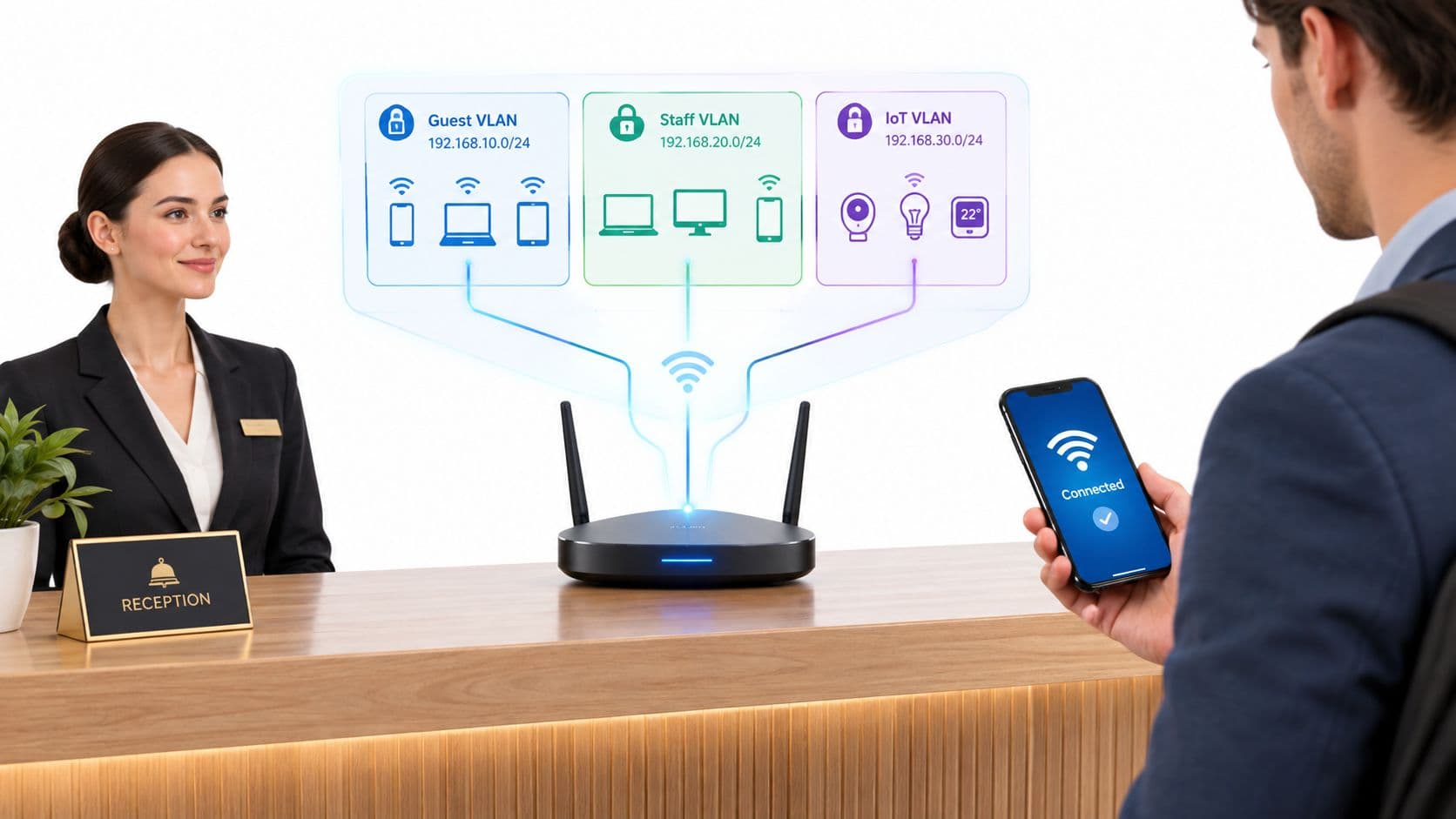
একটি কার্যকর অপারেটিং মডেল সহজ। গেস্ট ট্রাফিক কেবল ইন্টারনেট-অ্যাক্সেস সহ একটি গেস্ট সেগমেন্টে ল্যান্ড করে। স্টাফ ট্রাফিক একটি ডিরেক্টরি-ব্যাকড কর্পোরেট সেগমেন্টে ল্যান্ড করে। IoT ট্রাফিক কেবল তার প্রয়োজনীয় ডেস্টিনেশন সহ একটি লকড-ডাউন VLAN-এ ল্যান্ড করে। AP রেডিওর কাজ করে, কিন্তু আইডেন্টিটি লেয়ার সিদ্ধান্ত নেয় যে প্রতিটি ক্লায়েন্ট কী অ্যাক্সেস করার অনুমতি পাবে।
সেই ফ্রন্ট এন্ড হ্যান্ডেল করার জন্য Purple একটি বিকল্প হতে পারে, কারণ এটি WLAN-এর রিপ-অ্যান্ড-রিপ্লেস করতে বাধ্য না করেই গেস্ট এবং স্টাফ অনবোর্ডিং, Passpoint ফ্লো এবং সেগমেন্টেশন পরিচালনা করতে Meraki, Aruba, Ruckus, Mist, বা UniFi-এর সামনে কাজ করে।
ব্যবহারিক নিয়ম: কোনো ডিভাইস যদি নিয়ন্ত্রিত উপায়ে অনবোর্ড এবং রিভোক করা না যায়, তবে সেটি স্টাফদের ল্যাপটপের মতো একই পলিসি পাথের অন্তর্ভুক্ত নয়।
আপনি যদি SSID তালিকাকে মেইনটেন্যান্সের বোঝা না বানিয়ে হসপিটালিটি-স্টাইলের গেস্ট জার্নিকে এন্টারপ্রাইজ স্টাফ অ্যাক্সেস থেকে আলাদা করতে চান, তবে guest Wi-Fi management guide-টি দরকারী। গুরুত্বপূর্ণ বিষয়টি পোর্টাল নিজে নয়, বরং এটি নিশ্চিত করা যে সঠিক আইডেন্টিটিগুলো প্রতিবার সঠিক VLAN-এ পৌঁছাচ্ছে।
মাইগ্রেশন পাথ এবং লেগাসি SSID-এর সাথে সহাবস্থান
টিমগুলো যখন কাটওভারকে একটি একক ঘটনা হিসেবে বিবেচনা করে, তখন তা ব্যর্থ হয়। রিয়েল এস্টেট, বিশেষ করে হোটেল, হাসপাতাল এবং মাল্টি-টেন্যান্ট বিল্ডিংগুলোর জন্য এমন একটি মাইগ্রেশন প্ল্যান প্রয়োজন যা সহাবস্থানকে ধরে নেয়। এর অর্থ হলো ব্যবহারকারী, সার্টিফিকেট এবং ডিভাইসের মালিকদের মানিয়ে নেওয়ার জন্য নতুন ডিজাইনটিকে পুরানোটির পাশাপাশি যথেষ্ট সময় ধরে সচল থাকতে হবে।
গ্রিনফিল্ড সাইটগুলো সবচেয়ে সহজ ক্ষেত্র। বিল্ডিংয়ের বাকি অংশ প্রস্তুত থাকলে আপনি কন্ট্রোলার স্টেজ করতে পারেন, RF যাচাই করতে পারেন, আইডেন্টিটি পলিসি পুশ করতে পারেন এবং একটি নিয়ন্ত্রিত চেঞ্জ উইন্ডোতে লাইভ যেতে পারেন। ব্রাউনফিল্ড এস্টেটগুলো আলাদা। নিরাপদ প্যাটার্ন হলো লেগাসি SSID-এর পাশাপাশি নতুন SSID চালানো, ধীরে ধীরে ট্রাফিক পরিচালনা করা এবং ব্যবহারকারীরা স্থানান্তরিত হওয়ার পর পুরানো হার্ডওয়্যার অবসর দেওয়া।
ঝুঁকিপূর্ণ অংশগুলো সাবধানে ক্রমানুসারে সাজান
ফার্মওয়্যার আপগ্রেড, সার্টিফিকেট রোলআউট এবং Passpoint প্রোফাইল পুশ—সব একসাথে হওয়া উচিত নয়। প্রথমে প্ল্যাটফর্মের পরিবর্তনগুলো করুন, তারপর অথেন্টিকেশন যাচাই করুন, তারপর একটি পাইলট গ্রুপ স্থানান্তর করুন, তারপর পরিধি বাড়ান। ভেন্যুটি যদি গেস্ট অ্যাক্সেসের ওপর নির্ভর করে, তবে সাইটের বাকি অংশে হাত দেওয়ার আগে একটি একক ফ্লোর বা জোনে সেই পাথটি পরীক্ষা করুন।
শেয়ার্ড বিল্ডিংগুলোর ক্ষেত্রেও একই সতর্কতা প্রযোজ্য। টেন্যান্টরা তাদের নিজস্ব ওয়্যারলেস সরঞ্জাম চালাতে পারে এবং প্রতিবেশী নেটওয়ার্কগুলো আপনার প্রজেক্টের অংশ না হলেও ইন্টারফারেন্স তৈরি করতে পারে। সেই পরিবেশগুলোতে সহাবস্থান কোনো সাময়িক সমাধান নয়। এটিই হলো ডেপ্লয়মেন্ট মডেল।
লাইভ যাওয়ার আগেই রোলব্যাক ট্রিগারগুলো লিখে রাখা উচিত। যদি অথেন্টিকেশন ব্যর্থ হতে শুরু করে, DHCP ব্যাহত হতে শুরু করে, অথবা ক্যাপটিভ পোর্টাল ব্যবহারকারীদের সাইন-ইন পেজে লুপ করতে শুরু করে, তবে টিমের একটি স্পষ্ট পয়েন্ট প্রয়োজন যেখানে তারা থামবে এবং পূর্বাবস্থায় ফিরে যাবে। পাইলট ফ্লোরটি যদি ইতিমধ্যেই কাটওভার রানবুক প্রমাণ করে থাকে, তবে এটি হ্যান্ডেল করা অনেক সহজ হয়।
একটি ভালো মাইগ্রেশন প্ল্যানে সাধারণত তিনটি লেন থাকে—পুরানো SSID, নতুন SSID এবং একটি ডিকমিশন তালিকা। পুরানো নেটওয়ার্কটি কেবল ততক্ষণই সচল থাকে যতক্ষণ এটি একটি নির্দিষ্ট উদ্দেশ্য পূরণ করছে। নতুনটি প্রতি সপ্তাহে আরও বেশি ট্রাফিক শোষণ করে। ডিকমিশন তালিকাটি হার্ডওয়্যার অপসারণের কাজকে অন্য কোয়ার্টারে পিছিয়ে যাওয়া থেকে রক্ষা করে।
টেস্টিং, মনিটরিং এবং অ্যানালিটিক্স যা ডেপ্লয়মেন্টকে প্রমাণ করে
AP মাউন্ট করাটাই শেষ অবস্থা নয়। ডেপ্লয়মেন্ট কেবল তখনই সম্পন্ন হয় যখন ব্যবহারকারীরা নির্বিঘ্নে কানেক্ট করে, নির্বিঘ্নে রোম করে এবং সাইটটি ব্যস্ত হওয়ার পরেও কানেক্টেড থাকে। অ্যাকসেপ্টেন্স টেস্টিংয়ে থ্রুপুট চেক, ভয়েস আচরণ, রোমিং ওয়াক-থ্রু এবং Passpoint অটো-কানেক্ট ভেরিফিকেশন অন্তর্ভুক্ত থাকা উচিত, কারণ একটি শান্ত রুমে আপনি যে ব্যর্থতাগুলো ধরবেন তা লাইভ ফ্লোরে দেখা যাওয়া ব্যর্থতাগুলোর মতো নয়।
গুরুত্বপূর্ণ সিগন্যালগুলো ট্র্যাক করুন
সাপোর্ট কলের পূর্বাভাস দেয় এমন বিষয়গুলোকে বেসলাইন করুন। লাইভ যাওয়ার পর একটি সুন্দর হিটম্যাপের চেয়ে Authentication success rate, DHCP failures, রোমিং ল্যাটেন্সি এবং ক্লায়েন্ট রিট্রাই কাউন্ট আপনাকে ব্যবহারকারীর সমস্যা সম্পর্কে বেশি তথ্য দেয়। এই মেট্রিকগুলো যদি স্বাভাবিক থাকে, তবে ডেপ্লয়মেন্টটি সম্ভবত তার কাজ ঠিকঠাক করছে।
টিমকে অপ্রয়োজনীয় অ্যালার্টের নিচে চাপা দেবেন না। একটি দরকারী ড্যাশবোর্ডের ফোকাস হওয়া উচিত অথেন্টিকেশন সার্ভার আউটএজ, RADIUS কিউ ডেপথ, রোগ (rogue) AP এবং দীর্ঘস্থায়ী DHCP ব্যর্থতার ওপর। ডিফল্ট মনিটরিং প্রায়শই খুব বেশি কম-মূল্যের অ্যালার্ম দেয়, যা প্রকৃত সমস্যাগুলো ঘটার সময় তা চিহ্নিত করা কঠিন করে তোলে।
Purple-এর অ্যানালিটিক্স এবং CRM কানেক্টরগুলো এখানে প্রাসঙ্গিক কারণ এগুলো WiFi লেয়ারকে কেবল একটি হেলথ স্ক্রিন হিসেবে না রেখে ফার্স্ট-পার্টি ইউসেজ ডেটায় রূপান্তর করে। এটি টিমগুলোকে রেডিও পারফরম্যান্সের পাশাপাশি ভিজিট, ডোয়েল টাইম এবং সেগমেন্টেশন ফলাফলের ওপর ভিত্তি করে ডেপ্লয়মেন্ট বিচার করতে সাহায্য করে। হসপিটালিটি এবং রিটেইলে, আইডেন্টিটি এবং অ্যানালিটিক্সের মধ্যে এই সংযোগটিই প্রায়শই কাজের যৌক্তিকতা প্রমাণ করে।
একটি অপারেশনাল রোলআউট সাধারণত ধাপে ধাপে রূপ নেয়। রিকোয়ারমেন্ট এবং স্কোপিং, ডিজাইন এবং সার্ভে, বাস্তবায়ন, ভ্যালিডেশন, অপ্টিমাইজেশন, তারপর হ্যান্ডওভার। প্রজেক্টটি কয়েক সপ্তাহ নাকি তার বেশি সময় নেবে তা এস্টেট এবং মাইগ্রেশনের সীমাবদ্ধতার ওপর নির্ভর করে, তবে সিকোয়েন্সটি পরিবর্তন হওয়া উচিত নয়। একটি প্রিন্টযোগ্য চেকলিস্ট সরাসরি পরিকল্পনা, ডিজাইন, বাস্তবায়ন এবং অপ্টিমাইজেশনের সাথে ম্যাপ করা উচিত যাতে টিমগুলোর মধ্যে কোনো কিছু হারিয়ে না যায়।
প্রথম গো-লাইভ ইনসিডেন্ট দেখা দিলে, একজন জুনিয়র ইঞ্জিনিয়ারের লক্ষণ দেখে শুরু করার এবং কোথায় খুঁজতে হবে তা জানার সক্ষমতা থাকা উচিত। একটি অনুপস্থিত Passpoint প্রোফাইল সাধারণত প্রোভিশনিং ওয়ার্কফ্লোকে নির্দেশ করে। ক্যাপটিভ পোর্টাল রিডাইরেক্ট লুপগুলো সাধারণত DNS, পলিসি এবং পোর্টাল লজিকের সংযোগস্থলে থাকে। RADIUS টাইমআউটগুলো অথেন্টিকেশন পাথে থাকে। গেস্ট VLAN মাল্টিকাস্ট ব্রেকগুলো প্রায়শই সুইচিং বা পলিসি হ্যান্ডলিংয়ের সাথে সম্পর্কিত থাকে। IoT ডিভাইস stuck on the wrong SSID সাধারণত অনবোর্ডিং রুলস বা লেগাসি প্রোফাইল অ্যাসাইনমেন্টের আরেকটি পর্যালোচনার প্রয়োজন।
একটি wireless network deployment-এর পরীক্ষা হলো টিম কোনো অনুমান ছাড়াই এটি ব্যাখ্যা করতে, সমাধান করতে এবং মনিটর করতে পারছে কিনা। আপনার পরবর্তী রোলআউটে আপনি যদি RF, আইডেন্টিটি, গেস্ট অ্যাক্সেস এবং সেগমেন্টেশনের মধ্যে একই ধরণের সংযোগ চান, তবে প্রথম AP বসানোর আগেই Purple ভিজিট করুন এবং তাদের প্ল্যাটফর্ম ও সার্ভিসগুলো কীভাবে ডেপ্লয়মেন্ট ওয়ার্কফ্লোতে ফিট করে তা পর্যালোচনা করুন।