
Passenger WiFi: পরিবহন অপারেটররা যাত্রা বুঝতে কীভাবে WiFi ডাটা ব্যবহার করে
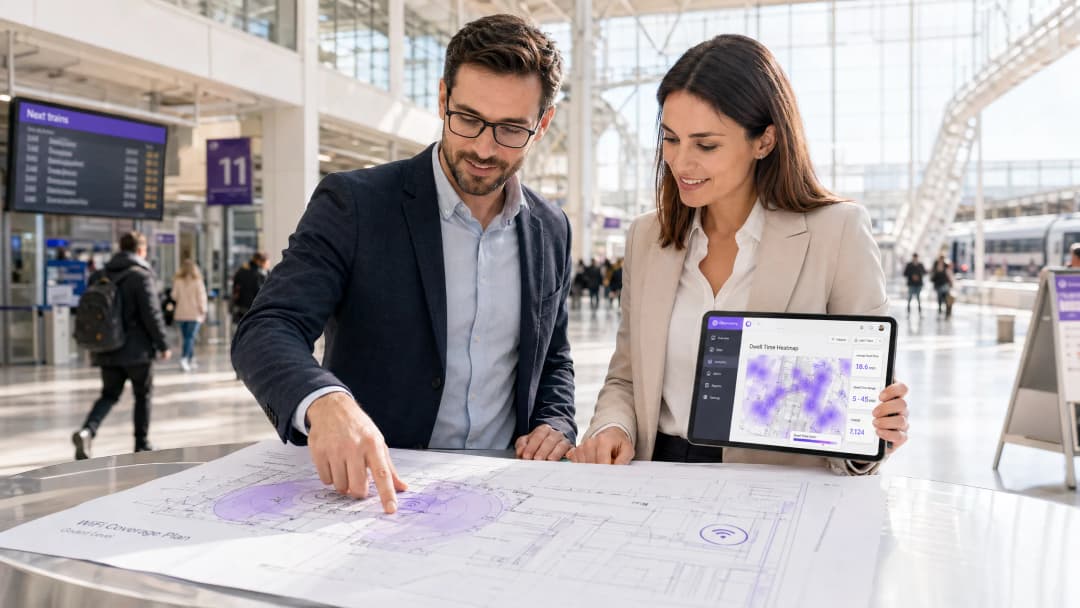
এই টেকনিক্যাল নির্দেশিকাটি ব্যাখ্যা করে যে কীভাবে পরিবহন অপারেটররা অপারেশনাল অ্যানালিটিক্স পাওয়ার জন্য যাত্রী WiFi অবকাঠামো ব্যবহার করে। এটি ফুটফল, ডdwell time এবং যাত্রার ধরন পরিমাপের জন্য টেকনিক্যাল আর্কিটেকচার, ডেপ্লয়মেন্টের সর্বোত্তম অনুশীলন এবং বাস্তব জীবনের অ্যাপ্লিকেশনগুলি কভার করে।
এই গাইডটি শুনুন
পডকাস্ট ট্রান্সক্রিপ্ট দেখুন
আমাদের মূল সিরিজের অংশ: WiFi অ্যানালিটিক্স গাইড →
এক্সিকিউটিভ সামারি
পরিবহন অপারেটরদের জন্য - তারা আন্তঃনগর রেল নেটওয়ার্ক, শহরের বাস বহর বা সামুদ্রিক ফেরি পরিষেবা পরিচালনা করুন না কেন - প্যাসেঞ্জার WiFi প্রায়শই কেবল একটি অপারেশনাল খরচ বা যাত্রীদের একটি সুযোগ-সুবিধা হিসাবে দেখা হয়। যাইহোক, যখন একটি এন্টারপ্রাইজ-গ্রেড অ্যানালিটিক্স স্তরের সাথে এটি সংহত করা হয়, তখন এই বিদ্যমান অবকাঠামোটি একটি শক্তিশালী অপারেশনাল ইন্টেলিজেন্স টুলে রূপান্তরিত হয়। ডিভাইসের কানেকশন মেটাডেটা ক্যাপচার করার মাধ্যমে, অপারেটররা শুধুমাত্র টিকিটের ডেটার উপর নির্ভর না করেই যাত্রীদের ফুটফল ম্যাপ করতে পারেন, স্টেশনের জোনের মধ্যে ডওয়েল টাইম পরিমাপ করতে পারেন এবং যাত্রার ধরণ ট্র্যাক করতে পারেন।
এই নির্দেশিকাটি আইটি ম্যানেজার, নেটওয়ার্ক আর্কিটেক্ট এবং অপারেশন ডিরেক্টরদের প্যাসেঞ্জার WiFi অ্যানালিটিক্স স্থাপন এবং লিভারেজ করার জন্য একটি ব্যবহারিক ফ্রেমওয়ার্ক প্রদান করে। আমরা ডিভাইসের সিগন্যাল নিরাপদে ক্যাপচার করার জন্য প্রয়োজনীয় মৌলিক প্রযুক্তিগত আর্কিটেকচার, পরিমাপযোগ্য ROI প্রদানকারী অপারেশনাল ব্যবহারের ক্ষেত্রে এবং GDPR এবং ডেটা সুরক্ষা ফ্রেমওয়ার্কের মধ্যে এই ডেটা প্রক্রিয়া করার জন্য প্রয়োজনীয় কমপ্লায়েন্সের প্রয়োজনীয়তাগুলি অন্বেষণ করব।
আমাদের সিনিয়র কনসালট্যান্টদের কাছ থেকে এই বিষয়ে একটি ব্রিফিং শুনুন:
Technical Deep Dive: Architecture and Data Flow
যেকোনো প্যাসেঞ্জার WiFi অ্যানালিটিক্স ক্ষমতার ভিত্তি হলো নেটওয়ার্কের সুরক্ষিতভাবে ডিভাইসের মেটাডেটা ক্যাপচার এবং প্রসেস করার ক্ষমতা। এই আর্কিটেকচার সাধারণত চারটি প্রধান স্তর নিয়ে গঠিত:
- Access Point Layer (Edge): স্টেশন এবং রোলিং স্টকে মোতায়েন করা ফিজিক্যাল হার্ডওয়্যার। IEEE 802.11ax (WiFi 6) ব্যবহার করে আধুনিক ডেপ্লয়মেন্টগুলো উচ্চ-ঘনত্বের ক্লায়েন্ট সাপোর্ট প্রদান করে এবং MAC addresses, সিগন্যাল স্ট্রেন্থ (RSSI), ও কানেকশন টাইমস্ট্যাম্প সহ প্রয়োজনীয় মেটাডেটা ক্যাপচার করে।
- Data Collection Layer (Controller): একটি সেন্ট্রালাইজড ক্লাউড-ম্যানেজড কন্ট্রোলার অ্যাক্সেস পয়েন্ট লেয়ার থেকে র সেশন লগ এবং রোমিং হ্যান্ডঅফগুলোকে একত্রিত করে।
- Analytics Engine: Purple এর WiFi Analytics লেয়ারের মতো প্ল্যাটফর্মগুলো র লগ প্রসেস করে, স্টাফ ডিভাইস এবং ট্রানজিয়েন্ট সিগন্যাল ফিল্টার করতে মেশিন লার্নিং মডেল প্রয়োগ করে, এবং র ডেটাকে অর্থপূর্ণ মেট্রিক্সে (যেমন dwell time, ফুটফল) রূপান্তর করে।
- Operations Dashboard: ভিজ্যুয়ালাইজেশন লেয়ার যেখানে নেটওয়ার্ক প্ল্যানার এবং স্টেশন ম্যানেজাররা রিয়েল-টাইম ড্যাশবোর্ড এবং হিটম্যাপের মাধ্যমে ইনসাইটগুলো বিশ্লেষণ করেন।

Overcoming MAC Randomisation
আধুনিক WiFi অ্যানালিটিক্সে একটি জটিল প্রযুক্তিগত চ্যালেঞ্জ হলো MAC address র্যান্ডমাইজেশন। iOS 14 এবং Android 10 থেকে, ডিভাইসগুলো গোপনীয়তা বাড়ানোর জন্য প্রতি নেটওয়ার্কে তাদের MAC address র্যান্ডমাইজ করে। যদিও এটি সামগ্রিক ফুটফল বা dwell time মেট্রিক্সকে প্রভাবিত করে না (কারণ একটি একক ভিজিটের সময় সেশনটি সামঞ্জস্যপূর্ণ থাকে), এটি সময়ের সাথে সাথে বেনামে ফিরে আসা ভিজিটরদের ট্র্যাক করার ক্ষমতাকে সীমিত করে।
এর প্রযুক্তিগত সমাধান হলো অথেনটিকেটেড Guest WiFi। ব্যবহারকারীদের একটি Captive Portal এর মাধ্যমে রাউট করার মাধ্যমে যার জন্য অথেনটিকেশন প্রয়োজন (যেমন ইমেল বা সোশ্যাল লগইন), সিস্টেমটি একটি স্থায়ী, সম্মতিপ্রাপ্ত ইউজার প্রোফাইল তৈরি করে। এই প্রোফাইলটি সেশন ডেটাকে একজন পরিচিত ইউজারের সাথে লিঙ্ক করে, ডেটা সুরক্ষা নিয়মাবলী কঠোরভাবে মেনে চলার পাশাপাশি MAC address র্যান্ডমাইজেশনের সীমাবদ্ধতাগুলোকে অতিক্রম করে।
Implementation Guide: From Infrastructure to Insights
ডেটার নির্ভুলতা এবং নেটওয়ার্ক নিরাপত্তা নিশ্চিত করার জন্য প্যাসেঞ্জার WiFi অ্যানালিটিক্স মোতায়েন করার ক্ষেত্রে একটি কাঠামোগত পদ্ধতির প্রয়োজন।
- Conduct Comprehensive RF Audits: অ্যানালিটিক্সের নির্ভুলতা সম্পূর্ণরূপে নেটওয়ার্ক কভারেজের উপর নির্ভর করে। স্টেশন কনকোর্স বা প্ল্যাটফর্মের ডেড জোনগুলো ড্রপড সেশন এবং খণ্ডিত জার্নি ডেটার কারণ হয়। সমস্ত প্যাসেঞ্জার জোনে অবিচ্ছিন্ন কভারেজ নিশ্চিত করতে পুঙ্খানুপুঙ্খ RF সাইট সার্ভে পরিচালনা করুন।
- Standardise Data Integration: ট্রান্সপোর্ট নেটওয়ার্কগুলোতে প্রায়ই ভিন্নধর্মী হার্ডওয়্যার থাকে (যেমন স্টেশনে Cisco Meraki, রোলিং স্টকে বিভিন্ন ভেন্ডর)। অ্যানালিটিক্স ইঞ্জিনে পৌঁছানোর আগে সেশন লগগুলোকে স্বাভাবিক করতে একটি ভেন্ডর-অ্যাগনস্টিক API লেয়ার প্রয়োগ করুন। ৩. দৃঢ় সিকিউরিটি কন্ট্রোল প্রয়োগ করুন: যাত্রী-মুখী নেটওয়ার্কগুলো উচ্চ-ঝুঁকিপূর্ণ অ্যাটাক সারফেস। ক্লায়েন্ট সামঞ্জস্যতা যেখানে অনুমতি দেয় সেখানে WPA3 প্রয়োগ করুন, যাত্রীদের ডিভাইসের মধ্যে পারস্পরিক যোগাযোগ রোধ করতে কঠোর ক্লায়েন্ট আইসোলেশন (Layer 2 isolation) বলবৎ করুন এবং ক্ষতিকারক ডোমেইনগুলো ব্লক করতে DNS ফিল্টারিং স্থাপন করুন। এই পরিবেশগুলোকে সুরক্ষিত করার বিষয়ে আরও তথ্যের জন্য, Protect Your Network with Strong DNS and Security সংক্রান্ত আমাদের গাইডটি পর্যালোচনা করুন। ৪. জোনাল আর্কিটেকচার নির্ধারণ করুন: আপনার ভৌত অবস্থানগুলোকে লজিক্যাল জোনে বিভক্ত করুন (যেমন - কনকোর্স, রিটেল এরিয়া, প্ল্যাটফর্ম)। এটি গ্র্যানুলার ডোয়েল টাইম বিশ্লেষণকে সক্ষম করে, যা অপারেটরদের একটি রিটেল জোনে ব্রাউজ করা যাত্রী এবং একটি সার্ভিস বিলম্বের কারণে প্ল্যাটফর্মে অপেক্ষা করা যাত্রীর মধ্যে পার্থক্য সনাক্ত করতে সাহায্য করে।
আপনার নির্দিষ্ট সেটআপ নিয়ে কোনো প্রশ্ন আছে?
আমাদের টিম ৮০,০০০ ভেন্যুতে ভেন্যু অপারেটর, IT ম্যানেজার এবং নেটওয়ার্ক ইঞ্জিনিয়ারদের সাথে কাজ করে। একটি ২০ মিনিটের কল বুক করুন এবং আপনার মতো অন্যরা কীভাবে এর সমাধান করেছেন তা আমরা আপনাকে দেখাব।
সেরা অনুশীলন এবং অপারেশনাল ব্যবহারের ক্ষেত্র
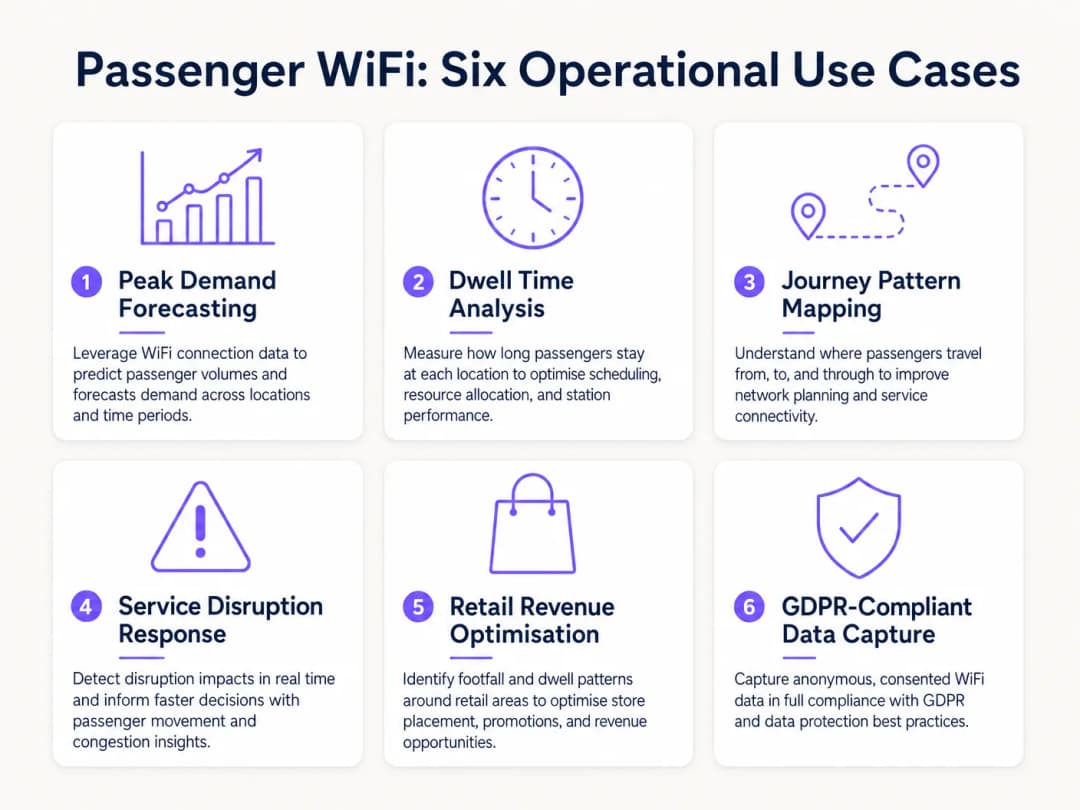
পরিবহন অপারেটররা একাধিক অপারেশনাল ডোমেইন জুড়ে দক্ষতা বাড়াতে WiFi অ্যানালিটিক্স ব্যবহার করছেন। ঠিক যেভাবে Retail এবং Hospitality খাতের ভেন্যুগুলো কর্মী নিয়োগের প্রক্রিয়াকে অপ্টিমাইজ করতে ফুটফল ডেটা ব্যবহার করে, পরিবহন অপারেটররাও পিক ডিমান্ড পরিচালনা করতে এই অন্তর্দৃষ্টিগুলো ব্যবহার করেন।
বাস্তব-ক্ষেত্রের কেস স্টাডি: ইন্টারসিটি রেল নেটওয়ার্ক
যুক্তরাজ্যের একটি প্রধান ইন্টারসিটি রেল অপারেটর প্ল্যাটফর্মের অতিরিক্ত ভিড় কমাতে বারোটি টার্মিনাস স্টেশন জুড়ে WiFi অ্যানালিটিক্স স্থাপন করেছে। ট্রেন ছাড়ার সময়ের সাথে WiFi কানেকশনের বৃদ্ধির তুলনা করে, অপারেশন টিম সনাক্ত করেছে যে ট্রেন ছাড়ার ৪০ মিনিট আগে নির্দিষ্ট প্ল্যাটফর্মগুলোতে বিপজ্জনক ভিড় তৈরি হচ্ছিল। ডেটা থেকে জানা গেছে যে মূল কনকোর্সে অস্পষ্ট ডিজিটাল সাইনেজের কারণে যাত্রীরা প্রত্যাশার চেয়ে আগেই চলে আসছিলেন। ডিপার্চার বোর্ডে প্ল্যাটফর্ম ঘোষণার সময় সামঞ্জস্য করার মাধ্যমে অপারেটর যাত্রীদের যাতায়াত সহজ করেছে, যার ফলে প্ল্যাটফর্মের সর্বোচ্চ ভিড় ২২% হ্রাস পেয়েছে এবং সামগ্রিক নিরাপত্তা উন্নত হয়েছে।
বাস্তব-ক্ষেত্রের কেস স্টাডি: ফেরি টার্মিনাল অপারেশনস
গ্রীষ্মকালীন ভারী ট্রাফিক পরিচালনাকারী একটি আঞ্চলিক ফেরি অপারেটর তাদের টার্মিনাল রিটেল কৌশল অপ্টিমাইজ করতে WiFi ডোয়েল টাইম অ্যানালিটিক্স ব্যবহার করেছে। অ্যানালিটিক্স ড্যাশবোর্ড দেখিয়েছে যে বিলম্বিত ক্রসিংয়ের জন্য অপেক্ষারত যাত্রীদের টার্মিনালে গড় ডোয়েল টাইম ছিল ৪৫ মিনিট, কিন্তু মাত্র ১২% যাত্রী দ্বিতীয় রিটেল জোনে প্রবেশ করেছিলেন। ডিজিটাল সাইনেজের অবস্থান পরিবর্তন করে এবং বিলম্বের সময় কফির ডিসকাউন্ট দিয়ে Captive Portal-এর মাধ্যমে স্বয়ংক্রিয় পুশ নোটিফিকেশন চালু করার মাধ্যমে, অপারেটর বিঘ্নিত পরিস্থিতির সময়ে রিটেল কনভার্সন ১৮% বৃদ্ধি করতে সক্ষম হয়েছে।
ট্রাবলশুটিং এবং ঝুঁকি হ্রাস
যাত্রী WiFi অ্যানালিটিক্স প্রয়োগ করার সময়, IT টিমকে কিছু সাধারণ ব্যর্থতার ঝুঁকি প্রশমিত করতে হবে:
- স্টাফ ডিভাইস থেকে ডেটা ডিলিউশন: স্টাফ ডিভাইসগুলোকে ফিল্টার করতে ব্যর্থ হলে (যেমন - পরিচ্ছন্নতাকর্মী, রিটেল স্টাফ) তা ডোয়েল টাইমের মেট্রিক্সকে উল্লেখযোগ্যভাবে প্রভাবিত করে। যাত্রীদের ডেটা নির্ভুল রাখতে কঠোর MAC অ্যাড্রেস ফিল্টারিং বা কর্মীদের জন্য একটি ডেডিকেটেড SSID প্রয়োগ করুন।
- সম্মতিহীনতার ব্যর্থতা: স্পষ্ট সম্মতি বা নথিভুক্ত আইনগত ভিত্তি ছাড়া ডিভাইসের ডেটা সংগ্রহ করা GDPR লঙ্ঘন করে। আপনার Captive Portal যেন স্পষ্টভাবে ডেটা প্রসেসিং নীতি উল্লেখ করে এবং যেখানে প্রয়োজন সেখানে স্পষ্ট সম্মতি গ্রহণ করে তা নিশ্চিত করুন।
- ব্যাকহল বটলনেক: সেলুলার ব্যাকহলের (LTE/5G) ওপর নির্ভরশীল অনবোর্ড সিস্টেমগুলি প্রায়শই ব্যান্ডউইথের সীমাবদ্ধতার সম্মুখীন হয়। আপনার আর্কিটেকচার যেন কানেক্টিভিটি ড্রপের সময় অ্যানালিটিক্স ডেটা স্থানীয়ভাবে বাফার করে এবং যাত্রীদের ব্রাউজিং স্পিডকে প্রভাবিত না করে ডেটা ক্ষতি রোধ করতে অ্যাসিঙ্ক্রোনাসভাবে সিঙ্ক করে তা নিশ্চিত করুন।
ROI এবং ব্যবসায়িক প্রভাব
যাত্রী WiFi অ্যানালিটিক্স থেকে বিনিয়োগের লাভ (ROI) আইটি বিভাগের চেয়েও অনেক দূর পর্যন্ত বিস্তৃত। নেটওয়ার্ককে একটি ইন্টেলিজেন্স অ্যাসেট হিসেবে ব্যবহার করে, অপারেটররা নিম্নলিখিত সুবিধা পেতে পারেন:
- রিসোর্স অ্যালোকেশন অপ্টিমাইজ করা: স্ট্যাটিক সময়সূচীর পরিবর্তে অভিজ্ঞতামূলক ফুটফল ডেটার সাথে স্টেশনের স্টাফিং, পরিচ্ছন্নতার সময়সূচী এবং নিরাপত্তা টহলকে সারিবদ্ধ করুন।
- রিটেল রেভিনিউ বৃদ্ধি করা: রিটেল ভাড়াটেদের সঠিক ফুটফল এবং কনভার্সন মেট্রিক্স প্রদান করুন, যা উচ্চ ট্রাফিক জোনে প্রিমিয়াম লিজ রেটকে সমর্থন করে।
- যাত্রী অভিজ্ঞতা উন্নত করা: স্টেশনের যাত্রাপথের সমস্যাগুলো চিহ্নিত করুন এবং প্রাকৃতিকভাবে ভিড় নিয়ন্ত্রণ করুন, ঠিক যেভাবে Healthcare খাত রোগীদের প্রবাহ বোঝার জন্য একই প্রযুক্তি ব্যবহার করে। বিভিন্ন শিল্পে এর প্রয়োগ সম্পর্কে জানতে, How WiFi Can Improve Patient Experience in Hospitals দেখুন।
কোর অপারেশনাল স্ট্র্যাটেজিতে WiFi অ্যানালিটিক্স সংহত করে, Transport খাতের পরিবহন অপারেটররা রিঅ্যাক্টিভ ম্যানেজমেন্ট থেকে প্রোঅ্যাক্টিভ, ডেটা চালিত পরিষেবা প্রদানে রূপান্তর করতে পারেন।
মূল সংজ্ঞাসমূহ
MAC Address Randomisation
আধুনিক অপারেটিং সিস্টেমের (iOS, Android) একটি গোপনীয়তা বৈশিষ্ট্য যা ডিভাইসটি যে প্রতিটি WiFi নেটওয়ার্কের সাথে সংযুক্ত হয় তার জন্য একটি অস্থায়ী, র্যান্ডম MAC অ্যাড্রেস তৈরি করে।
IT টিমগুলিকে অবশ্যই এটি বিবেচনায় রাখতে হবে কারণ এটি শুধুমাত্র হার্ডওয়্যার আইডেন্টিফায়ার ব্যবহার করে বারবার আসা ভিজিটরদের ট্র্যাক করতে বাধা দেয়, যার ফলে Captive Portal অথেন্টিকেশনের প্রয়োজন হয়।
Dwell Time
একটি নির্দিষ্ট ফিজিক্যাল জোনের মধ্যে একটি ডিভাইস WiFi নেটওয়ার্কের সাথে সংযুক্ত বা দৃশ্যমান থাকার মোট সময়কাল।
অপারেশন পরিচালকদের দ্বারা যাত্রীরা প্ল্যাটফর্মে কতক্ষণ অপেক্ষা করে বা রিটেল এলাকায় কত সময় ব্যয় করে তা পরিমাপ করতে ব্যবহৃত হয়, যা বাণিজ্যিক ও নিরাপত্তা পরিকল্পনার ওপর সরাসরি প্রভাব ফেলে।
Captive Portal
একটি ওয়েব পেজ যা একটি পাবলিক WiFi নেটওয়ার্কে অ্যাক্সেস পাওয়ার আগে ব্যবহারকারীদের অবশ্যই দেখতে হবে এবং যার সাথে ইন্টারঅ্যাক্ট করতে হবে।
ব্যবহারকারীর সম্মতি সংগ্রহ, পরিষেবার শর্তাবলী কার্যকর এবং ফার্স্ট-পার্টি মার্কেটিং ডাটা সংগ্রহের প্রাথমিক মাধ্যম।
IEEE 802.11ax (WiFi 6)
ওয়্যারলেস নেটওয়ার্কের বর্তমান স্ট্যান্ডার্ড, যা হাই-ডেনসিটি পরিবেশে কর্মক্ষমতা উন্নত করার জন্য ডিজাইন করা হয়েছে।
স্টেডিয়াম এবং ট্রেন স্টেশনের মতো পরিবহন হাবগুলির জন্য অপরিহার্য যেখানে হাজার হাজার ডিভাইস একই সাথে সংযোগ করার চেষ্টা করে।
RSSI (Received Signal Strength Indicator)
গৃহীত রেডিও সিগন্যালে উপস্থিত শক্তির পরিমাপ।
একটি ভেন্যুর মধ্যে ডিভাইসের ফিজিক্যাল লোকেশন ট্রায়াঙ্গুলেট করতে অ্যানালিটিক্স ইঞ্জিনগুলি একাধিক অ্যাক্সেস পয়েন্ট থেকে RSSI মান ব্যবহার করে।
Client Isolation
একটি সিকিউরিটি ফিচার যা একই WiFi নেটওয়ার্কের সাথে সংযুক্ত ডিভাইসগুলোকে একে অপরের সাথে সরাসরি যোগাযোগ করতে বাধা দেয়।
পাবলিক প্যাসেঞ্জার WiFi-এর জন্য অত্যন্ত গুরুত্বপূর্ণ যাতে ক্ষতিকারক ব্যবহারকারীরা নেটওয়ার্কের অন্যান্য ব্যবহারকারীদের ডিভাইস স্ক্যান বা আক্রমণ করতে না পারে।
Footfall
একটি নির্দিষ্ট সময়সীমার মধ্যে WiFi নেটওয়ার্ক দ্বারা সনাক্ত করা অনন্য ডিভাইসের মোট সংখ্যা।
টিকিট বিক্রি নির্বিশেষে স্টেশন ম্যানেজারদের মোট যাত্রী সংখ্যার একটি সঠিক প্রক্সি প্রদান করে।
Cellular Backhaul
একটি লোকাল WiFi নেটওয়ার্ককে (যেমন বাস বা ট্রেনে) ইন্টারনেটের সাথে পুনরায় সংযুক্ত করতে সেলুলার নেটওয়ার্ক (LTE/5G) এর ব্যবহার।
অনবোর্ড WiFi স্থাপনের জন্য প্রাথমিক চলমান পরিচালন ব্যয় (OPEX), যার জন্য সতর্ক ব্যান্ডউইথ ম্যানেজমেন্ট প্রয়োজন।
সমাধানকৃত উদাহরণসমূহ
একটি প্রধান ট্রেন স্টেশন অপারেটর সন্ধ্যার ব্যস্ত সময়ে ৪ নম্বর প্ল্যাটফর্মে তীব্র যানজটের সম্মুখীন হচ্ছে। প্রবাহের উন্নতি করতে এই যাত্রীরা স্টেশনের কোথা থেকে আসছেন (যেমন - প্রধান কনকোর্স বনাম রিটেল জোন) তা তাদের বুঝতে হবে।
১. অবিচ্ছিন্ন কভারেজ নিশ্চিত করতে কনকোর্স, রিটেল জোন এবং ৪ নম্বর প্ল্যাটফর্ম জুড়ে হাই-ডেনসিটি IEEE 802.11ax অ্যাক্সেস পয়েন্ট ডেপ্লয় করুন। ২. প্রতিটি এলাকার জন্য লজিক্যাল 'জোন' নির্ধারণ করতে অ্যানালিটিক্স প্ল্যাটফর্ম কনফিগার করুন। ৩. ১৬:০০-১৯:০০ সময়ের মধ্যে অ্যানালিটিক্স ড্যাশবোর্ডে 'জোন-টু-জোন ট্রানজিশন' রিপোর্ট বিশ্লেষণ করুন। ৪. ৪ নম্বর প্ল্যাটফর্মে পৌঁছানো ডিভাইসগুলির প্রধান উৎস জোনগুলি চিহ্নিত করুন। ৫. যদি ডাটা দেখায় যে রিটেল জোন করিডোর থেকে একটি বাধা তৈরি হচ্ছে, তবে অপারেশনাল টিম প্রবাহ অন্য দিকে ঘুরিয়ে দিতে কর্মী মোতায়েন করতে পারে অথবা যাত্রীদের একটি সেকেন্ডারি কনকোর্স প্রবেশ পথ দিয়ে পাঠাতে ডিজিটাল সাইনেজ আপডেট করতে পারে।
একটি আঞ্চলিক বাস অপারেটর বিনামূল্যে অনবোর্ড WiFi অফার করতে চায় কিন্তু মার্কেটিং ডাটা সংগ্রহের মাধ্যমে বাণিজ্যিক পরিচালকের কাছে সেলুলার ব্যাকহল খরচ যুক্তিযুক্ত করতে হবে।
১. অনবোর্ড WiFi নেটওয়ার্কের জন্য একটি ক্লাউড-ম্যানেজড Captive Portal ইমপ্লিমেন্ট করুন। ২. ইমেল বা সোশ্যাল লগইন (যেমন - Facebook, Google) এর মাধ্যমে অথেন্টিকেশন বাধ্যতামূলক করতে পোর্টালটি কনফিগার করুন। ৩. পোর্টালে একটি স্পষ্ট, GDPR-সম্মত গোপনীয়তার নোটিশ এবং মার্কেটিং যোগাযোগের জন্য অপ্ট-ইন টিক বক্স অন্তর্ভুক্ত করা নিশ্চিত করুন। ৪. API-এর মাধ্যমে সরাসরি অপারেটরের CRM বা ইমেল মার্কেটিং প্ল্যাটফর্মের সাথে Captive Portal ডাটা সংগ্রহকে ইন্টিগ্রেট করুন। ৫. প্রতি রুটে উৎপন্ন নতুন মার্কেটিং অপ্ট-ইনের পরিমাণ ট্র্যাক করুন এবং ব্যাকহল OPEX-কে যৌক্তিক প্রমাণ করতে সমতুল্য কস্ট-পার-অ্যাকুইজিশন (CPA) গণনা করুন।
অনুশীলনী প্রশ্নসমূহ
Q1. আপনার ফেরি টার্মিনালে WiFi অ্যানালিটিক্স স্থাপন করা হয়েছে, কিন্তু প্রধান ওয়েটিং লাউঞ্জে গড় dwell time ৮.৫ ঘণ্টা দেখাচ্ছে, যা আপনার যাতায়াতের সময়সূচী অনুযায়ী অসম্ভব। এর সম্ভাব্য কারণ কী এবং কীভাবে আপনি এটি সমাধান করবেন?
ইঙ্গিত: অন্য কোন ডিভাইসগুলো অপেক্ষার লাউঞ্জে বা তার কাছাকাছি স্থায়ীভাবে থাকতে পারে তা বিবেচনা করুন।
মডেল উত্তর দেখুন
অ্যানালিটিক্স ইঞ্জিনটি সম্ভবত স্ট্যাটিক ডিভাইস (যেমন - স্মার্ট টিভি, ডিজিটাল সাইনেজ, পয়েন্ট - অব - সেল সিস্টেম) বা স্টাফদের ডিভাইসগুলো সনাক্ত করছে যা সারাদিন লাউঞ্জে থাকে। সমাধান হলো এই পরিচিত ডিভাইসগুলোর MAC অ্যাড্রেসগুলো সনাক্ত করা এবং অ্যানালিটিক্স প্ল্যাটফর্মটিকে এমনভাবে কনফিগার করা যেন এগুলোকে ডেটাসেট থেকে বাদ দেওয়া যায়।
Q2. একজন বাস অপারেটর ট্র্যাক করতে চান যে কতজন যাত্রী একটি নির্দিষ্ট রুটের সম্পূর্ণ পথ ভ্রমণ করছেন বনাম কতজন দ্রুত নেমে যাচ্ছেন। তারা পুরোপুরি অনবোর্ড অ্যাক্সেস পয়েন্ট থেকে বেনামী MAC অ্যাড্রেস ট্র্যাকিংয়ের ওপর নির্ভর করছেন। এই ডেটা কেন ভুল হতে পারে?
ইঙ্গিত: গোপনীয়তা রক্ষা করতে আধুনিক স্মার্টফোনগুলো কীভাবে নেটওয়ার্ক সংযোগ পরিচালনা করে তা চিন্তা করুন।
মডেল উত্তর দেখুন
আধুনিক স্মার্টফোনগুলো MAC অ্যাড্রেস র্যান্ডমাইজেশন ব্যবহার করে। বাসের WiFi - এর সাথে সংযুক্ত থাকার সময়, সেশনটি সঠিকভাবে ট্র্যাক করা হয়। তবে, যদি একটি ডিভাইস সংযোগ বিচ্ছিন্ন করে (যেমন - স্লিপ মোডে চলে যায়) এবং রুটের পরবর্তীতে আবার সংযোগ করে, তবে এটি একটি নতুন MAC অ্যাড্রেস দেখাতে পারে, যার ফলে এটি একটি চলমান যাত্রার পরিবর্তে নতুন যাত্রী হিসেবে উপস্থিত হতে পারে। অবিরত যাত্রাগুলো সঠিকভাবে ট্র্যাক করার জন্য অথেন্টিকেশনের জন্য একটি captive portal প্রয়োগ করা প্রয়োজন।
Q3. আপনি একটি উচ্চ ঘনত্বের কনকোর্স সহ একটি বড় ট্রেন স্টেশনে WiFi স্থাপন করছেন। নিরাপদ ডেটা ক্যাপচার নিশ্চিত করতে এবং যাত্রীদের সুরক্ষিত করতে, পাবলিক SSID - তে কোন দুটি গুরুত্বপূর্ণ নেটওয়ার্ক সিকিউরিটি কনফিগারেশন অবশ্যই সক্রিয় করতে হবে?
ইঙ্গিত: একটি ডিভাইসগুলোকে একে অপরের সাথে কথা বলতে বাধা দেয়; অন্যটি ক্ষতিকারক সাইটগুলোতে অ্যাক্সেস প্রতিরোধ করে।
মডেল উত্তর দেখুন
১. ক্লায়েন্ট আইসোলেশন (Layer 2 isolation) অবশ্যই সক্রিয় করতে হবে যাতে স্থানীয় নেটওয়ার্কে যাত্রীদের ডিভাইসগুলো একে অপরের সাথে যোগাযোগ বা আক্রমণ করতে না পারে। ২. পরিচিত ক্ষতিকারক ডোমেন, ফিশিং সাইট এবং অনুপযুক্ত কন্টেন্টে অ্যাক্সেস ব্লক করার জন্য DNS ফিল্টারিং স্থাপন করা উচিত।
এই সিরিজে পড়া চালিয়ে যান
Guest WiFi এবং লোকেশন অ্যানালিটিক্স-এর ব্যবসায়িক ROI পরিমাপ করা
এই টেকনিক্যাল রেফারেন্সটি IT এবং ভেন্যু টিমকে দেখায় কীভাবে নেটওয়ার্কের কার্যক্ষমতা এবং সম্মতিপ্রাপ্ত ডেটা থেকে শুরু করে যাচাইকৃত অপারেশনাল বা ব্যবসায়িক ফলাফল পর্যন্ত একটি যুক্তিযুক্ত চেইনের মাধ্যমে Guest WiFi-এর ROI পরিমাপ করা যায়। এটি পরিমাপযোগ্য প্রমাণকে অনুমান থেকে আলাদা করে, Purple Connect, Capture এবং Engage-কে সঠিক পরিমাপ স্তরের সাথে ম্যাপ করে এবং হোটেল, রিটেল এস্টেট ও ইভেন্ট ভেন্যুগুলির জন্য পরিকল্পনা সিনারিও প্রদান করে।
Privacy by Design: GDPR কমপ্লায়েন্সের জন্য WiFi ডাটা অ্যানোনিমাইজ করা
এই নির্ভরযোগ্য গাইডটি GDPR কমপ্লায়েন্স নিশ্চিত করতে WiFi ডাটা অ্যানোনিমাইজ করার জন্য টেকনিক্যাল আর্কিটেকচার এবং ইমপ্লিমেন্টেশন স্ট্র্যাটেজি বিস্তারিতভাবে ব্যাখ্যা করে। এটি IT লিডার এবং নেটওয়ার্ক আর্কিটেক্টদের কঠোর ডাটা প্রাইভেসি প্রয়োজনীয়তার সাথে শক্তিশালী ভেন্যু অ্যানালিটিক্সের ভারসাম্য বজায় রাখার জন্য কার্যকর ফ্রেমওয়ার্ক প্রদান করে।
Heatmapping বনাম Presence Analytics: প্রযুক্তিগত পার্থক্য
এই নির্ভরযোগ্য প্রযুক্তিগত নির্দেশিকাটি এন্টারপ্রাইজ ভেন্যু অপারেটরদের জন্য WiFi heatmapping এবং presence analytics এর মধ্যে গুরুত্বপূর্ণ আর্কিটেকচারাল এবং অপারেশনাল পার্থক্যগুলি বিস্তারিতভাবে বর্ণনা করে। এটি IT লিডার, নেটওয়ার্ক স্থপতি এবং অপারেশন ডিরেক্টরদের তাদের বিদ্যমান ওয়্যারলেস অবকাঠামো থেকে সর্বাধিক ROI বের করার জন্য প্রয়োগযোগ্য ডেপ্লয়মেন্ট ফ্রেমওয়ার্ক, বাস্তব জীবনের বাস্তবায়ন পরিস্থিতি এবং বিক্রেতা নিরপেক্ষ সর্বোত্তম অনুশীলন সরবরাহ করে।
আপনার নির্দিষ্ট সেটআপ নিয়ে কোনো প্রশ্ন আছে?
আমাদের টিম ৮০,০০০ ভেন্যুতে ভেন্যু অপারেটর, IT ম্যানেজার এবং নেটওয়ার্ক ইঞ্জিনিয়ারদের সাথে কাজ করে। একটি ২০ মিনিটের কল বুক করুন এবং আপনার মতো অন্যরা কীভাবে এর সমাধান করেছেন তা আমরা আপনাকে দেখাব।