
WiFi passeggeri: Come gli operatori di trasporto utilizzano i dati WiFi per comprendere i viaggi
Questa guida tecnica spiega come gli operatori di trasporto sfruttano l'infrastruttura WiFi dei passeggeri per acquisire analisi operative. Copre l'architettura tecnica, le migliori pratiche di implementazione e le applicazioni reali per misurare l'affluenza, il tempo di sosta e i modelli di viaggio.
Ascolta questa guida
Visualizza trascrizione del podcast
Parte della nostra serie principale: Guida alle analisi WiFi →

Sintesi Esecutiva
Per gli operatori di trasporto - che gestiscano reti ferroviarie interurbane, flotte di autobus urbani o servizi di traghetti marittimi - il WiFi per i passeggeri è spesso visto solo come un costo operativo o un semplice servizio di cortesia. Tuttavia, se integrata con un livello di analisi di livello enterprise, questa infrastruttura esistente si trasforma in un potente strumento di operational intelligence. Acquisendo i metadati di connessione dei dispositivi, gli operatori possono mappare l'affluenza dei passeggeri, misurare i tempi di sosta all'interno delle aree delle stazioni e tracciare i flussi di viaggio, senza affidarsi esclusivamente ai dati di bigliettazione.
Questa guida fornisce ai responsabili IT, agli architetti di rete e ai direttori operativi un quadro pratico per implementare e sfruttare l'analisi del WiFi per i passeggeri. Esploreremo l'architettura tecnica di base necessaria per acquisire in modo sicuro i segnali dei dispositivi, i casi d'uso operativi che generano un ROI misurabile e i requisiti di conformità necessari per elaborare questi dati all'interno del GDPR e dei framework di protezione dei dati.
Ascolta un briefing su questo argomento dai nostri consulenti senior:
Approfondimento Tecnico: Architettura e Flusso dei Dati
La base di qualsiasi funzionalità di analytics per il WiFi passeggeri è la capacità della rete di acquisire ed elaborare in modo sicuro i metadati dei dispositivi. Questa architettura si compone tipicamente di quattro livelli principali:
- Livello Access Point (Edge): Hardware fisico distribuito nelle stazioni e a bordo dei treni. Le distribuzioni moderne che utilizzano lo standard IEEE 802.11ax (WiFi 6) offrono un supporto client ad alta densità e acquisiscono metadati essenziali, tra cui indirizzi MAC, intensità del segnale (RSSI) e timestamp di connessione.
- Livello di Raccolta Dati (Controller): Un controller centralizzato gestito in cloud aggrega i log di sessione grezzi e i passaggi di roaming dal livello degli access point.
- Motore di Analytics: Le piattaforme come il livello WiFi Analytics di Purple elaborano i log grezzi, applicano modelli di machine learning per filtrare i dispositivi del personale e i segnali transitori, e convertono i dati grezzi in metriche significative (ad es. tempo di permanenza, affluenza).
- Dashboard Operativa: Il livello di visualizzazione in cui i pianificatori di rete e i responsabili delle stazioni consultano i dati di insight attraverso dashboard in tempo reale e mappe di calore.

Superare la Randomizzazione dei MAC
Una sfida tecnica fondamentale nei moderni sistemi di analytics per il WiFi è la randomizzazione degli indirizzi MAC. A partire da iOS 14 e Android 10, i dispositivi randomizzano il proprio indirizzo MAC per ogni singola rete per migliorare la privacy. Sebbene ciò non influisca sulle metriche complessive di affluenza o tempo di permanenza (poiché la sessione rimane coerente durante una singola visita), limita la capacità di tracciare in modo anonimo i visitatori ricorrenti nel tempo.
La soluzione architetturale a questo problema è il Guest WiFi autenticato. Indirizzando gli utenti attraverso un Captive Portal che richiede l'autenticazione (ad es. email o login social), il sistema crea un profilo utente persistente e consensuale. Questo profilo collega i dati di sessione a un utente noto, superando i limiti della randomizzazione dei MAC e garantendo al contempo la rigorosa conformità alle normative sulla protezione dei dati.
Guida all'Implementazione: Dall'Infrastruttura agli Insight
Garantire l'accuratezza dei dati e la sicurezza della rete richiede un approccio strutturato per l'implementazione degli analytics del WiFi passeggeri.
- Condurre Audit RF Completi: L'accuratezza degli analytics dipende interamente dalla copertura di rete. Le zone d'ombra negli atri delle stazioni o sulle banchine causano sessioni interrotte e dati di viaggio frammentati. Conducete sondaggi accurati del sito RF per garantire una copertura continua in tutte le aree passeggeri.
- Standardizzare l'Integrazione dei Dati: Le reti di trasporto presentano spesso hardware eterogeneo (ad es. Cisco Meraki nelle stazioni, fornitori diversi sul materiale rotabile). Implementate un livello API indipendente dal fornitore per normalizzare i log di sessione prima che raggiungano il motore di analytics.
- Implementare controlli di sicurezza robusti: Le reti dedicate ai passeggeri sono superfici d'attacco ad alto rischio. Implementa WPA3 dove la compatibilità dei client lo consente, applica un isolamento rigoroso dei client (isolamento Layer 2) per impedire movimenti laterali tra i dispositivi dei passeggeri e distribuisci il filtraggio DNS per bloccare i domini dannosi. Per ulteriori informazioni sulla protezione di questi ambienti, consulta la nostra guida su come Proteggere la tua rete con DNS efficaci e sicurezza.
- Definire l'architettura a zone: Suddividi le tue sedi fisiche in zone logiche (ad es. atrio, aree commerciali, banchine). Ciò consente un'analisi dettagliata dei tempi di permanenza, consentendo agli operatori di distinguere tra un passeggero che visita un'area retail e uno che attende in banchina a causa di un ritardo del servizio.
Hai domande sulla tua configurazione specifica?
Il nostro team collabora con gestori di sedi, responsabili IT e ingegneri di rete in 80.000 sedi. Prenota una chiamata di 20 minuti e ti mostreremo come altri professionisti come te hanno risolto il problema.
Best Practice e casi d'uso operativi
Gli operatori di trasporto stanno sfruttando l'analisi WiFi per ottimizzare l'efficienza in molteplici ambiti operativi. Proprio come le strutture nei settori del Retail e dell'Hospitality utilizzano i dati sull'affluenza per ottimizzare il personale, gli operatori di trasporto utilizzano queste informazioni per gestire i picchi di domanda.
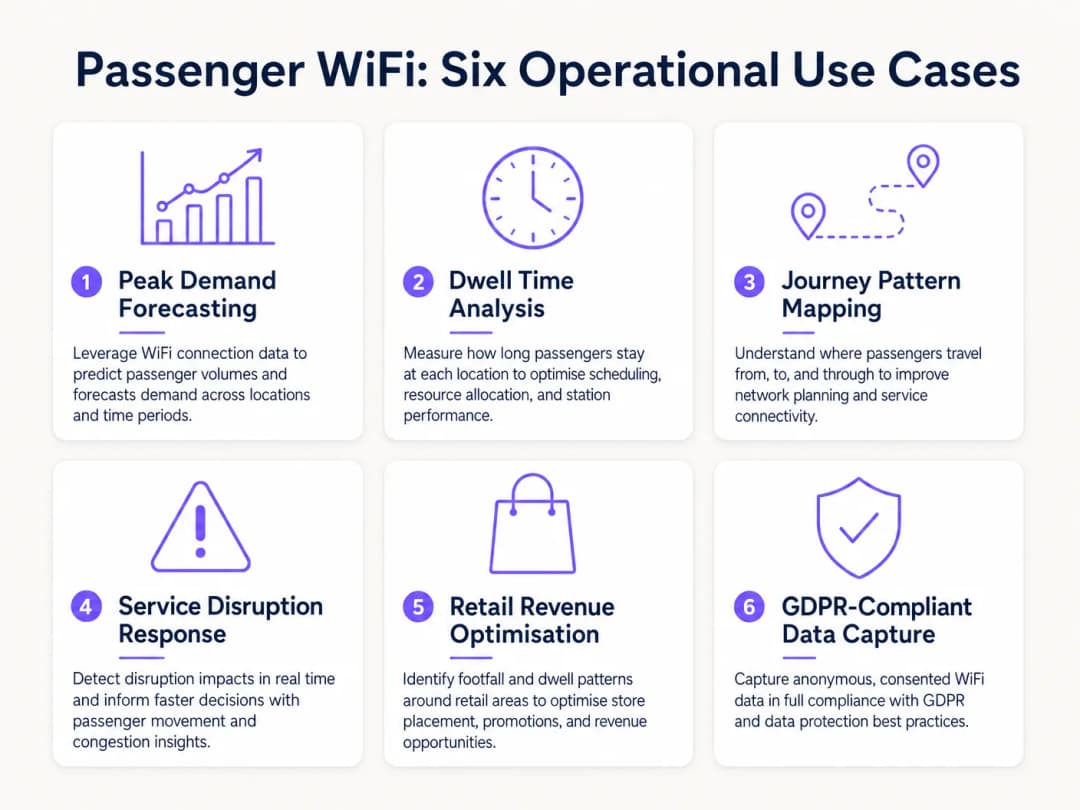
Caso di studio reale: Rete ferroviaria intercity
Un importante operatore ferroviario intercity del Regno Unito ha implementato l'analisi WiFi in dodici stazioni capolinea per ridurre il sovraffollamento sulle banchine. Correlando i picchi di connessione WiFi con gli orari di partenza dei treni, il team operativo ha identificato che si verificava un affollamento pericoloso su banchine specifiche 40 minuti prima della partenza. I dati hanno rivelato che i passeggeri arrivavano prima del previsto a causa di una segnaletica digitale poco chiara nell'atrio principale. Modificando la tempistica degli annunci delle banchine sui tabelloni delle partenze, l'operatore ha reso più fluido il flusso dei passeggeri, riducendo la densità di picco sulle banchine del 22% e migliorando la sicurezza generale.
Caso di studio reale: Operazioni del terminal traghetti
Un operatore di traghetti regionali che gestisce un intenso traffico estivo ha utilizzato l'analisi dei tempi di permanenza WiFi per ottimizzare la strategia commerciale del terminal. Il dashboard analitico ha evidenziato che i passeggeri in attesa per partenze ritardate avevano un tempo di permanenza medio di 45 minuti nel terminal, ma solo il 12% entrava nella zona commerciale secondaria. Riposizionando la segnaletica digitale e attivando notifiche push automatizzate tramite il Captive Portal che offrivano sconti sul caffè durante i ritardi, l'operatore ha aumentato la conversione retail del 18% durante gli eventi di disservizio.
Risoluzione dei problemi e mitigazione dei rischi
Quando implementano l'analisi dei dati WiFi dei passeggeri, i team IT devono mitigare diversi scenari di errore comuni:
- Diluizione dei dati dai dispositivi del personale: La mancata esclusione dei dispositivi del personale (ad es. addetti alle pulizie, personale di vendita) distorce in modo significativo le metriche del tempo di permanenza. Implementa un filtro rigoroso degli indirizzi MAC o un SSID dedicato per il personale per garantire che i dati dei passeggeri rimangano puliti.
- Mancata Conformità: L'acquisizione dei dati dei dispositivi senza un consenso esplicito o una base giuridica documentata viola il GDPR. Assicurati che il tuo Captive Portal delinei chiaramente la policy sul trattamento dei dati e acquisisca il consenso esplicito laddove richiesto.
- Colli di Bottiglia del Backhaul: I sistemi di bordo che si affidano a un backhaul cellulare (LTE/5G) affrontano spesso limitazioni di larghezza di banda. Assicurati che la tua architettura memorizzi localmente i dati analitici durante le interruzioni di connettività e li sincronizzi in modo asincrono per prevenire la perdita di dati senza influire sulla velocità di navigazione dei passeggeri.
ROI e Impatto Aziendale
Il ritorno sull'investimento per l'analisi del WiFi dei passeggeri va ben oltre il reparto IT. Trattando la rete come una risorsa di intelligence, gli operatori possono:
- Ottimizzare l'Allocazione delle Risorse: Allineare il personale di stazione, i programmi di pulizia e le pattuglie di sicurezza con i dati empirici sull'afflusso di persone piuttosto che con orari statici.
- Guidare i Ricavi Retail: Fornire ai partner commerciali metriche accurate sull'afflusso e sulla conversione, supportando canoni di locazione premium nelle zone ad alto traffico.
- Migliorare l'Esperienza dei Passeggeri: Identificare i punti di attrito nel percorso in stazione e gestire proattivamente il sovraffollamento, proprio come il settore Healthcare utilizza una tecnologia simile per comprendere il flusso dei pazienti. Per contestualizzare le applicazioni intersettoriali, consulta How WiFi Can Improve Patient Experience in Hospitals.
Integrando l'analisi del WiFi nelle strategie operative fondamentali, gli operatori di trasporto nel settore Transport possono passare da una gestione reattiva a una fornitura di servizi proattiva e guidata dai dati.
Definizioni chiave
Randomizzazione degli indirizzi MAC
Una funzione di privacy nei moderni sistemi operativi (iOS, Android) che genera un indirizzo MAC temporaneo e casuale per ogni rete WiFi a cui il dispositivo si connette.
I team IT devono tenere conto di questo aspetto poiché impedisce il tracciamento dei visitatori ricorrenti utilizzando solo gli identificativi hardware, rendendo necessaria l'autenticazione tramite Captive Portal.
Tempo di sosta
La durata totale in cui un dispositivo rimane connesso o visibile alla rete WiFi all'interno di una specifica zona fisica.
Utilizzato dai direttori operativi per misurare quanto tempo i passeggeri attendono sulle banchine o trascorrono nelle aree commerciali, con un impatto diretto sulla pianificazione commerciale e della sicurezza.
Captive Portal
Una pagina web che gli utenti devono visualizzare e con cui devono interagire prima di poter accedere a una rete WiFi pubblica.
Il meccanismo principale per acquisire il consenso dell'utente, applicare i termini di servizio e raccogliere dati di marketing di prima parte.
IEEE 802.11ax (WiFi 6)
L'attuale standard per le reti wireless, progettato per migliorare le prestazioni in ambienti ad alta densità.
Essenziale per gli hub di trasporto come stadi e stazioni ferroviarie in cui migliaia di dispositivi tentano di connettersi simultaneamente.
RSSI (Received Signal Strength Indicator)
Una misura della potenza presente in un segnale radio ricevuto.
I motori di analisi utilizzano i valori RSSI di più access point per triangolare la posizione fisica di un dispositivo all'interno di una struttura.
Isolamento dei client
Una funzione di sicurezza che impedisce ai dispositivi connessi alla stessa rete WiFi di comunicare direttamente tra loro.
Critico per il WiFi pubblico dei passeggeri per impedire ad attori malintenzionati di scansionare o attaccare i dispositivi di altri utenti sulla rete.
Footfall
Il numero totale di dispositivi univoci rilevati dalla rete WiFi entro un intervallo di tempo specifico.
Fornisce ai gestori delle stazioni un indicatore accurato del volume totale dei passeggeri, indipendente dalle vendite dei biglietti.
Cellular Backhaul
L'uso di reti cellulari (LTE/5G) per connettere una rete WiFi locale (come su un autobus o un treno) a internet.
Il principale costo operativo continuo (OPEX) per le implementazioni WiFi a bordo, che richiede un'attenta gestione della larghezza di banda.
Esempi pratici
Un importante operatore di una stazione ferroviaria riscontra un forte affollamento sul binario 4 durante il picco serale. Deve capire da dove provengono questi passeggeri all'interno della stazione (ad esempio, atrio principale rispetto alla zona commerciale) per migliorare il flusso.
- Distribuire access point ad alta densità IEEE 802.11ax nell'atrio, nelle zone commerciali e sul binario 4 per garantire una copertura contigua.
- Configurare la piattaforma di analisi per definire "Zone" logiche per ciascuna area.
- Analizzare i report "Transizione da zona a zona" nel pannello di controllo delle analisi durante la fascia oraria 16:00 - 19:00.
- Identificare le zone di origine principali per i dispositivi che arrivano al binario 4.
- Se i dati mostrano un collo di bottiglia originato dal corridoio della zona commerciale, il team operativo può impiegare personale per reindirizzare il flusso o aggiornare la segnaletica digitale per instradare i passeggeri attraverso un ingresso secondario dell'atrio.
Un operatore di autobus regionali desidera offrire il WiFi gratuito a bordo, ma deve giustificare i costi del backhaul cellulare al direttore commerciale acquisendo dati di marketing.
- Implementare un Captive Portal gestito in cloud per la rete WiFi di bordo.
- Configurare il portale per richiedere l'autenticazione tramite e-mail o social login (ad esempio, Facebook, Google).
- Assicurarsi che il portale includa un'informativa sulla privacy chiara e conforme al GDPR e caselle di spunta per il consenso alle comunicazioni di marketing.
- Integrare l'acquisizione dei dati del Captive Portal direttamente con il CRM o la piattaforma di e-mail marketing dell'operatore tramite API.
- Monitorare il volume dei nuovi consensi di marketing generati per tratta e calcolare il costo per acquisizione (CPA) equivalente per giustificare i costi operativi (OPEX) del backhaul.
Domande di esercitazione
Q1. Il tuo terminal traghetti ha implementato i sistemi di WiFi analytics, ma il tempo medio di permanenza nella sala d'attesa principale risulta essere di 8,5 ore, il che è impossibile visto l'orario delle partenze. Qual è la causa più probabile e come si può risolvere?
Suggerimento: Considera quali altri dispositivi potrebbero essere posizionati in modo permanente all'interno o nei pressi della sala d'attesa.
Visualizza risposta modello
Il motore di analisi sta probabilmente rilevando dispositivi statici (ad es. smart TV, segnaletica digitale, sistemi per punti vendita) o dispositivi del personale che rimangono nella sala tutto il giorno. La soluzione consiste nell'identificare gli indirizzi MAC di questi dispositivi noti e configurare la piattaforma di analisi per filtrarli ed escluderli dal set di dati.
Q2. Un operatore di autobus vuole monitorare quanti passeggeri percorrono l'intera tratta di un percorso specifico rispetto a quanti scendono prima. L'operatore si affida esclusivamente al tracciamento anonimo dell'indirizzo MAC dall'access point di bordo. Perché questi dati potrebbero non essere accurati?
Suggerimento: Pensa a come i moderni smartphone gestiscono le connessioni di rete per proteggere la privacy.
Visualizza risposta modello
I moderni smartphone utilizzano la randomizzazione dell'indirizzo MAC. Durante la connessione al WiFi dell'autobus, la sessione viene tracciata accuratamente. Tuttavia, se un dispositivo si disconnette (ad esempio va in standby) e si riconnette più avanti lungo il percorso, potrebbe presentare un nuovo indirizzo MAC, apparendo come un nuovo passeggero anziché come la continuazione dello stesso viaggio. Per tracciare con precisione i viaggi completi è necessario implementare un captive portal per l'autenticazione.
Q3. Stai implementando il WiFi in una grande stazione ferroviaria con un atrio ad alta densità. Per garantire un'acquisizione sicura dei dati e proteggere i passeggeri, quali due configurazioni critiche di sicurezza di rete devono essere abilitate sull'SSID pubblico?
Suggerimento: Uno impedisce ai dispositivi di comunicare tra loro; l'altro impedisce l'accesso a siti dannosi.
Visualizza risposta modello
- L'isolamento dei client (isolamento Layer 2) deve essere abilitato per impedire ai dispositivi dei passeggeri di comunicare tra loro o di attaccarsi a vicenda sulla rete locale. 2. Il filtraggio DNS deve essere implementato per bloccare l'accesso a domini dannosi noti, siti di phishing e contenuti inappropriati.
Continua a leggere questa serie
Misurare il ROI aziendale del guest WiFi e della Location analytics
Questa guida tecnica mostra ai team IT e ai gestori delle sedi come misurare il ROI del guest WiFi attraverso un percorso tracciabile che va dallo stato della rete e dai dati raccolti previo consenso fino ai risultati operativi o commerciali convalidati. Distingue le prove misurabili dalle ipotesi, associa Purple Connect, Capture e Engage al corretto livello di misurazione e fornisce scenari di pianificazione per hotel, complessi retail e spazi per eventi.
Privacy by Design: Anonimizzare i Dati WiFi per la Conformità al GDPR
Questa guida autorevole descrive dettagliatamente l'architettura tecnica e le strategie di implementazione per l'anonimizzazione dei dati WiFi al fine di garantire la conformità al GDPR. Fornisce ai responsabili IT e agli architetti di rete framework operativi per bilanciare analisi avanzate delle presenze e rigorosi requisiti di riservatezza dei dati.
Heatmapping vs Analisi delle Presenze: Differenze Tecniche
Questa guida tecnica autorevole illustra in dettaglio le differenze strutturali e operative fondamentali tra l'heatmapping WiFi e l'analisi delle presenze per i gestori di grandi spazi aziendali. Fornisce ai responsabili IT, ai progettisti di rete e ai direttori operativi schemi di implementazione pratici, scenari reali e best practice indipendenti dai fornitori per massimizzare il ROI dall'infrastruttura wireless esistente.
Hai domande sulla tua configurazione specifica?
Il nostro team collabora con gestori di sedi, responsabili IT e ingegneri di rete in 80.000 sedi. Prenota una chiamata di 20 minuti e ti mostreremo come altri professionisti come te hanno risolto il problema.