
Staff WiFi Policies for Retail: Securing Back-of-House Networks
This guide covers the critical technical and policy requirements for securing retail back-of-house WiFi networks - from VLAN segmentation and PCI DSS 4.0 compliance to managing employee BYOD on the shop floor. It gives IT managers, network architects, and operations directors a practical, vendor-neutral blueprint they can act on this quarter.
Listen to this guide
View podcast transcript

Executive summary
Securing retail back-of-house WiFi is a critical operational mandate. As retail environments become increasingly connected, the boundary between the shop floor and the back office blurs. Staff use mobile point-of-sale (mPOS) devices, handheld inventory scanners, and personal smartphones on the same physical premises as customer Guest WiFi . Without rigorous network segmentation, this convergence creates a massive attack surface.
PCI DSS 4.0, fully enforced as of March 2025, demands stricter controls, continuous monitoring, and documented segmentation testing every six months. A single misconfigured access point or a compromised staff device can expose the Cardholder Data Environment (CDE), leading to data breaches and severe financial penalties. The 2013 Target breach - which cost $18.5 million in settlements - began with an attacker entering through a third-party HVAC system on the same flat network as the POS systems. That lesson still applies today.
This guide provides a practical, vendor-neutral blueprint for implementing robust staff WiFi policies. We cover the technical architecture required to isolate back-of-house systems, manage employee BYOD access, and maintain compliance without crippling operational efficiency. For a broader view of enterprise security architecture, see our Enterprise WiFi Security: A Complete Guide for 2026 .
Technical deep-dive: architecture and segmentation
The foundation of secure retail WiFi is logical isolation. A flat network is a compromised network. Best practices dictate a layered architecture that separates responsibilities across distinct network zones.
The four-zone retail network model
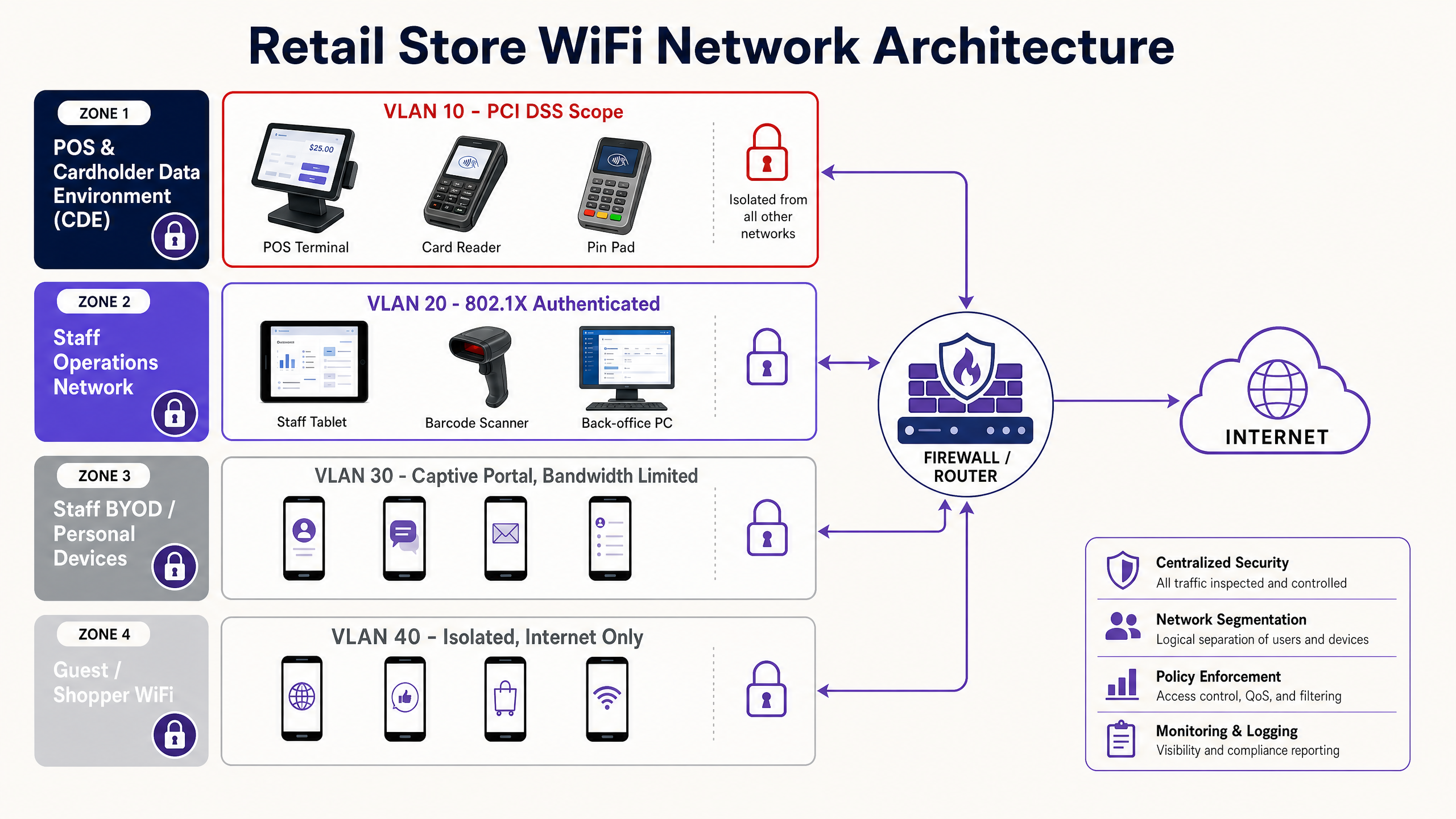
Retail store networks must be segmented using Virtual Local Area Networks (VLANs) to isolate traffic types. A standard deployment requires at least four distinct zones.
Zone 1 - Cardholder Data Environment (CDE), VLAN 10. This is the most critical segment. It houses fixed POS terminals, payment gateways, and any device that processes or transmits credit card data. This VLAN must be strictly isolated from all other networks. The tighter you lock down the CDE, the smaller your PCI DSS audit scope becomes - saving significant time and cost on annual assessments.
Zone 2 - Staff Operations Network, VLAN 20. This segment supports business-critical devices that do not handle payment data: inventory scanners, back-office PCs, manager tablets, and VoIP phones. Access must be tightly controlled using 802.1X authentication.
Zone 3 - Staff BYOD / Personal Devices, VLAN 30. Employee personal smartphones and tablets belong here. This network should provide internet access only, completely isolated from all internal corporate resources. Bandwidth controls are essential to prevent staff streaming from degrading operational network performance.
Zone 4 - Guest / Shopper WiFi, VLAN 40. This is the public-facing network for customers. It must be logically separated from all internal systems and routed directly to the internet. For a detailed guide on deploying this layer, see our Retail industry resources.
| VLAN | Zone | Devices | Authentication | Internet | Internal Access |
|---|---|---|---|---|---|
| 10 | CDE / POS | POS terminals, card readers | WPA3-Enterprise + 802.1X | No | Payment gateway only |
| 20 | Staff Operations | Scanners, back-office PCs, tablets | WPA3-Enterprise + 802.1X | Restricted | Inventory DB, VoIP |
| 30 | Staff BYOD | Personal smartphones, personal laptops | Captive portal + corporate SSO | Yes | None |
| 40 | Guest WiFi | Shopper devices | Captive portal | Yes | None |
Authentication protocols
Securing the Staff Operations Network requires robust authentication. Pre-Shared Keys (PSKs) are insufficient for enterprise environments. If a single employee leaves, the PSK must be rotated across all devices. Nobody actually does this, which means the network remains compromised indefinitely.
Instead, deploy IEEE 802.1X authentication using a RADIUS server. This standard provides port-based network access control, ensuring that only authorised devices and users can connect to the corporate VLAN. For the highest security posture, deploy WPA3-Enterprise, which mandates 256-bit encryption and server certificate validation.
When managing a fleet of corporate-owned devices - like mPOS tablets or inventory scanners - use Mobile Device Management (MDM) to push unique client certificates to each device. This is the EAP-TLS method. It eliminates passwords entirely and ensures that only managed devices can access the operations network. If a device is lost or stolen, revoke its certificate instantly from the MDM console without affecting any other device on the network.
For environments where EAP-TLS is not yet feasible, PEAP (Protected Extensible Authentication Protocol) with MSCHAPv2 provides a reasonable intermediate step, using username and password credentials tunnelled inside a TLS session.
Implementation guide: deploying staff BYOD policies
Managing employee personal devices on the shop floor presents a unique challenge. Banning them entirely is often culturally unfeasible, but allowing unrestricted access is a security risk.
The captive portal approach
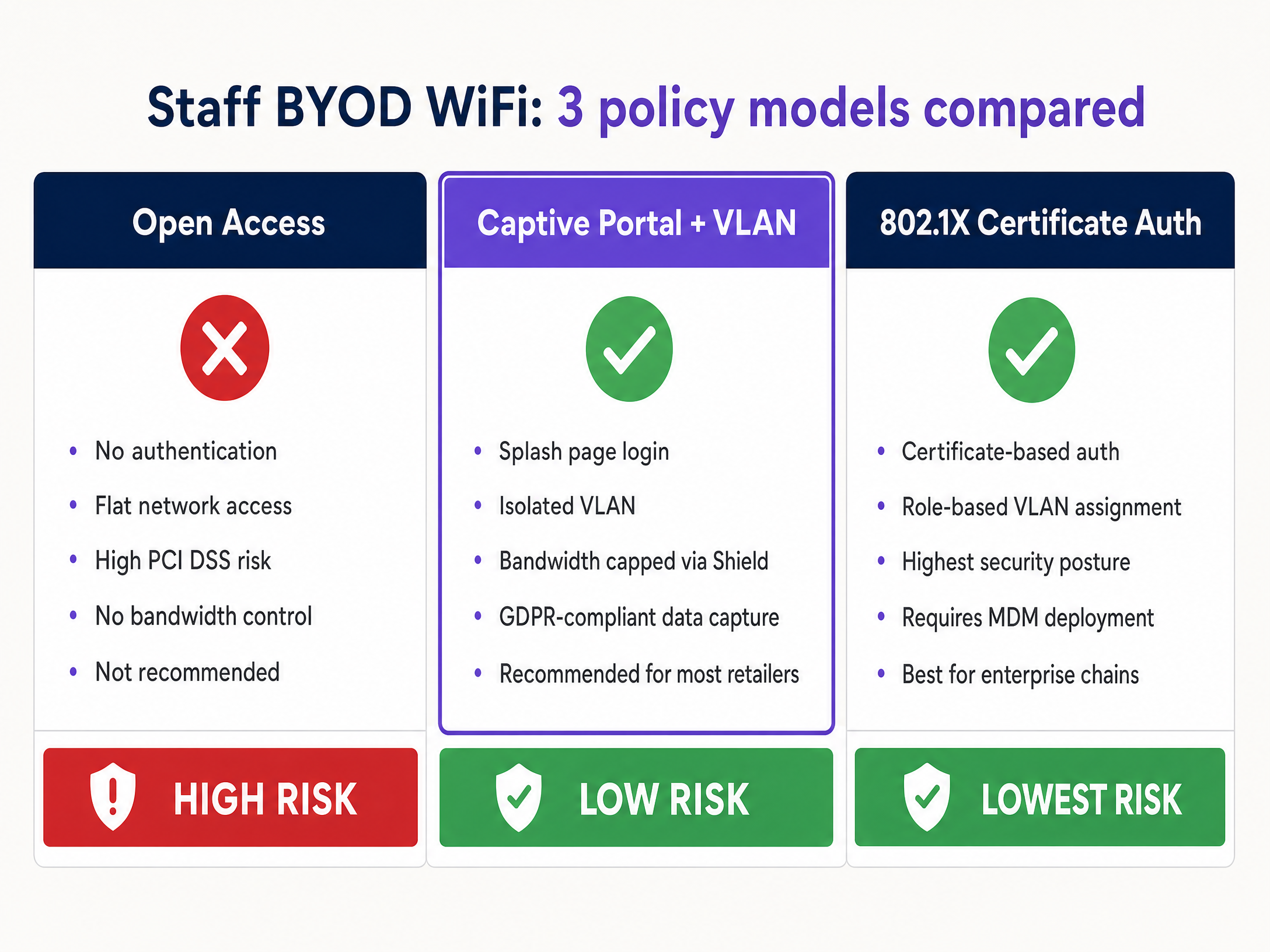
For most retail environments, the most practical approach for Staff BYOD is a dedicated SSID backed by a captive portal, similar to a Guest WiFi deployment but tailored for employees.
Step 1 - Isolation. The BYOD SSID must map to a dedicated VLAN (VLAN 30) that only routes to the internet. It must have zero access to the CDE or the Staff Operations Network. Enforce this with explicit deny rules in your ACLs.
Step 2 - Authentication. Require staff to authenticate via the captive portal using their corporate credentials. Integrate with Microsoft Entra ID, Okta, or Google Workspace to provide single sign-on. This creates an audit trail of who is connected and when - critical for both security investigations and GDPR compliance.
Step 3 - Bandwidth management. Deploy Purple Shield to enforce strict bandwidth limits on the BYOD network. Cap individual user speeds - typically 2-5 Mbps is sufficient for personal use - and block high-bandwidth application categories like video streaming. This guarantees that personal device usage never starves core retail operations of the bandwidth they need to process payments and sync inventory.
Step 4 - Policy acceptance. The captive portal must require employees to explicitly accept the company's Acceptable Use Policy (AUP) before granting access. Under GDPR, this creates a documented record of consent for any data processing associated with network access.
Hardware integration
Ensure your chosen access points and controllers support dynamic VLAN assignment and robust QoS policies. Enterprise hardware from Cisco Meraki, HPE Aruba, Ruckus, Juniper Mist, Ubiquiti UniFi, Cambium, Extreme, and Fortinet all support these capabilities. Purple operates as a hardware-agnostic cloud overlay, integrating with all of these platforms to deliver consistent policy enforcement and analytics across your entire estate.
Best practices for retail environments
Continuous compliance monitoring. PCI DSS 4.0 shifts the focus from annual audits to continuous compliance. Implement automated logging and centralised monitoring to detect unauthorised access attempts or configuration drift. Every access event on VLAN 10 should generate a log entry.
Regular segmentation testing. Requirement 11.4.5 of PCI DSS 4.0 mandates that segmentation controls must be tested at least every six months. Do not assume your VLANs are secure; prove it through penetration testing. VLAN bleed - where traffic inadvertently crosses zone boundaries due to a misconfigured switch port or ACL - is the most common cause of PCI audit failures.
Disable legacy protocols. Ensure all access points reject outdated, vulnerable protocols like WEP and WPA/WPA2-TKIP. Enforce WPA2-AES as a minimum, and transition to WPA3 wherever hardware supports it. Legacy protocol support is a common misconfiguration that creates unnecessary vulnerabilities.
Physical security. Secure the physical access points. A rogue device plugged into an exposed ethernet port in the stockroom can bypass all wireless security controls. Implement Wireless Intrusion Prevention Systems (WIPS) to detect and neutralise rogue access points automatically. Hardware vendors including Cisco Meraki and HPE Aruba include WIPS capabilities in their enterprise access points.
Multifactor authentication for admins. PCI DSS 4.0 requires MFA for all privileged admin accounts. If your network engineers manage the wireless infrastructure, they must use MFA to access the management console.
Troubleshooting and risk mitigation
Common failure modes
VLAN bleed. Misconfigured switch ports or router rules can allow traffic to jump between VLANs. This is the most common cause of PCI audit failures. Regularly audit Access Control Lists and re-test segmentation after any firmware updates or infrastructure changes.
Rogue access points. Employees may plug consumer-grade WiFi routers into corporate ethernet ports to improve signal in the break room. This completely bypasses enterprise security controls. Deploy WIPS to detect and block these automatically. Educate staff that this is a disciplinary matter, not just an IT inconvenience.
Credential sharing. If using a single PSK for staff operations, credential sharing is inevitable. Transition to 802.1X to tie authentication to individual user identities or device certificates. This also provides the audit trail required by PCI DSS.
Certificate expiry. When using EAP-TLS, client certificates have expiry dates. An expired certificate will silently fail authentication, locking devices off the network. Implement automated certificate renewal through your MDM and set alerts for certificates expiring within 30 days.
Bandwidth contention. Without QoS policies, a single staff member streaming 4K video can saturate the shared radio frequency and degrade POS transaction speeds. Purple Shield addresses this directly by enforcing per-user and per-category bandwidth limits on the BYOD VLAN.
ROI and business impact
Implementing a robust staff WiFi policy requires investment in enterprise-grade hardware and management software, but the return is clear and measurable.
The average cost of a retail data breach exceeds $3 million, factoring in fines, remediation, and reputational damage. Proper segmentation is the most effective control against this risk. The PCI SSC estimates that organisations with documented, tested segmentation reduce their audit scope by up to 60%, directly reducing the cost of annual compliance assessments.
Bandwidth management via Purple Shield ensures that critical retail operations - processing payments, syncing inventory, running mPOS devices - are never delayed by staff streaming in the break room. This protects revenue during peak trading hours.
A structured BYOD policy also improves staff morale. Providing a sanctioned, controlled option for personal device usage - rather than an outright ban - reduces friction and demonstrates that the organisation takes a balanced approach to technology policy.
For organisations measuring the broader return on their WiFi investment, see our guide on Measuring the Business ROI of Guest WiFi and Location Analytics .
Purple operates across 80,000+ live venues and has processed 440 million logins in 2024, providing the scale and data to inform policies that work in practice, not just in theory. Our platform is ISO 27001 certified, GDPR and CCPA compliant, and Cyber Essentials certified - giving you confidence that the infrastructure underpinning your network policies meets the same standards you are trying to enforce.
References
[1] BizTech Magazine, "Understanding PCI DSS 4.0: A Guide for IT Leaders in Retail" (May 2024). https://biztechmagazine.com/article/2024/05/pci-dss-40-guide-for-retail-it-leaders-perfcon
[2] PDI Technologies, "Enterprise Retail Network Architecture: Build a Scalable, Secure Foundation for Growth". https://security.pditechnologies.com/blog/enterprise-retail-network-architecture/
[3] SecureW2, "What Is 802.1X? IEEE 802.1X Authentication". https://securew2.com/protocols/802-1x-authentication-configuration
[4] Cloud4Wi, "5 best practices for strengthening enterprise WiFi security" (March 2024). https://cloud4wi.ai/resources/enterprise-wifi-security-best-practices-revealed/
[5] OpenMetal, "Building PCI DSS Compliant Infrastructure for Payment Processors" (April 2026). https://openmetal.io/resources/blog/building-pci-dss-compliant-infrastructure-for-payment-processors/
Key Definitions
VLAN (Virtual Local Area Network)
A logical grouping of network devices that isolates traffic at Layer 2, even if they share the same physical switches and access points. Traffic between VLANs must pass through a router or firewall, where access control rules can be enforced.
The primary tool for separating POS systems from staff and guest networks to meet PCI DSS requirements without deploying separate physical hardware at every location.
PCI DSS 4.0
The latest version of the Payment Card Industry Data Security Standard, fully enforced from March 2025. It introduces 64 new requirements focused on continuous monitoring, stricter multifactor authentication, and documented segmentation testing every six months.
Any retailer processing credit or debit card payments must comply. Non-compliance results in fines from card networks and, in the event of a breach, significantly higher liability.
802.1X
An IEEE standard for port-based network access control. It requires devices to authenticate against a RADIUS server before being granted network access, using methods like EAP-TLS (certificates) or PEAP (username and password).
Replaces shared PSKs for enterprise WiFi. Ties network access to individual user or device identities, enabling instant revocation and providing the audit trail required by PCI DSS.
CDE (Cardholder Data Environment)
The specific area of the network that stores, processes, or transmits payment card data. Defined by PCI DSS as the primary scope of compliance assessment.
Isolating the CDE onto its own VLAN reduces the number of systems in scope for a PCI audit, directly reducing compliance cost and complexity.
Captive portal
A web page that users must view and interact with before being granted network access. Typically used to require login, display terms of service, or collect consent.
Used for both Guest WiFi and Staff BYOD networks to enforce authentication, capture consent under GDPR, and provide an audit trail of network access.
WPA3-Enterprise
The latest WiFi security protocol for enterprise environments, offering 256-bit encryption (GCMP-256) and mandatory server certificate validation to prevent man-in-the-middle attacks.
The recommended security standard for retail operations networks. Prevents attackers from deploying a rogue access point with the same SSID to intercept staff credentials.
MDM (Mobile Device Management)
Software used by IT teams to control, secure, and enforce policies on smartphones, tablets, and other endpoints. Capabilities include remote wipe, certificate deployment, and application management.
Essential for deploying EAP-TLS certificates to corporate-owned retail scanners and mPOS devices at scale, and for revoking access instantly when a device is lost or an employee leaves.
Rogue access point
An unauthorised wireless router connected to the corporate network, typically by an employee seeking better signal coverage. It bypasses all enterprise security controls including firewalls and VLAN segmentation.
A significant and common threat in retail back-of-house environments. Requires Wireless Intrusion Prevention Systems (WIPS) to detect and neutralise automatically.
EAP-TLS (Extensible Authentication Protocol - Transport Layer Security)
A certificate-based authentication method used within 802.1X. Both the client and the server present certificates, providing mutual authentication and eliminating password-based attacks.
The strongest available authentication method for corporate device fleets. Requires an MDM to distribute client certificates but provides the highest security posture.
RADIUS (Remote Authentication Dial-In User Service)
A networking protocol that provides centralised authentication, authorisation, and accounting (AAA) for network access. Acts as the authentication server in an 802.1X deployment.
The server-side component of enterprise WiFi authentication. Can integrate with identity providers like Microsoft Entra ID, Okta, and Google Workspace to use existing corporate credentials.
Worked Examples
A national supermarket chain with 400 locations needs to deploy mobile inventory scanners to shop floor staff. Currently, the stores use a single WPA2-PSK network for all operations - POS, back-office PCs, and staff devices all share the same SSID. How should they architect the new scanner deployment?
- Create a dedicated SSID for the inventory scanners, separate from the existing operational network. 2. Map this SSID to a new VLAN (VLAN 20 - Staff Operations) that is fully isolated from the POS environment (VLAN 10 - CDE). 3. Implement 802.1X authentication using a RADIUS server. 4. Deploy an MDM solution to push unique client certificates (EAP-TLS) to each scanner. 5. Configure ACLs to allow the scanners to communicate only with the central inventory management database, blocking all other internal and internet traffic. 6. Simultaneously, migrate the POS systems to their own dedicated VLAN 10 with strict isolation rules. 7. Retire the flat WPA2-PSK network entirely once migration is complete.
A large department store is experiencing slow POS transaction times during lunch hours. Investigation reveals that staff are connecting personal smartphones to the back-office WiFi network to stream video. The IT team wants to resolve this without banning personal devices, as HR has flagged that an outright ban would damage morale.
- Create a dedicated 'Staff BYOD' SSID mapped to an isolated VLAN 30 that provides internet access only. 2. Implement a captive portal requiring staff to authenticate with their Microsoft Entra ID credentials. 3. Deploy Purple Shield on VLAN 30 to enforce a per-user bandwidth cap of 2 Mbps and block video streaming application categories. 4. Update the back-office SSID (VLAN 20) to use 802.1X authentication, removing the PSK that personal devices were using to access it. 5. Communicate the new BYOD SSID to all staff alongside the updated Acceptable Use Policy. 6. Monitor bandwidth utilisation on both VLANs for two weeks post-deployment to confirm POS performance has recovered.
Practice Questions
Q1. A store manager requests that their personal laptop be added to the Staff Operations network (VLAN 20) so they can print schedules directly to the back-office printer. The manager argues that they are a trusted employee and the laptop is used only for work. How should IT respond, and what alternative should they offer?
Hint: Consider the risks of unmanaged devices on the operations VLAN, regardless of the owner's trustworthiness.
View model answer
Deny the request. Personal, unmanaged devices must never be placed on the Staff Operations network. The risk is not the manager's intent but the device's security posture - an unmanaged laptop may lack endpoint protection, have outdated software, or carry malware unknowingly. Placing it on VLAN 20 creates a potential pivot point into the CDE. The correct alternative is either to issue a corporate-managed device for operational tasks (enrolled in MDM with certificates deployed), or to update the printing architecture to support secure cloud printing accessible from the BYOD VLAN, which is isolated from internal systems.
Q2. During a network audit, you discover that the Guest WiFi VLAN (VLAN 40) and the POS VLAN (VLAN 10) share the same physical switch, but are logically separated by ACLs. A junior engineer flags this as a PCI DSS violation and recommends deploying separate physical switches. Is the engineer correct?
Hint: Review the PCI DSS definition of logical versus physical segmentation.
View model answer
The engineer is not correct. PCI DSS allows for logical segmentation using VLANs on shared physical infrastructure, provided the switch is correctly configured with strict ACLs that prevent traffic from crossing between VLANs. Physical separation is not required. However, this configuration requires rigorous, documented testing every six months (per PCI DSS 4.0 Requirement 11.4.5) to prove the isolation holds. The audit should verify that the ACLs are correctly configured and that the switch firmware is up to date. Deploying separate physical switches would increase cost without improving security if the logical controls are correctly implemented and tested.
Q3. Your retail chain is deploying 500 new mPOS tablets across 50 stores. The tablet vendor suggests using a single, complex WPA3-PSK for all 500 devices to simplify deployment. Your security team is uncomfortable with this. Who is right, and what is the correct approach?
Hint: Think about what happens when a single tablet is lost, or when an employee is terminated.
View model answer
Your security team is correct. Using a single PSK across a large fleet is a persistent security risk. If one tablet is lost or stolen, the PSK must be changed on all 500 devices simultaneously to maintain security - an operational nightmare that typically does not happen, leaving the network compromised indefinitely. The correct approach is to use WPA3-Enterprise with 802.1X certificate-based authentication (EAP-TLS), deploying unique client certificates to each tablet via MDM. This allows individual devices to be revoked instantly without affecting the rest of the fleet. The initial deployment effort is higher, but the ongoing security posture and operational manageability are significantly better.
Q4. Six months after deploying your four-zone VLAN architecture, a routine penetration test reveals that a device on VLAN 30 (Staff BYOD) can reach an internal file server on VLAN 20 (Staff Operations). No one has deliberately changed the configuration. What are the most likely causes, and how do you remediate?
Hint: Consider what events might have changed network configuration without a deliberate policy change.
View model answer
The most likely causes are: (1) a firmware update on the core switch or firewall that reset or modified ACL rules to a default state; (2) a new switch port added during a store refurbishment that was not correctly tagged to the right VLAN; or (3) a misconfigured access point that is broadcasting the BYOD SSID but assigning devices to the wrong VLAN. Remediation steps: immediately block the identified traffic path by updating the ACL; audit all switch port configurations against the documented baseline; review the firmware update changelog for any ACL-related changes; re-run the penetration test to confirm the fix; and update the change management process to require a segmentation test after any infrastructure change, not just on the six-month schedule.
Continue reading in this series
Staff WiFi Terms and Conditions: Legal and Compliance Essentials
This guide covers the legal and technical essentials of drafting and enforcing staff WiFi terms and conditions for enterprise venues. It details what to include in an Acceptable Use Policy (AUP), how to meet GDPR and PCI DSS requirements, and how to deploy identity-based authentication and network segmentation to protect corporate assets. IT managers, HR teams, and operations directors at hotels, retail chains, stadiums, and public-sector organisations will find actionable guidance they can implement this quarter.
The Future of Wi-Fi Security: AI-Driven NAC and Threat Detection
This authoritative guide explores the evolution of enterprise Wi-Fi security from legacy WPA2 to AI-driven Network Access Control (NAC) and threat detection. Designed for IT leaders, it provides actionable deployment strategies for securing high-density environments like retail, hospitality, and stadiums using Purple's identity-based networks.
The Future of Wi-Fi Security: AI-Driven NAC and Threat Detection
This authoritative guide explores the evolution of enterprise Wi-Fi security from legacy WPA2 to AI-driven Network Access Control (NAC) and threat detection. Designed for IT leaders, it provides actionable deployment strategies for securing high-density environments like retail, hospitality, and stadiums using Purple's identity-based networks.