
নিরাপদ নেটওয়ার্ক অ্যাক্সেসের জন্য ইউজার অনবোর্ডিং সহজতর করা
এই নির্দেশিকাটি আইটি ম্যানেজার, নেটওয়ার্ক আর্কিটেক্ট এবং ভেন্যু অপারেশনস ডিরেক্টরদের জন্য নিরাপদ নেটওয়ার্ক অ্যাক্সেসের জন্য ইউজার অনবোর্ডিং কীভাবে সহজতর করা যায় সে সম্পর্কে একটি বিস্তৃত প্রযুক্তিগত রেফারেন্স প্রদান করে। এটি সম্পূর্ণ অথেন্টিকেশন স্ট্যাক কভার করে - সেলফ-সার্ভিস Captive Portal এবং আইডেন্টিটি ফেডারেশন থেকে শুরু করে IEEE 802.1X, WPA3, RADIUS এবং OpenRoaming পর্যন্ত - যেখানে হসপিটালিটি, রিটেইল, ইভেন্ট এবং পাবলিক-সেক্টর পরিবেশের জন্য ব্যবহারিক ডেপ্লয়মেন্ট গাইডেন্স রয়েছে। এই নির্দেশিকাটি GDPR এবং PCI-DSS কমপ্লায়েন্সের প্রয়োজনীয়তা, রোল-ভিত্তিক অ্যাক্সেস কন্ট্রোল এবং MAC ক্যাশিং কৌশলগুলিকে সম্বোধন করে, যা টিমগুলিকে নিরাপত্তার সাথে আপস না করে অনবোর্ডিং জটিলতা এবং প্রশাসনিক ওভারহেড হ্রাস করতে সক্ষম করে।
এই গাইডটি শুনুন
পডকাস্ট ট্রান্সক্রিপ্ট দেখুন
আমাদের মূল সিরিজের অংশ: Enterprise WiFi সিকিউরিটি গাইড →

কার্যনির্বাহী সারসংক্ষেপ
একটি মাল্টি-ইউজার ওয়্যারলেস নেটওয়ার্ক পরিচালনাকারী যেকোনো সংস্থার জন্য - তা কোনো হোটেল গ্রুপ, রিটেইল চেইন, স্টেডিয়াম বা পাবলিক-সেক্টর সুবিধাই হোক না কেন - নেটওয়ার্কে ব্যবহারকারীদের সুরক্ষিতভাবে অনবোর্ড করার প্রক্রিয়াটি একই সাথে একটি সিকিউরিটি কন্ট্রোল পয়েন্ট এবং ব্যবহারকারীর সন্তুষ্টির সরাসরি নির্ধারক। একটি দুর্বলভাবে ডিজাইন করা অনবোর্ডিং ফ্লো সাপোর্ট ওভারহেড তৈরি করে, ব্যবহারকারীদের আপনার নেটওয়ার্কের পরিবর্তে মোবাইল ডেটা ব্যবহারে চালিত করে এবং কমপ্লায়েন্সের উদ্দেশ্যে আপনার কাছে কোনো অডিট ট্রেইল রাখে না। একটি সুপরিকল্পিত ফ্লো দশ সেকেন্ডের কম সময়ের কানেকশন টাইম, ভেরিফায়েড আইডেন্টিটি ক্যাপচার এবং সম্পূর্ণরূপে ডকুমেন্টেড কনসেন্ট রেকর্ড প্রদান করে।
এই নির্দেশিকাটি আর্কিটেকচার, অথেন্টিকেশন স্ট্যান্ডার্ড এবং ডেপ্লয়মেন্ট প্যাটার্নগুলি কভার করে যা আপনাকে সুরক্ষার সাথে আপস না করে সুরক্ষিত নেটওয়ার্ক অ্যাক্সেসের জন্য ব্যবহারকারী অনবোর্ডিংকে স্ট্রীমলাইন করতে সক্ষম করে। এটি সম্পূর্ণ স্ট্যাককে সম্বোধন করে: Captive Portal ডিজাইন, OAuth এবং SAML এর মাধ্যমে আইডেন্টিটি ফেডারেশন, RADIUS কনফিগারেশন, IEEE 802.1X ডেপ্লয়মেন্ট, WPA3 গ্রহণ, রোল-বেসড অ্যাক্সেস কন্ট্রোল এবং OpenRoaming এবং Passpoint এর মাধ্যমে স্বয়ংক্রিয় প্রভিশনিং। GDPR এবং PCI-DSS এর অধীনে কমপ্লায়েন্সের প্রয়োজনীয়তাগুলি শুরু থেকেই সংহত করা হয়েছে, পরবর্তীতে যুক্ত করার মতো বিষয় হিসেবে বিবেচনা করা হয়নি। হসপিটালিটি এবং রিটেইল সেক্টর থেকে নেওয়া দুটি বিস্তারিত কেস স্টাডি বাস্তব-বিশ্বের ডেপ্লয়মেন্ট থেকে পরিমাপযোগ্য ফলাফল প্রদর্শন করে।
Technical Deep-Dive
The Onboarding Architecture Stack
একটি আধুনিক সুরক্ষিত onboarding ডেপ্লয়মেন্ট পাঁচটি কার্যকরী স্তর নিয়ে গঠিত যা অবশ্যই একযোগে ডিজাইন করতে হবে। Guest Device Layer-এর মধ্যে রয়েছে সংযোগের চেষ্টা করা বিভিন্ন এন্ডপয়েন্টসমূহ - স্মার্টফোন, ট্যাবলেট, ল্যাপটপ এবং ক্রমবর্ধমান হারে IoT ডিভাইসসমূহ - যার প্রতিটিরই ভিন্ন ভিন্ন সাপ্লিক্যান্ট সক্ষমতা এবং পোর্টাল-হ্যান্ডলিং আচরণ রয়েছে। Captive Portal and Self-Service Layer হল ব্যবহারকারীর মুখোমুখি ইন্টারফেস: যে পয়েন্টে পরিচয় দাবি করা হয়, সম্মতি নেওয়া হয় এবং অথেনটিকেশন হ্যান্ডশেক শুরু করা হয়। Identity Provider Layer - তা অন-প্রিমিসেস RADIUS সার্ভার, ক্লাউড-ভিত্তিক IdP, বা ফেডারেটেড আইডেন্টিটি সার্ভিস যাই হোক না কেন - এখানেই ক্রেডেনশিয়াল যাচাই করা হয় এবং ইউজার অ্যাট্রিবিউট পলিসি ইঞ্জিনে ফেরত পাঠানো হয়। Policy Engine রোল-ভিত্তিক অ্যাক্সেস কন্ট্রোল প্রয়োগ করে, ইউজার অ্যাট্রিবিউটের উপর ভিত্তি করে ব্যান্ডউইথ প্রোফাইল, VLAN অ্যাসাইনমেন্ট এবং কনটেন্ট ফিল্টারিং নিয়ম প্রয়োগ করে। সবশেষে, Network Access Layer - ওয়্যারলেস কন্ট্রোলার, অ্যাক্সেস পয়েন্ট, VLAN, এবং ফায়ারওয়াল নিয়ম - আপস্ট্রিমে নির্ধারিত পলিসিগুলো প্রয়োগ করে।
প্রতিটি ডিজাইন সিদ্ধান্ত পরিচালনাকারী আর্কিটেকচারাল নীতিটি সহজবোধ্য: জটিলতা অবশ্যই ব্যাকএন্ডে থাকতে হবে, ব্যবহারকারীর সামনে নয়। Captive Portal-এ প্রতিটি অতিরিক্ত ধাপ আপনার সংযোগের হার হ্রাস করে। কিকঅফের সময় বিশ হাজার সমসাময়িক সংযোগের চেষ্টা প্রক্রিয়া করার মতো একটি স্টেডিয়াম পরিবেশে, তিনটি ফর্ম ফিল্ড এবং দুটি রিডাইরেক্ট সহ একটি পোর্টাল প্রচুর পরিমাণে সাপোর্ট রিকোয়েস্ট এবং নেটওয়ার্ক ব্যবহারের ক্ষেত্রে পরিমাপযোগ্য হ্রাস ঘটাবে।
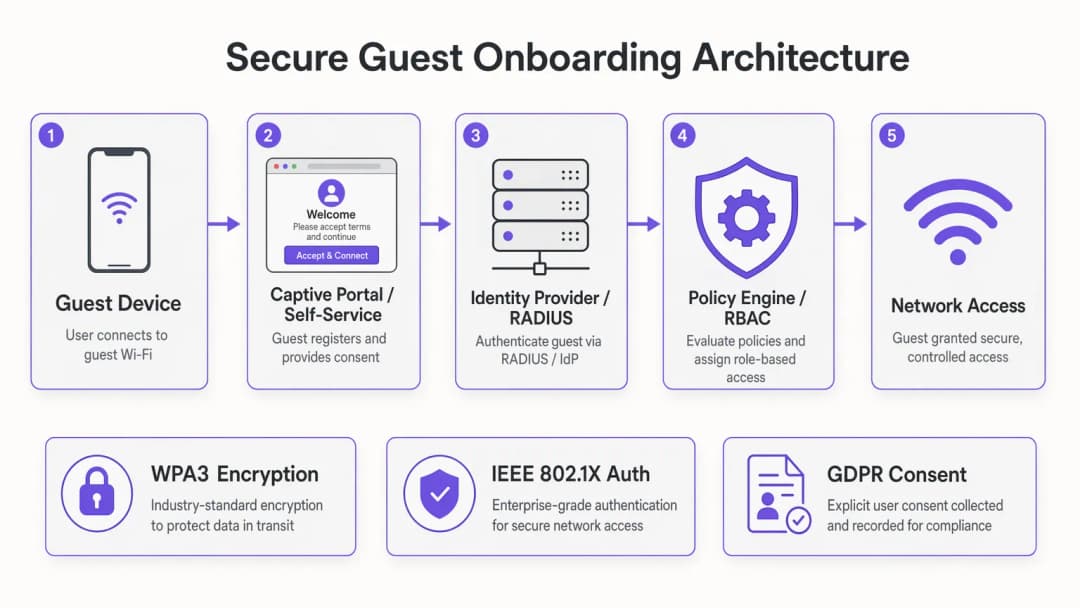
Authentication Methods: A Technical Comparison
OAuth 2.0-এর মাধ্যমে Social Login একটি বিশ্বস্ত তৃতীয় পক্ষ - Google, Apple, Facebook, বা Microsoft-এর কাছে পরিচয় যাচাইকরণের দায়িত্ব অর্পণ করে। ব্যবহারকারী তাদের বিদ্যমান ক্রেডেনশিয়াল দিয়ে অথেনটিকেট করেন, OAuth প্রদানকারী একটি অ্যাক্সেস টোকেন এবং মৌলিক প্রোফাইল ডেটা ইস্যু করে, এবং আপনার পোর্টাল সেই পরিচয়টিকে একটি নেটওয়ার্ক সেশনের সাথে ম্যাপ করে। সুরক্ষার দৃষ্টিকোণ থেকে, এটি গ্রাহক-মুখী ভেন্যুগুলিতে গেস্ট অ্যাক্সেসের জন্য অত্যন্ত উপযুক্ত। প্রধান সুবিধা হল যাচাইকৃত পরিচয়: আপনি একটি নিশ্চিত ইমেল ঠিকানা বা সোশ্যাল প্রোফাইল পান যা সরাসরি আপনার WiFi Analytics প্ল্যাটফর্ম এবং CRM-এ যুক্ত হয়। সীমাবদ্ধতা হল যে আপনি তৃতীয় পক্ষের OAuth প্রদানকারীদের প্রাপ্যতা এবং নীতিগত সিদ্ধান্তের উপর নির্ভরশীল।
ইমেল প্লাস ওয়ান-টাইম পাসকোড (OTP) কোনো সোশ্যাল অ্যাকাউন্টের প্রয়োজন ছাড়াই একটি লাইটওয়েট মাল্টি-ফ্যাক্টর অথেন্টিকেশন ফ্লো প্রয়োগ করে। ব্যবহারকারী তাদের ইমেল ঠিকানা প্রবেশ করান, একটি ছয়-সংখ্যার কোড পান এবং অথেন্টিকেশন সম্পূর্ণ করতে এটি প্রবেশ করান। এটি বিশেষ করে কনফারেন্স এবং ইভেন্ট পরিবেশের ক্ষেত্রে কার্যকর যেখানে আপনাকে যাচাই করতে হবে যে ব্যবহারকারী একজন নিবন্ধিত অংশগ্রহণকারী। এটি GDPR সম্মতি ক্যাপচারের জন্য একটি পরিচ্ছন্ন প্রক্রিয়া প্রদান করে, কারণ ইমেল জমা দেওয়া সরাসরি একটি স্পষ্ট অপ্ট-ইন চেকবক্সের সাথে যুক্ত করা যেতে পারে।
IEEE 802.1X সহ EAP-TLS হলো এন্টারপ্রাইজ গোল্ড স্ট্যান্ডার্ড। ডিভাইসটি RADIUS সার্ভারে একটি ক্লায়েন্ট সার্টিফিকেট উপস্থাপন করে, যা সার্টিফিকেট অথরিটির বিপরীতে এটি যাচাই করে এবং উপযুক্ত VLAN এবং নীতি বৈশিষ্ট্য সহ একটি RADIUS Access-Accept রিটার্ন করে। ব্যবহারকারীর দৃষ্টিকোণ থেকে, সংযোগটি সম্পূর্ণ স্বয়ংক্রিয় - কোনো পোর্টাল, কোনো পাসওয়ার্ড, কোনো ইন্টারঅ্যাকশনের প্রয়োজন নেই। এই আর্কিটেকচারের জন্য সার্টিফিকেট বিতরণ করতে পাবলিক কি ইনফ্রাস্ট্রাকচার (PKI) এবং মোবাইল ডিভাইস ম্যানেজমেন্ট (MDM) প্ল্যাটফর্মের প্রয়োজন হয়, যা এটিকে করপোরেট, স্বাস্থ্যসেবা এবং শিক্ষা পরিবেশের ম্যানেজড ডিভাইস ফ্লীটের জন্য সবচেয়ে উপযুক্ত করে তোলে। এই প্রসঙ্গে RADIUS সিকিউরিটি হার্ডেনিংয়ের বিশদ বিবরণের জন্য, Mitigating RADIUS Vulnerabilities: A Security Hardening Guide দেখুন।
সেলফ-সার্ভিস পোর্টাল সহ MAC ক্যাশিং হলো উচ্চ-ফুটফল সম্পন্ন কনজিউমার ভেন্যুগুলির জন্য সবচেয়ে ব্যবহারিক সমাধান। প্রথম সংযোগে, ব্যবহারকারী একটি লাইটওয়েট রেজিস্ট্রেশন ফ্লো সম্পন্ন করেন। পোর্টালটি সম্পূর্ণ অথেন্টিকেশন রেকর্ডের বিপরীতে ডিভাইসের MAC অ্যাড্রেস সংরক্ষণ করে। পরবর্তী সংযোগগুলিতে - একটি কনফিগারযোগ্য উইন্ডোর মধ্যে, সাধারণত ত্রিশ দিন - ডিভাইসটি পোর্টালটিকে সম্পূর্ণরূপে বাইপাস করে এবং সরাসরি সংযোগ করে। উচ্চ পুনরাবৃত্তি-ভিজিটের হার সহ আতিথেয়তা এবং খুচরা বিক্রেতা অপারেটরদের জন্য, MAC ক্যাশিং হলো সবচেয়ে প্রভাবশালী অপ্টিমাইজেশন।

OpenRoaming এবং স্বয়ংক্রিয় প্রভিশনিং
Passpoint স্ট্যান্ডার্ড (Wi-Fi Alliance) এবং IEEE 802.11u প্রোটোকলের উপর নির্মিত, OpenRoaming স্বয়ংক্রিয় অনবোর্ডিংয়ের সবচেয়ে উন্নত রূপকে উপস্থাপন করে। অংশগ্রহণকারী ডিভাইসগুলিতে একটি Passpoint প্রোফাইল থাকে যা সামঞ্জস্যপূর্ণ নেটওয়ার্কগুলিতে তাদের সনাক্ত করে। যখন ডিভাইসটি একটি OpenRoaming-সক্ষম SSID সনাক্ত করে, তখন এটি কোনো ব্যবহারকারীর ইন্টারঅ্যাকশন ছাড়াই EAP শংসাপত্র ব্যবহার করে স্বয়ংক্রিয়ভাবে অথেন্টিকেট করে। Purple একটি কানেক্ট লাইসেন্সের অধীনে OpenRoaming-এর জন্য একটি বিনামূল্যের আইডেন্টিটি প্রোভাইডার হিসেবে কাজ করে, যার অর্থ যে কোনো ব্যবহারকারী যিনি আগে যেকোনো অংশগ্রহণকারী ভেন্যুতে Purple-চালিত পোর্টালের মাধ্যমে অনবোর্ড করেছেন তিনি স্বয়ংক্রিয়ভাবে আপনার ভেন্যুতে সংযুক্ত হবেন। এটি এমন একটি আর্কিটেকচার যা সম্পূর্ণ OpenRoaming ফেডারেশন জুড়ে ফিরে আসা ব্যবহারকারীদের জন্য অনবোর্ডিংয়ের জটিলতা সম্পূর্ণরূপে দূর করে।
transport অপারেটরদের জন্য - বিমানবন্দর, রেলওয়ে স্টেশন, ফেরি টার্মিনাল - OpenRoaming অসাধারণভাবে আকর্ষণীয়। ট্রানজিটে থাকা যাত্রীদের অপেক্ষার সময় খুবই কম থাকে এবং তাদের কানেক্টিভিটির প্রত্যাশা অনেক বেশি থাকে। পোর্টালের সাথে কোনো মিথস্ক্রিয়া ছাড়াই স্বয়ংক্রিয়, নিরাপদ সংযোগই এই স্কেলে একমাত্র কার্যকর মডেল।
সিকিউরিটি আর্কিটেকচার: MFA, RBAC, এবং নেটওয়ার্ক সেগমেন্টেশন
গেস্ট WiFi-এর ক্ষেত্রে মাল্টি-ফ্যাক্টর অথেন্টিকেশন সবচেয়ে ব্যবহারিক উপায়ে প্রয়োগ করা হয় উপরে বর্ণিত ইমেল-প্লাস-OTP ফ্লো-এর মাধ্যমে, অথবা সোশ্যাল লগইনের মাধ্যমে (যা OAuth প্রোভাইডারের MFA কনফিগারেশন উত্তরাধিকার সূত্রে পায়)। কর্মচারী এবং ঠিকাদারদের অ্যাক্সেসের জন্য, হার্ডওয়্যার টোকেন বা অথেন্টিকেটর অ্যাপের TOTP কোডগুলো উপযুক্ত। মূল নীতিটি হলো অ্যাক্সেস করা হচ্ছে এমন রিসোর্সের সংবেদনশীলতার সাথে MFA আনুপাতিক হতে হবে: গেস্ট ইন্টারনেট অ্যাক্সেসের জন্য ব্যাক-অফিস সিস্টেম অ্যাক্সেসের মতো একই রকম MFA বোঝার প্রয়োজন নেই।
রোল-ভিত্তিক অ্যাক্সেস কন্ট্রোল RADIUS পলিসি স্তরে প্রয়োগ করা উচিত, পোর্টাল স্তরে নয়। পোর্টাল নির্ধারণ করে ব্যবহারকারী কে; RADIUS সার্ভার নির্ধারণ করে তারা কী অ্যাক্সেস করতে পারবে। একটি হোটেল প্রোপার্টির জন্য একটি সাধারণ RBAC ম্যাট্রিক্স গেস্টদের একটি ব্যান্ডউইথ-সীমিত কেবল-ইন্টারনেট VLAN-এ, কনফারেন্স প্রতিনিধিদের ইভেন্ট কোলাবোরেশন টুলগুলোতে অ্যাক্সেস সহ একটি VLAN-এ, স্টাফদের প্রোপার্টি ম্যানেজমেন্ট সিস্টেমে অ্যাক্সেস সহ একটি VLAN-এ এবং IoT ডিভাইসগুলোকে - দরজার লক, HVAC কন্ট্রোলার, ডিজিটাল সাইনেজ - ইন্টারনেট রাউটিংহীন আইসোলেটেড VLAN-এ অ্যাসাইন করতে পারে।
নেটওয়ার্ক সেগমেন্টেশন হলো RBAC-এর জন্য প্রয়োগকারী ব্যবস্থা। RADIUS Access-Accept রেসপন্সে VLAN ট্যাগিং, সংশ্লিষ্ট ফায়ারওয়াল নিয়মের সাথে যুক্ত হয়ে এটি নিশ্চিত করে যে প্রতিটি ব্যবহারকারীর শ্রেণী তার উপযুক্ত নেটওয়ার্ক জোনে সীমাবদ্ধ রয়েছে। PCI-DSS কমপ্লায়েন্সের জন্য, পেমেন্ট নেটওয়ার্ককে অবশ্যই অন্য সব VLAN থেকে সম্পূর্ণ আলাদা রাখতে হবে, যেখানে গেস্ট, স্টাফ এবং পেমেন্ট জোনের মধ্যে কোনো রাউটিং পাথ থাকবে না।
WPA3-কে সব নতুন ডেপ্লয়মেন্টের জন্য লক্ষ্য এনক্রিপশন স্ট্যান্ডার্ড হিসেবে ধরা উচিত। WPA3-SAE (Simultaneous Authentication of Equals) WPA2-PSK-এর অফলাইন ডিকশনারি অ্যাটাক দুর্বলতা দূর করে এবং ব্যক্তিগত সেশন নেগোসিয়েশনের মাধ্যমে ফরোয়ার্ড সিক্রেসি প্রদান করে। যেসব পরিবেশে এখনও লিগ্যাসি WPA2 ডিভাইস চলছে, সেখানে WPA3 ট্রানজিশন মোড মাইগ্রেশন পিরিয়ড চলাকালীন একই SSID-তে উভয় স্ট্যান্ডার্ডকে একসাথে কাজ করার অনুমতি দেয়।
GDPR এবং কমপ্লায়েন্স ইন্টিগ্রেশন
GDPR-এর আর্টিকেল ৭ অনুসারে সম্মতি অবশ্যই অবাধে, সুনির্দিষ্টভাবে, জেনেশুনে এবং দ্ব্যর্থহীনভাবে দিতে হবে। Captive Portal-এর ক্ষেত্রে এর অর্থ হলো কোনো ব্যক্তিগত ডেটা সংগ্রহ করার আগে একটি স্পষ্ট গোপনীয়তা বিজ্ঞপ্তি প্রদর্শন করা, একটি স্পষ্ট অপ্ট-ইন চেকবক্স ব্যবহার করা (আগে থেকে টিক দেওয়া বক্স নয়), সম্মতির টাইমস্ট্যাম্প এবং নির্দিষ্ট প্রসেসিংয়ের উদ্দেশ্য রেকর্ড করা এবং ব্যবহারকারীদের সম্মতি প্রত্যাহার করার জন্য একটি ব্যবস্থা প্রদান করা। নিরীক্ষার উদ্দেশ্যে সম্মতির রেকর্ড - যার মধ্যে ব্যবহারকারীর IP অ্যাড্রেস, MAC অ্যাড্রেস, টাইমস্ট্যাম্প এবং প্রদর্শিত সঠিক সম্মতির টেক্সট অন্তর্ভুক্ত - অবশ্যই বজায় রাখতে হবে।PCI DSS এর অধীনে থাকা retail অপারেটরদের জন্য, নেটওয়ার্ক আর্কিটেকচার অবশ্যই নিশ্চিত করবে যেন কার্ডধারীদের ডেটা পরিবেশ গেস্ট WiFi অবকাঠামো থেকে সম্পূর্ণ বিচ্ছিন্ন থাকে। এটি কেবল একটি কনফিগারেশন প্রয়োজনীয়তা নয় - এটি অবশ্যই ডকুমেন্টেড, পরীক্ষিত এবং নিরীক্ষাযোগ্য হতে হবে। আপনার VLAN সেগমেন্টেশন ডিজাইন, ফায়ারওয়াল রুল সেট এবং RADIUS পলিসি কনফিগারেশন অবশ্যই আপনার PCI DSS স্কোপ ডকুমেন্টেশনের অন্তর্ভুক্ত থাকতে হবে।
আপনার নির্দিষ্ট সেটআপ নিয়ে কোনো প্রশ্ন আছে?
আমাদের টিম ৮০,০০০ ভেন্যুতে ভেন্যু অপারেটর, IT ম্যানেজার এবং নেটওয়ার্ক ইঞ্জিনিয়ারদের সাথে কাজ করে। একটি ২০ মিনিটের কল বুক করুন এবং আপনার মতো অন্যরা কীভাবে এর সমাধান করেছেন তা আমরা আপনাকে দেখাব।
বাস্তবায়ন নির্দেশিকা
ধাপ ১: প্রয়োজনীয়তা এবং আর্কিটেকচার ডিজাইন
আপনার ব্যবহারকারী গোষ্ঠী এবং তাদের অ্যাক্সেসের প্রয়োজনীয়তা ম্যাপ করার মাধ্যমে শুরু করুন। প্রতিটি ব্যবহারকারীর শ্রেণী চিহ্নিত করুন - গেস্ট, কর্মী, ঠিকাদার, IoT ডিভাইস, ইভেন্টে অংশগ্রহণকারী - এবং প্রতিটি শ্রেণীর জন্য প্রয়োজনীয় নেটওয়ার্ক রিসোর্স সংজ্ঞায়িত করুন। এই ম্যাপিং সরাসরি আপনার VLAN ডিজাইন এবং RADIUS পলিসি কনফিগারেশন পরিচালনা করে। একই সাথে, আপনার কমপ্লায়েন্স বাধ্যবাধকতাগুলি চিহ্নিত করুন: GDPR সম্মতির প্রয়োজনীয়তা, PCI DSS স্কোপ এবং যেকোনো অঞ্চল-নির্দিষ্ট নিয়মাবলী (যেমন, healthcare নেটওয়ার্কের জন্য NHS Digital স্ট্যান্ডার্ড)।
প্রতিটি ব্যবহারকারী বিভাগের ডুয়েল টাইম (dwell time) এবং নিরাপত্তা প্রোফাইলের উপর ভিত্তি করে আপনার প্রমাণীকরণ পদ্ধতি নির্বাচন করুন। এই সিদ্ধান্তটি নিতে সাহায্য করার জন্য নীচের মেমরি হুক বিভাগে দেওয়া ফ্রেমওয়ার্কটি ব্যবহার করুন। যেকোনো কনফিগারেশন কাজ শুরু করার আগে আপনার নির্বাচিত আর্কিটেকচারটি ডকুমেন্ট করুন।
ধাপ ২: অবকাঠামো প্রস্তুতি
আপনার ওয়্যারলেস অবকাঠামো প্রয়োজনীয় স্ট্যান্ডার্ডগুলি সমর্থন করে কিনা তা নিশ্চিত করুন। WPA3 এর জন্য অ্যাক্সেস পয়েন্টগুলিতে WPA3-সক্ষম ফার্মওয়্যার প্রয়োজন - একটি শুধুমাত্র-WPA3 ডেপ্লয়মেন্ট করার আগে আপনার সম্পূর্ণ এস্টেট জুড়ে সামঞ্জস্যতা যাচাই করুন। আপনার সুইচিং অবকাঠামোতে আপনার VLAN স্ট্রাকচার কনফিগার করুন, নিশ্চিত করুন যে VLAN ট্যাগগুলি আপনার ওয়্যারলেস কন্ট্রোলার, সুইচ এবং ফায়ারওয়াল জুড়ে সারিবদ্ধ রয়েছে। আপনার RADIUS সার্ভারগুলি ডেপ্লয় বা কনফিগার করুন, নিশ্চিত করুন যে সেগুলির আপনার পিক অথেন্টিকেশন লোড পরিচালনা করার ক্ষমতা রয়েছে - উদাহরণস্বরূপ, একটি স্টেডিয়াম ডেপ্লয়মেন্টে একটি ইভেন্টের শুরুতে প্রতি মিনিটে হাজার হাজার EAP ট্রানজেকশন প্রসেস করার প্রয়োজন হতে পারে।
RADIUS এর উচ্চ প্রাপ্যতার (high availability) জন্য, স্বয়ংক্রিয় ফেইলওভার সহ একটি প্রাইমারি এবং সেকেন্ডারি সার্ভার ডেপ্লয় করুন। একটি উচ্চ-ফুটফল ইভেন্টের সময় RADIUS বিভ্রাট একটি গুরুতর অপারেশনাল ঘটনা। RADIUS রেসপন্স টাইম ক্রমাগত পর্যবেক্ষণ করুন; ২০০ মিলিসেকেন্ডের বেশি অথেন্টিকেশন লেটেন্সি কিছু ডিভাইসের ধরণে ক্লায়েন্ট টাইমআউট ব্যর্থতার কারণ হতে শুরু করবে।
ধাপ ৩: পোর্টাল এবং আইডেন্টিটি কনফিগারেশন
কনভার্সন রেটকে প্রাথমিক মেট্রিক হিসেবে রেখে আপনার Captive Portal ডিজাইন করুন। প্রতিটি ফর্ম ফিল্ড, প্রতিটি রিডাইরেক্ট, প্রতিটি পেজ লোড বাধা সৃষ্টি করে। একটি GDPR-সম্মত গেস্ট অ্যাক্সেসের জন্য একটি ন্যূনতম কার্যকর পোর্টাল প্রয়োজন: একটি একক অথেন্টিকেশন অ্যাকশন (সোশ্যাল লগইন বোতাম বা ইমেল ফিল্ড), একটি প্রাইভেসি নোটিশ লিঙ্ক এবং একটি স্পষ্ট সম্মতি চেকবক্স। এর বাইরে যেকোনো কিছুর জন্য একটি নির্দিষ্ট ব্যবসায়িক প্রয়োজনীয়তার যৌক্তিকতা থাকতে হবে।
আপনার আইডেন্টিটি প্রোভাইডার ইন্টিগ্রেশন কনফিগার করুন - সোশ্যাল লগইনের জন্য OAuth এন্ডপয়েন্ট, OTP ডেলিভারির জন্য SMTP, অথবা এন্টারপ্রাইজ SSO-এর জন্য SAML ফেডারেশন। iOS এবং Android ডিভাইসে সম্পূর্ণ অথেন্টিকেশন ফ্লো পরীক্ষা করুন, বিশেষ করে Captive Portal ডিটেকশন আচরণের দিকে মনোযোগ দিন। iOS Captive Portal সনাক্তকরণের জন্য HTTP প্রোব ব্যবহার করে; নিশ্চিত করুন যে আপনার পোর্টালটি এই প্রোবগুলোতে সঠিকভাবে সাড়া দিচ্ছে এবং প্রাথমিক সনাক্তকরণ অনুরোধে HTTPS রিডাইরেক্ট এড়িয়ে চলছে।
guest WiFi স্থাপনের জন্য, সম্মতিপ্রাপ্ত ব্যবহারকারীর ডেটা যাতে আপনার কাস্টমার ডেটা অবকাঠামোতে সঠিকভাবে প্রবাহিত হয় তা নিশ্চিত করতে আপনার পোর্টালটিকে আপনার অ্যানালিটিক্স এবং মার্কেটিং প্ল্যাটফর্মের সাথে সংহত করুন।
ধাপ ৪: টেস্টিং এবং ভ্যালিডেশন
যেকোনো উচ্চ-পদচারণাপূর্ণ ইভেন্ট বা বড় স্থাপনার আগে লোড টেস্টিং পরিচালনা করুন। আপনার RADIUS অবকাঠামোর বিপরীতে পিক অথেন্টিকেশন লোড সিমুলেট করুন এবং রেসপন্স টাইম পরিমাপ করুন। বিভিন্ন ধরণের ডিভাইসের প্রতিনিধি নমুনার উপর প্রতিটি অথেন্টিকেশন পদ্ধতি পরীক্ষা করুন। নেটওয়ার্ক জোনের মধ্যে ট্রাফিক রুট করার চেষ্টা করে আপনার VLAN সেগমেন্টেশন যাচাই করুন - নিশ্চিত করুন যে ফায়ারওয়াল নিয়মগুলো সমস্ত অননুমোদিত পথ ব্লক করছে। ফিরে আসা ডিভাইস কানেকশন সিমুলেট করে আপনার MAC ক্যাশিং লজিক পরীক্ষা করুন। টেস্ট কানেকশনের একটি নমুনা অডিট লগ পর্যালোচনা করে আপনার GDPR সম্মতি রেকর্ড যাচাই করুন।
ধাপ ৫: মনিটরিং এবং ক্রমাগত উন্নতি
স্থাপনের পরে, তিনটি মূল মেট্রিক মনিটর করুন: পোর্টাল কনভার্সন রেট (অনবোর্ডিং সফলভাবে সম্পন্ন করা ডিভাইসের শতাংশ), অথেন্টিকেশন লেটেন্সি (RADIUS রেসপন্স টাইম), এবং কানেক্টিভিটি সংক্রান্ত সমস্যার সাথে সম্পর্কিত সাপোর্ট টিকিট ভলিউম। RADIUS রেসপন্স টাইম হ্রাস এবং পোর্টাল এরর রেটের জন্য অ্যালার্টিং থ্রেশহোল্ড সেট করুন। আপনার MAC ক্যাশে হিট রেট মাসিক পর্যালোচনা করুন - একটি উচ্চ-পুনরাবৃত্ত-পদচারণাপূর্ণ ভেন্যুতে কম হিট রেট একটি কনফিগারেশন বা ডিভাইস-ট্র্যাকিং সমস্যা নির্দেশ করে।
সেরা অনুশীলনসমূহ
নিচের সুপারিশগুলো IEEE 802.1X, WPA3, GDPR, এবং PCI DSS প্রয়োজনীয়তার পাশাপাশি বৃহৎ-স্কেলের ভেন্যু স্থাপনার কার্যক্ষম অভিজ্ঞতা থেকে প্রাপ্ত বিক্রেতা-নিরপেক্ষ সেরা অনুশীলনের প্রতিনিধিত্ব করে।
অথেন্টিকেশনকে অথরাইজেশন থেকে আলাদা করুন। আপনার পোর্টাল পরিচয় নির্ধারণ করে; আপনার RADIUS সার্ভার অ্যাক্সেস নির্ধারণ করে। পোর্টালের ভেতরে কখনোই অ্যাক্সেস পলিসি লজিক কোড করবেন না। এই পৃথকীকরণ নিশ্চিত করে যে পোর্টাল কোড পরিবর্তন না করেই কেন্দ্রীয়ভাবে পলিসি পরিবর্তন করা যেতে পারে।
প্রথম দিন থেকেই RADIUS অ্যাকাউন্টিং বাস্তবায়ন করুন। RADIUS Accounting-Start এবং Accounting-Stop মেসেজ প্রতিটি নেটওয়ার্ক সেশনের একটি সম্পূর্ণ অডিট ট্রেইল প্রদান করে - ব্যবহারকারীর পরিচয়, সেশনের সময়কাল, স্থানান্তরিত বাইট এবং বন্ধ হওয়ার কারণ। কমপ্লায়েন্স অডিট, ক্যাপাসিটি প্ল্যানিং এবং ট্রাবলশুটিংয়ের জন্য এই ডেটা অপরিহার্য।
আপনার Captive Portal-এর জন্য সার্টিফিকেট পিনিং ব্যবহার করুন। একটি Captive Portal যা একটি বিশ্বস্ত নয় এমন সার্টিফিকেট দেখায় তা ব্রাউজারে সতর্কবার্তা তৈরি করবে যা ব্যবহারকারীদের বিভ্রান্ত করে এবং বিশ্বাস নষ্ট করে। আপনার পোর্টাল ডোমেনে একটি স্বীকৃত CA থেকে একটি বৈধ TLS সার্টিফিকেট স্থাপন করুন এবং HSTS কনফিগার করুন।আপনার RADIUS অ্যাট্রিবিউট ম্যাপিং ডকুমেন্ট করুন। RADIUS অ্যাট্রিবিউট (VLAN ID, ব্যান্ডউইথ পলিসি, সেশন টাইমআউট) এবং আপনার নেটওয়ার্ক পলিসি প্রোফাইলের মধ্যকার ম্যাপিং অবশ্যই ডকুমেন্ট এবং ভার্সন-নিয়ন্ত্রিত হতে হবে। ডকুমেন্ট না করা RADIUS কনফিগারেশনগুলো অবকাঠামো পরিবর্তনের সময় অ্যাক্সেস কন্ট্রোল ব্যর্থতার একটি সাধারণ কারণ।
শুরু থেকেই IoT ডিভাইস অনবোর্ডিংয়ের জন্য পরিকল্পনা করুন। হেডলেস ডিভাইস যা একটি Captive Portal নেভিগেট করতে পারে না সেগুলোর জন্য একটি বিকল্প অনবোর্ডিং পাথের প্রয়োজন হয় - সাধারণত MPSK বা MAC অথেন্টিকেশন বাইপাস। আপনার IoT VLAN পলিসি এবং অনবোর্ডিং প্রক্রিয়া ডেপ্লয়মেন্টের আগে নির্ধারণ করুন, পরে পরিবর্তন করার চেষ্টা না করে।
Ruckus ওয়্যারলেস অবকাঠামো চালিত পরিবেশের জন্য, Your Guide to a Wireless Access Point Ruckus একটি RADIUS-ভিত্তিক অনবোর্ডিং আর্কিটেকচারের সাথে Ruckus অ্যাক্সেস পয়েন্টগুলোকে একীভূত করার জন্য সুনির্দিষ্ট কনফিগারেশন নির্দেশিকা প্রদান করে।
ট্রাবলশুটিং এবং ঝুঁকি হ্রাসকরণ
RADIUS টাইমআউট ব্যর্থতা হলো দুর্বল অনবোর্ডিং অভিজ্ঞতার সবচেয়ে সাধারণ কারণ। এর লক্ষণগুলোর মধ্যে রয়েছে মাঝে মাঝে অথেন্টিকেশন ব্যর্থ হওয়া, বিশেষ করে লোডের অধীনে। নির্ণয়: টাইমআউট প্যাটার্নের জন্য RADIUS সার্ভারে EAP ট্রানজ্যাকশন লগগুলো পর্যালোচনা করুন। সমাধান: RADIUS সার্ভারের রেসপন্স টাইম অপ্টিমাইজ করুন, ক্লায়েন্ট রিট্রাই কাউন্ট বাড়ান এবং পিক লোডের জন্য আপনার RADIUS সার্ভারে পর্যাপ্ত CPU ও মেমরি রয়েছে তা নিশ্চিত করুন।
iOS Captive Portal সনাক্তকরণ ব্যর্থতা তখন ঘটে যখন পোর্টালটি Apple-এর HTTP প্রোব রিকোয়েস্টে সঠিকভাবে সাড়া দেয় না। লক্ষণ: Captive Portal নোটিফিকেশনটি iOS ডিভাইসে প্রদর্শিত হয় না এবং পোর্টালটি ট্রিগার করতে ব্যবহারকারীদের ম্যানুয়ালি একটি ব্রাউজারে যেতে হয়। সমাধান: আপনার ওয়্যারলেস কন্ট্রোলারটি HTTP ট্রাফিক ইন্টারসেপ্ট করতে এবং পোর্টালে রিডাইরেক্ট করার জন্য কনফিগার করা হয়েছে কিনা এবং পোর্টালটি একটি নন-200 HTTP স্ট্যাটাস সহ প্রোব URL-এ সাড়া দিচ্ছে কিনা তা নিশ্চিত করুন।
MAC অ্যাড্রেস র্যান্ডমাইজেশন ব্যবহারকারীর গোপনীয়তা রক্ষা করতে iOS 14+, Android 10+ এবং Windows 10+ ডিভাইসগুলো দ্বারা ক্রমবর্ধমানভাবে ব্যবহৃত হচ্ছে। র্যান্ডমাইজড MAC-গুলো প্রতিটি নেটওয়ার্ক অ্যাসোসিয়েশনে পরিবর্তিত হয়, যা MAC ক্যাশিং লজিককে ভেঙে দেয়। সমাধান: প্রাথমিক ক্যাশ কী হিসেবে একটি স্থায়ী আইডেন্টিফায়ার (অথেন্টিকেটেড ইমেল বা সোশ্যাল প্রোফাইল) এবং সেকেন্ডারি সিগন্যাল হিসেবে MAC অ্যাড্রেস ব্যবহার করার জন্য আপনার পোর্টাল কনফিগার করুন। কিছু প্ল্যাটফর্ম ব্যবহারকারীদের বিশ্বস্ত নেটওয়ার্কের জন্য MAC র্যান্ডমাইজেশন নিষ্ক্রিয় করার অনুমতি দেয় - আপনার পোর্টাল অনবোর্ডিং ফ্লোতে এই নির্দেশিকাটি অন্তর্ভুক্ত করার কথা বিবেচনা করুন।
VLAN মিসকনফিগারেশন যার ফলে ক্রস-জোন ট্রাফিক তৈরি হয় তা একটি উল্লেখযোগ্য নিরাপত্তা ঝুঁকি। লক্ষণ: গেস্ট VLAN-এর ডিভাইসগুলো এমপ্লয়ি বা পেমেন্ট VLAN-এর রিসোর্সগুলো অ্যাক্সেস করতে পারে। সমাধান: VLAN সীমানার নিয়মিত ফায়ারওয়াল রুল অডিট এবং পেনিট্রেশন টেস্টিং পরিচালনা করুন। একটি ডিফেন্স-ইন-ডেপ্থ ব্যবস্থা হিসেবে সুইচ স্তরে নেটওয়ার্ক অ্যাক্সেস কন্ট্রোল লিস্ট প্রয়োগ করুন।
GDPR সম্মতি রেকর্ডের ঘাটতি ঘটে যখন সম্মতি সংগ্রহের প্রক্রিয়াটি নিঃশব্দে ব্যর্থ হয় - উদাহরণস্বরূপ, উচ্চ লোডের সময় যদি ডাটাবেস রাইট ব্যর্থ হয়। সমাধান: রিট্রাই লজিক সহ সিনক্রোনাস সম্মতি রেকর্ড রাইট প্রয়োগ করুন এবং কানেকশন রেটের বিপরীতে সম্মতি রেকর্ড জেনারেশন রেট পর্যবেক্ষণ করুন। যেকোনো উল্লেখযোগ্য পার্থক্য ডেটা ক্যাপচার ব্যর্থতা নির্দেশ করে।
ROI এবং ব্যবসার ওপর প্রভাব
একটি সুপরিকল্পিত অনবোর্ডিং সিস্টেমে বিনিয়োগের ব্যবসায়িক ক্ষেত্রটি তিনটি দিক জুড়ে কাজ করে: পরিচালনগত দক্ষতা, রাজস্ব সক্ষমতা, এবং ঝুঁকি হ্রাস।
পরিচালনগত দক্ষতার ক্ষেত্রে, প্রাথমিক মেট্রিক হলো সংযোগ সংক্রান্ত সমস্যার সাথে সম্পর্কিত সাপোর্ট টিকিটের সংখ্যা। যেসব ডেপ্লয়মেন্ট MAC ক্যাশিং প্রয়োগ করে এবং পোর্টাল কনভার্সন রেট অপ্টিমাইজ করে, তারা ক্রমাগত WiFi-সংক্রান্ত সাপোর্ট যোগাযোগের ক্ষেত্রে ৪০ থেকে ৬০ শতাংশ হ্রাসের রিপোর্ট করে। ফুল-টাইম IT সাপোর্ট সুবিধা সম্পন্ন একটি হোটেলের জন্য, এটি রুটিন সংযোগ সমস্যার পেছনে কর্মীদের বরাদ্দকৃত সময়ের একটি পরিমাপযোগ্য হ্রাসকে প্রতিনিধিত্ব করে।
রাজস্ব সক্ষমতার ক্ষেত্রে, GDPR-সম্মত অনবোর্ডিং ফ্লোর মাধ্যমে সংগৃহীত ফার্স্ট-পার্টি ডেটার মূল্য অত্যন্ত গুরুত্বপূর্ণ। একটি হোটেল গ্রুপ যা কানেক্ট করা ৯০ শতাংশ অতিথির যাচাইকৃত ইমেল ঠিকানা সংগ্রহ করে - যেখানে শেয়ার্ড PSK ডেপ্লয়মেন্টের ক্ষেত্রে ডেটা সংগ্রহের হার প্রায় শূন্যের কাছাকাছি - সেটি পরিমাপযোগ্য লাইফটাইম ভ্যালু সহ একটি ডিরেক্ট মার্কেটিং অ্যাসেট ধারণ করে। WiFi Analytics প্ল্যাটফর্মগুলো এই ডেটাকে ফুটফল প্যাটার্ন, ডোয়েল-টাইম অ্যানালাইসিস এবং রিপিট ভিজিট রেটে রূপান্তর করতে পারে যা পরিচালনগত এবং মার্কেটিং সিদ্ধান্ত গ্রহণে সহায়তা করে।
ঝুঁকি হ্রাসের ক্ষেত্রে, একটি GDPR প্রয়োগকারী পদক্ষেপ বা একটি PCI-DSS অডিট ব্যর্থতার খরচ একটি সম্মত অনবোর্ডিং আর্কিটেকচার বাস্তবায়নের খরচের চেয়ে অনেক বেশি। ICO-এর এনফোর্সমেন্ট রেকর্ডে গুরুতর GDPR লঙ্ঘনের জন্য বৈশ্বিক বার্ষিক টার্নওভারের চার শতাংশ পর্যন্ত জরিমানার উল্লেখ রয়েছে। একটি নথিবদ্ধ, নিরীক্ষণযোগ্য সম্মতি সংগ্রহের প্রক্রিয়া এবং সঠিকভাবে সেগমেন্ট করা নেটওয়ার্ক হলো প্রাথমিক প্রযুক্তিগত নিয়ন্ত্রণ যা এই ঝুঁকি হ্রাস করে।
বিশেষ করে hospitality অপারেটরদের জন্য, অনলাইন রিভিউ সেন্টিনেন্টে গেস্ট WiFi-এর গুণমান ক্রমাগত শীর্ষ তিনটি উপাদানের একটি হিসেবে উল্লেখ করা হয়। সংযোগের সাফল্যের হার এবং গেস্ট স্যাটিসফ্যাকশন স্কোরের মধ্যে পারস্পরিক সম্পর্ক সুপ্রতিষ্ঠিত। তাই অনবোর্ডিং আর্কিটেকচারে বিনিয়োগ মূলত রিভিউ স্কোর এবং রিপিট বুকিং রেটে বিনিয়োগের মতোই।
ক্লিনিকাল পরিবেশে নিরাপদ নেটওয়ার্ক আর্কিটেকচার সম্পর্কে আরও জানতে, WiFi in Hospitals: A Guide to Secure Clinical Networks দেখুন। এন্টারপ্রাইজ মোবিলিটি প্রসঙ্গের জন্য, Your Guide to Enterprise In Car Wi Fi Solutions-এ যানবাহন-ভিত্তিক কানেক্টিভিটি ডেপ্লয়মেন্টের জন্য অথেন্টিকেশন আর্কিটেকচার আলোচনা করা হয়েছে।
মূল সংজ্ঞাসমূহ
IEEE 802.1X
পোর্ট-ভিত্তিক নেটওয়ার্ক অ্যাক্সেস কন্ট্রোলের জন্য একটি IEEE স্ট্যান্ডার্ড যা LAN বা WLAN-এর সাথে কানেক্ট হওয়া ডিভাইসগুলির জন্য একটি অথেনটিকেশন ফ্রেমওয়ার্ক প্রদান করে। এটি সাপ্লিক্যান্ট (ক্লায়েন্ট ডিভাইস), অথেনটিকেটর (অ্যাক্সেস পয়েন্ট বা সুইচ) এবং অথেনটিকেশন সার্ভারের (RADIUS) মধ্যে অথেনটিকেশন মেসেজ আদান-প্রদান করতে Extensible Authentication Protocol (EAP) ব্যবহার করে। 802.1X হলো এন্টারপ্রাইজ WiFi সিকিউরিটির ভিত্তি, যা শেয়ার্ড ক্রেডেনশিয়াল ছাড়াই প্রতিটি ডিভাইসের পৃথক অথেনটিকেশন সক্ষম করে।
কর্মীদের জন্য এন্টারপ্রাইজ WiFi বা ম্যানেজড ডিভাইস ফ্লীট ডেপ্লয় করার সময় IT টিমগুলি 802.1X-এর সম্মুখীন হয়। যেখানে প্রতিটি ডিভাইসের জবাবদিহিতা প্রয়োজন - যেমন কর্পোরেট নেটওয়ার্ক, হেলথকেয়ার, এডুকেশন - এমন যেকোনো পরিবেশের জন্য এটি প্রয়োজনীয় অথেনটিকেশন স্ট্যান্ডার্ড। এর জন্য একটি RADIUS সার্ভার এবং সার্টিফিকেট-ভিত্তিক EAP-TLS-এর জন্য একটি PKI ইনফ্রাস্ট্রাকচার প্রয়োজন হয়।
RADIUS (Remote Authentication Dial-In User Service)
একটি নেটওয়ার্কিং প্রোটোকল (RFC 2865) যা একটি নেটওয়ার্কে কানেক্ট করা ইউজারদের জন্য সেন্ট্রালাইজড অথেন্টিকেশন, অথরাইজেশন এবং অ্যাকাউন্টিং (AAA) প্রদান করে। WiFi ডেপ্লয়মেন্টে, RADIUS সার্ভার ওয়্যারলেস কন্ট্রোলার (NAS - Network Access Server) থেকে অথেন্টিকেশন রিকোয়েস্ট গ্রহণ করে, একটি আইডেন্টিটি স্টোরের বিপরীতে ক্রেডেন্সিয়াল যাচাই করে এবং VLAN অ্যাসাইনমেন্ট ও ব্যান্ডউইথ সীমার মতো পলিসি অ্যাট্রিবিউটসহ Access-Accept বা Access-Reject রেসপন্স ফেরত দেয়।
এন্টারপ্রাইজ WiFi অথেন্টিকেশনের মেরুদণ্ড হলো RADIUS। IT টিমগুলো Active Directory, LDAP, বা ক্লাউড IdPs-এর সাথে ইন্টিগ্রেট করার জন্য এবং প্রতিটি ইউজার ক্লাসের জন্য সঠিক VLAN এবং পলিসি অ্যাট্রিবিউট ফেরত দেওয়ার জন্য RADIUS সার্ভার কনফিগার করে। RADIUS মিসকনফিগারেশন - বিশেষ করে টাইমআউট সেটিংস এবং অ্যাট্রিবিউট ম্যাপিং - এন্টারপ্রাইজ ডেপ্লয়মেন্টে অথেন্টিকেশন ব্যর্থতার সবচেয়ে সাধারণ উৎস।
WPA3-SAE (Simultaneous Authentication of Equals)
WPA3 Personal মোডে ব্যবহৃত অথেন্টিকেশন হ্যান্ডশেক, যা WPA2-PSK (Pre-Shared Key) হ্যান্ডশেককে প্রতিস্থাপন করে। SAE একটি Diffie-Hellman কী এক্সচেঞ্জ ব্যবহার করে বাতাসে পাসওয়ার্ড ট্রান্সমিট না করেই একটি সেশন কী তৈরি করে, যা WPA2-PSK-এর অফলাইন ডিকশনারি অ্যাটাক ভালনারেবিলিটি দূর করে। এটি ফরোয়ার্ড সিক্রেসিও প্রদান করে, যার অর্থ নেটওয়ার্ক পাসওয়ার্ড কম্প্রোমাইজ হলেও তা পূর্বে ক্যাপচার করা ট্রাফিক এক্সপোজ করে না।
IT টিমগুলোর উচিত সমস্ত নতুন ডেপ্লয়মেন্ট এবং মাইগ্রেশনের জন্য WPA3-SAE-কে লক্ষ্য করা। WPA3 Transition Mode মাইগ্রেশন পিরিয়ড চলাকালীন একই SSID-তে WPA2 এবং WPA3 ক্লায়েন্টদের একসাথে থাকার অনুমতি দেয়। ২০২০ সাল থেকে WiFi CERTIFIED ডিভাইসের জন্য WPA3 বাধ্যতামূলক করা হয়েছে, তাই বেশিরভাগ আধুনিক ক্লায়েন্ট ডিভাইস এটি সাপোর্ট করে।
Captive Portal
ইউজারদের নেটওয়ার্ক অ্যাক্সেস দেওয়ার আগে তাদের সামনে উপস্থাপিত একটি ওয়েব-ভিত্তিক ইন্টারফেস, যা ইউজারদের অথেন্টিকেট করতে, সম্মতি ক্যাপচার করতে এবং ব্যবহারের শর্তাবলী প্রয়োগ করতে ব্যবহৃত হয়। Captive Portal আনঅথেন্টিকেটেড ক্লায়েন্টদের থেকে HTTP ট্রাফিক ইন্টারসেপ্ট করে এবং সেটিকে পোর্টাল URL-এ রিডাইরেক্ট করে কাজ করে। আধুনিক অপারেটিং সিস্টেমগুলোতে (iOS, Android, Windows, macOS) Captive Portal ডিটেকশন মেকানিজম অন্তর্ভুক্ত থাকে যা অটোমেটিকভাবে একটি ডেডিকেটেড ব্রাউজার উইন্ডোতে পোর্টালটি প্রদর্শন করে।
হসপিটালিটি, রিটেইল এবং পাবলিক ভেন্যুতে গেস্ট WiFi-এর জন্য প্রথম অনবোর্ডিং ইন্টারফেস হলো Captive Portal। IT টিমগুলোকে অবশ্যই নিশ্চিত করতে হবে যে পোর্টাল ডিজাইন যেন বাধা কমায়, GDPR সম্মতি ক্যাপচার সঠিকভাবে ইমপ্লিমেন্ট করা হয়েছে এবং পোর্টালটি OS-স্তরের Captive Portal ডিটেকশন প্রোবের সঠিকভাবে রেসপন্স করে। ফিরে আসা ডিভাইসগুলোর জন্য পোর্টাল বাইপাস করতে MAC ক্যাশিং ব্যবহার করা হয়।
MAC Authentication Bypass (MAB)
একটি ফলব্যাক অথেন্টিকেশন মেকানিজম যা একটি ডিভাইসের MAC অ্যাড্রেসকে তার আইডেন্টিটি ক্রেডেন্সিয়াল হিসেবে ব্যবহার করে, এমন ডিভাইসগুলোর জন্য যা 802.1X সাপ্লিক্যান্ট সাপোর্ট করে না। ওয়্যারলেস কন্ট্রোলার ডিভাইসের MAC অ্যাড্রেসটিকে ইউজারনেম এবং পাসওয়ার্ড উভয় হিসেবেই RADIUS সার্ভারে পাঠায়; RADIUS সার্ভার একটি ডেটাবেসে MAC অনুসন্ধান করে এবং উপযুক্ত অ্যাক্সেস পলিসি ফেরত দেয়। MAB কোনো ক্রিপ্টোগ্রাফিক অথেন্টিকেশন প্রদান করে না - এটি MAC অ্যাড্রেসগুলো স্পুফড নয় এমন ধারণার ওপর নির্ভর করে।
IT টিমগুলো প্রাথমিকভাবে IoT ডিভাইস - প্রিন্টার, স্মার্ট টিভি, অ্যাক্সেস কন্ট্রোল রিডার, HVAC সেন্সর - যেগুলোতে 802.1X সাপ্লিক্যান্ট চালানো যায় না, সেগুলোর জন্য MAB ব্যবহার করে। এটি সার্টিফিকেট ভ্যালিডেশনে ব্যর্থ হওয়া 802.1X-সক্ষম ডিভাইসগুলোর জন্য একটি ফলব্যাক হিসেবেও ব্যবহৃত হয়। একটি স্পুফড MAC অ্যাড্রেসের ক্ষতিকর প্রভাব সীমিত করতে MAB-কে সর্বদা নেটওয়ার্ক সেগমেন্টেশনের সাথে কম্বাইন করা উচিত।
OpenRoaming
Passpoint স্ট্যান্ডার্ড (IEEE 802.11u)-এর ওপর ভিত্তি করে তৈরি একটি WiFi Alliance প্রোগ্রাম যা কোনো ব্যবহারকারীর ইন্টারঅ্যাকশন ছাড়াই অংশগ্রহণকারী নেটওয়ার্কজুড়ে স্বয়ংক্রিয়, সুরক্ষিত WiFi রোমিং সক্ষম করে। ডিভাইসগুলো একটি Passpoint প্রোফাইল বহন করে যা তাদের সামঞ্জস্যপূর্ণ নেটওয়ার্কের কাছে সনাক্ত করে; EAP ক্রেডেনশিয়াল ব্যবহার করে স্বয়ংক্রিয়ভাবে প্রমাণীকরণ সম্পন্ন হয়। Purple Connect লাইসেন্সের অধীনে OpenRoaming-এর জন্য একটি বিনামূল্যের আইডেন্টিটি প্রোভাইডার হিসেবে কাজ করে।
অধিক লোক সমাগম হওয়া ভেন্যু - এয়ারপোর্ট, রেল স্টেশন, রিটেইল চেইন, হোটেল গ্রুপ - এ কর্মরত IT টিমগুলোর উচিত ফিরে আসা ইউজারদের জন্য অনবোর্ডিং ঝামেলা দূর করার একটি মেকানিজম হিসেবে OpenRoaming মূল্যায়ন করা। কোনো ইউজার একবার যেকোনো OpenRoaming অংশগ্রহণকারী ভেন্যুতে অনবোর্ড হয়ে গেলে, তাদের ডিভাইস অন্য সমস্ত অংশগ্রহণকারী ভেন্যুতে অটোমেটিকভাবে কানেক্ট হয়ে যাবে। এটি পরিবহন অপারেটর এবং মাল্টি-সাইট হসপিটালিটি গ্রুপগুলোর জন্য বিশেষভাবে মূল্যবান।
Role-Based Access Control (RBAC)
একটি অ্যাক্সেস কন্ট্রোল মডেল যা ব্যবহারকারীর ব্যক্তিগত পরিচয়ের পরিবর্তে তাদের প্রমাণীকৃত ভূমিকা বা বৈশিষ্ট্যের ভিত্তিতে নেটওয়ার্ক পারমিশন অ্যাসাইন করে। WiFi ডেপ্লয়মেন্টে, ব্যবহারকারীর বৈশিষ্ট্যগুলোকে (যা RADIUS সার্ভার বা IdP দ্বারা ফেরত পাঠানো হয়) নেটওয়ার্ক পলিসির সাথে - যেমন VLAN অ্যাসাইনমেন্ট, ব্যান্ডউইথ প্রোফাইল, কন্টেন্ট ফিল্টারিং নিয়ম এবং সেশন টাইমআউট - ম্যাপ করে RBAC প্রয়োগ করা হয়। একজন গেস্ট কেবল ইন্টারনেট অ্যাক্সেস পান; একজন স্টাফ মেম্বার LAN অ্যাক্সেস পান; এবং একটি IoT ডিভাইস একটি আইসোলেটেড VLAN পায়।
RBAC হলো এমন একটি মেকানিজম যা একটিমাত্র ফিজিক্যাল নেটওয়ার্ক পরিকাঠামোকে বিভিন্ন সুরক্ষার প্রয়োজনীয়তা সহ একাধিক ব্যবহারকারী ক্লাস পরিবেশন করতে সক্ষম করে। আইটি টিমগুলো RADIUS অ্যাট্রিবিউট ম্যাপিং এবং সংশ্লিষ্ট ফায়ারওয়াল ও VLAN কনফিগারেশনের মাধ্যমে RBAC প্রয়োগ করে। যেকোনো এন্টারপ্রাইজ WiFi ডেপ্লয়মেন্টে প্রথম তৈরি করা ডিজাইন অবজেক্ট হওয়া উচিত RBAC ম্যাট্রিক্স - যা ব্যবহারকারী ক্লাসগুলোকে রিসোর্স এবং সীমাবদ্ধতার সাথে ম্যাপ করে।
EAP-TLS (Extensible Authentication Protocol - Transport Layer Security)
একটি সার্টিফিকেট-ভিত্তিক EAP পদ্ধতি যা X.509 সার্টিফিকেট ব্যবহার করে ক্লায়েন্ট ডিভাইস এবং RADIUS সার্ভারের মধ্যে পারস্পরিক প্রমাণীকরণ প্রদান করে। ক্লায়েন্ট এবং সার্ভার উভয়েই সার্টিফিকেট প্রদর্শন করে; প্রতিটি একটি বিশ্বস্ত সার্টিফিকেট অথরিটির বিপরীতে অন্যটির সার্টিফিকেট যাচাই করে। EAP-TLS হল 802.1X ডেপ্লয়মেন্টে উপলব্ধ সর্বোচ্চ স্তরের প্রমাণীকরণ নিশ্চয়তা এবং একবার সার্টিফিকেট প্রভিশন করা হলে তা শেষ ব্যবহারকারীর জন্য সম্পূর্ণ পরোক্ষ ও নির্বিঘ্ন হয়।
আইটি টিমগুলো এমন পরিবেশে EAP-TLS ডেপ্লয় করে যেখানে ম্যানেজড ডিভাইসগুলো MDM প্ল্যাটফর্মের মাধ্যমে প্রভিশন করা হয়। সার্টিফিকেট বিতরণ MDM দ্বারা পরিচালিত হয়; একবার প্রভিশন করা হলে, ডিভাইসগুলো ব্যবহারকারীর কোনো ইন্টারঅ্যাকশন ছাড়াই স্বয়ংক্রিয়ভাবে প্রমাণীকরণ করে। EAP-TLS-এর জন্য একটি PKI পরিকাঠামো (সার্টিফিকেট অথরিটি, সার্টিফিকেট টেমপ্লেট, রিভোকেশন মেকানিজম) প্রয়োজন যা ডেপ্লয়মেন্টের জটিলতা বাড়ায় কিন্তু সবচেয়ে শক্তিশালী প্রমাণীকরণ ব্যবস্থা প্রদান করে।
MPSK (Multi-Pre-Shared Key)
একটি WiFi প্রমাণীকরণ মেকানিজম যা একটি একক SSID-এ একাধিক ইউনিক প্রি-শেয়ার্ড কী কনফিগার করার অনুমতি দেয়, যেখানে প্রতিটি কী একটি নির্দিষ্ট VLAN এবং পলিসি প্রোফাইলের সাথে ম্যাপ করা থাকে। একটি একক শেয়ার্ড PSK-এর বিপরীতে, MPSK প্রতিটি ডিভাইসের জন্য বা প্রতিটি ডিভাইস ক্লাসের জন্য 802.1X সাপ্লিক্যান্ট সক্ষমতার প্রয়োজন ছাড়াই আইসোলেশন প্রদান করে। অন্য ডিভাইসগুলোকে প্রভাবিত না করেই প্রতিটি কী স্বাধীনভাবে বাতিল করা যেতে পারে।
আইটি টিমগুলো প্রাথমিকভাবে IoT ডিভাইস অনবোর্ডিংয়ের জন্য MPSK ব্যবহার করে - প্রতিটি ডিভাইস ক্লাসকে (স্মার্ট টিভি, অ্যাক্সেস কন্ট্রোল রিডার, HVAC সেন্সর) একটি ইউনিক PSK অ্যাসাইন করে যা একটি আইসোলেটেড VLAN-এর সাথে ম্যাপ করে। MPSK বেশিরভাগ এন্টারপ্রাইজ ওয়্যারলেস প্ল্যাটফর্মে (Cisco, Aruba, Ruckus, Meraki) সমর্থিত এবং 802.1X-সক্ষম এবং অক্ষম ডিভাইসের মিশ্রণ রয়েছে এমন পরিবেশের জন্য এটি একটি প্রস্তাবিত পদ্ধতি।
সমাধানকৃত উদাহরণসমূহ
ছয়টি প্রপার্টি জুড়ে পরিচালিত একটি ৪০০ রুমের হোটেল গ্রুপ প্রতিটি প্রপার্টিতে একটি একক শেয়ার্ড WPA2 প্রি-শেয়ার্ড কি ব্যবহার করছে, যা ফ্রন্ট ডেস্কে একটি কার্ডে প্রদর্শিত হয়। অতিথিরা প্রায়শই পাসওয়ার্ডের জন্য রিসেপশনে যোগাযোগ করেন এবং আইটি টিমের কাছে নেটওয়ার্ক ব্যবহারের কোনো দৃশ্যমানতা নেই, কোনো GDPR সম্মতি রেকর্ড নেই এবং অতিথি ট্রাফিক থেকে IoT ডিভাইসগুলি (স্মার্ট টিভি, দরজার লক) আলাদা করার কোনো ক্ষমতা নেই। গ্রুপটি বারোটি প্রপার্টিতে একটি পরিকল্পিত সম্প্রসারণের আগে তাদের অনবোর্ডিং আর্কিটেকচারকে আধুনিকীকরণ করতে চায়।
ফেজ ১ - আর্কিটেকচার ডিজাইন: প্রতিটি প্রপার্টিতে একটি ডুয়াল-SSID আর্কিটেকচার ডেপ্লয় করুন। SSID ১ (Guest) অনবোর্ডিংয়ের জন্য একটি Captive Portal সহ WPA3-SAE ব্যবহার করে। SSID ২ (IoT) MAC অথেন্টিকেশন বাইপাস সহ MPSK ব্যবহার করে, যেখানে প্রতিটি ডিভাইস ক্লাস একটি আইসোলেটেড VLAN-এ ম্যাপ করা থাকে। SSID ৩ (Staff) অ্যাক্টিভ ডিরেক্টরি ডোমেনের বিরুদ্ধে RADIUS-ব্যাকড অথেন্টিকেশন সহ 802.1X ব্যবহার করে।
ফেজ ২ - পোর্টাল কনফিগারেশন: প্রাইমারী অথেন্টিকেশন পদ্ধতি হিসেবে সোশ্যাল লগইন (Google এবং Apple) সহ একটি Purple চালিত Captive Portal ডেপ্লয় করুন, যেখানে ফলব্যাক হিসেবে ইমেল-প্লাস-OTP থাকবে। একটি ৩০ দিনের উইন্ডো সহ MAC ক্যাশিং কনফিগার করুন। স্পষ্ট অপ্ট-ইন এবং স্বয়ংক্রিয় সম্মতি রেকর্ড স্টোরেজ সহ GDPR সম্মতি ক্যাপচার প্রয়োগ করুন। ইমেল ক্যাপচারের জন্য API-এর মাধ্যমে হোটেলটির CRM-এর সাথে পোর্টালটি সংযুক্ত করুন।
ফেজ ৩ - RADIUS এবং VLAN কনফিগারেশন: পোর্টাল-অথেন্টিকেটেড ব্যবহারকারীদের জন্য VLAN ১০ (Guest - শুধুমাত্র ইন্টারনেট, ২০Mbps ব্যান্ডউইথ ক্যাপ), MAC-অথেন্টিকেটেড ডিভাইসের জন্য VLAN ২০ (IoT - আইসোলেটেড, কোনো ইন্টারনেট নেই) এবং 802.1X-অথেন্টিকেটেড স্টাফ ডিভাইসের জন্য VLAN ৩০ (Staff - সম্পূর্ণ LAN অ্যাক্সেস) রিটার্ন করতে RADIUS কনফিগার করুন। সম্পূর্ণ সেশন অডিট ট্রেইলের জন্য RADIUS অ্যাকাউন্টিং প্রয়োগ করুন।
ফেজ ৪ - রোলআউট: ৩০ দিনের জন্য একটি প্রপার্টিতে পাইলট চালান, পোর্টাল কনভার্সন রেট, RADIUS লেটেন্সি এবং সাপোর্ট টিকিট ভলিউম পরিমাপ করুন। ধারাবাহিকতা নিশ্চিত করতে একটি টেমপ্লেটেড কনফিগারেশন পদ্ধতি ব্যবহার করে অবশিষ্ট প্রপার্টিগুলিতে রোলআউট করুন।
ফলাফল (ডেপ্লয়মেন্টের ৯০ দিন পর পরিমাপ করা হয়েছে): পোর্টাল কনভার্সন রেট: ৯৪%। গড় সংযোগ সময়: ৭ সেকেন্ড (৪৫ সেকেন্ড থেকে কম)। WiFi সংক্রান্ত সাপোর্ট যোগাযোগ: ৫৮% হ্রাস পেয়েছে। GDPR সম্মতি রেকর্ড: অথেন্টিকেটেড সেশনের জন্য ১০০% কভারেজ। ইমেল ক্যাপচার রেট: সংযোগকারী অতিথিদের ৯১%।
60টি স্টোর বিশিষ্ট একটি আঞ্চলিক রিটেইল চেইনকে সম্পূর্ণ PCI-DSS কমপ্লায়েন্স নিশ্চিত করে সবগুলি লোকেশনে গেস্ট WiFi প্রদান করতে হবে। পেমেন্ট নেটওয়ার্কটি প্রস্তাবিত গেস্ট WiFi-এর মতোই একই ফিজিক্যাল ইনফ্রাস্ট্রাকচারের উপর চলে। কর্মীদের ডিভাইসগুলিকে কোনও ম্যানুয়াল IT হস্তক্ষেপ ছাড়াই সমস্ত স্টোর জুড়ে ধারাবাহিকভাবে অনবোর্ড করা প্রয়োজন। চেইনটি প্রতি স্টোরে প্রতিদিন প্রায় 2,000টি গেস্ট WiFi কানেকশন প্রসেস করে।
নেটওয়ার্ক সেগমেন্টেশন ডিজাইন: সমস্ত স্টোরের সুইচিং ইনফ্রাস্ট্রাকচারে তিনটি VLAN প্রয়োগ করুন: VLAN 100 (গেস্ট WiFi - শুধুমাত্র ইন্টারনেট, কোনও LAN রাউটিং নেই), VLAN 200 (স্টাফ - রিটেইল ম্যানেজমেন্ট সিস্টেমে অ্যাক্সেস, কোনও পেমেন্ট নেটওয়ার্ক নেই), VLAN 300 (পেমেন্ট - সম্পূর্ণ আলাদা করা, VLAN 100 বা 200-এ কোনও রাউটিং নেই, ডেডিকেটেড ফায়ারওয়াল জোন)। ডিফেন্স-ইন-ডেপ্থ ব্যবস্থা হিসেবে VLAN-এর সীমানা প্রয়োগ করতে সুইচ স্তরে ACLs কনফিগার করুন।
গেস্ট অনবোর্ডিং: ইমেল ভেরিফিকেশন এবং 30 দিনের MAC ক্যাশিং সহ একটি সেলফ-সার্ভিস Captive Portal স্থাপন করুন। প্রতি স্টোরে প্রতিদিন 2,000টি কানেকশনের ক্ষেত্রে, ঘন ঘন আসা ক্রেতাদের জন্য MAC ক্যাশ হিট রেট বেশি হবে, যা পোর্টালের লোড উল্লেখযোগ্যভাবে কমিয়ে দেবে। মার্কেটিং অপ্ট-ইন সহ GDPR সম্মতি সংগ্রহকে একটি পৃথক, ঐচ্ছিক চেকবক্স হিসেবে কনফিগার করুন। লয়্যালটি প্রোগ্রামের ক্রস-রেফারেন্সিংয়ের জন্য রিটেইল CRM-এর সাথে ইন্টিগ্রেট করুন।
স্টাফ ডিভাইস অনবোর্ডিং: MDM প্ল্যাটফর্মের (Microsoft Intune বা Jamf) মাধ্যমে সমস্ত স্টাফ ডিভাইসে সার্টিফিকেট ডেপ্লয় করুন। Microsoft Entra ID-এর বিরুদ্ধে RADIUS অথেনটিকেশন সহ স্টাফ SSID-এ 802.1X কনফিগার করুন। নতুন ডিভাইস অনবোর্ডিং সম্পূর্ণ স্বয়ংক্রিয় - এনরোলমেন্টের সময় MDM সার্টিফিকেট এবং WiFi প্রোফাইল পুশ করে এবং প্রথমবার স্টোরে প্রবেশ করার সময় ডিভাইসটি স্বয়ংক্রিয়ভাবে কানেক্ট হয়ে যায়।
PCI-DSS ডকুমেন্টেশন: PCI-DSS স্কোপ ডকুমেন্টেশনে VLAN সেগমেন্টেশন ডিজাইন, ফায়ারওয়াল রুল সেট এবং RADIUS পলিসি কনফিগারেশনগুলি নথিভুক্ত করুন। VLAN সীমানাগুলির ত্রৈমাসিক পেনিট্রেশন টেস্টিং পরিচালনা করুন। প্রয়োজনীয় রিটেনশন পিরিয়ডের জন্য RADIUS অ্যাকাউন্টিং লগগুলি সংরক্ষণ করুন।
ফলাফল: স্টাফ ডিভাইস অনবোর্ডিং সময়: 20 মিনিট থেকে কমে 3 মিনিটেরও কম হয়েছে। গেস্ট পোর্টাল কনভার্সন রেট: 89%। PCI-DSS অডিট: নেটওয়ার্ক সেগমেন্টেশন সম্পর্কিত কোনও ত্রুটি ছাড়াই পাস হয়েছে। WiFi সম্পর্কিত IT সাপোর্ট টিকিট: পুরো এস্টেট জুড়ে 52% হ্রাস পেয়েছে।
অনুশীলনী প্রশ্নসমূহ
Q1. একটি ১৫,০০০ ধারণক্ষমতার স্টেডিয়াম এই প্রথম গেস্ট WiFi ডেপ্লয় করছে। ভেন্যুটি প্রতি বছর ৪০টি ইভেন্ট হোস্ট করে, যেখানে গেট খোলার প্রথম ১০ মিনিটে সর্বোচ্চ ৮,০০০ ডিভাইসের সংযোগের চেষ্টা থাকে। ভেন্যুর কোনো বিদ্যমান RADIUS পরিকাঠামো নেই এবং মাত্র দুজন লোকের একটি ছোট আইটি টিম রয়েছে। আপনি কোন অনবোর্ডিং আর্কিটেকচারের সুপারিশ করবেন এবং তিনটি সবচেয়ে গুরুত্বপূর্ণ কনফিগারেশন সিদ্ধান্ত কী কী?
ইঙ্গিত: dwell time, পিক লোড প্রোফাইল এবং চলমান অ্যাডমিনিস্ট্রেশন পরিচালনার জন্য আইটি টিমের সক্ষমতা বিবেচনা করুন। কিকঅফের সময় RADIUS সার্ভার অনুপলব্ধ থাকলে কী হবে?
মডেল উত্তর দেখুন
এই প্রোফাইলের একটি স্টেডিয়ামের জন্য, প্রস্তাবিত আর্কিটেকচার হল প্রাথমিক পদ্ধতি হিসেবে সোশ্যাল লগইন (Google/Apple) এবং ফলব্যাক হিসেবে ইমেল-প্লাস-OTP সহ একটি সেলফ-সার্ভিস captive portal, যার সাথে ৩০ দিনের MAC ক্যাশিং এবং অন-প্রিমিসেস সার্ভারের সিঙ্গেল-পয়েন্ট-অফ-ফেইলিউর ঝুঁকি এড়াতে একটি ক্লাউড-হোস্টেড RADIUS সার্ভিস যুক্ত থাকবে। তিনটি গুরুত্বপূর্ণ কনফিগারেশন সিদ্ধান্ত হল: (১) MAC ক্যাশিং কনফিগারেশন - বছরে ৪০টি ইভেন্ট এবং উল্লেখযোগ্য পুনরাবৃত্ত উপস্থিতির কারণে, একটি উচ্চ MAC ক্যাশ হিট রেট পিক টাইমে পোর্টালের লোড নাটকীয়ভাবে হ্রাস করবে; একটি ৩০ দিনের ক্যাশ উইন্ডো কনফিগার করুন এবং প্রতি ইভেন্টে হিট রেট মনিটর করুন; (২) RADIUS ক্ষমতা এবং উচ্চ প্রাপ্যতা (HA) - ফেলওভারের জন্য একটি সেকেন্ডারি সার্ভার সহ ১০ মিনিটে ৮,০০০ EAP লেনদেন (প্রতি সেকেন্ডে প্রায় ১৩টি) পরিচালনা করতে আপনার RADIUS ইনফ্রাস্ট্রাকচার তৈরি করুন; প্রথম ইভেন্টের আগে সিমুলেটেড লোডের অধীনে পরীক্ষা করুন; (৩) পোর্টাল পারফরম্যান্স অপ্টিমাইজেশান - পিক লোডের অধীনে সাব-সেকেন্ড পেজ লোড টাইম নিশ্চিত করতে একটি CDN বা লোকাল ক্যাশে পোর্টাল হোস্ট করুন; লোডের অধীনে লোড হতে ৩ সেকেন্ড সময় নেওয়া একটি পোর্টালের কারণে ব্যবহারকারীদের একটি বড় অংশ সংযোগের প্রচেষ্টা পরিত্যাগ করবে।
Q2. একটি NHS ট্রাস্ট ক্লিনিক্যাল সিস্টেমের সম্পূর্ণ আইসোলেশন এবং NHS ডিজিটাল নেটওয়ার্ক সিকিউরিটি স্ট্যান্ডার্ডের কমপ্লায়েন্স নিশ্চিত করার সাথে সাথে একটি ৬০০ শয্যার হাসপাতাল জুড়ে রোগী এবং দর্শনার্থীদের জন্য WiFi অ্যাক্সেস প্রদান করতে চায়। স্টাফ ডিভাইসগুলি Microsoft Intune-এর মাধ্যমে ম্যানেজ করা হয়। আপনি কীভাবে নেটওয়ার্ক সেগমেন্টেশন এবং অনবোর্ডিং আর্কিটেকচার ডিজাইন করবেন?
ইঙ্গিত: ক্লিনিক্যাল ডেটার সংবেদনশীলতা, ডিভাইসের প্রকারের পরিসীমা (ম্যানেজড স্টাফ ডিভাইস, আনম্যানেজড পেশেন্ট ডিভাইস, মেডিকেল IoT), এবং NHS ডিজিটাল ডেটা সিকিউরিটি অ্যান্ড প্রোটেকশন টুলকিটের নির্দিষ্ট কমপ্লায়েন্স প্রয়োজনীয়তাগুলি বিবেচনা করুন।
মডেল উত্তর দেখুন
একটি ফোর-SSID আর্কিটেকচার স্থাপন করুন: (১) পেশেন্ট/ভিজিটর WiFi - ইমেল ভেরিফিকেশন, GDPR সম্মতি ক্যাপচার, শুধুমাত্র ইন্টারনেট অ্যাক্সেস সহ VLAN, কোনো ক্লিনিক্যাল বা অ্যাডমিনিস্ট্রেটিভ নেটওয়ার্কে কোনো রাউটিং নেই; (২) স্টাফ WiFi - EAP-TLS সহ 802.1X, Intune-এর মাধ্যমে সার্টিফিকেট বিতরণ করা হয়েছে, ক্লিনিক্যাল অ্যাপ্লিকেশন এবং EHR সিস্টেমে অ্যাক্সেস সহ VLAN; (৩) মেডিকেল IoT - MAC Authentication Bypass সহ MPSK, প্রতিটি ডিভাইস ক্লাস (ইনফিউশন পাম্প, মনিটরিং সরঞ্জাম, ইমেজিং সিস্টেম)-এর জন্য একটি অনন্য PSK এবং আইসোলেটেড VLAN বরাদ্দ করা হয়েছে; (৪) বিল্ডিং ম্যানেজমেন্ট - HVAC, অ্যাক্সেস কন্ট্রোল এবং ফ্যাসিলিটি সিস্টেমের জন্য আলাদা SSID, যা সমস্ত ক্লিনিক্যাল VLAN থেকে সম্পূর্ণ আইসোলেটেড। গুরুত্বপূর্ণ ডিজাইনের প্রয়োজনীয়তা: ফায়ারওয়াল নিয়ম এবং সুইচ ACL দ্বারা প্রয়োগ করা রোগী, স্টাফ এবং ক্লিনিক্যাল VLAN-এর মধ্যে সম্পূর্ণ লেয়ার ৩ আইসোলেশন; অডিট ট্রেলের জন্য সমস্ত SSID-এ RADIUS অ্যাকাউন্টিং সক্ষম করা; সমস্ত SSID-এ WPA3; কোনো ইন্টারনেট রাউটিং এবং কঠোর ইগ্রেস ফিল্টারিং ছাড়া VLAN-এ মেডিকেল IoT ডিভাইস রাখা। ক্লিনিক্যাল নেটওয়ার্ক সিকিউরিটি সম্পর্কিত বিস্তারিত নির্দেশনার জন্য, হাসপাতালে WiFi ব্যবহারের রেফারেন্স গাইডটি দেখুন।
Q3. একটি বহুজাতিক রিটেল চেইন যুক্তরাজ্য এবং ইউরোপীয় ইউনিয়নের ২০০টি স্টোর জুড়ে একটি ইউনিফাইড গেস্ট WiFi প্ল্যাটফর্ম চালু করছে। IT টিমকে সমস্ত লোকেশনে GDPR কমপ্লায়েন্স, ধারাবাহিক PCI DSS নেটওয়ার্ক সেগমেন্টেশন এবং লয়্যালটি প্রোগ্রামের ডেটা ক্যাপচারের প্রয়োজনীয়তা সমর্থন করে এমন একটি পোর্টাল অভিজ্ঞতা নিশ্চিত করতে হবে। চেইনটির বর্তমানে কোনো সেন্ট্রালাইজড WiFi ম্যানেজমেন্ট প্ল্যাটফর্ম নেই। মূল আর্কিটেকচারাল সিদ্ধান্তগুলি কী কী এবং কোন ক্রমানুসারে সেগুলি নেওয়া উচিত?
ইঙ্গিত: সিদ্ধান্তগুলির মধ্যে পারস্পরিক নির্ভরতা বিবেচনা করুন: GDPR সম্মতির প্রয়োজনীয়তা পোর্টাল ডিজাইনকে প্রভাবিত করে; PCI DSS প্রয়োজনীয়তা VLAN আর্কিটেকচারকে প্রভাবিত করে; লয়্যালটি প্রোগ্রামের প্রয়োজনীয়তা আইডেন্টিটি প্রোভাইডার ইন্টিগ্রেশনকে প্রভাবিত করে। কোন সিদ্ধান্তগুলি অন্যগুলিকে সীমাবদ্ধ করে?
মডেল উত্তর দেখুন
সঠিক সিকোয়েন্সিং হলো: (১) প্রথমে GDPR সম্মতি সংক্রান্ত প্রয়োজনীয়তাগুলি নির্ধারণ করুন - পোর্টাল ডিজাইন শুরু করার আগেই ডেটা প্রসেসিংয়ের আইনি ভিত্তি, নির্দিষ্ট সম্মতির টেক্সট এবং ডেটা ধরে রাখার নীতি প্রতিষ্ঠা করতে হবে, কারণ এগুলি কী ডেটা সংগ্রহ করা যাবে এবং কীভাবে করা যাবে তা নির্ধারণ করে দেয়; (২) PCI DSS-এর পরিধি নির্ধারণ করুন - কোন আউটলেটগুলি পেমেন্ট কার্ডের ডেটা প্রসেস করে তা চিহ্নিত করুন এবং নেটওয়ার্ক আর্কিটেকচার যাতে গেস্ট WiFi থেকে পেমেন্ট অবকাঠামোকে সম্পূর্ণ আলাদা রাখে তা নিশ্চিত করুন; এটিই VLAN ডিজাইনকে চালিত করে; (৩) VLAN আর্কিটেকচার ডিজাইন করুন - সাধারণত তিনটি VLAN (গেস্ট, স্টাফ, পেমেন্ট) থাকবে যেখানে সুইচ স্তরে ACL প্রয়োগ করা হবে; এটিকে PCI DSS নেটওয়ার্ক সেগমেন্টেশনের প্রমাণ হিসেবে নথিবদ্ধ করুন; (৪) আইডেন্টিটি প্রোভাইডার এবং পোর্টাল প্ল্যাটফর্ম নির্বাচন করুন - অডিট লগিং সহ GDPR সম্মতি রেকর্ড করার সুবিধা, সোশ্যাল লগইনের জন্য OAuth ইন্টিগ্রেশন এবং লয়্যালটি CRM-এর সাথে API ইন্টিগ্রেশন অবশ্যই সমর্থিত হতে হবে; (৫) পোর্টালের UX ডিজাইন করুন - মিথস্ক্রিয়া যতটা সম্ভব কম রাখুন: একটি অথেনটিকেশন অ্যাকশন, একটি সম্মতির চেকবক্স, একটি ঐচ্ছিক মার্কেটিং অপ্ট-ইন; (৬) ১০টি আউটলেটের একটি পাইলট গ্রুপে এটি প্রয়োগ করুন এবং সম্পূর্ণ এস্টেটে রোল আউট করার আগে GDPR সম্মতির রেকর্ড, PCI DSS সেগমেন্টেশন এবং পোর্টাল কনভার্সন রেট যাচাই করুন। মূল সীমাবদ্ধতা হলো GDPR এবং PCI DSS প্রয়োজনীয়তাগুলি অলঙ্ঘনীয় এবং এগুলোকে শুরু থেকেই ডিজাইনে অন্তর্ভুক্ত করতে হবে - বিদ্যমান কোনো সিস্টেমে পরবর্তীতে কমপ্লায়েন্স যুক্ত করা প্রথম দিন থেকে তৈরি করার চেয়ে অনেক বেশি ব্যয়বহুল এবং ঝুঁকিপূর্ণ।
এই সিরিজে পড়া চালিয়ে যান
iOS এবং macOS 802.1X ট্রাবলশুটিং: Intune, Jamf এবং Entra ID-এর জন্য একটি ডিপ্লয়মেন্ট চেকলিস্ট
iPhones, iPads এবং Macs কেন Intune বা Jamf Pro-তে 802.1X ব্যর্থ হয় তা সনাক্ত করতে এই চেকলিস্টটি ব্যবহার করুন। প্রতিটি ব্যর্থতার পিছনে চারটি কারণের যেকোনো একটি থাকে: সার্ভার ট্রাস্ট, আইডেন্টিটি সার্টিফিকেট, macOS মোড বা Entra ID গ্রুপ স্কোপিং। আপনি eapolclient এবং RADIUS লগ থেকে এর কারণ নিশ্চিত করবেন, সমাধান প্রয়োগ করবেন এবং ভবিষ্যতের সার্টিফিকেট রোটেশন পরিচালনা করবেন।
Intune WiFi প্রোফাইল সার্ভার ট্রাস্ট: Microsoft Entra ID -এর জন্য সার্টিফিকেট সার্ভার নাম এবং রুট CA চেকলিস্ট
আপনি একটি Intune WiFi প্রোফাইলের সার্ভার ভ্যালিডেশন অংশটি কনফিগার করতে পারবেন যাতে Windows, Apple এবং Android -এ EAP-TLS এবং PEAP কানেক্ট হয়। আপনি RADIUS সার্টিফিকেটের সাথে সার্টিফিকেট সার্ভারের নাম মেলাতে পারবেন, সঠিক রুট CA ডেপ্লয় করতে পারবেন, Microsoft Entra ID গ্রুপ অ্যাসাইনমেন্ট অ্যালাইন করতে পারবেন এবং সার্টিফিকেট রিনিউয়াল কানেকশন বন্ধ করার আগেই সেটিকে প্রস্তুত করতে পারবেন।
Android 802.1X এবং EAP-TLS ট্রাবলশুটিং: Intune এবং Entra ID-এর জন্য একটি ডিপ্লয়মেন্ট চেকলিস্ট
আপনি সহজেই সনাক্ত করতে পারবেন কেন ম্যানেজড Android ফোনগুলো আপনার স্টাফ SSID-এ EAP-TLS সংযোগ করতে ব্যর্থ হচ্ছে এবং তা Intune-এ ঠিক করতে পারবেন। প্রতিটি লক্ষণকে চারটি সাধারণ কারণের সাথে মেলান - অনুপস্থিত CA বা ডোমেন, ভুল প্রোফাইলে থাকা ক্লায়েন্ট সার্টিফিকেট, একটি অমিল RADIUS সার্ভার নামের মান, অথবা একটি অপৌঁছানো ট্রাস্টেড রুট। তারপর একটি রোলআউট চেকলিস্ট প্রয়োগ করুন যা বারবার বিভ্রাট হওয়া বন্ধ করে।
আপনার নির্দিষ্ট সেটআপ নিয়ে কোনো প্রশ্ন আছে?
আমাদের টিম ৮০,০০০ ভেন্যুতে ভেন্যু অপারেটর, IT ম্যানেজার এবং নেটওয়ার্ক ইঞ্জিনিয়ারদের সাথে কাজ করে। একটি ২০ মিনিটের কল বুক করুন এবং আপনার মতো অন্যরা কীভাবে এর সমাধান করেছেন তা আমরা আপনাকে দেখাব।