
सुरक्षित नेटवर्क ॲक्सेससाठी युझर ऑनबोर्डिंग सुलभ करणे
हे मार्गदर्शक IT व्यवस्थापक, नेटवर्क आर्किटेक्ट आणि वेन्यू ऑपरेशन्स डायरेक्टर्स यांच्यासाठी सुरक्षित नेटवर्क ॲक्सेससाठी युझर ऑनबोर्डिंग कसे सुलभ करावे याबद्दल सर्वसमावेशक तांत्रिक संदर्भ प्रदान करते. यात संपूर्ण ऑथेंटिकेशन स्टॅक समाविष्ट आहे - सेल्फ-सर्व्हिस Captive Portal आणि आयडेंटिटी फेडरेशनपासून ते IEEE 802.1X, WPA3, RADIUS आणि OpenRoaming पर्यंत - हॉस्पिटॅलिटी, रिटेल, इव्हेंट्स आणि सार्वजनिक क्षेत्रातील वातावरणासाठी व्यावहारिक उपयोजन मार्गदर्शनासह. हे मार्गदर्शक GDPR आणि PCI-DSS अनुपालन आवश्यकता, रोल-बेस्ड ॲक्सेस कंट्रोल आणि MAC कॅशिंग धोरणांना संबोधित करते, ज्यामुळे टीम्सना सुरक्षिततेशी तडजोड न करता ऑनबोर्डिंगमधील अडचणी आणि प्रशासकीय काम कमी करण्यास मदत होते.
हे मार्गदर्शक ऐका
पॉडकास्ट ट्रान्सक्रिप्ट पहा
आमच्या मुख्य मालिकेचा भाग: Enterprise WiFi सुरक्षा मार्गदर्शक →

कार्यकारी सारांश (Executive Summary)
कोणतीही संस्था जी मल्टि-युझर वायरलेस नेटवर्क चालवते - मग ती हॉटेल ग्रुप, रिटेल चेन, स्टेडियम किंवा सार्वजनिक क्षेत्रातील सुविधा असो - वापरकर्त्यांना नेटवर्कवर सुरक्षितपणे ऑनबोर्ड करण्याची प्रक्रिया हा सुरक्षा नियंत्रण बिंदू आणि वापरकर्त्याच्या समाधानाचा थेट निर्धारक दोन्ही आहे. खराब डिझाइन केलेला ऑनबोर्डिंग फ्लो सपोर्ट ओव्हरहेड वाढवतो, वापरकर्त्यांना आपल्या नेटवर्कऐवजी मोबाईल डेटा वापरण्यास प्रवृत्त करतो आणि तुमच्याकडे कंप्लायन्सच्या हेतूंसाठी कोणताही ऑडिट ट्रेल ठेवत नाही. चांगल्या प्रकारे डिझाइन केलेला फ्लो दहा सेकंदांपेक्षा कमी कनेक्शन वेळ, सत्यापित ओळख कॅप्चर आणि पूर्णपणे दस्तऐवजीकरण केलेले संमती रेकॉर्ड प्रदान करतो.
हे मार्गदर्शक आर्किटेक्चर, ऑथेंटिकेशन मानके आणि डिप्लॉयमेंट पॅटर्न कव्हर करते जे तुम्हाला सुरक्षिततेशी तडजोड न करता secure network access साठी युझर ऑनबोर्डिंग सुलभ करण्यास सक्षम करतात. हे संपूर्ण स्टॅकला संबोधित करते: Captive Portal डिझाइन, OAuth आणि SAML द्वारे आयडेंटिटी फेडरेशन, RADIUS कॉन्फिगरेशन, IEEE 802.1X डिप्लॉयमेंट, WPA3 अवलंबन, रोल-बेस्ड ॲक्सेस कंट्रोल आणि OpenRoaming आणि Passpoint द्वारे ऑटोमेटेड प्रोव्हिजनिंग. GDPR आणि PCI-DSS अंतर्गत कंप्लायन्स आवश्यकता संपूर्ण समाविष्ट केल्या आहेत, त्याकडे नंतरचा विचार म्हणून पाहिले गेले नाही. हॉस्पिटॅलिटी आणि रिटेलमधील दोन तपशीलवार केस स्टडीज वास्तविक जगातील डिप्लॉयमेंटमधून मोजता येण्याजोगे परिणाम दर्शवतात.
Technical Deep-Dive
The Onboarding Architecture Stack
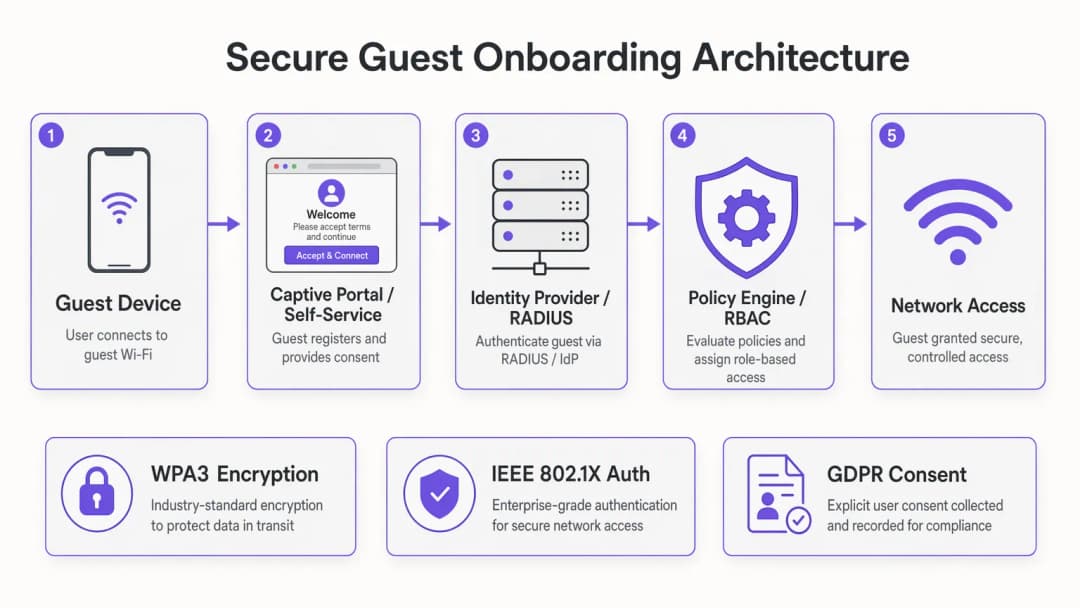
एक आधुनिक सुरक्षित ऑनबोर्डिंग डिप्लॉयमेंटमध्ये पाच कार्यात्मक स्तर असतात जे एकाच वेळी डिझाइन केले जाणे आवश्यक आहे. Guest Device Layer मध्ये कनेक्ट करण्याचा प्रयत्न करणाऱ्या एंडपॉइंट्सची श्रेणी समाविष्ट असते — स्मार्टफोन, टॅब्लेट, लॅपटॉप आणि वाढत्या प्रमाणात IoT डिव्हाइसेस — ज्या प्रत्येकाची सप्लिकंट क्षमता आणि पोर्टल-हँडलिंग वर्तन वेगवेगळे असते. Captive Portal and Self-Service Layer हा वापरकर्त्यासमोरील इंटरफेस आहे: हा असा बिंदू आहे जिथे ओळखीचा दावा केला जातो, संमती कॅप्चर केली जाते आणि ऑथेंटिकेशन हँडशेक सुरू केला जातो. Identity Provider Layer — मग तो ऑन-प्रिमायसेस RADIUS सर्व्हर असो, क्लाउड-आधारित IdP असो किंवा फेडरेटेड आयडेंटिटी सर्व्हर असो — येथे क्रेडेंशियल प्रमाणित केले जातात आणि वापरकर्ता विशेषता पॉलिसी इंजिनकडे परत पाठवले जातात. Policy Engine रोल-आधारित ऍक्सेस कंट्रोल लागू करते, वापरकर्ता विशेषतांच्या आधारे बँडविड्थ प्रोफाइल, VLAN असाइनमेंट्स आणि कंटेंट फिल्टरिंग नियम लागू करते. शेवटी, Network Access Layer — वायरलेस कंट्रोलर, ऍक्सेस पॉइंट्स, VLANs आणि फायरवॉल नियम — अपस्ट्रीमद्वारे निर्धारित केलेल्या पॉलिसी लागू करतात.
प्रत्येक डिझाइन निर्णयावर नियंत्रण ठेवणारे आर्किटेक्चरल तत्त्व अगदी सोपे आहे: जटिलता बॅकएंडमध्ये असणे आवश्यक आहे, वापरकर्त्याच्या समोर नाही. Captive Portal मधील प्रत्येक अतिरिक्त पायरी तुमचा कनेक्शन दर कमी करते. किकऑफच्या वेळी वीस हजार समवर्ती कनेक्शन प्रयत्नांवर प्रक्रिया करणाऱ्या स्टेडियमच्या वातावरणात, तीन फॉर्म फील्ड आणि दोन रिडायरेक्ट असलेले पोर्टल सपोर्ट विनंत्यांचा पूर आणि नेटवर्क वापरामध्ये मोजता येण्याजोगी घट निर्माण करेल.
Authentication Methods: A Technical Comparison
Social Login via OAuth 2.0 ओळख पडताळणीचे काम विश्वासू तृतीय पक्षाकडे सोपवते - Google, Apple, Facebook किंवा Microsoft. वापरकर्ता त्यांच्या विद्यमान क्रेडेंशियलसह ऑथेंटिकेट करतो, OAuth प्रदाता एक ऍक्सेस टोकन आणि मूलभूत प्रोफाइल डेटा जारी करतो आणि तुमचे पोर्टल त्या ओळखीला नेटवर्क सेशनसह मॅप करते. सुरक्षिततेच्या दृष्टिकोनातून, ग्राहकांसाठीच्या ठिकाणी गेस्ट ऍक्सेससाठी हे अत्यंत योग्य आहे. याचा मुख्य फायदा म्हणजे सत्यापित ओळख: तुम्हाला एक कन्फर्म केलेला ईमेल पत्ता किंवा सोशल प्रोफाइल मिळते जी थेट तुमच्या WiFi Analytics प्लॅटफॉर्म आणि CRM मध्ये पाठवली जाते. मर्यादा अशी आहे की तुम्ही तृतीय पक्ष OAuth प्रदात्यांच्या उपलब्धतेवर आणि पॉलिसी निर्णयांवर अवलंबून असता.
Email plus One-Time Passcode (OTP) हे सोशल अकाऊंटची गरज न पडता एक सोपा मल्टी-फॅक्टर ऑथेंटिकेशन फ्लो लागू करते. युझर त्यांचा ईमेल पत्ता प्रविष्ट करतो, त्यांना सहा-अंकी कोड मिळतो, आणि ऑथेंटिकेशन पूर्ण करण्यासाठी तो प्रविष्ट करतो. हे विशेषतः कॉन्फरन्स आणि इव्हेंटच्या वातावरणात प्रभावी ठरते जेथे तुम्हाला युझर हा नोंदणीकृत उपस्थित आहे की नाही हे सत्यापित करावे लागते. हे GDPR संमती कॅप्चर करण्यासाठी एक स्पष्ट यंत्रणा देखील प्रदान करते, कारण ईमेल सबमिशन थेट स्पष्ट ऑप्ट-इन चेकबॉक्सशी जोडले जाऊ शकते.
IEEE 802.1X with EAP-TLS हे एंटरप्राइझ स्तरावरील सर्वोत्तम मानक आहे. डिव्हाइस RADIUS सर्व्हरला क्लायंट सर्टिफिकेट सादर करते, जे सर्टिफिकेट ऑथॉरिटीद्वारे त्याचे प्रमाणीकरण करते आणि योग्य VLAN आणि पॉलिसी ॲट्रिब्युट्ससह RADIUS Access-Accept परत करते. युझरच्या दृष्टिकोनातून, हे कनेक्शन पूर्णपणे स्वयंचलित असते - कोणताही पोर्टल नाही, कोणतेही पासवर्ड नाहीत, कोणत्याही परस्परसंवादाची गरज नाही. या आर्किटेक्चरला सर्टिफिकेट्स वितरीत करण्यासाठी Public Key Infrastructure (PKI) आणि Mobile Device Management (MDM) प्लॅटफॉर्मची आवश्यकता असते, ज्यामुळे हे कॉर्पोरेट, आरोग्यसेवा आणि शैक्षणिक वातावरणातील व्यवस्थापित डिव्हाइसेसच्या ताफ्यासाठी सर्वात योग्य ठरते. या संदर्भातील RADIUS सुरक्षा मजबूत करण्याच्या सविस्तर माहितीसाठी, Mitigating RADIUS Vulnerabilities: A Security Hardening Guide पहा.
MAC caching with self-service portals हे ग्राहकांची मोठी गर्दी असलेल्या ठिकाणांसाठी सर्वात व्यावहारिक उपाय आहेत. पहिल्या कनेक्शनवर, युझर एक सोपा नोंदणी फ्लो पूर्ण करतो. पोर्टल डिव्हाइसचा MAC ॲड्रेस संपूर्ण ऑथेंटिकेशन रेकॉर्डसह स्टोअर करते. त्यानंतरच्या कनेक्शन्सवर - एका कॉन्फिगर करण्यायोग्य कालावधीत, सामान्यतः तीस दिवस - डिव्हाइस पोर्टल पूर्णपणे बायपास करते आणि थेट कनेक्ट होते. वारंवार भेट देणाऱ्या ग्राहकांचे प्रमाण जास्त असलेल्या हॉस्पिटॅलिटी आणि रिटेल ऑपरेटर्ससाठी, MAC कॅशिंग हे उपलब्ध असलेले सर्वात प्रभावी ऑप्टिमायझेशन आहे.

OpenRoaming आणि ऑटोमेटेड प्रोव्हिजनिंग
Passpoint मानकांवर (Wi-Fi Alliance) आणि IEEE 802.11u प्रोटोकॉलवर आधारित, OpenRoaming हे ऑटोमेटेड ऑनबोर्डिंगचे सर्वात प्रगत रूप दर्शवते. यामध्ये सहभागी असणाऱ्या डिव्हाइसेसमध्ये एक Passpoint प्रोफाइल असते जे सुसंगत नेटवर्कवर त्यांना ओळखते. जेव्हा डिव्हाइसला OpenRoaming-सक्षम SSID आढळते, तेव्हा ते कोणत्याही युझर परस्परसंवादाशिवाय EAP क्रेडेंशियल्स वापरून स्वयंचलितपणे ऑथेंटिकेट होते. Purple हे कनेक्ट लायसन्स अंतर्गत OpenRoaming साठी विनामूल्य आयडेंटिटी प्रोव्हाइडर म्हणून काम करते, याचा अर्थ असा की ज्या युझरने यापूर्वी कोणत्याही सहभागी ठिकाणी Purple-चालित पोर्टलद्वारे ऑनबोर्ड केले आहे, तो तुमच्या ठिकाणी स्वयंचलितपणे कनेक्ट होईल. हे असे आर्किटेक्चर आहे जे संपूर्ण OpenRoaming फेडरेशनमधील परत येणाऱ्या युझर्ससाठी ऑनबोर्डिंगमधील सर्व अडथळे पूर्णपणे दूर करते.
transport ऑपरेटर्स - विमानतळ, रेल्वे स्टेशन, फेरी टर्मिनल्स - यांच्यासाठी OpenRoaming अत्यंत आकर्षक आहे. ट्रान्झिटमधील प्रवाशांकडे अत्यंत कमी वेळ असतो आणि त्यांच्या कनेक्टिव्हिटीच्या अपेक्षा खूप जास्त असतात. अशा मोठ्या प्रमाणावर पोर्टल इंटरॲक्शनशिवाय स्वयंचलित, सुरक्षित कनेक्शन्स हाच एकमेव व्यवहार्य मॉडेल आहे.
Security Architecture: MFA, RBAC, आणि Network Segmentation
गेस्ट WiFi च्या संदर्भात Multi-factor authentication हे सर्वात व्यावहारिकपणे वर वर्णन केलेल्या ईमेल-अधिक-OTP प्रक्रियेद्वारे किंवा सोशल लॉगिनद्वारे (जे OAuth प्रदात्याच्या MFA कॉन्फिगरेशनचा वारसा घेते) लागू केले जाते. कर्मचारी आणि कंत्राटदार प्रवेशासाठी, हार्डवेअर टोकन्स किंवा ऑथेंटिकेटर ॲप TOTP कोड योग्य आहेत. याचे मुख्य तत्व असे आहे की MFA हे ऍक्सेस केल्या जाणाऱ्या संसाधनांच्या संवेदनशीलतेच्या प्रमाणात असले पाहिजे: गेस्ट इंटरनेट ऍक्सेससाठी बॅक-ऑफिस सिस्टमच्या ऍक्सेसइतका MFA चा भार असण्याची गरज नाही.
Role-based access control हे पोर्टल स्तरावर नसून RADIUS पॉलिसी स्तरावर लागू केले जावे. पोर्टल वापरकर्ता कोण आहे हे ठरवते; RADIUS सर्व्हर ते कशात प्रवेश करू शकतात हे ठरवतो. हॉटेलच्या मालमत्तेसाठी सामान्य RBAC मॅट्रिक्स गेस्टना बँडविड्थ-मर्यादित केवळ-इंटरनेट VLAN मध्ये समाविष्ट करू शकते, कॉन्फरन्स प्रतिनिधींना इव्हेंट कोलॅबरेशन टूल्सचा ऍक्सेस असलेल्या VLAN मध्ये, कर्मचाऱ्यांना प्रॉपर्टी मॅनेजमेंट सिस्टमचा ऍक्सेस असलेल्या VLAN मध्ये आणि IoT डिव्हाइसेसना - दरवाजाचे लॉक, HVAC कंट्रोलर्स, डिजिटल सायनेज - इंटरनेट राउटिंग नसलेल्या स्वतंत्र VLANs मध्ये समाविष्ट करू शकते.
Network Segmentation ही RBAC साठीची अंमलबजावणी यंत्रणा आहे. RADIUS Access-Accept प्रतिसादावरील VLAN टॅगिंग, संबंधित फायरवॉल नियमांसह एकत्रितपणे, हे सुनिश्चित करते की प्रत्येक वापरकर्ता वर्ग त्याच्या योग्य नेटवर्क झोनपुरता मर्यादित आहे. PCI DSS च्या पालनासाठी, पेमेंट नेटवर्क इतर सर्व VLANs पासून पूर्णपणे वेगळे असले पाहिजे, ज्यामध्ये गेस्ट, कर्मचारी आणि पेमेंट झोन दरम्यान कोणतेही राउटिंग मार्ग नसावेत.
WPA3 हे सर्व नवीन उपयोजनांसाठी लक्ष्यित एन्क्रिप्शन मानक असले पाहिजे. WPA3-SAE (Simultaneous Authentication of Equals) हे WPA2-PSK ची ऑफलाइन डिक्शनरी अटॅकची असुरक्षितता दूर करते आणि वैयक्तिक सेशन वाटाघाटींद्वारे फॉरवर्ड गोपनीयता प्रदान करते. अजूनही जुने WPA2 डिव्हाइसेस वापरणाऱ्या वातावरणासाठी, WPA3 ट्रान्झिशन मोड स्थलांतर कालावधी दरम्यान एकाच SSID वर दोन्ही मानकांना एकत्र अस्तित्त्वात राहण्याची अनुमती देतो.
GDPR आणि Compliance Integration
GDPR मधील कलम ७ नुसार संमती ही मुक्तपणे दिलेली, विशिष्ट, माहितीपूर्ण आणि स्पष्ट असणे आवश्यक आहे. Captive Portal च्या संदर्भात, याचा अर्थ कोणताही वैयक्तिक डेटा गोळा करण्यापूर्वी स्पष्ट गोपनीयता नोटीस सादर करणे, स्पष्ट ऑप्ट-इन चेकबॉक्स वापरणे (आधीपासून टिक केलेला बॉक्स नाही), संमतीची वेळ आणि विशिष्ट प्रक्रिया हेतू नोंदवणे आणि वापरकर्त्यांना संमती मागे घेण्यासाठी यंत्रणा प्रदान करणे आहे. ऑडिटच्या उद्देशांसाठी संमतीच्या नोंदी - वापरकर्त्याचा IP पत्ता, MAC पत्ता, वेळ आणि सादर केलेला अचूक संमती मजकूर यासह - राखल्या गेल्या पाहिजेत.PCI DSS च्या अधीन असलेल्या रिलेट ऑपरेटर्ससाठी, नेटवर्क आर्किटेक्चरने हे सुनिश्चित केले पाहिजे की कार्डधारक डेटाची वातावरणे अतिथी WiFi इन्फ्रास्ट्रक्चरपासून पूर्णपणे वेगळी आहेत. ही केवळ कॉन्फिगरेशनची आवश्यकता नाही - याचे दस्तऐवजीकरण, चाचणी आणि ऑडिट करणे आवश्यक आहे. तुमचे VLAN विभाजन डिझाइन, फायरवॉल नियम संच आणि RADIUS पॉलिसी कॉन्फिगरेशन हे सर्व तुमच्या PCI DSS व्याप्ती दस्तऐवजीकरणामध्ये समाविष्ट केले जाणे आवश्यक आहे.
तुमच्या विशिष्ट सेटअपबद्दल काही प्रश्न आहेत का?
आमची टीम ८०,००० हून अधिक वेन्यूजमधील वेन्यू ऑपरेटर्स, IT मॅनेजर्स आणि नेटवर्क इंजिनिअर्ससोबत काम करते. २० मिनिटांचा कॉल बुक करा आणि तुमच्यासारख्या इतरांनी ही समस्या कशी सोडवली हे आम्ही तुम्हाला दाखवू.
अंमलबजावणी मार्गदर्शक
पायरी 1: आवश्यकता आणि आर्किटेक्चर डिझाइन
तुमचे वापरकर्ते आणि त्यांच्या ॲक्सेस आवश्यकतांचे मॅपिंग करून सुरुवात करा. प्रत्येक वापरकर्ता वर्ग ओळखा - अतिथी, कर्मचारी, कंत्राटदार, IoT उपकरणे, कार्यक्रमाचे उपस्थिता - आणि प्रत्येक वर्गासाठी आवश्यक नेटवर्क संसाधने परिभाषित करा. हे मॅपिंग थेट तुमच्या VLAN डिझाइन आणि RADIUS पॉलिसी कॉन्फिगरेशनला चालना देते. त्याच वेळी, तुमच्या अनुपालन दायित्वांची ओळख पटवा: GDPR संमती आवश्यकता, PCI DSS व्याप्ती आणि कोणतीही प्रदेश-विशिष्ट नियमावली (उदा. आरोग्य सेवा नेटवर्कसाठी NHS डिजिटल मानके).
प्रत्येक वापरकर्ता श्रेणीचा ड्वेल टाइम आणि सुरक्षा प्रोफाइलच्या आधारे तुमची प्रमाणीकरण पद्धत निवडा. हा निर्णय घेण्यास मदत करण्यासाठी खालील मेमरी हुक विभागात प्रदान केलेल्या फ्रेमवर्कचा वापर करा. कोणतेही कॉन्फिगरेशन काम सुरू करण्यापूर्वी तुमच्या निवडलेल्या आर्किटेक्चरचे दस्तऐवजीकरण करा.
पायरी 2: इन्फ्रास्ट्रक्चरची तयारी
तुमचे वायरलेस इन्फ्रास्ट्रक्चर आवश्यक मानकांना समर्थन देत असल्याची खात्री करा. WPA3 ला ॲक्सेस पॉइंट्सवर WPA3-सक्षम फर्मवेअर आवश्यक आहे - केवळ WPA3-ओन्ली डिप्लॉयमेंट करण्यापूर्वी तुमच्या संपूर्ण इस्टेटमध्ये सुसंगततेची पडताळणी करा. तुमच्या स्विचिंग इन्फ्रास्ट्रक्चरवर तुमचे VLAN स्ट्रक्चर कॉन्फिगर करा, ज्यामुळे तुमचे वायरलेस कंट्रोलर, स्विच आणि फायरवॉलवर VLAN टॅग्ज संरेखित राहतील याची खात्री होईल. तुमचे RADIUS सर्व्हर्स तैनात किंवा कॉन्फिगर करा, ज्यामुळे त्यांच्याकडे तुमच्या कमाल प्रमाणीकरण लोड हाताळण्याची क्षमता असेल - उदाहरणार्थ, स्टेडियम डिप्लॉयमेंटला एखाद्या कार्यक्रमाच्या सुरुवातीला प्रति मिनिट हजारो EAP व्यवहारांवर प्रक्रिया करावी लागू शकते.
RADIUS च्या उच्च उपलब्धतेसाठी, स्वयंचलित फेलओव्हरसह प्राथमिक आणि दुय्यम सर्व्हर तैनात करा. गर्दीच्या कार्यक्रमादरम्यान RADIUS चे बंद पडणे ही एक गंभीर ऑपरेशनल घटना आहे. RADIUS च्या प्रतिसाद वेळेचे सतत निरीक्षण करा; 200 मिलिसेकंदांपेक्षा जास्त प्रमाणीकरण विलंब काही उपकरणांच्या प्रकारांवर क्लायंट टाइमआउट अपयश आणू शकतो.
पायरी 3: पोर्टल आणि ओळख कॉन्फिगरेशन
प्राथमिक मेट्रिक म्हणून कन्व्हरझन रेट लक्षात ठेवून तुमचे Captive Portal डिझाइन करा. प्रत्येक फॉर्म फील्ड, प्रत्येक रीडायरेक्ट, प्रत्येक पेज लोड घर्षण वाढवते. GDPR-सुसंगत अतिथी ॲक्सेससाठी किमान व्यवहार्य पोर्टल आवश्यक आहे: एकच प्रमाणीकरण कृती (सोशल लॉगिन बटण किंवा ईमेल फील्ड), गोपनीयता सूचनेची लिंक आणि स्पष्ट संमतीचा चेकबॉक्स. यापलीकडे कशाचीही आवश्यकता असल्यास त्याचे विशिष्ट व्यावसायिक गरजेनुसार समर्थन केले पाहिजे.
तुमचे आयडेंटिटी प्रोव्हायडर इंटिग्रेशन कॉन्फिगर करा — सोशल लॉगिनसाठी OAuth एंडपॉइंट्स, OTP वितरणासाठी SMTP, किंवा एंटरप्राइझ SSO साठी SAML फेडरेशन. iOS आणि Android डिव्हाइसेसवर संपूर्ण ऑथेंटिकेशन प्रवाहाची चाचणी घ्या, Captive Portal डिटेक्शन वर्तनावर विशेष लक्ष द्या. iOS Captive Portal डिटेक्शनसाठी HTTP प्रोब्स वापरते; तुमचे पोर्टल या प्रोब्सना योग्य प्रतिसाद देत असल्याची आणि सुरुवातीच्या डिटेक्शन विनंतीवर HTTPS रिडायरेक्ट्स टाळत असल्याची खात्री करा.
guest WiFi उपयोजनांसाठी, संमती असलेला वापरकर्ता डेटा तुमच्या कस्टमर डेटा इन्फ्रास्ट्रक्चरमध्ये योग्यरित्या प्रवाहित होत असल्याची खात्री करण्यासाठी तुमचे पोर्टल तुमच्या ॲनालिटिक्स आणि मार्केटिंग प्लॅटफॉर्मसह इंटिग्रेट करा.
पायरी ४: चाचणी आणि प्रमाणीकरण
कोणत्याही हाय-फूटफॉल इव्हेंट किंवा मोठ्या उपयोजनापूर्वी लोड टेस्टिंग करा. तुमच्या RADIUS इन्फ्रास्ट्रक्चरवर पीक ऑथेंटिकेशन लोडचे सिम्युलेशन करा आणि रिस्पॉन्स टाइम्स मोजा. डिव्हाइस प्रकारांच्या प्रातिनिधिक नमुन्यावर प्रत्येक ऑथेंटिकेशन पद्धतीची चाचणी घ्या. नेटवर्क झोन दरम्यान ट्रॅफिक रूट करण्याचा प्रयत्न करून तुमच्या VLAN सेगमेंटेशनचे प्रमाणीकरण करा - फायरवॉल नियम सर्व अनधिकृत मार्ग ब्लॉक करत असल्याची पुष्टी करा. परत येणाऱ्या डिव्हाइस कनेक्शन्सचे सिम्युलेशन करून तुमच्या MAC कॅशिंग लॉजिकची चाचणी घ्या. चाचणी कनेक्शन्सच्या नमुन्यासाठी ऑडिट लॉगचे पुनरावलोकन करून तुमच्या GDPR संमती रेकॉर्ड्सचे प्रमाणीकरण करा.
पायरी ५: मॉनिटरिंग आणि निरंतर सुधारणा
उपयोजनानंतर, तीन मुख्य मेट्रिक्सचे निरीक्षण करा: पोर्टल कन्व्हर्जन रेट (यशस्वीरित्या ऑनबोर्डिंग पूर्ण करणाऱ्या डिव्हाइसेसची टक्केवारी), ऑथेंटिकेशन लेटन्सी (RADIUS रिस्पॉन्स टाइम), आणि कनेक्टिव्हिटी समस्यांशी संबंधित सपोर्ट तिकीट व्हॉल्यूम. RADIUS रिस्पॉन्स टाइम्स आणि पोर्टल एरर रेट्समधील घसरणीसाठी अलर्टिंग थ्रेशोल्ड्स सेट करा. तुमच्या MAC कॅशे हिट रेटचे दरमहा पुनरावलोकन करा - हाय-रिपीट-फूटफॉल ठिकाणी कमी हिट रेट असणे हे कॉन्फिगरेशन किंवा डिव्हाइस-ट्रॅकिंग समस्येचे संकेत देते.
सर्वोत्तम पद्धती
खालील शिफारसी IEEE 802.1X, WPA3, GDPR, आणि PCI-DSS आवश्यकतांमधून, तसेच मोठ्या प्रमाणावरील ठिकाणांच्या उपयोजनांमधील ऑपरेशनल अनुभवातून मिळवलेल्या वेंडर-न्यूट्रल सर्वोत्तम पद्धतींचे प्रतिनिधित्व करतात.
ऑथेंटिकेशनला ऑथरायझेशनपासून वेगळे करा. तुमचे पोर्टल ओळख ठरवते; तुमचा RADIUS सर्व्हर ॲक्सेस ठरवतो. पोर्टलमध्येच ॲक्सेस पॉलिसी लॉजिक कधीही एन्कोड करू नका. हे वेगळेपण हे सुनिश्चित करते की पोर्टल कोडमध्ये बदल न करता पॉलिसी बदल मध्यवर्ती पातळीवर केले जाऊ शकतात.
पहिल्या दिवसापासून RADIUS अकाउंटिंग लागू करा. RADIUS Accounting-Start आणि Accounting-Stop मेसेजेस प्रत्येक नेटवर्क सेशनचा संपूर्ण ऑडिट ट्रेल प्रदान करतात - वापरकर्त्याची ओळख, सेशनचा कालावधी, ट्रान्सफर केलेले बाइट्स, आणि सेशन संपण्याचे कारण. हा डेटा कंप्लायन्स ऑडिट, कॅपॅसिटी प्लॅनिंग, आणि ट्रबलशूटिंगसाठी आवश्यक आहे.
तुमच्या Captive Portal साठी सर्टिफिकेट पिनिंग वापरा. अविश्वसनीय सर्टिफिकेट दाखवणारे Captive Portal ब्राउझर चेतावणी जनरेट करेल ज्यामुळे वापरकर्त्यांमध्ये गोंधळ निर्माण होतो आणि विश्वास कमी होतो. तुमच्या पोर्टल डोमेनवर मान्यताप्राप्त CA कडून वैध TLS सर्टिफिकेट तैनात करा आणि HSTS कॉन्फिगर करा. तुमच्या RADIUS ॲट्रिब्यूट मॅपिंगचे दस्तऐवजीकरण करा. RADIUS ॲट्रिब्यूट (VLAN IDs, बँडविड्थ पॉलिसी, सेशन टाईमआउट) आणि तुमच्या नेटवर्क पॉलिसी प्रोफाइल्समधील मॅपिंगचे दस्तऐवजीकरण केलेले असावे आणि त्याचे व्हर्जन नियंत्रित असावे. अनपेक्षित पायाभूत बदलांदरम्यान ॲक्सेस कंट्रोल बिघाडांचे प्रमुख कारण हे दस्तऐवजीकरण न केलेले RADIUS कॉन्फिगरेशन्स असते.
सुरुवातीपासूनच IoT डिव्हाइस ऑनबोर्डिंगचे नियोजन करा. Captive Portal वर नेव्हिगेट न करू शकणाऱ्या हेडलेस डिव्हाइसेससाठी पर्यायी ऑनबोर्डिंग मार्गाची आवश्यकता असते — सामान्यतः MPSK किंवा MAC ऑथेंटिकेशन बायपास. तैनात करण्यापूर्वी तुमच्या IoT VLAN पॉलिसी आणि ऑनबोर्डिंग प्रक्रियेची व्याख्या करा, नंतर जुळवाजुळव करण्यापेक्षा हे आधी करणे महत्त्वाचे आहे.
Ruckus वायरलेस इन्फ्रास्ट्रक्चर चालवणाऱ्या वातावरणासाठी, Your Guide to a Wireless Access Point Ruckus हे Ruckus ॲक्सेस पॉइंट्सला RADIUS-आधारित ऑनबोर्डिंग आर्किटेक्चरसह एकत्रित करण्यासाठी विशिष्ट कॉन्फिगरेशन मार्गदर्शन प्रदान करते.
ट्रबलशूटिंग आणि जोखीम कमी करणे
RADIUS टाईमआउट बिघाड हे ऑनबोर्डिंगच्या खराब अनुभवांचे सर्वात सामान्य कारण आहेत. लक्षणांमध्ये विशेषतः लोडच्या वेळी अधूनमधून ऑथेंटिकेशन बिघाड होणे समाविष्ट आहे. निदान: टाईमआउट पॅटर्न शोधण्यासाठी RADIUS सर्व्हरवरील EAP ट्रान्झॅक्शन लॉगचे पुनरावलोकन करा. उपाय: RADIUS सर्व्हरचा प्रतिसाद वेळ सुधारित करा, क्लायंट रीट्राय संख्या वाढवा आणि पीक लोडसाठी तुमच्या RADIUS सर्व्हरकडे पुरेसे CPU आणि मेमरी असल्याची खात्री करा.
iOS Captive Portal शोधण्यात येणारे बिघाड तेव्हा घडतात जेव्हा पोर्टल Apple च्या HTTP प्रोब विनंत्यांना योग्यरित्या प्रतिसाद देत नाही. लक्षणे: iOS डिव्हाइसवर Captive Portal चे नोटिफिकेशन दिसत नाही आणि युजर्सना पोर्टल ट्रिगर करण्यासाठी ब्राउझरवर मॅन्युअली जावे लागते. उपाय: तुमचा वायरलेस कंट्रोलर HTTP ट्रॅफिक इंटरसेप्ट करण्यासाठी आणि पोर्टलवर रिडायरेक्ट करण्यासाठी कॉन्फिगर केला आहे की नाही आणि पोर्टल प्रोब URLs ना नॉन-200 HTTP स्टेटससह प्रतिसाद देत आहे याची खात्री करा.
MAC ॲड्रेस रँडमायझेशनचा वापर युजर प्रायव्हसीचे रक्षण करण्यासाठी iOS 14+, Android 10+ आणि Windows 10+ डिव्हाइसेसद्वारे वाढत्या प्रमाणात केला जात आहे. प्रत्येक नेटवर्क असोसिएशनवर रँडमायझ्ड MAC बदलतात, ज्यामुळे MAC कॅशिंग लॉजिक बिघडते. उपाय: प्राथमिक कॅश की म्हणून परसिस्टंट आयडेंटिफायर (ऑथेंटिकेटेड ईमेल किंवा सोशल प्रोफाइल) आणि दुय्यम सिग्नल म्हणून MAC ॲड्रेस वापरण्यासाठी तुमचे पोर्टल कॉन्फिगर करा. काही प्लॅटफॉर्म्स युजर्सना विश्वसनीय नेटवर्कसाठी MAC रँडमायझेशन बंद करण्याची परवानगी देतात — तुमच्या पोर्टल ऑनबोर्डिंग फ्लोमध्ये या मार्गदर्शनाचा समावेश करण्याचा विचार करा.
VLAN चुकीचे कॉन्फिगरेशन ज्यामुळे क्रॉस-झोन ट्रॅफिक होते, ही एक मोठी सुरक्षा जोखीम आहे. लक्षणे: गेस्ट VLAN मधील डिव्हाइसेस एम्प्लॉयी किंवा पेमेंट VLAN मधील रिसोर्सेस ॲक्सेस करू शकतात. उपाय: नियमित फायरवॉल नियम ऑडिट आणि VLAN सीमांची पेनिट्रेशन चाचणी घ्या. संरक्षणाचा सखोल उपाय म्हणून स्विच लेव्हलवर नेटवर्क ॲक्सेस कंट्रोल लिस्ट लागू करा.
GDPR संमती रेकॉर्ड गॅप्स तेव्हा उद्भवतात जेव्हा संमती कॅप्चर यंत्रणा शांतपणे अपयशी ठरते — उदाहरणार्थ, हाय लोड दरम्यान डेटाबेस राइट अयशस्वी झाल्यास. उपाय: रीट्राय लॉजिकसह सिंक्रोनस संमती रेकॉर्ड राइट्स लागू करा आणि कनेक्शन दरांच्या तुलनेत संमती रेकॉर्ड निर्मिती दरांचे निरीक्षण करा. कोणताही मोठा फरक डेटा कॅप्चर अपयशी ठरल्याचे दर्शवतो.
ROI आणि व्यावसायिक प्रभाव
सुव्यवस्थित ऑनबोर्डिंग प्रणालीमध्ये गुंतवणूक करण्याचे व्यावसायिक फायदे तीन आयामांमध्ये दिसून येतात: ऑपरेशनल कार्यक्षमता, महसूल सक्षमीकरण, आणि जोखीम कमी करणे.
ऑपरेशनल कार्यक्षमतेचा विचार करता, मुख्य कळीचे परिमाण म्हणजे कनेक्टिव्हिटी समस्यांशी संबंधित सपोर्ट तिकीटचे प्रमाण आहे. MAC कॅशिंग लागू करणाऱ्या आणि पोर्टल कन्व्हर्शन रेट्स ऑप्टिमाइझ करणाऱ्या उपयोजनांमध्ये WiFi-संबंधित सपोर्ट संपर्कांमध्ये सातत्याने चाळीस ते साठ टक्के घट झाल्याची नोंद आहे. पूर्णवेळ आयटी सपोर्ट काम करणाऱ्या हॉटेलसाठी, हे नियमित कनेक्टिव्हिटी समस्यांसाठी कर्मचाऱ्यांच्या वेळेमध्ये झालेली मोजता येण्याजोगी घट दर्शवते.
महसूल सक्षमीकरणाचा विचार करता, GDPR-सुसंगत ऑनबोर्डिंग प्रवाहांद्वारे मिळवलेल्या फर्स्ट-पार्टी डेटाचे मूल्य लक्षणीय आहे. सामायिक PSK उपयोजनांच्या जवळपास शून्य डेटा संकलन दराच्या तुलनेत - कनेक्ट करणाऱ्या नव्वद टक्के पाहुण्यांचे सत्यापित ईमेल पत्ते संकलित करणारा हॉटेल गट मोजता येण्याजोगे लाइफटाइम व्हॅल्यू असलेली थेट विपणन मालमत्ता धारण करतो. WiFi Analytics प्लॅटफॉर्म्स या डेटाचे रूपांतर फूटफॉल पॅटर्न, ड्वेल-टाइम विश्लेषण आणि पुनरावृत्ती भेटींच्या दरांमध्ये करू शकतात जे ऑपरेशनल आणि विपणन निर्णयांना माहिती देतात.
जोखीम कमी करण्याचा विचार करता, GDPR अंमलबजावणी कारवाई किंवा PCI-DSS ऑडिट अपयशाचा खर्च हा सुसंगत ऑनबोर्डिंग आर्किटेक्चर लागू करण्याच्या खर्चापेक्षा खूप जास्त असतो. गंभीर GDPR उल्लंघनांसाठी ICO च्या अंमलबजावणीच्या नोंदींमध्ये जागतिक वार्षिक उलाढालीच्या चार टक्क्यांपर्यंतच्या दंडाचा समावेश आहे. दस्तऐवजीकरण केलेली, ऑडिट करण्यायोग्य संमती कॅप्चर प्रक्रिया आणि योग्यरित्या विभागलेले नेटवर्क ही मुख्य तांत्रिक नियंत्रणे आहेत जी ही जोखीम कमी करतात.
विशेषतः hospitality ऑपरेटर्ससाठी, ऑनलाइन पुनरावलोकनांमधील सकारात्मक भावनांमध्ये गेस्ट WiFi गुणवत्ता हा सातत्याने पहिल्या तीन घटकांपैकी एक म्हणून नोंदवला जातो. कनेक्शन यश दर आणि अतिथी समाधान स्कोअर यामधील परस्परसंबंध चांगल्या प्रकारे स्थापित आहे. त्यामुळे ऑनबोर्डिंग आर्किटेक्चरमधील गुंतवणूक ही पुनरावलोकन स्कोअर आणि पुनरावृत्ती बुकिंग दरांमध्ये देखील एक गुंतवणूक आहे.
क्लिनिकल वातावरणातील सुरक्षित नेटवर्क आर्किटेक्चरवरील अधिक वाचनासाठी, WiFi in Hospitals: A Guide to Secure Clinical Networks पहा. एंटरप्राइझ मोबिलिटी संदर्भांसाठी, Your Guide to Enterprise In Car Wi Fi Solutions हे वाहनांवर आधारित कनेक्टिव्हिटी उपयोजनांसाठी ऑथेंटिकेशन आर्किटेक्चर कव्हर करते.
महत्वाच्या व्याख्या
IEEE 802.1X
पोर्ट-आधारित नेटवर्क प्रवेश नियंत्रणासाठी एक IEEE मानक जे LAN किंवा WLAN शी कनेक्ट होणाऱ्या डिव्हाइसेससाठी प्रमाणीकरण फ्रेमवर्क प्रदान करते. हे सप्लिकंट (क्लायंट डिव्हाइस), ऑथेंटिकेटर (ॲक्सेस पॉइंट किंवा स्विच) आणि ऑथेंटिकेशन सर्व्हर (RADIUS) दरम्यान प्रमाणीकरण संदेश वाहून नेण्यासाठी Extensible Authentication Protocol (EAP) वापरते. 802.1X हा एंटरप्राइझ WiFi सुरक्षेचा पाया आहे, जो शेअर केलेल्या क्रेडेंशियल्सशिवाय वैयक्तिक डिव्हाइस प्रमाणीकरण सक्षम करतो.
कर्मचार्यांसाठी किंवा व्यवस्थापित डिव्हाइसेससाठी एंटरप्राइझ WiFi तैनात करताना आयटी टीम्सना 802.1X चा सामना करावा लागतो. कोणत्याही अशा वातावरणासाठी हे आवश्यक प्रमाणीकरण मानक आहे जेथे वैयक्तिक डिव्हाइस जबाबदारी आवश्यक आहे - कॉर्पोरेट नेटवर्क्स, आरोग्य सेवा, शिक्षण. यासाठी RADIUS सर्व्हर आणि प्रमाणपत्र-आधारित EAP-TLS साठी PKI इन्फ्रास्ट्रक्चर आवश्यक आहे.
RADIUS (Remote Authentication Dial-In User Service)
एक नेटवर्किंग प्रोटोकॉल (RFC 2865) जो नेटवर्कशी कनेक्ट होणाऱ्या वापरकर्त्यांसाठी केंद्रीकृत प्रमाणीकरण, अधिकृतता आणि अकाउंटिंग (AAA) प्रदान करतो. WiFi उपयोजनांमध्ये, RADIUS सर्व्हर वायरलेस कंट्रोलरकडून (NAS - Network Access Server) प्रमाणीकरण विनंत्या प्राप्त करतो, आयडेंटिटी स्टोअरच्या विरूद्ध क्रेडेंशियल सत्यापित करतो आणि VLAN असाइनमेंट आणि बँडविड्थ मर्यादा यांसारख्या पॉलिसी गुणधर्मांसह Access-Accept किंवा Access-Reject प्रतिसाद परत पाठवतो.
RADIUS हा एंटरप्राइझ WiFi प्रमाणीकरणाचा मुख्य आधार आहे. IT टीम्स Active Directory, LDAP किंवा क्लाउड IdPs सोबत समाकलित करण्यासाठी आणि प्रत्येक वापरकर्ता वर्गासाठी योग्य VLAN आणि पॉलिसी गुणधर्म परत पाठवण्यासाठी RADIUS सर्व्हर कॉन्फिगर करतात. RADIUS मधील चुकीचे कॉन्फिगरेशन - विशेषतः टाइमआउट सेटिंग्ज आणि ॲट्रिब्युट मॅपिंग - हे एंटरप्राइझ उपयोजनांमध्ये प्रमाणीकरण अयशस्वी होण्याचे सर्वात सामान्य कारण आहे.
WPA3-SAE (Simultaneous Authentication of Equals)
WPA3 Personal मोडमध्ये वापरला जाणारा प्रमाणीकरण हँडशेक, जो WPA2-PSK (Pre-Shared Key) हँडशेकची जागा घेतो. SAE हवेतून पासवर्ड न पाठवता सेशन की स्थापित करण्यासाठी Diffie-Hellman की एक्सचेंजचा वापर करते, ज्यामुळे WPA2-PSK ची ऑफलाइन डिक्शनरी अटॅकची असुरक्षितता दूर होते. हे फॉरवर्ड सिक्रसी देखील प्रदान करते, म्हणजेच नेटवर्क पासवर्ड धोक्यात आल्यास पूर्वी कॅप्चर केलेला ट्रॅफिक उघड होत नाही.
IT टीम्सनी सर्व नवीन उपयोजन आणि स्थलांतरांसाठी WPA3-SAE चे लक्ष्य ठेवले पाहिजे. WPA3 ट्रान्झिशन मोड स्थलांतर कालावधी दरम्यान WPA2 आणि WPA3 क्लायंटना एकाच SSID वर एकत्र राहण्याची परवानगी देतो. 2020 पासून पुढे WiFi CERTIFIED उपकरणांसाठी WPA3 अनिवार्य आहे, त्यामुळे बहुतेक आधुनिक क्लायंट उपकरणे याला सपोर्ट करतात.
Captive Portal
वापरकर्त्यांना नेटवर्क प्रवेश मंजूर करण्यापूर्वी त्यांच्यासमोर सादर केला जाणारा वेब-आधारित इंटरफेस, ज्याचा वापर वापरकर्त्यांचे प्रमाणीकरण करण्यासाठी, संमती कॅप्चर करण्यासाठी आणि वापराच्या अटी लागू करण्यासाठी केला जातो. Captive Portal अप्रमाणित क्लायंटकडून येणारा HTTP ट्रॅफिक अडवून आणि तो पोर्टल URL वर रिडायरेक्ट करून कार्य करतात. आधुनिक ऑपरेटिंग सिस्टम (iOS, Android, Windows, macOS) मध्ये Captive Portal शोधण्याची यंत्रणा समाविष्ट असते जी समर्पित ब्राउझर विंडोमध्ये स्वयंचलितपणे पोर्टल प्रदर्शित करते.
हॉस्पिटॅलिटी, रिटेल आणि सार्वजनिक ठिकाणी अतिथी WiFi साठी ऑनबोर्डिंगचा प्राथमिक इंटरफेस म्हणून Captive Portal वापरले जातात. IT टीम्सनी हे सुनिश्चित केले पाहिजे की पोर्टल डिझाइनमुळे अडथळे कमी होतील, GDPR संमती कॅप्चर योग्यरित्या लागू केली जाईल आणि पोर्टल OS-पातळीवरील Captive Portal शोधण्याच्या प्रोब्सना योग्य प्रतिसाद देईल. परत येणाऱ्या उपकरणांसाठी पोर्टल बायपास करण्यासाठी MAC कॅशिंग वापरले जाते.
MAC Authentication Bypass (MAB)
एक फॉलबॅक प्रमाणीकरण यंत्रणा जी 802.1X सप्लिकंटला सपोर्ट न करणाऱ्या उपकरणांसाठी ओळख क्रेडेंशियल म्हणून डिव्हाइसचा MAC पत्ता वापरते. वायरलेस कंट्रोलर डिव्हाइसचा MAC पत्ता RADIUS सर्व्हरकडे युझरनेम आणि पासवर्ड दोन्ही म्हणून पाठवतो; RADIUS सर्व्हर डेटाबेसमध्ये तो MAC शोधतो आणि योग्य प्रवेश पॉलिसी परत पाठवतो. MAB कोणतेही क्रिप्टोग्राफिक प्रमाणीकरण प्रदान करत नाही - हे MAC पत्ते स्पूफ केलेले नाहीत या गृहीतकावर अवलंबून असते.
IT टीम्स MAB प्रामुख्याने अशा IoT उपकरणांसाठी वापरतात - प्रिंटर, स्मार्ट टीव्ही, ॲक्सेस कंट्रोल रीडर, HVAC सेन्सर्स - जे 802.1X सप्लिकंट चालवू शकत नाहीत. हे प्रमाणपत्र प्रमाणीकरण अयशस्वी झालेल्या 802.1X-सक्षम उपकरणांसाठी फॉलबॅक म्हणून देखील वापरले जाते. स्पूफ केलेल्या MAC पत्त्याच्या प्रभावाची व्याप्ती मर्यादित करण्यासाठी MAB नेहमी नेटवर्क सेगमेंटेशनसह एकत्र केले पाहिजे.
OpenRoaming
Passpoint मानकावर (IEEE 802.11u) आधारित असलेला WiFi Alliance चा एक कार्यक्रम, जो युझरच्या हस्तक्षेपाशिवाय सहभागी नेटवर्क्सवर स्वयंचलित, सुरक्षित WiFi रोमिंग सक्षम करतो. डिव्हाइसेसमध्ये एक Passpoint प्रोफाइल असते जे सुसंगत नेटवर्क्सना त्यांची ओळख पटवून देते; EAP क्रेडेंशियलचा वापर करून ऑटोमॅटिक ऑथेंटिकेशन केले जाते. Purple हे Connect लायसन्स अंतर्गत OpenRoaming साठी विनामूल्य ओळख प्रदाता (identity provider) म्हणून काम करते.
गर्दीच्या ठिकाणच्या IT टीम्सनी - विमानतळ, रेल्वे स्थानके, रिटेल चेन्स, हॉटेल समूहांमध्ये - परत येणाऱ्या वापरकर्त्यांसाठी ऑनबोर्डिंगमधील अडथळे दूर करण्यासाठीची एक यंत्रणा म्हणून OpenRoaming चे मूल्यमापन केले पाहिजे. एकदा वापरकर्त्याने कोणत्याही OpenRoaming मध्ये सहभागी असलेल्या ठिकाणी ऑनबोर्डिंग केले की, त्यांचे उपकरण इतर सर्व सहभागी ठिकाणी स्वयंचलितपणे कनेक्ट होईल. ट्रान्सपोर्ट ऑपरेटर आणि मल्टि-साइट हॉस्पिटॅलिटी समूहांसाठी हे विशेषतः उपयुक्त आहे.
भूमिका-आधारित प्रवेश नियंत्रण - Role-Based Access Control (RBAC)
एक ॲक्सेस कंट्रोल मॉडेल जे युझरच्या वैयक्तिक ओळखीऐवजी त्याच्या ऑथेंटिकेटेड भूमिका किंवा वैशिष्ट्यांच्या (ॲट्रिब्युट्स) आधारे नेटवर्क परवानग्या नियुक्त करते. WiFi डेप्लॉयमेंटमध्ये, RADIUS सर्व्हर किंवा IdP द्वारे मिळालेल्या युझर वैशिष्ट्यांना नेटवर्क पॉलिसींशी (VLAN असाइनमेंट्स, बँडविड्थ प्रोफाइल्स, कंटेंट फिल्टरिंग नियम आणि सेशन टाइमआउट्स) मॅप करून RBAC लागू केले जाते. याद्वारे अतिथीला (guest) केवळ इंटरनेट-ॲक्सेस मिळतो; कर्मचाऱ्याला LAN ॲक्सेस मिळतो; आणि IoT डिव्हाइसला स्वतंत्र VLAN मिळते.
RBAC ही अशी प्रणाली आहे जी एकाच भौतिक नेटवर्क इन्फ्रास्ट्रक्चरला वेगवेगळ्या सुरक्षा आवश्यकता असलेल्या अनेक युझर वर्गांना सेवा देण्यास सक्षम करते. IT टीम्स RADIUS ॲट्रिब्युट मॅपिंग आणि संबंधित फायरवॉल व VLAN कॉन्फिगरेशनद्वारे RBAC लागू करतात. कोणत्याही एंटरप्राइझ WiFi डेप्लॉयमेंटमध्ये युझर वर्गांना संसाधने आणि निर्बंधांशी मॅप करणारा RBAC मॅट्रिक्स हा सर्वप्रथम तयार केलेला डिझाइन दस्तऐवज असावा.
EAP-TLS (Extensible Authentication Protocol - Transport Layer Security)
एक सर्टिफिकेट-आधारित EAP पद्धत जी X.509 सर्टिफिकेट्सचा वापर करून क्लायंट डिव्हाइस आणि RADIUS सर्व्हर दरम्यान परस्पर ऑथेंटिकेशन प्रदान करते. क्लायंट आणि सर्व्हर दोन्ही सर्टिफिकेट्स सादर करतात; प्रत्येक जण विश्वासू सर्टिफिकेट ऑथॉरिटीद्वारे दुसऱ्याच्या सर्टिफिकेटची पडताळणी करतो. EAP-TLS हे 802.1X डेप्लॉयमेंटमध्ये उपलब्ध असलेल्या ऑथेंटिकेशन खात्रीची सर्वोच्च पातळी प्रदान करते आणि एकदा सर्टिफिकेट प्रोव्हिजन झाल्यावर अंतिम युझरसाठी ते पूर्णपणे पारदर्शक असते.
जेथे मॅनेज्ड डिव्हाइसेस MDM प्लॅटफॉर्मद्वारे प्रोव्हिजन केली जातात अशा वातावरणात IT टीम्स EAP-TLS तैनात करतात. सर्टिफिकेट वितरण MDM द्वारे हाताळले जाते; एकदा प्रोव्हिजन केल्यावर, डिव्हाइसेस युझरच्या हस्तक्षेपाशिवाय स्वयंचलितपणे ऑथेंटिकेट होतात. EAP-TLS साठी PKI इन्फ्रास्ट्रक्चर (सर्टिफिकेट ऑथॉरिटी, सर्टिफिकेट टेम्पलेट्स, रिव्होकेशन मेकॅनिझम्स) आवश्यक असते, ज्यामुळे तैनातीची गुंतागुंत वाढते परंतु हे अत्यंत मजबूत ऑथेंटिकेशन प्रदान करते.
MPSK (Multi-Pre-Shared Key)
एक WiFi ऑथेंटिकेशन प्रणाली जी एकाच SSID वर अनेक युनिक प्री-शेअर्ड की कॉन्फिगर करण्याची परवानगी देते, जिथे प्रत्येक की विशिष्ट VLAN आणि पॉलिसी प्रोफाइलशी मॅप केलेली असते. एका सामायिक PSK च्या उलट, MPSK हे 802.1X सप्लिकंट क्षमतेची आवश्यकता नसतानाही प्रत्येक डिव्हाइस किंवा डिव्हाइस-वर्गाला स्वतंत्र आयसोलेशन प्रदान करते. इतर डिव्हाइसेसवर परिणाम न करता प्रत्येक की स्वतंत्रपणे रद्द केली जाऊ शकते.
IT टीम्स प्रामुख्याने IoT डिव्हाइस ऑनबोर्डिंगसाठी MPSK वापरतात - प्रत्येक डिव्हाइस वर्गाला (स्मार्ट टीव्ही, ॲक्सेस कंट्रोल रीडर्स, HVAC सेन्सर्स) एक युनिक PSK नियुक्त केला जातो जो स्वतंत्र VLAN शी मॅप होतो. MPSK बहुतांश एंटरप्राइझ वायरलेस प्लॅटफॉर्म्सवर (Cisco, Aruba, Ruckus, Meraki) समर्थित आहे आणि 802.1X-सक्षम आणि अक्षम अशा दोन्ही प्रकारच्या डिव्हाइसेसचे मिश्रण असलेल्या वातावरणासाठी हा शिफारसित दृष्टिकोन आहे.
सोडवलेली उदाहरणे
सहा मालमत्तांमध्ये कार्यरत असलेल्या ४०० खोल्यांच्या हॉटेल समूहाद्वारे प्रत्येक मालमत्तेवर एकच शेअर केलेला WPA2 प्री-शेअर्ड की वापरला जात आहे, जो फ्रंट डेस्कवरील कार्डवर प्रदर्शित केला जातो. पाहुणे वारंवार पासवर्डसाठी रिसेप्शनशी संपर्क साधतात आणि IT टीमला नेटवर्क वापराबद्दल कोणतीही दृश्यमानता नाही, कोणतेही GDPR संमती रेकॉर्ड नाहीत आणि IoT डिव्हाइसेस (स्मार्ट टीव्ही, डोअर लॉक्स) पाहुण्यांच्या ट्रॅफिकपासून वेगळे करण्याची क्षमता नाही. या समूहाला १२ मालमत्तांच्या नियोजित विस्तारापूर्वी त्यांच्या ऑनबोर्डिंग आर्किटेक्चरचे आधुनिकीकरण करायचे आहे.
टप्पा १ - आर्किटेक्चर डिझाईन: प्रत्येक मालमत्तेवर ड्युअल-SSID आर्किटेक्चर तैनात करा. SSID 1 (Guest) ऑनबोर्डिंगसाठी Captive Portal सह WPA3-SAE वापरते. SSID 2 (IoT) MAC ऑथेंटिकेशन बायपाससह MPSK वापरते, ज्यामध्ये प्रत्येक डिव्हाइस क्लास एका वेगळ्या VLAN शी मॅप केला जातो. SSID 3 (Staff) Active Directory डोमेन विरुद्ध RADIUS-बॅक्ड ऑथेंटिकेशनसह 802.1X वापरते.
टप्पा २ - पोर्टल कॉन्फिगरेशन: प्रायमरी ऑथेंटिकेशन पद्धत म्हणून सोशल लॉगिन (Google आणि Apple) सह आणि फॉलबॅक म्हणून ईमेल-प्लस-OTP सह Purple-संचालित Captive Portal तैनात करा. ३० दिवसांच्या विंडोसह MAC कॅशिंग कॉन्फिगर करा. स्पष्ट ऑप्ट-इन आणि स्वयंचलित संमती रेकॉर्ड स्टोरेजसह GDPR संमती कॅप्चर लागू करा. ईमेल कॅप्चरसाठी API द्वारे पोर्टल हॉटेलच्या CRM शी कनेक्ट करा.
टप्पा ३ - RADIUS आणि VLAN कॉन्फिगरेशन: पोर्टल-ऑथेंटिकेट केलेल्या युझर्ससाठी VLAN 10 (Guest - केवळ इंटरनेट, 20Mbps बँडविड्थ मर्यादा), MAC-ऑथेंटिकेट केलेल्या डिव्हाइसेससाठी VLAN 20 (IoT - विलग केलेले, इंटरनेट नाही) आणि 802.1X-ऑथेंटिकेट केलेल्या कर्मचारी डिव्हाइसेससाठी VLAN 30 (Staff - पूर्ण LAN ॲक्सेस) रिटर्न करण्यासाठी RADIUS कॉन्फिगर करा. संपूर्ण सेशन ऑडिट ट्रेलसाठी RADIUS अकाउंटिंग लागू करा.
टप्पा ४ - रोलआउट: पोर्टल कन्व्हर्जन रेट, RADIUS लेटन्सी आणि सपोर्ट तिकीट व्हॉल्यूम मोजून ३० दिवसांसाठी एका मालमत्तेवर प्रायोगिक तत्त्वावर चालवा. सातत्य सुनिश्चित करण्यासाठी टेम्पलेट केलेल्या कॉन्फिगरेशन दृष्टिकोनाचा वापर करून उर्वरित मालमत्तांवर रोल आउट करा.
परिणाम (उपयोजनानंतर ९० दिवसांनी मोजलेले): पोर्टल कन्व्हर्जन रेट: ९४%. सरासरी कनेक्शन वेळ: ७ सेकंद (४५ सेकंदांवरून कमी). WiFi संबंधित सपोर्ट संपर्क: ५८% ने कमी झाले. GDPR संमती रेकॉर्ड: ऑथेंटिकेट केलेल्या सेशन्ससाठी १००% कव्हरेज. ईमेल कॅप्चर दर: कनेक्ट होणाऱ्या पाहुण्यांपैकी ९१%.
६० स्टोअर्स असलेल्या एका प्रादेशिक रिटेल साखळीला संपूर्ण PCI DSS अनुपालन सुनिश्चित करून सर्व ठिकाणी अतिथी WiFi प्रदान करणे आवश्यक आहे. पेमेंट नेटवर्क हे प्रस्तावित अतिथी WiFi सारख्याच प्रत्यक्ष इन्फ्रास्ट्रक्चरवर चालते. मॅन्युअल आयटी हस्तक्षेपाशिवाय सर्व स्टोअर्समध्ये कर्मचार्यांचे डिव्हाइसेस सातत्यपूर्णपणे ऑनबोर्ड करणे आवश्यक आहे. ही साखळी दररोज प्रति स्टोअर अंदाजे २,००० अतिथी WiFi कनेक्शन्स हाताळते.
नेटवर्क विभाजन डिझाइन: सर्व स्टोअर स्विचिंग इन्फ्रास्ट्रक्चरवर तीन VLANs लागू करा: VLAN १०० (अतिथी WiFi - फक्त इंटरनेट, LAN राउटिंग नाही), VLAN २०० (कर्मचारी - रिटेल व्यवस्थापन प्रणालीमध्ये प्रवेश, पेमेंट नेटवर्क नाही), VLAN ३०० (पेमेंट - पूर्णपणे वेगळे केलेले, VLAN १०० किंवा २०० वर कोणतेही राउटिंग नाही, समर्पित फायरवॉल झोन). सुरक्षा अधिक मजबूत करण्यासाठी स्विच स्तरावर ACLs कॉन्फिगर करा.
अतिथी ऑनबोर्डिंग: ईमेल पडताळणी आणि ३०-दिवसांच्या MAC कॅशिंगसह सेल्फ-सर्व्हिस captive portal तैनात करा. दररोज प्रति स्टोअर २,००० कनेक्शन्सवर, वारंवार येणाऱ्या खरेदीदारांसाठी MAC कॅश हिट रेट जास्त असेल, ज्यामुळे पोर्टलवरील लोड लक्षणीयरीत्या कमी होईल. विपणन ऑप्ट-इनसह GDPR संमती कॅप्चर स्वतंत्र, पर्यायी चेकबॉक्स म्हणून कॉन्फिगर करा. लॉयल्टी प्रोग्रामच्या क्रॉस-रेफरन्सिंगसाठी रिटेल CRM सह समाकलित करा.
कर्मचारी डिव्हाइस ऑनबोर्डिंग: MDM प्लॅटफॉर्म (Microsoft Intune किंवा Jamf) द्वारे सर्व कर्मचार्यांच्या डिव्हाइसेसवर प्रमाणपत्रे तैनात करा. Azure AD विरुद्ध RADIUS प्रमाणीकरणासह कर्मचारी SSID वर 802.1X कॉन्फिगर करा. नवीन डिव्हाइस ऑनबोर्डिंग पूर्णपणे स्वयंचलित आहे - नोंदणी केल्यावर MDM प्रमाणपत्र आणि WiFi प्रोफाइल पाठवते आणि स्टोअरमध्ये पहिल्यांदा प्रवेश केल्यावर डिव्हाइस स्वयंचलितपणे कनेक्ट होते.
PCI DSS दस्तऐवजीकरण: PCI DSS व्याप्ती दस्तऐवजामध्ये VLAN विभाजन डिझाइन, फायरवॉल नियम संच आणि RADIUS पॉलिसी कॉन्फिगरेशन दस्तऐवजीकृत करा. VLAN सीमांची त्रैमासिक पेनिट्रेशन चाचणी घ्या. आवश्यक धारणा कालावधीसाठी RADIUS अकाउंटिंग लॉग्स राखून ठेवा.
परिणाम: कर्मचारी डिव्हाइस ऑनबोर्डिंग वेळ: २० मिनिटांवरून ३ मिनिटांपेक्षा कमी झाला. अतिथी पोर्टलचा रूपांतरण दर: ८९%. PCI DSS ऑडिट: नेटवर्क विभाजनाशी संबंधित कोणत्याही त्रुटींशिवाय उत्तीर्ण. संपूर्ण मालमत्तेमध्ये WiFi शी संबंधित आयटी सपोर्ट तिकिटे: ५२% ने कमी झाली.
सराव प्रश्न
Q1. १५,००० क्षमतेचे स्टेडियम पहिल्यांदाच गेस्ट WiFi तैनात करत आहे. या ठिकाणी वर्षाला ४० इव्हेंट्स आयोजित केले जातात, ज्यामध्ये गेट्स उघडल्यानंतर पहिल्या १० मिनिटांत कमाल ८,००० डिव्हाइसेस कनेक्ट करण्याचा प्रयत्न करतात. स्टेडियमकडे कोणतेही अस्तित्वात असलेले RADIUS इन्फ्रास्ट्रक्चर नाही आणि फक्त दोन लोकांची लहान IT टीम आहे. तुम्ही कोणत्या ऑनबोर्डिंग आर्किटेक्चरची शिफारस कराल आणि तीन सर्वात महत्त्वाचे कॉन्फिगरेशन निर्णय कोणते असतील?
टीप: ड्वेल टाइम (थांबण्याचा वेळ), पीक लोड प्रोफाइल आणि चालू प्रशासन व्यवस्थापित करण्यासाठी IT टीमच्या क्षमतेचा विचार करा. कार्यक्रम सुरू होताना RADIUS सर्व्हर उपलब्ध नसेल तर काय होईल?
नमुना उत्तर पहा
या प्रोफाईलच्या स्टेडियमसाठी, शिफारस केलेले आर्किटेक्चर म्हणजे प्रायमरी पद्धत म्हणून सोशल लॉगिन (Google/Apple) आणि फॉलबॅक म्हणून ईमेल-अधिक-OTP सह सेल्फ-सर्व्हिस captive portal आहे. यासोबतच 30-दिवसांचे MAC caching आणि ऑन-प्रिमाइसेस सर्व्हरच्या सिंगल-पॉइंट-ऑफ-फेल्युअरचा धोका टाळण्यासाठी क्लाउड-होस्ट केलेली RADIUS सेवा वापरणे आवश्यक आहे. तीन गंभीर कॉन्फिगरेशन निर्णय आहेत: (1) MAC caching कॉन्फिगरेशन - वर्षाला 40 इव्हेंट्स आणि मोठ्या प्रमाणावर पुन्हा येणाऱ्या प्रेक्षकांमुळे, उच्च MAC कॅशे हिट रेट गर्दीच्या वेळी पोर्टलवरील लोड नाट्यमयरित्या कमी करेल; 30-दिवसांची कॅशे विंडो कॉन्फिगर करा आणि प्रत्येक इव्हेंटनुसार हिट रेट्सचे निरीक्षण करा; (2) RADIUS क्षमता आणि हाय अवेलेबिलिटी - फेलओव्हरसाठी दुय्यम सर्व्हरसह 10 मिनिटांत 8,000 EAP ट्रान्झॅक्शन्स (अंदाजे प्रति सेकंद 13) हाताळण्यासाठी तुमच्या RADIUS इन्फ्रास्ट्रक्चरचा आकार निश्चित करा; पहिल्या इव्हेंटपूर्वी सिम्युलेटेड लोड अंतर्गत चाचणी करा; (3) पोर्टल परफॉर्मन्स ऑप्टिमायझेशन - पीक लोड अंतर्गत सब-सेकंद पेज लोड वेळ सुनिश्चित करण्यासाठी CDN किंवा स्थानिक कॅशेवर पोर्टल होस्ट करा; पीक लोड दरम्यान लोड होण्यास 3 सेकंद घेणाऱ्या पोर्टलमुळे वापरकर्त्यांचा एक मोठा भाग कनेक्शनचा प्रयत्न सोडून देईल.
Q2. एका NHS ट्रस्टला 600 खाटांच्या हॉस्पिटलमध्ये रुग्ण आणि अभ्यागतांसाठी WiFi ॲक्सेस द्यायचा आहे, तसेच क्लिनिकल सिस्टीम्सचे पूर्ण अलगाव आणि NHS डिजिटल नेटवर्क सुरक्षा मानकांचे अनुपालन सुनिश्चित करायचे आहे. कर्मचाऱ्यांची उपकरणे Microsoft Entra ID द्वारे मॅनेज केली जातात. तुम्ही नेटवर्क सेगमेंटेशन आणि ऑनबोर्डिंग आर्किटेक्चरची रचना कशी कराल?
टीप: क्लिनिकल डेटाची संवेदनशीलता, उपकरणांचे प्रकार (मॅनेज केलेले कर्मचारी उपकरणे, अनमॅनेज केलेले रुग्ण उपकरणे, वैद्यकीय IoT) आणि NHS डिजिटल डेटा सुरक्षा आणि संरक्षण टूलकिटच्या विशिष्ट अनुपालन आवश्यकतांचा विचार करा.
नमुना उत्तर पहा
चार-SSID आर्किटेक्चर तैनात करा: (1) रुग्ण/अभ्यागत WiFi - ईमेल पडताळणीसह captive portal, GDPR संमती कॅप्चर, केवळ-इंटरनेट प्रवेशासह VLAN, कोणत्याही क्लिनिकल किंवा प्रशासकीय नेटवर्कवर कोणतेही राउटिंग नाही; (2) कर्मचारी WiFi - EAP-TLS सह 802.1X, Intune द्वारे वितरीत केलेली प्रमाणपत्रे, क्लिनिकल ॲप्लिकेशन्स आणि EHR सिस्टीम्सच्या ॲक्सेससह VLAN; (3) वैद्यकीय IoT - MAC ऑथेंटिकेशन बायपाससह MPSK, प्रत्येक उपकरण वर्गाला (इन्फ्युजन पंप, मॉनिटरिंग उपकरणे, इमेजिंग सिस्टीम्स) एक युनिक PSK आणि स्वतंत्र VLAN नियुक्त केलेला असेल; (4) बिल्डिंग मॅनेजमेंट - HVAC, ॲक्सेस कंट्रोल आणि सुविधा प्रणालींसाठी स्वतंत्र SSID, सर्व क्लिनिकल VLANs पासून पूर्णपणे वेगळा. गंभीर डिझाइन आवश्यकता: फायरवॉल नियम आणि स्विच ACLs द्वारे लागू केलेले रुग्ण, कर्मचारी आणि क्लिनिकल VLANs मधील पूर्ण लेअर 3 अलगाव; ऑडिट ट्रेलसाठी सर्व SSIDs वर RADIUS अकाउंटिंग सक्षम केले आहे; सर्व SSIDs वर WPA3; इंटरनेट राउटिंग नसलेल्या आणि कडक इग्रेस फिल्टरिंग असलेल्या VLANs वरील वैद्यकीय IoT उपकरणे. क्लिनिकल नेटवर्क सुरक्षेवरील तपशीलवार मार्गदर्शनासाठी, हॉस्पिटलमधील WiFi संदर्भ मार्गदर्शक पहा.
Q3. एक बहुराष्ट्रीय रिटेल साखळी UK आणि EU मधील 200 स्टोअर्समध्ये युनिफाइड गेस्ट WiFi प्लॅटफॉर्म रोल आउट करत आहे. IT टीमला सर्व ठिकाणी GDPR अनुपालन, सुसंगत PCI DSS नेटवर्क सेगमेंटेशन आणि लॉयल्टी प्रोग्रामच्या डेटा कॅप्चर आवश्यकतांना सपोर्ट करणारा पोर्टल अनुभव सुनिश्चित करणे आवश्यक आहे. साखळीकडे सध्या कोणतेही केंद्रीकृत WiFi व्यवस्थापन प्लॅटफॉर्म नाही. मुख्य आर्किटेक्चरल निर्णय कोणते आहेत आणि ते कोणत्या क्रमाने घेतले पाहिजेत?
टीप: निर्णयांमधील परस्पर संबंधांचा विचार करा: GDPR संमतीच्या आवश्यकता पोर्टल डिझाइनवर परिणाम करतात; PCI DSS आवश्यकता VLAN आर्किटेक्चरवर परिणाम करतात; लॉयल्टी प्रोग्राम आवश्यकता आयडेंटिटी प्रोव्हाइडर इंटिग्रेशनवर परिणाम करतात. कोणते निर्णय इतरांना मर्यादित करतात?
नमुना उत्तर पहा
योग्य क्रमवारी खालीलप्रमाणे आहे: (१) प्रथम GDPR संमती आवश्यकता स्पष्ट करा - प्रोसेसिंगचा कायदेशीर आधार, विशिष्ट संमती मजकूर आणि डेटा धारणा (retention) पॉलिसी पोर्टल डिझाइन सुरू होण्यापूर्वी स्थापित करणे आवश्यक आहे, कारण ते कोणता डेटा आणि कसा गोळा केला जाऊ शकतो यावर मर्यादा घालतात; (२) PCI DSS व्याप्ती निश्चित करा - कोणते स्टोअर्स पेमेंट कार्ड डेटा प्रोसेस करतात ते ओळखा आणि नेटवर्क आर्किटेक्चर पेमेंट इन्फ्रास्ट्रक्चरला अतिथी WiFi पासून पूर्णपणे वेगळे करत असल्याची खात्री करा; हे VLAN डिझाइन ठरवते; (३) VLAN आर्किटेक्चर डिझाइन करा - साधारणपणे स्विच स्तरावर ACLs सह लागू केलेले तीन VLANs (अतिथी, कर्मचारी, पेमेंट); हे PCI DSS नेटवर्क विभागणीचे पुरावे म्हणून दस्तऐवजीकरण करा; (४) आयडेंटिटी प्रोव्हाइडर आणि पोर्टल प्लॅटफॉर्म निवडा - ज्यामध्ये ऑडिट लॉगिंगसह GDPR संमती कॅप्चर, सोशल लॉगिनसाठी OAuth इंटिग्रेशन आणि लॉयल्टी CRM सह API इंटिग्रेशनला सपोर्ट असणे आवश्यक आहे; (५) पोर्टल UX डिझाइन करा - संवाद शक्य तितका कमीत कमी ठेवणे: एक ऑथेंटिकेशन कृती, एक संमती चेकबॉक्स, एक ऐच्छिक मार्केटिंग ऑप्ट-इन; (६) १० स्टोअर्सच्या पायलट गटामध्ये तैनात करा, संपूर्ण इस्टेटमध्ये रोल आउट करण्यापूर्वी GDPR संमती रेकॉर्ड्स, PCI DSS विभागणी आणि पोर्टल कन्व्हर्जन रेट्सचे प्रमाणीकरण करा. मुख्य मर्यादा ही आहे की GDPR आणि PCI DSS आवश्यकतांवर कोणतीही तडजोड केली जाऊ शकत नाही आणि त्या सुरुवातीपासूनच डिझाइनमध्ये समाविष्ट करणे आवश्यक आहे - अस्तित्वात असलेल्या डिप्लॉयमेंटमध्ये नंतर अनुपालन (compliance) जोडणे हे पहिल्या दिवसापासून ते तयार करण्यापेक्षा खूपच महाग आणि जोखमीचे असते.
या मालिकेमध्ये पुढे वाचा
iOS आणि macOS 802.1X ट्रबलशूटिंग: Intune, Jamf आणि Microsoft Entra ID साठी एक डिप्लोयमेंट चेकलिस्ट
iPhones, iPads आणि Macs वर Intune किंवा Jamf Pro च्या माध्यमातून 802.1X का अयशस्वी होत आहे याचे निदान करण्यासाठी ही चेकलिस्ट वापरा. प्रत्येक बिघाड चारपैकी एका कारणामुळे होतो: सर्व्हर ट्रस्ट, आयडेंटिटी सर्टिफिकेट, macOS मोड किंवा Microsoft Entra ID ग्रुप स्कोपिंग. तुम्ही eapolclient आणि RADIUS लॉग्समधून कारणाची खात्री कराल, त्यावर उपाय लागू कराल आणि भविष्यातील सर्टिफिकेट रोटेशनचे टप्पे ठरवाल.
Intune WiFi प्रोफाइल सर्व्हर ट्रस्ट: Entra ID साठी सर्टिफिकेट सर्व्हर नावे आणि रूट CA चेकलिस्ट
तुम्ही Intune WiFi प्रोफाईलचे सर्व्हर व्हॅलिडेशन कॉन्फिगर करू शकाल जेणेकरून EAP-TLS आणि PEAP हे Windows, Apple आणि Android वर कनेक्ट होतील. तुम्ही सर्टिफिकेट सर्व्हरच्या नावांना RADIUS सर्टिफिकेटशी जुळवून घ्याल, योग्य root CA डिप्लोय कराल, Microsoft Entra ID ग्रुप असाइनमेंट्स अलाइन कराल आणि सर्टिफिकेट रिन्यूअल्स कनेक्शन खंडित करण्यापूर्वी ते आधीच स्टेज करून ठेवाल.
Android 802.1X आणि EAP-TLS ट्रबलशूटिंग: Intune आणि Microsoft Entra ID साठी एक डिप्लॉयमेंट चेकलिस्ट
तुम्ही हे शोधून काढू शकाल की व्यवस्थापित Android फोन्स तुमच्या स्टाफ SSID वर EAP-TLS मध्ये का अपयशी ठरतात आणि ते Intune मध्ये दुरुस्त करू शकाल. प्रत्येक समस्येला चार सामान्य कारणांशी जुळवून घ्या - गहाळ CA किंवा डोमेन, चुकीच्या प्रोफाइलमधील क्लायंट प्रमाणपत्र, न जुळणारे RADIUS सर्व्हरचे नाव व्हॅल्यू, किंवा न पोहोचवलेले ट्रस्टेड रूट. त्यानंतर एक रोलआउट चेकलिस्ट लागू करा जी पुन्हा होणारे आउटेज थांबवते.
तुमच्या विशिष्ट सेटअपबद्दल काही प्रश्न आहेत का?
आमची टीम ८०,००० हून अधिक वेन्यूजमधील वेन्यू ऑपरेटर्स, IT मॅनेजर्स आणि नेटवर्क इंजिनिअर्ससोबत काम करते. २० मिनिटांचा कॉल बुक करा आणि तुमच्यासारख्या इतरांनी ही समस्या कशी सोडवली हे आम्ही तुम्हाला दाखवू.