
Optimierung des Benutzer-Onboardings für sicheren Netzwerkzugriff
Dieser Leitfaden bietet IT-Managern, Netzwerkarchitekten und Betriebsleitern von Veranstaltungsorten eine umfassende technische Referenz zur Optimierung des Benutzer-Onboardings für den sicheren Netzwerkzugriff. Er deckt den gesamten Authentifizierungs-Stack ab – von Self-Service Captive Portals und Identitätsföderation bis hin zu IEEE 802.1X, WPA3, RADIUS und OpenRoaming – mit praktischen Bereitstellungsanleitungen für die Bereiche Hotellerie, Einzelhandel, Events und den öffentlichen Sektor. Der Leitfaden behandelt Compliance-Anforderungen gemäß GDPR und PCI DSS, rollenbasierte Zugriffskontrolle sowie MAC-Caching-Strategien und befähigt Teams, Onboarding-Hürden und administrativen Aufwand zu reduzieren, ohne die Sicherheitslage zu beeinträchtigen.
Diesen Leitfaden anhören
Podcast-Transkript ansehen
Teil unserer Kernserie: Enterprise WiFi Security Guide →

Executive Summary
Für jede Organisation, die ein drahtloses Multi-User-Netzwerk betreibt – sei es eine Hotelgruppe, eine Einzelhandelskette, ein Stadion oder eine öffentliche Einrichtung –, ist der Prozess, Benutzer sicher in das Netzwerk einzubinden, sowohl ein Sicherheitskontrollpunkt als auch ein direkter Faktor für die Benutzerzufriedenheit. Ein schlecht gestalteter Onboarding-Flow verursacht Support-Aufwand, treibt Benutzer dazu, mobile Daten anstelle Ihres Netzwerks zu nutzen, und hinterlässt keinen Audit-Trail für Compliance-Zwecke. Ein gut gestalteter Flow bietet eine Verbindungszeit von weniger als zehn Sekunden, eine verifizierte Identitätserfassung und lückenlos dokumentierte Einwilligungserklärungen.
Dieser Leitfaden behandelt die Architektur, Authentifizierungsstandards und Bereitstellungsmuster, mit denen Sie das Benutzer-Onboarding für den Netzwerkzugriff optimieren können, ohne die Sicherheit zu gefährden. Er deckt den gesamten Stack ab: Captive Portal-Design, Identitätsföderation über OAuth und SAML, RADIUS-Konfiguration, IEEE 802.1X-Bereitstellung, WPA3-Einführung, rollenbasierte Zugriffskontrolle sowie automatische Bereitstellung über OpenRoaming und Passpoint. Compliance-Anforderungen gemäß GDPR und PCI DSS sind von Anfang an integriert und werden nicht erst nachträglich betrachtet. Zwei detaillierte Fallstudien aus der Hotellerie und dem Einzelhandel zeigen messbare Ergebnisse aus realen Implementierungen.
Technischer Deep-Dive
Onboarding-Architektur-Stack
Eine moderne, sichere Onboarding-Bereitstellung umfasst pfünf funktionale Schichten, die gemeinsam entworfen werden müssen. Die Gastgeräte-Schicht umfasst die Palette der Endgeräte, die eine Verbindung herstellen möchten – Smartphones, Tablets, Laptops und zunehmend IoT-Geräte –, jeweils mit unterschiedlichen Supplicant-Fähigkeiten und Portal-Verhalten. Die Captive Portal- und Self-Service-Schicht ist die benutzerseitige Schnittstelle: der Punkt, an dem die Identität beansprucht, die Einwilligung erfasst und der Authentifizierungs-Handshake initiiert wird. Die Identity-Provider-Schicht – sei es ein lokaler RADIUS-Server, ein cloudbasierter IdP oder ein föderierter Identitätsdienst – ist der Ort, an dem Anmeldedaten validiert und Benutzerattribute an die Policy Engine zurückgegeben werden. Die Policy Engine setzt die rollenbasierte Zugriffskontrolle durch und wendet Bandbreitenprofile, VLAN-Zuweisungen und Inhaltsfilterregeln basierend auf den Benutzerattributen an. Schließlich setzt die Netzwerkzugriffsschicht – Wireless Controller, Access Points, VLANs und Firewall-Regeln – die vorgelagerten Richtlinien durch.
Das architektonische Prinzip, das jede Designentscheidung leitet, ist einfach: Die Komplexität gehört in das Backend, nicht vor den Benutzer. Jeder zusätzliche Schritt im Captive Portal senkt Ihre Verbindungsrate. In einer Stadionumgebung, in der zu Beginn einer Veranstaltung zwanzigtausend gleichzeitige Verbindungsversuche verarbeitet werden müssen, würde ein Portal mit drei Formularfeldern und zwei Weiterleitungen eine Flut von Support-Anfragen und einen messbaren Rückgang der Netzwerknutzung verursachen.
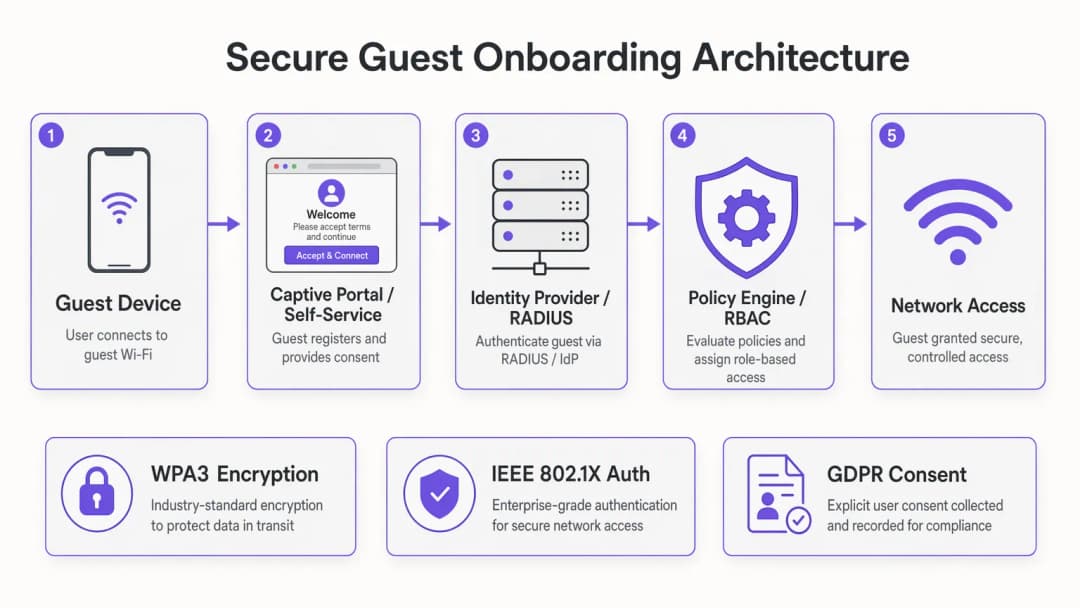
Authentifizierungsmethoden: Ein technischer Vergleich
Social Login über OAuth 2.0 delegiert die Identitätsprüfung an einen vertrauenswürdigen Drittanbieter – Google, Apple, Facebook oder Microsoft. Der Benutzer authentifiziert sich mit seinen vorhandenen Anmeldedaten, der OAuth-Anbieter liefert ein Zugriffstoken sowie grundlegende Profildaten, und Ihr Portal ordnet diese Identität der Netzwerksitzung zu. Aus Sicherheitsaspekten eignet sich dies hervorragend für den Gästezugang an kundenorientierten Standorten. Der Hauptvorteil ist die verifizierte Identität: Sie erhalten eine bestätigte E-Mail-Adresse oder ein Social-Media-Profil, das direkt in Ihre WiFi-Analysen-Plattform und Ihr CRM einfließt. Die Einschränkung besteht darin, dass Sie von der Verfügbarkeit und den Richtlinienentscheidungen der Drittanbieter von OAuth abhängig sind.
E-Mail plus Einmalpasswort (OTP) implementiert einen schlanken Multi-Faktor-Authentifizierungs-Flow, ohne dass der Benutzer ein Social-Media-Konto benötigt. Der Benutzer gibt seine E-Mail-Adresse ein, erhält einen sechsstelligen Code und gibt diesen ein, um die Authentifizierung abzuschließen. Dies ist besonders in Konferenz- und Eventumgebungen effektiv, in denen Sie überprüfen müssen, ob der Benutzer ein registrierter Teilnehmer ist. Es bietet auch einen sauberen Mechanismus für die GDPR-Einwilligungserfassung, da die E-Mail-Übermittlung direkt mit einem eindeutigen Opt-in-Kontrollkästchen verknüpft werden kann.
IEEE 802.1X mit EAP-TLS ist der Goldstandard für Unternehmen. Das Gerät präsentiert dem RADIUS-Server ein Client-Zertifikat, das dieser mit der Zertifizierungsstelle abgleicht und ein RADIUS Access-Accept mit den entsprechenden VLAN- und Richtlinienattributen zurückgibt. Aus Benutzersicht erfolgt die Verbindung vollautomatisch – kein Portal, kein Passwort, keine Interaktion erforderlich. Diese Architektur erfordert eine Public-Key-Infrastruktur (PKI) und Mobile-Device-Management-Plattformen (MDM) zur Verteilung von Zertifikaten, wodurch sie sich am besten für verwaltete Geräteflotten in Unternehmens-, Gesundheitswesen- und Bildungsumgebungen eignet. Eine detaillierte Abhandlung zur RADIUS-Sicherheitshärtung in diesem Kontext finden Sie unter RADIUS-Schwachstellen mindern: Ein Leitfaden zur Sicherheitshärtung.
Self-Service-Portale mit MAC-Caching sind die praktischste Lösung für stark frequentierte Verbraucherstandorte. Bei der ersten Verbindung durchläuft der Benutzer einen schlanken Registrierungs-Flow. Das Portal speichert die MAC-Adresse des Geräts im Abgleich mit dem vollständigen Authentifizierungsdatensatz. Bei nachfolgenden Verbindungen – innerhalb eines konfigurierbaren Zeitfensters, in der Regel dreißig Tage – umgeht das Gerät das Portal vollständig und verbindet sich direkt. Für Betreiber in den Bereichen Hotellerie und Einzelhandel mit hohen Raten an wiederkehrenden Besuchen ist MAC-Caching die wirkungsvollste verfügbare Optimierung.

OpenRoaming und automatische Bereitstellung
OpenRoaming basiert auf dem Passpoint-Standard (Wi-Fi Alliance) und dem IEEE-802.11u-Protokoll und stellt die fortschrittlichste Form des automatischen Onboardings dar. Teilnehmende Geräte verfügen über ein Passpoint-Profil, das sie in kompatiblen Netzwerken identifiziert. Wenn das Gerät eine OpenRoaming-fähige SSID erkennt, authentifiziert es sich automatisch mithilfe von EAP-Anmeldedaten ohne jegliche Benutzerinteraktion. Purple fungiert im Rahmen der Connect-Lizenz als kostenloser Identity Provider für OpenRoaming. Das bedeutet, dass jeder Benutzer, der sich zuvor an einem teilnehmenden Standort über ein von Purple betriebenes Portal registriert hat, an Ihrem Standort automatisch verbunden wird. Dies ist die Architektur, die Onboarding-Hürden für wiederkehrende Benutzer in der OpenRoaming-Föderation vollständig beseitigt.
Für Transportwesen-Betreiber – Flughäfen, Bahnhöfe, Fährterminals – ist OpenRoaming besonders attraktiv. Reisende im Transit haben minimale Verweilzeiten und hohe Erwartungen an die Konnektivität. Eine automatische, sichere Verbindung ohne Portal-Interaktion ist das einzige praktikable Modell in dieser Größenordnung.
Sicherheitsarchitektur: MFA, RBAC und Netzwerksegmentierung
Multi-Faktor-Authentifizierung im Kontext von Gäste-WiFi wird am praktischsten als der oben beschriebene E-Mail-plus-OTP-Flow oder als Social Login (das die MFA-Konfiguration des OAuth-Anbieters erbt) implementiert. Für den Zugriff von Mitarbeitern und Auftragnehmern sind Hardware-Token oder TOTP-Codes über Authentifikator-Apps geeignet. Das Kernprinzip besteht darin, dass die MFA im Verhältnis zur Sensibilität der Ressourcen stehen sollte, auf die zugegriffen wird: Ein Gäste-Internetzugang rechtfertigt nicht denselben MFA-Aufwand wie der Zugriff auf Back-Office-Systeme.
Rollenbasierte Zugriffskontrolle sollte auf RADIUS-Richtlinienebene implementiert werden, nicht auf Portalebene. Das Portal bestimmt, wer der Benutzer ist; der RADIUS-Server bestimmt, worauf er zugreifen darf. Eine typische RBAC-Matrix für ein Hotel könnte Gästen ein bandbreitenbegrenztes, reines Internet-VLAN zuweisen, Konferenzteilnehmern ein VLAN mit Zugriff auf Event-Kollaborations-Tools, Mitarbeitern ein VLAN mit Zugriff auf das Property-Management-System und IoT-Geräten – Türschlössern, HLK-Steuerungen, digitaler Beschilderung – ein isoliertes VLAN ohne Internet-Routing.
Netzwerksegmentierung ist der Durchsetzungsmechanismus für RBAC. VLAN-Tagging bei der RADIUS Access-Accept-Antwort sorgt in Verbindung mit entsprechenden Firewall-Regeln dafür, dass jede Benutzerklasse auf ihre jeweilige Netzwerkzone beschränkt bleibt. Für die PCI-DSS-Compliance muss das Zahlungsnetzwerk vollständig von allen anderen VLANs isoliert sein, ohne Routing-Pfade zwischen Gäste-, Mitarbeiter- und Zahlungszonen.
WPA3 sollte der Ziel-Verschlüsselungsstandard für alle neuen Bereitstellungen sein. WPA3-SAE (Simultaneous Authentication of Equals) beseitigt die Anfälligkeit von WPA2-PSK für Offline-Wörterbuchangriffe und bietet Forward Secrecy durch die Aushandlung individueller Sitzungen. Für Umgebungen, in denen noch ältere WPA2-Geräte betrieben werden, ermöglicht der WPA3-Transitionsmodus die Koexistenz beider Standards auf derselben SSID während der Migrationsphase.
GDPR und Compliance-Integration
Artikel 7 der GDPR fordert, dass die Einwilligung freiwillig, für den bestimmten Fall, in informierter Weise und unmissverständlich erteilt wird. Im Kontext eines Captive Portals bedeutet dies, dass vor der Erfassung personenbezogener Daten ein klarer Datenschutzhinweis angezeigt werden muss, ein eindeutiges Opt-in-Kontrollkästchen (kein bereits angekreuztes Kästchen) verwendet werden muss, Zeitstempel der Einwilligung und spezifische Verarbeitungszwecke aufgezeichnet werden müssen und den Benutzern ein Mechanismus zum Widerruf der Einwilligung bereitgestellt werden muss. Einwilligungsnachweise – einschließlich der IP-Adresse des Benutzers, der MAC-Adresse, des Zeitstempels und des genauen Texts der erteilten Einwilligung – müssen für Audit-Zwecke aufbewahrt werden.
Für Einzelhandel-Betreiber, die PCI-DSS-Richtlinien unterliegen, muss die Netzwerkarchitektur sicherstellen, dass Karteninhaber-Datenumgebungen vollständig von der Gäste-WiFi-Infrastruktur isoliert sind. Dies ist nicht nur eine Konfigurationsanforderung – es muss dokumentiert, getestet und auditierbar sein. Ihr VLAN-Segmentierungsdesign, Ihre Firewall-Regelsätze und Ihre RADIUS-Richtlinienkonfigurationen müssen alle in Ihrer PCI-DSS-Scope-Dokumentation enthalten sein.
Haben Sie Fragen zu Ihrem spezifischen Setup?
Unser Team arbeitet mit Standortbetreibern, IT-Managern und Netzwerktechnikern an über 80.000 Standorten zusammen. Buchen Sie ein 20-minütiges Gespräch und wir zeigen Ihnen, wie andere diese Herausforderungen gelöst haben.
Implementierungsleitfaden
Schritt 1: Anforderungen und Architekturdesign
Beginnen Sie mit der Erfassung Ihrer Benutzergruppen und deren Zugriffsanforderungen. Identifizieren Sie jede Benutzerklasse – Gäste, Mitarbeiter, Auftragnehmer, IoT-Geräte, Event-Teilnehmer – und definieren Sie die für jede Klasse erforderlichen Netzwerkressourcen. Diese Zuordnung steuert direkt Ihr VLAN-Design und Ihre RADIUS-Richtlinienkonfiguration. Identifizieren Sie gleichzeitig Ihre Compliance-Verpflichtungen: GDPR-Einwilligungsanforderungen, PCI-DSS-Scope und alle regionalspezifischen Vorschriften (z. B. NHS-Digitalstandards für Gesundheitswesen-Netzwerke).
Wählen Sie Ihre Authentifizierungsmethoden basierend auf der Verweilzeit und dem Sicherheitsprofil jeder Benutzerklasse aus. Nutzen Sie das Framework im Abschnitt „Memory-Hooks“ weiter unten, um diese Entscheidung zu treffen. Dokumentieren Sie Ihre gewählte Architektur, bevor Sie mit Konfigurationsarbeiten beginnen.
Schritt 2: Vorbereitung der Infrastruktur
Stellen Sie sicher, dass Ihre Wireless-Infrastruktur die erforderlichen Standards unterstützt. WPA3 erfordert Access Points mit WPA3-fähiger Firmware – überprüfen Sie die Kompatibilität in Ihrer gesamten Infrastruktur, bevor Sie sich für eine reine WPA3-Bereitstellung entscheiden. Konfigurieren Sie Ihre VLAN-Struktur auf Ihrer Switching-Infrastruktur und stellen Sie sicher, dass die VLAN-Tags zwischen Ihrem Wireless Controller, Ihren Switches und Ihrer Firewall übereinstimmen. Stellen Sie Ihren RADIUS-Server bereit oder konfigurieren Sie ihn so, dass er Ihre Spitzenlasten bei der Authentifizierung bewältigen kann – eine Stadionbereitstellung muss beispielsweise zu Beginn einer Veranstaltung möglicherweise Tausende von EAP-Transaktionen pro Minute verarbeiten.
Für eine hohe RADIUS-Verfügbarkeit stellen Sie einen primären und einen sekundären Server mit automatischem Failover bereit. Ein RADIUS-Ausfall während einer stark frequentierten Veranstaltung ist ein schwerwiegender betrieblicher Vorfall. Überwachen Sie die RADIUS-Antwortzeiten kontinuierlich; eine Authentifizierungslatenz von über 200 Millisekunden führt bei einigen Gerätetypen zu Client-Timeout-Fehlern.
Schritt 3: Portal- und Identitätskonfiguration
Gestalten Sie Ihr Captive Portal mit der Konversionsrate als primärer Kennzahl. Jedes Formularfeld, jede Weiterleitung und jeder Seitenaufruf erzeugt Hürden. Ein DSGVO-konformer Gästezugang erfordert ein minimales Portal: eine einzige Authentifizierungsaktion (Social-Login-Button oder E-Mail-Feld), einen Link zum Datenschutzhinweis und ein eindeutiges Kontrollkästchen für die Einwilligung. Alles darüber hinaus muss durch eine spezifische geschäftliche Anforderung gerechtfertigt sein.
Konfigurieren Sie Ihre Identity-Provider-Integration – OAuth-Endpunkte für Social Login, SMTP für die OTP-Zustellung oder SAML-Föderation für Enterprise-SSO. Testen Sie den vollständigen Authentifizierungs-Flow auf iOS- und Android-Geräten und achten Sie besonders auf das Verhalten bei der Erkennung des Captive Portals. iOS verwendet HTTP-Probes, um ein Captive Portal zu erkennen; stellen Sie sicher, dass Ihr Portal auf diese Probes korrekt antwortet und HTTPS-Weiterleitungen bei der ersten Erkennungsanfrage vermeidet.
Integrieren Sie bei Gäste-WiFi-Bereitstellungen Ihr Portal in Ihre Analyse- und Marketingplattformen, um sicherzustellen, dass die erfassten Benutzerdaten mit Einwilligung korrekt in Ihre Kundendaten-Infrastruktur einfließen.
Schritt 4: Testen und Validierung
Führen Sie vor jeder stark frequentierten Veranstaltung oder größeren Bereitstellung Lasttests durch. Simulieren Sie die Spitzenlast bei der Authentifizierung für Ihre RADIUS-Infrastruktur und messen Sie die Antwortzeiten. Testen Sie jede Authentifizierungsmethode an einer repräsentativen Auswahl von Gerätetypen. Validieren Sie Ihre VLAN-Segmentierung, indem Sie versuchen, Datenverkehr zwischen den Netzwerkzonen zu routen – bestätigen Sie, dass die Firewall-Regeln alle unbefugten Pfade blockieren. Testen Sie Ihre MAC-Caching-Logik, indem Sie die Verbindung wiederkehrender Geräte simulieren. Validieren Sie Ihre GDPR-Einwilligungsnachweise, indem Sie die Audit-Protokolle für eine Stichprobe von Testverbindungen überprüfen.
Schritt 5: Überwachung und kontinuierliche Verbesserung
Überwachen Sie nach der Bereitstellung drei wichtige Kennzahlen: die Portal-Konversionsrate (Prozentsatz der Geräte, die das Onboarding erfolgreich abschließen), die Authentifizierungslatenz (RADIUS-Antwortzeit) und das Volumen der Support-Tickets im Zusammenhang mit Konnektivitätsproblemen. Richten Sie Alarmierungsschwellenwerte für eine Verschlechterung der RADIUS-Antwortzeit und für Portal-Fehlerraten ein. Überprüfen Sie monatlich Ihre MAC-Cache-Trefferquote – eine niedrige Trefferquote an einem stark frequentierten Standort weist auf ein Konfigurations- oder Geräte-Tracking-Problem hin.
Best Practices
Die folgenden Empfehlungen spiegeln herstellerneutrale Best Practices wider, die auf IEEE 802.1X-, WPA3-, GDPR- und PCI-DSS-Anforderungen sowie auf betrieblichen Erfahrungen bei großflächigen Standort-Bereitstellungen basieren.
Trennen Sie Authentifizierung von Autorisierung. Ihr Portal bestimmt die Identität; Ihr RADIUS-Server bestimmt den Zugriff. Codieren Sie die Logik der Zugriffsrichtlinien niemals direkt im Portal. Diese Trennung stellt sicher, dass Richtlinienänderungen zentral vorgenommen werden können, ohne den Portal-Code zu ändern.
Implementieren Sie RADIUS-Accounting von Tag eins an. RADIUS Accounting-Start- und Accounting-Stop-Nachrichten bieten einen lückenlosen Audit-Trail jeder Netzwerksitzung – Benutzeridentität, Sitzungsdauer, übertragene Bytes und Grund für die Beendigung. Diese Daten sind für Compliance-Audits, Kapazitätsplanung und Fehlerbehebung unerlässlich.
Verwenden Sie vertrauenswürdige Zertifikate für Ihr Captive Portal. Ein Captive Portal, das ein nicht vertrauenswürdiges Zertifikat präsentiert, führt zu Browser-Warnungen, die Benutzer verunsichern und das Vertrauen untergraben. Stellen Sie ein gültiges TLS-Zertifikat einer anerkannten CA für Ihre Portal-Domain bereit und konfigurieren Sie HSTS.
Dokumentieren Sie Ihre RADIUS-Attributzuordnung. Die Zuordnung zwischen RADIUS-Attributen (VLAN-ID, Bandbreitenrichtlinie, Sitzungs-Timeout) und Ihren Netzwerkrichtlinienprofilen sollte dokumentiert und versioniert werden. Undokumentierte RADIUS-Konfigurationen sind bei Infrastrukturänderungen eine häufige Ursache für Fehler bei der Zugriffskontrolle.
Planen Sie das Onboarding von IoT-Geräten von Anfang an. Headless-Geräte, die kein Captive Portal nutzen können, benötigen einen separaten Onboarding-Pfad – in der Regel MPSK oder MAC-Authentifizierungs-Bypass. Definieren Sie Ihre IoT-VLAN-Richtlinie und den Onboarding-Prozess vor der Bereitstellung und nicht erst als nachträgliche Anpassung.
Für Umgebungen mit einer Ruckus-Wireless-Infrastruktur bietet Ihr Leitfaden für einen Wireless Access Point von Ruckus spezifische Konfigurationsanleitungen zur Integration von Ruckus Access Points in eine RADIUS-basierte Onboarding-Architektur.
Fehlerbehebung und Risikominderung
RADIUS-Timeout-Fehler sind die häufigste Ursache für eine schlechte Onboarding-Erfahrung. Zu den Symptomen gehören sporadische Authentifizierungsfehler, insbesondere unter Last. Diagnose: Überprüfen Sie die EAP-Transaktionsprotokolle auf dem RADIUS-Server auf Timeout-Muster. Lösung: Optimieren Sie die Antwortzeit des RADIUS-Servers, erhöhen Sie die Anzahl der Client-Wiederholungsversuche und stellen Sie sicher, dass Ihr RADIUS-Server über ausreichend CPU und Arbeitsspeicher für Spitzenlasten verfügt.
Fehler bei der iOS Captive Portal-Erkennung treten auf, wenn das Portal nicht korrekt auf die HTTP-Probe-Anfragen von Apple antwortet. Symptome: Die Captive Portal-Benachrichtigung wird auf iOS-Geräten nicht angezeigt, und Benutzer müssen manuell den Browser aufrufen, um das Portal zu triggern. Lösung: Stellen Sie sicher, dass Ihr Wireless Controller so konfiguriert ist, dass er HTTP-Datenverkehr abfängt und zum Portal weiterleitet, und dass das Portal auf Probe-URLs mit einem HTTP-Status ungleich 200 antwortet.
MAC-Adressen-Randomisierung wird von Geräten mit iOS 14+, Android 10+ und Windows 10+ zunehmend genutzt, um die Privatsphäre der Benutzer zu schützen. Randomisierte MAC-Adressen ändern sich bei jeder Netzwerkverbindung, was die MAC-Caching-Logik aushebelt. Lösung: Konfigurieren Sie Ihr Portal so, dass es eine dauerhafte Kennung (verifizierte E-Mail-Adresse oder Social-Media-Profil) als primären Cache-Schlüssel verwendet, wobei die MAC-Adresse als sekundäres Signal dient. Einige Plattformen ermöglichen es Benutzern, die MAC-Randomisierung für vertrauenswürdige Netzwerke zu deaktivieren – erwägen Sie, diesen Hinweis in Ihren Portal-Onboarding-Flow aufzunehmen.
Eine VLAN-Fehlkonfiguration, die zu zonenübergreifendem Datenverkehr führt, stellt ein erhebliches Sicherheitsrisiko dar. Symptome: Geräte im Gäste-VLAN können auf Ressourcen im Mitarbeiter- oder Zahlungs-VLAN zugreifen. Lösung: Führen Sie regelmäßige Audits der Firewall-Regeln und Penetrationstests der VLAN-Grenzen durch. Implementieren Sie Netzwerk-Zugriffskontrolllisten (ACLs) auf Switch-Ebene als Defense-in-Depth-Maßnahme.
Lücken bei GDPR-Einwilligungsnachweisen treten auf, wenn der Mechanismus zur Einwilligungserfassung unbemerkt fehlschlägt – beispielsweise, wenn ein Datenbank-Schreibvorgang unter hoher Last fehlschlägt. Lösung: Implementieren Sie synchrone Schreibvorgänge für Einwilligungsnachweise mit Retry-Logik und überwachen Sie die Erstellungsrate von Einwilligungsnachweisen im Vergleich zu den Verbindungsraten. Jede signifikante Abweichung deutet auf einen Fehler bei der Datenerfassung hin.
ROI und geschäftliche Auswirkungen
Der Business Case für die Investition in ein gut durchdachtes Onboarding-System basiert auf drei Dimensionen: betriebliche Effizienz, Umsatzpotenzial und Risikominderung.
Bei der betrieblichen Effizienz ist das Volumen der Support-Tickets im Zusammenhang mit Konnektivitätsproblemen die primäre Kennzahl. Bereitstellungen, die MAC-Caching implementieren und die Portal-Konversionsraten optimieren, berichten durchweg von einer Reduzierung der WiFi-bezogenen Support-Anfragen um vierzig bis sechzig Prozent. Für ein Hotel mit einer Vollzeit-IT-Supportfunktion bedeutet dies eine messbare Entlastung der Mitarbeiter von routinemäßigen Konnektivitätsproblemen.
Beim Umsatzpotenzial ist der Wert von First-Party-Daten, die über einen GDPR-konformen Onboarding-Flow erfasst werden, beträchtlich. Eine Hotelgruppe, die für neunzig Prozent der sich verbindenden Gäste verifizierte E-Mail-Adressen erfasst – im Vergleich zu einer Erfassungsrate von nahezu null bei gemeinsam genutzten PSK-Bereitstellungen –, verfügt über ein direktes Marketing-Asset mit messbarem Lifetime-Value. WiFi-Analysen-Plattformen können diese Daten in Besucherströme, Verweilzeitanalysen und Wiederholungsbesuchsraten übersetzen, die betriebliche und Marketingentscheidungen unterstützen.
Bei der Risikominderung übersteigen die Kosten eines GDPR-Durchsetzungsverfahrens oder eines fehlgeschlagenen PCI-DSS-Audits die Kosten für die Implementierung einer konformen Onboarding-Architektur bei Weitem. Die Durchsetzungsberichte der Aufsichtsbehörden weisen bei schweren GDPR-Verstößen Bußgelder von bis zu vier Prozent des weltweiten Jahresumsatzes aus. Ein dokumentierter, auditierbarer Prozess zur Einwilligungserfassung und ein ordnungsgemäß segmentiertes Netzwerk sind die primären technischen Kontrollen, die dieses Risiko mindern.
Insbesondere für Hotellerie-Betreiber wird die Qualität des Gäste-WiFi in Online-Bewertungen regelmäßig als einer der drei wichtigsten Faktoren genannt. Der Zusammenhang zwischen der Erfolgsquote bei der Verbindung und der Gästezufriedenheit ist unbestritten. Eine Investition in die Onboarding-Architektur ist daher auch eine Investition in bessere Bewertungen und höhere Wiederholungsbuchungsraten.
Weitere Informationen zu sicheren Netzwerkarchitekturen in klinischen Umgebungen finden Sie im Leitfaden WiFi in Krankenhäusern: Ein Leitfaden für sichere klinische Netzwerke. Für Enterprise-Mobility-Kontexte behandelt Ihr Leitfaden für Enterprise In-Car-WiFi-Lösungen die Authentifizierungsarchitektur für fahrzeugbasierte Konnektivitätsbereitstellungen.
Schlüsseldefinitionen
IEEE 802.1X
Ein IEEE-Standard für portbasierte Netzwerkzugriffskontrolle, der ein Authentifizierungs-Framework für Geräte bietet, die eine Verbindung zu einem LAN oder WLAN herstellen. Er verwendet das Extensible Authentication Protocol (EAP), um Authentifizierungsnachrichten zwischen dem Supplicant (Client-Gerät), dem Authenticator (Access Point oder Switch) und dem Authentifizierungsserver (RADIUS) zu übertragen. 802.1X ist das Fundament der Enterprise-WiFi-Sicherheit und ermöglicht die Authentifizierung einzelner Geräte ohne gemeinsam genutzte Anmeldedaten.
IT-Teams stoßen auf 802.1X, wenn sie Enterprise-WiFi für Mitarbeiter oder verwaltete Geräteflotten bereitstellen. Es ist der erforderliche Authentifizierungsstandard für jede Umgebung, in der eine individuelle Geräte-Zurechenbarkeit erforderlich ist – Unternehmensnetzwerke, Gesundheitswesen, Bildungswesen. Es erfordert einen RADIUS-Server und, für zertifikatsbasiertes EAP-TLS, eine PKI-Infrastruktur.
RADIUS (Remote Authentication Dial-In User Service)
Ein Netzwerkprotokoll (RFC 2865), das eine zentrale Authentifizierung, Autorisierung und Kontoführung (AAA) für Benutzer bietet, die eine Verbindung zu einem Netzwerk herstellen. Bei WiFi-Bereitstellungen empfängt der RADIUS-Server Authentifizierungsanfragen vom Wireless Controller (dem NAS – Network Access Server), validiert die Anmeldedaten mit einem Identitätsspeicher und gibt Access-Accept- oder Access-Reject-Antworten zusammen mit Richtlinienattributen wie VLAN-Zuweisung und Bandbreitenbegrenzungen zurück.
RADIUS ist das Rückgrat der Enterprise-WiFi-Authentifizierung. IT-Teams konfigurieren RADIUS-Server für die Integration in Active Directory, LDAP oder Cloud-IdPs und für die Rückgabe der korrekten VLAN- und Richtlinienattribute für jede Benutzerklasse. Eine RADIUS-Fehlkonfiguration – insbesondere bei Timeout-Einstellungen und Attributzuordnungen – ist die häufigste Ursache für Authentifizierungsfehler in Unternehmensumgebungen.
WPA3-SAE (Simultaneous Authentication of Equals)
Der Authentifizierungs-Handshake, der im WPA3-Personal-Modus verwendet wird und den WPA2-PSK-Handshake (Pre-Shared Key) ersetzt. SAE verwendet einen Diffie-Hellman-Schlüsselaustausch, um einen Sitzungsschlüssel zu etablieren, ohne das Passwort über die Luft zu übertragen, wodurch die Anfälligkeit von WPA2-PSK für Offline-Wörterbuchangriffe beseitigt wird. Es bietet zudem Forward Secrecy, was bedeutet, dass die Kompromittierung des Netzwerkkennworts den zuvor erfassten Datenverkehr nicht offenlegt.
IT-Teams sollten WPA3-SAE für alle neuen Bereitstellungen und Migrationen anstreben. Der WPA3-Transitionsmodus ermöglicht die Koexistenz von WPA2- und WPA3-Clients auf derselben SSID während des Migrationszeitraums. WPA3 ist seit 2020 für WiFi CERTIFIED-Geräte obligatorisch, sodass die meisten modernen Client-Geräte es unterstützen.
Captive Portal
Eine webbasierte Schnittstelle, die Benutzern angezeigt wird, bevor ihnen Netzwerkzugriff gewährt wird. Sie dient zur Authentifizierung von Benutzern, zur Erfassung von Einwilligungen und zur Durchsetzung von Nutzungsbedingungen. Captive Portals fangen den HTTP-Datenverkehr von nicht authentifizierten Clients ab und leiten ihn an die Portal-URL weiter. Moderne Betriebssysteme (iOS, Android, Windows, macOS) verfügen über Erkennungsmechanismen für Captive Portals, die das Portal automatisch in einem dedizierten Browserfenster anzeigen.
Captive Portals sind die primäre Onboarding-Schnittstelle für Gäste-WiFi in der Hotellerie, im Einzelhandel und an öffentlichen Veranstaltungsorten. IT-Teams müssen sicherstellen, dass das Portal-Design Hürden minimiert, dass die GDPR-Einwilligungserfassung korrekt implementiert ist und dass das Portal korrekt auf Erkennungs-Probes von Captive Portals auf Betriebssystemebene antwortet. MAC-Caching wird verwendet, um das Portal für wiederkehrende Geräte zu umgehen.
MAC Authentication Bypass (MAB)
Ein Fallback-Authentifizierungsmechanismus, der die MAC-Adresse eines Geräts als Identitätsnachweis für Geräte verwendet, die keine 802.1X-Supplicants unterstützen. Der Wireless Controller sendet die MAC-Adresse des Geräts sowohl als Benutzernamen als auch als Passwort an den RADIUS-Server; der RADIUS-Server sucht die MAC in einer dantenbank und gibt die entsprechende Zugriffsrichtlinie zurück. MAB bietet keine kryptografische Authentifizierung – es basiert auf der Annahme, dass MAC-Adressen nicht gefälscht sind.
IT-Teams verwenden MAB in erster Linie für IoT-Geräte – Drucker, Smart-TVs, Zutrittskontrollleser, HLK-Sensoren –, die keinen 802.1X-Supplicant ausführen können. Es wird auch als Fallback für 802.1X-fähige Geräte verwendet, bei denen die Zertifikatsvalidierung fehlschlägt. MAB sollte immer mit einer Netzwerksegmentierung kombiniert werden, um die Schadensreichweite einer gefälschten MAC-Adresse zu begrenzen.
OpenRoaming
Ein Programm der WiFi Alliance, das auf dem Passpoint-Standard (IEEE 802.11u) basiert und ein automatisches, sicheres WiFi-Roaming über teilnehmende Netzwerke ohne Benutzerinteraktion ermöglicht. Geräte verfügen über ein Passpoint-Profil, das sie gegenüber kompatiblen Netzwerken identifiziert; die Authentifizierung erfolgt automatisch über EAP-Anmeldedaten. Purple fungiert im Rahmen der Connect-Lizenz als kostenloser Identity Provider für OpenRoaming.
IT-Teams an stark frequentierten Standorten – Flughäfen, Bahnhöfe, Einzelhandelsketten, Hotelgruppen – sollten OpenRoaming als Mechanismus zur Beseitigung von Onboarding-Hürden für wiederkehrende Benutzer evaluieren. Sobald sich ein Benutzer an einem an OpenRoaming teilnehmenden Standort angemeldet hat, verbindet sich sein Gerät automatisch an allen anderen teilnehmenden Standorten. Dies ist besonders wertvoll für Transportunternehmen und Hotelgruppen mit mehreren Standorten.
Role-Based Access Control (RBAC)
Ein Zugriffskontrollmodell, das Netzwerkberechtigungen basierend auf der Rolle oder den Attributen des authentifizierten Benutzers und nicht auf dessen individueller Identität zuweist. Bei WiFi-Bereitstellungen wird RBAC implementiert, indem Benutzerattribute (die vom RADIUS-Server oder IdP zurückgegeben werden) Netzwerkrichtlinien zugeordnet werden – VLAN-Zuweisungen, Bandbreitenprofile, Inhaltsfilterregeln und Sitzungs-Timeouts. Ein Gast erhält nur Internetzugriff; ein Mitarbeiter erhält LAN-Zugriff; ein IoT-Gerät erhält ein isoliertes VLAN.
RBAC ist der Mechanismus, der es einer einzigen physischen Netzwerkinfrastruktur ermöglicht, mehrere Benutzerklassen mit unterschiedlichen Sicherheitsanforderungen zu bedienen. IT-Teams implementieren RBAC über RADIUS-Attributzuordnungen und entsprechende Firewall- und VLAN-Konfigurationen. Die RBAC-Matrix – die Zuordnung von Benutzerklassen zu Ressourcen und Einschränkungen – sollte das erste Design-Artefakt sein, das bei jeder Enterprise-WiFi-Bereitstellung erstellt wird.
EAP-TLS (Extensible Authentication Protocol - Transport Layer Security)
Eine zertifikatsbasierte EAP-Methode, die eine gegenseitige Authentifizierung zwischen dem Client-Gerät und dem RADIUS-Server mithilfe von X.509-Zertifikaten ermöglicht. Sowohl der Client als auch der Server präsentieren Zertifikate; jeder validiert das Zertifikat des anderen gegenüber einer vertrauenswürdigen Zertifizierungsstelle. EAP-TLS bietet das höchste Maß an Authentifizierungssicherheit, das in 802.1X-Bereitstellungen verfügbar ist, und ist für den Endbenutzer transparent, sobald die Zertifikate bereitgestellt sind.
IT-Teams stellen EAP-TLS in Umgebungen bereit, in denen verwaltete Geräte über MDM-Plattformen bereitgestellt werden. Die Zertifikatsverteilung wird vom MDM übernommen; einmal bereitgestellt, authentifizieren sich die Geräte automatisch ohne Benutzerinteraktion. EAP-TLS erfordert eine PKI-Infrastruktur (Zertifizierungsstelle, Zertifikatsvorlagen, Sperrmechanismen), was die Komplexität der Bereitstellung erhöht, aber die stärkste verfügbare Authentifizierungsmethode bietet.
MPSK (Multi-Pre-Shared Key)
Ein WiFi-Authentifizierungsmechanismus, der es ermöglicht, mehrere eindeutige Pre-Shared-Keys auf einer einzigen SSID zu konfigurieren, wobei jeder Schlüssel einem bestimmten VLAN und Richtlinienprofil zugeordnet ist. Im Gegensatz zu einem einzigen gemeinsam genutzten PSK bietet MPSK eine Isolierung pro Gerät oder Geräteklasse, ohne dass eine 802.1X-Supplicant-Fähigkeit erforderlich ist. Jeder Schlüssel kann unabhängig widerrufen werden, ohne andere Geräte zu beeinträchtigen.
IT-Teams verwenden MPSK in erster Linie für das Onboarding von IoT-Geräten – sie weisen jeder Geräteklasse (Smart-TVs, Zutrittskontrollleser, HLK-Sensoren) einen eindeutigen PSK zu, der einem isolierten VLAN zugeordnet ist. MPSK wird auf den meisten Enterprise-Wireless-Plattformen (Cisco, Aruba, Ruckus, Meraki) unterstützt und ist der empfohlene Ansatz für Umgebungen mit einer Mischung aus 802.1X-fähigen und nicht-fähigen Geräten.
Ausgearbeitete Beispiele
Eine Hotelgruppe mit 400 Zimmern an sechs Standorten nutzt an jedem Standort einen einzigen, gemeinsam genutzten WPA2-Pre-Shared-Key, der auf einer Karte an der Rezeption ausliegt. Gäste fragen häufig an der Rezeption nach dem Passwort, und das IT-Team hat weder Einblick in die Netzwerknutzung noch GDPR-Einwilligungsnachweise oder die Möglichkeit, IoT-Geräte (Smart-TVs, Türschlösser) vom Gästedatenverkehr zu segmentieren. Die Gruppe möchte ihre Onboarding-Architektur vor einer geplanten Expansion auf zwölf Standorte modernisieren.
Phase 1 - Architekturdesign: Stellen Sie an jedem Standort eine Dual-SSID-Architektur bereit. SSID 1 (Gast) verwendet WPA3-SAE mit einem Captive Portal für das Onboarding. SSID 2 (IoT) verwendet MPSK mit MAC-Authentifizierungs-Bypass, wobei jede Geräteklasse einem isolierten VLAN zugeordnet ist. SSID 3 (Mitarbeiter) verwendet 802.1X mit RADIUS-gestützter Authentifizierung gegenüber der Active Directory-Domäne.
Phase 2 - Portalkonfiguration: Stellen Sie ein von Purple betriebenes Captive Portal mit Social Login (Google und Apple) als primärer Authentifizierungsmethode und E-Mail-plus-OTP als Fallback bereit. Konfigurieren Sie MAC-Caching mit einem 30-Tage-Fenster. Implementieren Sie die GDPR-Einwilligungserfassung mit explizitem Opt-in und automatisierter Speicherung der Einwilligungsnachweise. Verbinden Sie das Portal über eine API mit dem CRM des Hotels für die E-Mail-Erfassung.
Phase 3 - RADIUS- und VLAN-Konfiguration: Konfigurieren Sie RADIUS so, dass VLAN 10 (Gast – nur Internet, 20 Mbit/s Bandbreitenbegrenzung) für über das Portal authentifizierte Benutzer, VLAN 20 (IoT – isoliert, kein Internet) für MAC-authentifizierte Geräte und VLAN 30 (Mitarbeiter – vollständiger LAN-Zugriff) für 802.1X-authentifizierte Mitarbeitergeräte zurückgegeben wird. Implementieren Sie RADIUS-Accounting für einen lückenlosen Sitzungs-Audit-Trail.
Phase 4 - Rollout: Führen Sie ein 30-tägiges Pilotprojekt an einem Standort durch und messen Sie die Portal-Konversionsrate, die RADIUS-Latenz und das Support-Ticket-Volumen. Rollen Sie die Lösung an den verbleibenden Standorten mithilfe eines standardisierten Konfigurationsansatzes aus, um Konsistenz zu gewährleisten.
Ergebnisse (gemessen 90 Tage nach der Bereitstellung): Portal-Konversionsrate: 94 %. Durchschnittliche Verbindungszeit: 7 Sekunden (vorher 45 Sekunden). WiFi-bezogene Support-Anfragen: um 58 % reduziert. GDPR-Einwilligungsnachweise: 100 % Abdeckung für authentifizierte Sitzungen. E-Mail-Erfassungsrate: 91 % der sich verbindenden Gäste.
Eine regionale Einzelhandelskette mit 60 Filialen muss an allen Standorten Gäste-WiFi bereitstellen und gleichzeitig die vollständige PCI-DSS-Compliance gewährleisten. Das Zahlungsnetzwerk läuft auf derselben physischen Infrastruktur wie das geplante Gäste-WiFi. Mitarbeitergeräte müssen in allen Filialen ohne manuelles Eingreifen der IT konsistent angemeldet werden. Die Kette verarbeitet etwa 2.000 Gäste-WiFi-Verbindungen pro Filiale und Tag.
Netzwerksegmentierungsdesign: Implementieren Sie drei VLANs auf der gesamten Switching-Infrastruktur der Filialen: VLAN 100 (Gäste-WiFi – nur Internet, kein LAN-Routing), VLAN 200 (Mitarbeiter – Zugriff auf Einzelhandelsmanagementsysteme, kein Zahlungsnetzwerk), VLAN 300 (Zahlungsverkehr – vollständig isoliert, kein Routing zu VLAN 100 oder 200, dedizierte Firewall-Zone). Konfigurieren Sie ACLs auf Switch-Ebene, um VLAN-Grenzen als Defense-in-Depth-Maßnahme durchzusetzen.
Gäste-Onboarding: Stellen Sie ein Self-Service Captive Portal mit E-Mail-Verifizierung und 30-tägigem MAC-Caching bereit. Bei 2.000 Verbindungen pro Tag und Filiale wird die MAC-Cache-Trefferquote für Stammkunden hoch sein, was die Portallast erheblich reduziert. Konfigurieren Sie die GDPR-Einwilligungserfassung mit Marketing-Opt-in als separates, optionales Kontrollkästchen. Integrieren Sie das System in das Einzelhandels-CRM für den Abgleich mit dem Treueprogramm.
Onboarding von Mitarbeitergeräten: Verteilen Sie Zertifikate über die MDM-Plattform (Microsoft Intune oder Jamf) an alle Mitarbeitergeräte. Konfigurieren Sie 802.1X auf der Mitarbeiter-SSID with RADIUS-Authentifizierung gegenüber Azure AD. Das Onboarding neuer Geräte erfolgt vollautomatisch – das MDM pusht das Zertifikat und das WiFi-Profil bei der Registrierung, und das Gerät verbindet sich beim ersten Betreten der Filiale automatisch.
PCI-DSS-Dokumentation: Dokumentieren Sie das VLAN-Segmentierungsdesign, die Firewall-Regelsätze und die RADIUS-Richtlinienkonfigurationen in der PCI-DSS-Scope-Dokumentation. Führen Sie vierteljährliche Penetrationstests der VLAN-Grenzen durch. Bewahren Sie RADIUS-Accounting-Protokolle für den erforderlichen Aufbewahrungszeitraum auf.
Ergebnisse: Onboarding-Zeit für Mitarbeitergeräte: von 20 Minuten auf unter 3 Minuten reduziert. Konversionsrate des Gästeportals: 89 %. PCI-DSS-Audit: ohne Beanstandungen bezüglich der Netzwerksegmentierung bestanden. IT-Support-Tickets im Zusammenhang mit WiFi: um 52 % über den gesamten Bestand reduziert.
Übungsfragen
Q1. Ein Stadion mit einer Kapazität von 15.000 Zuschauern stellt zum ersten Mal Gäste-WiFi bereit. Der Veranstaltungsort beherbergt 40 Events pro Jahr, mit Spitzenwerten von 8.000 Verbindungsversuchen in den ersten 10 Minuten nach Einlass. Der Veranstaltungsort verfügt über keine bestehende RADIUS-Infrastruktur und ein kleines IT-Team von zwei Personen. Welche Onboarding-Architektur würden Sie empfehlen und welches sind die drei kritischsten Konfigurationsentscheidungen?
Hinweis: Berücksichtigen Sie die Verweilzeit, das Spitzenlastprofil und die Kapazität des IT-Teams zur laufenden Verwaltung. Was passiert, wenn der RADIUS-Server zu Beginn der Veranstaltung nicht verfügbar ist?
Musterlösung anzeigen
Für ein Stadion mit diesem Profil ist die empfohlene Architektur ein Self-Service Captive Portal mit Social Login (Google/Apple) als primärer Methode und E-Mail-plus-OTP als Fallback, kombiniert mit einem 30-tägigen MAC-Caching und einem in der Cloud gehosteten RADIUS-Dienst, um das Single-Point-of-Failure-Risiko eines lokalen Servers zu eliminieren. Die drei kritischsten Konfigurationsentscheidungen sind: (1) Konfiguration des MAC-Cachings – bei 40 Veranstaltungen pro Jahr und einer hohen Zahl wiederkehrender Besucher wird eine hohe MAC-Cache-Trefferquote die Portallast zu Spitzenzeiten drastisch reduzieren; konfigurieren Sie ein 30-tägiges Cache-Fenster und überwachen Sie die Trefferquoten pro Veranstaltung; (2) RADIUS-Kapazität und Hochverfügbarkeit – dimensionieren Sie Ihre RADIUS-Infrastruktur so, dass sie 8.000 EAP-Transaktionen in 10 Minuten (ca. 13 pro Sekunde) verarbeiten kann, mit einem sekundären Server für das Failover; testen Sie dies vor der ersten Veranstaltung unter simulierter Last; (3) Optimierung der Portal-Performance – hosten Sie das Portal auf einem CDN oder lokalen Cache, um Ladezeiten von unter einer Sekunde bei Spitzenlast zu gewährleisten; ein Portal, das unter Last 3 Sekunden zum Laden benötigt, führt dazu, dass ein erheblicher Teil der Benutzer den Verbindungsversuch abbricht.
Q2. Ein NHS-Trust möchte WiFi-Zugang für Patienten und Besucher in einem Krankenhaus mit 600 Betten bereitstellen und gleichzeitig eine vollständige Isolierung klinischer Systeme sowie die Einhaltung der NHS-Digital-Netzwerksicherheitsstandards gewährleisten. Mitarbeitergeräte werden über Microsoft Intune verwaltet. Wie würden Sie die Netzwerksegmentierung und die Onboarding-Architektur gestalten?
Hinweis: Berücksichtigen Sie die Sensibilität klinischer Daten, die Bandbreite der Gerätetypen (verwaltete Mitarbeitergeräte, nicht verwaltete Patientengeräte, medizinisches IoT) und die spezifischen Compliance-Anforderungen des NHS Digital Data Security and Protection Toolkit.
Musterlösung anzeigen
Stellen Sie eine Architektur mit vier SSIDs bereit: (1) Patienten-/Besucher-WiFi – Captive Portal mit E-Mail-Verifizierung, GDPR-Einwilligungserfassung, VLAN mit reinem Internetzugang, kein Routing zu klinischen oder administrativen Netzwerken; (2) Mitarbeiter-WiFi – 802.1X mit EAP-TLS, über Intune verteilte Zertifikate, VLAN mit Zugriff auf klinische Anwendungen und EHR-Systeme; (3) Medizinisches IoT – MPSK mit MAC-Authentifizierungs-Bypass, wobei jeder Geräteklasse (Infusionspumpen, Überwachungsgeräte, Bildgebungssysteme) ein eindeutiger PSK und ein isoliertes VLAN zugewiesen werden; (4) Gebäudemanagement – separate SSID für HLK, Zutrittskontrolle und Gebäudetechnik, vollständig isoliert von allen klinischen VLANs. Kritische Designanforderungen: vollständige Layer-3-Isolierung zwischen Patienten-, Mitarbeiter- und klinischen VLANs, erzwungen durch Firewall-Regeln und Switch-ACLs; RADIUS-Accounting auf allen SSIDs für den Audit-Trail aktiviert; WPA3 auf allen SSIDs; medizinische IoT-Geräte in VLANs ohne Internet-Routing und mit strenger Egress-Filterung. Detaillierte Anleitungen zur klinischen Netzwerksicherheit finden Sie im Referenzhandbuch „WiFi in Hospitals“.
Q3. Eine multinationale Einzelhandelskette führt eine einheitliche Gäste-WiFi-Plattform in 200 Filialen in Großbritannien und der EU ein. Das IT-Team muss die GDPR-Compliance an allen Standorten, eine konsistente PCI-DSS-Netzwerksegmentierung und ein Portal-Erlebnis gewährleisten, das die Datenerfassungsanforderungen des Treueprogramms unterstützt. Die Kette verfügt derzeit über keine zentrale WiFi-Management-Plattform. Was sind die wichtigsten architektonischen Entscheidungen und in welcher Reihenfolge sollten sie getroffen werden?
Hinweis: Berücksichtigen Sie die Interdependenzen zwischen den Entscheidungen: GDPR-Einwilligungsanforderungen beeinflussen das Portal-Design; PCI-DSS-Anforderungen beeinflussen die VLAN-Architektur; Anforderungen des Treueprogramms beeinflussen die Identity-Provider-Integration. Welche Entscheidungen schränken die anderen ein?
Musterlösung anzeigen
Die korrekte Reihenfolge lautet: (1) Definieren Sie zuerst die GDPR-Einwilligungsanforderungen – die Rechtsgrundlage für die Verarbeitung, der spezifische Einwilligungstext und die Datenaufbewahrungsrichtlinie müssen vor Beginn des Portal-Designs festgelegt werden, da sie einschränken, welche Daten wie erfasst werden können; (2) Definieren Sie den PCI-DSS-Scope – identifizieren Sie, welche Filialen Zahlungskartendaten verarbeiten, und stellen Sie sicher, dass die Netzwerkarchitektur die Zahlungsinfrastruktur vollständig vom Gäste-WiFi isoliert; dies bestimmt das VLAN-Design; (3) Entwerfen Sie die VLAN-Architektur – in der Regel drei VLANs (Gast, Mitarbeiter, Zahlung) mit auf Switch-Ebene erzwungenen ACLs; dokumentieren Sie dies als Nachweis für die PCI-DSS-Netzwerksegmentierung; (4) Wählen Sie den Identity Provider und die Portal-Plattform aus – diese müssen die GDPR-Einwilligungserfassung mit Audit-Protokollierung, OAuth-Integration für Social Login und API-Integration in das Treue-CRM unterstützen; (5) Gestalten Sie die Portal-UX – beschränken Sie sie auf die minimal erforderliche Interaktion: eine Authentifizierungsaktion, ein Kontrollkästchen für die Einwilligung, ein optionales Marketing-Opt-in; (6) Führen Sie die Bereitstellung in einer Pilotgruppe von 10 Filialen durch, validieren Sie die GDPR-Einwilligungsnachweise, die PCI-DSS-Segmentierung und die Portal-Konversionsraten, bevor Sie den Rollout auf den gesamten Bestand ausweiten. Die wichtigste Einschränkung besteht darin, dass GDPR- und PCI-DSS-Anforderungen nicht verhandelbar sind und von Anfang an eingeplant werden müssen – die nachträgliche Anpassung der Compliance in einer bestehenden Bereitstellung ist erheblich teurer und riskanter, als sie vom ersten Tag an zu integrieren.
Weiterlesen in dieser Reihe
iOS und macOS 802.1X Fehlerbehebung: Eine Bereitstellungs-Checkliste für Intune, Jamf und Microsoft Entra ID
Nutzen Sie diese Checkliste, um zu diagnostizieren, warum iPhones, iPads und Macs die 802.1X Authentifizierung bei Intune oder Jamf Pro verweigern. Jeder Fehler lässt sich auf eine von vier Ursachen zurückführen: Server-Vertrauensstellung, Identitätszertifikat, macOS Modus oder Microsoft Entra ID Gruppenzuweisung. Sie bestätigen die Ursache anhand von eapolclient- und RADIUS-Protokollen, wenden den Fix an und planen zukünftige Zertifikatsrotationen.
Intune WiFi-Profil Server-Vertrauensstellung: Zertifikat-Servernamen und Stamm-CA-Checkliste für Entra ID
Sie können die Servervalidierungsseite eines Intune WiFi-Profils so konfigurieren, dass EAP-TLS und PEAP unter Windows, Apple und Android eine Verbindung herstellen. Sie gleichen Zertifikat-Servernamen mit dem RADIUS-Zertifikat ab, stellen die richtige Stamm-CA bereit, richten Entra ID-Gruppenzuweisungen aus und planen Zertifikatsverlängerungen, bevor Verbindungen unbemerkt abbrechen.
Fehlerbehebung bei Android 802.1X und EAP-TLS: Eine Checkliste für die Bereitstellung mit Intune und Microsoft Entra ID
Sie werden in der Lage sein, genau zu bestimmen, warum verwaltete Android-Telefone EAP-TLS auf Ihrer Mitarbeiter-SSID verweigern, und dies in Intune zu beheben. Ordnen Sie jedes Symptom den vier üblichen Ursachen zu - fehlende Zertifizierungsstelle (CA) oder Domäne, Client-Zertifikat im falschen Profil, ein nicht übereinstimmender RADIUS-Servername oder eine nicht zugestellte vertrauenswürdige Root-Zertifizierungsstelle. Wenden Sie dann eine Rollout-Checkliste an, die wiederholte Ausfälle verhindert.
Haben Sie Fragen zu Ihrem spezifischen Setup?
Unser Team arbeitet mit Standortbetreibern, IT-Managern und Netzwerktechnikern an über 80.000 Standorten zusammen. Buchen Sie ein 20-minütiges Gespräch und wir zeigen Ihnen, wie andere diese Herausforderungen gelöst haben.