
Streamlining User Onboarding for Secure Network Access
This guide provides a comprehensive technical reference for IT managers, network architects, and venue operations directors on how to streamline user onboarding for secure network access. It covers the full authentication stack - from self-service captive portals and identity federation to IEEE 802.1X, WPA3, RADIUS, and OpenRoaming - with practical deployment guidance for hospitality, retail, events, and public-sector environments. The guide addresses GDPR and PCI DSS compliance requirements, role-based access control, and MAC caching strategies, equipping teams to reduce onboarding friction and administrative overhead without compromising security posture.
Listen to this guide
View podcast transcript
Part of our core series: Enterprise WiFi Security Guide →

Executive Summary
For any organisation operating a multi-user wireless network - whether a hotel group, retail chain, stadium, or public-sector facility - the process of onboarding users securely to the network is both a security control point and a direct determinant of user satisfaction. A poorly designed onboarding flow creates support overhead, drives users towards mobile data instead of your network, and leaves you with no audit trail for compliance purposes. A well-designed flow provides a sub-ten-second connection time, verified identity capture, and fully documented consent records.
This guide covers the architecture, authentication standards, and deployment patterns that enable you to streamline user onboarding for secure network access without compromising security. It addresses the entire stack: Captive Portal design, identity federation via OAuth and SAML, RADIUS configuration, IEEE 802.1X deployment, WPA3 adoption, role-based access control, and automated provisioning via OpenRoaming and Passpoint. Compliance requirements under GDPR and PCI DSS are integrated throughout, not treated as an afterthought. Two detailed case studies from hospitality and retail demonstrate measurable outcomes from real-world deployments.
Technical Deep-Dive
The Onboarding Architecture Stack
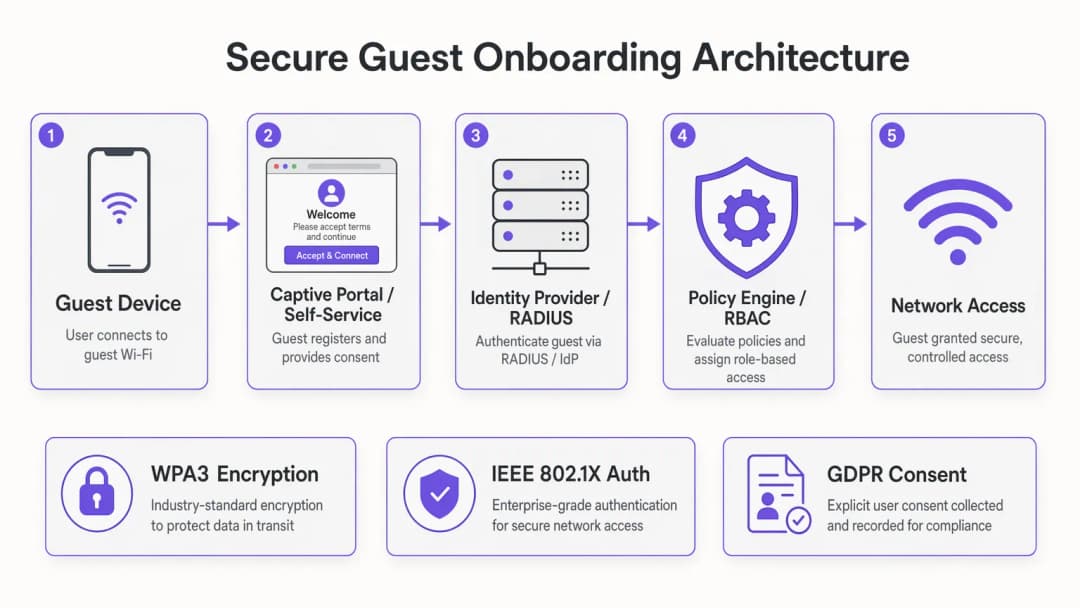
A modern secure onboarding deployment comprises five functional layers that must be designed in tandem. The Guest Device Layer includes the range of endpoints attempting to connect - smartphones, tablets, laptops, and increasingly IoT devices - each with varying supplicant capabilities and portal-handling behaviour. The Captive Portal and Self-Service Layer is the user-facing interface: the point at which identity is claimed, consent is captured, and the authentication handshake is initiated. The Identity Provider Layer - whether an on-premises RADIUS server, cloud-based IdP, or federated identity service - is where credentials are validated and user attributes are returned to the policy engine. The Policy Engine enforces role-based access control, applying bandwidth profiles, VLAN assignments, and content filtering rules based on user attributes. Finally, the Network Access Layer - wireless controllers, access points, VLANs, and firewall rules - enforces the policies determined upstream.
The architectural principle governing every design decision is straightforward: complexity must reside in the backend, not in front of the user. Every additional step in the Captive Portal reduces your connection rate. In a stadium environment processing twenty thousand concurrent connection attempts at kickoff, a portal with three form fields and two redirects will generate a cascade of support requests and a measurable drop in network utilization.
Authentication Methods: A Technical Comparison
Social Login via OAuth 2.0 delegates identity verification to a trusted third party - Google, Apple, Facebook, or Microsoft. The user authenticates with their existing credentials, the OAuth provider issues an access token and basic profile data, and your portal maps that identity to a network session. From a security perspective, this is well-suited for guest access in consumer-facing venues. The primary benefit is verified identity: you receive a confirmed email address or social profile that feeds directly into your WiFi Analytics platform and CRM. The limitation is that you are dependent on the availability and policy decisions of third-party OAuth providers.
Email plus One-Time Passcode (OTP) implements a lightweight multi-factor authentication flow without requiring a social account. The user enters their email address, receives a six-digit code, and enters it to complete authentication. This is particularly effective in conference and event environments where you need to verify that the user is a registered attendee. It also provides a clean mechanism for GDPR consent capture, as the email submission can be tied directly to an explicit opt-in checkbox.
IEEE 802.1X with EAP-TLS is the enterprise gold standard. The device presents a client certificate to the RADIUS server, which validates it against the Certificate Authority and returns a RADIUS Access-Accept with the appropriate VLAN and policy attributes. From the user's perspective, the connection is entirely automatic - no portal, no passwords, no interaction required. This architecture requires Public Key Infrastructure (PKI) and Mobile Device Management (MDM) platforms to distribute certificates, making it best suited for managed device fleets in corporate, healthcare, and education environments. For a detailed treatment of RADIUS security hardening in this context, see Mitigating RADIUS Vulnerabilities: A Security Hardening Guide.
MAC caching with self-service portals are the most practical solution for high-footfall consumer venues. On the first connection, the user completes a lightweight registration flow. The portal stores the device's MAC address against the full authentication record. On subsequent connections - within a configurable window, typically thirty days - the device bypasses the portal entirely and connects directly. For hospitality and retail operators with high repeat-visit rates, MAC caching is the most impactful optimisation available.

OpenRoaming and Automated Provisioning
Built on the Passpoint standard (Wi-Fi Alliance) and the IEEE 802.11u protocol, OpenRoaming represents the most advanced form of automated onboarding. Participating devices carry a Passpoint profile that identifies them on compatible networks. When the device detects an OpenRoaming-enabled SSID, it automatically authenticates using EAP credentials without any user interaction. Purple acts as a free Identity Provider for OpenRoaming under a connect licence, meaning any user who has previously onboarded via a Purple-powered portal at any participating venue will automatically connect at yours. This is the architecture that completely eliminates onboarding friction for returning users across the OpenRoaming federation.
For transport operators - airports, railway stations, ferry terminals - OpenRoaming is exceptionally attractive. Passengers in transit have minimal dwell times and high connectivity expectations. Automated, secure connections without portal interactions are the only viable model at that scale.
Security Architecture: MFA, RBAC, and Network Segmentation
Multi-factor authentication in the guest WiFi context is most practically implemented as the email-plus-OTP flow described above, or via social login (which inherits the OAuth provider's MFA configuration). For employee and contractor access, hardware tokens or authenticator app TOTP codes are appropriate. The core principle is that MFA must be proportional to the sensitivity of the resources being accessed: guest internet access does not warrant the same MFA burden as access to back-office systems.
Role-based access control should be enforced at the RADIUS policy level, not the portal level. The portal determines who the user is; the RADIUS server determines what they can access. A typical RBAC matrix for a hotel property might assign guests to a bandwidth-limited Internet-only VLAN, conference delegates to a VLAN with access to event collaboration tools, staff to a VLAN with access to the property management system, and IoT devices - door locks, HVAC controllers, digital signage - to isolated VLANs with no Internet routing.
Network segmentation is the enforcement mechanism for RBAC. VLAN tagging on the RADIUS Access-Accept response, combined with corresponding firewall rules, ensures that each user class is restricted to its appropriate network zone. For PCI DSS compliance, the payment network must be completely isolated from all other VLANs, with no routing paths between the guest, staff, and payment zones.
WPA3 should be the target encryption standard for all new deployments. WPA3-SAE (Simultaneous Authentication of Equals) eliminates the offline dictionary attack vulnerability of WPA2-PSK and provides forward secrecy through individual session negotiations. For environments still running legacy WPA2 devices, WPA3 transition mode allows both standards to coexist on the same SSID during the migration period.
GDPR and Compliance Integration
GDPR Article 7 requires that consent be freely given, specific, informed, and unambiguous. In the Captive Portal context, this means presenting a clear privacy notice before collecting any personal data, using an explicit opt-in checkbox (not a pre-ticked box), recording consent timestamps and specific processing purposes, and providing a mechanism for users to withdraw consent. Consent records - including the user's IP address, MAC address, timestamp, and the exact consent text presented - must be maintained for auditing purposes.
For retail operators subject to PCI DSS, the network architecture must ensure that cardholder data environments are completely isolated from the guest WiFi infrastructure. This is not just a configuration requirement - it must be documented, tested, and auditable. Your VLAN segmentation design, firewall rule sets, and RADIUS policy configurations must all be included in your PCI DSS scope documentation.
Got questions about your specific setup?
Our team works with venue operators, IT managers, and network engineers across 80,000 venues. Book a 20-minute call and we will show you how others like you solved it.
Implementation Guide
Step 1: Requirements and Architecture Design
Begin by mapping your user populations and their access requirements. Identify each user class - guests, staff, contractors, IoT devices, event attendees - and define the network resources required for each class. This mapping directly drives your VLAN design and RADIUS policy configuration. Simultaneously, identify your compliance obligations: GDPR consent requirements, PCI DSS scope, and any region-specific regulations (for example, NHS Digital standards for healthcare networks).
Select your authentication methods based on the dwell time and security profile of each user category. Use the framework provided in the memory hook section below to guide this decision. Document your chosen architecture before initiating any configuration work.
Step 2: Infrastructure Preparation
Ensure your wireless infrastructure supports the required standards. WPA3 requires WPA3-capable firmware on access points - verify compatibility across your entire estate before committing to a WPA3-only deployment. Configure your VLAN structure on your switching infrastructure, ensuring VLAN tags align across your wireless controllers, switches, and firewalls. Deploy or configure your RADIUS servers, ensuring they have the capacity to handle your peak authentication load - for example, a stadium deployment may need to process thousands of EAP transactions per minute at the start of an event.
For RADIUS high availability, deploy a primary and secondary server with automatic failover. A RADIUS outage during a high-footfall event is a critical operational incident. Continuously monitor RADIUS response times; authentication latency above 200 milliseconds will begin to cause client timeout failures on some device types.
Step 3: Portal and Identity Configuration
Design your Captive Portal with conversion rate as the primary metric. Every form field, every redirect, every page load adds friction. A GDPR-compliant guest access requires a minimum viable portal: a single authentication action (social login button or email field), a privacy notice link, and a clear consent checkbox. Anything beyond this must be justified by a specific business requirement.
Configure your identity provider integration - OAuth endpoints for social login, SMTP for OTP delivery, or SAML federation for enterprise SSO. Test the full authentication flow on iOS and Android devices, paying special attention to Captive Portal detection behaviour. iOS uses HTTP probes for Captive Portal detection; ensure your portal responds correctly to these probes and avoids HTTPS redirects on the initial detection request.
For guest WiFi deployments, integrate your portal with your analytics and marketing platforms to ensure consented user data flows correctly into your customer data infrastructure.
Step 4: Testing and Validation
Perform load testing before any high-footfall event or major deployment. Simulate peak authentication loads against your RADIUS infrastructure and measure response times. Test each authentication method on a representative sample of device types. Validate your VLAN segmentation by attempting to route traffic between network zones - confirm that firewall rules block all unauthorised paths. Test your MAC caching logic by simulating returning device connections. Validate your GDPR consent records by reviewing audit logs for a sample of test connections.
Step 5: Monitoring and Continuous Improvement
Post-deployment, monitor three key metrics: portal conversion rate (the percentage of devices successfully completing onboarding), authentication latency (RADIUS response time), and support ticket volume related to connectivity issues. Set alerting thresholds for degradation in RADIUS response times and portal error rates. Review your MAC cache hit rate monthly - a low hit rate in a high-repeat-footfall venue indicates a configuration or device-tracking issue.
Best Practices
The following recommendations represent vendor-neutral best practices derived from IEEE 802.1X, WPA3, GDPR, and PCI DSS requirements, as well as operational experience in large-scale venue deployments.
Separate authentication from authorisation. Your portal determines identity; your RADIUS server determines access. Never encode access policy logic in the portal itself. This separation ensures that policy changes can be made centrally without modifying portal code.
Implement RADIUS accounting from day one. RADIUS Accounting-Start and Accounting-Stop messages provide a complete audit trail of each network session - user identity, session duration, bytes transferred, and reason for termination. This data is essential for compliance audits, capacity planning, and troubleshooting.
Use certificate pinning for your Captive Portal. A Captive Portal that presents an untrusted certificate will generate browser warnings that confuse users and erode trust. Deploy a valid TLS certificate from a recognised CA on your portal domain and configure HSTS.
Document your RADIUS attribute mapping. The mapping between RADIUS attributes (VLAN IDs, bandwidth policies, session timeouts) and your network policy profiles should be documented and version-controlled. Undocumented RADIUS configurations are a common source of access control failures during infrastructure changes.
Plan for IoT device onboarding from the start. Headless devices that cannot navigate a Captive Portal require an alternative onboarding path - typically MPSK or MAC authentication bypass. Define your IoT VLAN policy and onboarding process prior to deployment, rather than as a retrofit.
For environments running Ruckus wireless infrastructure, Your Guide to a Wireless Access Point Ruckus provides specific configuration guidance for integrating Ruckus access points with a RADIUS-based onboarding architecture.
Troubleshooting and Risk Mitigation
RADIUS timeout failures are the most common cause of poor onboarding experiences. Symptoms include intermittent authentication failures, especially under load. Diagnosis: Review EAP transaction logs on the RADIUS server for timeout patterns. Solution: Optimise RADIUS server response times, increase client retry counts, and ensure your RADIUS server has adequate CPU and memory for peak loads.
iOS Captive Portal detection failures occur when the portal does not respond correctly to Apple's HTTP probe requests. Symptoms: The Captive Portal notification does not appear on the iOS device, and users must manually navigate to a browser to trigger the portal. Solution: Ensure your wireless controller is configured to intercept HTTP traffic and redirect to the portal, and that the portal responds to probe URLs with a non-200 HTTP status.
MAC address randomisation is increasingly used by iOS 14+, Android 10+, and Windows 10+ devices to protect user privacy. Randomised MACs change on each network association, breaking MAC caching logic. Solution: Configure your portal to use a persistent identifier (authenticated email or social profile) as the primary cache key, with the MAC address as a secondary signal. Some platforms allow users to disable MAC randomisation for trusted networks - consider including this guidance in your portal onboarding flow.
VLAN misconfiguration leading to cross-zone traffic is a significant security risk. Symptoms: Devices in the guest VLAN can access resources in the employee or payment VLAN. Solution: Conduct regular firewall rule audits and penetration testing of VLAN boundaries. Implement network access control lists at the switch level as a defence-in-depth measure.
GDPR consent record gaps occur when the consent capture mechanism silently fails - for example, if a database write fails during high load. Solution: Implement synchronous consent record writes with retry logic, and monitor consent record generation rates against connection rates. Any significant divergence indicates a data capture failure.
ROI and Business Impact
The business case for investing in a well-architected onboarding system operates across three dimensions: operational efficiency, revenue enablement, and risk reduction.
On operational efficiency, the primary metric is support ticket volume related to connectivity issues. Deployments implementing MAC caching and optimising portal conversion rates consistently report a forty to sixty percent reduction in WiFi-related support contacts. For a hotel with a full-time IT support function, this represents a measurable reduction in staff time allocated to routine connectivity issues.
On revenue enablement, the value of first-party data captured through GDPR-compliant onboarding flows is substantial. A hotel group capturing verified email addresses for ninety percent of connecting guests - against a near-zero capture rate of shared PSK deployments - holds a direct marketing asset with measurable lifetime value. WiFi Analytics platforms can translate this data into footfall patterns, dwell-time analysis, and repeat visit rates that inform operational and marketing decisions.
On risk mitigation, the cost of a GDPR enforcement action or a PCI DSS audit failure dwarfs the cost of implementing a compliant onboarding architecture. The ICO's enforcement records include fines of up to four percent of global annual turnover for severe GDPR breaches. A documented, auditable consent capture process and a properly segmented network are the primary technical controls that mitigate this risk.
For hospitality operators specifically, guest WiFi quality is consistently cited as a top-three factor in online review sentiment. The correlation between connection success rates and guest satisfaction scores is well-established. Investment in onboarding architecture is therefore also an investment in review scores and repeat booking rates.
For further reading on secure network architecture in clinical environments, see WiFi in Hospitals: A Guide to Secure Clinical Networks. For enterprise mobility contexts, Your Guide to Enterprise In Car WiFi Solutions covers authentication architecture for vehicle-based connectivity deployments.
Key Definitions
IEEE 802.1X
An IEEE standard for port-based network access control that provides an authentication framework for devices connecting to a LAN or WLAN. It uses the Extensible Authentication Protocol (EAP) to carry authentication messages between the supplicant (client device), authenticator (access point or switch), and authentication server (RADIUS). 802.1X is the foundation of enterprise WiFi security, enabling individual device authentication without shared credentials.
IT teams encounter 802.1X when deploying enterprise WiFi for staff or managed device fleets. It is the required authentication standard for any environment where individual device accountability is necessary - corporate networks, healthcare, education. It requires a RADIUS server and, for certificate-based EAP-TLS, a PKI infrastructure.
RADIUS (Remote Authentication Dial-In User Service)
A networking protocol (RFC 2865) that provides centralised authentication, authorisation, and accounting (AAA) for users connecting to a network. In WiFi deployments, the RADIUS server receives authentication requests from the wireless controller (the NAS - Network Access Server), validates credentials against an identity store, and returns Access-Accept or Access-Reject responses along with policy attributes such as VLAN assignment and bandwidth limits.
RADIUS is the backbone of enterprise WiFi authentication. IT teams configure RADIUS servers to integrate with Active Directory, LDAP, or cloud IdPs, and to return the correct VLAN and policy attributes for each user class. RADIUS misconfiguration - particularly timeout settings and attribute mappings - is the most common source of authentication failures in enterprise deployments.
WPA3-SAE (Simultaneous Authentication of Equals)
The authentication handshake used in WPA3 Personal mode, replacing the WPA2-PSK (Pre-Shared Key) handshake. SAE uses a Diffie-Hellman key exchange to establish a session key without transmitting the password over the air, eliminating the offline dictionary attack vulnerability of WPA2-PSK. It also provides forward secrecy, meaning that compromise of the network password does not expose previously captured traffic.
IT teams should target WPA3-SAE for all new deployments and migrations. WPA3 Transition Mode allows WPA2 and WPA3 clients to coexist on the same SSID during the migration period. WPA3 is mandatory for WiFi CERTIFIED devices from 2020 onwards, so most modern client devices support it.
Captive Portal
A web-based interface presented to users before they are granted network access, used to authenticate users, capture consent, and enforce terms of use. Captive portals work by intercepting HTTP traffic from unauthenticated clients and redirecting it to the portal URL. Modern operating systems (iOS, Android, Windows, macOS) include captive portal detection mechanisms that automatically display the portal in a dedicated browser window.
Captive portals are the primary onboarding interface for guest WiFi in hospitality, retail, and public venues. IT teams must ensure that portal design minimises friction, that GDPR consent capture is correctly implemented, and that the portal responds correctly to OS-level captive portal detection probes. MAC caching is used to bypass the portal for returning devices.
MAC Authentication Bypass (MAB)
A fallback authentication mechanism that uses a device's MAC address as its identity credential, for devices that do not support 802.1X supplicants. The wireless controller sends the device's MAC address to the RADIUS server as both the username and password; the RADIUS server looks up the MAC in a database and returns the appropriate access policy. MAB provides no cryptographic authentication - it relies on the assumption that MAC addresses are not spoofed.
IT teams use MAB primarily for IoT devices - printers, smart TVs, access control readers, HVAC sensors - that cannot run an 802.1X supplicant. It is also used as a fallback for 802.1X-capable devices that fail certificate validation. MAB should always be combined with network segmentation to limit the blast radius of a spoofed MAC address.
OpenRoaming
A WiFi Alliance programme built on the Passpoint standard (IEEE 802.11u) that enables automatic, secure WiFi roaming across participating networks without user interaction. Devices carry a Passpoint profile that identifies them to compatible networks; authentication is performed automatically using EAP credentials. Purple acts as a free identity provider for OpenRoaming under the Connect licence.
IT teams in high-footfall venues - airports, rail stations, retail chains, hotel groups - should evaluate OpenRoaming as a mechanism for eliminating onboarding friction for returning users. Once a user has onboarded at any OpenRoaming-participating venue, their device will connect automatically at all other participating venues. This is particularly valuable for transport operators and multi-site hospitality groups.
Role-Based Access Control (RBAC)
An access control model that assigns network permissions based on the authenticated user's role or attributes, rather than their individual identity. In WiFi deployments, RBAC is implemented by mapping user attributes (returned by the RADIUS server or IdP) to network policies - VLAN assignments, bandwidth profiles, content filtering rules, and session timeouts. A guest receives internet-only access; a staff member receives LAN access; an IoT device receives an isolated VLAN.
RBAC is the mechanism that enables a single physical network infrastructure to serve multiple user classes with different security requirements. IT teams implement RBAC through RADIUS attribute mappings and corresponding firewall and VLAN configurations. The RBAC matrix - mapping user classes to resources and restrictions - should be the first design artefact produced in any enterprise WiFi deployment.
EAP-TLS (Extensible Authentication Protocol - Transport Layer Security)
A certificate-based EAP method that provides mutual authentication between the client device and the RADIUS server using X.509 certificates. Both the client and the server present certificates; each validates the other's certificate against a trusted Certificate Authority. EAP-TLS provides the highest level of authentication assurance available in 802.1X deployments and is transparent to the end user once certificates are provisioned.
IT teams deploy EAP-TLS in environments where managed devices are provisioned via MDM platforms. Certificate distribution is handled by the MDM; once provisioned, devices authenticate automatically without user interaction. EAP-TLS requires a PKI infrastructure (Certificate Authority, certificate templates, revocation mechanisms) which adds deployment complexity but delivers the strongest available authentication posture.
MPSK (Multi-Pre-Shared Key)
A WiFi authentication mechanism that allows multiple unique pre-shared keys to be configured on a single SSID, with each key mapped to a specific VLAN and policy profile. Unlike a single shared PSK, MPSK provides per-device or per-device-class isolation without requiring 802.1X supplicant capability. Each key can be revoked independently without affecting other devices.
IT teams use MPSK primarily for IoT device onboarding - assigning each device class (smart TVs, access control readers, HVAC sensors) a unique PSK that maps to an isolated VLAN. MPSK is supported on most enterprise wireless platforms (Cisco, Aruba, Ruckus, Meraki) and is the recommended approach for environments with a mix of 802.1X-capable and non-capable devices.
Worked Examples
A 400-room hotel group operating across six properties is running a single shared WPA2 pre-shared key at each property, displayed on a card at the front desk. Guests frequently contact reception for the password, and the IT team has no visibility into network usage, no GDPR consent records, and no ability to segment IoT devices (smart TVs, door locks) from guest traffic. The group wants to modernise their onboarding architecture before a planned expansion to twelve properties.
Phase 1 - Architecture Design: Deploy a dual-SSID architecture at each property. SSID 1 (Guest) uses WPA3-SAE with a captive portal for onboarding. SSID 2 (IoT) uses MPSK with MAC Authentication Bypass, with each device class mapped to an isolated VLAN. SSID 3 (Staff) uses 802.1X with RADIUS-backed authentication against the Active Directory domain.
Phase 2 - Portal Configuration: Deploy a Purple-powered captive portal with social login (Google and Apple) as the primary authentication method, with email-plus-OTP as the fallback. Configure MAC caching with a 30-day window. Implement GDPR consent capture with explicit opt-in and automated consent record storage. Connect the portal to the hotel's CRM via API for email capture.
Phase 3 - RADIUS and VLAN Configuration: Configure RADIUS to return VLAN 10 (Guest - internet only, 20Mbps bandwidth cap) for portal-authenticated users, VLAN 20 (IoT - isolated, no internet) for MAC-authenticated devices, and VLAN 30 (Staff - full LAN access) for 802.1X-authenticated staff devices. Implement RADIUS accounting for full session audit trail.
Phase 4 - Rollout: Pilot at one property for 30 days, measuring portal conversion rate, RADIUS latency, and support ticket volume. Roll out to remaining properties using a templated configuration approach to ensure consistency.
Outcomes (measured at 90 days post-deployment): Portal conversion rate: 94%. Average connection time: 7 seconds (down from 45 seconds). WiFi-related support contacts: reduced by 58%. GDPR consent records: 100% coverage for authenticated sessions. Email capture rate: 91% of connecting guests.
A regional retail chain with 60 stores needs to provide guest WiFi across all locations while ensuring complete PCI DSS compliance. The payment network runs on the same physical infrastructure as the proposed guest WiFi. Staff devices need to be onboarded consistently across all stores without manual IT intervention. The chain processes approximately 2,000 guest WiFi connections per store per day.
Network Segmentation Design: Implement three VLANs on all store switching infrastructure: VLAN 100 (Guest WiFi - internet only, no LAN routing), VLAN 200 (Staff - access to retail management systems, no payment network), VLAN 300 (Payment - completely isolated, no routing to VLAN 100 or 200, dedicated firewall zone). Configure ACLs at the switch level to enforce VLAN boundaries as a defence-in-depth measure.
Guest Onboarding: Deploy a self-service captive portal with email verification and 30-day MAC caching. At 2,000 connections per day per store, MAC cache hit rate will be high for frequent shoppers, reducing portal load significantly. Configure GDPR consent capture with marketing opt-in as a separate, optional checkbox. Integrate with the retail CRM for loyalty programme cross-referencing.
Staff Device Onboarding: Deploy certificates to all staff devices via the MDM platform (Microsoft Intune or Jamf). Configure 802.1X on the Staff SSID with RADIUS authentication against Azure AD. New device onboarding is fully automated - the MDM pushes the certificate and WiFi profile on enrolment, and the device connects automatically on first store entry.
PCI DSS Documentation: Document the VLAN segmentation design, firewall rule sets, and RADIUS policy configurations in the PCI DSS scope documentation. Conduct quarterly penetration testing of VLAN boundaries. Maintain RADIUS accounting logs for the required retention period.
Outcomes: Staff device onboarding time: reduced from 20 minutes to under 3 minutes. Guest portal conversion rate: 89%. PCI DSS audit: passed with no findings related to network segmentation. IT support tickets related to WiFi: reduced by 52% across the estate.
Practice Questions
Q1. A 15,000-capacity stadium is deploying guest WiFi for the first time. The venue hosts 40 events per year, with peak connection attempts of 8,000 devices in the first 10 minutes after gates open. The venue has no existing RADIUS infrastructure and a small IT team of two people. Which onboarding architecture would you recommend, and what are the three most critical configuration decisions?
Hint: Consider the dwell time, the peak load profile, and the IT team's capacity to manage ongoing administration. What happens if the RADIUS server is unavailable at kickoff?
View model answer
For a stadium with this profile, the recommended architecture is a self-service captive portal with social login (Google/Apple) as the primary method and email-plus-OTP as fallback, combined with 30-day MAC caching and a cloud-hosted RADIUS service to eliminate the single-point-of-failure risk of an on-premises server. The three critical configuration decisions are: (1) MAC caching configuration - with 40 events per year and significant repeat attendance, a high MAC cache hit rate will dramatically reduce portal load at peak times; configure a 30-day cache window and monitor hit rates per event; (2) RADIUS capacity and high availability - size your RADIUS infrastructure to handle 8,000 EAP transactions in 10 minutes (approximately 13 per second) with a secondary server for failover; test under simulated load before the first event; (3) Portal performance optimisation - host the portal on a CDN or local cache to ensure sub-second page load times under peak load; a portal that takes 3 seconds to load under load will cause a significant proportion of users to abandon the connection attempt.
Q2. An NHS trust wants to provide WiFi access for patients and visitors across a 600-bed hospital, while ensuring complete isolation of clinical systems and compliance with NHS Digital network security standards. Staff devices are managed via Microsoft Intune. How would you design the network segmentation and onboarding architecture?
Hint: Consider the sensitivity of clinical data, the range of device types (managed staff devices, unmanaged patient devices, medical IoT), and the specific compliance requirements of the NHS Digital Data Security and Protection Toolkit.
View model answer
Deploy a four-SSID architecture: (1) Patient/Visitor WiFi - captive portal with email verification, GDPR consent capture, VLAN with internet-only access, no routing to any clinical or administrative network; (2) Staff WiFi - 802.1X with EAP-TLS, certificates distributed via Intune, VLAN with access to clinical applications and EHR systems; (3) Medical IoT - MPSK with MAC Authentication Bypass, each device class (infusion pumps, monitoring equipment, imaging systems) assigned a unique PSK and isolated VLAN; (4) Building Management - separate SSID for HVAC, access control, and facilities systems, completely isolated from all clinical VLANs. Critical design requirements: complete Layer 3 isolation between patient, staff, and clinical VLANs enforced by firewall rules and switch ACLs; RADIUS accounting enabled on all SSIDs for audit trail; WPA3 on all SSIDs; medical IoT devices on VLANs with no internet routing and strict egress filtering. For detailed guidance on clinical network security, see the WiFi in Hospitals reference guide.
Q3. A multinational retail chain is rolling out a unified guest WiFi platform across 200 stores in the UK and EU. The IT team needs to ensure GDPR compliance across all locations, consistent PCI DSS network segmentation, and a portal experience that supports the loyalty programme's data capture requirements. The chain currently has no centralised WiFi management platform. What are the key architectural decisions and the sequence in which they should be made?
Hint: Consider the interdependencies between decisions: GDPR consent requirements affect portal design; PCI DSS requirements affect VLAN architecture; loyalty programme requirements affect identity provider integration. Which decisions constrain the others?
View model answer
The correct sequencing is: (1) Define GDPR consent requirements first - the legal basis for processing, the specific consent text, and the data retention policy must be established before portal design begins, as they constrain what data can be collected and how; (2) Define PCI DSS scope - identify which stores process payment card data and ensure the network architecture completely isolates payment infrastructure from guest WiFi; this drives the VLAN design; (3) Design the VLAN architecture - typically three VLANs (Guest, Staff, Payment) with ACLs enforced at the switch level; document this as the PCI DSS network segmentation evidence; (4) Select the identity provider and portal platform - must support GDPR consent capture with audit logging, OAuth integration for social login, and API integration with the loyalty CRM; (5) Design the portal UX - keeping it to the minimum viable interaction: one authentication action, one consent checkbox, one optional marketing opt-in; (6) Deploy in a pilot cohort of 10 stores, validate GDPR consent records, PCI DSS segmentation, and portal conversion rates before rolling out to the full estate. The key constraint is that GDPR and PCI DSS requirements are non-negotiable and must be designed in from the start - retrofitting compliance into an existing deployment is significantly more expensive and risky than building it in from day one.
Continue reading in this series
iOS and macOS 802.1X troubleshooting: a deployment checklist for Intune, Jamf and Entra ID
Use this checklist to diagnose why iPhones, iPads and Macs fail 802.1X on Intune or Jamf Pro. Each failure maps to one of four causes: server trust, identity certificate, macOS mode or Entra ID group scoping. You will confirm the cause from eapolclient and RADIUS logs, apply the fix and stage future certificate rotations.
Intune WiFi profile server trust: certificate server names and root CA checklist for Entra ID
You will be able to configure the server validation half of an Intune WiFi profile so EAP-TLS and PEAP connect on Windows, Apple and Android. You will match certificate server names to the RADIUS certificate, deploy the correct root CA, align Entra ID group assignments, and stage certificate renewals before they silently break connections.
Android 802.1X and EAP-TLS troubleshooting: a deployment checklist for Intune and Entra ID
You will be able to pinpoint why managed Android phones fail EAP-TLS on your staff SSID and fix it in Intune. Match each symptom to the four usual causes - missing CA or domain, client certificate in the wrong profile, a mismatched RADIUS server names value, or an undelivered trusted root. Then apply a rollout checklist that stops repeat outages.
Got questions about your specific setup?
Our team works with venue operators, IT managers, and network engineers across 80,000 venues. Book a 20-minute call and we will show you how others like you solved it.