
So beheben Sie WiFi Kanal-Überlappungen
Dieser fundierte Leitfaden erläutert die Mechanismen von WiFi Kanal-Überlappungen, einschließlich Co-Channel Interference (CCI) und Adjacent Channel Interference (ACI). Er bietet IT-Teams in Unternehmen praktische Schritte zur Optimierung von Kanalplanung, Sendeleistung und RRM-Konfigurationen für hochfrequentierte Standorte.
Video overview
Diesen Leitfaden anhören
Podcast-Transkript ansehen
Executive Summary
Für IT-Leiter und Netzwerkarchitekten, die hochdichte Umgebungen wie Gastronomie- und Hotelleriebetriebe , Einzelhandelsflächen oder große öffentliche Bereiche verwalten, ist die WiFi Kanalüberlappung der stille Killer der Netzwerkperformance. Selbst wenn Management-Dashboards alle Access Points (APs) als "grün" und online anzeigen, können die zugrundeliegende Co-Kanal-Interferenz (CCI) und Nachbarkanal-Interferenz (ACI) den Durchsatz drastisch verringern, die Latenzzeiten erhöhen und die Erfahrung der Endnutzer ruinieren.
Dieser Leitfaden bietet ein praktisches, herstellerneutrales Framework zur Identifizierung, Diagnose und Behebung von Kanalüberlappungen. Wir behandeln die Funktionsweise von HF-Interferenzen im 2,4 GHz- und 5 GHz-Band, wie Sie das Radio Resource Management (RRM) effektiv konfigurieren und wie Sie einen disziplinierten Kanalplan implementieren, der Ihre Guest WiFi Performance schützt und eine präzise Datenerfassung für Ihre WiFi Analytics gewährleistet.
Technischer Deep-Dive: Interferenzen verstehen
WiFi arbeitet in einem gemeinsam genutzten, lizenzfreien Spektrum. Um dies zu verwalten, nutzt das 802.11 MAC-Protokoll einen Mechanismus namens Carrier Sense Multiple Access with Collision Avoidance (CSMA/CA). Vor dem Senden muss ein Gerät "lauschen", um sicherzustellen, dass der Kanal frei ist. Wenn ein anderes Gerät sendet, muss es warten.
Wenn die Kanalplanung fehlschlägt, treten zwei verschiedene Arten von Interferenzen auf:
Co-Kanal-Interferenz (CCI)
CCI tritt auf, wenn zwei oder mehr APs mit überlappenden Abdeckungsbereichen auf exakt demselben Kanal arbeiten. Da sie sich gegenseitig "hören" können, weichen sie einander aus. Jeder Client in der Überlappungszone wird in eine einzige Kollisionsdomäne gezwungen, wodurch sie sich effektiv die Sendezeit eines einzigen APs teilen. In einer dichten Bereitstellung wirkt CCI wie ein massiver Engpass, der den Durchsatz lahmlegt.
Nachbarkanal-Interferenz (ACI)
ACI ist wohl noch zerstörerischer. Sie tritt auf, wenn APs auf überlappenden, benachbarten Kanälen platziert werden (z. B. Kanal 1 und Kanal 3 im 2,4 GHz-Band). Da die Kanäle unterschiedlich sind, erkennt der CSMA/CA-Mechanismus die Übertragungen des anderen APs nicht als gültigen 802.11-Verkehr an, dem er ausweichen müsste. Stattdessen nimmt er sie als reines HF-Rauschen wahr. Beide APs senden gleichzeitig, was zu Frame-Kollisionen, massiven Retransmissionsraten und schweren Leistungseinbußen führt.
Die Realität: 2,4 GHz vs. 5 GHz
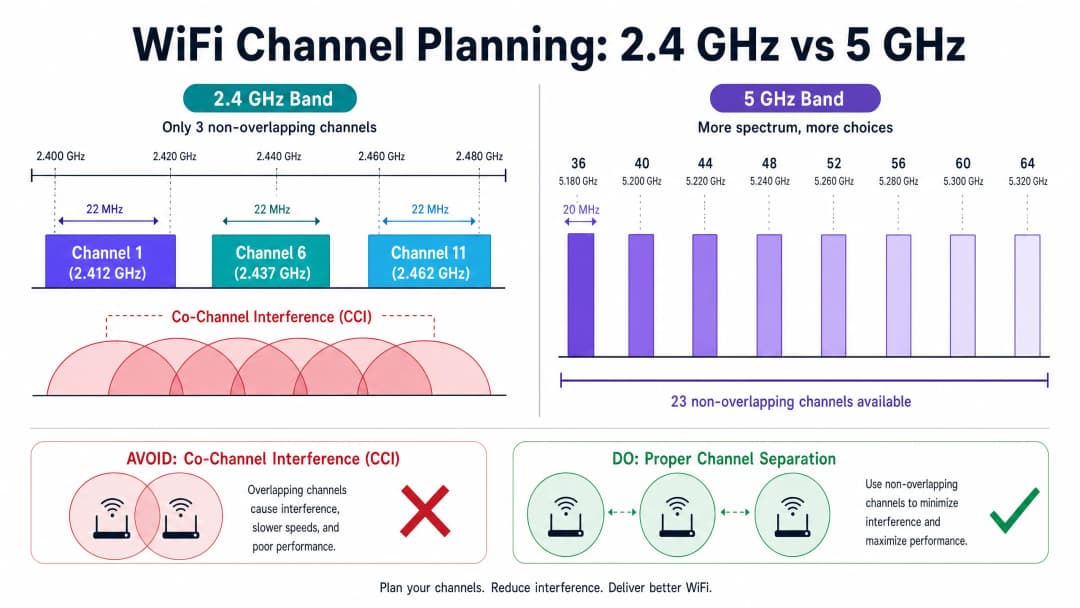
Das 2,4-GHz-Band bietet nur drei überlappungsfreie 20-MHz-Kanäle: 1, 6 und 11. Jede Abweichung von diesem Plan (z. B. die Verwendung der Kanäle 2, 3 oder 4) führt unweigerlich zu ACI. Für einen tieferen Einblick in die Frequenzbänder sei auf unseren Leitfaden zu WiFi Frequenzen: Ein Leitfaden zu WiFi Frequenzen im Jahr 2026 verwiesen.
Das 5-GHz-Band bietet deutlich mehr Spektrum und stellt bis zu 23 überlappungsfreie 20-MHz-Kanäle zur Verfügung (abhängig von regionalen Vorschriften wie ETSI in Europa oder der FCC in den USA). Dies macht 5 GHz zum primären Kapazitätsband für Enterprise-Bereitstellungen.
-
Haben Sie Fragen zu Ihrem spezifischen Setup?
Unser Team arbeitet mit Standortbetreibern, IT-Managern und Netzwerktechnikern an über 80.000 Standorten zusammen. Buchen Sie ein 20-minütiges Gespräch und wir zeigen Ihnen, wie andere diese Herausforderungen gelöst haben.
Implementierungsleitfaden: Behebung der RF-Umgebungsprobleme
Die Behebung von Kanalüberlappungen erfordert einen systematischen Ansatz bei der Kanalzuweisung, dem Leistungsmanagement und der kontinuierlichen Überwachung.
1. Einen strengen Kanalplan durchsetzen
- 2,4 GHz: Halten Sie sich strikt an die Kanäle 1, 6 und 11. Verwenden Sie im 2,4-GHz-Band niemals eine 40-MHz-Kanalbündelung. Wenn Sie zu viele APs für drei Kanäle haben, müssen Sie die Sendeleistung reduzieren oder die 2,4-GHz-Funkmodule auf ausgewählten APs deaktivieren, um Überlappungen zu vermeiden.
- 5 GHz: Nutzen Sie das gesamte verfügbare Spektrum (z. B. UNII-1, UNII-2, UNII-3). Beschränken Sie in Umgebungen mit hoher Dichte die Kanalbreite auf 20 MHz oder 40 MHz, um die Anzahl der verfügbaren überlappungsfreien Kanäle zu maximieren. Vermeiden Sie 80-MHz- oder 160-MHz-Kanäle, es sei denn, die Bereitstellung erfolgt in Bereichen mit extrem geringer Dichte.
2. Sendeleistung (Tx) optimieren
Die APs auf maximaler Sendeleistung zu belassen, ist der häufigste Fehler bei der Bereitstellung. Eine hohe Tx-Leistung vergrößert die Funkzelle künstlich, was die Überlappungszone mit benachbarten APs vergrößert und CCI verschlimmert.
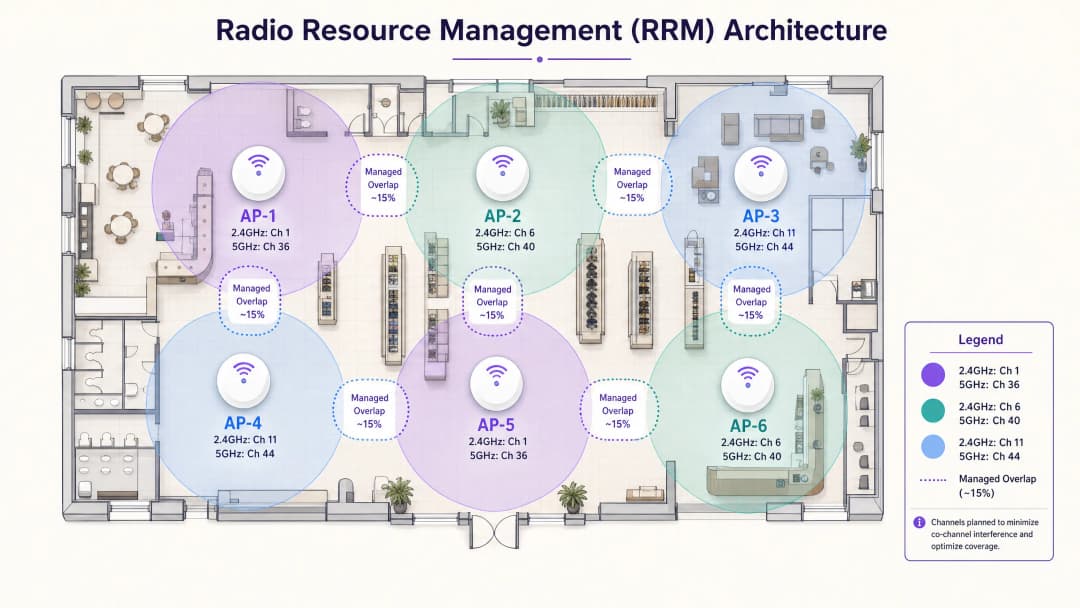
- Faustregel: Planen Sie für einen Zellenrand von ca. -67 dBm, mit nicht mehr als 15-20 % Überlappung zwischen benachbarten Zellen.
- Leistungsasymmetrie: Stellen Sie sicher, dass die Sendeleistung des APs in etwa der Sendeleistung typischer mobiler Clients entspricht (ca. 10-14 dBm). Wenn der AP schreit, der Client aber nur flüstern kann, entstehen Probleme mit "Sticky Clients".
3. Radio Resource Management (RRM) sorgfältig konfigurieren
Moderne Controller nutzen RRM (oder ARM), um Kanäle und Leistung dynamisch anzupassen. Dies ist zwar nützlich, muss aber begrenzt werden.
- Legen Sie minimale und maximale Tx-Leistungsschwellenwerte fest, um zu verhindern, dass RRM die APs bei vorübergehenden Interferenzen auf maximale Leistung hochregelt.
- Planen Sie RRM-Kanalwechsel für Nebenzeiten ein, um Unterbrechungen aktiver Client-Sitzungen zu vermeiden.
-
Best Practices & Netzwerkhygiene
- Band Steering: Aktivieren Sie Band Steering, um fähige Clients in das sauberere 5-GHz-Band zu leiten und so Sendezeit auf 2,4 GHz für ältere IoT-Geräte freizugeben.
- Minimale Datenraten: Deaktivieren Sie veraltete Datenraten (z. B. 1, 2, 5,5, 11 Mbps). Wenn Clients gezwungen werden, höhere Basisraten zu nutzen, verringert sich die Größe der Funkzelle und es wird sichergestellt, dass langsame Clients nicht übermäßig viel Sendezeit verbrauchen.- Koexistenz: Achten Sie auf Störungen, die nicht durch WiFi verursacht werden. Wenn Sie Beacons einsetzen, lesen Sie unseren Leitfaden BLE Low Energy Explained for Enterprise .
- Segmentierung: Implementieren Sie in komplexen gemeinsam genutzten Umgebungen eine ordnungsgemäße logische Trennung. Siehe unsere Micro-Segmentation Best Practices for Shared WiFi Networks (oder die italienische Version: Best Practices per la Micro-Segmentazione nelle Reti WiFi Condivise ).
Fehlerbehebung & Risikominderung
Bei der Diagnose von Performance-Problemen:
- Führen Sie eine Spektrumanalyse durch: Verwenden Sie einen dedizierten Spektrumanalysator und nicht nur einen WiFi-Scanner, um Nicht-802.11-Interferenzen (z. B. Mikrowellen, drahtlose AV-Geräte) zu identifizieren.
- RRM-Protokolle prüfen: Überprüfen Sie, wie oft APs die Kanäle wechseln. Übermäßiges Flapping deutet auf eine instabile RF-Umgebung oder zu aggressive RRM-Algorithmen hin.
- Suche nach Rogue APs: Benachbarte Netzwerke, die auf überlappenden Kanälen arbeiten, verursachen CCI/ACI. In Office Wi Fi: Optimize Your Modern Office Wi-Fi Network besprechen wir Strategien zur Bewältigung von Interferenzen in Gebäuden mit mehreren Mietern.
ROI & geschäftliche Auswirkungen
Die Behebung von Kanalüberlappungen ist nicht nur eine Aufgabe für die IT; sie wirkt sich direkt auf das Geschäftsergebnis aus.
- Erhöhte Kapazität: Durch die Eliminierung von CCI kann das Netzwerk mehr gleichzeitige Benutzer ohne Leistungseinbußen unterstützen, was für Großveranstaltungen oder geschäftige Einzelhandelszeiten entscheidend ist.
- Bessere Analysen: Eine saubere RF-Umgebung führt zu zuverlässigeren Client-Verbindungen und stellt sicher, dass Ihre WiFi Analytics genaue Verweilzeiten und Besucherzahlen erfassen.
- Weniger Support-Tickets: Eine stabile Konnektivität reduziert Beschwerden von Gästen und Mitarbeitern drastisch und entlastet den IT-Service-Desk operativ.
Schlüsseldefinitionen
Co-Channel Interference (CCI)
Interferenz, die auftritt, wenn mehrere Access Points auf genau demselben Kanal arbeiten und sich ihre Abdeckungsbereiche überschneiden.
Zwingt alle Geräte in der Überlappungszone, sich die Airtime zu teilen, was den Durchsatz in dichten Umgebungen drastisch reduziert.
Adjacent Channel Interference (ACI)
Interferenz, die entsteht, wenn Access Points auf überlappenden, aber unterschiedlichen Kanälen arbeiten (z. B. 2,4-GHz-Kanäle 1 und 3).
Verursacht Frame-Kollisionen und Datenkorruption, da das 802.11-Protokoll Übertragungen auf unterschiedlichen Frequenzen nicht ordnungsgemäß koordinieren kann.
Radio Resource Management (RRM)
Eine zentralisierte Software-Controller-Funktion, die die Sendeleistung und Kanalzuweisung der APs basierend auf den HF-Bedingungen dynamisch verwaltet.
Unverzichtbar für große Installationen, muss jedoch mit Grenzwerten (min/max Sendeleistung) konfiguriert werden, um instabiles Netzwerkverhalten zu verhindern.
CSMA/CA
Carrier Sense Multiple Access with Collision Avoidance. Das Protokoll, das von WiFi verwendet wird, um sicherzustellen, dass jeweils nur ein Gerät auf einem Kanal sendet.
Das Verständnis dieses "Listen-Before-Talk"-Mechanismus ist entscheidend, um zu verstehen, warum CCI die Netzwerkleistung beeinträchtigt.
Band Steering
Eine Funktion, die Dual-Band-Clients dazu bewegt oder zwingt, sich mit dem 5-GHz-Band anstatt mit dem überlasteten 2,4-GHz-Band zu verbinden.
Wird verwendet, um die Client-Last zu verteilen und die 2,4-GHz-Airtime für ältere Geräte freizuhalten.
Channel Bonding
Das Kombinieren mehrerer benachbarter 20-MHz-Kanäle zu breiteren Kanälen (40, 80 oder 160 MHz), um die Spitzen-Datenraten zu steigern.
Erhöht zwar die individuelle Geschwindigkeit, verringert jedoch die Anzahl der verfügbaren, nicht überlappenden Kanäle, was in dichten Unternehmensumgebungen oft zu CCI führt.
RSSI
Received Signal Strength Indicator. Ein Messwert für die Leistung eines empfangenen Funksignals.
Wird bei Standortvermessungen verwendet, um den Rand der nutzbaren Funkzelle eines APs zu bestimmen (typischerweise wird -67 dBm für Unternehmensdaten angestrebt).
Basic Data Rates
Die Mindestgeschwindigkeiten, mit denen ein Client kommunizieren können muss, um sich mit einem AP zu verbinden.
Das Deaktivieren niedriger Basisdatenraten (z. B. 1, 2 Mbps) zwingt langsame Clients, das Netzwerk zu verlassen, und verringert die physische Größe der Funkzelle des APs.
Ausgearbeitete Beispiele
Ein Hotel mit 200 Zimmern verzeichnet eine schlechte WiFi Leistung in den Fluren. APs sind alle 10 Meter installiert. Das Dashboard zeigt eine hohe Auslastung im 2,4-GHz-Band, und die APs arbeiten auf den Kanälen 1, 4, 6, 8 und 11 mit maximaler Sendeleistung.
- Konfigurieren Sie die 2,4-GHz-Frequenzen so um, dass sie strikt nur die Kanäle 1, 6 und 11 nutzen. 2. Reduzieren Sie die Sendeleistung aller APs drastisch, um die Zellüberlappung zu minimieren (Zielwert ca. 15 % Überlappung bei -67 dBm). 3. Aktivieren Sie Band Steering, um fähige Geräte auf das 5-GHz-Band zu zwingen. 4. Deaktivieren Sie veraltete Datenraten (unter 12 Mbps), um die effektive Zellgröße zu verringern und die Airtime-Effizienz zu verbessern.
Eine große Einzelhandelskette nutzt 5 GHz für ihre Unternehmens- und POS-Netzwerke. In Stoßzeiten bricht der Durchsatz erheblich ein. Derzeit werden 80-MHz-Kanalbreiten verwendet, um die "Geschwindigkeit zu maximieren" für die 40 APs in der Filiale.
Reduzieren Sie die Kanalbreite auf allen 5-GHz-APs von 80 MHz auf 20 MHz (oder maximal 40 MHz). Planen Sie die Kanäle auf den APs neu, indem Sie die neu verfügbaren, nicht überlappenden Kanäle nutzen, um sicherzustellen, dass benachbarte APs nicht dieselbe Frequenz teilen.
Übungsfragen
Q1. Sie stellen WiFi in einem hochverdichteten Konferenzzentrum bereit. Sie haben 60 APs in einer einzigen großen Halle. Wie sollten Sie die 5 GHz-Kanalbreiten konfigurieren, um den Durchsatz für die 2000 Teilnehmer zu maximieren?
Hinweis: Berücksichtigen Sie die Gesamtzahl der verfügbaren Kanäle im Vergleich zur Anzahl der APs, die sich in einem offenen Raum gegenseitig „hören“ können.
Musterlösung anzeigen
Konfigurieren Sie alle 5 GHz-Funkmodule so, dass sie 20 MHz-Kanalbreiten nutzen. In einer offenen Halle breiten sich HF-Signale sehr weit aus. Die Verwendung von 40 MHz- oder 80 MHz-Kanälen würde das verfügbare Spektrum schnell erschöpfen, was dazu führen würde, dass APs dieselben Kanäle wiederverwenden, was massive Co-Channel Interference (CCI) verursacht. 20 MHz-Kanäle bieten die maximale Anzahl an überlappungsfreien Kanälen und ermöglichen so die höchste Gesamtkapazität für den Veranstaltungsort.
Q2. Ein IT-Leiter eines Stadions bemerkt, dass Clients häufig die Verbindung trennen und wiederherstellen, während sie durch die Gänge gehen, obwohl die Signalstärke stark ist. Die APs sind mit maximaler Sendeleistung konfiguriert. Was ist die wahrscheinliche Ursache und wie sieht die Lösung aus?
Hinweis: Denken Sie an den Unterschied zwischen der Sendeleistung des APs und der Sendeleistung des mobilen Clients.
Musterlösung anzeigen
Die wahrscheinliche Ursache sind „Sticky Clients“ aufgrund von Leistungsasymmetrie. Der AP sendet mit maximaler Leistung, sodass der Client ein starkes Signal sieht und verbunden bleibt. Der Sender des Clients ist jedoch zu schwach, um zuverlässig an den weit entfernten AP zurückzusenden. Die Lösung besteht darin, die Sendeleistung des APs so zu verringern, dass sie in etwa den Client-Eigenschaften entspricht (z. B. 10 - 14 dBm), und eine angemessene Zellenüberlappung (15 - 20 %) sicherzustellen.
Q3. In einem Einzelhandelsgeschäft ist die Leistung im 2.4 GHz-Band extrem schlecht. Eine WiFi-Scanner-App zeigt nahegelegene APs auf den Kanälen 1, 6 und 11 an. Die Leistung ist jedoch weiterhin schlecht. Was sollte der Netzwerkingenieur als Nächstes tun?
Hinweis: WiFi-Scanner-Apps sehen nur 802.11-Frames. Was läuft noch im 2.4 GHz-Band?
Musterlösung anzeigen
Der Ingenieur sollte eine professionelle HF-Spektrumsanalyse mit dedizierter Hardware durchführen. Das 2.4 GHz-Band wird mit vielen Nicht-WiFi-Geräten geteilt (Bluetooth, Mikrowellengeräte, drahtlose Kameras, Zigbee). Ein Standard-WiFi-Scanner kann das reine HF-Rauschen dieser Geräte nicht erkennen, welches das Grundrauschen zerstören und die Leistungsprobleme verursachen könnte.
Weiterlesen in dieser Reihe
Verständnis von RSSI und Signalstärke für eine optimale Kanalplanung
Dieser Leitfaden bietet einen umfassenden technischen Einblick in RSSI, Signal-Rausch-Verhältnis (SNR) und HF-Ausbreitungsprinzipien für eine optimale Kanalplanung. Er bietet IT-Managern, Netzwerkarchitekten und Leitern des Standortbetriebs umsetzbare Strategien zur Reduzierung von Co-Kanal- und Nachbarkanal-Interferenzen, zur Optimierung der AP-Platzierung und zur Nutzung von Analysen für messbare geschäftliche Auswirkungen in den Bereichen Gastgewerbe, Einzelhandel und im öffentlichen Sektor.
20MHz vs 40MHz vs 80MHz: Welches Channel Width sollten Sie nutzen?
Dieser Leitfaden bietet IT-Managern, Netzwerkarchitekten und Leitern des Standortbetriebs eine definitive, herstellerunabhängige technische Referenz zur Auswahl der richtigen WiFi-Kanalbreite – 20MHz, 40MHz oder 80MHz – bei Enterprise-Implementierungen in den Bereichen Hotellerie, Einzelhandel, Events und im öffentlichen Sektor. Er behandelt die zugrunde liegenden IEEE 802.11-Mechanismen, Kapazitätskompromisse in der Praxis und eine schrittweise Anleitung für das Deployment, um Teams bei der richtigen Entscheidung in diesem Quartal zu unterstützen. Die Wahl der richtigen Kanalbreite ist eine der wirkungsvollsten Entscheidungen bei jedem WLAN-Design, da sie sich direkt auf den Durchsatz, Interferenzen, die Client-Dichte und die Zuverlässigkeit von Services für Gäste auswirkt.
WiFi 6 vs. WiFi 5: Löst es Kanalinterferenzen?
Dieser Leitfaden bietet einen technischen Deep-Dive darüber, wie WiFi 6 (802.11ax) Kanalinterferenzen in High-Density-Unternehmensumgebungen durch OFDMA und BSS Coloring bewältigt. Er stattet IT-Manager, Netzwerkarchitekten und CTOs mit praxisnahen Bereitstellungsstrategien, realen Fallstudien aus dem Gastgewerbe und dem Gesundheitswesen sowie einem Framework zur Bewertung des ROI von Infrastruktur-Upgrades an Standorten aus, an denen die Wireless-Performance geschäftskritisch ist.
Haben Sie Fragen zu Ihrem spezifischen Setup?
Unser Team arbeitet mit Standortbetreibern, IT-Managern und Netzwerktechnikern an über 80.000 Standorten zusammen. Buchen Sie ein 20-minütiges Gespräch und wir zeigen Ihnen, wie andere diese Herausforderungen gelöst haben.