
Saturday lunch rush in a café, cards are tapping, tables are full, someone at the counter is asking for the guest network, and the payment terminal starts hesitating. The owner feels the delay in the queue, the staff feel it in the stress, and the customers feel it in the silence. That's why wifi for small business isn't just a box on the wall any more, it's part of how the business earns trust, keeps people moving, and turns a busy room into repeat trade.
UK small businesses already know this instinctively. In a survey of 1,000 UK SMBs, 9 in 10 had experienced at least one Wi‑Fi issue that stopped them meeting business needs, and the most common problems were slow connections, dropped connections, and poor coverage NETGEAR study on UK small business Wi‑Fi issues . In the same survey, 82% said a good customer Wi‑Fi connection mattered, and 52% said they rely on Wi‑Fi for customer retention NETGEAR study on UK small business Wi‑Fi issues . That's the shift, Wi‑Fi has moved from background utility to customer experience, staff tool, and operational backbone.
The awkward bit is that many owners still buy Wi‑Fi as if they're buying a toaster. They look at the router first, then discover the network has to support tills, phones, tablets, printers, guest access, and maybe a back office on the same airspace. A better approach is to treat the network as a system with layers, because decisions about access points, switching, identity, and guest access shape how easy or expensive the network is to run for years.
If you're already thinking about hospitality, it's worth pairing network planning with broader venue planning. A useful outside perspective is hospitality industry growth tips , because Wi‑Fi belongs in the same conversation as layout, dwell time, and repeat visits.

Why WiFi Matters More Than Ever for Small Business
A café owner does not lose a Saturday morning because the internet is “a bit slow.” She loses it because the payment terminal hesitates, the booking tablet will not refresh, the staff keep reconnecting, and a customer decides not to wait. In a retail shop, the same problem shows up differently, as a queue that moves more slowly than it should, or as a staff member walking to the back room to find a signal. The network only becomes visible when it fails, and that is exactly why many owners underestimate it. From there, the question is not just whether the Wi‑Fi works, but whether the infrastructure behind it is fit for payments, service, and day-to-day operations.
That is the mistake. Wi‑Fi isn't only an amenity, it is part of the customer journey and the operating model. If a guest cannot connect cleanly, or a staff member has to share a password at the counter, the business is already spending time and attention on something that should stay out of the way.
The business outcome sits on top of the network design
The practical chain is simple. The technology layer is the gear, access points, switches, gateways, and cabling. The identity layer decides who can join and how they prove it is them. The business outcome layer is where the owner sees fewer interruptions, a smoother guest experience, and easier staff workflow.
That matters because a network built for a handful of devices can become awkward the moment a business adds a second room, a delivery tablet, or guest Wi‑Fi. The decisions you make now affect whether future changes feel tidy or messy. If the network has been planned well, adding another access point or another staff group is an administrative change. If it has not, every change becomes a fire drill.
A useful way to think about it is like shop shelving. You can buy a couple of shelves and hope they work, or you can design the layout around what people need to reach. Wi‑Fi works the same way. Owners who plan it as infrastructure tend to spend less time apologising to customers and more time running the business. That is where hospitality industry growth tips fit naturally, because Wi‑Fi belongs in the same conversation as layout, dwell time, and repeat visits.
Practical rule: if the network matters to payments, bookings, staff devices, or guest experience, it is not an IT side project. It is part of the operating backbone.
How a Modern Small Business WiFi Network Actually Works
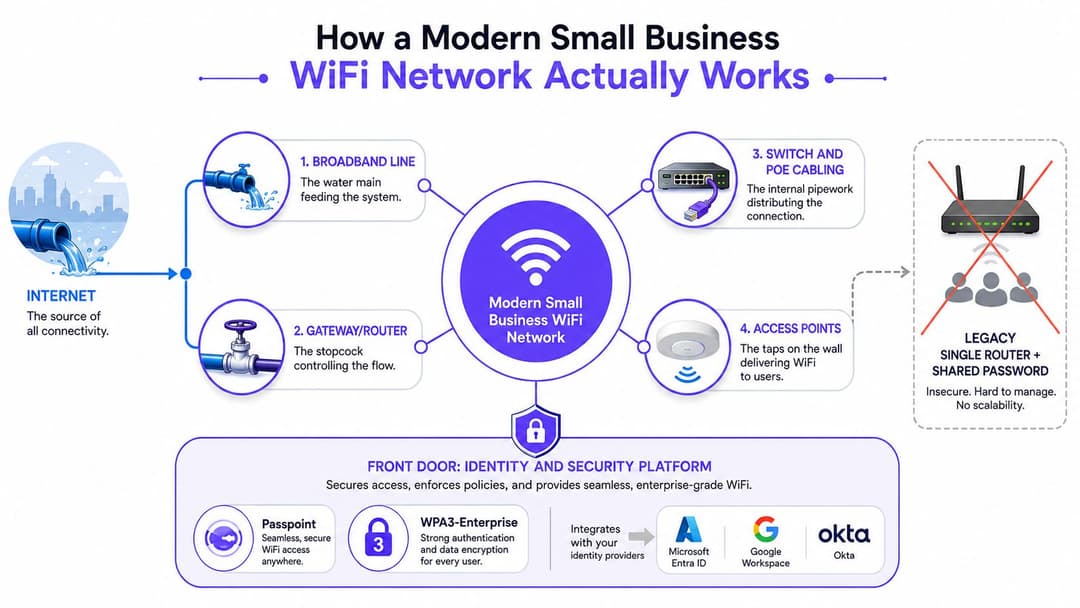
A modern small-business network stacks four layers, broadband, routing, switching, and access points, and each one solves a different problem. The broadband line brings internet capacity into the premises. The gateway or router decides what enters and leaves, and hands traffic off to the rest of the network. The switch and PoE cabling move connections to the right parts of the building and can power some devices along the way. The access points spread Wi‑Fi to the places where people work, serve customers, or take payments.
Modern Wi‑Fi serves two roles simultaneously, customer experience and operational backbone. That means the network has to do more than connect phones and laptops. It also has to support staff tablets, tills, printers, booking systems, and guest access without turning every change into a manual workaround.
The part many owners do not see is the identity check at the front of the network. A modern setup can add an identity and security layer so the right person gets the right access without everyone sharing one password. That layer can support Passpoint, WPA3-Enterprise, and integration with tools like Entra ID, Google Workspace, or Okta. In plain English, the network stops treating everyone the same and starts recognising whether someone is a staff member, guest, contractor, or device.
What the common terms mean
A few terms sound technical, but they are easier to understand once they are tied to a real building.
- SSID: the network name people choose on their phone or laptop.
- VLAN: a way of separating traffic so staff, guests, and devices do not all live in the same space.
- RADIUS: the authentication service that checks whether a device or user is allowed in.
- Captive portal : the login page or welcome page that appears before full access is granted.
A single-router setup with one shared password can work in a tiny space with only a few devices. Once a business grows, that model starts to feel like one entrance for everyone, staff, guests, printers, and smart devices all pushed through the same door. A more structured design creates separate lanes, which is easier to manage and easier to remove when a staff member leaves or a contractor's visit ends.
The simplest way to read a vendor diagram is to ask four questions. Where does the internet enter? How is traffic distributed inside the building? Where do users connect wirelessly? Where does identity get checked? If the diagram can answer those clearly, the architecture is understandable even if the labels look dense at first glance.
Planning Capacity and Coverage for Real Business Layouts
The biggest planning error is assuming Wi‑Fi coverage is the same as Wi‑Fi usefulness. A router in the middle of the floor might light up a coverage map, but that does not mean it can serve a lunch rush in the kitchen, a quiet meeting room upstairs, and people seated outside. Real businesses have walls, mirrors, stockrooms, fridges, stairwells, and people moving in and out, so planning has to start with the building rather than the brochure.
Start with the floorplan, not the brochure
Good capacity planning starts with the floor plan, then accounts for wall materials, device count, and traffic type in that order. A simple UK rule of thumb is the rough under 100m², one access point guidance mentioned in one office setup article office Wi‑Fi setup guidance for small business . That is a starting point, not a guarantee. A separate office guide also points out kitchens, reception, and outdoor areas as places where weak coverage often shows up after installation office Wi‑Fi setup guidance for small business .
What matters most is the combination of space, walls, and concurrent devices. A café with one room and a patio has different needs from a salon with treatment rooms and retail tills. A warehouse with a mezzanine may need a different placement strategy again, because a high ceiling can look generous while still being awkward for signal distribution at desk height.
Use a one-page worksheet before you ask for quotes:
- Draw the floorplan. Mark reception, tills, stockrooms, meeting rooms, kitchens, and outdoor seating.
- Note the wall materials. Thick internal walls, stairwells, or metal shelving change the signal path.
- List peak devices. Include staff phones, tills, tablets, printers, and guest phones.
- Define the traffic type. Payments and bookings need different reliability than casual browsing.
- Mark the trouble zones. Reception desks, kitchens, back offices, and outside tables deserve a test walk.
Practical rule: test Wi‑Fi where people work, not only where the access point looks neat on a ceiling plan.
If you want a rough planning tool, Purple has an access point calculator that sits well alongside a site survey. The value is not magic, it is discipline. It pushes the conversation away from “how many bars do we get in the centre of the room?” and towards “where does the business need reliable service?”
The outcome of good capacity planning is simple. You stop guessing, and you start asking the right installer questions about placement, density, and coverage validation.
Choosing the Right Access Point Setup and Topology
Once coverage areas are clear, the next decision is how the network should be built. Most small businesses end up choosing between a single all-in-one router, a mesh kit, or a wired multi-access-point setup fed by PoE switches. Each option can work, but each one fits a different building shape, budget, and appetite for future change.
A single box suits premises that are small, simple, and unlikely to grow quickly. Mesh helps when running cable is difficult or when the business needs to get online fast. A wired multi-AP design usually gives the cleanest result when reliability matters, the floorplan is awkward, or the business wants outdoor coverage and tighter control over how traffic is carried.
Match topology to the building, not to the marketing
A compact café or salon may be fine with a single-router deployment if the walls are light and the number of devices stays modest. A pub garden, gym floor, multi-room office, or garden centre often suits a mesh kit because it can reach awkward spaces without opening walls. A hotel, managed workspace, or warehouse mezzanine usually makes more sense for wired access points, because the backhaul is predictable and expansion is easier.
The access point itself matters too. SMB-class hardware such as NETGEAR's WAX210 and WAX610 is positioned around AX1800 speeds, 1.5k sq ft class coverage, 40 to 50 concurrent clients, a 2.5G Ethernet uplink, and around 15W PoE NETGEAR WAX210/WAX610 specifications . The faster uplink helps when wireless traffic builds up and a basic gigabit port starts to feel tight.
Ask these questions before you accept a quote
- Where is the cabling path? If the installer has to guess, the job becomes harder and more expensive to change later.
- Which rooms need the same level of service? A kitchen, a till point, and a meeting room do not all need identical treatment.
- Do you need outdoor Wi‑Fi? If yes, the plan should deliberately cover garden tables, entrances, or loading areas.
- Will the access points be ceiling-mounted? Placement affects both signal shape and maintenance access.
- Can the design grow? A good layout should allow more devices or another floor without starting again.
Handyman-grade installations can be enough for simple sites. Once a building has thick walls, multiple floors, or mixed traffic, a proper site survey becomes worth asking for. The goal is not just to get signal, it is to make sure the right devices get the right kind of service in the right parts of the premises.
Securing Staff, Guest and Multi-Tenant WiFi
Security in small business Wi‑Fi begins with proper segmentation, because shared passwords create management and trust gaps that a stronger passphrase cannot fix. If staff, guests, tills, cameras, and contractor devices all sit on the same network, one compromised device can spread trouble farther than it should. Shared credentials also make day-to-day control messy, because nobody can easily tell who used them, who left with them, or which devices should still be trusted.
The cleaner approach separates staff and guest SSIDs and places them on different VLANs, so traffic stays organised from the start. Staff devices can use certificate-based onboarding, which lets the business grant access through identity rather than through a password passed around in chat. Guests can use a captive portal, and the better versions reduce friction with one-tap email or social login instead of asking people to retype shared credentials at reception.
From shared passwords to identity-based access
WPA3 improves the encryption layer, which matters because the connection itself should be protected, not just the login page. Passpoint and OpenRoaming take that further by making onboarding feel closer to a mobile network handoff than a clumsy public hotspot. The result is easier for guests, and easier for staff who no longer have to recite a password at the desk.
For devices that cannot use full enterprise authentication, iPSK still has a role. It gives a separate pre-shared key per user or device group, which can help with legacy kit, IoT devices, or awkward hardware that will not join a modern 802.1X setup. For many small businesses, that becomes the bridge between a fully modern network and the reality of mixed equipment on site.
Purple is one platform built around this identity layer. Its approach to secure guest and staff access sits on top of existing network hardware, with directory service integration and passwordless guest onboarding, so the access model can improve without a rip-and-replace project. For a detailed walkthrough of the same approach, see our enterprise WiFi security guide .
Good security feels boring to staff. If people can join the right network without asking the manager for the Wi‑Fi password every week, the design is probably heading in the right direction.
For a business owner, the practical test is straightforward. A guest should connect without seeing internal resources. A staff member should be removable when they leave. IoT devices should be isolated rather than trusted by default. In multi-tenant spaces, each tenant should have clear boundaries so one company's traffic does not become another company's problem. If those checks pass, the network is doing its job.
Cloud-Managed Versus On-Premises WiFi for Small Business
The management model is where many owners overthink the wrong thing. They focus on whether the controller sits in a cupboard or in the cloud, when the more useful question is how much effort they want to spend each month keeping the network healthy. That's where cloud-managed and on-premises designs differ in practice.
A cloud-managed system keeps the controller in the vendor's datacentre, while the access points check in over the internet. An on-premises system keeps the controller hardware on site, usually in a comms room or office cupboard. Both can work well, but they create different experiences for deployment, visibility, and support.
| Criterion | Cloud-managed | On-premises |
|---|---|---|
| Deployment speed | Faster to roll out across one or many sites | Slower, because the controller has to be installed and maintained |
| Ongoing management | Easier for small teams with limited IT time | Better for teams that want local control and already manage kit on site |
| Multi-site use | Natural fit for businesses with several locations | Can be done, but often feels heavier to administer |
| Visibility | Central dashboards are usually simpler to review | Local control can be detailed, but more hands-on |
| Fit for a small team | Good when no one wants to babysit hardware | Good when the business already has in-house network support |
For a single café, cloud-managed usually feels lighter. For a 20-person office, it removes a lot of administration without making the network feel remote. For a hotel group with several properties, cloud management is often the easier way to keep policies consistent. For a managed office provider, the win is the ability to standardise and monitor without walking into every comms cupboard.
The nice part is that guest and identity layers can sit above either model. Platforms like Purple work on top of existing access hardware, including environments based on Meraki, Aruba, Ruckus, Mist, or UniFi, so the management choice doesn't force a replacement of the whole wireless estate. You can keep the underlying network model that suits the site, then add a cleaner access layer on top.
Real-World WiFi Setups for Three UK Small Businesses
A coastal café with 40 seats and a small outdoor area usually needs a network that feels simple to staff and invisible to guests. One access point may cover the inside if the walls are light, but the outside tables often need their own attention because patio signal doesn't always behave like indoor signal. The owner might choose a cloud-managed setup with staff and guest separation, branded captive access for visitors, and analytics to see which tables get the longest dwell times.
A multi-site hair salon with retail products has a different shape. Each branch needs reliable booking tablets, payment devices, and a tidy guest network, but the value comes from consistency across locations. Cloud management makes sense here because it lets the owner apply the same policy everywhere, while the guest layer can support email capture for repeat offers and appointment reminders. In a business like this, Wi‑Fi becomes part of client experience and repeat booking, not just internet access.
A 70-staff logistics warehouse with an office mezzanine needs something sturdier. The office area can sit on one segment, the floor devices on another, and contractor access can be time-limited so visitors don't land on the same network as operations. A wired multi-AP design usually suits the layout better than mesh, especially when the business needs stable coverage around desks, scanners, and shift-change areas. Analytics can help the operations team see where staff gather, which zones need reinforcement, and where handsets drop off coverage during a busy shift.
The rough pattern is the same across all three. Plan around the building, segment staff and guest traffic, choose the management model that matches the team, and treat analytics as a business tool rather than a vanity dashboard.
Your WiFi Deployment Checklist and Next Steps
Take one sheet of paper and write down the following. The site survey date, the number of access points you think you need, the uplink choice, the power and cabling plan, the identity strategy for staff and guests, the management model, and any directory or CRM integration you care about. Add reporting goals too, because if you can't tell whether the network is helping the business, you've missed half the point.
Don't forget the cost items that hide in plain sight, installation labour, switch ports, cabling, subscriptions, and post-launch tuning. A modern cloud-managed platform with identity overlays can get a site from survey to live service in weeks rather than months, but only if the owner is clear about the layout and the access model from the start.
Your next three actions are straightforward. First, walk the premises and mark the dead spots. Second, list every device and every person who needs access. Third, ask for a quote that separates coverage, security, and management so you can compare options properly.
Purple provides identity-based Wi‑Fi that sits on top of existing hardware, so you can replace shared passwords with cleaner guest and staff access without ripping out the whole network. If you're planning wifi for small business and want a clearer path from coverage to guest experience, visit Purple to see how the access layer, analytics, and management model fit together.