
Apartment WiFi solutions: a comprehensive guide for businesses
This guide covers the architecture, deployment, and business case for apartment WiFi solutions in Build to Rent and multi-dwelling unit properties. It explains how Identity Pre-Shared Key (iPSK) technology creates secure, isolated network bubbles for each resident while supporting smart devices and IoT. Property developers, landlords, and BTR operators will find actionable deployment guidance, ROI data, and worked implementation scenarios.
Video overview
Listen to this guide
View podcast transcript
Part of our core series: Multi-Tenant WiFi Guide →
Resumen ejecutivo
El WiFi multiinquilino no es WiFi para invitados. En entornos de Build to Rent (BTR) y unidades multifamiliares (MDU), los residentes esperan una experiencia de red doméstica desde el primer día. Necesitan que sus televisiones inteligentes, videoconsolas y dispositivos IoT se detecten entre sí sin problemas, al tiempo que permanecen completamente aislados del apartamento de al lado. Los portales cautivos estándar y las contraseñas compartidas fallan en ambos aspectos.
La respuesta técnica son las redes basadas en la identidad mediante iPSK (Identity Pre-Shared Key). Esta arquitectura asigna a cada residente una clave WiFi única, que el servidor RADIUS en la nube utiliza para ubicar dinámicamente cada dispositivo en una VLAN privada. El resultado es una burbuja de red segura y persistente que acompaña al residente por toda la propiedad.
Para los promotores inmobiliarios y operadores de BTR, desplegar un WiFi gestionado como una capa de software sobre hardware empresarial convierte un centro de costes en un servicio que genera ingresos. Según Parks Associates (2025), el 70% de los propietarios de MDU afirman que el WiFi ayuda a atraer residentes y casi el 80% indica que aumenta el valor de la propiedad. En el mercado de BTR del Reino Unido se pueden alcanzar primas de alquiler de entre 15 y 30 libras al mes por unidad, según los propios datos de despliegue de Purple.
Esta guía abarca la arquitectura técnica, un proceso de despliegue en cinco fases, escenarios del mundo real y los requisitos de cumplimiento sobre los que le consultará su equipo legal.
Análisis técnico profundo
El problema del aislamiento de dispositivos
En un despliegue estándar de WiFi para invitados , el aislamiento de clientes es absoluto. Cada dispositivo se separa de todos los demás para evitar el movimiento lateral a través de la red. Este es el comportamiento correcto para el vestíbulo de un hotel o un entorno de Retail , donde los usuarios son transitorios y no se conocen entre sí.
En un entorno residencial, esto interrumpe el servicio. El smartphone de un residente no puede comunicarse con su Chromecast en la red local. Su altavoz inteligente no puede detectar sus bombillas inteligentes. Su videoconsola no puede encontrar la televisión. La red es técnicamente funcional, pero prácticamente inútil para la vida residencial moderna.
La alternativa - desactivar el aislamiento de clientes en un SSID compartido - crea un problema mucho peor. Los dispositivos de cada residente se vuelven visibles para todos los demás residentes del edificio. Un dispositivo de la unidad 101 puede explorar los archivos compartidos de un dispositivo de la unidad 405. Esto es inaceptable en un entorno residencial donde los residentes tienen una relación continua con la propiedad y una expectativa razonable de privacidad.
La arquitectura iPSK
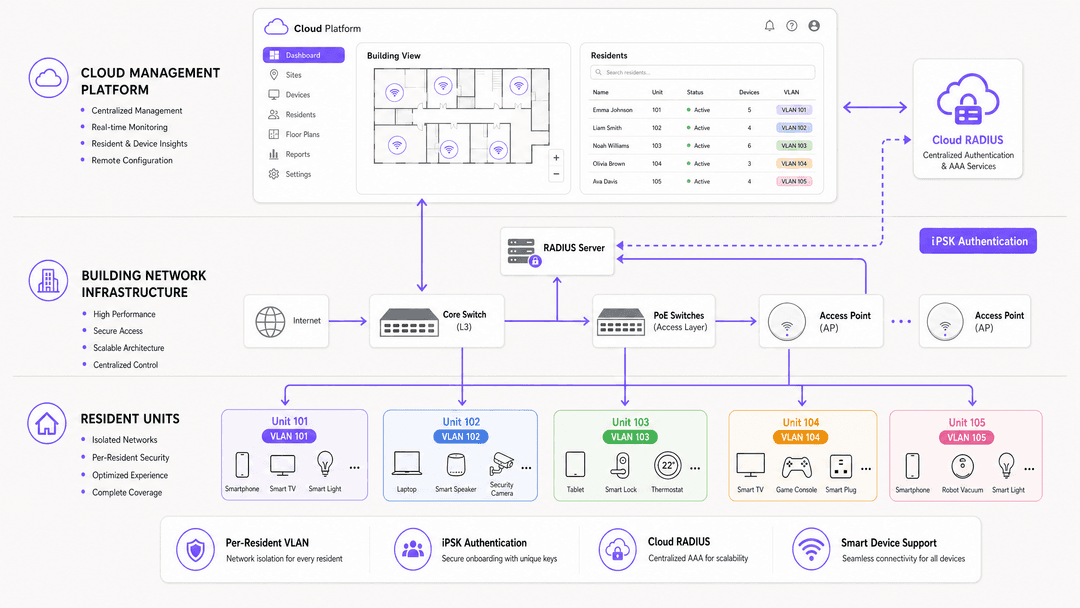
iPSK (Identity Pre-Shared Key) - llamado PPSK por HPE Aruba y Personal Private Network por Cisco Meraki - soluciona esto desacoplando el SSID de la clave de cifrado. En lugar de una única contraseña para todo el edificio, la red admite miles de frases de contraseña únicas en un único SSID.
Cuando un dispositivo se asocia con un punto de acceso, el AP reenvía la frase de contraseña al servidor RADIUS en la nube. El servidor RADIUS autentica la clave específica, busca el perfil del residente y devuelve una asignación de VLAN dinámica a través de un mensaje RADIUS Access-Accept. El AP asigna inmediatamente el dispositivo a esa VLAN.
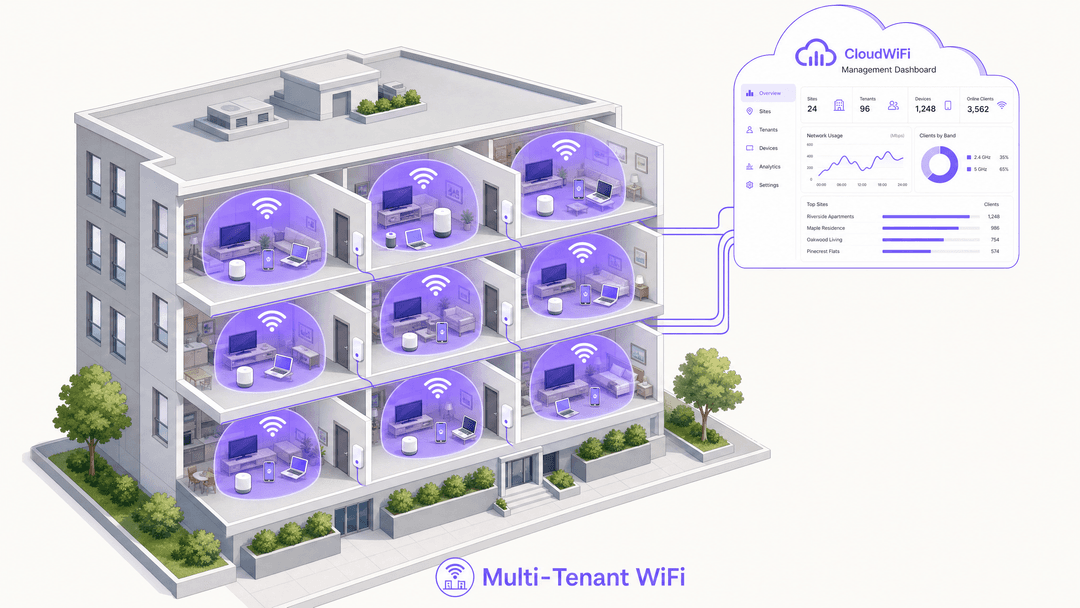
El resultado es una burbuja de WiFi por residente:
- Cada dispositivo que utiliza la clave del Residente A detecta todos los demás dispositivos asociados a esa clave. Su teléfono encuentra su Chromecast. Su altavoz inteligente se empareja con sus bombillas inteligentes. Su consola se conecta a su televisor.
- Ningún dispositivo con la clave del Residente A puede ver ningún dispositivo con una clave diferente. Los dispositivos del Residente B son invisibles, aunque ambos residentes compartan el mismo punto de acceso físico.
- Cuando el Residente A se muda, Purple revoca su clave. Ningún otro residente se ve afectado. No se requiere la rotación de contraseñas de todo el edificio.
Estándares y seguridad
Esta arquitectura se basa en estándares del sector firmemente establecidos:
| Estándar | Función en la arquitectura |
|---|---|
| IEEE 802.1X | Marco para la asignación dinámica de VLAN a través de RADIUS |
| WPA3-Personal | Cifrado individualizado por residente, mitigando ataques de diccionario fuera de línea |
| RADIUS (RFC 2865) | Autenticación, autorización y contabilidad a través de RADIUS en la nube |
| VLAN (IEEE 802.1Q) | Aislamiento lógico del tráfico entre segmentos de residentes |
| mDNS (RFC 6762) | Descubrimiento de dispositivos dentro de la burbuja de VLAN del residente |
La arquitectura se alinea con los requisitos de GDPR y CCPA. El tráfico de los inquilinos está separado lógicamente y el análisis del comportamiento de los residentes individuales dentro de las unidades privadas está restringido por diseño. Los datos agregados de utilización de áreas comunes - ocupación por piso, horas de uso pico - son generalmente admisibles y operacionalmente útiles.
Compatibilidad de hardware
Purple funciona como un software de superposición en la nube agnóstico respecto al hardware. El RADIUS en la nube se integra con puntos de acceso de Cisco Meraki, HPE Aruba, Ruckus, Juniper Mist, Ubiquiti UniFi, Cambium, Extreme y Fortinet. No es necesario reemplazar la infraestructura existente. Solo debe apuntar sus puntos de acceso al endpoint de RADIUS en la nube de Purple y configurar el SSID para usar autenticación WPA2/WPA3-Enterprise.
Guía de implementación
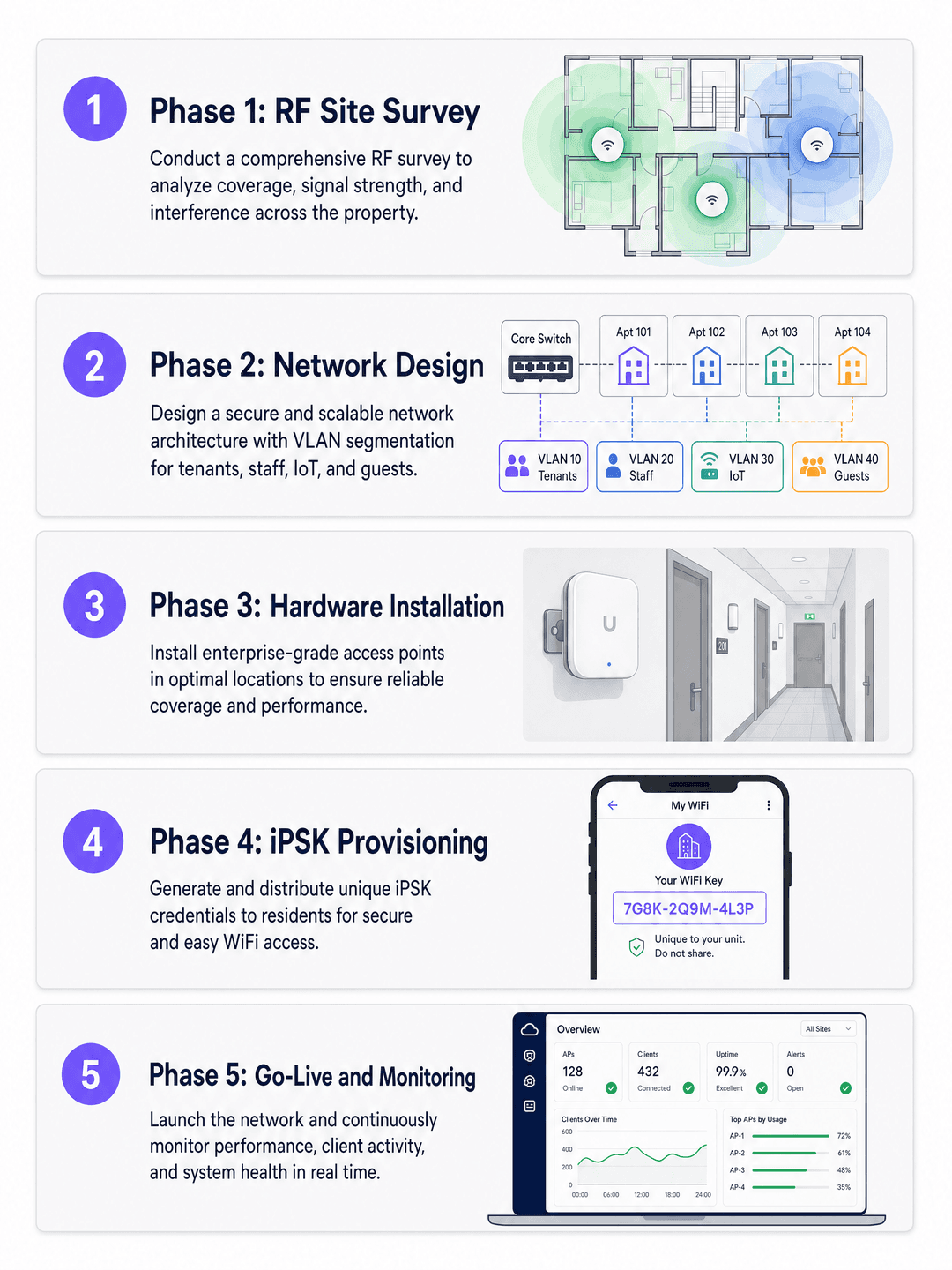
Un despliegue de WiFi multi-inquilino sigue cinco fases. Saltarse cualquier fase - particularmente el estudio de RF y la integración del proveedor de identidad - es la causa más común de problemas de soporte post-despliegue.
Phase 1: RF site survey
Do not rely solely on predictive modelling. BTR and MDU environments contain dense concrete and masonry walls that attenuate 5GHz and 6GHz signals heavily. Conduct an active RF site survey using a spectrum analyser to identify interference sources, coverage gaps, and co-channel interference from neighbouring buildings.
Access point placement decisions:
- In-unit placement (ceiling or wall) provides the strongest signal but requires cable runs into each apartment.
- Corridor placement with directional antennas reduces cabling cost but requires careful RF design to avoid inter-unit interference.
- Target -65 dBm or better at the furthest point in each unit.
Phase 2: Network design
Design the switching infrastructure to support dynamic VLAN pooling. A 200-unit building with 15-25 devices per household requires a DHCP scope of at least 5,000 addresses. Use /22 or /21 subnets per VLAN pool. Ensure your core and distribution switches support the required number of VLANs - most enterprise switches support 4,094 VLANs per IEEE 802.1Q.
Configure DHCP snooping and ARP inspection on all access-layer switches to prevent rogue DHCP servers and ARP spoofing. Implement rate limiting per VLAN to prevent a single resident from saturating the uplink.
For a detailed comparison of PPSK deployment models, see our guide on PPSK: comparing features and deployment models.
Phase 3: Hardware installation
Install PoE switches at each distribution point. Use Cat6A cabling to all access point locations to support WiFi 6E and WiFi 7 speeds. Label all ports and document the physical topology - this is essential for remote troubleshooting.
For common areas (lobbies, gyms, coworking spaces), deploy access points on a separate SSID for Guest WiFi to handle visitor traffic. This keeps visitor traffic off the resident network entirely. For more on this three-SSID design pattern, see Three SSIDs to rule them all: guest, Passpoint, and IoT WiFi .
Phase 4: iPSK provisioning and identity integration
Integrate Purple with your Property Management System (PMS) or identity provider - Microsoft Entra ID, Okta, or Google Workspace. When a lease is signed, the integration automatically generates an iPSK and delivers it to the resident via email or the resident portal. When the lease terminates, Purple revokes the key automatically.
This zero-touch provisioning eliminates manual IT intervention for onboarding and offboarding. In a 200-unit building with 30% annual turnover, that is approximately 60 move-in and move-out events per year - each one handled without a support ticket.
Phase 5: Go-live and monitoring
Before go-live, test the following scenarios on each access point model in the deployment:
- A phone and a Chromecast on the same iPSK can discover each other.
- A phone and a Chromecast on different iPSKs cannot discover each other.
- Un dispositivo IoT sin pantalla (enchufe inteligente) se conecta utilizando la iPSK sin necesidad de un navegador.
- Los dispositivos de un residente realizan un roaming fluido entre puntos de acceso sin necesidad de volver a autenticarse.
Tras el lanzamiento, supervise el panel de control de Purple para detectar fallos de autenticación, advertencias de agotamiento de DHCP y el estado de los puntos de acceso. Configure alertas para cualquier punto de acceso con más de 50 clientes asociados, lo que indica una brecha de cobertura en otra zona.
Got questions about your specific setup?
Our team works with venue operators, IT managers, and network engineers across 80,000 venues. Book a 20-minute call and we will show you how others like you solved it.
Buenas prácticas
Nunca utilice una PSK compartida en varias unidades sin aislamiento por cliente y limitación de ancho de banda. En el momento en que los residentes puedan ver los dispositivos de los demás, el servicio se ve comprometido y el operador se enfrenta a una responsabilidad bajo el GDPR.
Automatice el ciclo de vida de las credenciales. Vincule el acceso a la red directamente al contrato de alquiler. Purple revoca el acceso al finalizar el contrato sin ninguna intervención manual, lo que elimina el riesgo de seguridad de que los antiguos residentes conserven el acceso a la red.
Priorice las bandas de 5GHz y 6GHz. Diseñe la red para una cobertura principal en 5GHz y 6GHz. Reserve la de 2.4GHz únicamente para dispositivos IoT heredados. En entornos MDU densos, la interferencia de canal compartido en 2.4GHz procedente de edificios vecinos es grave.
Planifique para una alta densidad de IoT. Asuma una base de 15 a 25 dispositivos por vivienda. Un edificio de 200 unidades tiene entre 3,000 y 5,000 dispositivos en la red en cualquier momento. Dimensione sus pools de DHCP, la capacidad de conmutación y el ancho de banda de subida de manera acorde.
Pruebe la reflexión mDNS antes del lanzamiento. Este es el error de configuración más común en despliegues multi-inquilino. Verifique que el mDNS se refleje dentro de la VLAN de cada residente pero no entre diferentes VLAN.
Para obtener una perspectiva de primera mano sobre la experiencia de incorporación de los residentes, consulte Cómo causar una excelente primera impresión con su WiFi para invitados .
Resolución de problemas y mitigación de riesgos
Fallos de emparejamiento con Chromecast y dispositivos de hogar inteligente
Síntoma: Los residentes informan de que su teléfono no puede encontrar su altavoz inteligente o su dispositivo de transmisión.
Causa principal: La reflexión mDNS está desactivada o configurada para transmitirse a toda la subred en lugar de estar restringida a las VLAN individuales.
Solución: Active la reflexión mDNS dentro de la VLAN de cada residente. Verifique que el punto de acceso no esté aplicando un aislamiento de cliente absoluto dentro de la VLAN dinámica. Realice pruebas con un Apple TV, un altavoz Sonos y un Chromecast - estos tres cubren los principales protocolos de descubrimiento en uso.
Errores de tipo de NAT en videoconsolas
Síntoma: Los jugadores informan de NAT estricta (PlayStation) o NAT tipo 3 (Nintendo Switch), lo que impide el modo multijugador online.
Causa principal: La NAT simétrica en la puerta de enlace impide el redireccionamiento de puertos UDP peer-to-peer requerido por las plataformas de juego.
Solución: Implemente CGNAT por residente con UPnP activado. Evite la NAT simétrica en toda la red. Realice pruebas con una PlayStation 5 y una Xbox Series X antes de la puesta en marcha.
Agotamiento de direcciones IP
Síntoma: Los dispositivos no consiguen obtener una dirección IP, especialmente durante las horas punta de la tarde.
Causa principal: El pool de DHCP se ha dimensionado para el número de dispositivos en un único momento, no para la rotación de concesiones de corta duración de los dispositivos IoT.
Solución: Utilice el iPSK Subnet Designer gratuito de Purple para calcular el tamaño adecuado de las subredes. Implemente tiempos de concesión de DHCP agresivos de cuatro a ocho horas para los dispositivos IoT. Supervise la utilización del pool DHCP en el panel de control de Purple.
Puntos de acceso no autorizados
Síntoma: Los residentes instalan sus propios routers domésticos, lo que provoca interferencias de canales y degrada la red gestionada.
Solución: Active la detección de AP no autorizados en los puntos de acceso gestionados. Comunique claramente a los residentes al mudarse que la red gestionada ofrece la misma experiencia en el hogar que obtendrían de un router doméstico, incluido el soporte completo para IoT y hogares inteligentes. La red gestionada es la mejor opción - exponga este argumento en el paquete de bienvenida para residentes.
ROI e impacto empresarial
Tratar el WiFi como un servicio gestionado transforma el modelo financiero de la propiedad. Los datos que se muestran a continuación proceden de Parks Associates (2025) y del estudio Building a True Home de ASK4 (2025).
| Métrica | Punto de datos | Fuente |
|---|---|---|
| Propietarios de MDU que afirman que el WiFi atrae a los residentes | 70% | Parks Associates, 2025 |
| Propietarios de MDU que afirman que el WiFi aumenta el valor de la propiedad | 80% | Parks Associates, 2025 |
| Inquilinos con mayor probabilidad de mudarse si se incluye el WiFi | 77% | ASK4, 2025 |
| Inquilinos que afirman que un WiFi deficiente afecta a la renovación del alquiler | 84% | ASK4, 2025 |
| Inquilinos que esperan tener el WiFi listo a los pocos días de mudarse | 93% | ASK4, 2025 |
| Incremento del alquiler BTR por unidad y mes | £15-30 | Datos de despliegue de Purple |
| Reducción de los periodos de desocupación | 5-10 días | Datos de despliegue de Purple |
Cuando se despliega como una capa de software sobre hardware propio, el WiFi gestionado es sistemáticamente positivo para el NOI. El modelo se deteriora cuando el WiFi se empaqueta con un contrato de banda ancha de terceros que se queda con el aumento de los ingresos. Ser propietario de la infraestructura y utilizar Purple como capa de gestión mantiene el valor en manos del operador.
Más allá del rendimiento financiero directo, las analíticas de WiFi proporcionan datos de utilización del edificio (ocupación por ala, horas de mayor uso, tiempo de permanencia en zonas comunes) que se integran directamente en la gestión de las instalaciones y la programación del mantenimiento. La plataforma de WiFi Analytics de Purple exporta estos datos a los paneles de control existentes a través de una API.
Para los operadores de Hospitality que gestionan desarrollos BTR de uso mixto con servicios de tipo hotelero, la misma plataforma de Purple gestiona tanto el WiFi multiinquilino para residentes como el WiFi para invitados desde una única consola de gestión.
Key Definitions
iPSK (Identity Pre-Shared Key)
A security architecture that allows multiple unique passphrases on a single SSID. The specific passphrase presented by a device is used by the RADIUS server to assign that device to a specific VLAN and network policy.
The core technology enabling per-resident network isolation in multi-tenant WiFi. Also called PPSK (HPE Aruba) or Personal Private Network (Cisco Meraki).
VLAN (Virtual Local Area Network)
A logical subnetwork that groups devices and isolates their traffic from other devices on the same physical infrastructure, defined by IEEE 802.1Q.
The mechanism that prevents a resident in unit 101 from seeing devices in unit 102, even when both units connect to the same physical access point.
mDNS (Multicast DNS)
A protocol defined in RFC 6762 that allows devices to discover services on a local network without a central DNS server, using multicast UDP on port 5353.
Required for Chromecast, Apple TV, Sonos, and smart home hubs to function. Must be reflected within each resident's VLAN but blocked between VLANs.
Dynamic VLAN assignment
The process by which a RADIUS server instructs a network switch or access point to place a device into a specific VLAN based on its authentication credentials, returned in the RADIUS Access-Accept message.
The mechanism that routes a resident's device into their personal network bubble upon connection.
BTR (Build to Rent)
Purpose-built residential developments designed specifically for long-term rental rather than sale, typically offering professional management and amenity packages.
The primary market for multi-tenant WiFi in the UK. The BTR sector grew 16% in the 12 months to Q1 2025, according to the British Property Federation.
NOI (Net Operating Income)
A real estate financial metric calculated as total property revenue minus all operating expenses, excluding debt service and capital expenditure.
Managed WiFi increases NOI by generating rent premiums, reducing void periods, and lowering IT support costs.
Headless device
A network-connected device that lacks a screen or web browser, such as a smart plug, game console, smart speaker, or IP camera.
These devices cannot authenticate via captive portals. They require iPSK or MAC authentication to connect to enterprise networks. They represent the majority of IoT devices in modern apartments.
CGNAT (Carrier-Grade NAT)
A method of sharing a single public IP address among multiple private IP addresses, commonly used by ISPs and MDU operators to conserve IPv4 address space.
Must be configured correctly in MDU environments. Symmetric CGNAT breaks online gaming consoles that require Open or Type 2 NAT for peer-to-peer connections.
RADIUS (Remote Authentication Dial-In User Service)
A networking protocol defined in RFC 2865 that provides centralised authentication, authorisation, and accounting for network access.
The authentication engine behind iPSK. Purple operates a cloud RADIUS service with 99.999% uptime, eliminating the need for on-premise RADIUS servers.
Worked Examples
A 250-unit Build to Rent development needs to provide seamless WiFi for residents from move-in day. The developer wants residents to connect smart TVs and games consoles easily, but the IT team is concerned about broadcast traffic flooding the network if all 250 units share a single subnet. The property management system is built on Microsoft Entra ID.
Deploy a single property-wide SSID using Purple's Identity-Based Networks with iPSK. Integrate Purple's cloud RADIUS with Microsoft Entra ID via SCIM provisioning. When a lease is signed in the PMS, the integration creates a resident account in Entra ID and triggers Purple to generate a unique iPSK. Purple emails the key to the resident before move-in day. On arrival, the resident enters the key on their phone. All subsequent devices - smart TV, console, laptop, smart speaker - use the same key. The RADIUS server places every device into a dedicated VLAN (e.g., VLAN 101 for unit 101). mDNS reflection within VLAN 101 allows the phone to discover the Chromecast. The console receives a NAT type of Open via per-VLAN UPnP. At lease end, the Entra ID account is deactivated, Purple revokes the iPSK, and the VLAN is released back to the pool. No IT intervention required.
A purpose-built student accommodation (PBSA) provider experiences severe network congestion during move-in week in September. Students arrive with five to seven devices each, the helpdesk is overwhelmed with captive portal failures, and students cannot connect their games consoles or smart TVs. The existing network uses a single shared SSID with a captive portal.
Replace the captive portal with an iPSK architecture deployed on the existing Ruckus access points. Two weeks before move-in, the student portal generates a unique iPSK for each student and displays it in their account dashboard. Students arrive, enter their key on their phone, and connect immediately. Subsequent devices - laptop, console, smart TV - use the same key without any browser interaction. The Ruckus cloud controller receives the VLAN assignment from Purple's RADIUS server and places each student into their own micro-segment. The helpdesk load drops to near zero because there is no captive portal session to expire and no shared password to reset.
Practice Questions
Q1. You are upgrading the network for a 300-unit luxury apartment complex. The property manager wants to offer a premium WiFi tier. Residents are complaining that they cannot connect their new smart home hubs to the existing 802.1X network. The IT team is reluctant to lower security standards. How do you resolve this?
Hint: Consider the authentication capabilities of consumer IoT devices and whether 802.1X is the right protocol for headless devices.
View model answer
Migrate the network from standard 802.1X to an iPSK architecture. Consumer IoT devices and smart home hubs do not support 802.1X supplicants, making them impossible to connect securely on a traditional enterprise network without MAC authentication bypass (which is weaker than iPSK). With iPSK, residents connect headless devices using a standard WPA2/WPA3 personal passphrase. The RADIUS server dynamically assigns them to their secure, isolated VLAN. Security is maintained - each resident has a unique key, and VLANs prevent cross-tenant access - whilst the user experience matches a home network.
Q2. During a pilot deployment of a multi-tenant WiFi solution across 20 units, a resident reports that they can see their neighbour's Apple TV on their iPhone's AirPlay menu. The network uses iPSK with dynamic VLAN assignment. What is the most likely configuration error and how do you fix it?
Hint: Review how mDNS operates and how it should be scoped in a multi-tenant deployment.
View model answer
The most likely cause is that mDNS reflection is configured to broadcast across the entire subnet rather than being restricted to individual VLANs. Verify that the cloud RADIUS is returning a unique VLAN ID for each resident's iPSK and that the access point is correctly tagging traffic to those VLANs. Then check the mDNS proxy or reflector configuration - it should reflect mDNS queries only within the originating VLAN, not across all VLANs. Test by connecting a phone and an Apple TV to two different iPSKs and confirming that AirPlay discovery fails between them.
Q3. A BTR operator wants to bundle managed WiFi into the rent across a portfolio of 15 buildings. They are concerned about the ongoing IT support costs, particularly for resident move-ins and move-outs. The portfolio has approximately 40% annual resident turnover. How do you minimise the operational overhead?
Hint: Consider the integration points between the WiFi platform and the existing property management system.
View model answer
Integrate Purple directly with the property management system via API or SCIM provisioning. When a lease is signed, the PMS triggers Purple to generate an iPSK and deliver it to the resident automatically. When the lease terminates, the PMS triggers Purple to revoke the key. With 40% annual turnover across 15 buildings, this automation handles hundreds of provisioning events per year without any IT intervention. The only manual step is the initial integration setup. Post-integration, the IT team's role is monitoring the Purple dashboard for anomalies, not managing individual credentials.
Q4. A network architect is designing the switching infrastructure for a new 400-unit BTR development. Each unit is expected to have 20 devices on average. The architect is considering whether to use one VLAN per unit or one VLAN per floor. Which approach is correct and why?
Hint: Consider the privacy requirements and the broadcast domain implications of each approach.
View model answer
Use one VLAN per unit. A per-floor VLAN places all residents on the same floor in the same broadcast domain, meaning their devices are visible to each other. This violates the privacy requirement that residents cannot see neighbouring devices. It also creates a larger broadcast domain, increasing the risk of broadcast storms and ARP flooding. One VLAN per unit, dynamically assigned via iPSK and RADIUS, provides complete isolation between residents while keeping broadcast domains small. A 400-unit building requires 400 VLANs, well within the 4,094 VLAN limit of IEEE 802.1Q. Size the DHCP pool for each VLAN to accommodate 20-25 devices with a /27 or /26 subnet.
Continue reading in this series
How to deploy iPSK on Cisco Meraki, HPE Aruba and Ruckus
This hands-on reference guide shows how to deploy iPSK on Cisco Meraki, MPSK on HPE Aruba Central and DPSK on Ruckus SmartZone, with a short UniFi PPSK appendix. It focuses on key issuance, VLAN or policy placement, RADIUS decision flows and revocation tests that prove a deployment works in a live venue.
Bulk internet agreement vs managed WiFi: which model fits your building
A practical procurement reference for property, IT and operations leaders comparing resident-paid retail broadband, a bulk internet agreement and managed WiFi. It clarifies ownership, resident move-in, security, cost scope and contractual exit, using US bulk-internet framing and UK equivalents.
Managed WiFi services in Dubai: a comprehensive guide for businesses
This guide gives IT managers, network architects, and property developers a practical framework for deploying managed WiFi services in Dubai. It covers multi-tenant isolation using iPSK, VLAN segmentation architecture, TDRA and UAE PDPL compliance, and the commercial case for treating connectivity as a managed amenity across hospitality, retail, and BTR environments.
Got questions about your specific setup?
Our team works with venue operators, IT managers, and network engineers across 80,000 venues. Book a 20-minute call and we will show you how others like you solved it.