
Aruba ClearPass vs. Purple WiFi: Comparing Features and Co-deployment
A comprehensive technical guide detailing the co-deployment architecture of Aruba ClearPass and Purple WiFi. It covers RADIUS proxy configuration, dynamic VLAN assignment, and best practices for delivering secure, analytics-driven guest networks alongside enterprise NAC.
Video overview
Listen to this guide
View podcast transcript
📚 Part of our core series: Enterprise WiFi Security Guide →

Executive Summary
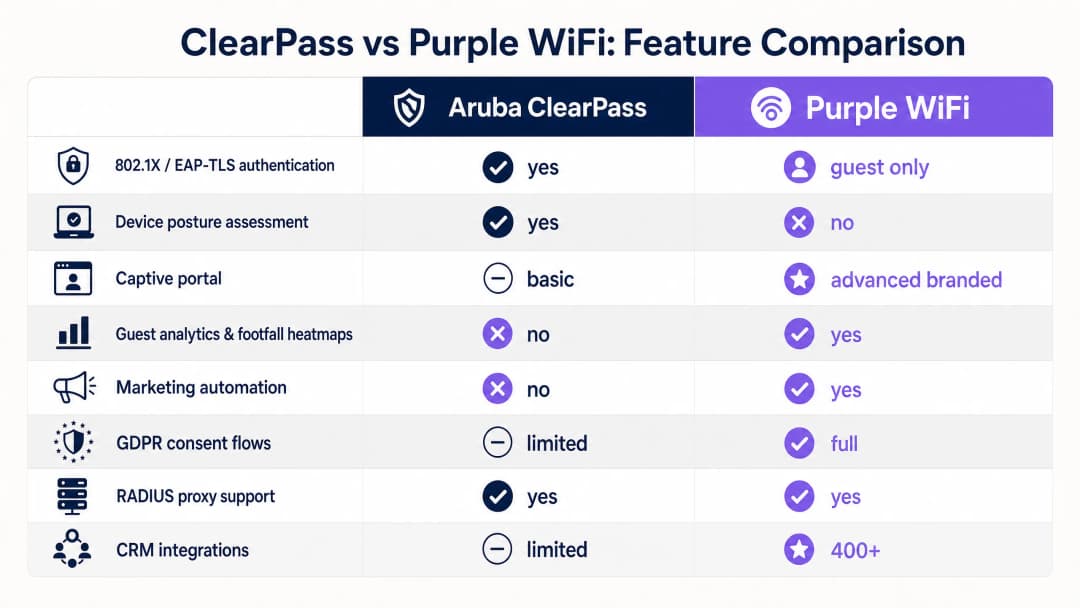
For enterprise environments heavily invested in HPE Aruba infrastructure, managing complex network access policies whilst delivering a seamless, data-rich guest WiFi experience presents a significant architectural challenge. Whilst Aruba ClearPass Policy Manager excels in Network Access Control (NAC) and 802.1X security for corporate devices, its built-in Captive Portal often lacks the advanced marketing automation and analytics required by modern venues. This guide details how to integrate Purple WiFi with ClearPass, allowing each platform to focus on its core strengths.
By deploying ClearPass as a RADIUS proxy, you maintain a unified security audit trail and dynamic VLAN assignment for corporate and IoT devices, whilst offloading the guest onboarding experience to Purple. This approach enables GDPR-compliant first-party data capture, detailed footfall analytics, and integrations with over 400 marketing connectors—all without replacing your existing Aruba NAC investment. This document provides the technical blueprint for this co-deployment, covering architecture, configuration workflows, and best practices.
Technical Deep Dive
The integration of Aruba ClearPass and Purple WiFi relies on standard RADIUS protocols and HTTP redirect mechanisms, structured around a RADIUS proxy architecture. This design ensures that ClearPass remains the central policy decision point for all network access, whilst Purple manages the guest-facing Captive Portal and data collection.
Core Architecture
In a standard co-deployment, your Aruba Mobility Controllers or Aruba Instant Access Points broadcast multiple SSIDs. A typical design pattern, as detailed in Three SSIDs to rule them all: the WiFi design for guest, staff and IoT , utilises three dedicated networks:
- Corporate SSID: Utilises 802.1X with EAP-TLS. Devices authenticate using certificates provisioned via ClearPass Onboard. ClearPass assesses device posture, queries Microsoft Entra ID or Active Directory, and assigns the device to the corporate VLAN (e.g., VLAN 10). Purple is not involved in this flow.
- IoT SSID: Utilises MAC Authentication Bypass (MAB). ClearPass profiles the device using its Organisationally Unique Identifier (OUI) and assigns it to an isolated IoT VLAN (e.g., VLAN 30) with no internet access.
- Guest SSID: An open or Opportunistic Wireless Encryption (OWE) network that triggers the Purple Captive Portal.

RADIUS Proxy Flow
When a visitor connects to the guest SSID and opens a browser, the Aruba controller intercepts HTTP traffic and redirects the session to the Purple Captive Portal URL. The visitor authenticates via Purple using social login, custom forms, or OpenRoaming (where Purple acts as a free identity provider under the Connect plan).
Once Purple validates the visitor, it sends a RADIUS Access-Accept message. However, instead of the Aruba controller contacting Purple's cloud RADIUS servers directly, ClearPass is integrated as a RADIUS proxy:
- The Aruba controller sends all RADIUS requests to ClearPass.
- ClearPass evaluates the request against its Service Rules. If the request matches the guest SSID (identified by the
Called-Station-Idor NAS identifier), the RADIUS Routing Policy forwards the request to Purple's RADIUS servers. - Purple responds with an Access-Accept message.
- ClearPass receives this response and applies its own Enforcement Policy, appending specific Vendor-Specific Attributes (VSAs) before forwarding the final response to the controller.
Dynamic Role-Based VLAN Assignment
The key VSA in this architecture is Aruba-User-Role. When ClearPass forwards the Access-Accept message to the controller, it includes this attribute to define precisely what role the visitor should assume on the wireless network.
For example, ClearPass can return Aruba-User-Role = guest-authenticated. On the Aruba controller, this role is mapped to VLAN 20, which is configured with firewall policies allowing internet access but blocking routing to internal corporate subnets. This segmentation is essential for compliance with standards such as PCI DSS [1].
Implementation Guide
Deploying this architecture requires precise configuration on both the Aruba infrastructure and ClearPass. Follow these vendor-neutral steps to establish the integration.
Step 1: Configure Purple RADIUS Servers in ClearPass
Navigate to Configuration > Network > Devices in ClearPass and add Purple's primary and secondary RADIUS servers as network devices. You will require the IP addresses and shared secret provided in your Purple venue configuration dashboard.
Step 2: Create a RADIUS Routing Policy
Create a new RADIUS Routing Policy in ClearPass. This policy will determine under which conditions requests are proxied to Purple. Set the primary and backup destinations to the Purple RADIUS servers you configured in Step 1.
Step 3: Define the Guest Service
Create a new Service in ClearPass for guest authentication.
- Type: RADIUS Enforcement (Generic)
- Service Rules: Match the
Radius:IETF:Called-Station-Idcontaining your guest SSID name. - Routing Policy: Select the policy created in Step 2.
- Enforcement Policy: Configure a policy to return the
Aruba-User-RoleVSA with the value corresponding to your guest role on the Aruba Controller.
Step 4: Configure the Walled Garden on the Controller
The walled garden is a list of domains that a device can access prior to authentication. This is configured on the Aruba Controller (or via access rules in ArubaOS 10). You must include Purple's core domains:
*.purple.ai*.cloudfront.net*.venuewifi.com
If you are enabling social logins, you must also add the OAuth domains for each provider (e.g. *.facebook.com, *.google.com, *.microsoftonline.com).
Step 5: Configure RADIUS Accounting
Ensure that RADIUS accounting is also being proxied via ClearPass to Purple. Purple uses accounting data (Acct-Start, Acct-Interim-Update, Acct-Stop) to track session duration and populate its WiFi Analytics dashboard. Set the accounting interval to 5 minutes on the Aruba Controller.
Best Practices
To ensure a robust and consistent deployment, follow these industry-standard recommendations.
- Strictly Segregate Traffic: Always place guest traffic on a dedicated VLAN with no path to corporate resources. This is a fundamental requirement for PCI DSS and general network security.
- Proxy Accounting Data: Do not neglect RADIUS accounting. If accounting packets do not reach Purple, your footfall analytics and dwell time reports will be incomplete.
- Enable WISPr: On the Aruba Controller’s captive portal profile, ensure WISPr (Wireless Internet Service Provider roaming) is enabled. This protocol allows mobile operating systems to automatically detect the captive portal and display the login screen seamlessly.
- Use Active-Choice Opt-Ins: For GDPR compliance, configure your Purple portal to use explicit opt-in checkboxes for marketing communications rather than pre-ticked boxes or assumed consent [2].
Troubleshooting and Risk Mitigation
Even with careful configuration, integrations can fail. Here are the most common failure modes and how to resolve them.
Walled Garden Misconfiguration
If the captive portal fails to load on a visitor's device, the root cause is almost always the walled garden. Social login providers frequently update their CDN IP ranges and domain names. Treat the walled garden as a continuously changing configuration. If a specific social login fails, use a packet capture to identify which domain the device is attempting to reach and add it to the allowed list.
RADIUS Timeout Errors
The default RADIUS timeout on most Aruba controllers is 3 seconds. In a proxy architecture, the authentication request must travel from the AP to the controller, to ClearPass, over the internet to Purple's cloud infrastructure, and back. On a congested network, this round trip can easily exceed 3 seconds, causing the controller to drop the request. Increase the RADIUS timeout on the Aruba controller to at least 10 seconds and configure retry logic.
Shared Secret Mismatch
RADIUS relies on shared secrets for security. If the shared secret between the Aruba controller and ClearPass, or ClearPass and Purple, does not match exactly, authentication will fail silently. The visitor will not be shown any meaningful error message. Always verify these secrets character-by-character if authentication is failing.
Role Name Case Sensitivity
The value of the Aruba-User-Role VSA returned by ClearPass must match the role name defined on the Aruba controller exactly, including case. If ClearPass returns guest-authenticated but the controller expects Guest-Authenticated, the visitor will fall back to the default logon role and will not get internet access.
ROI and Business Impact
Deploying Purple WiFi instead of a basic local captive portal delivers measurable business value across multiple departments.
- Marketing Impact: By capturing first-party data via the portal, venues see a significant increase in their marketing databases. For example, Harrods achieved a 57x marketing ROI using Purple to drive loyalty program sign-ups [3].
- Operational Efficiency: The RADIUS proxy architecture reduces the operational burden on IT. Security teams maintain a single pane of glass in ClearPass for all network access events, simplifying compliance reporting and troubleshooting.
- Monetisation: For venues in transport or hospitality sectors, Purple enables tiered bandwidth models. AGS Airports generated an 842% ROI by implementing a paid premium WiFi tier alongside a free basic tier [4].
By implementing this co-deployment, you transform your guest network from a cost centre into a revenue-generating asset, whilst maintaining the rigorous security posture required for enterprise IT.
References
[1] PCI Security Standards Council. "Payment Card Industry (PCI) Data Security Standard." [2] Information Commissioner's Office (ICO). "Guide to the General Data Protection Regulation (GDPR)." [३] Purple. "Harrods Guest WiFi Case Study." [४] Purple. "AGS Airports Guest WiFi Case Study."
Key Definitions
RADIUS Proxy
An architecture where an intermediate server (ClearPass) receives authentication requests from a network device (Aruba controller) and forwards them to the appropriate backend server (Purple), allowing the proxy to inspect, log, or modify the traffic.
Used to maintain a single security audit trail in ClearPass while allowing Purple to handle guest authentication.
Walled Garden
A limited environment that controls a user's access to web content before they have fully authorised on the network.
Essential for captive portals; the walled garden must allow access to the portal's hosting domains and social login providers so the login page can load.
Vendor-Specific Attribute (VSA)
Custom data fields within the RADIUS protocol that allow hardware vendors to support proprietary features not defined in the standard RADIUS RFCs.
ClearPass uses the 'Aruba-User-Role' VSA to tell the Aruba controller exactly which firewall role and VLAN to assign to a guest user.
802.1X
An IEEE standard for port-based network access control that provides an authentication mechanism to devices wishing to attach to a LAN or WLAN.
The primary protocol used by ClearPass to secure corporate devices, typically using EAP-TLS with certificates.
Captive Portal
A web page that the user of a public-access network is obliged to view and interact with before access is granted.
Purple provides the captive portal interface to capture visitor data, display branding, and gather marketing consent.
MAC Authentication Bypass (MAB)
A technique that uses a device's MAC address to authenticate it on the network when the device does not support 802.1X supplicants.
Used by ClearPass to profile and authenticate headless IoT devices like smart TVs or thermostats, placing them in an isolated VLAN.
Dynamic VLAN Assignment
The process of automatically assigning a device to a specific Virtual Local Area Network based on its authentication credentials or role, rather than the SSID it connected to.
Allows a single physical network infrastructure to securely segment corporate, guest, and IoT traffic.
WISPr
Wireless Internet Service Provider roaming; a protocol that allows devices to automatically detect captive portals.
Must be enabled on the Aruba controller so mobile devices automatically pop up the Purple login screen when connecting to the guest WiFi.
Worked Examples
A 500-room hotel needs to deploy secure corporate WiFi for staff and a branded, data-capturing guest portal for visitors, using existing Aruba controllers and ClearPass.
Deploy two SSIDs: 'Hotel_Corp' and 'Hotel_Guest'. Configure 'Hotel_Corp' for 802.1X authentication against Active Directory via ClearPass, assigning staff to VLAN 10. Configure 'Hotel_Guest' as an open network redirecting to the Purple captive portal. Set up ClearPass as a RADIUS proxy for the guest SSID, forwarding requests to Purple. Configure ClearPass to return the 'Aruba-User-Role' VSA upon successful Purple authentication, assigning guests to an isolated VLAN 20.
Visitors are connecting to the guest SSID, but the Purple captive portal page is failing to load on their devices.
Review and update the walled garden configuration on the Aruba controller. Ensure that Purple's core domains (*.purple.ai, *.cloudfront.net, *.venuewifi.com) are explicitly allowed. If social login is enabled, verify that all necessary OAuth domains (e.g., *.facebook.com, *.google.com) are also included in the pre-authentication allowlist.
Practice Questions
Q1. You have configured ClearPass to proxy guest authentication to Purple. The guest authenticates successfully on the Purple portal, but the Aruba controller places them in the default 'logon' role with no internet access instead of the intended 'guest-access' role. What is the most likely configuration error?
Hint: Check how ClearPass communicates the role assignment back to the controller.
View model answer
The role name case sensitivity is mismatched. The value of the Aruba-User-Role VSA returned by ClearPass must exactly match the role name defined on the Aruba controller. If there is a typo or case mismatch (e.g., 'Guest-Access' vs 'guest-access'), the controller will not recognise the role and will drop the user into the default restricted state.
Q2. A retail chain wants to deploy Purple WiFi for guest analytics but their security team insists that all network authentication events must be logged centrally in their existing Aruba ClearPass system for compliance. How should the architecture be designed?
Hint: Consider how RADIUS traffic flows between the access points, ClearPass, and Purple.
View model answer
Implement a RADIUS proxy architecture. Configure the Aruba controllers to send all RADIUS requests to ClearPass. In ClearPass, create a routing policy that forwards requests from the guest SSID to Purple's cloud RADIUS servers. This ensures Purple handles the guest portal and analytics, while ClearPass maintains a complete, centralised audit trail of all authentication events.
Q3. After deploying the integration, the marketing team reports that the Purple analytics dashboard is showing zero data for visitor 'dwell time', even though guests are successfully connecting and using the internet. What configuration step was missed?
Hint: Dwell time calculations require ongoing updates about the session status, not just the initial authentication.
View model answer
RADIUS accounting is not being proxied to Purple. While authentication proxying allows users onto the network, Purple requires RADIUS accounting packets (Acct-Start, Acct-Interim-Update, Acct-Stop) to calculate session duration and dwell time. You must ensure ClearPass is configured to proxy accounting data to Purple, and the controller is set to send interim updates (e.g., every 5 minutes).
Continue reading in this series
Configuring RADIUS Authentication for Guest and Staff WiFi Networks
This technical reference guide outlines the architecture, configuration, and deployment of RADIUS authentication for enterprise guest and staff WiFi networks. It provides network architects and IT managers with the exact protocols, security standards, and troubleshooting methodologies required to build secure, scalable wireless access control systems.
Passpoint and OpenRoaming: Complete Guide
This technical reference guide provides a comprehensive analysis of Passpoint (Hotspot 2.0) and WBA OpenRoaming frameworks within enterprise WiFi networks. It details the underlying authentication protocols, architectural components, and deployment strategies required to establish secure, frictionless guest connectivity. Network architects and IT leaders will learn how to design, implement, and troubleshoot these standards to eliminate manual login barriers while maintaining enterprise-grade security.
How to Implement SCEP for Secure BYOD and Network Enrolment in Higher Education
This technical guide provides network architects and IT managers with a vendor-neutral blueprint for deploying SCEP-based certificate enrolment to secure higher education campus networks. It details how to migrate from password-based PEAP to 802.1X EAP-TLS, automate BYOD onboarding, and enforce robust VLAN segmentation.