
How to Change Your Router's Default Channel
This authoritative technical reference guide provides IT managers and network architects with actionable strategies for configuring WiFi channels to mitigate interference, maximise throughput, and ensure a stable RF foundation for enterprise applications like Purple Guest WiFi and Analytics.
Video overview
Part of our core series: Guest WiFi Guide →
Executive Summary
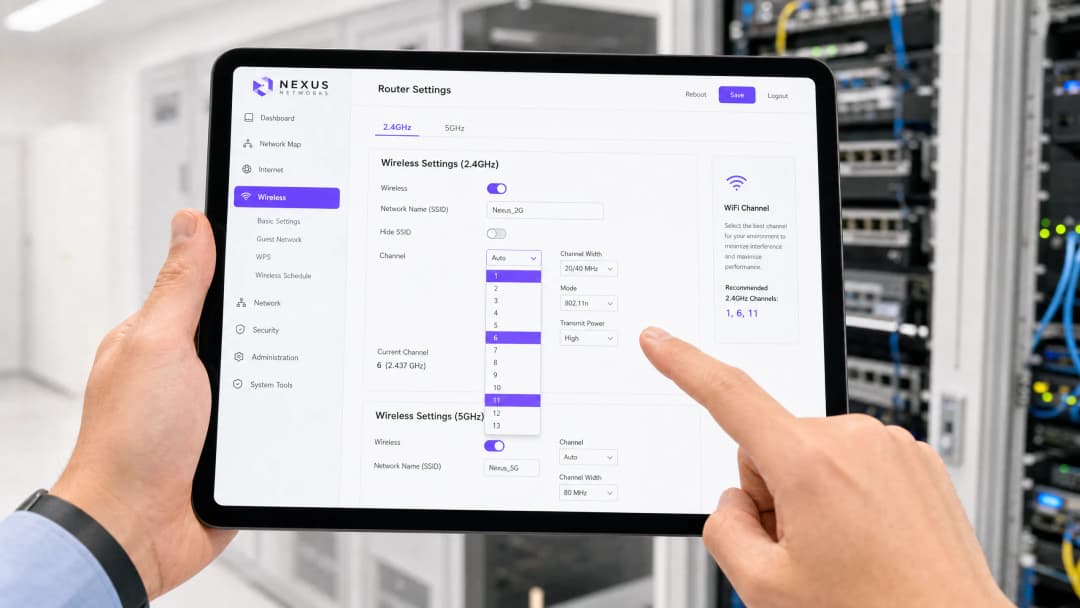
For CTOs and network architects managing high-density environments such as retail chains, hospitality venues, and public sector facilities, relying on default router channel settings is a critical vulnerability. Out-of-the-box configurations often default to congested frequency bands, resulting in severe co-channel interference, degraded throughput, and a poor user experience. This technical guide explores the mechanics of 2.4GHz and 5GHz channel allocation, the impact of adjacent-channel interference, and the strategic deployment of non-overlapping channels. By implementing a structured channel plan, IT teams can establish the robust RF foundation that is essential for reliable connectivity, seamless authentication via Guest WiFi, and the collection of precise spatial data through WiFi Analytics.
Technical Deep-Dive
The 2.4GHz Band: Mitigating Congestion
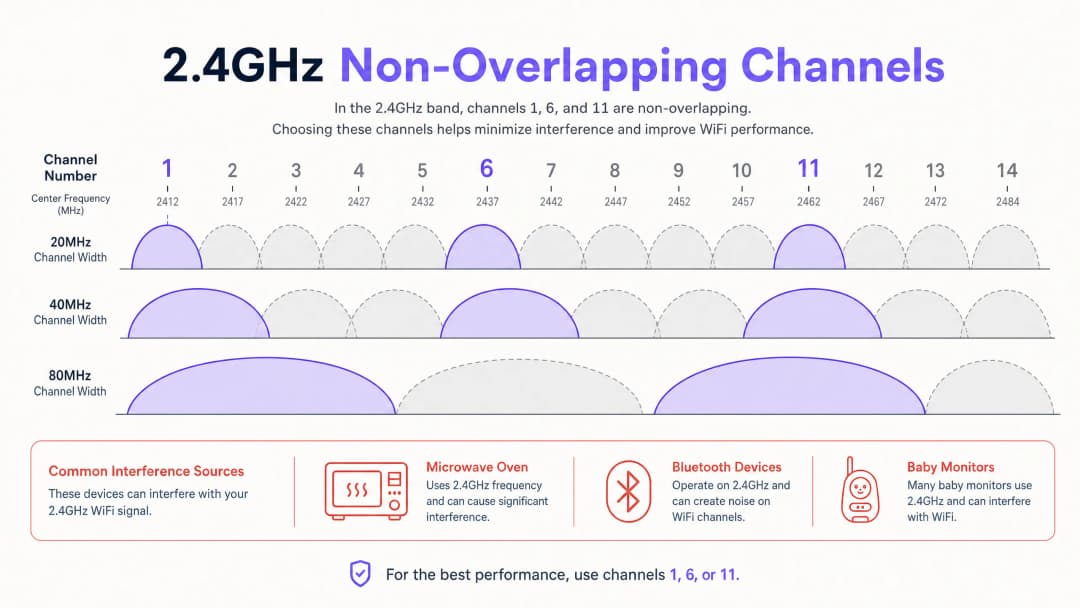
The 2.4GHz spectrum remains essential for legacy devices and IoT sensors, but it is notoriously congested. Although there are 14 channels globally, they are spaced only 5MHz apart. A standard WiFi transmission requires 20MHz of bandwidth, meaning adjacent channels overlap significantly. This overlap causes adjacent-channel interference, which is more destructive than co-channel interference because the carrier-sensing mechanism cannot coordinate transmissions, producing pure RF noise instead.
To ensure optimal performance, network administrators must strictly adhere to the non-overlapping channels: 1, 6, and 11. Using any other channel (for example, channel 3 or 9) will inevitably create interference with multiple neighbouring networks.
The 5GHz Band and Channel Width
The 5GHz band offers many more non-overlapping channels, making it the preferred choice for high-capacity enterprise networks. However, in high-density deployments, you must resist the temptation to boost peak individual throughput through channel bonding (using 40MHz or 80MHz widths). Channel bonding halves the number of available non-overlapping channels, increasing the likelihood of co-channel interference. In environments such as stadiums or conference centres, standardising on a 20MHz channel width on the 5GHz band maximises overall network capacity and stability.
In addition, administrators must carefully manage Dynamic Frequency Selection (DFS) channels. These frequencies are shared with radar systems, and access points must vacate the channel when a radar signal is detected, causing client disconnections. For a deeper look at this regulatory requirement, see our comprehensive guide: DFS Channels: What They Are and When to Avoid Them.
Got questions about your specific setup?
Our team works with venue operators, IT managers, and network engineers across 80,000 venues. Book a 20-minute call and we will show you how others like you solved it.
Implementation Guide
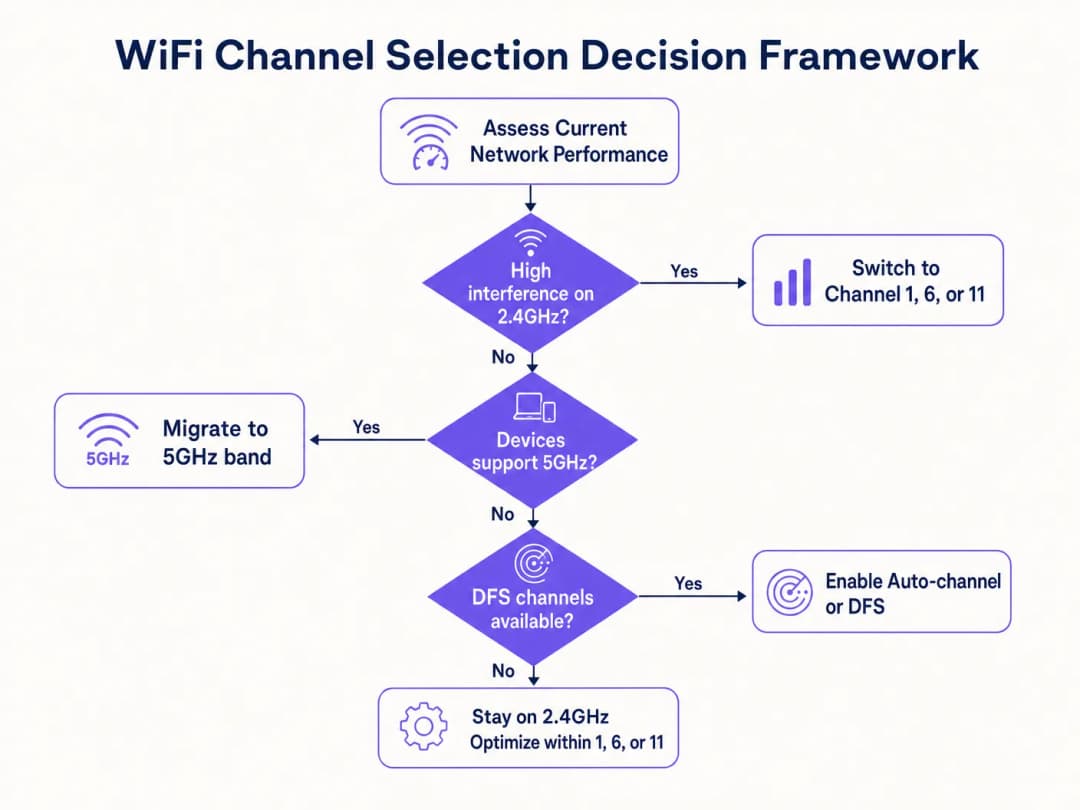
- Conduct an active site survey: Use a spectrum analyser to map the existing RF noise across both bands, identifying interference from neighbouring networks and non-WiFi sources (such as microwave ovens and Bluetooth).
- Define an allowed channel list: Rather than relying on an unrestricted "Auto" setting, explicitly define which channels your Radio Resource Management (RRM) algorithm is permitted to use. On the 2.4GHz band, restrict this strictly to 1, 6, and 11.
- Optimise channel width: Set the 5GHz channel width to 20MHz in high-density areas to maximise the reuse of non-overlapping channels.
- Assess DFS usage: Determine whether your venue's proximity to an airport or weather station prevents the use of DFS channels. If radar events are frequent, exclude DFS channels from the allowed list.
Best Practices
- Never use overlapping 2.4GHz channels: Always use 1, 6, and 11.
- Prioritise capacity over peak speed: Use 20MHz channels on 5GHz in dense deployments.
- Constrain auto-channel algorithms: Do not give RRM free rein; provide a curated list of clean channels.
- Monitor for radar: Proactively monitor AP logs for DFS events to prevent unexpected client disconnections.
Troubleshooting and Risk Mitigation
- Symptom: High signal strength but poor throughput.
- Diagnosis: Most likely co-channel or adjacent-channel interference. Confirm that APs are not sharing the same channel or using overlapping 2.4GHz channels.
- Symptom: Clients randomly disconnecting from the 5GHz network.
- Diagnosis: Possibly DFS radar detection forcing the AP to change channel. Check the logs and consider disabling DFS channels in the affected areas.
ROI and Business Impact
A well-planned RF environment directly affects the bottom line. For venues in hospitality or retail, poor connectivity causes customers to abandon the login flow, reducing the volume of first-party data captured through guest WiFi. Furthermore, inconsistent channel performance can skew location analytics, undermining the accuracy of footfall and dwell-time metrics. Investing the time in correct channel configuration ensures the underlying infrastructure can reliably support advanced business intelligence applications and a seamless user experience.
Listen to our expert briefing on this topic:
{{asset:how_to_change_your_router_s_default_channel_podcast.wav}}
Key Definitions
Co-Channel Interference (CCI)
Interference that occurs when multiple access points and clients transmit on the exact same frequency channel, forcing them to share the available airtime.
Critical in high-density deployments where APs are placed close together; mitigated by careful channel planning and reducing transmit power.
Adjacent-Channel Interference (ACI)
Interference caused by overlapping frequencies (e.g., using channel 3 on the 2.4GHz band), which corrupts transmissions because carrier sense mechanisms cannot properly coordinate access.
The primary reason why administrators must strictly adhere to channels 1, 6, and 11 on the 2.4GHz band.
Dynamic Frequency Selection (DFS)
A regulatory mechanism that requires WiFi equipment operating in certain 5GHz channels to detect and avoid interfering with radar systems.
Essential for utilising the full 5GHz spectrum, but requires careful management near airports or weather stations to prevent client disconnects.
Radio Resource Management (RRM)
Automated algorithms used by enterprise WLAN controllers to dynamically adjust channel assignments and transmit power based on the RF environment.
While useful, RRM should often be constrained by administrators to prevent it from making suboptimal choices, such as selecting overlapping 2.4GHz channels.
Channel Bonding
Combining adjacent 20MHz channels to create wider channels (40MHz, 80MHz, or 160MHz) to increase theoretical peak throughput for individual clients.
Generally discouraged in high-density enterprise environments because it drastically reduces the number of available non-overlapping channels.
Airtime Contention
The competition between multiple devices to transmit data over the shared half-duplex WiFi medium.
The fundamental bottleneck in WiFi networks; effective channel planning minimises contention by distributing devices across multiple clean channels.
Spectrum Analysis
The process of measuring and visualising RF energy across specific frequency bands to identify sources of interference.
A mandatory prerequisite step before designing or troubleshooting an enterprise wireless network.
Half-Duplex
A communication system where transmission and reception cannot occur simultaneously on the same frequency.
The underlying reason why WiFi is susceptible to contention and why minimising co-channel interference is paramount.
Worked Examples
A 200-room hotel in a dense urban area is experiencing severe guest complaints regarding WiFi speeds on the 2.4GHz band, despite having an AP in every other room.
The IT team conducted a spectrum analysis and found that the APs were left on default 'Auto' settings, resulting in many APs selecting overlapping channels like 3, 4, and 8. The team implemented a static channel plan, restricting all 2.4GHz radios strictly to channels 1, 6, and 11, ensuring adjacent APs never shared the same channel. They also reduced the transmit power on the 2.4GHz radios to limit cell size and encourage clients to migrate to the 5GHz band.
A large retail chain is rolling out new access points across 50 locations and wants to maximise 5GHz performance for their internal inventory scanners and guest WiFi.
The network architects standardised the deployment template to use 20MHz channel widths on the 5GHz band rather than the default 40MHz or 80MHz. They also enabled DFS channels but implemented a monitoring script to alert the NOC if any AP experienced more than three radar detection events in a 24-hour period, allowing them to statically reassign problem APs to non-DFS channels.
Practice Questions
Q1. You are deploying WiFi in a new hospital wing. The medical equipment vendor requires the use of the 2.4GHz band for their legacy telemetry monitors. A junior engineer suggests using channels 1, 4, 8, and 11 to spread out the devices. How do you respond?
Hint: Consider the required channel width for standard WiFi and the centre frequency spacing.
View model answer
Reject the suggestion. Using channels 4 and 8 will cause severe adjacent-channel interference with channels 1 and 11, corrupting the transmissions. You must mandate the strict use of only channels 1, 6, and 11 to ensure reliable communication for the critical telemetry monitors.
Q2. A stadium deployment is experiencing poor performance during events. The APs are currently configured to use 80MHz channel widths on the 5GHz band to provide 'maximum speed' to attendees. What is the recommended architectural change?
Hint: Analyse the trade-off between individual peak throughput and overall aggregate network capacity in high-density environments.
View model answer
Reconfigure the APs to use 20MHz channel widths. While 80MHz provides higher theoretical speeds for a single user, it consumes four standard channels, drastically reducing the number of available non-overlapping channels. In a stadium, minimising co-channel interference by maximising the number of independent channels (using 20MHz widths) is essential for aggregate capacity.
Q3. Your enterprise controller logs show that APs in the corporate headquarters are frequently changing channels on the 5GHz band, causing brief connectivity drops for users on VoIP calls. The building is located 5 miles from a regional airport. What is the most likely cause and solution?
Hint: Consider the regulatory requirements for specific frequencies in the 5GHz band.
View model answer
The APs are likely detecting radar signatures from the nearby airport on DFS channels, triggering mandatory channel changes. The solution is to remove the DFS channels from the allowed channel list in the Radio Resource Management configuration for that specific site.
Continue reading in this series
What is a WLC (Wireless LAN Controller) and Do You Still Need One?
This comprehensive guide explores the evolution of Wireless LAN Controllers (WLCs) and provides a technical framework for determining the right architecture in 2026. It covers traditional hardware, cloud-managed, and controller-less models, detailing their impact on compliance, scalability, and guest experience.
Power over Ethernet (PoE) for Access Points: An Implementation Guide
This guide provides infrastructure technicians, network architects, and IT decision-makers with a definitive technical reference for deploying Power over Ethernet (PoE) access points across enterprise venues including hotels, retail estates, stadiums, and public-sector facilities. It covers IEEE standards from 802.3af through 802.3bt, power budget calculation, cabling requirements, VLAN segmentation, and security compliance, with concrete implementation scenarios and measurable ROI benchmarks. Understanding PoE architecture is foundational to any [Guest WiFi](/guest-wifi) or [WiFi Analytics](/guest-wifi-marketing-analytics-platform) deployment, as the reliability of the physical layer directly determines the quality of data capture, user experience, and operational uptime.
Mesh Network vs Access Points: Which is Better for Large Venues?
This technical guide provides a definitive comparison between mesh networks and traditional wired access points for large-scale venues, covering architecture, performance trade-offs, and deployment strategy. It equips IT managers, network architects, and CTOs with actionable frameworks to design high-performance, compliant WiFi infrastructures for hospitality, retail, events, and public-sector environments. The guide also maps these architectural decisions to Purple's hardware-agnostic guest WiFi and analytics platform, demonstrating how the right infrastructure choice drives measurable business outcomes.
Got questions about your specific setup?
Our team works with venue operators, IT managers, and network engineers across 80,000 venues. Book a 20-minute call and we will show you how others like you solved it.