
How to Set Up a WiFi Hotspot for Your Business
This authoritative guide provides IT leaders, network architects, and venue operations directors with a practical, vendor-neutral blueprint for deploying secure, compliant, and business-enhancing guest WiFi hotspots. It covers critical architecture decisions - from VLAN segmentation and captive portal configuration to GDPR compliance and traffic shaping - and demonstrates how to transform network infrastructure from a cost centre into a revenue-driving analytics platform using Purple's Guest WiFi and analytics capabilities.
Video overview
Listen to this guide
View podcast transcript
Part of our core series: Captive Portal Guide →
Executive Summary
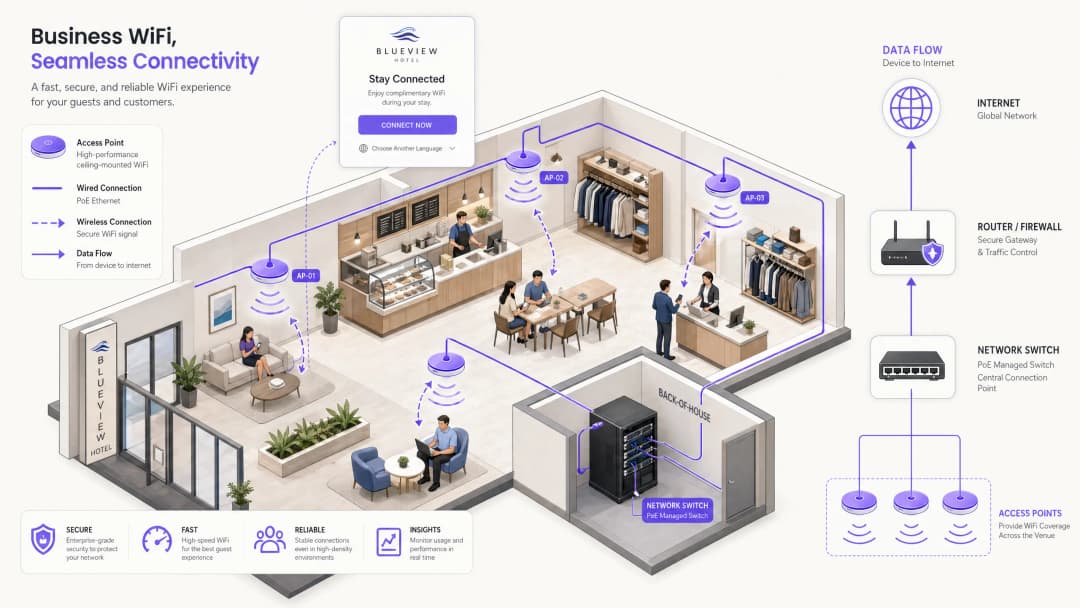
For business premises - whether retail chains, hotel groups, conference centres or large public institutions - guest WiFi has evolved from an optional convenience into a critical digital touchpoint. Guests and visitors now expect reliable, fast connectivity as a baseline. Yet the operational and legal gap between a consumer-grade router and a properly deployed enterprise hotspot is enormous. A poorly implemented network exposes corporate assets to lateral movement attacks, creates liability under GDPR and the Computer Misuse Act, and squanders the opportunity to capture valuable first-party data.
This guide gives IT managers and network architects responsible for deploying or upgrading a public WiFi service a pragmatic, vendor-neutral blueprint. We detail the technical architecture required to deliver a secure, segmented hotspot, with particular focus on VLAN design, the captive portal authentication flow, bandwidth management, and compliance requirements including GDPR, PCI DSS and IEEE 802.1X. We also explore how integrating a managed platform such as Guest WiFi turns raw connectivity into actionable WiFi Analytics, enabling venue operators to understand footfall patterns, measure dwell time and drive measurable marketing ROI.
Technical Deep-Dive: Architecture and Segmentation
The foundational principle of any enterprise hotspot deployment is isolation. At every layer of the network stack, guest traffic must be cryptographically and logically separated from corporate data. Failing to enforce this separation is the most common - and most consequential - mistake in public WiFi deployments.
Network Segmentation via VLANs
Deploying a flat network in which guests and point-of-sale (POS) systems share the same subnet is a catastrophic security failure. Enterprise deployments use Virtual Local Area Networks (VLANs) to segment traffic at the managed-switch level, enforcing logical boundaries regardless of the physical topology.
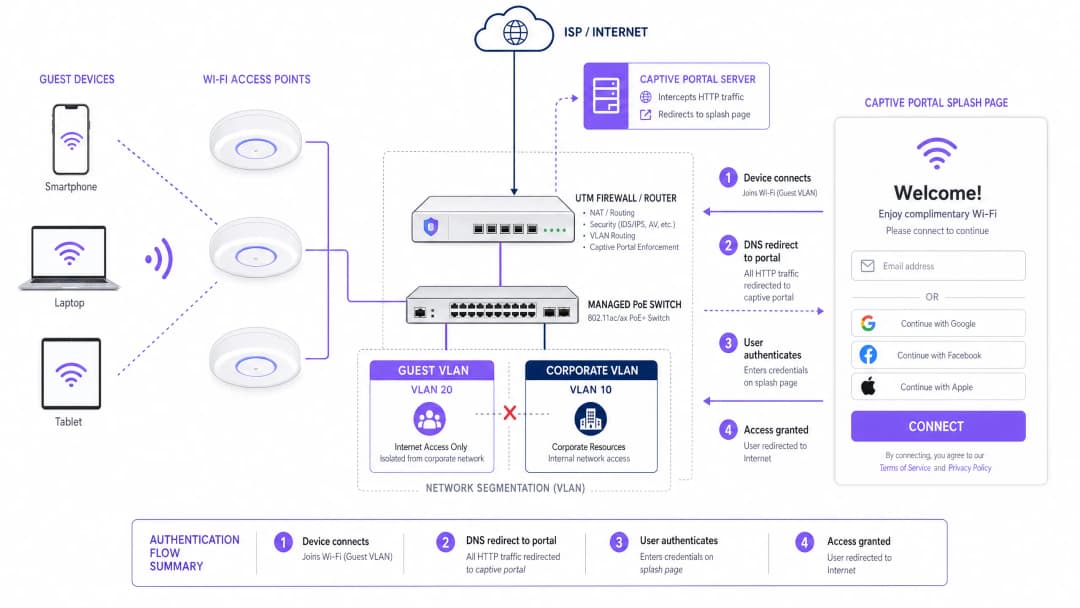
A standard multi-tenant deployment typically defines at least two VLANs:
| VLAN | Purpose | Typical ID | Routing Policy |
|---|---|---|---|
| Corporate | Staff devices, POS terminals, back-office servers | VLAN 10 | Full internal access |
| Guest | Public internet access only | VLAN 20 | Internet only; no internal routing |
| IoT/Building | CCTV, HVAC, door access control | VLAN 30 | Isolated; no internet |
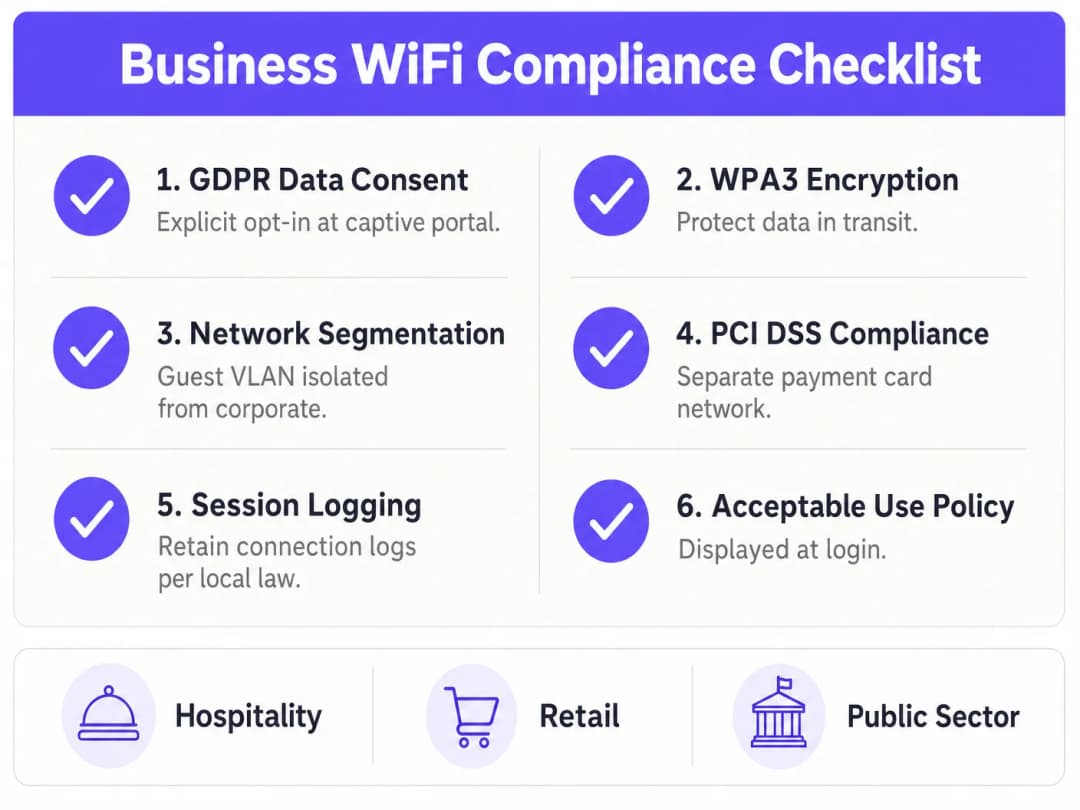
Traffic on the guest VLAN is routed directly to the internet through a Unified Threat Management (UTM) firewall, configured with strict access control lists (ACLs) that drop any packets destined for internal subnets. This segmentation is a mandatory control under PCI DSS Requirement 1.3, which stipulates that the cardholder data environment must be isolated from untrusted networks. For retail and hospitality operators running payment terminals on the same physical infrastructure, this is non-negotiable.
The Captive Portal Authentication Flow
When a guest device associates with an access point (AP), it obtains an IP address via DHCP. At this stage, the firewall blocks all outbound internet traffic. The complete authentication sequence works as follows:
- Association: The device connects to the open SSID (or to a secure OpenRoaming SSID using 802.1X/EAP).
- DHCP assignment: The guest VLAN's DHCP server assigns an IP address, default gateway and DNS servers.
- Interception: When the device attempts an HTTP request (or the operating system triggers a captive portal probe against a known URL), the network intercepts the request via DNS redirection and routes the user to the captive portal server.
- Authentication: The user is presented with a branded splash page. They authenticate via email, social login (OAuth), an SMS one-time code, or a seamless identity provider such as OpenRoaming.
- Consent capture: The user is shown the Acceptable Use Policy (AUP) and, if data is being collected for marketing purposes, an explicit opt-in consent checkbox.
- Authorisation signal: The portal server communicates with the wireless LAN controller or firewall via RADIUS or a REST API to authorise the device's MAC address or IP for internet access.
- Access granted: The firewall rules update dynamically and the user is redirected to their intended destination.
For environments that require enterprise-grade certificate-based authentication for staff devices beyond the guest portal, see our guide How to Set Up Enterprise WiFi with 802.1X on iOS and macOS.
Wireless Standards and Frequency Planning
Enterprise deployments should standardise on 802.11ax (WiFi 6) or 802.11be (WiFi 7) access points. WiFi 6 introduced OFDMA (Orthogonal Frequency-Division Multiple Access), which dramatically improves performance in high-density environments by allowing a single AP to serve multiple clients simultaneously on sub-channels rather than sequentially. This is especially critical in healthcare facilities, conference centres and stadium deployments, where hundreds of devices may connect to a single AP during peak periods.
Band allocation should follow these principles. The 2.4 GHz band offers greater range and better penetration through walls, making it suitable for legacy devices and large open areas. However, it has only three non-overlapping channels (1, 6, 11) and is highly susceptible to co-channel interference in dense deployments. The 5 GHz band offers more than 24 non-overlapping channels and significantly higher throughput, but at reduced range. Modern enterprise wireless controllers support band steering, a feature that actively encourages dual-band-capable devices to connect on 5 GHz, freeing up 2.4 GHz spectrum for legacy clients.
Got questions about your specific setup?
Our team works with venue operators, IT managers, and network engineers across 80,000 venues. Book a 20-minute call and we will show you how others like you solved it.
Implementation Guide: Hardware, Configuration and Deployment
Step 1: ISP and Uplink Sizing
Before selecting hardware, calculate the required uplink bandwidth. For a general-purpose guest network, a conservative estimate is 1-2 Mbps per concurrent user. For a venue expecting 300 concurrent guests, a minimum 500 Mbps symmetric fibre connection is recommended, with a 1 Gbps connection providing headroom for growth. For transport hubs or large event venues, consider multiple bonded uplinks or SD-WAN failover.
Step 2: Access Point Selection and Placement
Use managed 802.11ax access points from an enterprise vendor. These APs must support PoE+ (Power over Ethernet Plus, IEEE 802.3at), allowing a single Cat6 cable to carry both data and power from the managed switch to the AP. This eliminates the need to install local power outlets at every AP location, substantially reducing installation costs.
AP placement must be determined by a professional RF site survey, not guesswork. That survey should account for:
- Attenuation: Signal loss through concrete walls, metal shelving and glass partitions.
- Coverage overlap: APs should overlap by roughly 15-20% to ensure seamless roaming with no dead zones.
- Capacity planning: High-density areas (conference rooms, food courts, lobbies) need more APs at lower transmit power to serve many clients over short distances, rather than a few high-power APs.
Step 3: Managed Switch and VLAN Configuration
Deploy a managed Layer 2/Layer 3 switch with sufficient PoE+ budget to power all APs. Configure 802.1Q VLAN tagging on all uplinks and AP trunk ports. Access ports connecting POS terminals or staff workstations should be assigned to the corporate VLAN as untagged members. AP ports should be configured as trunk ports carrying all required VLANs, with the wireless controller mapping each SSID to its corresponding VLAN.
Step 4: Firewall and Traffic Shaping
The UTM firewall is the enforcement point for all security and bandwidth policies. Key configurations include:
- VLAN routing rules: Permit the guest VLAN to reach the internet; deny the guest VLAN access to all internal subnets.
- Per-user bandwidth limits: Implement traffic-shaping policies to cap individual throughput. A standard starting point is 5 Mbps down / 2 Mbps up per user. This prevents a single user streaming 4K video from degrading the experience for every other guest.
- Application control: Block peer-to-peer file-sharing protocols (BitTorrent, eDonkey) and other high-bandwidth or illegal applications at the firewall level.
- DNS filtering: Implement DNS-based content filtering to block access to malicious domains, phishing sites and inappropriate content categories. For a detailed guide to this layer, see Protecting Your Network with Robust DNS and Security.
Step 5: Captive Portal Configuration
The captive portal is the most visible component of the deployment and the primary data-capture mechanism. When configuring the portal, ensure that:
- The splash page is served over HTTPS with a valid, publicly trusted SSL certificate to prevent browser security warnings.
- Authentication options include, at minimum, email/password and social login (Google, Facebook, Apple) to maximise conversion rates.
- The AUP is clearly displayed and requires explicit acceptance before access is granted.
- GDPR consent for marketing communications is captured via a separate, unticked opt-in checkbox.
- Session timeouts and re-authentication intervals are configured to balance user convenience with security.
Best Practices and Compliance
GDPR and Data Privacy
If you collect user data for marketing purposes, explicit, informed consent is mandatory under both UK GDPR and EU GDPR. The legal requirements are unambiguous: pre-ticked consent boxes are prohibited; consent must be freely given, specific, informed and unambiguous; and users must be able to withdraw consent as easily as they gave it. Your captive portal must clearly state what data is collected, the legal basis for processing, how the data will be used, and how long it will be retained.
Session Logging and Legal Compliance
In the UK, the Regulation of Investigatory Powers Act (RIPA) and related legislation may require venue operators to retain connection logs - including MAC addresses, timestamps and IP assignments - to assist law enforcement in the event of illegal activity on the network. Consult your legal counsel to determine the specific retention obligations that apply to your organisation and jurisdiction.
WPA3 and Encryption Standards
For any SSID using a pre-shared key (for example, a staff network), mandate WPA3-Personal (SAE) rather than WPA2. WPA3 eliminates the offline dictionary attack vulnerability inherent in WPA2's four-way handshake. For corporate staff networks using 802.1X certificate-based authentication, WPA3-Enterprise in 192-bit mode provides the highest level of assurance. For more on securing the physical and logical layers of your wireless infrastructure, see Access Point Security: Your 2026 Enterprise Guide.
Handling MAC Address Randomisation
Modern iOS (since iOS 14) and Android (since Android 10) devices use MAC address randomisation by default, generating a unique random MAC address for each WiFi network. This means MAC addresses can no longer be relied upon to identify returning visitors or build long-term user profiles. The correct architectural response is to enforce identity-based authentication at the captive portal - requiring users to sign in via email or a social account - so that the user profile, rather than a hardware identifier, becomes the persistent tracking entity.
Troubleshooting and Risk Mitigation
Even a well-designed network will encounter operational issues. The table below summarises the most common failure modes and their recommended mitigations.
| Failure Mode | Root Cause | Mitigation |
|---|---|---|
| DHCP exhaustion | Subnet too small or lease times too long relative to footfall | Use a /22 or larger subnet; shorten lease times to 30-60 minutes |
| Co-channel interference | Multiple APs on the same channel in overlapping coverage areas | Enable dynamic channel assignment on the wireless controller |
| Captive portal SSL errors | Invalid or self-signed certificate on the portal server | Deploy a valid public CA certificate; use Let's Encrypt |
| Slow roaming | APs not sharing client association data | Enable 802.11r (Fast BSS Transition) on the wireless controller |
| Bandwidth saturation | Per-user traffic shaping not configured | Implement per-user QoS policies on the firewall |
| Guest-to-corporate lateral movement | Flat network or misconfigured ACLs | Audit VLAN ACLs; penetration-test the guest VLAN |
ROI and Business Impact
A properly deployed hotspot transcends its function as IT infrastructure - it becomes a first-party data engine and a direct marketing channel. The business case for investing in a managed guest WiFi platform is compelling in every vertical.
In hospitality, guest WiFi data lets hotels understand which facilities guests use before and after connecting, personalise in-stay communications, and drive repeat bookings through automated post-departure campaigns. A 300-room hotel capturing 200 email opt-ins per day builds a marketing database of 70,000 opted-in contacts per year - a significant CRM asset.
In retail, WiFi analytics deliver footfall heatmaps, dwell times by zone and repeat-visit rates - data that was previously obtainable only through expensive manual surveys. Retailers can use this data to optimise store layouts, measure the impact of promotional displays, and trigger loyalty campaigns when a known customer enters the store.
For public-sector and transport operators, the value proposition lies in operational efficiency: understanding peak congestion periods, optimising staffing levels, and delivering convenient digital services to citizens and passengers.
Platforms such as Purple's Guest WiFi and WiFi Analytics provide the managed infrastructure layer that connects raw networking to these business outcomes. As Purple's strategic expansion demonstrates - including recent moves into new verticals, as highlighted in the announcement of VP of Education Tim Peers joining the team - the value of intelligent, connected spaces is expanding rapidly across every sector of the economy.
The transition from basic internet connectivity to an intelligent, data-driven network is the defining characteristic of a modern business WiFi deployment. The infrastructure costs are largely fixed; the incremental investment in a managed platform layer delivers compounding returns as the marketing database grows and automated workflows mature.
Key Definitions
Captive Portal
A web page that a user of a public access network is obliged to view and interact with before internet access is granted. It intercepts HTTP traffic via DNS redirection and presents a splash page for authentication and consent capture.
The primary mechanism for enforcing Acceptable Use Policies, authenticating users, and capturing first-party marketing data on guest WiFi networks.
VLAN (Virtual Local Area Network)
A logical subnetwork that groups a collection of devices from different physical LANs, enforced at the managed switch level via 802.1Q tagging.
Essential for isolating guest WiFi traffic from sensitive corporate networks. A mandatory control for PCI DSS compliance in any venue that processes payment card data.
Traffic Shaping (QoS)
The control of network traffic to optimise or guarantee performance by limiting the bandwidth available to individual users or application types.
Used to prevent a small number of heavy users from consuming the majority of the available uplink bandwidth, ensuring a consistent baseline experience for all concurrent guests.
MAC Randomization
A privacy feature in modern operating systems (iOS 14+, Android 10+) that generates a unique random MAC address when connecting to different WiFi networks, preventing persistent hardware-based tracking.
Forces venue operators to use identity-based captive portal logins rather than hardware address tracking to identify and re-engage returning visitors.
DHCP Exhaustion
A network failure condition where the DHCP server has assigned all available IP addresses in its configured pool, preventing new devices from obtaining an IP address and connecting to the network.
A common and easily preventable failure in high-footfall venues with undersized subnets or excessively long DHCP lease times.
Band Steering
A wireless controller feature that detects dual-band capable client devices and actively encourages or forces them to connect to the 5 GHz band rather than the more congested 2.4 GHz band.
Improves overall network performance in high-density deployments by distributing clients across the available spectrum and reducing co-channel interference on the 2.4 GHz band.
OpenRoaming
A Wireless Broadband Alliance (WBA) federation standard that enables automatic, secure WiFi connections across participating networks using 802.1X/EAP authentication, without requiring users to interact with a captive portal.
Provides a seamless, cellular-like connectivity experience for users of participating identity providers. Purple operates as an identity provider within the OpenRoaming federation under its Connect licence.
PCI DSS (Payment Card Industry Data Security Standard)
A set of security standards mandated by the major card schemes (Visa, Mastercard, Amex) requiring any organisation that accepts, processes, stores, or transmits payment card data to maintain a secure, segmented network environment.
Directly relevant to any retail or hospitality WiFi deployment where payment terminals share physical network infrastructure with guest access points. Requirement 1.3 mandates strict isolation of the cardholder data environment from untrusted networks.
UTM Firewall (Unified Threat Management)
A network security appliance that combines multiple security functions - including stateful packet inspection, intrusion prevention, application control, DNS filtering, and VPN - into a single managed platform.
The central enforcement point for VLAN routing rules, per-user bandwidth policies, and content filtering in an enterprise guest WiFi deployment.
Worked Examples
A 200-room hotel is upgrading its guest WiFi. During peak evening hours, guests complain about slow speeds and dropped connections, despite the hotel having a 1 Gbps symmetric fibre uplink. Investigation reveals the current setup uses a single flat /24 subnet for both staff and guests, with no traffic shaping configured. The hotel also wants to start capturing guest email addresses for a post-stay marketing programme.
Phase 1 - Network Redesign:
- Implement VLAN segmentation. Move all staff devices, POS terminals, and the property management system to VLAN 10 (/24 subnet). Move guests to VLAN 20 with a /22 subnet (1,022 usable IPs) to accommodate peak occupancy with multiple devices per guest.
- Configure the UTM firewall with strict ACLs: Guest VLAN 20 has internet access only; all routes to VLAN 10 are explicitly denied.
Phase 2 - Performance Optimisation: 3. Configure per-user bandwidth limits of 10 Mbps down / 5 Mbps up on the firewall. This ensures the 1 Gbps pipe is distributed fairly among 400+ concurrent devices. 4. Enable Band Steering on the wireless controller to push capable devices to the less congested 5 GHz band. 5. Reduce DHCP lease time from the default 24 hours to 2 hours to prevent IP exhaustion during peak check-in periods.
Phase 3 - Captive Portal and Data Capture: 6. Deploy a branded captive portal (e.g., via Purple Guest WiFi) requiring email authentication. 7. Configure the splash page with an explicit, un-ticked GDPR opt-in checkbox for the post-stay marketing programme. 8. Integrate the portal's API with the hotel's CRM to sync authenticated guest profiles and trigger automated post-stay email sequences.
A 50-store retail chain wants to use their free guest WiFi to build their marketing database. They currently use a WPA2 pre-shared key (password printed on receipts) across all stores and have zero visibility into who is connecting or how long they stay. The marketing team wants to send weekly promotional emails to WiFi users, and the IT team is concerned about PCI DSS compliance given that payment terminals are on the same physical switches.
Step 1 - Remove the Pre-Shared Key: Transition the guest SSID to an open network (no password) that immediately redirects to a captive portal. This eliminates the shared secret vulnerability and enables per-user authentication.
Step 2 - VLAN Segmentation for PCI DSS: Create a dedicated Guest VLAN (e.g., VLAN 20) on all managed switches. Assign POS terminals to the existing Corporate VLAN (VLAN 10). Configure ACLs on the firewall to enforce hard isolation between the two VLANs. Document this segmentation as part of the PCI DSS network diagram.
Step 3 - Captive Portal with GDPR-Compliant Consent: Deploy a managed captive portal platform. Configure the splash page to require authentication via Email, Google, or Facebook. Include a clearly worded, un-ticked opt-in checkbox: 'I agree to receive promotional emails from [Brand Name]. You can unsubscribe at any time.'
Step 4 - CRM Integration and Automation: Connect the portal's API to the retailer's CRM (e.g., Salesforce, Klaviyo). Sync authenticated user profiles, visit timestamps, and store location data. Configure an automated welcome email triggered on first connection, and a re-engagement campaign triggered when a known user has not connected for 30 days.
Practice Questions
Q1. Your marketing team wants to collect guest email addresses via the new WiFi hotspot. They suggest setting the DHCP lease time to 24 hours so guests do not have to log in repeatedly during the day. Your venue sees 3,000 unique visitors per day. Your guest subnet is a /23 (510 usable IPs). What is the architectural flaw in this request, and how do you resolve it while still meeting the marketing team's requirement?
Hint: Consider the relationship between the number of daily visitors, the subnet size, and the lease duration. Then think about how to separate the network-layer concern from the application-layer concern.
View model answer
The architectural flaw is that a 24-hour lease time on a /23 subnet with 3,000 daily visitors will cause rapid DHCP exhaustion. Once 510 devices have connected, no new devices will receive an IP address for up to 24 hours. The solution is twofold: First, expand the subnet to at least a /21 (2,046 IPs) to accommodate peak concurrent devices. Second, reduce the DHCP lease time to 30-60 minutes to recycle IP addresses as guests leave the venue. To satisfy the marketing team's requirement that guests do not have to re-authenticate repeatedly, configure the captive portal controller to remember authenticated MAC addresses (or user identity tokens) for 24 hours. This allows a returning device to obtain a new IP via DHCP but bypass the splash page, delivering the seamless experience the marketing team wants without breaking the network.
Q2. A retail client wants to implement a captive portal but is concerned about the cost of replacing their existing unmanaged switches. They ask if they can run the guest WiFi on the same physical unmanaged switches as their Point of Sale terminals, with the guest network simply using a different SSID.
Hint: VLAN enforcement requires managed switch hardware. Consider what happens to traffic on an unmanaged switch.
View model answer
This configuration is not acceptable from a security or compliance standpoint. Unmanaged switches do not support 802.1Q VLAN tagging, meaning all traffic on the switch - regardless of SSID - is on the same broadcast domain. A guest device on the 'guest' SSID would be able to reach POS terminals on the same switch, violating PCI DSS Requirement 1.3. The client must replace unmanaged switches with managed Layer 2 switches that support 802.1Q VLAN tagging. The capital cost of managed switches is modest compared to the liability exposure of a PCI DSS breach or the fines associated with a data compromise.
Q3. You are deploying access points in a high-density conference centre that hosts events with up to 1,500 concurrent WiFi users. You notice significant latency and packet loss on the 2.4 GHz spectrum during events, even though the 5 GHz spectrum appears underutilised. How should you configure the wireless controller to address this, and what additional hardware consideration should you make?
Hint: Think about how to move capable devices off the congested frequency band, and consider the relationship between AP transmit power and client density.
View model answer
Enable Band Steering on the wireless controller. This feature detects if a client device is capable of connecting to the 5 GHz band and actively encourages or forces the device to associate there, freeing up the 2.4 GHz band for legacy devices. Additionally, reduce the transmit power on all APs. Counter-intuitively, in high-density deployments, lower transmit power improves performance by reducing co-channel interference between adjacent APs and encouraging clients to associate with the nearest AP rather than a distant one at high signal strength. Consider deploying additional APs at lower power rather than fewer APs at high power. Also enable 802.11r (Fast BSS Transition) to enable seamless roaming as users move through the venue.
Continue reading in this series
Ubiquiti UniFi guest portal not redirecting: causes and fixes
This guide isolates a UniFi guest portal redirect failure by following the guest state, redirect, pre-authorisation route and controller authorisation in sequence. It gives venue IT teams a sourced method to address guest-network versus Hotspot confusion, external portal hand-offs, current UniFi OS account requirements and DNS isolation testing.
Cisco Meraki splash page not working: a troubleshooting flowchart
This practical day-two guide isolates where a Cisco Meraki splash flow has failed: client authorisation, HTTP redirect initiation, walled-garden reachability or RADIUS sign-on. It gives venue IT teams a controlled evidence path, so they can restore Guest WiFi without making broad changes to a live estate.
Enterprise Guest WiFi Setup Guide: VLAN Segmentation, Security, and Captive Portals
This technical guide shows IT teams how to set up Guest WiFi as a controlled internet-access service, using VLAN segmentation, firewall policy and a captive portal. It also explains how Purple's registration forms and onboarding controls support a proportionate visitor experience without weakening the boundary around staff, payment and operational systems.
Got questions about your specific setup?
Our team works with venue operators, IT managers, and network engineers across 80,000 venues. Book a 20-minute call and we will show you how others like you solved it.