
How to Securely Segment Staff and Guest WiFi Networks: Best Practices for Enterprise LANs
This guide provides IT managers and network architects with a vendor-neutral, technical blueprint for securing enterprise LANs by properly segmenting staff and guest WiFi traffic. It covers 802.1X authentication, cloud RADIUS, VLAN isolation, and the credential lifecycle management required to eliminate shared passphrases and protect corporate assets.
Listen to this guide
View podcast transcript
Executive Summary
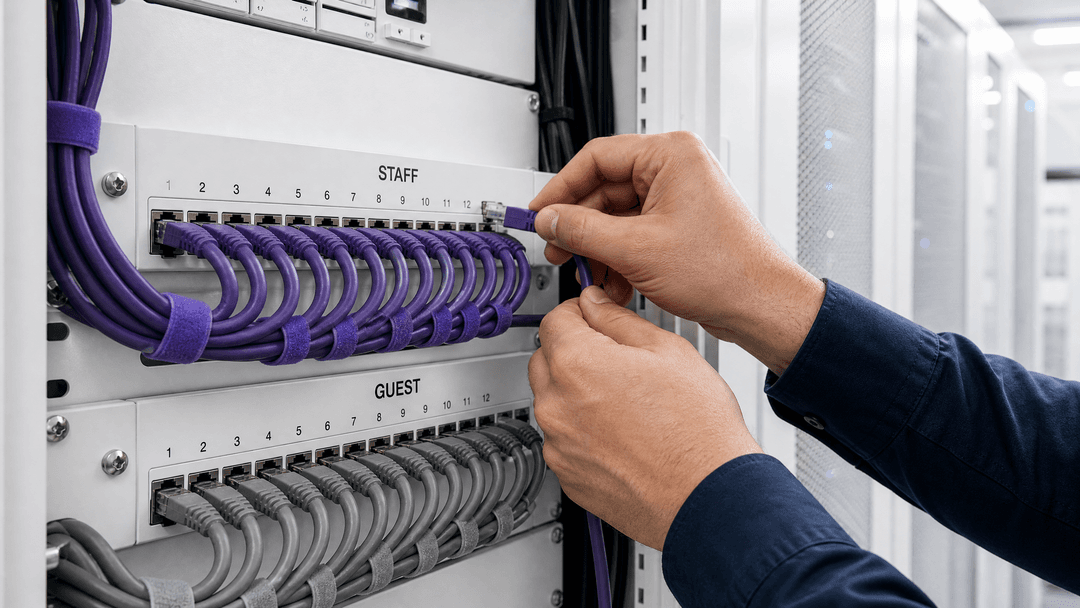
Enterprise networks are under increasing pressure to deliver seamless connectivity for both staff and guests without compromising the security of the corporate LAN. The fundamental challenge for IT managers is providing internet access to untrusted guest devices while ensuring they cannot reach sensitive infrastructure such as point-of-sale systems, ERP platforms, or file servers.
The standard approach of using a shared pre-shared key (PSK) for staff networks is a critical vulnerability. When a shared passphrase is used, the credential remains active long after an employee leaves, creating a persistent risk. This guide details the architectural shift required to properly segment these networks using Identity-Based Networks. By implementing 802.1X authentication with EAP-TTLS for staff, backed by a cloud RADIUS infrastructure, and isolating guest traffic via captive portals or Passpoint on dedicated VLANs, organisations can achieve robust security. This approach automates the credential lifecycle, ensures compliance with standards like PCI DSS and ISO 27001, and integrates directly with existing identity providers such as Microsoft Entra ID, Okta, and Google Workspace.
Technical Deep-Dive
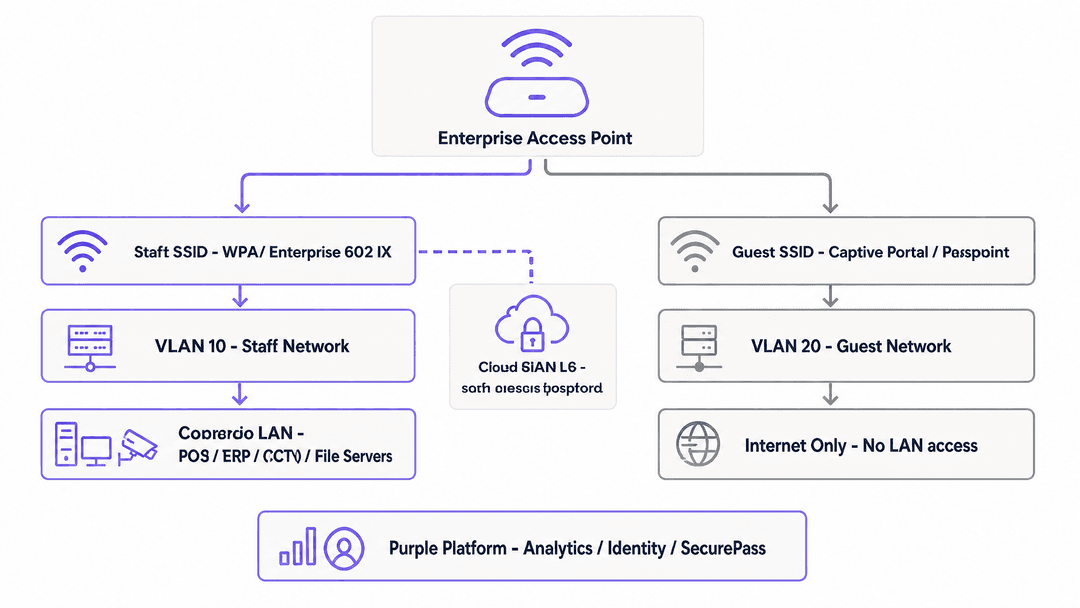
Network segmentation at Layer 2 relies on Virtual Local Area Networks (VLANs) to separate traffic. In a properly architected environment, the staff SSID is mapped to one VLAN (e.g., VLAN 10) and the guest SSID to another (e.g., VLAN 20). Managed switches and access points enforce this separation. Guest traffic is routed directly to the internet, while staff traffic is permitted access to the corporate LAN based on strict firewall policies.
The Failure of Shared Passphrases
Many venues rely on a single WPA2-Personal passphrase for staff access. This model fails because the credential is tied to the network, not the individual. When a staff member departs, the passphrase must be changed across all devices to revoke access - an operational burden that is rarely executed. This leaves the network exposed to unauthorized access from former employees.
802.1X and Cloud RADIUS
The secure alternative is 802.1X port-based network access control. Staff authenticate using their individual corporate directory credentials. The access point acts as an authenticator, passing the request to a RADIUS server.
Modern deployments utilise cloud-native RADIUS, such as Purple's SecurePass. This removes the need for on-premises hardware like Cisco ISE or FreeRADIUS. The access point communicates with the cloud RADIUS server over RadSec (RADIUS over TLS on port 2083), encrypting the authentication traffic. The preferred authentication method is EAP-TTLS, which establishes a secure TLS tunnel before transmitting credentials via PAP, ensuring they are never exposed over the air.
Guest Network Isolation
Guest devices are inherently untrusted. They connect to a separate SSID and are assigned to an isolated VLAN. Authentication is typically handled via a captive portal that collects GDPR-compliant consent, or via Passpoint (Hotspot 2.0). Passpoint enables automatic, secure connections using existing credentials, such as a mobile carrier profile or the Purple app, bypassing the splash page entirely while maintaining WPA2/WPA3 Enterprise encryption over the air.
Implementation Guide
Implementing secure segmentation requires configuration across your identity provider, cloud RADIUS service, and wireless access points. Purple is hardware-agnostic and integrates with Cisco Meraki, HPE Aruba, Ruckus, Juniper Mist, Ubiquiti UniFi, Cambium, Extreme, and Fortinet.
Scenario 1: Cisco Meraki Deployment
For a Cisco Meraki environment, the staff SSID is configured under Wireless > Access Control.
- Set Security to Enterprise with my RADIUS server and WPA encryption to WPA2 only.
- Add the Purple RADIUS servers:
rad1-secure.purple.aiandrad2-secure.purple.ai, both on port 2083, with RadSec enabled. - Configure the NAS ID appropriately.
For the guest network using Passpoint, navigate to Wireless > Hotspot 2.0. Enable Hotspot 2.0, configure the operator and venue names, and set the domain list and NAI realms to match your Purple configuration. Add EAP-TTLS as the authentication method.
Scenario 2: Juniper Mist Deployment
In a Juniper Mist dashboard, navigate to Network > WLANs and add a new WLAN.
- Set Security Type to WPA2 Enterprise (802.1X).
- Enable Passpoint and configure the domain and NAI realm settings.
- Under Authentication Servers, select RadSec and add the Purple endpoints (
rad1-secure.purple.aiandrad2-secure.purple.aion port 2083). - Crucially, you must install the Purple RadSec certificate under Organization Settings to establish the secure TLS connection.
Best Practices
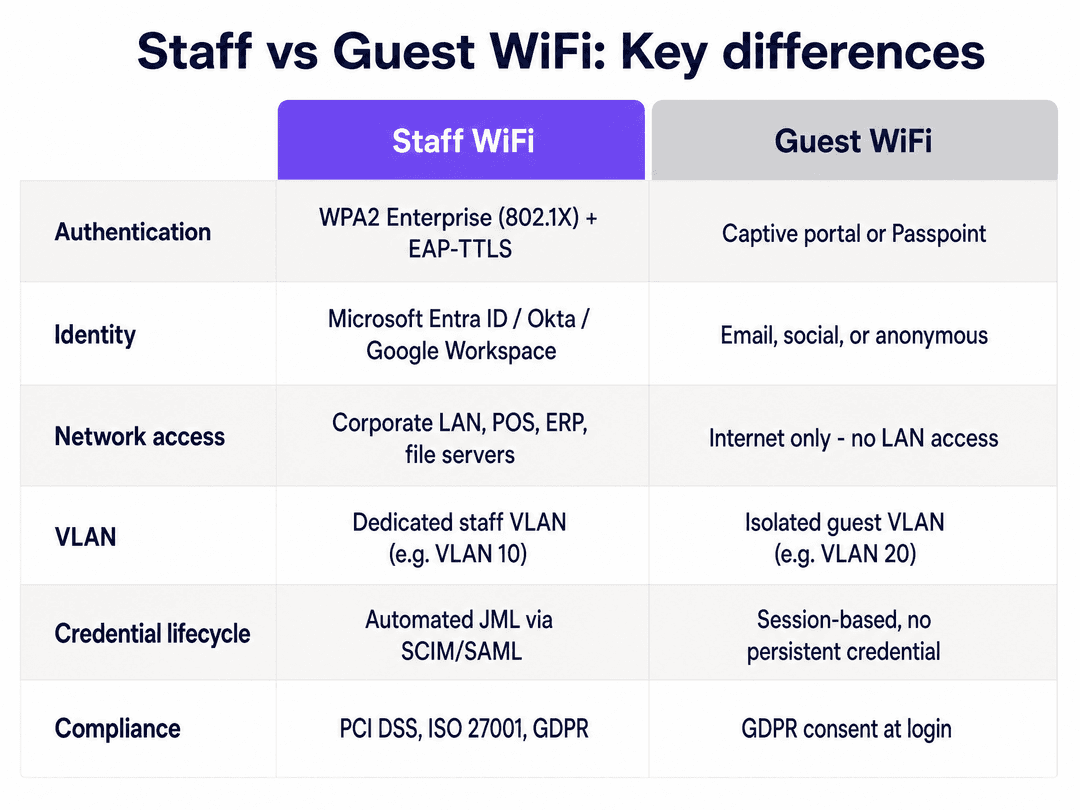
- Automate the Joiners, Movers, Leavers (JML) Process: Integrate your cloud RADIUS directly with Microsoft Entra ID or Okta via SCIM or SAML. When an employee is deprovisioned in the directory, Purple revokes their WiFi access immediately.
- Enforce Client Isolation: On the guest VLAN, enable client isolation at the access point level. This prevents guest devices from communicating with each other, mitigating lateral movement if a device is compromised.
- Deploy Redundant RADIUS: Always configure both primary and secondary RADIUS servers (
rad1-secureandrad2-secure). If the primary endpoint is unreachable, the access point must failover seamlessly to ensure staff can authenticate. - Audit Inter-VLAN Routing: Ensure your firewall rules explicitly deny traffic originating from the guest VLAN destined for the staff VLAN or corporate subnets.
Troubleshooting & Risk Mitigation
- VLAN Bleed: If a guest device can ping an internal server, your switch trunk ports or firewall rules are misconfigured. Verify that the guest VLAN is strictly routed to the WAN interface.
- Authentication Timeouts: If staff experience timeouts during 802.1X authentication, verify that outbound traffic on TCP port 2083 is permitted through your perimeter firewall to reach the cloud RADIUS servers.
- Certificate Errors: When using EAP-TTLS, ensure the RADIUS server's certificate is trusted by the client devices, or use an MDM to push the necessary root CA certificates to corporate devices.
ROI & Business Impact
Proper segmentation delivers measurable business value. It eliminates the IT overhead of manually rotating shared passphrases. It reduces the attack surface, directly supporting compliance with PCI DSS and ISO 27001 by provably isolating payment terminals and corporate data from public access. Furthermore, by layering Purple's Guest WiFi and WiFi Analytics on the isolated guest network, venues can safely capture first-party data to drive engagement, particularly in Retail and Hospitality environments.
Key Definitions
802.1X
An IEEE standard for port-based network access control that provides an authentication mechanism to devices wishing to attach to a LAN or WLAN.
Essential for staff WiFi, as it replaces shared passwords with individual identity authentication.
VLAN
Virtual Local Area Network; a logical subnetwork that groups a collection of devices from different physical LAN segments.
Used to logically separate guest traffic from staff and corporate traffic on the same physical access points.
RADIUS
Remote Authentication Dial-In User Service; a networking protocol that provides centralized Authentication, Authorization, and Accounting (AAA) management.
The server that validates staff credentials against the corporate directory before granting network access.
RadSec
A protocol that allows RADIUS packets to be transmitted securely over a TLS tunnel (typically on TCP port 2083).
Crucial for cloud RADIUS deployments to ensure authentication data is encrypted across the internet.
EAP-TTLS
Extensible Authentication Protocol Tunnelled Transport Layer Security; an EAP method that creates a secure TLS tunnel for client authentication.
The recommended authentication method for staff devices, ensuring credentials are not exposed over the air.
Passpoint
Also known as Hotspot 2.0; a Wi-Fi Alliance standard that enables mobile devices to automatically discover and connect to Wi-Fi networks securely.
Used to provide guests with seamless, encrypted access without requiring a captive portal on every visit.
JML
Joiners, Movers, Leavers; the lifecycle process of managing employee access rights.
Automating JML via SCIM or SAML ensures network access is instantly revoked when an employee departs.
Captive Portal
A web page that a user of a public-access network is obliged to view and interact with before access is granted.
Used on the guest VLAN to collect GDPR-compliant consent and first-party data before allowing internet access.
Worked Examples
A 200-room hotel currently uses a single WPA2-Personal SSID for both staff and back-of-house systems, with a separate open SSID for guests. The IT manager needs to secure the staff network to comply with PCI DSS without replacing their existing HPE Aruba access points.
The IT manager must migrate the staff network to 802.1X. They configure a new staff SSID on the Aruba controllers using WPA2 Enterprise. They integrate Purple's SecurePass cloud RADIUS with their Microsoft Entra ID tenant. The Aruba controllers are configured to authenticate against rad1-secure.purple.ai over RadSec. Staff now log in with their Entra ID credentials. The guest network remains on a separate VLAN, but is updated to use a captive portal for GDPR-compliant consent.
A stadium deploying Cisco Meraki wants to provide seamless, secure WiFi for season ticket holders without requiring them to log in via a captive portal every match day, while keeping this traffic isolated from the ticketing infrastructure.
The stadium deploys Passpoint (Hotspot 2.0) on the guest VLAN. Fans download a profile via the Purple app once. On subsequent visits, their devices automatically negotiate an EAP-TTLS connection with the Meraki access points, authenticating against Purple's cloud RADIUS. The Meraki infrastructure drops this traffic onto a dedicated guest VLAN that routes only to the internet.
Practice Questions
Q1. A retail chain is deploying Juniper Mist access points. They want to ensure that staff authentication traffic sent to Purple's cloud RADIUS cannot be intercepted over the internet. Which protocol and port must they configure on the access points?
Hint: Traditional RADIUS uses UDP port 1812 and does not encrypt the entire payload.
View model answer
They must configure RadSec, which uses a TLS tunnel over TCP port 2083. They must also install the Purple RadSec certificate in the Juniper Mist Organization Settings to establish trust.
Q2. An IT manager notices that devices connected to the guest SSID are able to ping the IP address of the local print server. The guest SSID is assigned to VLAN 20 and the print server is on VLAN 10. What is the most likely cause?
Hint: Consider where routing decisions between different subnets are made.
View model answer
The inter-VLAN routing rules on the site's firewall or Layer 3 switch are too permissive. There should be an explicit deny rule preventing traffic from the guest subnet (VLAN 20) from reaching the corporate subnet (VLAN 10).
Q3. A venue wants to move away from a shared WPA2 passphrase for staff but does not have an on-premises Active Directory server. They use Google Workspace for email and document storage. Can they implement 802.1X?
Hint: Consider the role of a cloud RADIUS provider.
View model answer
Yes. They can use a cloud RADIUS service like Purple SecurePass, which integrates directly with Google Workspace. The access points authenticate against the cloud RADIUS, which validates the credentials against Google Workspace, enabling 802.1X without on-premises directory hardware.
Continue reading in this series
How to Safely Segregate Staff and Guest WiFi Networks
This authoritative technical guide provides IT leaders with actionable strategies for safely segregating staff, guest, and IoT WiFi networks using VLANs and 802.1X. It details how to secure enterprise infrastructure, maintain PCI DSS compliance, and leverage captive portals to capture first-party data.
Best DNS filtering: a comprehensive guide for businesses
This technical reference guide explains how enterprise DNS filtering secures public networks by blocking malicious domains at the resolution layer - before a connection is ever established. It gives IT directors, network architects, and venue operations teams the deployment architecture, firewall configuration, and compliance context they need to protect Guest WiFi across hospitality, retail, and public-sector environments. Purple Shield blocks malware, botnets, and inappropriate content at the DNS level across 80,000+ live venues.
Understanding Cisco SUDI: Hardware-Anchored Identity in Secure Network Access Control
This guide explains how Cisco SUDI provides hardware-anchored, cryptographically secure identity for enterprise network infrastructure. Learn how to replace spoofable MAC addresses with immutable 802.1AR certificates to secure your venue's network access control.