
Managing Digital Certificates for EAP-TLS WiFi Authentication
This technical reference guide details the lifecycle management of digital certificates for EAP-TLS WiFi authentication. It provides actionable strategies for deploying, renewing, and revoking certificates at scale across enterprise networks using SCEP and MDM integrations.
Video overview
Listen to this guide
View podcast transcript
📚 Part of our core series: Enterprise WiFi Security Guide →

Executive Summary
Managing digital certificates for EAP-TLS WiFi authentication represents a major operational challenge for enterprise IT teams. As organisations phase out credential-based authentication to align with Zero Trust compliance, the operational burden shifts from password resets to certificate lifecycle management. This guide details the architectural patterns required to deploy, renew, and revoke client-side certificates at scale across complex estate environments.
For CTOs and network architects, the objective is clear: implement a robust Public Key Infrastructure (PKI) that integrates seamlessly with existing Mobile Device Management (MDM) platforms. By automating certificate issuance via Simple Certificate Enrolment Protocol (SCEP) and executing real-time revocation, manual intervention is eliminated. This approach secures the network perimeter, satisfies compliance frameworks including PCI DSS 4.0, and ensures continuous connectivity for over 80,000 physical venues running corporate hardware.
Technical Deep Dive
EAP-TLS (Extensible Authentication Protocol-Transport Layer Security) represents the gold standard for 802.1X network access control. It enforces mutual authentication. The RADIUS server presents its certificate to prove its identity to the client, while the client presents its certificate to prove its identity to the network.
Three-Tier PKI Architecture
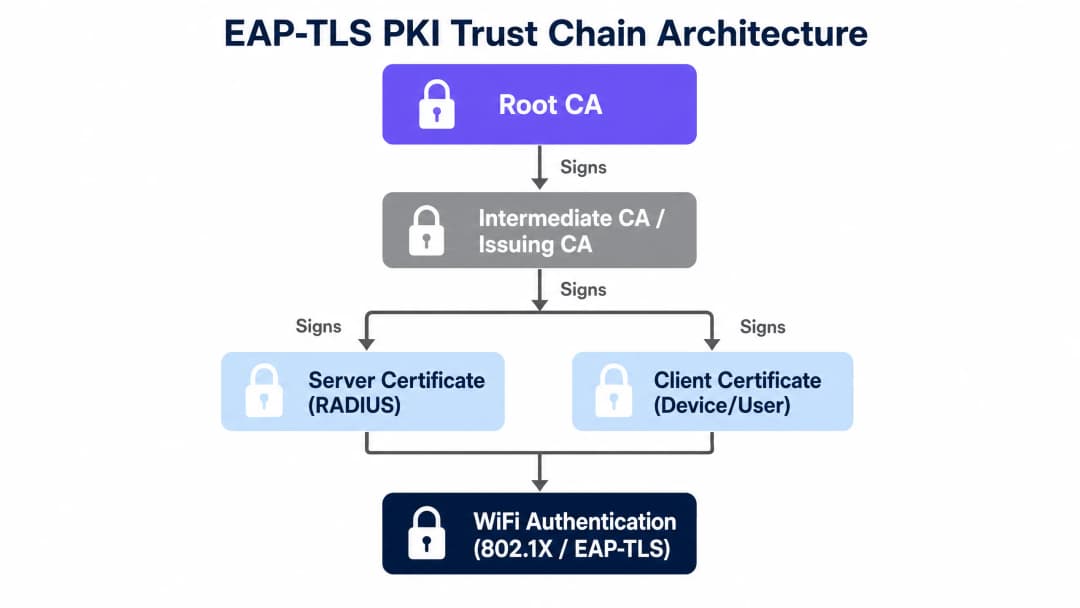
A flat PKI hierarchy introduces unacceptable risk. The recommended pattern is a three-tier architecture:
- Root Certificate Authority (Root CA): The ultimate trust anchor. This server remains offline and air-gapped from the network. Its sole function is to sign intermediate CA certificates.
- Intermediate CA (Issuing CA): This server remains online and handles daily client and server certificate signing. If compromised, it can be revoked by the Root CA without needing to rebuild the entire trust infrastructure.
- End-Entity Certificates: These are the actual certificates deployed to RADIUS servers and client devices.
Certificate Lifespans and Cryptographic Standards
The industry is mandating shorter certificate lifespans to limit the exposure window if a key is compromised. While public TLS certificates are capped at 398 days, internal client certificates used for WiFi authentication typically use a 365-day validity period.
Cryptographic requirements mandate a minimum of RSA 2048-bit keys or Elliptic Curve Cryptography (ECC) using the P-256 curve. WPA3-Enterprise 192-bit mode requires specific cipher suites, and EAP-TLS is the only authentication method that fully satisfies these requirements.
Implementation Guide
Deploying EAP-TLS across distributed venues requires tight integration between your identity provider, MDM platform, and network hardware. Purple's cloud overlay integrates with Cisco Meraki, HPE Aruba, Ruckus, Juniper Mist, Ubiquiti UniFi, Cambium, Extreme, and Fortinet.
Step 1: Establish the Trust Chain
Before any device can authenticate, it must trust the RADIUS server. Deploy the Root CA certificate to all managed devices via your MDM. For unmanaged devices, you must provide a bootstrapping onboarding portal to install the trust profile.
Step 2: Automate Issuance via SCEP
Generating certificates manually is non-viable. Implement SCEP to automate this workflow:
- The MDM (e.g., Microsoft Intune) pushes a SCEP payload to the device.
- The device generates a private key locally.
- The device submits a Certificate Signing Request (CSR) to the SCEP server.
- The CA issues the certificate, and the device installs it in its hardware-backed keystore.
Step 3: Configure RADIUS Policies
Configure your RADIUS server to require EAP-TLS. Ensure the server validates the Subject Alternative Name (SAN) in the client certificate against your identity directory (Microsoft Entra ID, Okta, or Google Workspace) to confirm the user account is still active.

Best Practices
- Automate Renewal Early: Configure MDM profiles to trigger certificate renewal at least 30 days before expiry. This prevents sudden authentication failures across entire venues.
- Enforce Hardware Keystores: Require that private keys are generated and stored within the device's Trusted Platform Module (TPM) or Secure Enclave. Keys must be configured as non-exportable.
- Implement Real-Time Revocation: Relying on static Certificate Revocation Lists (CRLs) introduces latency. Implement Online Certificate Status Protocol (OCSP) so the RADIUS server can verify certificate status in real time during authentication.
Troubleshooting & Risk Mitigation
The most common failure modes in EAP-TLS deployments relate to trust and time.
Trust Anchor Failures
If a client device rejects the RADIUS server certificate, authentication will fail silently. This happens when the Root CA certificate is missing from the device's trust store. Verify MDM deployment logs to ensure the trust profile is applied before the WiFi profile. For further diagnostics on connectivity issues, see Troubleshooting Public WiFi: Fixing 'Connected, No Internet' and Splash Page Redirection Failures .
Expiry Cliffs
Issuing thousands of certificates simultaneously creates a renewal spike cliff-edge. If the SCEP server experiences downtime during this window, devices will be disconnected from the network. Stagger initial deployments to spread the renewal load.
OCSP Timeouts
If the RADIUS server cannot reach the OCSP responder, it must decide whether to fail open or fail closed. For enterprise networks, failing closed is standard practice. Ensure your OCSP infrastructure is highly available and geographically distributed.
ROI & Business Impact
Transitioning to EAP-TLS requires upfront engineering effort, but the operational return is significant. An organisation with 5,000 users typically spends 40 hours per month resolving password resets and RADIUS lockouts caused by PEAP password rotations.
By automating certificate lifecycles, you can eliminate these support tickets. Additionally, you satisfy the strict access control requirements of ISO 27001 and PCI DSS, reducing audit overheads. When integrated with Guest WiFi and WiFi Analytics , Purple provides a unified view of network access for all user types, simplifying compliance reporting across distributed locations.
Key Definitions
EAP-TLS
Extensible Authentication Protocol with Transport Layer Security. An authentication framework that requires both the client and the server to prove their identity using digital certificates.
The industry standard for securing enterprise WiFi networks without relying on vulnerable passwords.
SCEP
Simple Certificate Enrolment Protocol. A protocol used by MDM platforms to securely automate the request and installation of digital certificates on devices.
Essential for scaling EAP-TLS deployments beyond a few dozen devices by removing manual certificate handling.
RADIUS
Remote Authentication Dial-In User Service. The networking protocol that provides centralised authentication, authorisation, and accounting management.
The server component that validates the client certificate and tells the access point to grant network access.
OCSP
Online Certificate Status Protocol. An internet protocol used for obtaining the revocation status of an X.509 digital certificate in real time.
Replaces static CRLs to ensure that a revoked certificate is blocked from the network immediately.
Root CA
Root Certificate Authority. The top-level cryptographic authority in a Public Key Infrastructure, used to sign subordinate CAs.
Must be kept highly secure and offline to protect the entire trust chain of the organisation.
SAN
Subject Alternative Name. An extension to X.509 that allows various values to be associated with a security certificate, such as email addresses or UPNs.
Used by the RADIUS server to map the certificate to a specific user account in the identity directory.
MDM
Mobile Device Management. Software used by IT departments to monitor, manage, and secure employees' mobile devices.
The delivery mechanism that pushes the SCEP configuration and WiFi profiles to the end-user devices.
CRL
Certificate Revocation List. A list of digital certificates that have been revoked by the issuing CA before their scheduled expiry date.
A legacy method of checking certificate validity that suffers from latency issues compared to OCSP.
Worked Examples
A 150-property hotel group needs to secure staff access across 3,000 devices. They currently use PEAP with a shared password that rotates quarterly, causing significant helpdesk volume. How should they implement EAP-TLS?
Deploy Microsoft Intune to manage all corporate devices. Establish a Microsoft ADCS Intermediate CA integrated with Intune via the Intune Certificate Connector. Push the Root CA certificate to all devices, followed by a SCEP profile that requests a client certificate with a 365-day validity. Configure the WiFi profile to use EAP-TLS and point to the Purple-linked RADIUS servers. Set the SCEP profile to renew automatically at 20% remaining life (73 days).
A retail chain requires secure WiFi for point-of-sale handhelds in 200 locations. The devices run Android and frequently lose connectivity to the central management server. How do you handle certificate revocation?
Implement OCSP for real-time revocation checking at the RADIUS server level. Configure the RADIUS server to query the OCSP responder for every authentication attempt. If a handheld is reported lost, the security team revokes the certificate in the CA. The next time the device attempts to associate with an access point, the RADIUS server receives a "revoked" response from OCSP and denies access immediately.
Practice Questions
Q1. You are deploying EAP-TLS for 2,000 corporate laptops. The SCEP infrastructure is configured, but during testing, the laptops fail to connect to the WiFi. The RADIUS logs show 'Unknown CA'. What is the most likely cause?
Hint: Consider the order of operations when deploying trust profiles versus authentication profiles.
View model answer
The laptops do not have the Root CA certificate installed in their trusted root store. The MDM must be configured to push the Root CA certificate payload to the devices before pushing the SCEP payload or the EAP-TLS WiFi profile. Without the Root CA, the client rejects the RADIUS server's certificate.
Q2. A compromised device is reported lost. The IT team deletes the device from the MDM and revokes the certificate in the CA. However, testing reveals the device can still connect to the network for up to 12 hours. How do you resolve this?
Hint: Look at how the RADIUS server validates certificate status.
View model answer
The RADIUS server is likely relying on a Certificate Revocation List (CRL) that is only published or downloaded every 12 to 24 hours. To resolve this, implement the Online Certificate Status Protocol (OCSP) and configure the RADIUS server to query the OCSP responder for real-time validation during every authentication attempt.
Q3. You are designing the certificate lifecycle policy. The security team wants 30-day certificate lifetimes to minimise risk, but the network team is concerned about SCEP server load and connectivity drops. What is the recommended balance?
Hint: Consider the difference between public web certificates and internal managed PKI.
View model answer
A 365-day validity period with automated renewal triggered at 60 or 90 days before expiry provides the optimal balance. 30-day lifetimes for WiFi certificates create excessive operational risk if devices are offline during their narrow renewal window. Security is maintained through robust, real-time OCSP revocation rather than aggressively short lifetimes.
Continue reading in this series
Configuring RADIUS Authentication for Guest and Staff WiFi Networks
This technical reference guide outlines the architecture, configuration, and deployment of RADIUS authentication for enterprise guest and staff WiFi networks. It provides network architects and IT managers with the exact protocols, security standards, and troubleshooting methodologies required to build secure, scalable wireless access control systems.
Passpoint and OpenRoaming: Complete Guide
This technical reference guide provides a comprehensive analysis of Passpoint (Hotspot 2.0) and WBA OpenRoaming frameworks within enterprise WiFi networks. It details the underlying authentication protocols, architectural components, and deployment strategies required to establish secure, frictionless guest connectivity. Network architects and IT leaders will learn how to design, implement, and troubleshoot these standards to eliminate manual login barriers while maintaining enterprise-grade security.
How to Implement SCEP for Secure BYOD and Network Enrolment in Higher Education
This technical guide provides network architects and IT managers with a vendor-neutral blueprint for deploying SCEP-based certificate enrolment to secure higher education campus networks. It details how to migrate from password-based PEAP to 802.1X EAP-TLS, automate BYOD onboarding, and enforce robust VLAN segmentation.