

How to Create a Bespoke WiFi Login Page for Your Brand
This guide provides a comprehensive, implementation-ready reference for IT managers, network architects, and venue operations directors on how to create a fully branded guest WiFi login page — covering captive portal architecture, HTML/CSS customisation, GDPR compliance, and data capture strategy. It moves from technical foundations through to real-world deployment scenarios in hospitality and retail, with measurable business outcomes at each stage. For organisations running Purple's guest WiFi platform, the guide maps directly to the platform's portal builder, analytics, and consent management capabilities.
🎧 Listen to this Guide
View Transcript
Executive Summary
The guest WiFi login page — commonly referred to as a captive portal or splash page — is frequently the first branded digital interaction a visitor has with your organisation. Despite this, the majority of enterprise deployments rely on generic, vendor-supplied splash screens that carry no brand identity and capture no useful data. This guide addresses that gap directly.
A fully branded Guest WiFi login experience is not a cosmetic upgrade. It is a data acquisition asset, a trust signal, and a compliance instrument simultaneously. When deployed correctly, it can increase email capture rates from single digits to 30–40 per cent of connecting guests, feed first-party data directly into your CRM, and provide an auditable GDPR consent record for every user session. For organisations operating across hospitality , retail , healthcare , or transport environments, the commercial case is straightforward.
This guide covers the technical architecture underpinning captive portals, the HTML/CSS customisation layer, the five-stage implementation process, compliance requirements under GDPR, and two detailed case studies with measurable outcomes. Purple's WiFi Analytics platform is referenced throughout as a concrete implementation example.
Technical Deep-Dive
How a Captive Portal Works
A captive portal operates at the network layer, intercepting a guest device's initial HTTP request and redirecting it to a login page before granting full internet access. The mechanism is standardised across all major wireless LAN vendors and operates independently of the encryption standard in use — meaning it is fully compatible with WPA3 deployments using Simultaneous Authentication of Equals (SAE).
The core components of a modern captive portal architecture are illustrated below.
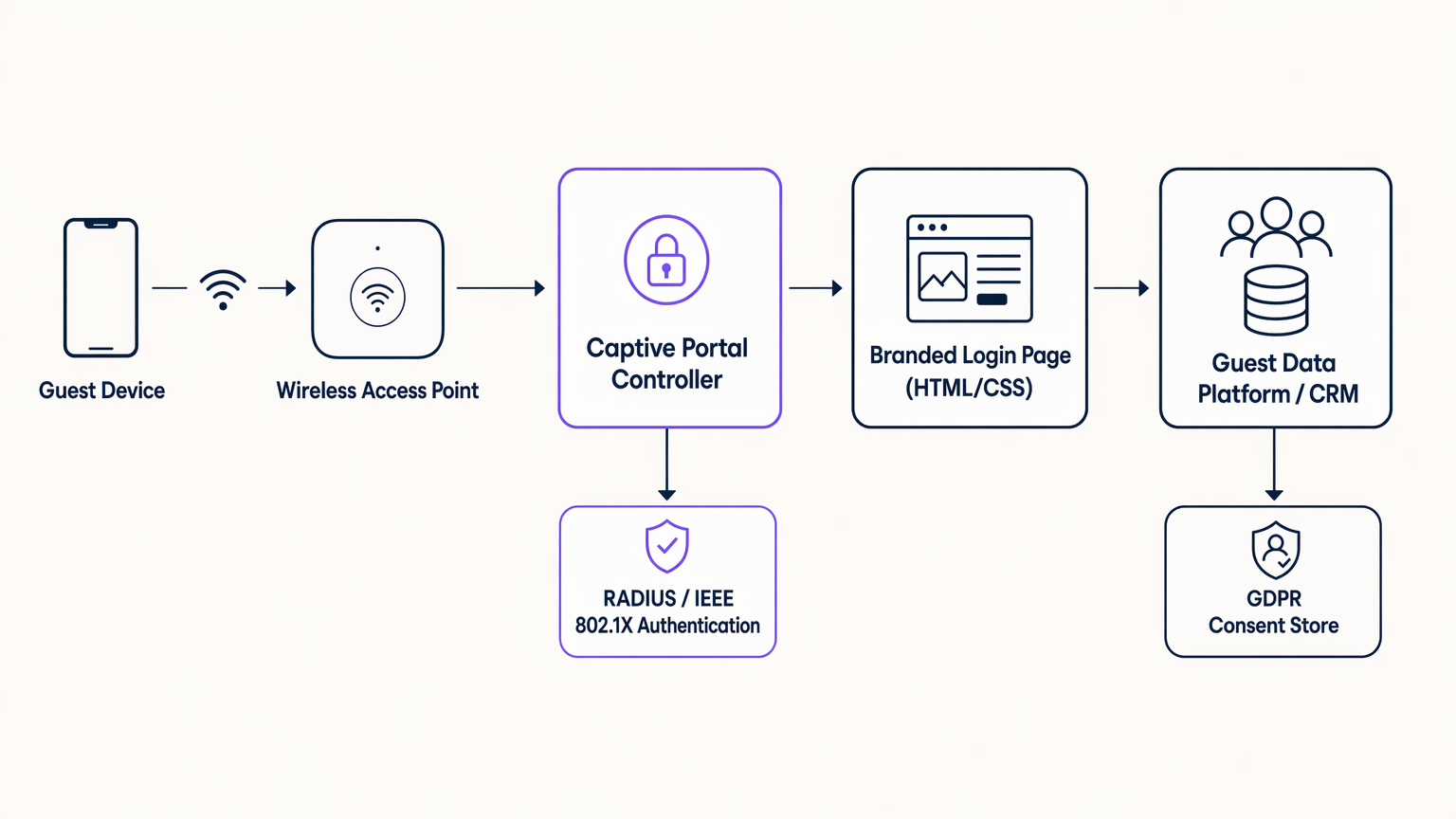
The flow is as follows. When a guest device associates with the access point and attempts to load any HTTP URL, the wireless LAN controller or gateway appliance intercepts the request and issues a 302 redirect to the captive portal controller. The controller serves the branded HTML/CSS login page. Once the user completes the authentication flow — whether via an email form, social login (OAuth 2.0 via Facebook, Google, or Apple), or a seamless method such as OpenRoaming — the controller communicates with a RADIUS server using IEEE 802.1X or MAC Authentication Bypass (MAB) to grant the device access to the internet VLAN. The data captured during authentication is simultaneously routed to the guest data platform or CRM via a secure API call, with the GDPR consent record written to a compliant data store.
It is worth noting that the captive portal page itself loads in a restricted browser environment — the Captive Network Assistant (CNA) on iOS and Android — before the device has full internet access. This has a critical implication for front-end development: all assets must be self-hosted on the portal controller. External CDN resources, Google Fonts, and third-party JavaScript libraries will fail to load in this environment. Every stylesheet, font file, and image must be bundled with the portal page and served from the controller's own web server.
The HTML/CSS Customisation Layer
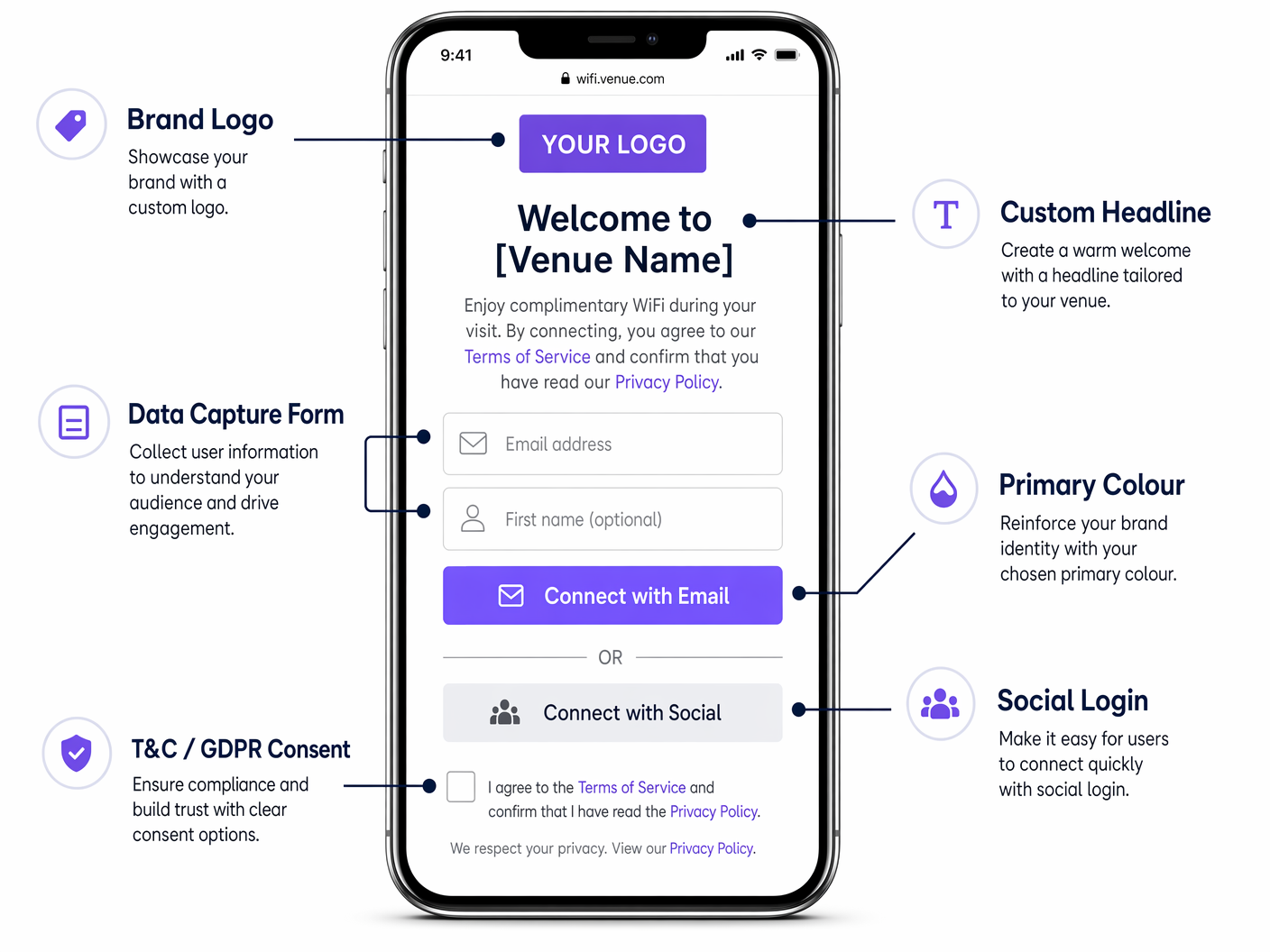
The login page itself is a standard HTML5 document with an associated CSS stylesheet. Modern captive portal platforms — including Purple — expose a visual editor that generates this code, but understanding the underlying structure is essential for IT teams who need to enforce brand standards or troubleshoot rendering issues.
The key CSS variables to control are:
| CSS Property | Brand Element | Recommended Approach |
|---|---|---|
background-color |
Page background | Use a flat hex value or CSS gradient; avoid raster images |
font-family |
Typography | Embed WOFF2 font files locally; do not reference Google Fonts |
color (headings) |
Brand secondary colour | Match exactly to brand guidelines |
background-color (CTA button) |
Primary brand colour | Use exact hex value from brand guidelines |
border-radius |
Button and container shape | 12px for containers, 6px for small elements |
max-width (form container) |
Mobile-first layout | 480px maximum for optimal mobile rendering |
The page weight constraint is the most commonly violated technical requirement in captive portal deployments. The practical limit is 500 kilobytes total for the entire page, including all assets. This ensures reliable rendering on slow or congested connections before authentication. Use SVG format for logos (typically 5–20 KB), locally embedded WOFF2 for fonts (typically 30–80 KB per weight), and CSS gradients or flat colours rather than photographic backgrounds.
Authentication Methods
The choice of authentication method has a direct impact on both data capture rates and compliance posture.
| Method | Data Captured | Conversion Rate | Compliance Notes |
|---|---|---|---|
| Email form | Email, name, bespoke fields | Medium (25–40%) | Full GDPR control; recommended |
| Social login (OAuth) | Email, name, profile data | High (35–55%) | Requires DPA with social provider |
| SMS / OTP | Mobile number | Medium (20–35%) | Requires SMS gateway; PECR applies |
| Click-through (no data) | None | Very high (70–90%) | No data value; use only where required |
| OpenRoaming / Passpoint | Carrier-verified identity | Seamless | Eduroam/WBA ecosystem; enterprise use |
For most commercial deployments, a combination of email form and social login — with a clearly presented GDPR consent tickbox — delivers the optimal balance of conversion rate and data quality.
Implementation Guide
A successful captive portal deployment follows five distinct stages. Skipping or compressing any stage is the primary cause of post-deployment issues.
Stage 1 — Requirements Gathering. Convene a cross-functional working group including marketing (brand assets, copy, consent language), legal (GDPR review, privacy policy), and network engineering (VLAN architecture, RADIUS configuration, DNS whitelist). Define the exact data fields to capture, the post-authentication redirect URL, and the marketing consent opt-in language. Obtain written sign-off from legal on the consent mechanism before development begins.
Stage 2 — Design and Development. Build the portal page as a standalone HTML/CSS document. Enforce the page weight limit of 500 KB. Test rendering on iOS Safari (CNA), Android Chrome (CNA), and desktop browsers. Validate the SSL certificate chain — the portal domain must have a trusted certificate, as an untrusted certificate warning will cause the majority of users to abandon the login. Ensure the form is fully accessible (WCAG 2.1 AA minimum).
Stage 3 — Integration. Connect the portal to your guest data platform or CRM via the platform's API. Configure the RADIUS server (or use the platform's hosted RADIUS service). Set up the post-authentication redirect. Configure VLAN segmentation to isolate the pre-authentication network segment from internal resources. Test the complete end-to-end flow — device association, portal redirect, authentication, RADIUS authorisation, CRM data write, and post-auth redirect — on a staging network before touching production.
Stage 4 — Pilot Deployment. Roll out to a single venue or a defined pilot group. Monitor four key metrics for the first 30 days: authentication success rate (target >95%), average page load time (target <3 seconds), data capture rate (baseline measurement), and RADIUS authorisation failures (target <1%). Resolve any issues before proceeding to full rollout.
Stage 5 — Optimisation and Governance. Review data capture rates monthly. Test headline copy and CTA button text variants. Update the portal design when brand guidelines change. Review GDPR consent language whenever data processing activities change. Conduct an annual security review of the portal infrastructure, including SSL certificate renewal, RADIUS server patching, and review of the DNS whitelist.
Best Practices
Brand Fidelity
The portal must pass a five-point Brand Fidelity Check before deployment: correct logo variant at minimum size (30px digital); primary button colour matching the exact brand hex value; font family consistent with digital brand guidelines; headline tone consistent with brand voice; and visual consistency with the brand's website and app. Any portal that fails this check should be returned to the design stage.
GDPR Compliance Architecture
Under UK GDPR and EU GDPR, the consent mechanism must be explicit, unbundled, and granular. The terms of service acceptance and the marketing communications opt-in must be presented as separate, unticked tickboxes. Bundling them into a single tickbox is non-compliant. Each consent event must be recorded with a timestamp, the exact consent text presented, and the user's identifier. Purple's platform stores these records in an auditable consent store that can be exported for regulatory review.
Security Posture
The pre-authentication network segment must be isolated from all internal resources via VLAN segmentation. Only the DNS whitelist entries required for the portal to function — the portal controller domain, the social login OAuth endpoints, and any CDN domains used for self-hosted assets — should be accessible before authentication. Post-authentication, guests should be placed on a dedicated guest VLAN with internet access only, with no route to internal subnets. This architecture aligns with PCI DSS Requirement 1.3 for network segmentation.
For a detailed comparison of portal page types, see WiFi Landing Page vs. Splash Page: What's the Difference? .
Real-World Case Studies
Case Study 1: UK Hotel Chain — Hospitality
A mid-scale hotel group operating 45 properties across the UK was using the default splash page provided by their wireless LAN vendor. The page was unbranded, loaded slowly on mobile, and presented no data capture form. Email capture rate: approximately 8% of connecting guests.
The IT team deployed Purple's Guest WiFi platform across all 45 properties, replacing the vendor splash page with a fully branded captive portal. The new portal used the hotel group's exact brand colours, Poppins typography, and a single-screen layout with an email field, a first-name field, and a GDPR-compliant marketing consent tickbox. Total page weight was optimised to 380 KB. The post-authentication redirect was set to the hotel's loyalty programme landing page.
Outcomes at 90 days: email capture rate increased from 8% to 38% of connecting guests. The captured data was integrated into the hotel group's CRM, enabling a targeted re-engagement email campaign to previous guests. Direct booking revenue attributable to the email campaign increased by 14% year-on-year in the pilot properties. The GDPR consent store provided a complete audit trail for all 45 venues.
Case Study 2: European Fashion Retailer — Retail
A fashion retailer operating 120 stores across five European markets was deploying guest WiFi as part of a digital transformation programme. The requirement was a single, centrally managed branded portal with per-market language localisation (English, French, German, Spanish, Italian) and a single CRM integration into Salesforce.
The retailer deployed a cloud-managed guest WiFi platform with a centralised portal configuration. Brand assets and CSS were managed from a single admin console, with per-venue and per-region overrides applied for language and localised consent language. The Salesforce integration used the platform's native CRM connector.
Outcomes at six months: a first-party data asset of over 400,000 opted-in guest profiles was built across all 120 stores. Email campaigns to this audience achieved an average open rate of 28%, compared to a 12% industry benchmark for retail. The retailer attributed a 9% uplift in repeat in-store visits in the six months following the deployment, based on CRM attribution modelling. See Purple's WiFi Analytics platform for the analytics and attribution capabilities used in this deployment.
Troubleshooting & Risk Mitigation
Portal not displaying on iOS. iOS uses a Captive Network Assistant (CNA) that renders the portal in a restricted WebKit view. Ensure the portal domain is not on Apple's known-networks list, that the portal responds correctly to Apple's captive portal detection probe (/hotspot-detect.html), and that all assets are served over HTTP (not HTTPS) on the initial redirect — the CNA does not follow HTTPS redirects on the first request.
High authentication failure rate. Check the RADIUS server logs for specific error codes. Common causes include clock skew between the RADIUS server and the access point (NTP synchronisation required), expired certificates on the RADIUS server, and MAC address format mismatches between the access point and the RADIUS server.
Low data capture rate despite high connection volume. Review the form field count — each additional field reduces conversion by approximately 5–10%. Review the page load time — if the portal takes more than 3 seconds to load, abandonment increases sharply. Review the consent language — overly legalistic consent text reduces opt-in rates.
GDPR audit request. Purple's platform exports a complete consent record for any given email address or date range on demand. Ensure your data retention policy is configured correctly — under UK GDPR, personal data should not be retained beyond the period necessary for the stated purpose.
Brand inconsistency across venues. Centralise portal configuration management. Any venue-level customisation should be limited to localised copy and language; brand colours, typography, and logo must be locked at the global configuration level.
ROI & Business Impact
The ROI of a custom captive portal is measured across three dimensions: data asset value, direct revenue attribution, and operational efficiency.
Data Asset Value. The primary output of a captive portal deployment is a first-party data asset — a database of opted-in guest profiles with verified email addresses. The value of this asset is determined by the capture rate, the opt-in rate, and the quality of the data. A venue with 500 daily connections, a 35% capture rate, and a 70% opt-in rate will build a database of approximately 44,000 opted-in profiles per year. At an industry-standard email marketing ROI of £42 per £1 spent, the commercial value of this asset is substantial.
Direct Revenue Attribution. Purple's WiFi Analytics platform provides CRM-level attribution reporting, linking specific email campaigns to in-venue visits and transactions. This enables a direct calculation of revenue attributable to the captive portal data capture programme.
Operational Efficiency. A centrally managed portal platform eliminates the need for per-venue IT configuration work when brand guidelines change. A single CSS update propagates across all venues simultaneously, reducing the operational overhead of maintaining brand consistency at scale.
| Metric | Typical Unbranded Portal | Branded Portal (Purple) | Uplift |
|---|---|---|---|
| Email capture rate | 5–10% | 30–40% | 3–4x |
| Marketing opt-in rate | N/A | 60–75% of captures | — |
| Post-auth engagement | None | Loyalty page / offer | Direct |
| GDPR audit readiness | Manual | Automated export | Significant |
| Brand consistency | None | Centrally enforced | Full |
For network architecture context relevant to multi-site deployments, see The Core SD-WAN Benefits for Modern Businesses , which covers how SD-WAN simplifies the network underlay for distributed captive portal deployments.
Key Terms & Definitions
Captive Portal
A network mechanism that intercepts a guest device's HTTP requests and redirects them to a login or authentication page before granting full internet access. Operates at the network layer, independent of the wireless encryption standard in use.
IT teams encounter this term when configuring wireless LAN controllers, cloud WiFi management platforms, or gateway appliances. It is the technical name for what end users experience as a 'WiFi login page'.
Captive Network Assistant (CNA)
A restricted browser environment built into iOS and Android that automatically opens when the operating system detects a captive portal. It renders the portal page in a sandboxed WebKit view with no access to cookies, local storage, or external CDN resources.
Critical for front-end developers building portal pages. Any asset that cannot be loaded from the portal controller itself will fail to render in the CNA, causing visual breakage or page load failures.
RADIUS (Remote Authentication Dial-In User Service)
A networking protocol that provides centralised authentication, authorisation, and accounting (AAA) for network access. In a captive portal deployment, the portal controller communicates with the RADIUS server to grant or deny network access after the user completes the authentication flow.
Network engineers configure RADIUS servers (or use a hosted RADIUS service provided by the portal platform) as part of the captive portal backend. IEEE 802.1X uses RADIUS as its authentication protocol.
IEEE 802.1X
An IEEE standard for port-based network access control that provides an authentication mechanism for devices connecting to a LAN or WLAN. In enterprise guest WiFi deployments, it is used in conjunction with a RADIUS server to authenticate users before granting network access.
Relevant when configuring enterprise-grade captive portals, particularly in environments where MAC Authentication Bypass (MAB) is insufficient and stronger identity verification is required.
MAC Authentication Bypass (MAB)
An authentication method in which a device's MAC address is used as its credential for network access. The access point sends the MAC address to the RADIUS server, which either approves or denies access based on a pre-configured allowlist.
Used in captive portal deployments to enable automatic re-authentication for returning devices without requiring the user to re-enter credentials. Commonly used for known corporate devices or returning guests.
GDPR Consent Record
A timestamped record of a user's explicit consent to data processing, including the exact consent text presented, the date and time of consent, and the user's identifier (typically email address). Required under UK GDPR and EU GDPR Article 7(1) as evidence that consent was obtained.
Captive portal platforms must generate and store a consent record for every user who opts in to marketing communications. This record must be exportable for regulatory audit purposes.
DNS Whitelist
A list of domain names that are accessible to a guest device before it has completed captive portal authentication. The whitelist must include the portal controller domain, any social login OAuth endpoints, and any CDN domains used for self-hosted portal assets.
Network engineers configure the DNS whitelist on the wireless LAN controller or gateway appliance. An incorrectly configured whitelist is a common cause of portal rendering failures, particularly for social login flows.
Post-Authentication Redirect
The URL to which a guest device's browser is redirected immediately after the user successfully completes the captive portal authentication flow. This is the first page the user sees with full internet access.
The post-authentication redirect is a high-value commercial touchpoint. It should be set to a landing page that drives a specific action — loyalty programme sign-up, app download, current promotion — rather than defaulting to the user's originally requested URL.
WPA3-SAE (Simultaneous Authentication of Equals)
The authentication protocol used in WPA3 Personal mode, replacing the Pre-Shared Key (PSK) handshake used in WPA2. SAE provides stronger resistance to offline dictionary attacks and forward secrecy. It is fully compatible with captive portal deployments.
IT teams evaluating network security upgrades should be aware that migrating from WPA2 to WPA3 does not require changes to the captive portal architecture. The portal mechanism operates at the network layer, above the encryption layer.
OpenRoaming
A WiFi roaming standard developed by the Wireless Broadband Alliance (WBA) that allows users to automatically connect to participating networks using their existing credentials (carrier, enterprise, or identity provider). Eliminates the need for manual captive portal authentication for enrolled users.
Relevant for enterprise and transport deployments where seamless connectivity is a priority. Purple operates as an identity provider within the OpenRoaming ecosystem under its Connect licence, enabling venues to offer automatic connection to enrolled users.
Case Studies
A 200-room hotel in central London wants to replace its vendor-supplied splash page with a fully branded captive portal. The hotel's brand guidelines specify a dark navy primary colour (#011638), a gold accent (#C9A84C), and the Playfair Display serif font. The IT manager is concerned about iOS compatibility and GDPR compliance. How should this be approached?
Begin with a requirements workshop involving IT, marketing, and legal. Confirm the exact brand assets: SVG logo file, hex colour values, and font files (WOFF2 format for Playfair Display). For iOS compatibility, configure the wireless LAN controller to respond correctly to Apple's captive portal detection probe at /hotspot-detect.html, and ensure the initial redirect is HTTP (not HTTPS) — the CNA on iOS does not follow HTTPS redirects on the first request. The portal page itself should be served over HTTPS once the CNA has loaded it. For GDPR, present two separate, unticked checkboxes: one for terms of service acceptance (required to connect) and one for marketing communications (optional). Record each consent event with a timestamp and the exact consent text version. Optimise the page to under 500 KB by embedding the Playfair Display WOFF2 file locally (do not reference Google Fonts), using the SVG logo, and using a CSS gradient for the background rather than a photographic image. Set the post-authentication redirect to the hotel's loyalty programme or a current promotions page. Deploy to a single floor as a pilot, monitor authentication success rate and page load time for 14 days, then roll out to the full property.
A national retail chain with 85 stores wants to deploy a consistent branded captive portal across all locations. Each store has a different wireless LAN vendor (a mix of Cisco, Aruba, and Ruckus hardware from historical acquisitions). The marketing team wants to be able to update the portal design centrally without involving IT at each site. How should the architecture be designed?
Deploy a cloud-hosted captive portal platform — such as Purple — that operates as a vendor-neutral overlay, independent of the underlying wireless hardware. The platform communicates with each access point via a RADIUS proxy or a cloud RADIUS service, meaning the portal controller is entirely decoupled from the hardware vendor. The portal page is hosted on the platform's CDN (with all assets self-hosted on the platform, not on external CDNs), and the platform's admin console allows centralised management of brand assets, CSS, and copy. Per-store customisations (store name in the headline, localised promotions) are managed via venue-level variables in the platform's template engine. When the marketing team updates the brand CSS, the change propagates to all 85 stores within minutes, with no per-site IT intervention required. The CRM integration is configured once at the platform level and applies to all venues. VLAN configuration at each site is a one-time setup task handled by the local IT team or the platform's onboarding service.
A conference centre hosting 50 events per year wants to offer event sponsors a co-branded WiFi login experience — showing the sponsor's logo alongside the venue's own branding — for the duration of each event. The IT team needs to be able to switch portal configurations between events with minimal manual effort. How should this be implemented?
Configure the captive portal platform with a library of portal templates — one master template per event type (conference, exhibition, gala dinner) — with sponsor logo and colour variables that can be updated via the admin console or API. For each event, the event operations team updates the sponsor logo URL and primary accent colour in the admin console, and the portal updates in real time. If the platform supports it, configure SSID-to-portal mapping so that a sponsor-specific SSID (e.g., 'EventName-WiFi') serves the co-branded portal, while the venue's permanent SSID serves the standard venue portal. Set the portal to revert to the standard venue template at a scheduled time after the event ends. Ensure the sponsor's logo is provided in SVG format and is pre-approved by the venue's brand team to ensure it meets the page weight and quality standards. The post-authentication redirect for event portals should point to the event's own landing page or the sponsor's campaign URL, with UTM parameters for attribution tracking.
Scenario Analysis
Q1. Your marketing director has sent you a Figma mockup of the new branded captive portal. It includes a full-screen photographic background image (exported as a 4.2 MB JPEG), the brand's custom serif font loaded from Google Fonts, and a Facebook Login button. You need to implement this design. What changes must you make before development begins, and why?
💡 Hint:Consider the technical constraints of the Captive Network Assistant environment and the page weight limit.
Show Recommended Approach
Three changes are required. First, the background image must be replaced with a CSS gradient or a heavily compressed WebP/SVG alternative under 100 KB — a 4.2 MB JPEG will cause the portal to time out on slow connections before it renders. Second, the Google Fonts reference must be replaced with a locally embedded WOFF2 font file served from the portal controller — the CNA environment has no internet access before authentication, so external font CDNs will fail to load. Third, the Facebook Login OAuth flow requires the Facebook OAuth endpoint domains to be added to the DNS whitelist on the wireless LAN controller, so the OAuth redirect can complete before full internet access is granted. Additionally, ensure the Facebook Login is accompanied by an email-based fallback option for users without Facebook accounts, and that the Facebook data processing agreement is in place with your legal team.
Q2. You are the IT manager for a hospital trust deploying guest WiFi across three sites. Your legal team has told you that the consent mechanism on the current portal is non-compliant with UK GDPR. You review the portal and find a single checkbox that reads: 'I agree to the Terms of Service and consent to receive marketing communications.' What is wrong with this, and how do you fix it?
💡 Hint:Consider the GDPR requirements for consent to be freely given, specific, and granular.
Show Recommended Approach
The consent mechanism is non-compliant on two counts. First, it bundles terms of service acceptance (a contractual requirement for network access) with marketing communications consent (an optional data processing activity) into a single checkbox. Under UK GDPR Article 7 and Recital 43, consent is not freely given if it is bundled with a service that the user cannot access without consenting. Second, the checkbox appears to be pre-ticked or required — marketing consent must be presented as an unticked, optional checkbox. The fix is to separate the two into distinct checkboxes: one required checkbox for terms of service acceptance (worded as 'I agree to the Terms of Service and Privacy Policy'), and one separate, unticked, optional checkbox for marketing communications (worded as 'I would like to receive news and offers from [Organisation Name] by email'). The consent record stored for each user must capture which checkboxes were ticked, the exact text of each consent statement, and the timestamp of the consent event. In a healthcare environment, additional care must be taken to ensure the privacy policy accurately describes all data processing activities, including any sharing with third-party analytics platforms.
Q3. A stadium operator wants to deploy a branded captive portal for 40,000 concurrent users during match days. Their current wireless infrastructure supports a maximum of 500 concurrent RADIUS authentication requests per second. The match starts at 15:00, and the majority of fans arrive in the 30 minutes before kick-off. What are the key infrastructure risks, and how should they be mitigated?
💡 Hint:Consider the authentication load profile and the impact of RADIUS server capacity on the user experience.
Show Recommended Approach
The primary risk is RADIUS server overload during the pre-match authentication surge. If 40,000 users attempt to authenticate in a 30-minute window, that is approximately 22 authentication requests per second on average — well within the 500 rps capacity. However, the arrival pattern will not be uniform: the peak surge in the final 5 minutes before kick-off could generate 5–10x the average rate, potentially exceeding 200 rps. Mitigations include: (1) deploying a load-balanced RADIUS cluster rather than a single server, with automatic failover; (2) configuring MAC Authentication Bypass (MAB) for returning devices, which bypasses the full authentication flow and significantly reduces RADIUS load for repeat visitors; (3) pre-caching the portal page on the wireless LAN controller to reduce portal controller load; (4) setting a short session timeout (e.g., 8 hours) so that devices that authenticated at a previous match do not consume RADIUS sessions unnecessarily; and (5) conducting a load test simulating the peak authentication rate before the first match day. Additionally, the portal page must be optimised for maximum performance — a slow-loading portal during a surge will cause users to abandon the login, reducing data capture rates and increasing support calls.




