
EnGenius Cloud Access Points Integration with Purple WiFi
This technical reference details the step-by-step integration of EnGenius Cloud Access Points and ECS switches with Purple's guest WiFi platform. It covers guest captive portal redirection via an external splash page, Walled Garden configuration, secure staff WiFi using IEEE 802.1X, and multi-tenant network isolation using EnGenius MyPSK with dynamic VLAN assignment. IT installers and network architects will find actionable configuration sequences, real-world case studies, and a troubleshooting framework for deploying Purple across EnGenius hardware estates.
Listen to this guide
View podcast transcript
執行摘要
企業 WiFi 若依賴共用的預先共用金鑰,會使場域面臨重大的安全性風險,且無法收集有價值的首方數據。本指南詳細說明 EnGenius Cloud Access Points 與 Purple 的 Guest WiFi 平台的整合,旨在為 旅宿餐飲 、 零售 及多租戶環境提供安全、隔離且可衡量的無線網路。透過為員工實施 IEEE 802.1X 驗證、透過 EnGenius MyPSK 為住戶與租戶進行動態 VLAN 分配,以及為訪客提供雲端託管的 Captive Portal,IT 團隊可以執行嚴格的存取控制,同時將無線基礎設施轉化為商業智慧資產。
Purple 每年在 80,000 多個實體場域處理 4.4 億次登入(Purple 內部數據,2024 年)。該平台已通過 ISO 27001 認證、符合 GDPR 與 CCPA 規範,且不受硬體品牌限制,這也正是它能與 EnGenius 以及 Cisco Meraki、HPE Aruba、Ruckus、Juniper Mist 和 Ubiquiti UniFi 完美整合的原因。本指南涵蓋在 EnGenius Cloud 硬體上部署 Purple 所需的四個配置層:訪客 Captive Portal 重導向、Walled Garden 設定、安全員工 WiFi,以及使用 EnGenius MyPSK 的多租戶隔離。
技術深度解析
架構概述
EnGenius Cloud 與 Purple 之間的整合依賴於標準 RADIUS 協定與 HTTP 重導向。當訪客在啟用 Captive Portal 的 SSID 上連線至 EnGenius ECW 存取點(AP)時,AP 會攔截第一個 HTTP 請求,並將瀏覽器重導向至 Purple 的雲端託管歡迎頁面。此重導向會向該入口網站傳遞多個參數(包括 client_mac、ap_mac 與 userurl),Purple 會使用這些參數來追蹤工作階段並回傳驗證決策。
針對員工與營運設備,其架構則從 Captive Portal 重導向轉變為基於 IEEE 802.1X 連接埠的網路存取控制。EnGenius 存取點作為驗證器,透過 UDP 連接埠 1812 將可延伸驗證協定(EAP)訊息轉發至 Purple 的 RADIUS 伺服器。驗證成功後,RADIUS 伺服器會傳回包含 VLAN 分配屬性的 Access-Accept 訊息,指示 AP 將該裝置放置在正確的網路區段中。
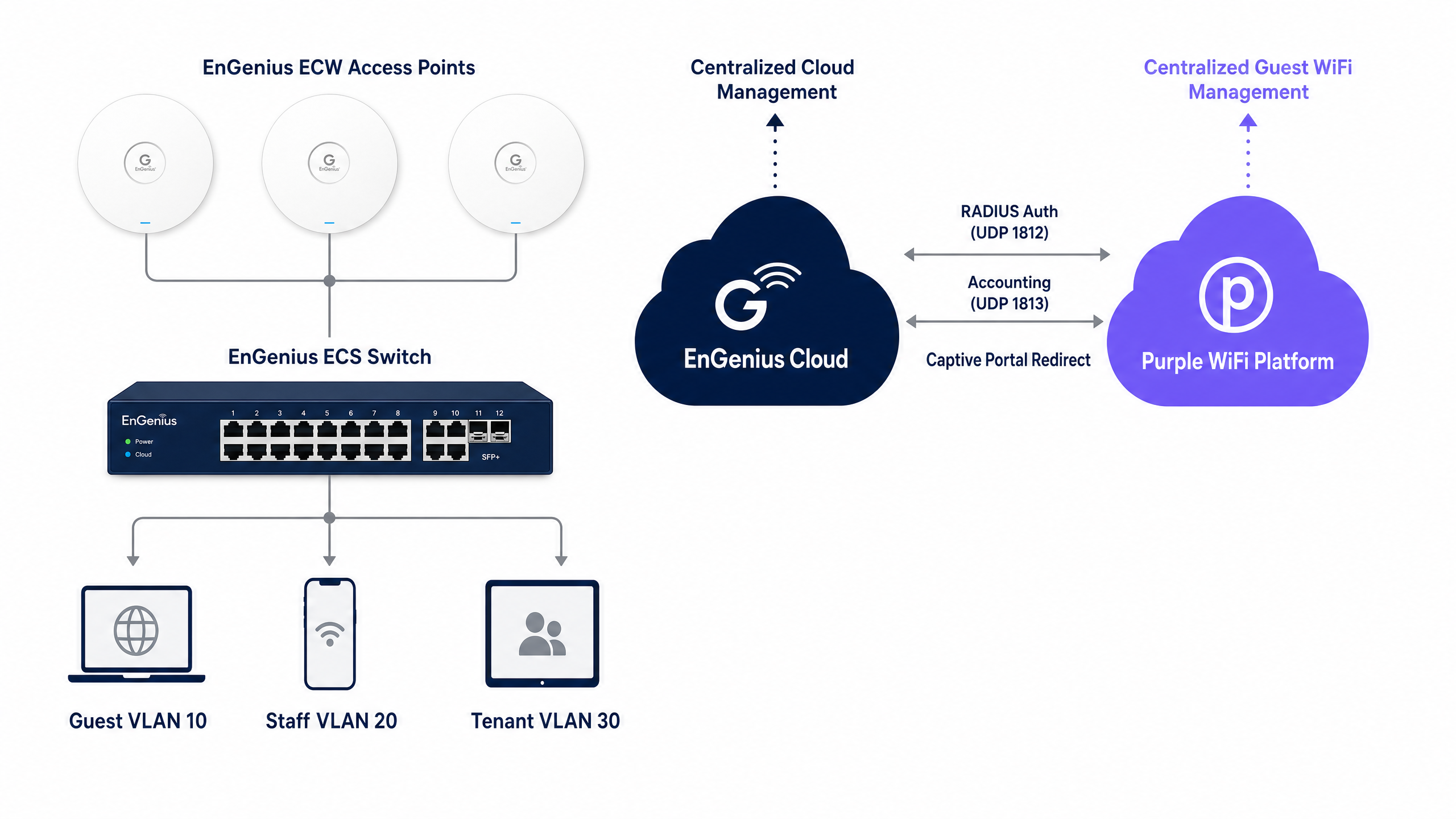
| 層級 | SSID 類型 | 驗證方法 | VLAN 分配 |
|---|---|---|---|
| Guest WiFi | Open 或 WPA2 PSK | 透過自訂 RADIUS 的 Purple Captive Portal | 靜態(例如 VLAN 10) |
| Staff WiFi | WPA2/WPA3 Enterprise | 802.1X (PEAP 或 EAP-TLS) | 透過 RADIUS 屬性動態分配 |
| 多租戶 | 搭配 MyPSK 的 WPA2/WPA3 PSK | 每使用者 PSK | 每金鑰 VLAN 綁定 |
EnGenius Cloud 平台
EnGenius Cloud 是一個雲端管理的網路平台,支援 ECW 系列無線基地台(包括 ECW220、ECW230 和 ECW520 WiFi 7 機型)以及 ECS 系列管理型交換器。此平台為組織內所有裝置提供了一個集中式儀表板,用於管理 SSID、RADIUS 設定、VLAN 標記以及 Captive Portal 設定。EnGenius Cloud 支援三種基於 RADIUS 的 Captive Portal 認證類型:EnGenius Authentication(使用內建的 Cloud RADIUS)、Custom RADIUS(指向外部伺服器,例如 Purple)以及憑證服務(Voucher Service)。
對於企業級部署,與 Purple 進行整合時,正確的認證類型為 Custom RADIUS。此模式會指示無線基地台將認證請求代理傳送至 Purple 的 RADIUS 端點,從而啟用 Purple 的入口網站、分析和數據擷取功能。
EnGenius MyPSK 與多租戶隔離
在建案出租住宅、學生宿舍、服務式辦公室或共享工作空間等環境中,為每個租戶廣播獨立的 SSID 會降低無線射頻效能。每增加一個 SSID 都會產生信標訊框(beacon frames),消耗空中傳輸時間並減少可用於數據流量的容量。EnGenius MyPSK(亦稱為 PPSK 或個人預共用金鑰)透過在單一 SSID 上允許高達 500 個不重複的 PSK 來解決此問題。
每個金鑰都綁定至特定的 VLAN。當住戶使用其專屬金鑰連線時,無線基地台會自動將其置於指定的網路區段中。加密是針對每位使用者的:每個金鑰都會產生一個不重複的成對主金鑰(PMK),因此即使租戶共用相同的 SSID,其中一個租戶也無法解密另一個租戶的空中傳輸流量。相較於單一共用 PSK(任何知道密碼的使用者都可以解密網路上所有流量),這是一個根本上的安全性優勢。
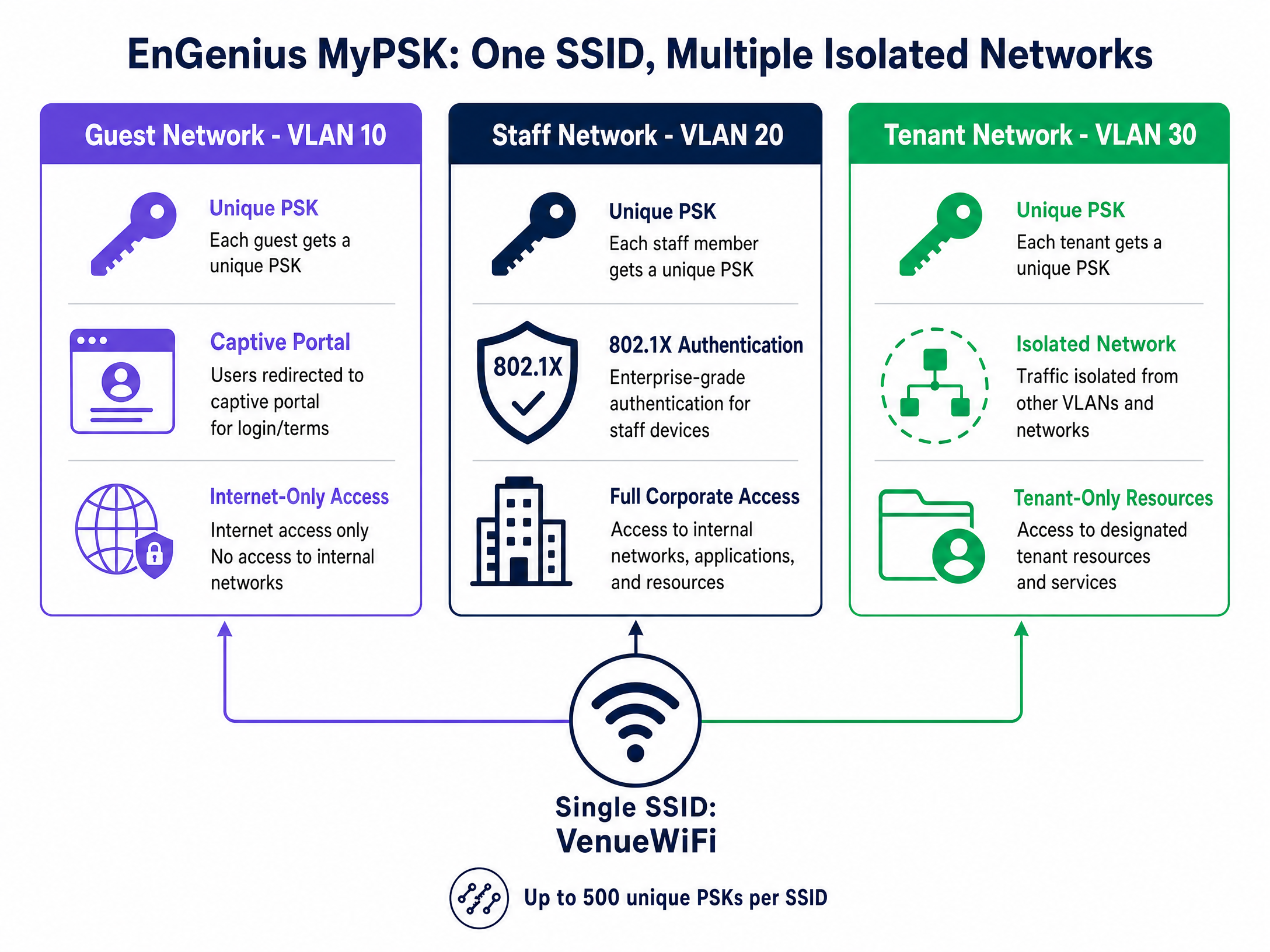
MyPSK 金鑰支援到期日設定,非常適合有時間限制的存取情境:學生的金鑰在學年結束時過期、承包商的金鑰在其約期結束時過期,而會議出席者的金鑰則在活動最後一天的午夜過期。
實作指南
步驟 1:定義您的 VLAN 架構
在設定任何 SSID 之前,請先在您的 ECS 交換器上定義 VLAN 結構。典型的部署會使用三個 VLAN:
| VLAN ID | 用途 | 存取原則 |
|---|---|---|
| VLAN 10 | 訪客 WiFi | 僅限網際網路,與企業區域網路隔離 |
| VLAN 20 | 員工 WiFi | 完整企業區域網路存取權限 |
| VLAN 30 | 租戶/住戶 WiFi | 獨立的每租戶區段 |
步驟 2:配置訪客 Captive Portal(EnGenius Captive Portal 設定)
這是部署帶有 Purple 的 EnGenius Splash Page 的主要配置。
- 登入您的 EnGenius Cloud 控制面板: cloud.engenius.ai 。
- 導覽至 Configure > SSID 並選擇您的訪客網路(例如 "VenueGuest")。
- 在 Wireless 索引標籤下,將安全性類型(Security Type)設定為 Open。這是訪客 WiFi 的標準設定;訪客是在 Portal 層進行識別與驗證,而非在關聯層。
- 切換至 Captive Portal 索引標籤並啟用 Portal。
- 將驗證類型(Authentication Type)設定為 Custom RADIUS。
- 輸入 Purple RADIUS 伺服器詳細資訊:
| 欄位 | 值 |
|---|---|
| RADIUS 伺服器 IP | 於 Purple 控制面板的硬體配置(Hardware Configuration)中提供 |
| 驗證連接埠 (Authentication Port) | UDP 1812 |
| 計費連接埠 (Accounting Port) | UDP 1813 |
| 共用金鑰 (Shared Secret) | 由 Purple 產生的 22 個以上字元的字串 |
| NAS 識別碼 (NAS Identifier) | 您的場地名稱或 Purple 場地 ID |
- 切換至 Splash Page 索引標籤。
- 選擇 External Splash Page URL。
- 輸入您場地的 Purple Portal URL(格式:
https://portal.purple.ai/[venue-id])。 - 按一下 Apply。
步驟 3:配置 Walled Garden
必須配置 Walled Garden(EnGenius 訪客 WiFi 白名單),以允許在驗證前存取載入 Portal 所需的網域。導覽至 Captive Portal > Advanced Settings > Walled Garden 並新增以下項目:
Purple 基礎架構:
*.purple.ai*.purpleportal.net
作業系統 Captive Portal 探測(強制性):
captive.apple.com(iOS 和 macOS)connectivitycheck.gstatic.com(Android)msftconnecttest.com(Windows)
社群登入(若啟用):
- Google:
accounts.google.com,oauth2.googleapis.com,apis.google.com,*.gstatic.com - Facebook:
www.facebook.com,graph.facebook.com,connect.facebook.net,*.fbcdn.net - Microsoft Entra ID:
login.microsoftonline.com,login.live.com
請務必使用網域名稱而非靜態 IP 位址。社群登入供應商使用動態 IP 範圍和任播(Anycast)路由;隨著 CDN 位址的變更,靜態 IP 白名單效能將會逐漸下降。
步驟 4:配置安全員工 WiFi (802.1X)
用於員工 WiFi 的 EnGenius RADIUS 設定採用 WPA2 Enterprise,以提供憑證型、無密碼的驗證。
- 建立新的 SSID(例如 "VenueStaff")。
- 在 Wireless 索引標籤下,將安全性類型設定為 WPA2 Enterprise。
- 選擇 Custom RADIUS 並輸入 RADIUS 伺服器 IP、連接埠 1812 以及共用金鑰。
- 不需要 Captive Portal。員工裝置會透過 802.1X 自動在背景完成驗證。
- 配置您的 RADIUS 伺服器,使其在
Access-Accept上傳回以下屬性:
| RADIUS 屬性 | 值 |
|---|---|
| Tunnel-Type | 13 (VLAN) |
| Tunnel-Medium-Type | 6 (802) |
| Tunnel-Private-Group-ID | 20 (或您的員工 VLAN ID) |
關於 EAP 方法的選擇:對於使用 Microsoft Entra ID 或 Active Directory 的環境,PEAP-MSCHAPv2 是最實用的選擇。EAP-TLS 透過完全消除密碼來提供更強的安全性,但需要公開金鑰基礎建設(PKI)和 MDM 解決方案來部署用戶端憑證。請務必透過群組原則(Windows)或 MDM 設定檔(macOS、iOS、Android),在所有用戶端裝置上強制執行嚴格的伺服器憑證驗證,以防止惡意存取點竊取憑證。
步驟 5:配置 EnGenius MyPSK 以實現多租戶隔離
適用於多租戶環境的 EnGenius MyPSK 設定:
- 建立一個新的 SSID(例如 "VenueResident")。
- 在 Wireless 索引標籤下,將安全類型設定為 WPA2 PSK 或 WPA3 Personal。
- 啟用 MyPSK(Private PSK)。
- 按一下 Add PSK 建立個別的金鑰,或使用 Auto-Generate 一次批次產生最多 50 個金鑰。
- 為每個 PSK 分配一個 VLAN ID,並可選擇設定 Start Date(開始日期)和 Expiration Date(過期日期)。
- 將每個唯一的 PSK 分發給對應的租戶或住戶。
當租戶的租約結束時,刪除或使其 PSK 過期。存取權限會立即被撤銷,且不會影響網路上的任何其他租戶。
最佳實踐
在 802.1X 用戶端上強制執行嚴格的憑證驗證。 只有當用戶端設定為針對信任的 CA 驗證 RADIUS 伺服器的憑證時,PEAP-MSCHAPv2 才是安全的。如果沒有此設定,惡意存取點可能會呈現欺詐性憑證並竊取認證資訊。請透過 Windows 的群組原則物件(GPO)以及所有其他平台的 MDM 組態設定檔來部署驗證設定。對於任何受法規監管環境中的部署,這是不可妥協的要求。
在 Walled Garden 中使用動態 DNS 解析。 Google、Apple 和 Meta 的 OAuth 和 CDN 端點使用的是動態 IP 範圍。請將 Walled Garden 條目配置為網域名稱,並確保您的 EnGenius Cloud 控制器能對其進行動態解析。隨著 CDN IP 的更替,靜態 IP 白名單將會導致驗證失敗。
使用 MAC 驗證繞過(MAB)隔離 IoT 裝置。 印表機、顯示器和 IoT 感測器等無介面裝置無法透過 802.1X 進行驗證。請使用 MAC 驗證繞過(MAB)來識別它們,並將其放入受限制的 VLAN 中,同時配合防火牆規則以防止橫向移動。MAB並非一種安全控制手段,而是一種裝置識別機制。請將經 MAB 驗證的裝置視為不受信任的裝置。
實作 RADIUS 計費。 在 EnGenius Cloud 的 RADIUS 配置中啟用計費伺服器,將其指向 Purple 在 UDP 1813 上的計費端點。這會將工作階段持續時間、數據量和裝置資訊傳送到 Purple 的 WiFi Analytics 平台,提供證明基礎建設投資價值的場地使用率數據。
每季審查 Walled Garden。 OAuth 提供商與 CDN 會變更其網域結構。Apple 在 2023 年曾兩次更新其登入網域。請將 Walled Garden 的每季審查納入您的營運行事曆。如需企業 WiFi 安全實務的進一步指引,請參閱我們的 企業 WiFi 安全指南 。
疑難排解與風險緩釋
症狀:Captive Portal 無法在 iOS 裝置上載入。
原因:captive.apple.com 未加入 Walled Garden。iOS 使用此端點來偵測 Captive Portal 的存在並觸發 Captive Network Assistant。若缺少此端點,裝置會報告「無網際網路連線」,且永遠不會開啟 Portal 瀏覽器。
解決方法:在 EnGenius Cloud 的「Captive Portal > 進階設定」中,將 captive.apple.com 新增至 Walled Garden。
症狀:驗證無聲無息地失敗 - RADIUS 沒有傳回回應。 原因:EnGenius Cloud 與 Purple RADIUS 伺服器設定之間的共用金鑰(Shared Secret)不一致。單一字元的差異就會導致所有驗證請求被捨棄。 解決方法:在兩個系統中重新輸入共用金鑰。請從純文字來源複製貼上,以避免隱形字元的置換。
症狀:802.1X 用戶端已驗證,但未收到 IP 地址。 原因:ECS 交換器上行鏈路連接埠未設定為 Trunk 埠,或者 RADIUS 伺服器傳回的 VLAN 在該 Trunk 上不被允許。 解決方法:驗證交換器連接埠設定。該連接埠必須是 Trunk 埠,且承載 RADIUS 回應中所參照的所有 VLAN。
症狀:MyPSK 用戶端已連線,但可以接觸到其他租戶的裝置。 原因:SSID 上未啟用用戶端隔離(Client Isolation),或者交換器上的 VLAN 設定未能正確隔離各個區段。 解決方法:在 EnGenius Cloud 的 SSID 中啟用用戶端隔離。驗證上游路由器或防火牆上,每個 VLAN 是否都設定了適當的跨 VLAN 路由規則。
症狀:社群媒體登入按鈕有載入,但驗證失敗。 原因:Walled Garden 中遺漏了一個或多個 OAuth 提供商的子網域。Google 與 Meta 在其驗證流程中使用了多個子網域。 解決方法:從未驗證的裝置上擷取瀏覽器主控台(Console)輸出,以識別哪個網域被封鎖。將遺漏的網域新增至 Walled Garden。請參閱 Purple 的 Walled Garden 網域白名單文件以取得最新列表。
投資報酬率(ROI)與業務影響
將 Purple 與 EnGenius Cloud 協同部署,能將無線基礎設施從成本中心轉變為數據資產。場地營運商可透過訪客自願同意的選擇,收集完全合規的第一方人口統計數據,進而實現精準的行銷活動與可衡量的參與度。對於 IT 團隊而言,轉向 802.1X 與 MyPSK 消除了管理共用密碼的營運開銷,減少了與存取問題相關的支援工單,並提供了網路使用狀況的精細可視性。
對於 旅宿業 營運商而言,Premier Inn(Purple 的知名客戶)利用顧客 WiFi 數據來提高忠誠度計劃的參與度,並個性化發送訪問後的溝通訊息。對於 零售 環境,結合來自 Purple 的 WiFi Analytics 平台的客流量分析與停留時間數據,可提供商品陳列洞察,獨立於安全效益之外,證明了基礎設施投資的合理性。
在多租戶環境中,MyPSK 消除了解決每個租戶需要獨立實體網路基礎設施的需求。單台 EnGenius ECW 基地台即可在單一 SSID 上為 500 個隔離的租戶提供服務,從而降低硬體成本並簡化日常管理。當租戶搬離時,其 PSK 會在幾秒鐘內被刪除,無需更改密碼,也不會對其他住戶造成影響。
Purple 的平台與硬體無關,這意味著相同的 Purple 設定、分析和數據擷取層可在 Cisco Meraki、HPE Aruba、Ruckus、Juniper Mist、Ubiquiti UniFi、Cambium、Extreme 和 Fortinet 硬體上運行。如果您的資產中混合了 EnGenius 和其他廠商,Purple 可為所有設備提供單一管理介面來進行顧客 WiFi 管理。如需相關部署指南,請參閱我們的 DrayTek Vigor 整合指南 。
Key Definitions
Captive portal
A web page that intercepts a user's first HTTP request after connecting to a WiFi network and requires them to authenticate or accept terms before granting internet access.
The primary mechanism for guest onboarding, data capture, and GDPR-compliant consent management in Purple deployments. EnGenius Cloud supports both internal and external captive portal pages.
Walled Garden
The explicit whitelist of domains and IP addresses a client device can communicate with before successfully authenticating through the captive portal.
Required to allow devices to reach the Purple portal servers, OS probe endpoints, and third-party identity providers such as Google or Microsoft Entra ID before authentication completes.
EnGenius MyPSK
A feature that allows network administrators to create multiple unique Pre-Shared Keys on a single SSID, each bound to a specific VLAN for network isolation.
Used in multi-tenant environments to provide secure, isolated network segments without broadcasting multiple SSIDs. Supports up to 500 unique keys per SSID with optional expiration dates.
Dynamic VLAN assignment
The process where a RADIUS server instructs an access point to place an authenticated device onto a specific VLAN based on directory group membership, using the Tunnel-Private-Group-ID attribute.
Allows a single 802.1X SSID to securely segment traffic for different staff roles automatically, without manual VLAN configuration per device.
IEEE 802.1X
An IEEE standard for port-based Network Access Control that provides an authentication mechanism to devices wishing to attach to a LAN or WLAN, using EAP to carry credentials to a RADIUS server.
The foundation of enterprise WiFi security for staff networks, replacing vulnerable shared passwords with individualised credential or certificate validation.
RADIUS
Remote Authentication Dial-In User Service; a networking protocol providing centralised Authentication, Authorisation, and Accounting management for network access.
The protocol used by EnGenius access points to communicate with Purple's authentication servers. Authentication uses UDP port 1812; accounting uses UDP port 1813.
PEAP-MSCHAPv2
Protected Extensible Authentication Protocol with Microsoft Challenge Handshake Authentication Protocol version 2; an 802.1X method that creates a TLS tunnel using a server-side certificate, inside which username-password credentials are exchanged.
The most common 802.1X deployment method for environments using Active Directory or Microsoft Entra ID. Requires strict server certificate validation on clients to prevent credential theft.
EAP-TLS
Extensible Authentication Protocol - Transport Layer Security; an 802.1X authentication method requiring digital certificates on both the RADIUS server and every client device, eliminating passwords entirely.
The most secure 802.1X method, recommended for high-security environments. Requires a Public Key Infrastructure and MDM solution to deploy client certificates.
NAS Identifier
Network Access Server Identifier; a string attribute included in RADIUS requests to identify the access point or controller originating the authentication request.
Configured in EnGenius Cloud to match the venue identifier in the Purple platform, ensuring analytics and session data are attributed to the correct location.
PMK
Pairwise Master Key; the cryptographic key derived from a PSK and the SSID name, used to encrypt the wireless session between a specific client and access point.
In MyPSK deployments, each unique PSK generates a distinct PMK, preventing one tenant from decrypting another's traffic even on the same SSID.
Worked Examples
A 200-room hotel needs to provide seamless WiFi access to guests, secure access to hotel staff, and isolated networks for three retail concessions in the lobby, all using the same EnGenius ECW access points and ECS switches.
Deploy three SSIDs on the same hardware. SSID 1 (VenueGuest): Open security with Custom RADIUS pointing to Purple's RADIUS endpoint. External splash page URL configured to the Purple portal. Walled Garden populated with OS probes, Purple CDN domains, and Google OAuth endpoints. VLAN 10 assigned statically. SSID 2 (VenueStaff): WPA2 Enterprise with Custom RADIUS. No captive portal. RADIUS server returns Tunnel-Private-Group-ID of 20 for all staff, with sub-groups (finance, operations, maintenance) mapped to VLANs 21, 22, and 23 respectively. SSID 3 (VenueRetail): WPA2 PSK with MyPSK enabled. Three unique PSKs created, each bound to VLANs 31, 32, and 33. Expiry dates set to match each concession's lease term. The ECS switch uplink port is configured as a trunk carrying VLANs 10, 20-23, and 31-33.
A university campus deploying EnGenius Cloud reports that students attempting to log into the Purple guest portal using their Google Workspace accounts are receiving a browser error after clicking the Google login button. The portal page itself loads correctly.
The portal page loading confirms the Purple CDN domains are correctly whitelisted. The failure at the Google login step indicates one or more Google OAuth domains are missing from the Walled Garden. Navigate to EnGenius Cloud > Captive Portal > Advanced Settings > Walled Garden and add: accounts.google.com, oauth2.googleapis.com, apis.google.com, and *.gstatic.com. The gstatic.com wildcard is required because Google serves its client-side JavaScript libraries from this CDN. After updating the Walled Garden, test with an unauthenticated device and capture browser console output to confirm no further domains are blocked.
Practice Questions
Q1. You deploy a Purple captive portal on EnGenius ECW access points. Android guests report their devices show 'Connected, no internet' and the portal never appears. iOS guests on the same SSID see the portal correctly. What is the most likely configuration error and how do you fix it?
Hint: Android and iOS use different captive portal probe endpoints.
View model answer
Android uses connectivitycheck.gstatic.com as its captive portal probe endpoint. iOS uses captive.apple.com. If iOS guests see the portal but Android guests do not, connectivitycheck.gstatic.com is missing from the Walled Garden. Add it in EnGenius Cloud under Captive Portal > Advanced Settings > Walled Garden. Also add connectivitycheck.android.com and www.google.com as Android uses multiple probe URLs depending on the device version.
Q2. A venue configures 802.1X on an EnGenius SSID. Staff devices authenticate successfully (the RADIUS server logs show Access-Accept), but devices receive a 169.x.x.x APIPA address rather than a corporate IP. What is the most likely cause?
Hint: The RADIUS server is accepting the authentication, so the issue is downstream of authentication.
View model answer
The RADIUS server is returning a Tunnel-Private-Group-ID attribute specifying a VLAN ID. The EnGenius access point is attempting to tag the client's traffic with that VLAN, but the uplink port on the ECS switch is not configured as a trunk port carrying that VLAN. The device is placed on a VLAN with no DHCP server reachable. Fix: configure the ECS switch uplink port as a trunk, explicitly permitting the VLAN ID returned by the RADIUS server.
Q3. A build-to-rent property manager asks why you are recommending EnGenius MyPSK rather than creating a separate SSID for each of the 80 residential units. Provide a technical justification.
Hint: Consider the impact of SSID beacons on WiFi performance.
View model answer
Each SSID broadcasts beacon frames at regular intervals (typically every 100ms). In a dense environment, 80 SSIDs would generate constant beacon overhead consuming significant airtime, reducing the capacity available for actual data traffic and degrading performance for all users. Most enterprise access points also impose a practical limit of 8-16 SSIDs per radio. MyPSK delivers the same isolation (each resident on a unique VLAN with a unique encryption key) using a single SSID, eliminating the beacon overhead entirely. The per-user PMK also prevents residents from decrypting each other's traffic, which a single shared PSK cannot achieve.
Continue reading in this series
CommScope Ruckus Integration with Purple WiFi: Setup and Configuration Guide
This technical reference guide provides an authoritative configuration playbook for integrating CommScope Ruckus architectures with Purple WiFi. It details step-by-step deployments for Guest WiFi captive portals, Secure Staff WiFi via 802.1X, and Multi-Tenant network isolation using Ruckus Dynamic PSK.
CommScope Ruckus Integration with Purple WiFi: Setup and Configuration Guide
This technical reference guide provides an authoritative configuration playbook for integrating CommScope Ruckus architectures with Purple WiFi. It details step-by-step deployments for Guest WiFi captive portals, Secure Staff WiFi via 802.1X, and Multi-Tenant network isolation using Ruckus Dynamic PSK.
Allied Telesis Access Points Integration with Purple WiFi
This guide provides a comprehensive configuration playbook for integrating Allied Telesis TQ-Series access points with Purple WiFi. It covers external captive portal redirection, 802.1X RADIUS authentication, and dynamic VLAN steering using Private Pre-Shared Keys (PPSK) for secure multi-tenant deployments.